

en
2
Ú Table of contents
[ en] I nst r uct i ons for installation and us e
INSTRUCTION MANUAL.......................................................... 2
8 Intended use..........................................................2
( Important safety information ...............................3
7 Environmental protection.....................................4
1 Operating the appliance .......................................5
e Connecting to a hob .............................................7
o Home Connect.......................................................8
2 Cleaning and maintenance................................ 10
3 Trouble shooting................................................ 12
4 Customer service............................................... 12
INSTALLATION INSTRUCTIONS .......................................... 13
( Important safety information ............................ 13
K General information ........................................... 14
5 Installation .......................................................... 15
INSTRUCTION MANUAL
Produktinfo
Additional information on products, accessories,
replacement parts and services can be found at
www.neff-international.com and in the online shop
www.neff-eshop.com
8Intended use
Intended use
Read these instructions carefully. Only then
will you be able to operate your appliance
safely and correctly. Retain the instruction
manual and installation instructions for future
use or for subsequent owners.
The appliance can only be used safely if it is
correctly installed according to the safety
instructions. The installer is responsible for
ensuring that the appliance works perfectly at
its installation location.
This appliance is intended for domestic use
and the household environment only. The
appliance is not intended for use outside. Do
not leave the appliance unattended during
operation. The manufacturer is not liable for
damage which is caused by improper use or
incorrect operation.
This appliance is intended for use up to a
maximum height of 2000 metres above sea
level.
This appliance may be used by children over
the age of 8 years old and by persons with
reduced physical, sensory or mental capacity
or by persons with a lack of experience or
knowledge if they are supervised by someone
who is responsible for their safety, or have
been instructed in how to use the appliance
safely and have understood the risks involved
in not using it properly.
Children must not play with the
appliance.Cleaning and user maintenance
must not be performed by children unless they
are over 15 years of age and are supervised.
Keep children below the age of 8 years old at
a safe distance from the appliance and power
cable.
Check the appliance for damage after
unpacking it. Do not connect the appliance if it
has been damaged in transport.
This appliance is not intended for operation
with an external clock timer or a remote
control.

Important safety information en
3
(Important safety
information
Impor t ant safety informat i on
:Warning – Danger of suffocation!
Packaging material is dangerous to children.
Never allow children to play with packaging
material.
:Warning – Risk of fire!
■ Fatty deposits in the grease filter may catch
fire. Regularly clean the grease filter. Never
operate the appliance without a grease
filter.
Risk of fire!
■ Grease deposits in the grease filter may
catch fire. Never work with naked flames
close to the appliance (e.g. flambéing). Do
not install the appliance near a heat-
producing appliance for solid fuel
(e.g. wood or coal) unless a closed,
non-removable cover is available. There
must be no flying sparks.
Risk of fire!
■ Hot oil and fat can ignite very quickly. Never
leave hot fat or oil unattended. Never use
water to put out burning oil or fat. Switch off
the hotplate. Extinguish flames carefully
using a lid, fire blanket or something similar.
Risk of fire!
■ When gas burners are in operation without
any cookware placed on them, they can
build up a lot of heat. A ventilation
appliance installed above the cooker may
become damaged or catch fire. Only
operate the gas burners with cookware on
them.
Risk of fire!
■ Operating several gas burners at the same
time gives rise to a great deal of heat. A
ventilation appliance installed above the
cooker may become damaged or catch fire.
Never operate two gas burners
simultaneously on the highest flame for
longer than 15 minutes. One large burner of
more than 5 kW (wok) is equivalent to the
power of two gas burners.
:Warning – Risk of burns!
The accessible parts become very hot when in
operation. Never touch hot parts. Keep
children at a safe distance.
:Warning – Risk of injury!
■ Components inside the appliance may have
sharp edges. Wear protective gloves.
Risk of injury!
■ Items placed on the appliance may fall
down. Do not place any objects on the
appliance.
Risk of injury!
■ The light emitted by LED lights is very
dazzling, and can damage the eyes
(risk group 1). Do not look directly into the
switched on LED lights for longer than
100 seconds.
:Warning – Risk of injury!
Items placed on the appliance may overload
the fasteners, potentially causing the
appliance to fall off the wall.Do not place items
on the appliance.
:Warning – Risk of electric shock!
■ A defective appliance may cause electric
shock. Never switch on a defective
appliance. Unplug the appliance from the
mains or switch off the circuit breaker in the
fuse box. Contact the after-sales service.
Risk of electric shock!
■ Incorrect repairs are dangerous. Repairs
may only be carried out and damaged
power cables replaced by one of our
trained after-sales technicians. If the
appliance is defective, unplug the appliance
from the mains or switch off the circuit
breaker in the fuse box. Contact the after-
sales service.
Risk of electric shock!
■ Do not use any high-pressure cleaners or
steam cleaners, which can result in an
electric shock.
en Environmental protection
4
Causes of damage
Caution!
Risk of damage due to corrosion. Always
switch on the appliance while cooking to avoid
condensation. Condensate can produce
corrosion damage.
Always replace faulty bulbs to prevent the
remaining bulbs from overloading.
Risk of damage due to ingress of humidity into
the electronic circuitry. Never clean operator
controls with a wet cloth.
Surface damage due to incorrect cleaning.
Clean stainless steel surfaces in the direction
of the grain only. Do not use any stainless
steel cleaners for operator controls.
Surface damage due to strong or abrasive
cleaning agents. Never use strong and
abrasive cleaning agents.
Risk of damage as a result of incorrect
loading of design elements. Do not pull design
elements.Do not place objects on the design
elements or hang objects from them.
7Environmental protection
En v i r o n ment al pr ot ect i on
Your new appliance is particularly energy-efficient.
Here you can find tips on how to save even more
energy when using the appliance, and how to dispose
of your appliance properly.
Saving energy
■ During cooking, ensure that there is a sufficient
supply of air to enable the extractor hood to work
efficiently and with a low level of operating noise.
■ Adjust the fan speed to the amount of steam
produced during cooking. Only use intensive mode
when required. The lower the fan speed, the less
energy is consumed.
■ If cooking produces large amounts of steam, select
a higher fan speed in good time. If the cooking
steam has already spread around the kitchen, the
extractor hood will need to be operated for longer.
■ Switch off the extractor hood if you no longer require
it.
■ Switch off the lighting if you no longer require it.
■ Clean and (if required) replace the filter at regular
intervals in order to increase the effectiveness of the
ventilation system and to prevent the risk of fire.
■ Put the lid on to reduce cooking steam and
condensation.
Environmentally-friendly disposal
Dispose of packaging in an environmentally-friendly
manner.
This appliance is labelled in accordance with
European Directive 2012/19/EU concerning
used electrical and electronic appliances
(waste electrical and electronic equipment -
WEEE). The guideline determines the
framework for the return and recycling of used
appliances as applicable throughout the EU.

Operating the appliance en
5
1Operating the appliance
Oper at i ng the appl i ance
These instructions apply to several appliance variants.
It is possible that individual features are described
which do not apply to your appliance.
Note: Switch on the extractor hood when you start
cooking and switch it off again several minutes after you
have finished cooking. This is the most effective way of
removing the kitchen fumes.
Control panel
Setting the fan
Switching on
■ Touch the # symbol.
The fan starts at setting ƒ.
■ Touch + or - to alter the fan speed.
Switching off
Touch the # symbol.
Noise reduction function
The noise reduction function reduces the fan noise.
Switching on
Note: This function can be used at any fan setting
except fan setting ‚. The function will remain active
even after the fan is switched off.
Touch the Q symbol.
Switching off
Touch the Q symbol.
AirFresh function
Switching on
Touch the 3 symbol.
3 will be shown on the display panel.The fan runs for
approximately 5 minutes per hour at fan setting 1.
Switching off
Touch the 3 symbol.
This ends the AirFresh function.
Intensive setting
You can use the intensive setting if there is a large
build-up of odours and fumes/vapours.
Switching on
Touch the ˜ symbol. ˜ƒ will light up on the display.
Touch the ˜ symbol again to switch back to intensive
mode ˜‚.
Note: After approx. 6 minutes, the extractor hood
automatically switches back to fan setting 3.
Switching off
If you want to end intensive mode before the preset
time expires, touch the ˜ symbol.
Symbol Explanation
#
Fan on/off
Q
Noise reduction function
3
AirFresh function
A
Decrease fan setting
@
Increase fan settings/intensive mode 1, 2
˜
Intensive mode 2 shortcut
‘
Automatic mode
6
Light on/off/dimming
Display Explanation
Q
Noise reduction function
1-3 Fan settings
9
Fan run-on
3
AirFresh function
D
Hob-based hood control

en Operating the appliance
6
Automatic mode
Switching on the appliance
■ Press the # button.
The fan starts at ƒ setting.
■ Press the ‘ button.
The optimum fan setting ‚, ƒ or „ is automatically
set via a sensor.
Switching off the appliance
Press the ‘ or # button to switch off automatic mode.
The fan switches off automatically if the sensor no
longer detects a change in the air quality of the room.
The automatic mode lasts 4 hours at most.
Sensor control
In automatic mode, an automatic air sensor in the
extractor hood detects the intensity of the cooking and
roasting odours. Depending on the setting of the
automatic air sensor, the fan automatically switches
itself to another fan setting.
Possible sensor settings:
Default sensitivity setting: †
Lowest sensitivity setting: ‹
Highest sensitivity setting: Š
If the sensor controller responds too strongly or not
enough, it can be changed accordingly:
1. Touch and hold the ‘ symbol for 1 second when the
fan is switched on. The setting will be displayed.
2. The sensor controller setting can be changed by
touching the @ or A symbol.
3. Take your finger off the ‘ symbol.
Lighting
The lighting can be switched on and off independently
of the fan.
Touch the 6 symbol.
Setting the brightness
Press and hold the 6 symbol until the required
brightness is reached.
Saturation display
If the metal grease filters or activated charcoal filter are/
is saturated, the corresponding symbols will flash once
the appliance has been switched off:
■ Metal grease filter: ”ª
■ Activated charcoal filter: ’ª
■ Metal grease filter and activated charcoal filter:
ӻ and ջ
If you have not yet done so, the metal grease filters
should now be cleaned or the activated charcoal filter
replaced. ~ "Cleaning and maintenance" on page 10
The saturation indicators can be reset while they are
flashing. To do this, touch the A symbol.
Switching over the display for air recirculation mode
For air recirculation mode, the electronic controller must
be switched over accordingly:
■ The extractor hood must be connected and switched
off.
■ Touch and hold the Q symbol and touch the @ or
A symbol until "2" lights up for air recirculation mode
(filters that cannot be regenerated). Take your finger
off the Q symbol. This will switch the electronic
controller over to air recirculation mode (filters that
cannot be regenerated).
■ Touch and hold the Q symbol and touch
the @ or A symbol until "3" lights up for air
recirculation mode (filters that can be regenerated).
Take your finger off the Q symbol. This will switch
the electronic controller over to air recirculation
mode (filters that can be regenerated).
■ Repeatedly touching and holding the Q symbol and
touching the @ or A symbol until "1" lights up
switches the electronic controller back over to air
extraction mode.
Audible signal
Switching on
Touch and hold the # and Q symbols at the same
time for approximately 3 seconds when the fan is
switched on. An audible signal will sound as an
acknowledgement.
When the signal tone is activated, ‚ will be lit.
Switching off
Touch and hold the # and Q symbols at the same
time for approximately 3 seconds when the fan is
switched on. An audible signal will sound as an
acknowledgement.
When the signal tone is deactivated, ‹ will be lit.
Connecting to a hob en
7
eConnecting to a hob
Connect i ng to a hob
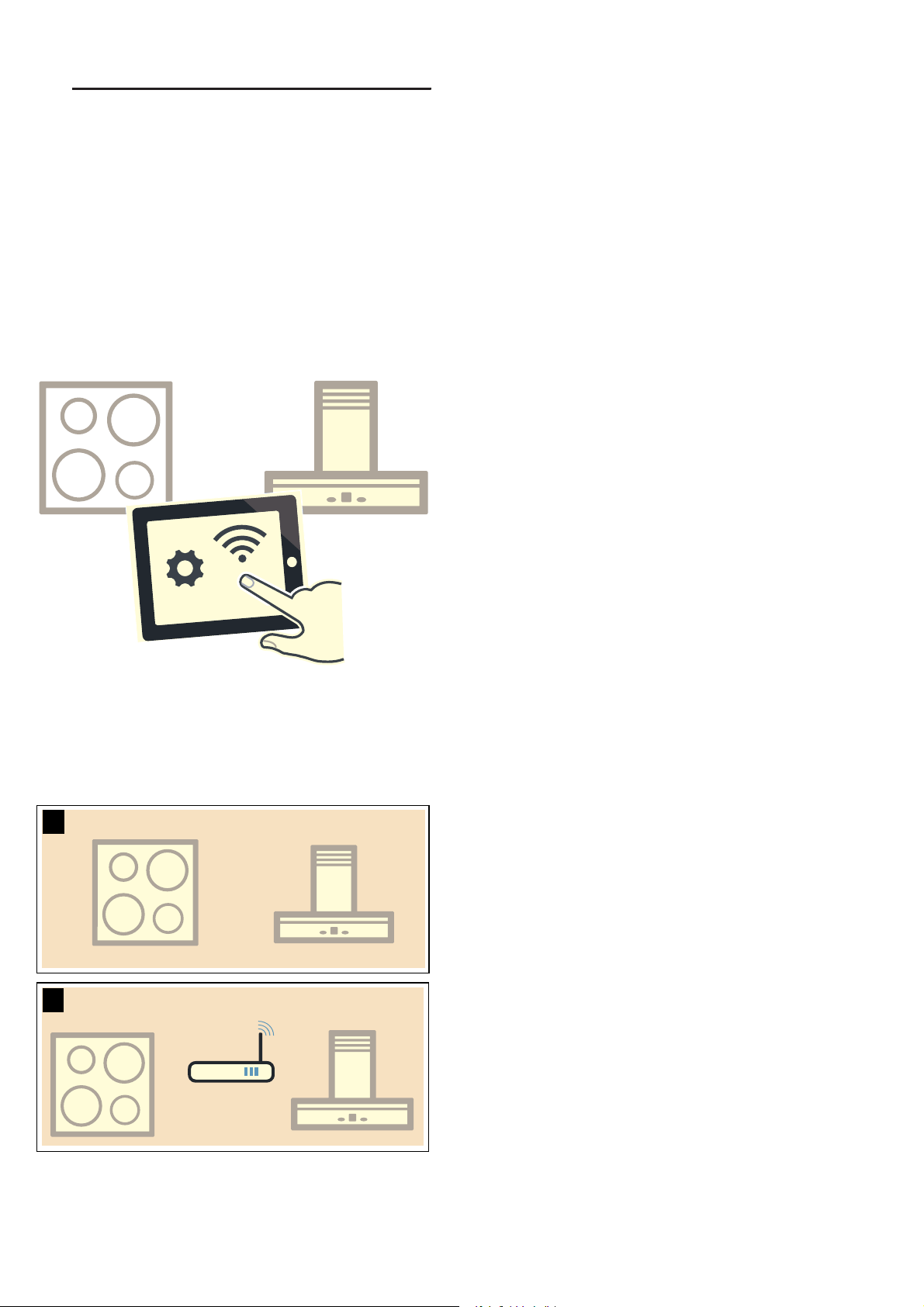
You can connect this appliance to a hob (if the hob
supports connection to the appliance) and then control
the functions of the hood via your hob.
Appliances can be connected to each other in different
ways:
Home Connect
Two appliances can be connected using the Home
Connect app provided that both of them are Home
Connect compatible.
Refer to the Home Connect documents supplied for
more information.
Connecting appliances directly
If the appliance is connected directly to a hob, it cannot
be connected to your home network as well. The
appliance will function as an extractor hood that is not
connected to the network and you can continue to
operate it via the control panel.
Connecting appliances via your home network
If the appliances are connected to each other via your
home network, both the hood controls on the hob and
Home Connect can be used to operate the appliance.
Notes
■ Make sure you follow the safety instructions in the
instruction manual for your extractor hood and that
these are complied with even when operating the
appliance via the hood controls on the hob.
■ If the extractor hood is being operated by means of
the controls on the hood itself, this mode of
operation always has priority. It is not possible to use
the hood controls on the hob during this time.
Setting up a connection
To connect the hob to the extractor hood, the hood
must be switched on.
Make sure that the hob is switched on and is in search
mode.
To do this, refer to the section entitled
"Connecting to the extractor hood" in the instruction
manual for your hob.
Connecting directly
Notes
■ Before connecting the appliance, reset all existing
connections to the WiFi or other appliances.
■ If your extractor hood is connected directly to the
hob, it cannot be connected to your WiFi as well and
you will not be able to use Home Connect.
Press and hold the # and ˜ symbols at the same time
until the D and Ù indicators start flashing.
The extractor hood has been connected to the hob
when the D symbol stops flashing and remains
continuously lit.
Connecting via your home network
Notes
■ You require a router that has WPS functionality.
■ You require access to your router.
■ The extractor hood cannot be switched on during the
connection process. You can cancel the process at
any time by pressing the # symbol.
■ In the networked standby mode, your appliance
requires a maximum of 2 W.
1. Press and hold the # and ˜ symbols at the same
time until the D and Ù indicators start flashing.
2. Tap the + symbol to start automatic login to your
home network. D and ‚ will flash.
3. Press the WPS button on the router within the next
2 minutes.
Once the connection to your home network has
been established, the extractor hood will connect to
the hob automatically. D and „ will flash.
The connection process is complete when the
D indicator stops flashing on the control panel and
remains continuously lit.
Note: . The connection can only be established when
both appliances are connected to your home network
and are in search mode. If the time allowed for search
mode has already expired for one of the two
appliances, start the search again.
en Home Connect
8
oHome Connect
Ho me Connec t
This appliance can be networked and also controlled
using a mobile device.
If the appliance is not connected to your home network,
it will function as an extractor hood with no network
connection and can still be operated via the display.
The availability of the Home Connect function depends
on the availability of Home Connect services in your
country. Home Connect services are not available in
every country. You can find more information on this at
www.home-connect.com.
Notes
■ Ensure that you follow the safety instructions in this
instruction manual and that you comply with these
even when you are away from home and are
operating the appliance via the Home Connect app.
You must also follow the instructions in the
Home Connect app.
■ Operating the appliance directly from the appliance
always takes priority. It is not possible to operate the
appliance using the Home Connect app during this
time.
Setting up
To implement settings via Home Connect, you must
have installed and set up the Home Connect app on
your mobile device.
Refer to the Home Connect documents supplied for
more information.
The app will guide you through the entire registration
process. Follow the steps specified by the app to
implement the settings.
The app must be open in order to perform the set-up
process.
Note: In networked standby mode, your appliance
requires a maximum of 2 W.
Automatic registration in the home network
Notes
■ You need a router that has WPS functionality.
■ You need to be able to access your router. If you do
not have this, follow the steps for "Manually logging
into your home network".
■ The extractor hood cannot be switched on during the
connection process. You can cancel the process at
any time by pressing the # symbol.
■ To connect the extractor hood to your home
network, the extractor hood must be switched on.
1. Press and hold the # and ˜ symbols at the same
time until the D and Ù indicators start flashing.
2. Tap the + symbol to start automatic login to your
home network. D and ‚ will flash.
3. Press the WPS button on the router within the next
2 minutes.
If the extractor hood has successfully connected, it
will automatically connect to the Home Connect app.
D and „ will flash.
Note: If the extractor hood has been unable to
connect, it will automatically allow you to manually
connect to your home network. D and ƒ will flash.
Log the appliance into your home network manually
or tap - to try logging in automatically again.
4. On your mobile device, follow the instructions for
automatic network login.
The login process is complete when the D indicator
stops flashing on the control panel and remains
continuously lit.
Manual registration in the home network
Notes
■ The extractor hood cannot be switched on during the
connection process. You can cancel the process at
any time by pressing the # symbol.
■ To connect the extractor hood to your home
network, the extractor hood must be switched on.
1. Press and hold the # and ˜ symbols at the same
time until the D and Ù indicators start flashing.
2. Tap the + symbol twice to manually log into your
home network. D and ƒ will flash.
3. Use the "Home Connect" SSID and the
"Home Connect" key to log your mobile device into
the extractor hood network.
If the extractor hood has successfully connected, it
will automatically connect to the Home Connect app.
D and „ will flash.
4. On your mobile device, follow the instructions for
manually logging into your network.
The login process is complete when the D indicator
stops flashing on the control panel and remains
continuously lit.
Home Connect en
9
Connecting to the app
If the Home Connect app is installed on your mobile
device, you can connect it to your extractor hood.
Notes
■ The appliance must be connected to the network.
■ The app must be open.
1. Press and hold the # and ˜ symbols at the same
time until the D and „ indicators start flashing.
2. On your mobile device, follow the instructions in the
Home Connect app.
The connection process is complete when the
D indicator stops flashing on the control panel and
remains continuously lit.
Software update
Using the software update function, your extractor
hood's software can be updated (e.g. for the purpose of
optimisation, troubleshooting or security updates). To
do this, you need to be a registered Home Connect
user, have installed the app on your mobile device and
be connected to the Home Connect server.
As soon as a software update is available, you will be
informed through the Home Connect app and will be
able to start the software update via the app.
Once the update has been successfully downloaded,
you can start installing it via the Home Connect app if
you are on your local area network.
The Home Connect app will inform you once installation
is complete.
Notes
■ You can continue to use your extractor hood as
normal while updates are downloading.
■ Depending on your personal settings in the app,
software updates can also be set to download
automatically.
■ We recommend that you install security updates as
soon as possible.
Resetting the connection
You can reset the connections you have saved on your
home network and on Home Connect at any time.
Press and hold the # and ‘ symbols at the same time
until an audible signal sounds. When the audible signal
is switched on, an audible signal sounds.
About data protection
When your appliance is connected for the first time to a
WLAN network, which is connected to the Internet, your
appliance transmits the following categories of data to
the Home Connect server (initial registration):
■ Unique appliance identification (consisting of
appliance codes as well as the MAC address of the
installed WiFi communication module).
■ Security certificate of the WiFi communication
module (to ensure a secure IT connection).
■ The current software and hardware version of your
domestic appliance.
■ Status of any previous resetting to factory settings.
This initial registration prepares the Home Connect
functions for use and is only required when you want to
use these Home Connect functions for the first time.
Note: Ensure that the Home Connect functions can be
used only in conjunction with the Home Connect app.
Information on data protection can be accessed in the
Home Connect app.
Declaration of Conformity
Constructa Neff Vertriebs-GmbH hereby declares that
the appliance with functionality meets the basic
requirements and other relevant provisions of Directive
2014/53/EU.
A detailed RED Declaration of Conformity can be found
online at www.neff-international.com among the
additional documents on the product page for your
appliance.
2.4 GHz band: max. 100 mW
5 GHz band: max. 100 mW
y
BE BG CZ DK DE EE IE EL
ES FR HR IT CY LV LT LU
HU MT NL AT PL PT RO SI
SK FI SE UK NO CH TR
5 GHz Wi-Fi: for indoor use only
en Cleaning and maintenance
10
2Cleaning and maintenance
Cl eani ng and mai nt enanc e
:Warning – Risk of injury!
Items placed on the appliance may overload the
fasteners, potentially causing the appliance to fall off the
wall.Do not place items on the appliance.
:Warning – Risk of electric shock!
Penetrating moisture may result in an electric shock.
Clean the appliance using a damp cloth only. Before
cleaning, pull out the mains plug or switch off the circuit
breaker in the fuse box.
:Warning – Risk of electric shock!
Do not use any high-pressure cleaners or steam
cleaners, which can result in an electric shock.
:Warning – Risk of injury!
Components inside the appliance may have sharp
edges. Wear protective gloves.
:Warning – Risk of injury!
If appliances supported by cables are permitted to
swing to and fro, this may overload the fasteners,
potentially causing the appliance to fall off the wall. Do
not do anything that makes the appliance swing to and
fro.
Cleaning agents
To ensure that the different surfaces are not damaged
by using the wrong cleaning product, follow the
instructions in the table. Do not use any of the following:
■ Harsh or abrasive cleaning agents, e.g. scouring
powder or liquid scouring cleaner,
■ Cleaning products with a high alcohol content,
■ Hard scouring pads or cleaning sponges,
■ Pressure washers or steam cleaners,
■ Cleaning products that dissolve limescale,
■ Aggressive all-purpose cleaning products,
■ Oven spray.
Note: Wash new sponge cloths thoroughly before use.
Note: Follow all instructions and warnings included with
the cleaning products.
--------
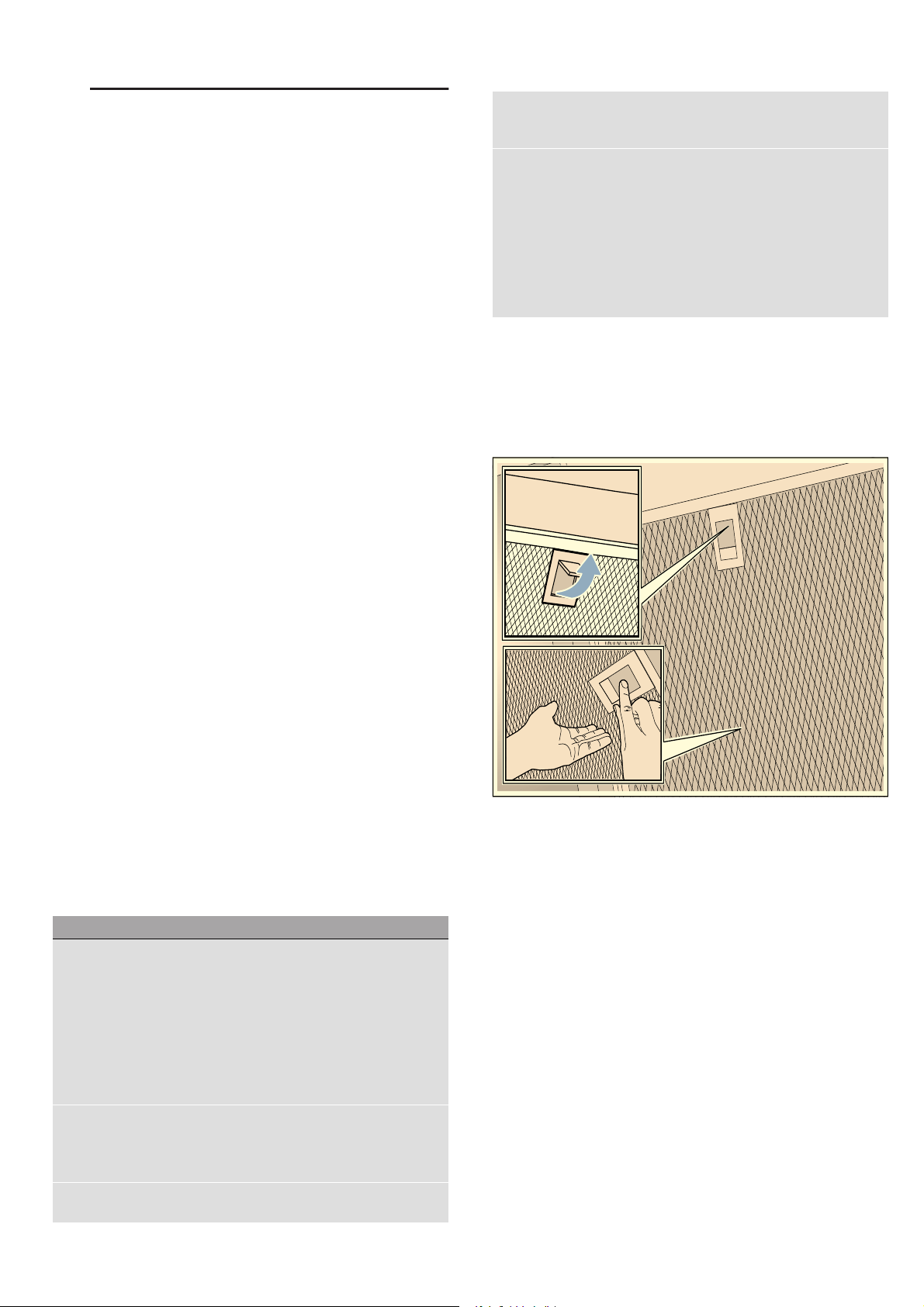
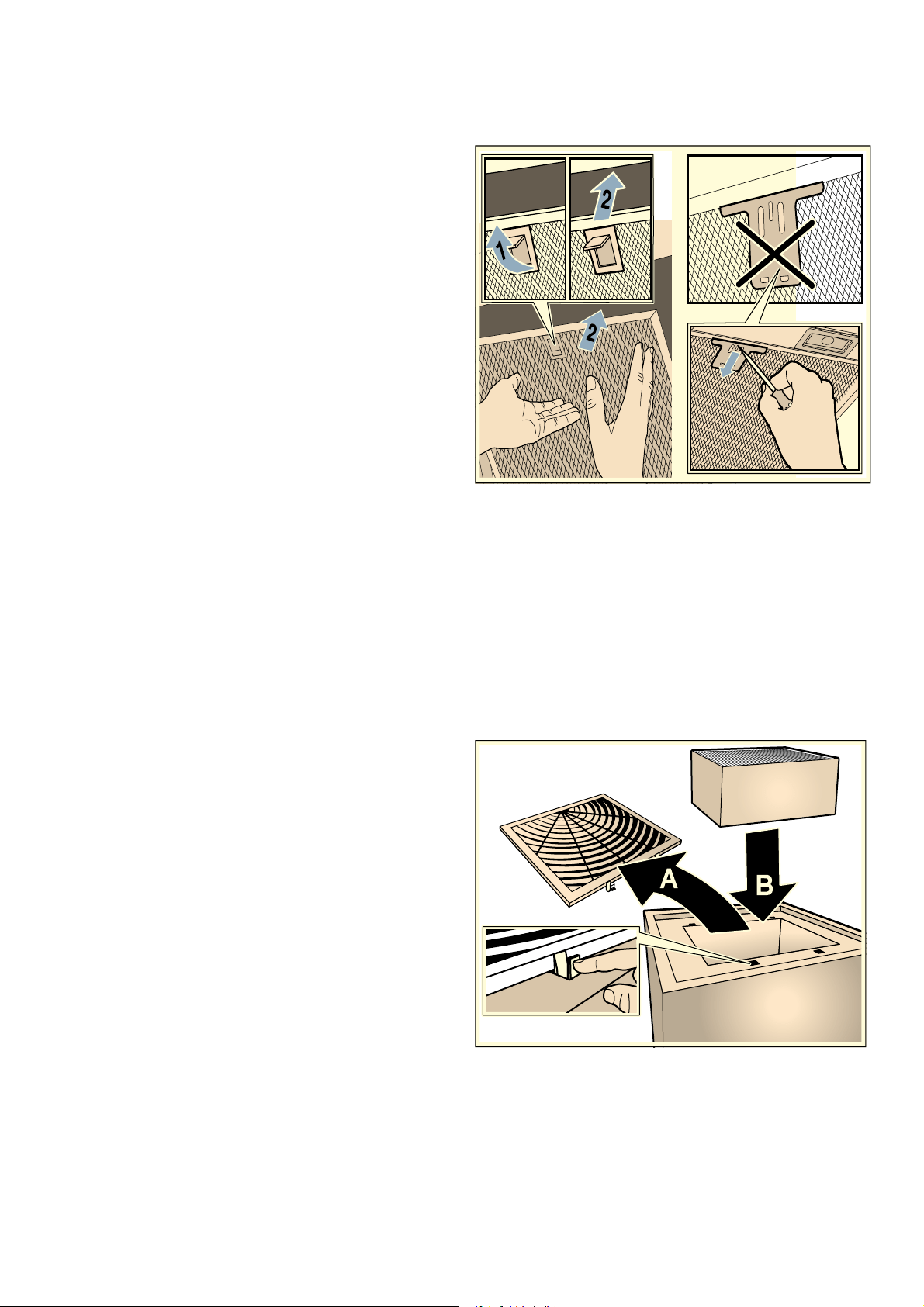
Removing metal grease filter
1. Open the lock and swing down the metal grease
filter. When you do this, take hold of the metal
grease filter from underneath with your other hand.
2. Take the metal grease filter out of the holder.
Notes
– Fat may accumulate in the bottom of the metal
grease filter.
– Hold the metal grease filter level to prevent fat
from dripping out.
3. Clean the metal grease filter.
4. Clean the appliance support cables.
5. Clean the accessible parts of the housing. Clean the
inside of the appliance.
:Warning – Risk of injury!
Components inside the appliance may have sharp
edges. Wear protective gloves.
Area Cleaning products
Stainless steel Hot soapy water:
Clean with a dish cloth and then dry with a
soft cloth.
Clean stainless steel surfaces in the direction
of the grain only.
Special stainless steel cleaning products are
available from our after-sales service or from
specialist retailers.Apply a very thin layer of
the cleaning product with a soft cloth.
Painted surfaces Hot soapy water:
Clean using a damp dish cloth and then dry
with a soft cloth.
Do not use stainless steel cleaner.
Aluminium and plastic Hot soapy water:
Clean with a soft cloth.
Glass Glass cleaner:
Clean with a soft cloth. Do not use a glass
scraper.
Controls Hot soapy water:
Clean using a damp dish cloth and then dry
with a soft cloth.
Risk of electric shock caused by penetrating
moisture.
Risk of damage to the electronics caused by
penetrating moisture. Never clean controls
with a wet cloth.
Do not use stainless steel cleaner.
Cleaning and maintenance en
11
Cleaning the metal mesh grease filters
These instructions apply to several appliance variants. It
is possible that individual features are described which
do not apply to your appliance.
:Warning – Risk of fire!
Fatty deposits in the grease filter may catch fire.
Regularly clean the grease filter. Never operate the
appliance without a grease filter.
Notes
■ Do not use aggressive, acidic or alkaline cleaning
products.
■ We recommend cleaning the grease filters every
2 months.
■ When cleaning the metal grease filters, also clean
the metal grease filter holder in the appliance using
a damp cloth.
■ The metal grease filters can be cleaned in the
dishwasher or by hand.
By hand:
Note: You can use a special degreaser to remove
stubborn dirt. This can be ordered from the online shop.
■ Soak the metal grease filters in hot soapy water.
■ Clean the filters with a brush and then rinse them
thoroughly.
■ Leave the metal grease filters to drain on an
absorbent material.
In the dishwasher:
Note: Slight discolouration may occur if the metal
grease filters are cleaned in the dishwasher. This
discolouration has no effect on the performance of the
metal grease filters.
■ Use normal domestic dishwashing detergents.
■ Do not clean heavily soiled metal grease filters
together with cookware.
■ Place the metal grease filters in the dishwasher,
leaving plenty of space around them. Do not trap the
metal grease filters.
■ Select a temperature of no more than 70 °C.
Installing the metal mesh grease filter
:Warning – Risk of injury!
Components inside the appliance may have sharp
edges. Wear protective gloves.
Notes
■ Clean all accessible parts of the housing.
■ Clean the appliance support cables with care.
1. Insert the metal grease filter. When you do this, take
hold of the metal grease filter from underneath with
your other hand.
Note: Make sure that the metal grease filter is
positioned correctly.
2. Swing the metal grease filter up and click it into
place.
3. If the metal grease filter has not been inserted
correctly, open the lock and reinsert the metal
grease filter correctly.
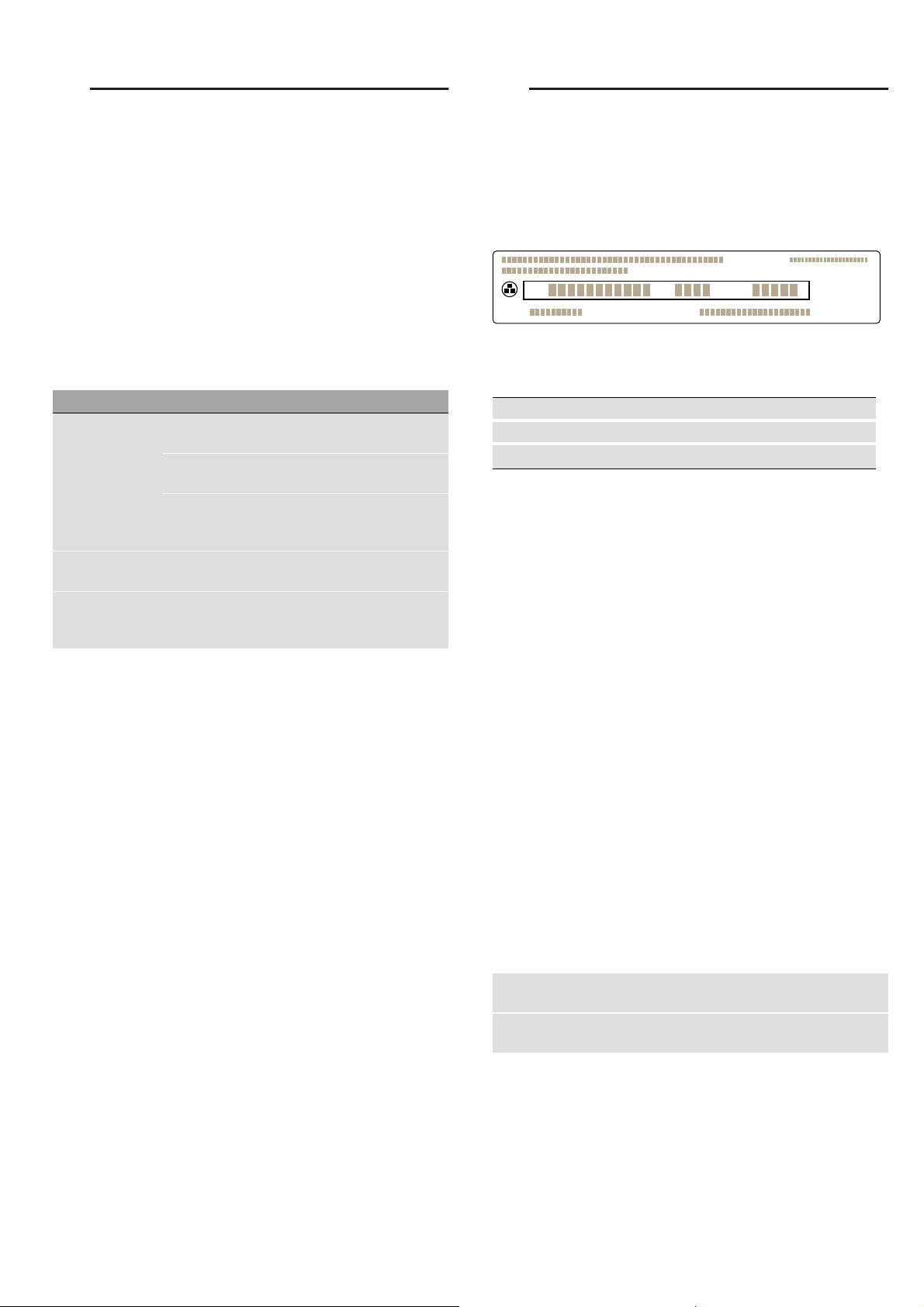
Replacing the activated charcoal filter
Note: To bind odours in circulating-air mode, you must
install an activated carbon filter. The different options for
operating the appliance in circulating-air mode can be
found in the brochure. Alternatively, ask your dealer.
The required accessories are available from specialist
retailers, from customer service or from the Online
Shop.
1. Open the cover on the top of the appliance.
2. Remove the old activated charcoal filter and insert
the new one.
3. Close the cover.
4. Reset the saturation indicator.~ "Saturation display"
on page 6
en Trouble shooting
12
3Trouble shooting
Tr oubl e shoot i ng
Malfunctions often have simple explanations. Please
read the following notes before calling the after-sales
service.
:Warning – Risk of electric shock!
Incorrect repairs are dangerous. Repairs may only be
carried out and damaged power cables replaced by
one of our trained after-sales technicians. If the
appliance is defective, unplug the appliance from the
mains or switch off the circuit breaker in the fuse box.
Contact the after-sales service.
Malfunction table
--------
LED lights
Defective LED lights may be replaced by the
manufacturer, their customer service or a qualified
technician (electrician) only.
:Warning – Risk of injury!
The light emitted by LED lights is very dazzling, and can
damage the eyes (risk group 1). Do not look directly
into the switched on LED lights for longer than
100 seconds.
4Customer service
Cu s t o mer ser vi ce
When calling us, please quote the product number
(E no.) and the production number (FD no.) so that we
can provide you with the correct advice. These numbers
can be found on the rating plate on the top of the
appliance (to access it, you will need to remove the
activated charcoal filter).
You can make a note of the numbers of your appliance
and the telephone number of the after-sales service in
the space below to save time should it be required.
Please be aware that a visit by an after-sales engineer
will be charged if a problem turns out to be the result of
operator error, even during the warranty period.
Please find the contact data of all countries in the
enclosed customer service list.
To book an engineer visit and product advice
Rely on the professionalism of the manufacturer. You
can therefore be sure that the repair is carried out by
trained service technicians who carry original spare
parts for your appliances.
Accessories
(not included in the scope of delivery)
Note: These instructions apply to several appliance
models. It may be the case that an optional accessory
that is listed does not apply for your appliance.
Note: Observe the installation instructions in the
accessory.
--------
Problem Possible cause Solution
The appliance
does not work
The plug is not
plugged in.
Connect the appliance to the
electricity supply
Power cut Check whether other kitchen
appliances are working
Faulty fuse Check in the fuse box to make
sure that the fuse for the
appliance is OK
The lighting does
not work.
The LED lights
are defective.
Call the after-sales service.
The button illumi-
nation does not
work.
The control unit is
faulty.
Call the aftersales service.
E no. FD no.
After-sales serviceO
GB 0344 892 8989
Calls charged at local or mobile rate.
IE 01450 2655
0.03 € per minute at peak.
Off peak 0.0088 € per minute.
Easy-change filter for CleanAir air recirculation
module (cannot be regenerated)
Z5170X1
Easy-change filter for CleanAir air-recirculation
module (can be regenerated)
Z50XXP0X0
=1U)'(1U
7\SH
Installation instructions en
13
INSTALLATION INSTRUCTIONS
Instal l ati on instructions
Installation instructions
■ This appliance is fitted to the kitchen ceiling or a
sturdy suspended ceiling.
■ The surfaces of the appliance are sensitive. Avoid
damaging them during installation.
(Important safety
information
Impor t ant saf et y informat i on
Read these instructions carefully. Only then
will you be able to operate your appliance
safely and correctly. Retain the instruction
manual and installation instructions for future
use or for subsequent owners.
Check the appliance for damage after
unpacking it. Do not connect the appliance if it
has been damaged in transport.
The appliance can only be used safely if it is
correctly installed according to the safety
instructions. The installer is responsible for
ensuring that the appliance works perfectly at
its installation location.
Only a licensed professional may connect
appliances without plugs. Damage caused by
incorrect connection is not covered under
warranty.
The surfaces of the appliance are easily
damaged. Avoid damaging them during
installation.
For the installation, observe the currently valid
building regulations and the regulations of the
local electricity and gas suppliers.
:Warning – Risk of fire!
■ Fatty deposits in the grease filter may catch
fire. The specified safety clearances must
be complied with in order to prevent a build-
up of heat. Refer to the information
provided for your cooker. If gas and electric
hobs are being operated together, the
largest specified clearance applies.
Risk of fire!
■ Grease deposits in the grease filter may
catch fire. Never work with naked flames
close to the appliance (e.g. flambéing). Do
not install the appliance near a heat-
producing appliance for solid fuel
(e.g. wood or coal) unless a closed, non-
removable cover is available. There must
be no flying sparks.
[
[
[
[
[
[
PP
PP
!
!

en General information
14
:Warning – Risk of injury!
■ Components inside the appliance may have
sharp edges. Wear protective gloves.
Risk of injury!
■ The appliance may fall down if it has not
been properly fastened in place. All
fastening components must be fixed firmly
and securely.
Risk of injury!
■ The appliance is heavy. To move the
appliance, 2 people are required. Use only
suitable tools and equipment.
Risk of injury!
■ Changes to the electrical or mechanical
assembly are dangerous and may lead to
malfunctions. Do not make any changes to
the electrical or mechanical assembly.
Risk of injury!
■ Risk of falling when working on the
appliance. Use a stable stepladder.
:Warning – Risk of electric shock!
Components inside the appliance may have
sharp edges. These may damage the
connecting cable. Do not kink or pinch the
connecting cable during installation.
:Warning – Risk of electric shock!
It must always be possible to disconnect the
appliance from the power supply. If there is a
fixed connection, an all-pole isolating switch
with a contact gap of at least 3 mm must be
provided for the wiring. Only an electrician
may install the fixed connection.We
recommend installing a residual-current circuit
breaker (RCCB) in the appliance's power
supply circuit.
:Warning – Risk of electric shock!
Incorrect repairs are dangerous. Repairs may
only be carried out and damaged power
cables replaced by one of our trained after-
sales technicians. If the appliance is defective,
unplug the appliance from the mains or switch
off the circuit breaker in the fuse box. Contact
the after-sales service.
:Warning – Danger of suffocation!
Packaging material is dangerous to children.
Never allow children to play with packaging
material.
KGeneral information
Gener al informat i o n
Preparing the ceiling
■ The ceiling must be flat, horizontal and have
adequate load-bearing capacity.
■ The depth of the bore holes must be the same
length as the screws. The wall plugs must have a
secure grip.
■ The enclosed screws and wall plugs are suitable for
solid brickwork. Suitable fasteners must be used for
other structures (e.g. plasterboard, porous concrete,
poroton bricks).
■ The maximum weight of the extractor hood is 26 kg.
Electrical connection
:Warning – Risk of electric shock!
It must always be possible to disconnect the appliance
from the power supply. If there is a fixed connection, an
all-pole isolating switch with a contact gap of at least
3 mm must be provided for the wiring. Only an
electrician may install the fixed connection.We
recommend installing a residual-current circuit breaker
(RCCB) in the appliance's power supply circuit.
:Warning – Risk of electric shock!
Components inside the appliance may have sharp
edges. These may damage the connecting cable. Do
not kink or pinch the connecting cable during
installation.
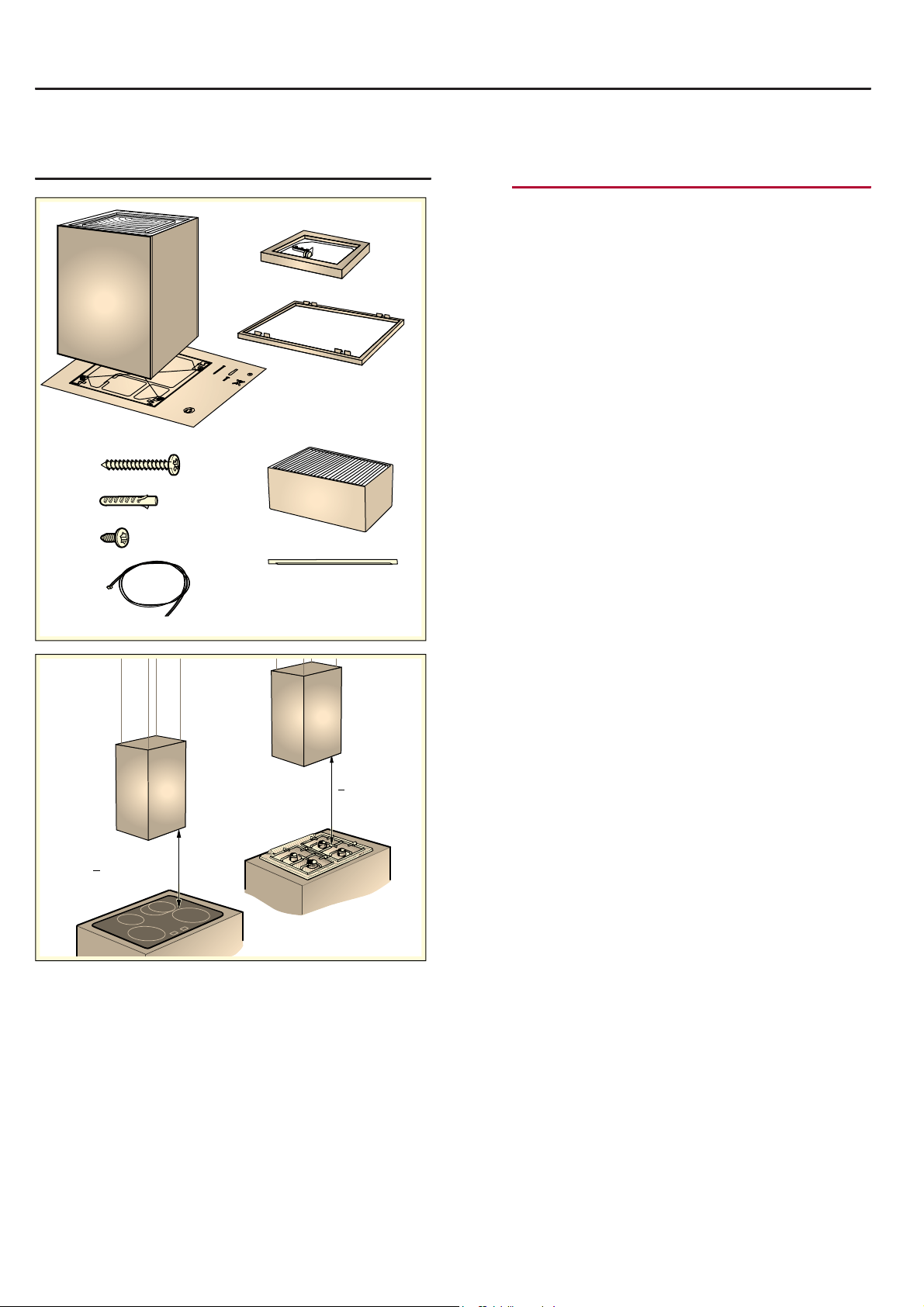
The required connection information can be found on
the rating plate inside the appliance; to access it, you
will need to remove the activated charcoal filter.
Length of the cable: approx. 1.30 m
This appliance complies with the EC interference
suppression regulations.
The appliance must be disconnected from the power
supply whenever installation work is being carried out.
When the appliance is installed, protection must be
provided against accidental contact in the future.
Installation en
15
5Installation
Instal l ati on
Preparing for installation
Caution!
Ensure that there are no electrical wires, gas pipes or
water pipes in the area where holes are to be drilled.
1. Cover the hob to protect it from damage.
2. Mark where the centre of the extractor hood should
be on the ceiling above the centre of the hob.
3. Using the template provided, mark the locations
where the bolts should be inserted on the ceiling.
4. Drill four 8 mm diameter holes to a depth of 80 mm
for fastening the appliance and press in the wall
plugs flush with the wall.
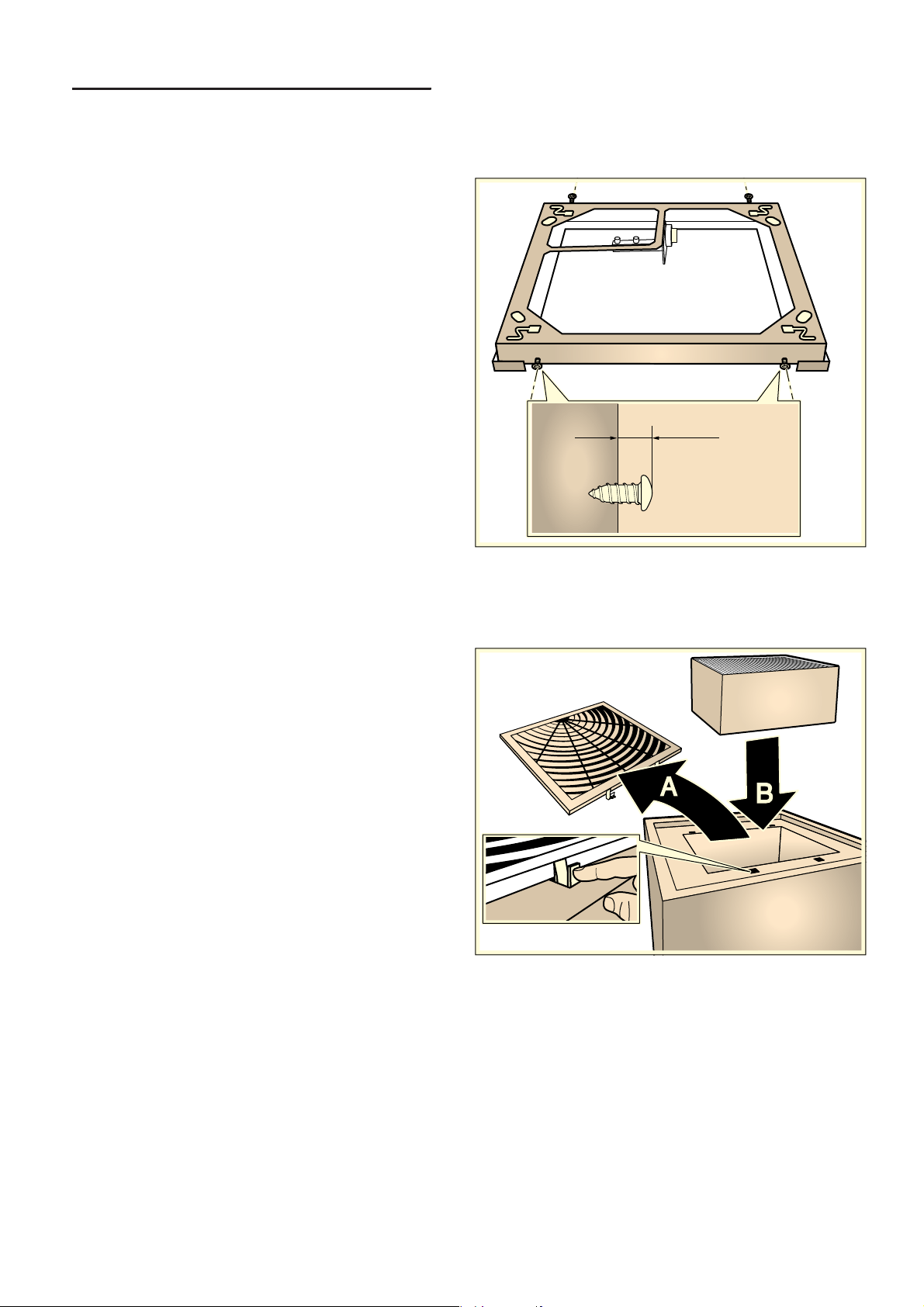
Preparing the appliance
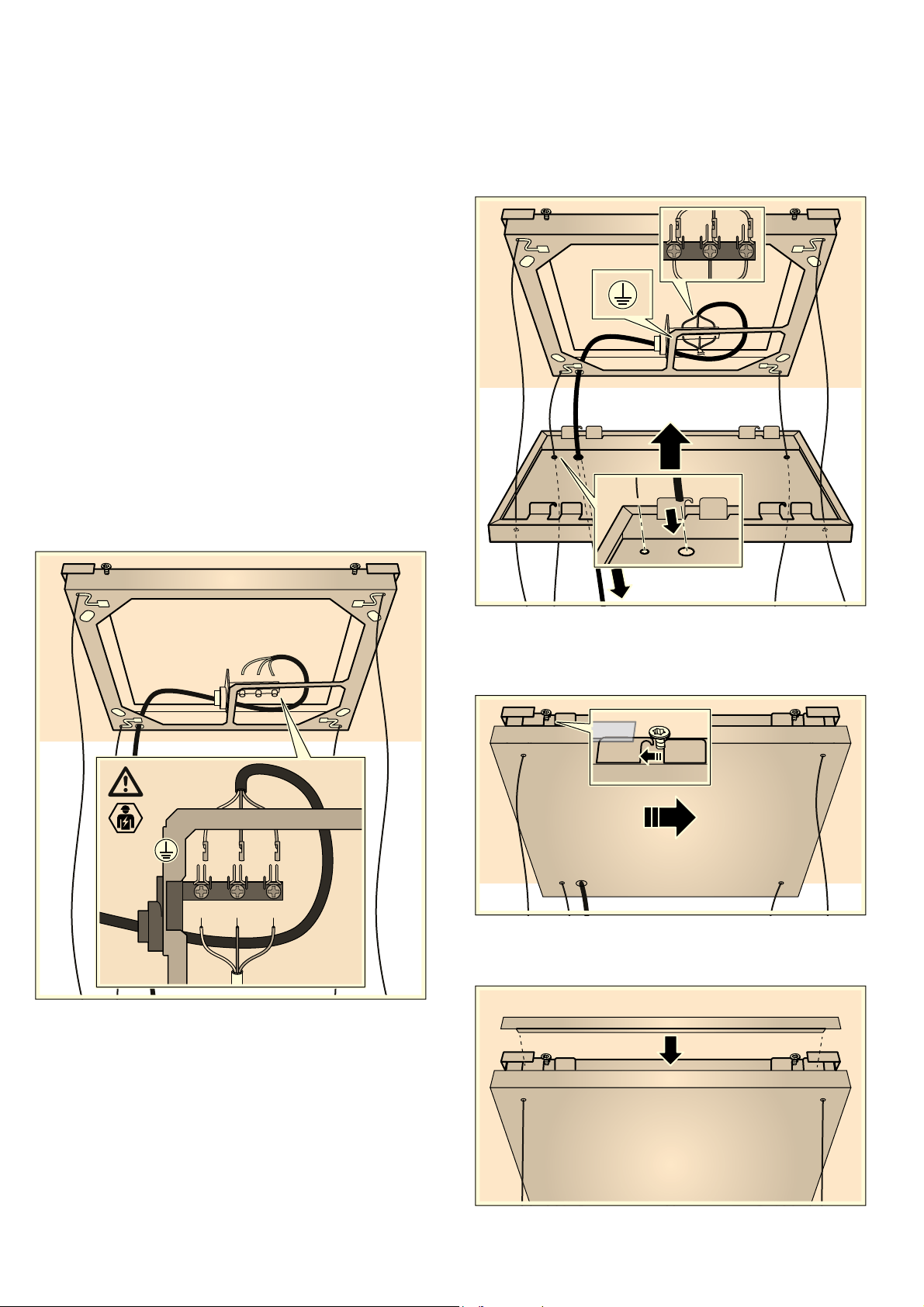
1. Screw in the four bolts on the edge of the frame at
the marked locations, leaving them protruding out of
the frame by approx. 5 mm.
2. Remove the film from the frame cover.
3. Remove the activated charcoal filter from the film.
4. Open the cover on the top of the appliance and
remove it ¨, insert the activated charcoal filter ©
and then close the cover.
NJONN

en Installation
16
Fitting the frame
1. Screw in the two bolts, leaving them protruding out
of the ceiling by 5 - 9 mm ¨.
Note: Make sure that the bolts ¨, frame ©, frame
cover ª and control « are positioned correctly
relative to one another. The position of the control is
marked on the template.
2. Insert the two bolts on the ceiling through the
openings provided in the frame ¨. Move the frame
to allow the bolts to be screwed into the keyhole
openings ©.
3. Use two more bolts to screw the frame in place. ª
Tighten all the bolts fully.
4. Insert the four cables into the openings provided in
the frame and thread them through the labyrinth.
PP
PP
Installation en
17
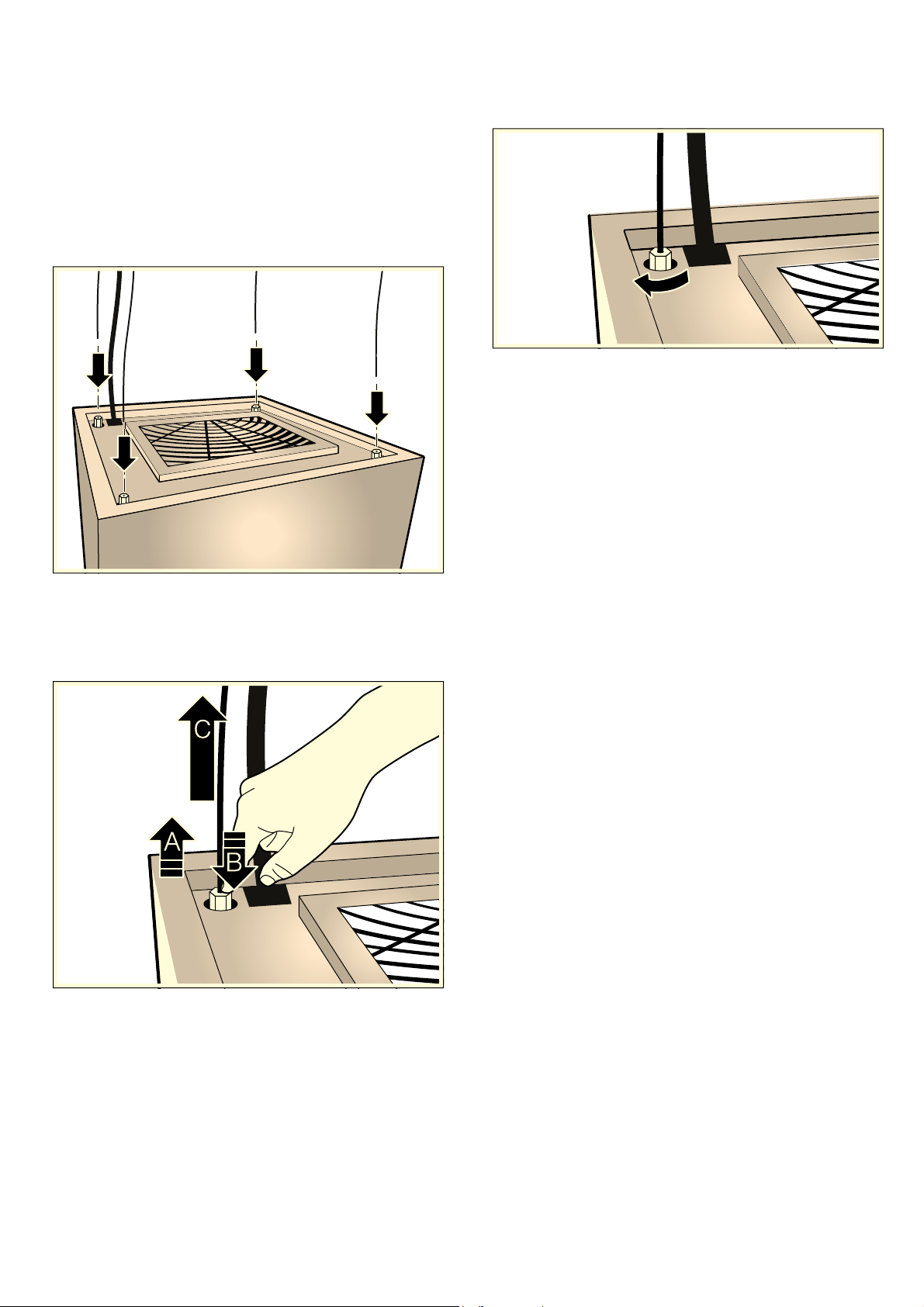
Establishing a connection to the mains
:Warning – Risk of electric shock!
It must always be possible to disconnect the appliance
from the power supply. If there is a fixed connection, an
all-pole isolating switch with a contact gap of at least
3 mm must be provided for the wiring. Only an
electrician may install the fixed connection.We
recommend installing a residual-current circuit breaker
(RCCB) in the appliance's power supply circuit.
Note: To find out the correct fuse rating, see the total
connected load (in watts) on the appliance's rating
plate.
1. Position the appliance underneath the frame.
2. Carefully thread the cables and the mains power
cable through the opening in the frame cover. Place
the frame cover down onto the appliance.
3. Mount the appliance on the wall and level it; see the
section entitled "Wall-mounting the appliance and
levelling it".
4. Thread the mains power cable through the opening
in the frame and then through the strain relief.
Caution!
Do not position the mains power cable that is inside
the frame underneath the frame.
5. Connect the appliance to the power supply.
Caution!
Pay attention to the marks on the connection
terminals when connecting the wires (permissible
cross sections of the domestic wiring: 1 mm² -
2.5 mm²) in the mains power cable.
6. Use an open-ended spanner (WAF 17) to tighten the
strain relief until the mains power cable is held firmly
and cannot move.
Fitting the frame cover
1. Slide the frame cover up.
Note: Thread the mains power cable through the
opening in the frame cover and, if necessary,
carefully pull it down.
2. Fit the frame cover onto the four bolts at the edge of
the frame.
Note: Slide the frame cover approx. 5 mm to the
right until you hear it click into place.
3. Tighten the bolts at the edge of the frame.
4. Secure the covers to the magnets to hide the bolts
at the edges of the frame.
3( 1 /
3( 1 /
en Installation
18
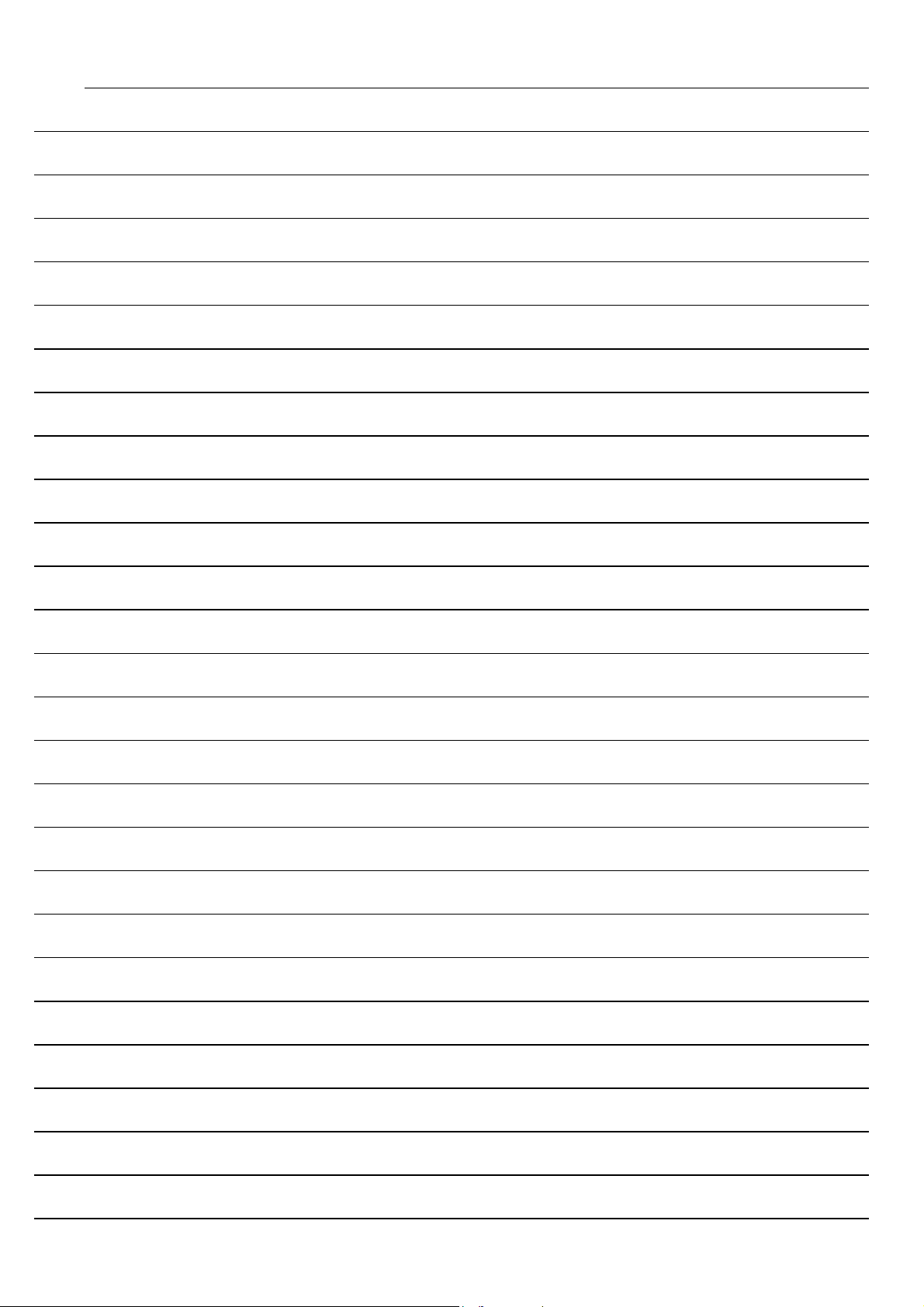
Attaching and aligning the appliance
1. Manually open the cable tensioners until the cable
can be inserted in it. Do not use any tools.
Note: Do not open the cable tensioners fully. The
cable tensioners may fall into the appliance.
2. Enlist the help of a second person to lift the
appliance and thread the cables into the cable
tensioners on the top of the appliance.
Note: Never shorten the cables.
3. Taking care to comply with the safety clearances,
slide the appliance up and level it.
4. If you need to position the appliance lower down, lift
it up ¨, push the cable tensioners down © and pull
the cables back out of the cable tensioners ª.
5. After aligning, tighten the cable tensioners so that
they are hand-tight. Do not use any tools.
6
*9001196406*
9001196406
980815
en