
Installation Guide

Installation Guide
2
Go to august.com/install
to watch a video version
of this installation guide.

3
Welcome!
This guide will get you up and running with
your August Smart Lock. Installation generally
takes less than 15 minutes. If you have any
trouble, please check our support section
(august.com/support), contact our installer
network (august.com/installers) or call
844-AUGUST1 (284-8781) for help.

Installation Guide
4
Preparation
Make sure your existing deadbolt is compatible
with the August Smart Lock. Only standard
deadbolts are supported. Use our compatibility
assistant to double-check: august.com/compatibility
TOOLS NEEDED
You will need a standard
Phillips screwdriver.
Alternately, we have a network of installers who can
help with installation. august.com/installers
5
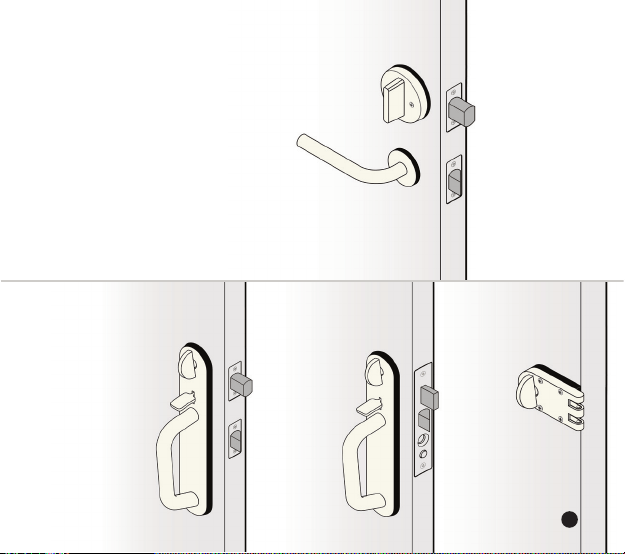
Compatibility
YES
Standard
Deadbolt is mounted and operates
independently of the door handle.
Integrated
Lock & Handle
Handle and lock
thumb-latch are
both mounted
together on a
metal plate
NO
Mortise
An integrated
door handle
and deadbolt
in a single
metal unit
Rim
Cylinder
Mounted on
the inside,
on top of the
door and
door jamb
NO NO
5
Installation Guide
6
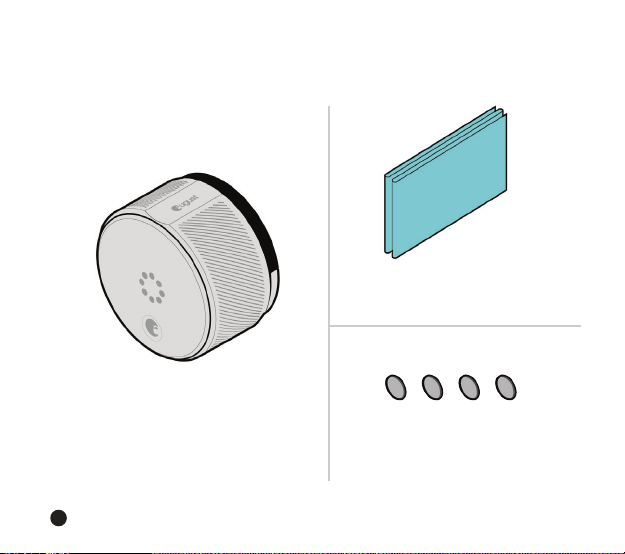
1 August Smart Lock
(4 AA Batteries Pre-installed)
1 Adhesive Strip
(Inside Envelope)
Package Contents
4 Adhesive Rubber Bumpers
(Inside Envelope)

7
3 Mounting Plates
3 Adapters
Installation Guide
8
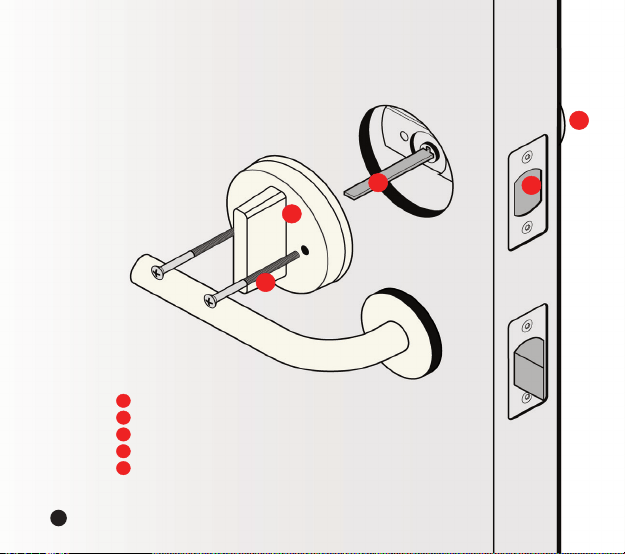
Installation Overview
Before Installation
Key Hole
Deadbolt
Tail Piece
Thumb-latch
Screws
1
2
3
4
5
1
2
3
4
5
8
Installation Guide
9
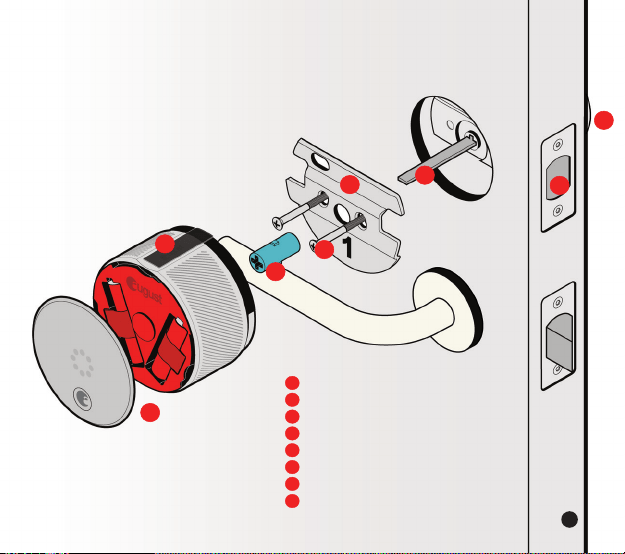
After Installation
Key Hole
Deadbolt
Tail Piece
Mounting Plate
Screws
Tail Piece Adapter
August Smart Lock & Faceplate
Calibration Tape
1
2
3
4
5
6
7
1
2
3
4
5
6
7
9
8
8

Installation Guide
10
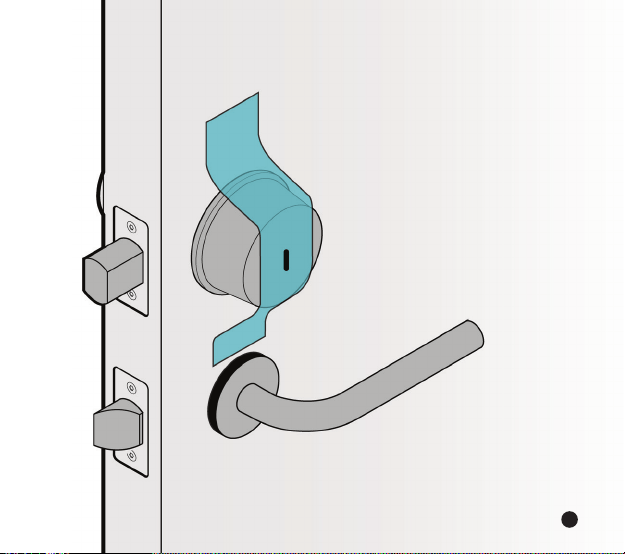
Step 1:
Prepare existing deadbolt.
Ax the supplied adhesive strip over the key
hole, securing it to the exterior side of your door.
This should hold the key hole in place when you
remove the thumb-latch on the inside of the door.
On some doors, such as those with glossy paint, the
included tape may not be strong enough. In this case
you should apply additional stronger tape to ensure
that the key hole stays in place. Use caution. Some
types of tape, such as duct tape, may damage the
paint on certain types of doors.
1111

Installation Guide
12
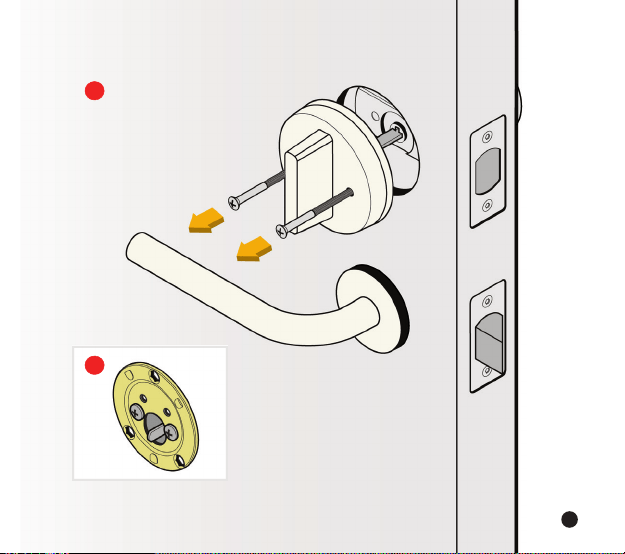
Step 2:
Remove your existing
thumb-latch.
Position your thumb-latch so that you can unscrew
the existing screws on your deadbolt.
Remove the screws entirely from the deadbolt and
keep them to assist in the next step.
After removing the screws, be sure to unlock your
deadbolt before removing the thumb-latch.
Your thumb-latch may include an additional back
plate underneath it. If so, remove the back plate. Use
the back plate and the longer screws for the next step.
B
A
13
A
B

Installation Guide
14
Step 3:
Select the correct mounting
plate and adapter.
If you know the brand of your deadbolt, please select
the correct mounting plate and adapter from the
Compatibility Chart on the next page, and then
go to Step 4 (page 18).
If not, go to Step 3a (page 16) to find the correct
mounting plate and adapter.
15
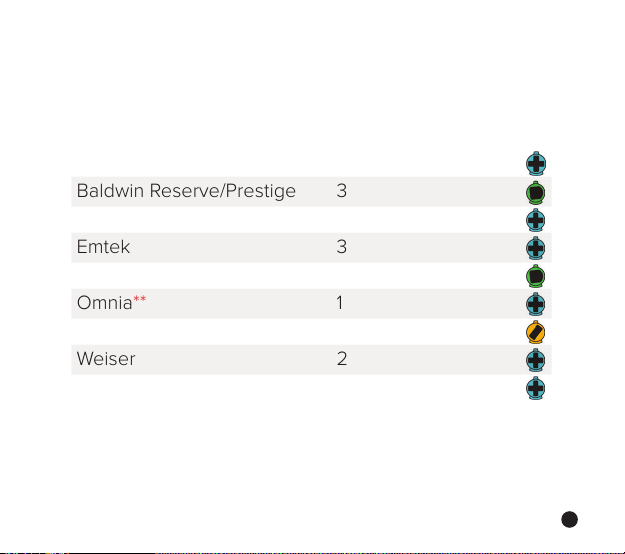
Standard Deadbolt
Compatibility Chart
BRAND MOUNTING PLATE ADAPTER
Baldwin - Estate/Images* 1
Baldwin Reserve/Prestige 3
Defiant 2
Emtek 3
Kwikset* 3
Omnia** 1
Schlage*** 2
Weiser 2
Weslock 1
*
Baldwin and Kwikset Deadbolts installed before 1997 have unique installation
requirements, please contact us at 844-AUGUST1 (284-8781) and we will walk you
through installation.
**
Compatible only with non-mortise, standard Omnia deadbolts.
***
Commercial grade Schlage B560 deadbolts require supplemental screws.
If your Schlage screws are too short please contact us at [email protected]

Installation Guide
16
Step 3a:
Select the correct
mounting plate.
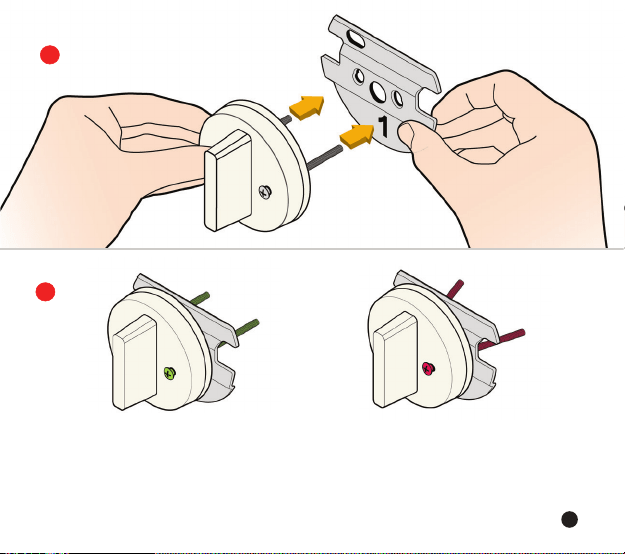
Insert the existing screws in the thumb-latch to help
you choose the correct mounting plate. If there was a
back plate under your thumb-latch, insert the screws
into this back plate instead of the thumb-latch.
Slide the mounting plates onto the screws one at
a time until you find a mounting plate that allows the
screws to fit straight through the holes.
B
A
17
COMPATIBLE
2.
A
B
NOT COMPATIBLE
Having trouble selecting the right mounting plate? Try august.com/installation or call August
customer support at 844-AUGUST1 (284-8781)
1.

Installation Guide
18
Step 4:
Position the mounting plate.
Remove the backing from the 4 rubber bumpers
and place them on the back side of the mounting plate
(the side that does not show a number).
Remove the screws from the thumb-latch and use
them to install the mounting plate over the existing
deadbolt tail piece.
Do not fully tighten the screws. Over-tightening
can deform the mounting plate and interfere with
the operation of the lock.
C
A
B

19
A
C
B

Installation Guide
20
Step 5:
Position adapter and
align mounting plate.
Remove the tape from the key hole, and use your
key to turn your deadbolt to the fully unlocked position.
If your lock was not in the Compatibility Chart, select
the adapter that fits your tail piece. To do this, slide each
adapter onto the tail piece. The correct adapter will
have the small nub pointing up.
Place the correct adapter onto the tail piece with
the small nub pointing up. Tighten the screws until they
are just tight. Do not over-tighten. Over-tightening
can deform the mounting plate and interfere with the
operation of the lock.
B
C
A

21
B
C
A
Front View
Deadbolt Tail Piece
Adapter Alignment
Having trouble selecting the right adapter?
Call August customer support at 844-AUGUST1 (284-8781)

Installation Guide
22
Step 6:
Attach the August Smart Lock.
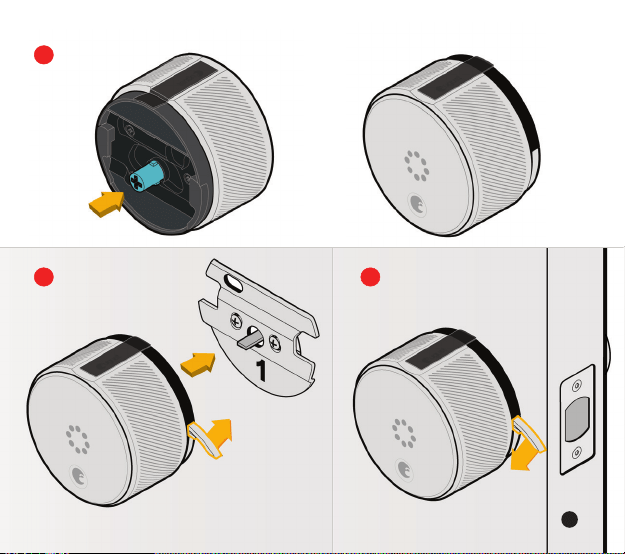
Insert the adapter into the back of the August Smart
Lock, then position the August Smart Lock with the
curved notch at the top.
Pull out both side wing latches. Slide the August
Smart Lock over tail piece and attach to mounting plate.
Make sure the back of the lock is flush with the door.
To secure the August Smart Lock, clamp down both
side wing latches to the mounting plate completely.
If the latches are dicult to clamp down, then go back
to Step 5C and ensure that the screws have not been
over-tightened. You may need to loosen them slightly.
A
B
C
23
B
A
C
23

Installation Guide
24
Step 7:
Remove battery tab.
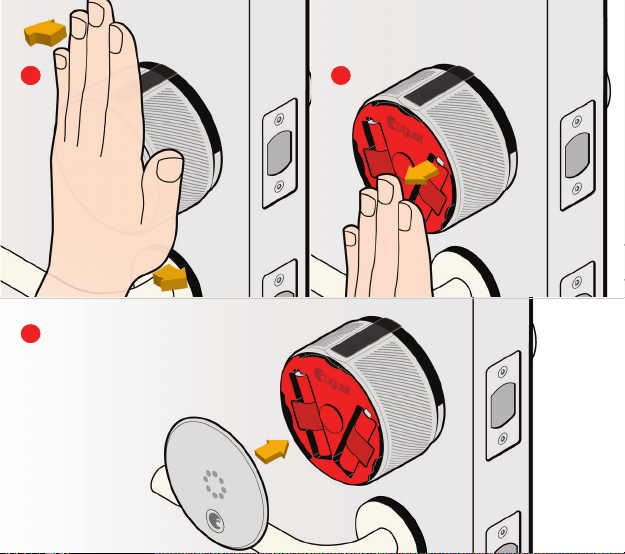
Press down on the face place and rotate it
counterclockwise to open the battery compartment.
(Don’t remove the factory seal until instructed to do
so during the calibration process.)
Holding batteries in place, remove the plastic
battery isolation tab. Make sure that the battery is
properly seated in its compartment.
Align faceplate hooks with the August Smart Lock.
The faceplate will lock into place with the logo at
the bottom.
A
B
C
25
A
C
A
B
C

Installation Guide
26
Step 8:
Install August App
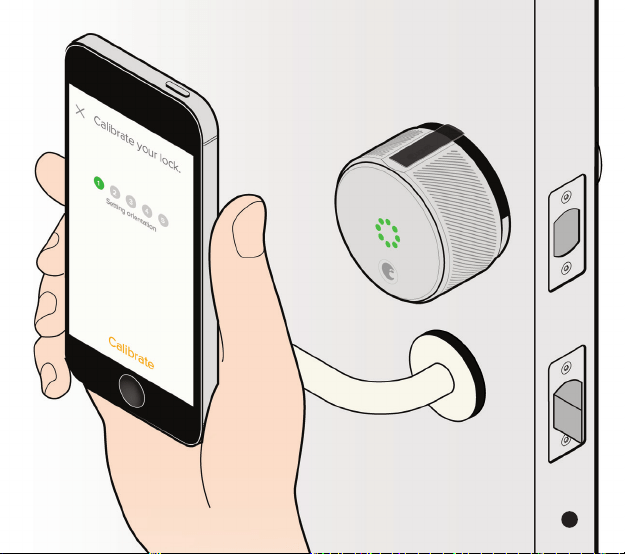
Download the App from august.com/app
The app will help you create an account and
set up your August Smart Lock.
We suggest that you protect your phone with
a passcode in case it is lost or stolen.
2727

Installation Guide
28
Questions?
If you have any questions or diculties, visit
august.com/support or call 844-AUGUST1 (284-8781)
Lost your phone? Go to august.com to disable
the August app running on your phone.
©2014 August Home Inc.
1006-0000-A Rev8.1