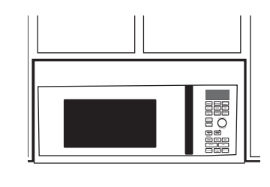
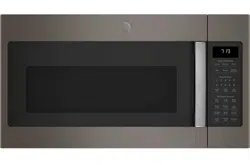
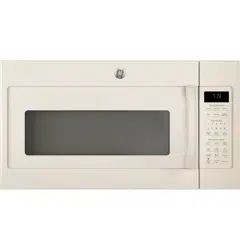
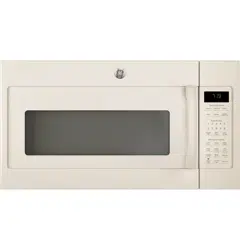
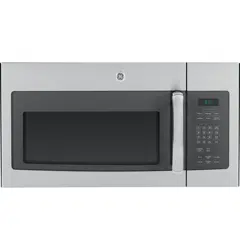
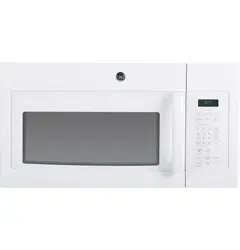
Throughout this manual, features and appearance may vary from your model.
Features of the Oven
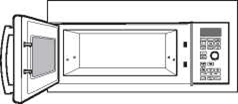
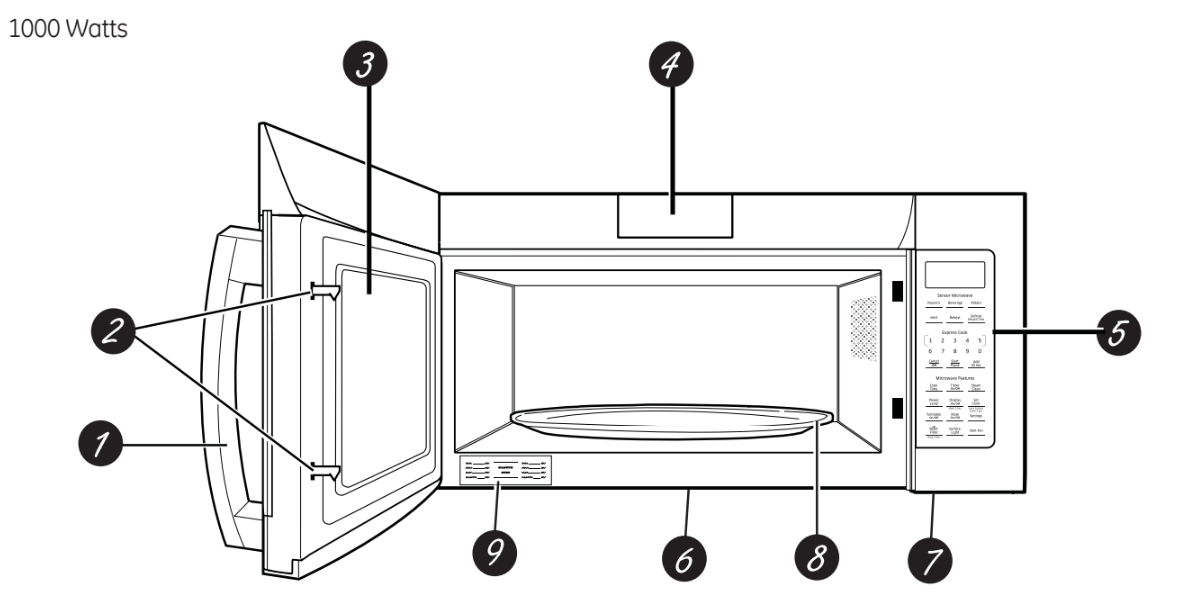
Door Handle. Pull to open the door. The door must be securely latched for the microwave to operate.
Door Latches.
Window with Metal Shield. Screen allows cooking to be viewed while keeping microwaves confined in the oven.
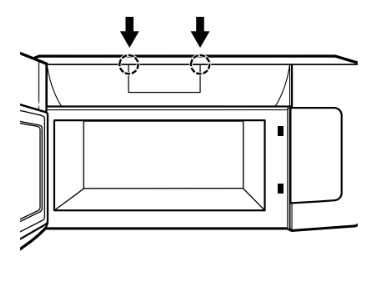
Charcoal Filter Door. Push down two button to open the door. You can change charcoal filter easily.
Touch Control Panel.
Cooktop Light.
Grease Filter.
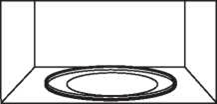
Removable Turntable. Turntable and support must be in place when using the oven. The turntable may be removed for cleaning.
Rating Plate.
NOTE: Oven vent(s) and oven light are located on the inside walls of the microwave oven.
Optional Accessories
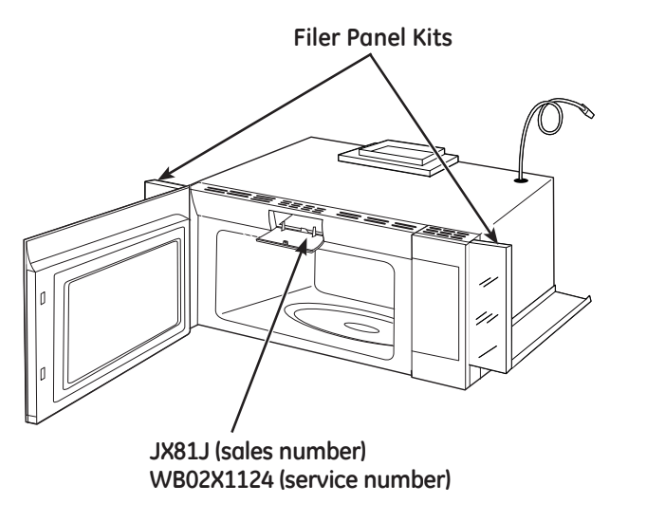
Filler Panel Kits
JVM7195 / JNM7196
JX36DWW - White
JX36DBB - Black
JX35DSS - Stainless
When replacing a 36" range hood, filler panel kits fill in the additional width to provide a custom built-in appearance.
For installation between cabinets only; not for end-of cabinet installation. Each kit contains two 3" wide filler panels. Two kits are needed for a 36" opening.
Recirculating Charcoal Filter Kit
JX81J (sales number)
WB02X1124 (service number)
Filter kits are used when the microwave oven cannot be vented to the outside.
15” Cabinet Installation Kit
JX15BUMPBB- Black
JX15BUMPWW- White
For use when installing with 15" depth cabinets.
Available at extra cost from your GE Appliances supplier, or see the GE Appliances Service numbers.
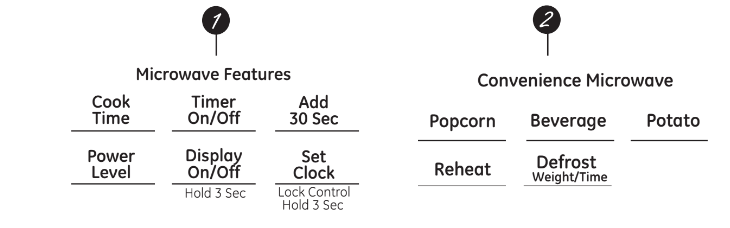
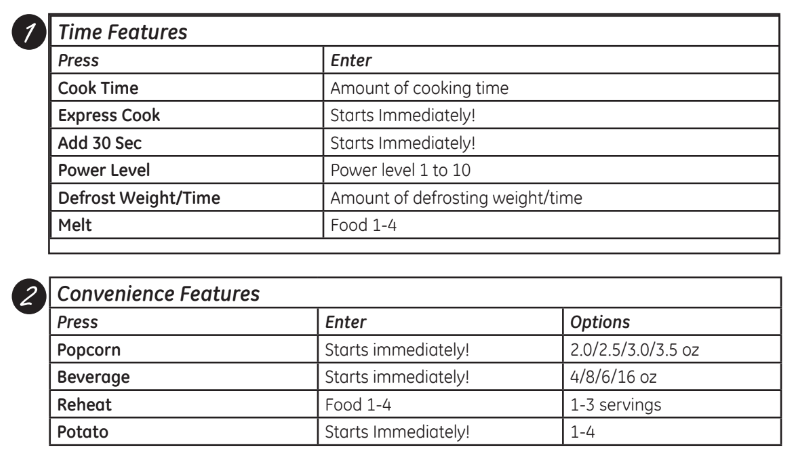
You can microwave by time or with the convenience features. Not all features on all models.
Cooking Controls
Check the Convenience Guide before you begin.
Power Levels
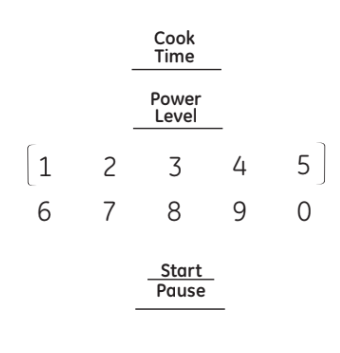
Changing the Power Level
The power level may be entered or changed immediately after entering the feature time for Cook Time, Time Defrost, Add 30 Sec or Express Cook. The power level may also be changed during the time countdown.
Press Cook Time.
Enter cooking or defrosting time
Press Power Level.
Select desired power level 1-10.
Press Start/Pause. Pressing Start/Pause is not necessary for Express Cook buttons.
Variable power levels add flexibility to microwave cooking. The power levels on the microwave oven can be compared to the surface units on a range. Each power level gives you microwave energy a certain percent of the time. Power level 7 is microwave energy 70% of the time. Power level 3 is energy 30% of the time. Most cooking will be done on HI which gives you 100% power.
Power Level 10 will cook faster but food may need more frequent stirring, rotating or turning over.A lower setting will cook more evenly and need less stirring or rotating of the food.
Some foods may have better flavor, texture or appearance if one of the lower settings is used. Use a lower power level when cooking foods that have a tendency to boil over, such as scalloped potatoes.
Rest periods (when the microwave energy cycles off) give time for the food to "equalize" or transfer heat to the inside of the food. An example of this is shown with power level 3—the defrost cycle. If microwave energy did not cycle off, the outside of the food would cook before the inside was defrosted.
Here are some examples of uses for various power levels:
Power Level 10: Fish, bacon, vegetables, boiling
liquids.
Power Level 7: Gentle cooking of meat and poultry; baking casseroles and reheating.
Power Level 5: Slow cooking and tenderizing for stews and less tender cuts of meat.
Power Level 2 or 3: Defrosting; simmering; delicate sauces.
Power Level 1: Keeping food warm; softening butter.
Time Features
About the time features.
Cook Time I
Allows you to microwave for any time up to 99 minutes and 99 seconds.
Power level 10 (high) is automatically set, but you may change it for more flexibility.
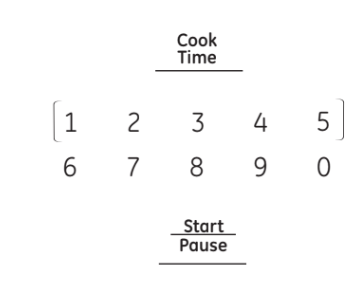
1. Press Cook Time.
2. Enter cooking time.
3. Change power level if you don't want full power. (Press Power Level. Select a desired power level 1-10.)
4. Press Start/Pause.
You may open the door during Cook Time to check the food. Close the door and press Start/Pause to resume cooking.
Cook Time II
Lets you change power levels automatically during cooking. Here's how to do it:
1. Press Cook Time.
2. Enter the first cook time.
3. Change the power level if you don't want full power. (Press Power Level. Select a desired power level 1-10.)
4. Press Cook Time again.
5. Enter the second cook time.
6. Change the power level if you don't want full power. (Press Power Level. Select a desired power level 1-10.)
7. Press Start/Pause.
At the end of Cook Time I, Cook Time II counts down.
Express Cook
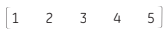
This is a quick way to set cooking time for 1-5 minutes.
Press one of the Express Cook pads (from 1 to 5) for 1 to 5 minutes of cooking at power level 10. For example, press the 2 pad for 2 minutes of cooking time.
The power level can be changed as time is counting down. Press POWER LEVEL and enter 1-10.
Add 30 Sec
You can use this feature two ways:
It will add 30 seconds to the time counting down each time the pad is pressed.
It can be used as a quick way to set 30 seconds of cooking time.
Melt
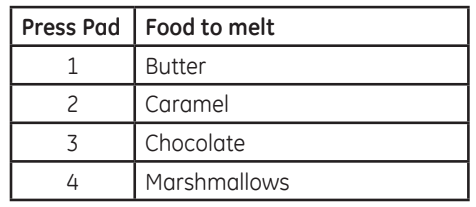
Use the Melt feature to melt certain preprogrammed foods:
1. Press Melt.
2. Press one of the Express Cook Pads (from 1 to 4) to select the food you wish to melt.
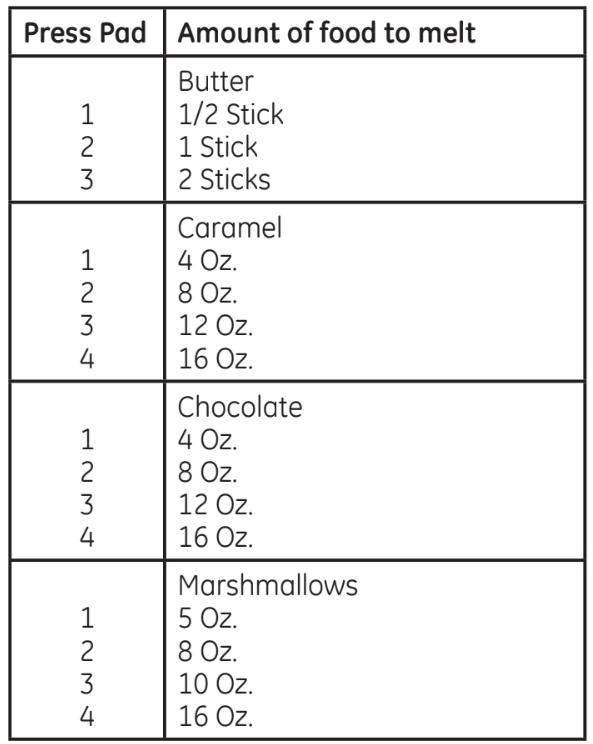
3. Enter an amount (from 1 to 4) for food selected:
4. Press Start/Pause to start cooking. The amount can be changed as time is counting down. Enter Express Cook pads (from 1 to 4).
Weight Defrost
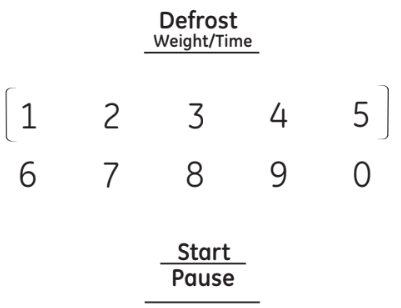
The Defrost Weight/Time feature gives you two ways to defrost food.
Press Defrost Weight/Time once for weight defrost or twice for Time Defrost.
Use Weight Defrost for meat, poultry and fish up to 6 pounds. Use Time Defrost for most other frozen foods.
Weight Defrost automatically sets the defrosting times and power levels to give even defrosting results for meats, poultry and fish.
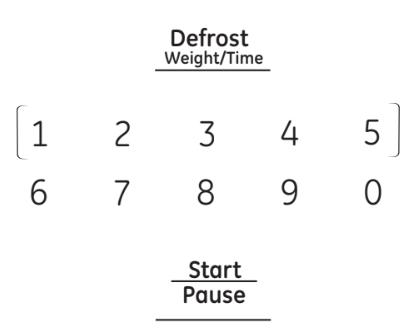
1. Press Defrost Weight/Time once.
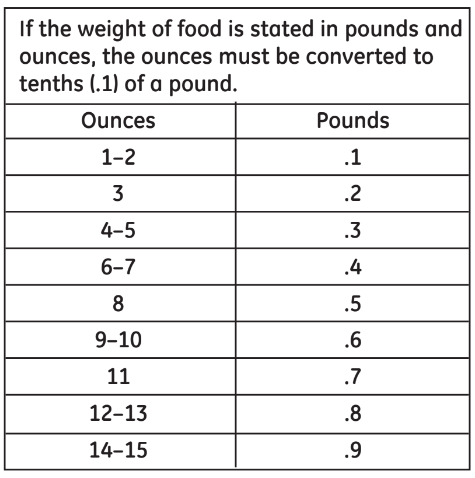
2. Using the conversion guide, enter food weight. For example, press pads 1 and 2 for 1.2 pounds (1 pound, 3 ounces).
3. Press Start/Pause.
(Time Defrost is explained in the Time Features section.)
Remove meat from package and place on microwave-safe dish.
When the oven signals, turn the food over. Remove defrosted meat or shield warm areas with small pieces of foil.
After defrosting, most meats need to stand 5 minutes to complete defrosting. Large roasts should stand for about 30 minutes.
Conversion Guide
Time Defrost allows you to defrost for a selected length of time. See the Defrosting Guide for suggested times. (Weight Defrost is explained in the Auto Feature section.)
Press Defrost Weight/Time twice.
Enter defrosting time.
Press Start/Pause.
Turn food over when the oven signal.
Press Start/Pause.
When the oven signals, turn food over and break apart or rearrange pieces for more even defrosting. Shield any warm areas with small pieces of foil. The oven will continue to defrost if you don't open the door and turn the food.
Power level is automatically set at 3, but can be changed. You can defrost small items quickly by raising the power level after entering the time. Power level 7 cuts the total defrosting time in about half; power level 10 cuts the total time to approximately 1/3. However, food will need more frequent attention than usual.
A dull thumping noise may be heard during defrosting. This is normal when oven is not operating at High power.
Defrosting Tips
Foods frozen in paper or plastic can be defrosted in the package. Closed packages should be slit, pierced or vented AFTER food has partially defrosted. Plastic storage containers should be partially uncovered.
Family-size, prepackaged frozen dinners can be defrosted and microwaved. If the food is in a foil container, transfer it to a microwave-safe dish.
For more even defrosting of larger foods, such as roasts, use Defrost Weight. Be sure large meats are completely defrosted before cooking.
Foods that spoil easily should not be allowed to sit out for more than one hour after defrosting. Room temperature promotes the growth of harmful bacteria.
When defrosted, food should be cool but softened in all areas. If still slightly icy, return to the microwave very briefly, or let it stand a few minutes counts down.
Defrosting Guide
Food
Time
Comments
Breads, Cakes
Bread, buns or rolls (1 piece)
Sweet rolls (approx. 12 oz.)
1 min.
3 to 5 min.
Rearrange after half of time.
Fish and Seafood
Fillets, frozen (1 lb.)
Shellfish, small pieces (1 lb.)
6 to 8 min.
5 to 7 min.
Place block in casserole.
Turn over and break up after first half of time.
Fruit
Plastic pouch—1 or 2 (10-oz. package)
3 to 6 min.
Meat
Bacon (1 lb.)
Franks (1 lb.)
Ground meat (1 lb.)
Roast: beef, lamb, veal, pork Steaks, chops and cutlets
2 to 5 min.
2 to 5 min.
5 to 7 min.
12 to 16 min. per lb. 5 to 7 min. per lb.
Place unopened package in oven. Let stand 5 minutes after defrosting.
Place unopened package in oven. Microwave just until franks can be separated. Let stand 5 minutes, if necessary, to complete defrosting.
Turn meat over after first half of time.
Use power level Warm (1).
Place unwrapped meat in cooking dish. Turn over after first half of time and shield warm areas with foil. After second half of time, separate pieces with table knife. Let stand to complete defrosting.
Poultry
Chicken, broiler-fryer, cut up
(2 V 2 to 3 lbs.)
Chicken, whole (2 V2 to 3 lbs.)
Cornish hen
Turkey breast (4 to 6 lbs.)
15 to 19 min.
17 to 21 min.
7 to 13 min. per lb.
5 to 9 min. per lb.
Place wrapped chicken in dish. Unwrap and turn over after first
half of time. After second half of time, separate pieces and place in cooking dish. Microwave 2 to 4 minutes more, if necessary. Let stand a few minutes to finish defrosting.
Place wrapped chicken in dish. After first half of time, unwrap and turn chicken over. Shield warm areas with foil. To complete defrosting, run cool water in cavity until giblets can be removed.
Place unwrapped hen in oven breast-side-up. Turn over after first half of time. Run cool water in cavity until giblets can be removed.
Place unwrapped breast in microwave-safe dish breast-side-down. After first half of time, turn breast-side-up and shield warm areas with foil. Defrost for second half of time. Let stand 1 to 2 hours in refrigerator to complete defrosting.
About the sensor features.
Humidity Sensor
What happens when using the Sensor Feature:
The Sensor Features detect the increasing humidity released during cooking. The oven automatically adjusts the cooking time to various types and amounts of food.
Do not use the Sensor Features twice in succession on the same food portion—it may result in severely overcooked or burnt food. Be sure to let the oven cool down for 5-10 minutes before starting the next sensor cook.
If food is under cooked after the countdown, use Cook Time for additional cooking time.
The proper containers and covers are essential for best sensor cooking.
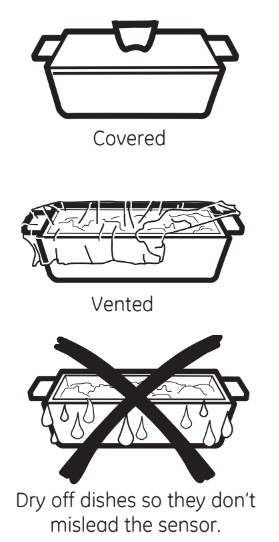
Always use microwave-safe containers and cover them with lids or vented plastic wrap. Never use tight-sealing plastic covers— they can prevent steam from escaping and cause food to overcook.
Be sure the outside of the cooking container and the inside of the microwave oven are dry before placing food in the oven. Beads of moisture turning into steam can mislead the sensor.
To use the Popcorn feature: Use only with prepackaged microwave popcorn weighing 2.0 to 3.5 ounces
To use the Popcorn feature:
Follow package instructions, using Cook Time if the package is less than 2.0 ounces or larger than 3.5 ounces. Place the package of popcorn in the center of the microwave.
Press POPCORN. The oven starts immediately.
How to Adjust the Popcorn Program to Provide a Shorter or Longer Cook Time
If you find that the brand of popcorn you use under pops or overcooks consistently, you can add or subtract 20-30 seconds to the automatic popping time.
To add time: After pressing POPCORN, press 9 immediately after the oven starts for an extra 20 seconds of the cooking time. Press 9 again to add another 10 seconds (total 30 seconds) of additional time.
To subtract time: After pressing POPCORN, press 1 immediately after the oven starts for 20 seconds less cooking time. Press 1 again to reduce cooking time another 10 seconds (total 30 seconds) less cooking time.
To use the Beverage feature:
The Beverage feature heats 4-16 oz of any beverage.
Press BEVERAGE. The oven starts immediately.
Drinks heated with the Beverage feature may be very hot. Remove the container with care.
Reheat:
How to Change the Automatic Settings
To reduce time by 10%:
Press 1 after the feature pad.
To add 10% to cooking time:
Press 9 after the feature pad.
NOTE: Do not use this feature twice in succession on the same food portion— it may result in severely overcooked or burnt food.
To use the Reheat feature:
The Reheat feature reheats single servings of previously cooked foods or a plate of leftovers.
Place covered food in the oven. Press Reheat.
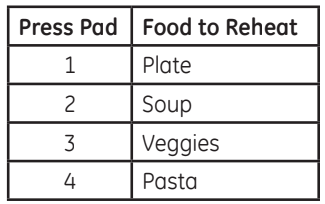
Press one of the Express Cook pads (from 1 to 4) to select the food you wish to reheat.
The oven signals when steam is sensed and the time remaining begins counting down. Do not open the oven door until time is counting down. If the door is opened, close it and press Start/Pause immediately.
After removing food from the oven, stir, if possible, to even out the temperature. If the food is not hot enough, use Cook Time to reheat for more time. Reheated foods may have wide variations in temperature. Some areas may be extremely hot.
If food is not hot enough after the countdown, use Cook Time for additional reheating time.
Some Foods Not Recommended For Use With Reheat:
It is best to use Cook Time for these foods:
Bread products.
Foods that must be reheated uncovered.
Foods that need to be stirred or rotated.
Foods calling for a dry look or crisp surface after reheating.
Potato
How to Change the Automatic Settings
To reduce time by 10%:
Press 1 after the feature pad.
To add 10% to cooking time:
Press 9 after the feature pad.
NOTE: Do not use this feature twice in succession on the same food portion— it may result in severely overcooked or burnt food.
Potato
Pierce potato skin with fork and place potato in the oven.
Press Potato. the oven starts immediately.
The oven signals when steam is sensed and time remaining is counting down. Turn or stir the food if necessary.
Do not open the oven door until time is counting down. If the door is opened, close it and press Start/Pause immediately.
If food is undercooked after the countdown,use Cook Time for additional cooking time.
About other features.
Cooking Complete Reminder
To remind you that you have food in the oven, the oven will display "Food is Ready" and beep once a minute until you either open the oven door or press Cancel/Off.
Set Clock
Press to enter the time of day or to check the time of day while microwaving.
Press Set Clock.
Enter time of day.
Press Start or Set Clock.
To check the time of day while microwaving, press Set Clock.
Child Lock-Out
You may lock the control panel to prevent the microwave from being accidentally started or used by children.
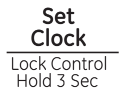
To lock or unlock the controls, press and hold Set Clock for about three seconds. When the control panel is locked, LOCKED will appear in the display.
Display On/Off
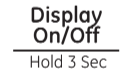
To turn the clock display on or off, press and hold Display On/Off button for about 3 seconds. The Display On/Off feature cannot be used while a cooking feature is in use.
Timer On/Off
Timer On/Off operates as a minute timer and can be used at any time, even when the oven is operating.
Press TIMER ON/OFF.
Enter time you want to count down.
Press TIMER ON/OFF to start.
When time is up, the oven will signal. To turn off the timer signal, press TIMER ON/OFF.
NOTE: The timer indicator will be lit while the timer is operating.
Start/Pause
In addition to starting many functions, Start/Pause allows you to stop cooking without opening the door or clearing the display. Press Start/Pause again to restart the oven.
Steam Clean
Use Steam Clean for easy wiping inside with steam.
Press the Steam Clean button.
Put steam bowl with 1/4 cup of water.
Press the dial or Start/Pause to start.
After Steam Clean, remove Turntable and Turn Table Support and wipe out inside of oven cavity with paper towel or soft cloth
Turntable
For best cooking results, leave the turntable on. It can be turned off for large dishes. Press TURNTABLE to turn the turntable on or off.
Sometimes the turntable can become too hot to touch. Be careful touching the turntable during and after cooking.
Vent Fan
The vent fan removes steam and other vapors from surface cooking.
Press Vent Fan once for boost fan speed, twice for high fan speed, a third time for low fan speed or a forth time to turn the fan off.
Surface Light
Press to turn the surface light on or off.
On some models, there is a night light option.
Press Surface Light once for bright light, twice for the night light or three times to turn the light off.
Mute
The beeper sound level can be muted. Press Mute On/Off.
Automatic Fan
An automatic fan feature protects the microwave from too much heat rising from the cooktop below it. It automatically turns on at low speed if it senses too much heat.
If you have turned the fan on you may find that you cannot turn it off. The fan will automatically turn off when the internal parts are cool. It may stay on for 30 minutes or more after the cooktop and microwave controls are turned off.
Clock Mode
You can change clock 12/24hrs display mode.
Press Settings.
Press Express Cook pad 1.
Select 12hrs/24hrs. 1 -12 hrs 2- 24 hrs
Settings
Display Speed
You can change display speed.
Press Settings.
Press Express Cook pad 2.
Select new display speed. 1 - slow 2- normal 3 - fast
The light will illuminate after approximately 6 months of alert user to replace the charcoal filter (if used) and clean/replace the grease filters. Reset by push and hold 3 seconds.
Filter Replace Reminder
The charcoal/grease filter should be replaced when it is noticeably dirty/discolored (usually after 6-12 months, depending on hood usage) or filter replacement LED is on.
When the Filter Replace LED turned on, replacefilter and press Reset Filter and hold for 3seconds to reset.
Microwave terms.
Arcing
Arcing is the microwave term for sparks in the oven. Arcing is caused by:
• Metal such as twist-ties, poultry pins, gold-rimmed dishes.
• Metal or foil touching the side of the oven.
• Foil that is not molded to food (upturned edges act like antennas).
• Recycled paper towels containing small metal pieces.
• Plates or dishes with a metallic trim or glaze with a metallic sheen.
Covering
Covers hold in moisture, allow for more even heating and reduce cooking time.
Venting plastic wrap or covering with wax paper allows excess steam to escape.
Shielding
In a regular oven, you shield chicken breasts or baked foods to prevent over-browning. When microwaving, you use small strips of foil to shield thin parts, such as the tips of wings and legs on poultry, which would cook before larger parts.
Standing
Time
When you cook with regular ovens, foods such as roasts or cakes are allowed to stand to finish cooking or to set.
Standing time is especially important in microwave cooking. Note that a microwaved cake is not placed on a cooling rack.
Venting
After covering a dish with plastic wrap, you vent the plastic wrap by turning back one corner so excess steam can escape.
CARE AND CLEANING
Care and cleaning of the microwave oven.
Helpful Hints
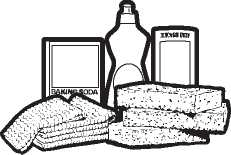
An occasional thorough wiping with a solution of baking soda and water keeps the inside fresh. Be sure the power is off before cleaning any part of this oven.
How to Clean the Inside
Walls, Floor, Inside Window, Metal and Plastic Parts on the Door
Some spatters can be removed with a paper towel; others may require a damp cloth. Remove greasy spatters with a sudsy cloth, then rinse with a damp cloth. Do not use abrasive cleaners or sharp utensils on oven walls.
Never use a commercial oven cleaner on any part of your microwave.
Removable Turntable and Turntable Support
To prevent breakage, do not place the turntable into water just after cooking. Wash it carefully in warm, sudsy water or in the dishwasher. The turntable and support can be broken if dropped. Remember, do not operate the oven in the microwave mode without the turntable and support seated and in place.
How to Clean the Outside
We recommend against using cleaners with ammonia or alcohol, as they can damage the appearance of the microwave oven. If you choose to use a common household cleaner, first apply the cleaner directly to a clean cloth, then wipe the soiled area.
Case
Clean the outside of the microwave with a sudsy cloth. Rinse and then dry. Wipe the window clean with a damp cloth.
Control Panel
Wipe with a damp cloth. Dry thoroughly. Do not use cleaning sprays, large amounts of soap and water, abrasives or sharp objects on the panel—they can damage it. Some paper towels can also scratch the control panel.
Door Panel
Before cleaning the front door panel, make sure you know what type of panel you have. Refer to the eighth digit of the model number. "S" is stainless steel, "L" is CleanSteel and "B", "W" or "C" are plastic colors.
Stainless Steel (on some models)
The stainless steel panel can be cleaned with Stainless Steel Magic or a similar product using a clean, soft cloth. Apply stainless cleaner carefully to avoid the surrounding plastic parts. Do not use appliance wax, polish, bleach or products containing chlorine on Stainless Steel finishes.
Plastic Color Panels
Use a clean, soft, lightly dampened cloth, then dry thoroughly.
Door Seal
It's important to keep the area clean where the door seals against the microwave. Use only mild,
non-abrasive detergents applied with a clean sponge or soft cloth. Rinse well.
Bottom
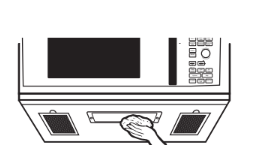
Clean off the grease and dust on the bottom often. Use a solution of warm water and detergent
Cooktop Light/Nite Light
Replace with a 120 volt, 40 watt (max.) halogen bulb. Order WB08X10051 from your GE Appliances supplier.
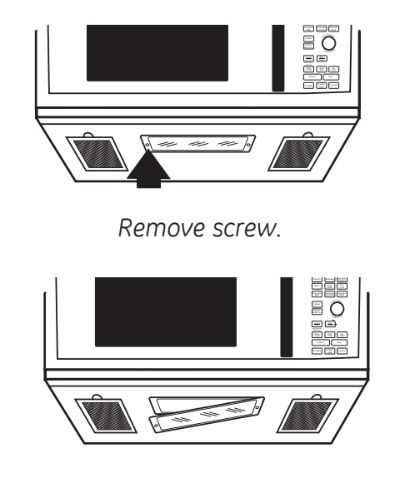
To replace the cooktop light/nite light, first disconnect the power at the main fuse or circuit breaker panel, or pull the plug.
Remove the screw from the side of the light compartment cover and lower the cover until it stops.
Be sure the bulb is cool before removing. Break the adhesive seal by gently unscrewing the bulb.
Screw in the new bulb, then raise the light cover and replace the screw. Connect electrical power to the oven.
Vent Fan
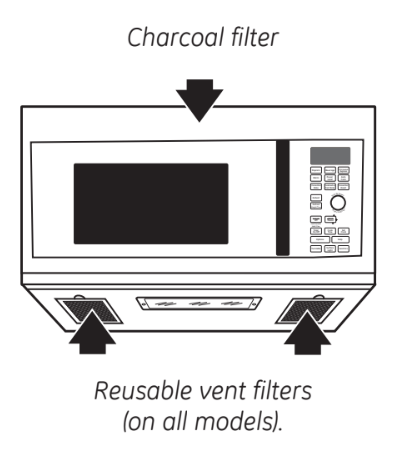
The vent fan has two metal reusable vent filters.
Models that recirculate air back into the room also use a charcoal filter.
Reusable Vent Filters
The metal filters trap grease released by foods on the cooktop. They also prevent flames from foods on the cooktop from damaging the inside of the oven.For this reason, the filters must always be in place when the hood is used. The vent filters should be cleaned once a month, or as needed.
Removing and Cleaning the Filters
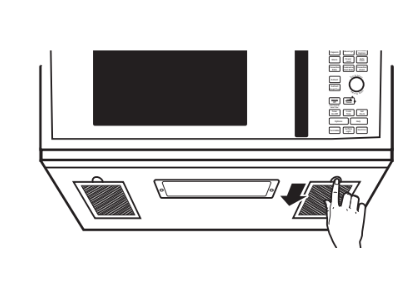
To remove, slide them to the rear using the tabs. Pull down and out.
To clean the vent filters, soak them and then swish around in hot water and detergent. Don't use ammonia or ammonia products because they will darken the metal. Light brushing can be used to remove embedded dirt.Rinse, shake and let dry before replacing.
To replace, slide the filters into the frame slots on the back of each opening. Press up and to the front to lock into place.
Charcoal Filter
The charcoal filter cannot be cleaned. It must be replaced. Order Part No. JX81H from your GE Appliances supplier.
If the model is not vented to the outside, the air will be recirculated through a disposable charcoal filter that helps remove smoke and odors.
The charcoal filter should be replaced when it is noticeably dirty or discolored (usually after 6 to 12 months, depending on usage). See "Optional Kits," page 7, for more information.
To Remove the Charcoal Filter
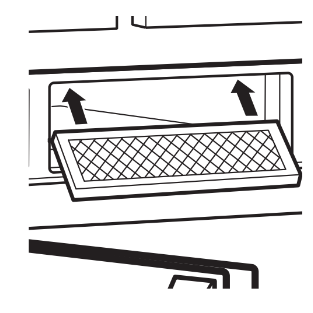
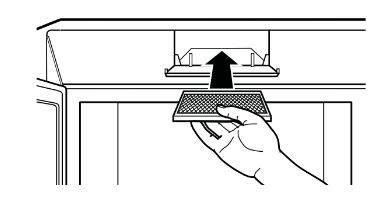
To remove the charcoal filter, first disconnect power at the main fuse or circuit breaker, or pull the plug. Push down 2 buttons on the filter door.
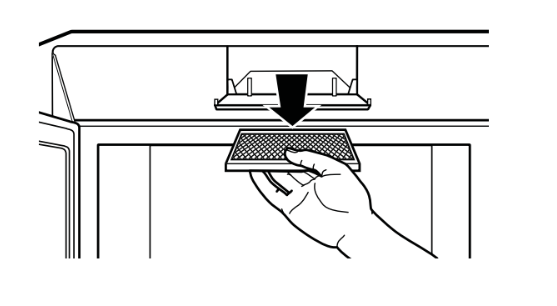
The charcoal filter should be replaced every 7 months when LED is on. See "Optional Kits", page 7.Lift the filter at the bottom until it comes free of the tabs. Slide the filter down and out.
To Install the Charcoal Filter
To install a new charcoal filter, remove plastic and other outer wrapping from the new filter.
Insert the top of the filter up. Push the bottom of the filter in until it rests in place behind the tabs. Close filter door.
TROUBLESHOOTING
Problem
Possible Cause
What to Do
Oven will not start
A fuse in your home may be blown or the circuit breaker tripped.
• Replace fuse or reset circuit breaker.
Power surge.
• Unplug the microwave oven, then plug it back in.
Plug not fully inserted wall outlet.
• Make sure the 3-prong plug on the into oven is fully inserted into wall outlet.
Door not securely closed.
• Open the door and close securely.
Floor of the oven is warm, even when the oven has not been used
Heat from the cooktop light may make the oven floor get warm.
• This is normal.
"LOCKED" appears on display
The control has been locked.
• Press and hold SET CLOCK for about 3 seconds to unlock the control.
You hear an unusual, low-tone beep
You have tried to start the Reminder without a valid time of day.
• Start over and enter a valid time of day.
You have tried to change the power level when it is not allowed.
• Many of the oven's features are preset and cannot be changed.
"SENSOR ERROR” appears on display
When using a Sensor feature, the door was opened before steam could be detected.
• Do not open door until steam is sensed and time is shown counting down on display.
Steam not detected in maximum amount of time.
• Use Time Cook to heat for more time.
Food amount too large for Sensor Reheat
Sensor Reheat is for single servings of recommended foods.
• Use Time Cook for large amounts of food.
Things That Are Normal With Your Microwave Oven
Steam or vapor escaping from around the door.
Light reflection around door or outer case.
Dimming oven light and change in the blower sound at power levels other than high.
Dull thumping sound while oven is operating.
TV/radio interference might be noticed while using the microwave. Similar to the interference caused by other small appliances, it does not indicate a problem with the microwave. Plug the microwave into a different electrical circuit, move the radio or TV as far away from the microwave as possible, or check the position and signal of the TV/radio antenna.
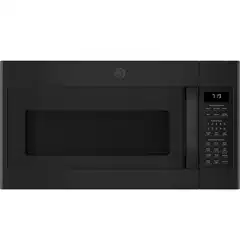
 This is a quick way to set cooking time for 1-5 minutes.