www.srhythm.com
User Manual
Manuale diIstruzioni
Manual de instrucciones
Manuel d'Utilisation
Bedienungsanleitung
取扱説明爾
NC25
Findtherhythmofyoursoul
Findtherhythmofyoursoul
SrhythmAudio
SrhythmAudio
Srhythm
Srhythm
Standard warranty: 3 months.
Prolong warranty to 18 months by registering member.
Lifetime support for Srhythm products.
7 x 24 hours customer service: service@srhythm.com
Garanzia standard: 3 mesiProlungare la garanzia a
18 mesi dal membro registratoSupporto a vita per i
prodotti Srhythm.
7 x 24 ore di servizio clienti: service@srhythm.com
Servicio al cliente 7 x 24 horas:
service@srhythm.com
Garantía Estándar: 3 mesesProlongue la garantía
a 18 meses al registrarse como miembroSoporte
de por vida para productos Srhythm.
Garantie standard: 3 moisGarantie prolongée de 18
mois en s´inscrivant en tant que membre
Service client 24h/7J pour les produits Srhythm:
service@srhythm.com
7x24 Stunden Kundendienst: service@srhythm.com
Standardgarantie: 3 MonateVerlängern Sie die
Garantie auf 18 Monate, indem Sie sich als Mitglied
registrierenLebenslange Unterstützung für Srhythm-
Produkte.
標準保証:3か月。メンバーを登録することにより、保証を18か
月まで延長します。Srhythm製品のライフタイムサポート。
7 x 24時間のカスタマーサービス:service@srhythm.com
1. Avoid dropping.
2. Do not disassemble.
3. Keep away from children to avoid danger from
improper use.
4. Do not submerge in water.
5. Do not use outdoors during thunderstorms.
6. Avoid operating in extreme temperatures. Please
use the headphones within their operation
temperature range: -15 °C (5 F) – 55°C(131 F).
7. Use original or certified cables for charging.
8. Do not use corrosive cleaner/oil to clean the
headphones.
1. To avoid hearing damage, please do no t listen
for a long time at high volume.
2. Please use cautiously or stop using the
headphones in potentially dangerous situations.
3. Do not use the headphones while driving.
4. For your safety, please do not turn the volume too
high while running outside so as to ensure that you
can hear sounds in your surroundings.
User Manual
Use r Manua l
Man uale di Istru zioni
Man ual de in struc cione s
Man uel d'U tilis ation
Bed ienun gsanl eitun g
取扱 説明 爾
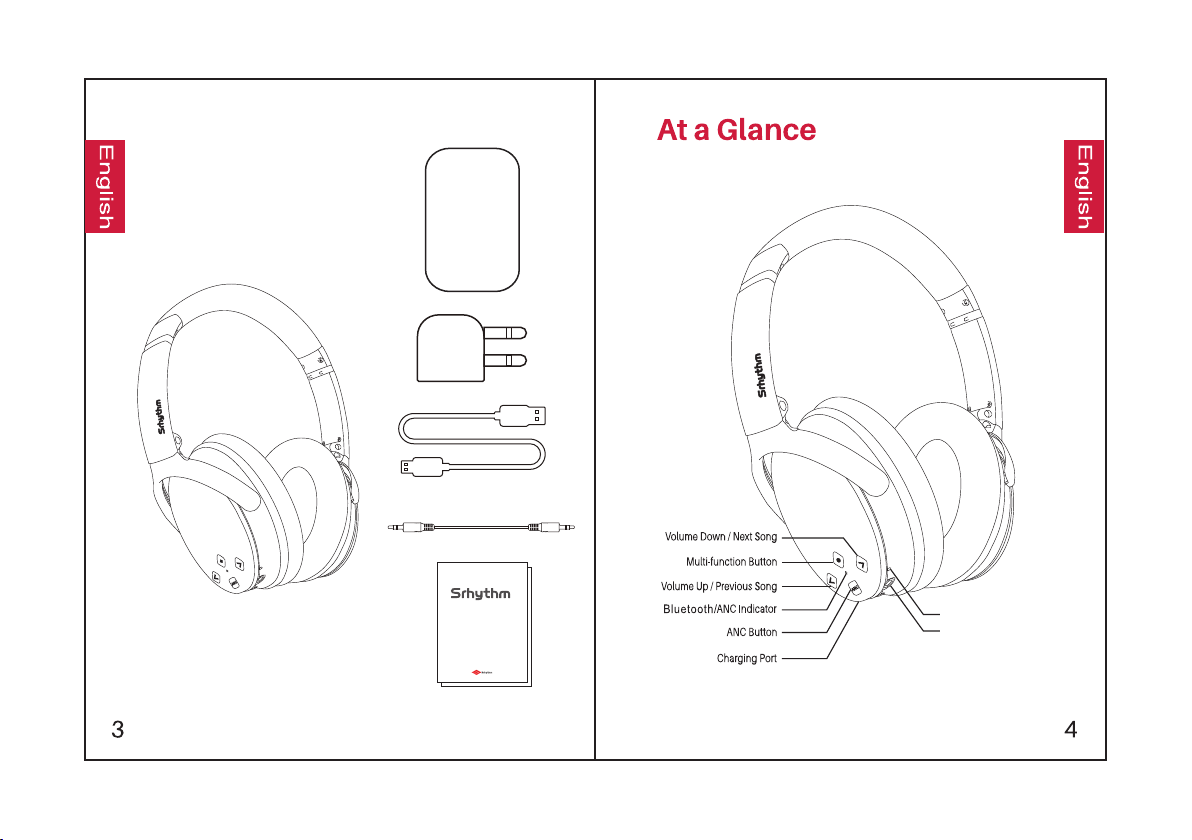
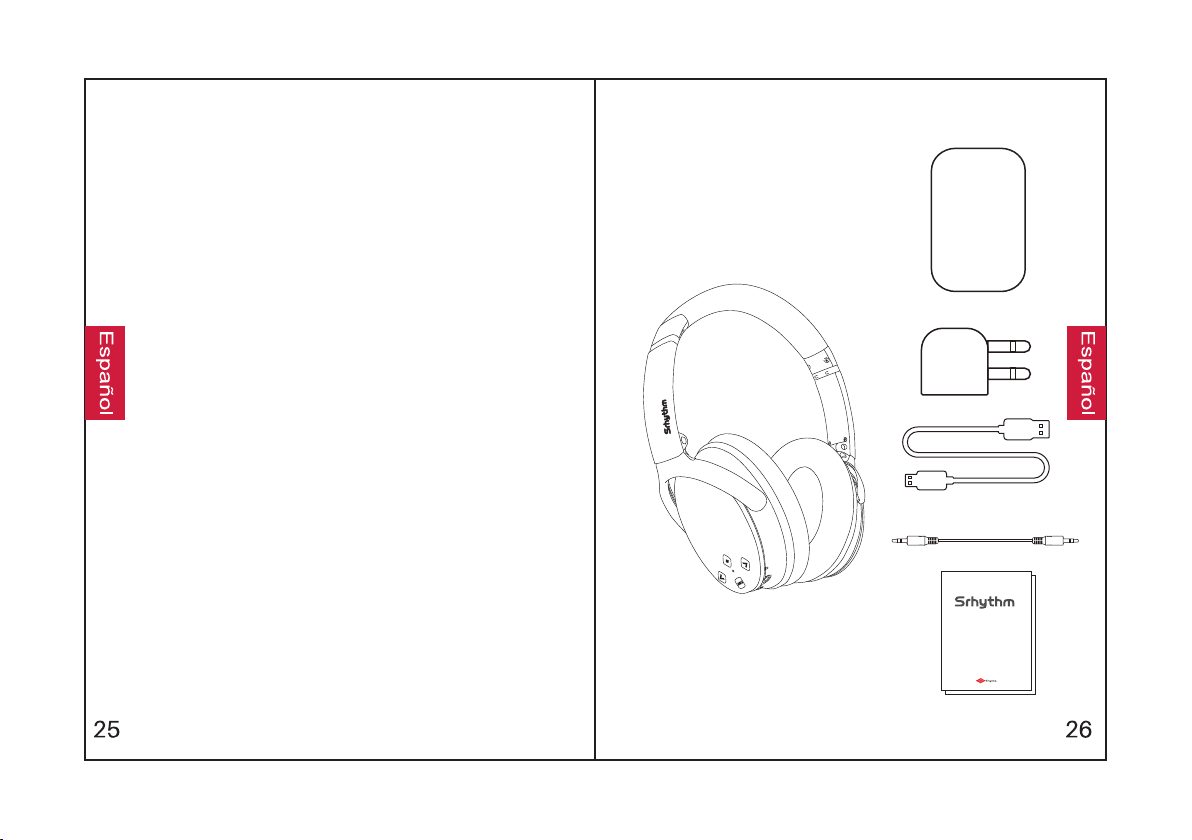
What's in the Box
Microphone
3.5mm AUX Port
NC 25
2
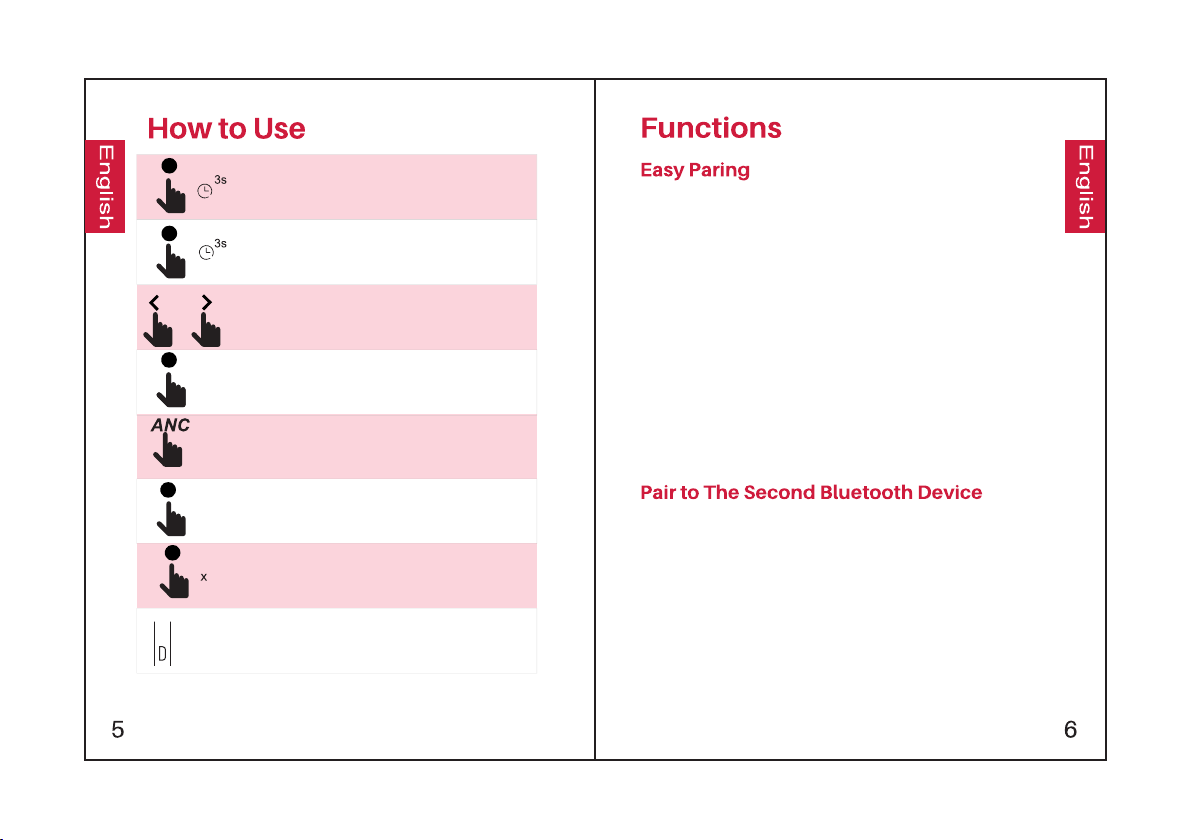
Hold the Multi-function Button for 3 seconds to turn
the headphones on and they will enter pairing mode.
(the indicator light will turn blue)
Hold the Multi-function Button for 3 seconds to turn
the headphones off.
Press to adjust volume. Long press to skip to
next/previous song.
Press the Multi-function Button to play/pause
music.
Press the ANC Button to turn Active Noise
Cancellation on/off
(the indicator light will turn green).
Press the Multi-function Button to answer/end call.
Double-press the Multi-function Button to reject
an incoming call.
Charging: Use the included micro USB charging
cable to connect to the Charging Port of the device.
Connect the other end of the charging cable to
either a computer USB port or USB wall charger.
1. Hold the Multi-function Button for 3 seconds to
turn the headphones on and they will enter
pairing mode.
2. Keep the headphones and your Bluetooth
device as close as possible during the pairing
process.
3. Turn on the Bluetooth function of your Bluetooth
device. Search for the Bluetooth signal of the
headphones on your Bluetooth device, and
select“NC-25”to pair it with your Bluetooth device.
The indicator light will slowly flash blue when the
headphones are paired successfully.
4. If you are asked for a password/PIN code during
the pairing procedure, enter "0000" (four zeros).
1. Make sure the headphones are connected to the
first Bluetooth device successfully and music is
not playing.
2. Hold the Multi-function Button until the
headphones re-enter pairing mode
(the indicator light will flash red and blue
alternately).
3. Pair the headphones with the second device
according to "Easy Pairing" steps.
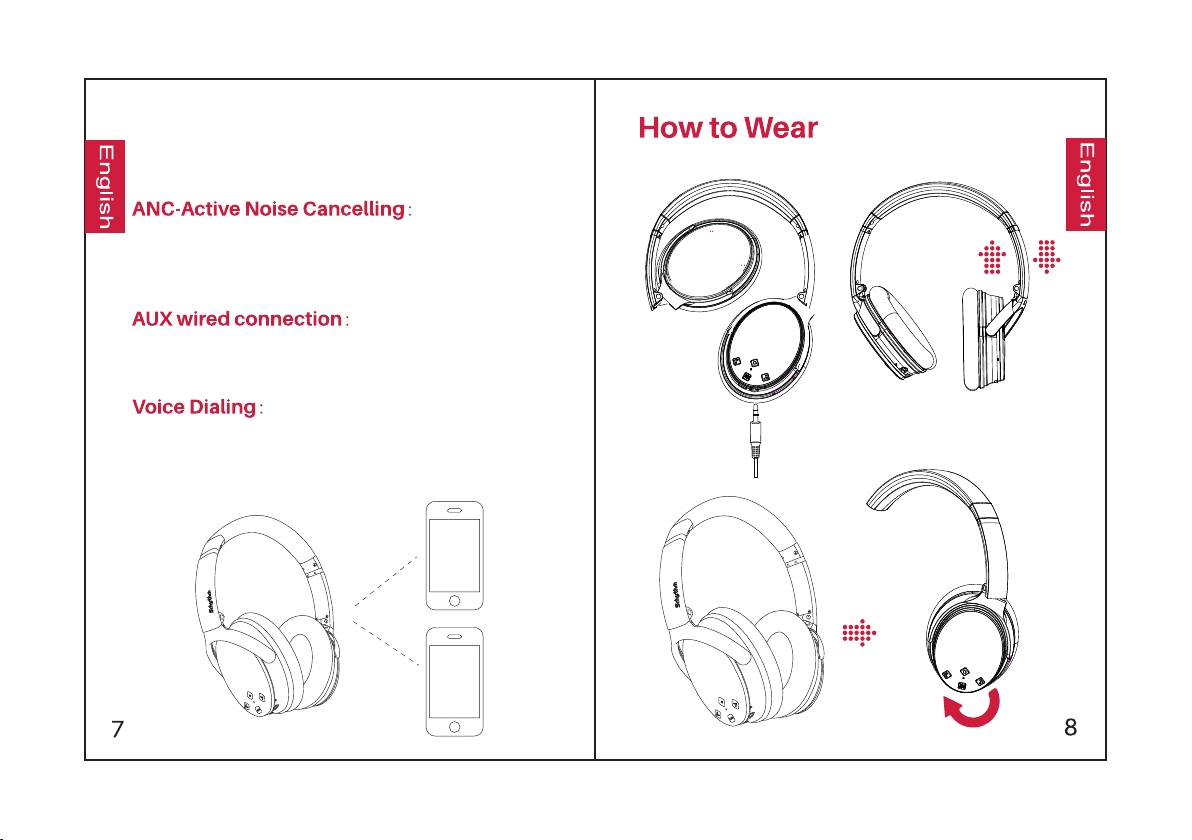
4. Return to the first Bluetooth device and
pair it with the headphones again. Now both of
your devices are paired with the headphones.
To turn on ANC, press the ANC Button;
the green ANC Indicator light will turn on.
To turn off ANC, press the ANC Button;
the green ANC Indicator light will turn off.
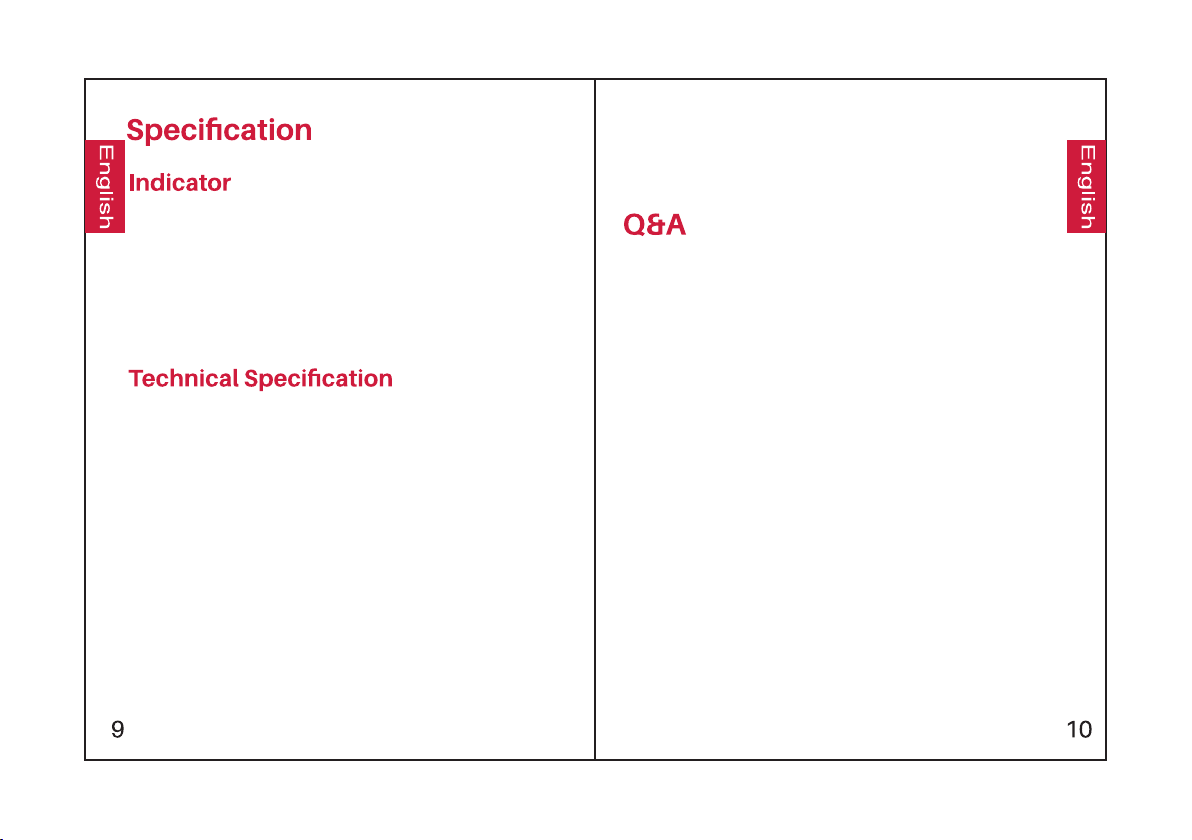
The headphones support AUX input for wired
external audio source connection. Simply turn
the headphones off and plug in the audio cable.
Press both the Volume Up and Volume Down
buttons simultaneously to activate the voice
dialing function(compatible with iPhone Siri
and selected Android voice dialing software).
Light
•Pairing: Red and blue lights flash alternately
•Paired: Blue light flashes
•Playing:Blue light slowlyflashes
•Charging: Red light turns on
•Full Charge: Red light turns off
•Battery Low: Red light turns on with voice prompt
•ANC On: Green light turns on.
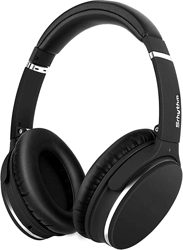
•Product name: Srhythm NC25
•Battery capacity: 360mAh
•Input: 5V220mA
•Charging time: About 2 hours
•Use time: 12–16 hours
•Bluetooth version: V4.1
•Chip: CSR
•Bluetooth profile: A2DP, AVRCP, HSP, HFP, CVC
•Bluetooth range: 10m/33ft
•Waterproof rating: IPX4
•Net weight: 180g
•Impedance: 32 Ω
•Driver diameter: Φ40mm
•Frequency response: 20–20KHz
1. Q: Why can't the headphones pair with my mobile
phone?
A: Please check whether your headphones are in pairing
mode or reconnection mode, check if the Bluetooth
search function of your Bluetooth device is turned on,
then go to the Bluetooth menu of your Bluetooth device,
delete/forget the headphones and reconnect them.
2. Q: Why can't the headphones turn on?
A: Please double check the battery status of your
headphones.
3. Q: Can I replace the battery in the headphones?
A: No. These headphones use a built-in non- detachable
Li-Polymer battery which can't be replaced.
4. Q: Can I use the headphones while driving?
A: For your safety, we strongly recommend you do not use
headphones while driving so as to avoid distraction.
5. Q: Why do the headphones sometimes disc-onnect from
the Bluetooth device within 10 meters?
A: Please check if there is any metal material within a
relatively close range that may be interfering with the
Bluetooth connection. This may happen because
Bluetooth is a radio technology which is sensitive to
objects between the headphones and the irconnected
devices.
If any isssues,please full charge your
headphone(don't use fast charger),then Reset
the headphone by inserting the audio cable
into audio socket then removing it.
Manuale d'istruzioni
6. Q: Why can't I hear any sound from my computer
or mobile phone?
A: Please check if the output channel of your
computer supports the A2DP profile. Also check the
volume settings on your headphones and
computer/mobile phone.
7. Q: Why am I unable to use the headphones to
control the volume of a track playing on an APP on
my mobile phone?
A: Due to the configurations of different application
software, the headphones may not be completely
compatible with some APPs.
8. Q: What do I do if Bluetooth crashes?
(Cannot close or open)
A: Please reset the Bluetooth function of the
headphones by inserting an audio cable into the
audio port and removing it.
9. Q: Why does Bluetooth turn off when I connect an
audio cable?
A: This is one of our special features. When the user
inserts an audio cable into the audio port, all
Bluetooth feature buttons stop working and
Bluetooth turns off. Don't worry, Bluetooth will be
available again when the audio cable is moved.
10. Q: Why can't I turn the headphones on/off?
A: Please note that ANC and Bluetooth are
indicated by the same indicator light, with a green
light for ANC and a blue light for Bluetooth. If you
need to turn Bluetooth on/off, please make sure you
first turn off ANC.
Sicurezza Uditiva:
1. Onde evitare danni permanenti all'apparato
uditivo, si prega di non farne un utilizzo prolungato
a volume alto.
2. Si pregadi usare responsabilmente e di
rimuovere le cuffie in situazioni pericolose.
3. Si prega di non utilizzare durante la guida.
4. Per la vostra sicurezza, si prega di non utilizzare
le cuffie a volume elevato durante lacorsa in modo
da esseresicuri di poter sentire I rumori circostanti.
Sicurezza Operativa:
1.Evitare le cadute e gli urti.
2.Non disassemblare.
3.Tenere lontano dalla portata dei bambini.
4.Non immergere in acqua.
6.Non utilizzare a temperature estreme. Si prega di
rimanere nella gamma di temperatura consigliata:
-15 °C (5 F) – 55°C(131 F).
5.Non utilizzare all'aperto durante i temporali.
7.Utilizzare solo cavi di ricarica certificati e originali.
cuffie.
8.Non utilizzare detergenti corrosivi per pulire le
ContenutodellaConfezione
Use r Manua l
Man uale di I struz ioni
Man ual de in struc cione s
Man uel d'U tilis ation
Bed ienun gsanl eitun g
取扱 説明 爾
NC 25
2
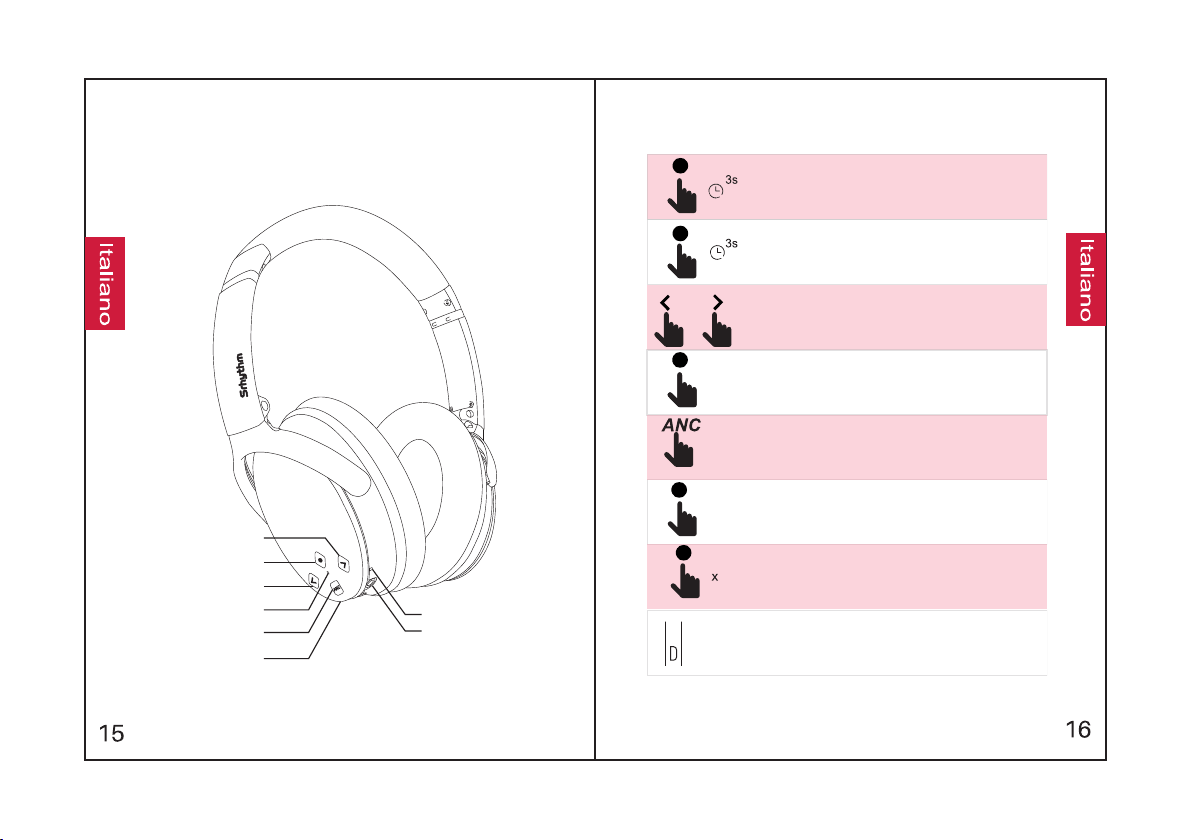
Uno Sguardo al Prodotto
AbbassaVol/Canzone Successiva
Pulsante Multi-funzione
Alza Vol /Canzone Precedente
Spia Bluetooth / ANC
Pulsante ANC
Entrata Caricabatterie
Microfono
3.5mm Entrata AUX
Come Utilizzare
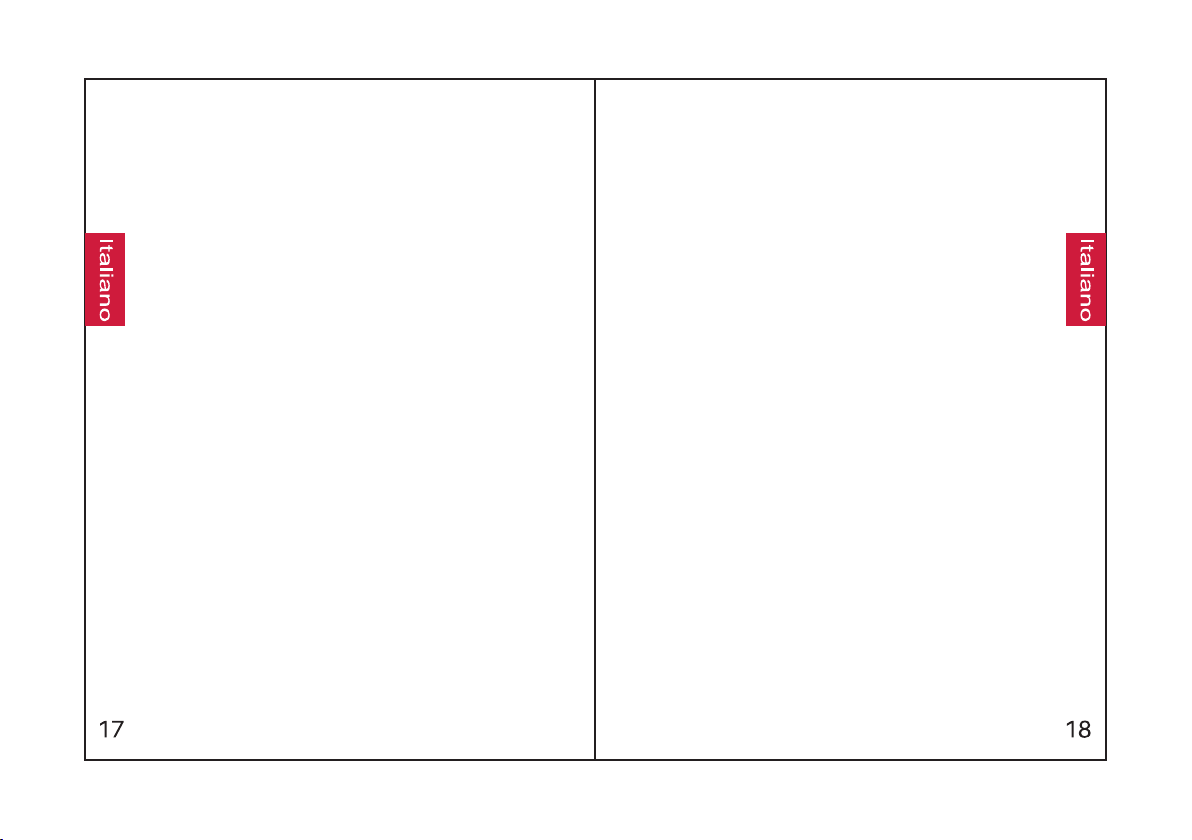
Tenere premuto il Pulsante Multi-funzione per 3 secondi per
accendere il dispositivo, esso entrerà in modalità
accoppiamento in automatico(la spia diventerà blu).
Tenere premuto il pulsante Multi-funzione per 3 secondi per
spegnere il dispositivo.
Premere per regolare il volume. Tenere premuto per passare
alla canzone precedente/successiva.
Premere il pulsante Multi-funzione per far partire/ fermare la
musica.
Premere il pulsante ANC per attivare/disattivare il soppressore
di rumori (la spia diventerà verde).
Premere il pulsante Multi-funzione per rispondere / terminare
una chiamata.
Premere due volte il pulsante Multi-funzione per rifiutare una
chiamata entrante.
Operazione di ricarica: Connettere ilcavo di ricarica USB
incluso all'entrata corrispondente sulle cuffie. Connettere
l'altra estremità all'entrata USB di un computer o di un
Caratteristiche
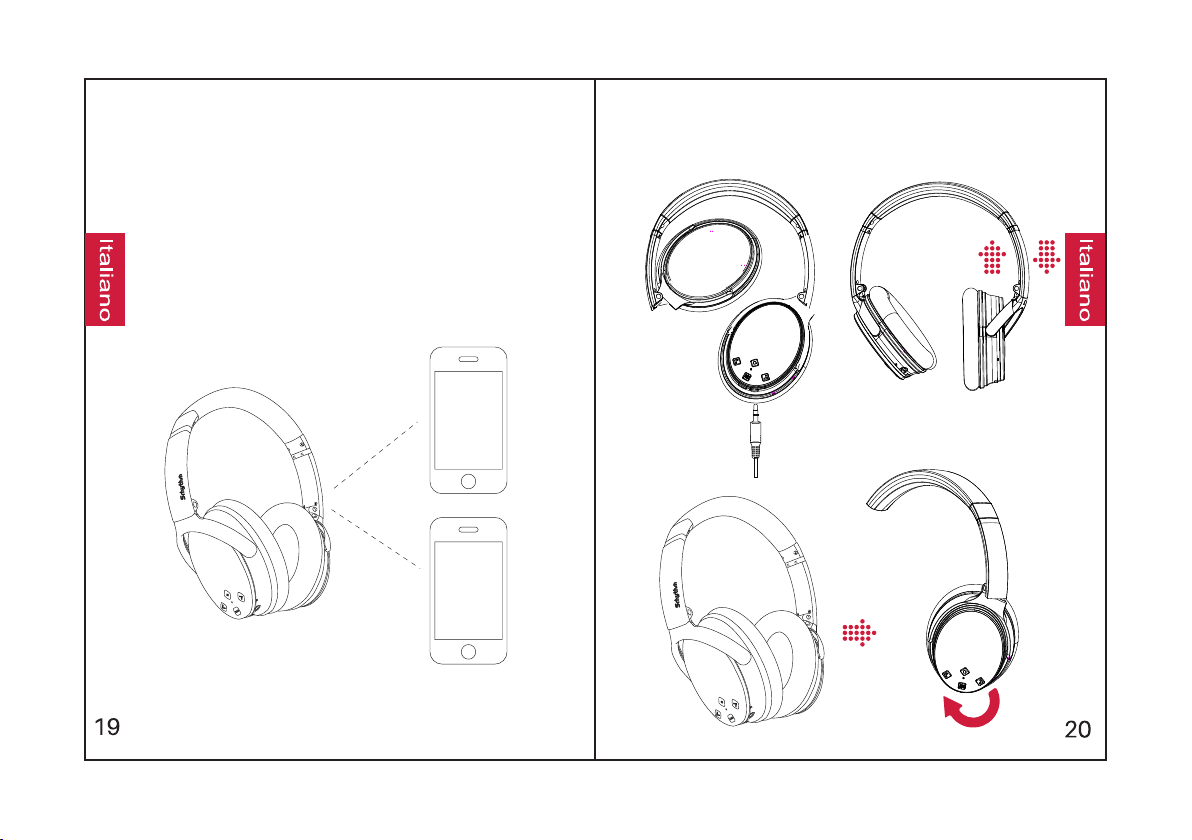
Accoppiamento Facile
più vicino possibile durante l'accoppiamento.
lentamente ad accoppiamento avvenuto.
"0000" (quattro volte zero).
automatico.
entrerà in modalità accoppiamento in
1.Tenere premuto il Pulsante Multi-funzione per 3
2.Mantenere le cuffie e il dispositivo Bluetooth il
dispositivo. Cercare il segnale Bluetooth delle
25”per accoppiare. La spia lampeggerà
4.Se dovesse richiedere una password/PIN
durante il procedimento, immettere il codice
secondi per Multi-funzione il dispositivo, esso
3.Attivare la funzione Bluetooth sul vostro
vostre cuffie sul dispositivo, e selezionare“NC-
Accoppiamento con un Secondo
Dispositivo Bluetooth
rosso).
correttamente al primo dispositivo e che le
le cuffie non rientrino in modalità accoppiamento
stesse non stiano riproducendo musica.
2.Tenere premuto il pulsante Multi-funzione finchè
(la spia lampeggerà alternativamente blu e
1.Assicurarsi che lecuffie siano accoppiate
3.Procedere all'accoppiamento seguendo I passi
precedenti (vedi Accoppiamento facile).
4. Riaccoppiare il primo dispositivo Bluetooth
con le cuffie. Ora entrambi i dispositivi sono
accoppiati.
ANC – Soppressore di Rumori:
Per attivare la funzione ANC, premere il
pulsante ANC; laspia verde corrispondente si
accenderà.
Per disattivare la funzione ANC, premere il
pulsante ANC; la spia verde corrispondente si
spegnerà.
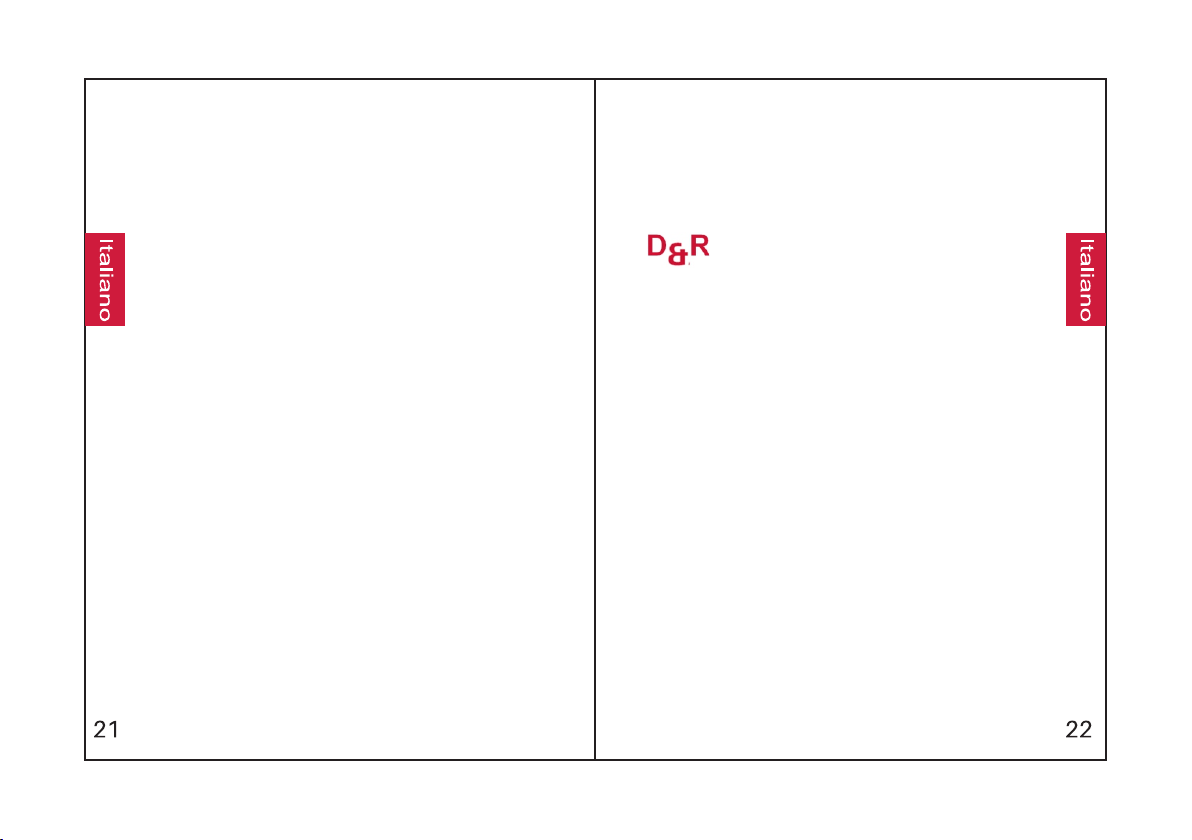
Come Indossare
Cablaggio AUX:
Le cuffie sono dotate di entrata AUX per
connettere impianti audio esterni. Spegnere le
cuffie e inserire il cavo audio.
Chiamate Vocali:
Premere contemporaneamente I pulsanti della
regolazione del volume per attivare le funzioni di
chiamate vocali(compatibile con iPhone Siri e
programma dedicato di chiamate vocali Android ).
Specifiche
Luci Spie
•Riproduzione musicale:luce blu a lampeggio lento
vocale
•ANC attivato: luce verde fissa.
•Accoppiamento: luce rossa e blu a lampeggio
alternato
•Accoppiato: luce blu lampeggiante
•Batteria scarica: luce rossa accesa con indicatore
•Ricarica completa: luce rossa spenta
•Ricarica: lucerossafissa
Specifiche Tecniche
Profilo Bluetooth: A2DP, AVRCP, HSP, HFP, CVC
Impermeabilità: IPX4
Entrata: 5V220mA
Capacità Batteria: 360mAh
• Nome del Prodotto: Srhythm NC25
Tempo di Ricarica:2 ore circa
Tempo di utilizzo a piena carica: 12–16 ore circa
Versione Bluetooth: V4.1
Chip: CSR
Raggio d'azione Bluetooth: 10m/33piedi
Impedenza: 32 Ω
Diametro driver: Φ40mm
Risposta in frequenza: 20–20KHz
Peso netto: 180g
R: Si prega di verificare se le vostre cuffie sono in
modalità accoppiamento o riconnessione, verificare se
la funzione di ricerca Bluetooth sul vostro dispositivo sia
attivata, accedere quindi al menù Bluetooth del vostro
dispositivo, rimuovere/dimenticare le cuffie e ricollegare
nuovamente.
1. D: Perchè non riesco ad accoppiare le cuffie al mio
telefono?
R: Si pregadi controllare lo stato della batteria delle
vostre cuffie.
R: No. Queste cuffiesono dotate di una batteria ai
polimeri di litio incorporatanon removibile che non può
essere sostituita.
4. D: Posso utilizzare le cuffiementre sono alla guida?
R: Si prega di verificare qualora siano presenti oggetti di
metallo nel raggio d'azione del Bluetooth che potrebbero
interferire con la connessione. Questo talvolta accade
perchè il bluetooth è una tecnologia radio sensibile
all'intromissione di oggetti nel raggio d'azione.
5. D: Perchè le cuffie a volte si disconnettono dal
dispositivo Bluetooth nel raggio di 10 metri?
R: Per la vostra sicurezza, raccomandiamo fermamente
di non utilizzarele cuffie mentre si è alla guida, onde
evitare possibili distrazioni.
2. D: Perchè non riesco ad accendere le cuffie?
3. D: Posso sostituire labatteria delle cuffie?
If you experience problems, fully charge
the headphones (do not use the quick
charger), then reset the headphones by
inserting the audio cable into the audio
jack and removing it.
R: Le cuffie potrebbero non essere compatibili con
tutte le APP per via delle configurazioni dei
programmi.
R: Si pregadi riavviare la funzione Bluetooth delle
cuffie inserendo un cavo audio nell'entrata
apposita e rimuovendolo.
7. D: Perchè non posso usare le cuffie per regolare
il volume di una canzone in riproduzione da
un'APP sul mio telefono?
R: Questa è una nostra speciale caratteristica.
Quando si inserisce un cavo audio nell'apposita
entrata, tutte le funzioni Bluetooth smettono di
funzionare. Non preoccupatevi, il Bluetooth si
riattiverà in automatico disinserendo il cavo audio.
R: Si prega di verificare se il canale di uscita
delvostro computer supportail profilo A2DP.
Verificare anche le impostazioni dei volumi delle
cuffie del dispositivo in uso.
10. D: Perchè non riesco ad accendere / spegnere
le cuffie?
R: Si prega di notare che sia il Bluetooth che la
funzione ANC hanno la stessa luce spia, verde per
ANC e blu per Bluetooth. Se si desidera accendere
/ spegnere il Bluetooth, è necessario disattivare la
funzione ANC.
6. D: Perchè non riesco a sentire alcun suono dal
mio computer o dal mio telefono?
8. D: Cosa faccio se il programma Bluetooth si
blocca?(Impossibile chiudere o aprire)
9. D: Perchè il Bluetoothsi disattiva quando
inserisco un cavo audio?
Manual de Usuario
Seguridad Auditiva:
1. Para evitar daños auditivos, no escuche durante
mucho tiempo con el volumen muy alto.
2. Utilice con precaución y detenga el uso de los
auriculares en situaciones potencialmente
peligrosas.
3. No utilice los auriculares mientras conduce.
4. Para su seguridad, no suba demasiado el volumen
cuando salga a correr para asegurar que puede
escuchar los sonidos ambientales que le rodean.
Seguridad Operativa:
1.Evitar dejar caer.
2.No desmontar.
3.Mantener alejado de los niños para evitar peligros
por uso inadecuado.
4.No sumergir en agua.
7.Utilice cables originales o certificados para cargar.
6.Evitar operar a temperaturas extremas. Utilice
8.No utilice limpiador/aceite corrosivo para limpiar
estos auriculares dentro de su rango de
temperatura operativa: -15 °C (5 F) – 55 °C (131 F).
los auriculares.
5.No utilizar al aire libre durante una tormenta
eléctrica.
Qué contiene la CajaInstrucciones de Seguridad
Use r Manua l
Man uale di Istru zioni
Man ual de in struc cione s
Man uel d'U tilis ation
Bed ienun gsanl eitun g
取扱 説明 爾
NC 25
2
Cómo Utilizar
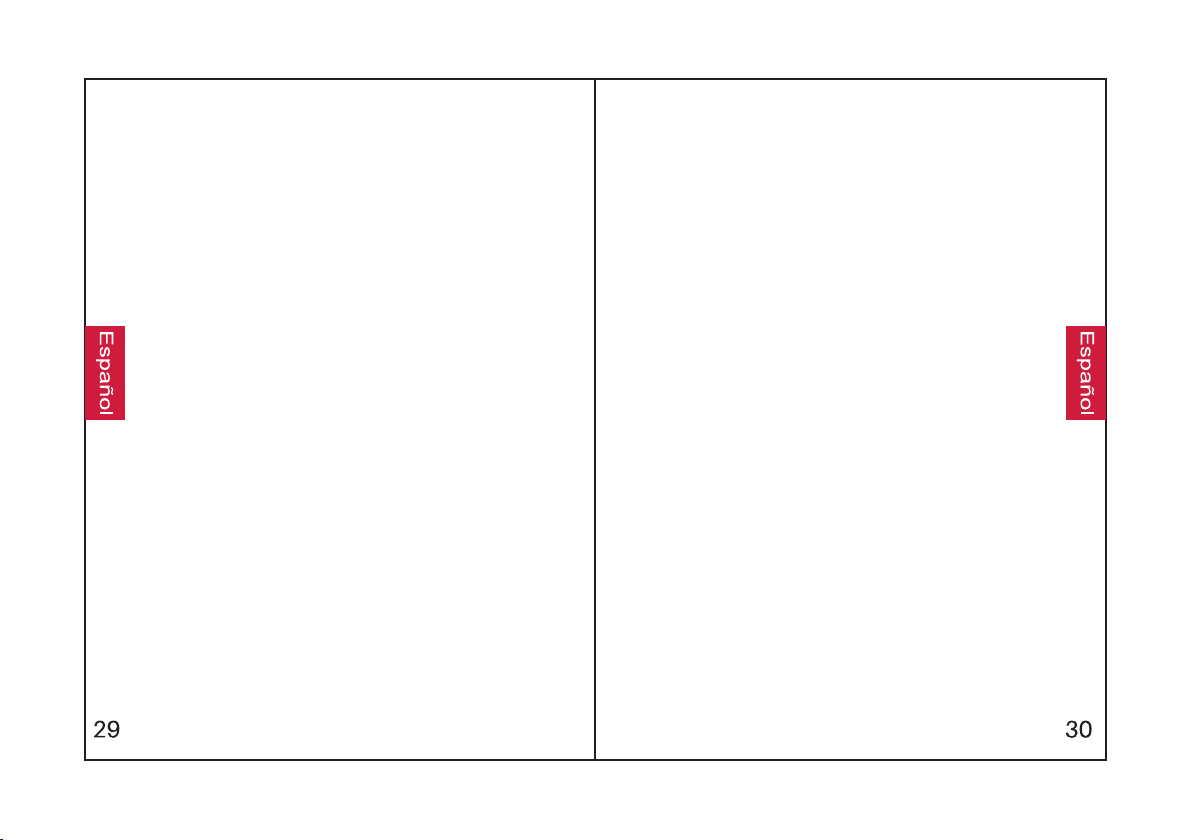
Mantenga presionado el Botón Multifunción durante 3
segundos para encender los auriculares y entrarán en modo
de emparejamiento (la luz indicadora se volverá azul).
Mantenga presionado el Botón Multifunción durante 3
segundos para apagar los auriculares.
Pulse para ajustar el volumen. Mantenga pulsado para ir a la
canción siguiente/anterior.
Pulse el Botón Multifunción para reproducir/pausar la música.
Pulse el Botón ANC para encender/apagar la Cancelación de
Ruido la luz indicadora se volverá verde).
Pulse el Botón Multifunción para responder/finalizar una
llamada.
Pulse dos veces el Botón Multifunción para rechazar una
llamada entrante.
Carga: Use el cable de carga micro USB para conectar al
Puerto de Carga del dispositivo. Conecte el otro extremo del
cable de carga a un puerto USB en un ordenador o a un
cargador USB de pared.
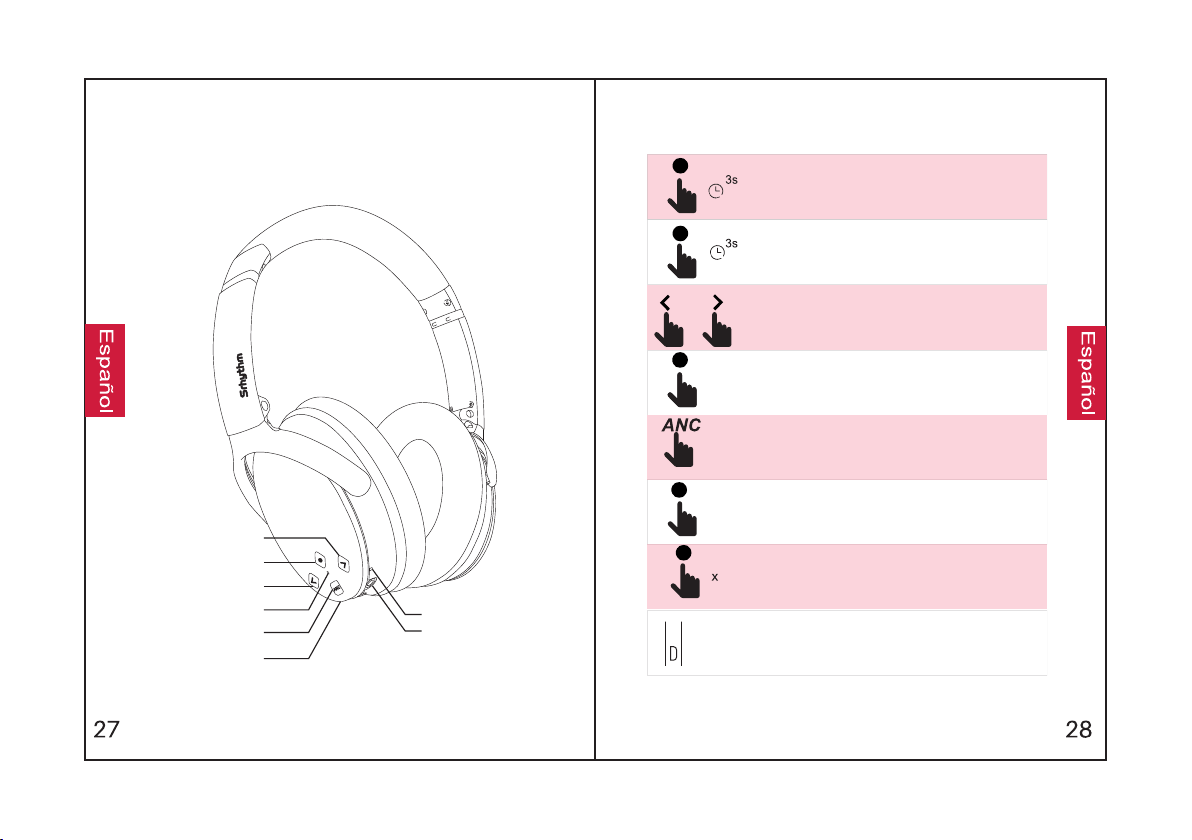
De un Vistazo
Bajar volumen / Canción siguiente
Botón Multifunción
Subir volumen / Canción anterior
Indicador Bluetooth / ANC
Botón ANC
Puerto de Carga
Micrófono
Puerto AUX de 3.5
Funciones
Emparejamiento Fácil
1.Mantenga pulsado el Botón Multifunción
3.Encienda la función Bluetooth de su
auriculares se hayan emparejado
dispositivo Bluetooth. Busque la señal Bluetooth
auriculares y entrarán en modo de
Bluetooth tan cerca como sea posible durante el
2.Mantenga los auriculares y el dispositivo
introduzca "0000" (cuatro ceros).
proceso de emparejamiento.
dispositivo Bluetooth. La luz indicadora
durante 3 segundos para encender los
emparejamiento.
de los auriculares en su dispositivo Bluetooth, y
seleccione “NC-25” para emparejarlo con su
correctamente.
parpadeará lentamente en azul cuando los
4.Si se le solicita una contraseña/código PIN
durante el proceso de emparejamiento,
Emparejar con un Segundo Dispositivo
Bluetooth
Bluetooth y que no está reproduciendo música.
1.Asegúrese de que los auriculares están
conectados correctamente al primer dispositivo
2. Mantenga presionado el Botón Multifunción hasta
que los auriculares vuelvan a entrar en modo de
emparejamiento (la luz indicadora parpadeará en
rojo y azul alternativamente).
3. Empareje los auriculares con el segundo
dispositivo siguiendo los pasos de “Emparejamiento
Fácil".
4. Vuelva al primer dispositivo Bluetooth y empareje
de nuevo con los auriculares. Ahora ambos
dispositivos están emparejados con los auriculares.
ANC – Cancelación Activa de Ruido:
Para apagar ANC, pulse el Botón ANC; la luz
indicadora verde de ANC se apagará.
Para encender ANC, pulse el botón ANC; la luz
indicadora verde de ANC se encenderá.
Conexión AUX por Cable:
Los auriculares admiten la entrada AUX de
conexiones de fuentes de audio externas con
cable. Simplemente, apague los auriculares y
enchufe el cable de audio.
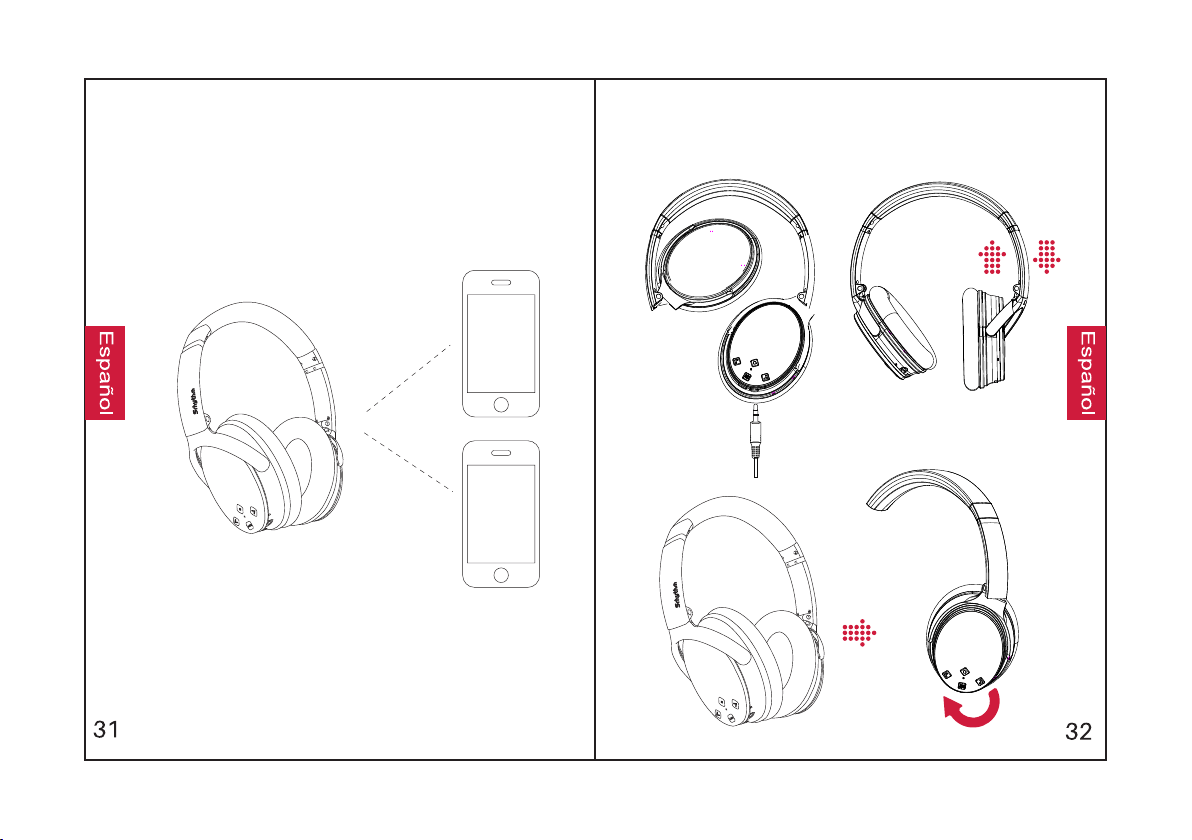
Cómo Llevar
Marcación por Voz:
Pulse simultáneamente los botones de Subir
Volumen y Bajar Volumen para activar la función
de marcación por voz (compatible con Siri de
iPhone y software seleccionado Android de
marcación por voz).
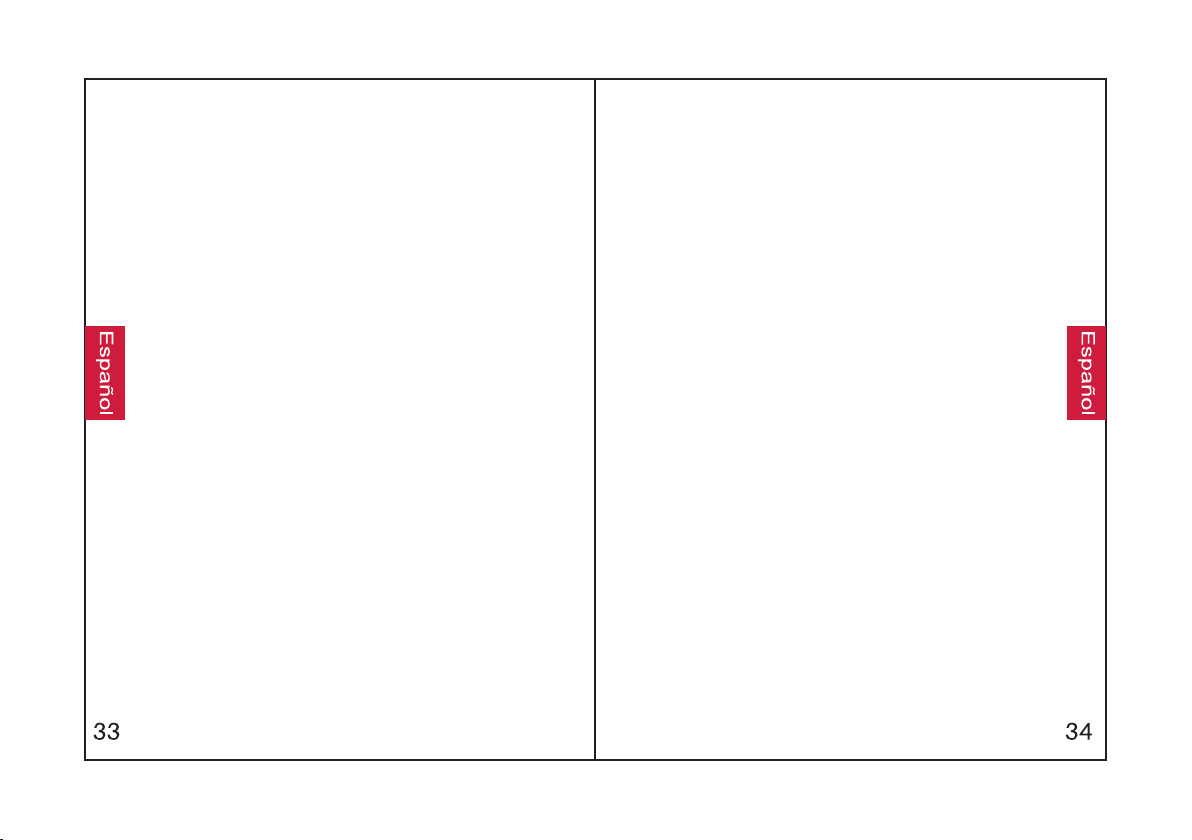
Especificaciones
Luz Indicadora
•Emparejamiento: las luces roja y azul parpadean
alternativamente.
•Emparejado: la luz azul parpadea.
•Reproducción: la luz azul parpadea lentamente.
•Carga: se enciende la luz roja.
voz.
•ANC Encendido: se enciende la luz verde.
•Batería Baja: se enciende la luz roja con aviso de
•Carga Completa: se apaga la luz roja.
Especificaciones Técnicas
•Capacidad de la Batería: 360mAh
•Entrada: 5V220mA
•Nombre del producto: Srhythm NC25
•Tiempo de Carga: Aprox. 2 horas
•Tiempo de Uso: 12–16 horas
•Chip: CSR
•Perfil de Bluetooth: A2DP, AVRCP, HSP, HFP,
CVC
•Rango de Bluetooth: 10 m/33 ft
•Peso Neto: 180 g
•Impedancia: 32 Ω
•Diámetro del Driver: Φ40 mm
•Versión Bluetooth: V4.1
•Respuesta de Frecuencia: 20–20KHz
•Impermeabilidad: IPX4
PREGUNTAS FRECUENTES
R: Compruebe si hay algún material de metal en un rango
relativamente cerca que pueda estar interfiriendo en la
conexión Bluetooth. Esto puede ocurrir porque el
Bluetooth es una tecnología de radio sensible a objetos
entre los auriculares y sus dispositivos conectados.
R: No. Estos auriculares tienen una batería integrada de
polímero de litio que no es extraíble ni puede ser
reemplazada.
1.P: ¿Por qué los auriculares no se emparejan con mi
teléfono?
R: Compruebe si sus auriculares están en modo de
emparejamiento o en modo de reconexión, compruebe si
la función de búsqueda Bluetooth de su dispositivo
Bluetooth está encendida, luego entre en el menú de
Bluetooth de su dispositivo Bluetooth, borre/olvide los
auriculares y vuelva a conectarlos.
R: Compruebe de nuevo el estado de la batería de sus
auriculares.
3.P: ¿Puedo cambiar la batería de los auriculares?
2.P: ¿Por qué no se encienden los auriculares?
4.P: ¿Puedo utilizar los auriculares mientras conduzco?
R: Por su seguridad, le recomendamos no utilizar los
auriculares mientras conduce para evitar distracciones.
5.P: ¿Por qué a veces los auriculares se desconectan del
dispositivo Bluetooth dentro del rango de 10 metros?
Si hay algún problema, cargue por completo
sus auriculares (no use el cargador rápido),
luego reinicie los auriculares insertando el
cable de audio en la toma de audio y luego
retirándolo.
8.P: ¿Qué hago si bloquea el Bluetooth? (No se
puede abrir ni cerrar)
9.P: ¿Por qué el Bluetooth se apaga cuando conecto
el cable de audio?
7.P: ¿Por qué no puedo utilizar los auriculares para
controlar el volumen de una ìsta en reproducción en
una aplicación de mi teléfono móvil?
R: esta es una de nuestras funciones especiales.
Cuando el usuario inserta un cable de audio en el
puerto de audio, todos los botones de función del
Bluetooth dejan de funcionar y el Bluetooth se apaga.
No se preocupe, el Bluetooth estará disponible de
nuevo cuando el cable de audio se mueva.
R: Debido a las distintas configuraciones del software
de las aplicaciones, los auriculares pueden no ser
completamente compatibles con algunas
aplicaciones.
R: Compruebe si el canal de salida de su ordenador
admite el perfil A2DP. Compruebe también los ajustes
de volumen de sus auriculares y del
ordenador/teléfono móvil.
R: Tenga en cuenta que la función ANC y el Bluetooth
se señalizan con la misma luz indicadora, en verde
para ANC y en azul para el Bluetooth. Si necesita
encender/apagar el Bluetooth, asegúrese de que
primero apaga la función ANC.
R: Reinicie la función de Bluetooth de los auriculares
insertando y retirando un cable de audio en el puerto
de audio.
6.P: ¿Por qué no escucho ningún sonido de mi
ordenador o teléfono móvil?
10. P: ¿Por qué no puedo encender/apagar los
auriculares?
Manuel Utilisateur
Sécurité auditive :
1. Pour éviter tout dommage auditif, n'écoutez pas
longtemps à un volume élevé.
2. Veuillez utiliser le casque avec précaution ou
arrêter de l'utiliser dans des situations
potentiellement dangereuses.
3. N'utilisez pas le casque d'écoute en conduisant.
4. Pour votre sécurité, ne réglez pas le volume trop
haut lorsque vous courez à l'extérieur afin de
vous assurer que vous pouvez entendre les sons
dans votre environnement.
Sécurité de fonctionnement :
3.Tenir hors de portée des enfants afin d'éviter tout
risque d'utilisation non conforme.
4.Ne pas plonger dans l'eau.
1.Évitez de faire tomber.
5.Ne pas utiliser à l'extérieur pendant les orages.
6.Évitez de travailler dans des températures
extrêmes. Veuillez utiliser les écouteurs dans leur
2.Ne pas démonter.
plage de température de fonctionnement : -15 °C (5
F) - 55 °C (131 F).
7.Utilisez des câbles originaux ou certifiés pour la
nettoyer les écouteurs.
recharge.
8.N'utilisez pas d'huile ou de nettoyant corrosif pour
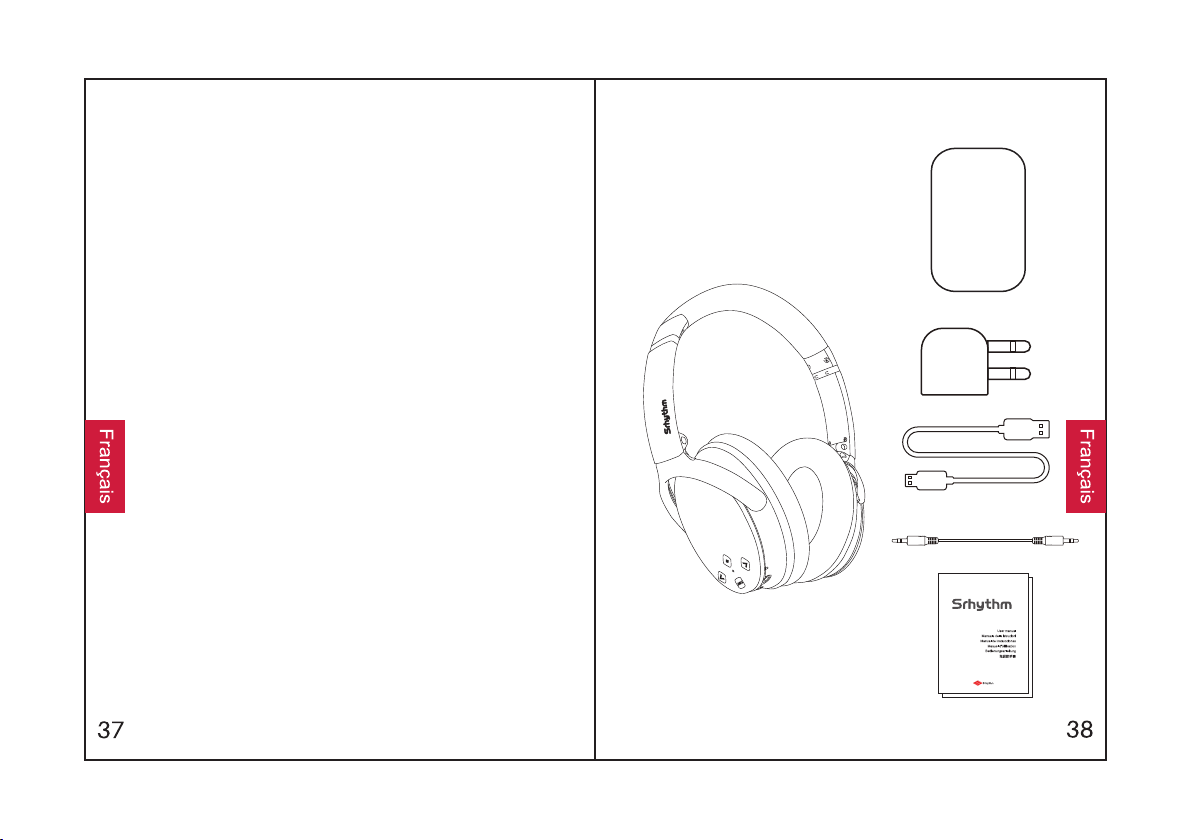
Contenu de la boîteConsignes de sécurité
NC 25
2
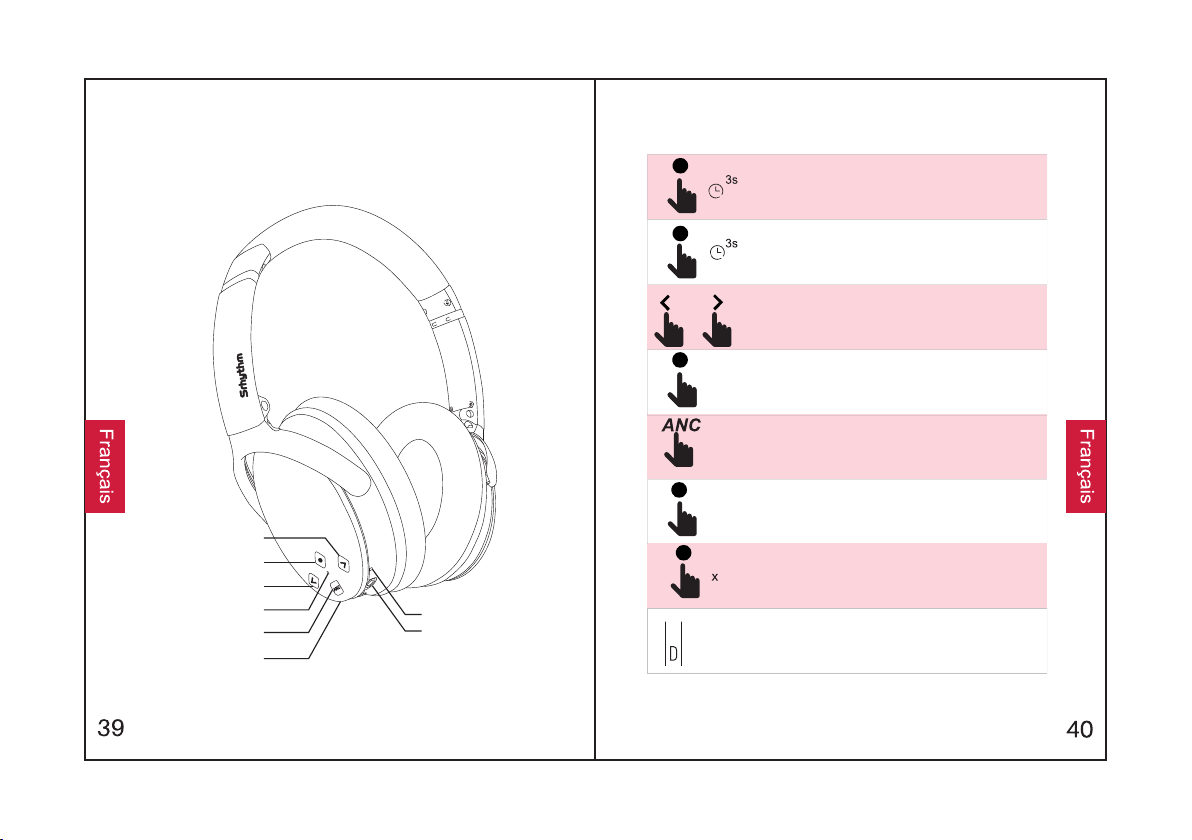
En un coup d'œil
Volume bas / Chanson suivante
Touche multifonctions
Indicateur Bluetooth / ANC
Bouton ANC
Port de chargement
Microphone
Port 3.5 mm AUX
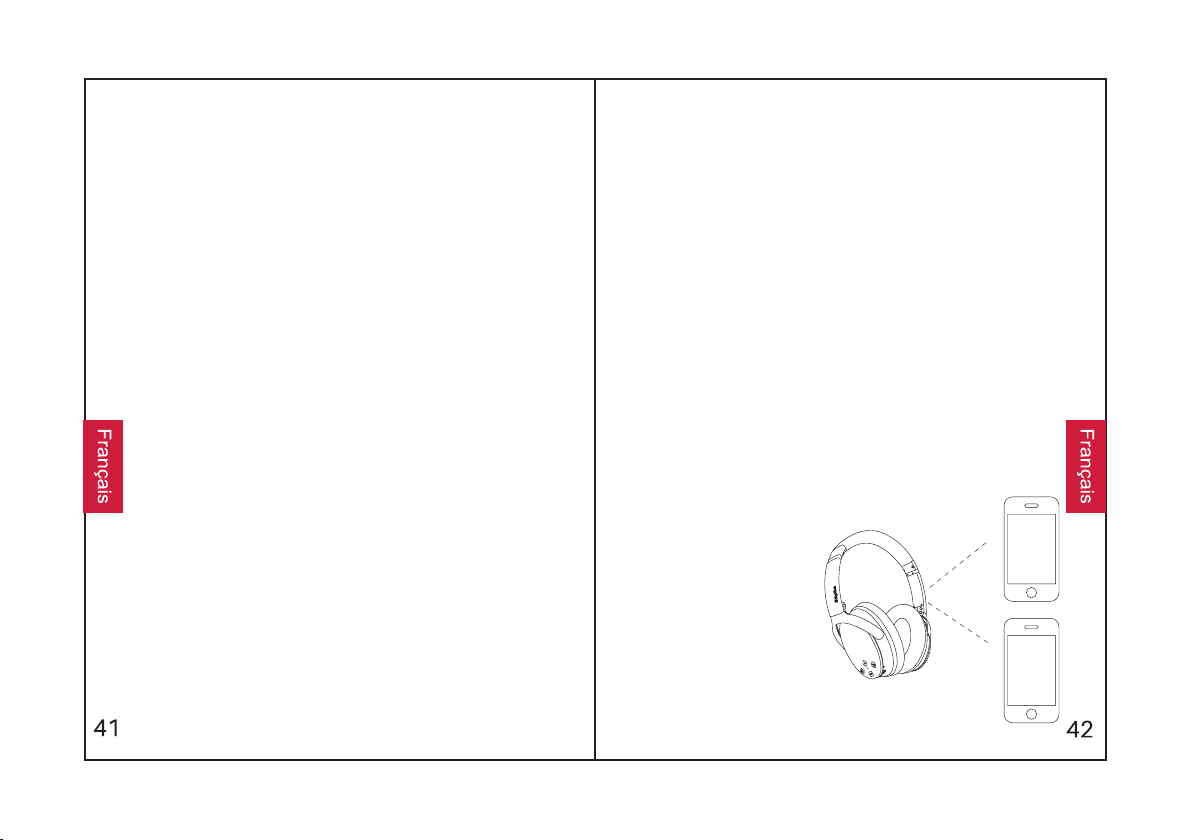
Maintenez le bouton multifonction enfoncé pendant 3
secondes pour allumer les écouteurs et ils passeront en mode
d'appairage (le voyant lumineux deviendra bleu).
Maintenez le bouton multifonction enfoncé pendant 3
secondes pour éteindre le casque.
Appuyez sur pour régler le volume. Appuyez longuement pour
passer à la chanson suivante/précédente.
Appuyez sur la touche multifonction pour écouter/pauser de la
musique.
Appuyez sur le bouton ANC pour activer/désactiver
l'annulation active du bruit (le témoin lumineux devient vert).
Appuyez sur la touche multifonction pour répondre à l'appel ou
y mettre fin.
Appuyez deux fois sur la touche multifonction pour rejeter un
appel entrant.
Chargement : Utilisez le câble de chargement micro USB
fourni pour le brancher au port de chargement de l'appareil.
Connectez l'autre extrémité du câble de chargement à un port
USB de l'ordinateur ou à un chargeur mural USB.
Augmenter le volume /
Chanson précédente
Comment l'utiliser
Fonctions
Jumelage facile
4.Si l'on vous demande un mot de passe/code PIN
Bluetooth. Recherchez le signal Bluetooth des
pendant 3 secondes pour allumer le casque et ils
sélectionnez "NC-25" pour le coupler à votre
appareil Bluetooth. Le voyant lumineux clignote
lentement en bleu lorsque les écouteurs sont
pendant le processus d'appairage.
3.Activez la fonction Bluetooth de votre appareil
appairés avec succès.
1.Maintenez le bouton Multifonction
passeront en mode appairage.
écouteurs de votre appareil Bluetooth et
2.Gardez le casque d'écoute et votre appareil
Bluetooth aussi près que possible de vous
pendant la procédure d'appairage, entrez "0000"
(quatre zéros).
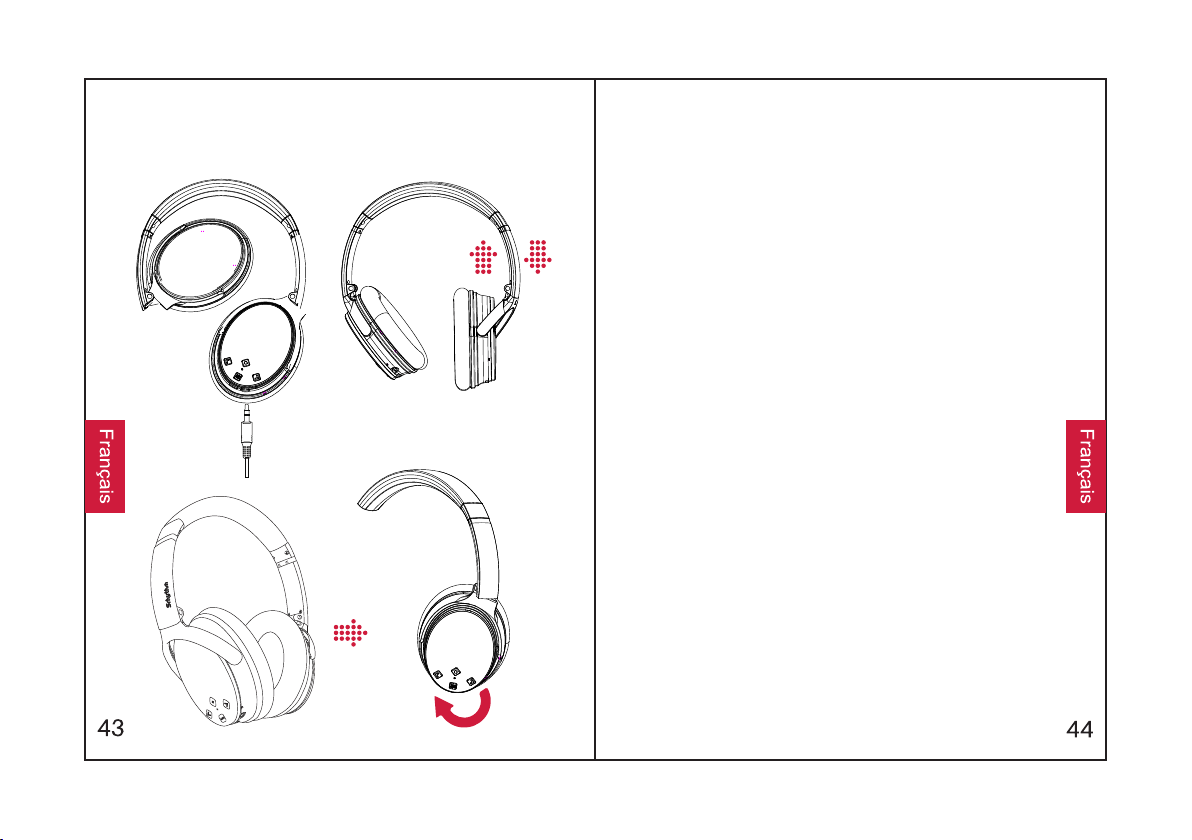
Jumeler avec un deuxième périphérique
Bluetooth
1.Assurez-vous que les écouteurs sont bien
connectés au premier périphérique Bluetooth et
que la musique ne joue pas.
2.Maintenez la touche multifonction enfoncée
jusqu'à ce que le casque revienne en mode
d'appairage (le témoin lumineux clignote
alternativement en rouge et en bleu).
suivant les étapes de "Couplage facile".
4.Retournez sur le premier périphérique Bluetooth
et associez-le à nouveau au casque. Maintenant,
écouteurs.
3.Couplez le casque avec le second appareil en
vos deux appareils sont appairés avec les
ANC - annulation active du bruit :
Pour désactiver l'ANC, appuyez sur le bouton ANC ;
le voyant lumineux vert ANC s'éteint.
Pour activer la fonction ANC, appuyez sur le bouton
ANC ; le voyant lumineux vert ANC s'allume.
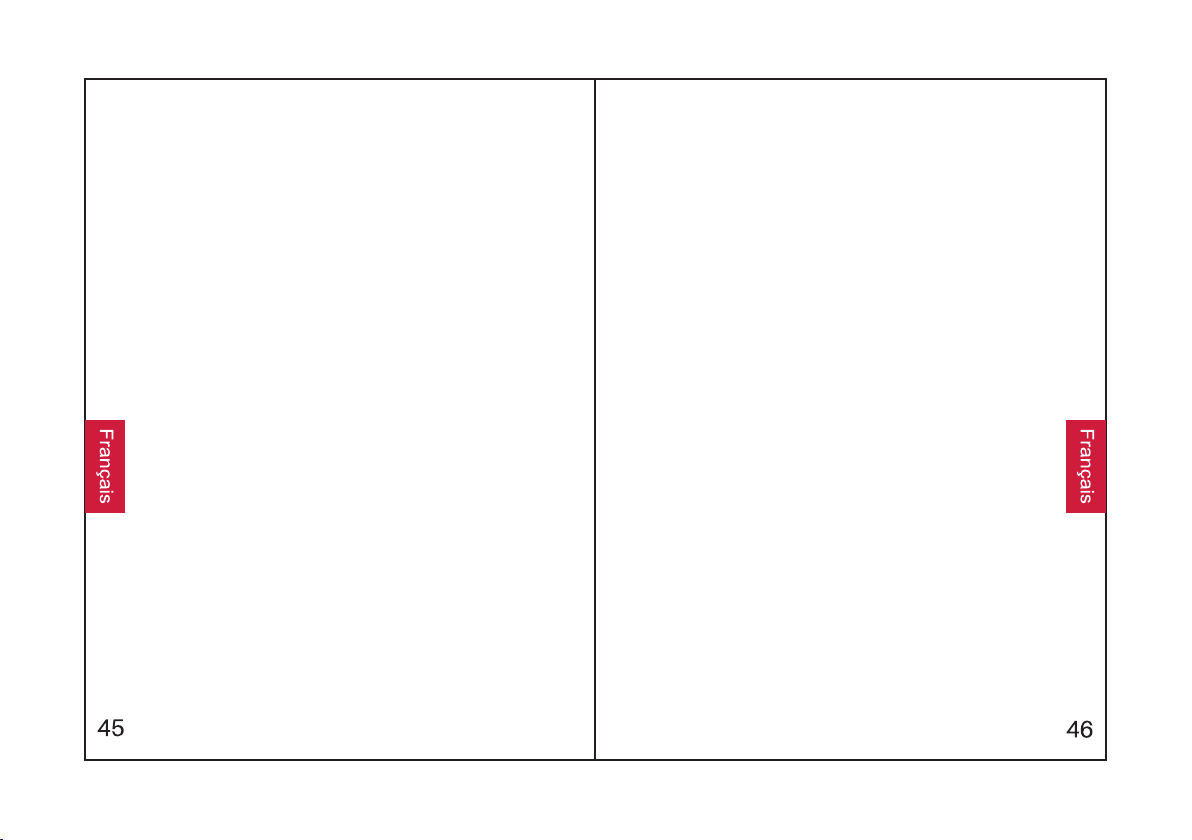
Connexion filaire AUX :
Le casque prend en charge l'entrée AUX pour la
connexion d'une source audio externe câblée. Il
suffit d'éteindre le casque et de brancher le câble
audio.
Composition vocale :
(compatible avec
fonction de
Volume haut et Volume bas pour activer la
numérotation vocale
Appuyez simultanément sur les boutons
numérotation vocale
logiciel de
Android sélectionné).
l'iPhone Siri et le
Comment le porter Caractéristiques techniques
Témoin lumineux
•Charge complète : Le voyant rouge s'éteint
•Jumelage : Les lumières rouge et bleue clignotent
alternativement
•Chargement : Le voyant rouge s'allume
•Jouer : La lumière bleue clignote lentement
•Batterie faible : Le voyant rouge s'allume à l'invite
vocale.
•ANC activé : Le voyant vert s'allume.
•Jumelés : La lumière bleue clignote
Caractéristiques techniques
•Profil Bluetooth : A2DP, AVRCP, HSP, HFP, CVC
•Diamètre du driver : Φ40 mm
•Capacité de la batterie : 360mAh
•Temps de charge : Environ 2 heures
•Chip : RSE
•Portée Bluetooth : 10 m/33 ft
•Étanchéité à l'eau : IPX4
•Poids net : 180 g
•Entrée : 5V220mA
•Durée d'utilisation : 12-16 heures
•Version Bluetooth : V4.1
•Nom du produit : Srhythm NC25
•Impédance : 32 Ω
Réponse en fréquence : 20-20KHz
6.Q : Pourquoi ne puis-je pas entendre le son de mon
ordinateur ou de mon téléphone portable ?
R : Veuillez vérifier si le canal de sortie de votre
ordinateur supporte le profil A2DP. Vérifiez également
les réglages du volume de votre casque d'écoute et
de votre ordinateur/téléphone portable.7.Q : Pourquoi
suis-je incapable d'utiliser les écouteurs pour
contrôler le volume d'une piste jouant sur un APP sur
mon téléphone portable ?
R : En raison de la configuration de différents logiciels
d'application, le casque peut ne pas être
complètement compatible avec certains APP.
8.Q : Que dois-je faire en cas de panne de Bluetooth ?
(Ne peut pas fermer ou ouvrir)
R : Veuillez réinitialiser la fonction Bluetooth du
casque en insérant un câble audio dans le port audio
et en le retirant.
9.Q : Pourquoi le Bluetooth s'éteint quand je connecte
un câble audio ?
R : C'est l'une de nos particularités. Lorsque
l'utilisateur insère un câble audio dans le port audio,
toutes les touches de fonction Bluetooth cessent de
fonctionner et Bluetooth s'éteint. Ne vous inquiétez
pas, Bluetooth sera de nouveau disponible lorsque le
câble audio sera déplacé.
10.Q : Pourquoi ne puis-je pas allumer/éteindre les
écouteurs ?
R : Veuillez noter que l'ANC et le Bluetooth sont
indiqués par le même voyant lumineux, avec un
voyant vert pour l'ANC et un voyant bleu pour le
Bluetooth. Si vous avez besoin d'activer/désactiver le
Bluetooth, assurez-vous d'abord de désactiver l'ANC.
Questions fréquentes
2.Q : Pourquoi les écouteurs ne peuvent-ils pas s'allumer
?
3.Q : Puis-je remplacer la batterie du casque ?
R : Pour votre sécurité, nous vous recommandons
fortement de ne pas utiliser un casque d'écoute au volant
afin d'éviter toute distraction.
1.Q : Pourquoi les écouteurs ne peuvent-ils pas être
jumelés à mon téléphone mobile ?
5.Q : Pourquoi le casque se déconnecte-t-il parfois de
l'appareil Bluetooth dans un rayon de 10 mètres ?
4.Q : Puis-je utiliser les écouteurs en conduisant ?
R : Veuillez vérifier l'état de la batterie de votre casque.
R : Non. Ce casque utilise une batterie Li-Polymère
intégrée non détachable qui ne peut pas être remplacée.
R : Veuillez vérifier si vos écouteurs sont en mode
appairage ou en mode reconnexion, vérifiez si la fonction
de recherche Bluetooth de votre appareil Bluetooth est
activée, puis allez dans le menu Bluetooth de votre
appareil Bluetooth, supprimez/oubliez les écouteurs et
reconnectez-les.
R : Veuillez vérifier s'il y a un matériau métallique dans un
rayon d'action relativement proche qui pourrait interférer
avec la connexion Bluetooth. Cela peut se produire parce
que Bluetooth est une technologie radio qui est sensible
aux objets entre le casque et les appareils connectés.
En cas de problème, veuillez charger
complètement votre casque (n'utilisez pas
de chargeur rapide), puis réinitialisez le
casque en insérant le câble audio dans la
prise audio puis en le retirant.
Benutzerhandbuch
Sicherheitshinweise
Gehörsicherheit:
1.Um Hörschäden zu vermeiden, sollten Sie bitte
4.Zu Ihrer Sicherheit sollten Sie die Lautstärke
können.
nicht lange bei hoher Lautstärke hören.
3.Verwenden Sie die Kopfhörer nicht während der
Fahrt.
beim Laufen im Freien nicht zu hoch einstellen,
damit Sie Geräusche in Ihrer Umgebung hören
oder verwenden Sie sie nicht mehr in potenziell
gefährlichen Situationen.
2.Bitte verwenden Sie die Kopfhörer vorsichtig
Betriebssicherheit:
6.Den Betrieb bei extremen Temperaturen
1.Fallen vermeiden.
2.Nicht zerlegen.
3.Von Kindern fernhalten, um Gefahren durch
unsachgemäßen Gebrauch zu vermeiden.
4.Nicht in Wasser eintauchen.
5.Bei Gewittern nicht im Freien verwenden.
innerhalb des Betriebstemperaturbereichs: -15
°C (5 F) - 55 °C (131 F).
7.Original- oder zertifizierte Kabel zum Laden
verwenden.
8.Verwenden Sie zur Reinigung der Kopfhörer
vermeiden. Bitte verwenden Sie die Kopfhörer
keinen ätzenden Reiniger/Öl.
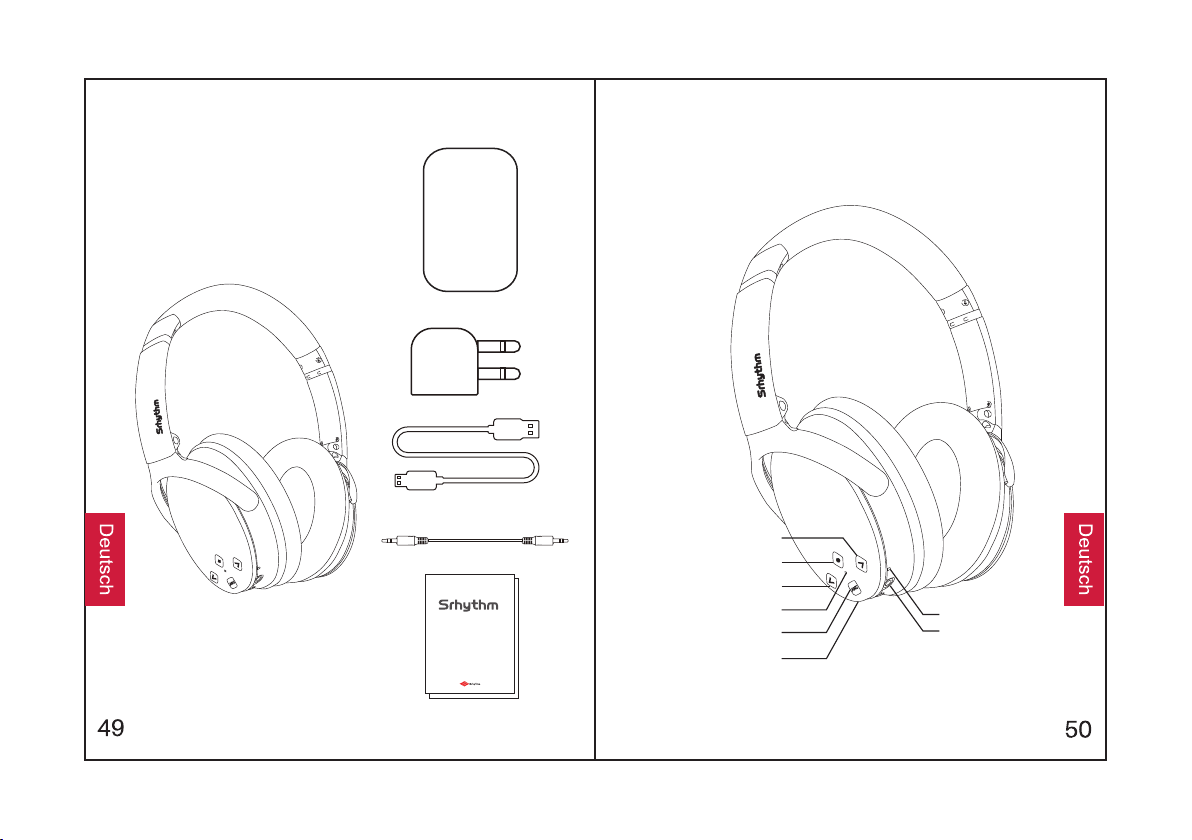
Was ist in der Box?
Use r Manua l
Man uale di I struz ioni
Man ual de in struc cione s
Man uel d'U tilis ation
Bed ienun gsanl eitun g
取扱 説明 爾
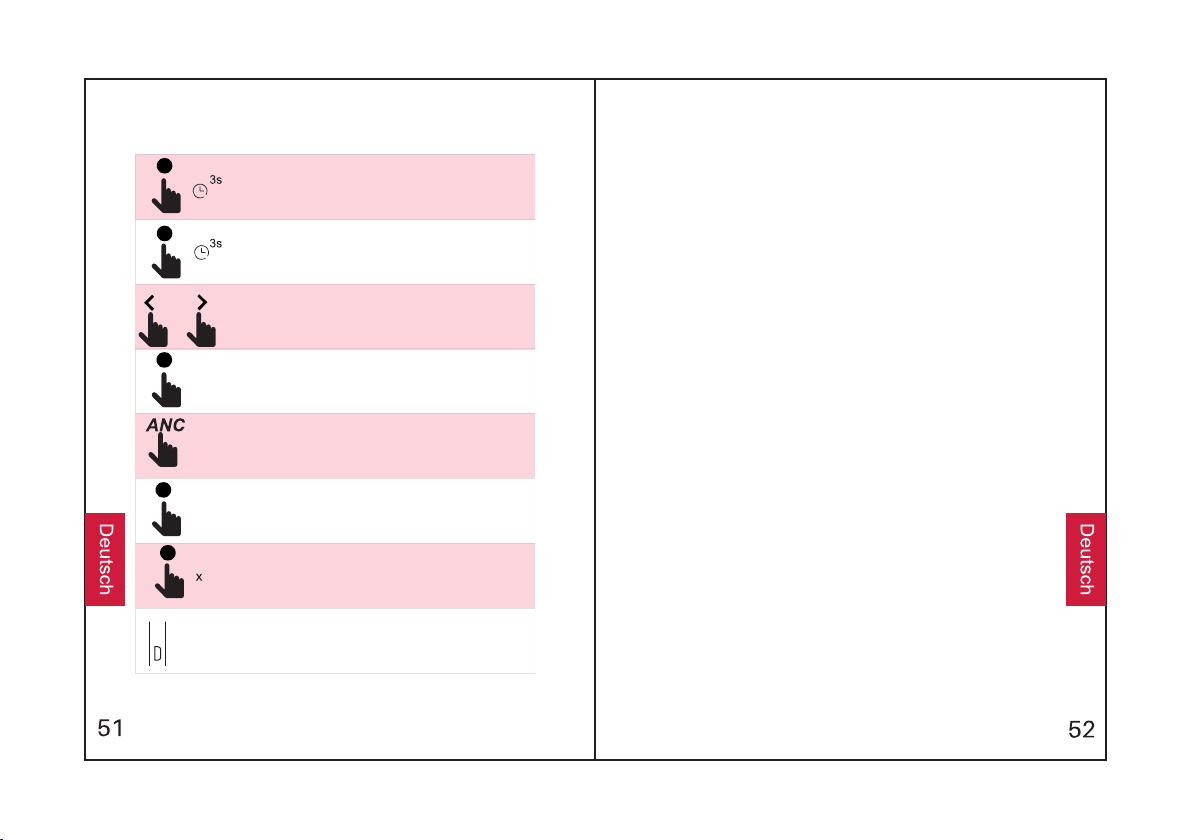
ImÜberblick
Lautstärke - / Nächster Song
Multifunktionstaste
Lautstärke + / Vorheriger Song
Bluetooth / ANC Anzeige
ANC-Taste
Ladebuchse
Mikrofon
3.5mm AUX-Port
NC 25
2
Wie man esbenutzt
Halten Sie die Multifunktionstaste 3 Sekunden lang gedrückt,
um die Kopfhörer einzuschalten, und sie gelangen in den
Kopplungsmodus (Die Kontrollleuchte blinktblau).
Halten Sie die Multifunktionstaste 3 Sekunden lang gedrückt,
um die Kopfhörer auszuschalten.
Drücken Sie diese Taste, um die Lautstärke
einzustellen.Drücken Sie lange, um zum nächsten/vorherigen
Song zu springen.
Drücken Sie die Multifunktionstaste, um Musik
abzuspielen/anzuhalten.
Drücken Sie die ANC-Taste, um die aktive
Rauschunterdrückung ein- und auszuschalten (Die
Kontrollleuchte blinktgrün).
Drücken Sie die Multifunktionstaste, um einen Anruf
anzunehmen/zu beenden.
Drücken Sie die Multifunktionstaste doppelt, um einen
eingehenden Anruf abzulehnen.
Aufladen: Verwenden Sie das mitgelieferte Micro-USB-
Ladekabel, um es an die Ladebuchse des Geräts
anzuschließen. Schließen Sie das andere Ende des
Ladekabels entweder an einen USB-Anschluss des Computers
oder an ein USB-Wandladegerät an.
Funktionen
Einfaches Koppeln
1.Halten Sie die Multifunktionstaste 3 Sekunden lang
Kopfhörer erfolgreich gekoppelt sind.
während des Kopplungsprozesses so nah wie
Bluetooth-Geräts ein. Suchen Sie nach dem
mit Ihrem Bluetooth-Gerät zu koppeln. Die
Kontrollleuchte blinkt langsam blau, wenn die
gedrückt, um die Kopfhörer einzuschalten, und
möglich an sich.
Bluetooth-Signal der Kopfhörer auf Ihrem
3.Schalten Sie die Bluetooth-Funktion Ihres
Bluetooth-Gerät und wählen Sie "NC-25", um es
4.Wenn Sie während des Kopplungsprozesses
2.Halten Sie die Kopfhörer und Ihr Bluetooth-Gerät
sie gelangen in den Kopplungsmodus.
geben Sie "0000" (vier Nullen) ein.
nach einem Passwort/PIN-Code gefragt werden,
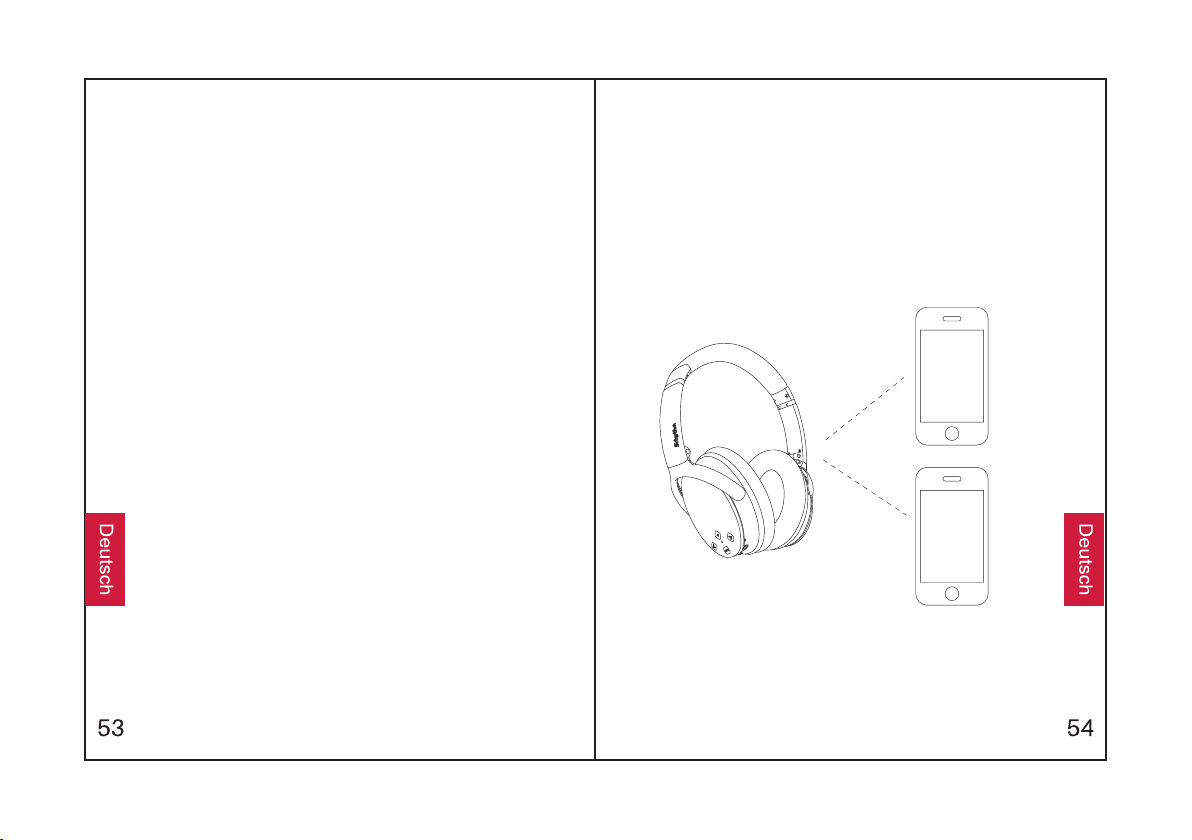
Koppeln Sie mit zweitem Bluetooth-Gerät
die Kopfhörer wieder in den Kopplungsmodus
1.Stellen Sie sicher, dass die Kopfhörer mit dem
sind und keine Musik abgespielt wird.
2.Halten Sie die Multifunktionstaste gedrückt, bis
gelangen (Die Kontrollleuchte leuchtet
abwechselnd rot und blau).
ersten Bluetooth-Gerät erfolgreich gekoppelt
3. Koppeln Sie die Kopfhörer mit dem zweiten
Gerät gemäß den Schritten "Einfaches Koppeln".
ANC - Aktive Rauschunterdrückung:
4.Kehren Sie zum ersten Bluetooth-Gerät zurück
und koppeln Sie es erneut mit den Kopfhörern.
Jetzt sind beide Ihre Geräte mit den Kopfhörern
gekoppelt.
Um den ANC auszuschalten, drücken Sie die ANC-
Taste; die grüne ANC-Anzeige erlischt.
Um den ANC einzuschalten, drücken Sie die ANC-
Taste; die grüne ANC-Anzeige blinkt.
AUX Kabelverbindung:
Die Kopfhörer unterstützen den AUX-Eingang für
den kabelgebundenen Anschluss externer
Audioquellen. Schalten Sie einfach die Kopfhörer
aus und verbinden Sie das Audiokabel.
Sprachsteuerung:
Drücken Sie gleichzeitig die Tasten Lautstärke +
und Lautstärke -, um die Sprachsteuerung zu
aktivieren (Kompatibel mit dem iPhone Siri und der
ausgewählten Android Sprachsteuerung-
Software).
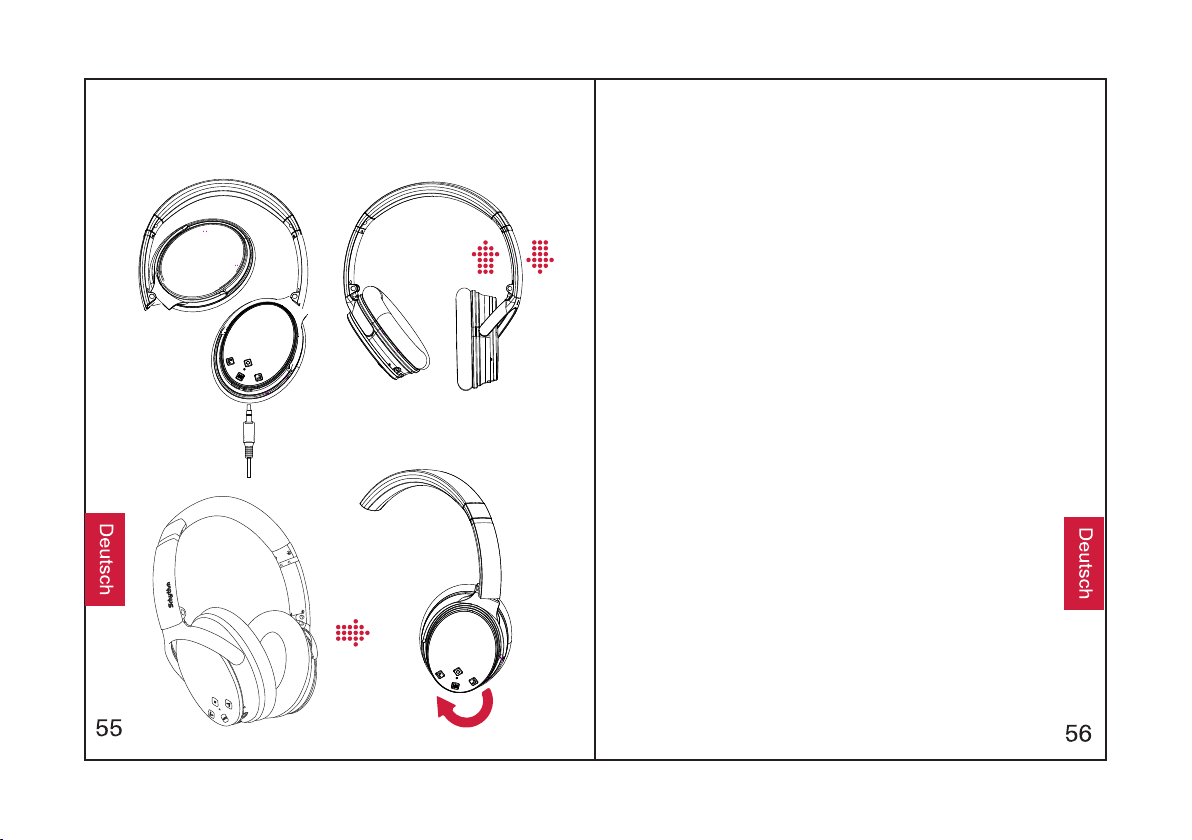
Wie man esträgt Spezifikationen
Kontrollleuchte
abwechselnd.
Sprachausgabe.
•Gekoppelt: Blaue Leuchte blinkt.
•Kopplung: Rote und blaue Leuchten blinken
•Abspielen: BlaueLeuchte blinkt langsam.
•Aufladen: Rote Leuchte leuchtet.
•Volle Aufladung: RoteLeuchte erlischt.
•Schwache Batterie: Rote Leuchte leuchtet mit
•ANC ein: Grüne Leuchte leuchtet.
Technische Spezifikationen
•Bluetooth-Profil: A2DP, AVRCP, HSP, HFP, CVC
•Impedanz: 32 Ω
•Batteriekapazität: 360mAh
•Bluetooth-Reichweite: 10m/33ft
•Nettogewicht: 180g
•Bluetooth-Version: V4.1
•Produktname: Srhythm NC25
•Treiberdurchmesser: Φ40mm
•Eingang: 5V220mA
•Ladezeit: About 2 Stunden
•Chip: CSR
•Frequenzbereich: 20–20KHz
•Gebrauchszeit: 12–16 Stunden
•Wasserdichtheit: IPX4
F&A
2.F: Warum können die Kopfhörer nicht eingeschaltet werden?
3.F: Kann ich die Batterie in den Kopfhörern austauschen?
4.F: Kann ich die Kopfhörer während der Fahrt benutzen?
5.F: Warum trennen sich die Kopfhörer manchmal innerhalb von
10 Metern vom Bluetooth-Gerät?
1.F: Warum können die Kopfhörer nicht mit meinem Handy
gekoppelt werden?
A: Bitte überprüfen Sie, ob sich Ihre Kopfhörer im Koppelungs-
oder Wiederverbindungsmodus befinden.Überprüfen Sie, ob die
Bluetooth-Suchfunktion Ihres Bluetooth-Geräts eingeschaltet ist,
gehen Sie dann in das Bluetooth-Menü Ihres Bluetooth-Geräts,
löschen/vergessen Sie die Kopfhörer und verbinden Sie sie
wieder.
A: Bitte überprüfen Sie den Batteriestand Ihrer Kopfhörer
nochmals.
A: Nein. Diese Kopfhörer verwenden eine eingebauteBatterie,
nicht abnehmbare Li-Polymer-Batterie, dienicht ersetzt werden
kann.
A: Zu Ihrer Sicherheit empfehlen wir Ihnen, während der Fahrt
keine Kopfhörer zu benutzen, um Beeinträchtigung zu
vermeiden.
A: Bitte stellen Sie sicher, dass sich in relativ kurzer Entfernung
Metallmaterial befindet, das die Bluetooth-Verbindung stören
kann. Dies ist möglich, weil Bluetooth eine Funktechnologie ist,
die auf Objekte zwischen den Kopfhörern und den
angeschlossenen Geräten reagiert.
A: Bitte beachten Sie, dass ANC und Bluetooth durch die
gleiche Kontrollleuchte angezeigt werden, mit einer
grünen Leuchte für ANC und einer blauen Leuchte für
Bluetooth. Wenn Sie Bluetooth ein- und ausschalten
müssen, stellen Sie bitte sicher, dass Sie ANC zuerst
ausschalten.
6.F: Warum kann ich keinen Ton von meinem Computer
oder Handy hören?
A: Bitte stellen Sie sicher, dass der Ausgabekanal Ihres
Computers das A2DP-Profil unterstützt. Überprüfen Sie
auch die Lautstärkeeinstellungen an Ihren Kopfhörern
und am Computer/Handy.
7.F: Warum kann ich die Kopfhörer nicht verwenden, um
die Lautstärke eines Songs zu regeln, der auf einem APP
auf meinem Handy abgespielt wird?
A: Wegen der Konfigurationen verschiedener
Anwendungssoftware sind die Kopfhörer möglicherweise
nicht vollständig mit einigen APPs kompatibel.
8.F: Was soll ich tun, wenn Bluetooth abstürzt? (Kann
nicht geschlossen oder geöffnet werden)
A: Bitte setzen Sie die Bluetooth-Funktion der Kopfhörer
zurück, indem Sie ein Audiokabel in den Audio-Port
stecken und entfernen.
9.F: Warum schaltet sich Bluetooth aus, wenn ich ein
Audiokabel anschließe?
A: Das ist eine unserer Besonderheiten. Wenn der
Benutzer ein Audiokabel in den Audio-Port einsteckt,
funktionieren alle Bluetooth-Funktionstasten nicht mehr
und Bluetooth schaltet sich aus. Machen Sie sich keine
Sorgen, Bluetooth ist wieder verfügbar, wenn das
Audiokabel entfernt wird.
10.F: Warum kann ich die Kopfhörer nicht ein- und
ausschalten?
Wenn Probleme auftreten, laden Sie bitte
Ihren Kopfhörer vollständig auf
(verwenden Sie kein Schnellladegerät)
und setzen Sie den Kopfhörer zurück,
indem Sie das Audiokabel in die
Audiobuchse stecken und dann entfernen.
ユーザーマニュアル
安全上の説明
聴覚について:
いでください。
の音が聞こえるように音量を小さくしください。
2.危険な状況ではヘッドフォンを慎重に使用する、
3.運転中はヘッドフォンを使用しないでください。
1.聴覚損傷を避けるため、大音量で長時間聴かな
4.安全のため、戸外でランニングしているとき周囲
または使用しないようにお願いします。
操作について:
1.落とさないでください。
2.分解しないでください。
3.不適切な使用による危険を避けるために、子供
の手の届かない場所に保管してください。
4.水に浸けないでください。
5.雷の時屋外で使用しないでください。
(131F)で使用してください。
たケーブルを使用してください。
フォンの動作温度範囲、-15℃(5F)~55℃
8.ヘッドフォンをクリーニングする場合、腐食性
のクリーナーやオイルを使用しないでください。
6.極端な温度での使用は避けてください。 ヘッド
7.充電する場合、オリジナルの、または認定され
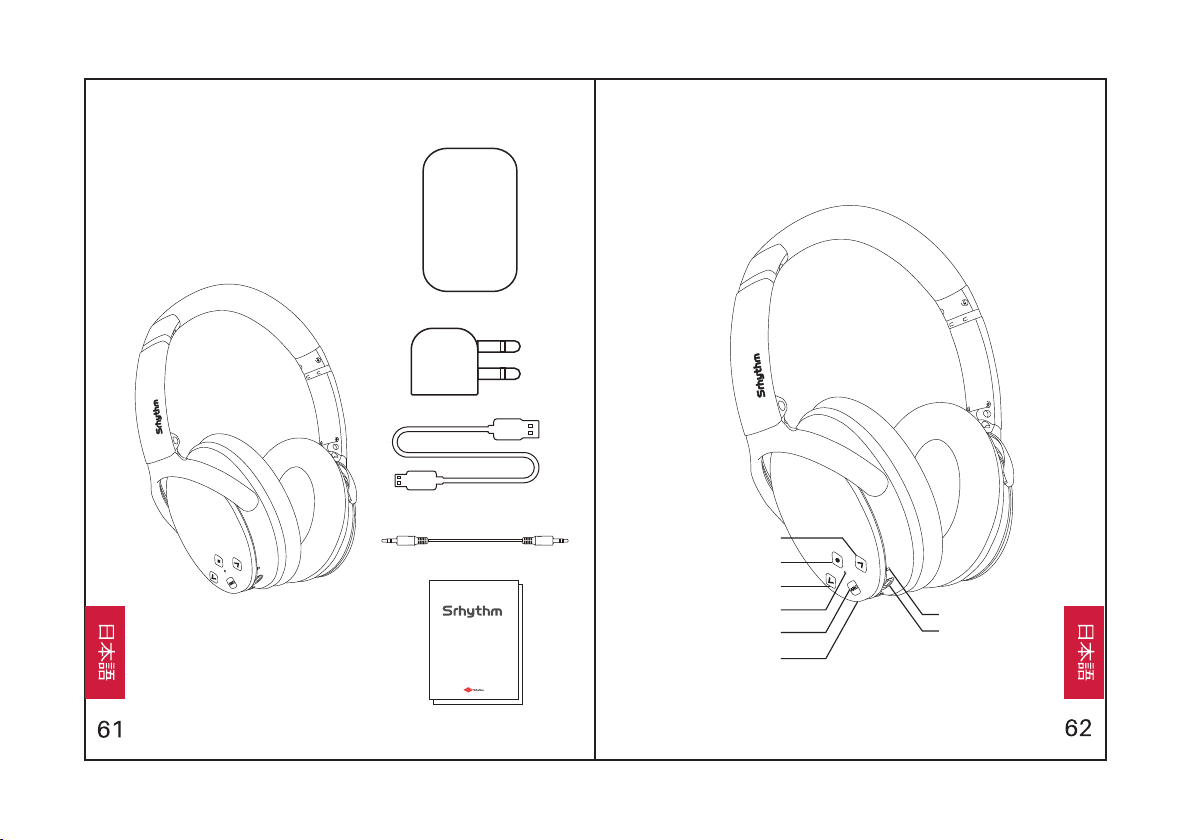
概観各パーツについて
Use r Manua l
Man uale di Istru zioni
Man ual de in struc cione s
Man uel d'U tilis ation
Bed ienun gsanl eitun g
取扱説 明爾
音量ダウン/次の曲
多機能ボタン
音量アップ/前の曲
ブルートゥース/ANC表示灯
ANCボタン
充電ポート
マイク
3.5mm AUXポート
NC 25
2
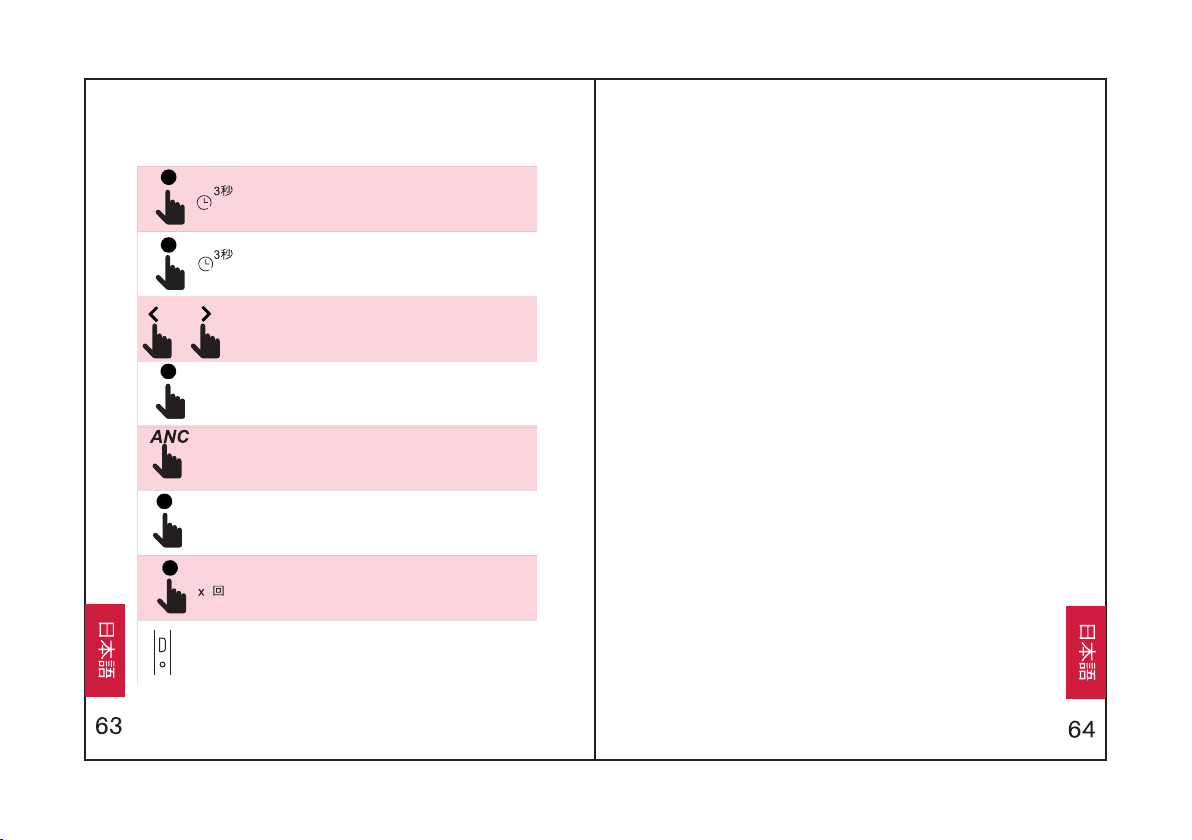
多機能ボタンを3秒間長押しして、ヘッドフォンの電源をオン
にします。するとペアリングモードに入ります。(表示灯が青
になります)
多機能ボタンを3秒間長押しして、ヘッドフォンの電源をオフ
にします。
押すと音量を調節できます。長押しすると、前の曲/次の曲に
切り替えます。
多機能ボタンを押して、音楽を再生/停止します。
ANCボタンを押して、雑音除去機能をオン/オフにします。
(表示灯が緑になります)
多機能ボタンを押して、電話を受けます/切ります。
多機能ボタンを2回押して、電話を拒否します。
充電:製品に含まれるマイクロUSB充電ケーブルの一端を製品
の充電ポートに接続し、一端をパソコンのUSBポートかUSBア
ダプターに接続します。
操作説明 機能
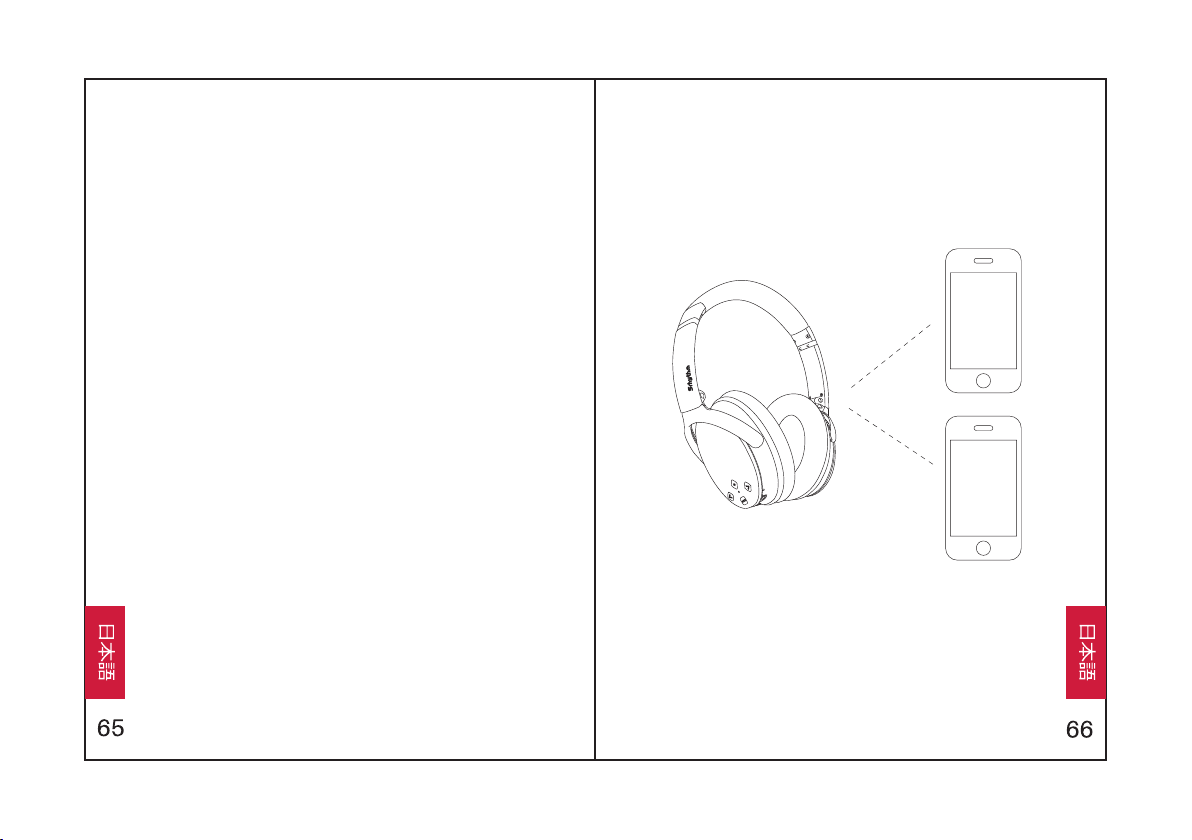
1.多機能ボタンを3秒間押してヘッドフォンをオンにすると、ペア
リングモードに⼊ります。
2.ペアリングするとき、ヘッドフォンとBluetoothデバイスをでき
るだけ近づけてください。
3.BluetoothデバイスのBluetooth機能をオンにします。
BluetoothデバイスでヘッドフォンのBluetooth信号を検
索し、「NC-25」に選択してBluetoothデバイスとペアリン
グします。ヘッドフォンが正常にペアリングされると、表⽰
灯が⻘くなって、ゆっくり点滅します。
4.ペアリング中にパスワード/PINコードの⼊⼒を求められた
場合は、「0000」(4つのゼロ)を⼊⼒してください。
簡単なペアリング
ださい。
グされ、⾳楽が再⽣されていない状況なのかを確認してく
2.ヘッドフォンがペアリングモードになるまで多機能ボタンを⻑
3.「簡単なペアリング」の⼿順に従って、ヘッドフォンを2台⽬
押しします。(表⽰灯が⾚と⻘と交互に点滅します)。
のデバイスとペアリングします。
1.ヘッドフォンが最初のBluetoothデバイスに正常にペアリン
第二のBluetoothデバイスとペアリング
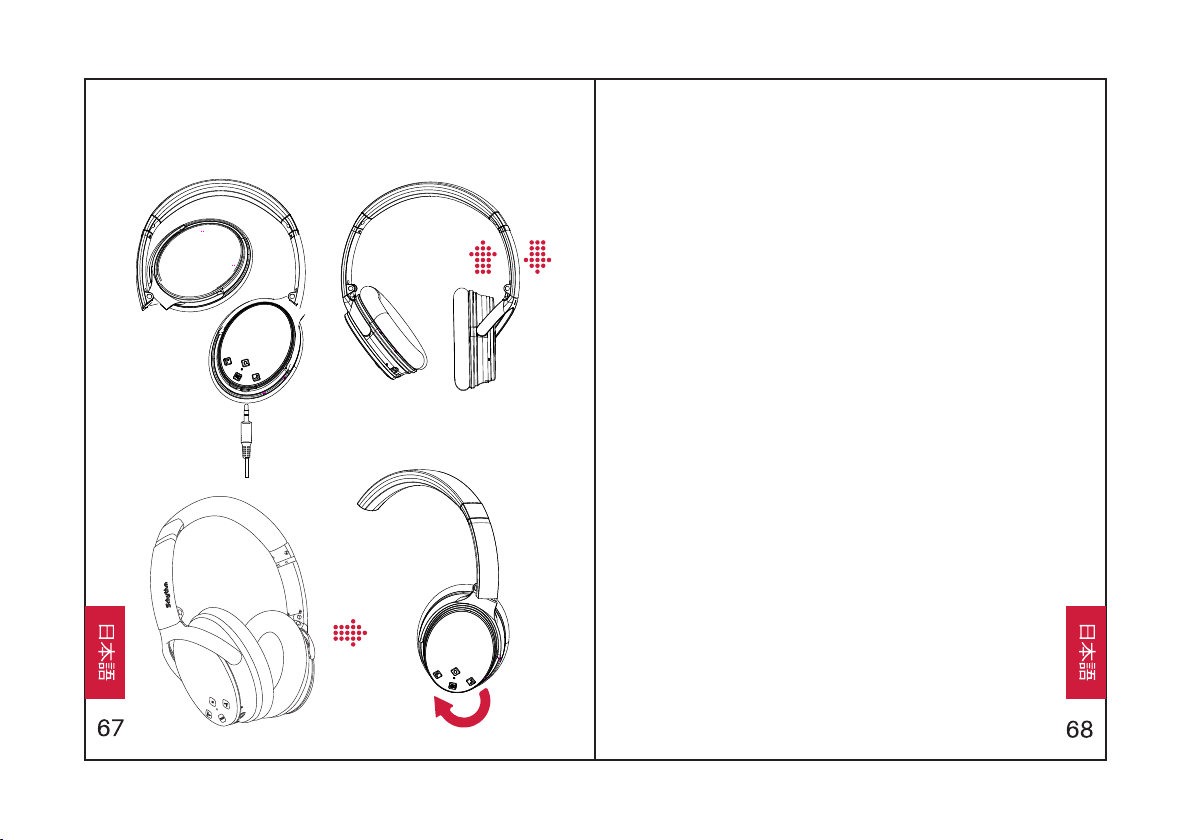
すると、緑のANC表⽰灯が点灯します。
ANCボタンを押して、ANCをオフにします。
ANCボタンを押して、ANCをオンにします。
すると、緑のANC表⽰灯が消灯します。
ANC – 能動型雑⾳除去:
とペアリングされました。
4.最初のBluetoothデバイスに戻って、ヘッドフォンともう⼀
度ペアリングします。 すると、両⽅のデバイスがヘッドフォン
当ヘッドフォンは有線外部オーディオソースによるAUX⼊⼒を
サポート。操作は簡単で、ヘッドフォンを電源オフにしてオー
ディオケーブルを接続すれば完成です。
AUX有線接続:
⾳量アップと⾳量ダウンボタンを同時に押して、⾳声ダイヤ
ル機能をオンにします。(iPhoneのSiriとAndroid⾳声ダイ
ヤルアプリに適応)
⾳声ダイヤル:
装着説明 仕様
• 充電中:⾚ライトが点灯
• ペアリング中: ⾚と⻘ライトが交互に点滅
• ペアリング成功:⻘ライトが点滅
• 再⽣中:⻘ライトがゆっくり点滅
• 充電完了:⾚ライトが消灯
• 電量不⾜:⾚ライトが点灯し、警告⾳が発します
•ANCオン:緑ライトが点灯
表⽰灯
• 充電時間:About 2 hours
• ドライバー直径:Φ40mm
•Bluetoothバージョン:V4.1
• 周波数応答: 20–20KHz
• チップ:CSR
• 電池容量:360mAh
• ⼊⼒:5V220mA
• 連続使⽤時間:12–16 hours
•Bluetoothプロファイル:A2DP, AVRCP, HSP, HFP, CVC
•Bluetooth距離:10m/33ft
• インピーダンス:32 Ω
• 品名:Srhythm NC25
• 防⽔レベル:IPX4
• 正味重量:180g
技術仕様
Q&A
1. Q:ヘッドフォンと携帯電話がペアリングできません。なぜです
か?
A:ヘッドフォンがペアリングモードもしくは再接続モードであるかを
確認してください。BluetoothデバイスのBluetooth検索機能がオン
になっているかを確認してください。Bluetoothデバイスの
Bluetoothメニューに⼊り、ヘッドフォンデバイスを削除し、再接続し
てください。
3. Q:ヘッドフォンのバッテリーを交換できますか?
4. Q:運転中にこのヘッドフォンを使⽤できますか?
A:安全のため、運転中は気を散らさないようにヘッドフォンを使⽤
しないようお勧めします。
A:いいえ、当ヘッドフォンは、内蔵式取り外し不可能なリチウムポ
リマー電池を使⽤しているので、交換できません。
2. Q:ヘッドフォンが起動できません。なぜですか?
A:ヘッドフォンのバッテリー状態をもう⼀度確認してください。
5. Q:ヘッドフォンが時々、10メートル以内のBluetoothデバイスが
接続不良になります。なぜですか。
A:Bluetooth接続を妨害している可能性があるので、付近に⾦
属物体があるかどうかを確認してください。 Bluetoothがラジオ技術
を使⽤しているので、ヘッドフォンと接続されたデバイスの間に物があ
ると、接続不良になる可能性があります。
10.Q:ヘッドフォンをオン/オフできません。なぜですか?
A:ANCとBluetoothは同じ表⽰灯で表⽰され、ANCは緑のライ
トで、Bluetoothは⻘のライトで表⽰されています。Bluetoothをオン
/オフにする場合は、まずはANCをオフにしてください。
8. Q:Bluetoothがクラッシュするとき、どうしたらいいですか?
(オープン/クローズできません)
A:アプリの仕様がさまざまで、当ヘッドフォンは⼀部のアプリと完
全な互換性がない場合があります。
A:お使いのコンピュータの出⼒チャンネルがA2DPプロファイルをサ
ポートしているか確認してください。ヘッドフォンとコンピュータ/携帯
電話の⾳量設定も確認してください。
A:オーディオケーブルをオーディオポートに差し込んでから取り外しま
す。すると、ヘッドフォンのBluetooth機能がリセットされます。
9. Q:オーディオケーブルを接続するとBluetoothがオフになってしま
います。なぜですか?
A:これは当製品の特別な機能です。オーディオケーブルをオーディ
オポートに差し込むと、すべてのBluetooth機能ボタンが機能しなく
なり、Bluetoothがオフになります。⼼配しないでください。オーディオ
ケーブルを外すと、Bluetoothが再び利⽤可能になります。
7. Q:携帯電話のアプリで再⽣している曲の⾳量をヘッドフォンで
制御できません。なぜですか?
6. Q:コンピュータや携帯電話からの⾳が聞こえません。なぜです
か?
問題がある場合は、ヘッドホンをフル充電してく
ださい(⾼速充電器は使⽤しないでください)。
次に、オーディオケーブルをオーディオソケット
に差し込んでから取り外し、ヘッドホンをリセッ
トします。