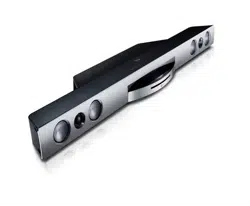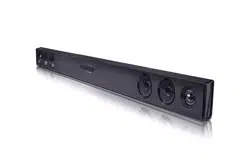

OWNER’S MANUAL
Sound Bar
Please read this manual carefully before operating
your set and retain it for future reference.
MODEL
LAS160B
*MFL69361011*
www.lg.com
1 Getting Started
Getting Started2
Getting Started
1
Safety Information
CAUTION
RISK OF ELECTRIC SHOCK
DO NOT OPEN
CAUTION: TO REDUCE THE RISK OF ELECTRIC
SHOCK DO NOT REMOVE COVER (OR BACK) NO
USER-SERVICEABLE PARTS INSIDE REFER
SERVICING TO QUALIFIED SERVICE PERSONNEL.
This lightning ash with arrowhead
symbol within an equilateral
triangle is intended to alert the
user to the presence of uninsulated
dangerous voltage within the
product’s enclosure that may be of
sufcient magnitude to constitute
a risk of electric shock to persons.
The exclamation point within an
equilateral triangle is intended to
alert the user to the presence of
important operating and
maintenance (servicing)
instructions in the literature
accompanying the product.
WARNING: This product contains chemicals known
to the State of California to cause cancer and birth
defects or other reproductive harm. Wash hands
after handling.
WARNING: TO PREVENT FIRE OR ELECTRIC SHOCK
HAZARD, DO NOT EXPOSE THIS PRODUCT TO RAIN
OR MOISTURE.
CAUTION: The apparatus shall not be exposed to
water (dripping or splashing) and no objects lled
with liquids, such as vases, shall be placed on the
apparatus.
WARNING: Do not install this equipment in a
conned space such as a book case or similar unit.
CAUTION: Do not use high voltage products around
this product. (ex. Electrical swatter) This product may
malfunction due to electrical shock.
CAUTION: No naked ame sources, such as lighted
candles, should be placed on the apparatus.
CAUTION: Do not block any ventilation openings.
Install in accordance with the manufacturer’s
instructions.
Slots and openings in the cabinet are provided for
ventilation and to ensure reliable operation of the
product and to protect it from over heating. The
openings shall be never be blocked by placing the
product on a bed, sofa, rug or other similar surface.
This product shall not be placed in a built-in
installation such as a bookcase or rack unless proper
ventilation is provided or the manufacturer’s
instruction has been adhered to.
CAUTION concerning the Power Cord
Check the specication page of this owner’s manual
to be certain. Do not overload wall outlets.
Overloaded wall outlets, loose or damaged wall
outlets, extension cords, frayed power cords, or
damaged or cracked wire insulation are dangerous.
Any of these conditions could result in electric shock
or re. Periodically examine the cord of your device,
and if its appearance indicates damage or
deterioration, unplug it, discontinue use of the device,
and have the cord replaced with an exact
replacement part by an authorized service center.
Protect the power cord from physical or mechanical
abuse, such as being twisted, kinked, pinched, closed
in a door, or walked upon. Pay particular attention to
plugs, wall outlets, and the point where the cord exits
the device. The Power Plug is the disconnecting
device. In case of an emergency, the Power Plug must
remain readily accessible
NOTICE: For safety marking information including
product identication and supply ratings, please refer
to the main label on the bottom or the other surface
of the product.
Getting Started 3
Getting Started
1
This device is equipped with a portable battery or
accumulator.
Safety way to remove the battery from the
equipment: Remove the old battery or battery pack,
follow the steps in reverse order than the assembly.
To prevent contamination of the environment and
bring on possible threat to human and animal health,
the old battery or the battery put it in the
appropriate container at designated collection points.
Do not dispose of batteries or battery together with
other waste. It is recommended that you use local,
free reimbursement systems batteries and
accumulators. The battery should not be exposed to
excessive heat such as sunshine, re or the like.
IMPORTANT SAFETY
INSTRUCTIONS
1. Read these instructions.
2. Keep these instructions.
3. Heed all warnings.
4. Follow all instructions.
5. Do not use this apparatus near water.
6. Clean only with dry cloth.
7. Do not block any ventilation openings. Install in
accordance with the manufacturer’s instructions.
8. Do not install near any heat sources such
as radiators, heat registers, stoves, or other
apparatus (including amplifiers) that produce
heat.
9. Do not defeat the safety purpose of the polarized
or grounding-type plug. A polarized plug has two
blades with one wider than the other. A grounding
type plug has two blades and a third grounding
prong. The wide blade or the third prong are
provided for your safety. If the provided plug does
not fit into your outlet, consult an electrician for
replacement of the obsolete outlet.
10. Protect the power cord from being walked on
or pinched particularly at plugs, convenience
receptacles, and the point where they exit from
the apparatus.
11. Only use attachments/accessories specified by
the manufacturer.
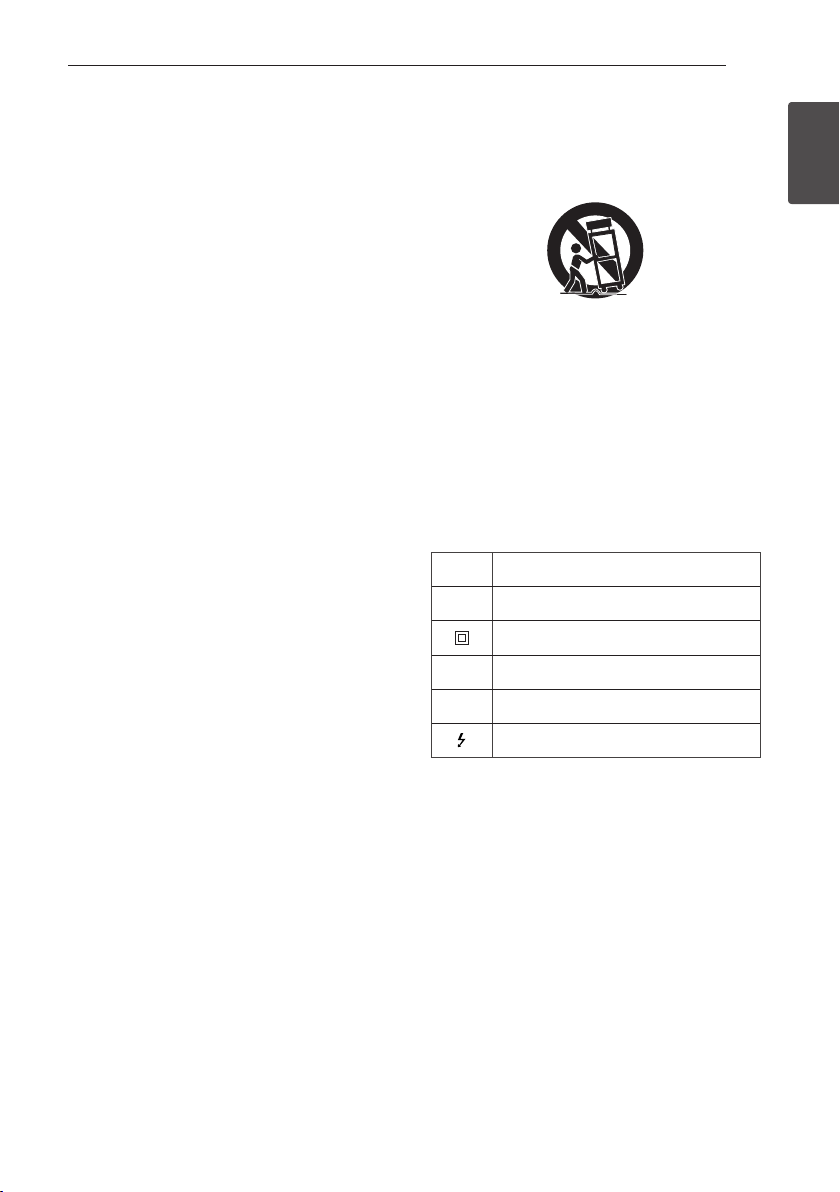
12. Use only with the cart, stand, tripod, bracket, or
table specified by the manufacturer, or sold with
the apparatus. When a cart is used, use caution
when moving the cart/apparatus combination to
avoid injury from tip-over.
13. Unplug this apparatus during lightning storms or
when unused for long periods of time.
14. Refer all servicing to qualified service personnel.
Servicing is required when the apparatus has
been damaged in any way, such as power-supply
cord or plug is damaged, liquid has been spilled
or objects have fallen into the apparatus, the
apparatus has been exposed to rain or moisture,
does not operate normally, or has been dropped.
Symbols
~
Refers to alternating current(AC).
0
Refers to direct current(DC).
Refers to class II equipment.
1
Refers to stand-by.
!
Refers to “ON” (power).
Refers to dangerous voltage.

Getting Started4
Getting Started
1
FCC Compliance Statement
This equipment has been tested and found to comply with
the limits for a Class B digital device, pursuant to Part 15 of
the FCC Rules. These limits are designed to provide
reasonable protection against harmful interference in a
residential installation. This equipment generates, uses, and
can radiate radio frequency energy and, if not installed and
used in accordance with the instructions, may cause harmful
interference to radio communications. However, there is no
guarantee that interference will not occur in a particular
installation. If this equipment does cause harmful
interference to radio or television reception, which can be
determined by turning the equipment off and on, the user is
encouraged to try to correct the interference by one or more
of the following measures:
y Reorient or relocate the receiving antenna.
y Increase the separation between the equipment and the
receiver.
y Connect the equipment to an outlet on a circuit different
from that to which the receiver is connected.
y Consult the dealer or an experienced radio/TV technician
for help.
This device complies with part 15 of the FCC Rules.
Operation is subject to the following two conditions: (1) this
device may not cause harmful interference and (2) this
device must accept any interference received, including
interference that may cause undesired operation of the
device. Any changes or modications in construction of this
device which are not expressly approved by the party
responsible for compliance could void the user’s authority to
operate the equipment.
FCC RF Radiation Exposure Statement : This equipment
complies with FCC radiation exposure limits set forth for an
uncontrolled environment. This transmitter must not be
co-located or operating in conjunction with any other
antenna or transmitter.
This equipment should be installed and operated with
minimum distance 20 cm (7.8 inches) between the antenna
and your body. Users must follow the specic operating
instructions for satisfying RF exposure compliance.
Responsible Party :
LG Electronics USA, Inc.
1000 Sylvan Ave
Englewood Cliffs, NJ 07632
Tel: 1-800-243-0000
Table of Contents 5
1
2
3
4
5
Table of Contents
1 Getting Started
2 Safety Information
6 Unique features
6 – Auto power down
6 Introduction
6 – Symbols used in this manual
6 Accessories
7 Remote control
8 Front panel
9 Rear panel
10 Installing the sound bar
11 Mounting the main unit on a wall
2 Connecting
13 Connecting to your TV
13 – Using an OPTICAL cable
13 Optional equipment connection
13 – OPTICAL IN connection
14 – Portable In connection
15 Operations
15 – DRC (Dynamic range control)
15 – Turn off the sound temporarily
15 – Using your TV remote control
3 Operating
16 – AUTO POWER On/Off
16 – Auto function change
17 Using BLUETOOTH® technology
17 – Listening to music stored on the
BLUETOOTH devices
18 Sound adjustment
4 Troubleshooting
19 Troubleshooting
20 NOTES to use wireless
5 Appendix
21 Trademarks and licenses
22 Specifications
23 Maintenance
23 – Handling the unit
Getting Started6
Getting Started
1
Unique features
Auto power down
This unit supports to turn off by itself for saving
energy consumption.
Introduction
Symbols used in this manual
,
Note
Indicates special notes and operating features.
>
Caution
Indicates cautions for preventing possible damages
from abuse.
Accessories
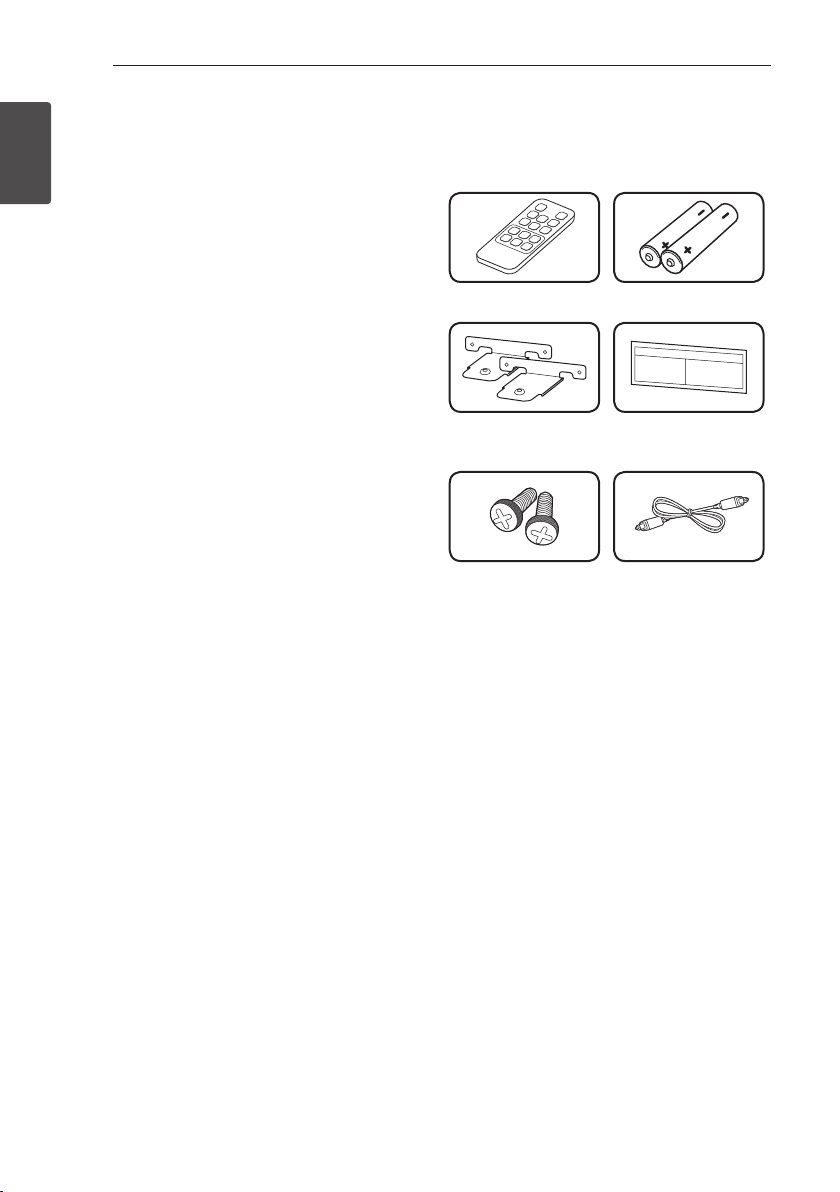
Please check and identify the supplied accessories.
Remote control (1) Batteries (2)
Wall bracket (2) Wall bracket install
guide (1)
Screws (2) Optical cable (1)
Getting Started 7
Getting Started
1
Remote control
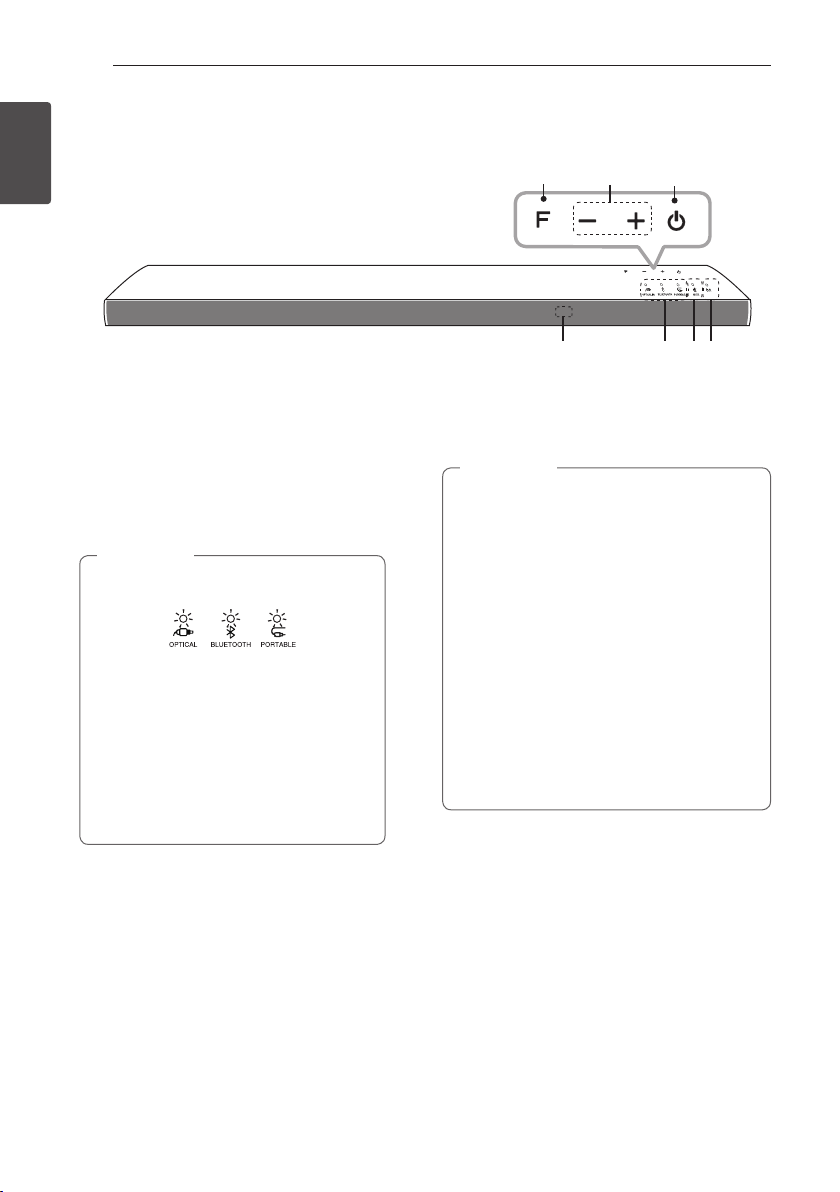
Replacement of battery
Remove the battery cover on the rear of the remote
control, and insert battery with and matched
correctly.
• • • • • • • • • • • • • • a • • • • • • • • • • • • •
1 (Power): Switches the unit ON or OFF.
F : Changes input sources.
STANDARD : Selects STANDARD sound effect.
VOICE : Selects VOICE sound effect.
CINEMA : Selects CINEMA sound effect.
(Mute) : Mutes the sound.
VOL o/p : Adjusts speaker volume.
• • • • • • • • • • • • • • b • • • • • • • • • • • • •
DRC ON/OFF : Turns on or off DRC function. (Refer
to the page 15.)
AUTO POWER ON/OFF: Turns on or off AUTO
POWER function. (Refer to the page 16.)
?
: This button is not used.
Getting Started8
Getting Started
1
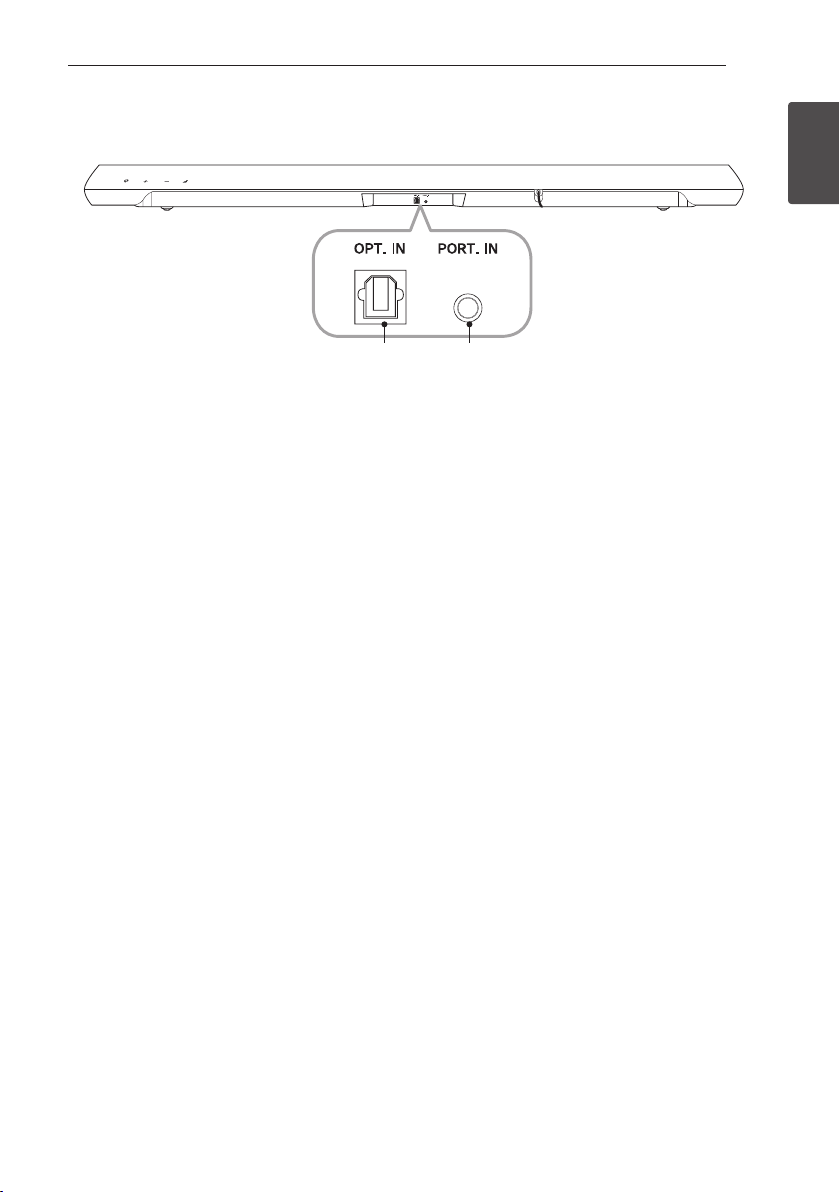
A F (Function)
Selects the function and input source.
B p/o (Volume)
Adjusts volume level.
C 1 (Standby/On)
D Remote sensor
E Function LED
y You can check current function through
the LED.
y This unit turns off LED If there is no key
input for 20 seconds. To display LED,
press any button.
y Standby LED quickly blinks when you
press any button.
y Bluetooth LED blinks when you select
Bluetooth function. if you connect
Bluetooth device, LED will turn on.
,
Note
F MUTE LED
G Standby LED
It lights up in red on standby mode.
Precautions in using the touch buttons
y Use the touch buttons with clean and dry
hands.
- In a humid environment, wipe out any
moisture on the touch buttons before using.
y Do not press the touch buttons hard to make
it work.
- If you apply too much strength, it can
damage the sensor of the touch buttons.
y Touch the button that you want to work in
order to operate the function correctly.
y Be careful not to have any conductive
material such as metallic object on the touch
buttons. It can cause malfunctions.
,
Note
Front panel
A
B
C
D E
GF
Getting Started 9
Getting Started
1
Rear panel
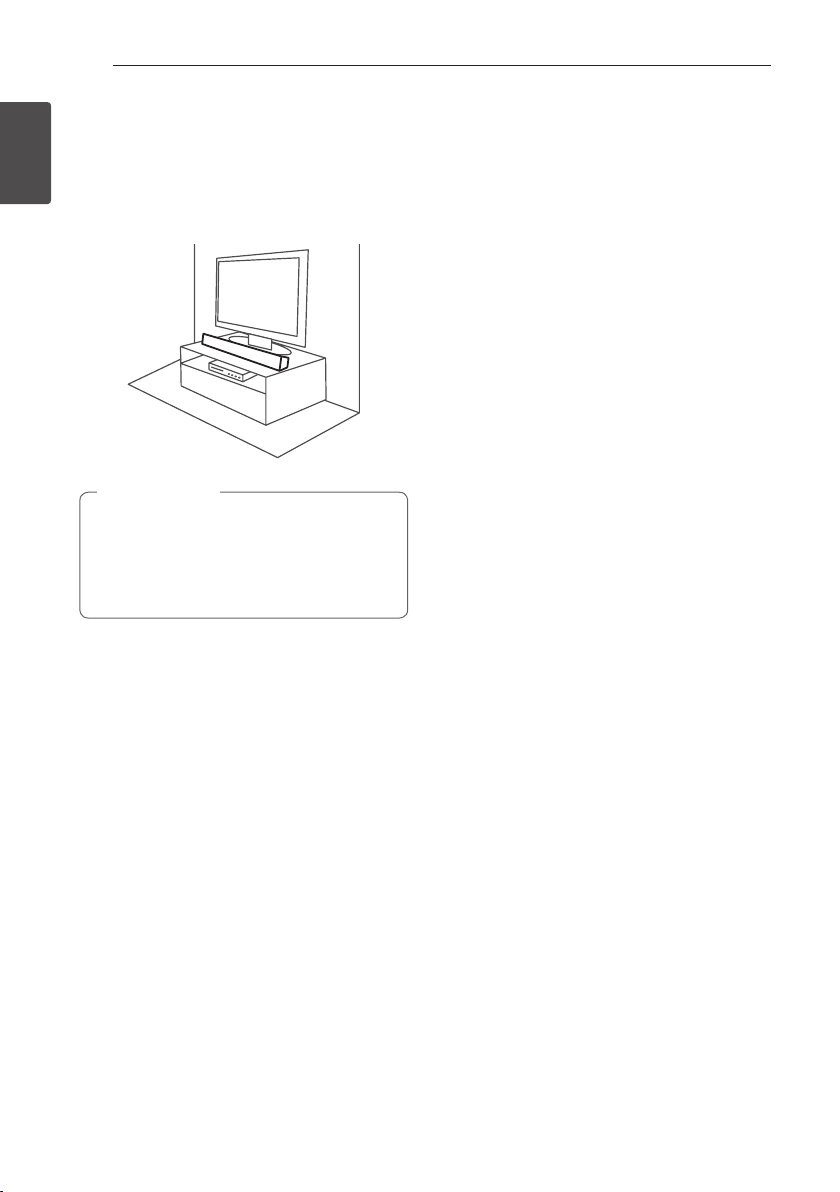
A OPT. IN : Optical input B PORT. IN : Portable input
A B
Getting Started10
Getting Started
1
Installing the sound bar
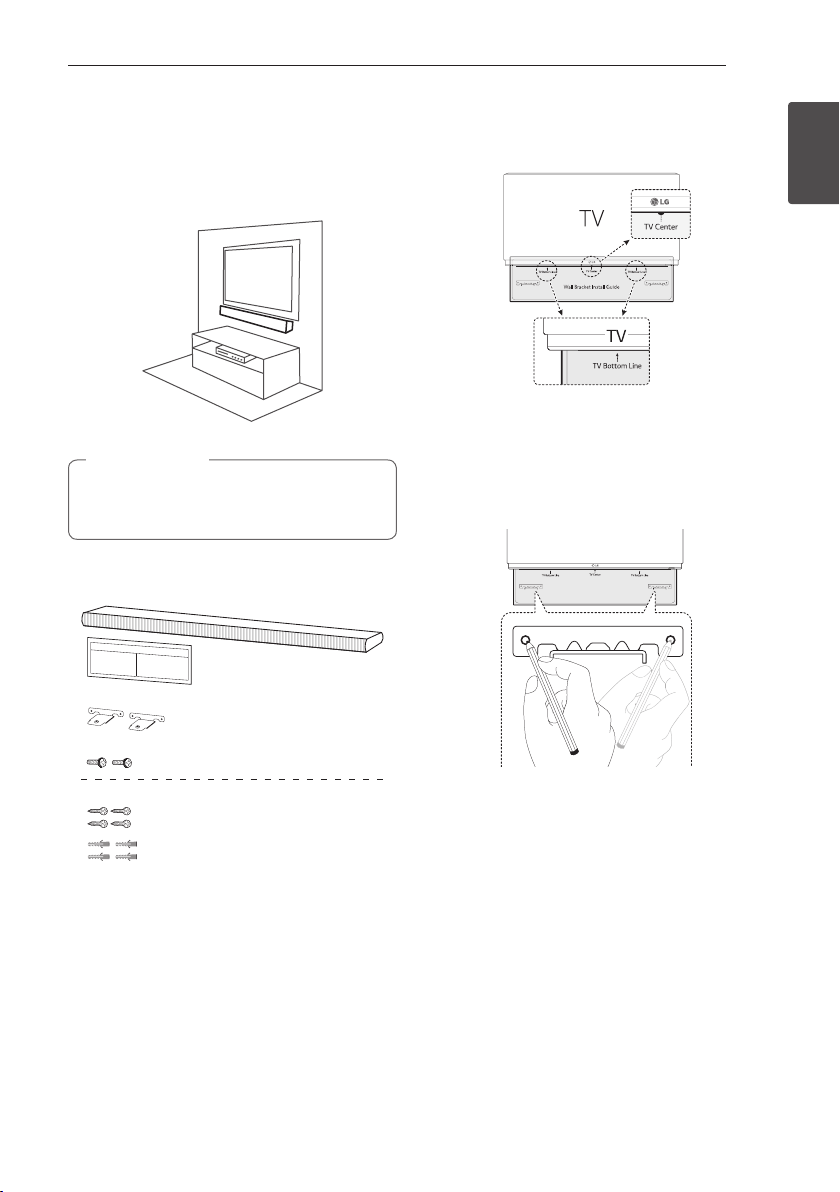
You can hear the sound by connecting the unit to
another device: TV, Blu-ray disc player, DVD player, etc.
Place the unit in front of the TV and connect it to the
device you want. (Refer to page 13)
For best performance of wireless connection
such as Bluetooth, do not install the unit on
Metallic furniture because wireless connection
communicates through a module positioned on
the bottom of the unit.
>
Caution
Getting Started 11
Getting Started
1
Mounting the main unit
on a wall
You can mount the main unit on a wall.
Because it is difcult to make a connection after
installing this unit, you should connect the
cables before installation.
>
Caution
Preparation materials
Unit
Wall bracket install guide
Screws
Screws (A)
Wall plug
Wall bracket
(Not supplied)
1. Match the TV’s BOTTOM EDGE of Wall bracket
install guide with the bottom of TV and attach to
the position.
2. When you mount it on a wall (concrete), use the
wall plugs (Not supplied). You will need to drill
some holes. A guide sheet (Wall Bracket Install
guide) is supplied showing you where to drill. Use
the sheet to check the points where you should
drill.
3. Remove the Wall bracket install guide.
Getting Started12
Getting Started
1
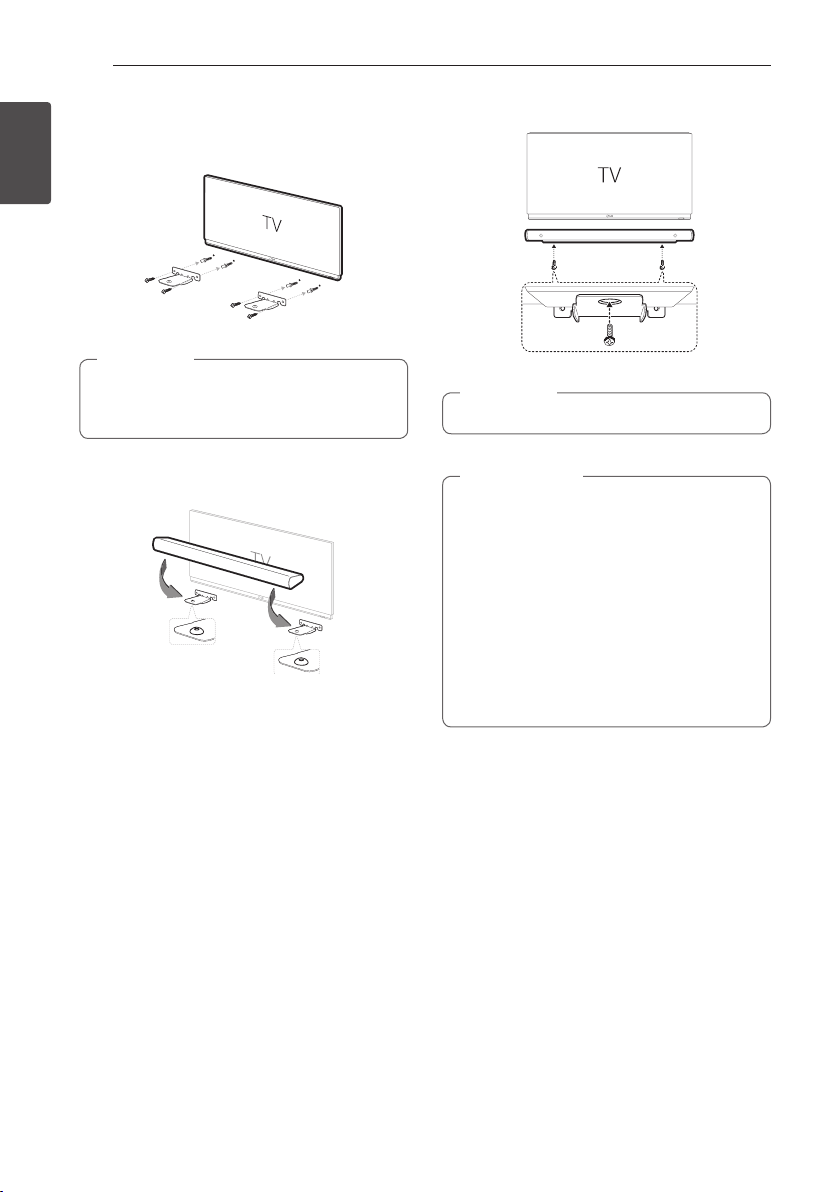
4. Fix the brackets with screws (A) (Not Supplied)
as shown in the illustration below.
Screws (A) and Wall Plugs are not supplied for
mounting the unit. We recommend the Hilti
(HUD -16 x 30) for the mounting.
,
Note
5. Put the unit on the brackets to match screw
holes on the bottom of the unit.
6. Fix the unit with the screws firmly.
To detach the unit, perform it in reverse order.
,
Note
y Do not install this unit upside down. It can
damage the parts of this unit or be the cause
of personal injury.
y Do not hang onto the installed unit and avoid
any impact to the unit.
y Secure the unit rmly to the wall so that it
does not fall off. If the unit falls off, it may
result in an injury or damage to the product.
y When the unit is installed on a wall, please
make sure that a child does not pull any of
connecting cables, as it may cause it to fall.
>
Caution
2 Connecting
Connecting 13
Connecting
2
Connecting to your TV
Using an OPTICAL cable
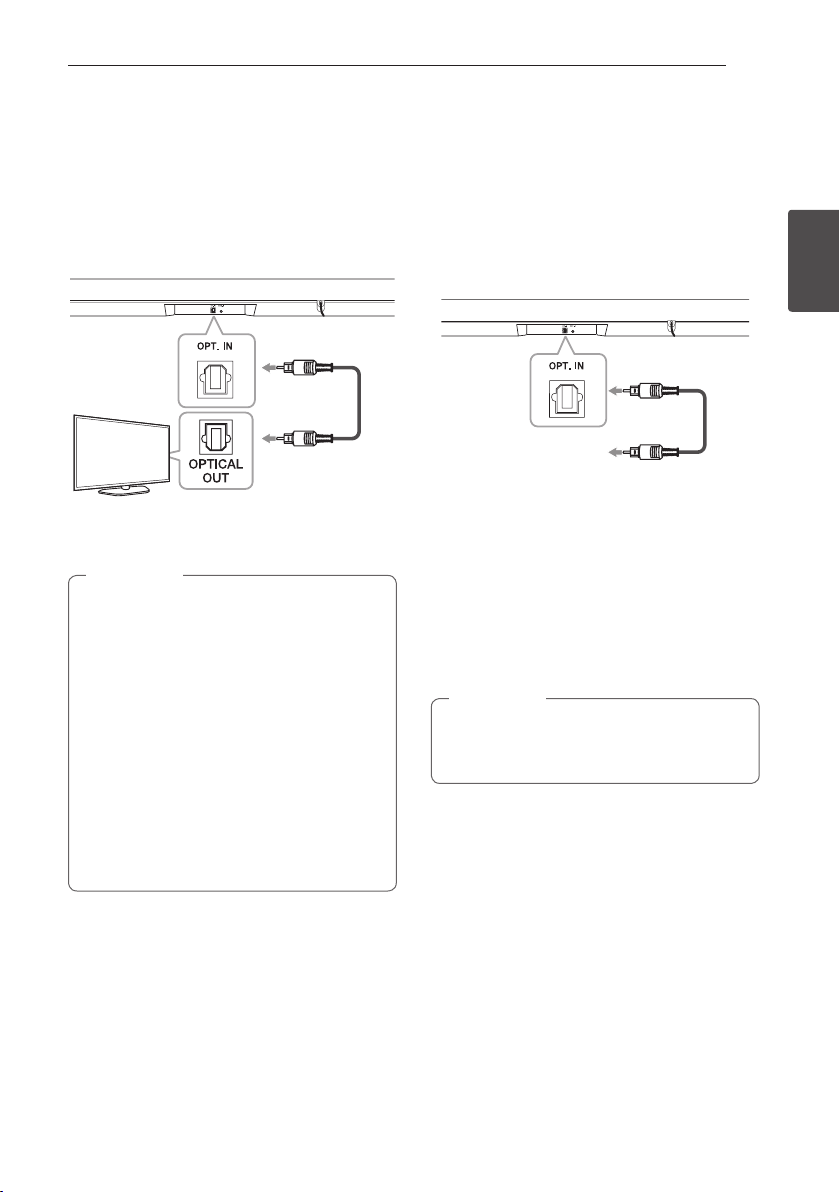
1. Connect the OPT. IN jack on the back of the unit
to OPTICAL OUT jack on the TV using an OPTICAL
cable.
Optical
cable
2. Set the input source to OPTICAL. Press F button
repeatedly until the function is selected.
y Before connecting the optical cable, be sure
to remove the protection plug cover if your
cable has the cover.
y You can enjoy the TV audio through the
speakers of this unit. In the case of some TV
models, you must select the external speaker
option from the TV menu. (For details,
reference your TV user manual.)
y Set up the sound output of TV to listen to the
sound through this unit :
TV setting menu [ [Sound] [ [TV Sound
output] [ [External speaker (Optical)]
y Details of TV setting menu vary depending on
the manufacturers or models of your TV.
,
Note
Optional equipment
connection
OPTICAL IN connection
Connect an optical output jack of external devices to
the OPT. IN jack.
To the digital
optical output jack of
external device
1. Connect the OPT. IN jack on the back of the unit
to optical out jack of your TV (or digital device
etc.).
2. Select the input source to OPTICAL by pressing F
button repeatedly until the function is selected.
3. Listen to sound.
4. Press F to exit from OPTICAL.
Before connecting the optical cable, be sure to
remove the protection plug cover if your cable
has the cover.
,
Note
Connecting14
Connecting
2
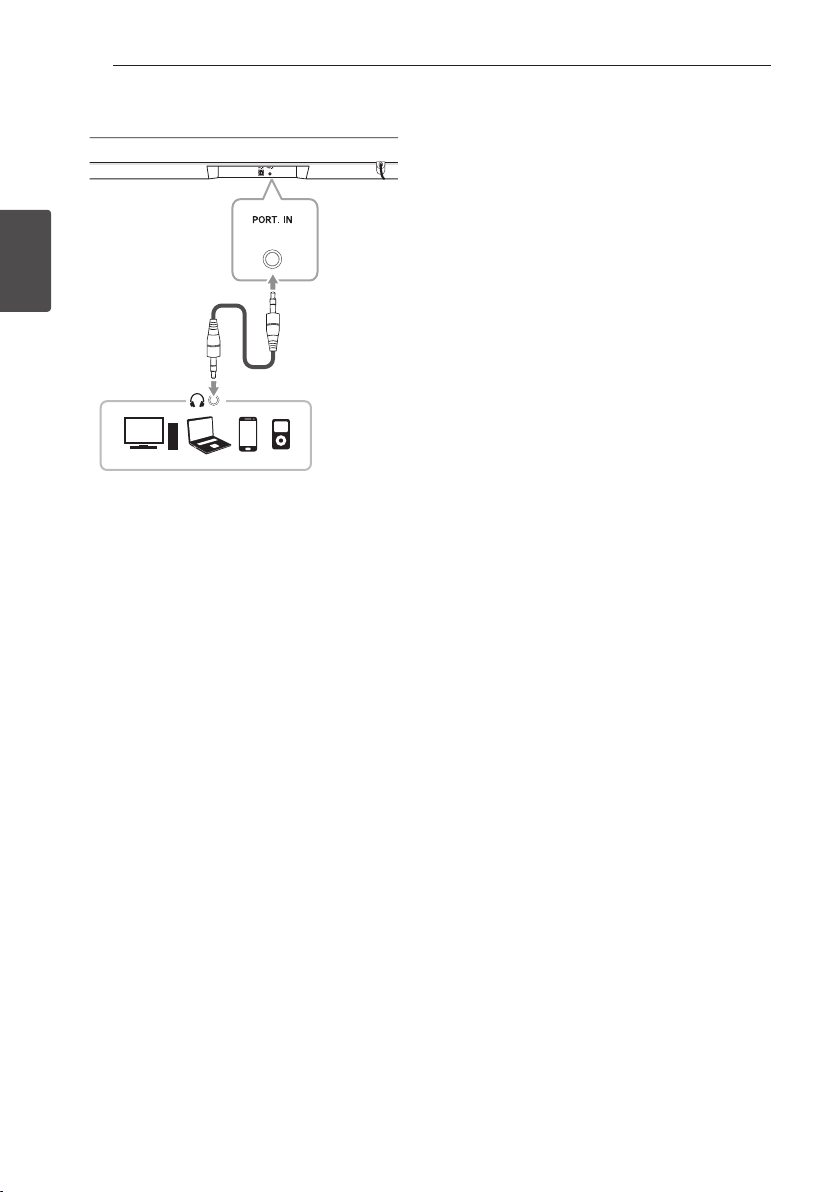
Portable In connection
MP3 player, etc...
Listening to music from your portable
player
The unit can be used to play the music from many
types of portable players or external devices.
1. Connect the portable player to the
PORT.IN connector of the unit by using 3.5 mm
stereo cable.
2. Turn the power on by pressing 1 (Power).
3. Select the input source to PORTABLE
by pressing F button repeatedly.
4. Turn on the portable player or external device and
start playing it.
3 Operating
Operating 15
Operating
3
Operations
DRC (Dynamic range control)
Make the sound clear when the volume is turned
down and prevent sudden increase of sound (Dolby
Digital only). This function turns on or off you press
DRC ON/OFF.
Turn off the sound temporarily
Press (Mute) to mute your unit. To cancel it, press
(Mute) again on the remote control or change the
volume level.
Using your TV remote control
You can control some functions of this unit by your
TV remote control even by other company’s product.
Controllable functions are volume up/down and
mute.
Press and hold DRC ON on the remote control for
about 3 seconds.
To turn off this function, press and hold DRC OFF
about 3 seconds.
y Supported TV brands
LG Panasonic Philips Samsung
Sharp Sony Toshiba Vizio
y Make sure that the sound output of your TV
is set to [External speaker].
y Depending on the remote control, this
function may not work well.
,
Note
Auto power down
This unit will turn itself off to save electric
consumption in the case main unit is not connected
to external device and is not used for 20 minutes.
It will also shut itself off after six hours when the
Main unit has been connected to other device using
analog input. (Ex : Portable, etc..)
How to disconnect the wireless
network connection or the wireless
device
Set up the AUTO POWER ON/OFF function to off
and turn off the unit.
Operating16
Operating
3
AUTO POWER On/Off
This unit automatically turns on by an input source :
Optical or Bluetooth.
When you turn on your TV or an external device
connected to this unit, this unit recognizes the input
signal and selects the suitable function. You can hear
the sound from your device.
If you try to connect your Bluetooth device, this unit
turns on and the unit will be connected to your
Bluetooth device.
This function turns on or off when you press AUTO
POWER ON/OFF.
y After the unit is turned on by AUTO POWER
function, it will be automatically turned off if
there is no signal for a certain period of time
from the external device.
y If you turned off the unit directly, it cannot be
turned on automatically by AUTO POWER
function. However the unit can be turned on
by AUTO POWER function when optical
signal comes in after 5 seconds of no signal.
y Depending on the connected device, this
function may not operate.
y If you disconnect Bluetooth connection by
this unit, some Bluetooth devices try to
connect to the unit continually. Therefore it is
recommended to disconnect the connection
before turning off the unit.
y When you turn on this unit for the rst time,
Auto Power function status is turned on.is
turned on status.
y To use this function, the main unit must be
registered in paired devices list of Bluetooth
device.
,
Note
Auto function change
This unit recognizes input signals such as optical and
Bluetooth. And then changes suitable function
automatically.
When optical signal comes in
When you turn on the external device connected to
this unit by an optical cable, this unit changes the
function to optical. You can hear the sound from your
device.
When you try to connect BLUETOOTH
device
When you try to connect your Bluetooth device to
this unit, the Bluetooth function is selected. Play
your music on the Bluetooth device.
To change to optical function, it needs 5 seconds
of no signal.
,
Note
Operating 17
Operating
3
Using BLUETOOTH®
technology
About BLUETOOTH
Bluetooth is wireless communication technology for
short range connection.
The sound may be interrupted when the connection
has interference from other electronic waves or you
connect the Bluetooth in other rooms.
Connecting individual devices under Bluetooth
wireless technology does not incur any charges. A
mobile phone with Bluetooth wireless technology
can be operated via the Cascade if the connection
was made via Bluetooth wireless technology.
Available Devices : Mobile phone, MP3, Laptop, PDA
etc.
BLUETOOTH Profiles
In order to use Bluetooth wireless technology,
devices must be able to interpret certain profiles. This
unit is compatible with following profile.
A2DP (Advanced Audio Distribution Profile)
Codec : SBC
Listening to music stored on the
BLUETOOTH devices
Pairing your unit and BLUETOOTH
device
Before you start the pairing procedure, make sure
the Bluetooth feature is turned on in to your
Bluetooth device. Refer to your Bluetooth device’s
user guide. Once a pairing operation is performed, it
does not need to be performed again.
1. Turn on the unit.
2. Operate the Bluetooth device and perform the
pairing operation. When searching for this unit
with the Bluetooth device, a list of the devices
found may appear in the Bluetooth device
display depending on the type of Bluetooth
device. Your unit appears as “LG LAS160B (XX)”.
y XX means the last two digits of Bluetooth
address. For example, if your unit has a
Bluetooth address such as
9C:02:98:4A:F7:08, you will see
“LG LAS160B (08)” on your Bluetooth
device.
y Depending on the Bluetooth device type,
some device have a different pairing way.
Enter the PIN code (0000) as needed.
,
Note
3. When this unit is successfully connected with
your Bluetooth device, BLUETOOTH LED will turn
on.
4. Listen to music.
To play a music stored on your Bluetooth device,
refer to your Bluetooth device’s user guide.
Operating18
Operating
3
y When using Bluetooth technology, you have
to make a connection between the unit and
the Bluetooth device as close as possible and
keep the distance.
However it may not work well in the case
below :
- There is a obstacle between the unit and
the Bluetooth device.
- There is a device using same frequency
with Bluetooth technology such as a
medical equipment, a microwave or a
wireless LAN device.
y You should connect your Bluetooth device to
this unit again when you restart it.
y The sound may be interrupted when the
connection has interference from other
electronic waves.
y You may not control the Bluetooth device
with this unit.
y Pairing is limited to one Bluetooth device per
unit and multi-pairing is not supported.
y Depending on the type of the device, you may
not be able to use the Bluetooth function.
y You can enjoy Bluetooth function using
Smart phone, MP3 player, Notebook, etc..
y The more distance between the unit and the
Bluetooth device, the lower the sound
quality becomes.
y Bluetooth connection will be disconnected
when the unit is turned off or the Bluetooth
device gets far from the unit.
y When Bluetooth connection is disconnected,
connect the Bluetooth device to the unit
again.
y When not connected the Bluetooth,
BLUETOOTH LED will blink.
,
Note
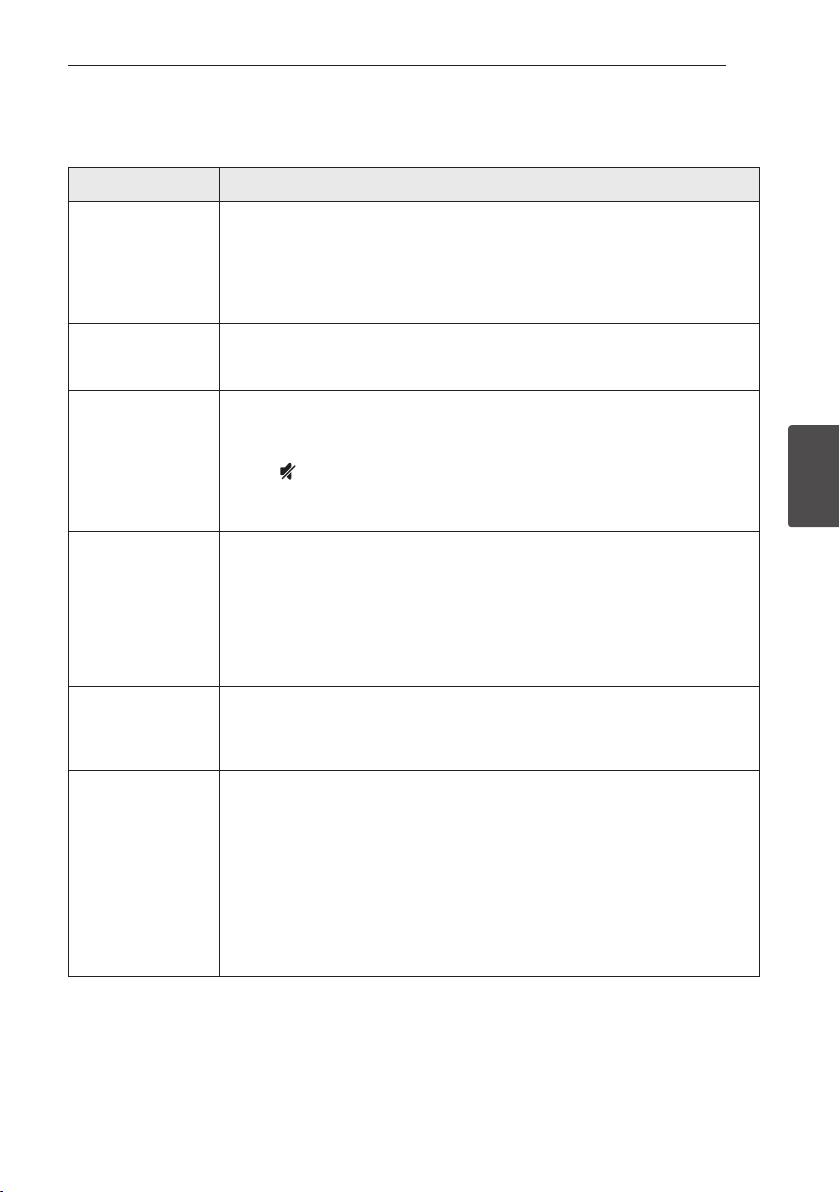
Sound adjustment
This system has a number of pre-set surround sound
fields. You can select a desired sound mode by using
each sound mode button.
Button Description
STANDARD You can enjoy optimized sound.
CINEMA
You can enjoy more immersive
and cinematic surround sound.
VOICE
This program make voice sound
clear, improving the quality of
voice sound.
y In some of the sound effect modes,
some speakers may have no sound or low
sound. It depends on the mode of sound and
the source of the audio, it is not a defect.
y You may need to reset the sound effect
mode, after switching the input, sometimes
even after the sound source changed.
,
Note
4 Troubleshooting
Troubleshooting 19
Troubleshooting
4
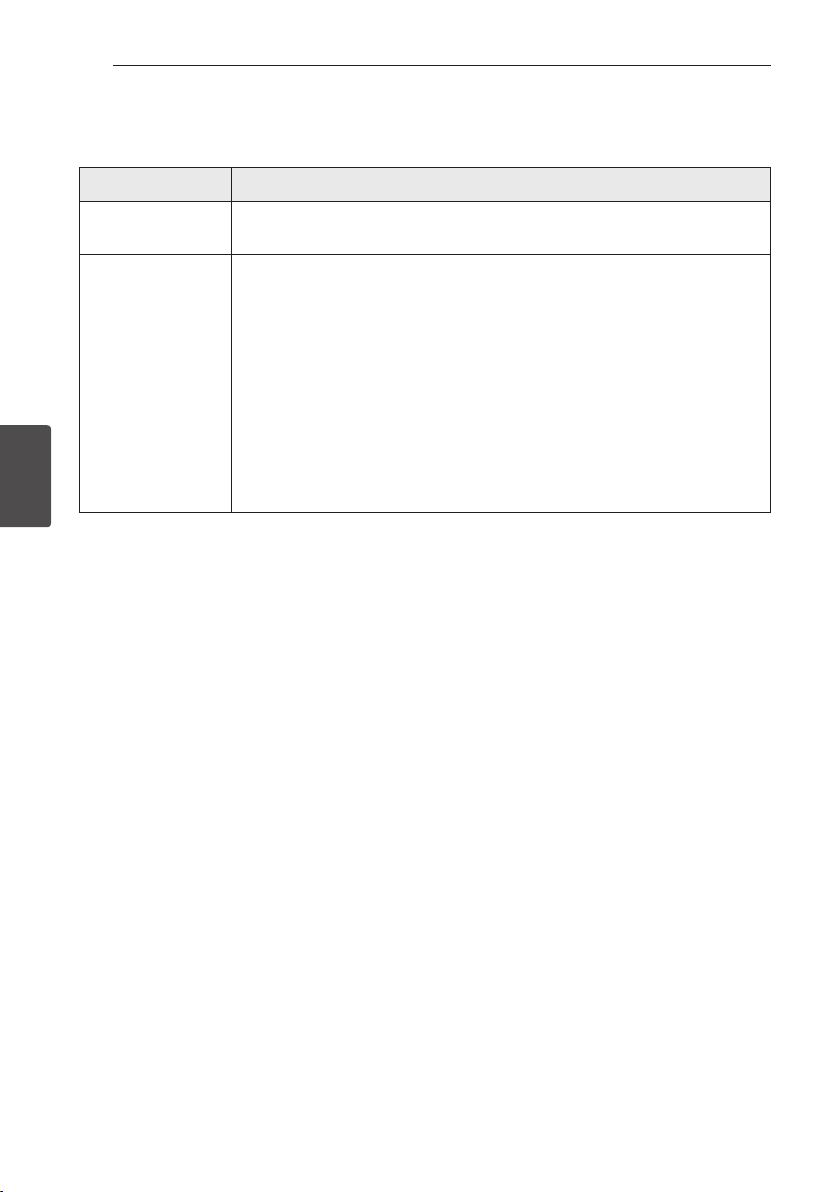
Troubleshooting
PROBLEM CAUSE & CORRECTION
The unit does not
work properly.
y Turn off the power of this unit and the connected external device (TV, Woofer,
DVD-player, Amplier, etc.) and turn it on again.
y Disconnect the power cord of this unit and the connected external device (TV,
Woofer, DVD-player, Amplier, etc.) and then try connecting again.
y Previous setting may not be saved when device power is shut off.
No Power
y The power cord is unplugged.
Plug in the power cord.
y Check the condition by operating other electronic devices.
No sound
y Incorrect input source is selected.
Check the input source and select the correct input source.
y The mute function is activated.
Press
(Mute) or adjust the volume level to cancel the mute function.
y When you are using connection with a external device (set top box, Bluetooth
device etc.), adjust volume level of the device.
The remote control
does not work
properly.
y The remote control is too far from the unit.
Operate the remote control within about 7 m, (23 ft.).
y There is an obstacle in the path of the remote control and the unit.
Remove the obstacle.
y The batteries in the remote control is exhausted.
Replace the batteries with new one.
The AUTO POWER
function does not
work.
y Check connection of the external device such as TV, DVD/Blu-Ray player or
Bluetooth device.
y Depending on the connected device, this function may not operate.
When you feel the
output sound of the
unit is low.
Check the details below and adjust the unit according to them.
y Switch [ON] state of DRC function to [OFF] by using remote controller.
y With the sound bar connected with TV, change the AUDIO DIGITAL OUT setting on
TV Setup Menu from [PCM] to [AUTO] or [BITSTREAM].
y With the sound bar connected with Player, change the AUDIO DIGITAL OUT setting
on Player Setup Menu from [PCM] to [PRIMARY PASS-THROUGH] or
[BITSTREAM].
y Change Audio DRC setting on Player setup menu to [OFF] state.
Troubleshooting20
Troubleshooting
4
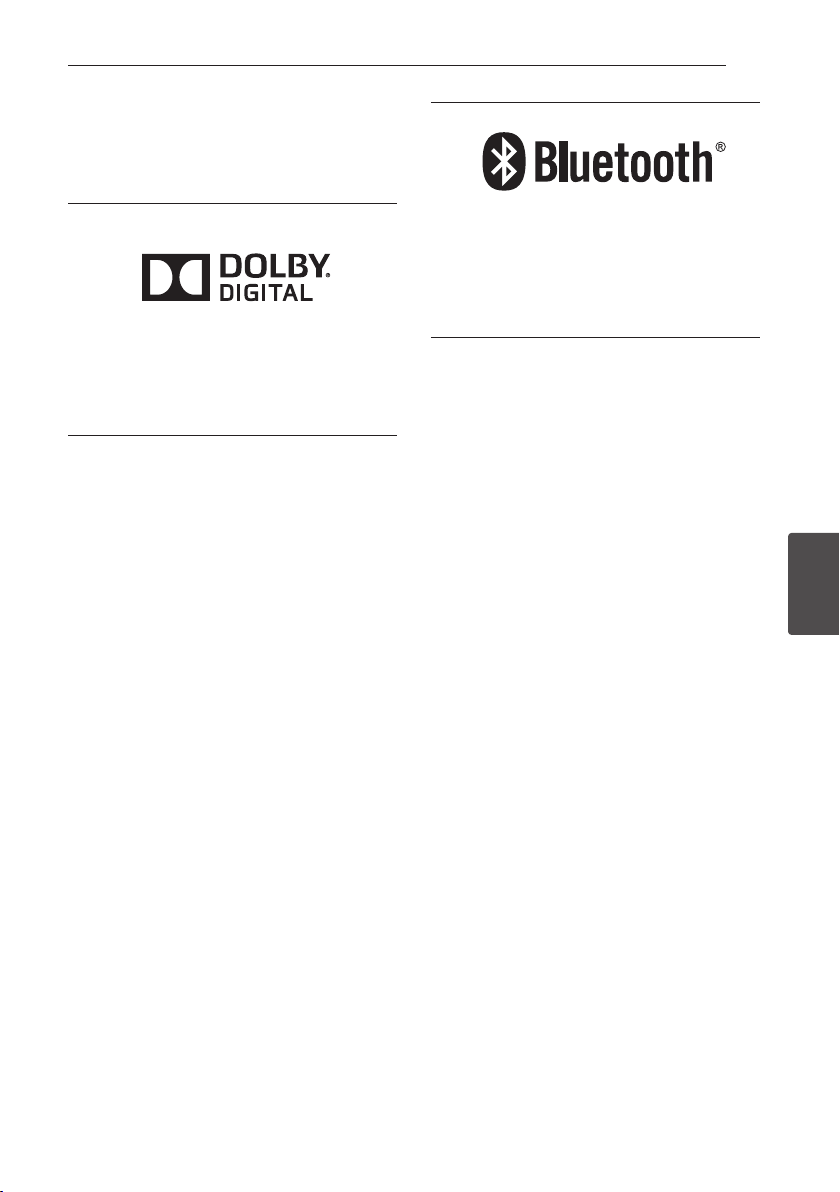
NOTES to use wireless
PROBLEM CAUSE & CORRECTION
This device may have
wireless interference.
y Wireless may not operate normally in weak signal area.
y Do not install the device on metal furniture for optimum performance.
Bluetooth device may
malfunction or make
noise in the following
cases.
y When any part of your body contacts the transceiver of the Bluetooth device or
sound bar.
y When there is an obstacle or wall or the device is installed in a secluded spot.
y When there is a device (a wireless LAN, a medical equipment or a microwave)
using the same frequency, make the distance between the products as far away as
possible from each other.
y When connecting the device to a Bluetooth device, make the distance between
the products as close as possible.
y When the device gets too far from the Bluetooth device, the connection is
disconnected and also may cause the device malfunction.
5 Appendix
Appendix 21
Appendix
5
Trademarks and licenses
All other trademarks are trademarks of their
respective owners.
Manufactured under license from Dolby
Laboratories. Dolby and the double-D symbol are
trademarks of Dolby Laboratories.
The Bluetooth word mark and logos are owned
by the Bluetooth SIG, Inc. and any use of such
marks by LG Electronics is under license.
Other trademarks and trade names are those of
their respective owners.
Appendix22
Appendix
5
Specifications
General
Power requirements Refer to main label.
Power consumption
Refer to main label.
Networked standby : 0.4 W
(If all network ports are activated.)
Dimensions (W x H x D) Approx. 880 mm x 62 mm x 90 mm (34.6 inch x 2.4 inch x 3.5 inch)
Net Weight Approx. 1.5 kg (3.3 lb)
Operating temperature 5 °C to 35 °C
Operating humidity 5 % to 90 %
Available Digital Input Audio
Sampling Frequency
32 kHz, 44.1 kHz, 48 kHz, 88.2 kHz, 96 kHz
Available Digital Input Audio format Dolby Digital, PCM
Inputs
Digital audio in (OPT. IN) 3 V (p-p), Optical jack x 1
PORT. IN (Portable in) 0.5 Vrms (3.5 mm stereo jack) x 1
Amplier (RMS Output power)
Total 50 W
Front 25 W +25 W (4 Ω at 1 kHz, 10 % THD)
y Designs and specications are subject to change without prior notice.

Appendix 23
Appendix
5
Maintenance
Handling the unit
When shipping the unit
Please save the original shipping carton and packing
materials. If you need to ship the unit, for maximum
protection, re-pack the unit as it was originally
packed at the factory.
Keeping the exterior surfaces clean
y Do not use volatile liquids such as insecticide spray
near the unit.
y Wiping with strong pressure may damage the
surface.
y Do not leave rubber or plastic products in contact
with the unit for a long period of time.
Cleaning the unit
To clean the player, use a soft, dry cloth. If the
surfaces are extremely dirty, use a soft cloth lightly
moistened with a mild detergent solution. Do not use
strong solvents such as alcohol, benzine, or thinner,
as these might damage the surface of the unit.