7084 665-00
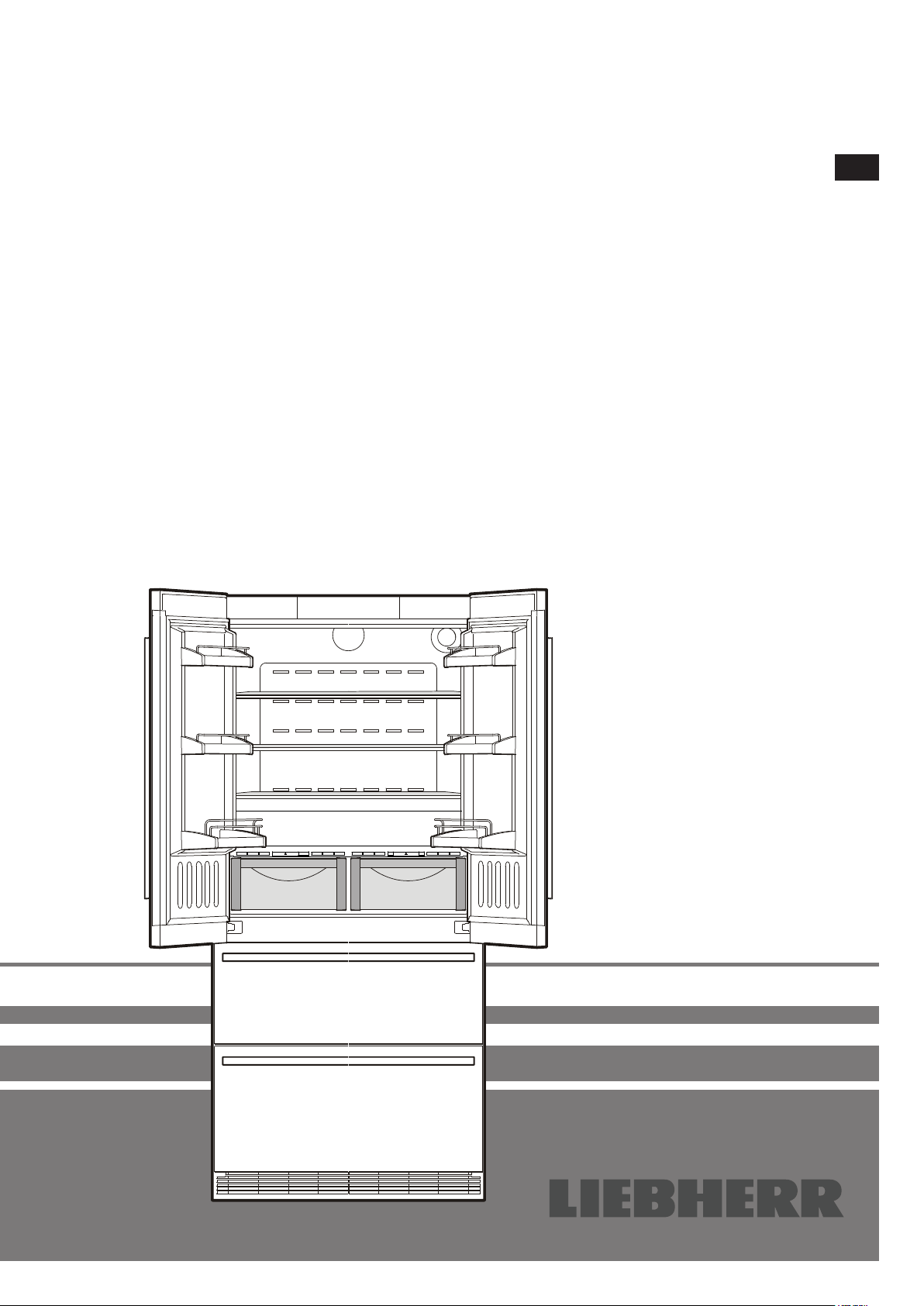
CBNes 62
Operating instructions Page 16
No-frost combined refrigerator-freezer
GB
Safety instructions and warnings
•Topreventinjuryordamagetotheunit,theap-
plianceshouldbeunpackedandsetupbytwo
people.
•Intheeventthattheapplianceisdamagedon
delivery,contactthesupplierimmediatelybefore
connectingtothemains.
•Toguaranteesafeoperation,ensurethattheap-
plianceissetupandconnectedasdescribedin
theseoperatinginstructions.
•Disconnecttheappliancefromthemainsifany
faultoccurs.Pullouttheplug,switchofforremove
thefuse.
•Whendisconnectingtheappliance,pullonthe
plug,notonthecable.
•Anyrepairsandworkontheapplianceshould
only be carried out by the customer service
department,asunauthorisedworkcouldprove
highlydangerousfortheuser.Thesameapplies
tochangingthemainspowercable.
•Donotallownakedflamesorignitionsources
toentertheappliance.Whentransportingand
cleaningtheapplianceensurethattherefrigerant
circuitisnotdamaged.Intheeventofdamage,
make sure that there are no ignition sources
nearbyandkeeptheroomwellventilated.
•Donotstandontheplinth,drawersordoorsor
usethemtosupportanythingelse.
•Thisappliancecanbeusedbychildrenof8years
oldandover,andalsobypersonswithrestricted
physical,sensoryormentalcapacityorlackof
experienceandknowledge,iftheyaresupervised
orhavebeeninstructedonsafeuseoftheappli-
anceandunderstandtheresultingrisks.Children
mustnotbeallowedtoplaywiththeappliance.
Cleaning and user maintenance must not be
carriedoutbychildrenwithoutsupervision.
•Avoidprolongedskincontactwithcoldsurfaces
or chilled/frozen food. This could cause pain,
numbnessandfrostbite.Inthecaseofprolonged
skin contact, protective measures should be
taken,e.g.glovesshouldbeworn.
•Donoteaticecream,particularyicelolliesorice
cubes,immediatelyaftertakingthemfromthe
freezercompartmentasthereisariskof"burn-
ing"becauseoftheverycoldtemperatures.
•Donotconsumefoodwhichhasbeenstoredfor
toolong,asitcouldcausefoodpoisoning.
•Do not store explosivesor spraysusing com-
bustiblepropellants suchasbutane,propane,
pentaneetc.intheappliance.Electricalcompo-
nentsmightcauseleakinggastoignite.Youmay
identifysuchspraysbytheprintedcontentsora
flamesymbol.
•Donotuseelectricalappliancesinsidetheap-
pliance.
•Theapplianceisdesignedforuseinenclosed
areas.Donotoperatetheapplianceoutdoorsor
inareaswhereitisexposedtosplashwateror
dampconditions.
•TheLEDlightstripsilluminatetheinteriorofthe
appliance. They are not suitable for lighting a
room.
Disposal notes
Theappliancecontainsreusablematerialsandshould
be disposed of properly - not simply with unsorted
household refuse. Appliances which are no longer
needed must be disposed of in a professional and
appropriateway,inaccordancewiththecurrentlocal
regulationsandlaws.
Whendisposingoftheappliance,ensurethattherefrigerantcircuit
isnotdamagedtopreventuncontrolledescapeoftherefrigerant
itcontains(dataontypeplate)andoil.
• Disabletheappliance.
• Pulloutthemainsplug.
• Cutthroughtheconnectioncable.
WARNING
Danger of suffocation due to packing material
and plastic film!
Do not allow children to play with packaging
material.
Take the packaging material to an official collec-
tion point.
16
GB
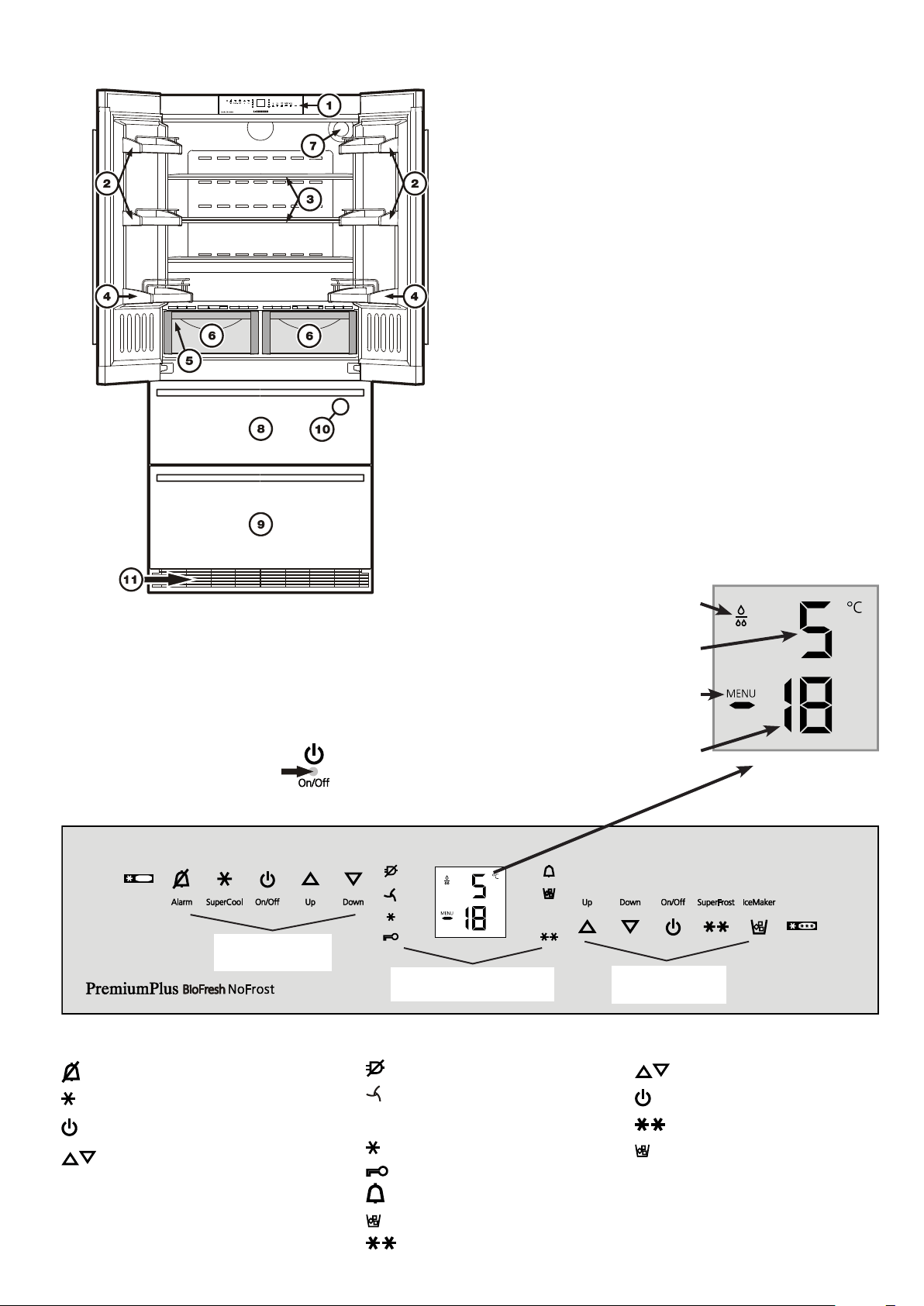
Description of the appliance
1
Operatingandcontrolelements
2
Adjustabledoorracks
3
Adjustablestorageshelves
4
Bottlerack
5
Typeplate(behindthevegetabledrawerontheleft-handside)
6
BioFreshdrawers
7
Waterfilter
8
Upperfreezerdrawer
9
Lowerfreezerdrawer
bl
IceMaker(intheinterioroftheupperfreezerdrawer)
bm
Ventilationgrille.Inthisarea,theexchangeofairforthere-
frigerationunittakesplace.
Nevercoverthisgrilleorotherwiseobstructthe
airflow.
Freezer operating icons
Temperaturesettingbuttons
FreezerON/OFF
SuperFrost
IceMakerON/OFF
Operating and control elements
Theelectroniccontrolpanelhasthe"touch capacitance tech-
nology".
Anyfunctioncanbeactivatedbytouchingthecorrespondingicon.
Theexactcontactpoint
isbetweenthesymbolanditslabel
Refrigerator
operating icons
Refrigerator operating icons
Mutealarm(refrigeratorandfreezer)
SuperCool
RefrigeratorON/OFF
Temperaturesettingbuttons
Freezer
operating icons
Control
icons
Temperature and control display
Refrigeratortemperaturedisplay
Freezertemperaturedisplay
Waterfilterhastobechanged
Menumodeisactivated
(forsettingadditionalfunctions)
Appliance control icons
PowerfailureLED
DustfilterLED
Thedustfilterintheappliance
plinthmustbecleaned.
SuperCoolingLED
ChildlockLED
AlarmLED
IceMakerONLED
SuperFrostLED
17
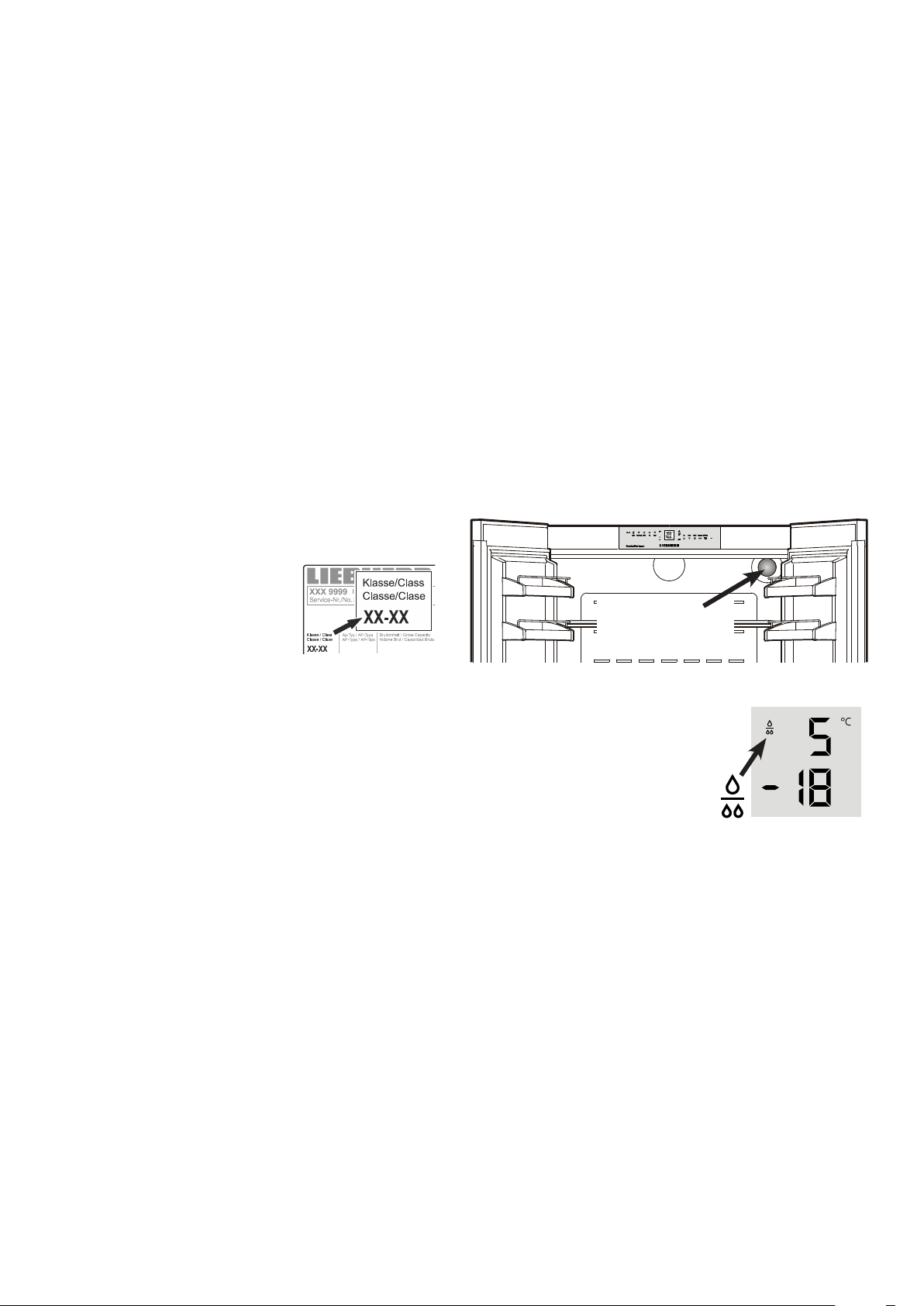
Replacethefilterwhenthewaterdrop
symbol appears in the temperature
display.
Filterscanbeobtainedfromyourdealer.
The drop symbol must be cancelled
afterthefilter hasbeenchanged. For
detailedinstructionsseesectionentitled
"Setup mode".
Water filter
Beforeswitchingontheappliance,installthewaterfilterprovided
intheinteriorrearwalloftherefrigeratorcompartment.
Thisensuresgoodicecubequalityandkeepsthewatercircuit
freeofsolidssuchassand.
Waterfilter
location
Caution!
To avoid the risk of bacteria growth, the water filter
must be changed when the waterdrop symbol appears
on the display!
Itisnotnecessarytoswitchoffthewatersupplywhenremoving
orinstallingthewaterfilter.
Range of appliance use
Theapplianceissuitablesolelyforcoolingfood
inadomesticenvironmentorsimilar.
Thisincludes,forexample,use
-instaffkitchenettes,bedandbreakfastestablish-
ments,
-byguestsincottages,hotels,motelsandother
formsofaccommodation,
-incateringandsimilarservicesinthewholesale
trade.
Usetheappliancesolelyasiscustomarywithinadomesticen-
vironment.Allothertypesofuseareinadmissible.
Theapplianceisnotsuitableforstoringandcoolingmedicines,
bloodplasma,laboratorypreparationsorsimilarsubstancesand
productscoveredbythe2007/47/ECMedicalDevicesDirective.
Anymisuseoftheappliancemayresultindamagetoorspoilage
ofstoredgoods.
Furthermore,theapplianceisnotsuitableforoperationinpoten-
tiallyexplosiveatmospheres.
Climate rating
The climate rating indicates the room
temperatureatwhichtheappliancemay
beoperatedinordertoachievefullrefrig-
erationperformance.
The climate rating is indicated on the
typeplate.
Thepositionofthetypeplate isshowninthesectionentitled
Description of the appliance.
Climate rating Room temperature
SN +10°Cto+32°C
N +16°Cto+32°C
ST +16°Cto+38°C
T +16°Cto+43°C
SN-ST +10°Cto+38°C
SN-T +10°Cto+43°C
Do not operate the appliance outside the
specified room temperature range.
Saving energy
- Alwaysensuregoodventilation.Donotcoverventilationopen-
ingsorgrille.
- Alwayskeepfanslitsclear.
- Donotplaceapplianceinareasofdirectsunlightornexttoa
cooker,radiatororsimilarobject.
- Theenergyconsumptiondependsontheinstallationconditions,
e.g.theambienttemperature.
- Keepthetimetheapplianceisopentoaminimum.
- Storefoodlogically.
- Ensurethatallfoodiswellpackedandcoveredforstorage.This
willpreventfrostfromforming.
- Firstcoolwarmfoodtoroomtemperaturebeforestoringit.
- Defrostfrozenfoodintherefrigerator.
- Emptyandswitchoffrefrigeratingunitforlongervacationpe-
riods.
18
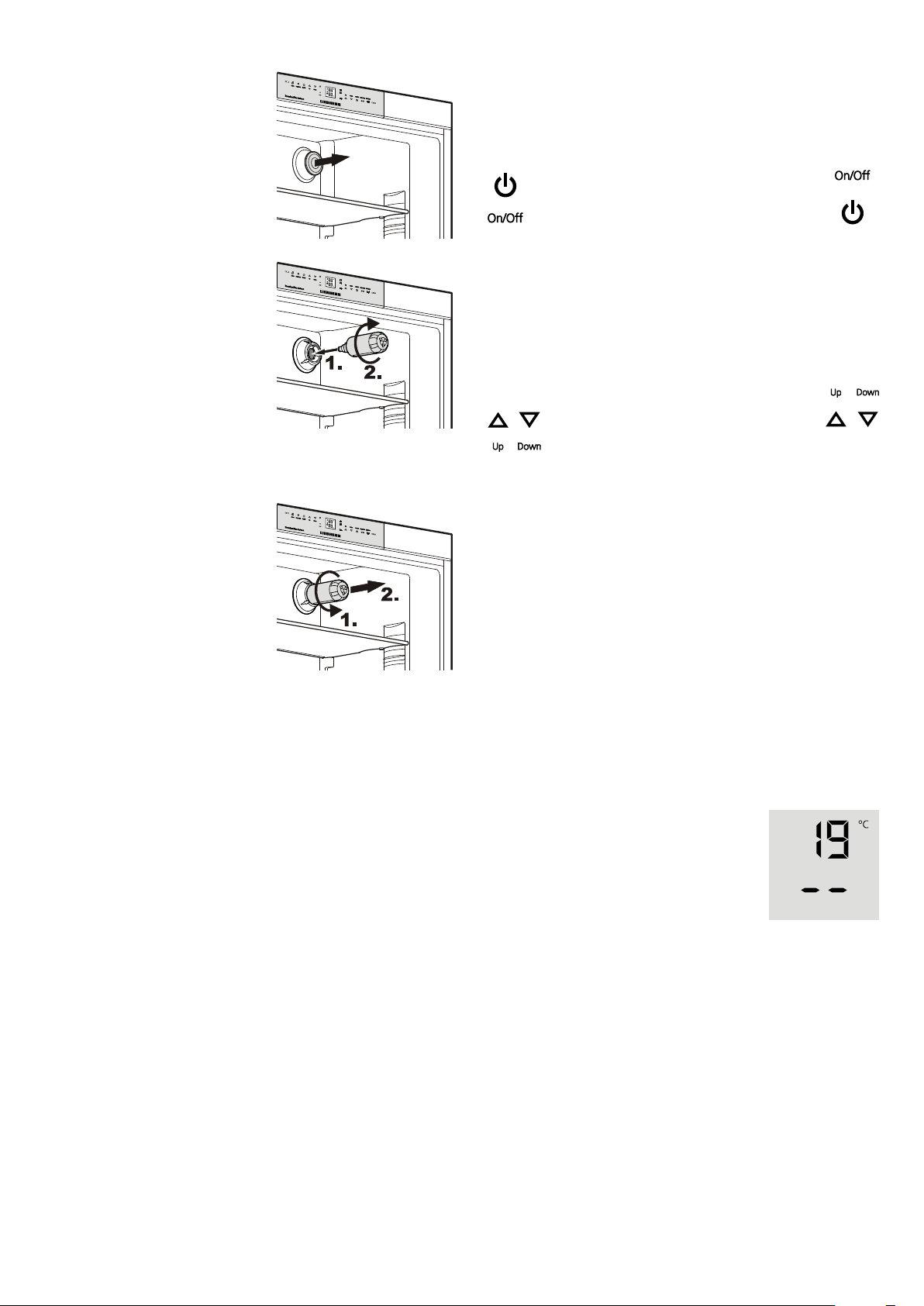
Switching the appliance on and off
Youareadvisedtocleantheappliancebeforeswitchingitonfor
thefirsttime(see"Cleaning").
Donotloadwithfrozenfooduntilthetemperatureshowsatleast
-18°C.Therefrigeratorandfreezercompartmentscanbeoper-
atedseparately.
Switching off: Keep the On/Off icons pressed for approx. 3
seconds.
Temperature display
Innormaloperation,thefollowingsettingswillbedisplayed:
- theaveragerefrigeratortemperatureand
- thewarmestfrozenfoodtemperature.
Whenstartingupforthefirsttimeorwhenthe
applianceiswarm,dasheswillappearuntil
thetemperaturereachesalevelthatcanbe
displayed(below0°Cinthefreezer).
Thedisplaywillflash:
-ifyouchangethetemperatureor
-if the temperature rises by several degrees, indicating cold
loss,e.g.ifyouplacefresh,"warm"foodinthefreezerorifyou
removeorre-packfrozenfoodthetemperaturemayrisefora
shorttimeduetowarmairflowingintothefreezer.
If F1 to F5 appears in the display, the appliance has a fault.
Consult the customer service department indicating the fault
numberdisplayed.
Switching on:TouchtheOn/Officons(onleft
forrefrigerator, onrightfor freezer)so that the
temperaturedisplayslightuporflash.
Setting the temperature
Theapplianceispre-setfornormaloperation.Werecommend
temperaturesof+5°Cintherefrigeratorand-18°Cinthefreezer.
To reduce the temperature: Touch the
Down icon;onleftfor refrigerator and on
rightforfreezer.
To increase the temperature:Touchthe
Upicon.
- Whileyouare enteringthetemperature,thesettemperature
willflashonthedisplay.
- Whenyoutouchthetemperaturesettingiconsforthefirsttime,
themostrecentsetting("referencesetting")isdisplayed.
- Youcan change the settings in increments of 1°C by briefly
touchingtheiconsagain.Iftheiconsareheld,thetemperature
settingwillchangefaster.
- Approximately5secondsafterthelasttouch,thedisplaywill
automaticallyshowtheactualfreezingorcoolingtemperature
("actualsetting").
- Youcanchangethetemperatures
intherefrigerator:between9°Cand3°Cand
inthefreezer:between-14°Cand-28°C.
Installing the water filter
1. Removethecoverofthefilter
socket.
2. Insert the filter and turn it 90°
clockwise.
Removing the water filter
Turn the filter 90° anticlockwise
andremove.
GB
19
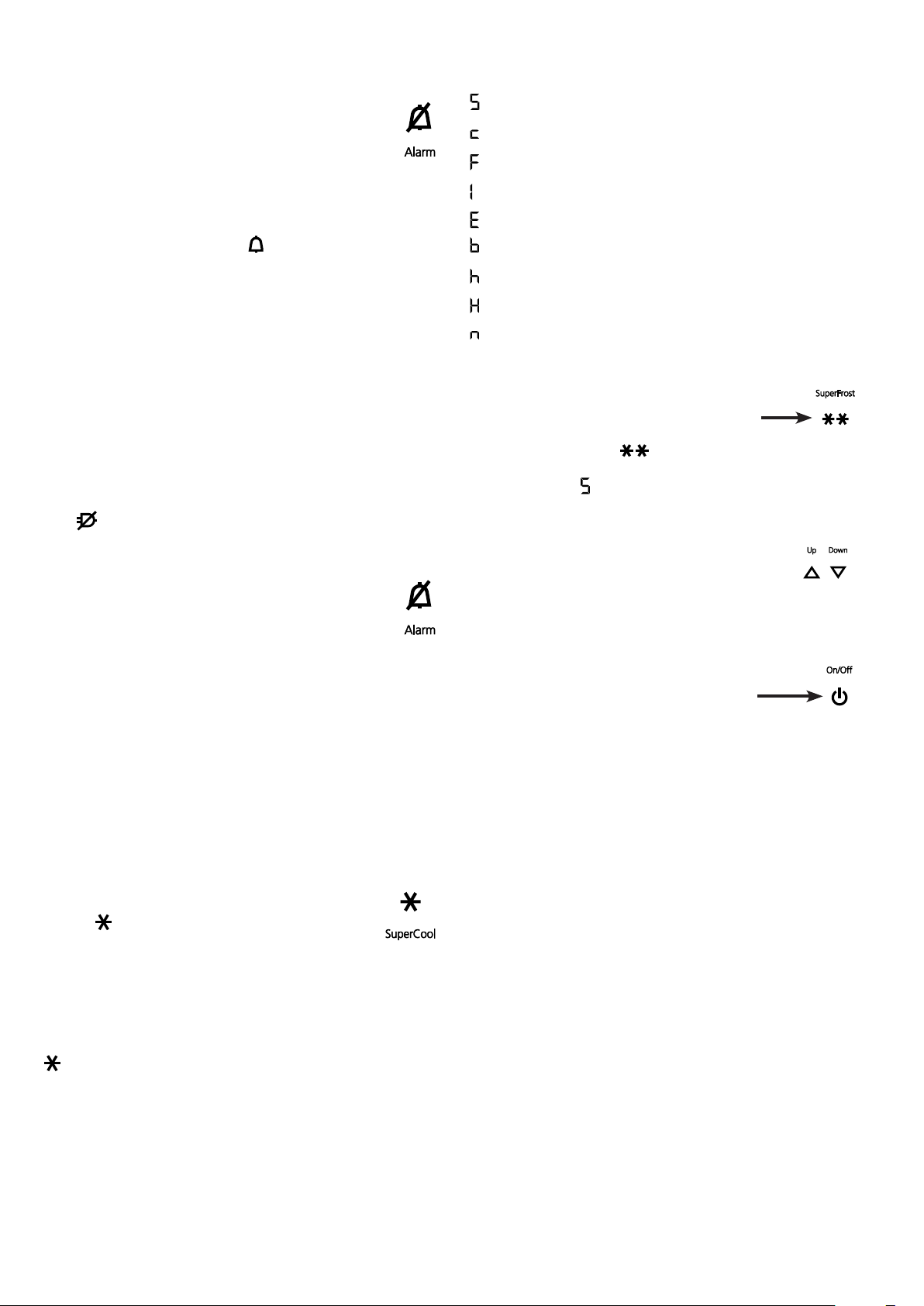
Power failure/FrostControl display
Ifthe LEDcomesononthecontrolpanel,thismeansthatthe
freezertemperaturehasrisentoohighduringthelastfewhours
ordaysduetoapowerfailure.
IfyoutouchtheALARMiconnow,thehighesttemperature
registeredduringthepowerfailurewillbedisplayed.
C h e c k t h e q u a l i t y o f t h e f o o d a n d i t s s u i t a b i l i t y f o r c o n s u m p -
tionincaseithasbecometoowarmorevendefrosted.
Thehighesttemperaturewillappearforappox.1minute.After
that,theactualtemperatureinthefreezerwillre-appear.
ThedisplaycanbeswitchedoffbytouchingtheALARMicon.
Audible warning signal
Theapplianceisequippedwithanalarmfunction.
Audible door alarm
Ifanappliancedoorisleftopenformorethan60seconds,
theaudiblewarningsignalwillsound.TouchtheALARM
icon to cancel the alarm. The alarm switches back to
standbywhenthedoorisshut.
Audible/visual temperature alarm
Itsoundswhenitisnotcoldenoughinthefreezercompartment.
Thetemperaturedisplayandthe
LEDwillalsoflash.
Theaudiblewarningdeviceisswitchedoffbytouching
theALARM icon.Thetemperaturedisplaywillcontinue
toflashuntilthecauseofthealarmhasbeenrectified.
This can be caused by:
• thefreezerdoorbeingleftopenforalongtime,allowingwarm
ambientairtoenter;
• alongpowerfailure;
• afaultintheappliance.
Ineachcase,makesurefoodhasnotthawedorperished.
SuperCool
TouchingtheSuperCooliconswitchestherefrigeratorcompart-
menttomaximumcooling.Itisrecommendedparticularlyifyou
wishtocoollargequantitiesoffood,drinks,freshlybakedgoods
ormealsrapidly.
Switching on:Touc h t heSu p er Co olic onbr i efl ys otha t
theLED
comeson.Therefrigeratortemperaturewill
droptoitslowestvalue.
Note:TheSuperCoolfunctionusesslightlymoreenergy.After
approximatelysixhours,however,therefrigeratorswitchesback
automaticallytonormalenergy-savingoperation.Ifrequired,the
SuperCoolfunctioncanbeswitchedoffsooner.
Switching off:Touch theSuperCool iconagainuntil theLED
goesout.
Setup mode
Thefollowingfunctionscanbeactivatedinsetupmode:
=Sabbathmode
=Childlock
=Confirmwaterfilterchange
=Icemakervacationstate
=Waterquantityforicecubetray
=SetBioFreshtemperature
=Displaybrightness
=Doorgasketheatingcontrol
=Confirmdustfiltercleaning
Activating setup mode
• TouchtheSuperFrosticonforfiveseconds.
- TheSuperFrost LED comesonfor5seconds,
- after5seconds
willflashinthedisplay.
Theapplianceisinsetupmodenow.
Youcanselectthesetupmodefunctionsbytouching
thefreezercompartmenttemperaturesettingicons.
Note
Insetupmodethedisplaywillflashcontinuously.
Exiting setup mode
• TouchthefreezercompartmentOn/Officon
Theappliancewillchangebacktonormaloperation.
20
GB
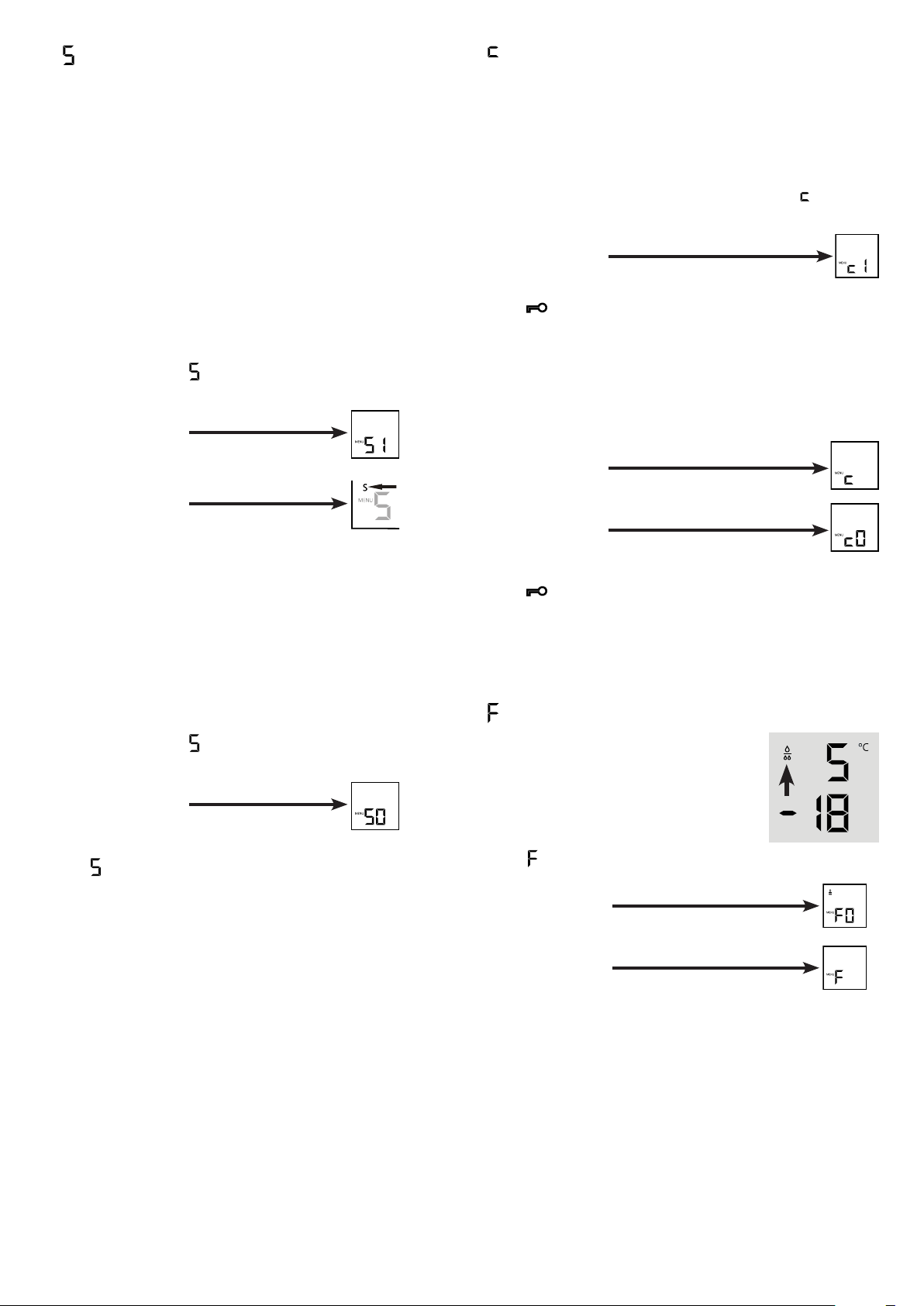
= Confirm water filter change
Afterthewaterfilterhasbeenchanged,the
dropsymbolonthedisplaymustbereset.
Resetting the drop symbol
• Activate setup mode by touching the
SuperFrosticonfor5seconds.
• TouchthefreezercompartmentDownicon
until
appearsinthedisplay.
• TouchtheSuperFrosticon.
- Thedisplayreads
• TouchtheSuperFrosticonagain.
- Thedisplayreads
• Thedropsymboldisappears.
• ExitsetupmodebytouchingthefreezercompartmentOn/Off
icon.
= Child lock
Thechildlockisdesignedtoprotecttheappliancefrombeing
switchedoffaccidentally.
Activating the child lock
• Activatesetupmodebytouching
theSuperFrosticonfor5seconds.
• TouchthefreezercompartmentDowniconuntil
appearsin
thedisplay.
• TouchtheSuperFrosticon.
- Thedisplayreads
• TouchtheSuperFrosticonagain.
- The
LEDislitandthechildlockisactivated.
• ExitsetupmodebytouchingthefreezercompartmentOn/Off
icon.
Deactivating the child lock
• Activatesetupmodebytouching
theSuperFrosticonfor5seconds.
- Thedisplayreads
• TouchtheSuperFrosticon.
- Thedisplayreads
• TouchtheSuperFrosticonagain.
- The
LEDgoesout.Thechildlockisdeactivated.
• ExitsetupmodebytouchingthefreezercompartmentOn/Off
icon.
= Sabbath mode
This function complies with the religious requirements to be
observedontheSabbathorreligiousholidays.
WhenSabbathmodeisactivated,someofthefunctionsofthe
controlelectronicsareswitchedoff.
• Theinteriorlightremainsswitchedoffifoneoftheappliance
doorsisopened.
• Theinteriorfanremainsinthestatuswhichiscurrentlyset(On
orOff)ifanappliancedoorisopened.
• Nodooropenalarm.
• Notemperaturealarm.
Activating the sabbath mode
• Activatesetupmodebytouching the SuperFrost icon for
5seconds.
- Thedisplayreads
• TouchtheSuperFrosticon.
- Thedisplayreads
• TouchtheSuperFrosticonagain.
- Thedisplayreads
Thesabbathmodeisactivated.
• ExitsetupmodebytouchingthefreezercompartmentOn/Off
icon.
Note
TheSabbathmodeisdeactivatedautomaticallyafter120hours.
Deactivating the sabbath mode
• Activatesetupmodebytouching the SuperFrost icon for
5seconds.
- Thedisplayreads
• TouchtheSuperFrosticon.
- Thedisplayreads
• TouchtheSuperFrosticonagain.
The
inthedisplaywillgoout.
Thesabbathmodeisdeactivated.
• ExitsetupmodebytouchingthefreezercompartmentOn/Off
icon.
21
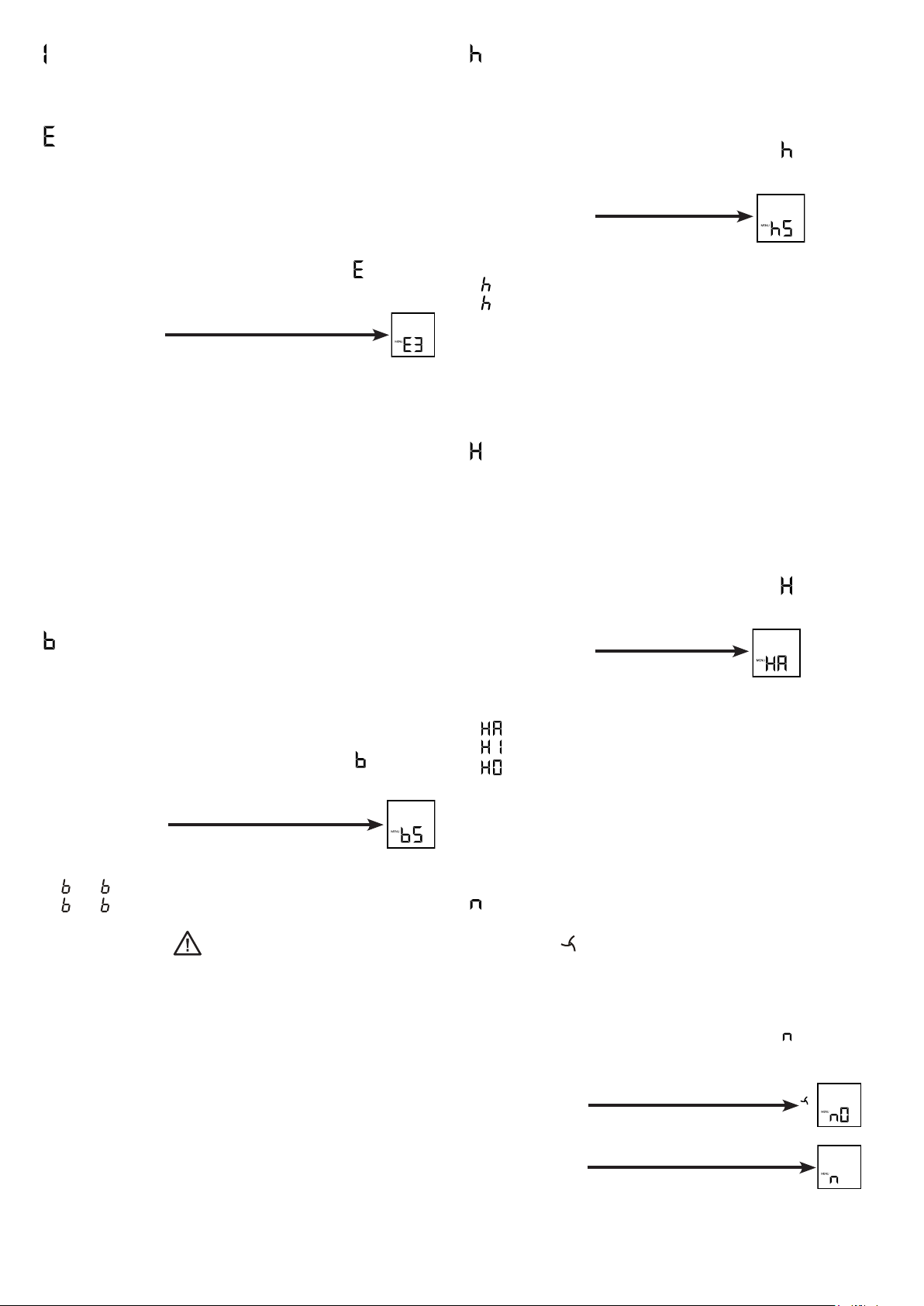
= Door gasket heating control
Condensedwateronthegasketoftherefrigeratordoorscanbe
eliminatedbyactivatingthedoorgasketheating.
Activating the door gasket heating
• Activate setup mode by touching the SuperFrost icon for
5seconds
• TouchthefreezercompartmentDowniconuntil
appearsin
thedisplay.
• TouchtheSuperFrosticon.
- Thedisplayreads
• Touchthefreezercompartment
Up/Downiconstoselect
=atslightcondensationofthegasket,
=atheavycondensationofthegasket,
=heateroff.
• TouchtheSuperFrosticonatthedesiredvalue.
• ExitsetupmodebytouchingthefreezercompartmentOn/Off
icon.
= Confirm dust filter cleaning
Oncethedustfilterintheapplianceplinthhasbeencleaned,the
dustfilterLED
inthedisplaymustbecancelled.
Cancelling the dust filter symbol
• Activate setup mode by touching theSuperFrost icon for 5
seconds.
• TouchthefreezercompartmentDowniconuntil
appearsin
thedisplay.
• TouchtheSuperFrosticon.
- Thedisplayreads
• TouchtheSuperFrosticon.
- Thedisplayreads
• Thedustfiltersymbolhasbeencancelled.
• ExitsetupmodebytouchingthefreezercompartmentOn/Off
icon.
= Water quantity for ice cube tray
If the produced ice cubes of the ice maker are too small, the
inflowingwaterquantitycanbeadjusted.
Adjusting the water quantity
• Activate setup mode by touching the SuperFrost icon for
5seconds.
• TouchthefreezercompartmentDowniconuntil
appearsinthedisplay.
• TouchtheSuperFrosticon.
- Thedisplayreads
• TouchthefreezercompartmentUpicononceonlysothatE 4
appearsinthedisplay.
Caution!
Do not increase for more than one step. If the adjusted value
is too high, the ice cube tray of the ice maker could overflow.
• TouchtheSuperFrosticonagain.
• ExitsetupmodebytouchingthefreezercompartmentOn/Off
icon.
Checktheicecubesizewithinthenextdays.Iftheicecubesare
stilltoosmall,followthestepsaboveagain.
= Display brightness
Adjusting the display brightness
• Activate setup mode by touching the SuperFrost icon for
5seconds.
• TouchthefreezercompartmentDowniconuntil
appearsin
thedisplay.
• TouchtheSuperFrosticon.
- Thedisplayreads
• Touchthefreezercompartment
Up/Downiconstoselect
0 =minimumto
5 =maximumbrightness.
• TouchtheSuperFrosticonatthedesiredvalue.
• ExitsetupmodebytouchingthefreezercompartmentOn/Off
icon.
= Set BioFresh temperature
ThetemperatureintheBioFreshdrawersmaybechanged.
Setting the BioFresh temperature
• Activate setup mode by touching the SuperFrost icon for
5seconds.
• TouchthefreezercompartmentDowniconuntil
appearsin
thedisplay.
• TouchtheSuperFrosticon.
- Thedisplayreads
• TouchthefreezercompartmentUp/Downicons
andset
6 - 9toincreasethetemperature(warmer),
4 - 1 toreducethetemperature.
CAUTION!
For values b4 - b1, the temperature in the drawers can
drop to below 0°C. Food may freeze.
• TouchtheSuperFrosticonatthedesiredvalue.
• ExitsetupmodebytouchingthefreezercompartmentOn/Off
icon.
= Ice maker vacation state
Seesectionentitled"Ice maker".
22
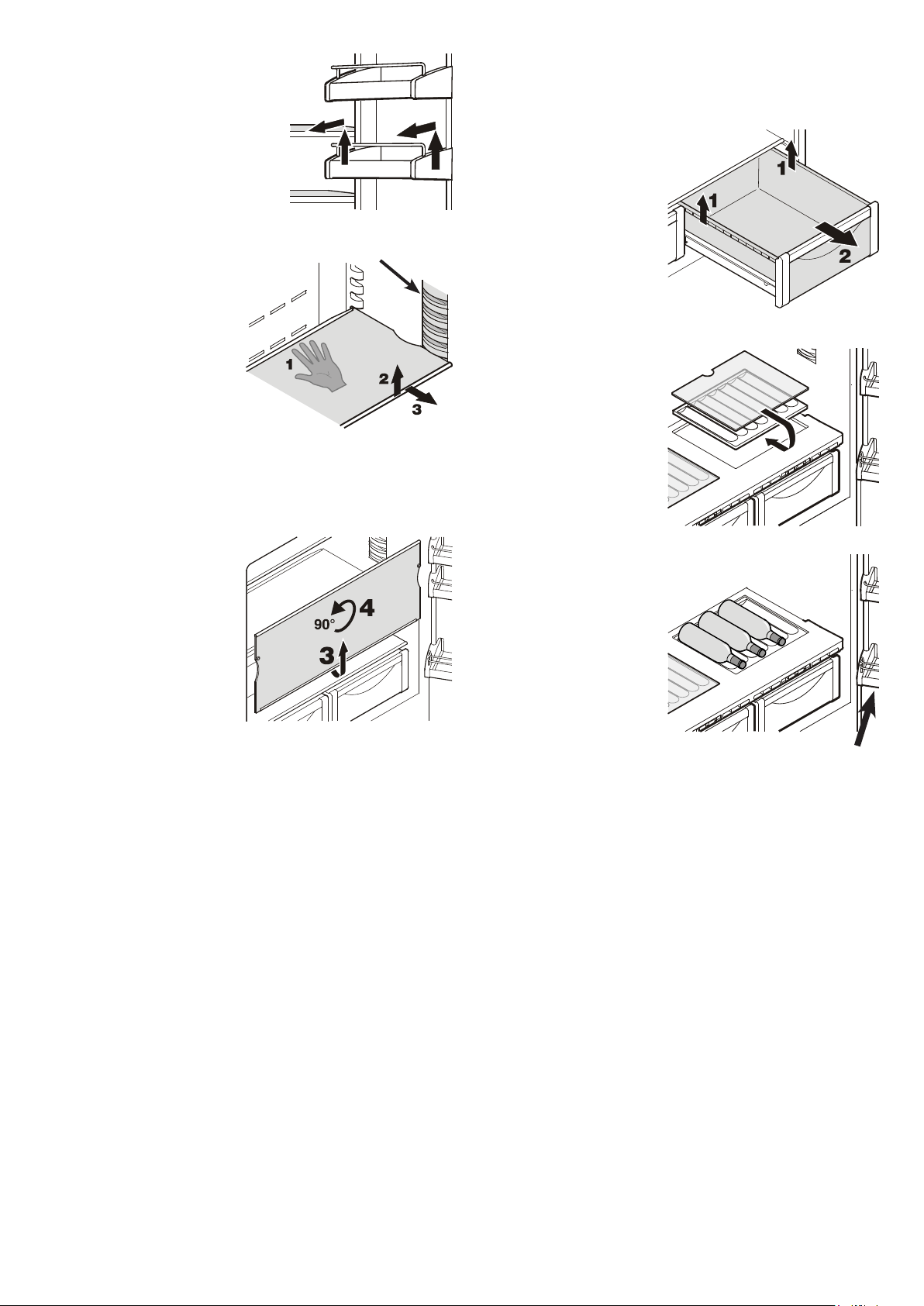
GB
BioFresh drawer
Pullthedrawerstraightout,
gripatthebackandliftout.
Inserting the BioFresh
drawer
Placethedraweronthepull-
outrails.The railsmustbe
fully extended and aligned
withthefrontofthedrawer.
Slidethedrawerin.
Repositioning the shelves
1. Holdtheshelfunderneath
withyourhandtoprevent
from tipping down back-
wardswhenremoving.
2. Lifttheshelfatthefront.
3. Pulltheshelftowardsyou
until the round cutout of
theshelfisinlinewiththe
interiorlightcover.
4. Lifttheshelfupandreplace
inthedesiredposition.
Removing the shelves
1. Followthefirstthreesteps
inthechapterabove.
2. Movetheshelfdownand
stopjustoverthevegeta-
bledrawer.
3. Movethefrontoftheshelf
upwardsuntiltheshelfis
inaverticalposition.
4. Turntheshelfby90°and
remove.
Equipment
Repositioning the door racks
Lift door rack vertically, lift out to
thefrontandre-insertatadifferent
height,followingthesestepsinthe
reverseorder.
Lightcover
Bottle shelf
TheshelfabovetheBioFresh
drawerscanbeusedforstor-
ingbottleshorizontally.
Removetheglassplate
andinsertitundertheshelf
plate.
The recesses in the shelf
plateensurethatthebottles
arestoredsecurely.
Whenstoringtallbottles,the
bottomdoorrackmustbemoved
furtherup.
23
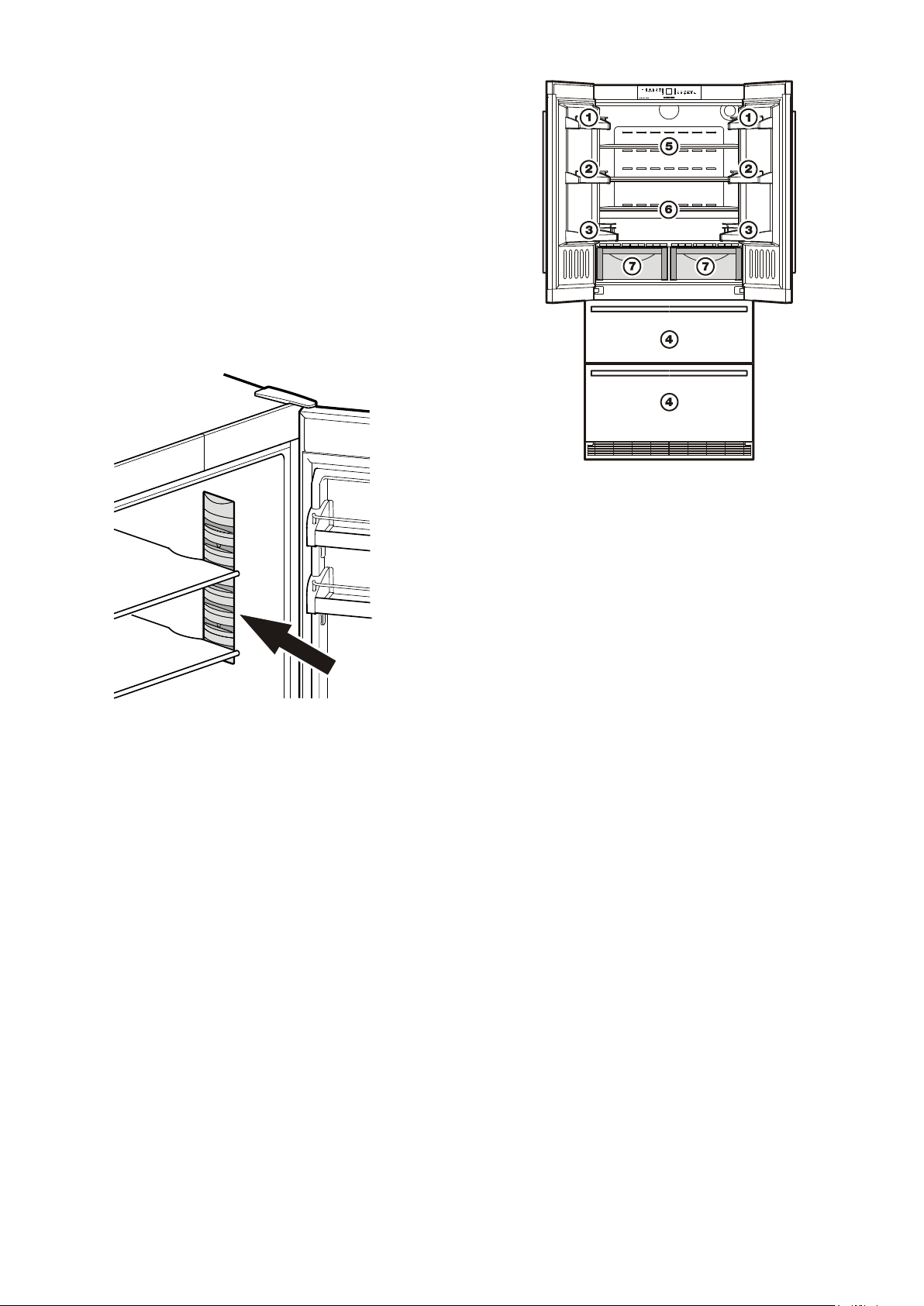
Arranging food
(1) butter,cheese
(2) eggs
(3) bottles
(4) frozenfood,icecubes
(5) meat,sausageproducts,dairyproducts
(6) bakedgoods,pre-cookedmeals
(7)fruit,vegetables,salads(forhighhumiditysetting)
meat,coldmeats,dairyproducts(forlowhumiditysetting)
TheadjustablehumidityisexplainedintheBioFresh com-
partmentsection.
Note
• Foodwhichgivesofforabsorbsodoursandflavoursaswellas
liquidsshouldalwaysbestoredcoveredorinclosedcontainers.
• High-percentagealcoholsshouldbetightlysealedandstored
upright.
Interior light
Theinteriorlightislocatedattheleft,rightandtopintherefrigerator
compartmentandaboveeachdrawerinthefreezercompartment.
Itcomesonifoneofthedoorsorafreezerdrawerisopened.
Caution - class 1M laser radiation. When cover is removed,
do not look directly at light through optical instruments.
Severe eye injury can occur.
Thelightswitchesoffautomaticallyifoneofthedoorsorafreezer
drawerhasbeenleftopenformorethan15minutes.Theaudible
warningsignalsoundsatthesametime.
Ifoneofthestriplightsisnotlit,itisdefective.
The lighting may only be replaced by the customer service
technician or by competent skilled personnel!
Do not try to change the defective lighting yourself!
24
GB
Freezing
Freshfoodshouldbefrozentothecoreasrapidlyaspossible.
Frozenfoodcanalsobegivenacoldboost.Thisisprovidedby
theSuperFrostfacility.
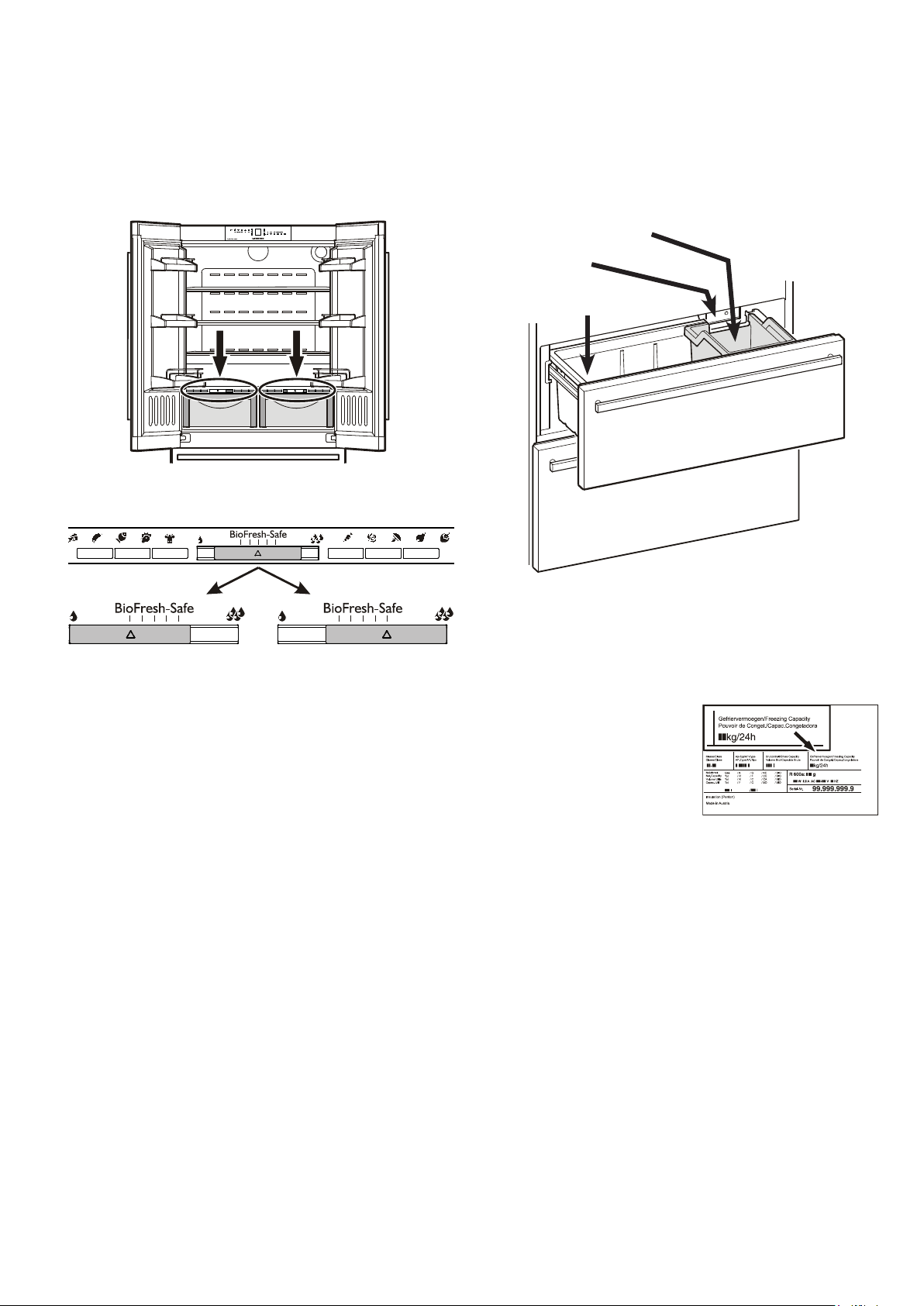
Themaximumamountoffood(in
kg)whichcanbefrozenin24hours
isshownonthetypeplate("Freez-
ingcapacity").Thisamountvaries
accordingtothemodelandclimate
rating.
Spaceforfreezingand
storage
Icemaker
Icecubebin
Freezer compartment description
Both drawers can be used for freezing of food or storage of
frozenfood.
T h e i c e c u b e b i n i n t h e u p p e rd r aw e r i s i n t e n d e d f o r i c e c u b e s o n l y.
Ifyouneedthewholeupperdrawerforfreezingorstorage,the
icecubebincanberemoved.
Important:Theicemakerwillnotejecttheicecubesofitstray
ifthebinhasbeenremoved.
BioFresh compartment
TheBioFreshcompartmentenablesyoutokeepfoodforupto
3timeslongerthaninnormalrefrigerators.
Theconstanttemperatureofjustabove0°Candtheadjustable
humidityprovidetheidealstorageconditionsfordifferenttypes
offood.
TheBioFreshcompartmentsatisfiestherequirementsofachill
compartmenttoENISO15502.
Notes
• The humidity in the compartment depends on the moisture
contentofthefoodinit,andthefrequencywithwhichthecom-
partmentisopened.
• Thefreshertheproductandthehigheritsquality,thelongerit
willkeep.
• Unwrapped animal and vegetable foods should be stored
separatelyinthedrawers.Ifthereisnotenoughspaceforthem
tobestoredseparately,makesurethattheyarewrapped.Do
notallowdifferenttypesofmeattocomeintocontactwithone
anotherbut keepthem packaged separatelyso as to avoid
prematurebacterialspoilage.
• Thefollowingproductsshouldnotbestoredin theBioFresh
compartment:hardcheese,potatoes,cold-sensitivevegetables
suchascucumbers,aubergines,avocadoes,semiripetomatoes,
zucchini,allcold-sensitivetropicalfruitssuchaspineapples,
bananas,grapefruit,melons,mangos,papayas,etc.
Dry
Smallhumiditysymbol-slide
controltoleft.
Thissettingissuitablefordry
or wrapped food like dairy
products, meat, fish, cold
meats.
Humidity selection
Humid
Highrelativehumidityofmax.
90%,largehumiditysymbol-
slidecontroltoright.
This setting is suitable for
storing unwrapped food with
ahighmoisturecontentsuch
assalad,vegetablesandfruit.
25
Ice maker
Safety instructions and warnings
• Theicemakerisdesignedexclusivelytomakeicecubesin
quantitiesrequiredbyahouseholdandmayonlybeoperated
withwatersuitableforthispurpose.
• Allrepairsandworkontheicemakermayonlybecarriedout
bycustomerservicepersonnelorothertrainedpersonnel.
• The first three batches of ice must not be consumed or
used. This applies both to using the appliance for the first
time and also to using it after it has not been used for a
lengthy period of time.
This ensures that the water supply
is purged.
• The manufacturer cannot accept liability for damage
caused by a faulty connection to the mains water supply.
• Theicemakerwillonlyworkifthecombinedrefrigerator-freezer
isconnectedtotheelectricitysupply.Itwillonlymakeicecubes
ifthefreezercompartmentisoperating.
• Ensurethat the drawer is fullyclosed, as theice maker can
otherwisenotproduceicecubes.
Notes on freezing
• Alwaysstoreidenticalfooditemstogether.
• Packfoodwhichyouarefreezingyourselfinquantitiesappro-
priatetoyourhousehold.Toensurethatthefoodfreezesright
through,thefollowingquantitiesshouldnotbeexceededper
package:fruit,vegetables:upto1kg,meat:upto2.5kg.
• Packfrozenfoodinstandardfreezerbagsorreuseableplastic,
metaloraluminiumcontainers.
• Donotallowfreshfoodwhichistobefrozentocomeintocon-
tactwithfoodalreadyfrozen.Alwayskeeppacksdryinorder
toavoidthemstickingtogether.
• Always write the date and contents on the pack and do not
exceedthestatedstoragetimeforthefood.
• Donotfreezebottlesandcanswhichcontaincarbonateddrinks
astheymightburst.
• Only take out as much food as is immediately required for
thawing.Usefoodwhichhasbeenthawedinpreparedmeals
asquicklyaspossible.
Frozen food can be thawed in the following ways:
–inafanoven,
–inamicrowaveoven,
–atroomtemperature,
–intherefrigerator:thecoldgivenoffbythefrozenfoodisused
forcooling.
Bleeding the ice maker
Toensurethattheicemakerworksproperly,thewatersupply
linemustbebled.
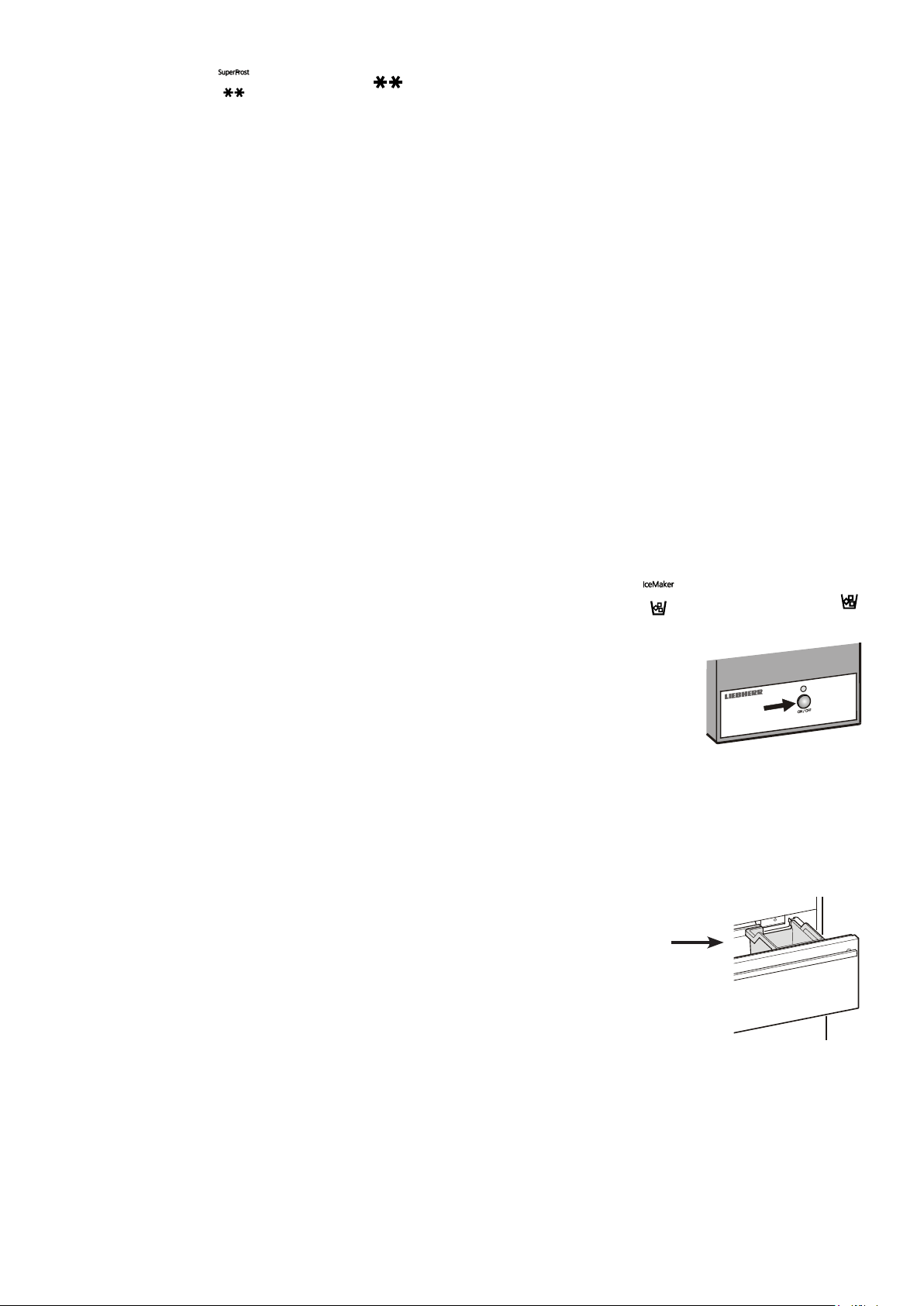
• TouchtheIceMaker icon
sothattheIceMaker LED
comeson.
• Openthetopfreezerdrawer.
• PresstheON/OFFbuttonontheice
maker housing for approx. 3 sec-
onds. The LED above the button
startsflashing.
• Pressthebuttonagainbriefly.TheLEDflashesmorequickly.
• Closethefreezerdrawerimmediately.
Thewatersupplyvalveopensfor25secondsandpumpsallthe
airoutofthewatersupplysystem.
• Thentheicecubetrayoftheicemakermustbecompletely
emptied.SeethesectionActivating the ice maker vacation
state.
• Finally,cleantheicecubebin.
Freezing with SuperFrost
Touch the SuperFrost icon briey so that the LED
comeson.
• ForsmallamountsoffrozenfoodswitchonSuperFrost6hours
beforehand.Forthemaximumamount(seefreezingcapacityon
thetypeplate)youwillneedtoswitchiton24hoursbeforehand.
• Thenplacethefreshfoodinsidethefreezer.
- TheSuperFrostfunctionswitchesoff automatically.Depending
onthequantityoffoodplacedinthefreezer,thiswillnormally
bebetween30andmax.65hours.Thefreezingprocessisnow
complete,theSuperFrost LED will go out.
You should not switch on the SuperFrost func tion:
- whenplacingfrozenfoodinthefreezer;
- whenfreezinguptoapprox.2kgfreshfooddaily.
26
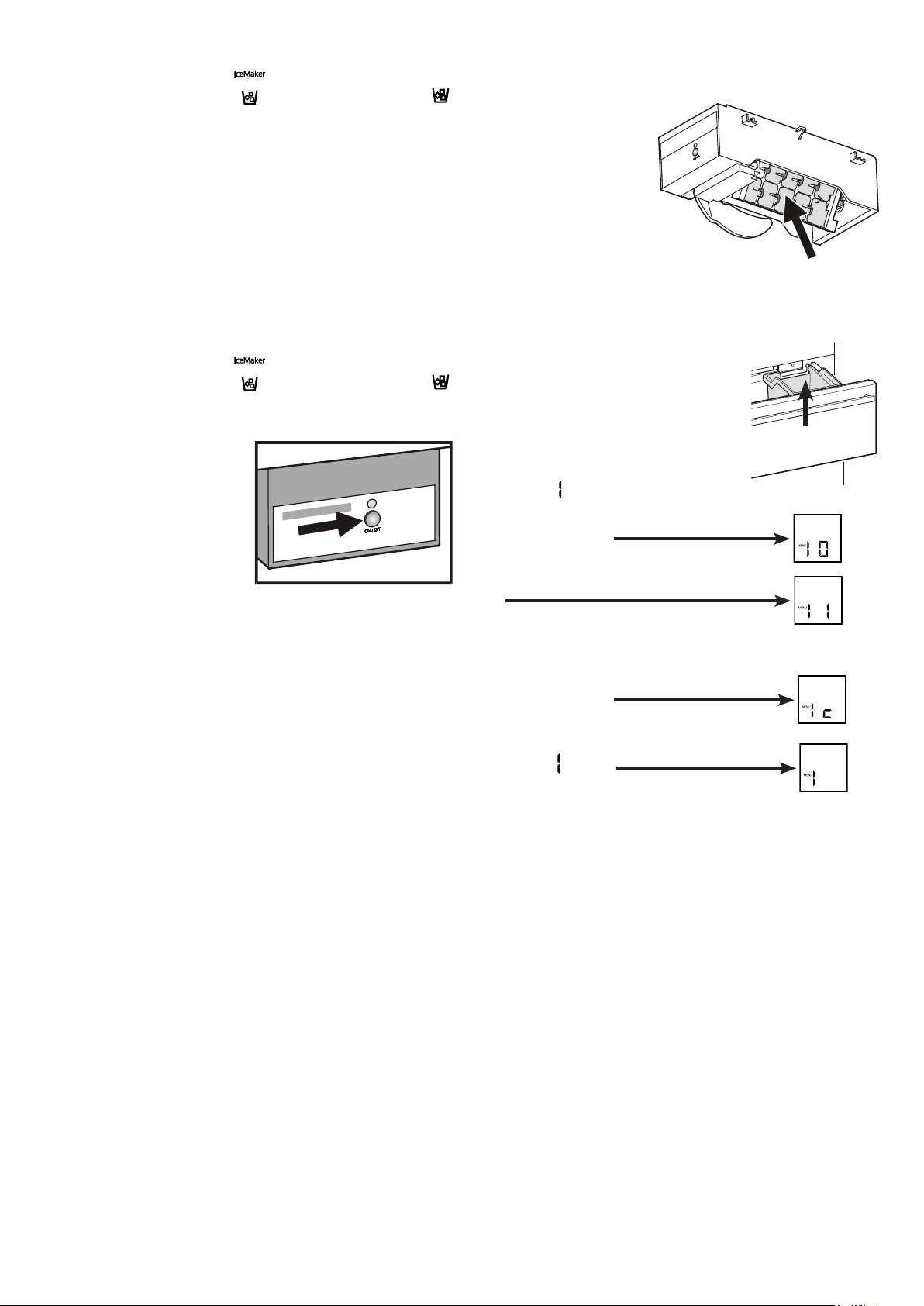
Switching the ice maker on
• TouchtheIceMaker icon sothattheIceMaker LED
comeson.
Afteryoustarttheicemakerforthefirsttime,itmaytakeupto
24hoursbeforethefirsticecubesareready.
Theproductioncapacitydependsonthetemperatureinsidethe
freezercompartment.Thelowerthetemperature,themoreice
cubescanbeproducedoveraperiodoftime.
Theicecubesfalloutoftheicemakerintotheicecubebin.When
theicereachesacertainlevelinthebin,theappliancestops
producingiceautomatically.
Switching the ice maker off
Ifyoudonotneedanyicecubes,theicemakercanbeswitched
offindependentlyofthefreezercompartment.
• TouchtheIceMaker icon
sothattheIceMaker LED
goesout.
The ice maker can also be
switchedonandoffusingthe
ON/OFFbu t t o n a t t h e i c e m a k e r
housing.
Press the button for approxi-
mately1second.
GB
Activating the ice maker vacation state
Besuretheupperfreezerdraweriscom-
pletely closed and the ice cube bin is
installedcorrectly.
• Activate setup mode by touching the
SuperFrosticonfor5seconds.
• TouchthefreezercompartmentDown
iconuntil
appearsinthedisplay.
• TouchtheSuperFrosticon.
- Thedisplayreads
or
dependingonwhethertheicemakerisswitched
onoroff.
• TouchthefreezercompartmentDownicon.
- Thedisplayreads
• TouchtheSuperFrosticon.
- Thedigit
flashes.
Theicecubetrayrotatesdown.
Whentheinteriortemperatureappearsinthedisplay,thetrayisin
thedownpositionandtheicemakerisswitchedoffautomatically.
Ice maker vacation state
Incaseoflongervacations,theicecubetrayshouldbeemptied.
Bysettingtheicemakerintothe
vacationstate,thetraywill
rotate down and no water
remainsinthetray.
Thefreezerdrawermustbe
leftopensothatthesurface
ofthetraydriesupandnomould
orunpleasantodourscanoccur.
Icecubebin
27
Cleaning
Before cleaning always switch off the appliance. Pull out
the mains plug or switch off or unscrew the fuse.
• Cleantheinside,equipmentandouterwallswithlukewarmwater
andalittledetergent.Donotuseabrasiveoracidcleanersor
chemicalsolvents.
Do not use steam cleaners because of the
risk of injury and damage.
• Ensurethat no cleaning water penetrates into the electrical
componentsorventilationgrille.
• Dryallpartswellwithacloth.
• Donotdamageorremovethetypeplateontheinsideofthe
appliance.Itisveryimportantforservicingpurposes.
• Useacommerciallyavailablestainless-steelcleaningagentfor
stainless-steel appliances.
- Inordertoachievebestpossibleprotection,applyastainless-
steelcareagentuniformlyingrindingdirectionaftercleaning.
Po intsw h ic ha redar keratth esta r tandamo r eintens i vecol o ra-
tionofthestainless-steelsurfacearenormal.
- Donotuseabrasivespongesorscourers,donotuseconcen-
tratedcleaningagentsandneverusecleaningagentscontain-
ingsand,chlorideoracidorchemicalsolvents,asthesewould
damagethesurfacesandcouldcausecorrosion.
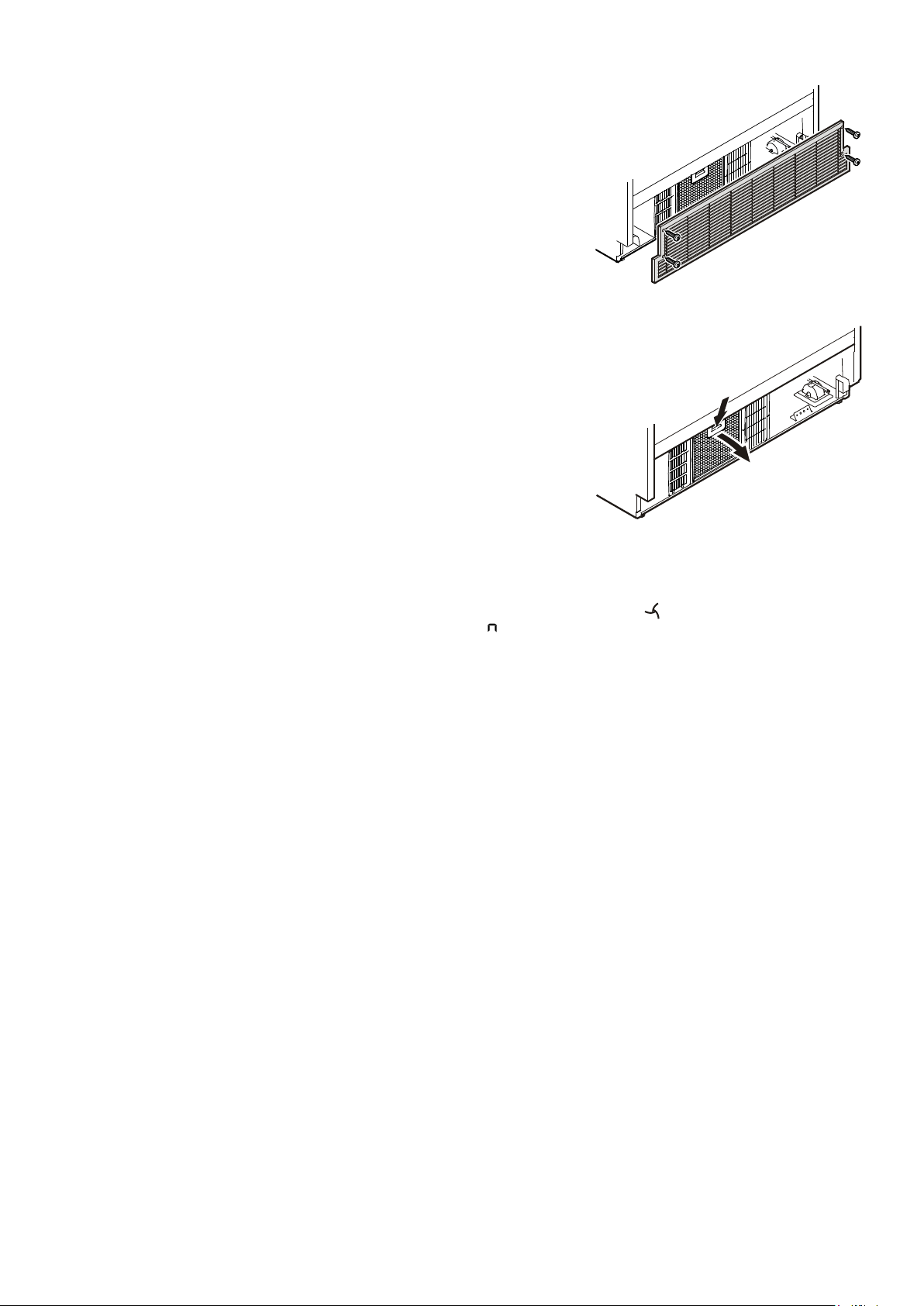
4. Pushdownthebuttononthefilter,tiltthefilterforwards
andremove.
Thedustfiltercanbewashedinadish-
washerorbyhandusingwaterand
detergent.
Cleaning the dust filter
1. Disconnect the appliance from the mains.
2. Pullthebottomfreezerdrawerrightout.
3. Unscrewtheventilationgrille.
5. Drythefilterandthen,inreverseorder,replaceit.
6. Re-attachtheventilationgrille.
7. CancelthedustfilterLED
inthedisplay.SeeSetup mode,
=Confirmdustfiltercleaning.
Defrosting
Refrigerator compartment
Therefrigeratorcompartmentdefrostsautomatically.Thewater
thatformsontherearwalldrainsintoareservoiratthebackof
theapplianceandevaporatesautomaticallythroughthecom-
pressorheat.
Freezer compartment
TheNoFrostsystemautomaticallydefroststheappliance.
Anymoisturearisingcollectsontheevaporatorandfreezes,and
isperiodicallydefrostedandevaporated.
28
GB
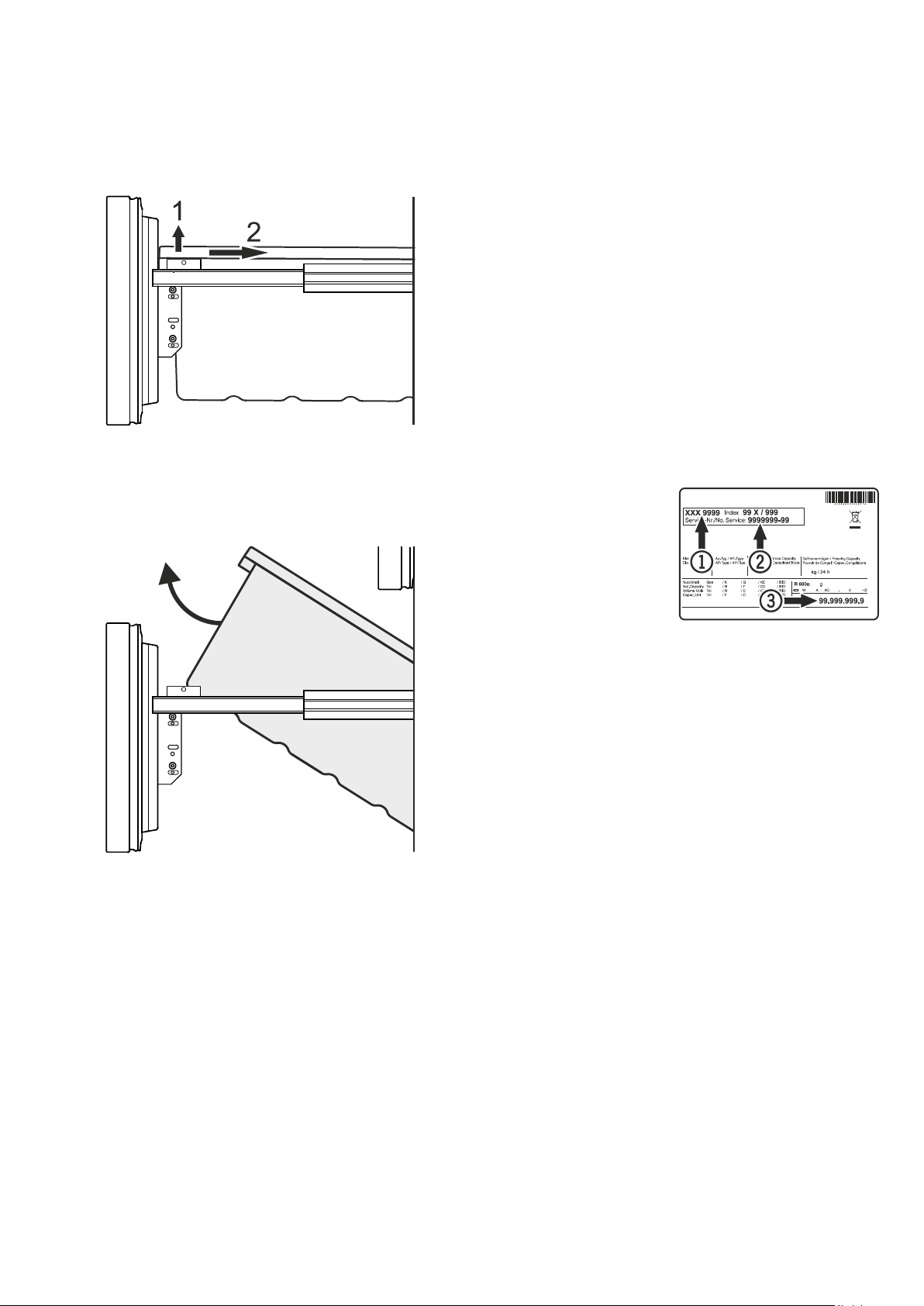
Removing the freezer drawer containers
• Opentherefrigeratordoor.
• Pulloutthefreezerdrawer.
• Pullthecontainerupwardsbytherightandleftcorners(1).
• Pushthecontainerbackwards(2).
• Tiltthecontaineratanangleandremove.
• Installthecontainerinthereverseorder.
Sideview of the freezer
drawerpulledout
Malfunctions
You may be able to rectify the following faults by checking
the possible causes yourself.
• Appliancedoesnotfunction:
–Istheapplianceswitchedon?
–Istheplugcorrectlyfittedinthemainssocket?
–Isthefuseintact?
• Loudrunningnoise:
–Istheappliancesetupfirmlyonthefloor?
–Doestheappliancecausenearbyitemsoffurnitureorobjects
tovibrate?Pleasenotethatnoisescausedbytherefrigerant
circuitcannotbeavoided.
• Thetemperatureisnotlowenough:
–Isthetemperaturesettingcorrect(see"Settingthetempera-
ture")?
–Doestheseparatelyinstalledthermometershowthecorrect
reading?
–Istheventilationsystemworkingproperly?
–Is the dust filter in the appliance plinth soiled? See section
entitled"Cleaning the dust filter".
–Istheappliancesetuptooclosetoaheatsource?
If none of the above causes
apply and you cannot rec-
tifythefaultyourself,contact
the nearest customer ser-
vice department stating the
type designation
1, service
number
2and appliance
number
3asindicatedonthe
typeplate.
Thepositionofthetypeplate isshowninthesectionentitled
Description of the appliance.
Shutting your appliance down
Ifyourapplianceistobeshutdownforanylengthoftime,switch
itoffanddisconnecttheplugorswitchofforunscrewthefuse.
Cleantheapplianceandleavethedooropeninordertoprevent
unpleasantsmells.
Theappliancecomplieswiththerelevantsafetyregulationsand
ECDirectives2004/108/ECand2006/95/EC.
29