WARNING: Do not operate the oven when empty or without the glass tray. It is best to leave a glass of water in the oven when not in use. The water will safely absorb all microwave energy, if the oven is accidentally started.
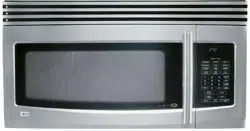
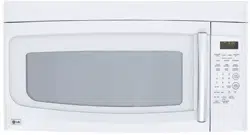
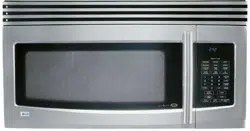
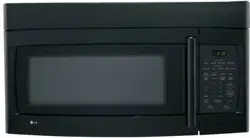
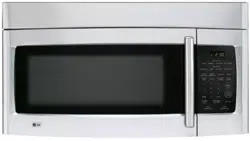
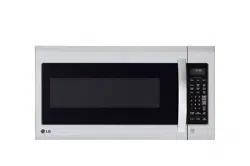
Your microwave oven is designed to make your cooking experience as enjoyable and productive as possible. To get you up and running quickly, the following is a list of the oven’s basic features:
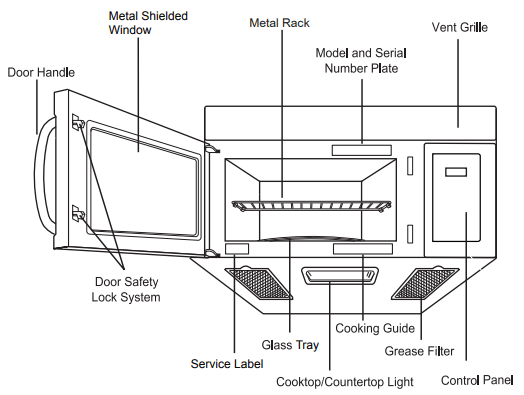
1. Metal Shielded Window. The shield prevents microwaves from escaping. It is designed as a screen to allow you to view food as it cooks.
2. Metal Rack. Use for extra space when cooking in more than one container at the same time. Remove cooking rack when you are not using it.
3. Model and Serial Number Plate
4. Charcoal Filter (behind Vent Grille)
5. Vent Grille
6. Control Panel. Press the buttons on this panel to perform all functions.
7. Grease Filter
8. Cooking Guide Label
9. Cooktop/Countertop Light
10. Glass Tray. The glass tray moves food as it cooks for more even cooking. It must be in the oven during operation for best cooking results.
11. Service Label
12. Door Safety Lock System
13. Door Handle
FEATURES
OVEN CONTROL PANEL
1. DISPLAY. The Display includes a clock and indicators to tell you time of day, cooking time settings and cooking functions selected.
2. Popcorn. Touch this pad when popping popcorn in your microwave oven.
3. Potato. Touch this pad to cook up to 4 potatoes without entering a cook time or power.
4. Frozen Entree. Touch this pad to cook a 10 to 20 ounce (284 to 567 g) frozen entree without entering a cook time or power.
5. Auto Cook. Touch this pad to cook microwavable foods without entering a cook time or power.
6. Soften. Touch this pad to soften butter, ice cream, cream cheese, frozen juice.
7. Melt. Touch this pad to melt butter or margarine, chocolate, cheese, marshmallows.
8. Time. Touch this pad followed by number pads to set a cooking time.
9. NUMBER. Touch number pads to enter cooking time, power level, quantities or weights.
10. Less. Touch this pad to subtract ten seconds of cooking time each time you press it.
11. Light On/Off. Touch this pad to turn the cooktop/countertop light on or off.
12. Pizza. Touch this pad to reheat one or several slices of pizza without entering a cook time or power.
13. Auto Reheat. Touch this pad to reheat microwavable foods without entering a cook time or power.
14. Time Defrost. Touch this pad to set a defrost time.
15. Auto Defrost. Touch this pad followed by number pads to thaw frozen meat by weight.
16. Power Level. Touch this pad to select a cooking power level.
17. Clock. Touch this pad to enter the time of day.
18. START Enter. Touch this pad to start a function. If you open the door after oven begins to cook, retouch START Enter.
19. STOP Clear. Touch this pad to stop the oven or clear all entries.
20. Energy Saving. Touch this pad to save energy.
21. More. Touch this pad to add ten seconds of cooking time each time you press it.
22. Add 30 Sec. Touch this pad to add 30 seconds of cooking time each time you press it.
23. Vent Hi/Low/Off. Touch this pad to turn the Vent on or off.
NOTE: If you try to enter incorrect instructions, you will not hear any tones. Touch STOP Clear and re-enter the instructions.
USING YOUR MICROWAVE OVEN
LEARN ABOUT YOUR MICROWAVE OVEN
This section discusses the concepts behind microwave cooking and introduces you to the basics you need to know to operate your microwave oven. Please read this information before use.
AUDIBLE SIGNALS
Audible signals are available to guide you when setting and using your oven:
A programming tone will sound each time you touch a pad.
Four tones signal the end of a cooking cycle.
INTERRUPTING COOKING
You can stop the oven during a cycle by opening the door. The oven stops heating and the fan stops, but the light stays on.
To restart cooking, close the door and Touch START.
If you do not want to continue cooking, open the door and touch STOP Clear.
CLOCK
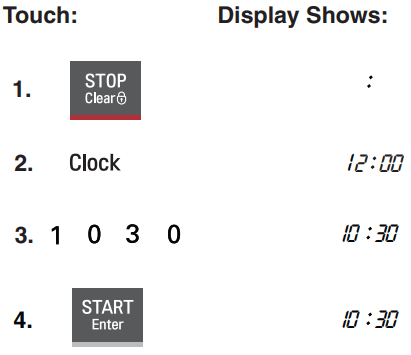
When your microwave oven is first plugged in or after a power failure, the Display will show “:”.
If a time of day is not set, “:” will show on the Display until you touch “Clock”.
Example: To set the clock for 10:30(AM or PM).
NOTES:
• If you enter in an incorrect time and touch “Clock”, you cannot set time of day. Enter the correct time.
• If you touch STOP Clear while setting the clock, the Display will show the last time of day set or “:” if no time of day has been set.
CHILD LOCK
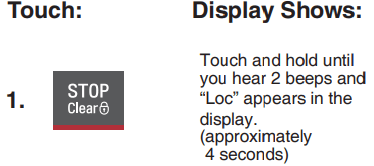
Use this safety feature to lock the control panel when you are cleaning the oven, or so that children cannot use the oven unsupervised.
To set CHILD LOCK:
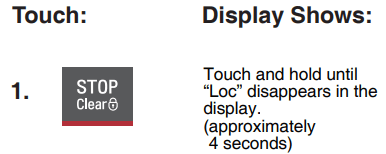
To cancel CHILD LOCK:
VENT HI/LOW/OFF
The Vent moves steam and other vapors from the surface cooking.
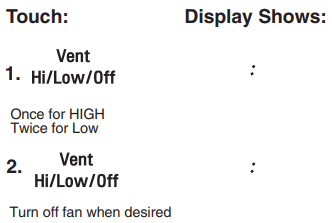
Touch Vent once for High fan speed, twice for Low fan speed, or a three times to turn the fan off.
NOTE: If the temperature from the range or cooktop below the oven gets too hot, the exhaust fan in the vent hood will automatically turn on at the HIGH setting to protect the oven.
It may stay on up to an hour to cool the oven. When this occurs, the ent pad will not turn the fan off. You cannot turn the exhaust fan off during microwave cooking.
ADD 30 SEC
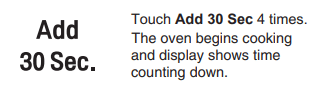
A time-saving pad, this simplified control lets you quickly set and start microwave cooking without the need to touch START Enter.
NOTE: If you touch Add 30 sec, it will add 30 seconds up to 99 min 59 seconds.
COOKTOP LIGHT
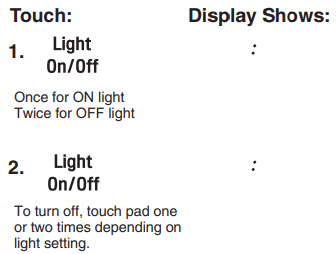
The pad on the bottom left of the control panel controls the cooktop light.
Example: To set the Lamp for ON.
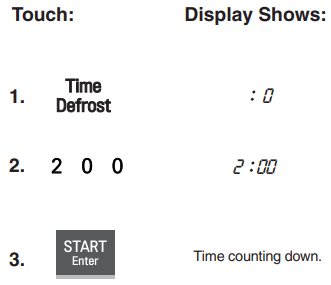
TIME DEFROST
Using Time Defrost can defrost for a selected length of time.
Example: To set Time Defrost for 2 minutes.
At the end of the Time defrost four tones will sound.
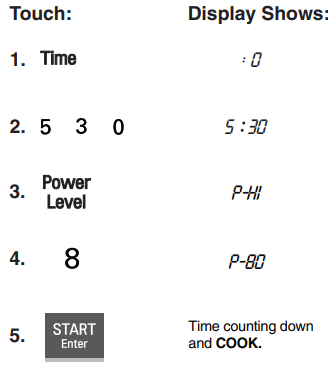
TIMED COOKING
This feature lets you program a specific cook time and power. For best results, there are 10 power level settings in addition to HIGH (100%) power . Refer to the “Microwave Power Levels Table” on page for more information.
NOTE: If you do not select a power level, the oven will automatically cook at HIGH (100%) power.
Example: To cook for 5 minutes, 30 seconds at 80% power.
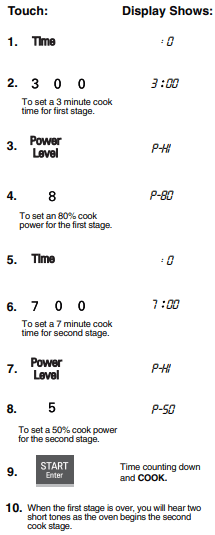
MULTI-STAGE COOKING
For best results, some recipes call for different cook powers during different stages of a cook cycle. You can program your oven to switch from one power level to another for up to 2 stages.
Example: To set a 2-stage cook cycle.
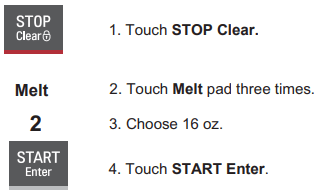
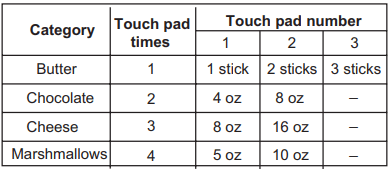
MELT
Melt provides four preset categories for melt.
Butter, Chocolate, Cheese, Marshmallows.
Details refer to MELT TABLE
Example: To Melt 16 oz Cheese.
NOTE: After 4 seconds, the oven will start automatically. When the cook time is over, you will hear four beeps and End will display.
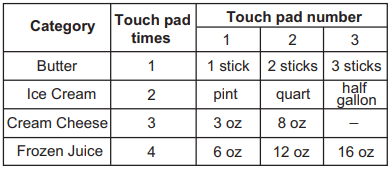
SOFTEN
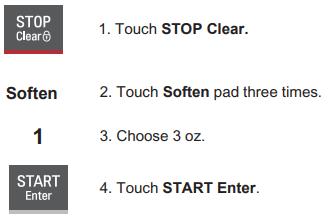
Soften provides four preset categories for melt. Butter, Ice Cream, Cream Cheese, Frozen Juice. Details refer to SOFTEN TABLE.
NOTE: After 4 seconds, the oven will start automatically. When the cook time is over, you will hear four beeps and End will display.
MELT TABLE
SOFTEN TABLE
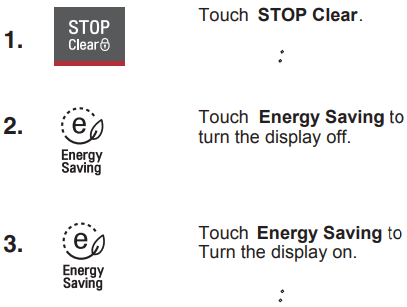
ENERGY SAVING
Energy Saving feature saves energy by turning off the display by touching the Energy Saving Button. The display will automatically turn off of idleness if the clock has not been set.
If the clock has been set, then the display will not automatically turn off.
Using Quick Touch
Your oven’s menu has been preprogrammed to cook food automatically. Tell the oven what you want. Then let you microwave oven cook your selections.
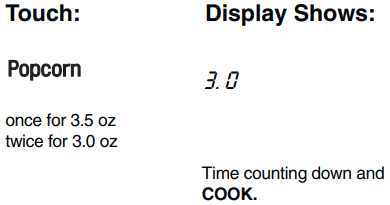
POPCORN
Popcorn lets you pop 3.0, and 3.5 ounce bags of commercially packaged microwave popcorn. Pop only one package at a time. If you are using a microwave popcorn popper, follow manufacturer’s instructions.To set your microwave oven correctly, follow this chart:
Example: To pop a 3.0 oz. bag.
When the cook time is over, you will hear four beeps and End will display
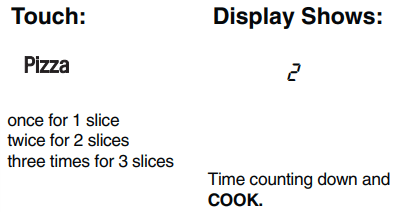
PIZZA
Pizza lets you reheat up to 3 slices of pizza.
A slice is based on a 5 ounce slice.
NOTE:
• Place on a low plate & paper towel.
• Do not cover.
Example: To reheat 2 slices of Pizza.
When the cook time is over, you will hear four beeps and End will display.
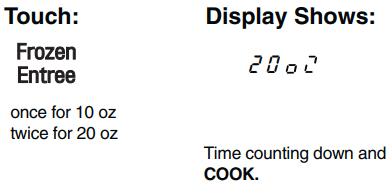
FROZEN ENTREE
Frozen Entree lets you cook 10 and 20 ounce plates of commercially packaged microwave frozen entree without entering cooking times and power levels.
Remove tray from outer carton.
Do not remove film cover, but cut it to vent.
Example: To reheat a 20 oz. frozen entree.
When the cook time is over, you will hear four beeps and End will display.
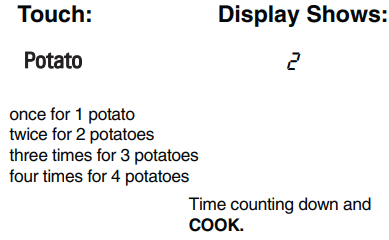
POTATO
The Potato lets you cook potatoes with preset times and cook powers. You can choose from 1 to 4 potatoes.
NOTE:
• Cooking times are based on an average 8 ounce potato.
• Before baking, pierce potato with fork several times.
• After baking, let stand for 5 minutes.
Example: To cook 2 Potatoes.
When the cook time is over, you will hear four beeps and End will display.
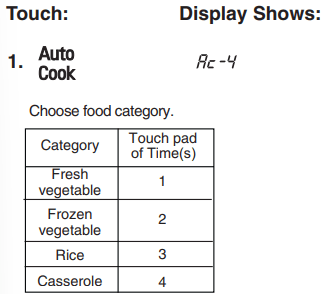
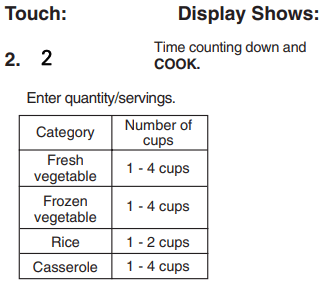
AUTO COOK
Auto Cook provides four preset categories for cooking.
Example: To cook 2 cups of Casserole.
When the cook time is over, you will hear four beeps and End will display
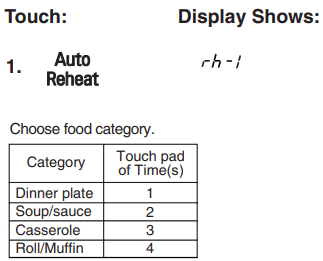
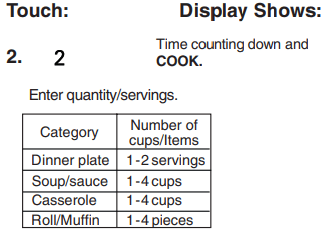
AUTO REHEAT
Auto Reheat provides four preset categories for reheating.
Example: To reheat 2 servings of Dinner plate.
When the cook time is over, you will hear four beeps and End will display.
MAINTENANCE
CARE AND CLEANING
For best performance and safety, keep the oven clean inside and outside. Take special care to keep the inner door panel and the oven front frame free of food or grease build-up.
Never use abrasive powder or pads. Wipe the microwave oven inside and out, including the hood bottom cover, with a soft cloth and a warm (not hot) mild detergent solution. Then rinse and wipe dry.
Use a chrome cleaner and polish on chrome, metal and aluminum surfaces. Wipe spatters immediately with a wet paper towel, especially after cooking chicken or bacon. Clean your oven weekly or more often, if needed.
METAL RACK
Wash the metal rack with a mild soap and a soft or nylon scrub brush.Dry completely. Do not use abrasive scrubbers or cleaners to clean rack.
CLEANING THE GREASE FILTERS
The grease filters should be removed and cleaned often, at least once a month.
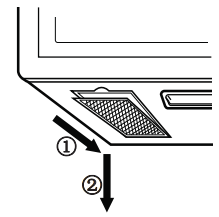
1. To remove the grease filters, slide each filter to the side, then pull the filters downward. The filters will drop out.
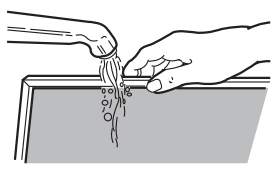
2. Soak grease filters in hot water and a mild detergent. Rinse well and shake to dry. Do not use ammonia or place them in a dishwasher. The aluminum will darken.
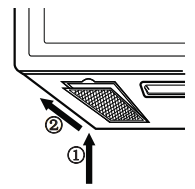
3. To reinstall the filters, slide them into the side slots, then push up and forward to lock.
NOTE: Do not operate the hood without the filters in place.
CHARCOAL FILTER REPLACEMENT
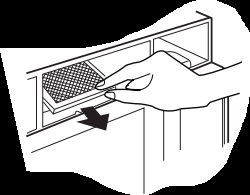
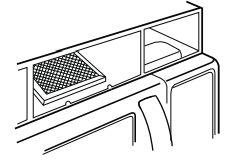
If your oven is vented inside, the charcoal filter should be replaced every 6 to 12 months, and more often if necessary. The charcoal filter cannot be cleaned. To order a new charcoal filter, call 1-800-243-0000.
1. Turn the power off at the main power supply and wear gloves
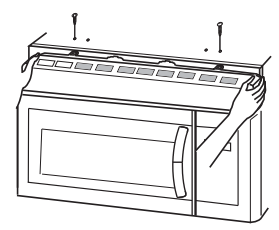
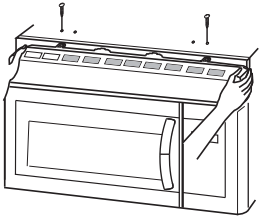
2. Remove the two vent grille mounting screws. (2 outside screws)
3. Tip the grille forward, then lift it out.
4. Open the door.
5. Remove the old filter.
6. Slide a new charcoal filter into place and close the door. The filter should rest at the angle shown.
7. Slide the bottom of the vent cover into place. Push the top until it snaps into place. Replace the mounting screws. Turn the power back on at the main power supply and set the clock.
COOKTOP/NIGHT LIGHT REPLACEMEN
1. Unplug the oven or turn off power at the main power supply.
2. Remove the bulb cover mounting screws.
3. Replace the bulb with a 30 watt appliance bulb.
4. Replace the bulb cover and mounting screws.
5. Turn the power back on at the main power supply.
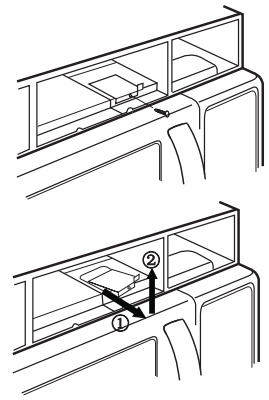
OVEN LIGHT REPLACEMENT
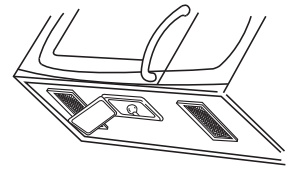
1. Unplug the oven or turn off power at the main power supply and wear gloves.
2. Remove the vent cover mounting screws. (2 outside screws)
3. Tip the cover forward, then lift out to remove.
4. Remove the cover screw,pull the cover forward and then lift up the bulb holder.
5. Replace the bulb with a 30 watt appliance bulb.
6. Replace the bulb holder and screw.
7. Slide the top of the vent cover into place. Push the bottom until it snaps into place. Replace the mounting screws. Turn the power back on at the main power supply.
FAQS
FREQUENTLY ASKED QUESTIONS
Q. Can I use a rack in my microwave oven so that I may reheat or cook on two levels at a time?
A. Only use the rack that is supplied with your rmicrowave oven. Use of any other rack can result in poor cooking performance and/or arcing and may damage your oven.
Q. Can I use either metal or aluminum pans in my microwave oven?
A. Usable metal includes aluminum foil for shielding (use small, flat pieces), and shallow foil trays (if tray is 3/4 inch deep and filled with food to absorb microwave energy). Never allow metal to touch walls or door.
Q. Sometimes the door of my microwave oven appears wavy. Is this normal?
A. This appearance is normal and does not affect the operation of your oven.
Q. What are the humming noises that I hear when my microwave oven is operating?
A. You hear the sound of the transformer when the magnetron tube cycles on and off.
Q. Why does the dish become hot when I microwave food in it? I thought that this should not happen.
A. As the food becomes hot it will conduct the heat to the dish. Use hot pads to remove food after cooking.
Q. What does “standing time” mean?
A. ”Standing time” means that food should be taken out of the oven and covered for additional time after cooking. This process allows the cooking to finish, saves energy and frees the oven for other purposes.
Q. Can I pop popcorn in my microwave oven? How do I get the best results?
A. Yes. Pop packaged microwave popcorn following manufacturer’s guidelines or use the preprogrammed Popcorn button. Do not use regular paper bags. Use the “listening test” by stopping the oven as soon as the popping slows to a “pop” every one or two seconds. Do not try to repop unpopped kernels. You can also use special microwave poppers. When using a popper, be sure to follow manufacturer’s directions. Do not pop popcorn in glass utensils.
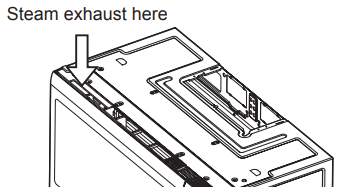
Q. Why does steam come out of the air exhaust vent?
A. Steam is normally produced during cooking. The microwave oven has been designed to vent this steam out the top vent.
TROUBLESHOOTING
BEFORE CALLING FOR SERVICE
Check the following list to be sure a service call is really necessary. A quick review of this manual as well as the additional information in this checklist may prevent an unneeded service call.
If nothing on the oven operates:
• check for a blown circuit fuse or a tripped main circuit breaker.
• check if oven is properly connected to electric circuit in house.
• check that controls are set properly.
If the oven interior light does not work:
• the light bulb is loose or defective.
If the oven will not cook:
• check that cooking program was entered correctly.
• check that door is firmly closed.
• check that Start button was touched.
• check that probe was inserted correctly into receptacle.
• check that timer wasn't started instead of a cook function.
If oven takes longer than normal to cook or cooks too rapidly:
• be sure the Power Level is programmed properly
If the time of day clock does not always keep correct time:
• check that the power cord is fully inserted into the outlet receptacle.
• be sure the oven is the only appliance on the electrical circuit.
If food cooks unevenly:
• be sure food is evenly shaped.
• be sure food is completely defrosted before cooking.
• check placement of aluminum foil strips used to prevent overcooking.
If food is undercooked:
• check recipe to be sure all directions (amount, time, power levels) were correctly followed.
• be sure microwave oven is on a separate circuit.
• be sure food is completely defrosted before cooking.
If food is overcooked:
• check recipe to be sure all directions (amount, power level, time, size of dish) were followed.
If arcing (sparks) occur:
• be sure microwavable dishes were used.
• be sure wire twist ties weren't used.
• be sure oven wasn’t operated when empty.
• make sure metal rack (if used) is properly installed on supports.
If the Display shows a time counting down but the oven is not cooking:
• check that door is firmly closed.
• check that timer wasn’t started instead of a cooking function.