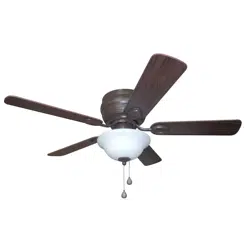
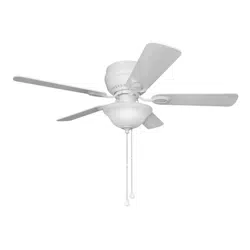
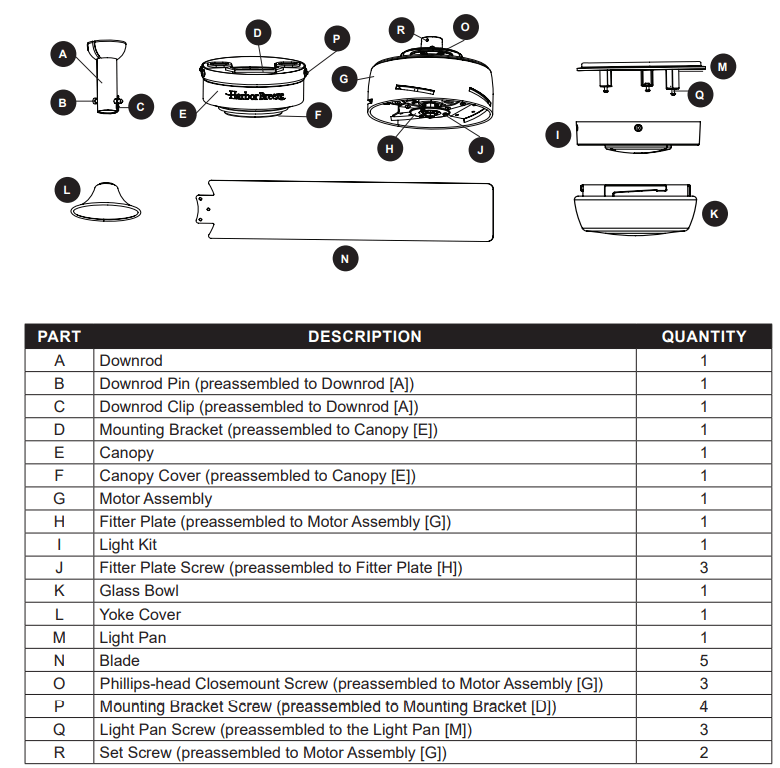
User ManualPACKAGE CONTENTS
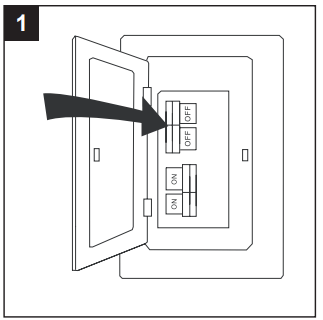
INITIAL INSTALLATION
1. Turn off the circuit breakers and the wall switch to the fan supply line leads.
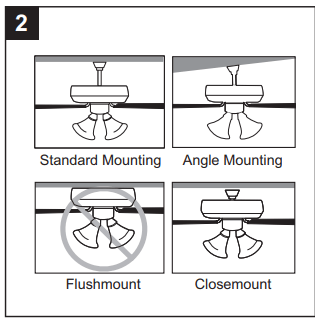
2. Determine the mounting method to use.
Standard mounting is best suited for ceilings 8 ft. or higher. For taller ceilings you may want to use a longer downrod (not included).
Angle-style mounting is best suited for angled or vaulted ceilings. A longer downrod is sometimes necessary to ensure proper blade clearance.
Note: If using the angle mount, check to ensure the ceiling angle is not steeper than 16°.
Closemount-style mounting is more suitable for ceilings lower than 8 ft. high.
Flushmount installation is not available for this item.
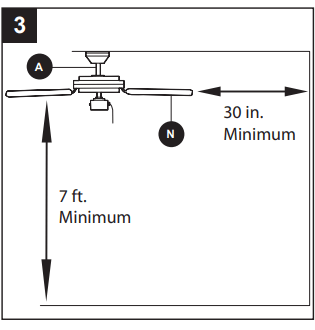
3. Ensure the blades (N) will be at least 30 in. from any obstructions. Also check the downrod (A) length to ensure the blades (N) will be at least 7 ft. above the floor.
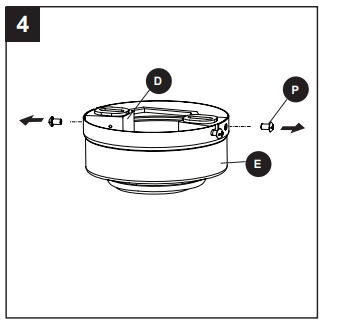
4. Loosen all four preassembled mounting bracket screws (P), then completely remove the two mounting bracket screws (P) from the round holes of canopy (E). Set aside for later use. Detach mounting bracket (D) from canopy (E).
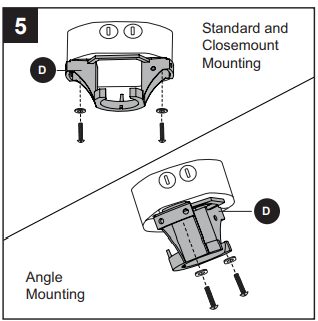
5. Attach mounting bracket (D) to outlet box (not included) using screws and washers provided with the outlet box.
CAUTION: It is very important to use the proper hardware when installing the mounting bracket (D) as this will support the fan.
For Standard or Angle Mounting Instructions, continue to page 9. For Closemount Instructions, proceed to page 11.
OPERATING INSTRUCTIONS
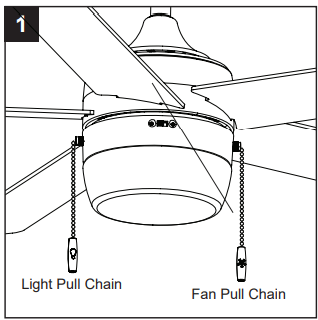
1. The pull chain has four positions to control the fan speed. One pull is high, two is medium, three is low, and four turns the fan off. The light pull chain turns the light on and off.
2. Using a ceiling fan will allow you to raise your thermostat setting in summer and lower your thermostat setting in winter without feeling a difference in your comfort.
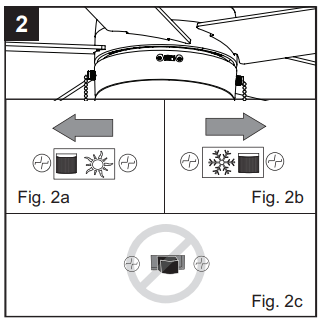
In warmer weather, push the reverse switch left to display a sun icon, which will result in downward airflow creating a wind chill effect (Fig. 2a).
In cooler weather, push the reverse switch right to display a snowflake icon, which will result in upward airflow that can help move hot air off the ceiling area (Fig. 2b).
Important: The reverse switch must be set either completely left or right in order for the fan to function correctly. If the reverse switch is set in the middle position, the fan will not operate (Fig. 2c).
CARE AND MAINTENANCE
At least twice each year, lower the canopy to check the downrod assembly, and then tighten all screws on the fan. Clean the motor assembly with only a soft brush or lint-free cloth to avoid scratching the finish. Clean the blades with a lint-free cloth. Total fixture wattage is 18.5 watts; do not attempt to replace LED.
Important: Shut off the main power supply before you begin any maintenance task. Do not use water or a damp cloth to clean the fan.
TROUBLESHOOTING
The fan does not move.
- The reverse switch is not engaged.
- Firmly push the reverse switch completely up or down.
- The wall switch is turned off.
- Make sure the wall switch is turned on
- The power is off or the fuse (breaker) is blown.
- Turn the power on or check the fuse (breaker).
- There is a faulty wire connection.
- Turn the power off and check all connections at the ceiling outlet box.
The fan is noisy.
- The blades are loose.
- Check and tighten all screws that hold the fan blades to the blade arms and the motor.
- There is a cracked blade.
- Replace the cracked blade.
- The wall control is not compatible with the fan.
- Do not use a full range dimmer switch to control the fan speed.
- The outlet box is not secure.
- Ensure the outlet box is secured to the building structure.
- The mounting bracket is not secure.
- Ensure the mounting bracket is secured to the outlet box and that the screws are tight.
There is excessive wobbling.
- The blades and/or blade arms are loose.
- Check and tighten all screws that hold the fan blades to the blade arms and the blade arms to the motor.
- The blades are unbalanced.
- Switch one blade with a blade from the opposite side. Or balance the fan using a blade balancing kit (sold separately).
- The fan mounting is not secure.
- Turn off the power. Loosen the motor housing and verify that the mounting bracket is secure to the electrical outlet box. The bracket must be flush without movement against the outlet box. Verify the outlet box is secure.
- The fan is too close to the vaulted ceiling.
- Use a longer downrod (sold separately) or move the fan to another location.
- The set screws on the motor assembly yoke is loose.
- Lift up the yoke cover and tighten the set screws on the yoke until secure.
The fan operates correctly, but the lights are not working.
- The light kit wire plugs are not connected properly.
- Ensure the single-pin connectors in the light kit are connected properly.
- There is a faulty wire connection.
- Turn the power off and check all connections at the ceiling outlet box.
LIMITED LIFETIME WARRANTY
The manufacturer warrants this fan to be free from defects in workmanship and materials present at time of shipment from the factory for a lifetime from the date of purchase by the original purchaser. The retailer also warrants that all other fan parts, excluding any glass or plastic blades, to be free from defects in workmanship and material at the time of shipment from the factory for a period of one year after the date of purchase by the original purchaser. The manufacturer agrees to correct such defects without charge or at its option replace the ceiling fan with a comparable or superior model.
To obtain warranty service, present a copy of the receipt as proof of purchase. All costs of removing and reinstalling the product are your responsibility. Any damage to any part such as by accident or misuse or improper installation or by affixing any accessories, is not covered by this warranty. The manufacturer assumes no responsibility whatsoever for fan installation during the limited lifetime warranty. Any service performed by an unauthorized person will render the warranty invalid.
Due to varying climate conditions, this warranty does not cover any changes in brass finish, including rusting, pitting, corroding, tarnishing or peeling. Brass finishes of this type give their longest useful life when protected from varying weather conditions. Any glass provided with this fan is not covered by the warranty.
Any replacement of defective parts from the ceiling fan must be reported within the first year from the date of purchase. For the balance of the warranty, call our customer service department for return authorization and shipping instructions so that we may repair or replace the ceiling fan. Any fan or parts returned improperly is the sole responsibility of the purchaser. There is no other expressed warranty. The manufacturer disclaims any and all warranties. The duration of any implied warranty which cannot be disclaimed is limited to the time period as specified in the expressed warranty. The manufacturer shall not be liable for incidental, consequential, or special damages arising out of or in connection with product use or performance except as may otherwise be accorded by law. This warranty gives specific legal rights, and you may also have other rights which vary from state to state.
This warranty supersedes all prior warranties.
Note A small amount of “wobble” is normal and should not be considered a defect.