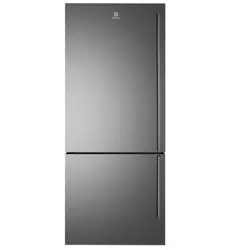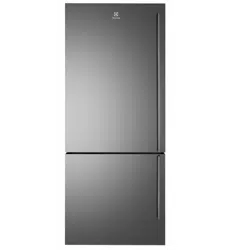
Refrigeration User manual
REGISTER YOUR FRIDGE
WITH YOUR SMARTPHONE
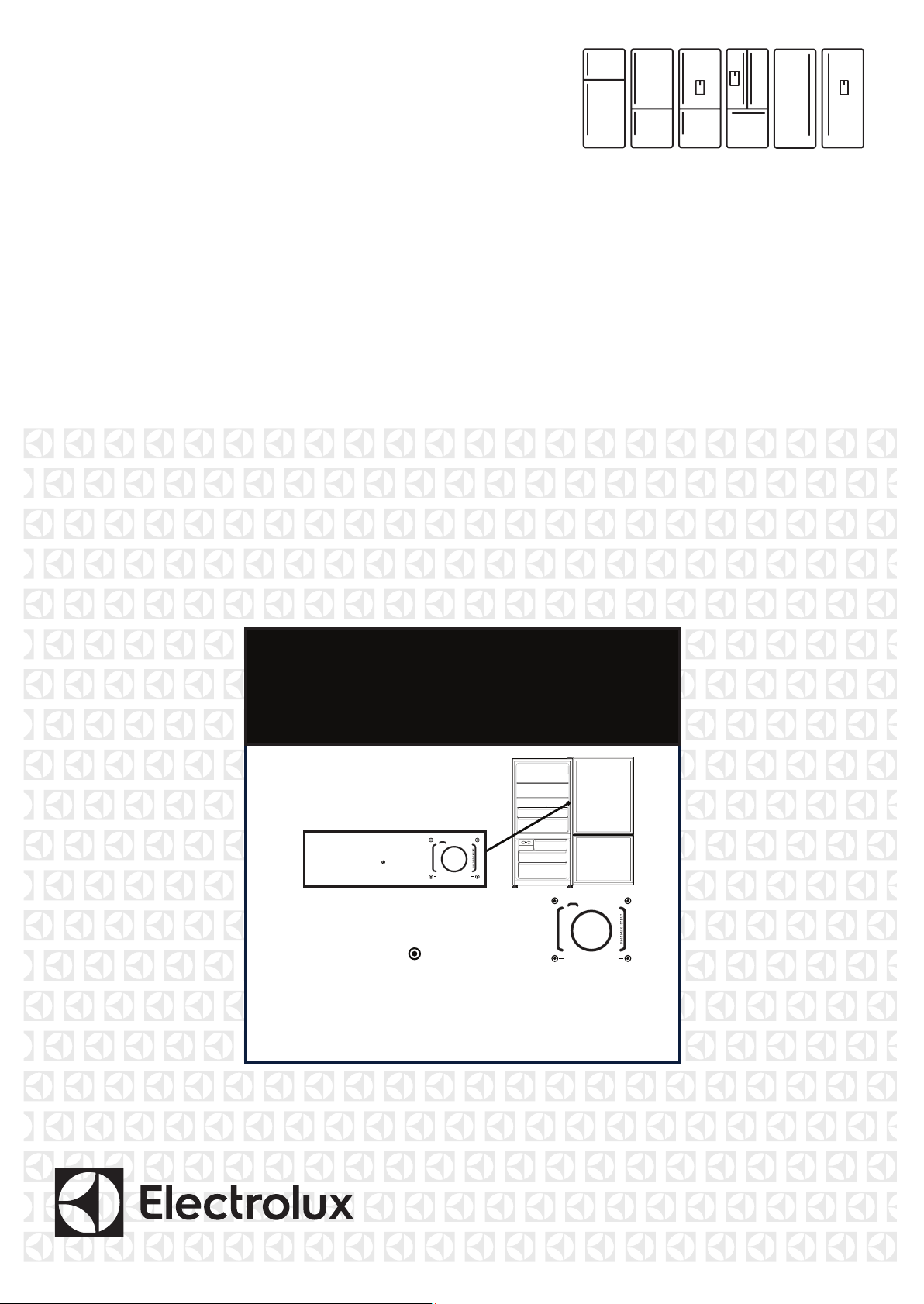
Locate the label
on the inside of
your fridge
1
Photograph the
camera icon, including
the 4 dots
(
00000000000
)
2
Text image to 0488 446 622
(Australia only)
3
00000000000
© 2017 Electrolux Home Products Pty Ltd. EST_PhotoRegister_Fridge_70x70_Dec17
Easy register with your smartphone
1. Photograph the camera icon,
including the 4 dots(
00000000000
).
2. Then text it to 0488 446 622
(Australia only)
00000000000
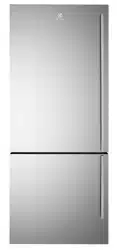
ETE4607, ETE5407,
EBE4507, EBE5307,
EBE5367, EHE5267,
EFE4227, ERE5047

CONTENTS
Important safety instructions ......................................................3
Refrigerator features ......................................................................4
Top mount refrigerator features ....................................4
Bottom mount refrigerator features ..............................5
Ice & Water ...........................................................................6
French door ice & water features .................................7
French door features ..........................................................7
Single door features ............................................................8
Single door features ............................................................9
Installing your new refrigerator ...............................................10
Unpacking your refrigerator ..........................................10
Locating your refrigerator. ..............................................10
Installing your refrigerator................................................10
Fitting the handles ...............................................................11
Ice & Water models ......................................................................11
Installation ..............................................................................12
Changing the water filter .................................................14
Using your refrigerator ................................................................15
Removing Features ............................................................15
AHC (Auto humidity control............................................15
Freezer Shelves ....................................................................15
Drawers with telescopic slides ......................................15
Twist & Serve ice .................................................................16
LED Lighting ..........................................................................16
Controlling .........................................................................................17
About the User Interface .................................................17
Functions of the user interface ......................................18
The freezer user interface ..............................................20
Error Codes ...........................................................................21
General information .....................................................................22
Cleaning the refrigerator ................................................22
Food storage guide ..........................................................23
Troubleshooting ...................................................................24
Ice maker troubleshooting .............................................26
Noises ......................................................................................27
Warranty Information ...................................................................31
CONGRATULATIONS
Dear customer,
Congratulations and thank you for choosing our
refrigerator. We are sure you will find your new
refrigerator a pleasure to use. Before you use the
refrigerator we recommend that you read through the
relevant sections of this manual, which provides a
description of your refrigerator and its functions.
To avoid the risks that are always present when you use
an electric appliance, it is important that the refrigerator
is installed correctly and that you read the safety
instructions carefully to avoid misuse and hazards.
We recommend that you keep this instruction booklet
for future reference and pass it on to any future owners.
After unpacking the refrigerator, please check it is not
damaged. If in doubt, do not use the refrigerator but
contact your local customer care centre.
The symbols you will see in this booklet have these
meanings:
WARNING
This symbol indicates information concerning your
personal safety.
CAUTION
This symbol indicates information on how to avoid
damaging the refrigerator.
IMPORTANT
This symbol indicates tips and information about use
of the refrigerator.
ENVIRONMENT
This symbol indicates tips and information about
economical and ecological use of the refrigerator.
CONDITIONS OF USE
This refrigerator is designed and intended to be used in
normal domestic applications only.
Record model and serial number here:
Model number: ....................................................................
Serial number: .....................................................................
2 electrolux.com.au
NOTE: You must read these warnings carefully before
installing or using the refrigerator. If you need
assistance, contact your customer care centre. The
manufacturer will not accept liability, should these
instructions or any other safety instructions
incorporated in this book be ignored.
WARNING
• This appliance is not intended for use by persons
(including children) with reduced physical, sensory or
mental capabilities, or lack of experience and
knowledge, unless they have been given supervision
or instruction concerning use of the appliance by a
person responsible for their safety. Children should
be supervised to ensure that they do not play with
the appliance.
• I t is essential the power point is properly earthed to
ground. Consult a qualified electrician if you
are unsure.
• Do not use electrical appliances inside the food
storage compartments of the appliance, unless they
are of the type recommended by the manufacturer.
• Unplug the refrigerator before cleaning or moving it
to avoid electric shock.
• Never unplug the refrigerator by pulling the electrical
cord as this may damage it. Grip the plug firmly and
pull straight out.
• I f the power cord is damaged, it must be replaced
by the manufacturer, its service agent or similarly
qualified persons in order to avoid a hazard.
• Don’t use a steam cleaner. If live components come
into contact with condensing steam, they may short-
circuit or cause an electric shock.
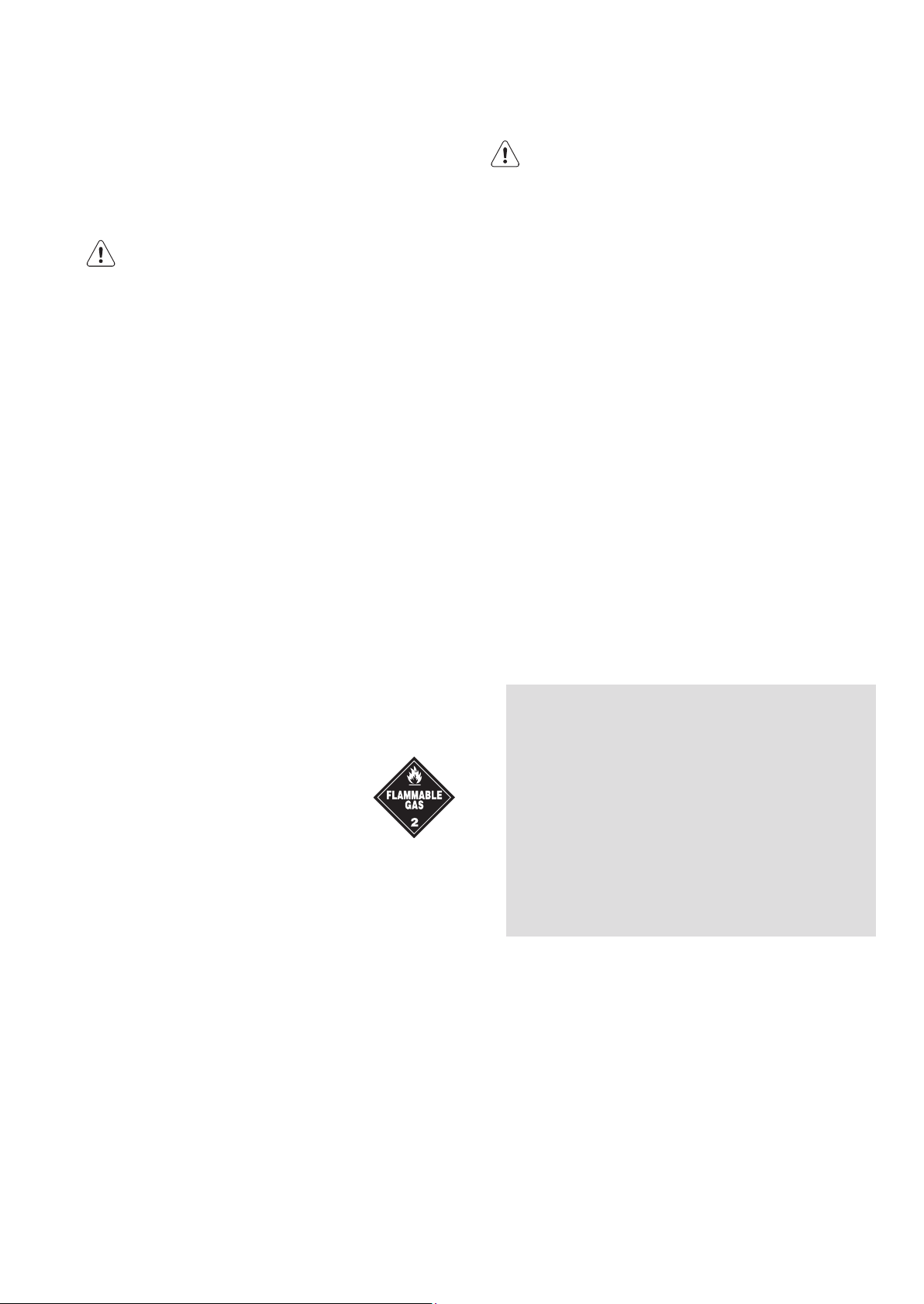
• Do not store explosive substances
such as aerosol cans with a flammable
propellant in this appliance. If
pressurised aerosol containers bear
the word ‘flammable’ and/or a small
flame symbol, do not store them inside
any refrigerator or freezer. If you do so
you may cause an explosion.
• Do not damage the refrigerant circuit.
• This appliance contains insulation formed with
flammable blowing gases. Avoid safety hazards by
carefully disposing of this appliance.
• I f you wish to discard this refrigerator, please
contact your local authorities and ask for the correct
method of disposal.
• When you dispose of your old refrigerators and
freezers, remove any doors. Children can suffocate if
they get trapped inside.
• The plug must be accessible when the appliance is in
position.
• Never try to repair the refrigerator yourself, only use
a qualified or authorised service person for repairs.
WARNING
R600a refrigerant warning
This appliance contains flammable R600a refrigerant.
Avoid safety hazards by carefully installing, handling,
servicing and disposing of this appliance.
• Ensure that the tubing of the refrigerant circuit is not
damaged during transportation and installation.
• Leaking refrigerant may cause eye injuries or ignite.
• The room for installing appliance must be at least
1m
3
per 8g of refrigerant. The amount of refrigerant
in the appliance can be found on the rating plate
inside the appliance.
• If you are unsure of the refrigerant check the rating
plate inside the refrigerator compartment.
• It is hazardous for anyone other than an Authorised
Service Person to service this appliance. In
Queensland Australia the Authorisation Service
Person MUST hold a Gas Work Authorisation for
hydrocarbon refrigerants to carry out servicing or
repairs which involve the removal of covers.
• Keep ventilation openings in the appliance
enclosure or in the built-in structure,
clear of
obstruction.
• Do not use mechanical devices or other means to
accelerate the defrosting process, other than those
recommended by the manufacturer.
IMPORTANT SAFETY INSTRUCTIONS
3
Important Information that my impact your
Manufacturer's Warranty
Adherence to the directions for use in this manual
is extremely important for health and safety. Failure
to strictly adhere to the requirements in this manual
may result in personal injury, property damage and
affect your ability to make a claim under the
Electrolux
manufacturer’s warranty provided with
your product. Products must be used, installed and
operated in accordance with this manual. You may
not be able to claim on the Electrolux
manufacturer’s warranty in the event that your
product fault is due to failure to adhere to this
manual.

Features may vary depending on model. Not all models will have features listed.
REFRIGERATOR FEATURES
ETE5407 illustrated
Refrigerator/freezer control panel
From this panel you can control the temperature of the
refrigerator and freezer compartments as well as setting
the Boost function or resetting the door alarm.
For further information on how to use this feature refer to
the section “About the User Interface”.
LED light
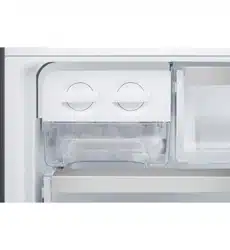
Twist & Serve Ice
Refer to the section “Using
your Refrigerator” for details
on removing, relocating and
using this feature.
LED lighting
Your refrigerator is fitted
with LED lighting.
Glass shelves
The glass shelves improve
visibility.
Wire shelf
MultiZone™ deli drawer
Use the MultiZone™ deli
drawer to store foods like
small goods, fresh or cooked
meat and cheese, or as an
additional crisper. The
drawer will prevent strong
food odours from impacting
the rest of the refrigerator.
To remove the deli drawer,
pull it forward, then lift it up
and pull it further forward.
TasteLock™ crisper
Use the crisper to store
vegetables, fruit or small
goods.
Dairy compartment
This compartment can
be used to store dairy.
FlexStor™ door bins
Slide the bins to meet
different storage needs.
To remove, lift and tilt.
To replace, tilt the top
and push down until
locked in place.
Door storage bin
The door bin can be
removed by lifting it up
over the support lugs.
To replace, push down
over the support lugs to
lock in place.
Bottle storage bin
Use the bottle bin for tall
bottle storage. The bottle
bin can be removed by
lifting it up over the
support lugs. To replace,
push down over the
support lugs to lock in
place.
TOP MOUNT
Auto humidity control
TasteGuard Deodoriser
TasteGuard Deodoriser
4 electrolux.com.au
EBE5307 illustrated
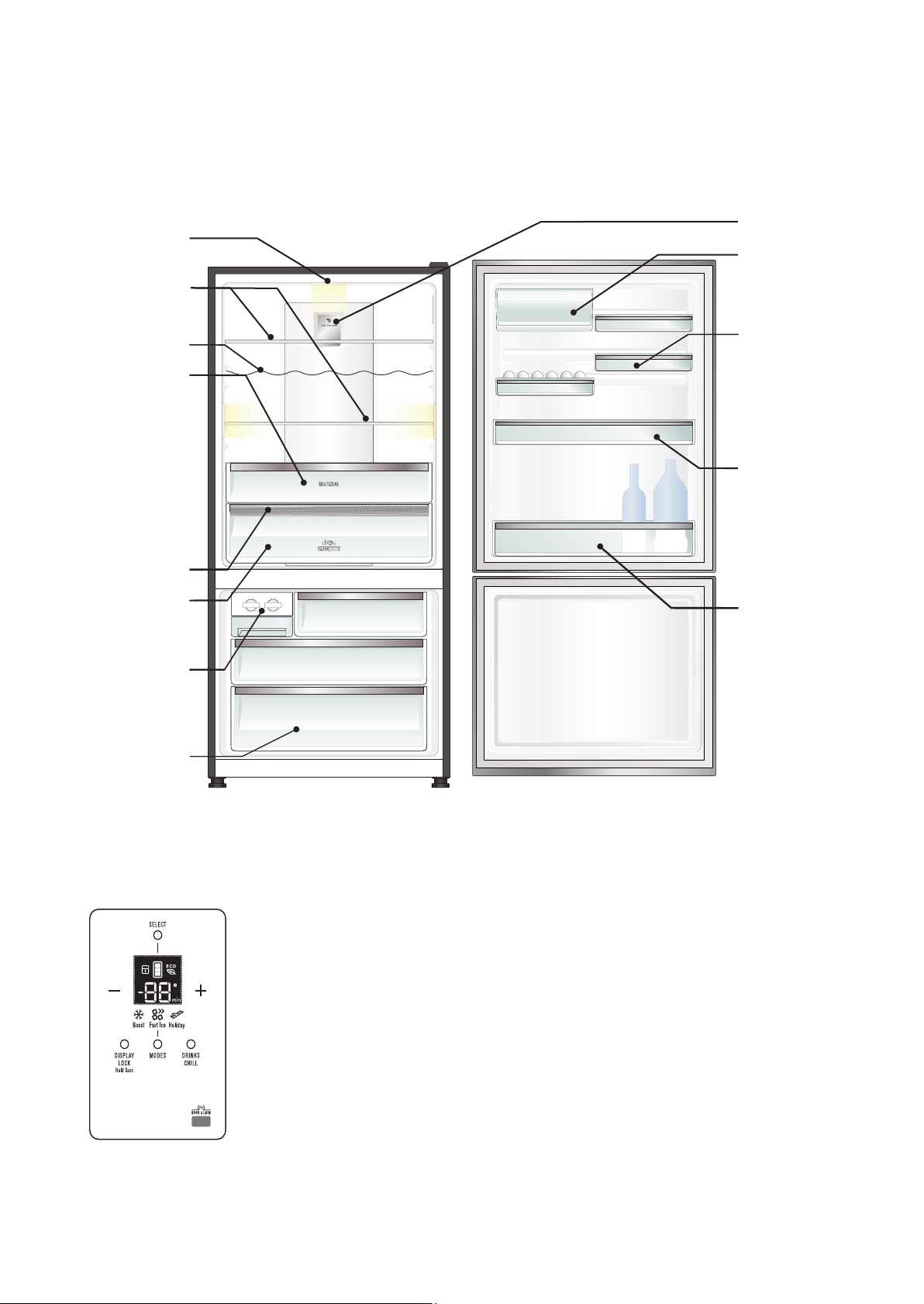
Refrigerator/freezer control panel
From this panel you can control the temperature of the
refrigerator and freezer compartments as well as setting
the Boost function or resetting the door alarm.
For further information on how to use this feature refer to
the section “About the User Interface”.
Features may vary depending on model. Not all models will have features listed.
LED lighting
Your refrigerator is fitted with
LED lighting.
Glass shelves
The glass shelves improve
visibility.
Wire shelf
MultiZone™ deli drawer
Use the deli drawer to store
foods like small goods, fresh
or cooked meat and cheese,
or as an additional crisper.
The drawer will prevent
strong food odours from
impacting the rest of the
refrigerator. To remove the
deli drawer, pull it forward,
then lift it up and pull it further
forward.
Auto humidity control
TasteLock™ crisper
Use the crisper to store
vegetables, fruit or small
goods.
Twist & Serve ice
Refer to the section “Using
your Refrigerator” for
details on removing and
using this feature.
Freezer storage bin
Refer to the section “Using
your Refrigerator” for
details on removing, and
using this feature.
BOTTOM MOUNT
TasteGuard Deodoriser
Dairy compartment
This compartment can be
used to store dairy.
FlexStor™ door bins
Slide the bins to meet
different storage needs.
To remove, lift and tilt.
To replace, tilt the top and
push down until locked in
place.
Door storage bin
The door bin can be
removed by lifting it up
over the support lugs. To
replace, push down over
the support lugs to lock in
place.
Bottle storage bin
Use the bottle bin for tall
bottle storage. The bottle
bin can be removed by
lifting it up over the
support lugs. To replace,
push down over the
support lugs to lock in
place.
5 electrolux.com.au
5

EBE5367 illustrated
REFRIGERATOR FE
ATURES
Refrigerator/freezer control panel
From this panel you can control the temperature of the
refrigerator and freezer compartments as well as setting
the Boost function controlling the Ice Maker or resetting
the door alarm.
For further information on how to use this feature refer to
the section “About the User Interface”.
Features may vary depending on model. Not all models will have features listed.
LED lighting
Your refrigerator is fitted
with LED lighting.
Replaceable water filter
Glass shelves
The glass shelves improve
visibility.
Wire shelf
MultiZone™ deli drawer
Use the deli drawer to store
foods like small goods, fresh or
cooked meat and cheese, or as
an additional crisper.
The drawer will prevent strong
food odours from impacting
the rest of the refrigerator. To
remove the deli drawer, pull
it forward, then lift it up and
pull it further forward.
TasteLock™ crisper
Use the crisper to store
vegetables, fruit or small goods.
Automatic ice maker
Refer to the section “Using
your Refrigerator” for details
on using this feature.
Freezer storage bin
Refer to the section “Using
your Refrigerator” for details
on removing, and using this
feature.
ICE & WATER
Auto humidity control
TasteGuard Deodoriser
Dairy compartment
This compartment can be
used to store dairy.
FlexStor™ door bins
Slide the bins to meet
different storage needs.
To remove, lift and tilt.
To replace, tilt the top and
push down until locked in
place.
Door storage bin
The door bin can be
removed by lifting it up
over the support lugs.
To replace, push down
over the support lugs to
lock in place.
Bottle storage bin
Use the bottle bin for tall
bottle storage. The bottle
bin can be removed by
lifting it up over the support
lugs. To replace, push down
over the support lugs to
lock in place.
6 electrolux.com.au

Features may vary depending on model. Not all models will have features listed.
SINGLE DOOR
ERE5047 illustrated
Refrigerator control panel
From this panel you can control the temperature of the
refrigerator compartments as well as setting the Boost
function or resetting the door alarm.
For further information on how to use this feature refer to
the section “About the User Interface”.
LED lighting
Your refrigerator is fitted
with LED lighting.
Replaceable water filter
Glass shelves
The glass shelves improve
visibility.
Wire shelf
MultiZone™ Deli drawer
Use the deli drawer to store
foods like small goods, fresh or
cooked meat and cheese, or as
an additional crisper. The
drawer will prevent strong food
odours from impacting the rest
of the refrigerator. To remove
the deli drawer, pull it forward,
then lift it up and pull it further
forward.
FreshZone™ crispers
Use the crisper to store
vegetables, fruit or small
goods.
Dairy compartment
This compartment can be
used to store dairy.
FlexStore™ door bins
Slide the bins to meet
different storage needs.
To remove, lift and tilt.
To replace, tilt the top and
push down until locked in
place.
Door storage bin
The door bin can be
removed by lifting it up
over the support lugs.
To replace, push down
over the support lugs to
lock in place.
Bottle storage bins
Use the bottle bin for tall
bottle storage. The bottle
bin can be removed by
lifting it up over the
support lugs. To replace,
push down over the
support lugs to lock in
place.
REFRIGERATOR FE
ATURES
TasteGuard Deodoriser
8 electrolux.com.au
Features may vary depending on model. Not all models will have features listed.
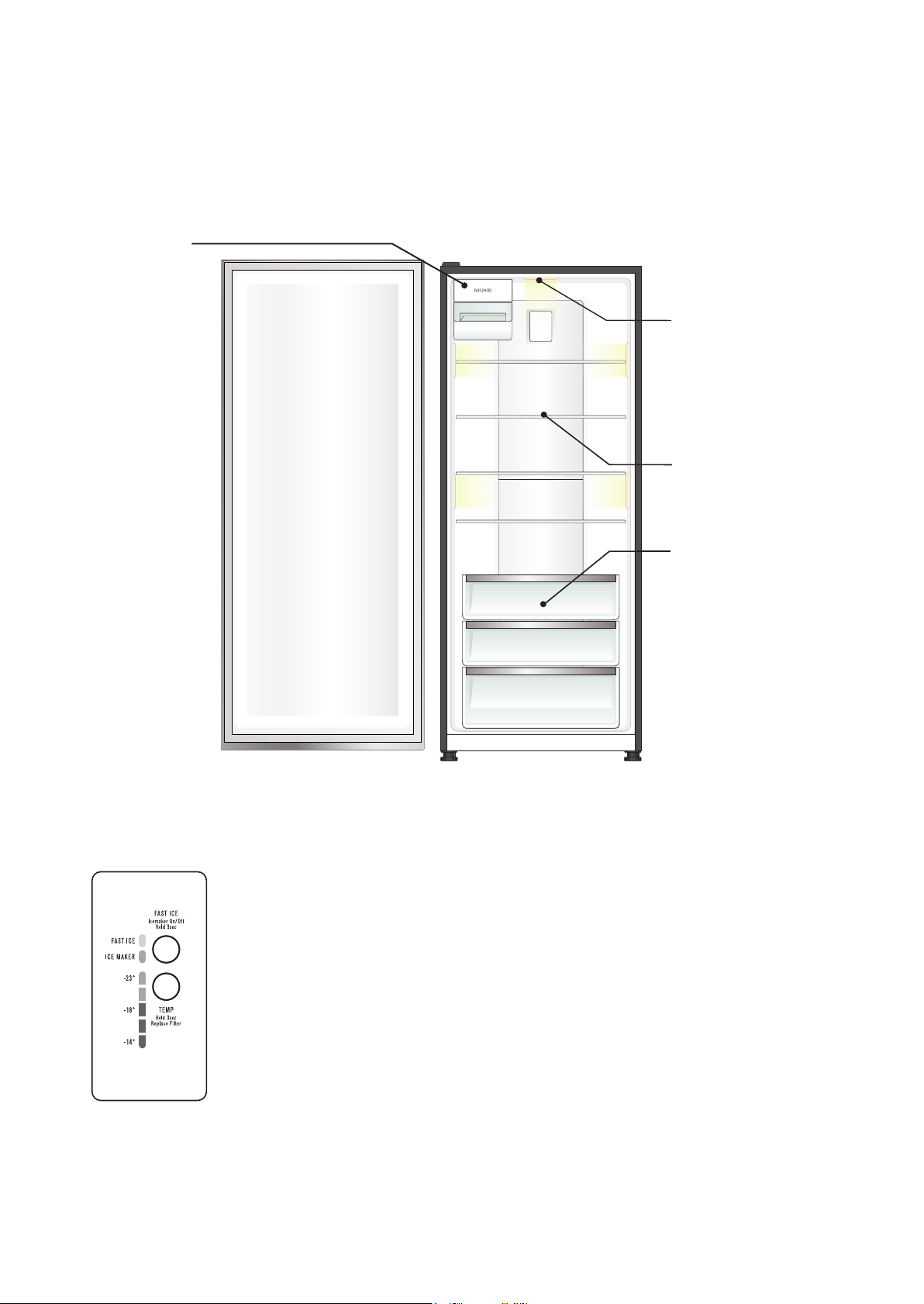
Freezer control panel
From this panel you can control the temperature of the
freezer as well as setting the fast ice function or reset the
door alarm.
F
or further information on how to use this feature refer to
the section “About the User Interface”.
EFE4227 illustrated
SINGLE DOOR
LED lighting
Your freezer is fitted with
LED lighting.
Glass shelves
The glass shelves improve
visibility.
Storage bins
Refer to the section “Using your
Refrigerator” for details on
removing, and using this feature.
Automatic ice maker
Refer to the section
“Using your Refrigerator”
for details on using this
feature.
F
REEZER FEATURES
9
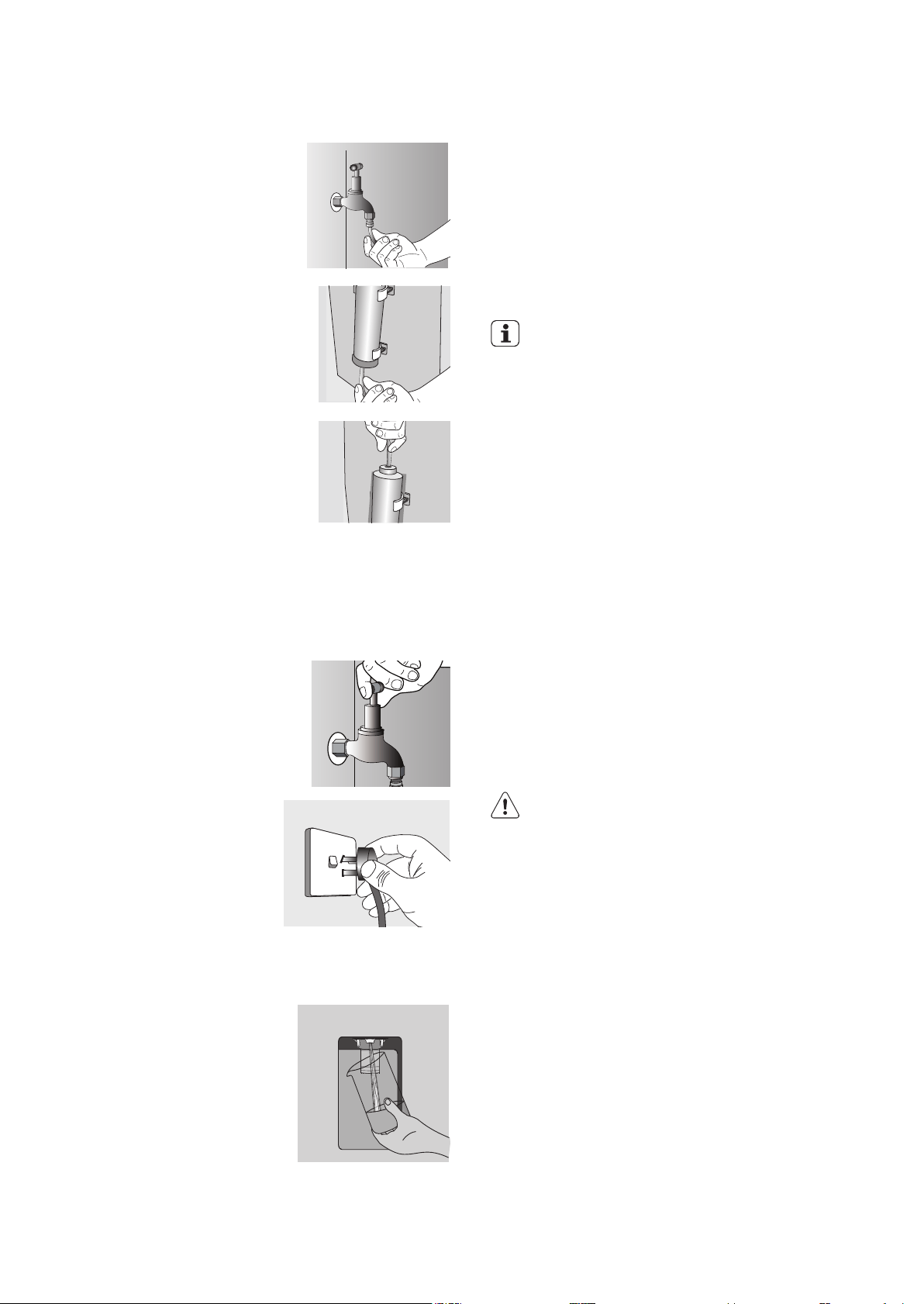
Step 8.
Push shorter tube into tap
fitting past insertion mark.
Step 9.
Push other end into filter INLET.
Step 10.
Connect remaining tube length
into filter OUTLET. Water filter
contains carbon dust which
is non-toxic. Using a large
container, turn on water and
purge the residual carbon dust
from filter until water runs
clear.
Step 11.
Connect other end of
remaining tube length to inlet
on bottom right hand side of
refrigerator.
Step 12.
Turn on water and check all
joints and tubes for leaks.
Step 13.
Reconnect the power.
Step 14.
Switch On Water Dispenser (except model EFE4227.)
Using a large container, run the water dispenser to clear
air from lines. This may take a few minutes. Purge and
dispense a minimum of 2 litres of water. Initial water may
be black in colour. This is residual carbon dust from the
filter and is non-toxic. If the water is slow to shut off or
the dispenser is dripping, air may still be in the lines.
Either purge more water through the system to remove
this air or allow some time for the air to be removed over
subsequent dispensing. For normal use, water dispenser
will automatically shut off after 2 minutes of continuous
operation.
IMPORTANT
As the water cut off is not instant, leave the glass under
the dispenser briefly until the water has stopped flowing
to avoid spills.
Clean and empty the dispenser drip tray regularly to
avoid overflow.
If you have not used the dispenser for some time,
discard the first seven or eight cups of water
(contaminants could have settled in the
water pipes).
Step 15.
Switch ON Ice Maker. (except model ERE5047.)
Refer to Controlling section
Once the refrigerator has been running for at least 24
hours remove the ice bin and dispose of the first few
batches of ice to ensure that impurities have been flushed
from the system.
Party Ice (except model EFE4227)
When the Ice Bin is removed from the cabinet the
Auto Ice Maker will continue to dispense ice into the top
freezer drawer.
CAUTION
Water dispenser should not be used for extended
periods of time. After 2 minutes of continuous use the
water dispenser will automatically shut off.
13

CHANGING THE WATER FILTER
IMPORTANT
• Always fit the filter as per
manufacturer’s instructions.
• If you need to replace water tube, only use
approved water quality piping that meets the
pressure requirements.
• Make sure your refrigerator is level to avoid
uneven ice cubes.
• Replace filter at suggested intervals to avoid
water/ice reduction and irregularities in taste.
• Remove and clean ice bin once a month,
discarding unused ice cubes. This will ensure fresh,
clean ice and smooth operation of your ice maker.
• Clean and empty the dispenser drip tray regularly
to avoid overflow.
WARNING
If you have not used the dispenser for some time,
discard the first seven or eight cups of water and any
ice that the ice maker produces in the first 24 hours
(contaminants could have settled in the water pipes).
Internal Water filter
The water filter is located at the top left side of the fresh
food compartment.
Replacing the water filter
You should change the water filter every six months to
ensure the highest possible water quality.
If your refrigerator has not been used for a period of
time (during a house move for example), change the
filter before reinstalling the refrigerator.
It is not necessary to turn the water supply off to
change the filter. Be ready to wipe up any small
amounts of water released during the filter
replacement.
1. Ensure that the ice maker is turned off (Diagram 1).
2. Remove the filter by turning anti-clockwise 180˚.
3. Slide the old water filter cartridge straight out of the
housing and
discard it. (Diagram 2).
4. Unwrap the new filter cartridge and using the
alignment guide, slide it gently into filter housing
until it stops against the filter connection at the back
of the housing. (Diagram 3).
5. Engage the filter by firmly rotating clockwise until
the filter snaps into position (once engaged the filter
cannot be rotated further). (Diagram 4).
PureSou rce
U l t r a 2
Ice & Water Filtration System
PureSou rce
U l t r a 2
Ice & Water Filtration System
PureSou rce
U l t r a 2
Ice & Water Filtration System
ICE AND WATER MODELS (CONTINUED)
DDiiaaggrraamm 2
DDiiaaggrraamm 3
DDiiaaggrraamm 4
DDiiaaggrraamm 5
6. Press a drinking glass against the water dispenser
while checking for any leaks at the filter housing.
Any spurts and sputters that occur as the system
purges air out of the dispenser system are normal.
7. After filling one glass of water, continue flushing the
system for about four minutes.
8. Turn on the ice maker. (Diagram 5).
9. When the filter has been replaced press and hold
the ‘Ice and Water’ button for three seconds to reset
the filter replace timer.
D
Diiaaggrraamm 1
14 electrolux.com.au

Refrigerators work by transferring heat from the food
inside to the outside air. This operation makes the back
and sides of the refrigerator feel warm or even hot
particularly at start-up and on warm days – this is
normal.
Avoid placing food against the air vents in the
refrigerator as it affects efficient circulation. If the door
is opened frequently, a light frosting will occasionally
occur on the freezer’s interior. This is normal and will
clear after a few days. If the freezer door is accidentally
kept open, a heavy frost will coat the inside walls and
should be removed.
Your new refrigerator uses a high-speed compressor,
along with other energy-efficient components, which
may make unusual sounds and be more noticeable at
night and quieter times. These sounds simply indicate
your refrigerator is working how it should. They include:
• Compressor running noises;
• Air movement noise from the small fan motor;
• A gurgling sound, similar to water boiling;
• A popping noise, heard during automatic
defrosting; and
• A clicking noise, prior to compressor start-up.
Further details can be found in the
Troubleshooting Guide.
IMPORTANT
For top mount refrigerators (where the freezer is on
top of the fresh food compartment).
• Don’t place food forward of the ribs on the
freezer floor, as it will keep the door open.
Ribs
For bottom mount refrigerators (where freezer is below
the fresh food compartment):
• Ensure all freezer drawers and shelves are
pushed back completely to prevent them from
keeping the door open.
REMOVING FEATURES
AHC (Auto Humidity Control)
Auto Humidity Filter Cartridge
Auto Humidity Control automatically releases excess
moisture & maintains optimal humidity for your fresh
vegetables, maintaining the taste, texture and freshness.
Recommended to replace filter once a year*
Replacing Filter Cartridge
Auto Humidity Filter is located at the back of the crisper
handle.
• Hold the tabs of the fil er cartridge.
• Slide o the Right to release the filter.
• Replace a new filter and slide to the Left to lock in
place.
Freezer shelf
Remove the freezer shelf by lifting the catches on the
right and left underside of the shelf to release the shelf
then pull the shelf toward you.
Drawers fitted with telescopic slides
To remove the drawer for cleaning.
WARNING
Never close the door while the telescopic slides are
extended. This may damage the slide and/
or refrigerator or cause the slide to become disengaged
from the refrigerator.
USING YOUR REFRIGERATOR
15
the front to unhook it from the slides. Once you have
removed the drawer, ensure the slides are pushed
back so they are fully closed.
1. Empty food from the drawer.
2 . Remove the drawer by pulling it forward and lifting
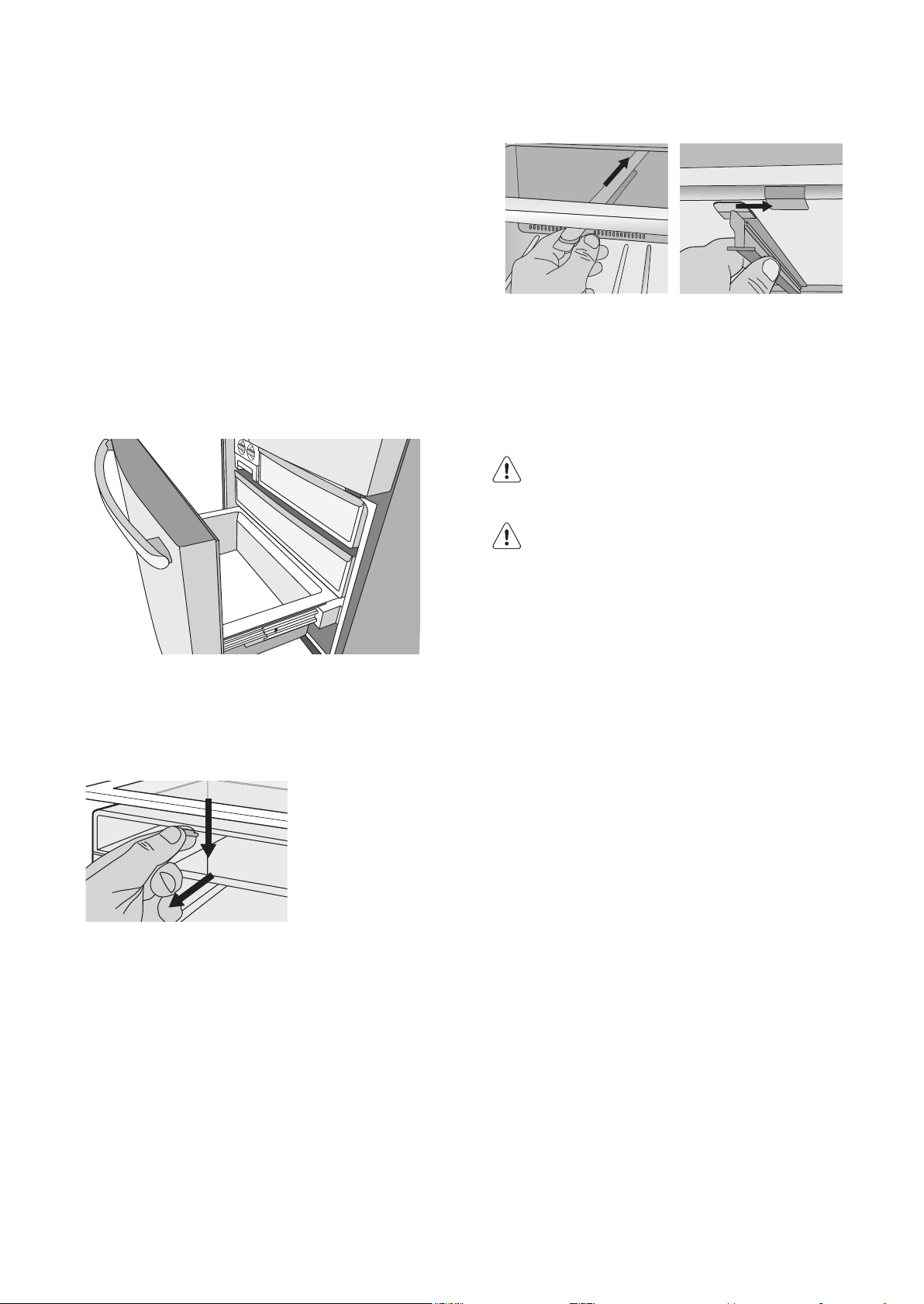
To replace the drawer:
1. Ensure the telescopic slides are pushed in all the
way.
2. Slide the drawer into place over the slides and push
the bin in until it stops.
3. Drop drawer into position.
Freezer bottom bin
To remove the bin, pull the drawer out until it is open all
the way then lift bin out from the front of the bin. When
refitting insert the rear of the bin first then lower into
position.
When replacing the bins after cleaning, we recommend
fitting the lower bin first.
Twist and Serve Ice
Mounting the twist & serve dispenser to the other side
of the freezer.
NOTE: This is only possible on top mount models.
1. R emove the ice bin and ice cube tray. If the ice tray
assembly is frozen to the carriage, simply squeeze the
tray and shelf together to break the ice.
2. Before you remove The ice carriage, remember to
disengage it from the glass shelf as it may result in
damage to the assembly.
3. Remove the centre runner by disengaging it at the
front of the shelf,and removing it from the rear.
USING YOUR REFRIGERATOR (CONTINUED)
Insert into the slot at the rear of the shelf Then engage into the front of the shelf
1. Refit the runner into the rear of the shelf on the
right hand side and then engage the front.
2. Fit the carriage by sliding it into the runners until
the front if the carriage engages with the shelf.
3. Refit the ice tray and ice bin.
WARNING
Fill the ice cube tray with potable water only.
CAUTION
LED lighting
Your appliance is fitted with long life LED lighting. In the
unlikely event the LED lights should fail, then the LED
lights should be serviced by the manufacturer.
Refer to the warranty page for contact details.
16 electrolux.com.au

ABOUT THE USER INTERFACE
The following pages explain the various functions of the
user interface to help you better understand how to get
the most out of your new refrigerator.
IMPORTANT
NOTE: When you set a temperature, you set an average
temperature for the whole refrigerator cabinet. Ensuring
that you make only small adjustments and wait at least
24 hours to see if the new temperature is correct to your
liking.
Checking the softness of ice cream is a good indication
that your freezer is the right temperature, while checking
the temperature of water kept in the refrigerator is a
good way of checking the temperature of the food
compartment.
Temperatures inside each compartment may vary,
depending on how much food you store and where you
place it.
High or low room temperature may also affect the
actual temperature inside the refrigerator.
CONTROLLING
17

FUNCTIONS OF THE USER INTERFACE
IMPORTANT
The factory default settings for the refrigerator is “3°
C” and “-18°C” for the freezer. If you want to change
the temperature, remember to make only small
adjustments and wait 24 hours to see if it’s correct.
Button / Icon Description Primary Function
1 Compartment Selector button Selects controllable compartment.
2 Lock Icon Indicates if the user interface is locked.
3 Compartment Icon Indicates controllable compartment.
4
ECO Icon
Indicates if the appliance is operating in its most energy
efficient mode.
5 Digital display Indicates temperature of selected compartment.
6 Decrease button Decreases temperature of selected compartment.
7 Increase button Increases temperature of selected compartment.
8 Mode indicators (Boost, Fast Ice, Holiday) Indicates appliance operation mode.
9 Display Lock button Selects lock state of user interface.
10 Mode select button Selects oper
ation mode of appliance.
11 Drinks Chill button Selects drinks ch
ill timer.
12 Filter status indicators Indicates filter
replacement timing.
13 Icemaker and Water on off indicators Shows operational status.
14 Ice & Water or Water on/off button Selects operation status.
15 Door sensor Senses door st
ate (open or closed).
ETE4607, ETE5407, EBE4507,
EBE5300, EBE5307
2
4
5
7
10
11
12
13
15
3
6
8
9
14
1 1
4
5
7
10
11
12
13
15
2
3
6
8
9
14
9
1
4
5
7
10
11
15
2
3
6
8
9
EBE5367, EHE5267 ERE5047
CONTROLLING (CONTINUED)
18 electrolux.com.au
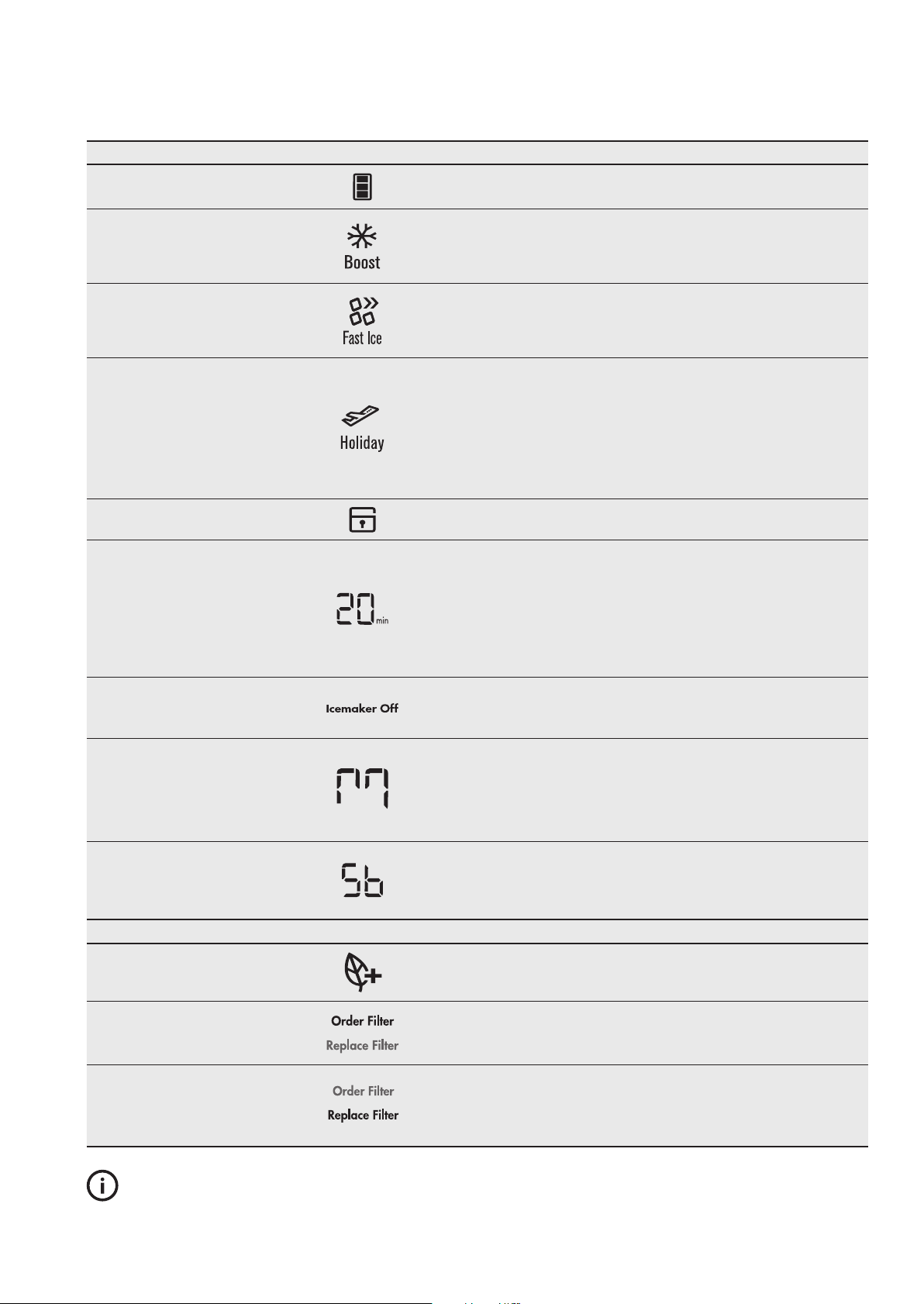
Function Ic
on
O
peration (depending on model)
Setting the temperature
Press button 1 to select compartment on icon 3 Press buttons 6 or 7 to adjust
temperature up or down.
Boost mode
Increases the chill rate of the
refrigerator for 90mins before returning
to pre-set mod
e.
Press button 10 until the snowflake icon is illuminated. Boost mode can be
deselected using button 10.
Fast Ice
Decreases the freezer temperature to
-23°C for 12 hours before returning to
pre-set mode.
Press button
10 until the fast ice icon is illuminated. Fast ice mode can be
deselected using button 10.
H
o
liday mode
The
r
efrigerator
minimises defrosting
to save energy when doors remain
closed for an extended period.
Press button 10 until the holiday icon is illuminated.
When holiday mode is enabled the temperature settings will be set to 3°C for
the refrigerator and -18°C for the freezer.
Holiday mode can be deselected using button 10 or opening the fridge door.
When holiday mode is disabled the temperature settings will revert to the
previous settings.
Holiday mode can be deselected using button 10 or opening the fridge door.
Display Lock
Deactivates th
e user interfa
ce controls.
To turn on/off press and hold button 9 for 3 seconds,
the lock icon is illuminated when activated.
Drinks Chill
Sets a timer for between 1 and 30
minutes as a reminder for when drinks
are placed in the freezer for quick chill.
To turn on press button 11 and initial time of 20 mins will appear on digital display.
To adjust time use buttons 6 and 7.
Alarm will sound when time is finished.
Press button 11 to turn off during or after countdown. The time taken to chill
depends on the size of your bottle.
Do not leave the bottle inside the freezer longer than the time needed
for chilling.
Ice Maker on/off
Enables/disables ice maker and water
dispensing features.
To enable/disable press button 14 to cycle through on/off modes.
Indicator 13 will illuminate when either the ice maker or water dispenser are
deactivated.
Ice Cube Size
Ice cube size can be adjusted for
personal preference or
to suit supply
water pressure.
Press and hold buttons 10 and 14 for 3 seconds.
Press button 6 to cycle through cube sizes, small (S), medium (M), large (L) &
extra large (EL). Medium symbol shown.
To confirm the setting press button 10.
The display will return to the preset mode after 45 seconds.
Sabbath Mode
Disables all lights and other electrical
activity from occurring when the
refrigerator door i
s opened.
To enable and disable Sabbath mode, press and hold buttons 7 and 9 for
3 seconds.
When enabled/disabled an alarm will beep 4 times and “Sb” will appear
on digital
display when active.
Indicator Icon Operation
Eco Mode
Enabled when appliance set to energy
efficient operating
temperatures.
ECO icon automatically appears when refrigerator is set between +3°C and
+7°C and freezer is set between -14°C and -18°C
Order Filter
Reminder when the water filter
periodically r
equires replacement.
Order filter icon will appear as a reminder to order a replacement water filter.
When the filter has been replaced press and hold button 14 for 3 seconds to
reset the filter replacement timer.
Replace Filter
Reminder
when the water filter requires
replacement.
Replace filter icon and alarm will activate as a reminder to replace the water filter.
Mute alarm for 1 week by pressing any button on the user interface.
When the filter has been replaced press and hold button 14 for 3 seconds to reset
the filter replacement timer.
TIPS & INFORMATION
IMPORTANT
The factory default settings for the refrigerator is “3°C” and “-18°C” for the freezer. If you want to change the
temperature, remember to make only small adjustments and wait 24 hours to see if it’s correct.
19
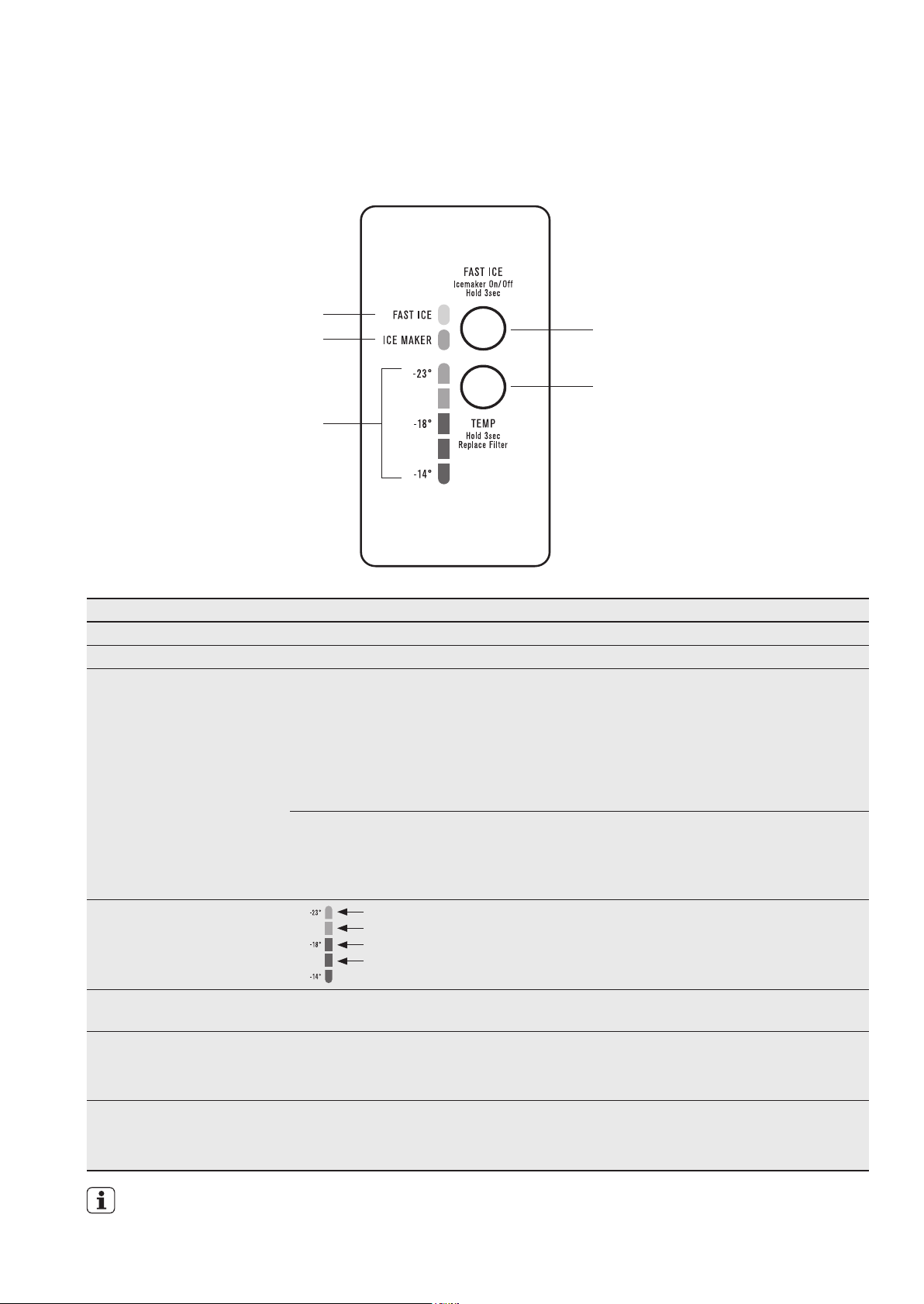
Description Operation / Primary Function
Fast Ice on/off LED Indicates the status of the Fast Ice function.
Ice Maker on/ off LED Indicates the status of the Ice Maker function.
Fast Ice/Ice Maker button
Turning Automatic Ice Maker
On/
Off
Use the Fast Ice function when you add a large amount of food to the freezer
compartment;
• Press the ‘Fast Ice/Ice Maker’ button. The Fast Ice icon will flash indicating that the
Fast Ice is active. and the compressor will run continuously for 12 hours
• After 12 hours the freezer will automatically return to normal mode.
• Th e
Fast Ice function can be cancelled anytime by pressing the button again.
• Press and hold the ‘Fast Ice’/Ice Maker button for 3 seconds.
The Ice Maker LED will activate indicating that the Ice Maker is active.
• I ce Maker can be turned off at any time. Press and hold the 'Fast Ice'
/Ice Maker
button for 3 seconds.
Ice cube size
Ice cube size can be adjusted
for personal preference or to
suit s
upply water pressure
Extra large
Large
Medium
Small
Press “Temp” and “Fast Ice” buttons together for 3 seconds within
first 12 seconds of appliance starting. Four pre-set ice cube sizes
can be selected by the use
r. Press “Fast Ice” button to scroll
through options and press “Temp” button to confirm.
Freezer temperature scale
icons
Indicates the temperature setting of the freezer compartment.
Temperature adjust button Press any button to awaken control.
Press the ‘Temp’ button to decrease the compartment temperature. Once the coldest
temperature is reached the display will return to the warmest setting with the next press.
Replace filter
Reminder for when the water
filter requires
replacement.
Replace filter alarm will activate as a reminder to replace the water filter.
An alarm will sound and the Fast Ice on/off icon will flash. Hold "TEMP" button for
3 seconds to reset.
IMPORTANT
The factory default settings for the freezer is “-18°C”. If you want to change the temperature, remember
to make only small adjustments and wait 24 hours to see if it’s correct.
THE FREEZER USER INTERFACE
Fast Ice/ Ice maker on/off button
Temperature adjust/Replace filter button
Freezer temperature
scale LEDs
Fast Ice on/off LED
Ice Maker on/off LED
EFE4227
CONTROLLING (CONTINUED)
20 electrolux.com.au
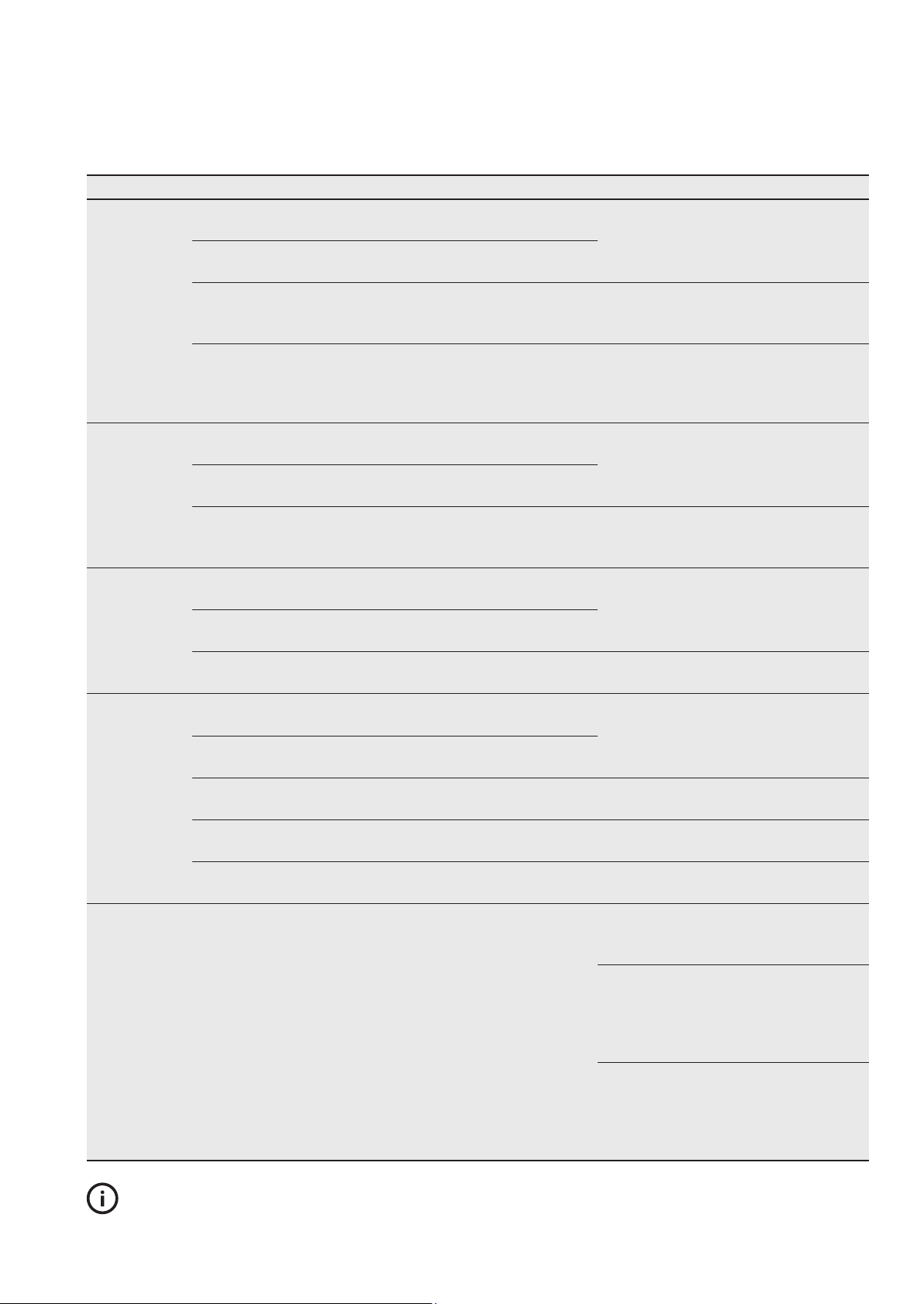
FOOD STORAGE GUIDE
TIPS & INFORMATION
IMPORTANT
Please note, use this information as a guide only, actual storage times will vary depending on how you use
your refrigerator, climatic conditions and the freshness of the food.
Category Product Refrigerator Freezer Storage Tips
Meat
Sausages and Mince 1-2 Days 2-3 Months Keep cold meat at the back of the
refrigerator where it is coldest.
Chops and Steak 3-4 Days 4-6 Months
Cold Meats 3-5 Days 4-6 Months Plastic can cause meat to sweat if stored
in refrigerator for more than a day.
Cuts for roasting 3-5 Days 12 Months Cuts for roasting can take up to 48 hours
to defrost properly. Transfer frozen cuts
to the refrigerator 2 days before use.
Poultry
Chicken 1-2 Days 2 Months If poultry takes on a smell or colour you
are unsure about it is best to throw it
out.
Roast Chicken 3-5 Days 12 Months
Eggs 6 Weeks Not Suitable Whole eggs are not suitable for freezing,
slightly beaten eggs may be frozen for four
months.
Seafood
Whole fish and fillets 2-3 Days 2 Months Store in an airtight container or foil.
Lobster and crabs 1-2 Days 2 Months
Prawns 1-2 Days 2 Months Never freeze prawns in salty water as this
will dehydrate the flesh.
Dairy
Milk Until Expiry Date Not Suitable If dairy takes on a smell or colour and you
are unsure about it, it is best to throw it out.
Yoghurt 7- 10 Days Not Suitable
Hard Cheeses 2 Weeks – 2
Months
2 Months (Grated)
Depending on the variety hard cheese can
last from 2 weeks to 2 months.
Soft Cheeses 1-2 Weeks Not Suitable
Butter 8 Weeks 12 Months
Fruit &
Vegetables
Every fruit and vegetable has a different
shelf life.
Some stay fresh for a couple of days e.g
beans, others can last for a couple of
months e.g. onions.
8-12 Months
When freezing
chop and blanch in
small portions.
Keep vegetables in the crisper and
away from the air vents to avoid
freezing.
If you wash fruit and vegetables before
storing them make sure they are dry or wrap
in absorbent paper before storing in the
refrigerator as this can make them susceptible
to rotting.
Try to keep fruit and vegetables
separated as fruits that give off high levels
of ethylene (the ripening agent) can
prematurely ripen and spoil surrounding
vegetables
23
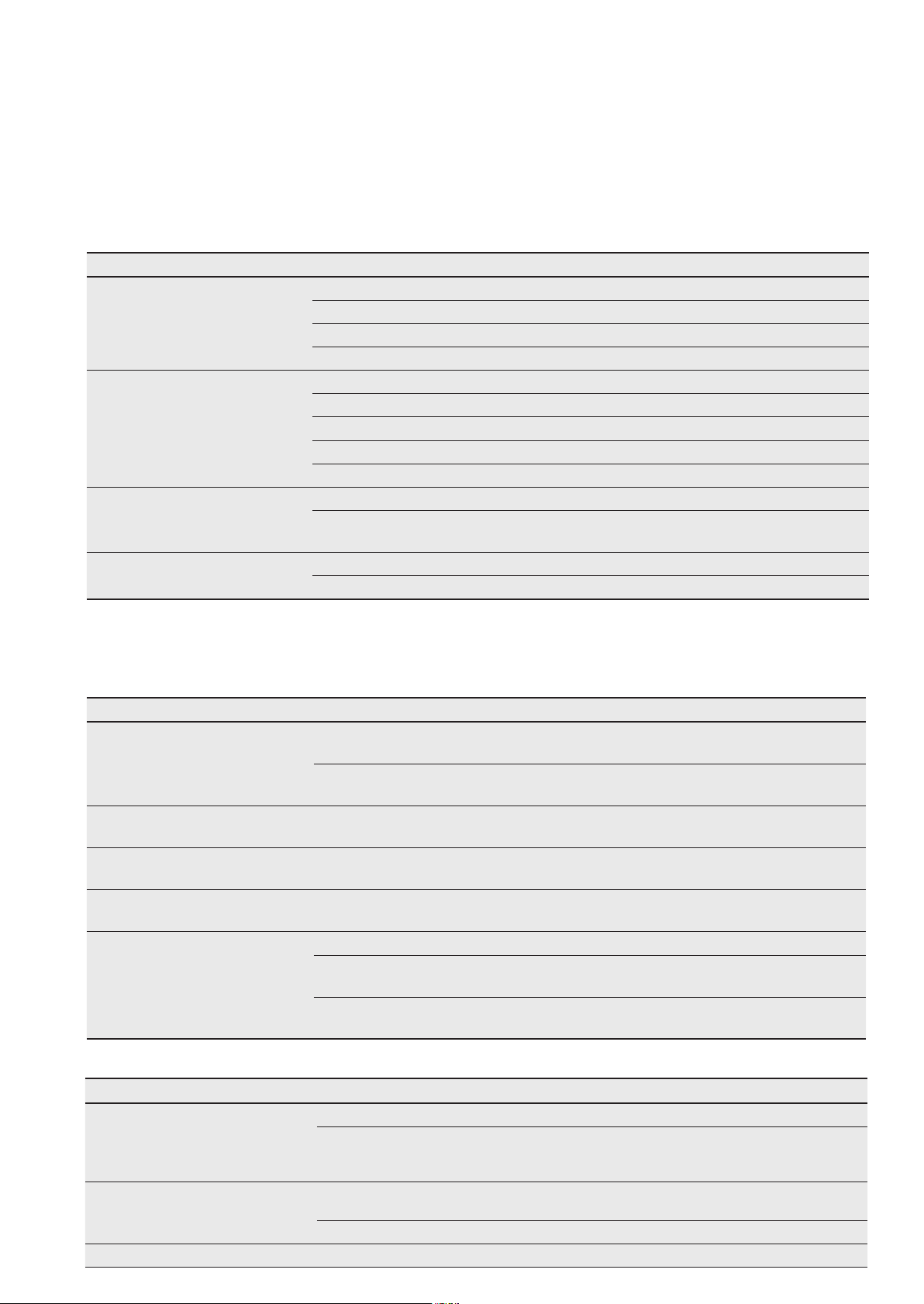
TROUBLESHOOTING
Appliance does not operate at
desired temperature
In a modern frost free refrigerator / freezer, cold air is circulated around the various compartments through air vents
using a high efficiency fan.
Concern What to do
Refrigerator is too warm. Ensure food is allowed to cool before placing inside the refrigerator.
Ensure the appliance is set up as per instructions on page 11.
Ensure that contents are not obstructing the cooling vents.
Ensure the door is not held open or is being opened too frequently.
Freezer is too warm. Adjust temperature to a colder setting.
Ensure food is allowed to cool before placing inside the freezer.
Ensure the appliance is set up as per instructions on page 11.
Ensure that contents are not obstructing the cooling vents.
Ensure the door is not held open or is being opened too frequently.
Food is freezing in the
refrig
erator.
Adjust temperature to a warmer setting.
Ensure that fruit and vegetables are stored in the crisper. Items with a high water content
should not be placed near the cooling vents.
Unable to change temperature
settings.
Refer to function guide in Controlling Your Refrigerator.
Ensure that user interface is in "awake" mode before trying to adjust temperature settings.
Appliance noise
Your new refrigerator may make sounds that your old one didn’t make. Because the sounds are new to you, you
might be concerned about them. Most of the new sounds are normal. Hard surfaces, like the floor, walls and
cabinets, can make the sounds seem louder than they actually are. The following describes the kinds of sounds and
what may be making them.
Concern What to do
Motor noise (compressor). Nothing. This is normal as your new refrigerator uses a variable speed compressor and fan that
at start up and on warm days runs at a high speed to provide additional cooling.
When less cooling is required the compressor and fan will run at a lower speed Note that
the compressor noise may seem louder at the start of the on cycle.
A clicking noise heard just before the
compressor starts.
Nothing. This is normal as your new refrigerator has an automatic switching action of the
temperature control,
turning the compressor on and off.
Occasional gurgling, similar to
wa
ter boiling.
Nothing. As each refrigeration cycle ends, you may hear a gurgling sound due to the refrigerant
flowing in your refrigerator system.
Airflow noise.
Nothing, this is normal as your new refrigerator uses high efficiency fans to circulate air. Fan speed
and noise may increase during periods of heavy usage or hot weather.
Rattling and other noises.
Ensure that the cabinet is level and stable, refer to Installation Instructions on page 11.
Check the surrounds of the appliance to ensure there is nothing touching or placed on top of
the appliance.
Ensure that contents of the appliance are not placed in such a way that they are vibrating
(such as bottles).
Crisper Operation
Concern What to do
Excess moisture build up in crisper.
It is
normal for there to be some moisture
and hu
midity in the crisper bin.
Ensure that the crisper is not over packed.
Adjust crisper humidity slides.
C
r
isper bin can not be removed.
Position cabinet so that the door can be fully opened.
Freezing items in the crisper. Adjust temperature to a warmer setting.
GENERAL INFORMATION (CONTINUED)
If crisper bin interferes with the door bins, remove door bins before removing crisper.
24 electrolux.com.au
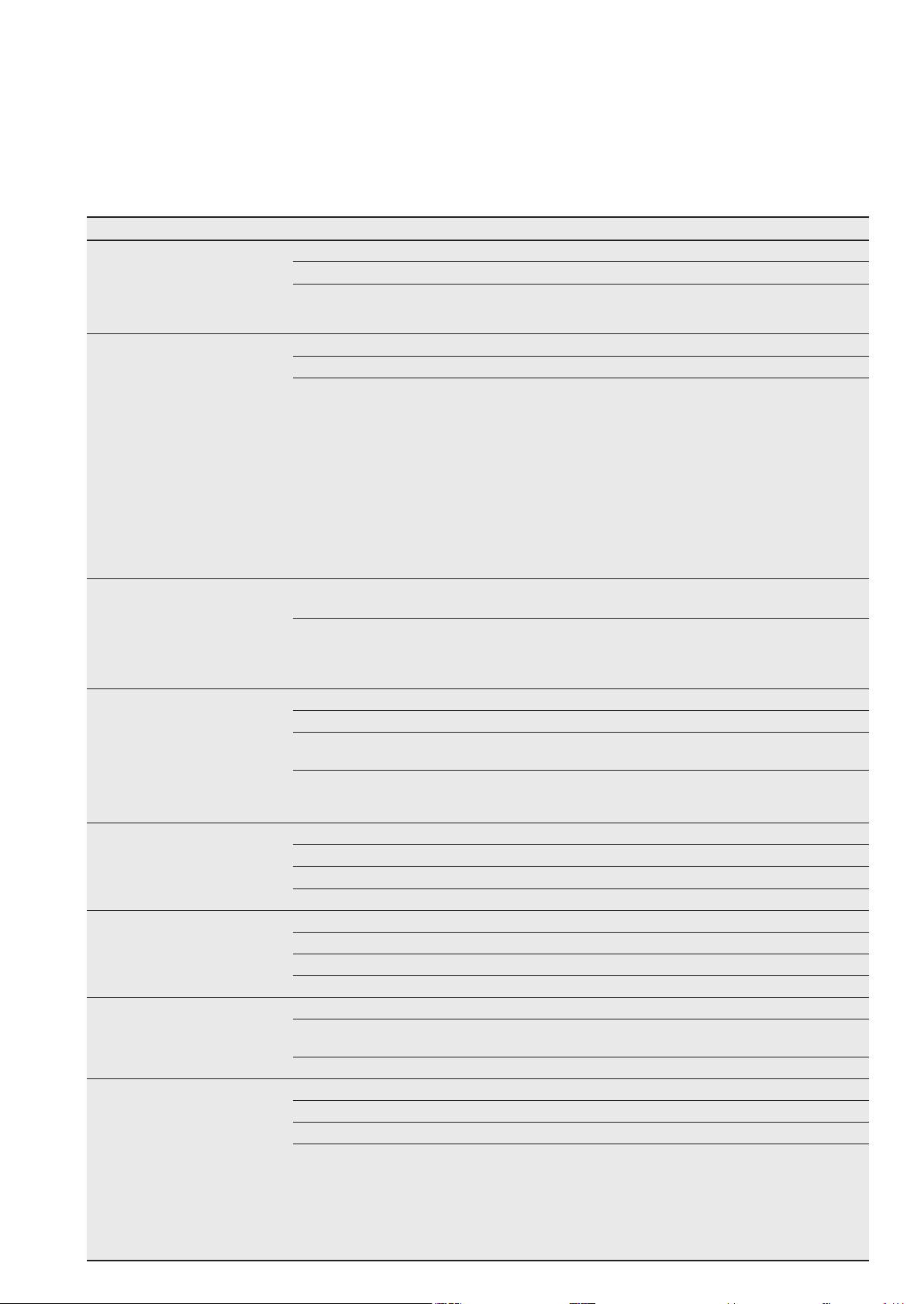
TROUBLESHOOTING
Refrigerator operation
C
o
n
cern
Wh
a
t to do
Appliance will not run
It is normal for the freezer fan not
to operate
during the automatic
defrost cycle, or for a short time
after the appliance is switched on.
Ensure that the cord is plugged into a live power outlet and
outlet is switched on.
Ensure that the household circuit breaker has not tripped or
that the fuse has not blown.
The appliance maybe in defrost mode, check again in half an hour.
Compressor motor seems to run
too long
At
normal room temperatures,
expect your motor to run about
40% to 80% of the time. Under
warmer conditions, expect it to
run even more often.
The variable speed compressor
and fan that at start up and on
warm days runs at a high speed
to provide additional cooling.
When less cooling is required the
compressor and fan will run at a
lower speed.
Ensure that the doors are not held open.
Check that large amounts of warm food have not just been placed inside the appliance.
Note that the appliance will run more than normal just after you install it or when adjusting
to temperature setting changes.
The exterior of the appliance is
warm or hot to touch
This is normal because the
appliance transfers heat from the
inside out through the outer panels
and the divider between the doors.
Ensure the appliance has the external clearances recommended in the section “Installing your
new appliance
”.
The exterior of the cabinet will be much warmer on warmer days it may even feel hot to touch, as
the appliance is working harder.
User interface will not respond
To ensure settings are not
accidentally
changed the user
interface will go into sleep mode
when not in use.
Press any button to wake user
interface.
Check that the user interface is in awake mode, refer to section “About the user interface”.
Check that the user interface is not locked, refer to section “About the user interface”.
If the user interface is frozen turn the appliance off for five minutes for the memory to clear, then
tu
rn back on.
Check that the user interface is not in Sabbath Mode, refer to control
instructions. (I&W
models only).
Alarms sounding Check that all doors are fully closed.
Ensure that the over temperature alarm is not being activa
ted by hot food placed in the freezer.
Check if the drinks timer has ended, refer control instructions.
Check if the Filter Replacement alert is activated, refer control instructions. (I&W models only)
Frost build up Check that all doors are fully closed.
Ensure that the doors are not opened too often.
Ensure that the return air vents are not blocked with packaging.
Ensure the seals are clean and not obstructed.
Odours The interior may need cleaning, refer to cleaning guide.
Ensure that food is stored correctly as some food, containers and wrapping
can produce
odours.
Check appliance for old or unusual food.
Lights not working
The LED lighting is designed to
dim au
tomatically if the door is
left opened for more than 5
minutes and turn off completely
if the door is open for more than
7 minutes. Closing the door will
reset the timer.
The LED lighting is also
designed to turn on gradually.
Ensure that the cord is plugged into a live power outlet and outlet is switched on.
Ensure that the household circuit breaker has not tripped or that the fuse has not blown.
Check that the user interface is not in Sabbath Mode, refer to control instructions.
Close and re-open the door. When door has been open for 5 minutes the lights fade to 50%
then
after 7 minutes they will turn off.
25

28 electrolux.com.au
NOTES
30 electrolux.com.au
NOTES
shop.electrolux.com.au
telephone: 1300 363 640
fax:
email:
web:
1800 350 067
electrolux.com.au
Electrolux Home Products New Zealand
telephone: 0800 436 245
fax:
email:
web:
0800 225 088
electrolux.co.nz
To add a touch of
professional inspiration
to your home,
visit electrolux.com.au
or electrolux.co.nz
electrolux.com.au
or electrolux.co.nz
P/No.
© 2018 Electrolux Home Products Pty
Ltd. ABN 51 004 762 341
Electrolux Home Products Australia
EMAN_Refrigeration_Factory_Oct18