QUICK START GUIDE
DELUXE ONE-TOUCH CAFÉ
KEEP THIS GUIDE SOMEWHERE SAFE For more information, visit Krupsusa.com or call 1-866-668-0325
LET’S MAKE A CUSTOM DRINK TOGETHER!
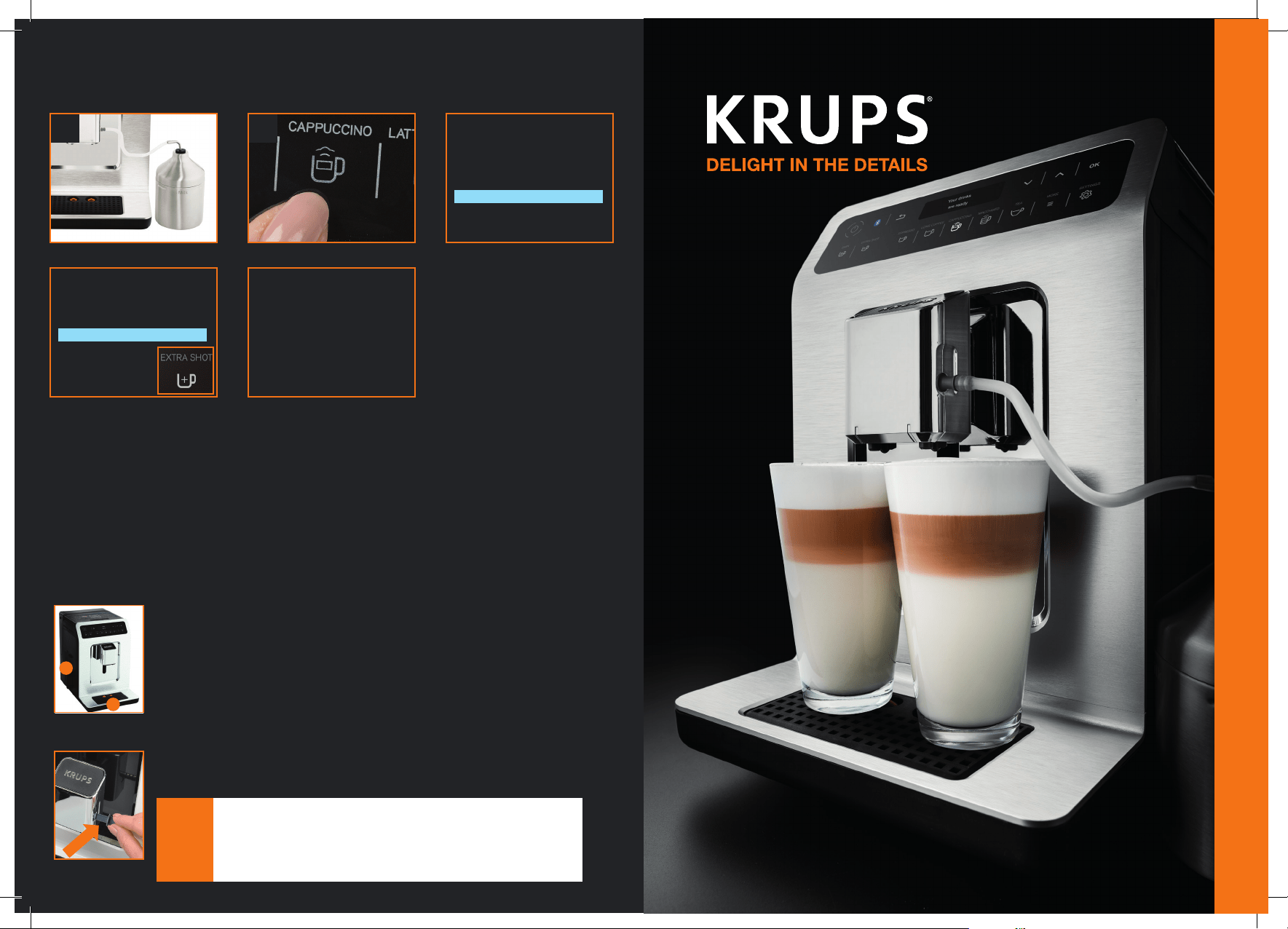
DOUBLE SHOT CAPPUCCINO
HOW TO CLEAN YOUR MACHINE
1 2
4 5
3
1. Fill and connect milk container, and place a 12 ounce cup under the coffee nozzle.
2. Press the Cappuccino button.
3. Milk frothing will start first. Adjust the time of the frothing cycle to 40 seconds.
4. Adjust the espresso size to 2.10 ounces, and press EXTRA SHOT for double
shot Cappuccino.
5. The screen will display “Your drink is ready” when the machine is done preparing
your drink. Enjoy!
What should I do when “Empty the two collectors” is displayed on the screen?
What should I do when “rinse and dismantle milk system” is displayed on the screen?
1. Empty the quick access coffee grounds collector located on
the left side of the machine and clear used grounds.
2. Pull the drip tray and empty the water. The orange floaters
come up when the tray is full.
Unplug the milk tube and milk jar from the machine, and clean
them with hot water.
Your drink
is ready
Cappuccino
1
2
NOTE:
• It is advised to rinse the milk system after each preparation, but you can
easily skip this step by pressing OK to continue to make drinks.
• For more details regarding cleaning and maintaining your machine
please reference pages 16-17.
• To purchase additional cleaning tablets visit Krupsusa.com or call
1-866-668-0325
40 s
Cappuccino
2. 10 oz
8400001966
INITIAL SET-UP
KEY BUTTONS/FEATURES TO KNOW
LET’S TRY A QUICK PRE-SET
RECIPE - ESPRESSO
QUICK TIPS TO KNOW
Thank you for choosing the KRUPS Deluxe One-Touch
Café to be part of your coffee ritual. Let’s get started.
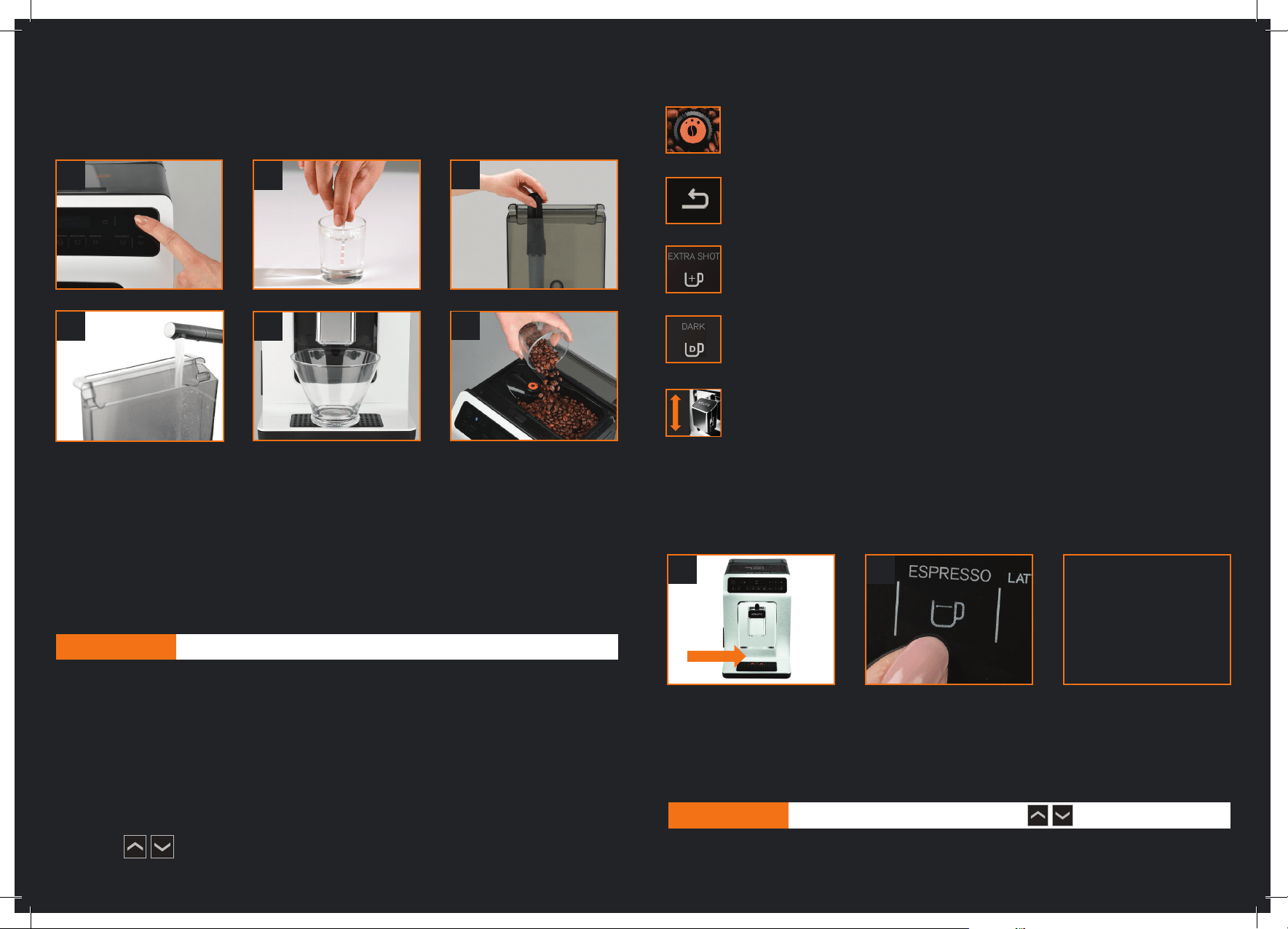
1. Switch on the appliance by pressing the ON/OFF button and follow instructions on screen.
2. Check your water hardness using the test strip included in your welcome pack.
3. Install water filter in the water tank located in the back of the machine.
4. Fill water tank.
5. Place a 21 ounce container under the coffee nozzle and complete the automatic
rinse cycle.
6. Fill beans container with coffee beans.
Your machine is ready to enjoy!
Adjustable Grinder – Adjust the grind size to suit your favorite drink by turning the
dial in the bean hopper. We recommend a fine setting for espressos and a coarser
setting for long coffees.
Back arrow – Press the back arrow button to cancel a drink in progress, or to
return to previous settings.
Extra Shot - For a stronger, more robust taste, try adding an extra shot by
pressing the EXTRA SHOT button.
DARK: The DARK button grinds more beans per cup for a bolder, more intense
cup of coffee.
Adjustable Coffee Spout – Slide the nozzle up or down to fit your favorite mug.
• Every time the machine powers on, an automatic short rinse cycle will initiate. You can
choose to deactivate this rinse cycle from the settings.
• Every time a drink is prepared, the machine will remember the settings you selected for
the last drink.
• Your selection will remain lighted during the brewing cycle.
• To prepare two drinks at the same time, press the drink icon twice.
• You can adjust the quantity of frothed milk by increasing or decreasing the frothing time
using the during the milk frothing cycle. You can adjust the time from 5 – 60
seconds.
1
4
2
5
6
3
1 2 3
NOTE: For more details about the initial set up, please reference pages 8-9 of your user manual.
NOTE: You can adjust the quantity of coffee size using
1. Place your cup under the coffee nozzle and adjust nozzle height.
2. Press the Espresso button.
3. The screen will display “Your drink is ready” when the machine is done preparing
your drink. Enjoy!
Your drink
is ready