
2
Contents
Congratulations and thank you for choosing our Inverter split-
type room air conditioner. We are sure you will find your new air
conditioner a pleasure to use. Before you use the air conditioner,
we recommend that you read through the entire user manual, which
provides the description of the air conditioner and its functions.
To avoid the risks that are always present when you use an electrical
appliance, it is important that the air conditioner is installed
correctly and that you read the safety instructions carefully to avoid
misuse and hazards.
We recommend that you keep this instruction booklet
for future reference and pass it on to any future owners.
After unpacking the air conditioner please check it is not damaged.
If in doubt, do not use the air conditioner but contact your local
Electrolux Customer Care Centre.
ENVIRONMENTAL TIPS
environment
Information on disposal for users
• Most of the packing materials are recyclable. Please dispose
of those materials through your local recycling depot or by
placing them in appropriate collection containers.
• If you wish to discard this air conditioner, please contact your
local authorities and ask for the correct method of disposal.
Conditions of use
This appliance is intended to be used in household and similar
applications such as:
• Staff kitchen areas in shops, offices and other working
environments
• Farm houses
• By clients in hotels, motels, and other residential
type environments
• Bed and breakfast type environments
Contents ...................................................................... 2
Safety precautions .......................................................3
Parts identification ....................................................... 4
Quickstart guide .......................................................... 5
Using the remot e control ............................................. 6
Features of the remote control .................................... 7
Changing batteries .................................................... 10
Emergency operation.................................................10
Care and cleaning ......................................................11
Operation tips............................................................ 12
Troubleshooting ......................................................... 13
Installation checklist ................................................... 14
Important notes
WARNING
caution
• Contact an authorised installer for installation of this unit.
• Contact an authorised service technician for repair or
maintenance of this unit.
• The socket oulet required to supply power must be connected
and commissioned by a licenced electrician.
• This appliance is not intended for use by persons (including
children) with reduced physical, sensory or mental capabilities,
or lack of experience and knowledge, unless they have
been given supervision or instruction concerning use of the
appliance by a person responsible for their safety.
• Young children should be supervised to ensure that they do
not play with the air conditioner.
• If the power cord is to be replaced, replacement work shall be
performed by authorised personnel only.
• Installation work must be performed in accordance with the
national wiring standards and the electricity suppliers service
rules by authorised personnel only.
• If the system is to be moved to another location or disposed
of, only a suitably qualified person is permitted to undertake
such work.
• Take care not to catch fingers on the fan blade when adjusting
vertical louvres.
• This air conditioner uses R410A refrigerant (Confirm before
installation).
Congratulations Contents
Downloaded from www.ManualsFile.com manuals search engine

3Safety
Safety precautions
Inside this manual you will find many helpful hints on how to use
and maintain your air conditioner properly.
Just a little preventive care on your part can save you a great deal
of time and money over the life of your air conditioner. You'll find
many answers to common problems in the chart of troubleshooting
tips on page 13. If you review the chart of troubleshooting tips first,
you may not need to call for service.
Meanings of symbols used in this manual are shown below:
WARNING
caution
This indicates information concerning your personal safety and
how to avoid damaging the appliance
TIPS & INFORMATION
important
This symbol indicates tips and information about
use of the appliance
ENVIRONMENTAL TIPS
environment
This symbol indicates tips and information about economical and
ecological use of the appliance
This symbol indicates never to do this
Always do this
Important notes:
1 Do not operate unit with horizontal louvre in closed position.
2 Do not operate unit without the air filter.
WARNING
warning
If you notice an unusal situation, such as a burning
smell, please switch off the power to the air
conditioner and contact an Electrolux service agent.
If this abnormal status continues the air conditioner
may be damaged or even cause electric shock or fire.
Do not operate the air conditioner with wet hands.
This may cause electric shock.
Do not damage or cut off the power cord or other
wires. If this occurs, please have it repaired or
replaced by an accredited technician.
Do not connect this air conditioner to a multi
outlet powerboard.
Please switch off the power supply to the air
conditioner if it is not to be used for an
extended period.
Otherwise, it will accumulate dust and may cause a fire.
Before cleaning the air conditioner, please
disconnect the power supply in order to eliminate
the possibility of electric shock.
The power supply should be matched with the air
conditioner according to the installation manual.
Air conditioners provided with a supply cord should
be connected directly to a power outlet with a
suitable safety switch. Air conditioners that are hard
wired must be connected to a suitable safety circuit
breaker according to the installation manual.
Please ensure that the power supply to the air
conditioner is stable and meets the requirements set
out in the installation manual.
Always ensure the product is installed with
appropriate earthing.
For safety, be sure to turn off the circuit breaker
before performing any maintenance or cleaning or
when the product is not used for an extended
period of time.
Accumulated dust may cause fire or electric shock.
WARNING
caution
Select the most appropriate temperature.
It can save electricity.
Do not keep windows and doors open for a long
time during operation.
It will result in insufficient performance.
Do not block the air inlet or outlet.
It will result in insufficient performance and cause
malfunctions.
Keep combustible materials away from the units at
least 1m.
It may cause fire.
Do not step on the top of the outdoor unit or place
heavy things on it.
It may cause damage or injury.
Do not attempt to repair the air conditioner yourself.
Incorrect repairs may cause electric shock or fire.
Please contact your local authorised service centre.
Do not insert your hands or objects into the air inlet
or outlet.
It may cause injury.
Do not expose animals or plants directly to the air
flow.
Do not use the unit for any other purpose, such as
preserving food or drying clothes.
Do not splash water on the air conditioner.
It may cause electric shock or malfunction.
Downloaded from www.ManualsFile.com manuals search engine

4 Name of parts
Indoor unit
(3)
(2)
(1)
(4)
(5)
(6)
(7)
(8)
(9)
(10)
(1) Power cord
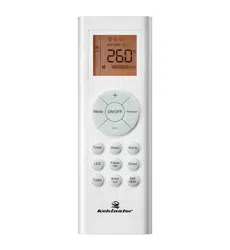
(2) Remote controller
(3) Front panel
(4) Filter
(5) Horizontal louver
(6) Wall pipe
(7) Binding tape
(8) Connection pipe
(9) Drain hose
(10) Drain connector
(11) Indoor display
(when active)
Outdoor unit
Air in
Air in
(11)
Air out
Air out
Name of parts
Downloaded from www.ManualsFile.com manuals search engine

5Quickstart guide
Quickstart guide
2
1
3
4
6
7
5
8
9
General operation
1. Once power is connected, press the ON/OFF button (1) and
the air conditioner will start to run.
Note: When the power is connected the main louver will close
automatically
2. Press the mode button (2) to select the desired runnng mode
(heating, cooling, fan only or dehumidify).
3. Pressing
or button (3) to select the desired temperature.
(It is unnecessary to set the temperature
in AUTO MODE.)
4. Pressing the fan button (4) will allow you to select from
6 different fan speeds from high to low, including an AUTO
setting.
5. The swing buttons (5) will allow you to select horizontal (H) or
vertical (V) swing of the air guding louvers.
:Cool
:Dry
:Heat
:Set temp
:
Power
The icons displayed on the indoor unit:
Optional operations
6. Press the SLEEP button (6) to select the sleep mode.
7. The TIMER ON and TIMER OFF buttons (7) can be used to set
automatic start and stop for the air conditioner, (see detailed
instructions for more information)
8. The light button (8) can be used to swith on or off the display
on the front panel of the indoor unit.
9. Press TURBO button, can realize the ON and OFF of TURBO
function.
Special functions
This function indicates that moisture on evaporator of indoor unit
will be blowed after the unit is stopped to avoid mould.
X-FAN (Air Purge)
When the X-fan function is on, the fan will continue to run for 2
minutes at low speed after the off button is pressed in order to
purge the air conditioner of all moisture to avoid the growth of
mould.
About AUTO RUN
When AUTO RUN mode is selected, the set temperature will not be
displayed on the LCD, the unit will be in accordance with the room
temperature automatically to select the suitable running method
and to make ambient comfortable.
Turbo function
The Turbo function operates a higher than normal fan speed to
allow for rapid heating or cooling.
Remote lock
Press SWING-V and ION-FILTER buttons simultaneously to lock or
unlock the keyboard. If the remote control is locked, the icon
will
be displayed on it, in which case, press any button, the mark will
flicker three times. If the keyboard
is unlocked, the mark will disappear.
Switch between Centigrade and Farenheit
With the air conditinioner switched off, press the SWING-H and
ION-FILTER buttons simultaneously to switch between °C and °F .
Energy saving
Press ION-FILTER and CLOCK simultaneously to start or stop
enegry saving funtion. The remote control display will show “SE”
when this function is active.
Low heat mode
In heating mode, pressing ION-FILTER and CLOCK simultaneously
will put the air conditioner into a low heat mode that will operate to
a temperature of 8°C. Repeat the operation to quit the function.
Downloaded from www.ManualsFile.com manuals search engine

6 Using the remote control
Location of the remote control
• Keep the remote control where its signal can reach the receiver
of the indoor unit. (a maximum distance of 8m
is allowed).
• When you select the timer operation, the remote control
automatically transmits a signal to the indoor unit at the
specified time.
• If you keep the remote control in a position that hinders proper
signal transmission, a time lag of up to 15 minutes may occur.
• When the remote control sends out a signal, the
symbol
will flicker for about 1 second on the display.
The indoor unit will acknowledge the signal with a beep when
it receives an effective signal.
8m
Back view
Temperature/
Humidity senso
r
window
WARNING
caution
• The air conditioner will not operate if curtains, doors or other
materials block the signals from the remote control
to the indoor unit.
• Prevent any liquid from falling into the remote control.
Do not expose the remote control to direct sunlight
or heat.
• If the infrared signal receiver on the indoor unit is exposed to
direct sunlight, the air conditioner may not function properly.
Use curtains to prevent the sunlight from falling on the receiver.
• If other electrical appliances react to the remote control,
either move these appliances or consult your local dealer.
Prior to Operation
1 Contact a qualified installer for installation.
2 Plug in the power plug properly.
3 Do not use a damaged or non-standard power cord.
4 Do not share the same outlet with other appliances.
5 Do not use an extension cord.
6 Do not start/stop operation by plugging /unplugging the
power cord.
Using the remote control
Usage
Exposure to direct airflow from the air conditioner for an extended
period of time could be hazardous to your health. Do not expose
people, pets or plants to the direct airflow for an extended period.
Cleaning and maintenance
1 Do not touch the metal parts of the unit when removing the
filters. Injuries can occur when handling sharp
metal edges.
2 Do not use water to clean inside the air conditioner. Exposure
to water can destroy the insulation, leading to possible electric
shock.
3 When cleaning the unit, first make sure that the power and
circuit breaker are turned off.
Service
For repair and maintenance, contact your authorised
service centre.
Downloaded from www.ManualsFile.com manuals search engine

7Remote control features
Features of the remote control
2
1
3
4
5
1 ON/OFF Button
Press this button, the unit will be turned on, press it once more,
the unit will be turned off. Sleep function will be cancelled
while the unit is switched off.
2 MODE Button
By pressing this button, Auto, Cool,Dry, Fan, Heat mode can
be selected progressively. Auto mode is default while power
on. Under Auto mode,the temperature will not be displayed;
Under Heat mode, the initial value is 28°C; Under other modes,
the initial value is 25°C.
AUTO
COOL
DRY
FAN
HEAT
3 FAN Button
By pressing this button, Auto, Low, Medium-low, Medium,
Medium-high, High speed can be progressively selected.
When the unit is turned on, Auto fan speed is the default.
Under DRY mode only, Low fan speed can
be set up.
Medium fan
Low fan
High fan
Medium-low fan
Medium-high fan
4 Button
Pressing this button will increase the temperature setting, holding
this button down for 2 seconds and more will increase the
temperature setting more quickly. Maximum setting is 30°C.
5 Button
Pressing this button will decrease the temperature setting, holding
the button down for 2 seconds and
more will decrease the temperature setting more.
The minimum setting is 16°C
Downloaded from www.ManualsFile.com manuals search engine
8 Remote control features
Features of the remote control
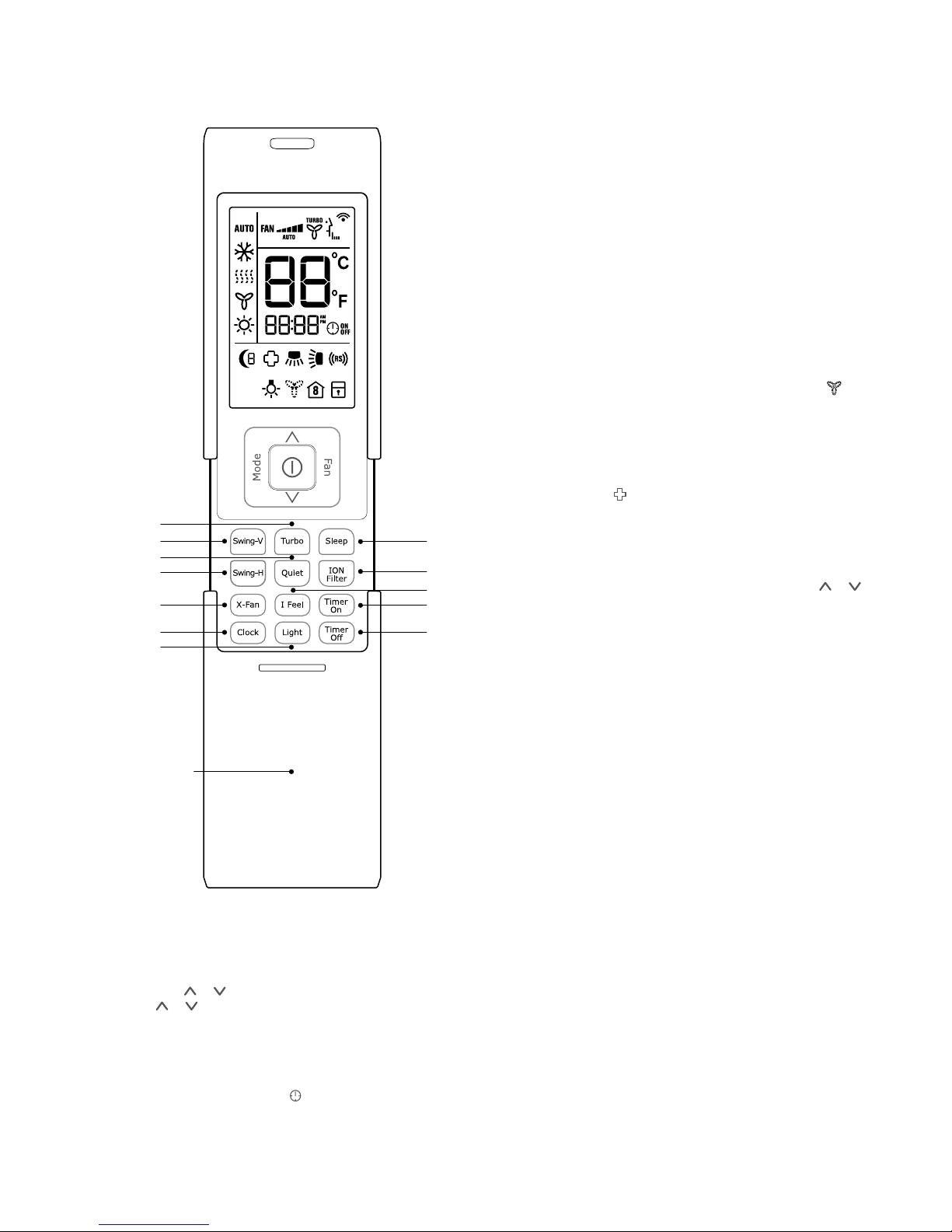
2 LIGHT Button
Press this button while the air conditioner is operating to
switch the indicating lights of the indoor unit on or off. The
normal condition at start up is on.
3 TURBO Button
Pressing this button while the air conditioner is
operating will put the fan into the high speed turbo mode. The
indicator on the remote control will show. Turbo mode will be
cancelled if the mode or fan speed
is changed.
4 X-FAN Button
Pressing X -FAN button in COOL or DRY mode, the icon
is displayed and the indoor fan will continue operation for 2
minutes in order to dry the indoor unit even though you have
turned off the unit.
5 ION-FILTER Button
Press this button to turn the cold plasma function on and
off.
6 TIMER-ON Button
Setting the Timer On or start time, press the Timer On button
and the "ON" symbol will flash in the display. Press the or
symbol to adjust the start time. Holding the button down will
scroll more rapidly through the start time display. Pressing the
Timer On button again will cancel the timer on function.
NOTE: After selecting the desired time wait 5 seconds and the
ON symbol will display permanently. Default times for timer on
and off are 8:00am and 5:00pm.
7 TIME-OFF Button
Press this key to enter into TIMER OFF setup, in which case the
OFF icon will blink. The method of setting is the same as for
TIMER ON.
8 SWING V Button
Press this button to enable or disable the vertical
swing function. When disabling the vertical swing function the
guiding louver will stay at its last position.
9 SWING H Button
Press this button to enable or disable the horizontal
swing function. When disabling the horizontal swing function
the guiding louver will stay at its last position.
3
11
1
4
8
9
2
The lower 12
buttons are
revealed by
sliding the panel
downwards
5
12
6
10
7
1 Clock Button
The clock timer uses a 12 hour clock mode.
Press this button to set the clock. When the clock signal blinks,
you can press or button to set the time you want, when
hold the or button more than 2 seconds, the numbers
increase or decrease by 10 per 0.5 seconds. While the clock
symbol is blinking, press the clock button again or after 5
seconds with no operation, the clock symbol will stop blinking
and the time is set. Please note the default time for the
remote is 12:00 pm and it will revert to this when the battery is
changed. When the clock symbol shows, the numbers are
the actual time, when the symbol is not shown, the numbers
are for the timer.
Downloaded from www.ManualsFile.com manuals search engine

9Remote control features
In Heat mode
(1) When the initial temperature is set at 16°C, the air
conditioner will continue to run at this setting.
(2) When the initial temperature is set at between 17°C-20°C,
after Sleep function is selected, the set temperature will
decrease 1°C at the end of the first hour and continue to
run at this setting.
(3) When the initial temperature is set between
21°C-27°C, after this Sleep function is selected,
the temperature will decrease 1°C in every hour,
after 2 hours the air conditioner will continue to
run at this setting.
(4) When the initial temperature is set between
28°C-30°C, after this Sleep function is selected
the temperature will decrease 1°C in every hour,
after 3 hours the air conditioner will continue to run
at this setting.
Sleep Mode 3
In this mode the sleep temperature curve is manually
set (DIY).
(1) After selecting Sleep mode 3, press and hold the Turbo
button until the remote control enters into
user defined sleep setting status. The remote control
will display "1 hour", temperature display will show the
corresponding temperature of last setting sleep curve and
blink (The first use will display the original factory setting).
(2) Adjust "
" and " " buttons will change the setting
temperature for the first hour of sleep, after
setting the temperature, press the Turbo button
for confirmation.
(3) The hour of sleep mode will be automatically increased on
the remote control, to the 2nd, 3rd hour of sleep mode and
so on with each press of the
Turbo button.
(4) Repeat the above step (2 )-(3) operation, until 8 hours of
sleep temperature setting is finished. The sleep curve
program is finished The remote control will resume the
original timer display. The temperature display will return to
the original setting.
The sleep program can be checked by selecting sleep mode 3,
pressing and holding the Turbo button and
then repeat pressing the turbo button to review the sleep
program temperatures without pressing the "
" or " "
buttons. In this mode, if the no button were to
be pressed for 10 seconds, the display will revert to normal
operation.
10 I FEEL Button
Press this button once, to turn on the I FEEL
function, then the symbol of "I FEEL" will be displayed. The air
conditioner will then operate to reach the set temperature at
the location of the remote control.
After this function has started, the remote control will send
temperature to the main unit every 10 minutes.
Once the button has been pressed again, the function will be
cancelled.
11 QUIET Button
During operation press the Quiet button in order to use the
Quietest fan mode in AUTO, COOL, DRY, FAN or HEAT mode.
12 SLEEP Button
Pressing this button to select sleep mode ( ),
sleep mode (
), Sleep mode ( ) and cancel the
Sleep mode. Circulate between these modes after
the air conditioner is switched on.
Sleep mode 1
In Cool and Dry modes, the set temperature will increase 1°C
after an hour, after 2 hours the set temperature will increase
another 1°C, then continue to run at this setting. In Heat mode:
the set temperature
will decrease 1°C, after 2 hours the set temperature
will decrease another 1°C, then continue to run at
this setting.
Sleep mode 2
In this mode, the air conditioner will run according to a preset
sleep temperature curve.
In Cool mode
(1) When setting the initial temperature between 16-23°C,
after turning on the Sleep function, the temperature will
increase 1°C every hour, after 3°C the temperature will
be maintained, after 7 hours, the temperature will be
decreased a further 1°C, after that the unit will keep running
at this temperature;
(2) When setting the initial temperature between 24°C-27°C,
after turning on the Sleep function, the temperature will
increase 1°C in every hour, after 2°C the temperature
will be maintained, after 7 hours, the temperature will be
decreased a further 1°C, after
that the unit will keep running at this temperature;
(3) When setting the initial temperature between 28°C-29°C,
after turning on the Sleep function, the temperature will
increase 1°C in the first hour, after 7 hours, the temperature
will be decreased a further 1°C, after that the unit will keep
running at this temperature;
(4) When setting the initial temperature to 30°C, after 7 hours
the temperature will be decreased 1°C, after that the unit
will keep running at this temperature.
Downloaded from www.ManualsFile.com manuals search engine
10 Changing batteries / emergency operation
Emergency operationChanging batteries and notices
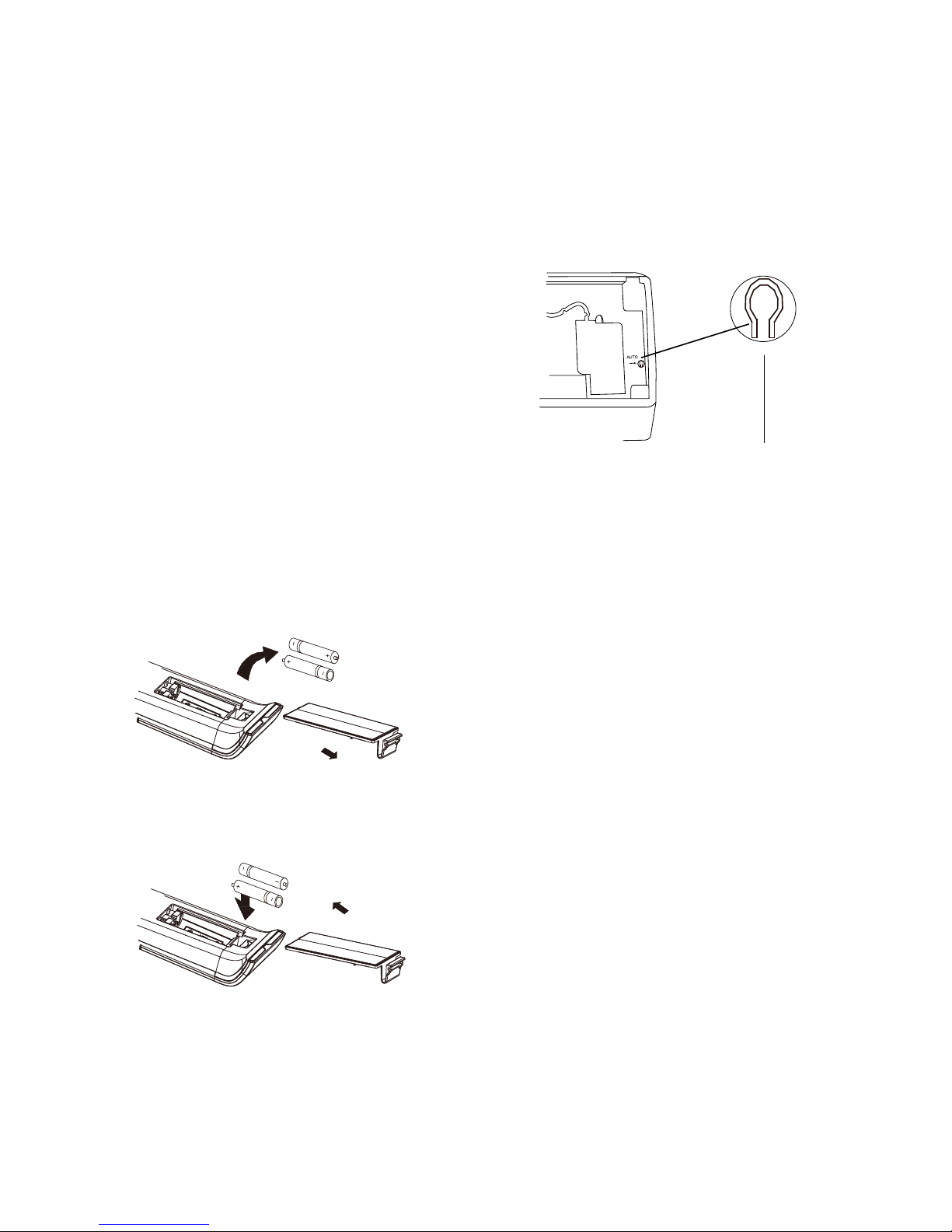
1 Push the back cover of wireless remote control.
(As shown in Fig 1.)
2 Take out the old batteries.
3 Insert two new AAA1.5V dry batteries, and pay attention to the
polarity. (As shown in Fig 2.)
4 Attach the back cover of wireless remote control.
NOTE:
• When changing the batteries, do not use old or varied
batteries, otherwise, it may cause problems with the remote
control.
• If the remote control is not used for a long time, please remove
the batteries as old batteries may leak or corrode and damage
the remote controller.
• To avoid interference, the remote should be placed 1m away
from the TV or stereo equipment.
• For correct operation the remote control should be placed
within visible range of the air conditioner.
• If the remote control does not operate normally, please
remove and refit the batteries. If abnormal operation
continues, replace with new batteries.
• To operate the air conditioner, please point the remote control
at the indoor unit in order to improve the sensitivity of the main
unit.
1
3
4
2
Fig.1
Fig.2
When the remote control is lost or damaged, please use the
manual switch on the main unit. In that case, the unit will operate in
AUTO mode and the temperature setting or fan speed can not be
changed.
The manual switch can be operated as below:
AUTO SWITCH
Turn on the unit
Press AUTO/STOP button to enter AUTO mode.
The air conditioner will select the mode (COOL, HEAT, FAN)
automatically according to the room temperature for reaching best
comfort.
Turn off the unit
Press the AUTO/STOP button to switch off the unit.
When AUTO mode is activated, if room temperature is greater
than 25ºC, the unit will go into cooling mode and cool to 25ºC. If
room temperature is lower than 20ºC, the unit will go into HEATING
mode and heat to 20ºC. If the room temperature is between 20ºC
to 25ºC, the unit will run on FAN mode.
This switch is to be used only when the remote control
is missing.
Downloaded from www.ManualsFile.com manuals search engine

11Care and cleaning
Care and cleaning
Replace the air filter
Replace the filters in the direction of the arrowhead.
Check before Use
1 Be sure that nothing obstructs the air outlet and inlet.
2 Check if the batteries of remote control are installed.
3 Check if the installation of the outdoor unit
is damaged. If damaged, consult the installers.
Maintenance after Use
1 Switch off the power supply.
2 Clean the filter and bodies of indoor and outdoor units.
3 Clear obstructions from the outdoor unit.
WARNING
caution
• Disconnect the power supply before cleaning and
maintenance.
• Do not splash water on the units for cleaning, as electric
shocks may occur.
• Wipe the units with a dry soft cloth, or a cloth slightly
moistened with water or cleaner (not with volatile liquid such
as thinner or gasoline).
Cleaning the Front Panel
Remove the front panel. Then wipe the front panel with a soft cloth
moistened with water to remove any marks.
NOTE: Do not immerse the front panel into water so as to protect
microcomputer components and circuit diagram
on the front panel.
Cleaning the Air Filter (every 3 months)
NOTE: Do not touch the fin of indoor unit during cleaning to avoid
personal injury.
Fig. a
Fig. b
To remove the air filter
Lift up the front panel.
Pull the air filter downwards to take it off, as shown in Fig. (a, b).
Downloaded from www.ManualsFile.com manuals search engine

12 Operation tips
Operation tips
Cooling Operation
Principle
Air conditioners absorb heat from the room and transmit it to the
outdoor unit, so that the room temperature is decreased. The
cooling capacity will increase or decrease according to the outdoor
ambient temperature.
Antifreezing Function
If the unit is operating in COOL mode and in low ambient
temperature, frost may be formed on the heat exchanger. When
indoor heat exchanger temperature decreases below zero,
compressor will stop operation to protect the unit.
Heating Operation
Principle
Air conditioners absorb heat from outdoors and transmit it
to the indoor unit, increasing the indoor room temperature. The
heating capacity will decrease at low ambient temperature.
Defrosting
When outdoor temperature is low but humidity is high, ice may
form on the outdoor unit during extended operation, affecting
the heating efficiency. The air conditioner may stop operation
during an auto defrosting operation to remove this ice. During
auto defrosting, the fan motors of indoor unit and outdoor unit
will stop. During defrosting, the indoor indicator flashes “H1” and
the outdoor unit may emit water vapor. This is not a malfunction.
After defrosting is finished, the heating operation will recover
automatically.
Anti-cold Air Function
In HEAT mode, the indoor fan will not operate in order to prevent
cold air being blown into the room (within 2 minutes). If the indoor
heat exchanger doesn't reach a minimum temperature under the
following three states:
1 Heating operation starts;
2 After Auto Defrosting is finished;
3 Heating at low temperature.
Gentle Breeze
In the following situations, the indoor unit may blow a gentle
breeze, and the horizontal louver rotates to a certain position:
1 In HEAT mode, the compressor does not start operation after
the unit is turned on.
2 In HEAT mode, the temperature reaches the setting value and
the compressor has stopped operation for about 1 minute.
Operating temperature range
Indoor side DB/
WB(°C)
Outdoor side DB/
WB(°C)
Maximum cooling
32/23 48/26
Minimum cooling
21/15 21/–
Maximum heating
27/– 24/18
Minimum heating
20/– -5/-6
The operating temperature range (outdoor temperature) for
cooling mode is 16°C-48°C and for heating mode is -15°C-24°C.
Tips for energy saving
• Do not overcool or overheat. Setting temperature at a
moderate level helps energy saving.
• Cover windows with a blind or a curtain. Blocking sunlight and
air from outdoors reduces energy consumption.
• Clean air filters every 3 months. Clogged air filters lead to
inefficient operation and energy waste.
Tip for relative humidity
Condensate water is likely to form at the air outlet if cooling or
drying for a long time when the relative humidity is more than 80%
(with doors and windows open).
Demand Response
• This unit is Demand Response - enabled. This means it can
be interfaced with your electricity supplier to utilise Demand
Response if available. A separate arrangement needs to be
made for this. Contact your energy supplier to determine
if there is an Air Conditioning Demand Response program
available in your area
• When your energy supplier activates one of the 3 possible
Demand Response modes, the display of the indoor unit will
show d1, d2 or d2 as described below:
Demand response
mode
Description of operation
in this mode
d1
Compressor off
d2
The air conditioner continues to
cool or heat during the demand
response event,but the electrical
energy consumed by the air
conditioner in a half your period is
not more than 50% of the total
electrical energy that would be
consumed if operating at the rated
capacity in a half hour period.
d3
The air conditioner continues to
cool or heat during the demand
response event, but the electrical
energy consumed by the air
conditioner in a half your period is
not more than 75% of the total
electrical energy that would be
consumed if operating at the rated
capacity in a half hour period.
• When the unit goes into a Demand Response mode,
the effect of cooling or heating may be reduced, the unit will
run as designed. You can not reverse this function by remote
control by change setting temperature or other actions unless
the unit finishes the function.
• Refer to your electricity supplier if you have problems with
the operation of the Demand Response Modes of your Air
Conditioner.
Downloaded from www.ManualsFile.com manuals search engine

13Troubleshooting
Problem
Cause
Water leakage of
outdoor unit
• During cooling operation, water
condensates around the pipes and
connection joints.
• During defrosting operation, thawed
water flows out.
• During heating operation, water on the
heat exchanger drips out.
Noise from
indoor unit
• The noise emitted when the fan or
compressor relay is switched on or off.
• When the defrosting operation
is started or stopped, there is a
sound of refrigerant flowing in the
reverse direction.
Indoor unit does
not blow air
• In HEAT mode, when the temperature
of indoor heat exchanger is very low,
air flow is stopped until the heat
excharger warms up (approx 2 minutes).
• In HEAT mode, when the outdoor
temperature is low or humidity is high,
frost will be formed on the outdoor
heat exchanger. The unit will defrost
automatically and indoor unit will stop
blowing air for 3-12 minutes.
• During defrosting operation, water or
vapour may be emitted.
• In DRY mode, the indoor fan may stop
blowing air for 3-12 minutes in order
to avoid condensing water being
vaporised again.
Moisture on air
outlet
• If the unit operates at high humidity for
a long time, moisture will be generated
on the air outlet grill and then drip off.
H1: Defrosting
It is normal. The unit is in defrosting
mode and heating will recommence
soon.
E3: Low pressure
warning
Your air conditioner has lost refrigerant.
Contact your installer to check for
potential leaks.
If any one of the following situations occurs, immediately stop
all operations, disconnect the power supply, and contact the
authorised personnel.
• There is a harsh sound during operation.
• Strong odours are emitted during operation.
• Water is leaking from the indoor unit.
• The circuit breaker often trips.
• Water or other liquid is splashed into the unit.
• Power cord and power plug is overheating.
The air conditioner is not user serviceable. Incorrect repair may
cause electric shock or fire, so please contact an authorised service
center for professional repair.
The following checks prior to contact may save you time
and money.
Problem
Cause
The unit
does not
operate
The unit does not operate if it is turned on
immediately after it is turned off. This is to protect
the unit. You should wait about 3 minutes.
Odours are
emitted
• Some odours may be emitted from the
indoor unit. This is the result of room smells
(such as furniture,tobacco,etc.) which have
been taken into the air conditioner.
• Consult authorised service centre for
cleaning if the odours persist.
"Water
flowing"
noise
The swishing noise like water flowing is the
refrigerant flowing inside the unit.
Mist is
emitted in
COOL mode
During cooling operation, a thin mist may be
seen emitted from the indoor unit due to high
room temperature and humidity.
After a period of time, the mist will disappear
as the decrease of room temperature and
humidity decreases.
Cracking
noise
This is the sound of friction caused
by expansion and/or contraction of panel or
other parts due to the change of temperature.
The unit
can not be
started up
• Is the power cut off?
• Is the power plug loose? (if applicable )
• Is the circuit protection device tripped off?
• Is voltage higher or lower? (Tested by
professionals)
• Is the TIMER correctly used?
Cooling/
Heating
effect is poor
• Is temperature setting appropriate?
• Is the inlet or outlet blocked?
• Is the filter dirty?
• Is the window or the door open?
• Is low fan speed set?
• Are there heat sources in the room?
Remote
control does
not transmit
signals
• Check if there is magnetic or electrical
interference near the unit that may affecting
operation of the remote control. In this case,
pull the plug out and reinsert it.
• Is the remote control within its operating
range or obstructed? Check the condition of
the batteries and replace them if necessary.
• Check if the remote control is damaged.
Water
leakage of
indoor unit
• The humidity is high.
• Condensing water overflows.
• Drain hose is loose or obstructed.
Troubleshooting
Downloaded from www.ManualsFile.com manuals search engine

14 Checklist
Installation checklist
TIPS & INFORMATION
important
• If your appliance is damaged due to improper installation your warranty may be void.
• Proper installation requires the use of a licensed installer.
• You must keep full details of the installer including the license number and provide those details whenever you
request a service for your appliance.
Question
Does the unit have adequate clearance from walls and ceiling in accordance to installation instructions?
Is the unit mounted to allow condensate to flow freely toward the outside?
Does outdoor section have adequate clearance in accordance to installation instructions?
Is the unit securely mounted?
Is the unit readily accessible without special equipment?
Has the appropriate size circuit and fuse/circuit breaker been fitted?
Has the unit been tested and confirmed to operate correctly?
Has the user of the air conditioner been shown how to use the air conditioner?
CUSTOMER: PLEASE RETAIN WITH YOUR PURCHASE DOCUMENTS IN A SAFE PLACE
Model Number ________________________________________________
Serial Number ___________________________________________________________________________________________________________
Installers name ________________________________________________ Refrigerant handling license no. ______________________________
Installers address ______________________________________________ Phone
Installers signature _____________________________________________ Date of installation
Downloaded from www.ManualsFile.com manuals search engine

15Warranty
This document sets out the terms and conditions of the product
warranties for Electrolux Appliances. It is an important document.
Please keep it with your proof of purchase documents in a safe place
for future reference should you require service for your Appliance.
1. In this warranty:
(a) ‘acceptable quality’ as referred to in clause 10 of this warranty has the
same meaning referred to in the ACL;
(b) ‘ACL’ means Schedule 2 to the Competition and Consumer
Act 2010;
(c) ‘Appliance’ means any Electrolux product purchased by you and
accompanied by this document;
(d) ‘ASC’ means Electrolux authorised service centres;
(e) ‘Electrolux’ means Electrolux Home Products Pty Ltd of 163
O’Riordan Street, Mascot NSW 2020, ABN 51 004 762 341 in respect
of Appliances purchased in Australia and Electrolux (NZ) Limited
(collectively ‘Electrolux’) of 3-5 Niall Burgess Road, Mount Wellington,
in respect of Appliances purchased in New Zealand;
(f) ‘major failure’ as referred to in clause 10 of this warranty has the same
meaning referred to in the ACL and includes a situation when an
Appliance cannot be repaired or it is uneconomic for Electrolux,
at its discretion, to repair an Appliance during the Warranty Period;
(g) ‘Warranty Period’ means the Appliance is warranted against
manufacturing defects in Australia and New Zealand for the period of
60 months, subject to this warranty and to the customer meeting the
Warranty Condition.
(h) ‘Warranty Condition’ means:
(i) evidence by the customer that the Appliance was installed by a
licensed air conditioner installer in Australia and in accordance with
Electrolux installation guidelines as set out in the installation manual;
(ii) the Appliance rating is correct for the size and thermal
characteristics of the room;
(iii) the Appliance has been regularly maintained in accordance
with Electrolux guidelines set out in the user manual;
(iv) the Appliance is designed for providing human comfort and
should be used under ambient conditions as set out in the
productspecicationsandgeneralairqualityconditions.
(i) ‘you’ means the purchaser of the Appliance not having purchased
the Appliance for re-sale, and ‘your’ has a corresponding meaning.
2. This warranty only applies to Appliances purchased and used in Australia or
New Zealand in normal domestic appliactions and is in addition to (and does
not exclude, restrict, or modify in any way) any non-excludable statutory
warranties in Australia or New Zealand.
3. During the Warranty Period Electrolux or its ASC will, at no extra charge if
your Appliance is readily accessible for service, without special equipment
and subject to these terms and conditions, repair or replace any parts which
it considers to be defective. Electrolux or its ASC may use remanufactured
parts to repair your Appliance. You agree that any replaced Appliances or
parts become the property of Electrolux. This warranty does not apply to
lightglobes,batteries,ltersorsimilarperishableparts.
4. Parts and Appliances not supplied by Electrolux are not covered by
this warranty.
5. To the extent permitted by law, you will bear the cost of transportation,
travel and delivery of the Appliance to and from Electrolux or its ASC. If you
reside outside of the service area, you will bear the cost of:
(a) travel of an authorised representative;
(b) transportation and delivery of the Appliance to and from Electrolux
or its ASC.
In all instances, unless the Appliance is transported by Electrolux or an Electrolux
authorised representative, the Appliance is transported at the owner’s cost and
risk while in transit to and from Electrolux or its ASC.
6. Proof of purchase is required before you can make a claim under
this warranty.
7. You may not make a claim under this warranty unless the defect claimed is
due to faulty or defective parts or workmanship. Electrolux is not liable in the
following situations (which are not exhaustive):
(a) the Appliance is damaged by:
(i) accident
(ii) misuse or abuse, including failure to properly maintain or service
(iii) normal wear and tear
(iv) power surges, electrical storm damage or incorrect power supply
(v) incomplete or improper installation
(vi) incorrect, improper or inappropriate operation
(vii) insect or vermin infestation
(viii) failure to comply with any additional instructions supplied with the
Appliance;
(b) theApplianceismodiedwithoutauthorityfromElectroluxinwriting;
(c) the Appliance’s serial number or warranty seal has been removed
or defaced;
(d) the Appliance was serviced or repaired by anyone other than Electrolux,
an authorised repairer or ASC.
8. This warranty, the contract to which it relates and the relationship between
you and Electrolux are governed by the law applicable where the Appliance
was purchased. Where the Appliance was purchased in New Zealand for
commercial purposes the Consumer Guarantee Act does not apply.
9. To the extent permitted by law and subject to your non-excludable
statutory rights and warranties, Electrolux excludes all warranties and
liabilities (other than as contained in this document) including liability for any
loss or damage whether direct or indirect arising from your purchase, use or
non use of the Appliance.
10. For Appliances and services provided by Electrolux in Australia, the
Appliances come with a guarantee by Electrolux that cannot be excluded
under the ACL. You are entitled to a replacement or refund for a major failure
and for compensation for any other reasonably foreseeable loss or damage.
You are also entitled to have the Appliance repaired or replaced if the
Appliance fails to be of acceptable quality and the failure does not amount
toamajorfailure.Thebenetstoyougivenbythiswarrantyareinaddition
to your other rights and remedies under a law in relation to the Appliances or
services to which the warranty relates.
11. At all times during the Warranty Period, Electrolux shall, at its discretion,
determine whether repair, replacement or refund will apply if an Appliance
has a valid warranty claim applicable to it.
12. For Appliances and services provided by Electrolux in New Zealand, the
Appliances come with a guarantee by Electrolux pursuant to the provisions
of the Consumer Guarantees Act, the Sale of Goods Act and the Fair
Trading Act.
13. To enquire about claiming under this warranty, please follow these steps:
(a) carefully check the operating instructions, user manual and the terms of
this warranty;
(b) have the model and serial number of the Appliance available;
(c) have the proof of purchase (e.g. an invoice) available;
(d) telephone the numbers shown below.
14. You accept that if you make a warranty claim, Electrolux and its ASC may
exchange information in relation to you to enable Electrolux to meet its
obligations under this warranty.
Warranty
FOR SALES IN AUSTRALIA AND NEW ZEALAND
APPLIANCE: KELVINATOR SPLIT SYSTEM AIR CONDITIONER
Important Notice
Before calling for service, please ensure that the steps listed in clause 13 above have been followed.
FOR SERVICE
ortondtheaddressofyournearest
state service centre in Australia
PLEASE CALL 13 13 49
For the cost of a local call (Australia only)
SERVICE AUSTRALIA
ELECTROLUX HOME PRODUCTS
www.electrolux.com.au
FOR SPARE PARTS
ortondtheaddressofyournearest
state spare parts centre in Australia
PLEASE CALL 13 13 50
For the cost of a local call (Australia only)
FOR SERVICE
ortondtheaddressofyournearest
authorised service centre in New Zealand
FREE CALL 0800 10 66 10
(New Zealand only)
SERVICE NEW ZEALAND
ELECTROLUX (NZ) Limited
www.electrolux.co.nz
FOR SPARE PARTS
ortondtheaddressofyournearest
state spare parts centre in New Zealand
FREE CALL 0800 10 66 20
(New Zealand only)
KSSAC_Warr_Aug13
Downloaded from www.ManualsFile.com manuals search engine

AUSTRALIA
phone: 1300 363 640
fax: 1800 350 067
email: customercar[email protected]
web: kelvinator.com.au
NEW ZEALAND
phone: 0800 436 245
fax: 0800 225 088
email: customercar[email protected]
web: kelvinator.co.nz
For more information on all Kelvinator
appliances, or for dimension and installation
information, call into your retailer, phone or email
our customer care team or visit our website:
Kelvinator. We are part of the Electrolux family.
Share more of our thinking at electrolux.com.au
Part No. 66129909124
© 2015 Electrolux Home Products Pty Ltd.
ABN 51 004 762 341
KMAN_AIRWAVE_UM_Jun15
Downloaded from www.ManualsFile.com manuals search engine