Online Edition for Part no. 01 41 2 603 292 - © 06/09 BMW AG

X5 M
X6 M
Supplementary Owner's Manual of the vehicle
We are happy that you have decided on a BMW X5 M /
BMW X6 M.
The more familiar you are with your BMW, the greater command
you will have of it in traffic.
We therefore ask you to:
Read the information contained in this Supplementary Owner's
Manual before you start off in your new BMW. It contains impor-
tant notes on vehicle operation that will allow you to make full use
of the technical advantages of your BMW.
We wish you a pleasant and safe driving experience
BMW Group
Online Edition for Part no. 01 41 2 603 292 - © 06/09 BMW AG

© 2009 Bayerische Motoren Werke
Aktiengesellschaft
Munich, Germany
Reprinting, including excerpts,
only with the written consent of
BMW AG, Munich.
US English VI/09, 09 07 500
Printed on environmentally friendly paper,
bleached without chlorine, suitable for recycling.
Online Edition for Part no. 01 41 2 603 292 - © 06/09 BMW AG

Reference At a glanceControlsDriving tipsMobility
Contents
The fastest way to find specific topics is to use
the index, starting on page 44.
Using this Owner's Manual
4 Notes
At a glance
8 Cockpit
Controls
16 Adjusting
18 Driving
20 Everything under control
21 Technology for comfort, convenience
and safety
Driving tips
28 Things to remember when driving
29 BMW X5 M / BMW X6 M technology
Mobility
32 Refueling
33 Wheels and tires
35 Under the hood
36 Replacing components
Reference
40 Technical data
44 Everything from A to Z
Online Edition for Part no. 01 41 2 603 292 - © 06/09 BMW AG

Notes
4
Notes
About this Owner's Manual
This Supplementary Owner's Manual contains
all essential equipment, instructions, and tech-
nical data in which the BMW X5 M / BMW X6 M
differs from the BMW X5 / BMW X6. For a
description of equipment not contained in this
Supplementary Owner's Manual, please refer to
the Owner's Manual of the BMW X5 / BMW X6
or possibly to other brochures included with the
onboard literature.
We have made every effort to ensure that you
are able to find what you need in this Supple-
mentary Owner's Manual as quickly as possi-
ble. The fastest way to find specific topics is to
refer to the detailed index at the back of the
manual. If you wish to gain an initial overview of
your vehicle, you will find this in the first chap-
ter.
Should you sell your BMW some day, please
remember to also pass the Supplementary
Owner's Manual on to the new owner; it is an
important component of your vehicle.
Symbols used
Indicates precautions that must be fol-
lowed precisely in order to avoid the pos-
sibility of personal injury and serious damage to
the vehicle.
Indicates information that will assist you
in gaining the optimum benefit from your
vehicle and enable you to care more effectively
for your vehicle.
Refers to measures that can be taken to
help protect the environment.
< Marks the end of a specific item of informa-
tion.
*
Indicates special equipment, country-specific
equipment and optional accessories, as well as
equipment and functions not yet available at the
time of printing.
"..." Identifies Control Display texts used to
select individual functions.
{...} Verbal instructions to use with the voice
activation system.
{{...}} Identifies the answers generated by the
voice activation system.
Symbols on vehicle components
Indicates that you should consult the rel-
evant section of this Owner's Manual for
information on a particular part or assembly.
Online Edition for Part no. 01 41 2 603 292 - © 06/09 BMW AG

Reference At a glanceControlsDriving tipsMobility
5
The individual vehicle
When purchasing your BMW, you have decided
in favor of a model with individualized equip-
ment and features. This Owner's Manual
describes the entire array of options and equip-
ment available with a specific BMW model.
Please bear in mind that the manual may con-
tain information on accessories and equipment
that you have not specified for your own vehicle.
Sections describing options and special equip-
ment are marked by asterisks
*
to assist you in
identifying possible differences between the
descriptions in this manual and your own vehi-
cle's equipment.
If equipment of your BMW X5 M / BMW X6 M is
not described in this Owner's Manual, please
refer to the Owner's Manual of the BMW X5 /
BMW X6.
Editorial notice
BMW pursues a policy of continuous, ongoing
development that is conceived to ensure that
our vehicles continue to embody the highest
quality and safety standards combined with
advanced, state-of-the-art technology. For this
reason, in rare cases, the features described in
this Supplementary Owner's Manual may differ
from those in your vehicle.
Online Edition for Part no. 01 41 2 603 292 - © 06/09 BMW AG

Online Edition for Part no. 01 41 2 603 292 - © 06/09 BMW AG

At a glance
This overview of buttons, switches and displays
is intended to familiarize you with your vehicle's
operating environment. The section will also
assist you in becoming acquainted with the
control concepts and options available
for operating the various systems.
At a glance
Online Edition for Part no. 01 41 2 603 292 - © 06/09 BMW AG

Cockpit
8
Cockpit
Around the steering wheel: controls and displays
For the description of components with-
out page references, please refer to the
respective keyword in the Owner's Manual of
the BMW X5 / BMW X6.<
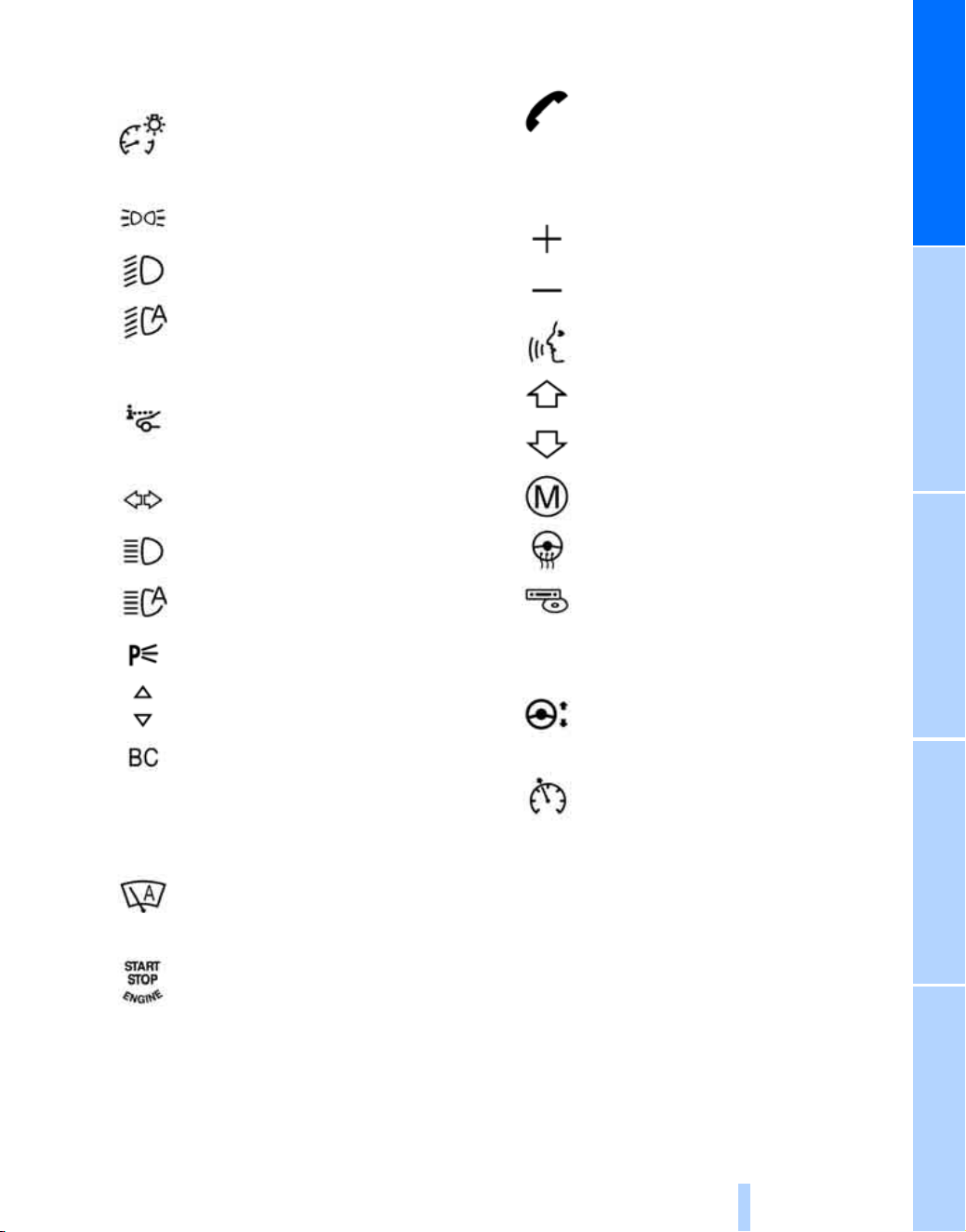
1 Rear window safety switch
2 Opening and closing windows
3 Folding exterior mirrors in and out
*
Online Edition for Part no. 01 41 2 603 292 - © 06/09 BMW AG
At a glanceControlsDriving tipsMobilityReference
9
4 Adjusting exterior mirrors
Automatic curb monitor
*
9 Shift paddles 18
10 Instrument panel 10
13 Ignition lock
14 Buttons on steering wheel
15 Horn, entire surface
18 Releasing hood
5
Instrument lighting
6
Parking lamps
Low beams
Automatic headlamp control
*
Adaptive Head Light
*
High-Beam Assistant
*
7
Head-Up Display
*
8
Turn signal
High beams, headlamp flasher
High-beam assistant
*
Roadside parking lamps
*
Time, date, outside temperature,
Check Control
Computer
11
Windshield wiper
Rain sensor
12 Switching engine on/off and
Switching ignition on/off
Telephone
*
:
Accepting and ending calls, begin
dialing
*
for selected phone num-
ber. Redialing when no phone
number is selected.
Volume
Activating/deactivating voice acti-
vation system
*
Changing radio station
Selecting track
Scrolling through the redial list
M Drive, accessing individual
settings 16
Steering wheel heating
*
Next entertainment source
16
Steering wheel adjustment
17
Cruise control
Online Edition for Part no. 01 41 2 603 292 - © 06/09 BMW AG

Cockpit
10
Instrument panel
For the description of components with-
out page references, please refer to the
respective keyword in the Owner's Manual of
the BMW X5 / BMW X6.<
1 Indicator lamps for turn signals
2 Speedometer
3 Indicator and warning lamps 11
4 Tachometer 20
5 Engine oil temperature 20
6 Display for
> Clock/date
> Outside temperature
> Indicator/warning lamps
> Speed of cruise control
7 Display for
> Trip odometer/odometer
> Computer
> M Engine Dynamic Control 19
> Date and remaining travel distance
for service requirements
> M Sport Automatic transmission
positions
> HDC Hill Descent Control
> High-beam assistant
*
> Check Control message present
8 Fuel gauge
9 Button for
> Resetting trip odometer
> Displaying service requirements
Online Edition for Part no. 01 41 2 603 292 - © 06/09 BMW AG

At a glanceControlsDriving tipsMobilityReference
11
Indicator and warning lamps
The concept
The indicator and warning lamps can light up in
different combinations and colors.
Some lamps are tested for proper function by
briefly lighting up during starting of the engine
or when the ignition is switched on.
Explanatory text messages
Text messages at the upper edge of the Control
Display explain the meaning of the displayed
indicator and warning lamps.
Additional information, e.g. on the cause of a
malfunction and on the corresponding need to
take action can be accessed via the Check Con-
trol, refer to the Owner's Manual for Vehicle.
Indicator lamps without text messages
The following indicator lamps indicate that cer-
tain functions are activated:
MDrive 16
M Dynamic Mode 21
Online Edition for Part no. 01 41 2 603 292 - © 06/09 BMW AG
Cockpit
12
Around the center console: controls and displays
Online Edition for Part no. 01 41 2 603 292 - © 06/09 BMW AG

At a glanceControlsDriving tipsMobilityReference
13
For the description of components with-
out page references, please refer to the
respective keyword in the Owner's Manual of
the BMW X5 / BMW X6.<
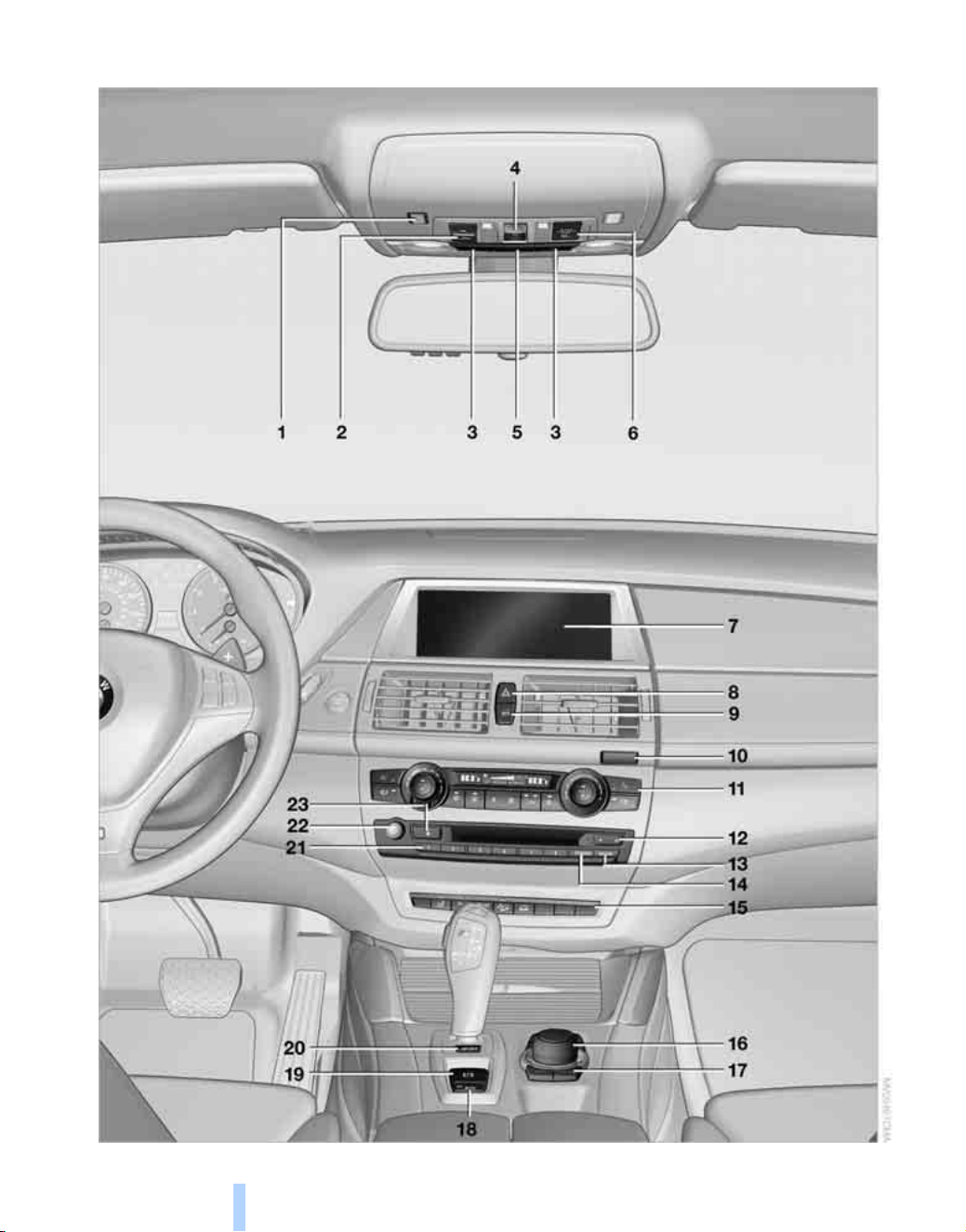
1 Microphone for hands-free mode for tele-
phone
*
and for voice activation system
*
2 Initiating an Emergency Request call
*
3 Reading lamps
4 Glass sunroof
*
5 Interior lamps
6 Passenger airbag status lamp
7 Control Display
Displays for menu navigation
8 Hazard warning flashers
9 Central locking system
10 Opening glove compartment
11 Automatic climate control
12 Changing
> Radio station
> Track
13 Selecting radio, CD and CD changer
14 Selecting AM or FM waveband
16 Controller
Can be turned, pressed, or moved in four
directions
17 Buttons on the controller
Selecting menus directly
18 Automatic Hold
19 Parking brake
20 EDC Electronic Damping Control 22
21 Programmable memory buttons
22 Switching Entertainment sound output on/
off and adjusting volume
23 Ejecting CD/DVD
Manual air distribution
Automatic air distribution
and volume
Cooling function
AUC Automatic recirculated-air
control
Maximum cooling
Air volume
Defrosting windows
Rear window defroster
Seat heating
Active seat ventilation
*
15
Active seat
*
PDC Park Distance Control
Rear view camera with Top View
*
DSC Dynamic Stability
Control 21
MDynamic Mode 21
HDC Hill Descent Control
Unlocking/opening liftgate
*
Online Edition for Part no. 01 41 2 603 292 - © 06/09 BMW AG

Online Edition for Part no. 01 41 2 603 292 - © 06/09 BMW AG

Controls
This chapter is intended to provide you with
information for complete control of your vehicle.
Its extensive array of features and accessories,
both for driving and for your own safety,
comfort and convenience, are described here.
Controls
Online Edition for Part no. 01 41 2 603 292 - © 06/09 BMW AG
Adjusting
16
Adjusting
MDrive
The concept
With M Drive, you can configure several individ-
ual settings for your vehicle on the Control Dis-
play. The settings influence the engine charac-
teristics, driving dynamics control, damper
adjustment, and Head-Up Display
*
.
> M Engine Dynamic Control 19
> DSC Dynamic Stability Control 22
> Head-Up Display 24
> EDC Electronic Damping Control 23
Configuring settings
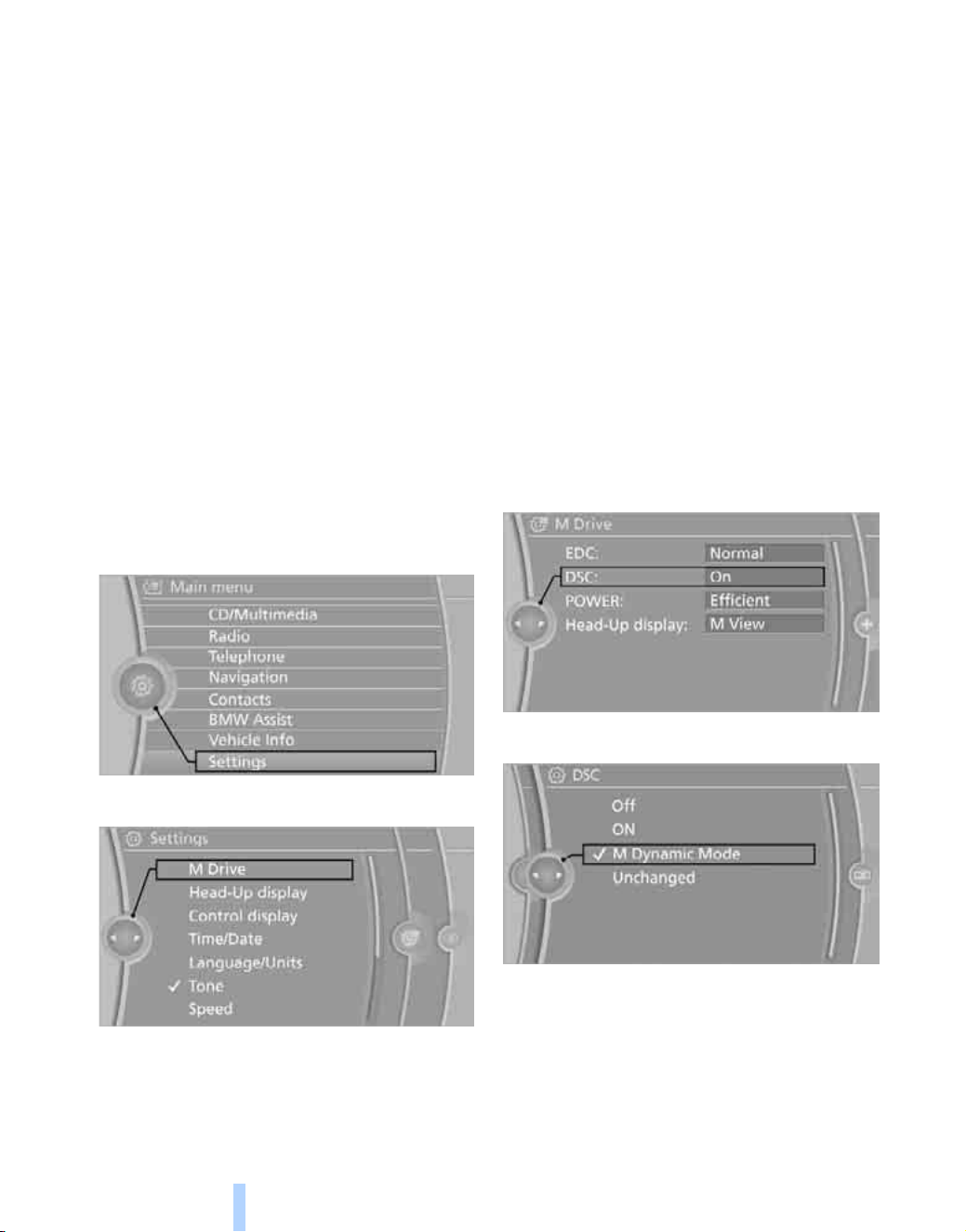
With the ignition switched on, you can adjust
M Drive on the Control Display.
1. "Settings"
2. "M Drive"
The functions contained in M Drive are dis-
played:
> "EDC:"
Program for steering adjustment and
electronic damping control EDC, refer to
page 22.
> "DSC:"
Dynamic Stability Control and
M Dynamic Mode, refer to page 21
> "POWER:"
M Engine dynamics control program,
refer to page 19.
> "Head-Up display:"
Select "M View", also refer to page 23.
3. Select the desired function, e.g. "DSC:".
4. Select the desired setting.
"Unchanged" maintains the current setting
made from outside M Drive, e.g. using the
button in the center console.
Online Edition for Part no. 01 41 2 603 292 - © 06/09 BMW AG
Reference At a glanceControlsDriving tipsMobility
17
Activating settings
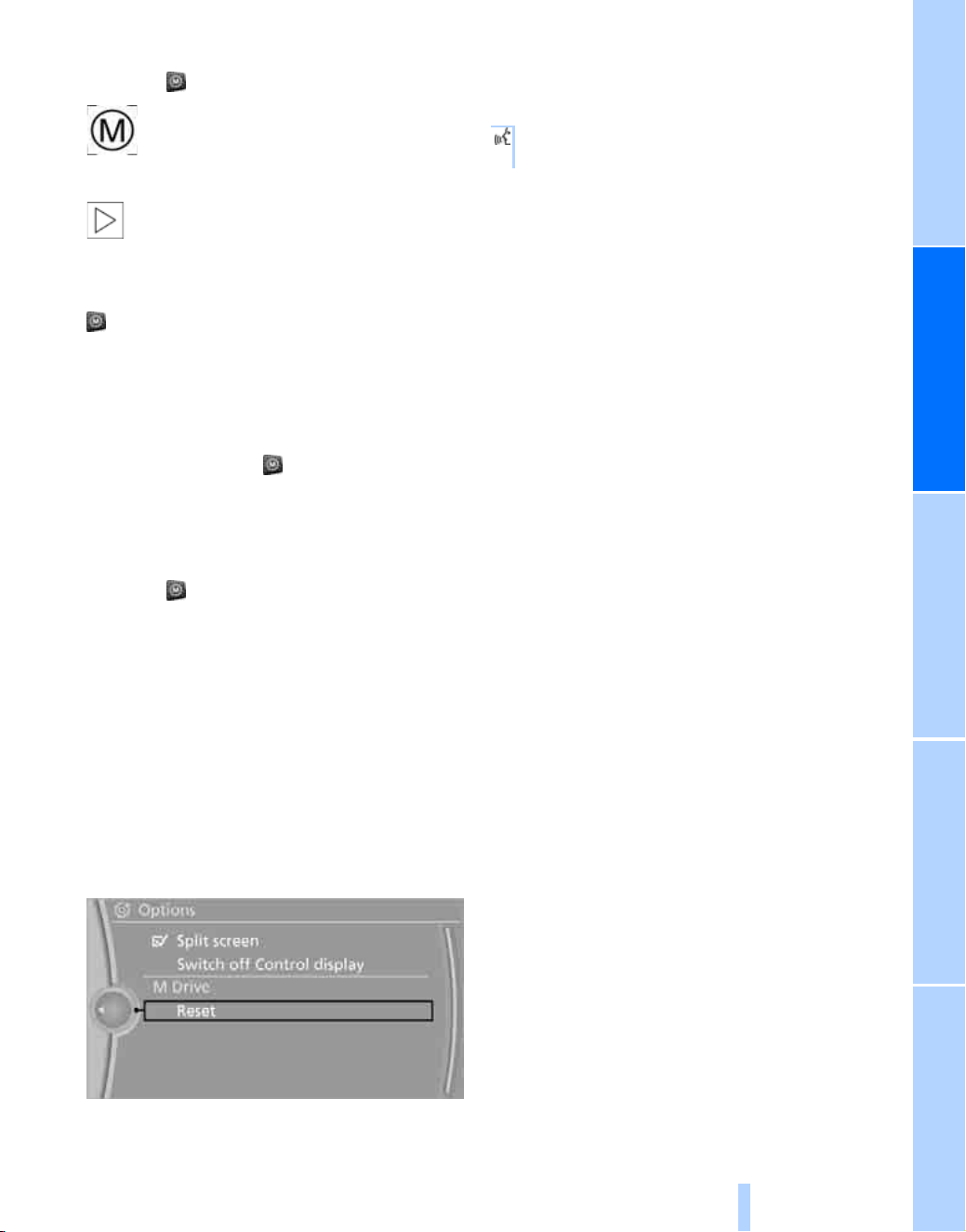
Press the button on the steering wheel.
The indicator lamp in the instrument
cluster lights up. The settings for
M Drive made on the Control Display
are active.
If the indicator lamp flashes after the but-
ton is pressed, then M Drive could not be
activated because the ABS Antilock Brake Sys-
tem or DSC Dynamic Stability Control is cur-
rently regulating driving stability. Press the
button again when the indicator lamp no
longer flashes.<
Even with M Drive activated, you can change
individual settings from outside M Drive, e.g.
with the buttons in the center console. To reac-
tivate all settings made for M Drive on the Con-
trol Display: press the button twice.
With M Drive activated, changes made on the
Control Display are applied immediately.
Deactivating settings
Press the button on the steering wheel
again. M Drive is deactivated. The indicator
lamp in the instrument panel goes out.
Restoring settings
You can restore all settings for M Drive to the
default values:
1. "Settings"
2. "M Drive"
3. Move the controller to the right repeatedly
until the "Options" menu is selected.
4. "Reset"
5. Confirm by clicking "Yes".
Operating by voice activation*
You can also select the "M Drive" menu using
voice activation.
{M Drive}.
The menu is selected.
Online Edition for Part no. 01 41 2 603 292 - © 06/09 BMW AG
Driving
18
Driving
M Sport Automatic
transmission
Transmission positions
D Drive, automatic position
Position for normal vehicle operation. All for-
ward gears are shifted automatically. Gear
shifts are carried out with an emphasis on com-
fort.
Sport program
Pressing the selector lever to the left switches
you into the sport program. The sport program
supports a performance-oriented driving style.
Manual mode M/S
Switch from D Drive into manual mode M/S:
> press the selector lever to the left and shift
gears using the selector lever
> shift gears using the shifting paddles
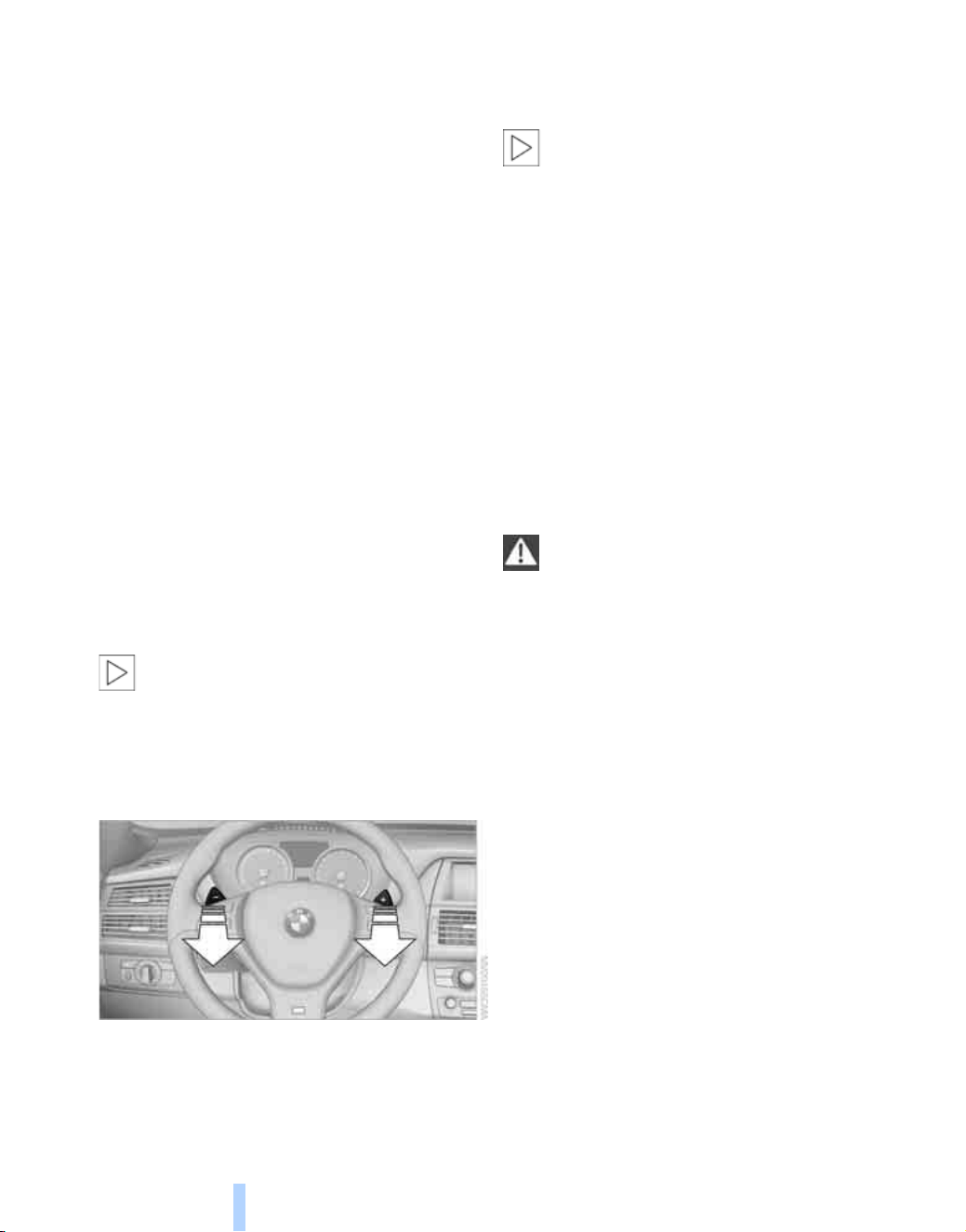
In the manual mode, the M Sport Auto-
matic transmission will not upshift after
the maximum engine speed is reached.<
Gear changes
Using shift paddles on steering wheel
> To upshift, briefly pull the right shift
paddle +.
> To downshift, briefly pull the left shift
paddle –.
In the manual mode, the M Sport Auto-
matic transmission will not upshift after
the maximum engine speed is reached.<
Shift lights in the Head-Up Display*
To permit the best possible acceleration of a
sporty driving style, when the M Sport Auto-
matic transmission is in the manual mode, shift
lights in the Head-Up Display
*
indicate the
optimum shifting time just before the maximum
engine speed is reached, refer to Head-Up Dis-
play page 23.
Launch Control
On a road surface with good traction, Launch
Control permits an optimum acceleration when
starting off.
Do not use Launch Control too often;
otherwise, the high stress on the vehicle
will lead to premature component wear.
Only use Launch Control when the engine is
warm; otherwise, increased wear may occur.
Do not use Launch Control when towing a
trailer.
1. When the vehicle is stationary with the
engine running, step on the brake pedal.
2. With the transmission in M/S mode, shift
into M1.
3. Activate MDM mode or deactivate DSC
Dynamic Stability Control, refer to page 21.
4. Select the "Sport" program of the M Engine
dynamics control.
5. Floor the accelerator pedal completely. The
engine speed is controlled for starting off.
The flag symbol appears in the instrument
panel.
6. When the brake pedal is released, the vehi-
cle accelerates. Continue flooring the
accelerator pedal.
7. Upshifting occurs automatically as long as
the accelerator pedal remains completely
floored.
Online Edition for Part no. 01 41 2 603 292 - © 06/09 BMW AG

Reference At a glanceControlsDriving tipsMobility
19
Launch Control will be available again only after
a certain amount of time.
Do not use Launch Control during the break-in
period, refer to page 28.
To maintain vehicle stability, always acti-
vate DSC whenever possible.<
M Engine dynamics control/POWER
With M Engine Dynamic Control you can influ-
ence how sporty the reaction of your vehicle to
accelerator pedal movements is to be. Two pro-
grams are available to you.
The "Efficient" program is activated after each
engine start.
"Efficient" program
In the "Efficient" program, a lower fuel con-
sumption is achieved. The engine and the
M Sport Automatic transmission respond to
accelerator pedal movements with an emphasis
on comfort, which is ideal in city traffic or in
snow, for example.
"Sport" program
The "Sport" program permits the engine and
the M Sport Automatic transmission to respond
more spontaneously to accelerator pedal
movements. The acoustics of your BMW X5 M /
BMW X6 M become more sporty.
POWER is displayed in the instrument panel.
Adjustments via M Drive
1. "Settings"
2. "M Drive"
3. "POWER"
4. "Efficient" or "Sport"
Press the button on the steering wheel, refer
to M Drive on page 16. M Drive is activated,
with the settings you have selected.
Be aware of the settings for DSC in
M Drive; otherwise, driving stability can
be impaired and there is the risk of accident.<
Cruise control
Unlike the description in the BMW X5 / BMW X6
Owner's Manual, the cruise control is not auto-
matically deactivated in the M Dynamic Mode.
Online Edition for Part no. 01 41 2 603 292 - © 06/09 BMW AG

Everything under control
20
Everything under control
Tachometer
The yellow advance warning field, arrow 1,
changes depending on the engine temperature.
As the engine temperature rises, the permissi-
ble engine speed also increases.
During the warm-up phase, avoid engine
speeds in the advance warning field as much as
possible.
When the engine speeds reach the red warning
field, arrow 2, the engine speed governor is
activated to protect the engine.
Engine oil temperature
When the engine is warm, the engine oil tem-
perature is between 1757/806 and 2507/
1206.
When the engine oil temperature is too high, a
message appears on the Control Display.
Online Edition for Part no. 01 41 2 603 292 - © 06/09 BMW AG

Reference At a glanceControlsDriving tipsMobility
21
Technology for comfort, convenience and
safety
Driving stability control
systems
Unlike the description in the BMW X5 / BMW X6
Owner's Manual, your BMW X5 M / BMW X6 M
does not have DTC Dynamic Traction Control.
DSC Dynamic Stability Control
DSC prevents traction loss in the driving wheels
when starting off and accelerating. DSC also
identifies unstable driving conditions, such as a
loss of traction at the rear of the vehicle or slid-
ing of the vehicle in its front wheels. In these
cases, DSC helps the vehicle maintain a safe
course within physical limits by reducing engine
output and through braking actions in the indi-
vidual wheels.
The laws of physics cannot be repealed,
even with DSC. An appropriate driving
style always remains the responsibility of the
driver. Therefore, do not reduce the additional
safety margin further by taking risks.<
MDynamic Mode MDM
The M Dynamic Mode is a mode of the DSC
Dynamic Stability Control. It enables driving
with greater longitudinal and lateral accelera-
tion on dry road surfaces, however with limited
vehicle stability. The system does not provide
stabilizing intervention by reducing the engine
output and braking at the wheels until the abso-
lute driving limit is reached. These driving con-
ditions may require the driver to make addi-
tional steering corrections.
The M Dynamic Mode is deactivated each time
the engine is switched off.
With the M Dynamic Mode switched on,
stabilizing interventions are only carried
out to a reduced degree. Take action yourself,
otherwise there is a risk of an accident.<
To maintain vehicle stability, drive with
DSC switched on and the M Dynamic
Mode switched off whenever possible.<
Activating MDM
Press the button; the MDM indicator lamp in the
instrument panel lights up.
Deactivating MDM
Press the button again.
The MDM indicator lamp in the instru-
ment panel goes out.
Adjustments via M Drive
With the ignition switched on, you can adjust
the M Dynamic Mode via "M Drive" on the Con-
trol Display.
1. "Settings"
2. "M Drive"
3. "DSC"
4. Select "M Dynamic Mode".
Online Edition for Part no. 01 41 2 603 292 - © 06/09 BMW AG

Technology for comfort, convenience and safety
22
Press the button on the steering wheel, refer
to M Drive on page 16. M Drive is activated,
with the settings you have selected.
The indicator lamp in the instrument cluster
lights up.
Be aware of the settings for DSC in
M Drive; otherwise, driving stability can
be impaired and there is the risk of accident.<
For better control
The indicator lamp lights up:
M Dynamic Mode is activated.
The MDM indicator lamp lights up
continuously and the DSC indicator
lamp flashes: M Dynamic Mode regu-
lates the driving and brake forces.
Deactivating DSC
Press and hold the button until the indicator
lamp for DSC lights up and DSC OFF is dis-
played in the instrument panel; do not press the
button for longer than approx. 10 seconds. DSC
and M Dynamic Mode are simultaneously deac-
tivated. Stabilizing interventions are now not
carried out.
A message appears on the Control Display.
You may find it useful to briefly deactivate DSC
under the following special circumstances:
> When driving on snowy inclines, in slush, or
on unplowed, snow-covered road surfaces
> When rocking a stuck vehicle free or start-
ing off in deep snow or on loose ground
> When driving with snow chains
To increase vehicle stability, activate DSC again
as soon as possible.
Activating DSC
Press the button again.
Adjustments via M Drive
With the ignition switched on, you can also
adjust DSC via M Drive on the Control Display,
also refer to page 16.
1. "Settings"
2. "M Drive"
3. "DSC"
4. Select the desired setting.
Press the button on the steering wheel, refer
to M Drive on page 16. M Drive is activated,
with the settings you have selected.
To maintain vehicle stability, always acti-
vate DSC whenever possible.<
For better control
The indicator lamp flashes:
DSC controls the drive forces and
brake forces.
The indicator lamp lights up: DSC is malfunc-
tioning.
The indicator lamp lights up:
DSC and MDM are deactivated.
EDC Electronic Damping
Control
The concept
If the influencing variables such as road surface
quality or operating conditions such as steer-
ing, braking etc. change, the damping automat-
ically adjusts to the new conditions within a
fraction of a second.
You can select between two programs to influ-
ence the adjustment of the shock absorbers
and steering.
Online Edition for Part no. 01 41 2 603 292 - © 06/09 BMW AG

Reference At a glanceControlsDriving tipsMobility
23
"Normal" program:
The "Normal" program offers a well-balanced
adjustment of the shock absorbers and steer-
ing.
"Sport" program
Select the "Sport" program if you want a con-
sistently sporty coordination of shock absorb-
ers and steering.
Selecting program
Press the EDC button.
> Sport:
The LED in the button lights up.
> Normal:
The LED in the button goes out.
Adjustments via M Drive
You can also use M Drive to set the program
you prefer.
1. "Settings"
2. "M Drive"
3. "EDC"
4. Select the desired setting.
Press the button on the steering wheel, refer
to M Drive on page 16. M Drive is activated,
with the settings you have selected.
Be aware of the settings for DSC in
M Drive; otherwise, driving stability can
be impaired and there is the risk of accident.<
Head-Up Display*
Switching on/off
Press this button to switch the
Head-Up Display on or off.
Selecting M view
You can select the M view in the Head-Up Dis-
play via two different menus:
> "Displayed information"
> "M View"
Adjusting via displayed information
1. "Settings"
2. "Head-Up display"
3. "Displayed information"
4. Select "M View".
Online Edition for Part no. 01 41 2 603 292 - © 06/09 BMW AG
Technology for comfort, convenience and safety
24
"M View": the M view appears in the Head-
Up Display. Information unavailable in the M
view appears on the Control Display in gray and
cannot be selected.
"M View": the default view is displayed.
Adjustments via M Drive
You can also set the M view via M Drive.
1. "Settings"
2. "M Drive"
3. "Head-Up display"
4. "M View"
Press the button on the steering wheel to
activate the M view, also refer to M Drive on
page 16.
Be aware of the settings for DSC in
M Drive; otherwise, driving stability can
be impaired and there is the risk of accident.<
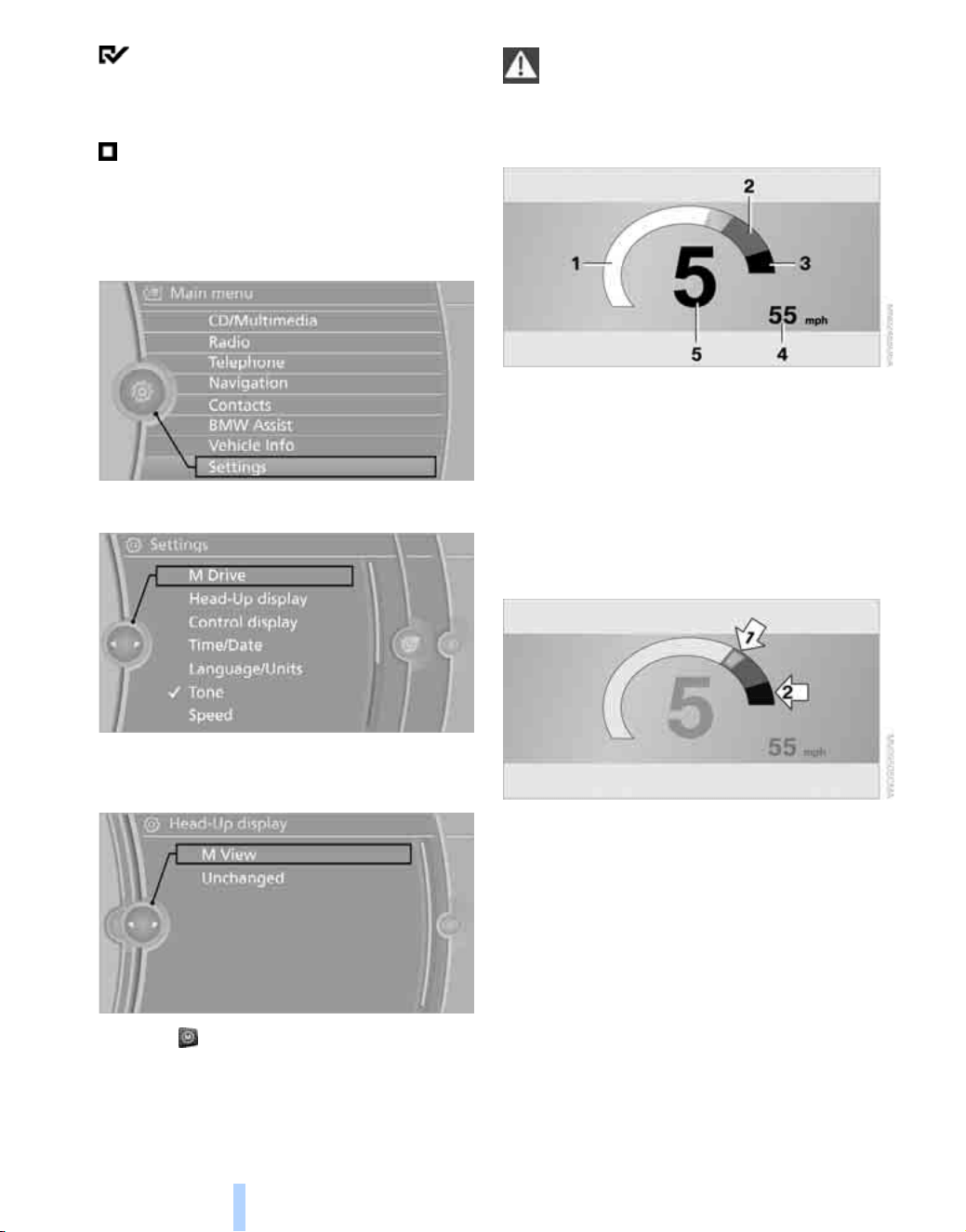
M view
1 Current engine speed, highlighted
2 Advance warning field of tachometer
3 Red warning field of tachometer, also refer
to Tachometer on page 20
4 Speed
5 Gear display
Shift lights
The current engine speed is highlighted on the
tachometer.
> When approaching the maximum rpm, yel-
low illuminated fields 1 of the tachometer
consecutively indicate the approaching
upshift point.
> At the very latest, shift when the field 2
lights up in red.
When the permissible maximum rpm is
reached, the entire tachometer begins to flash.
When the maximum rpm is exceeded, the
engine speed governor is activated to protect
the engine. Always avoid engine speeds in this
range.
Online Edition for Part no. 01 41 2 603 292 - © 06/09 BMW AG


Online Edition for Part no. 01 41 2 603 292 - © 06/09 BMW AG

Driving tips
This section is designed to provide you
with extra support by supplying information
useful in dealing with specific driving
and operating conditions.
Driving tips
Online Edition for Part no. 01 41 2 603 292 - © 06/09 BMW AG

Things to remember when driving
28
Things to remember when driving
Break-in period
Please note the following ways in which your
BMW X5 M / BMW X6 M differs from the
description given in the Owner's Manual for the
BMW X5 / BMW X6.
Do not use Launch Control, refer to page 18,
during the break-in period.
Engine and differential
Always obey all official speed limits.
Up to 1,200 miles/2,000 km
Drive at varying engine and driving speeds,
but do not exceed 5,500 rpm or 105 mph/
170 km/h.
Avoid full-throttle operation and use of the
transmission's kick-down mode during these
initial miles.
From 1,200 miles/2,000 km to
3,000 miles/5,000 km
The engine and driving speed can gradually be
increased up to a continuous vehicle speed of
135 mph/220 km/h. Only drive at top speed
briefly, e.g. when passing.
Transmission
The function of the transmission is only at its
optimized level after driving a distance of
approx. 300 miles/500 km. During this time,
do not exceed engine speeds of 5,500 rpm.
Following part replacement
Observe the break-in instructions again if com-
ponents mentioned above must be replaced
after subsequent driving operation.
General driving notes
Ground clearance
Make sure that there is always sufficient
ground clearance, e.g. when entering
underground garages or when driving over curb
edges; otherwise, damage may occur to the
front or rear spoiler.<
Driving on poor roads
When driving on rough terrain, use stone impact
protective film to prevent damage to painted
vehicle components such as side sills. Your
BMW Sports Activity Vehicle Center will be
happy to advise you.
Online Edition for Part no. 01 41 2 603 292 - © 06/09 BMW AG
Reference At a glanceControlsDriving tipsMobility
29
BMW X5 M / BMW X6 M technology
M TwinPower Turbo engine
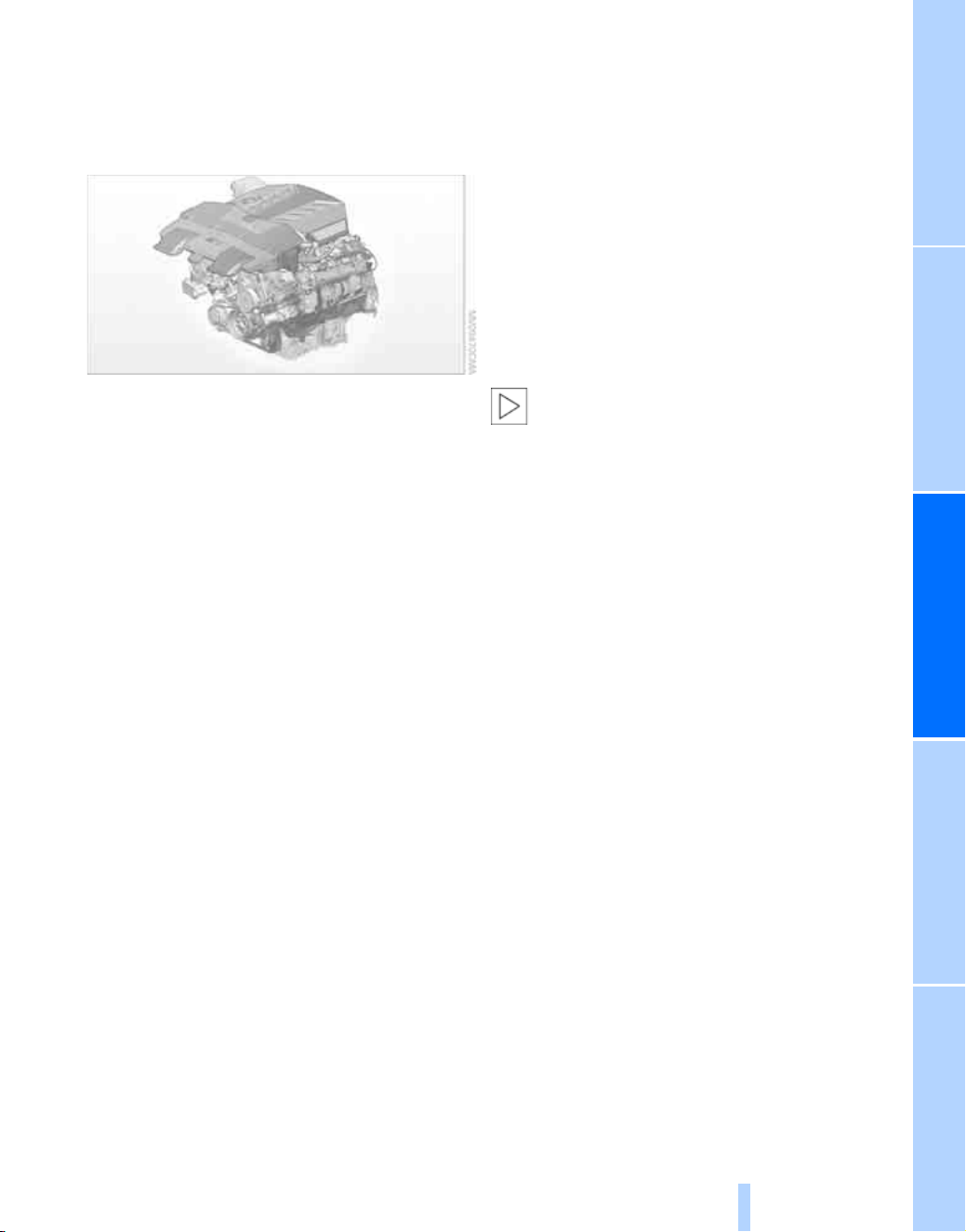
The M TwinPower Turbo engine is a high-per-
formance V8 engine. With a 268.2 cu in/4.4 liter
displacement, this engine generates a maxi-
mum output of 555 hp and a maximum torque
of 500 lb ft/680 Nm. It features spontaneous
response characteristics and a very broad
usable engine speed range. The maximum
engine speed is 6,800 rpm and is electronically
controlled.
Warming up
During the warm-up phase, the high-perfor-
mance V8 engine will have slightly rougher run-
ning characteristics and a temporarily elevated
idle speed.
When the engine is cold, the exhaust system
has a slightly metallic undertone due to the sys-
tem design.
For additional information on warming up, refer
to Tachometer and Engine oil temperature on
page 20.
Drive train
The xDrive all-wheel-drive system produces a
constantly variable torque distribution between
the front and rear axle. The combination of
xDrive and Dynamic Performance Control gives
your BMW X5 M / BMW X6 M the highly
dynamic driving characteristics typical of a
BMW M series. The dynamics and steering pre-
cision in all road speed ranges can be increased
even further by activating the M Dynamic mode.
Driving on a racetrack
Before you drive on a racetrack, BMW recom-
mends:
> participation in BMW driver training
> having the vehicle checked at your
BMW Sports Activity Vehicle Center
At high engine loads, high component temper-
atures may cause the system to reduce perfor-
mance in order to protect the engine. Full per-
formance is restored after cooling.
Racetrack driving leads to increased
wear. The BMW X5 M / BMW X6 M is not
designed for use in motor sport competition.
This added wear is not covered under the war-
ranty.<
The production brake linings and wear indica-
tors are not designed for racetrack driving. Your
BMW Sports Activity Vehicle Center will be
happy to advise you.
Online Edition for Part no. 01 41 2 603 292 - © 06/09 BMW AG
Online Edition for Part no. 01 41 2 603 292 - © 06/09 BMW AG

Mobility
This section helps you maintain your
mobility by supplying important information
on vital topics including fuels and lubricants,
wheels and tires, service, maintenance
and roadside assistance.
Mobility
Online Edition for Part no. 01 41 2 603 292 - © 06/09 BMW AG

Refueling
32
Refueling
Observe the following when
refueling
Please note the following ways in which your
BMW X5 M / BMW X6 M differs from the
description given in the Owner's Manual for the
BMW X5 / BMW X6.
Fuel specifications
Do not use leaded gasoline, otherwise
permanent damage to the catalytic con-
verter will result.
Do not use E85, i.e. fuel that consists of 85%
ethanol, or Flex Fuel, otherwise permanent
damage to the engine and the fuel supply sys-
tem will result.<
Required fuel
Super Premium Gasoline/AKI 93
Always use this premium grade fuel to obtain
maximum fuel economy and performance.
The minimum approved fuel grade is AKI 91.
Do not use gasoline below the specified
minimum quality, otherwise engine dam-
age can result.<
Online Edition for Part no. 01 41 2 603 292 - © 06/09 BMW AG
Reference At a glanceControlsDriving tipsMobility
33
Wheels and tires
Information for your safety
The factory approved tires with emergency
operation properties are matched to your vehi-
cle and when used properly, offer both optimum
driving safety and the desired driving comfort.
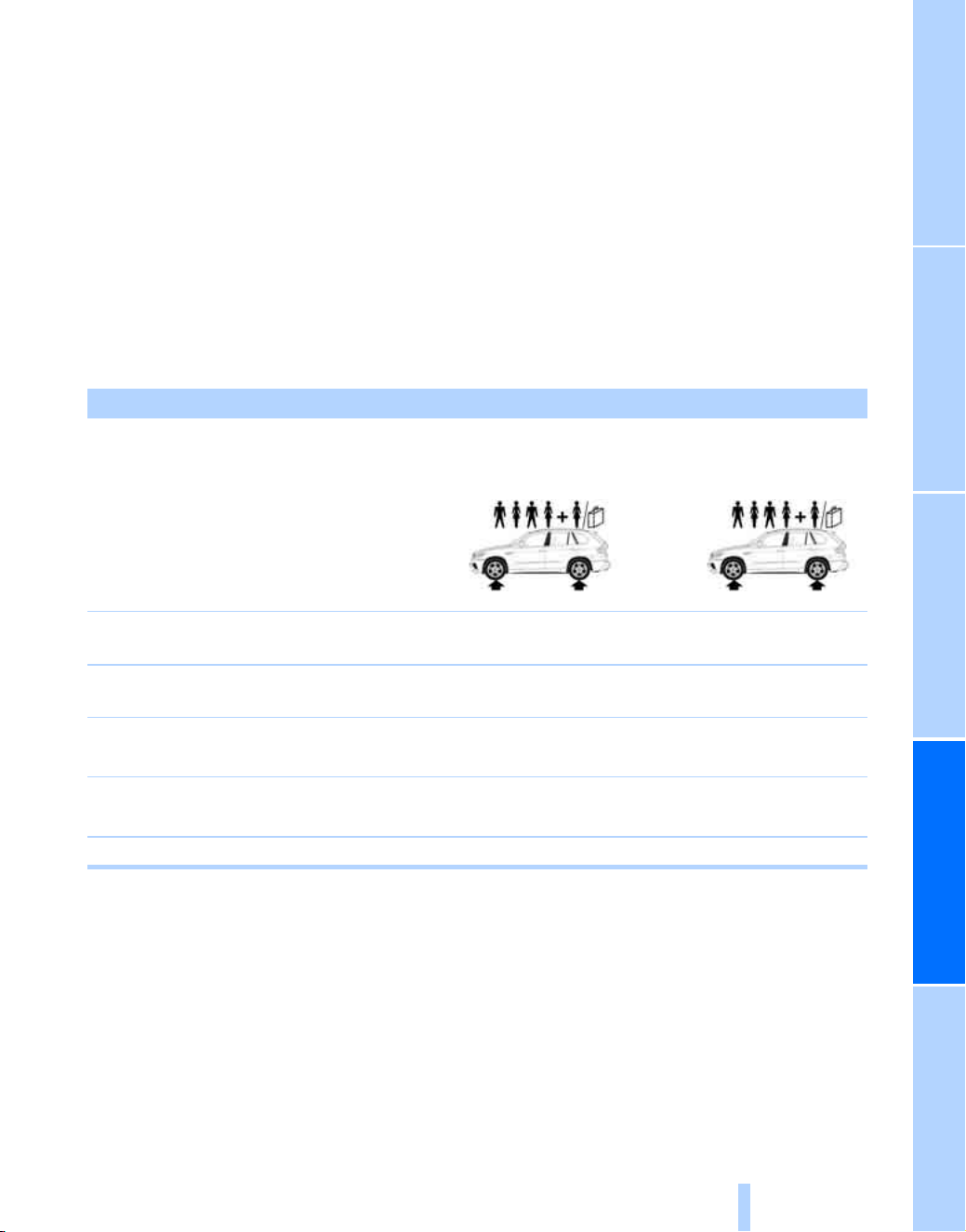
Tire inflation pressures
BMW X5 M
Tire size Pressure specifications in psi/kPa
Traveling speeds
up to a max. of
100 mph/160 km/h
Traveling speeds
including those exceeding
100 mph/160 km/h
All pressure specifications
in the table are indicated in
psi/kilopascal with cold tires.
Cold = ambient temperature
Compact wheel
*
:
T 155/80 R 19 114 M
60/420 60/420 60/420 60/420
255/50 R 19 107 H M+S XL
255/50 R 19 107 V M+S XL
38/260 38/260 41/280 46/320
Front: 275/40 R 20 106 W XL 38/260 - 44/300 -
Rear: 315/35 R 20 110 W XL - 38/260 - 44/300
Front: 285/35 R 21 105 W XL 38/260 - 45/310 -
Rear: 325/30 R 21 108 W XL - 38/260 - 46/320
More details on the permissible load and weights can be found on page 43.
Online Edition for Part no. 01 41 2 603 292 - © 06/09 BMW AG

Wheels and tires
34
BMW X6 M
Snow chains*
Use of snow chains is only permitted in pairs,
with winter tires of the size 255/50 R 19 on the
rear wheels.
After snow chains are installed, do not ini-
tialize the Flat Tire Monitor
*
or reset Tire
Pressure Control as these may result in incor-
rect readings.
When you are driving with snow chains, it can
be beneficial to briefly deactivate DSC, refer to
page 22.<
Tire size Pressure specifications in psi/kPa
Traveling speeds
up to a max. of
100 mph/160 km/h
Traveling speeds
including those exceeding
100 mph/160 km/h
All pressure specifications
in the table are indicated in
psi/kilopascal with cold tires.
Cold = ambient temperature
Compact wheel
*
:
T 155/80 R 19 114 M
60/420 60/420 60/420 60/420
255/50 R 19 107 H M+S XL
255/50 R 19 107 V M+S XL
38/260 38/260 41/280 44/300
Front: 275/40 R 20 106 W XL 38/260 - 44/300 -
Rear: 315/35 R 20 110 W XL - 38/260 - 44/300
Front: 285/35 R 21 105 W XL 38/260 - 45/310 -
Rear: 325/30 R 21 108 W XL - 38/260 - 45/310
More details on the permissible load and weights can be found on page 43.
Online Edition for Part no. 01 41 2 603 292 - © 06/09 BMW AG

Reference At a glanceControlsDriving tipsMobility
35
Under the hood
Engine compartment
1 Reservoir for washer fluid for the
headlamp and windshield washer system
2 Filler neck for engine oil, refer to
Owner's Manual for Vehicle
3 Jump starting terminal
4 Expansion tank for coolant
Online Edition for Part no. 01 41 2 603 292 - © 06/09 BMW AG

Replacing components
36
Replacing components
Bulb replacement, front
Parking lamps and roadside parking
lamps, daytime driving lamps
35-Watt bulb, H8
The bulb is pressurized. Therefore, wear
safety glasses and protective gloves.
Otherwise there is a danger of injuries if the
bulb is accidentally damaged during replace-
ment.<
1. Turn the cover to the left and remove.
2. Left side of vehicle:
Rotate the bulb holder to the right, refer to
arrow, and remove.
Right side of vehicle:
Rotate the bulb holder to the left and
remove.
3. Disconnect plug and replace bulb.
4. Install in the reverse order.
Side marker lamps
5-Watt bulb, WY5W XLL
1. Rotate the bulb holder to the left and
remove.
2. Pull the bulb out of the bulb holder and
replace.
3. Install in the reverse order.
Turn signals, front
24-Watt bulb, PY24W
1. Rotate bulb holder to the left and remove it
along with the bulb.
2. Rotate the bulb to the right along with the
socket and replace.
3. Install in the reverse order.
Online Edition for Part no. 01 41 2 603 292 - © 06/09 BMW AG


Online Edition for Part no. 01 41 2 603 292 - © 06/09 BMW AG

Reference
Use this section for the quickest access to
the information you are seeking. The chapter
contains the technical data and the index.
Reference
Online Edition for Part no. 01 41 2 603 292 - © 06/09 BMW AG

Technical data
40
Technical data
Engine data
BMW X5 M / BMW X6 M
Displacement cu in/cmμ 268.2/4,395
No. of cylinders 8
Maximum output hp 555
at engine speed rpm 6,000
Maximum torque lb ft/Nm 500/680
at engine speed rpm 1,500-5,650
Online Edition for Part no. 01 41 2 603 292 - © 06/09 BMW AG

Technical data
42
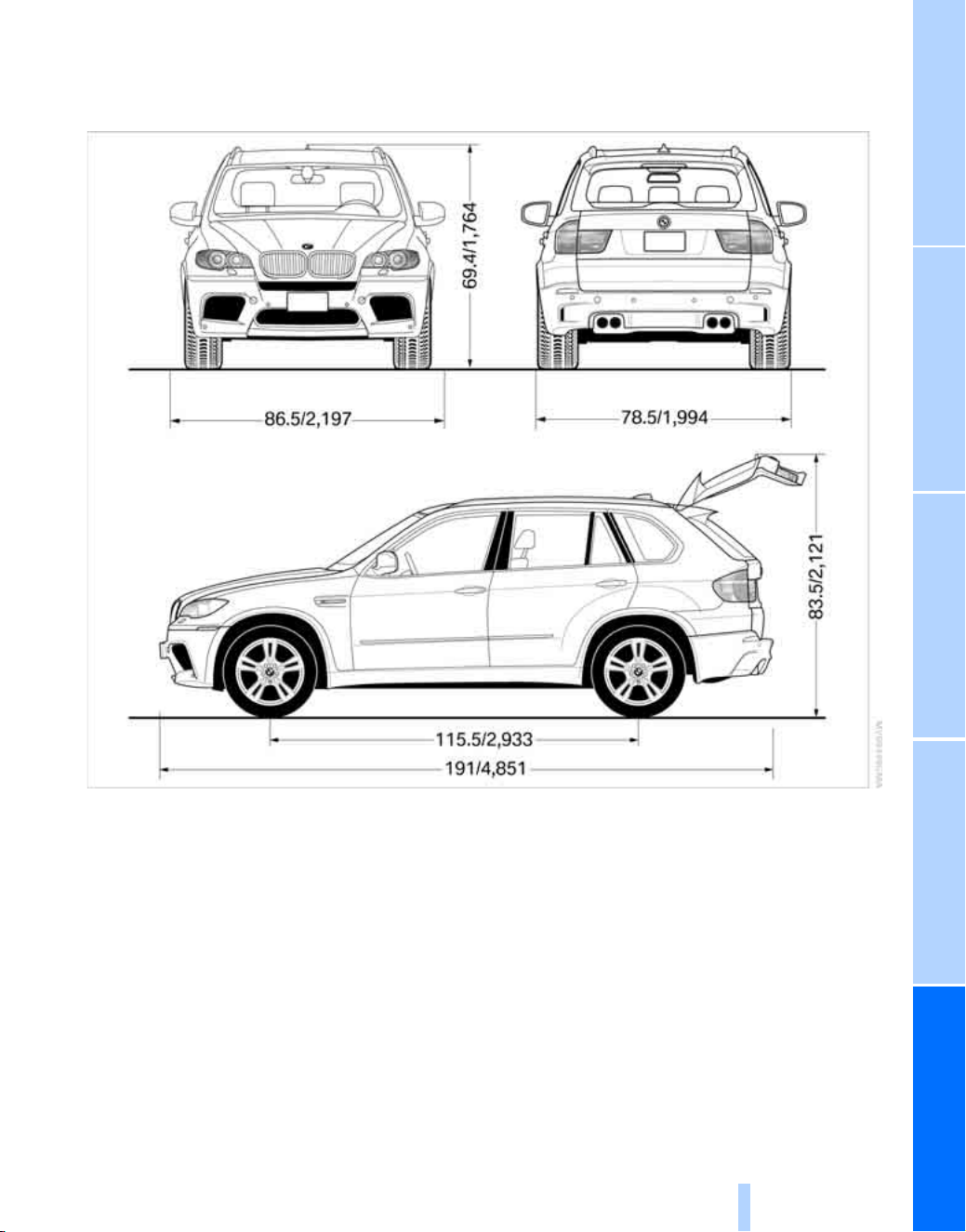
BMW X6 M
All measurements in inches/millimeters. Smallest turning circle dia. 42 ft/12.8 m.
Online Edition for Part no. 01 41 2 603 292 - © 06/09 BMW AG

Reference At a glanceControlsDriving tipsMobility
43
Weights
Capacities
Electrical system
BMW X5 M
Curb weight lbs./kg 5,368/2,435
Approved gross vehicle weight lbs./kg 6,471/2,935
Load lbs./kg 1,102/500
Approved front axle weight lbs./kg 3,153/1,430
Approved rear axle weight lbs./kg 3,505/1,590
Cargo bay capacity cu ft/liters 21.9-61.8/620-1,750
Do not exceed the approved axle weights and the approved gross vehicle weight.
BMW X6 M
Curb weight lbs./kg 5,324/2,415
Approved gross vehicle weight lbs./kg 6,261/2,840
Load lbs./kg 425/937
Approved front axle weight lbs./kg 3,153/1,430
Approved rear axle weight lbs./kg 3,307/1,500
Cargo bay capacity cu ft/liters 25.6-59.7/570-1,450
Do not exceed the approved axle weights and the approved gross vehicle weight.
Notes
Fuel tank US gal/liters approx. 22.5/85 Fuel grade: page 32
of that reserve US gal/liters approx. 3.2/12
Windshield washer
with headlamp washer system US quarts/liters approx. 6.9/6.5
For more details:
Owner's Manual for Vehicle
BMW X5 M / BMW X6 M
Battery capacity Ah 90
Generator output A/W 210/2,940
Online Edition for Part no. 01 41 2 603 292 - © 06/09 BMW AG

Everything from A to Z
44
Everything from A to Z
Index
A
Acceleration assistant, refer to
Launch Control 18
Accessories, refer to Your
individual vehicle 5
AKI, refer to Fuel
specifications 32
Approved axle weight, refer to
Weights 43
Approved gross vehicle
weight, refer to Weights 43
Assistance systems, refer to
DSC Dynamic Stability
Control 21
Axle weights, refer to
Weights 43
B
Breaking-in the differential,
refer to Engine and
differential 28
Breaking-in transmission,
refer to Transmission 28
Break-in period 28
C
Cargo bay capacity 43
Center console, refer to
Around the center
console 12
Cockpit 8
Comfort area, refer to Around
the center console 12
Contents 3
Controls and displays 8
Copyright 2
Cruise control 19
Curb weight, refer to
Weights 43
Cylinders, refer to Engine
data 40
D
Dashboard, refer to Cockpit 8
Data 40
– dimensions 41
– engine data 40
– technical 40
Data, technical 40
– capacities 43
– electrical system 43
– engine data 40
– weights 43
Dimensions 41
Displacement, refer to Engine
data 40
Display elements, refer to
Instrument panel 10
Displays, refer to Instrument
panel 10
Displays and controls 8
Displays on the windshield,
refer to Head-Up Display 23
Driving stability control
systems 21
DSC Dynamic Stability
Control 21
– indicator lamp 22
E
EDC Electronic Damping
Control 22
Editorial notice 5
Electronic Damping Control
EDC 22
Engine
– breaking-in 28
– data 40
– M Engine Dynamic
Control 19
– speed 20
Engine compartment 35
Engine data 40
Engine oil temperature 20
Engine oil thermometer, refer
to Engine oil temperature 20
Engine output, refer to Engine
data 40
Engine speed, refer to Engine
data 40
ESP Electronic Stability
Program, refer to DSC
Dynamic Stability
Control 21
F
Flat Tire Monitor, snow
chains 34
Fuel
– quality 32
– refer to Fuel
specifications 32
G
Gasoline, refer to Fuel
specifications 32
General driving notes 28
Gross vehicle weight, refer to
Weights 43
Ground clearance 28
Online Edition for Part no. 01 41 2 603 292 - © 06/09 BMW AG

Reference At a glanceControlsDriving tipsMobility
45
H
Hazard warning flashers 12
Head-Up Display 23
– M view 24
– shift lights 18, 24
Height, refer to
Dimensions 41
Hood 35
Horn 8
I
Imprint 2
Indicator/warning lamps
– M Drive 17
– M Dynamic Mode 22
Individual equipment, refer to
Your individual vehicle 5
Instrument cluster
– refer to Cockpit 8
– refer to Instrument panel 10
Instrument panel 10
– refer to Cockpit 8
K
Knock control 32
L
Launch Control 18
Length, refer to
Dimensions 41
M
M Dynamic Mode MDM 21
– indicator lamp 22
M Engine Dynamic Control 19
M Sport Automatic
transmission 18
Manufacturer 5
MDM, refer to M Dynamic
Mode 21
M Drive 16
Measurements, refer to
Dimensions 41
M view 24
O
Octane rating, refer to Fuel
specifications 32
Oil temperature 20
Output, refer to Engine
data 40
P
Parts and accessories, refer to
Your individual vehicle 5
POWER, refer to M Engine
Dynamic Control 19
R
Refueling 32
Run-flat tires 33
S
Safety systems, refer to
DSC Dynamic Stability
Control 21
Settings, configuring, refer to
M Drive 16
Shifting, M Sport Automatic
transmission 18
Shift lights 18
Shift paddles on steering
wheel 18
Shock absorber control, refer
to EDC Electronic Damping
Control 22
Signal horn, refer to Horn 8
Speedometer 10
Sport program, M Sport
Automatic transmission 18
Stability control, refer to
– driving stability control
systems 21
– DSC Dynamic Stability
Control 21
Steering wheel 8
– M Drive button 16
– shift paddles 18
Switches, refer to Cockpit 8
Symbols 4
T
Tachometer 20
Technical data 40
Temperature gauge, engine
oil 20
Tempomat, refer to Cruise
control 19
Tire inflation pressures 34
Torque, refer to Engine
data 40
Track width, refer to
Dimensions 41
Traction-assist feature, refer
to DSC Dynamic Stability
Control 21
Traction control, refer to
DSC Dynamic Stability
Control 21
Transmission
– Launch Control 18
– shift lights 18
Trunk capacity, refer to Cargo
bay capacity 43
Turning circle, refer to
Dimensions 41
Turn signals, replacing
bulbs 36
U
Upshift display, refer to Shift
lights 24
V
Vehicle
– breaking-in 28
– measurements, refer to
Dimensions 41
– weights 43
Volume, cargo bay, refer to
Weights 43
Online Edition for Part no. 01 41 2 603 292 - © 06/09 BMW AG


Online Edition for Part no. 01 41 2 603 292 - © 06/09 BMW AG

01 41 2 603 292 ue
*BL260329200I*
The Ultimate
Driving Machine
More about BMW
bmwusa.com
Online Edition for Part no. 01 41 2 603 292 - © 06/09 BMW AG