

User Guide
• Somecontentandillustrationsmaydifferfromyourdevicedependingonthe
region,serviceprovider,softwareversion,orOSversion,andaresubjecttochange
withoutpriornotice.
• AlwaysusegenuineLGaccessories.Thesupplieditemsaredesignedonlyforthis
deviceandmaynotbecompatiblewithotherdevices.
• Availableaccessoriesmayvarydependingonyourregion,countryorservice
provider.
• Thisdeviceisnotsuitableforpeoplewhohaveavisualimpairmentduetothe
touchscreenkeyboard.
• Copyright©2015LGElectronics,Inc.Allrightsreserved.LGandtheLGlogoare
registeredtrademarksofLGGroupanditsrelatedentities.Allothertrademarks
arethepropertyoftheirrespectiveowners.
• Google™,GoogleMaps™,Gmail™,YouTube™,Hangouts™andPlayStore™
aretrademarksofGoogle,Inc.
ENGLISH

2
SERVICE ACTIVATION
SERVICE ACTIVATION
IfyouareanewT-Mobile
®
customerandyourservicehasnotbeenactivated,simply
callCustomerCareat1-800-937-8997fromyourlandlinephoneandaT-Mobile
Activationsrepresentativewillassistyou.Youwillneedthefollowinginformationwhen
activatingservice:
• ServiceAgreementandagentcodeonyourAgreement.
• Yourname,homeaddress,homephone,andbillingaddress.
NOTE: For business and government accounts, please provide the name of
your company or government agency, address, and tax ID.
• YourSocialSecuritynumber,currentdriver’slicensenumber,anddateofbirthfor
creditcheckpurposes.
• YourchoiceofT-Mobilerateplanandservices(seewww.t-mobile.comforthe
latestplaninformation).
• SIMserialnumberandIMEInumber(locatedontheboxbarcodelabel).
Byactivatingservice,youacknowledgethatyouhaveread,understand,andagreetobe
boundbyeachofT-Mobile’sTermsandConditionsandyourServiceAgreement.

3
SERVICE ACTIVATION
About this user guide
Pleasereadthisuserguidecarefullybeforeyouuseyourphoneandkeepithandyfor
futurereference.
Shouldyourphonefailstooperatecorrectly,refertotheFAQsection.
• Somefeaturesandservicemayvarybyarea,phone,carrier,planandversionof
phonesoftware.
• Screendisplaysandillustrationsonthisusermanualmaydifferfromthoseyousee
ontheactualphone.
• Designsandspecificationsofthephoneandotheraccessoriesaresubjectto
changewithoutanynotice.

4
Table of contents
Table of contents
SERVICE ACTIVATION ................................2
About this user guide ...............................3
Important notice .......................................8
Getting to know your phone ...................12
Phone layout ..........................................12
Installing the SIM or USIM card ..............14
Charging the phone ...............................16
Unlocking the screen .............................17
Smart Lock ............................................17
Your Home screen ...................................18
Touch screen tips ..................................18
Home screen .........................................19
Customizing the Home screen ...............20
Returning to recently-used applications .21
Notifications panel .................................22
On-screen keyboard ..............................25
Special Features .....................................26
Gesture shot ..........................................26
KnockON ...............................................27
Knock Code ...........................................27
QuickMemo+ .........................................28
Google account setup .............................29
Connecting to Networks and Devices ....30
Wi-Fi .....................................................30
Bluetooth ...............................................31
Wi-Fi Direct ...........................................32
Transferring data between a PC and your
device....................................................33
Calls ........................................................34
Making a call .........................................34
Calling your contacts .............................34
Answering and rejecting a call ...............34
Making a second call .............................35
Viewing your call logs ............................35
Call settings ...........................................35
Contacts ..................................................36
Searching for a contact ..........................36
Adding a new contact ............................36
Favorites contacts..................................37
Creating a group ....................................37
Messaging ...............................................38
Sending a message ...............................38
Conversation view .................................39
Changing message settings ...................39
Email .......................................................40
Managing email accounts ......................40
Working with account folders .................40
Composing and sending email ...............41
Camera and Video ...................................42
Camera options on the viewfinder ..........42
Using the advanced settings ..................43

5
Table of contents
Taking a photo ......................................43
Once you have taken a photo .................44
Recording a video ..................................44
After recording a video...........................45
Gallery ...................................................45
Multimedia ..............................................48
Music ....................................................48
Utilities ....................................................50
Clock .....................................................50
Calculator ..............................................51
Calendar ................................................52
Voice Recorder ......................................52
Voice Search..........................................53
Downloads ............................................53
Browsing the Web...................................54
Browser .................................................54
Chrome .................................................56
Settings ...................................................57
Networks ...............................................57
Sound ....................................................60
Display ..................................................61
General ..................................................64
Phone software update ..........................70
Phone software update ..........................70
About this user guide .............................72
About this user guide .............................72
Trademarks ...........................................73
Troubleshooting ......................................74
FAQ ..........................................................78
Safety ......................................................84
Consumer Information About Radio
Frequency Emissions .............................86
Consumer Information on SAR ...............90
FCC Hearing-Aid Compatibility (HAC)
Regulations for Wireless Devices ...........92
Caution: Avoid potential hearing loss. .....94
TIA Safety Information ...........................95
Safety Information .................................98
FDA Consumer Update .........................103
Driving .................................................109
10 Driver Safety Tips ...........................110
Limited Warranty Statement.................112
6
SERVICE ACTIVATION
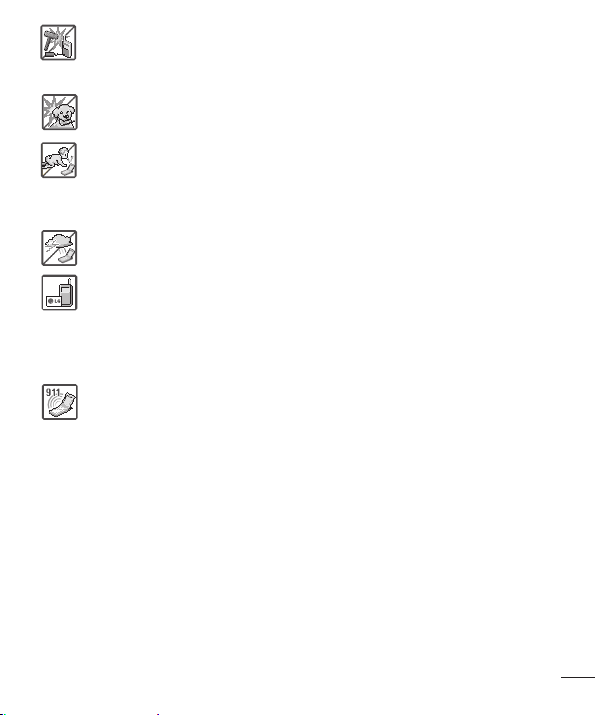
Violationoftheinstructionsmaycauseseriousinjuryordeath.
WARNING:ThisproductcontainschemicalsknowntotheStateofCaliforniatocause
cancerandbirthdefectsorotherreproductiveharm.
Wash hands after handling
.
• Neveruseanunapprovedbatterysincethiscoulddamagethephoneand/
orbatteryandcouldcausethebatterytoexplode.
• Neverplaceyourphoneinamicrowaveovenasitwillcausethebatteryto
explode.
• Donotdisposeofyourbatterynearfireorwithhazardousorflammable
materials.
• Whenridinginacar,donotleaveyourphoneorsetupthehands-freekit
neartheairbag.Ifwirelessequipmentisimproperlyinstalledandtheair
bagisdeployed,youmaybeseriouslyinjured.
• Donotusethephoneinareaswhereitsuseisprohibited.(Forexample:
aircraft)
• Donotexposethebatterychargeroradaptertodirectsunlightoruseitin
placeswithhighhumidity,suchasabathroom.
• Donotuseharshchemicals(suchasalcohol,benzene,thinners,etc.)or
detergentstocleanyourphone.Thiscouldcauseafire.
• Donotdrop,strike,orshakeyourphoneseverely.Itmayharmtheinternal
circuitboardsofthephone.
• Donotuseyourphoneinhighexplosiveareasasthephonemaygenerate
sparks.
• Donotdamagethepowercordbybending,twisting,pulling,orheating.Do
notusetheplugifitislooseasitmaycauseelectricshockorfire.
• Donotplaceanyheavyitemsonthepowercord.Donotallowthepower
cordtobecrimpedasitmaycauseelectricshockorfire.
• Donothandlethephonewithwethandswhileitisbeingcharged.Itmay
causeanelectricshockorseriouslydamageyourphone.
Caution
7
SERVICE ACTIVATION
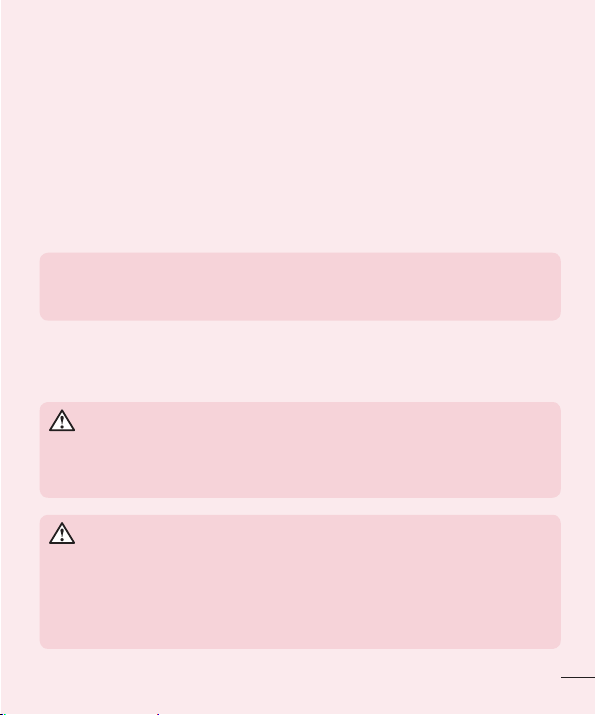
• Donotdisassemblethephone.
• Donotplaceoranswercallswhilechargingthephoneasitmayshort-
circuitthephoneand/orcauseelectricshockorfire.
• Makesurethatnosharp-edgeditems,suchasanimal’steethornails,
comeintocontactwiththebattery.Thiscouldcauseafire.
• Storethebatteryoutofreachofchildren.
• Becarefulthatchildrendonotswallowanyparts(suchasearphone,
connectionpartsofthephone,etc.)Thiscouldcauseasphyxiationor
suffocationresultinginseriousinjuryordeath.
• Unplugthepowercordandchargerduringlightningstormstoavoidelectric
shockorfire.
• OnlyusethebatteriesandchargersprovidedbyLG.Thewarrantywillnot
beappliedtoproductsprovidedbyothersuppliers.
• Onlyauthorizedpersonnelshouldservicethephoneanditsaccessories.
Faultyinstallationorservicemayresultinaccidentsandconsequently
invalidatethewarranty.
• Anemergencycallcanbemadeonlywithinaservicearea.Foran
emergencycall,makesurethatyouarewithinaserviceareaandthatthe
phoneisturnedon.
• Yourphoneisanelectronicdevicethatgeneratesheatduringnormal
operation.Extremelyprolonged,directskincontactintheabsenceof
adequateventilationmayresultindiscomfortorminorburns.Therefore,use
carewhenhandlingyourphoneduringorimmediatelyafteroperation.
• Useandstoreyourphoneintemperaturesbetween0°C/32°Fand
45°C/113°F,ifpossible.Exposingyourphonetoextremelyloworhigh
temperaturesmayresultindamage,malfunction,orevenexplosion.

8
Important notice
Please read this before you start using your phone!
Pleasechecktoseewhetheranyproblemsyouencounteredwithyourphoneare
describedinthissectionbeforetakingthephoneinforserviceorcallingaservice
representative.
1. Phone memory
Whenthereislessthan10MBofspaceavailableinyourphonememory,yourphone
cannotreceivenewmessages.Youmustcheckyourphonememoryanddeletesome
data,suchasapplicationsormessages,tomakemorememoryavailable.
To uninstall applications:
1 FromtheHomescreen,tap >Apps tab(ifnecessary)> >General tab>
Apps.
2 Onceallapplicationsappear,scrolltoandselecttheapplicationyouwantto
uninstall.
3 TapUninstall,thentapOKtoconrm.
Important notice
9
Important notice
2. Optimizing battery life
Extendyourbattery'spowerbyturningofffeaturesthatyoudonotneedtorun
constantlyinthebackground.Youcanmonitorhowapplicationsandsystemresources
consumebatterypower.
Extending your phone's battery life:
• Turnoffradiocommunicationswhenyouarenotusing.IfyouarenotusingWi-Fi,
BluetoothorLocationservices(includingGPS),turnthemoff.
• Reducescreenbrightnessandsetashorterscreentimeout.
• TurnoffautomaticsyncingforGmail,Calendar,Contactsandotherapplications.
NOTE:
• Some applications you download may consume battery power.
• While using downloaded applications, check the battery charge level.
3. Before installing an open source application and OS
WARNING
If you install and use an OS other than the one provided by the manufacturer
it may cause your phone to malfunction. In addition, your phone will no longer
be covered by the warranty.
WARNING
To protect your phone and personal data, only download applications from
trusted sources, such as Play Store™. If there are improperly installed
applications on your phone, the phone may not work normally or a serious
error may occur. You must uninstall those applications and all associated data
and settings from the phone.

10
Important notice
4. Using the Hard Reset (Factory Reset)
Ifyourphoneneedstoberestoredtoitsoriginalsettingsandcondition,useaHard
Reset(FactoryReset).
1 Turnthepoweroff.
2 PressandholdthePower/Lock Key+Volume Down Keyatthesametime.
3 ReleaseonlythePower/Lock Keywhenthebootlogoisdisplayed,then
immediatelypressandholditagain.
4 ReleaseallofthekeyswhentheFactorydataresetscreenisdisplayed.
5 PresstheVolume Down KeytoscrolltoYes,thenpressthePower/Lock Keyto
continue.
6 PresstheVolume Down KeytoscrolltoYesoncemore,thenpressthePower/
Lock Keytoconrm.
7 Yourphoneperformsafactoryreset.
WARNING
If you perform a Hard Reset, all user applications, user data and DRM
licenses will be deleted. Please remember to backup any important data
before performing a Hard Reset.

11
Important notice
5. Opening and switching applications
MultitaskingiseasywithAndroid;youcankeepmorethanoneapplicationrunningat
thesametime.Thereisnoneedtoquitanapplicationbeforeopeninganother.Useand
switchbetweenseveralopenapplications.Androidmanageseachapplication,stopping
andstartingthemasneededtomakesurethatidleapplicationsdon'tconsume
resourcesunnecessarily.
To stop applications:
1 Tap .Apppreviewsofrecentlyusedapplicationswillbedisplayed.
2 Taptheapplicationyouwanttoaccess.Thisdoesnotstopthepreviousappfrom
runninginthebackground.Makesuretotap
tobackoutofawindowafter
usingit.
• Tocloseanappfromtherecentappslist,swipetheapppreviewtotheleftorright.
Toclearallapps,tapClear all.
6. If the screen freezes
Ifthescreenfreezesorthephonedoesnotrespondwhenyoutrytooperateit,remove
thebatteryandreinsertit.Thenpowerthephonebackon.
12
Getting to know your phone
Phone layout
Earpiece Proximity Sensor
Front Camera Lens
Microphone
Microphone Charger/USB port
Headset Jack
NOTE: Proximity sensor
When receiving and making calls, the proximity sensor automatically turns
the backlight off and locks the touch screen by sensing when the phone is
near your ear. This extends battery life and prevents you from unintentionally
activating the touch screen during calls.
WARNING
Placing a heavy object on the phone or sitting on it can damage the display
and touch screen functions. Do not cover the proximity sensor with screen
protectors or any other type of protective film. This could cause the sensor to
malfunction.
Getting to know your phone

13
Getting to know your phone
Volume Buttons
Power/Lock Button
Speaker
Rear Camera Lens
Flash
Power/Lock Key • Pressandholdtoaccessthemenutoturnyourphoneoff,restartit,orturnairplane
modeonandoff.
• Pressoncequicklytowakeorlockthescreen.
Volume Keys While screen is off
• PressandholdtheUpkeytolaunchQuickMemo+.
• PressandholdtheDownkeytolaunchtheCamera.
On the Home screen
• Controlringervolume.
During a call
• Controlyourearpiecevolume.
When playing audio/video
• Controlvolumecontinuously.
14
Getting to know your phone
Installing the SIM or USIM card
Beforeyoucanstartexploringyournewphone,youneedtosetitup.
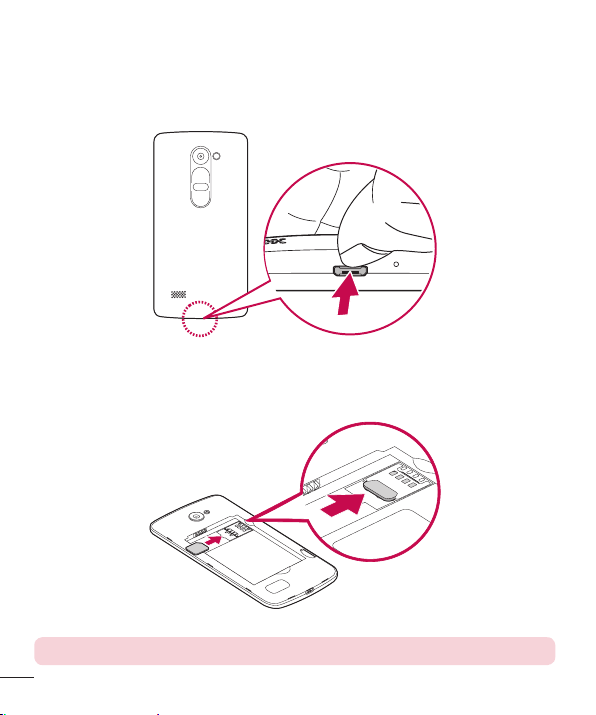
1 Toremovethebackcover,holdthephonermlyinonehand.Withyourotherhand,
liftoffthebackcoverwithyourthumbnailasshowninthegurebelow.
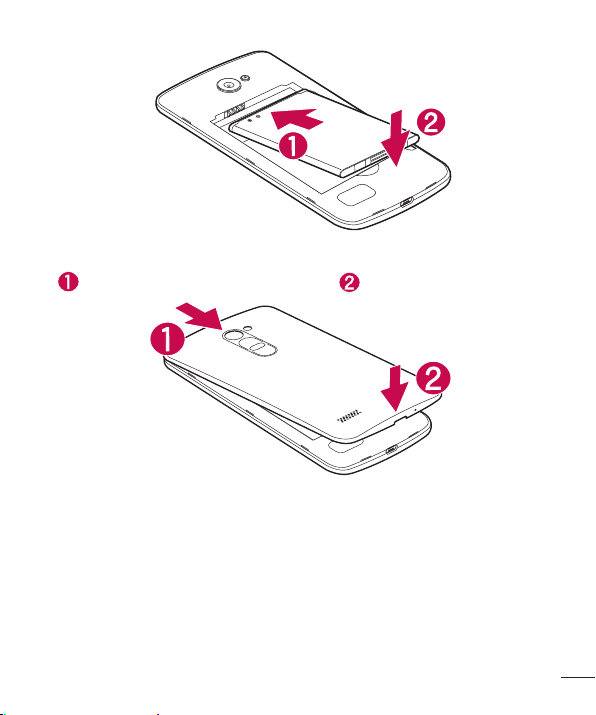
2 SlidetheSIMcardintotheSIMcardslotbelowthebattery,asshowninthegure.
Makesurethegoldcontactareaonthecardisfacingdownward.
NOTE: Only microSIM card types work with this device.
15
Getting to know your phone
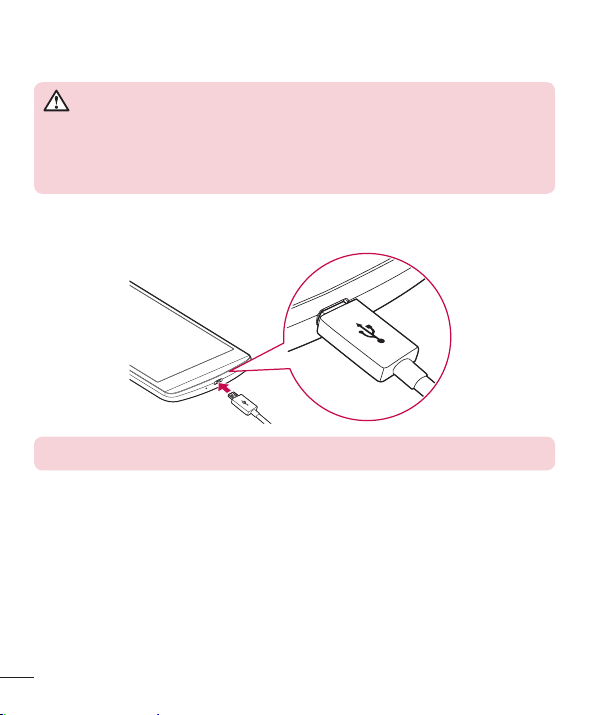
3 Insertthebattery.
4 Toreplacethecoverontothedevice,alignthecoveroverthebackofthephone
andpressitdownuntilitclicksintoplace .
16
Getting to know your phone
Charging the phone
Chargethebatterybeforeusingitforfirsttime.Usethechargertochargethebattery.
WARNING
Use only LG-approved chargers, batteries and cables. If you use unapproved
chargers, batteries or cables, it may cause a battery charging delay or display
a pop-up message regarding slow charging. It can also cause the battery to
explode or damage the device, which are not covered by the warranty.
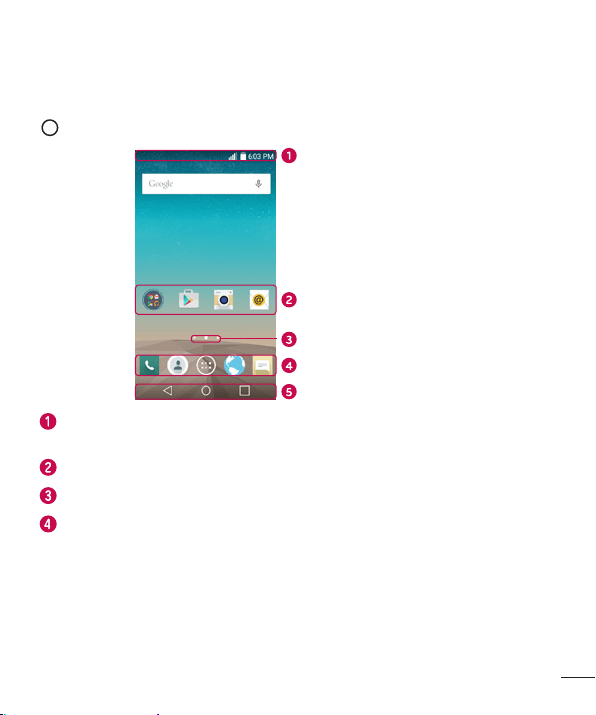
TheCharger/USBportisatthebottomofthephone.Insertthechargerandplugitinto
apoweroutlet.
NOTE: Do not open the back cover while your phone is charging.

17
Getting to know your phone
Unlocking the screen
Bydefault,yourscreenwilllockafteraperiodofinactivity,thenturnoff.
Unlocking the screen
1 PressthePower/Lock Keyordouble-taponthescreen.
2 Swipethescreeninanydirectiontounlockit.
Smart Lock
YoucanuseSmartLocktomakeunlockingyourphoneeasier.Youcanconfigureitto
keepyourphoneunlockedwhenyouhaveatrustedBluetoothdeviceconnectedtoit,
whenit'sinafamiliarlocation,likeyourhomeorwork,orwhenitrecognizesyourface.
Setting up Smart Lock
BeforeyouactivateSmartLock,youneedtosetupascreenlock(KnockCode,pattern,
PIN,orpassword).
1 FromtheHomescreen,tap
>Appstab(ifnecessary)> .
2 TapDisplaytab>Lock screen>Smart Lock.
3 Enteryourcurrentscreenlock.
4 Taponeoftheoptionsandaddtrusteddevices,locationsorfacialrecognition.

18
Your Home screen
Your Home screen
Touch screen tips
Herearesometipsonhowtonavigateonyourphone.
• Tap or touch–Asinglefingertapselectsitems,links,shortcutsandlettersonthe
on-screenkeyboard.
• Touch and hold–Touchandholdanitemonthescreenbytappingitandnot
liftingyourfingeruntilanactionoccurs.
• Drag–Touchandholdanitemforamomentandthen,withoutliftingyourfinger,
moveyourfingeronthescreenuntilyoureachthetargetposition.Youcandrag
itemsontheHomescreentorepositionthem.
• Swipe or slide–Toswipeorslide,quicklymoveyourfingeracrossthesurface
ofthescreen,withoutpausingwhenyoufirsttapit(soyoudon’tdraganitem
instead).
• Double-tap–Double-taptozoomonawebpageoramap(ifthefeatureis
supportedbytheapplication).
• Pinch-to-Zoom–Useyourindexfingerandthumbinapinchingorspreading
motiontozoominoroutwhenusingthebrowserormaps,orwhenbrowsing
pictures(ifthefeatureissupportedbytheapplication).
• Rotate the screen–Frommanyapplicationsandmenus,thescreenorientation
adjuststothedevice'sphysicalorientation.
NOTE:
• Do not press too hard; the tap screen is sensitive enough to pick up a light, yet
firm tap.
• Use the tip of your finger to tap the option you want. Be careful not to tap any
other buttons.
19
Your Home screen
Home screen
TheHomescreenisthestartingpointformanyandfunctions.Itallowsyoutoadd
itemslikeappshortcutsandGooglewidgetstogiveyouinstantaccesstoinformation
andapplications.Thisisthedefaultcanvasandaccessiblefromanymenubytapping
.
Status Bar
Application Icons
Location Indicator
Quick Key Area
Home Touch Keys
Showsthephone'sstatusinformation,includingthetime,signalstrength,battery
status,andnotificationicons.
Tapanicon(application,folder,etc.)toopenanduseit.
IndicateswhichHomescreencanvasyouarecurrentlyviewing.
Providesone-touchaccesstothefunctioninanyHomescreencanvas.
20
Your Home screen
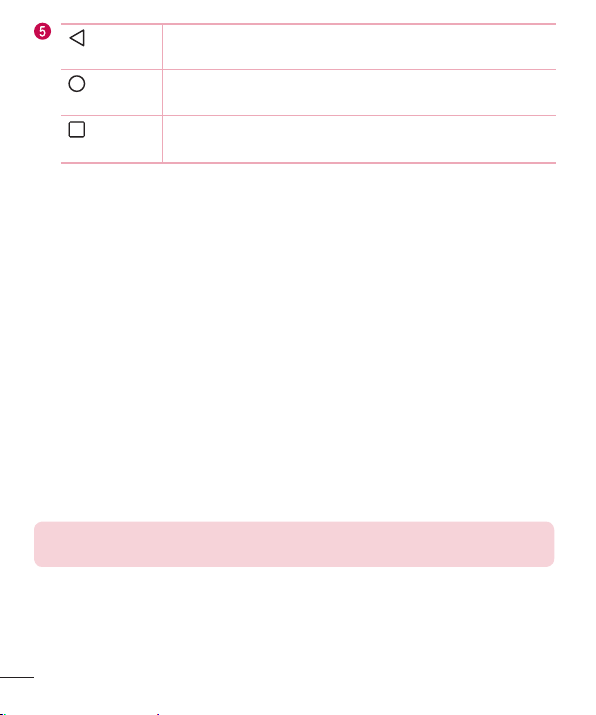
Back Key
Returnstothepreviousscreen.Alsoclosespop-upitems,such
asmenus,dialogboxesandtheon-screenkeyboard.
Home Key
ReturntotheHomescreenfromanyscreen.Touchandholdto
accesstheGoogleNowshortcut.
Recent
Apps Key
Displaysrecentlyusedapplications.Ifyoutouchandholdthis
key,itopensamenuofavailableoptions.
Extended Home screen
TheoperatingsystemprovidesmultipleHomescreencanvasestoprovidemorespace
foraddingicons,widgetsandmore.
• SlideyourfingerleftorrightacrosstheHomescreentoaccessadditional
canvases.
Customizing the Home screen
YoucancustomizeyourHomescreenbyaddingappsandwidgetsandchanging
wallpapers.
Adding items on your Home screen
1 TouchandholdtheemptypartoftheHomescreen.
2 ChoosetheAppsorWidgetstabandtapthedesireditem.
3 Dragittothedesiredlocationandliftyournger.
TIP! To add an application icon to the Home screen from the Apps screen,
touch and hold the application you want to add.
21
Your Home screen
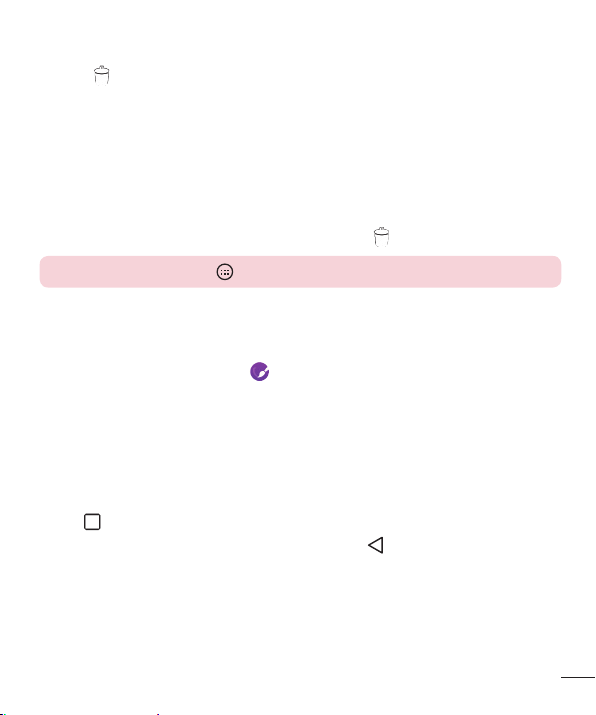
Removing an item from the Home screen
• WhileontheHomescreen,touchandholdtheiconyouwanttoremove,thendrag
itto andreleaseit.
Adding an app as a Quick Button
• FromtheAppsscreenorontheHomescreen,touchandholdanapplicationicon
anddragittotheQuickButtonarea.Thenreleaseitinthedesiredlocation.Upto5
appscanbeadded.
Removing an app from the Quick Button area
• TouchandholdthedesiredQuickButton,dragitto ,andreleaseit.
NOTE: The Apps Button cannot be removed.
Customizing app icons on the Home screen
1 Touchandholdanapplicationiconuntilitisunlockedfromitscurrentposition,
thenreleaseit.Theeditingicon willappearintheupperrightcornerofthe
application.
2 Taptheapplicationiconagainandselectthedesiredicondesignandsize.
3 TapOKtosavethechange.
Returning to recently-used applications
1 Tap .Apppreviewsofrecentlyusedapplicationswillbedisplayed.
2 Tapanapppreviewtoopentheapplication.Ortap
toreturntotheprevious
screen.
22
Your Home screen
Notifications panel
Notificationsalertyoutothearrivalofnewmessages,calendareventsandalarms,as
wellasongoingevents,suchaswhenyouareusingturn-by-turnnavigation.
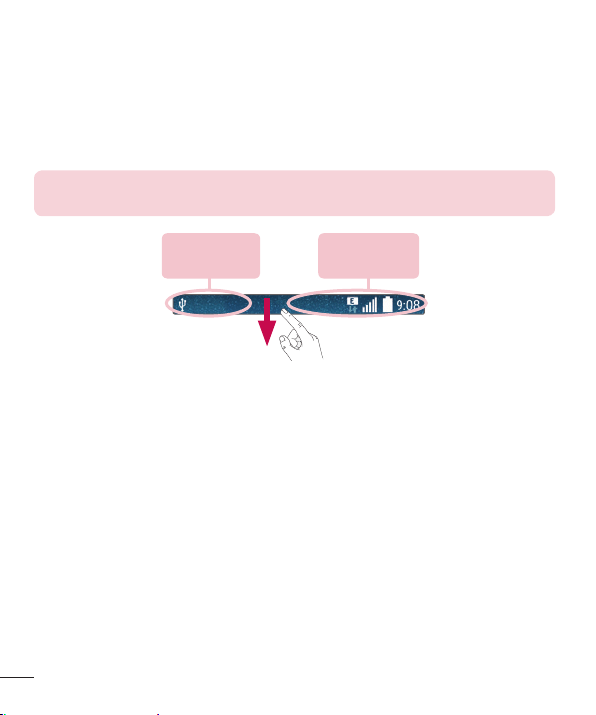
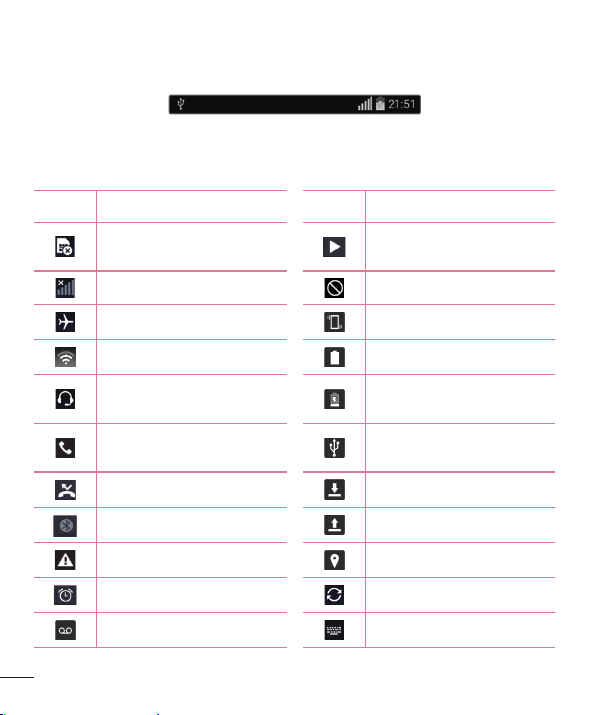
Whenanotificationarrives,itsiconappearsatthetopofthescreen.Iconsforpending
notificationsappearontheleft,andsystemicons,suchasWi-Fiandbatterystrength
areshownontheright.
NOTE: The available options may vary depending on the region or service
provider.
Pending
notifications
System
notifications
23
Your Home screen
Opening the Notifications panel
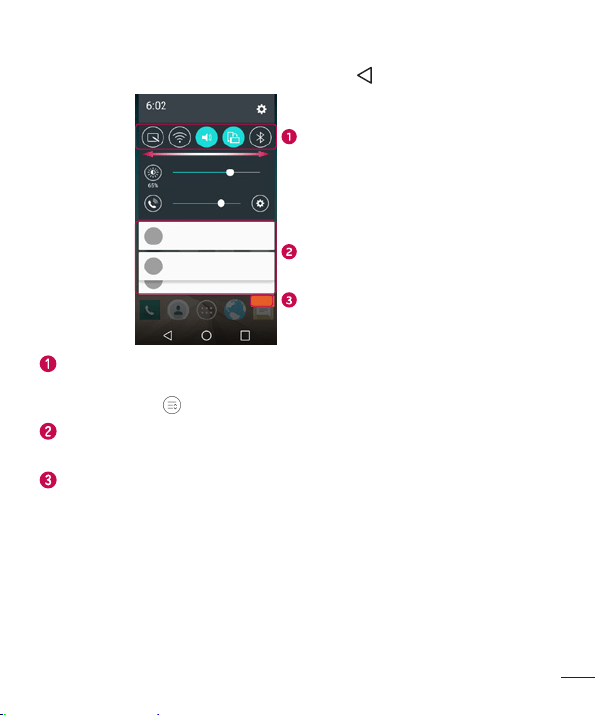
SwipedownfromtheStatusBartoopentheNotificationspanel.Toclosethe
Notificationspanel,swipethescreenupwardsortap .
Quick Settings Area
Notifications
Clear
TapeachQuickSettingkeytotoggleiton/off.Touchandholdthedesiredkeyto
directlyaccessthefunction'ssettingsmenu.ToseemoreQuickSettingkeys,swipe
leftorright.Tap
toremove,add,orrearrangeQuickSettingkeys.
Thecurrentnotificationsarelisted,eachwithabriefdescription.Tapanotification
toopenthecorrespondingapplicationthatmanagesit.
Taptoclearallofthenotifications.
24
Your Home screen
Indicator icons on the Status Bar
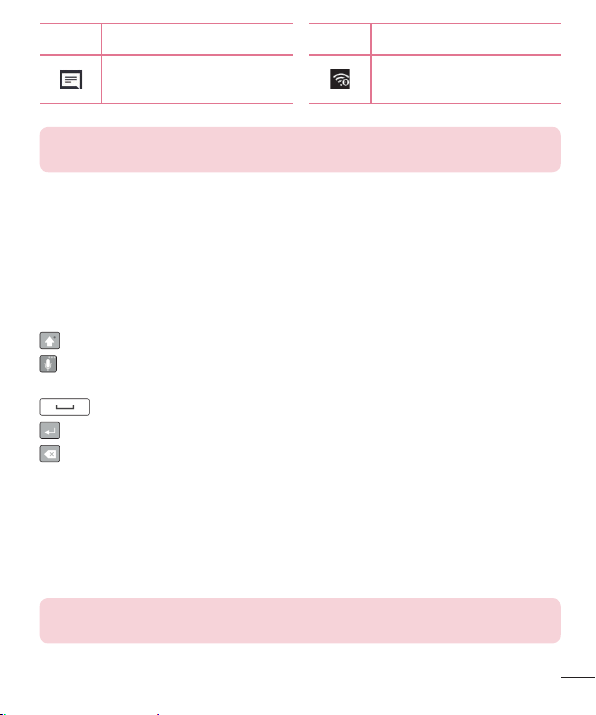
IndicatoriconsappearontheStatusbaratthetopofthescreentoreportmissedcalls,
newmessages,calendarevents,devicestatusandmore.
Theiconsdisplayedatthetopofthescreenprovideinformationaboutthestatusofthe
device.Theiconslistedinthetablebelowaresomeofthemostcommonones.
Icon Description Icon Description
NoSIMcardinserted
Amediafileiscurrently
playing
Nonetworksignalavailable Silentmodeisenabled
Airplanemodeison Vibratemodeison
ConnectedtoaWi-Finetwork Batteryfullycharged
Wiredheadset(withmic)
connected
Batteryischarging
Callinprogress
PhoneisconnectedtoPCvia
USBcable
Missedcall Downloadingdata
Bluetoothison Uploadingdata
Systemwarning
GPSison
Analarmisset Dataissynchronizing
Newvoicemailavailable Chooseinputmethod
25
Your Home screen
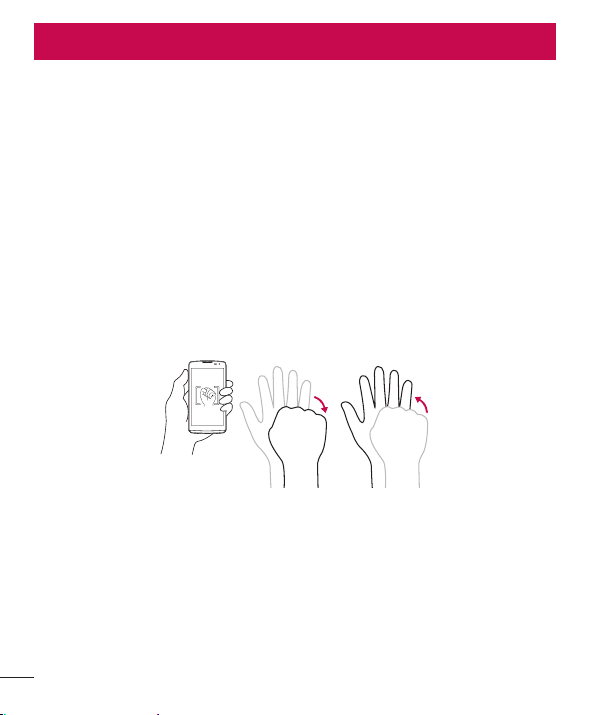
Icon Description Icon Description
Newtextormultimedia
message
Wi-Fihotspotisactive
NOTE: The icon's location in the Status bar may differ depending on the
function or service.
On-screen keyboard
Youcanentertextusingtheon-screenkeyboard.Theon-screenkeyboardappearson
thescreenwhenyoutapanavailabletextentryfield.
Using the keypad and entering text
Taponcetocapitalizethenextletteryoutype.Taptwiceforallcaps.
Taptoentertextwithyourvoice.TouchandholdtoaccesstheClipTrayandthe
keyboardsettings.
Taptoenteraspace.
Taptocreateanewlineinthemessagefield.
Taptodeletethepreviouscharacter.
Entering special characters
TheLGKeyboardallowsyoutoenterspecialcharacters(e.g."á")whenenteringtext.
Forexample,toenter"á",touchandholdthe"a"keyuntiltheadditionalcharactersare
displayed.Withoutliftingthefinger,dragyourfingertothedesiredspecialcharacterand
liftitoff.
NOTE: A symbol at the top right corner of a key indicates that additional
characters are available for that key.
26
Special Features
Gesture shot
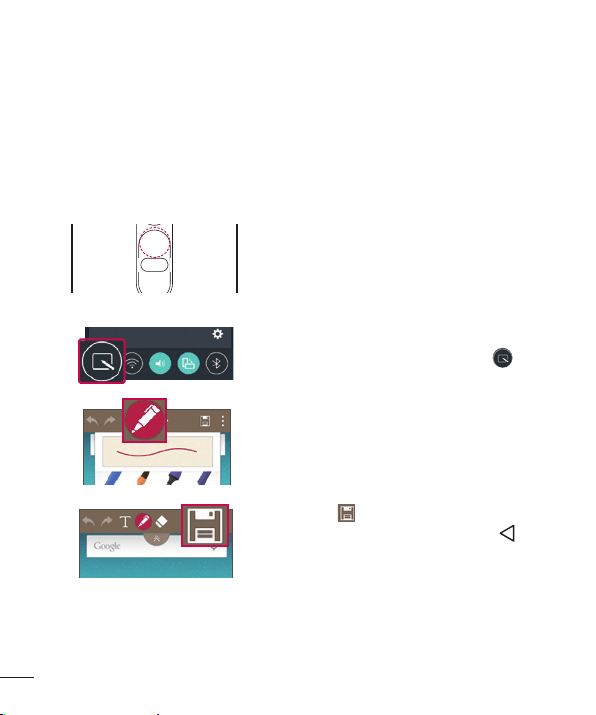
TheGestureshotfeatureallowsyoutotakeapicturewithahandgestureusingthe
frontcamera.
To take photo
TherearetwomethodsforusingtheGestureshotfeature.
• Raiseyourhand,withanopenpalm,untilthefrontcameradetectsitandabox
appearsonthescreen.Thencloseyourhandintoafisttostartthetimer,allowing
youtimetogetready.
• Raiseyourhand,inaclenchedfist,untilthefrontcameradetectsitandabox
appearsonthescreen.Thenunclenchyourfisttostartthetimer,allowingyoutime
togetready.
OR
Special Features

27
Special Features
KnockON
Youcanwakeup,orturnoff,thescreenaseasilyasdouble-tappingthescreen.
Whilethescreenisoff,andidle,double-tapthecenterscreenquicklytowakethe
screen.Toturnthescreenoff,double-taptheStatusbarinanyscreen(exceptonthe
cameraviewfinder)oremptyareaontheHomescreen.
NOTE: When using KnockOn to wake the screen, make sure you do not
cover the proximity sensor. Doing so will prevent the screen from turning on.
This feature is designed to prevent the device from turning on inadvertently in
your pocket or storage location.
Knock Code
TheKnockCodefeatureallowsyoutowakeandunlockthescreenwithyourown
KnockCodepattern.Whenenabled,KnockCodedividesthescreeninto4partsand
usesyouruniquecombinationoftapstosecureyourdevice.Youcandisablethis
featureintheLockscreensettings.
NOTE:
• If you enter an incorrect Knock Code combination 6 times, it will be necessary
to use your Google account log in or backup PIN.
• Use the fingertip instead of finger nail to tap the screen when using Knock
Code.
• When the Knock Code is not in enabled, you can use the Knock On function by
double-tapping the screen.
1 FromtheHomescreen,tap >Appstab(ifnecessary)> >Display tab>
Lock screen>Select screen lock>Knock Code.
2 Followtheon-screenstepstosetyourKnockCode.YouhavetocreateaBackup
PINasasafetymeasureincaseyouforgetyourKnockCode.
28
Special Features
Unlocking the screen using the Knock Code
YoucanwakeupandunlockthescreenbytappingtheKnockCode,setupinthe
previoussection,whenthescreenisoff.
QuickMemo+
TheQuickMemo+featureallowsyoutocapturescreenshotsandusethemtocreate
memos.YoucanuseQuickMemo+toeasilycreatememosduringacall,withasaved
pictureoronthecurrentphonescreenandsharethemwithfamilyandfriends.
1 Whilescreenisoff,pressandhold
theVolumeUpKey.
OR OR
Whilethescreenison,slidethe
StatusBardownwardandtap .
2 Usethetoolbartocreateamemo.
3 Tap tosavethememo.Toexit
QuickMemo+atanytime,tap .

29
Google account setup
Google account setup
Whenyoufirstturnonyourphone,youhavetheopportunitytosignintoyourGoogle
AccountandselecthowyouwanttousecertainGoogleservices.
Setting up your Google account
• Duringtheinitialbootupofyourdevice,ensureyourdeviceisconnectedtothe
Web.Then,signintoaGoogleAccountfromthepromptedsetupscreen.
OR
• AfterhavingexitedtheStartupWizard,tap > >Appstab(ifnecessary)>
>Generaltab>Accounts & sync>Add account>Google.
IfyoualreadyhaveaGoogleaccount,enteryouremailaddressandtapNEXT.
OnceyouhavesetupyourGoogleaccountonyourphone,yourphonewill
automaticallysynchronizewithyourGoogleaccountontheWeb(ifdataconnectionis
available).
Dependingonyoursynchronizationsettings,yourcontacts,Gmailmessages,Calendar
eventsandotherinformationfromtheseapplicationsandservicesontheWebare
synchronizedwithyourphone.
Aftersigningin,youcanuseGmail™andtakeadvantageofGoogleservicesonyour
phone.
30
Connecting to Networks and Devices
Connecting to Networks and Devices
Wi-Fi
Youcanusehigh-speedInternetaccesswhilewithinthecoverageofthewireless
accesspoint(AP).
Connecting to Wi-Fi networks
1 FromtheHomescreen,tap >Apps tab(ifnecessary)> >Networks tab
>Wi-Fi.
2 Tap
toturnWi-FionandstartscanningforavailableWi-Finetworks.
3 Tapanetworktoconnecttoit.
• Ifthenetworkissecuredwithalockicon,youwillneedtoenterasecuritykeyor
password.
NOTE:
• The Status bar displays icons that indicate Wi-Fi status.
• If you are out of the Wi-Fi zone or have set Wi-Fi to Off, the device may
automatically connect to the Web using mobile data, which may incur data
charges.
TIP! How to obtain the phone's MAC address
From the Home screen, tap
> Apps tab (if necessary) > > Networks
tab > Wi-Fi > > Advanced Wi-Fi > MAC address.

31
Connecting to Networks and Devices
Bluetooth
YoucanuseBluetoothtoconnectwithheadsets,soundsystems,oreventoexchange
databetweennearbydevices.
NOTE:
• LG is not responsible for the loss, interception or misuse of data sent or
received via the Bluetooth feature.
• Always ensure that you share and receive data with devices that are trusted and
properly secured.
• If there are obstacles between the devices, the operating distance may be
reduced.
• Some devices, especially those that are not tested or approved by Bluetooth
SIG, may be incompatible with your device.
Pairing your phone with another Bluetooth device
1 FromtheHomescreen,tap >Apps tab(ifnecessary)> >Networks tab
>Bluetooth.
2 Tap
toturnBluetoothon.
3 TapSearchtoviewthevisibledevicesinrange.
4 Choosethedeviceyouwanttopairwithfromthelistandfollowanysubsequent
instructionstocompletepairing.Oncetheparingissuccessful,yourphone
connectstotheotherdevice.
NOTE: Some devices, especially headsets or hands-free car kits, may have
a default Bluetooth PIN, such as 0000.
32
Connecting to Networks and Devices
Sending data via Bluetooth
1 Usinganapplicationthatsupportssharing,locatethedata,orle,thatyouwantto
share.
2 SelecttheShareoption.
3 SelectBluetooth.
4 SelectthepairedBluetoothdevice(orpairwithanewdevice).
NOTE: The method for selecting an option may vary by data type.
Receiving data via Bluetooth
1 FromtheHomescreen,tap >Apps tab(ifnecessary)> >Networks tab
>Bluetooth.
2 Tap
toturnBluetoothon.
3 Youwillreceivearequesttoacceptapairingattemptfromthesendingdevice.Be
suretoselectAccept.
Wi-Fi Direct
Wi-FiDirectprovidesadirectconnectionbetweenWi-Fienableddeviceswithout
requiringanaccesspoint.
Turning on Wi-Fi Direct
1 FromtheHomescreen,tap >Apps tab(ifnecessary)> > Networks tab
> Wi-Fi.
2 Tap
> Advanced Wi-Fi > Wi-Fi Direct.
NOTE: When in this menu, your device is visible to other visible Wi-Fi Direct
devices nearby.

33
Connecting to Networks and Devices
Transferring data between a PC and your device
YoucancopyormovedatabetweenaPCandthedevice.
Transferring data
1 ConnectyourdevicetoaPCusingtheUSBcablethatcamewithyourphone.
2 OpentheNoticationspanelandselectMedia device (MTP).
3 AwindowwillpopuponyourPC,allowingyoutotransferthedesireddata.
NOTE: The LG Android Platform Driver is required to be installed on your
PC to be able to detect the phone.
Items Requirement
OS MicrosoftWindowsXPSP3,Vistaorhigher
WindowMediaPlayerversion WindowsMediaPlayer10orhigher
34
Calls
Calls
Making a call
1 FromtheHomescreen,tap >Appstab(ifnecessary)> toopenthedialer.
2 Enterthenumberusingthedialer.Todeleteadigit,tap
.
3 Afterenteringthedesirednumber,tap
toplacethecall.
4 Toendthecall,tap
.
TIP! To enter "+" to make international calls, touch and hold .
Calling your contacts
1 FromtheHomescreen,tap >Appstab(ifnecessary)> toopenyour
contacts.
2 Scrollthroughthecontactlist.Youcanalsoenterthecontact'snameintheSearch
eldorscrollalongthealphabetlettersontherightedgeofthescreen.
3 Toplacethecall,tap
nexttothecontactyouwanttocall.
Answering and rejecting a call
Whenyoureceiveacall,swipe inanydirectiontoanswerthecall.
Swipe
inanydirectiontodeclinethecall.
35
Calls
Making a second call
1 Duringyourrstcall,tap >Add call.
2 Enterthenumberandtap
toplacethecall.
3 Bothcallsaredisplayedonthecallscreen.Yourinitialcallislockedandputon
hold.
4 Totogglebetweennumbers,tapthenumberdisplayedonthescreen.Youcanalso
tap
tostartaconferencecall.
5 Toendallcalls,tapEnd.
NOTE: You may be charged for each call you make.
Viewing your call logs
FromtheHomescreen,tap >Appstab(ifnecessary)> andselectCall logs
tab.
Alistofalldialed,receivedandmissedcallsisdisplayed.
TIP!
• Tap any call log entry to view the date, time and duration of the call.
• Tap , then tap Clear all to delete all of the recorded items.
Call settings
Youcanconfigurephonecallsettings,suchascallforwarding,aswellasotherspecial
featuresofferedbyyourcarrier.
1 FromtheHomescreen,tap
>Appstab(ifnecessary)> toopenthedialer.
2 Tap
todisplaytheavailableoptions.
3 TapCall settingsandcongurethedesiredoptions.
36
Contacts
Contacts
AddcontactstoyourphoneandsynchronizethemwiththecontactsinyourGoogle
accountorotheraccountsthatsupportcontactsyncing.
Searching for a contact
1 FromtheHomescreen,tap >Appstab(ifnecessary)> toopenyour
contacts.
2 TapSearch contactsandenterthecontactnameusingthekeyboard.Youcanalso
scrollalongthealphabetlettersontherightedgeofthescreen.
Adding a new contact
1 FromtheHomescreen,tap >Appstab(ifnecessary)> andenterthenew
contact'snumber.
2 Tap
>Add to Contacts.
3 Ifyouwanttoaddapicturetothenewcontact,taptheimageicon.ChooseTake
photoorSelect from Gallery.
4 Enterthedesiredinformationforthecontact.
5 TapSave.
37
Contacts
Favorites contacts
Youcanclassifyfrequentlycalledcontactsasfavorites.
Adding a contact to your favorites
1 FromtheHomescreen,tap >Appstab(ifnecessary)> toopenyour
contacts.
2 Tapacontacttoviewitsdetails.
3 Tapthestaratthetoprightcornerofthescreen.Thestarturnsyellow.
Removing a contact from your favorites list
1 FromtheHomescreen,tap >Appstab(ifnecessary)> toopenyour
contacts.
2 TaptheFavoritestabandchooseacontacttoviewitsdetails.
3 Taptheyellowstaratthetoprightcornerofthescreen.Thestarturnsadarkcolor
andthecontactisremovedfromyourfavorites.
Creating a group
1 FromtheHomescreen,tap >Appstab(ifnecessary)> toopenyour
contacts.
2 TapGroups>
>New group.
3 Enteranameforthenewgroup.Youcanalsosetadistinctringtoneforthegroup
andtheaccounttosavethegroupto.
4 TapAdd memberstoaddcontactstothegroup.
5 TapSavetosavethegroup.
NOTE: If you delete a group, the contacts assigned to that group are not
lost. They remain in your contact list.
38
Messaging
Messaging
Yourphonecombinestextandmultimediamessagesintooneintuitive,easy-to-use
menu.
Sending a message
1 FromtheHomescreen,tap >Appstab(ifnecessary)> > tocreatea
newmessage.
2 EnteracontactnameorcontactnumberintotheToeld.Asyouenterthecontact
name,matchingcontactsappear.Youcantapasuggestedrecipientandaddmore
thanonecontact.
NOTE: You may be charged for each text message you send. Please consult
with your service provider.
3 Tapthetexteldandbegincomposingyourmessage.
4 Tap
toopenthemessagingoptions.
TIP! You can tap to attach a file that you want to share.
5 TapSendtosendyourmessage.
TIP!
• The 160-character limit may vary from country to country, depending on the
language and how the text message is coded.
• If an image, video or audio file is added to a text message, it is automatically
converted into a multimedia message and you may be charged accordingly.

39
Messaging
Conversation view
Textandmultimediamessagesexchangedwithanotherpartyaredisplayedin
chronologicalordersothatyoucanconvenientlyseeandfindyourconversations.
Changing message settings
Yourphone'smessagingsettingsarepredefinedtoallowyoutosendmessages
immediately.Youcanchangethesettingsbasedonyourpreferences.
• OpentheMessagingappandtap >Settings.

40
Email
Email
YoucanusetheEmailapplicationtoreademailsfromserviceslikeGmail.TheEmail
applicationsupportsthefollowingaccounttypes:POP3,IMAPandExchange.Your
serviceproviderorsystemadministratorcanprovideyouwiththeaccountsettingsyou
need.
Managing email accounts
ThefirsttimeyouopentheEmailapplication,asetupwizardopenstohelpyoutoset
upanemailaccount.
Adding another email account:
OpentheEmailappandtap >Settings> Add account.
Changing an email general settings:
OpentheEmailappandtap >Settings>General settings.
Deleting an email account:
OpentheEmailappandtap >Settings> >Remove account>Selectthe
accountyouwanttodelete>Remove>Yes.
Working with account folders
Toaccessyouremailaccount'sfolders,opentheEmailappandtap >Folders.
EachaccounthasanInbox,Outbox,SentandDraftsfolder.Dependingonthefeatures
supportedbyyouraccount'sserviceprovider,youmayhaveadditionalfolders.

41
Email
Composing and sending email
Composing and sending messages
1 WhileintheEmailapplication,tap tocreateanewemail.
2 Enteranaddressforthemessage'sintendedrecipient.Asyouentertext,matching
addresseswillbeproposedfromyourContacts.Separatemultipleaddressesusing
semicolons.
3 TaptheCc/Bcceldtocopycontactsortap
toattachles,ifrequired.
4 Entertheemail'stext.
5 Tap
tosendtheemail.
42
Camera and Video
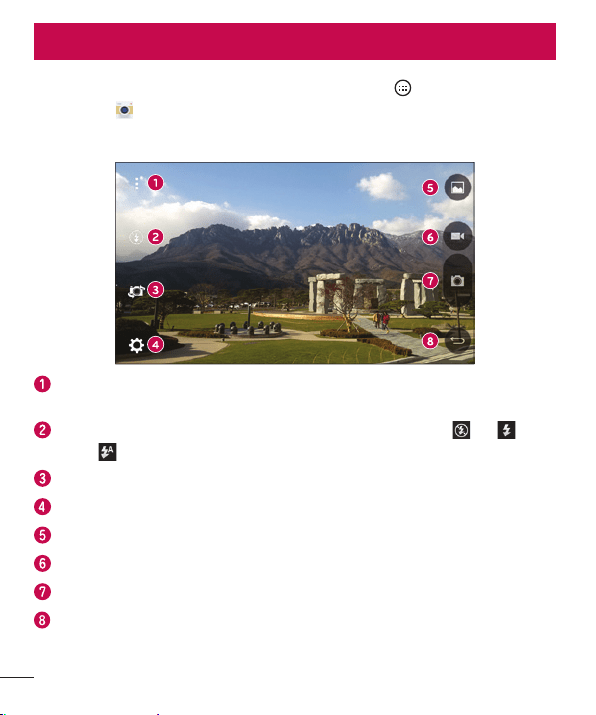
ToopentheCameraapplication,fromtheHomescreen,tap >Appstab(if
necessary)> .
Camera options on the viewfinder
Hide/Display Options–Taptohide/displaythecameraoptionsonthe
viewfinder.
Flash–Allowsyoutomanagethecamera'sflash.ChoosefromOff ,On ,
Auto .
Swap camera–Taptoswapbetweentherearcameraandthefrontcamera.
Settings–Taptoadjustthecameraandvideosettings.
Gallery–TaptoaccessyourGallery.
Record–Taptostartrecordingavideo.
Capture –Taptotakeaphoto.
Exit –TaptoclosetheselectedmenuorexittheCameraapp.
Camera and Video
43
Camera and Video
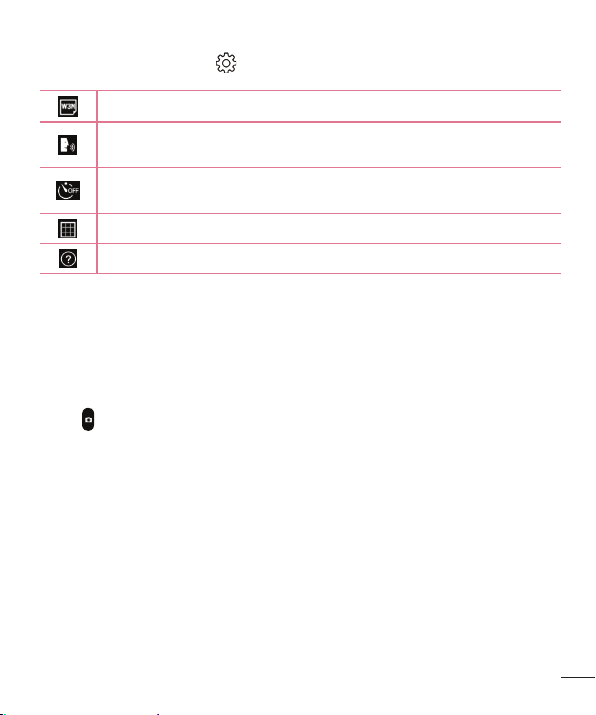
Using the advanced settings
Inthecameraviewfinder,tap toaccessthecamerasettingsbelow.
Selectsthephotoandvideoresolution.
Allowsyoutosayavoicecommandtotakepictures.YoucansayLG,
Cheese,Smile,oranyotheravailablecommand.
Setsadelayafterthecapturekeyispressed.Thisisidealifyouwanttobe
inthephotoorvideo.
Displaysgridlinestohelpyoualignyourpicturesandvideos.
OpenstheHelpguidetoshowhowtouseafunction.
Taking a photo
1 OpentheCameraapplicationandpointthelenstowardthesubjectyouwantto
photograph.
2 Placethesubjectofthepictureatthecenteroftheviewnder.
3 Tap
tocapturethephoto.
44
Camera and Video
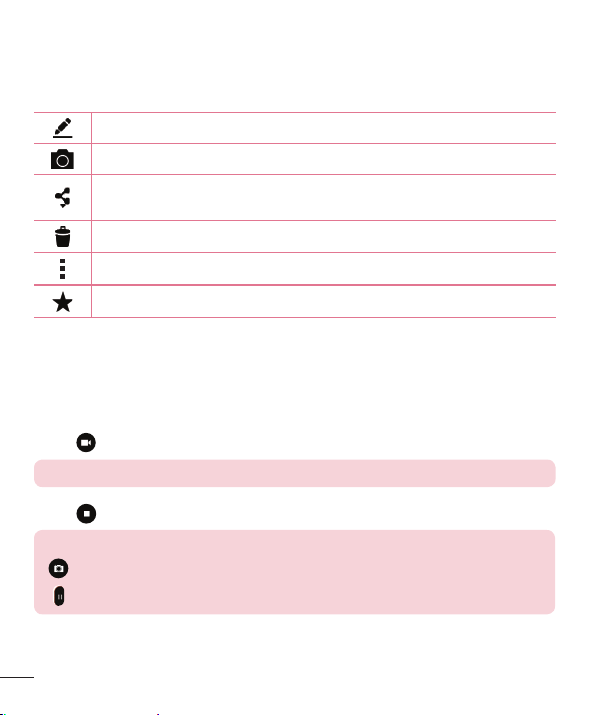
Once you have taken a photo
Taptheimagethumbnailonthescreentoviewthelastphotoyoutook.Thefollowing
optionsareavailable.
Taptoeditthephoto.
Taptotakeanotherphotoimmediately.
Taptosendyourphototoothersorshareitinviaanyavailablesocial
networkservices.
Taptodeletethephoto.
Taptoaccessadditionaloptions.
Taptoaddthephototoyourfavorites.
Recording a video
1 OpentheCameraapplicationandpointthelenstowardthesubjectyouwantto
captureinyourvideo.
2 Tap
oncetostartrecording.
NOTE: The timer will be displayed on the screen.
3 Tap tostoprecording.
TIP!
– Tap to capture a screen shot while recording a video.
– Tap to pause the recording.
45
Camera and Video
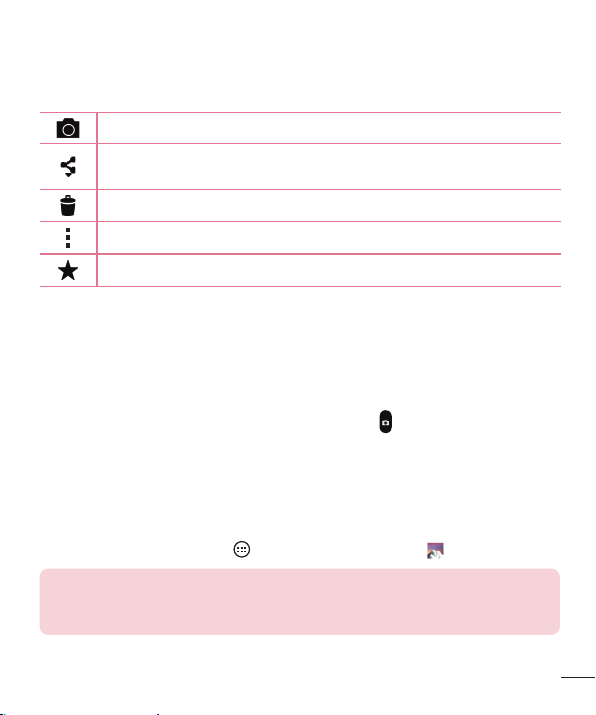
After recording a video
Tapthevideothumbnailonthescreentoviewthelastvideoyourecorded.The
followingoptionsareavailable.
Taptorecordanothervideoimmediately.
Taptosendyourvideotoothersorshareitviaanyavailablesocialnetwork
services.
Taptodeletethevideo.
Taptoaccessadditionaloptions.
Taptoaddthevideotoyourfavorites.
Multi-point Auto-focus
Whenyoutakeapicture,theMulti-pointAuto-focus(AF)functionoperatesautomatically
andallowsyoutoseeaclearimage.
Burst shot
Allowsyoutotakemultipleshotsquickly.Touchandhold totakemultiplepictures
quickly.
Gallery
TheGalleryallowsyoutoviewandmanageallofyourpicturesandvideos.
• FromtheHomescreen,tap >Apps tab(ifnecessary)> .
NOTE:
• Depending on the software installed, some file formats may not be supported.
• Some files may not play properly due to their encoding.
46
Camera and Video
Viewing pictures
TheGallerydisplaysyourpicturesinfolders.Whensomeapplicationssaveapicture,a
folderisautomaticallycreatedtocontainthepicture.
Picturesaredisplayedinafolderbythedatetheywerecreated.Selectapicturetoview
itfullscreen.Scrollleftorrighttoviewthenextorpreviousimage.
Zooming in and out
Useoneofthefollowingmethodstozoominandoutonanimage:
• Double-tapanywheretozoomin.
• Spreadtwofingersapartonanyplaceinthepicturetozoomin.Pinchinordouble-
taptheimagetozoomout.
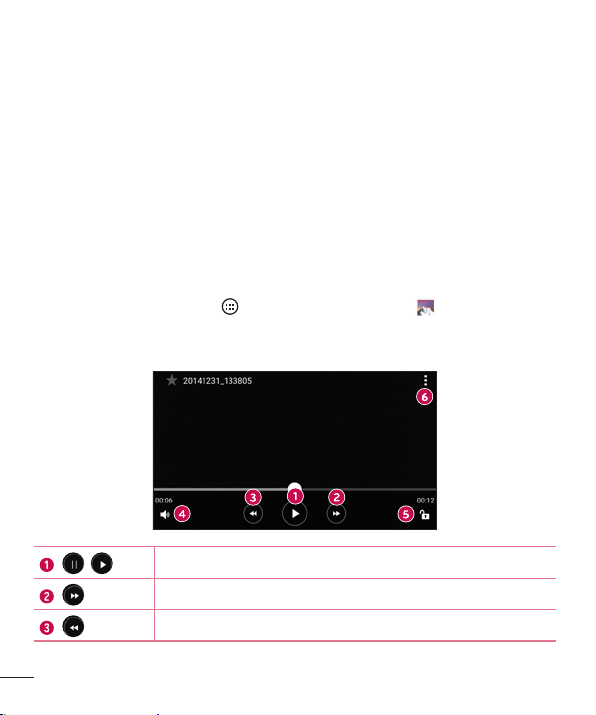
Video options
1 FromtheHomescreen,tap >Apps tab(ifnecessary)> .
2 Selectthevideoyouwanttowatch.
Thefollowingoptionsareavailable.
/
Touchtopause/resumevideoplayback.
Touchtofast-forward10seconds.
Touchtorewind10seconds.
47
Camera and Video
Touchtoadjustthevideovolume.
Touchtolock/unlockthescreen.
Taptoaccessadditionaloptions.
Tochangethevolumewhilewatchingavideo,presstheVolumeUp/DownKeysonthe
backofthephone.
Editing photos
Whileviewingaphoto,tap .
Deleting photos/videos
Useoneofthefollowingmethods:
• Whileinafolder,tap ,selectthephotos/videosyouwanttodelete.Thentap
Delete.
• Whileviewingaphoto,tap .
Setting wallpaper
Whileviewingaphoto,tap >Set image astosettheimageaswallpaperorassign
ittoacontact.
NOTE:
• Depending on the software installed, some file formats may not be supported.
• If the file size exceeds the available memory, an error can occur when you open
files.
48
Multimedia
Music
Yourphonehasamusicplayerthatletsyouplayallyourfavoritetracks.Toaccessthe
musicplayer,fromtheHomescreen,tap >Apps tab(ifnecessary)> .
Playing a song
1 fromtheHomescreen,tap >Apps tab(ifnecessary)> .
2 TaptheSongstab.
3 Selectthesongyouwanttoplay.
4 Thefollowingoptionsareavailable.
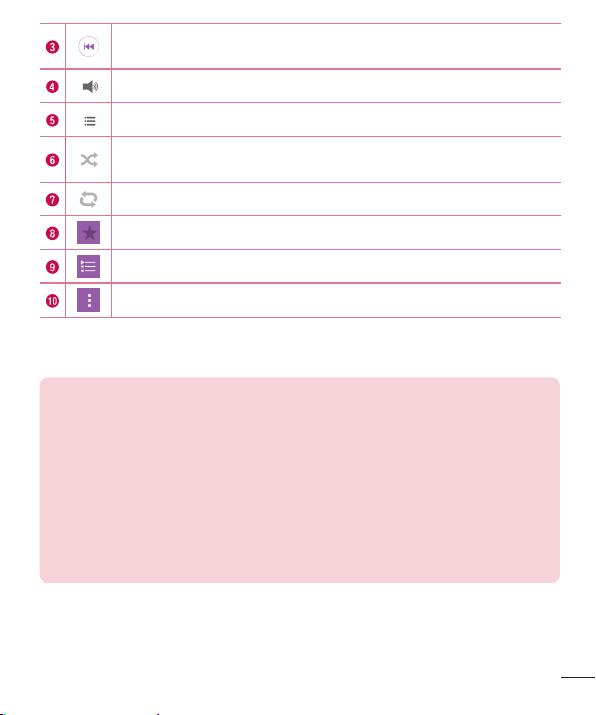
Taptopauseplayback.
Taptoresumeplayback.
Taptoskiptothenexttrackinthealbum,playlistorshufflelist.Touchand
holdtofast-forward.
Multimedia
49
Multimedia
Taptorestartthecurrenttrackorskiptotheprevioustrackinthealbum,
playlistorshufflelist.Touchandholdtorewind.
Taptoadjustthevolume.
Taptoseeallsonglist.
Taptoplaythecurrentplaylistinshufflemode(tracksareplayedin
randomorder).
Taptotogglethroughrepeatallsongs,repeatcurrentsongandrepeatoff.
Taptoaddthesongtoyourfavorites.
Taptoopenthecurrentplaylist.
Taptoaccessadditionaloptions.
Tochangethevolumewhilelisteningtomusic,presstheVolumeUp/DownKeysonthe
backsideofthephone.
NOTE:
• Depending on the software installed, some file formats may not be supported.
• If the file size exceeds the available memory, an error can occur when you open
files.
• Music file copyrights may be protected by international treaties and national
copyright laws.
Therefore, it may be necessary to obtain permission or
a license to reproduce or copy music. In some countries, national laws
prohibit private copying of copyrighted material. Before downloading or
copying the file, check the national laws of the relevant country concerning
the use of such material.
50
Utilities
Clock
UsetheClockapptoaccesstheAlarms,Timer,WorldclockandStopwatchfunctions.
Accessthesefunctionsbytappingthetabsacrossthetopofthescreenorswiping
horizontallyacrossthescreen.
ToaccesstheClockapp,fromtheHomescreen,tap
>Appstab(ifnecessary)>
.
Alarms
TheAlarmstaballowsyoutosetalarms.
1 OpentheClockapp,thenselecttheAlarmstab.
2 Tap
toaddanewalarm.
3 AdjustthesettingsasnecessaryandtapSave.
NOTE: You can also tap an existing alarm to edit it.
Timer
TheTimercanalertyouwithanaudiblesignalwhenasetamountoftimehaspassed.
1 OpentheClockapp,thenselecttheTimertab.
2 Setthedesiredtimeonthetimer.
3 TapStarttostartthetimer.
4 TapStoptostopthetimer.
Utilities

51
Utilities
World clock
TheWorldclockallowsyoutoeasilycheckthecurrenttimeinothercitiesaroundthe
world.
1 OpentheClockapp,thenselecttheWorld clocktab.
2 Tap
andselectthedesiredcity.
Stopwatch
TheStopwatchfeatureallowsyoutouseyourphoneasastopwatch.
1 OpentheClockapp,thenselecttheStopwatchtab.
2 TapStarttoinitiatethestopwatch.
NOTE: Tap Lap to record lap times.
3 TapStoptostopthestopwatch.
NOTE: To reset the stopwatch, tap the Reset button. You can also tap the
Resume button to resume the stopwatch.
Calculator
TheCalculatorappallowsyoutoperformmathematicalcalculationsusingastandard
calculatororascientificcalculator.
1 FromtheHomescreen,tap
>Appstab(ifnecessary)> .
2 Tapthenumberkeystoenternumbers.
3 Forsimplecalculations,tapthefunctionyouwanttoperform(+,–,xor÷)followed
by=.
4 Formorecomplexcalculations,tap
>Scientific calculatorandselectthe
desiredfunction.
NOTE: To check the history of calculations, tap > Calculation history.
52
Utilities
Calendar
TheCalendarappallowsyoutotrackyourscheduleofevents.
1 FromtheHomescreen,tap
>Apps tab(ifnecessary)> .
2 Tapthedateyouwanttoaddaneventto.Thentap
.
3 EntertheeventdetailsandtapSavetosavetheevent.
Voice Recorder
TheVoiceRecorderapprecordsaudiblefilesforyoutouseinavarietyofways.
Recording a sound or voice
1 FromtheHomescreen,tap >Appstab(ifnecessary)> .
2 Tap
tobeginrecording.
3 Tap
toendtherecording.
4 Tap
tolistentotherecording.
NOTE: Tap to access your recordings. You can listen to your saved
recordings. The displayed available recording time may differ from actual
recording time.
53
Utilities
Voice Search
Usethisapplicationtosearchthewebusingyourvoice.
1 FromtheHomescreen,tap
>Appstab(ifnecessary)>Google folder >
.
2 SayakeywordorphrasewhenListening...appearsonthescreen.Selectoneof
thesuggestedkeywordsthatappear.
NOTE: This application may not be available depending on the region or
service provider.
Downloads
Usethisapplicationtoseewhatfileshavebeendownloadedthroughyourapplications.
• FromtheHomescreen,tap >Appstab(ifnecessary)> .
NOTE: This application may not be available depending on the region or
service provider.
54
Browsing the Web
Browsing the Web
Browser
UsethisapplicationtobrowsetheInternet.Browsergivesyouafast,full-colorworld
ofgames,music,news,sports,entertainmentandmuchmore,rightonyourmobile
phone.
NOTE: Additional charges apply when connecting to these services and
downloading content. Check data charges with your network provider.
• FromtheHomescreen,tap >Apps tab(ifnecessary)> .
Using the Browser toolbar
Scrolltowardsthetopofthewebpagetoaccessthebrowsertoolbar.
Taptogobackonepage.
Taptogoforwardonepage.
TaptogototheHomepage.
Taptoopenanewwindow.
Taptoaccessyourbookmarks.
Viewing webpages
Taptheaddressfield,enterthewebaddressandtapGoonthekeyboard.
55
Browsing the Web
Opening a page
Toopenanewpage,tap .
Togotoanotherwebpage,tap
,scrollupordown,andtapthepagetoselectit.
Searching the web by voice
Inthebrowser,taptheaddressfieldandthentap .Whenprompted,sayakeyword
andselectoneofthesuggestedkeywordsthatappear.
NOTE: This feature may not be available depending on the region or service
provider.
Bookmarks
Tobookmarkthecurrentwebpage,tap >Add to bookmarks>OK.
Toopenabookmarkedwebpage,tap
andselectthedesiredone.
History
Tap >Historytoopenalistofrecentlyvisitedwebpages.Toclearallofyourhistory,
tap >Yes.
56
Browsing the Web
Chrome
UseChrometosearchforinformationandbrowsewebpages.
• FromtheHomescreen,tap >Apps tab(ifnecessary)> .
NOTE: This application may not be available, depending on your region and
service provider.
Viewing webpages
IntheChromebrowser,taptheaddressfield,andthenenterawebaddressorsearch
criteriaandtapGoonthekeyboard.
Opening a page
Toopenanewpage,tab >New tab.
Togotoanotherwebpage,tap
(iftabsaremergedwithapps)or atthetopright
cornerofthebrowser(iftabsarenotmergedwithapps).Thentapthedesiredpageto
viewit.

57
Settings
Settings
Thissectionprovidesanoverviewofitemsyoucanchangeusingyourphone’sSystem
Settingsmenus.
Accessing the Settings menu:
• FromtheHomescreen,touchandhold >System settings.
OR
• FromtheHomescreen,tap >Apps tab(ifnecessary)> .
Networks
< WIRELESS NETWORKS >
Airplane mode
AirplaneMode(flightmode)allowsyoutousemanyofyourphone'sfeatures,suchas
games,andmusic,whenyouareinanareawheremakingorreceivingcallsordata
useisprohibited.WhenyousetyourphonetoAirplaneMode,itcannotsendorreceive
anycallsoraccessonlinedata.
Wi-Fi
AllowsyoutomanageyourWi-FiconnectionsandconnecttoavailableWi-Finetworks.
Bluetooth
AllowsyoutomanageyourtheBluetoothwirelessfeature.
Mobile data
Displaysthedatausageandallowsyoutosetamobiledatausagelimit.
Call
Configurephonecallsettingssuchascallforwardingandotherspecialfeaturesoffered
byyourcarrier.

58
Settings
• Voicemail–Allowsyoutomanageyourvoicemailsettings.
• VoLTE–AllowsyoutoturntheVoLTEfeatureonandoff.
• Wi-Fi Calling–Wi-FiCallingcanimproveyourcoverageandallowsyoutomake
phonecallsoveraWi-Finetwork(whenaWi-Finetworkisavailable).
Important! Wi-Fi Calling requires that you use the SIM card that is
shipped with your phone. Also, you must register your address for 9-1-1.
Wi-Fi Calling will not work until you have registered for 9-1-1 by logging
into your account at www.T-Mobile.com. Go to your profile and click
Customer Info and continue on to enter your address.
• Fixed dialing numbers–Turnonandcompilealistofnumbersthatcanbecalled
fromyourphone.You’llneedyourPIN2,whichisavailablefromyouroperator.Only
numberswithinthefixeddiallistcanbecalledfromyourphone.
• Incoming voice call pop-up–Displaysapop-upforanincomingcallwhenan
appisinuse.
• Call reject–Allowsyoutosetcallrejectionandmanagetherejectlist.
• Decline with message–Whenyouwanttorejectacall,youcansendaquick
messageinstead.Thisisusefulifyouneedtorejectacallduringameeting.This
menuallowsyoutomanagethemessagesyoucansend.
• Call forwarding–Allowsyoutosetthecallforwardingoptions.
• Auto answer–Automaticallyanswerafterthesettime,whenahands-freedevice
isconnected.
• Connection vibration–Vibratesyourphonewhentheotherpartyanswersthe
call.
• TTY mode –AllowsyoutoactivateTTYmode.
• Hearing aids –Allowsyoutoturnonhearingaidcompatibility.
• Noise suppression –Suppressesbackgroundnoiseonyourdeviceduringacall.
• Power key ends call–AllowsyoutoendthecallbypressingthePower/LockKey.

59
Settings
• Call barring–Taptolockincomingand/oroutgoinginternationalcalls.
• Call duration–ViewthedurationofcallsincludingLastcall,Outgoingcalls,
IncomingcallsandAllcalls.
• Additional settings–Allowsyoutomanageadditionalcallsettings.
< CONNECTIVITY >
Share & connect
• LG PC Suite–ConnectLGPCSuitewithyourphonetoeasilymanagemultimedia
contentandapps.
Tethering & networks
• USB tethering–Allowsyoutosharetheinternetconnectionwithyourcomputer
viaaUSBcable.
• Mobile HotSpot–Allowsyoutocreateahotspotandshareyourconnection.
• Help–DisplaysHelpinformationaboutUSBtethering,Wi-Fihotspot,andBluetooth
tethering.
• Wi-Fi Calling–Wi-FiCallingcanimproveyourcoverageandallowsyoutomake
phonecallsoveraWi-Finetwork(whenaWi-Finetworkisavailable).
• Mobile networks–Thismenuallowsyoutoconfigurevariousmobilenetwork
settings.
• VPN–Fromyourphone,youcanadd,setup,andmanagevirtualprivatenetworks
(VPNs)thatallowyoutoconnectandaccessresourcesinsideasecuredlocal
network,suchasyourcorporatenetwork.
NOTE: You must set a screen lock before you can use VPN.

60
Settings
Sound
< BASIC >
Sound profile
Allowsyoutosetyourphone'ssoundprofile.ChoosefromSoundandVibrate only.
Volume
Adjustthephone’svolumesettingstosuityourneedsandenvironment.
< RINGTONES & VIBRATIONS >
Ringtone
Allowsyoutosettheringtonesforcalls.Youcanalsoaddaringtonebytapping
in
theupper-rightcornerofthescreen.
Notification sound
Allowsyoutosetthenotificationsound.Youcanalsoaddanotificationsoundby
tapping
intheupper-rightcornerofthescreen.
Sound with vibration
Allowsyoutosetthephonetovibrateinadditiontotheringtonewhenyoureceivecalls.
Vibration type
Allowsyoutochoosethetypeofvibration.
< NOTIFICATIONS >
Interruptions
Allowsyoutosetaschedulewhentopreventinterruptionsfromnotifications.Youcan
settoallowcertainfeaturestointerruptwhenPriorityonlyisset.
Lock screen
Allowsyoutochooseifyouwanttoshoworhidenotificationsonthelockscreen.

61
Settings
Apps
Allowsyoutopreventappsfromdisplayingnotifications.Youcanalsosetappstoshow
notificationswithprioritywhenDonotdisturbissettoPriorityonly.
< ADVANCED SETTINGS >
Vibrate on tap
EnabletovibratewhentappingtheHometouchbuttonsandduringotherUI
interactions.
Sound effects
Taptosetthedialpadtouchtones,touchsoundsandscreenlocksound.
• Dialpad touch sounds –Allowsyoutoplaytoneswhileusingthedialpad.
• Touch sounds –Allowsyoutoplayasoundwhenmakingascreenselections.
• Screen lock sound –Allowsyoutoplayasoundwhenlockingandunlockingthe
screen.
Message/call voice notifications
Tap
toggleitOnorOff.Onallowsyourdevicetoreadoutincomingcallsand
messageeventsautomatically.
Display
< HOME & LOCK >
Home screen
• Select Home –Allowsyoutoselectthehomeinterfaceyouwouldliketouse.
ChooseHomeforusersexperiencedwithAndroid'slayoutorEasyHomeforan
easierinterfaceforbeginners.
• Wallpaper –AllowsyoutosetthedesiredwallpaperforyourHomescreen.
• Screen swipe effect –Choosethedesiredtypeofeffecttodisplaywhenyou
swipefromoneHomescreencanvastothenext.

62
Settings
• Allow Home screen looping –Displaysthefirstscreenafterthelastscreenwhen
scrollingtheHomescreen.
• Home backup & restore –Youcanbackupandrestoreapp/widgetlayoutsand
theHomescreenwallpaper.
• Help –DisplayshelpinformationfortheHomescreen.
Lock screen
• Select screen lock–Allowsyoutosetthescreenlockforyourphone.
• Smart Lock–Allowsyoutosettokeepyourphoneunlockedwhenyouhavea
trustedBluetoothdeviceconnectedtoit,whenit'sinafamiliarlocationlikeyour
homeorwork,orwhenitrecognizesyourface.
• Screen swipe effect–Setsthescreenswipeeffectoptions.
NOTE: This setting name may be Pattern effect if the Screen lock is set to
Pattern.
• Wallpaper–AllowsyoutosetyourLockscreenwallpaper.
• Shortcuts–Allowsyoutochoosetheshortcutsavailableonthelockscreen.
• Contact info for lost phone–Allowsyoutodisplaytheownerinformationonthe
lockscreenincasethephoneislost.
• Lock timer–Allowsyoutosettheamountoftimebeforethescreenautomatically
locksafterthescreenhastimed-out.
• Power button instantly locks–Allowsyoutoinstantlylockthescreenwhenthe
Power/LockKeyispressed.ThissettingoverridestheLocktimersetting.
Home touch buttons
SettheHometouchbuttonsdisplayedatthebottomofallscreens.Setwhichkeysare
displayed,theirpositiononthebarandwhattheylooklike.

63
Settings
< FONT >
Font type
Allowsyoutosetthetypeoffontusedforthephoneandmenus.
Font size
Allowsyoutosetthesizeofthefontdisplayedinthephoneandmenus.
< OTHER SCREEN SETTINGS >
Brightness
Adjuststhebrightnessofthescreen.Forbestbatteryperformance,usethedimmest
comfortablebrightness.
Auto-rotate screen
Allowsyoutosettoswitchthescreenorientationautomaticallywhenyouphysically
rotatethephone.
Screen timeout
Allowsyoutosettheamountoftimebeforethescreentimesout.
< ADVANCED SETTINGS >
Screen-off effect
Allowsyoutosettheeffectusedwhenthescreenturnsoff.
Daydream
Tap
totoggleitOnorOff.Onallowsyoutosetascreensavertobedisplayedwhen
thephoneissleepingwhiledockedand/orcharging.

64
Settings
General
< PERSONAL >
Language & input
UsetheLanguage&inputsettingstoselectthelanguageforthetextonyourphone
andtoconfiguretheon-screenkeyboard,includingwordsyouaddedtoitsdictionary.
• Language –Setsthelanguagetouseonyourdevice.
• Default –Allowsyoutosetthedefaultkeyboardtousewhenenteringtext.
• LG Keyboard –EnabletoactivatetheLGKeyboardtoentertext.Tap tochange
thekeyboardsettings.
• Google voice typing –EnabletoactivateGooglevoicetypingtoentertext.Tap
tochangetheGooglevoicesettings.
• Voice Search–AllowsyoutosetthesamevoiceoptionsavailableforGooglevoice
typing.
• Text-to-speech output –Setsthepreferredspeechengineandspeechrate(slow
vs.fast).Alsoplaysashortdemonstrationofspeechsynthesis.
• Pointer speed –Allowsyoutosetthepointerspeedusingaslidebar.
Location
Allowsyoutomanagelocationservicestodetermineyourapproximatelocationusing
GPS,Wi-Fiandmobilenetworks.
• Mode –AllowsyoutochoosealocationmodefromHigh accuracy (GPS and
networks), Battery saving (Networks only) and Device sensors only (GPS
only).
• Camera –Checkmarktotagphotosorvideoswiththelocationtheyweretakenat.
• Google Location Reporting –AllowsyoutoviewandmanageyourGoogle
locationsettings.

65
Settings
Accounts & sync
Permitsapplicationstosynchronizedatainthebackground,whetherornotyouare
activelyusingthem.DeactivatingtheAuto-sync data optioncansavebatterypower
andlower(butnoteliminate)datausage.
Accessibility
UsetheAccessibilitysettingstoconfigureaccessibilityplug-insyouhaveinstalledon
yourphone.
• TalkBack –AllowsyoutosetuptheTalkBackfunction,whichassistspeoplewith
impairedvisionbyprovidingverbalfeedback.Tap totoggleitOnorOff.Tap
SettingsatthebottomofthescreentoadjusttheTalkBacksettings.
• Font size –Allowsyoutochangethefontsize.
• Invert colors –Allowsyoutoinvertthescreenandcontentcolors.
• Color adjustment –Allowsyoutoviewthescreenwithgreatercolorcontrast.To
adjustthecontrastandhue,activatethefeatureanddragyourfingeracrossthe
screen.
• Touch zoom –Allowsyoutotriple-tapthescreentozoominandout.
• Message/call voice notifications –Tap totoggleitOnorOff.Onallowsyour
devicetoreadoutincomingcallsandmessagesautomatically.
• Screen shade –Enabletodimthescreen'sbacklightforadarkercontrast.
• Accessibility shortcut –Tap totoggleitOnorOff.Onquicklyenables
accessibilityfeatures.
• Text-to-speech output –Setsthetext-to-speechpreferredengineandspeech
ratesetting.Alsoplaysashortdemonstrationofspeechsynthesis.Text-to-speech
outputprovidesanaudiblereadoutoftext,forexample,thecontentsoftext
messages,andtheCallerIDforincomingcalls.
• Audio type –Setstheaudiotype.ChooseMonoorStereo.

66
Settings
• Sound balance –Routesthesoundthroughboththerightandleftchannelwhen
aheadsetisconnected.Tomanuallysettheaudioroute,movetheslideronthe
soundbalancebartosetit.
• Flash alerts –Enabletoallowaflashtoblinkforincomingcallsandnotifications.
• Turn off all sounds –Enabletoturnoffallsounds.
• Captions –Tap totoggleitOnorOff.Oncustomizescaptionsettingsforthose
withhearingimpairments.SetLanguage,Font size,andCaption style.
• Touch feedback time –Setsthetouchandfeedbacktime.ChoosefromShort,
Medium,orLong.
• Touch assistant –Tap totoggleitOnorOff.Onallowsyoutoreplacethe
hardwarekeyswithaTouchassistantboardthatisdisplayedonthescreen.Tap
toaccessPowerbutton,Homebutton,Volume downbutton,Volume upbutton,
andthe1/2(page)button(Screen capturebutton,Accessibilitybutton,Pinch
button).
• Screen timeout –Setsthedesiredscreentimeoutoption.
• Touch control areas –Tap totoggleitOnorOff.Onallowsyoutoselectan
areaofthescreentolimittouchcontrol.PresstheVolumeDownKeyandtapthe
HomeKeyatthesametimetoactivateanddeactivatethisfeature.
• Auto-rotate screen –Enabletoallowthephonetorotatethescreendependingon
thephysicalphoneorientation(portraitorlandscape).
• Password voice confimation –Enabletoallowvoiceconfirmationofcharacters
whenenteringpasswords.
• Power key ends call –Enablesothatyoucanendvoicecallsbypressingthe
Power/LockKey.
• Accessibility settings shortcut –Setsquick,easyaccesstoselectedfeatures
whenyoutriple-taptheHomeKey.
• One-touch input –Enablethisfeaturetoactivateone-touchinput.Itallowseach
fingertouchtoenteraletterorcharacterontheLGkeyboard.

67
Settings
• Switch Access–Allowsyoutointeractwithyourdeviceusingoneormore
switchesthatworklikekeyboardkeys.Thismenucanbehelpfulforuserswith
mobilitylimitationsthatpreventthemfrominteractingdirectlywiththeyourdevice.
TapSettingsatthebottomofthescreentoadjusttheSwitchaccesssettings.
Shortcut key
GetquickaccesstoappsbypressingandholdingtheVolumeKeyswhenthescreenis
offorlocked.Tap
intheupper-rightcornerofthescreentotoggleitOnorOff.
< PRIVACY >
Security
• Encrypt phone –Opensascreenthatencryptsdataonthephoneforsecurity.You
willberequiredtoenteraPINorpasswordtodecryptyourphoneeachtimeyou
poweriton.
• Encrypt SD card storage –AllowsyoutoencrypttheSDcardandkeepdata
unavailableforotherdevices.
• Set up SIM card lock–AllowsyoutosetaPINtoberequiredtousethephone.
YoucanalsochangethePINaftersettingit.
• Password typing visible –Enabletobrieflyshoweachcharacterofpasswordsas
youenterthemsothatyoucanseewhatyouenter.
• Phone administrators –Allowsyoutoviewordeactivatephoneadministrators.
• Unknown sources –Allowsyoutoinstallnon-Playstoreapplications.
• Verify apps –Disalloworwarnbeforeinstallationofappsthatmaycauseharm.
• Storage type –Displaysthestoragetypeforcredentials.
• Trusted credentials –DisplaystrustedCAcertificates.
• Install from storage –Allowsyoutoinstallencryptedcertificates.
• Clear credentials –Deletesallsecurecertificatesandrelatedcredentialsand
erasesthesecurestorage'sownpassword.
• Trust agents –Selectappstousewithoutunlockingthescreen.

68
Settings
• Screen pin –Thisfeatureallowsyoutolockyourdevicesothatthecurrentuser
canonlyaccessthepinnedapp.Thisisusefulforuserswithchildren.
• App usage access–Allowsyoutoviewusageinformationofappsonyourphone.
< SMART FUNCTIONS >
Gestures
• Silence incoming calls –Enabletoallowyoutoflipthedevicetosilenceincoming
calls.
• Snooze or stop alarm –Enabletoallowyoutosimplyflipthedevicetosnoozeor
stopthealarm.
• Pause video –Enabletoallowyoutosimplyflipthedevicetopausethecurrently
playingvideo.
• Help –DisplaysaHelpguideonhowtousetheGesturesfeaturesofyourdevice.
• Motion sensor calibration –Allowsyoutoimprovetheaccuracyofthetiltand
speedofthesensor.
< PHONE MANAGEMENT >
Date & time
UsetheDate×ettingstosethowdateswillbedisplayed.Youcanalsousethese
settingstosetyourowntimeandtimezoneratherthanobtainingthecurrenttimefrom
themobilenetwork.
Storage
• Internal Storage–Allowsyoutoviewinformationabouttheinternalstorage
usage.
• SD Card–AllowsyoutoviewinformationaboutstorageuseontheSDcard.You
canalsomountandunmountanSDcardoreraseitscontents.
Battery
• Battery Information –TheBatterychargeinformationisdisplayedonabattery
graphicalongwiththepercentageoftheremainingchargeanditsstatus.

69
Settings
• Battery usage –Displaysthebatteryusagelevelandbatteryusedetails.
• Battery percentage on status bar –Enabletodisplaythebatterylevel
percentageontheStatusBarnexttothebatteryicon.
• Battery saver –Tap totoggleitOnorOff.Youcanalsochoosewhento
automaticallyturntheBatterysaverfeatureon.
• Help –DisplayshelpinformationfortheBatterysaverfeature.
Apps
Thismenuletsyouviewdetailsabouttheapplicationsinstalledonyourphone,manage
theirdata,forcethemtostop.
Default message app
Thismenuallowsyoutosetyourdefaultmessagingappasdesired.
Backup & reset
Thismenuallowsyoutoback-upyourdata,automaticallyrestoredata,anderaseall
thedataonyourphone.
• Back up my data –Allowsyoutobackupyourappdata,Wi-Fipasswords,and
othersettingstoGoogleservers.
• Backup account –Allowsyoutosettheaccounttowhichyouwanttobackup
datato.
• Automatic restore –Allowsyoutorestoreyoursettingsandapplicationdatawhen
theapplicationsarereinstalledonyourdevice.
• Collect diagnostics–Collectsdiagnosticdatafortroubleshooting.
• LG Backup service –Backsupallinformationonthedeviceandrestoresitinthe
eventofdatalossorreplacement.
• Factory data reset –Allowsyoutoresetyoursettingstothefactorydefaultvalues
anddeleteallyourdata,includinguserdatasuchaspicturesandvideos.
About phone
Displayinformationaboutthenetwork,phoneidentity,battery,hardware,software,legal,
andregulationsandsafety.

70
Phone software update
Phone software update
LG Mobile phone software update from the Internet
Formoreinformationaboutusingthisfunction,pleasevisithttp://www.lg.com/common/
index.jsp
selectyourcountryandlanguage.
Thisfeatureallowsyoutoconvenientlyupdatethefirmwareonyourphonetoanewer
versionfromtheInternetwithoutneedingtovisitaservicecenter.Thisfeaturewillonly
beavailableifandwhenLGmakesanewerfirmwareversionavailableforyourdevice.
Becausethemobilephonefirmwareupdaterequirestheuser'sfullattentionforthe
durationoftheupdateprocess,pleasemakesureyoucheckallinstructionsandnotes
thatappearateachstepbeforeproceeding.PleasenotethatremovingtheUSBdata
cableduringtheupgrademayseriouslydamageyourmobilephone.
NOTE: LG reserves the right to make firmware updates available only for
selected models at its own discretion and does not guarantee the availability
of the newer version of the firmware for all handset models.
LG Mobile Phone software update via Over-the-Air (OTA)
Thisfeatureallowsyoutoconvenientlyupdateyourphone'ssoftwaretoanewer
versionviaOTA,withoutconnectingusingaUSBdatacable.Thisfeaturewillonlybe
availableifandwhenLGmakesanewerfirmwareversionavailableforyourdevice.
Youshouldfirstcheckthesoftwareversiononyourmobilephone:Settings>General
tab>About phone>Update Center>System updates>CHECK FOR UPDATE.
Phone software update

71
Phone software update
NOTE: Your personal data from internal phone storage—including
information about your Google account and any other accounts, your
system/application data and settings, any downloaded applications and
your DRM licence—might be lost in the process of updating your phone's
software. Therefore, LG recommends that you backup your personal data
before updating your phone's software. LG does not take responsibility for
any loss of personal data.
NOTE: This feature depends on your network service provider, region and
country.
Notice: Open Source Software Notice Information
To obtain the source code under GPL, LGPL, MPL, and other open source
licenses, that is contained in this product, please visit
http://opensource.lge.com.
In addition to the source code, all referred license terms, warranty disclaimers
and copyright notices are available for download.
LG Electronics will also provide open source code to you on CD-ROM for a
charge covering the cost of performing such distribution (such as the cost of
media, shipping, and handling) upon email request to opensource@lge.com.
This offer is valid for three (3) years from the date on which you purchased the
product.

72
About this user guide
About this user guide
• Beforeusingyourdevice,pleasecarefullyreadthisguide.Thisensuresthatyou
useyourphonesafelyandcorrectly.
• Someoftheimagesandscreenshotsprovidedinthisguidemayappeardifferently
onyourphone.
• Yourcontentmaydifferfromthefinalproductorfromsoftwaresuppliedbyservice
providersorcarriers.Thiscontentissubjecttochangewithoutpriornotice.Forthe
latestversionofthisguide,pleasevisittheLGwebsiteatwww.lg.com.
• Yourphone'sapplicationsandtheirfunctionsmayvarybycountry,regionor
hardwarespecifications.LGcannotbeheldliableforanyperformanceissues
resultingfromtheuseofapplicationsdevelopedbyprovidersotherthanLG.
• LGcannotbeheldliableforperformanceorincompatibilityissuesresultingfrom
editedregistrysettingsormodifiedoperatingsystemsoftware.Anyattemptto
customizeyouroperatingsystemmaycausethedeviceoritsapplicationstowork
incorrectly.
• Software,audio,wallpaper,images,andothermediasuppliedwithyourdeviceare
licensedforlimiteduse.Ifyouextractandusethesematerialsforcommercialor
otherpurposes,youmaybeinfringingcopyrightlaws.Asauser,youarefullyare
entirelyresponsiblefortheillegaluseofmedia.
• Additionalchargesmayapplyfordataservices,suchasmessaging,
uploading,downloading,auto-syncingandlocationservices.Toavoidadditional
charges,selectadataplansuitabletoyourneeds.Contactyourserviceproviderto
obtainadditionaldetails.
About this user guide

73
About this user guide
Trademarks
• LGandtheLGlogoareregisteredtrademarksofLGElectronics.
• Bluetooth
®
isaregisteredtrademarkofBluetoothSIG,Inc.worldwide.
• Wi-Fi
®
andtheWi-FilogoareregisteredtrademarksoftheWi-FiAlliance.
• Allothertrademarksandcopyrightsarethepropertyoftheirrespectiveowners.
74
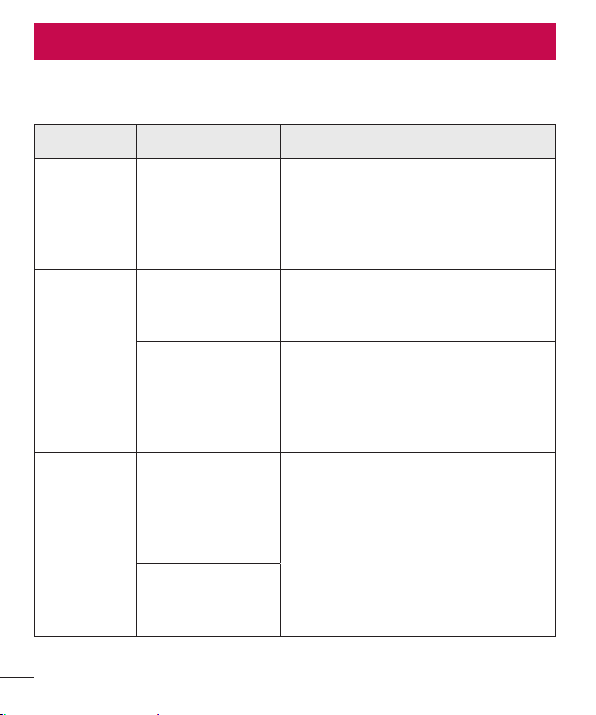
Troubleshooting
Troubleshooting
Thischapterlistssomeproblemsyoumightencounterwhenusingyourphone.Some
problemsrequireyoutocallyourserviceprovider,butmostareeasytofixyourself.
Message Possible causes Possible corrective measures
SIM or
USIM card
error
There is no SIM
or USIM card
in the phone
or it is inserted
incorrectly.
Make sure that the SIM card is
correctly inserted.
No network
connection/
Dropped
network
Signal is weak or
you are outside the
carrier network.
Move toward a window or into
an open area. Check the network
operator coverage map.
Operator applied
new services.
Check whether the SIM card is more
than 6~12 months old. If so, change
your SIM card at your network
provider’s nearest branch. Contact
your service provider.
Codes do
not match
To change a
security code,
must confirm
the new code by
re-entering it.
If you forget the code, contact your
service provider.
The two codes
you entered do
not match.
75
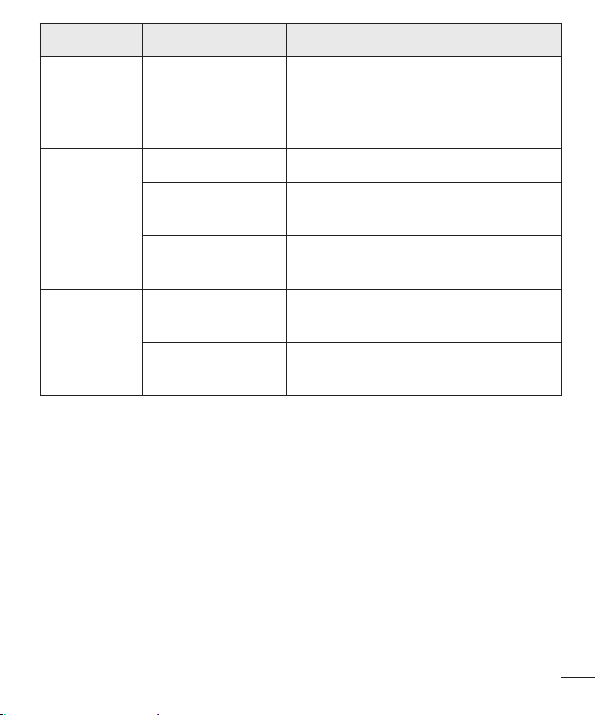
Troubleshooting
Message Possible causes Possible corrective measures
No
applications
can be set
Not supported by
service provider
or registration
required.
Contact your service provider.
Calls not
available
Dialing error New network not authorized.
New SIM or USIM
card inserted.
Check for new restrictions.
Pre-paid charge
limit reached.
Contact service provider or reset limit
with PIN2.
Phone
cannot be
turned on
On/Off key
pressed too briefly.
Press the On/Off key for at least two
seconds.
Battery is not
charged.
Charge battery. Check the charging
indicator on the display.
76
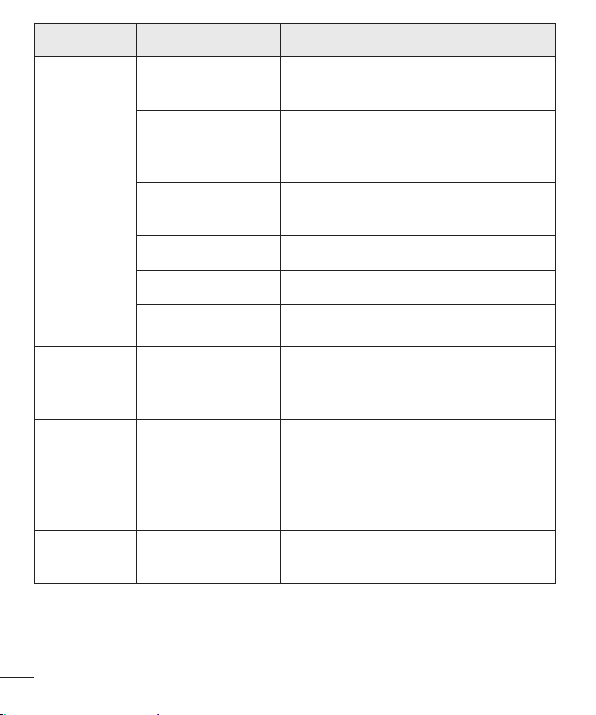
Troubleshooting
Message Possible causes Possible corrective measures
Charging
error
Battery is not
charged.
Charge battery.
Outside
temperature is too
hot or cold.
Make sure phone is charging at a
normal temperature.
Contact problem
Check the charger and its connection
to the phone.
No voltage Plug the charger into a different outlet.
Charger defective Replace the charger.
Wrong charger Use only original LG accessories.
Number not
allowed.
The Fixed dialing
number function
is on.
Check the Settings menu and turn the
function off.
Impossible
to receive/
send text
messages &
photos
Memory full
Delete some messages from your
phone.
Files do not
open
Unsupported file
format
Check the supported file formats.

77
Troubleshooting
Message Possible causes Possible corrective measures
The screen
does not
turn on
when I
receive a
call.
Proximity sensor
problem
If you use a protection tape or case,
make sure it has not covered the area
around the proximity sensor. Make
sure that the area around the proximity
sensor is clean.
No sound Vibration mode
Check the settings status in the sound
menu to make sure you are not in
vibration or silent mode.
Hangs up
or freezes
Intermittent
software problem
Try to perform a software update
through the website.

78
FAQ
Category Question Answer
Bluetooth
Devices
What functions
are available via
Bluetooth?
You can connect a Bluetooth audio
device, such as a Stereo/Mono
headset or car kit.
Contacts
Backup
How can I back up
Contacts?
Contacts data can be synchronized
between your phone and Gmail™.
Synchronization
Is it possible to set up
one-way sync with
Gmail?
Only two-way synchronization is
available.
Synchronization
Is it possible to
synchronize all email
folders?
The Inbox is automatically
synchronized. You can view other
folders by tapping the icon and
selecting Folders to choose a folder.
Gmail Log-In
Do I have to log into
Gmail whenever I want
to access Gmail?
Once you have logged into Gmail,
there is no need to log into Gmail
again.
Google
Account
Is it possible to filter
emails?
No, the phone does not support email
filtering.
Email
What happens when
I execute another
application while
writing an email?
Your email is automatically saved as
a draft.
Ringtone
Is there a file size limit
for using MP3 files as
ringtones?
There is no file size limit.
FAQ
79
FAQ
Category Question Answer
Message
Time
My phone does not
display the time of
receipt for messages
older than 24 hrs. How
can I change this?
Open the conversation and touch and
hold the desired message to see the
details.
Navigation
Is it possible to install
another navigation
application on my
phone?
Any application that is available at Play
Store™ and is compatible with the
hardware can be installed and used.
Synchronization
Is it possible to
synchronize my
contacts from all my
email accounts?
Only Gmail and MS Exchange server
(company email server) contacts can
be synchronized.
Wait and
Pause
Is it possible to save a
contact with Wait and
Pause in the numbers?
If you transferred a contact using the
Wait & Pause functions saved into
the number, you cannot use those
features. You must save each number
again.
How to save with Wait and Pause:
1. From the Home screen, tap
.
2. Dial the number, then tap
.
3. Tap Add 2-sec pause or Add wait.
Security
What are the phone’s
security functions?
You can set the phone to require an
Unlock Pattern to be entered before
the phone can be accessed or used.

80
FAQ
Category Question Answer
Unlock
Pattern
How do I create the
Unlock Pattern?
1. From the Home screen, touch and
hold
.
2. Tap System settings > Display tab
> Lock screen.
3. Tap Select screen lock > Pattern.
The first time you do this, a short
tutorial about creating an Unlock
Pattern appears.
4. Set up your pattern by drawing
itthen drawing it a second time for
confirmation.
Precautions to take when using the
pattern lock.
It is very important to remember
the unlock pattern you set. You can
nolonger access your phone if you
use an incorrect pattern five times.
You have five chances to enter your
unlock pattern, PIN or password. If you
have used all 5 opportunities, you can
try again after 30 seconds. (Or, if you
preset the backup PIN, you can use
the backup PIN code to unlock the
pattern.)
81
FAQ
Category Question Answer
Unlock
Pattern
What should I do if
I forget the unlock
pattern and I did not
create my Google
account on the
phone?
If you forgot your pattern:
If you logged into your Google account
on the phone but failed to enter the
correct pattern 5 times, tap the Forgot
pattern button. You are then required
to log in with your Google account
to unlock your phone. If you have
not created a Google account on the
phone or you have forgotten it, you
must perform a hard reset.
Caution: If you perform a factory reset,
all user applications and user data are
deleted. Please remember to back up
any important data before performing a
factory reset.
Memory
Will I know when my
memory is full?
Yes, you will receive a notification.
Language
Support
Is it possible to change
my phone’s language?
The phone has multilingual capabilities.
To change the language:
1. From the Home screen, touch and
hold
and tap System settings.
2. Tap General tab > Language &
input > Language.
3. Tap the desired language.
VPN
How do I set up a
VPN?
VPN access configuration is different
for each company. To configure VPN
access on your phone, you must
obtain the details from your company’s
network administrator.
82
FAQ
Category Question Answer
Screen time
out
My screen turns off
after only 15 seconds.
How can I change the
amount of time for the
backlight to turn off?
1. From the Home screen, touch and
hold
.
2. Tap System settings > Display tab.
3. Tap Screen timeout.
4. Tap the preferred screen backlight
timeout time.
Wi-Fi &
mobile
network
When the Wi-Fi and
mobile networks are
both available, which
service does my
phone use?
When using data, your phone may
default to the Wi-Fi connection (if Wi-Fi
connectivity on your phone is set to
On). However, there is no notification
when your phone switches from one
to the other.
To know which data connection is
being used, view the mobile network or
Wi-Fi icon at the top of your screen.
Home
screen
Is it possible to remove
an application from the
Home screen?
Yes. Just touch and hold the icon until
the trash can icon appears at the top
and center of the screen. Then, without
lifting your finger, drag the icon to the
trash can.
Application
I downloaded an
application and it
causes a lot of errors.
How do I remove it?
1. From the Home screen, touch and
hold
.
2. Tap System settings > General tab
> Apps > DOWNLOADED.
3. Tap the application, then tap
Uninstall.
Charger
Is it possible to charge
my phone using a
USB cable without
installing the necessary
USB driver?
Yes, the phone is charged through the
USB cable regardless of whether the
necessary drivers are installed.

83
FAQ
Category Question Answer
Alarm
Can I use music files
for my alarm?
Yes. After saving a music file as a
ringtone, you can use it as an alarm.
1. Touch and hold a song in a library
list. In the menu that opens, tap Set
as ringtone>Phone ringtone or
Contact ringtone.
2. On the Alarm Clock Setting screen,
select the song as a ringtone.
Alarm
Will my alarm be
audible or will it go off
if the phone is turned
off?
No, this is not supported.
Alarm
If my ringer volume is
set to Off or Vibrate,
will I hear my alarm?
Your alarm is programmed to be
audible even in these scenarios.
Hard Reset
(Factory
Reset)
How can I perform a
factory reset if I cannot
access the phone’s
Settings menu?
If your phone does not restore to its
original condition, use a hard reset
(factory reset) to initialize it.

84
Safety
HAC
Thisphonehasbeentestedandratedforusewithhearingaidsforsomeofthe
wirelesstechnologiesthatituses.However,theremaybesomenewerwireless
technologiesusedinthisphonethathavenotbeentestedyetforusewithhearing
aids.Itisimportanttotrythedifferentfeaturesofthisphonethoroughlyandindifferent
locations,usingyourhearingaidorcochlearimplant,todetermineifyouhearany
interferingnoise.Consultyourserviceproviderorthemanufacturerofthisphonefor
informationonhearingaidcompatibility.Ifyouhavequestionsaboutreturnorexchange
policies,consultyourserviceproviderorphoneretailer.
FCC RF Exposure Information
WARNING! Read this information before operating the phone.
InAugust1996,theFederalCommunicationsCommission(FCC)oftheUnitedStates,
withitsactioninReportandOrderFCC96-326,adoptedanupdatedsafetystandard
forhumanexposuretoRadioFrequency(RF)electromagneticenergyemittedby
FCCregulatedtransmitters.Thoseguidelinesareconsistentwiththesafetystandard
previouslysetbybothU.S.andinternationalstandardsbodies.Thedesignofthisphone
complieswiththeFCCguidelinesandtheseinternationalstandards.
Body-worn Operation
Thisdevicewastestedfortypicalbody-wornoperationswiththebackofthephonekept
0.39inches(1cm)betweentheuser'sbodyandthebackofthephone.Tocomplywith
FCCRFexposurerequirements,aminimumseparationdistanceof0.39inches(1cm)
mustbemaintainedbetweentheuser'sbodyandthebackofthephone.Anybelt-clips,
holsters,andsimilaraccessoriescontainingmetalliccomponentsmaynotbeused.
Body-wornaccessoriesthatcannotmaintain0.39inches(1cm)separationdistance
betweentheuser'sbodyandthebackofthephone,andhavenotbeentestedfor
Safety

85
Safety
typicalbody-wornoperationsmaynotcomplywithFCCRFexposurelimitsandshould
beavoided.
Caution
Useonlythesuppliedantenna.Useofunauthorizedantennas(ormodificationstothe
antenna)couldimpaircallquality,damagethephone,voidyourwarrantyand/orviolate
FCCregulations.
Don’tusethephonewithadamagedantenna.Adamagedantennacouldcausea
minorskinburn.Contactyourlocaldealerforareplacementantenna.
Part 15.19 statement
Thisdevicecomplieswithpart15ofFCCrules.Operationissubjecttothefollowingtwo
conditions:
(1)Thisdevicemaynotcauseharmfulinterference.
(2)Thisdevicemustacceptanyinterferencereceived,includinginterferencethatmay
causeundesiredoperation.
Part 15.21 statement
Changesormodificationsthatarenotexpresslyapprovedbythemanufacturerfor
compliancecouldvoidtheuser’sauthoritytooperatetheequipment.
Part 15.105 statement
ThisequipmenthasbeentestedandfoundtocomplywiththelimitsforaclassBdigital
device,pursuanttoPart15oftheFCCrules.Theselimitsaredesignedtoprovide
reasonableprotectionagainstharmfulinterferenceinaresidentialinstallation.This
equipmentgenerates,uses,andcanradiateradiofrequencyenergyand,ifnotinstalled
andusedinaccordancewiththeinstructions,maycauseharmfulinterferencetoradio
communications.However,thereisnoguaranteethatinterferencewillnotoccurina
particularinstallation.Ifthisequipmentdoescauseharmfulinterferencetoradioor
televisionreception,whichcanbedeterminedbyturningtheequipmentoffandon,the

86
Safety
userisencouragedtotrytocorrecttheinterferencebyoneormoreofthefollowing
measures:
-Reorientorrelocatethereceivingantenna.
-Increasetheseparationbetweentheequipmentandreceiver.
-Connecttheequipmentintoanoutletonacircuitdifferentfromthattowhichthe
receiverisconnected.
-Consultthedealeroranexperiencedradio/TVtechnicianforhelp.
Consumer Information About Radio Frequency
Emissions
Your wireless phone, which contains a radio transmitter and receiver, emits radio
frequency energy during use. The following consumer information addresses
commonly asked questions about the health effects of wireless phones. Are
wireless phones safe?
Scientificresearchonthesubjectofwirelessphonesandradiofrequency(“RF”)energy
hasbeenconductedworldwideformanyyears,andcontinues.IntheUnitedStates,the
FoodandDrugAdministration(“FDA”)andtheFederalCommunicationsCommission
(“FCC”)setpoliciesandproceduresforwirelessphones.TheFDAissuedawebsite
publicationonhealthissuesrelatedtocellphoneusagewhereitstates,“Thescientific
communityatlarge…believesthattheweightofscientificevidencedoesnotshow
anassociationbetweenexposuretoradiofrequency(RF)fromcellphonesandadverse
healthoutcomes.Stillthescientificcommunitydoesrecommendconductingadditional
researchtoaddressgapsinknowledge.Thatresearchisbeingconductedaroundthe
worldandFDAcontinuestomonitordevelopmentsinthisfield.Youcanaccessthe
jointFDA/FCCwebsiteathttp://www.fda.gov(under“c”inthesubjectindex,selectCell
Phones>Research).YoucanalsocontacttheFDAtoll-freeat(888)463-6332or(888)
INFO-FDA.InJune2000,theFDAenteredintoacooperativeresearchanddevelopment
agreementthroughwhichadditionalscientificresearchisbeingconducted.TheFCC

87
Safety
issueditsownwebsitepublicationstatingthat“thereisnoscientificevidencethat
provesthatwirelessphoneusagecanleadtocanceroravarietyofotherproblems,
includingheadaches,dizzinessormemoryloss.”Thispublicationisavailableathttp://
www.fcc.gov/cgb/cellular.htmlorthroughtheFCCat(888)225-5322or(888)CALL-
FCC.
What does “SAR” mean?
In1996,theFCC,workingwiththeFDA,theU.S.EnvironmentalProtectionAgency,and
otheragencies,establishedRFexposuresafetyguidelinesforwirelessphonesinthe
UnitedStates.Beforeawirelessphonemodelisavailableforsaletothepublic,itmust
betestedbythemanufacturerandcertifiedtotheFCCthatitdoesnotexceedlimits
establishedbytheFCC.OneoftheselimitsisexpressedasaSpecificAbsorptionRate,
or“SAR.”SARisameasureoftherateofabsorptionofRFenergyinthebody.Testsfor
SARareconductedwiththephonetransmittingatitshighestpowerlevelinalltested
frequencybands.Since1996,theFCChasrequiredthattheSARofhandheldwireless
phonesnotexceed1.6wattsperkilogram,averagedoveronegramoftissue.Although
theSARisdeterminedatthehighestpowerlevel,theactualSARvalueofawireless
phonewhileoperatingcanbelessthanthereportedSARvalue.Thisisbecausethe
SARvaluemayvaryfromcalltocall,dependingonfactorssuchasproximitytoacell
site,theproximityofthephonetothebodywhileinuse,andtheuseofhands-free
devices.FormoreinformationaboutSARs,seetheFCC’sOET
Bulletins56and65athttp://www.fcc.gov/Bureaus/Engineering_Technology/
Documents/bulletinsorvisittheCellularTelecommunicationsIndustryAssociation
websiteathttp://www.ctia.org/consumer_info/index.cfm/AID/10371.Youmayalsowish
tocontactthemanufacturerofyourphone.
Can I minimize my RF exposure?
IfyouareconcernedaboutRF,thereareseveralsimplestepsyoucantaketominimize
yourRFexposure.Youcan,ofcourse,reduceyourtalktime.Youcanplacemore
distancebetweenyourbodyandthesourceoftheRF,astheexposureleveldropsoff
dramaticallywithdistance.TheFDA/FCCwebsitestatesthat“hands-freekitscanbe

88
Safety
usedwithwirelessphonesforconvenienceandcomfort.Thesesystemsreducethe
absorptionofRFenergyintheheadbecausethephone,whichisthesourceofthe
RFemissions,willnotbeplacedagainstthehead.Ontheotherhand,ifthephoneis
mountedagainstthewaistorotherpartofthebodyduringuse,thenthatpartofthe
bodywillabsorbmoreRFenergy.WirelessphonesmarketedintheU.S.arerequired
tomeetsafetyrequirementsregardlessofwhethertheyareusedagainstthehead
oragainstthebody.Eitherconfigurationshouldresultincompliancewiththesafety
limit.”Also,ifyouuseyourwirelessphonewhileinacar,youcanuseaphonewithan
antennaontheoutsideofthevehicle.Youshouldalsoreadandfollowyourwireless
phonemanufacturer’sinstructionsforthesafeoperationofyourphone.
Do wireless phones pose any special risks to children?
TheFDA/FCCwebsitestatesthat“thescientificevidencedoesnotshowadangerto
usersofwirelesscommunicationdevices,includingchildren.”TheFDA/FCCwebsite
furtherstatesthat“somegroupssponsoredbyothernationalgovernmentshave
advisedthatchildrenbediscouragedfromusingwirelessphonesatall”.Forexample,
theStewartReportfromtheUnitedKingdom[“UK”]madesucharecommendationin
December2000.Inthisreportagroupofindependentexpertsnotedthatnoevidence
existsthatusingacellphonecausesbraintumorsorotherilleffects.[TheUK’s]
recommendationtolimitcellphoneusebychildrenwasstrictlyprecautionary;itwas
notbasedonscientificevidencethatanyhealthhazardexists.AcopyoftheUK’sleaflet
isavailableathttp://www.dh.gov.uk(search“mobile”),oryoucanwriteto:NRPB,
Chilton,Didcot,OxonOX11ORQ,UnitedKingdom.CopiesoftheUK’sannualreports
onmobilephonesandRFareavailableonlineatwww.iegmp.org.ukandhttp://www.
hpa.org.uk/radiation/(search“mobile”).Parentswhowishtoreducetheirchildren’sRF
exposuremaychoosetorestricttheirchildren’swirelessphoneuse.
Where can I get further information about RF emissions?
Forfurtherinformation,seethefollowingadditionalresources(websitescurrentasof
April2005):

89
Safety
U.S. Food and Drug Administration
FDAConsumermagazineNovember-December2000
Telephone:(888)INFO-FDA
http://www.fda.gov(Under“c”inthesubjectindex,selectCellPhones>Research.)
U.S. Federal Communications Commission
44512thStreet,S.W.Washington,D.C.20554
Telephone:(888)225-5322
http://www.fcc.gov/oet/rfsafety
Independent Expert Group on Mobile Phones
http://www.iegmp.org.uk
Royal Society of Canada Expert Panels on Potential Health Risks of Radio
Frequency Fields from Wireless Telecommunication Devices
283SparksStreetOttawa,OntarioK1R7X9Canada
Telephone:(613)991-6990
http://www.rsc.ca/index.php?page=Expert_Panels_RF&Lang_id=120
World Health Organization
AvenueAppia201211Geneva27Switzerland
Telephone:01141227912111
http://www.who.int/mediacentre/factsheets/fs193/en/
International Commission on Non-Ionizing Radiation Protection
c/oBundesamtfurStrahlenschutz
IngolstaedterLandstr.1
85764OberschleissheimGermany
Telephone:0114918883332156
http://www.icnirp.de
American National Standards Institute
1819LStreet,N.W.,6thFloorWashington,D.C.20036
Telephone:(202)293-8020
http://www.ansi.org

90
Safety
National Council on Radiation Protection and Measurements
7910WoodmontAvenue,Suite800
Bethesda,MD20814-3095
Telephone:(301)657-2652
http://www.ncrponline.org
Engineering in Medicine and Biology Society, Committee on Man and Radiation
(COMAR) of the Institute of Electrical and Electronics Engineers
http://ewh.ieee.org/soc/embs/comar/
Consumer Information on SAR
(Specific Absorption Rate)
Thismodelphonemeetsthegovernment'srequirementsforexposuretoradiowaves.
Yourwirelessphoneisaradiotransmitterandreceiver.Itisdesignedandmanufactured
nottoexceedtheemissionlimitsforexposuretoRadioFrequency(RF)energysetby
theFederalCommunicationsCommissionoftheU.S.Government.Theselimitsarepart
ofcomprehensiveguidelinesandestablishpermittedlevelsofRFenergyforthegeneral
population.Theguidelinesarebasedonstandardsthatweredevelopedbyindependent
scientificorganizationsthroughperiodicandthoroughevaluationofscientificstudies.
Thestandardsincludeasubstantialsafetymargindesignedtoassurethesafetyof
allpersons,regardlessofageandhealth.Theexposurestandardforwirelessmobile
phonesemploysaunitofmeasurementknownastheSpecificAbsorptionRate,orSAR.
TheSARlimitsetbytheFCCis1.6W/kg.TestsforSARareconductedusingstandard
operatingpositionsspecifiedbytheFCCwiththephonetransmittingatitshighest
certifiedpowerlevelinalltestedfrequencybands.AlthoughSARisdeterminedatthe
highestcertifiedpowerlevel,theactualSARlevelofthephonewhileoperatingcanbe
wellbelowthemaximumvalue.Becausethephoneisdesignedtooperateatmultiple
powerlevelstouseonlythepowerrequiredtoreachthenetwork,ingeneral,thecloser
youaretoawirelessbasestationantenna,thelowerthepoweroutput.Beforeaphone

91
Safety
modelisavailableforsaletothepublic,itmustbetestedandcertifiedtotheFCCthatit
doesnotexceedthelimitestablishedbythegovernment-adoptedrequirementforsafe
exposure.Thetestsareperformedinpositionsandlocations(e.g.,attheearandworn
onthebody)asrequiredbytheFCCforeachmodel.
ThehighestSARvaluesare:
• Head:1.05W/kg
• Body(Body-worn/Hotspot):1.28W/kg
(Bodymeasurementsdifferamongphonemodels,dependinguponavailable
accessoriesandFCCrequirements).
WhiletheremaybedifferencesbetweenSARlevelsofvariousphonesandatvarious
positions,theyallmeetthegovernmentrequirementforsafeexposure.TheFCChas
grantedanEquipmentAuthorizationforthismodelphonewithallreportedSARlevels
evaluatedasincompliancewiththeFCCRFemissionguidelines.SARinformationon
thismodelphoneisonfilewiththeFCCandcanbefoundundertheDisplayGrant
sectionofhttp://www.fcc.gov/oet/ea/fccidaftersearchingonFCCIDZNFH345.
AdditionalinformationonSpecificAbsorptionRates(SAR)canbefoundontheCellular
TelecommunicationsIndustryAssociation(CTIA)websiteathttp://www.ctia.org/.
*IntheUnitedStatesandCanada,theSARlimitformobilephonesusedbythepublic
is1.6watts/kg(W/kg)averagedoveronegramoftissue.Thestandardincorporatesa
substantialmarginofsafetytogiveadditionalprotectionforthepublicandtoaccount
foranyvariationsinmeasurements.

92
Safety
FCC Hearing-Aid Compatibility (HAC) Regulations for
Wireless Devices
OnJuly10,2003,theU.S.FederalCommunicationsCommission(FCC)Reportand
OrderinWTDocket01-309modifiedtheexceptionofwirelessphonesunderthe
HearingAidCompatibilityActof1988(HACAct)torequiredigitalwirelessphones
becompatiblewithhearing-aids.TheintentoftheHACActistoensurereasonable
accesstotelecommunicationsservicesforpersonswithhearingdisabilities.While
somewirelessphonesareusednearsomehearingdevices(hearingaidsandcochlear
implants),usersmaydetectabuzzing,humming,orwhiningnoise.Somehearing
devicesaremoreimmunethanotherstothisinterferencenoise,andphonesalso
varyintheamountofinterferencetheygenerate.Thewirelesstelephoneindustryhas
developedaratingsystemforwirelessphones,toassisthearingdeviceuserstofind
phonesthatmaybecompatiblewiththeirhearingdevices.Notallphoneshavebeen
rated.Phonesthatareratedhavetheratingontheirboxoralabellocatedonthebox.
Theratingsarenotguarantees.Resultswillvarydependingontheuser'shearing
deviceandhearingloss.Ifyourhearingdevicehappenstobevulnerabletointerference,
youmaynotbeabletousearatedphonesuccessfully.Tryingoutthephonewithyour
hearingdeviceisthebestwaytoevaluateitforyourpersonalneeds.
M-Ratings:PhonesratedM3orM4meetFCCrequirementsandarelikelytogenerate
lessinterferencetohearingdevicesthanphonesthatarenotlabeled.M4isthebetter/
higherofthetworatings.
T-Ratings:PhonesratedT3orT4meetFCCrequirementsandarelikelytogenerate
lessinterferencetohearingdevicesthanphonesthatarenotlabeled.T4isthebetter/
higherofthetworatings.
Hearingdevicesmayalsoberated.Yourhearingdevicemanufacturerorhearinghealth
professionalmayhelpyoufindthisrating.Higherratingsmeanthatthehearingdevice
isrelativelyimmunetointerferencenoise.Thehearingaidandwirelessphonerating
valuesarethenaddedtogether.Asumof5isconsideredacceptablefornormaluse.A
sumof6isconsideredforbestuse.

93
Safety
Intheaboveexample,ifahearingaidmeetstheM2levelratingandthewirelessphone
meetstheM3levelrating,thesumofthetwovaluesequalM5.Thisshouldprovidethe
hearingaiduserwith“normalusage”whileusingtheirhearingaidwiththeparticular
wirelessphone.“Normalusage”inthiscontextisdefinedasasignalqualitythat’s
acceptablefornormaloperation.TheMmarkisintendedtobesynonymouswiththeU
mark.TheTmarkisintendedtobesynonymouswiththeUTmark.TheMandTmarks
arerecommendedbytheAllianceforTelecommunicationsIndustriesSolutions(ATIS).
TheUandUTmarksarereferencedinSection20.19oftheFCCRules.TheHACrating
andmeasurementprocedurearedescribedintheAmericanNationalStandardsInstitute
(ANSI)C63.19standard.
ToensurethattheHearingAidCompatibilityratingforyourphoneismaintained,
secondarytransmitterssuchasBluetoothandWLANcomponentsmustbedisabled
duringacall.
Forinformationabouthearingaidsanddigitalwirelessphones:
Wireless Phones and Hearing Aid Accessibility
http://www.accesswireless.org/
Gallaudet University, RERC
http://tap.gallaudet.edu/Voice/
FCC Hearing Aid Compatibility and Volume Control
http://www.fcc.gov/cgb/dro/hearing.html
The Hearing Aid Compatibility FCC Order
http://hraunfoss.fcc.gov/edocs_public/attachmatch/FCC-03-168A1.pdf
Hearing Loss Association of America [HLAA]
http://hearingloss.org/content/telephones-and-mobile-devices

94
Safety
Caution: Avoid potential hearing loss.
Prolongedexposuretoloudsounds(includingmusic)isthemostcommoncauseof
preventablehearingloss.Somescientificresearchsuggeststhatusingportableaudio
devices,suchasportablemusicplayersandcellulartelephones,athighvolumesettings
forlongdurationsmayleadtopermanentnoise-inducedhearingloss.Thisincludes
theuseofheadphones(includingheadsets,earbudsandBluetooth®orotherwireless
devices).Exposuretoveryloudsoundhasalsobeenassociatedinsomestudieswith
tinnitus(aringingintheear),hypersensitivitytosoundanddistortedhearing.Individual
susceptibilitytonoise-inducedhearinglossandotherpotentialhearingproblemsvaries.
Theamountofsoundproducedbyaportableaudiodevicevariesdependingonthe
natureofthesound,thedevice,thedevicesettingsandtheheadphones.Youshould
followsomecommonsenserecommendationswhenusinganyportableaudiodevice:
• Setthevolumeinaquietenvironmentandselectthelowestvolumeatwhichyoucan
hearadequately.
• Whenusingheadphones,turnthevolumedownifyoucannothearthepeople
speakingnearyouorifthepersonsittingnexttoyoucanhearwhatyouarelistening
to.
• Donotturnthevolumeuptoblockoutnoisysurroundings.Ifyouchoosetolisten
toyourportabledeviceinanoisyenvironment,usenoise-cancellingheadphonesto
blockoutbackgroundenvironmentalnoise.
• Limittheamountoftimeyoulisten.Asthevolumeincreases,lesstimeisrequired
beforeyourhearingcouldbeaffected.
• Avoidusingheadphonesafterexposuretoextremelyloudnoises,suchasrock
concerts,thatmightcausetemporaryhearingloss.Temporaryhearinglossmight
causeunsafevolumestosoundnormal.
• Donotlistenatanyvolumethatcausesyoudiscomfort.Ifyouexperienceringingin
yourears,hearmuffledspeechorexperienceanytemporaryhearingdifficultyafter
listeningtoyourportableaudiodevice,discontinueuseandconsultyourdoctor.

95
Safety
TIA Safety Information
ThefollowingisthecompleteTIASafetyInformationforwirelesshandheldphones.
Exposure to Radio Frequency Signal
Yourwirelesshandheldportablephoneisalowpowerradiotransmitterandreceiver.
WhenON,itreceivesandsendsoutRadioFrequency(RF)signals.InAugust,1996,
theFederalCommunicationsCommissions(FCC)adoptedRFexposureguidelineswith
safetylevelsforhandheldwirelessphones.Thoseguidelinesareconsistentwiththe
safetystandardspreviouslysetbybothU.S.andinternationalstandardsbodies:
ANSIC95.1(1992)*
NCRPReport86(1986)
ICNIRP(1996)
*AmericanNationalStandardsInstitute;NationalCouncilonRadiationProtectionand
Measurements;InternationalCommissiononNon-IonizingRadiationProtectionThose
standardswerebasedoncomprehensiveandperiodicevaluationsoftherelevant
scientificliterature.Forexample,over120scientists,engineers,andphysiciansfrom
universities,governmenthealthagencies,andindustryreviewedtheavailablebodyof
researchtodeveloptheANSIStandard(C95.1).Thedesignofyourphonecomplieswith
theFCCguidelines(andthosestandards).
Antenna Care
Useonlythesuppliedoranapprovedreplacementantenna.Unauthorizedantennas,
modifications,orattachmentscoulddamagethephoneandmayviolateFCC
regulations.
Tips on Efficient Operation
Foryourphonetooperatemostefficiently:Don’ttouchtheantennaunnecessarilywhen
thephoneisinuse.Contactwiththeantennaaffectscallqualityandmaycausethe
phonetooperateatahigherpowerlevelthanotherwiseneeded.

96
Safety
Electronic Devices
MostmodernelectronicequipmentisshieldedfromRFsignals.However,certain
electronicequipmentmaynotbeshieldedagainsttheRFsignalsfromyourwireless
phone.
Pacemakers
TheHealthIndustryManufacturersAssociationrecommendsthataminimumseparation
ofsix(6)inchesbemaintainedbetweenahandheldwirelessphoneandapacemakerto
avoidpotentialinterferencewiththepacemaker.Theserecommendationsareconsistent
withtheindependentresearchbyandrecommendationsofWirelessTechnology
Research.Personswithpacemakers:
• ShouldALWAYSkeepthephonemorethansix(6)inchesfromtheirpacemakerwhen
thephoneisturnedON;
• Shouldnotcarrythephoneinabreastpocket;
• Shouldusetheearoppositethepacemakertominimizethepotentialforinterference;
• ShouldturnthephoneOFFimmediatelyifthereisanyreasontosuspectthat
interferenceistakingplace.
Hearing Aids
Somedigitalwirelessphonesmayinterferewithsomehearingaids.Intheeventofsuch
interference,youmaywanttoconsultyourserviceprovider(orcallthecustomerservice
linetodiscussalternatives).
Other Medical Devices
Ifyouuseanyotherpersonalmedicaldevice,consultthemanufacturerofyourdevice
todetermineifitisadequatelyshieldedfromexternalRFenergy.Yourphysicianmaybe
abletoassistyouinobtainingthisinformation.
Health Care Facilities
TurnyourphoneOFFinhealthcarefacilitieswhenanyregulationspostedinthese
areasinstructyoutodoso.Hospitalsorhealthcarefacilitiesmayuseequipmentthat
couldbesensitivetoexternalRFenergy.

97
Safety
Vehicles
RFsignalsmayaffectimproperlyinstalledorinadequatelyshieldedelectronicsystems
inmotorvehicles.Checkwiththemanufactureroritsrepresentativeregardingyour
vehicle.Youshouldalsoconsultthemanufacturerofanyequipmentthathasbeen
addedtoyourvehicle.
Posted Facilities
TurnyourphoneOFFinanyfacilitywherepostednoticessorequire.
Aircraft
FCCregulationsprohibitusingyourphonewhileintheair.SwitchOFFyourphone
beforeboardinganaircraft.
Blasting Areas
Toavoidinterferingwithblastingoperations,turnyourphoneOFFwhenina“blasting
area”orinareasposted:“Turnofftwo-wayradio”.Obeyallsignsandinstructions.
Potentially Explosive Atmosphere
TurnyourphoneOFFwheninanyareawithapotentiallyexplosiveatmosphereand
obeyallsignsandinstructions.Sparksinsuchareascouldcauseanexplosionorfire
resultinginbodilyinjuryorevendeath.Areaswithapotentiallyexplosiveatmosphere
areoften,butnotalwaysmarkedclearly.Potentialareasmayinclude:fuelingareas
(suchasgasolinestations);belowdeckonboats;fuelorchemicaltransferorstorage
facilities;vehiclesusingliquefiedpetroleumgas(suchaspropaneorbutane);areas
wheretheaircontainschemicalsorparticles(suchasgrain,dust,ormetalpowders);
andanyotherareawhereyouwouldnormallybeadvisedtoturnoffyourvehicle
engine.
For Vehicles Equipped with an Air Bag
Anairbaginflateswithgreatforce.DONOTplaceobjects,includingeitherinstalledor
portablewirelessequipment,intheareaovertheairbagorintheairbagdeployment
area.Ifin-vehiclewirelessequipmentisimproperlyinstalledandtheairbaginflates,
seriousinjurycouldresult.

98
Safety
Safety Information
Pleasereadandobservethefollowinginformationforsafeandproperuseofyour
phoneandtopreventdamage.
Caution
Violation of the instructions may cause minor or serious damage to the product.
• Donotdisassembleoropencrush,bendordeform,punctureorshred.
• Donotmodifyorremanufacture,attempttoinsertforeignobjectsintothebattery,
immerseorexposetowaterorotherliquids,exposetofire,explosionorotherhazard.
Suchconditionsmaypresenttheriskoffireorexplosion.
• Onlyusethebatteryforthesystemforwhichitisspecified.
• OnlyusethebatterywithachargingsystemthathasbeenLG-approvedandqualified
withthesystemperIEEE-Std-1725.Useofanunqualifiedandnon-LG-approved
batteryorchargermaypresentariskoffire,explosion,leakage,orotherhazard.
• Donotshortcircuitabatteryorallowmetallicconductiveobjectstocontactbattery
terminals.
• ReplacethebatteryonlywithanotherbatterythathasbeenLGapprovedandqualified
withthesystemperthisstandard,IEEE-Std-1725.Useofanunqualifiedandnon-LG-
approvedbatterymaypresentariskoffire,explosion,leakageorotherhazard.
• Promptlydisposeofusedbatteriesinaccordancewithlocalregulations.
• Batteryusagebychildrenshouldbesupervised.
• Avoiddroppingthephone,batteryorexposingthephoneorbatterytoaliquid.Ifthe
phoneorbatteryisdropped,especiallyonahardsurface,orisexposedtoaliquidor
comesintocontactwithasharpobjecttakeittoaservicecenterforinspection.
• Improperbatteryusemayresultinafire,explosionorotherhazard.
• Atleast,oneoftheAuthenticationmethodsmaybeimplemented.(e.g.H/W,S/W,
Mechanical,Hologram,etc.)

99
Safety
Charger and Adapter Safety
• Thechargerandadapterareintendedforindooruseonly.
• Insertthebatterypackchargerverticallyintothewallpowersocket.
• OnlyusetheLG-approvedbatterycharger.Otherwise,youmaycauseseriousdamage
toyourphone.
• Usethecorrectadapterforyourphonewhenusingthebatterypackchargerabroad.
Battery Information and Care
• Alwaysunplugthechargerfromthewallsocketafterthephoneisfullychargedto
saveunnecessarypowerconsumptionofthecharger.
• Pleasereadthemanualofproperinstallationandremovalofthebattery.
• Pleasereadthemanualofspecifiedchargeraboutchargingmethod.
• Donotdamagethepowercordbybending,twisting,orheating.Donotusetheplug
ifitislooseasitmaycauseelectricshockorfire.Donotplaceanyheavyitemson
thepowercord.Donotallowthepowercordtobecrimpedasitmaycauseelectric
shockorfire.
• Unplugthepowercordpriortocleaningyourphone,andcleanthepowerplugpin
whenit’sdirty.Whenusingthepowerplug,ensurethatit’sfirmlyconnected.Ifnot,
itmaycauseexcessiveheatorfire.Ifyouputyourphoneinapocketorbagwithout
coveringthereceptacleofthephone(powerplugpin),metallicarticles(suchasa
coin,papercliporpen)mayshort-circuitthephone.Alwayscoverthereceptaclewhen
notinuse.
• Rechargethebatteryafterlongperiodsofnon-usetomaximizebatterylife.Battery
lifewillvaryduetousagepatternandenvironmentalconditions.
• PleaseuseonlyanLG-approvedchargingaccessorytochargeyourLGphone.
Improperhandlingofthechargingport,aswellastheuseofanincompatiblecharger,
maycausedamagetoyourphoneandvoidthewarranty.
• Chargingtemperaturerangeisregulatedbetween32°F(0°C)and113°F(45°C).
Donotchargethebatteryoutofrecommendedtemperaturerange.Chargingoutof

100
Safety
recommendedrangemightcausethegeneratingheatorseriousdamageofbattery.
Andalso,itmightcausethedeteriorationofbattery'scharacteristicsandcyclelife.
• Donotuseorleavethebatteryundertheblazingsunorinheatedcarbysunshine.
Thebatterymaygenerateheat,smokeorflame.Andalso,itmightcausethe
deteriorationofbattery’scharacteristicsorcyclelife.
• Thebatterypackhasprotectioncircuittoavoidthedanger.Donotusenearbythe
placewheregeneratesstaticelectricitymorethan100Vwhichgivesdamagetothe
protectioncircuit.Iftheprotectioncircuitwerebroken,thebatterywouldgenerate
smoke,ruptureorflame.
• Whenthebatteryhasrust,badsmellorsomethingabnormalatfirst-time-using,do
notusetheequipmentandgotobringthebatterytotheshopwhichitwasbought.
• Incaseyoungerchildrenusethebattery,theirparentsshouldteachthemhowtouse
batteriesaccordingtothemanualwithcare.
• Iftheskinorclothissmearedwithliquidfromthebattery,washwithfreshwater.It
maycausetheskininflammation.Removeanddonotusethebattery.
• Donothandlethephonewithwethandswhileitisbeingcharged.Itmaycausean
electricshockorseriouslydamageyourphone.
• Donotplaceoranswercallswhilechargingthephoneasitmayshort-circuitthe
phoneand/orcauseelectricshockorfire.
• Thechargerandadapterareintendedforindooruseonly.
• Insertthebatterypackchargerverticallyintothewallpowersocket.
• OnlyusetheLG-approvedbatterycharger.Otherwise,youmaycauseseriousdamage
toyourphoneandriskofoverheating,fireorexplosionmayoccur.
• Usethecorrectadapterforyourphonewhenusingthebatterypackchargerabroad.
• Talkingonyourphoneforalongperiodoftimemayreducecallqualityduetoheat
generatedduringuse.
• Donotuseharshchemicals(suchasalcohol,benzene,thinners,etc.)ordetergentsto
cleanyourphone.Thiscouldcauseafire.Donotplaceoranswercallswhilecharging

101
Safety
thephoneasitmayshort-circuitthephoneand/orcauseelectricshockorfire.Don’t
short-circuitthebattery.Metallicarticlessuchasacoin,papercliporpeninyour
pocketorbagmayshort-circuitthe+and–terminalsofthebattery(metalstripson
thebattery)uponmoving.Short-circuitoftheterminalmaydamagethebatteryand
causeanexplosion.
• Neveruseandunapprovedbatterysincethiscoulddamagethephoneand/orbattery
andcouldcausethebatterytoexplode.Onlyusethebatteriesandchargersprovided
byLG.Thewarrantywillnotbeappliedtoproductsprovidedbyothersuppliers.Only
authorizedpersonnelshouldservicethephoneanditsaccessories.Faultyinstallation
orservicemayresultinaccidentsandconsequentlyinvalidatethewarranty.
Explosion, Shock, and Fire Hazards
• Donotputyourphoneinaplacesubjecttoexcessivedustandkeeptheminimum
requireddistancebetweenthepowercordandheatsources.
• Unplugthepowercordpriortocleaningyourphone,andcleanthepowerplugpin
whenit’sdirty.
• Whenusingthepowerplug,ensurethatit’sfirmlyconnected.Ifnot,itmaycause
excessiveheatorfire.
• Ifyouputyourphoneinapocketorbagwithoutcoveringthereceptacleofthephone
(powerplugpin),metallicarticles(suchasacoin,papercliporpen)mayshort-circuit
thephoneandmaycauseanexplosion.Alwayscoverthereceptaclewhennotinuse.
• Don’tshort-circuitthebattery.Metallicarticlessuchasacoin,papercliporpenin
yourpocketorbagorcontactwithsharpobjectsincludinganimalbitesmayshort-
circuitthe+and–terminalsofthebattery(metalstripsonthebattery)uponmoving.
Shortcircuitoftheterminalmaydamagethebatteryandcauseanexplosion.

102
Safety
General Notice
• Usingadamagedbatteryorplacingabatteryinyourmouthoranimal'smouthmay
causeseriousinjuryincludingafireorexplosion.
• Donotplaceitemscontainingmagneticcomponentssuchasacreditcard,phone
card,bankbook,orsubwayticketnearyourphone.Themagnetismofthephonemay
damagethedatastoredinthemagneticstrip.
• Talkingonyourphoneforalongperiodoftimemayreducecallqualityduetoheat
generatedduringuse.
• Whenthephoneisnotusedforalongperiodtime,storeitinasafeplacewiththe
powercordunplugged.
• Usingthephoneinproximitytoreceivingequipment(i.e.,TVorradio)maycause
interferencetothephone.
• Donotusethephoneiftheantennaisdamaged.Ifadamagedantennacontactsskin,
itmaycauseaslightburn.PleasecontactanLGAuthorizedServiceCentertoreplace
thedamagedantenna.
• Donotimmerseyourphoneinwater,liquid,orexposetohighhumidity.Ifthis
happens,turnitoffimmediatelyandremovethebattery.Immediately,takeittoanLG
AuthorizedServiceCenter.
• Donotpaintyourphone.
• Thedatasavedinyourphonemightbedeletedduetocarelessuse,repairofthe
phone,orupgradeofthesoftware.Pleasebackupyourimportantphonenumbers.
(Ringtones,textmessages,voicemessages,pictures,andvideoscouldalsobe
deleted.)Themanufacturerisnotliablefordamageduetothelossofdata.
• Whenyouusethephoneinpublicplaces,settheringtonetovibrationsoyoudon't
disturbothers.
• Donotturnyourphoneonoroffwhenputtingittoyourear.
• Useaccessories,suchasearphonesandheadsets,withcaution.Ensurethatcables
aretuckedawaysafelyanddonottouchtheantennaunnecessarily.

103
Safety
FDA Consumer Update
TheU.S.FoodandDrugAdministration’sCenterforDevicesandRadiological
HealthConsumerUpdateonMobilePhones:
1. Do wireless phones pose a health hazard?
Theavailablescientificevidencedoesnotshowthatanyhealthproblemsareassociated
withusingwirelessphones.Thereisnoproof,however,thatwirelessphonesare
absolutelysafe.WirelessphonesemitlowlevelsofRadioFrequency(RF)energyin
themicrowaverangewhilebeingused.TheyalsoemitverylowlevelsofRFwhenin
standbymode.WhereashighlevelsofRFcanproducehealtheffects(byheatingtissue),
exposuretolowlevelRFthatdoesnotproduceheatingeffectscausesnoknown
adversehealtheffects.ManystudiesoflowlevelRFexposureshavenotfoundany
biologicaleffects.Somestudieshavesuggestedthatsomebiologicaleffectsmayoccur,
butsuchfindingshavenotbeenconfirmedbyadditionalresearch.Insomecases,other
researchershavehaddifficultyinreproducingthosestudies,orindeterminingthe
reasonsforinconsistentresults.
2. What is the FDA's role concerning the safety of wireless phones?
Underthelaw,theFDAdoesnotreviewthesafetyofradiation-emittingconsumer
productssuchaswirelessphonesbeforetheycanbesold,asitdoeswithnewdrugs
ormedicaldevices.However,theagencyhasauthoritytotakeactionifwirelessphones
areshowntoemitRadioFrequency(RF)energyatalevelthatishazardoustotheuser.
Insuchacase,theFDAcouldrequirethemanufacturersofwirelessphonestonotify
usersofthehealthhazardandtorepair,replace,orrecallthephonessothatthehazard
nolongerexists.AlthoughtheexistingscientificdatadonotjustifyFDAregulatory
actions,theFDAhasurgedthewirelessphoneindustrytotakeanumberofsteps,
includingthefollowing:
• SupportneededresearchintopossiblebiologicaleffectsofRFofthetypeemittedby
wirelessphones;
• DesignwirelessphonesinawaythatminimizesanyRFexposuretotheuserthatis
notnecessaryfordevicefunction;and

104
Safety
• Cooperateinprovidingusersofwirelessphoneswiththebestpossibleinformationon
possibleeffectsofwirelessphoneuseonhumanhealth.
TheFDAbelongstoaninteragencyworkinggroupofthefederalagenciesthathave
responsibilityfordifferentaspectsofRFsafetytoensurecoordinatedeffortsatthe
federallevel.Thefollowingagenciesbelongtothisworkinggroup:
• NationalInstituteforOccupationalSafetyandHealth
• EnvironmentalProtectionAgency
• OccupationalSafetyandHealthAdministration
• NationalTelecommunicationsandInformationAdministration
TheNationalInstitutesofHealthparticipatesinsomeinteragencyworkinggroup
activities,aswell.TheFDAsharesregulatoryresponsibilitiesforwirelessphoneswith
theFederalCommunicationsCommission(FCC).AllphonesthataresoldintheUnited
StatesmustcomplywithFCCsafetyguidelinesthatlimitRFexposure.
TheFCCreliesontheFDAandotherhealthagenciesforsafetyquestionsabout
wirelessphones.
TheFCCalsoregulatesthebasestationsthatthewirelessphonenetworksrelyupon.
Whilethesebasestationsoperateathigherpowerthandothewirelessphones
themselves,theRFexposuresthatpeoplegetfromthesebasestationsaretypically
thousandsoftimeslowerthanthosetheycangetfromwirelessphones.Basestations
arethusnotthesubjectofthesafetyquestionsdiscussedinthisdocument.
3. What kinds of phones are the subject of this update?
Theterm“wirelessphone”refersheretohandheldwirelessphoneswithbuilt-in
antennas,oftencalled“cell”,“mobile”,or“PCS”phones.Thesetypesofwirelessphones
canexposetheusertomeasurableRadioFrequency(RF)energybecauseoftheshort
distancebetweenthephoneandtheuser’shead.
TheseRFexposuresarelimitedbyFCCsafetyguidelinesthatweredevelopedwith
theadviceoftheFDAandotherfederalhealthandsafetyagencies.Whenthephone
islocatedatgreaterdistancesfromtheuser,theexposuretoRFisdrasticallylower
becauseaperson'sRFexposuredecreasesrapidlywithincreasingdistancefrom

105
Safety
thesource.Theso-called“cordlessphones,”whichhaveabaseunitconnectedto
thetelephonewiringinahouse,typicallyoperateatfarlowerpowerlevels,andthus
produceRFexposuresfarbelowtheFCCsafetylimits.
4. What are the results of the research done already?
Theresearchdonethusfarhasproducedconflictingresults,andmanystudieshave
sufferedfromflawsintheirresearchmethods.Animalexperimentsinvestigatingthe
effectsofRadioFrequency(RF)energyexposurescharacteristicofwirelessphones
haveyieldedconflictingresultsthatoftencannotberepeatedinotherlaboratories.A
fewanimalstudies,however,havesuggestedthatlowlevelsofRFcouldacceleratethe
developmentofcancerinlaboratoryanimals.However,manyofthestudiesthatshowed
increasedtumordevelopmentusedanimalsthathadbeengeneticallyengineeredor
treatedwithcancercausingchemicalssoastobepre-disposedtodevelopcancerin
theabsenceofRFexposure.OtherstudiesexposedtheanimalstoRFforupto22
hoursperday.Theseconditionsarenotsimilartotheconditionsunderwhichpeople
usewirelessphones,sowedonotknowwithcertaintywhattheresultsofsuchstudies
meanforhumanhealth.Threelargeepidemiologystudieshavebeenpublishedsince
December2000.Betweenthem,thestudiesinvestigatedanypossibleassociation
betweentheuseofwirelessphonesandprimarybraincancer,glioma,meningioma,or
acousticneuroma,tumorsofthebrainorsalivarygland,leukemia,orothercancers.
Noneofthestudiesdemonstratedtheexistenceofanyharmfulhealtheffectsfrom
wirelessphoneRFexposures.However,noneofthestudiescananswerquestions
aboutlong-termexposures,sincetheaverageperiodofphoneuseinthesestudieswas
aroundthreeyears.
5. What research is needed to decide whether RF exposure from wireless
phones poses a health risk?
Acombinationoflaboratorystudiesandepidemiologicalstudiesofpeopleactually
usingwirelessphoneswouldprovidesomeofthedatathatareneeded.Lifetimeanimal
exposurestudiescouldbecompletedinafewyears.However,verylargenumbersof
animalswouldbeneededtoprovidereliableproofofacancerpromotingeffectifone

106
Safety
exists.Epidemiologicalstudiescanprovidedatathatisdirectlyapplicabletohuman
populations,buttenormoreyearsfollow-upmaybeneededtoprovideanswersabout
somehealtheffects,suchascancer.Thisisbecausetheintervalbetweenthetimeof
exposuretoacancer-causingagentandthetimetumorsdevelop—iftheydo—may
bemany,manyyears.Theinterpretationofepidemiologicalstudiesishamperedby
difficultiesinmeasuringactualRFexposureduringday-to-dayuseofwirelessphones.
Manyfactorsaffectthismeasurement,suchastheangleatwhichthephoneisheld,or
whichmodelofphoneisused.
6. What is the FDA doing to find out more about the possible health effects of
wireless phone RF?
TheFDAisworkingwiththeU.S.NationalToxicologyProgramandwithgroupsof
investigatorsaroundtheworldtoensurethathighpriorityanimalstudiesareconducted
toaddressimportantquestionsabouttheeffectsofexposuretoRadioFrequency
(RF)energy.TheFDAhasbeenaleadingparticipantintheWorldHealthOrganization
InternationalElectroMagneticFields(EMF)Projectsinceitsinceptionin1996.An
influentialresultofthisworkhasbeenthedevelopmentofadetailedagendaof
researchneedsthathasdriventheestablishmentofnewresearchprogramsaround
theworld.Theprojecthasalsohelpeddevelopaseriesofpublicinformationdocuments
onEMFissues.TheFDAandtheCellularTelecommunications&InternetAssociation
(CTIA)haveaformalCooperativeResearchAndDevelopmentAgreement(CRADA)todo
researchonwirelessphonesafety.TheFDAprovidesthescientificoversight,obtaining
inputfromexpertsingovernment,industry,andacademicorganizations.CTIA-funded
researchisconductedthroughcontractswithindependentinvestigators.Theinitial
researchwillincludebothlaboratorystudiesandstudiesofwirelessphoneusers.The
CRADAwillalsoincludeabroadassessmentofadditionalresearchneedsinthecontext
ofthelatestresearchdevelopmentsaroundtheworld.
7. How can I find out how much Radio Frequency energy exposure I can get by
using my wireless phone?
AllphonessoldintheUnitedStatesmustcomplywithFederalCommunications

107
Safety
Commission(FCC)guidelinesthatlimitRadioFrequency(RF)energyexposures.The
FCCestablishedtheseguidelinesinconsultationwiththeFDAandtheotherfederal
healthandsafetyagencies.TheFCClimitforRFexposurefromwirelessphonesis
setataSpecificAbsorptionRate(SAR)of1.6wattsperkilogram(1.6W/kg).TheFCC
limitisconsistentwiththesafetystandardsdevelopedbytheInstituteofElectricaland
ElectronicEngineering(IEEE)andtheNationalCouncilonRadiationProtectionand
Measurement.Theexposurelimittakesintoconsiderationthebody’sabilitytoremove
heatfromthetissuesthatabsorbenergyfromthewirelessphoneandissetwellbelow
levelsknowntohaveeffects.ManufacturersofwirelessphonesmustreporttheRF
exposurelevelforeachmodelofphonetotheFCC.TheFCCwebsite(http://www.fcc.
gov/oet/rfsafety)givesdirectionsforlocatingtheFCCidentificationnumberonyour
phonesoyoucanfindyourphone’sRFexposurelevelintheonlinelisting.
8. What has the FDA done to measure the Radio Frequency energy coming from
wireless phones?
TheInstituteofElectricalandElectronicEngineers(IEEE)isdevelopingatechnical
standardformeasuringtheRadioFrequency(RF)energyexposurefromwireless
phonesandotherwirelesshandsetswiththeparticipationandleadershipofFDA
scientistsandengineers.Thestandard,“RecommendedPracticeforDetermining
theSpatial-PeakSpecificAbsorptionRate(SAR)intheHumanBodyDuetoWireless
CommunicationsDevices:ExperimentalTechniques”,setsforththefirstconsistenttest
methodologyformeasuringtherateatwhichRFisdepositedintheheadsofwireless
phoneusers.Thetestmethodusesatissue-simulatingmodelofthehumanhead.
StandardizedSARtestmethodologyisexpectedtogreatlyimprovetheconsistency
ofmeasurementsmadeatdifferentlaboratoriesonthesamephone.SARisthe
measurementoftheamountofenergyabsorbedintissue,eitherbythewholebody
orasmallpartofthebody.Itismeasuredinwatts/kg(ormilliwatts/g)ofmatter.This
measurementisusedtodeterminewhetherawirelessphonecomplieswithsafety
guidelines.

108
Safety
9. What steps can I take to reduce my exposure to Radio Frequency energy from
my wireless phone?
Ifthereisariskfromtheseproducts—andatthispointwedonotknowthatthere
is—itisprobablyverysmall.Butifyouareconcernedaboutavoidingevenpotential
risks,youcantakeafewsimplestepstominimizeyourexposuretoRadioFrequency
(RF)energy.Sincetimeisakeyfactorinhowmuchexposureapersonreceives,
reducingtheamountoftimespentusingawirelessphonewillreduceRFexposure.
Ifyoumustconductextendedconversationsbywirelessphoneeveryday,youcould
placemoredistancebetweenyourbodyandthesourceoftheRF,sincetheexposure
leveldropsoffdramaticallywithdistance.Forexample,youcoulduseaheadsetand
carrythewirelessphoneawayfromyourbodyoruseawirelessphoneconnectedtoa
remoteantenna.Again,thescientificdatadoesnotdemonstratethatwirelessphones
areharmful.ButifyouareconcernedabouttheRFexposurefromtheseproducts,you
canusemeasureslikethosedescribedabovetoreduceyourRFexposurefromwireless
phoneuse.
10. What about children using wireless phones?
Thescientificevidencedoesnotshowadangertousersofwirelessphones,including
childrenandteenagers.IfyouwanttotakestepstolowerexposuretoRadioFrequency
(RF)energy,themeasuresdescribedabovewouldapplytochildrenandteenagers
usingwirelessphones.Reducingthetimeofwirelessphoneuseandincreasingthe
distancebetweentheuserandtheRFsourcewillreduceRFexposure.Somegroups
sponsoredbyothernationalgovernmentshaveadvisedthatchildrenbediscouraged
fromusingwirelessphonesatall.Forexample,thegovernmentintheUnitedKingdom
distributedleafletscontainingsucharecommendationinDecember2000.Theynoted
thatnoevidenceexiststhatusingawirelessphonecausesbraintumorsorotherill
effects.Theirrecommendationtolimitwirelessphoneusebychildrenwasstrictly
precautionary;itwasnotbasedonscientificevidencethatanyhealthhazardexists.
11. What about wireless phone interference with medical equipment?
RadioFrequency(RF)energyfromwirelessphonescaninteractwithsomeelectronic

109
Safety
devices.Forthisreason,theFDAhelpeddevelopadetailedtestmethodtomeasure
ElectroMagneticInterference(EMI)ofimplantedcardiacpacemakersanddefibrillators
fromwirelesstelephones.Thistestmethodisnowpartofastandardsponsoredbythe
AssociationfortheAdvancementofMedicalInstrumentation(AAMI).Thefinaldraft,a
jointeffortbytheFDA,medicaldevicemanufacturers,andmanyothergroups,was
completedinlate2000.Thisstandardwillallowmanufacturerstoensurethatcardiac
pacemakersanddefibrillatorsaresafefromwirelessphoneEMI.TheFDAhastested
hearingaidsforinterferencefromhandheldwirelessphonesandhelpeddevelopa
voluntarystandardsponsoredbytheInstituteofElectricalandElectronicEngineers
(IEEE).Thisstandardspecifiestestmethodsandperformancerequirementsforhearing
aidsandwirelessphonessothatnointerferenceoccurswhenapersonusesa
“compatible”phoneanda“compatible”hearingaidatthesametime.Thisstandardwas
approvedbytheIEEEin2000.
TheFDAcontinuestomonitortheuseofwirelessphonesforpossibleinteractionswith
othermedicaldevices.Shouldharmfulinterferencebefoundtooccur,theFDAwill
conducttestingtoassesstheinterferenceandworktoresolvetheproblem.
12. Where can I find additional information?
Foradditionalinformation,pleaserefertothefollowingresources:FDAwebpageon
wirelessphones(http://www.fda.gov/cellphones/)FederalCommunicationsCommission
(FCC)RFSafetyProgram(http://www.fcc.gov/oet/rfsafety)InternationalCommission
onNon-lonizingRadiationProtection(http://www.icnirp.de)WorldHealthOrganization
(WHO)InternationalEMFProject(http://www.who.int/emf)NationalRadiological
ProtectionBoard(UK)(http://www.hpa.org.uk/radiation/)
Driving
Checkthelawsandregulationsontheuseofwirelessphonesintheareaswhereyou
driveandalwaysobeythem.Also,ifusingyourphonewhiledriving,pleaseobservethe
following:

110
Safety
• Givefullattentiontodriving–drivingsafelyisyourfirstresponsibility;
• Usehands-freeoperation,ifavailable;
• Pullofftheroadandparkbeforemakingoransweringacallifdrivingconditionsor
thelawrequireit.
10 Driver Safety Tips
Yourwirelessphonegivesyouthepowerfulabilitytocommunicatebyvoicealmost
anywhere,anytime.Animportantresponsibilityaccompaniesthebenefitsofwireless
phones,onethateveryusermustuphold.Whenoperatingacar,drivingisyourfirst
responsibility.Whenusingyourwirelessphonebehindthewheelofacar,practicegood
commonsenseandrememberthefollowingtips:
1 Gettoknowyourwirelessphoneanditsfeaturessuchasspeeddialandredial.
Carefullyreadyourinstructionmanualandlearntotakeadvantageofvaluable
featuresmostphonesoffer,includingautomaticredialandmemory.Also,workto
memorizethephonekeypadsoyoucanusethespeeddialfunctionwithouttaking
yourattentionofftheroad.
2 Whenavailable,useahands-freedevice.Anumberofhands-freewirelessphone
accessoriesarereadilyavailabletoday.Whetheryouchooseaninstalledmounted
deviceforyourwirelessphoneoraspeakerphoneaccessory,takeadvantageof
thesedevicesifavailabletoyou.
3 Makesureyouplaceyourwirelessphonewithineasyreachandwhereyoucan
reachitwithoutremovingyoureyesfromtheroad.Ifyougetanincomingcallatan
inconvenienttime,ifpossible,letyourvoicemailansweritforyou.
4 Suspendconversationsduringhazardousdrivingconditionsorsituations.Letthe
personyouarespeakingwithknowyouaredriving;ifnecessary,suspendthecall
inheavytrafcorhazardousweatherconditions.Rain,sleet,snow,andicecan
behazardous,butsoisheavytrafc.Asadriver,yourrstresponsibilityistopay
attentiontotheroad.

111
Safety
5 Don’ttakenotesorlookupphonenumberswhiledriving.Ifyouarereadingan
addressbookorbusinesscard,orwritinga“to-do”listwhiledrivingacar,youare
notwatchingwhereyouaregoing.Itiscommonsense.Donotgetcaughtina
dangeroussituationbecauseyouarereadingorwritingandnotpayingattentionto
theroadornearbyvehicles.
6 Dialsensiblyandassessthetrafc;ifpossible,placecallswhenyouarenot
movingorbeforepullingintotrafc.Trytoplanyourcallsbeforeyoubeginyourtrip
orattempttocoincideyourcallswithtimesyoumaybestoppedatastopsign,red
light,orotherwisestationary.Butifyouneedtodialwhiledriving,followthissimple
tip–dialonlyafewnumbers,checktheroadandyourmirrors,thencontinue.
7 Donotengageinstressfuloremotionalconversationsthatmaybedistracting.
Stressfuloremotionalconversationsanddrivingdonotmix;theyaredistracting
andevendangerouswhenyouarebehindthewheelofacar.Makepeopleyouare
talkingwithawareyouaredrivingandifnecessary,suspendconversationswhich
havethepotentialtodivertyourattentionfromtheroad.
8 Useyourwirelessphonetocallforhelp.Yourwirelessphoneisoneofthegreatest
toolsyoucanowntoprotectyourselfandyourfamilyindangeroussituations–with
yourphoneatyourside,helpisonlythreenumbersaway.Dial911orotherlocal
emergencynumberinthecaseofre,trafcaccident,roadhazard,ormedical
emergency.Remember,it’safreecallonyourwirelessphone!
9 Useyourwirelessphonetohelpothersinemergencies.Yourwirelessphone
providesyouaperfectopportunitytobea“GoodSamaritan”inyourcommunity.
Ifyouseeanautoaccident,crimeinprogressorotherseriousemergencywhere
livesareindanger,call911orotherlocalemergencynumber,asyouwouldwant
otherstodoforyou.
10 Callroadsideassistanceoraspecialwirelessnonemergencyassistancenumber
whennecessary.Certainsituationsyouencounterwhiledrivingmayrequire
attention,butarenoturgentenoughtomeritacallforemergencyservices.Butyou
canstilluseyourwirelessphonetolendahand.Ifyouseeabroken-downvehicle

112
Safety
posingnoserioushazard,abrokentrafcsignal,aminortrafcaccidentwhereno
oneappearsinjuredoravehicleyouknowtobestolen,callroadsideassistanceor
otherspecialnonemergencywirelessnumber.
Theabovetipsaremeantasgeneralguidelines.Beforedecidingtouseyourmobile
devicewhileoperatingavehicle,itisrecommendedthatyouconsultyourapplicable
jurisdiction’slocallawsorotherregulationsregardingsuchuse.Suchlawsorother
regulationsmayprohibitorotherwiserestrictthemannerinwhichadrivermayusehis
orherphonewhileoperatingavehicle.
Limited Warranty Statement
1. WHAT THIS WARRANTY COVERS:
LGoffersyoualimitedwarrantythattheenclosedsubscriberunitanditsenclosed
accessorieswillbefreefromdefectsinmaterialandworkmanship,accordingtothe
followingtermsandconditions:
(1)ThelimitedwarrantyfortheproductextendsforTWELVE(12)MONTHSbeginning
onthedateofpurchaseoftheproductwithvalidproofofpurchase,orabsentvalid
proofofpurchase,FIFTEEN(15)MONTHSfromdateofmanufactureasdetermined
bytheunit'smanufacturedatecode.
(2)Thelimitedwarrantyextendsonlytotheoriginalpurchaseroftheproductandisnot
assignableortransferabletoanysubsequentpurchaser/enduser.
(3)Thiswarrantyisgoodonlytotheoriginalpurchaseroftheproductduringthe
warrantyperiodaslongasitisintheU.S.,includingAlaska,Hawaii,U.S.Territories
andCanada.
(4)Theexternalhousingandcosmeticpartsshallbefreeofdefectsatthetimeof
shipmentand,therefore,shallnotbecoveredundertheselimitedwarrantyterms.
(5)UponrequestfromLG,theconsumermustprovideinformationtoreasonablyprove
thedateofpurchase.

113
Safety
(6)ThecustomershallbearthecostofshippingtheproducttotheCustomerService
DepartmentofLG.LGshallbearthecostofshippingtheproductbacktothe
consumerafterthecompletionofserviceunderthislimitedwarranty.
2. WHAT THIS WARRANTY DOES NOT COVER:
(1)Defectsordamagesresultingfromuseoftheproductinotherthanitsnormaland
customarymanner.
(2)Defectsordamagesfromabnormaluse,abnormalconditions,improperstorage,
exposuretomoistureordampness,unauthorizedmodifications,unauthorized
connections,unauthorizedrepair,misuse,neglect,abuse,accident,alteration,
improperinstallation,orotheractswhicharenotthefaultofLG,includingdamage
causedbyshipping,blownfuses,spillsoffoodorliquid.
(3)Breakageordamagetoantennasunlesscauseddirectlybydefectsinmaterialor
workmanship.
(4)ThattheCustomerServiceDepartmentatLGwasnotnotifiedbyconsumerofthe
allegeddefectormalfunctionoftheproductduringtheapplicablelimitedwarranty
period.
(5)Productswhichhavehadtheserialnumberremovedormadeillegible.
(6)Thislimitedwarrantyisinlieuofallotherwarranties,expressorimpliedeitherin
factorbyoperationsoflaw,statutoryorotherwise,including,butnotlimitedtoany
impliedwarrantyofmarketabilityorfitnessforaparticularuse.
(7)DamageresultingfromuseofnonLGapprovedaccessories.
(8)Allplasticsurfacesandallotherexternallyexposedpartsthatarescratchedor
damagedduetonormalcustomeruse.
(9)Productsoperatedoutsidepublishedmaximumratings.
(10)Productsusedorobtainedinarentalprogram.
(11)Consumables(suchasfuses).

114
Safety
3. WHAT LG WILL DO:
LGwill,atitssoleoption,eitherrepair,replaceorrefundthepurchasepriceofany
unitthatiscoveredunderthislimitedwarranty.LGmaychooseatitsoptiontouse
functionallyequivalentre-conditioned,refurbishedornewunitsorpartsoranyunits.
Inaddition,LGwillnotre-installorback-upanydata,applicationsorsoftwarethatyou
haveaddedtoyourphone.Itisthereforerecommendedthatyouback-upanysuch
dataorinformationpriortosendingtheunittoLGtoavoidthepermanentlossofsuch
information.
4. STATE LAW RIGHTS:
Nootherexpresswarrantyisapplicabletothisproduct.THEDURATIONOFANY
IMPLIEDWARRANTIES,INCLUDINGTHEIMPLIEDWARRANTYOFMARKETABILITY
ORMERCHANTABILITYORFITNESSFORAPARTICULARPURPOSE,ISLIMITEDTO
THEDURATIONOFTHEEXPRESSWARRANTYHEREIN.LGSHALLNOTBELIABLE
FORTHELOSSOFTHEUSEOFTHEPRODUCT,INCONVENIENCE,LOSSORANY
OTHERDAMAGES,DIRECTORCONSEQUENTIAL,ARISINGOUTOFTHEUSEOF,
ORINABILITYTOUSE,THISPRODUCTORFORANYBREACHOFANYEXPRESSOR
IMPLIEDWARRANTY,INCLUDINGTHEIMPLIEDWARRANTYOFMARKETABILITYOR
MERCHANTABILITYORFITNESSFORAPARTICULARPURPOSEAPPLICABLETO
THISPRODUCT.Somestatesdonotallowtheexclusivelimitationofincidentalor
consequentialdamagesorlimitationsonhowlonganimpliedwarrantylasts;sothese
limitationsorexclusionsmaynotapplytoyou.Thiswarrantygivesyouspecificlegal
rightsandyoumayalsohaveotherrightswhichvaryfromstatetostate.
5. HOW TO GET WARRANTY SERVICE:
Toobtainwarrantyservice,pleasecallorfaxtothefollowingtelephonenumbersfrom
anywhereinthecontinentalUnitedStates:
Tel. 1-800-793-8896 or Fax. 1-800-448-4026
Orvisithttp://us.lgservice.com.Correspondencemayalsobemailedto:
LGElectronicsService-MobileHandsets,P.O.Box240007,Huntsville,AL35824

115
Safety
DO NOT RETURN YOUR PRODUCT TO THE ABOVE ADDRESS.Pleasecallorwritefor
thelocationoftheLGauthorizedservicecenternearestyouandfortheproceduresfor
obtainingwarrantyclaims.
7.11 Warranty Laws
Thefollowinglawsgovernwarrantiesthatariseinretailsalesofconsumergoods:
• TheCaliforniaSong-BeverlyConsumerWarrantyAct[CC§§1790etseq],
• TheCaliforniaUniformCommercialCode,DivisionTwo[ComC§§2101etseq],and
• ThefederalMagnuson-MossWarrantyFederalTradeCommissionImprovementAct
[15USC§§2301etseq;16CFRParts701–703].AtypicalMagnuson-MossAct
warrantyisawrittenpromisethattheproductisfreeofdefectsorawrittenpromise
torefund,repair,orreplacedefectivegoods.[See15USC§2301(6).]Remedies
includedamagesforfailingtohonorawrittenwarrantyorservicecontractorfor
violatingdisclosureprovisions.[See15USC§2310(d).]Exceptforsomelabelingand
disclosurerequirements,thefederalActdoesnotpreemptstatelaw.[See15USC
§2311.]
TheConsumerWarrantyActdoesnotaffecttherightsandobligationsofpartiesunder
thestateUniformCommercialCode,excepttheprovisionsoftheActprevailover
provisionsoftheCommercialCodewhentheyconflict.[CC§1790.3.]
Forpurposesofsmallclaimsactions,thiscoursewillfocusonrightsanddutiesunder
thestatelaws.