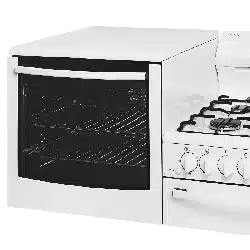
User Manual for Electric oven
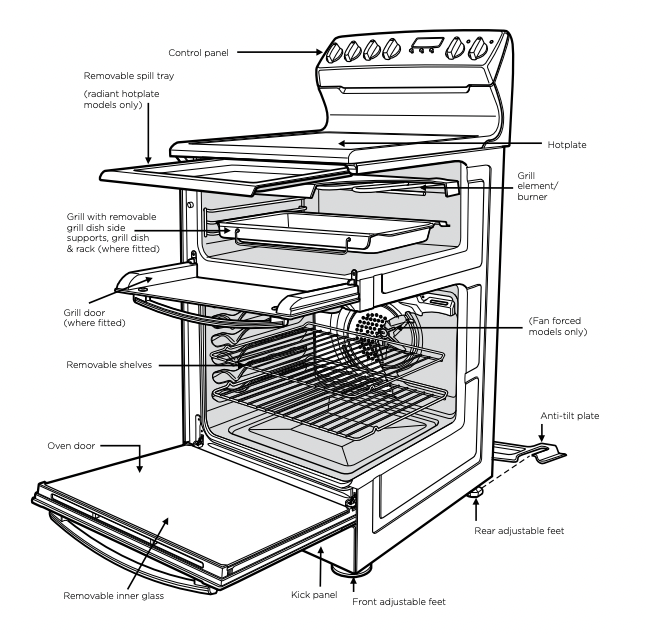
GENERAL APPLIANCE DESCRIPTION
Do not store items on the cooking surface, to avoid a fire. Unattended cooking on a hob with fat or oil can be dangerous and may result in a fire.
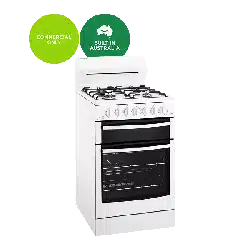
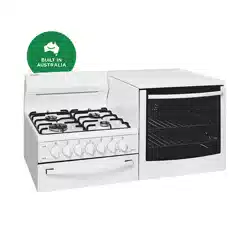
Electric Separate Grill Oven depicted
INSTALLATION
Location
This appliance must not be placed on a base. This appliance must not be installed behind a decorative door.
The appliance has been designed to fit a 550mm gap in kitchen cabinetry or have free space on either side. Ensure the top of the hotplate is at least 10mm higher than the level of the benchtop.
Electric hob models must not be installed in a corner; they must be installed at least 100mm from the side wall.
Gas hob models must be installed with a minimum clearance of 100mm to side walls made of unprotected combustible material. For gas models, refer to section 6.10.1 in AS/NZS 5601.1 for all relevant clearance.
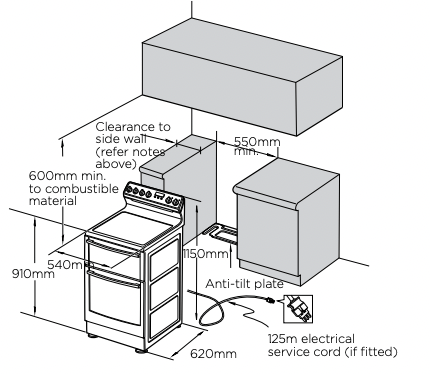
WARNING In order to avoid accidental tipping of the appliance (for example, by a child climbing onto the open oven door), the anti-tilt plate and stabilising bolt MUST be installed.
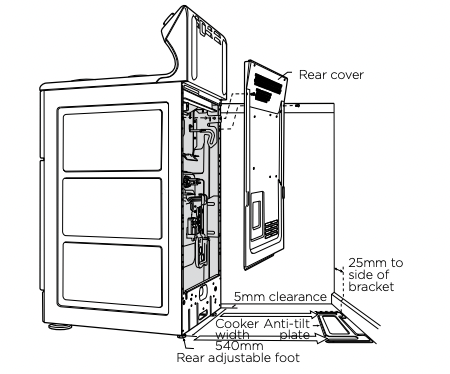
Position anti-tilt plate to the rear wall and 25mm from side of cupboard. Securely fix anti-tilt plate to the floor with fasteners. Adjust levelling feet on cooker as required.
Stabilising bolt
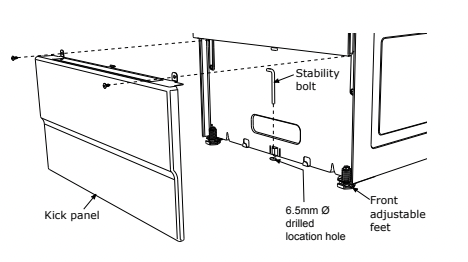
- 1. Remove oven door - to be done by qualified personnel only. (Refer to procedure).
- 2. Remove screws from kick panel. To remove kick panel lift kick panel upwards to release the two location tabs from the holes in the bottom of the panel.
- 3. Position cooker into the ant-tilt plate and then mark the position for the stability bolt hole on the floor.
- 4. Pull cooker out and drill the bolt hole, using a 6.5mm masonry or wood drill bit. The bolt hole needs to be a minimum of 30mm deep when fixing the oven to concrete.
- 5. Reposition cooker back into place and fit the stability bolt through the slot and into the drilled hole.
- 6. If the cooker is placed on a base, measures must be taken to prevent the appliance slipping from the base.
- 7. Carefully remove any protective plastic film to prevent damage to the appliance.
WARNING For your safety this cooker is designed to be moved out of position by a qualified person only. The unit must be pushed up against the wall on installation. On gas units check that the gas hose, if used, has not been kinked during installation.
Replacing the oven light
WARNING Ensure the appliance is switched off at power supply (not just the control knobs) before replacing the light globe to avoid possibility of electric shock.
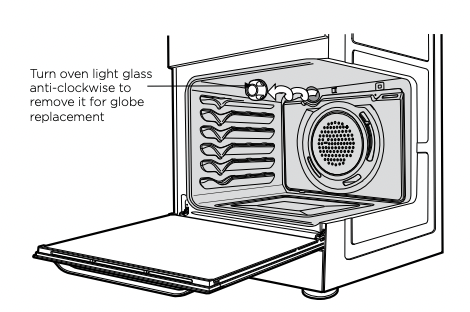
A special high temperature resistant globe should be used. This can be purchased from the Electrolux Customer Care Centre.
Light globes are not covered by warranty
Removing the oven door
(to be done by qualified personnel only)
1. With door fully open, rotate the two stirrups to its rest position.
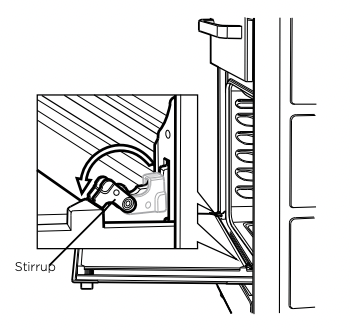
2. Close the door until it stops against the stirrups.
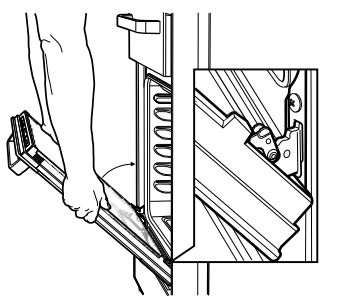
3. Close the door further.
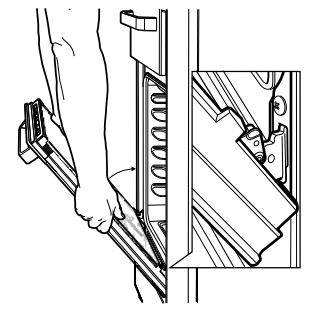
4. Lift the door slightly and evenly while continuing to slowly close the door.
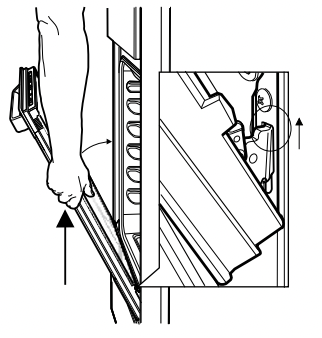
5. Remove the door by lowering gently and pull away from the frame of the oven. Care should be taken not to damage kick panel and other parts of the cooker.
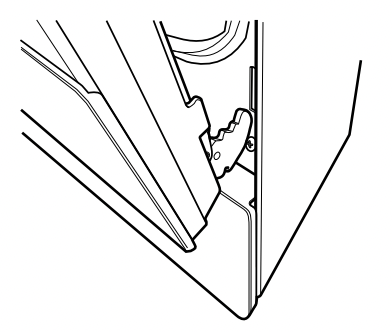
Replacing the oven door
(to be done by qualified personnel only)
1. Hold door with both hands.
2. Locate both hinges into the frame slots at the same time.
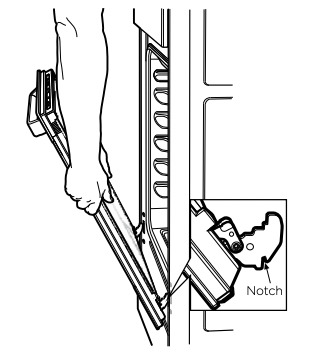
3. Ensure that the location notch drops into frame slot. Care should be taken not to damage other parts into the frame
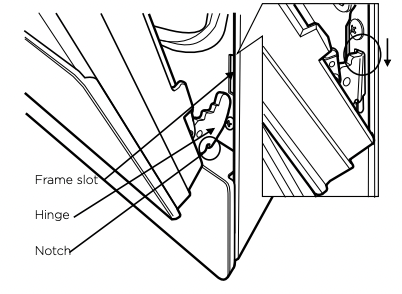
4. Open door fully and rotate stirrups away from you back to their original position.
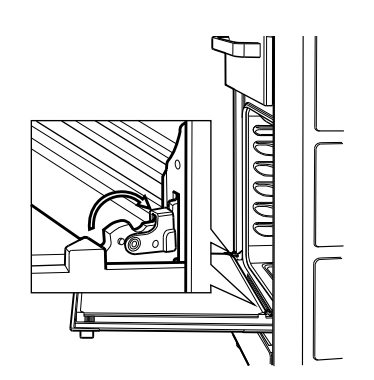
5. Close the door fully.
6. Carefully remove any protective plastic film to prevent damage to the appliance.
Service fuse location – Models with power point only
This product is fitted with a power outlet at each end of the control panel. The outlets are protected by a replaceable 15 amp fuse located at the rear of the product.
WARNING Before servicing the fuse, ensure that all power to the product is switched off.
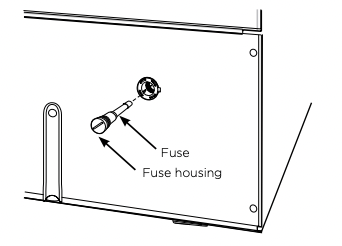
To access fuse, unscrew fuse housing and remove from appliance. (See diagram).
Electric wiring requirements
The cooker MUST be installed in compliance with:
• Wiring connections in AS/NZS3000 wiring rules.
• Local regulations, municipal building codes and other statutory regulations.
• Data plate – Gives information about the rating and is located behind the bottom of the oven door.
Hard wiring
- 1. Remove rear panel.
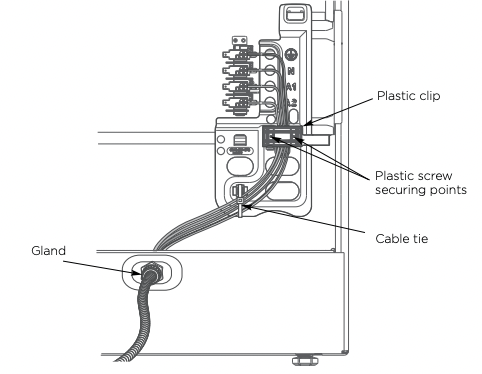
- 2. Fit wires through hole at bottom centre using the appropriate gland to protect insulation of wires from the hole edge. Note that the secondary insulation of the wires will probably need to be removed to fit through gland. If the conduit to appliance is required to bend due to rear wall an elbow may be required to achieve this.
- 3. Set the length of wiring from the gland to terminal block, ensuring length is sufficient but not excessive.
- 4. Make connections to terminals and engage wires into plastic clip. Cable tie as per diagram and secure plastic clip with two long screws supplied.
- 5. Replace rear cover.
Wiring connection for gas cooker
To allow for disconnection of the appliance after installation, the plug must be accessible after installation.
If the supply cord is damaged, it must be replaced by the manufacturer, its service agent or similarly qualified persons in order to avoid a hazard.
Gas connection
Read these points before connecting to the gas supply:
• The cooker inlet connection point has a ½" BSP external thread. See diagram below.
• An NG regulator or a LPG test point fitting is supplied.
• It is recommended to fit the regulator or test point fitting to the appliance connection point, then fit either hard piping or a high level flexible connection (AS/NZS 5601.1 clauses 5.9 and 6.10.1.9) which is then attached to the consumer hard piping.
• Ensure installation allows withdrawal of appliance.
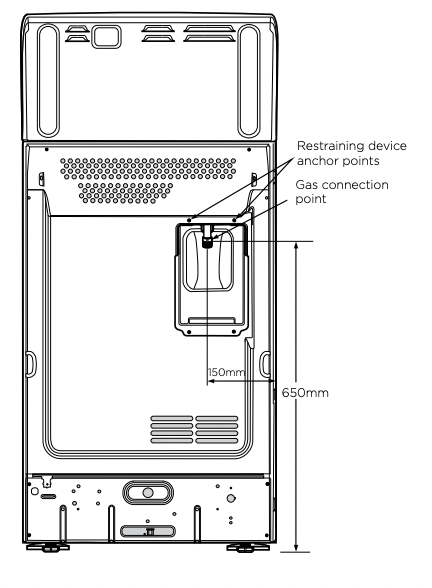
Operation on universal LPG/propane
- 1. The appliance inlet fitting provided MUST be orientated so that the pressure nipple is accessible.
- 2. The inlet fitting has ½" BSP internal thread at the inlet and outlet.
Operation on SNG
• If the cooker is to be used with SNG, then the grill burner MUST be modified by the replacement of the shutter, which fits into the throat of the grill burner.
• A conversion kit can be obtained by contacting the Customer Care Centre.
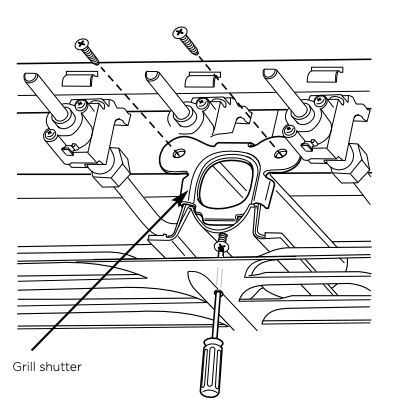
WARNING
Disconnect electric power before removing control panel.
- 1. Remove the control panel.
- 2. Remove the existing NG shutter securing screw (refer to diagram above) and slide upwards to disengage from grill burner.
- 3. Slide the SNG shutter into position and secure with screws.
Testing the gas cooker
WARNING : You MUST test the cooker after installation, before you hand it over to the customer. You MUST have a manometer and a connecting tube.
Checking the gas supply
- 1. Check the manometer zero point is correct.
- 2. Connect the manometer to the cooker pressure test point. This is located on the regulator or LPG inlet fitting.
- 3. Turn on the gas supply and the electricity (if applicable) and try to ignite the gas.
NOTE: It will take additional time to light the gas for the first time, as air needs to be purged from the pipes.
- 4. Check the operating pressure for the particular gas type (see 'Gas Type' table).
• For LPG cookers: Adjust the regulator if necessary (this may be remote from the cooker).
• For Natural Gas cookers: Regulators are supplied pre-adjusted and configured by the component maker for use with Natural Gas. The appliance installer is not required to make an adjustment to obtain the correct outlet pressure setting. An arrow on the base of the regulator indicates the direction of the gas flow when the inlet and outlet of the regulator are orientated correctly.
- 5. When the regulator has been fitted check for leaks from the connections with soapy water.
Checking regulator function
With the appliance operating, check the outlet pressure:
- 1. When all the burners of the appliance are operating at maximum.
- 2. When the smallest burner of the appliance is operating at minimum.
Under both these conditions the outlet pressure should not vary from nominal operating pressure of 1.0kPa by more then ± 20% (ie ±0.20kPa for Natural Gas).
If the regulator does not appear to be performing satisfactorily then check the following points:
- 1. If the outlet pressure is consistently too low then
• the inlet pressure may be too low and adjustment of an upstream regulator may be needed, or
• an upstream regulator or valve with insufficient flow capacity may be present in the gas supply line. It may be necessary to repeat the checks whilst measuring both the inlet and outlet pressure to determine if the inlet pressure is in the range 1.13-5kPa.
- 2. Check that the regulator has been fitted to the gas supply line in the correct orientation.
- 3. Replace the regulator if it fails to perform after the checks.
Testing Burner Performance
• Observe the flame appearance on each burner when set to max. If it is smaller or larger than expected, then the injector size needs checking (refer to table).
• When maximum flame appearance is correct, check the turn down setting on each burner. If incorrect, proceed as follows:
WARNING Disconnect electric power.
- 1. Remove the control panel and adjust the bypass screw when valve is set to maximum. The screw is mounted on the body of each hotplate control valve.
- 2. Check the ignition on all burners both separately and in combination.
- 3. Check the operation of the electrical components, if applicable.
- 4. When operating correctly, show customer how to use the cooker.
- 5. If not operating correctly, advise the customer to ring Electrolux Customer Service Centre. Place a warning sign on cooker or if dangerous, disconnect cooker.
OPERATING FOR THE FIRST TIME
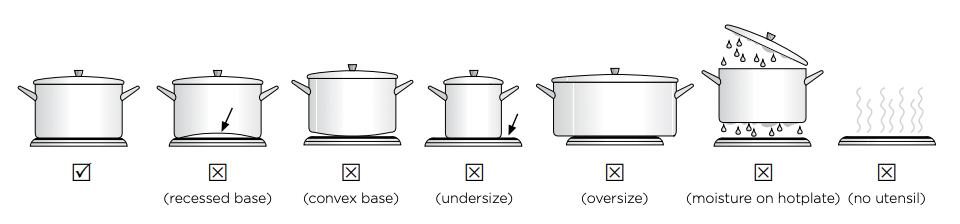
Choosing utensils for electric hotplates
Refer to the diagram below.
Choosing utensils for gas hotplates
Refer to the diagram below.
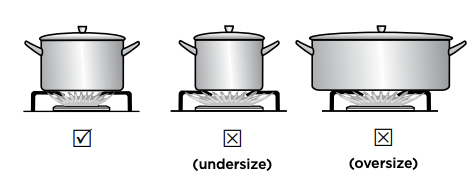
Do not use utensils which are too large or too small.
Installation and service warning
WARNING
• Only an authorised person must install and service this appliance (Certificate of Compliance to be retained).
• In order to avoid a hazard, the installation instructions MUST be followed.
• In order to avoid the appliance tipping, the anti-tilt plate MUST be installed.
• Appliances requiring connection to 230 – 240V MUST be earthed.
• An authorised person should inspect this appliance every 5 years.
• This appliance must NOT be installed on a base, box or in a closed cupboard.
• If the electrical supply cord is damaged, a qualified person MUST replace the cord to avoid a hazard or void your warranty
WARNING Surrounding kitchen cabinets MUST WITHSTAND 85°C.
Before operating first time
- 1. Read all the Warning and Safety information.
- 2. Remove all internal boxes and bags from oven.
- 3. Clean out the oven interior with detergent and warm water and polish with a soft cloth. DO NOT close oven door until the oven is completely dry
Setting the time
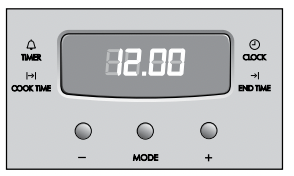
- 4. If you have purchased a model fitted with a 3 button programmable timer, you must set the time of day before you can operate your appliance.
• After the appliance has been electrically connected '12.00' will be displayed and the 'clock indicator' will flash.
• To set the time of day, press the – or + buttons.
- 5 seconds after the last change, the 'clock' indicator will disappear, confirming the time has been set.
NOTE: The clock has a 24-hour display
- 5. New appliances can have an odour during first operation. It is recommended to ‘run in’ the oven before you cook Run the oven at 180°C for 30 minutes and ensure that the room is well ventilated.
- 6. For products with a separate grill compartment, run grill on maximum for 15 minutes with grill door open.
- 7. If your appliance is fitted with solid hotplates, turn heat setting to high for 3 minutes to fully harden the hotplate coating.
INSTALLING OVEN ACCESSORIES
FITTING OVEN SHELVES
- 1. Ensure shelf orientation is correct (refer to diagram below).
- 2. Slide oven shelves onto oven supports (side runners) at an angle until raised back of shelf is past the stop on oven supports (side runners).
- 3. Lower front of shelf and push in until stop is reached.
- 4. To remove oven shelves, withdraw to the stop and raise the front of shelf to clear the stop.
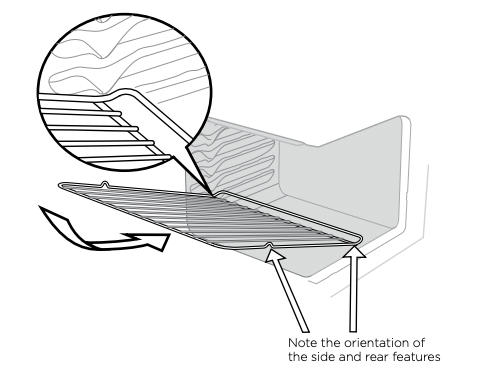
Oven shelf location
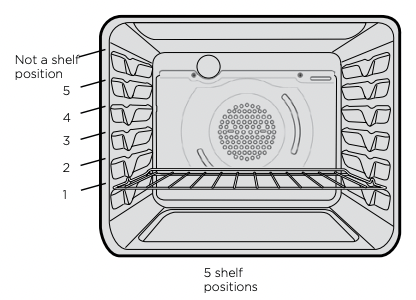
NOTE: the top ledge is not a shelf position. There are no stops for shelf withdrawal.
Assemble grill tray handle
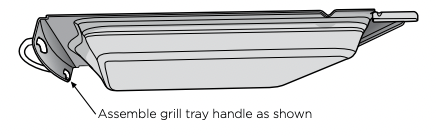
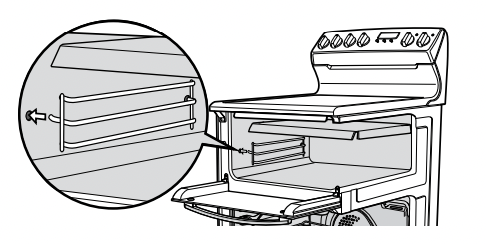
Fitting the grill dish supports
• Insert the rear hook into the rear hole.
• Align the front peg to the front hole and push in firmly.
FITTING THE GRILL DISH
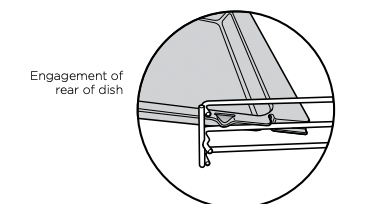
Separate grill
Ensure rear of the dish is engaged with the side support before sliding backwards. To remove, simply pull forwards and upwards.
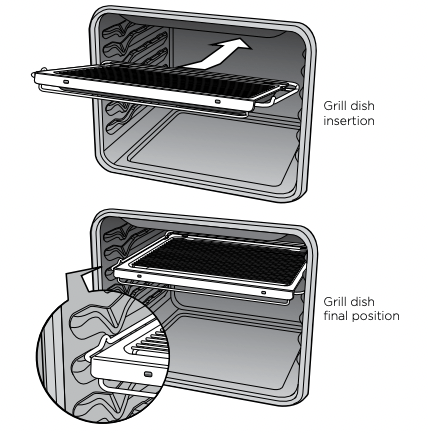
Grill in oven
(refer to Fitting Oven Shelves) The grill dish with wire insert can be used in any of the two upper height positions (shelf positions 4 and 5) between the runners.
NOTE: You must remove the grill dish when baking in the oven.
USING THE ELECTRIC COOKER
ELECTRIC OVEN FEATURES AND DESCRIPTIONS
Separate grill models – fan-forced oven
WLE527WA/WLE537WA/WLE547WA
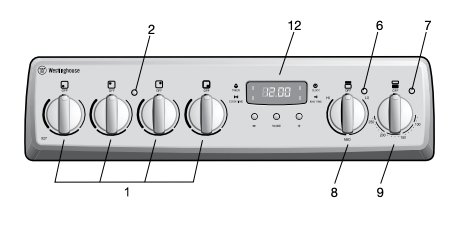
1. Radiant/Solid/Ceramic Hotplate Control Knob – sets hotplate temperature.
2. Hotplate Indicator Light – comes on when a hotplate control knob is operated.
3. Grill/Oven Function Control Knob – sets grill or oven function.
4. Grill/Oven Control knob – sets grill/oven temperature.
5. Grill/Oven Indicator Light – comes on when grill/oven temperature knob is operated. Oven indicator light cycles on and off when temperature is reached.
6. Grill Indicator Light – comes on when grill control knob is operated.
7. Oven Indicator Light – comes on when oven control knob is operated.
8. Grill Control Knob – sets grilling temperature.
9. Oven Control Knob – sets oven temperature.
10. Oven Light Switch – turns oven light on/off.
11. Timer 60 Minute – (where fitted) sets reminder time. – When timer returns to zero, timer gives a short ring. NOTE: For any time below 15 minutes, turn knob past 15 minutes, then back to required time setting.
12. Programmable Clock – sets baking/grilling reminder times – sets automatic cooking duration and stop time. NOTE: Clock time must be set before operating oven.
Radiant hotplates
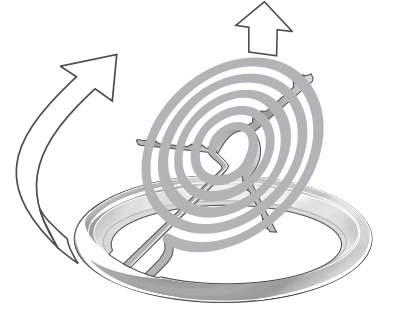
The high-speed radiant hotplates heat rapidly from a cold start. This saves power. The hotplates have a tray underneath the hob which collects spilt liquids. This tray can be removed by sliding it out through the open grill door (except model WLE522WA). Radiant elements also swivel for easy cleaning.
Solid hotplates
The strong solid-cast hotplates give wide contact for fast efficient cooking.
Hotplates are sealed to prevent spilt liquids from running under the hotplates.
If there is a red dot present in the centre of hotplate, this indicates it is a high power hotplate.
When necessary, apply a coating of hotplate protector to solid plates to maintain them
Ceramic hotplates
WARNING If the surface is cracked, switch off the appliance to avoid the possibility of electric shock.
• The ceramic cooktop is made from ceramic glass, a tough, durable material that withstands heating and cooling without breaking. However, it must be noted that as it is glass, it may break, and must therefore be treated with care. Should you have any questions about the glass in your new appliance, please contact the service centre by dialling 13 13 49.
• The smooth glass surface has a pattern to show where the elements under the glass are located.
• When a hotplate is on, the hot surface warning light will come on. After switching off, this light will continue to glow until the temperature of the hotplate drops below 60°C.
Electric oven conventional baking
Heat comes from two elements, one above and one below the food. The bottom element is hidden below the floor of the oven. As hot air rises naturally, the upper part of the oven will be approximately 10°C higher than the set temperature and the lower part of the oven approximately 10°C cooler.
For grill in oven models, the grill dish must be removed when baking.
For best baking results, preheat oven for 30 minutes, also refer to ‘General Hints and Tips”.
Electric oven fan forced baking
In a fan forced electric oven the heat comes from the rear oven element. Hot air is distributed by a fan behind the rear wall of the compartment, providing an even temperature on all shelf levels. This means, batches of food can be baked using multiple shelf positions simultaneously.
Fan forced operation can be used for single food baking with equal success.
Fan Forced baking generally requires lower temperatures than conventional baking. Most recipe books, unless stated, are typically for conventional oven temperatures. It is recommended that when using the fan forced mode, reduce the oven temperature by 10 degrees (refer to ‘Oven Guide’). For best baking results preheat oven for 30 minutes.
Cookware
For best cooking results with electric ovens, silver or shiny trays are recommended.
NOTE: Three button timer models MUST have clock set after a power outage to operate oven.
Your oven is equipped with a 3 button timer that has the following features:
• Timer - you can set a countdown time that will beep when the set time has elapsed.
• Cook time - you can set cooking duration. A timer will count down the preset cooking time, beep when the time has elapsed and turn the appliance off.
• End time - instead of setting a cooking duration you can set a cooking finish time. When the finish time has been reached the timer will beep and turn the appliance off.
• Delayed start cooking time - you can combine the cooking time and end cooking time to switch oven on and off at a specific time during the day
Selecting the timer
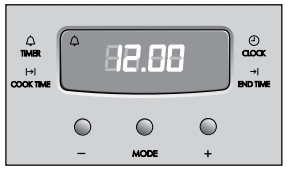
• Press the MODE button until the timer ‘indicator’ begins flashing.
• Set the countdown time you want by using the and
and buttons. 5 seconds after the last change the timer ‘indicator’ will stop flashing and the countdown will start in minutes.
• To stop the beeper, press any button.
• Maximum countdown time is 2hrs 30mins.
Setting the cooking duration
• Select the desired oven function and temperature.
• The oven indicator light will glow and the heating source will come on.
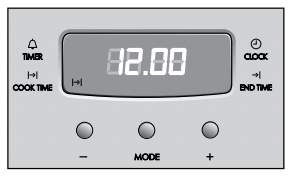
• Press the MODE button until the cook time ‘indicator’ begins flashing.
• Set the cooking duration you want by using the and buttons. 5 seconds after the last change the cook time ‘indicator’ will stop flashing, and the time of day will be displayed.
NOTE: Remember to add pre-heating time if necessary
Setting the cooking end time
1. Check that the clock displays the correct time of day.
2. Select the desired oven function and temperature. The oven indicator light will glow and the heating source will come on.
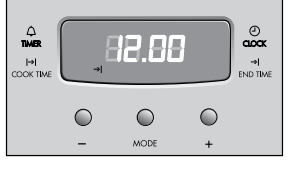
3. Press MODE button until the end time ‘indicator’ begins flashing.
4. Enter the time of day you want to finish cooking by pressing or buttons. 5 seconds after the last change, the end time ‘indicator’ will stop flashing and the current time of day will be displayed.
Setting the delayed start cooking time
• Set the cook time and end time as described in the previous sections.
• Once both the cook time and end time have been set, the cook time and the end time ‘indicators’ will stop flashing and the current time of day will be displayed.
• To stop the beeper, press any button.
To check or cancel settings
• To check your settings, press the MODE button until the indicator you want is flashing.
• To cancel ‘delayed start’ press the mode button until a the ‘end time’ indicator flashes. Press and hold the button until the clock no longer reverses (you will hear a beep). If you have left the temperature and function knobs at a setting the oven will start once the ‘end time’ indicator stops flashing.
• To cancel ‘auto shut off’ press the mode button until the ‘cook time’ indicator flashes. Press and hold the button until the clock no longer reverses (at 0:00 you will hear a beep). This automatically cancels ‘delayed start’. If you have left the temperature and function knobs at a setting, the oven will start once the ‘cook time’ indicator stops flashing. Because you have cancelled ‘auto off’ the oven will continue to heat until you manually turn it off.
On completion of cooking
• The heat source will turn off, the timer will beep and the end time and/or cook time ‘indicators’ will flash.
• Even though the heating element turns off the oven will still retain substantial heat. This will continue to cook the food until it is removed or the oven cools down. If you do not plan on being present when the oven turns off, you should take this extra heating time into account.
• Turn the function and temperature controls to the off position.
• Press any button to stop the timer beeping.
Adjusting the clock
• Press the MODE button until the clock ‘indicator’ begins flashing.
• Press the or buttons to change the time of day. 5 seconds after the last change, the clock ‘indicator’ will disappear, confirming the time has been adjusted.
CLEANING THE COOKER
Ovens and hotplates are made from steel and enamel. Do not use abrasives and harsh scourers as they may scratch the surface.
Enamel
• Keep enamel clean by wiping it with a soft cloth dipped in warm soapy water.
• Rub difficult stains with a nylon scourer or cream powder cleanser.
• DO NOT use abrasive cleaners, powder cleaners, steel wool or wax polishes.
• If you use an oven cleaner, follow the instructions on the product carefully
Stainless Steel
- All grades of stainless steel can stain, discolour or becomes greasy. Clean the cooker regularly, using the procedures outlined below, to maintain the function and appearance of your appliance.
- Care must be taken when wiping exposed stainless steel edges as they can be sharp.
- The front frame around the oven can be cleaned with stainless steel cleaners if it becomes soiled or discoloured.
- A suitable cleaner can be purchased from Electrolux Customer Care Centres.
- Always clean the stainless steel in the direction of the grain. Going against the grain may scratch the surface.
Oven Shelves
- Chrome shelves: use detergent and hot water. If very dirty use a non-abrasive nylon scourer.
Oven – Grill Dish and Insert
- After every use and while still warm, wash pan and grill with warm soapy water and a suitable oven cleaner. Rinse and dry before replacing in position.
Oven
- Use detergent, warm water (and household cloudy ammonia if necessary) and a soft cloth. Dry thoroughly.
- Remove shelves when the cleaning oven.
- If there is a build-up of grease use a suitable oven cleaner, following the instructions on the cleaning product carefully. Heat oven to 110°C and turn oven off when 110°C is reached. Leave over-night. The fumes will loosen stubborn grease and stains. Remove bowl, wash with hot, soapy water and dry well before closing oven door again. Ensure oven is thoroughly rinsed and dried before subsequent use.
CAUTION DO NOT remove the oven door.
Ceramic hotplates
Remove all spilt food with a razor blade scraper while the hotplate is still warm – NOT HOT.
- If aluminium foil, plastic items or foods with a high sugar content melt onto glass, use a razor blade scraper to remove immediately before the hotplate has cooled, otherwise pitting of the surface may occur. High sugar content foods include jam, fruit, carrots, tomatoes and peas.
- Sometimes SURFACE stains appear to be ‘bubble’ marks under the ceramic glass. These can be cleaned off with a razor blade scraper and ceramic cleaner.
- When the ceramic hotplate has cooled, wipe clean with dishwashing detergent and a damp cloth.
NOTE: DO NOT use abrasive sponges or scourers, oven sprays or stain removers on ceramic hotplates. These may damage, scratch or stain the ceramic cooktop. Any pitting, staining or scratching WILL NOT be covered by warranty.
Solid hotplates
Solid hotplates are fitted with stainless steel trim rings, which after initial use, change colour to light brown. This is a normal characteristic of stainless steel and will not affect the operation or performance of your hotplates.
- Clean off any spillage after hotplate has cooled down.
- At regular intervals, clean hotplate with a nylon scouring pad and soapy water. Wipe clean then warm hotplate for seconds to dry the surface.
- Apply ‘hotplate protector'. Set hotplate on high for minutes to allow coating to harden.
Radiant hotplates
These plates are self cleaning. Any liquid which boils over will burn to ash and can be wiped off when the hotplate has cooled. To clean the trim rings, lift front of element and remove, then wash in warm, soapy water.
To clean any spillage that falls through the element, remove the spillage tray and wash in warm soapy water.
Gas burners
- Flame port blockages should be removed with a small metal cake skewer or nylon brush.
- Clean dirty spark plugs very gently with a nylon scourer. Do not use steel wool. Do not bend spark plug as it may break.
- If the caps, crowns and cups are heavily soiled, use a nonabrasive cleaning compound.
- Do not clean these parts with abrasive or caustic type cleaners, or clean in a dishwasher as they will be damaged.
GENERAL HINTS AND TIPS
Cleaning the oven door
Cool air circulates through the door to lower the surface temperature on the outside of the oven door.
CAUTION
- Do not remove the outer oven door. This product has a removable inner glass insert for ease of cleaning.
To remove the inner door glass for cleaning
- Open the door fully to access the hinges then rotate the stirrups' on both hinges fully towards the door.
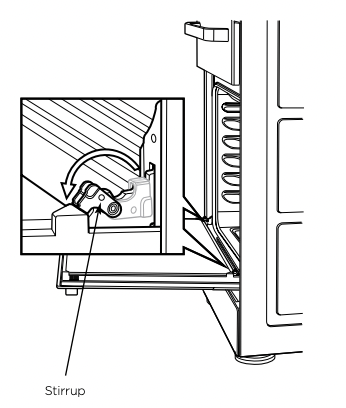
• Slowly close the door until it stops against the ‘stirrups’.
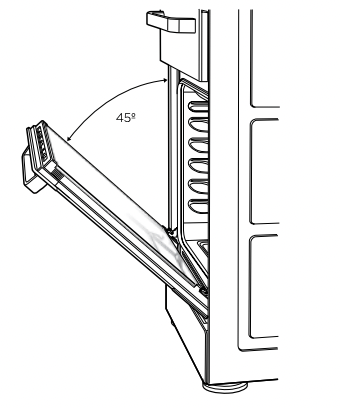
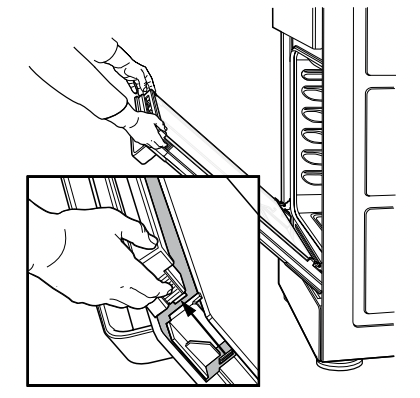
• To remove the top trim, press the ribbed release clips at each end and lift top trim away from the door.
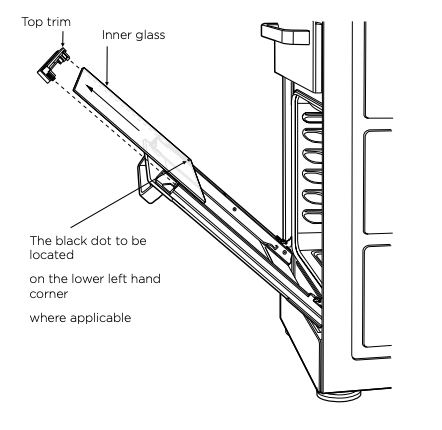
• Using both hands, gently remove the inner glass by sliding out and lifting away from the door.
• Hand wash only with a soft cloth and warm soapy water. When dry, polish with a soft cloth and ensure the glass is dry before re-assembly.
• Wipe inner and outer glass gently with detergent and warm water.
• Wipe clean and dry thoroughly
OVEN GUIDE
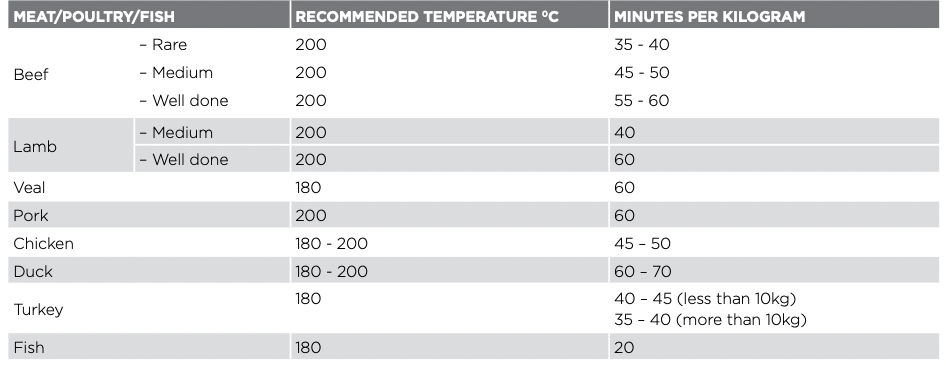
The following is intended as a guide. Cooking variation is natural and to be expected. You should experiment with times, temperatures and recipes to obtain the best results to your own taste. Get to know your oven before making a service call. Where the gas models vary from the electric models, details for gas cooking is shown in brackets. For best results when baking, preheat your oven for 30 minutes.
 * Shelf position is counted from the bottom shelf up. Bottom shelf position is 1.
# Turn down temperatures shown.
TROUBLE SHOOTING
| PROBLEM |
CAUSES |
WHAT TO DO |
Uneven cooking
|
Incorrect shelf position |
Select shelf that puts food in centre of oven |
| Oven tray too large |
Try other trays or dishes |
| Trays not in centre |
Put trays in centre |
| Air flow in oven uneven |
Rotate food during cooking |
| Grill tray affecting thermostat |
Remove grill tray from oven on bake modes |
Baked products too brown on top
|
Oven not preheated |
Preheat the oven |
| Baking tins too large for recipe |
Use correct size tins |
| Baking tins not evenly spaced |
Stagger baking tins at least 3cm between tins and the oven walls |
| Products not evenly sized or spaced on trays |
Make into same size and shape and spread evenly over trays |
Baked products too brown on bottom
|
Baking tins too large |
Use correct size tins |
| Baking tins are dark metal or glass |
Change to shiny, light tins or lower the temperature by 10°C |
| Food is positioned too low in oven |
Cook one shelf higher |
| Oven door opened too frequently during baking |
Don’t open the oven door until at least half the cooking time has passed |
| Baking temperature too high |
Lower the temperature |
| Grill tray affecting thermostat |
Remove grill tray from oven on bake modes |
Cakes have a cracked thick crust
|
Baking temperature too high |
Lower the temperature |
| Food is positioned too low in oven |
Cook one shelf higher |
| Cake batter over mixed |
Mix just long enough to combine the ingredients |
| Baking tin too deep |
Check size of tin and use recommended size |
| Baking tins dark |
Change to shiny light tins |
Baked products are pale, flat and undercooked
|
Baking temperature too low |
Raise the temperature |
| Food is positioned too low in oven |
Cook one shelf higher |
| Baking time too short |
Increase cooking time |
| Incorrect baking tin size |
Use correct size tin |
| Cakes fallen in centre |
Baking temperature too low |
Raise the temperature |
| Baking time too short |
Increase cooking time |
| Proportions of ingredients incorrect for recipe |
Check recipe |
| Opening door too early during baking |
Do not open door until the last quarter of cooking time |
Roast meat and potatoes not brown in fan oven
|
Poor hot air circulation |
Elevate food onto a rack to allow air circulation |
| Grill tray affecting thermostat |
Remove grill tray from oven on bake modes |
| Juices running out of meat |
|
Do not pierce meat with fork, turn with tongs |
| Grilled meats overcooked on outside and raw in the centre |
|
Grill at lower insert position |
| Grilled chops and steaks curling |
|
Cut into fat every 2cm (¾") |
| Excess grill smoke |
Build-up of fats in grill |
Clean grill |
| Stains appear to be under ceramic glass |
These marks are on the surface of the ceramic glass |
Clean marks off with a razor blade scraper and ceramic glass cleaner. |
If you have a problem with your appliance check the following before you ring the service line.
| PROBLEM |
WHAT TO DO |
| Operational problems i.e. Oven, grill or hob not working |
Check the electricity is turned on
Check your fuses. If the fuse continues to blow, call the Service Centre
Check the circuit breaker
Ensure correct knob is turned
Gas only – Dry or clean ignition electrodes
Gas only – Make sure flame ports and ignition areas are clean and dry
Gas only – Check gas supply is on
Gas only – Ensure cap/crown correctly fitted
Replace or tighten light globes (where fitted)
|
| Heat up problems |
Oven not pre-heated – Pre-heat oven for 30 minutes
Check oven door is closed properly
Remove foil or trays from bottom of oven
Change set oven temperature
Preheat your oven/grill before you put the food in to be cooked
|
| Unit smoking odours |
New appliances can have an odour during first operation. It is recommended to ' run in’ the oven before you cook. Run the oven at 180ºC for two hours and ensure room is well ventilated
For products with separate grill compartment, run the grill on for full for 15 minutes with grill door open
Persistent gas smell – do not operate appliance. Call service 131349
|
|
Condensation
NOTE: some condensation is normal and is to be expected during cooking
|
Reduce the amount of water used for cooking
Leave the door open after cooking if food remains in cooker for warming
|
| Timer not audible |
Turn Timer knob past 15 minute mark then to the required number of minutes |
| Oven shelf tight |
Remove shelf and insert as per diagram |
| Oven or grill not working (Electric cooker only) |
Clock not set, refer to clock instructions |
| Oven not working |
Clock program set. Cancel program |
| Oven light not working |
Lamp blown or loose in socket. Replace or tighten globe |
| Electronic clock flashing on display or off (Electric cooker only) |
Check household power supply, fuses and reset time of the day |
| Powerpoints not working (NZ model Electric cooker only) |
Check the fuse at rear and replace if blown |
| Gas oven burner uneven flame |
This does not affect cooking results. From cold start the oven burner flame will be higher on the left-hand side. After reaching the set temperature, the flame will then be even. |
| The oven seal is loose |
The oven seal is attached at each corner. It may seem like a loose fit, but when the oven door is closed it will function correctly |