1
Questions or Concerns? [email protected] • (855) 686-3835
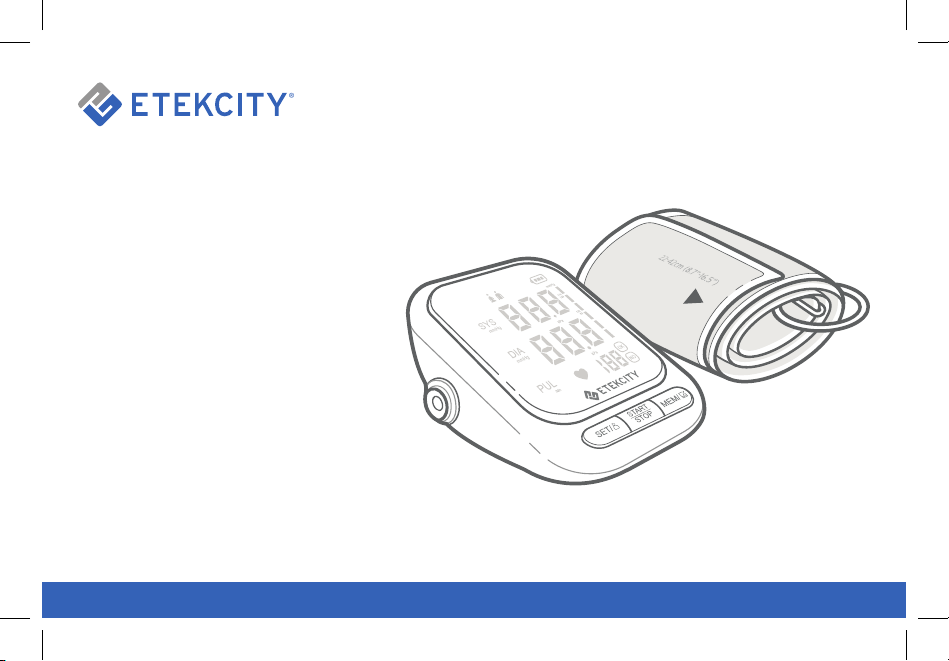
Upper-Arm Blood
Pressure Monitor
User Manual
Model: EBP-UA5

2
Thank you for purchasing the
Upper-Arm Blood Pressure Monitor
by Etekcity.
If you have any questions or concerns, please
reach out to our helpful Customer Support
Team at [email protected]. We hope
you enjoy your new blood pressure monitor!
BECOME AN ETEKCITIZEN
Get exclusive deals, giveaways, and product
registration. Better products for better living.
Find us at etekcity.com

3
Table of Contents
Package Contents
Specifications
Safety Information
Function Diagram
Digital Diagram
Getting to Know Your Blood Pressure Monitor
- When to Take Blood Pressure
- Selecting a User
- Memory
- Turning the Speaker On/Off
- Changing Units
Before Measurment
Using the Blood Pressure Monitor
Display Readings
Blood Pressure Classification Table for Adults
Maintenance
Frequently Asked Questions
Glossary of Symbols
Warranty Information
Customer Support
3
4
5
7
8
9
9
9
10
10
11
11
12
14
15
16
18
19
28
30
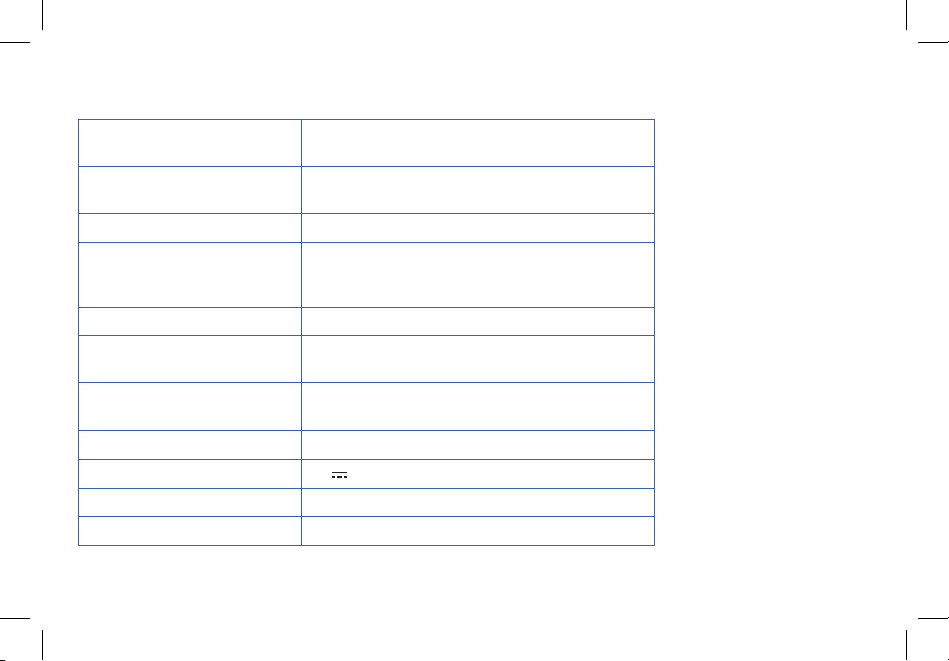
1 x Blood Pressure Monitor
1 x Arm Cuff
1 x Type-C USB Charging Cable
1 x Storage Bag
1 x Quick Start Guide
Package Contents
4
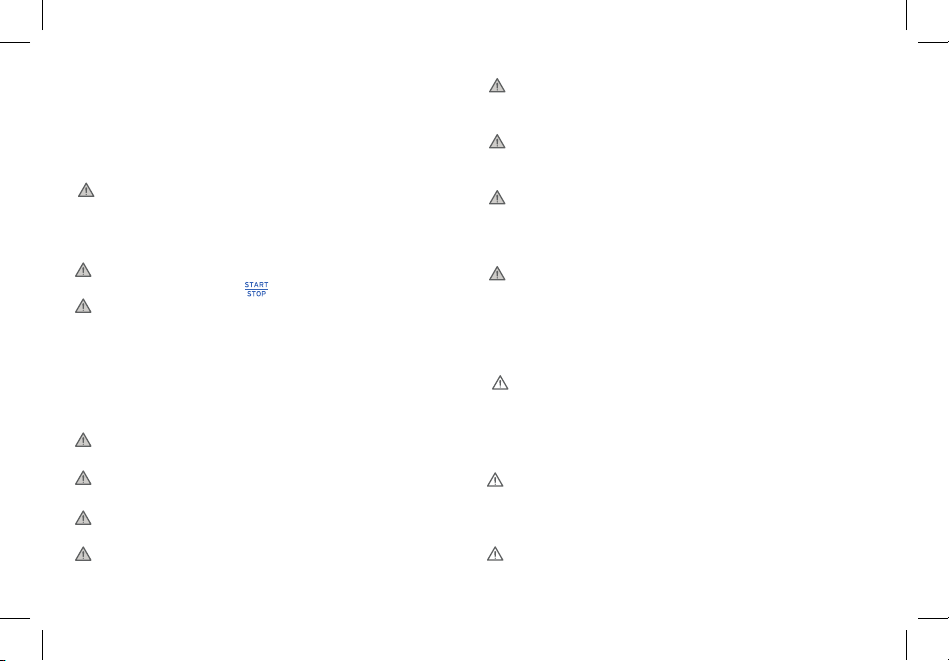
Specifications
Measurement Range
Pressure: 0–290 mmHg / 0–39 kPa
Pulse: 40–199 per minute
Accuracy
Pressure: 3 mmHg / 0.4 kPa
Pulse: 5%
Units mmHg / kPa
Dimensions
Monitor: 4.9 x 4.5 x 2.8 in / 12.6 x 11.5 x 7.1 cm
Cuff: 24.5 x 5.9 in / 62 x 15 cm
Cuff Circumference: 8.7–16.5 in / 22–42 cm
Weight 0.9 lb / 405 g
Operating Environment
Temperature: 41°–104°F / 5°–40°C
Relative Humidity: 15–80%
Transport and Storage
Environment
Temperature: -4°–131°F / -20°–55°C
Relative Humidity: 15–93%
Battery Type 3.7V, 800mAh Li-ion battery
Rated Power 5V 1A
Charging Time 3–4 hours
Automatic Shutoff 60 seconds
5
Safety Information
• If the arm cuff causes any discomfort,
immediately press to turn off the monitor.
• The monitor is not intended to be a diagnostic
device. Consult your physician before using if you
have any of the following conditions: advanced
age, common arrhythmias (such as atrial or
ventricular premature beats or atrial fibrillation),
arteriosclerosis, diabetes, poor perfusion,
pregnancy, pre-eclampsia, or renal diseases.
• Consult your physician before using on an arm
with an arterio-venous (A-V) shunt.
• Do not use the arm cuff on an arm that is injured
or undergoing medical treatment.
• Do not use the arm cuff on an arm that currently
has an intravenous drip or blood transfusion.
• Do not use the monitor at the same time as
other medical electrical (ME) equipment.
Please read and follow all instructions and safety
guidelines in this manual.
Warning: Indicates a potentially hazardous
situation which, if not avoided, could result in death
or serious injury.
• Do not use the monitor near HF surgical
equipment, MRI, CT scanner, or in an oxygen
rich environment.
• Closely supervise children near the monitor.
Do not allow children to use or play with this
monitor.
• Keep out of reach of children. The monitor
contains small pieces that may be swallowed
and the air hose and charging cable may cause
strangulation.
• This monitor is intended for adults only. Consult
your doctor before using this monitor on
children.
Caution: Indicates a potentially hazardous
situation which, if not avoided, may result in minor
or moderate injury to the user or patient, or damage
to the equipment or other property.
• People with severe blood flow problems or blood
disorders should consult a physician before
using the monitor, as the arm cuff inflation can
cause bruising.
• Consult your physician before using the monitor
if you have had a mastectomy.
6
• Do not take measurements more than
necessary. It may cause bruising due to blood
flow interference.
• Do not use the monitor for any purpose other
than measuring blood pressure.
• Only use the approved arm cuff for this monitor.
Use of third-party arm cuffs may result in
incorrect measurements.
• Do not get the monitor wet or use in a wet
or humid environment. This may damage the
monitor.
• Do not store in any place that is tilted, vibrates,
or can damage the monitor.
• Do not store near chemicals or corrosive gases.
• Keep away from heat sources and direct
sunlight.
• Do not leave the monitor exposed to any
chemical solvent, lint, or dust.
• Only use, transport, and store the monitor
within the required temperature and humidity
ranges (see page 4). If the temperature
and humidity go outside these ranges, the
measurement results may be inaccurate.
• Do not hit or drop the monitor.
• Do not use the monitor in a moving vehicle,
such as a car or an airplane.
• Do not use the monitor near a mobile phone
or any other device that emits electromagnetic
fields.
• When appears, charge the monitor with
the provided USB charging cable. Do not use the
monitor while it is charging.
• Only use the charging cable that meets the
requirements for the monitor (see page 16).
• Do not make any repairs yourself. If you have
any questions, contact Customer Support (see
page 30).
Safety Information (cont.)
SAVE THESE
INSTRUCTIONS
7
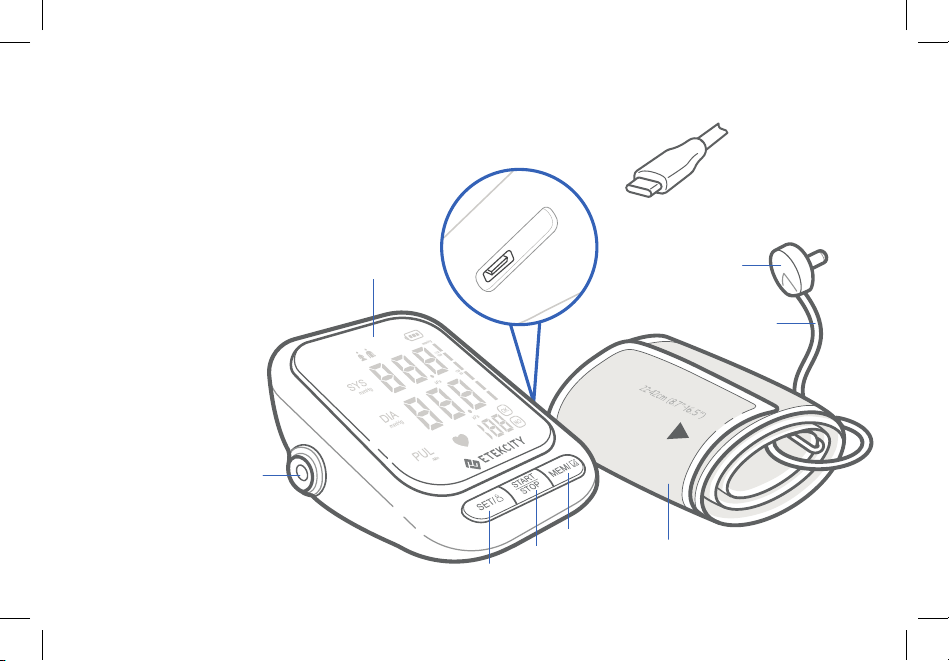
A. Display
B. Air Port
C. Type-C Charging Port
D. Set/User Button
E. Start/Stop Button
F. Memory Button
G. Air Plug
H. Air Hose
I. Type-C USB Charging Cable
J. Cuff
Function Diagram
A
B
C
H
J
D
E
F
I
G
8
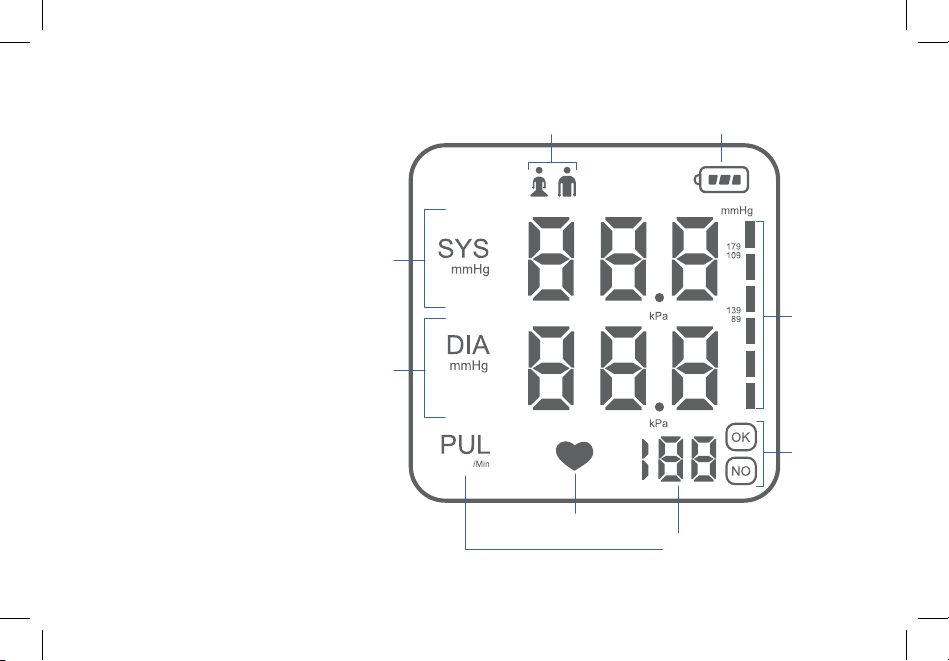
A. Battery
B. User
C. Systolic Blood Pressure
D. Diastolic Blood Pressure
E. Irregular Heartbeat Indicator
F. Pulse
G. Cuff Status
H. WHO Indicator
Display Diagram
B
C
D
E
G
H
A
F

9
Getting to Know Your Blood Pressure Monitor
Blood pressure monitors use the oscillometric
method of measuring blood pressure. The monitor
can detect the blood’s movement through the
brachial artery and convert it into a digital reading.
The monitor is easy and simple to use and does not
require a stethoscope.
• The best times to take your blood pressure are
within 1 hour of waking in the morning or 1 hour
before bedtime.
• When measuring in the morning, measure after
urinating and before eating breakfast.
• Always measure your blood pressure before
taking blood pressure medication.
• If you need to measure your blood pressure at
another time of day, make sure you are calm
and stable before measuring.
• Measure your blood pressure at the same time
every day.
When to Take Blood Pressure
Selecting a User
To switch between user 1 and 2:
• With the monitor off, press to show the
current user and press again to change users.
The user number will flash to indicate your
selection.
Note: If no buttons are pushed within 3 seconds,
the monitor will turn off.
10
Memory Turning the Speaker On/Off
Results are automatically saved after each
measurement. The monitor can save up to 90
results for each user.
To view saved results:
1. Select a user.
2. While the monitor is off, press
to display the average of the last 3
results. Press again to view each
result, beginning with the most recent
measurement taken.
3. Press
again to view the next result.
To delete all saved results:
1. Select a user.
2. While the monitor is off, press and hold
for more than 3 seconds. While still
holding , press .
3. Once “ALL EE” appears on the display, all
results for the user are being deleted.
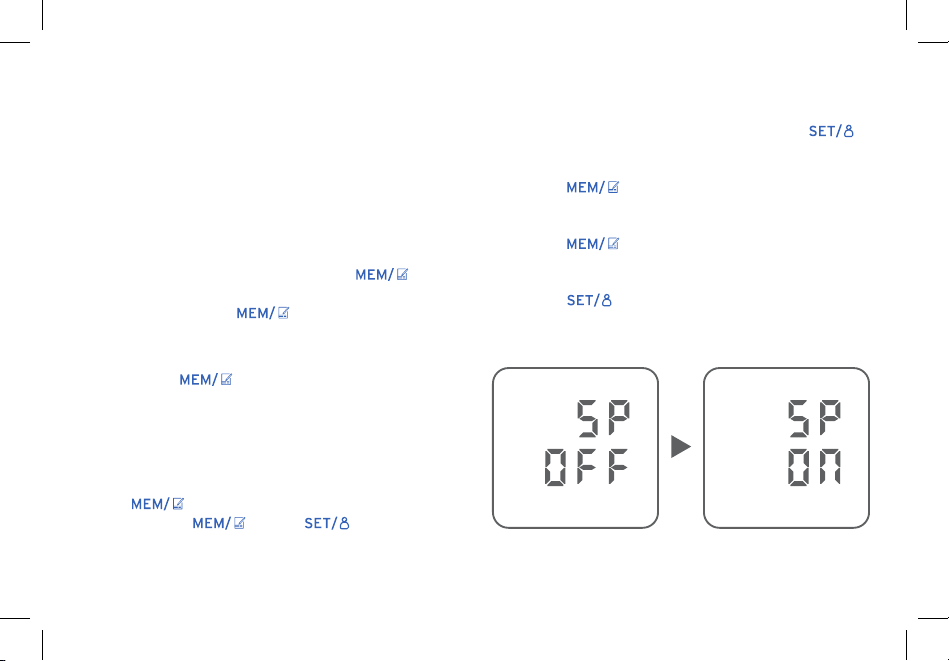
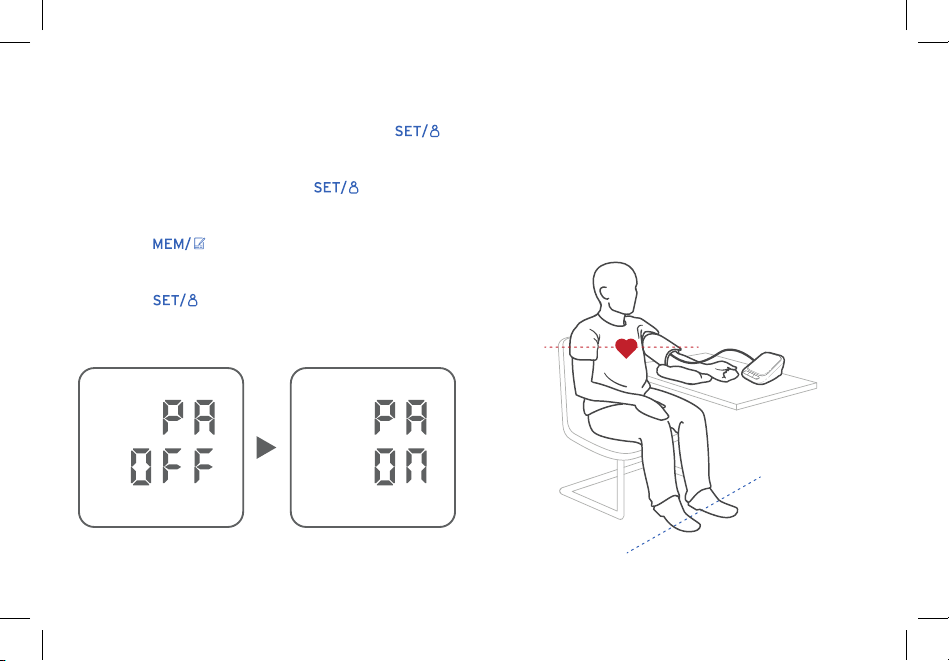
1. While the monitor is off, press and hold
until the display reads “SP OFF”. [Figure 1.1]
2. Press to change the reading to “SP ON”
to turn the speaker on. [Figure 1.2]
3. Press again to change the reading to
“SP OFF” to turn the speaker off.
4. Press to confirm the setting.
Figure 1.1 Figure 1.2
11
Changing Units
1. While the monitor is off, press and hold
until the display reads “SP OFF” or “SP ON”.
2. Once it blinks 2 times, press again to
change it to “PA OFF” for mmHg.
3. Press to switch to “PA ON” for kPa.
[Figure 2.1]
4. Press to confirm your desired unit.
• Sit on a chair with your feet flat on the floor and
your arms on the table so the cuff is level with
your heart. [Figure 3.1]
• Make sure the air plug is inserted into the air
port.
Before Measurement
Figure 2.1
Figure 3.1

12
Caution
• Do not measure blood pressure until at least
30 minutes after physical activity. Do not drink
stimulating beverages, such as coffee or alcohol,
or smoke before measurement.
• Sit for at least 5 minutes in a comfortable,
secure environment before measurement.
• Your blood pressure should be measured sitting
down. Take note if your blood pressure is taken
in a different position.
• Take measurements on both arms the first time
you use the monitor to make sure it is calibrated
and both readings are similar.
• Blood pressure should be measured at intervals
of no less than 3 minutes, depending on your
physical condition.
• People with arrhythmia and/or arteriosclerosis
should be measured by medical staff for a
professional diagnosis.
• Avoid pressing the cuff to your body when
taking measurements.
• Avoid any electromagnetic interference when
taking measurements.
Using the Blood Pressure
Monitor
Note: Before first use, fully charge the blood
pressure monitor (see Charging the Battery,
page 16).
Note: Your upper arm should be bare or wearing
only thin material.
1. Rest in a comfortable area for at least 5 minutes
before measuring to ensure the best results.
2. Plug the cuff into the monitor. Make sure the air
plug is completely inserted to avoid air leaking.
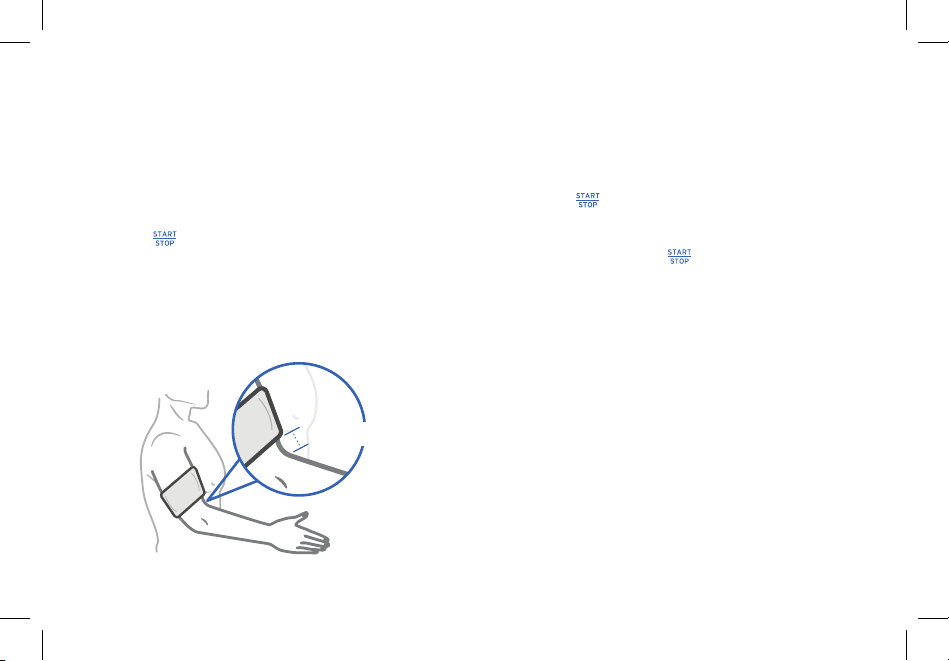
3. Place the cuff on your upper left arm with the
air cable on the inside of your arm. The band
should not be wrapped too tightly (leave space
to insert about 2 fingers) and the lower edge
of the cuff should be about 0.8–1.2 in / 2–3 cm
away from your elbow. [Figure 4.1]
4. Select a user (see page 9).
13
5. Place your arms on a surface so the cuff is at
the same level as your heart. Your arms should
be in a relaxed, natural position.
6. Press to begin measuring. Relax and avoid
moving or talking while measuring. When the
measuring is finished, the results will display.
7. Wait 3 minutes before taking a second
measurement, if necessary.
Using the Blood Pressure Monitor (cont.)
Note:
• Press at any time to stop measuring.
• If the cuff causes any increased discomfort,
immediately press to turn off the monitor.
• Wait at least 3 minutes before measuring
again.
• Only use the air plug to connect or disconnect
the arm cuff. Do not pull on the air hose to
disconnect from the air plug.
• If the monitor cannot read your blood pressure
on your left arm, measure on your right arm.
Figure 4.1
0.8–1.2 in / 2–3 cm
14
Display Readings
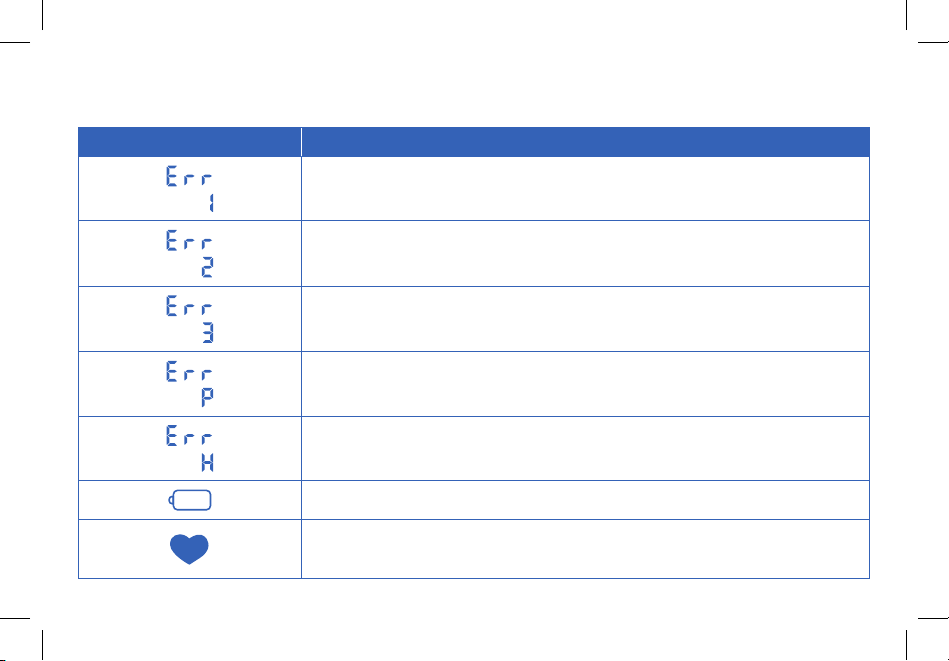
Symbol Solution
Air may be leaking or pulse may be too weak. Reattach the cuff and test
again.
Blood pressure cannot be detected due to interference. Make sure you are
seated and positioned correctly before testing again.
The measurement result is not correct. Test again.
Inflation has failed. Check the cuff and test again.
Air pressure is too high. Test again.
Charge the monitor with the provided Type-C USB charging cable.
Remove the arm cuff and wait 2–3 minutes before taking another
measurement. If this error continues to appear, contact your physician.

15
Blood Pressure Classification Table for Adults
BP Classification Systolic (mmHg) Diastolic (mmHg)
BP Classification
Normal Blood
Pressure
<120 and <80
Elevated Blood
Pressure
120–129 and <80
Hypertension:
Stage 1
130–139 or 80–89
Hypertension:
Stage 2
≥140 or ≥90
Hypertensive
Crises
Hypertensive
Urgency
>180
and/
or
>120
Hypertensive
Emergency
>180+ target organ
damage
and/
or
>120+ target organ
damage
According to the 2017 Guideline for the Prevention, Detection, Evaluation and Management of High
Blood Pressure in Adults, there are 4 levels for blood pressure classification and 2 hypertensive crises:
emergencies and urgencies.
16
Charging the Battery
Maintenance
The blood pressure monitor comes with a
rechargeable Li-ion battery inside. Use the included
Type-C USB cable to charge the monitor.
will
appear on the screen when the monitor needs to be
charged.
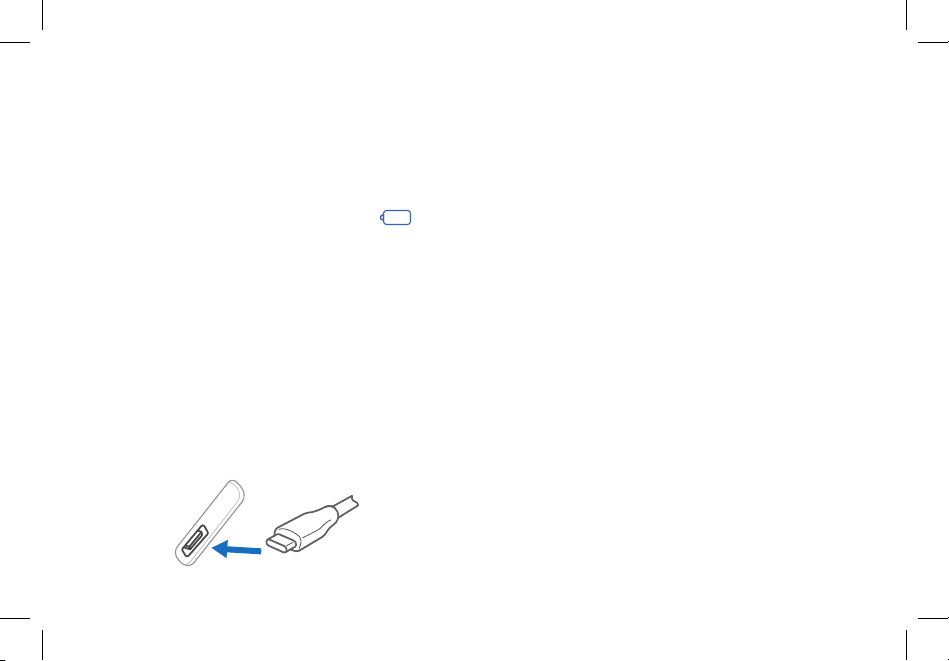
1. Insert the USB charging cable into the USB
charging socket on the monitor.
2. Plug the USB charging cable into a DC 5V
adapter and plug into an outlet. [Figure 5.1]
You can also plug the cable into a powered
USB outlet.
3. The monitor is fully charged when the
indicator turns solid green.
Note:
• Charging may take 3–4 hours.
• Every 2 months (or when battery life is
significantly shorter), fully charge the monitor
and then allow the battery to drain until the
monitor shuts off. This will optimize battery
performance.
• Battery life depends on the frequency and
time of use. If battery life is unusually reduced,
contact Customer Support (see page 30).
• Only use a Type-C USB charging cable to
charge the monitor.
• Do not use the monitor while charging.
• In extreme conditions, the battery may leak
corrosive fluid. If this comes into contact with
eyes or skin, rinse immediately with water and
seek medical attention.
Figure 5.1

17
Optimizing Battery Performance Storage
Cleaning the Monitor
For best results allow the monitor to go through 2
full charge and use cycles.
1. Fully charge the battery.
2. Use the monitor and allow the battery to
drain until the monitor shuts off.
3. Repeat steps 1 and 2 a second time.
1. Turn the monitor off and disconnect the arm
cuff.
2. Wipe gently with a damp cloth and wipe dry
immediately.
Note:
• Do not use chemicals or detergents to
clean the monitor.
• Do not let water get into the monitor.
• Turn the monitor off and unplug the air plug
from the air port.
• Place the cuff and the machine in the storage
bag.
Note: Do not roll or fold the air hose or cuff too
tightly.
• Do not store in wet, damp, or humid places.
• Do not store in any place that is tilted, vibrates,
or can damage the monitor.
• Do not store near chemicals or corrosive gases.
• Keep away from heat sources and direct
sunlight.
• Do not store in places that can be easily
reached by children.
• Do not leave the monitor exposed to any
chemical solvent, lint, or dust.
• When not in use for a long period of time,
recharge the battery monthly.

18
Frequently Asked Questions
Why are my blood pressure readings different?
• The area you are in as well as your mental and
physical state both factor into your readings.
Your readings may come out lower when you
are at home and at peace as compared to when
you are at the hospital and feeling nervous.
• If the cuff position is higher or lower than
the heart, the blood pressure reading may be
inaccurate. Make sure the cuff is 0.8–1.2 in /
2–3 cm away from your elbow.
• The cuff may be too loose, causing the blood
pressure reading to be too high. Tighten the
cuff on your arm.
• Your sitting posture, such as bending over
or sitting cross-legged, can raise your blood
pressure. Sit in a chair with your arms elevated
on a table (see Before Measurement,
page 11).
Why are the blood pressure readings different
every time I measure?
• Your blood pressure will vary throughout the
day, even if it is measured every 10 seconds. It
will fluctuate for a variety of reasons. Eating,
drinking, smoking, bathing, and even your
mood can all affect your blood pressure.
Why does my arm ache or feel numb after taking
my blood pressure?
• The cuff will inflate to compress your arm to
briefly stop the flow of blood. This may cause
temporary numbness and discomfort. Once the
cuff is removed, allow your arm to rest.
Why is the cuff not inflating?
• Air may be leaking. Check to make sure the air
plug is inserted in the air port and the air hose
does not have holes or punctures.
If your problem is not listed, please contact Customer Support (see page 30).
19
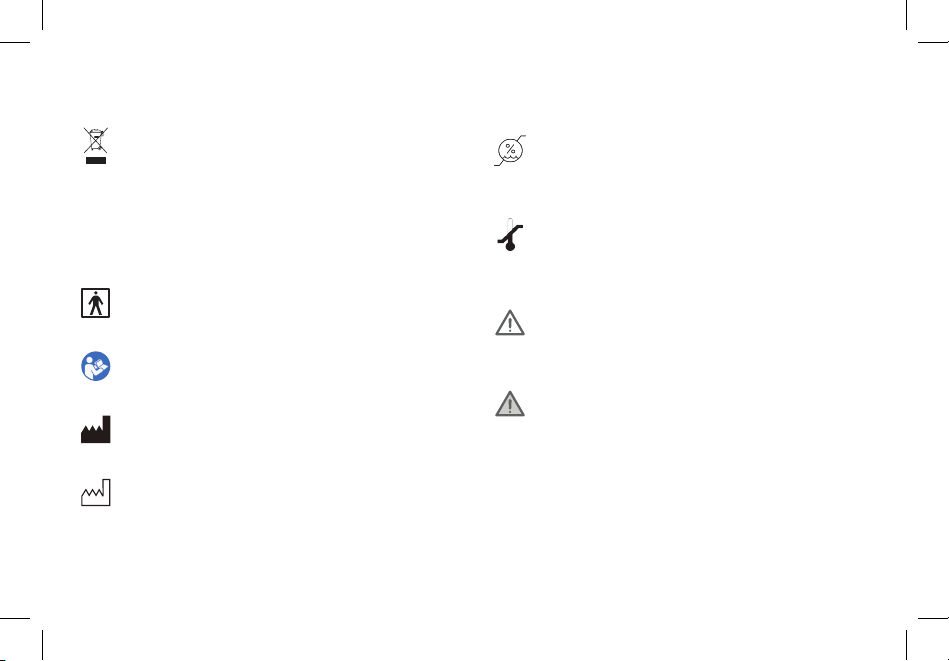
Glossary of Symbols
Electrical devices are recyclable material and
should not be disposed of with household
waste after their useful life. Help us protect the
environment and save resources by taking this
device to the appropriate collection point. Please
contact the organization which is responsible
for waste disposal in your area if you have any
questions.
Type BF Applied Part
The name and the address of the manufacturer
Date of manufacture
Refer to instruction manual
Temperature limit:
Lower limit: -20˚C
Maximum: 55˚C
Storage humidity range:
Lower limit: 15%RH
Upper limit: 93%RH
CAUTION: This alert identifies hazards that may
cause minor personal injury, product damage, or
property damage.
WARNING: This alert identifies hazards that may
cause serious personal injury or death.
B/N
The B/N code combine with destination country,
PO number, date of manufacture and serial
number.

20
IMPORTANT INFORMATION REGARDING
ELECTROMAGNETIC COMPATIBILITY (EMC)
• This product needs special precautions regarding electromagnetic compatibility (EMC) and needs to be
installed and put into service according to the EMC information provided, and this unit can be affected
by portable and mobile radiofrequency (RF) communications equipment.
• Do not use a mobile phone or other devices that emit electromagnetic fields, near the unit. This may
result in incorrect operation of the unit.
• This unit has been thoroughly tested and inspected to assure proper performance and operation.
• Caution: This machine should not be used adjacent to or stacked with other equipment and if adjacent
or stacked use is necessary, this machine should be observed to verify normal operation in the
configuration in which it will be used.
21
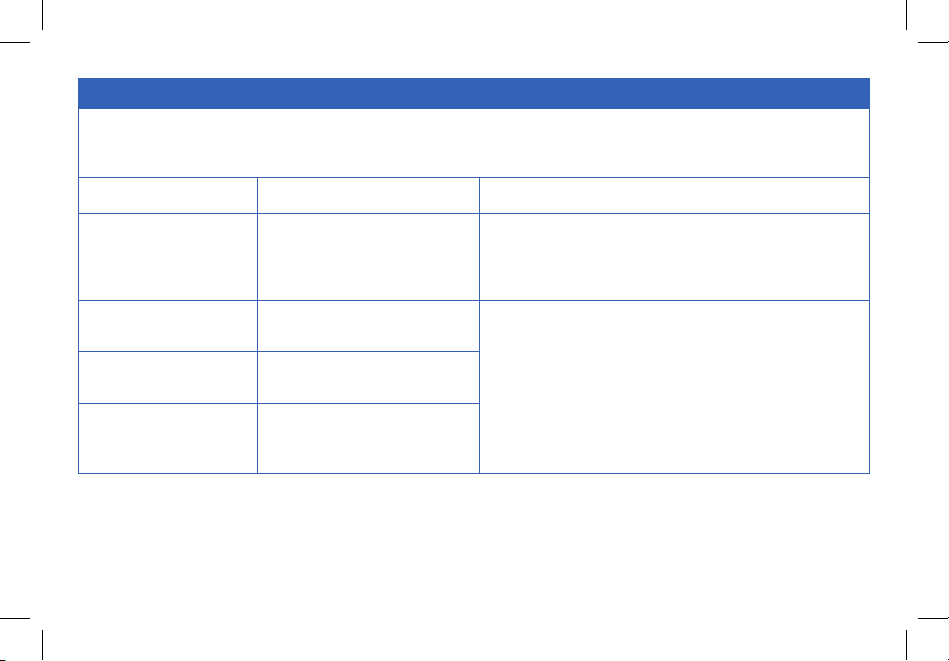
Guidance and Manufacturer’s Declaration – Electromagnetic Emission
The EBP-UA5 Upper-Arm Blood Pressure Monitor is intended for use in the electromagnetic environment specified below.
The customer or the user of the EBP-UA5 Upper-Arm Blood Pressure Monitor should assure that it is used in such an
environment.
Emissions Test Compliance Electromagnetic Environment - Guidance
RF emissions
CISPR 11
Group 1
The EBP-UA5 Upper-Arm Blood Pressure Monitor uses
RF energy only for its internal function. Therefore, its RF
emissions are very low and are not likely to cause any
interference in nearby electronic equipment.
RF emissions
CISPR 11
Class B
TheEBP-UA5 Upper-Arm Blood Pressure
Monitor is suitable for use inallestablishments,
includingdomesticestablishmentsandthosedirectly
connectedto thepubliclow-voltagepowersupply
networkthat supplies buildingsusedfordomestic
purposes.
Harmonic emissions
IEC 61000-3-2
N/A
Voltage fluctuations/
flicker emissions
IEC 61000-3-3
N/A
22
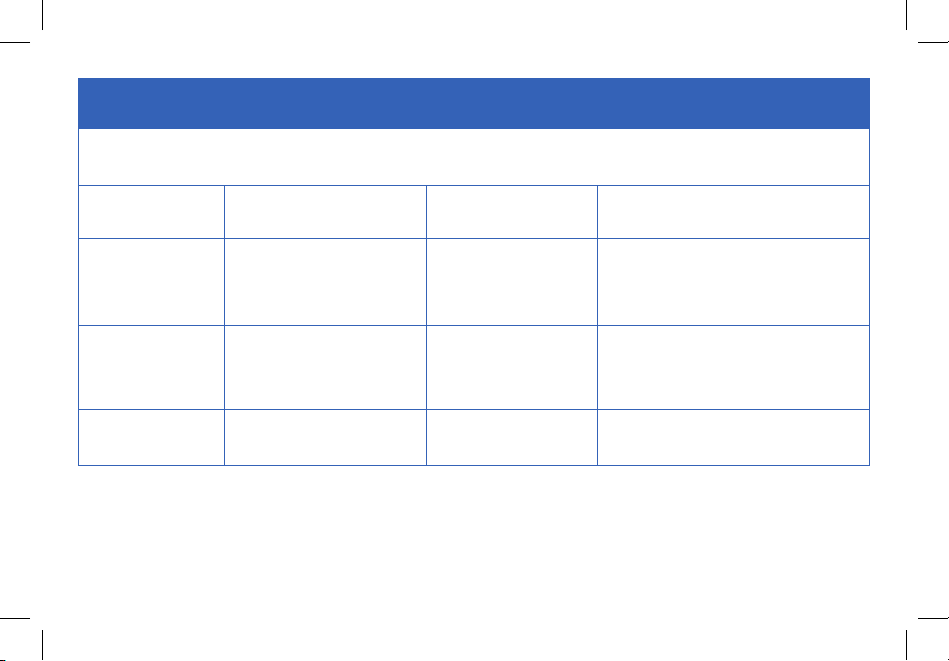
Guidance and Manufacturer’s Declaration – Electromagnetic Immunity –
for all EQUIPMENT and SYSTEMS
The EBP-UA5 Upper-Arm Blood Pressure Monitor is intended for use in the electromagnetic environment specified below.
The customer or the user of the EBP-UA5 Upper-Arm Blood Pressure Monitor should assure that it is used in such an
environment.
Immunity Test IEC 60601 Test Level Compliance Level
Electromagnetic Environment -
Guidance
Electrostatic
discharge (ESD)
IEC 61000-4-2
± 8 kV contact
± 15 kV air
± 8 kV contact
± 15 kV air
Floors should be wood, concrete, or
ceramic tile. If floors are covered with
synthetic material, the relative humidity
should be at least 30%.
Electrical fast
transient/burst
IEC 61000-4-4
± 2 kV for power supply lines N/A
Mains power quality should be that
of a typical commercial or hospital
environment.
Surge
IEC 61000-4-5
± 1 kV differential mode N/A
Mains power quality should be that
of a typical commercial or hospital
environment.

23
Voltage dips, short
interruptions and
voltage variations on
power supply input
lines IEC 61000-4-11
0 % U
T
; 0.5 cycle
At 0°,45°,90°,135°,
180°,225°,270°and 315°
0 % U
T
; 1 cycle and
70 % U
T
; 25/30 cycles
Single phase: at 0°
0 % U
T
; 250/300 cycle
N/A
Mains power quality should be that
of a typical commercial or hospital
environment. If the user of the
EBP-UA5 Upper-Arm Blood Pressure
Monitor requires continued operation
during power mains interruptions, it is
recommended that the EBP-UA5 Upper-
Arm Blood Pressure Monitor be powered
from an uninterruptible power supply or
a battery.
Power frequency
(50/60 Hz) magnetic
field IEC 61000-4-8
30 A/m N/A
Power frequency magnetic fields should
be at levels characteristic of a typical
location in a typical commercial or
hospital environment.
Note: U
T
is the a.c. mains voltage prior to application of the test level.
24
Guidance and Manufacturer’s Declaration – Electromagnetic Immunity –
for all EQUIPMENT and SYSTEMS that are not LIFE-SUPPORTING
The device is intended for use in the electromagnetic environment specified below. The customer or the user of the device
should assure that it is used in such an environment.
Immunity Test IEC 60601 Test Level Compliance Level Electromagnetic Environment - Guidance
Conducted RF
IEC 61000-4-6
3 V rms
150 kHz to 80 MHz
6 V in ISM bands
between 0,15 MHz and
80 MHz
N/A
Portable and mobile RF communications equipment should
be used no closer to any part of the EBP-UA5 Upper-
Arm Blood Pressure Monitor, including cables, than the
recommended separation distance calculated from the
equation applicable to the frequency of the transmitter.
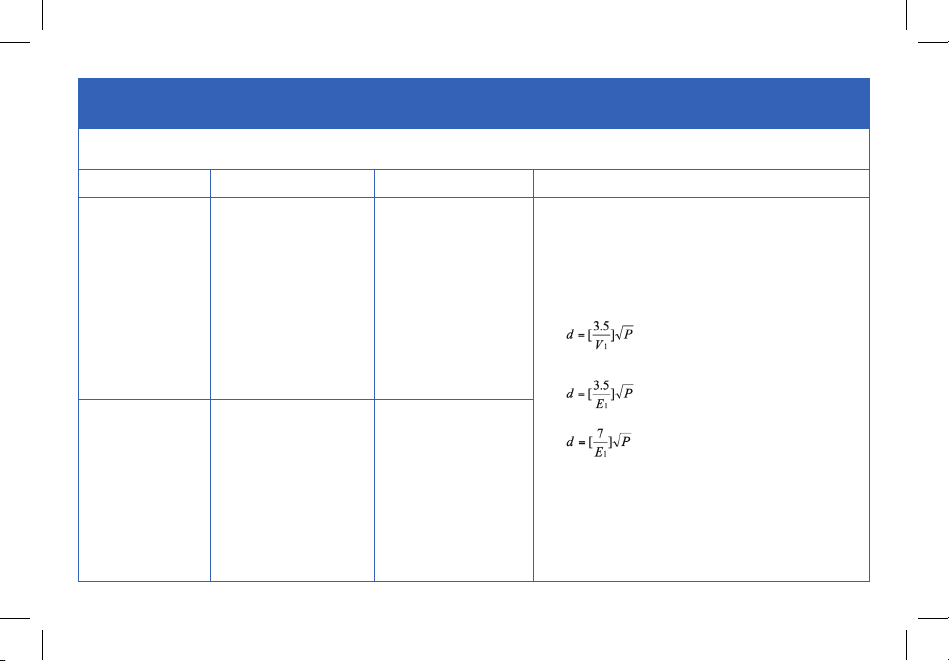
Recommended separation distance:
where P is the maximum output power rating of the
transmitter in watts (W) according to the transmitter
manufacturer and d is the recommended separation
distance in meters (m).
Field strengths from fixed RF transmitters, as determined
by an electromagnetic site survey, should be less than the
compliance level in each frequency range.
Radiated RF
IEC 61000-4-3
10V/m 80 MHz to 2.7
GHz
10V/m 80 MHz to 2.7
GHz
80 MHz to 800 MHz
800 MHz to 2.7 GHz
25
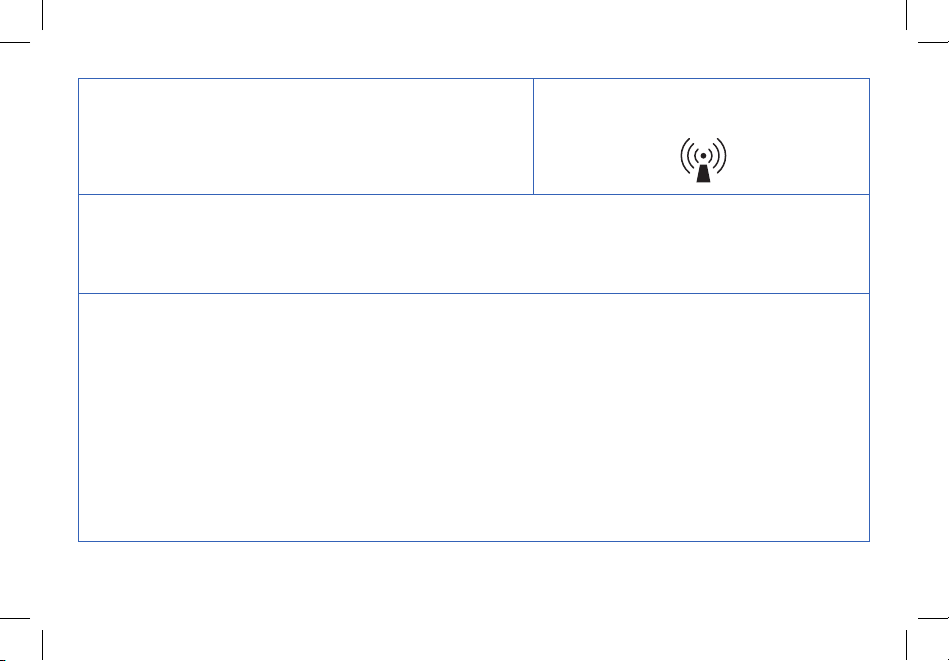
Interference may occur in the vicinity of
equipment marked with the following symbol:
Note 1: At 80 MHz and 800 MHz, the higher frequency range applies.
Note 2: These guidelines may not apply in all situations. Electromagnetic propagation is affected by absorption and
reflection from structures, objects and people.
A. Field strengths from fixed transmitters, such as base stations for radio (cellular/cordless) telephones and land mobile
radios, amateur radio, AM and FM radio broadcast and TV broadcast cannot be predicted theoretically with accuracy.
To assess the electromagnetic environment due to fixed RF transmitters, an electromagnetic site survey should be
considered. If the measured field strength in the location in which the EBP-UA5 Upper-Arm Blood Pressure Monitor is
used exceeds the applicable RF compliance level above, the EBP-UA5 Upper-Arm Blood Pressure Monitor should be
observed to verify normal operation. If abnormal performance is observed, additional measures may be necessary,
such as reorienting or relocating the EBP-UA5 Upper-Arm Blood Pressure Monitor.
B. Over the frequency range 150 kHz to 80 MHz, field strengths should be less than 3V/m.
26
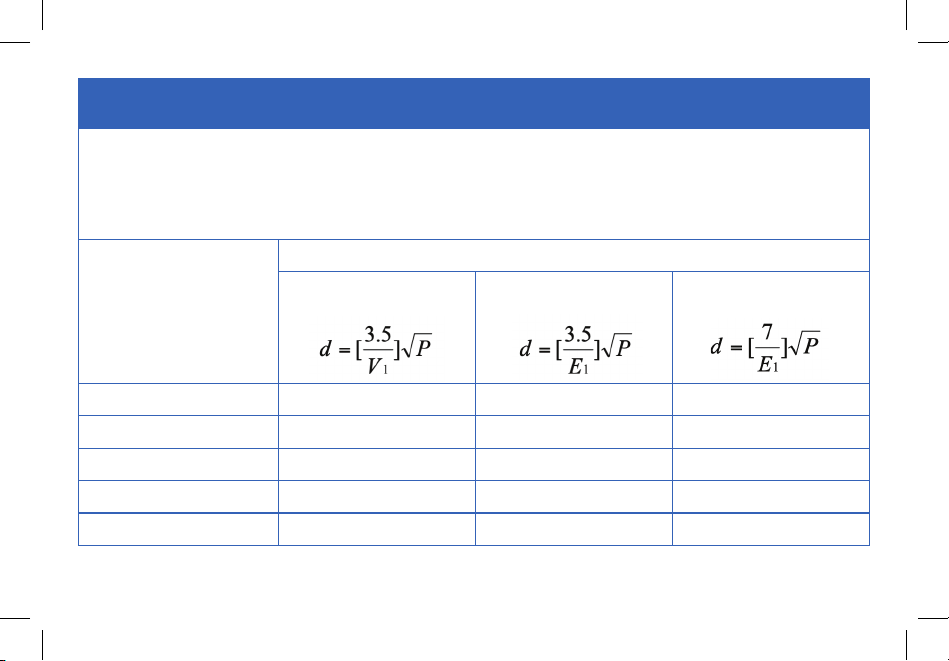
Recommended separation distances between portable and mobile RF
communications equipment and the EBP-UA5 Upper-Arm Blood Pressure Monitor
The EBP-UA5 Upper-Arm Blood Pressure Monitor is intended for use in an electromagnetic environment in which
radiated RF disturbances are controlled. The customer or the user of the EBP-UA5 Upper-Arm Blood Pressure Monitor
can help prevent electromagnetic interference by maintaining a minimum distance between portable and mobile RF
communications equipment (transmitters) and the EBP-UA5 Upper-Arm Blood Pressure Monitor as recommended below,
according to the maximum output power of the communications equipment.
Rated maximum output
power of transmitter W
Separation distance according to frequency of transmitter m
150 kHz to 80 MHz 80 MHz to 800 MHz 80 MHz to 2.7 GHz
0.01 N/A 0.035 0.07
0.1 N/A 0.11 0.22
1 N/A 0.35 0.7
10 N/A 1.11 2.21
100 N/A 3.5 7

27
For transmitters rated at a maximum output power not listed above, the recommended separation
distance d in meters (m) can be estimated using the equation applicable to the frequency of the
transmitter, where P is the maximum output power rating of the transmitter in watts (W) according to
the transmitter manufacturer.
Note 1: At 80 MHz and 800 MHz, the higher frequency range applies.
Note 2: These guidelines may not apply in all situations. Electromagnetic propagation is affected by
absorption and reflection from structures, objects and people.
FCC Statement
• This device complies with Part 15 of the FCC Rules. Operation is subject to the following two
conditions: (1) this device may not cause harmful interference, and (2) this device must accept any
interference received, including interference that may cause undesired operation.

28
Warranty Information
Terms & Policy
Etekcity Corporation warrants all products to be of the highest quality in
material, craftsmanship, and service, effective from the date of purchase
to the end of the warranty period.
Etekcity Corporation will replace any product found to be defective due
to manufacturer flaws based on eligibility. Refunds are available within
the first 30 days of purchase. Refunds are only available to the original
purchaser of the product. This warranty extends only to personal use
and does not extend to any product that has been used for commercial,
rental, or any other use in which the product is not intended for. There
are no warranties other than the warranties expressly set forth with each
product.
This warranty is non-transferrable. Etekcity Corporation is not
responsible in any way for any damages, losses, or inconveniences
caused by equipment failure or by user negligence, abuse, or use
noncompliant with the user manual or any additional safety or use
warnings included in the product packaging and manual.
This warranty does not apply to the following:
• Damage due to abuse, accident, alteration, misuse, tampering, or
vandalism.
• Improper or inadequate maintenance.
• Damage in return transit.
• Unsupervised use by children under 18 years of age.
Etekcity Corporation and its subsidiaries assume no liability for damage
caused by the use of the product other than for its intended use or as
instructed in the user manual. Some states do not allow this exclusion
or limitation of incidental or consequential losses so the foregoing
disclaimer may not apply to you. This warranty gives you specific legal
rights and you may also have other rights which may vary from state to
state.
ALL EXPRESSED AND IMPLIED WARRANTIES, INCLUDING THE
WARRANTY OF MERCHANTABILITY, ARE LIMITED TO THE PERIOD
OF THE LIMITED WARRANTY.
Product Name Upper-Arm Blood Pressure
Monitor
Model EBP-UA5
Default Warranty Period 1 year
For your own reference, we strongly recommend that you record
your order ID and date of purchase.
Order ID
Date of Purchase

29
Additional 1-Year Warranty
You can extend your 1-year warranty by an additional year. Log onto
www.etekcity.com/warranty to register your new product for the
extended warranty.
Please fill out all required fields and include your order ID, place of
purchase, and purchase date, if applicable.
Defective Products & Returns
If you discover your product is defective within the specified warranty
period, please contact Customer Support via [email protected] with
a copy of your invoice and order ID. DO NOT dispose of your product
before contacting us. Once our Customer Support Team has approved
your request, please return the product with a copy of the invoice and
order ID.
Warranty Information (cont.)

30
Customer Support
If you have any questions or concerns about your new
product, please contact our helpful Customer Support Team.
Manufacturer: Alicn Medical Shenzhen, Inc.
Address: 4/F, B Building, Shenfubao Modern Optical Factory, Kengzi
Street, Pingshan District, Shenzhen, Guangdong, China
Customer Support
1202 N. Miller St., Suite A
Anaheim, CA 92806
Email: [email protected]
Toll-Free: (855) 686-3835
Support Hours
Monday—Friday
9:00 am —5:00 pm PST/PDT
*Please have your invoice and order ID ready before
contacting Customer Support.
Distributed by Etekcity Corporation

31
Connect with us @Etekcity

Building on better living.
V1.1_20190709