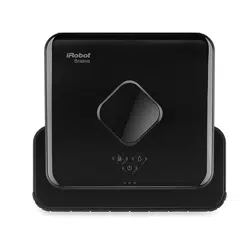
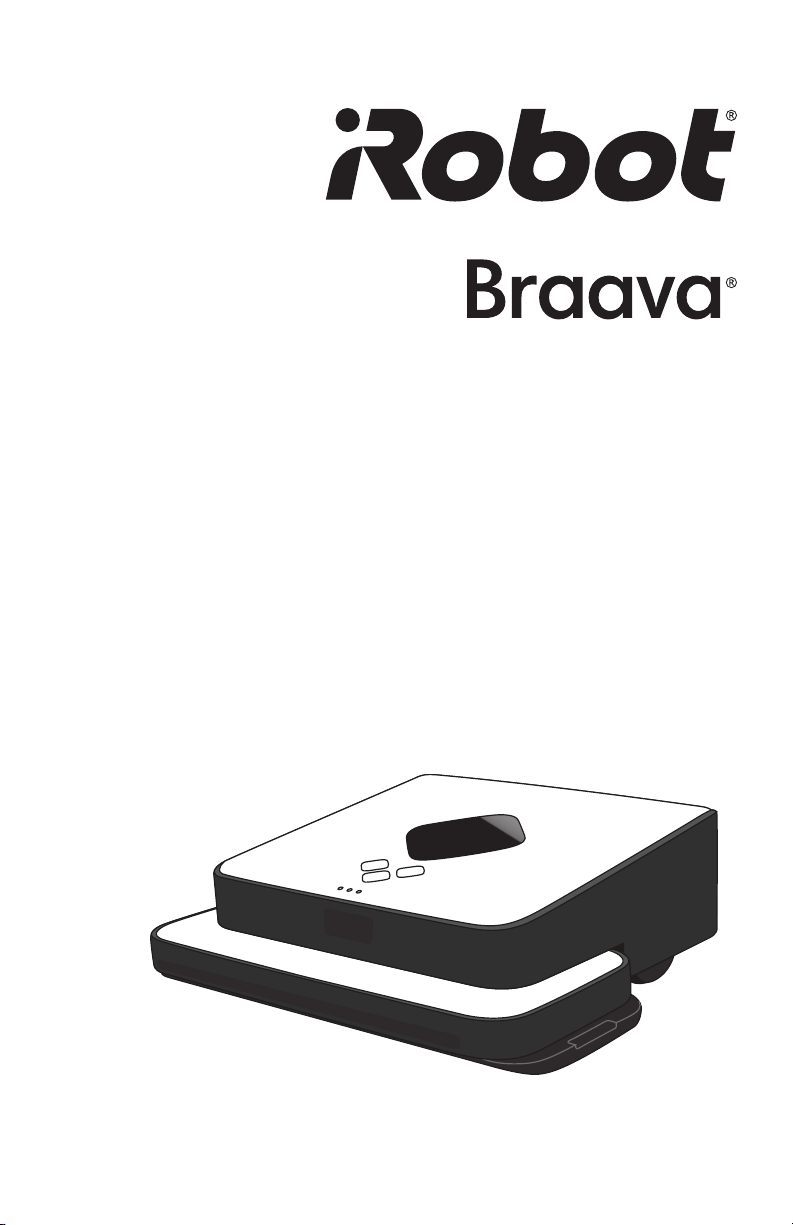
Mopping Robot
global.irobot.com
300 Series Owner’s Manual
2 Braava 300 Series Owner’s Manual
Dear iRobot
®
Braava
®
Owner,
Welcome to the world of iRobot. As an owner of the iRobot Braava Floor
Mopping Robot, you join a growing group of people around the globe who,
like you, are discovering an easier way to mop their floors.
The use of practical robots that help you in and around your home is a new
reality. We encourage you to share your feedback as we continue to develop
new and groundbreaking robots. Here’s what you can do to participate in
our efforts:
• Communicate with us if you have questions, comments or require
support. Contact us at global.irobot.com.
Thank you for joining the robot revolution. We look forward to your valued
input as we continue to deliver groundbreaking products that will change
and improve your world.
On behalf of the entire iRobot team,
Colin Angle
Co-Founder and CEO
iRobot Corporation
Welcome
global.irobot.com 3
Table of Contents
Safety Instructions ........................................................... 4
Braava Overview ............................................................. 8
Buttons and Lights .......................................................... 10
Battery and Charging ...................................................... 12
Sweep and Mop Modes .................................................. 14
How Braava Cleans ......................................................... 16
NorthStar
®
Navigation ..................................................... 18
Operating Braava ........................................................... 20
Maintenance .................................................................... 24
Troubleshooting ............................................................... 26
Customer Support ........................................................... 29
4 Braava 300 Series Owner’s Manual
IMPORTANT SAFETY INSTRUCTIONS
TO REDUCE THE RISK OF FIRE, ELECTRIC SHOCK, OR INJURY
WARNING: READ AND SAVE THESE INSTRUCTIONS.
To avoid the risk of injury or damage, these basic precautions should always
be followed:
• Read all safety and operating instructions before using Braava.
• Read and heed all warnings in this manual and on Braava, the Cube, and
the adapter.
• Only use Braava in accordance with the specifications outlined in this manual.
• Do not attempt to repair or adjust any electrical or mechanical functions
on this device. Tampering with these functions may create a hazardous
condition, and it will void your warranty.
• Be aware that floors may be slippery after wet cleaning with Braava.
• Braava operates very quietly. Take care when walking in the area Braava
is cleaning to avoid stepping on Braava and tripping.
USE RESTRICTIONS
• Braava is not a toy. Supervise children and pets when Braava is cleaning.
• Braava has electrical parts. Do not spray, rinse, or submerge it in water.
Clean with a dry cloth only.
• Braava is for indoor use on hard surface floors only.
• Do not use Braava to pick up large debris, liquid spills, bleach, paint, or
other chemicals.
• Do not use Braava near any objects that are burning or smoking.
• Before using Braava, remove fragile objects from the cleaning area, including
objects on furniture that may fall if the furniture is pushed or bumped.
• Move any power cords, as well as cords for blinds and curtains, out of the
way to reduce the risk of objects being pulled down.
• Block off access to open balconies near the cleaning area with physical barriers.
• Make sure the cleaning cloth does not drape into the middle channel
between the gripping strips, as this could impede sensor functions and
safe operation. See page 18 for further details.
• When mopping, do not use Braava in areas where wetness can damage
unfinished or unsealed floors, or delicate carpeting or rugs.
• Operate at room temperature. Do not expose Braava or its batteries to
freezing or extreme heat.
CAUTION: Do not expose the electronics of Braava, its battery or the
adapter. There are no user-serviceable parts inside. Refer servicing to
qualified service personnel.
global.irobot.com 5
• This appliance is not intended for use by persons (including children) with
reduced physical, sensory, or mental capabilities, or lack of experience
and knowledge, unless they have been given supervision or instruction
concerning use of the appliance by a person responsible for their safety.
BATTERY AND CHARGING
• Charge using a standard 220-240 V socket only.
• Do not dismantle, open, or shred secondary cells or batteries
• Do not expose cells or batteries to heat or fire. Avoid storage in direct
sunlight.
• Do not subject cell or batteries to mechanical shock.
• In the event of a cell leaking, do not allow the liquid to come in contact
with the skin or eyes. If contact has been made, wash the affected area
with copious amounts of water and seek medical advice.
• Battery usage by children should be supervised.
• Always purchase the battery recommended by iRobot for the appliance.
• Keep cells and batteries clean and dry.
• Use the cell or battery only in the appliance for which it was intended.
• The battery must be removed from the appliance before it is scrapped.
• The appliance must be disconnected from the power supply (adapter)
when removing the battery.
• The battery must be disposed of safely. Please contact your local or
regional waste authority for more information on collection, reuse, and
recycling programs.
• Do not use an adapter with a damaged cord or plug.
• Do not handle or charge Braava when your hands are wet.
• Always disconnect Braava from the adapter before cleaning.
Warning: Do not use non-rechargeable batteries. Use only the
rechargeable battery that was provided with this robot.
Only use a battery of this type and rating: Ni-MH 7.2V, 2000mAh, red
wire (+) black wire (-).
6 Braava 300 Series Owner’s Manual
This symbol on your device indicates:
This symbol on your device indicates that there is a detachable
power supply (adapter) unit.
Warning: For the purposes of recharging the battery, use only
the power supply (adapter) provided with the robot.
Should you require a replacement adapter, only purchase one of the
adapters listed below, depending on which region you are in. Replacement
adapters and batteries can be purchased at www.iRobot.com or through
your local iRobot Service Centre.
The adapter must be disconnected prior to removing the battery, cleaning,
or maintaining the robot.
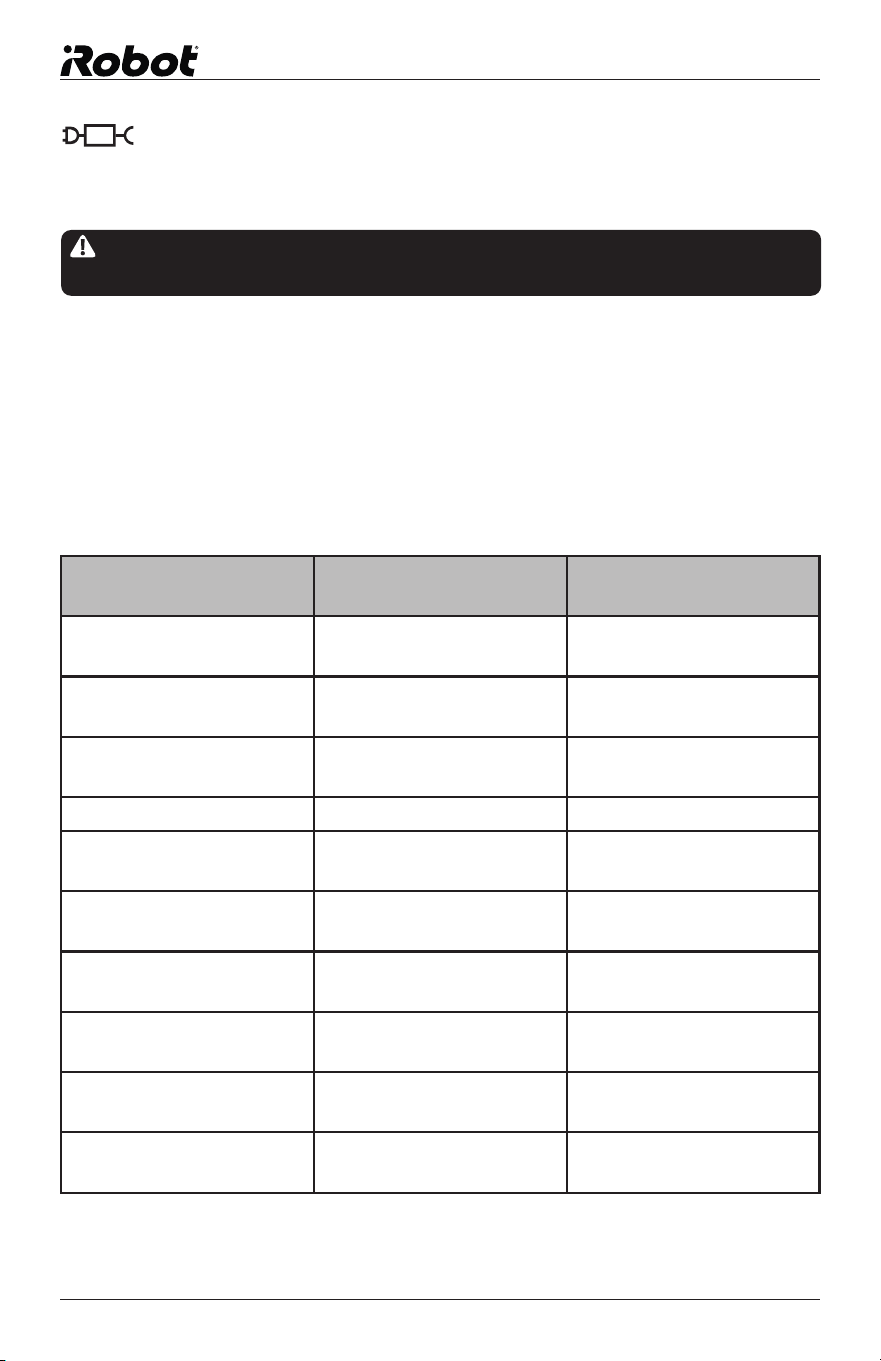
TenPao Power Supply
Model No.
Region To order replacement
S012AXU1200100 Mexico Contact your local
iRobot distributor
S012AXU1200100 Taiwan Contact your local
iRobot distributor
S012AXB1200100 UK/Singapore/Hong
Kong/Macau
Contact your local
iRobot distributor
S012BNU1200100 North America www.irobot.com
S012AXU1200100U Japan Contact your local
iRobot distributor
S012AXS1200100 Australia/New Zealand Contact your local
iRobot distributor
S012AXA1200100 Argentina Contact your local
iRobot distributor
S012AXD1200100 Brazil Contact your local
iRobot distributor
S012AXV1200100 Europe Contact your local
iRobot distributor
S012AQC1200100 China Contact your local
iRobot distributor
global.irobot.com 7
Notice: Braava contains a software interface for the purpose of enabling
the manufacturer to provide updates to the internal firmware if any such
updates are made available to users. Any attempt to access, retrieve,
copy, modify, distribute, or otherwise use any of the Braava software is
strictly prohibited.
WARNING: Changes or modifications not expressly approved by
iRobot could void your warranty.
THIS APPLIANCE CAN BE USED BY CHILDREN AGED
8 YEARS AND ABOVE AND PERSONS WITH REDUCED
PHYSICAL, SENSORY, OR MENTAL CAPABILITIES, OR LACK
OF EXPERIENCE AND KNOWLEDGE ONLY IF THEY HAVE
BEEN GIVEN SUPERVISION OR INSTRUCTION CONCERNING
USE OF THE APPLIANCE IN A SAFE WAY AND UNDERSTAND
THE HAZARDS INVOLVED. CHILDREN MUST NOT PLAY WITH
THE APPLIANCE. CLEANING AND USER MAINTENANCE
SHALL NOT BE DONE BY CHILDREN WITHOUT SUPERVISION.
This symbol on the product or its packaging indicates:
Do not dispose of electrical appliances as unsorted municipal waste,
use separate collection facilities. Contact the appropriate local
department government for information regarding the collection
systems available. If electrical appliances are disposed of in landfills
or dumps, hazardous substances can leak into the groundwater and
get into the food chain, damaging your health and well-being. When
replacing old appliances with new ones, the retailer is legally obligated
to at least take back your old appliance for disposal free of charge.
iRobot Corporation
EPS Models - S012AXB1200100 & S012AXV1200100
Input Voltage: 100-240VAC Input Frequncy: 50/60Hz
Output Voltage: 12.0 VDC Output Current: 1.0 A
Output Power: 12.0 W *Average Active Efficiency: 84.16%
*Efficiency at Low Load: 71.17% *No-Load Power Consumption:
0.0082W
In accordance with (EU) 2019/1782 Energy Efficiency Requirements the
following specifications apply to the external power supply (EPS) provided
with all 300 Series products
*values recorded at 230VAC Mains input
8 Braava 300 Series Owner’s Manual
Braava Overview
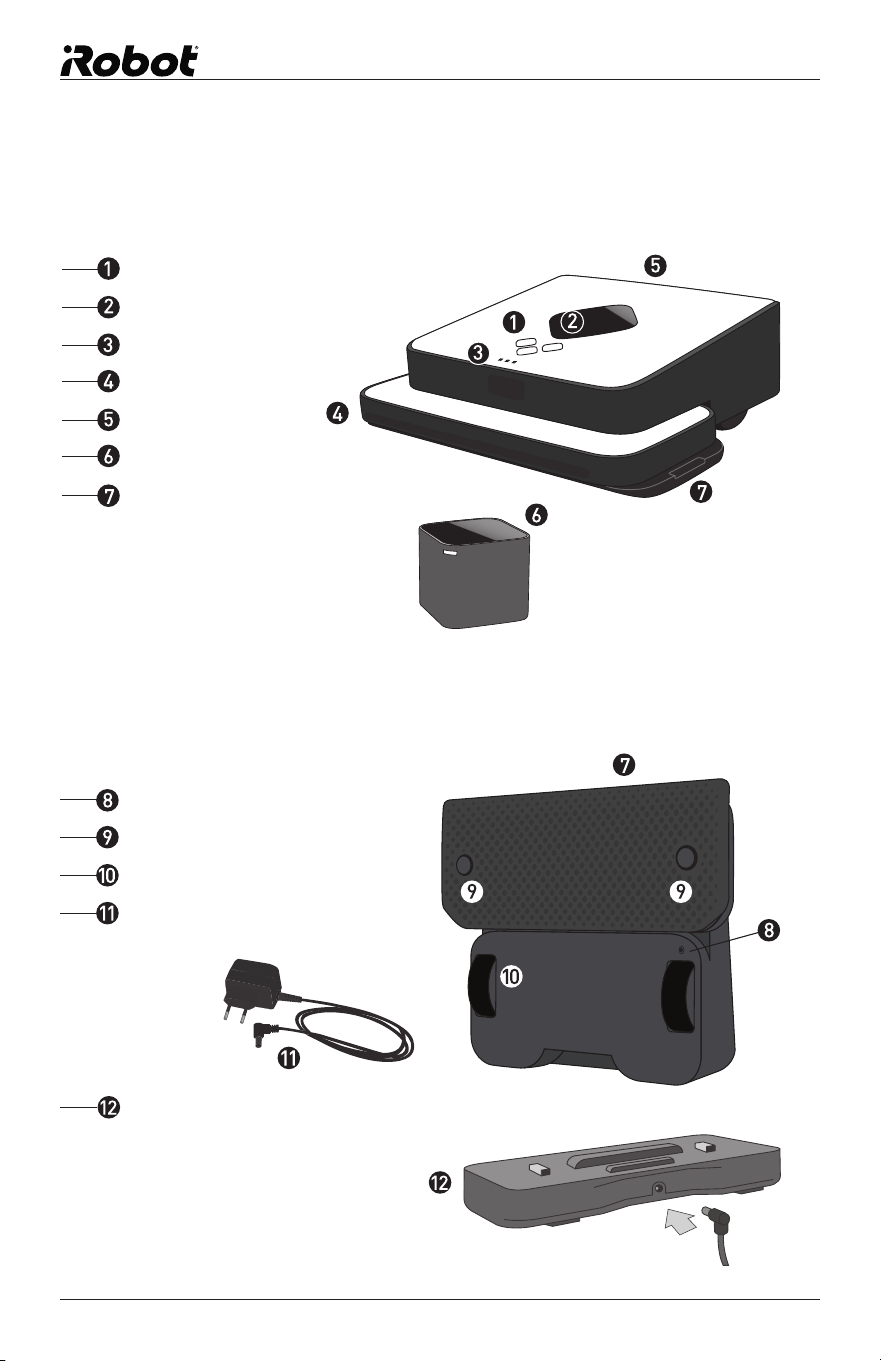
Braava
NorthStar
®
Navigation Cube
Control Buttons
NorthStar
®
Navigation Sensor
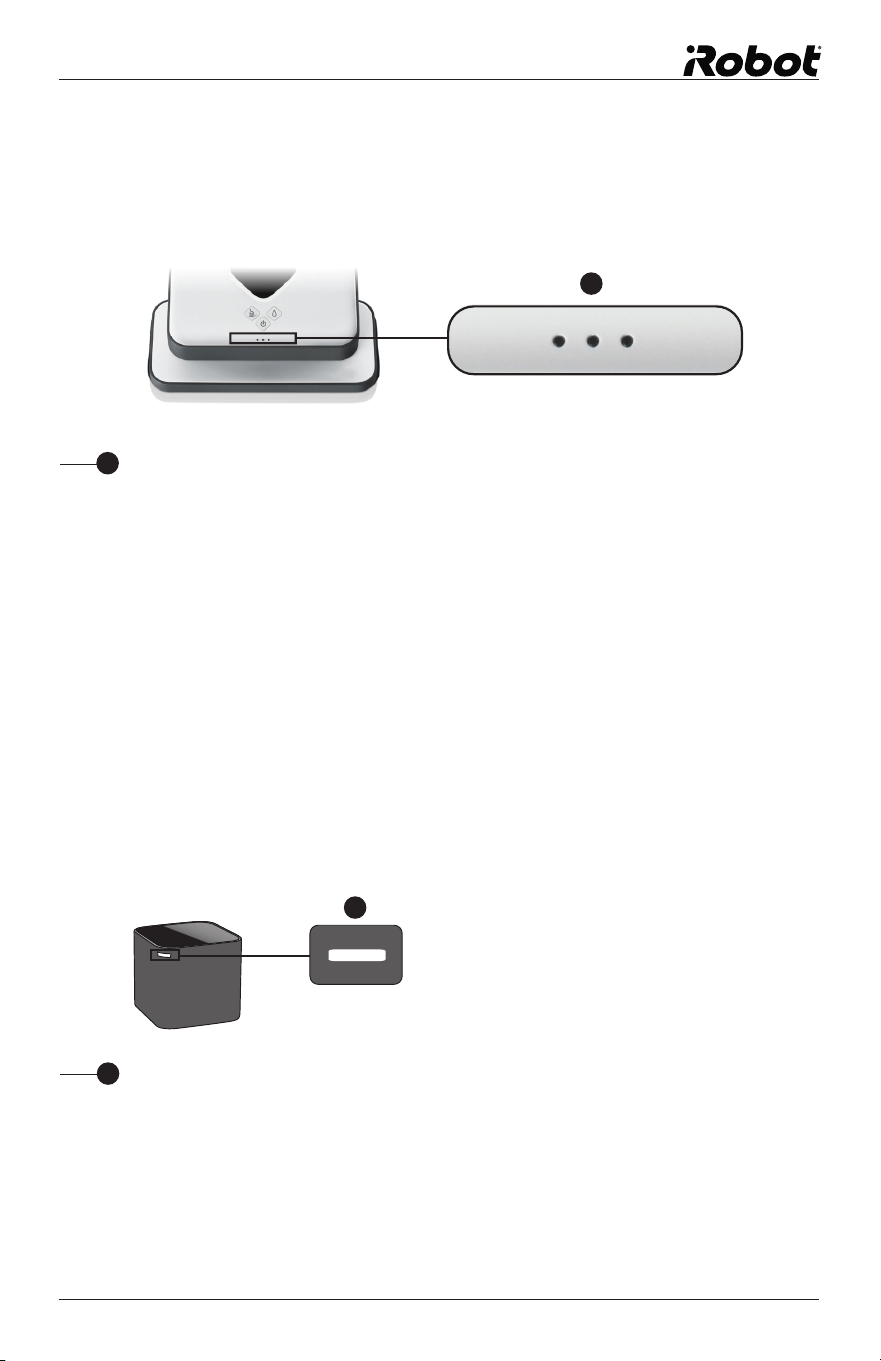
Navigation System Indicator
Bumper
Handle
Cube on/off button (on back corner)
Removable Cleaning Pad
Battery Charging Port
Floor Transition Sensors
Wheel Guards
Charging Adapter
Turbo Charge Cradle
(Shipswith Selected Models)
global.irobot.com 9
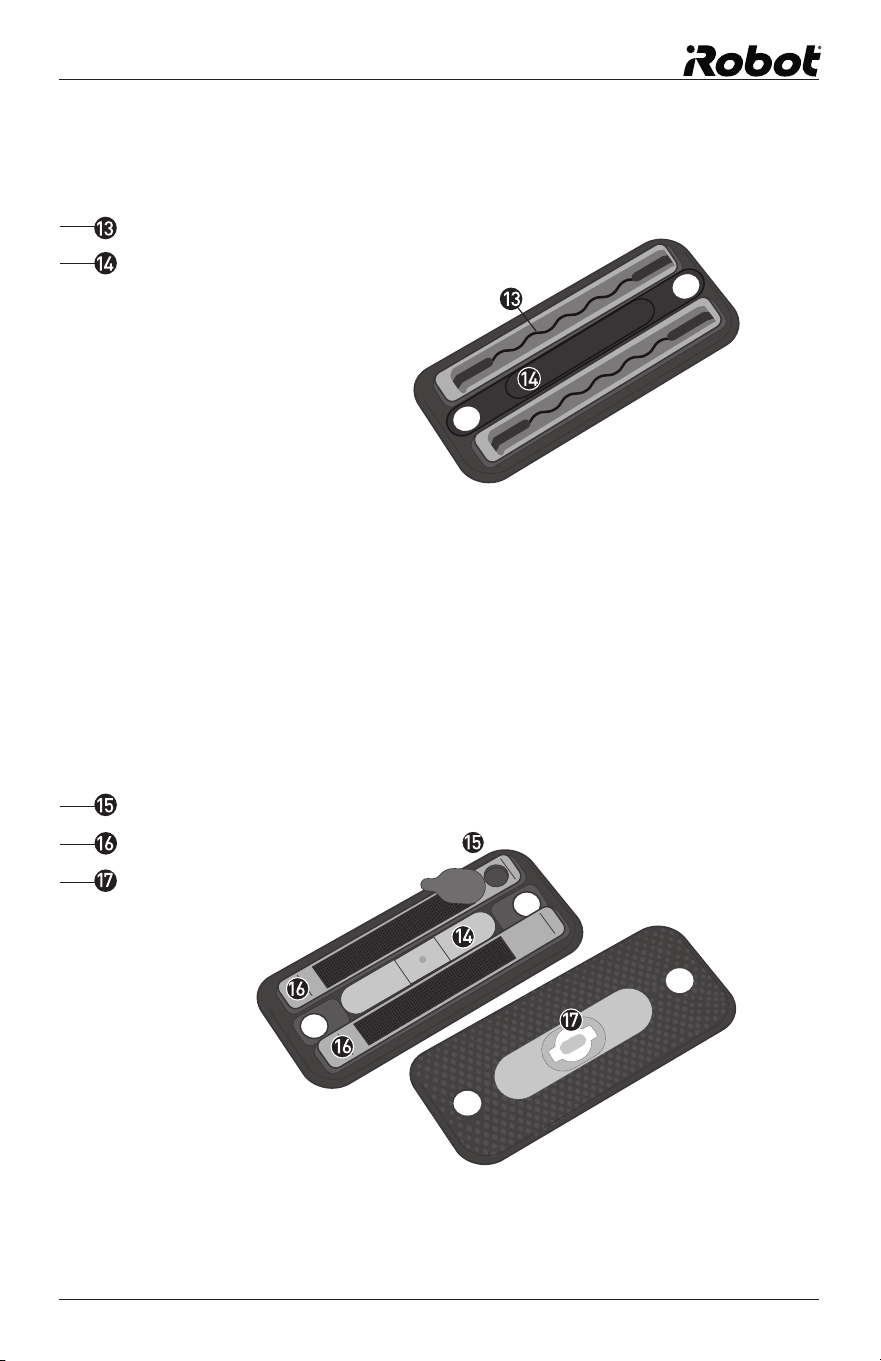
Fill Cap
Reservoir
Wick
Multi-Purpose Cleaning Pad
Pro-Clean Reservoir Pad (Ships with Selected Models)
For dry sweeping or wet mopping, disposable or reusable microfibre cloths.
For wet mopping with the blue Pro-Clean microfibre cleaning cloth.
Cloth Gripping Strips
Middle Channel for Floor Transition Sensors
10 Braava 300 Series Owner’s Manual
Buttons and Lights
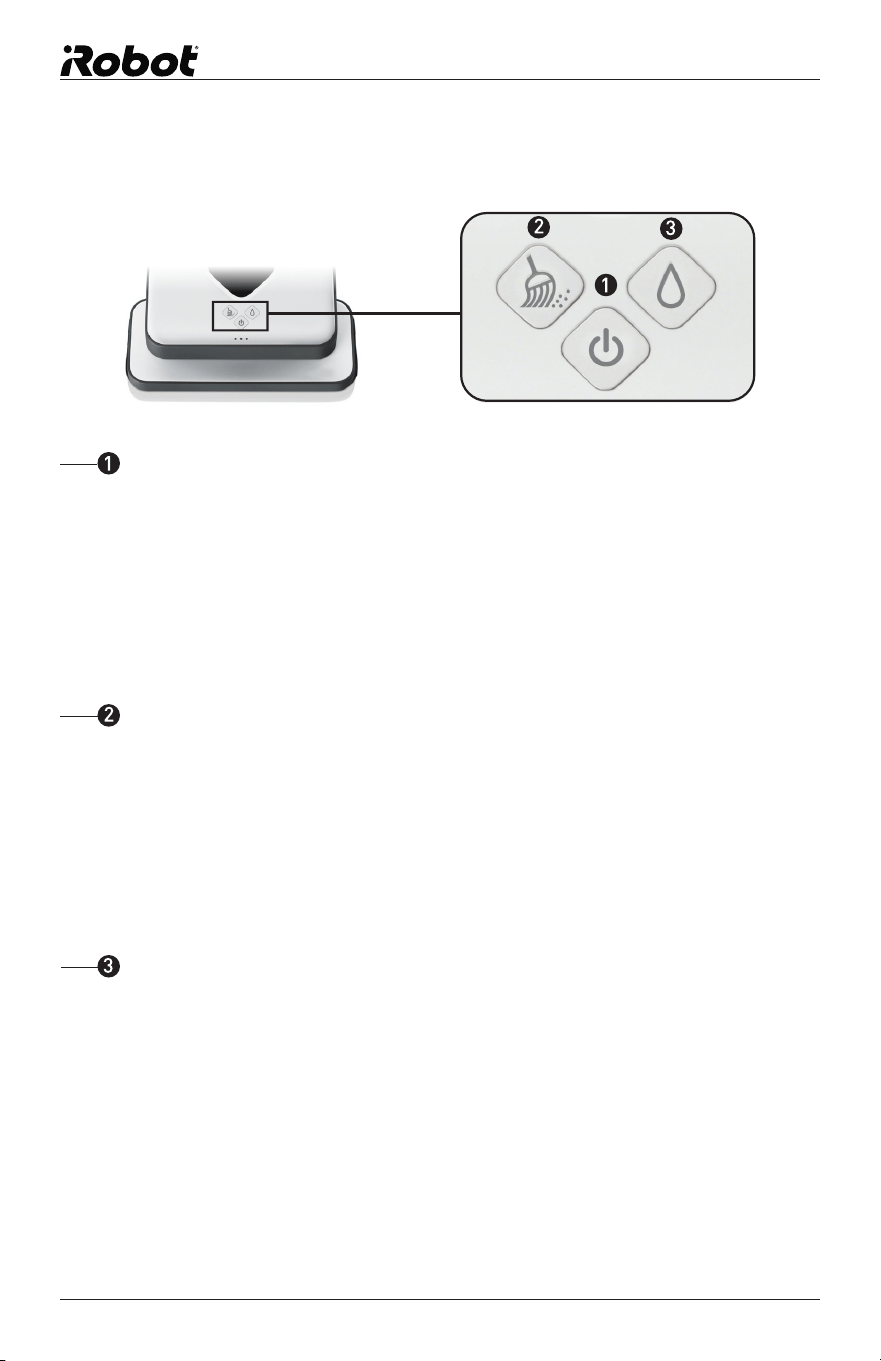
Press once to turn Braava on.
Hold for 2 seconds to turn Braava off.
Blue solid light: Power on
Red blinking light: Battery starting to get low
Red solid light: Low battery (needs to be recharged)
Power Button
Press once to start cleaning.*
Press while cleaning to pause.
Blue solid light: Mop mode activated
Blue blinking light: Mop mode paused
*Holding the cleaning mode button will activate Quick Clean Mode. See page 15.
Mop Button
Sweep Button
Press once to start cleaning.*
Press while cleaning to pause.
Blue solid light: Sweep mode activated
Blue blinking light: Sweep mode paused
For use with dry cloths.
For use with wet cloths.
global.irobot.com 11
4
Blue blinking light: Power on, broadcasting signal
Blue solid light: Power on, connected to Braava
Red solid light: Batteries low
5
5
Blue blinking light (1): Establishing connection
Blue solid light (1 to 3): Locked on to NorthStar Cube
NorthStar Connection
Navigation System Indicators
Blue lights flashing in sequence: Thinking
Blue lights flashing with pause: Sleep mode
Red light in middle: Error*
Other States
NorthStar
®
Navigation Cube Lights
4
The number of lights indicates the strength of Braava’s connection to the navigation system, with 3
being strongest. If there are no lights, Braava does not detect a NorthStar signal.
*See troubleshooting section for more information.
12 Braava 300 Series Owner’s Manual
Charging
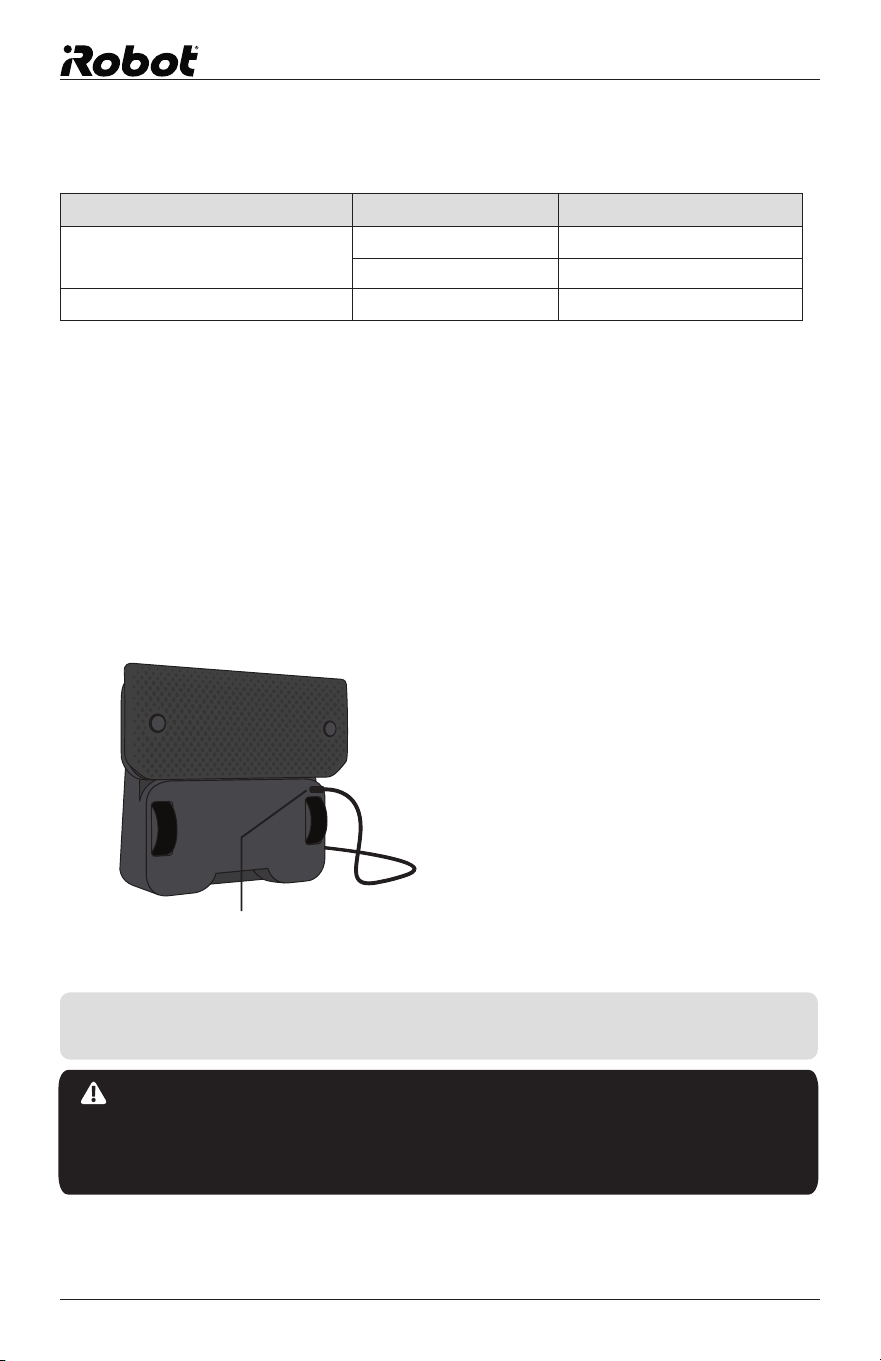
• Stand Braava on its end to access the charging port.
• Plug the adapter into a standard electrical socket and into Braava’s
charging port. The power button will regularly flash red.
• Charge Braava until a flashing blue light appears on the power button*.
• It may take Braava a few charging cycles to reach its full capacity.
Charging Port
Battery and Charging
TIP: Braava can also be charged with the Braava Turbo Charge Cradle.
See Cradle instructions for details (pg.11).
CAUTION: Do not charge Braava while the Pro-Clean reservoir
pad or any wet cloth is attached. Charge using a standard 220-240 V
socket only. Only use the included adapter to charge Braava. Always
disconnect Braava from the adapter before cleaning.
Charging Port
* The blue light indicates on average that the
battery has charged to 80% of its capacity.
Charging time and run time can be
affected by operating temperature,
floor type, and other conditions.
Mode Braava 300 series
Run Time Sweep 210 Minutes
Mop 150 Minutes
Charge Time N/A 120 Minutes

global.irobot.com 13
The NorthStar
Navigation Cube
The Cube uses 2 C
batteries. The battery
door can be found on the
bottom of the Cube.
Charging Indicators
(While Plugged In)
Please dispose of all batteries properly by finding a recycling resource near you.
Power Button
Red flashing light: Battery charging
Blue flashing light: Battery charged
• Plug the adapter into a standard electrical socket and plug the other end of the
cord into the power jack on the Cradle.
• One blue light will appear on the front of the Cradle.
• Place Braava on the Cradle to charge. The power button will regularly
flash red.
• Charge Braava for approximately 2 hours or until a flashing blue light
appears on Braava’s power button.
• Remove Braava from the Cradle before applying cleaning cloths or the
Pro-Clean Reservoir Pad.
• Charging time and run time can be affected by operating temperature,
floor type, and other conditions.
Turbo Charge Cradle
(Ships with Selected Models)
TIP: Braava’s adapter is compatible with the Cradle
and can either be plugged into Braava directly
or into the Turbo Charge Cradle.
CAUTION: Do not charge Braava while the
Pro-Clean reservoir pad or any wet cloth is
attached. Charge using a standard socket only.
Only use the adapter included with the Braava.
See Braava manual for safety warnings and
instructions.
Power Jack
1
Charging Contacts
2
LED indicator
3
1
2
2
3
Ships with Selected Models.
1
14 Braava 300 Series Owner’s Manual
Sweep and Mop Modes
Braava sweeps and mops hard surface floors using readily available dry and
wet cleaning cloths or the included reusable microfibre cloths.
Braava is not a vacuum and is not intended for use on carpets.
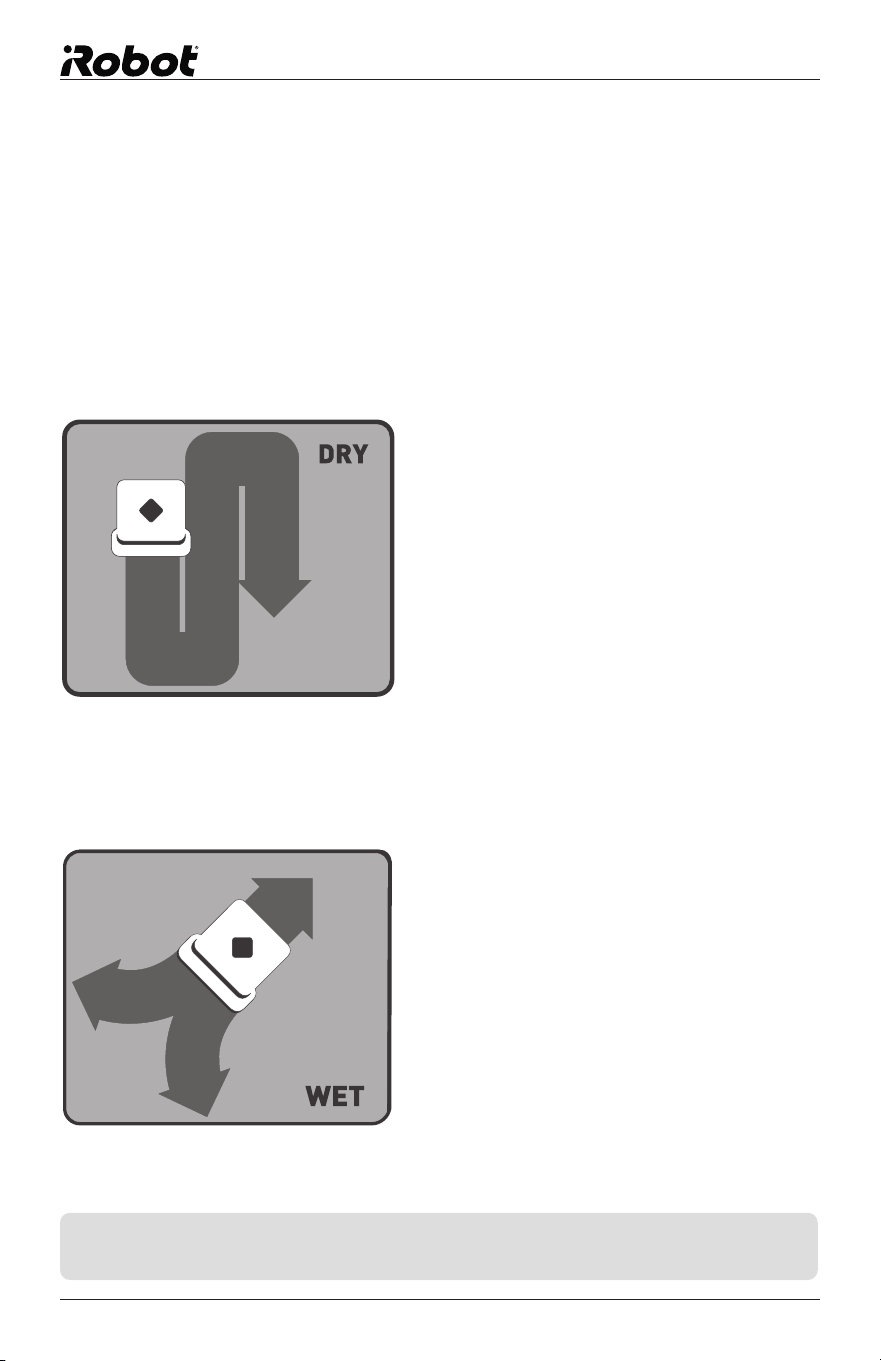
Sweep Mode
Sweep mode is intended for cleaning with a dry cloth.
In Sweep mode, Braava moves
ahead in a straight line when it begins
cleaning, then cleans back and forth
in parallel lines.
It is ideal for picking up dust, dirt, and
hair to maintain clean, grit-free floors
every day.
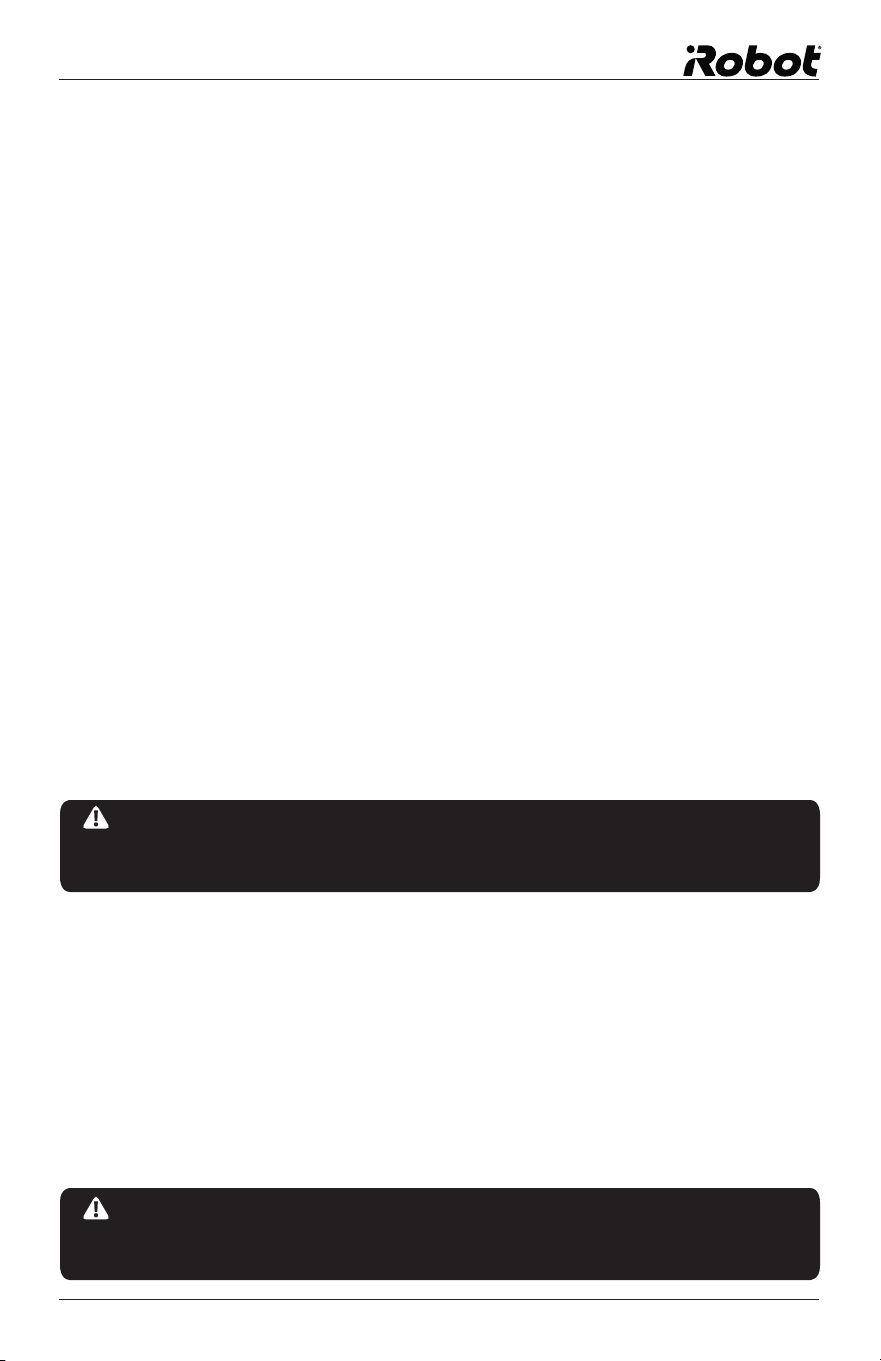
Mop Mode
Mop mode is intended for cleaning with a wet cloth.
In Mop mode, Braava drives forward
a short distance to one side, backs
up slightly, then moves forward to the
other side, alternating to the left and
right as it progresses.
This mopping action helps dissolve
and pick up the deeper dirt and grime
on your floors.
Braava automatically adjusts to a smaller
cleaning area in Mop mode to optimise
cleaning while the cloth is wet.
TIP: Start with dry Sweep mode to pick up surface grit and then follow
with a wet cloth in mopping mode to get a deeper clean.
global.irobot.com 15
Cleaning Cloths
Disposable Cloths
For use only with the Multi-Purpose Cleaning Pad.
• Braava is compatible with most disposable dry and pre-moistened
cleaning cloths, such as Swiffer
®
brand.
• Always follow the use and care instructions included with any dry or wet
cleaning cloths to care for your floors.
• Please note that Braava is not compatible with Swiffer
®
WetJet
®
Refills.
Microfibre Cloths
Braava’s specially designed microfibre cloths can be washed and reused.
• White cloths are for dry sweeping with the Multi-Purpose Cleaning Pad.
• Blue textured cloths are for mopping and can be used with either the Pro-
Clean Reservoir Pad or the Multi-Purpose Cleaning Pad. Dampen cloth
before use.
Floor Types
• Braava is designed to clean hard surface floors including wood, tile, vinyl,
linoleum, and laminate.
• Braava cleans best on smooth, hard surfaces and may not perform on
uneven tiles, heavily waxed floors, or rough surfaces like slate or brick,
which can snag the cleaning cloth.
NOTICE: Wet cloths may not be suitable for cleaning unsealed
floors. Ask your flooring manufacturer or installer if you are unsure
whether damp mopping is safe for your floor.
NOTICE: Braava is not intended to pick up large debris. Before
cleaning with Braava, pick up large debris and check for gravel or sharp
objects that could scratch the floor if captured under the cleaning pad.
16 Braava 300 Series Owner’s Manual
How Braava Cleans
Braava intelligently cleans your floor by mapping the room as it cleans.
Cleaning Cycle
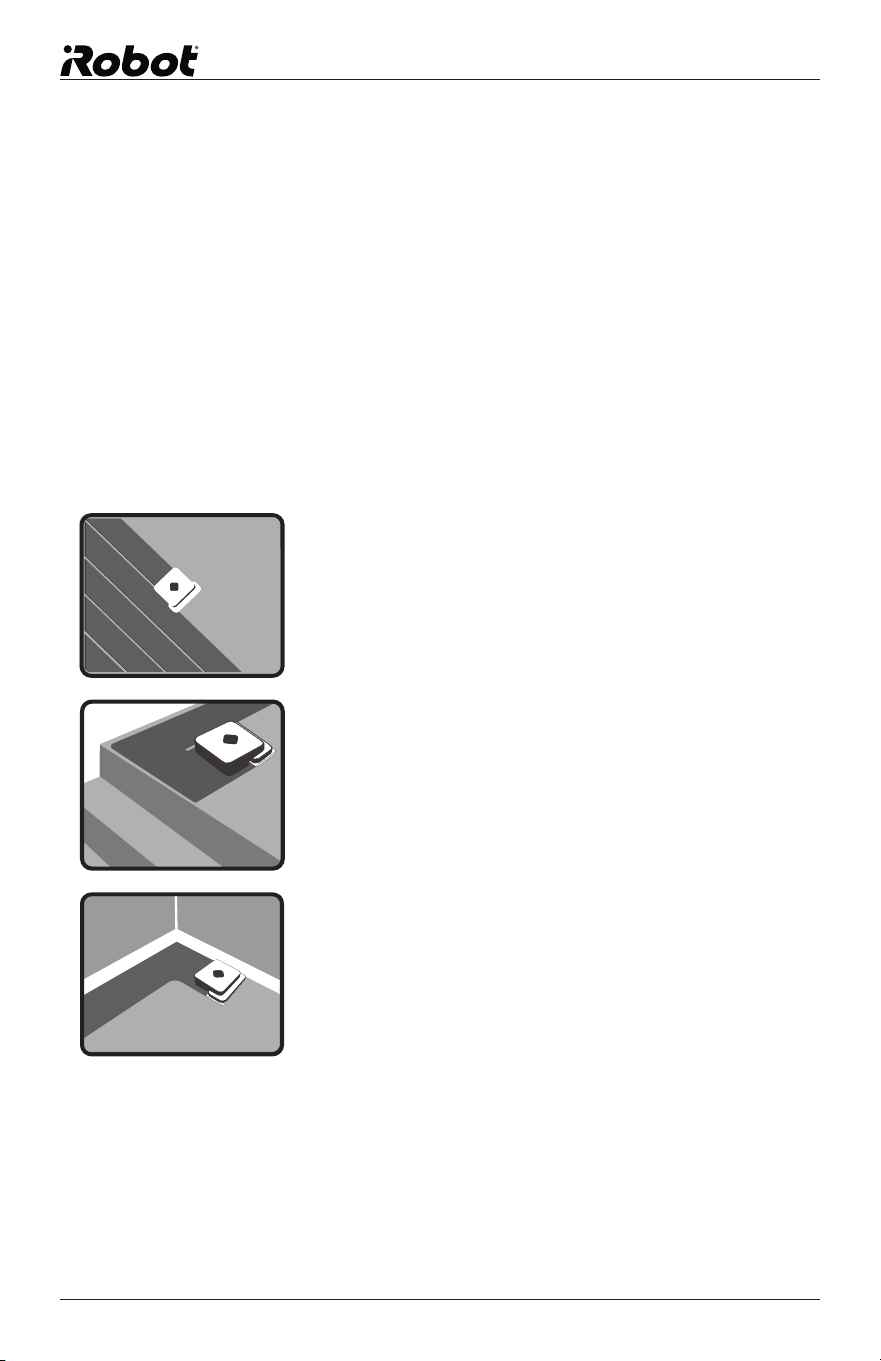
• Braava cleans your home in sections, first cleaning areas to its right, and
later returning to areas to its left.
• When the open areas in each section are complete, Braava cleans along
the edges of furniture and walls before moving on.
• When finished, Braava returns to where it started and parks itself.
Cleaning Pattern
• In open areas, Braava methodically cleans back
and forth across your floor.
• As Braava encounters chair legs, furniture, and
other obstacles, it cleans around them and
continues its cleaning pattern.
• Braava detects stairs and will manoeuvre away
from drop-offs and back to the cleaning area.
As a safety precaution, open ledges or
balconies with a drop of .61 metres orgreater
should be blocked off with a physical barrier.
• Braava also detects area rugs and raised transitions
to carpet so it can avoid driving onto them.
Note: If your carpet is flush with your hard surface floor, you
may need to add a temporary barrier to provide Braava with
a boundary it can detect.
• Braava follows along walls and edges as it
encounters them and as it completes each
section it cleans.
global.irobot.com 17
Quick Clean Mode
• Cleans 30% faster by focusing cleaning on open areas.
• Activate by holding the Sweep or Mop button for 3 seconds.
• You will hear a single beep, followed by the “start cleaning” song.
• Braava typically cleans the same total area as the standard detailed
cleaning mode, but will skip detailed cleaning around furniture and some
walls to save time.
Pause / Resume
Braava will automatically pause if you pick it up or press any button while
cleaning.
• The cleaning mode button will flash blue to indicate the cleaning cycle is
paused. While paused, Braava will save the map of the area it has already
cleaned.
• To resume cleaning, place Braava within 1.83 metres of the Cube where it
originally started, facing in the same general direction as it started.
• Press the flashing cleaning mode button.
• Braava will start cleaning while it determines its position on the map.
Once it confirms its position, it will drive to an area not yet covered and
continue cleaning.
• Braava may re-clean an area already covered or explore new areas of
cleaning while determining its position on the map.
• If you resume Braava where you paused it, it may take longer for the
cleaner to determine its position, depending on its distance from the Cube.
• To exit Pause and quit the cleaning cycle, power Braava off by holding the
power button for 2 seconds.
Note: Braava can only be paused after it has locked on to the NorthStar
Navigation Cube at the beginning of the cleaning cycle.
18 Braava 300 Series Owner’s Manual
NorthStar
®
Navigation
The NorthStar Navigation Cube acts as a beacon, emitting a signal that
guides Braava’s cleaning.
Connecting to the NorthStar Navigation Cube
• Once Braava starts cleaning, it tries to establish a connection to the
NorthStar Navigation Cube, indicated by one flashing blue light on the
Navigation System Indicator. Once Braava has locked on to the Cube,
Braava’s lights turn solid blue.
• The Navigation System Indicator also indicates Braava’s range. As Braava
gets to the edge of its range (such as going out of the room or far from the
NorthStar Navigation Cube), the number of lights will go down.
• Braava may occasionally drive back towards the NorthStar Navigation
Cube to confirm its position before continuing on its cleaning path.
• Braava builds a new map each time it starts a new cleaning cycle, but
retains its map if paused during the cleaning cycle.
Cleaning without a NorthStar Navigation Cube
• Because the Cube is just one part of the Navigation System, Braava can
still clean without a NorthStar signal present, however the cleaning area
will be much smaller and Braava will not be able to perform edge cleaning
in each section.
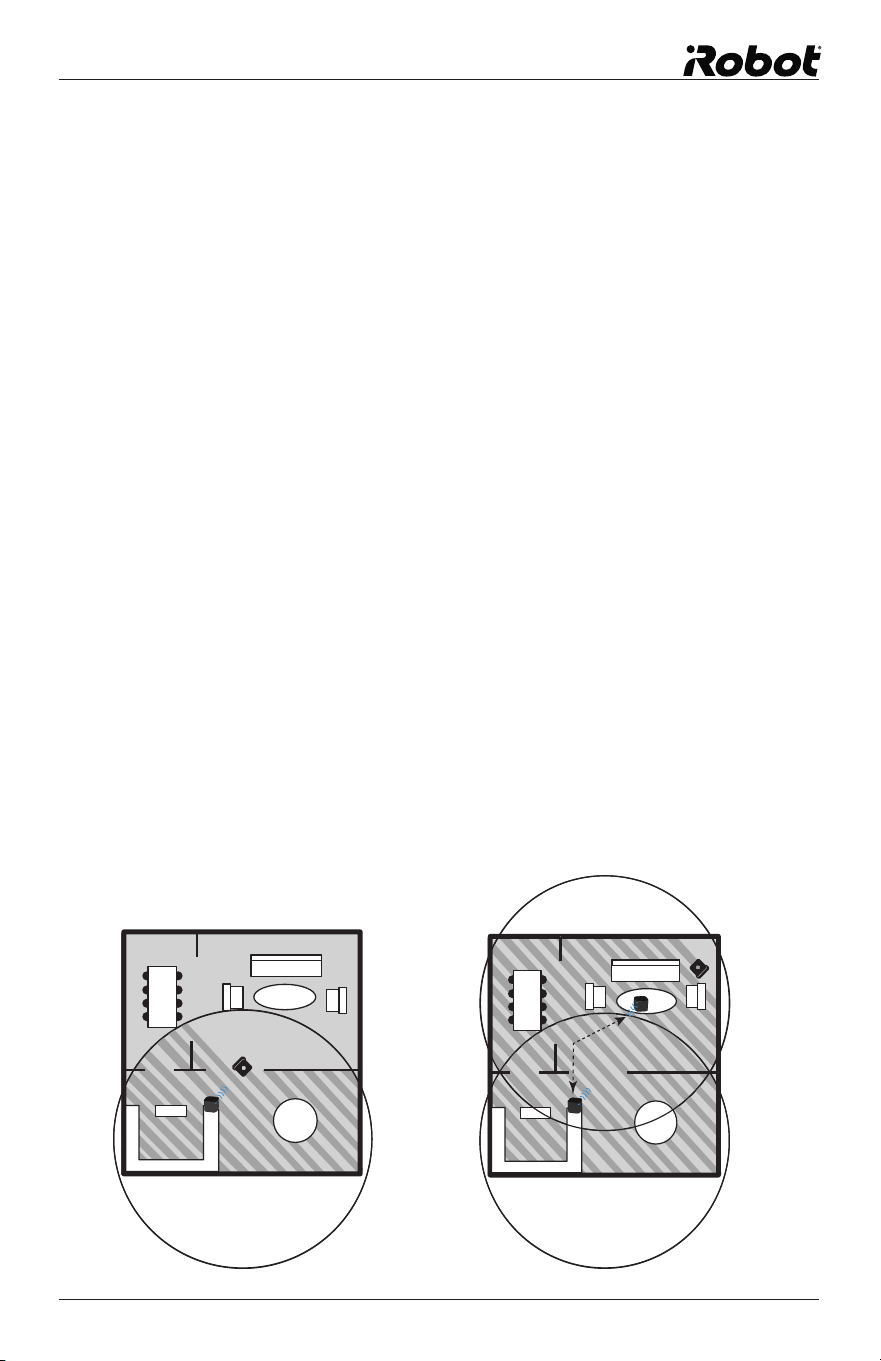
Cleaning with multiple NorthStar Navigation Cubes:
• Braava can use multiple NorthStar Cubes to clean multiple rooms and
large spaces when dry sweeping. Braava will move from one Cube to the
next, extending the cleaning area with each Cube it encounters.
global.irobot.com 19
Setting Up NorthStar Navigation Cubes
Using Braava with one Cube
• Place the Cube near the centre of the area you want to clean and start
Braava nearby.
• Braava will clean the area around the Cube, and may extend into other rooms
based on the cleaning mode and how far the NorthStar signal reaches.
• If you have a choice of rooms, place the Cube in a larger room to
maximise NorthStar coverage.
• Once Braava has completed its run, you can move the Cube to clean a
different part of your home.
Using Braava with multiple Cubes:
• Use one or more extra Cubes (sold separately) to expand how far Braava
cleans in a single run.*
• Place extra Cubes in rooms or areas next to the area covered by the first
Cube. The Cubes should typically be between 6 and 7 metres apart from
each other for the NorthStar coverage to overlap.
• Braava will automatically clean from one Cube to another.
* Cubes are pre-programmed to different NorthStar channels, indicated on the bottom of the Cube.
Cubes with different channels must be used for multi-Cube cleaning.
One Cube
Multiple Cubes
7m
20 Braava 300 Series Owner’s Manual
Operating Braava
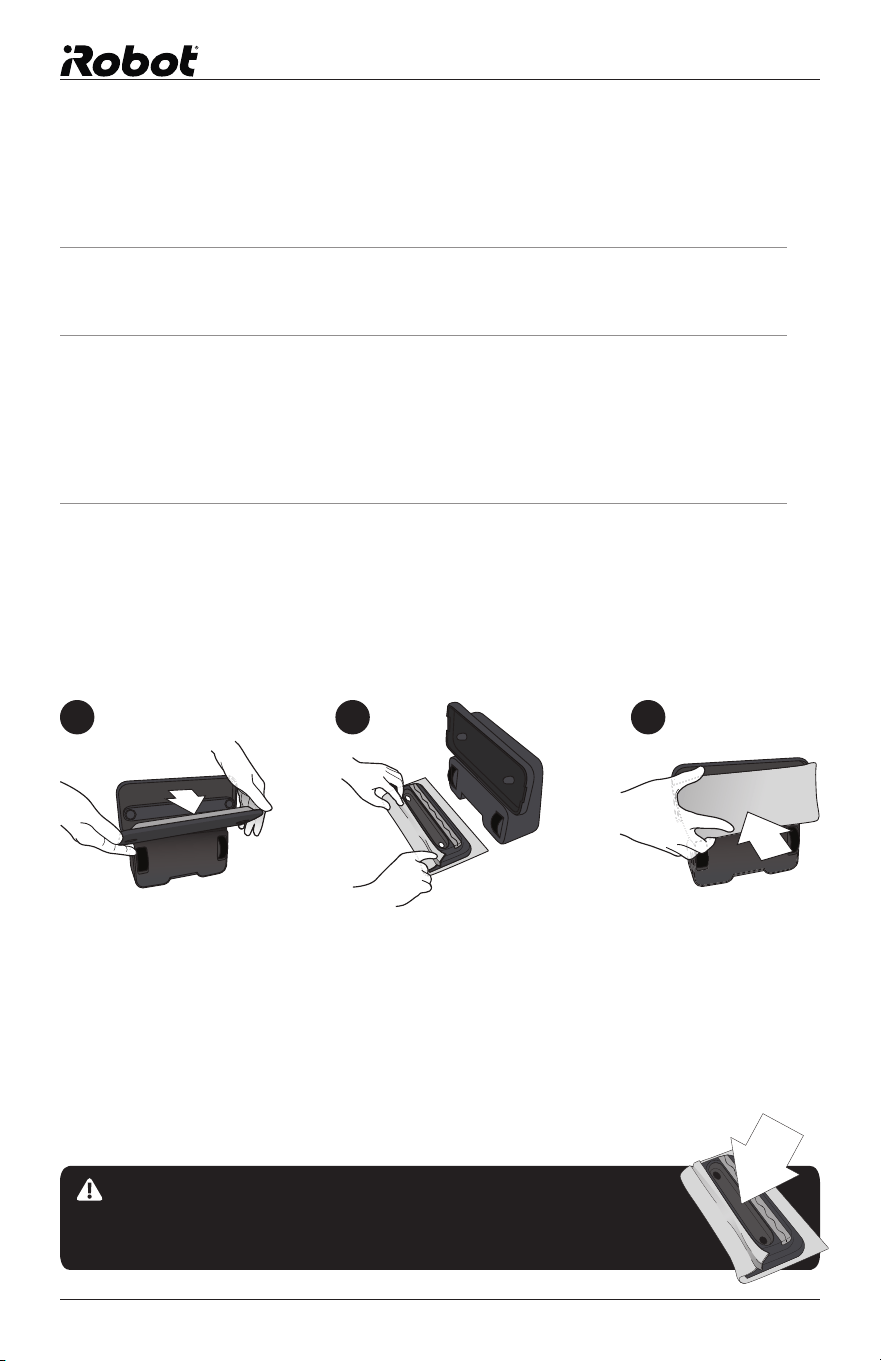
CAUTION: Make sure the cleaning cloth does not drape
into the middle channel between the gripping strips, as
this could impede sensor functions and safe operation.
Put On a Cleaning Cloth
1. Set Braava on its end and remove the cleaning pad.
2. Attach a dry or wet cloth to the Multi-Purpose cleaning pad.
Lay the removable pad on an open cleaning cloth. Attach
the cloth by tucking it into the gripping strips on both sides.
See the following page for the Pro-Clean Reservoir Pad.
3. Re-attach the cleaning pad. Magnets will help it snap back
into place.
1 2 3
global.irobot.com 21
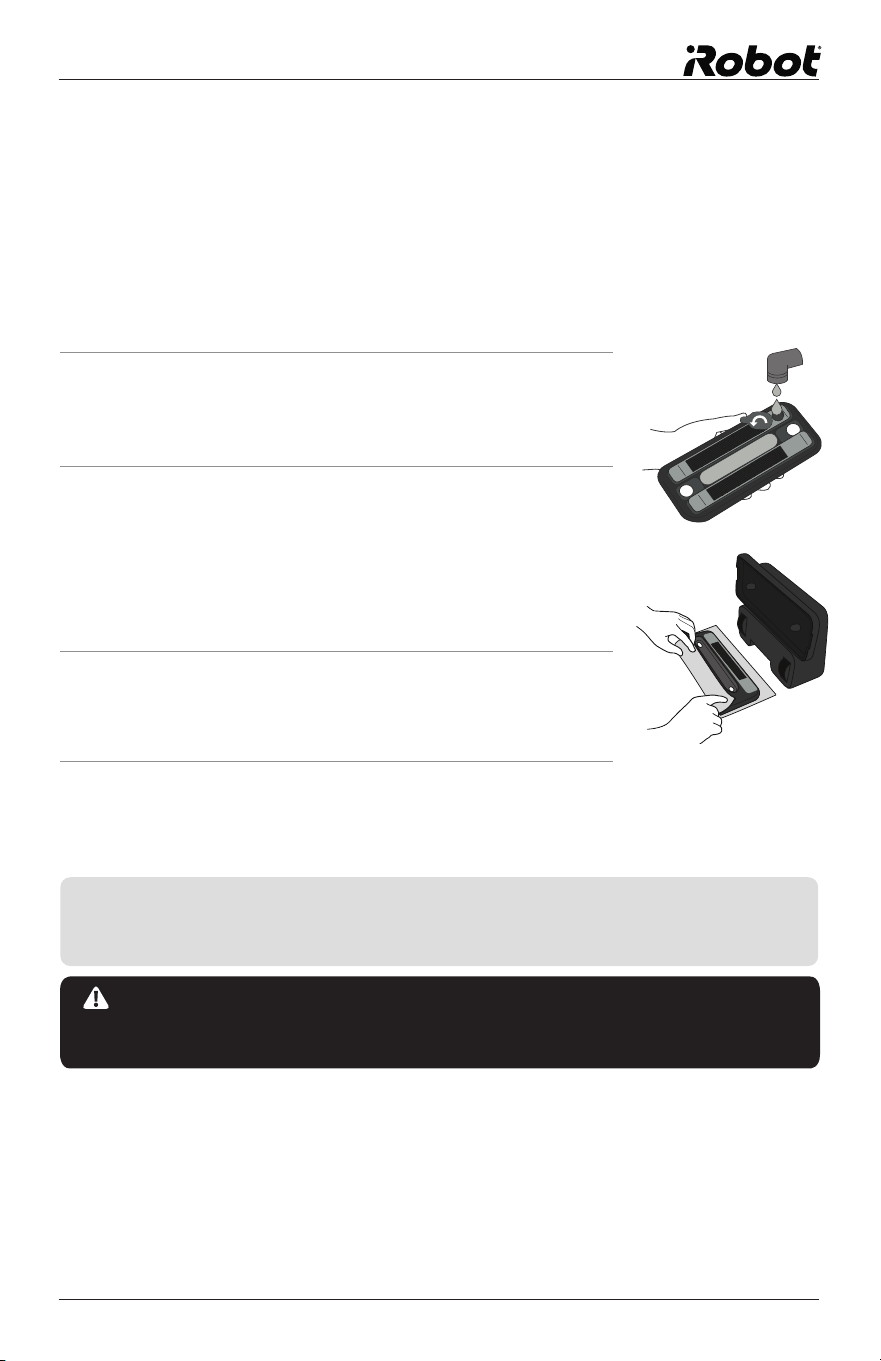
Using the Pro-Clean Reservoir Pad
(Also available as an accessory)
The Pro-Clean Reservoir Pad dispenses liquid as Braava mops to keep the
cleaning cloth wet for longer.
When mopping is finished:
NOTICE: To avoid the Pro-Clean Reservoir Pad leaving excess fluid
on your floor, do not leave Braava unattended when mopping and
remove it from the floor once Braava stops cleaning.
Fill the reservoir
1. Open the fill cap by pulling and swivelling
it to the side.
2. Fill the reservoir (maximum capacity is
100mL) with water and replace the fill cap,
pressing it in securely so it does not leak.
Visit global.irobot.com for information
about other cleaning solutions.
3. Fill the reservoir over a sink, as a small
amount of fluid can leak out when the fill cap
is closed.
4. Dampen the blue Pro-Clean microfibre
cloth and press it onto the velcro strips.
Do not use a dry cloth.
TIP: Fluid dispenses at different rates depending on the floor type and
solution used. The first time you mop, start with the cloth only slightly
damp, and then increase the starting cloth wetness if needed.
• Empty any remaining fluid from the reservoir.
• Leave the fill cap open to allow the reservoir to dry completely.
Do not store the pad on Braava if it is wet.
• See page 22 for care instructions.
22 Braava 300 Series Owner’s Manual
For Best Results
• Place the NorthStar Navigation Cube where it has a clear view of the
ceiling (for example, no cabinets or shelves directly above it).
• Do not move the NorthStar Navigation Cube once Braava has started
cleaning, as this may impair Braava’s cleaning performance.
• Do not put the NorthStar Navigation Cube on the floor, as the cleaner
may run into it and move it.
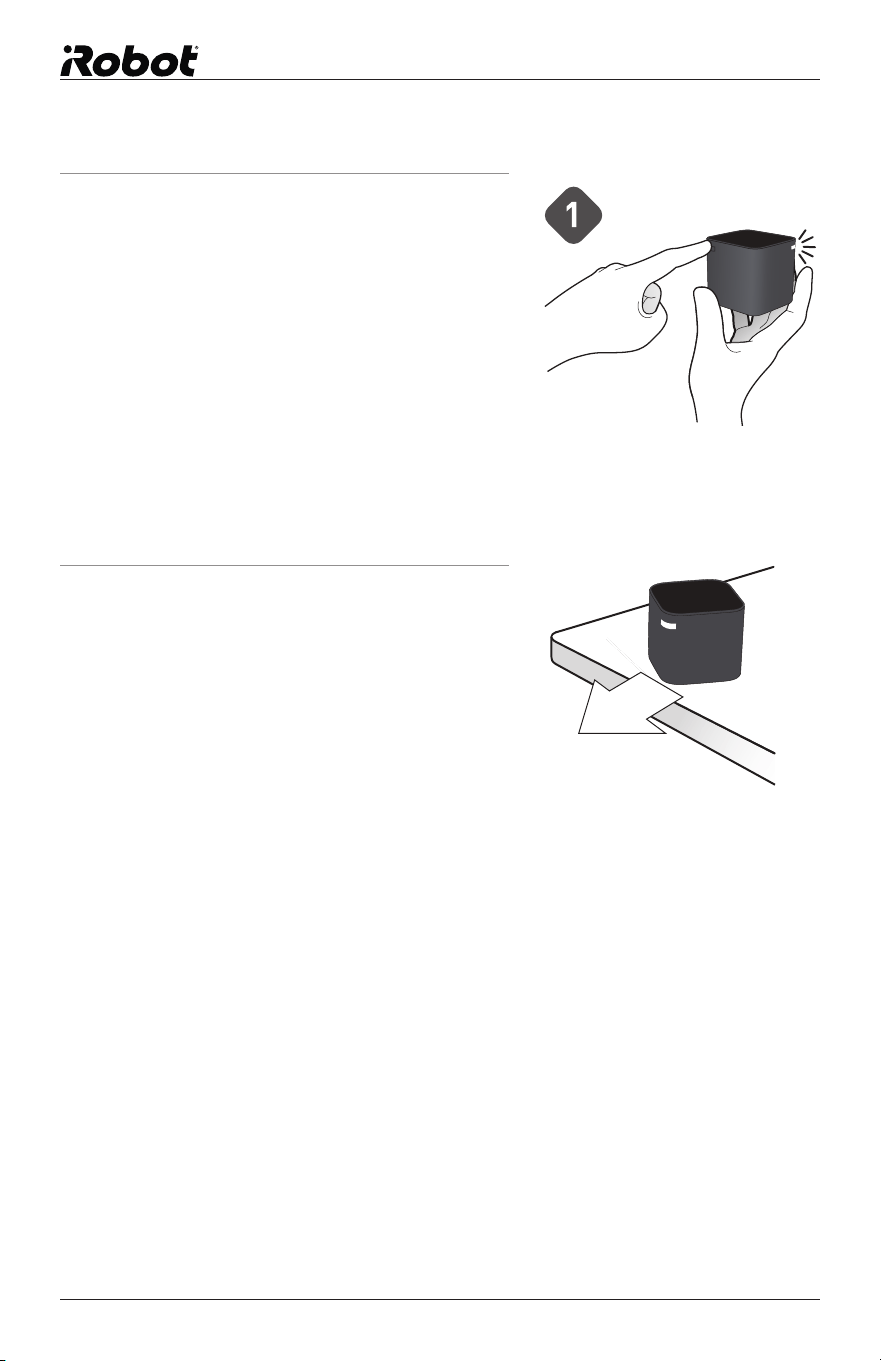
Place the NorthStar
®
Cube
1. Press the button on the
back corner of the NorthStar
Navigation Cube to turn it on.
A blue light will flash on the
opposite corner when turned
on, and then go solid when
Braava locks on to it.
If you forget to turn the Cube
on, Braava will send a signal
to try to turn it on. If Braava is
successful, the blue flashing
light will appear on the Cube.
2. Place the NorthStar Navigation
Cube on a table or worktop,
pointing the blue light away
from walls and towards the
middle of the room.
global.irobot.com 23
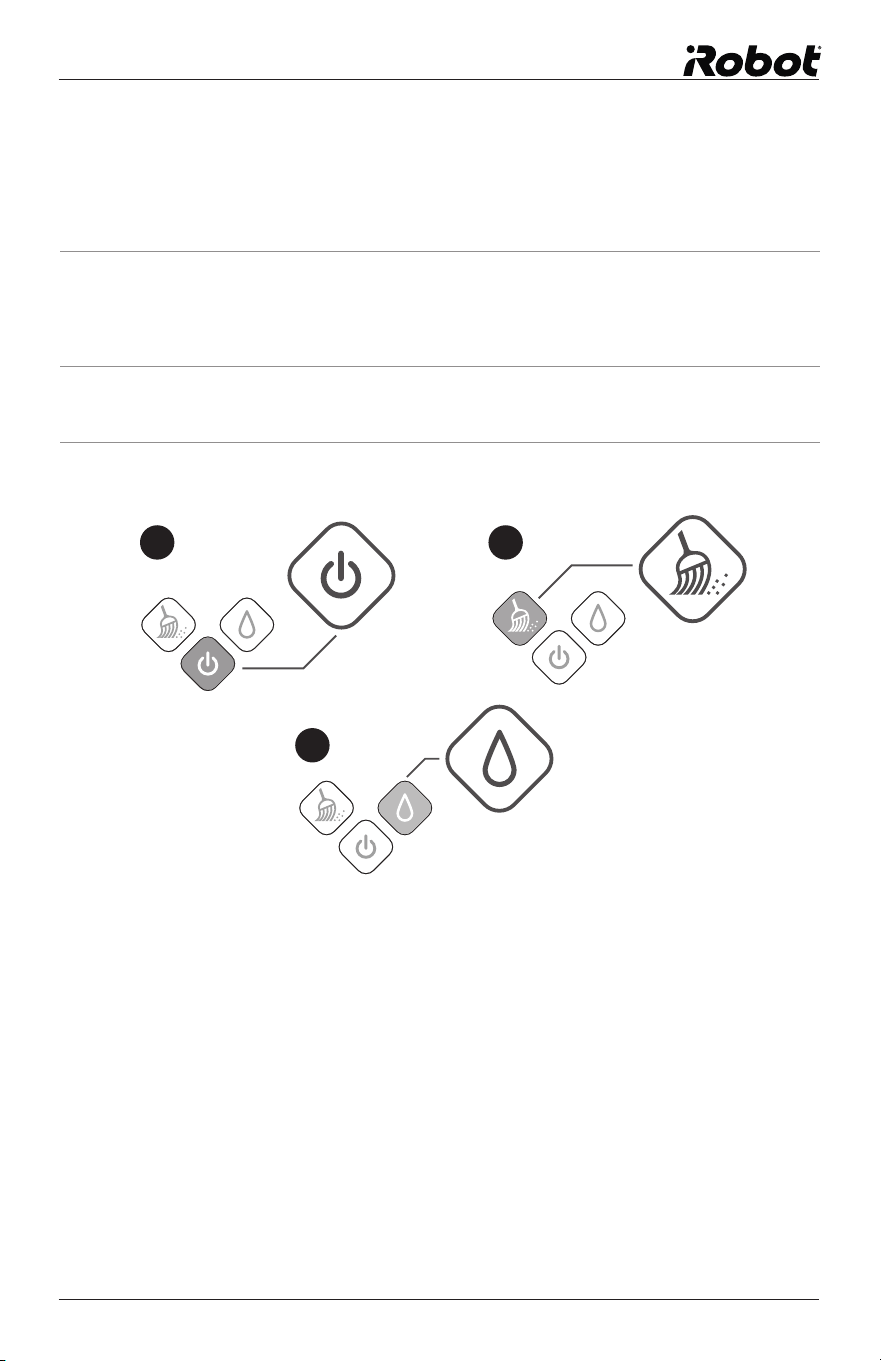
Start Cleaning
Place Braava on the floor within 2 to 2.5 metres of the NorthStar Navigation
Cube, facing towards the Cube.
1. Turn Braava on using the power button.
The button will light up blue when the cleaner is on.
2. To start cleaning with a DRY CLOTH, just press the Sweep button.
3. To start cleaning with a WET CLOTH, just press the Mop button.
1 2
3
• One blue light will start blinking on the Navigation System Indicator if
Braava detects a signal from the Cube. The light will turn solid blue once
it locks on to the Cube. If no lights appear, Braava does not detect a
NorthStar signal.
• When Braava finishes cleaning, it plays a short song, returns to where it
started, and parks itself. Braava will also do this if the battery runs low
while cleaning.
• To turn Braava off, press the power button for two seconds. A tune will
play and the light will turn off.
• To turn off the NorthStar Navigation Cube, press the button on the back
corner. The light on the opposite corner will turn off.
24 Braava 300 Series Owner’s Manual
Maintenance
To keep your Braava in the best working condition, follow these maintenance steps.
Cleaning and Storing
• Use a dry cloth to wipe dust or dirt from Braava’s exterior. Do not rinse or
submerge in water.
• Use a damp cloth to wipe off dust and dirt on tyres. Make sure that
Braava is not plugged in and that the cloth is not dripping.
• Place Braava on its end (handle side down) when charging or storing
between uses.
• For long term storage, remove the C batteries from the NorthStar Cube.
Wheel Guard
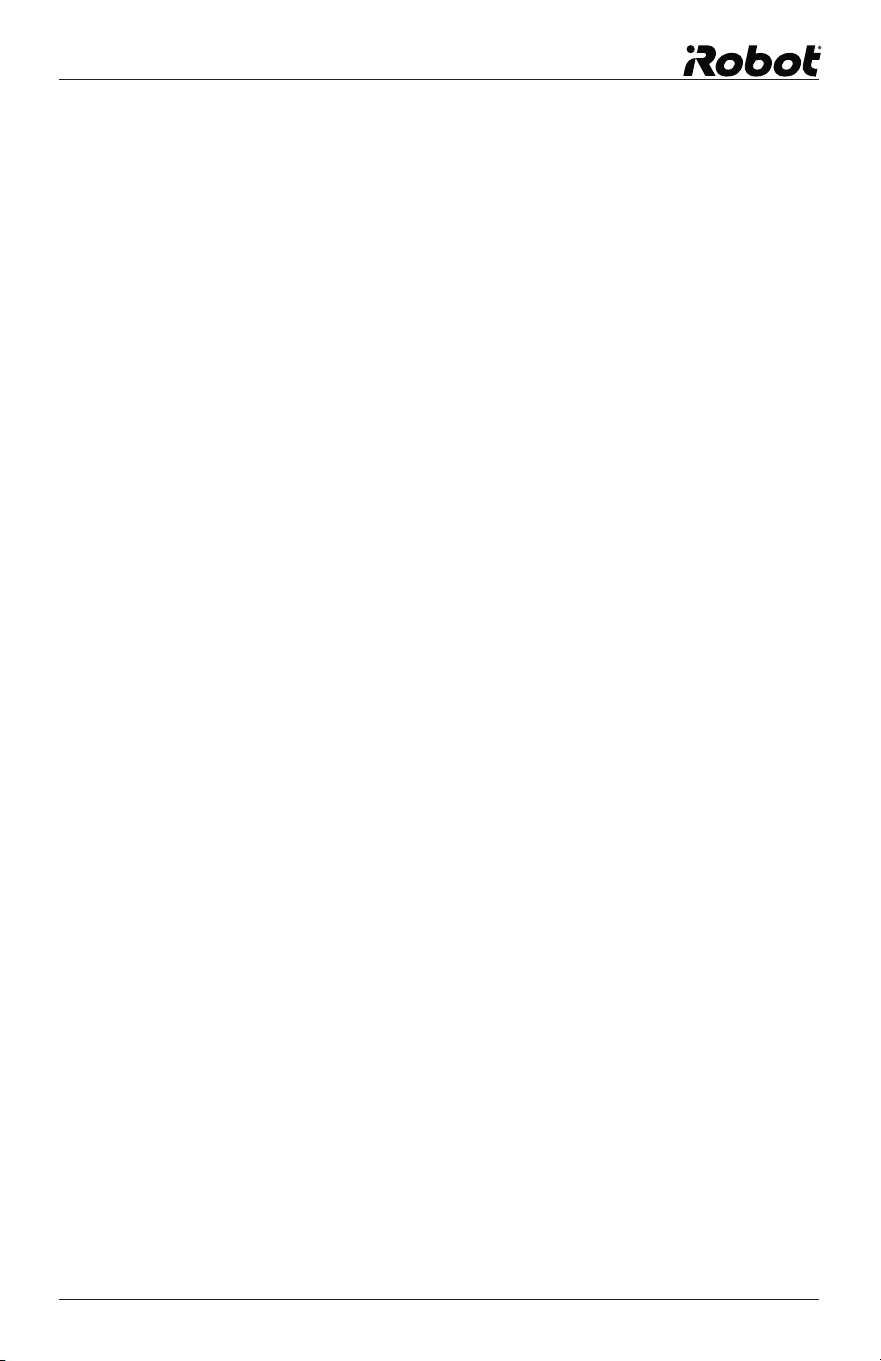
• As Braava cleans, debris may accumulate around the Wheel Guards.
This helps keep Braava’s wheels moving freely.
• Periodically check Braava’s wheels to see if debris has accumulated, and
remove as needed.
• A small notch next to the wheel allows access with tweezers or scissors if
needed to free the debris.
Access Notch
global.irobot.com 25
Pro-Clean Reservoir Pad
• Hand rinse with water in the sink to clean. Do not put the reservoir pad in
the dishwasher. Do not wash with soap.
• Let dry completely before re-attaching to Braava after cleaning is
complete.
• The wick is designed for repeated use. Do not remove the wick cap
between cleaning operations.
• If the wick cap becomes dirty or shows wear, it can be replaced.
• Remove the wick cap by pulling on the side rubber tab.
• Replace with a new wick cap, pressing firmly into place to create a
tight seal to prevent leaking.
Removing or Changing the Battery
• With Braava
®
unplugged and pad the and cloth removed, place Braava
®
on a flat surface with its wheels facing up.
• Locate the battery compartment screw between the wheels.
• With a coin or flathead screwdriver, remove the screw and open the
battery door.
• Lift the battery pack out of the robot and gently unplug the connector
from the port.
• Plug the connector of your new Braava
®
battery pack into the port.
• Place the battery pack into Braava
®
, ensuring the connecting wires are
tucked into the compartment.
• Reinstall the battery door and secure the screw using a flathead
screwdriver or coin.
For more information, please visit: www.irobot.com/Braava300
26 Braava 300 Series Owner’s Manual
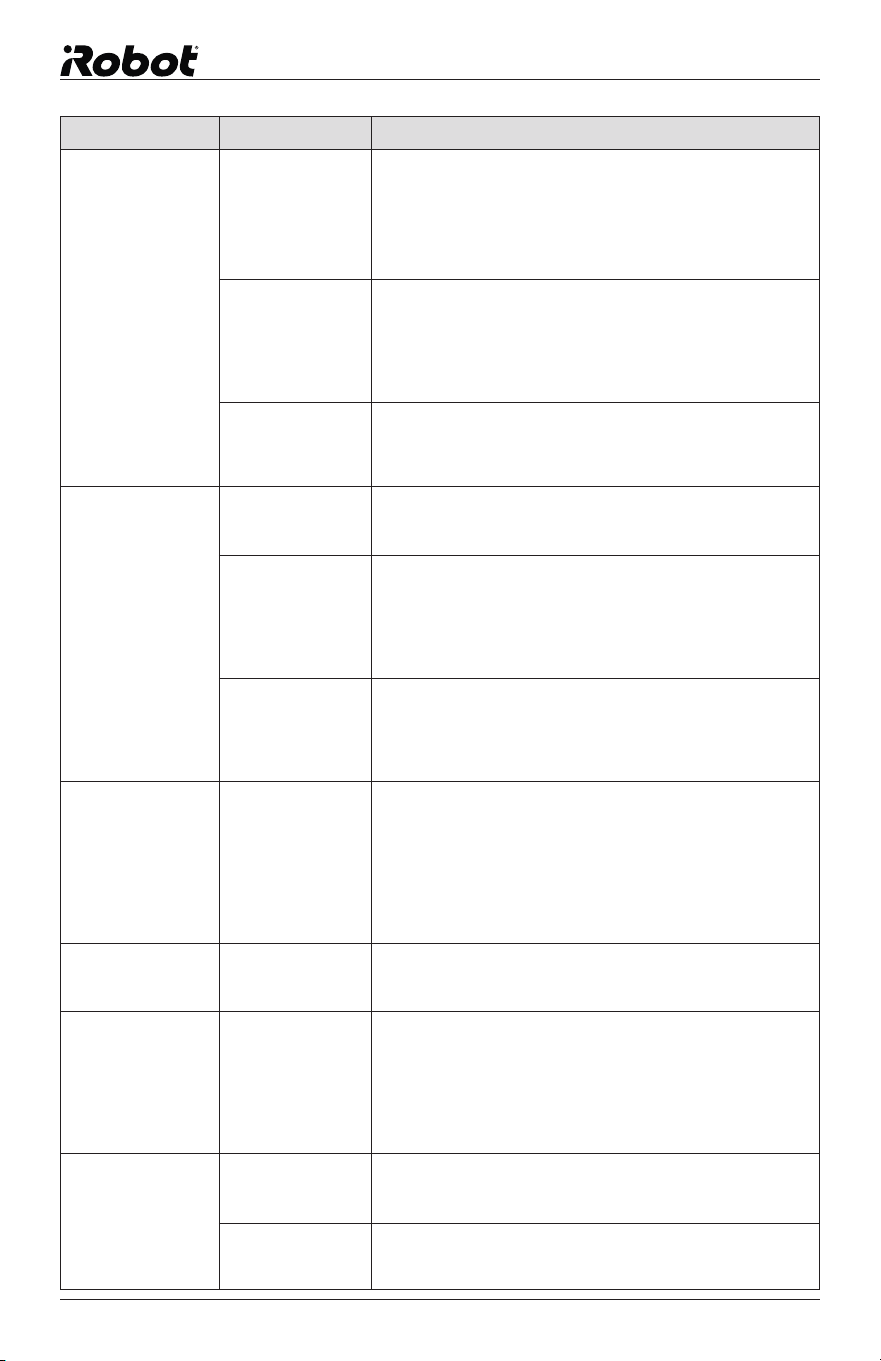
TroubleShooting
Visit global.irobot.com for additional tips and troubleshooting.
Problem: Likely Cause What To Do
Solid red light on
the middle NSI.
System error • Press and hold the power button to turn Braava off.
• Vigorously rotate both wheels for 15 seconds.
• Place Braava on the floor and power it on. Make sure a
drycleaning cloth has been applied.
• If the red light is gone, press Sweep.
• If the red light persists, contact Customer Support.
Red light blinks 2 to
6 times on the middle
NSI.
Braava is stuck in
its environment and
cannot free itself.
Remove Braava from the situation and restart in a new area.
Red light blinks 14
times on the middle
NSI.
Braava has
detected the motor
is getting too hot.
Turn Braava off and let it cool down before resuming
cleaning.
Red light blinks 15
times on the middle
NSI.
Braava is stuck
in too small of an
area and cannot
free itself.
Remove Braava from the situation and restart in a new area.
Red light on the
middle NSI when
pressing Sweep or
Mop, accompanied
by 3 beeps.
A sensor is
activated, so
Braava won’t start
driving.
Remove and reapply the cleaning cloth. When reapplying,
follow these instructions:
• Ensure the cloth does not overlap into the middle channel
of the removable cleaning pad
• Ensure the cloth is not bunching up, which can prevent the
removable pad from reattaching completely to the robot.
Problem: Likely Cause What To Do
Solid red light on
the middle NSI.
System error This is not a charging error, but will prevent Braava from
charging while Braava is plugged in. See ‘Error Indicators
While Cleaning’ chart for instructions.
Red light blinks 7 or
8 times on the middle
NSI.
Charging error
Contact Customer Support.
All lights flashing on
NSI and buttons,
and robot beeping
while charging.
Incompatible
adapter used
Remove the incompatible adapter and use only the adapter
included with Braava.
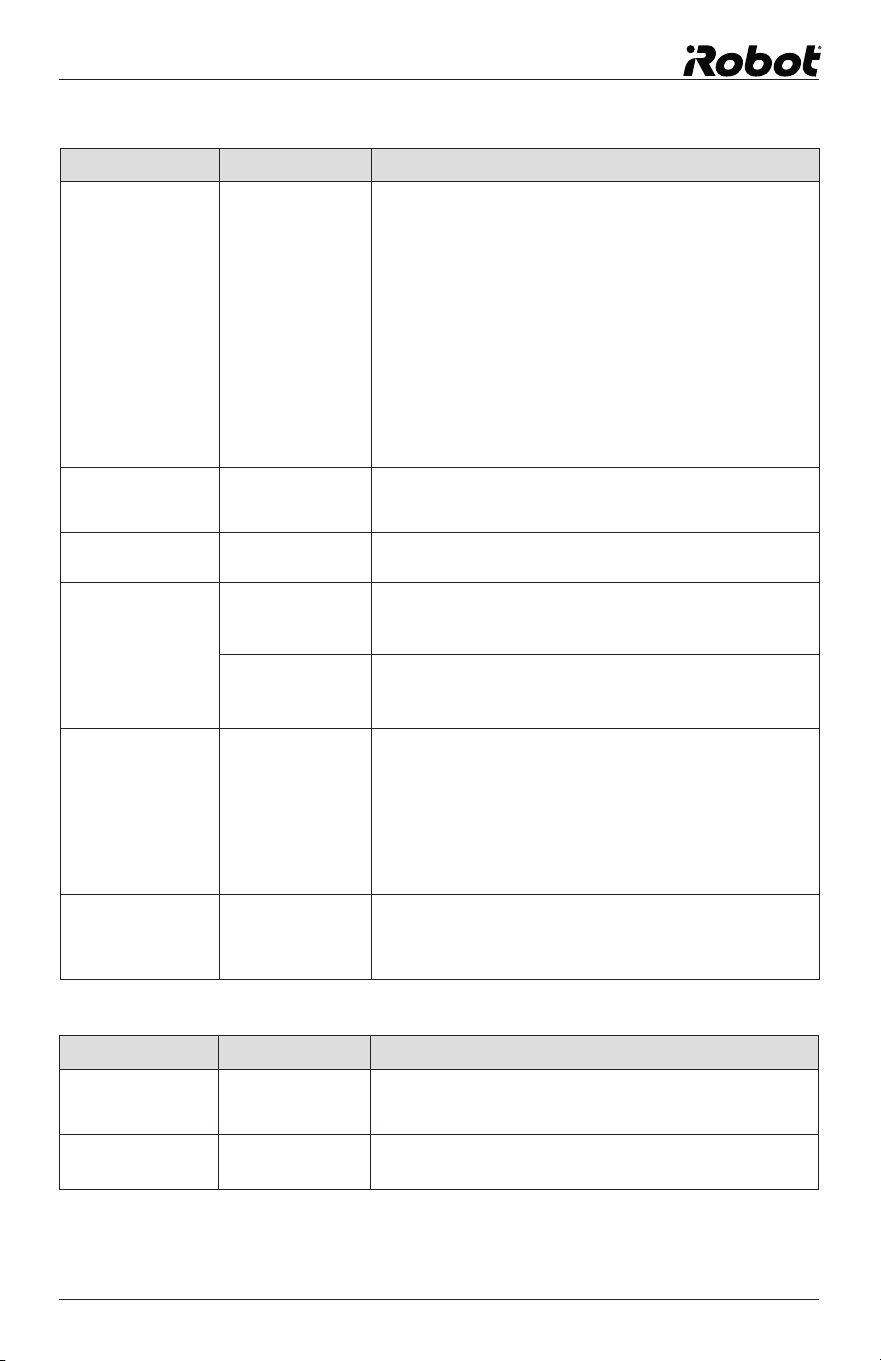
Navigation System Indicators (NSI)
Error Indicators on the Navigation System Indicator (NSI) while cleaning
Error Indicators on the Navigation System Indicator (NSI) while charging
global.irobot.com 27
Problem: Likely Cause What To Do
Leaking or leaving
puddles.
Loose wick or fill
cap
Check the fill cap and the wick cap and make sure both are
securely sealed shut. Fluid will dispense at a faster rate if
these caps are not sealed.
Not wicking fluid. Wick cap requires
replacement
Refer to Reservoir Pad maintenance for instructions to
replace the wick cap.
Pro-Clean Reservoir Pad Troubleshooting
Problem: Likely Cause What To Do
Braava is not
connecting to the
Cube.
Cube and robot
position
Turn on the Cube and place it on a raised surface. Point the
blue light towards an open area of the room.
Place Braava on the floor 2 to 2.5 metres away from the
Cube, facing towards the Cube. Turn Braava on.
With a dry cloth on Braava, press the Sweep button. Braava
should drive towards the Cube and connect with the Cube
within 30 seconds.
If the blue Navigation Indicator lights turn solid blue on
Braava, it has connected to the Cube. It is ok if the Cube
continues flashing.
If Braava is not able to drive straight, see “Not Driving
Properly” in the General Troubleshooting chart
Cube won’t turn on. C Batteries are
dead or inserted
incorrectly
Replace with new C batteries and confirm batteries are
facing the correct direction.
Cube light is red. C Batteries are dead Replace with new C batteries.
Cube turns off while
Braava is cleaning.
Signal interference Make sure Cube is not placed within 1.5 metres of a Plasma
or LCD television, and that the Cube is not in a room with
fluorescent lighting turned on.
Braava is out of
range
When Braava travels out of range, it is normal for the Cube
to turn off. When Braava returns, it will send a message to
the Cube to turn it back on.
Multiple Cubes are
set up, but Braava
is only using one
Cube.
Cube position Braava must be able to encounter a second Cube while
cleaning to use it. Make sure the second Cube is not isolated
in an area where Braava cannot get to it.
Try placing Cubes with just 4.5 metres between them to
help Braava connect, then move the Cubes further apart for
subsequent cleaning cycles. Do not move the Cubes while
Braava is cleaning.
Multiples Cubes are
set up, but Braava
is over-cleaning
many areas.
Cube channels Confirm the Cubes in use all have different channels. The
channel number can be found on the bottom of each Cube.
NorthStar
®
Navigation Cube Troubleshooting
28 Braava 300 Series Owner’s Manual
Problem: Likely Cause What To Do
Braava Cleans only
a small area.
Cube not being
used
Make sure the Cube is turned on and placed in the area
you want to clean. Check the position of the Cube for
interference such as:
• Cabinets, shelves, or ceiling fans above the Cube.
• Very high, uneven, or black ceilings above the Cube.
• Plasma or LCD televisions within 5 feet of the Cube.
Cleaning cloth
application
Remove and reapply the cleaning cloth. When reapplying,
follow these instructions:
• Ensure the cloth does not overlap into the middle channel
of the removable cleaning pad
• Ensure the cloth is not bunching up, which can prevent the
removable pad from reattaching completely to the robot.
Problem with
wheels or treads
Check the wheel area for debris and remove or clean as
needed. Examine the tyre treads to make sure they are
securely attached to the wheel. If not well attached, contact
Customer Support.
Braava is not driving
properly.
Wheels slipping Clean the wheels with a cloth dampened with warm water to
remove dust and cleaning solution. Let the wheels dry before
cleaning again.
Cleaning cloth
application
Remove and reapply the cleaning cloth. When reapplying,
follow these instructions:
• Ensure the cloth does not overlap into the middle channel
of the removable cleaning pad
• Ensure the cloth is not bunching up, which can prevent the
removable pad from reattaching completely to the robot.
Problem with
wheels or treads
• Check the wheel area for debris and remove or clean as
needed.
• Examine the tyre treads to make sure they are securely
attached to the wheel. If not well attached, contact Customer
Support.
Braava is backing
up.
Floor transition
sensor is activated
Remove and reapply the cleaning cloth. When reapplying,
follow these instructions:
• Ensure the cloth does not overlap into the middle channel
of the removable cleaning pad
• Ensure the cloth is not bunching up, which can prevent the
removable pad from reattaching completely to the robot.
If flooring is uneven or has wide grout lines, place Braava on
smoother flooring to see if the problem persists.
Braava drives off
and does not clean
where I started it.
Braava is in Pause/
Resume mode
Braava may still be in pause/resume mode from a previous
cleaning run. Tap the power button to exit pause/resume
mode.
When resuming after
pausing, Braava
cleans the same area.
Robot position when
resuming
It is normal for Braava to re-clean an area while trying to find
its position.
• To help Braava find its position quickly, restart Braava
near the Cube in the same orientation and location as the
beginning of the cleaning cycle.
• If Braava does not successfully find its position, it will start
a new cleaning cycle.
Braava won’t hold a
charge.
Incorrect adapter
or battery
Confirm the adapter has the same model number as noted
on the bottom of your Braava and use only an official Braava
battery. If the problem persists, contact Customer Support.
Battery needs
refresh charge
Charge Braava for 12 hours using the adapter and not a
Cradle, then run Braava until the battery fully depletes.
Repeat 3 times to achieve expected run times.
General Troubleshooting
global.irobot.com 29
iRobot Customer Care USA
If you have questions or comments about this product, please
contact iRobot before contacting a retailer.
Please visit the iRobot home support site at www.irobot.com/support for
support tips, frequently asked questions, or information about accessories
and other iRobot products.
Should you still need assistance:
Call our Customer Care team at 877.855.8593.
iRobot Customer Care Hours:
• Monday – Friday 9AM – 7PM Eastern Time
• Saturday 9AM – 6PM Eastern Time
iRobot Customer Care Outside USA
& Canada
Visit global.irobot.com to:
• Read hints and tips to improve the performance of your robot
• Get answers to questions
• Download a detailed product manual
• Contact your local distributor
Get Robot Updates
Register your Robot! Go to global.irobot.com

© 2008-2015 iRobot Corporation, 8 Crosby Drive, Bedford, MA 01730 USA | All rights reserved.
iRobot, Braava and NorthStar are registered trademarks of iRobot Corporation. Swiffer and WetJet are
registered trademarks of Procter and Gamble. Target is a registered trademark of Target Brands Inc.
U.S. Pat. http://www.irobot.com/patents | Additional Patents Pending. WC: 4410062
International customers
should visit global.irobot.com.