

3
Ú Table of contents
[en]Instruction manual
Safety precautions .....................................................................4
Safety notes .........................................................................................4
Causes of damage .............................................................................4
Your new appliance .................................................................... 5
Control panel .......................................................................................5
Operating modes ................................................................................6
Cooking compartment .......................................................................6
Accessories .........................................................................................6
Automatic calibration .........................................................................6
Before using for the first time ................................................... 7
Setting the clock .................................................................................7
Setting the water hardness range ...................................................7
First use ................................................................................................7
Cleaning the accessories before use .............................................8
Operating the appliance ............................................................ 8
Filling the water tank ..........................................................................8
Switching on the appliance...............................................................8
Switching off the appliance...............................................................9
After each use .....................................................................................9
Electronic clock.......................................................................... 9
Clock display .......................................................................................9
Timer .................................................................................................. 10
Cooking time .................................................................................... 10
End of operation .............................................................................. 10
Preset operation............................................................................... 10
Setting the clock .............................................................................. 11
Checking, correcting or deleting settings ................................... 11
Automatic programmes ........................................................... 11
Setting a programme ...................................................................... 11
Notes about the programmes ....................................................... 11
Programme table ............................................................................. 12
Childproof lock ......................................................................... 14
Lock .................................................................................................... 14
Permanent lock ................................................................................ 14
Basic settings ........................................................................... 14
Automatic safety cut-out ......................................................... 15
Care and cleaning .................................................................... 15
Cleaning agents ............................................................................... 16
Oven cleaning aid............................................................................ 16
Descaling........................................................................................... 17
Removing and fitting the appliance door.................................... 18
Cleaning the door panels............................................................... 18
Cleaning the rails ............................................................................. 19
Troubleshooting .......................................................................19
Replacing the cooking compartment bulb ................................. 20
Changing the door seal .................................................................. 21
After-sales service ................................................................... 21
E number and FD number ............................................................. 21
Environmental protection ........................................................ 21
Environmentally-friendly disposal.................................................. 21
Tips for saving energy .................................................................... 21
Tables and tips ......................................................................... 22
Steam cooking ................................................................................. 22
Hot air ................................................................................................ 22
CircoSteam® .................................................................................... 22
Vegetables ........................................................................................ 22
Side dishes and pulses .................................................................. 23
Poultry and meat.............................................................................. 24
Fish..................................................................................................... 25
Bakes, soup ingredients, etc. ........................................................ 26
Dessert, compote ............................................................................ 26
Cakes and pastries ......................................................................... 26
Reheating food................................................................................. 28
Defrosting .......................................................................................... 28
Proving dough .................................................................................. 29
Juicing................................................................................................ 29
Preserve............................................................................................. 29
Frozen products ............................................................................... 29
Test dishes................................................................................ 31
Baking................................................................................................ 31
Steaming ........................................................................................... 31
Produktinfo
Additional information on products, accessories, replacement
parts and services can be found at www.neff-
international.com and in the online shop www.neff-
eshop.com

4
: Safety precautions
Read these instructions for use carefully.
Please keep the instructions for use and
installation instructions in a safe place. If the
appliance changes owners, the instructions
should always be included.
Safety notes
This appliance is intended for domestic use only. This
appliance must only be used for food preparation.
Adults and children must not operate the appliance without
supervision,
■ if they are physically or mentally incapable of doing so or
■ if they have insufficient knowledge or experience.
Never let children play with the appliance.
Risk of scalding!
Hot steam may escape when the appliance door is opened.
Open the appliance door carefully during or after cooking.
When opening the door, do not lean over it. Ensure that,
depending on the temperature, steam is not visible.
Risk of burns!
Never touch the interior surfaces of the cooking compartment
or the heating elements when they are hot. Small children must
be kept at a safe distance from the appliance.
Risk of fire!
Never store combustible items in the cooking compartment.
Risk of fire!
When preheating, never place greaseproof paper unsecured on
the accessories. Draughts are created when the appliance door
is opened. Greaseproof paper may ignite when in contact with
very hot surfaces. Always use a plate or a baking tin to hold the
greaseproof paper down. Only cover the required surface with
greaseproof paper. The greaseproof paper must not extend
over the edge of accessories.
Risk of scalding!
Never pour water into the cooking compartment when it is hot.
This will create hot steam.
Risk of short circuit!
Never trap connecting cables of electrical appliances in the hot
appliance door. The cable insulation could melt.
Risk of burning!
Never prepare food containing large quantities of drinks with a
high alcohol content. Alcoholic vapours can catch fire in the
cooking compartment. Only use small quantities of drinks with
a high alcohol content and take care when opening the
appliance door.
Risk of burning!
Never remove hot accessories or ovenware from the cooking
compartment without oven gloves.
Risk of scalding!
Do not clean the appliance immediately after switching it off.
The water in the evaporator dish is still hot. Wait until the
appliance has cooled down.
Risk of electric shock!
Incorrect repairs are dangerous. Repairs may only be carried
out by one of our trained aftersales engineers. If the appliance
is defective, pull out the mains plug or switch off the appliance
at the circuit breaker in the fuse box. Call the aftersales
service.
Causes of damage
Caution!
■ Do not place anything on the cooking compartment floor. Do
not cover it with aluminium foil. A build-up of heat could
damage the appliance.
The cooking compartment floor and the evaporator dish must
always be kept clear. Always place ovenware in a perforated
cooking container or on a wire rack.
■ Aluminium foil in the cooking compartment must not come
into contact with the door panel. This could cause permanent
discolouration of the door panel.
■ Ovenware must be heat and steam resistant. Silicone baking
tins are not suitable for combined operation with steam.
■ Do not use ovenware that shows signs of rust. Even the
smallest spots of rust can lead to corrosion in the cooking
compartment.
■ When steaming with a perforated cooking container, always
insert the baking tray or the solid cooking container
underneath. Dripping liquid is caught.
■ Do not store moist food in the closed cooking compartment
for long periods. It can lead to corrosion in the cooking
compartment.
■ Fruit juice may leave stains in the cooking compartment.
Always remove fruit juice immediately and wipe the cooking
compartment with a moist and dry cloth.
■ If the door seal is very dirty, the appliance door will no longer
close properly during operation. The fronts of adjacent units
could be damaged. Always keep the door seal clean and
replace when necessary.
■ Do not place anything on the open appliance door. The
appliance could be damaged.
■ Do not carry or hold the appliance by the door handle. The
door handle cannot support the weight of the appliance, and
could break.
■ The cooking compartment in your appliance is made of high
grade stainless steel. Improper care can lead to corrosion in
the cooking compartment. Refer to the care and cleaning
instructions in the instruction manual. Remove food residues
from the cooking compartment as soon as the appliance has
cooled.
5
Your new appliance
In this section, you will find information on
■ the control panel
■ the operating modes
■ the cooking compartment
■ accessories
■ automatic calibration
Control panel
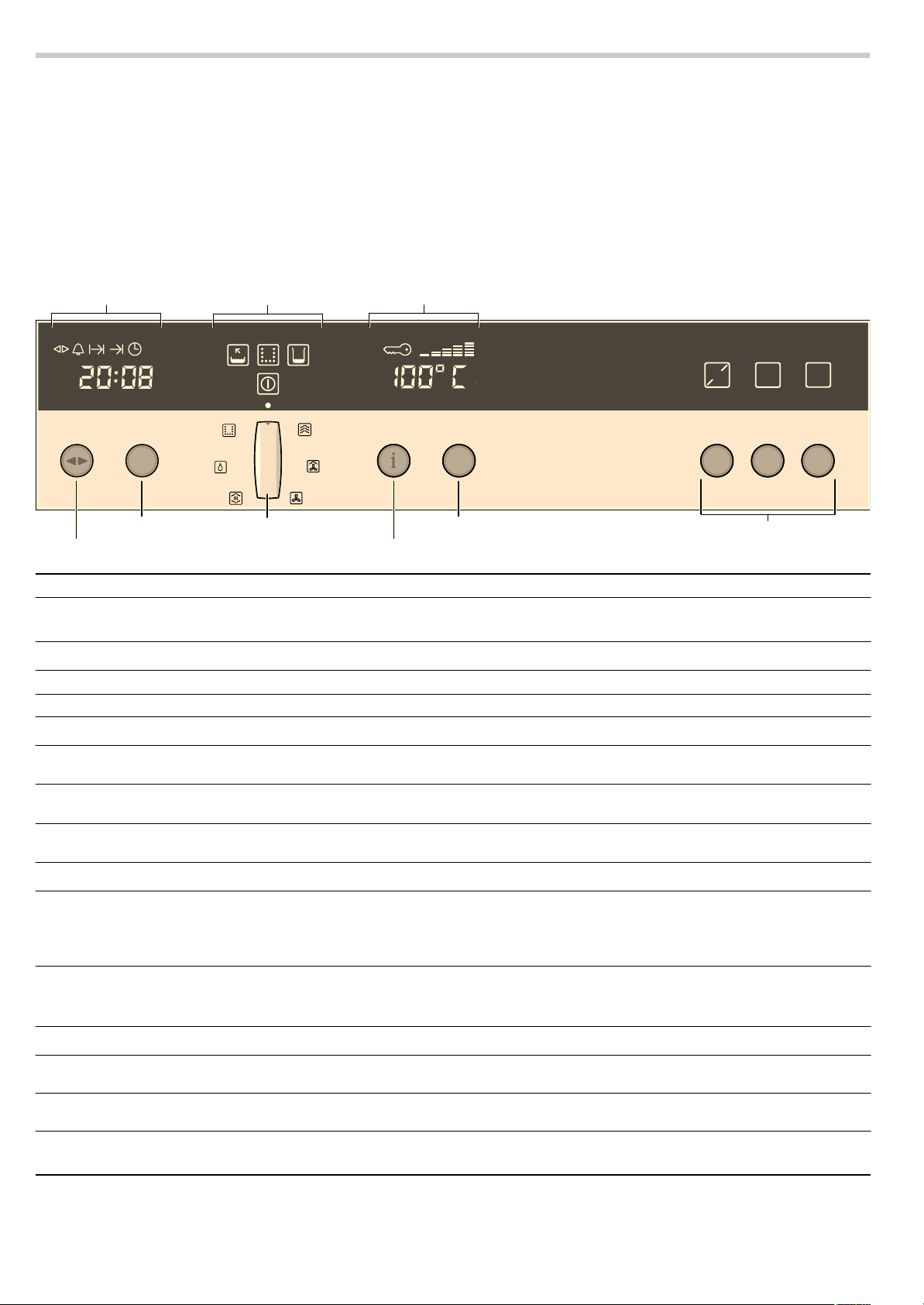
Pop-out operating knob
The rotary, temperature and operating mode selectors can all
be popped out. Push the required operating knob to pop it in or
out.
Control element Use/meaning
Operating mode selector Switching the appliance on and off
Selects the desired operating mode
Electronic clock
KJ
Clock function button Selects the clock function (see section: Electronic clock)
Rotary selector Makes settings within a clock function (see section: Electronic clock)
Symbols
Ì
Emptying the evaporator dish
If the symbol
Ì lights up: Remove the remaining water from the evaporator dish.
Í
Descaling
When the
Í symbol flashes, the appliance needs descaling
(see section: Descaling)
Î
Fill the water tank
When the symbol
Î lights up, fill the water tank or change the water in the water
tank (e.g. during descaling)
Temperature display (Basic settings)
±
Info button Press briefly: calls up additional information, for example the current temperature
during the heating up phase
Press and hold: calls up the Basic settings menu (see section: Changing the Basic
settings)
Temperature selector Sets the temperature
Changes the settings in the Basic settings menu (see section: Changing the Basic
settings)
Buttons
n
Programme button Set the programme or enter the weight (see section: Automatic programmes)
ƒ
Start button Starts operation
„
Stop button Short press: stops the operation (pause)
Press and hold: ends the operation
6WRS
6WDUW
3
NJ
(OHFWURQLFFORFN
7HPSHUDWXUHGLVSOD\
,QIREXWWRQ
7HPSHUDWXUHVHOHFWRU
2SHUDWLQJPRGHVHOHFWRU
5RWDU\VHOHFWRU
&ORFNIXQFWLRQEXWWRQ
%XWWRQV
6\PEROV
6
Operating modes
You can use the operating mode selector to set your appliance
for various different applications.
Cooking compartment
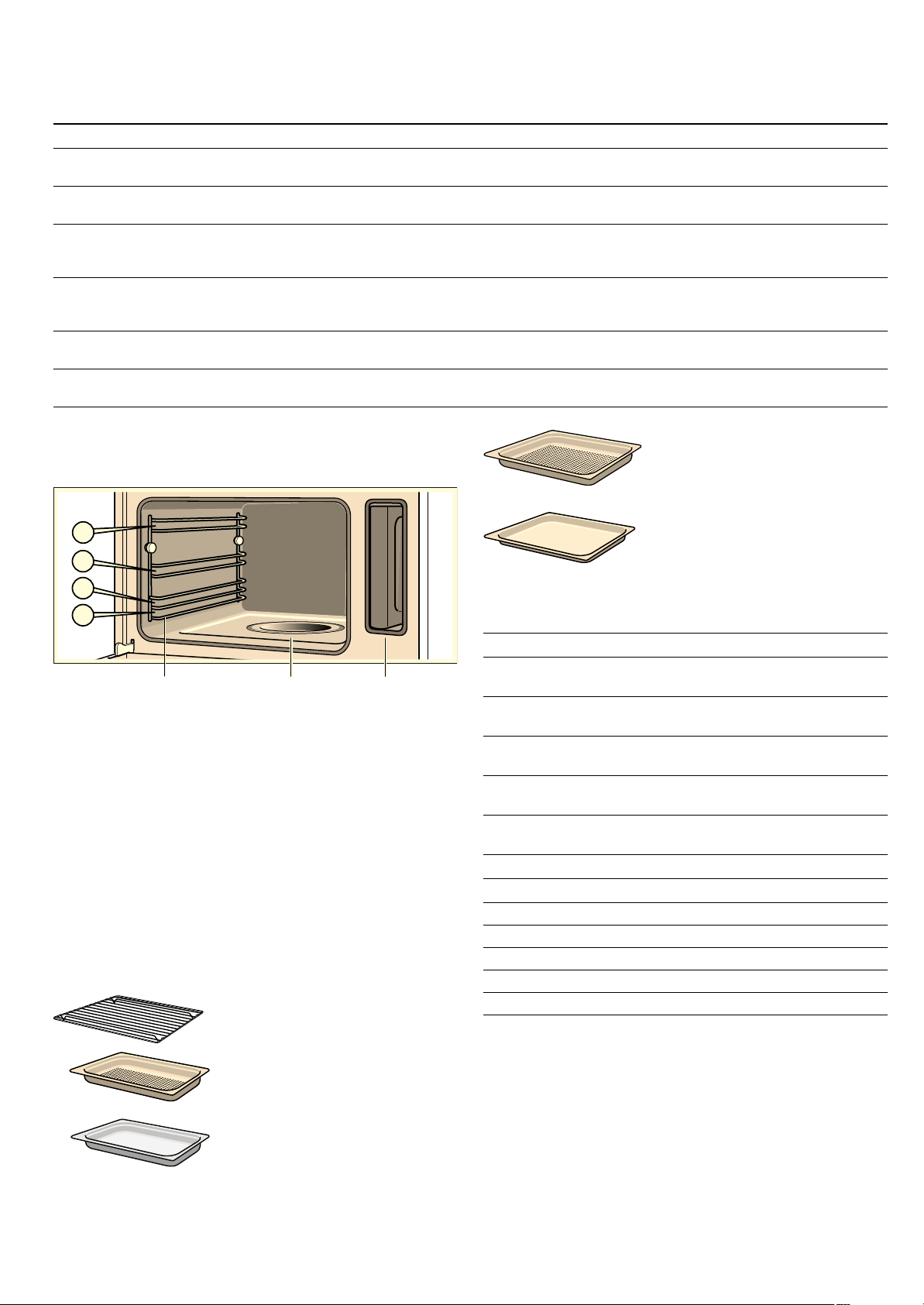
The cooking compartment has four shelf heights. The shelf
positions are counted from the bottom up.
Caution!
■ Do not place anything on the cooking compartment floor. Do
not cover it with aluminium foil. A build-up of heat could
damage the appliance.
The cooking compartment floor and the evaporator dish must
always be kept clear. Always place ovenware in a perforated
cooking container or on a wire rack.
■ Do not slide any accessories between the shelf positions, or
they may tip.
Accessories
Use only the accessories supplied with the product or available
from the after-sales service. They are specially designed for
your appliance.
Your appliance is equipped with the following accessories:
You can obtain further accessories from specialist retailers:
The cooking containers may warp during cooking. This is
caused by the considerable temperature differences on the
accessories. It may occur if only a part of the accessory is
covered or if you place frozen items, such as pizza, on the
accessory.
Automatic calibration
The boiling temperature of water depends on the air pressure.
During calibration, the appliance is adapted to the pressure
conditions in the location where it is installed. This happens
automatically when you first use the appliance (see section:
First use). More steam develops than usual.
Operating mode Application
é
Steam cooking 35 - 100 °C For vegetables, fish, side dishes, for juicing fruit and for blanching.
For proving dough (at 35 °C).
8
CircoSteam® 120 - 230 °C For meat, bakes, and pastries.
Hot air and steam are combined.
3
Hot air 30 - 230 °C For moist cakes, sponges and pot roasts.
A fan in the back wall of the oven distributes the heat evenly inside the cooking
compartment.
ä
Reheat 100 - 180 °C For plated meals and baked items.
Cooked food is gently reheated. The steam ensures that the food does not dry
out.
>
EasyClean® Makes cleaning the cooking compartment easier
(See the section: Cleaning aid EasyClean®)
Í
Descaling For descaling the water system and the evaporator dish
(see section: Descaling)
wire rack
For ovenware, cakes and casserole
dishes, and for roasting
Cooking container, perforated,
GN
Y, 40 mm deep
For steaming vegetables, juicing
berries and defrosting
Cooking container, solid, GN
Y,
40 mm deep
For cooking rice, pulses and
cereals
(YDSRUDWRUGLVK
5DLOVIRU
WKHDFFHVVRULHV
:DWHUWDQN
Cooking container, perforated,
GN
Z, 40 mm deep
for the steaming of whole fish or
large quantities of vegetables, for
juicing berries, etc.
Cooking container, solid, GN
Z,
28 mm deep (baking tray)
For baking tray bakes and for
catching dripping liquid during
steaming
Accessories Order no.
Cooking container, solid, GN
Z, 40 mm
deep
Z1683X0
Cooking container, perforated, GN
Z,
40 mm deep
Z1682X0
Cooking container, solid, GN
Z, 28 mm
deep (baking tray)
Z1673X0
Cooking container, solid, GN
Y, 40 mm
deep
Z1663X0
Cooking container, perforated, GN
Y,
40 mm deep
Z1662X0
Porcelain cooking container, solid, GN
Z
Z1685X0
Porcelain cooking container, solid, GN
Y
Z1665X0
Wire rack Z1664X0
Roasting set Z1684X0
Cleaning sponge 643 254
Descaler 311 138
Honeycomb microfibre cloth 460 770
7
It is important that the appliance steams without interruption for
20 minutes at 100 °C. Do not open the appliance door during
this time.
If the appliance was not able to calibrate itself automatically (for
example, because the appliance door was opened), the
calibration process is carried out again during the next cooking
operation.
After moving house
So that the appliance automatically adjusts itself to its new
location, you must reset the appliance to the factory settings
(see section: Basic settings) and repeat the initial start-up
process (see section: First use).
After a power cut
The appliance saves the calibration settings even in the event
of a power cut or disconnection from the mains. Recalibration
is not necessary.
Before using for the first time
In this section you will find out which steps are required before
using the appliance for the first time:
■ Setting the clock
■ Setting the water hardness range
■ Starting the appliance for the first time
■ Cleaning the accessories before use
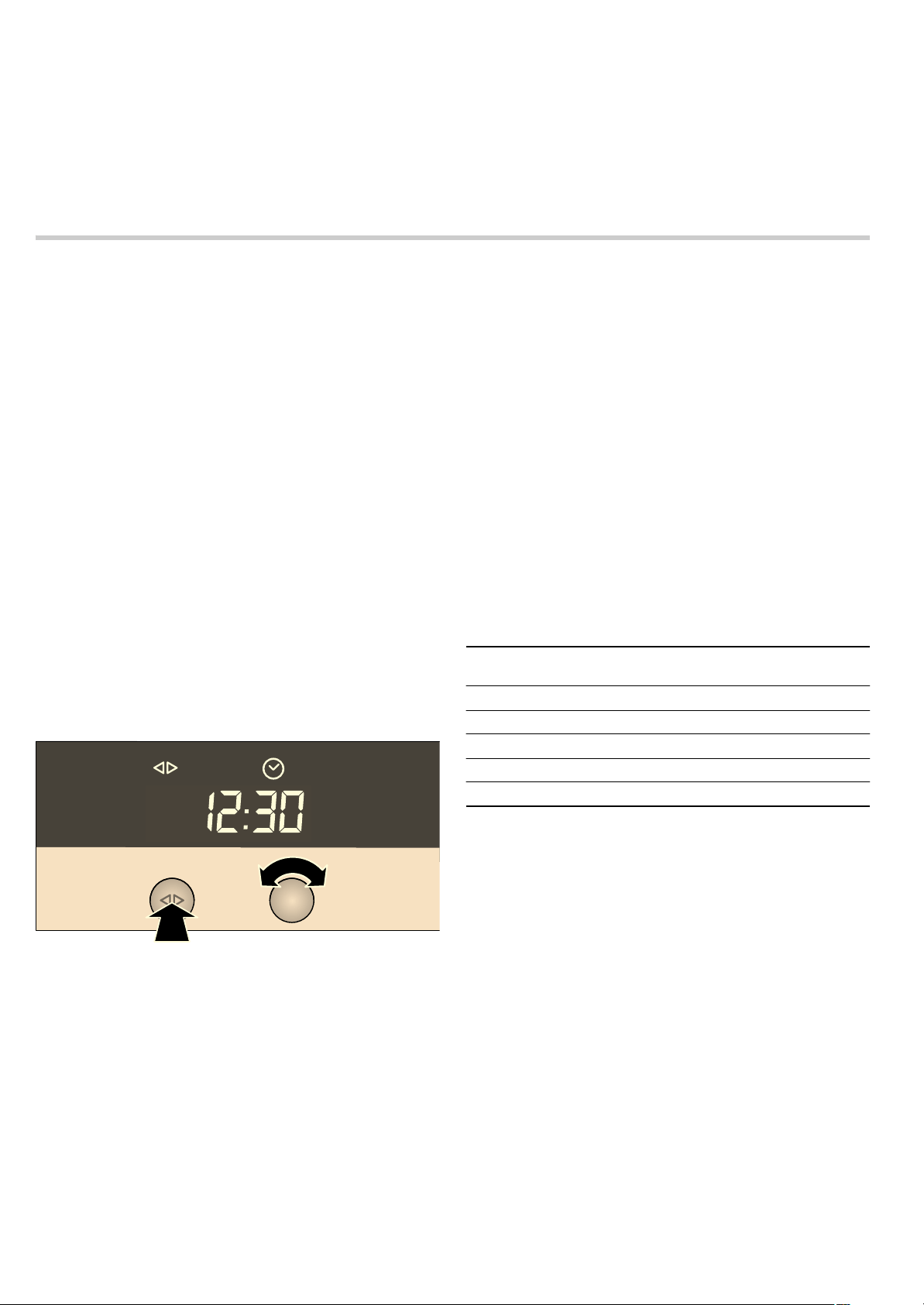
Setting the clock
Note: When you press the KJ clock function button, you have
3 seconds to set the clock using the rotary selector. Should this
have been insufficient for you, you can amend the clock time
later.
‹:‹‹ flashes in the clock display.
1. Briefly press the KJ clock function button to go to the
setting mode.
The
KJ and 3 symbols light up. ‚ƒ:‹‹ appears in the
clock display.
2. Set the current time using the rotary selector.
Your setting is accepted after 3 seconds.
Changing the clock
To subsequently change the time, press the
KJclock function
button repeatedly until the
KJ and 3 symbols light up again.
Change the time with the rotary selector.
Setting the water hardness range
Caution!
The appliance may become damaged due to the use of
unsuitable liquids.
Do not use distilled water, highly chlorinated tap water
(> 40 mg/l) or other liquids.
Only use cold, fresh tap water, softened water or uncarbonated
mineral water.
The water hardness "medium" (
™†ƒ) is the default setting.
Change the value if your water is softer or harder.
You can check the water hardness with the test strips supplied
or ask your water supplier.
Notes
■ If your water is very hard, we recommend that you use
softened water.
■ If you use only softened water, you can set your appliance to
the "softened" water hardness range.
■ If you use mineral water, set the water hardness to hard.
■ If you use mineral water, you must only use non-carbonated
mineral water (see section "Filling and emptying the water
tank").
You can change the water hardness range in the basic settings
when the appliance is switched on.
1. If required, turn the operating mode selector to the Û position.
2. Press and hold the ± information button until ™‚ ‹ appears
in the temperature display.
3. Briefly press the ± information button repeatedly until ™†ƒ
appears in the temperature display (water
hardness "medium").
4. Use the temperature selector to set the water hardness.
5. Press and hold the ± info button for 3 seconds.
Your setting is saved.
First use
Before first use, heat the empty appliance with é Steam
cooking for 20 minutes at 100 °C. Do not open the appliance
door during this time. The appliance is automatically calibrated
(see section: Automatic calibration).
1. Press the operating mode selector so that it pops out.
The appliance switches on.
2. Fill and insert the water tank (see section: Filling the water
tank).
Before using for the first time, moisten the seal in the tank
cover with a little water.
3. Turn the operating mode selector round to é Steam
cooking.
4. Press the Start button.
The appliance heats up to 100 °C. The cooking time
(20 minutes) does not start to count down until the set
temperature has been reached. Do not open the appliance
door during this time.
The cooking operation ends automatically and an audible
signal sounds.
Water hardness Setting symbol (temperature dis-
play)
softened
™†‹
soft
™†‚
medium
™†ƒ
hard
™†„
very hard
™†…
8
5. Press theKJ clock function button to exit the clock function.
6. Turn the operating mode selector back to the Û position and
click in place to turn off the appliance.
Leave the appliance door ajar until the appliance has cooled
down.
Cleaning the accessories before use
Using soapy water and a soft cloth, clean the accessories
thoroughly before first use.
Operating the appliance
In this section, you can read about
■ how to fill the water tank
■ how to switch the appliance on and off
■ what to note after each cooking operation
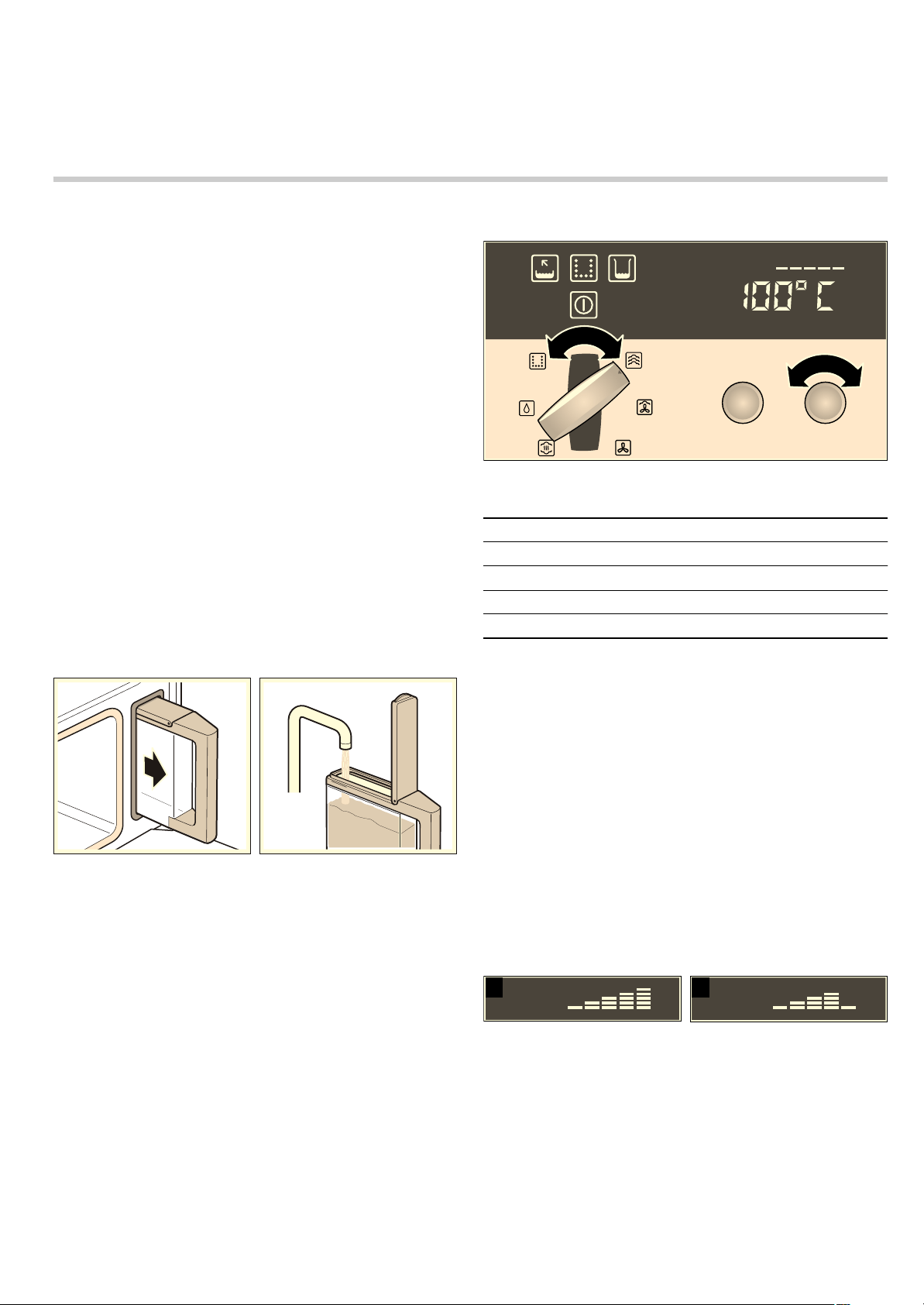
Filling the water tank
When you open the appliance door, you will see the water tank
on the right-hand side.
Caution!
Use of unsuitable liquids may damage the appliance
■ Only use fresh tap water, softened water or uncarbonated
mineral water.
■ If your tap water is very hard, we recommend that you use
softened water.
■ Do not use distilled water, highly chlorinated tap water
(> 40 mg/l) or other liquids.
You can obtain information about your tap water from your
water supplier. The water hardness can be checked with the
test strips enclosed.
Fill the water tank before each use:
1. Open the appliance door and take out the water tank.
2. Fill the water tank with cold water up to the "max" mark.
3. Close the tank cover until you feel it engage.
4. Slide in the water tank until it engages.
Switching on the appliance
1. Press the operating mode selector to make it pop out.
The appliance switches on.
2. Turn the operating mode selector until the required operating
mode lights up.
A default temperature appears on the temperature display.
3. Turn the temperature selector to change the default
temperature.
For operating modes that use steam, a default cooking time
appears in the clock display. The
KJ and x (cooking time)
symbols light up.
4. Turn the rotary selector to change the default cooking time.
The new cooking time is saved automatically after 3 seconds.
You can also set the cooking time for operating modes that
do not use steam (see section: Electronic clock).
5. Press the Start button.
If you do not press the Start button, a signal sounds.
When
é steam cooking, the cooking time does not start until
the heating up time has elapsed.
Heating indicator
The heating indicator displays the rising temperature in the
cooking compartment.
■ Temperature reached (fig. A)
■ Appliance reheating (fig. B)
Current temperature
Press the
± info button.
The current temperature is displayed for 3 seconds.
Displaying and changing the cooking time.
Press the
KJ clock function button repeatedly until the KJ
and
x symbols light up. The current cooking time is displayed.
Turn the rotary selector to change the cooking time. The
change is saved automatically.
PD[
Operating mode Temperature range
é
Steam cooking 35 - 100 °C
8
CircoSteam® 120 - 230 °C
3
Hot air 30 - 230 °C
ä
Reheat 80 - 100 °C
$ %
9
Changing the temperature
You can change the temperature at any time. To change the
temperature, turn the temperature selector until the required
temperature is displayed.
Pause
Briefly press the Stop button to interrupt cooking (pause). The
cooling fan may continue running. Press the Start button to
restart.
If you open the appliance door during cooking, operation is
interrupted. Close the appliance door and press the Start
button to restart.
If you have switched on the Auto start, there is no need to
restart the appliance (see section: Basic settings).
Display
Î
When the water tank is empty, an audible signal sounds and
the
Î indicator appears. Cooking is interrupted.
1. Open the appliance door carefully.
N.B.: Hot steam will escape.
2. Remove the water tank, fill up to the "max" mark and slide the
tank back in.
3. Press the Start button.
Switching off the appliance
: Risk of scalding!
Hot steam may escape when the appliance door is opened.
Open the appliance door carefully during or after cooking.
When opening the door, do not lean over it. Ensure that,
depending on the temperature, steam is not visible.
Press and hold the Stop button to stop the cooking.
If you have set a cooking time, cooking is ended automatically.
A signal sounds. Press the
KJ clock function button to stop
the signal.
The cooling fan may continue to run when you open the
appliance door.
Turn the operating mode selector back to the
Û position and
push it in to turn off the appliance.
You can see in the temperature display whether there is high or
low residual heat in the cooking compartment.
After each use
Emptying the water tank.
1. Open the appliance door carefully.
Hot steam will escape.
2. Remove and clean the water tank.
3. Thoroughly dry the seal in the tank cover and the tank recess
in the appliance.
Caution!
Do not dry the water tank in the hot cooking compartment. This
will damage the water tank.
Drying the cooking compartment
: Risk of scalding!
The water in the evaporator dish may still be hot. Allow it to cool
before wiping.
1. Leave the appliance door ajar until the appliance has cooled
down.
2. Once it has cooled down, wipe out the cooking compartment
and the evaporator dish with the enclosed cleaning sponge
and dry well with a soft cloth.
3. Remove food residues from the cooking compartment as
soon as the appliance has cooled. Burnt-on remains will be
much harder to remove later.
4. Wipe kitchen units or handles if condensation has formed on
them.
Electronic clock
In this section, you can read about
■ how to set the timer
■ how to switch your appliance off automatically (cooking time
and end of operation)
■ how to switch your appliance on and off automatically (preset
operation)
■ how to set the time
Clock display
Temperature display Meaning
•
Residual heat high
œ
Residual heat low
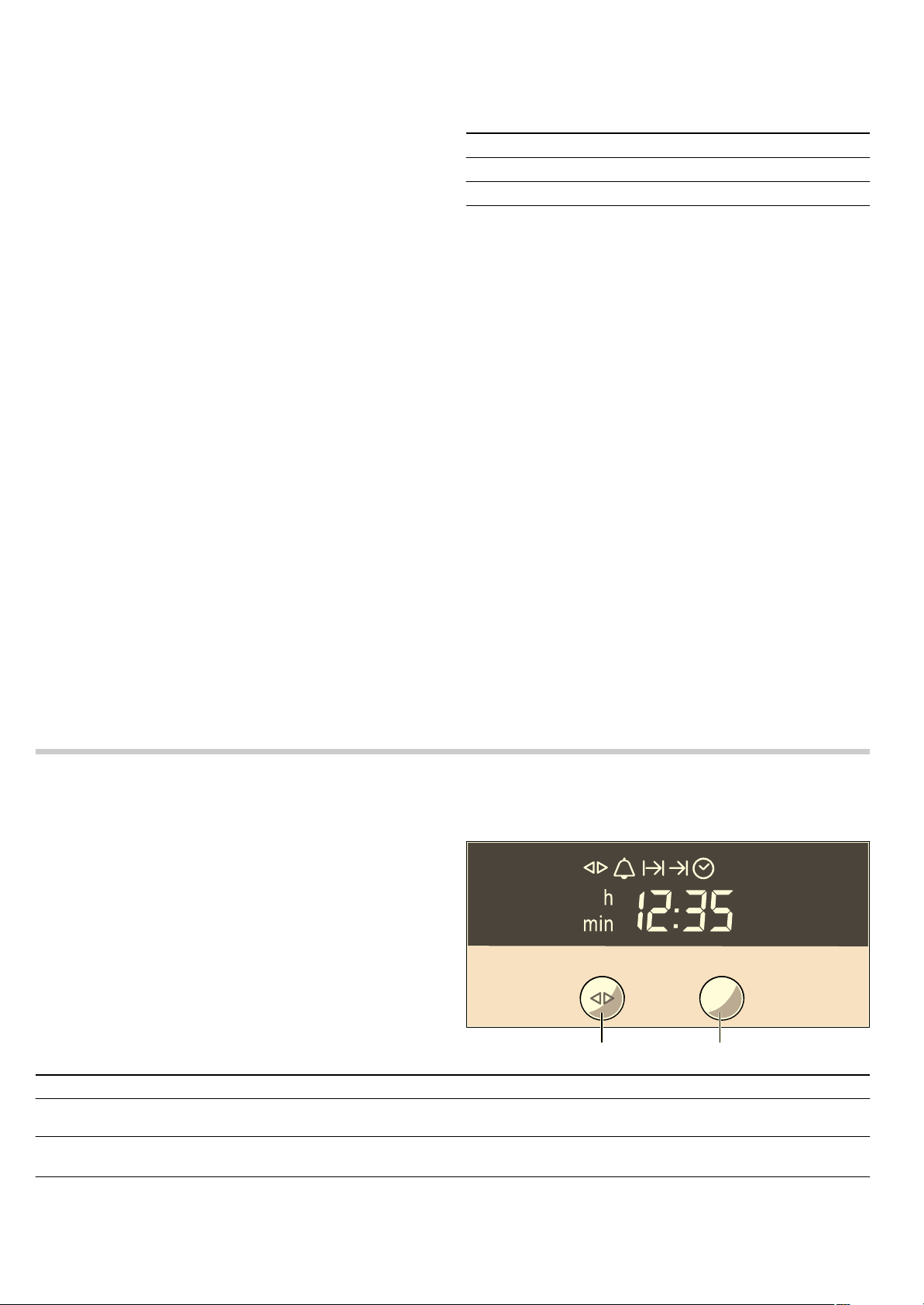
&ORFNIXQFWLRQEXWWRQ 5RWDU\VHOHFWRU
Clock function Use
Q
Minute minder You can use the minute minder as an egg timer or a kitchen timer. The appliance does
not switch on or off automatically
x
Cooking time The appliances switches off automatically after a cooking time setting has elapsed
(e.g.
‚:„‹ hours)
y
End of operation
The appliance switches off automatically at a set time (e.g.
‚ƒ:„‹ o'clock)
10
Notes
■ Between the times ƒƒ:‹‹ and †:†Š the clock display is
dimmed if you do not make any settings in that period or no
clock function is activated.
■ When you set a clock function, the time interval increases
when you set higher values (e.g. cooking time up to
‚:‹‹œ to
the minute, using
‚:‹‹œ
to the nearest 5 minutes).
■ For the Q minute minder, x cooking time, y end of
operation and preselection mode clock functions, a signal
sounds when the settings have elapsed and the
Q or y
symbol flashes. To cancel the audible signal before it ends,
press the
KJ clock function button.
■ Briefly press the KJ clock function button to select a clock
function. You then have 3 seconds to set the selected clock
function. After this time, the setting mode is exited
automatically.
Switching the clock display on and off
1. Press and hold the KJclock function button for 6 seconds.
The clock display switches off. If a clock function is active,
the associated symbol remains lit.
2. Press the KJclock function button briefly.
The clock display switches on.
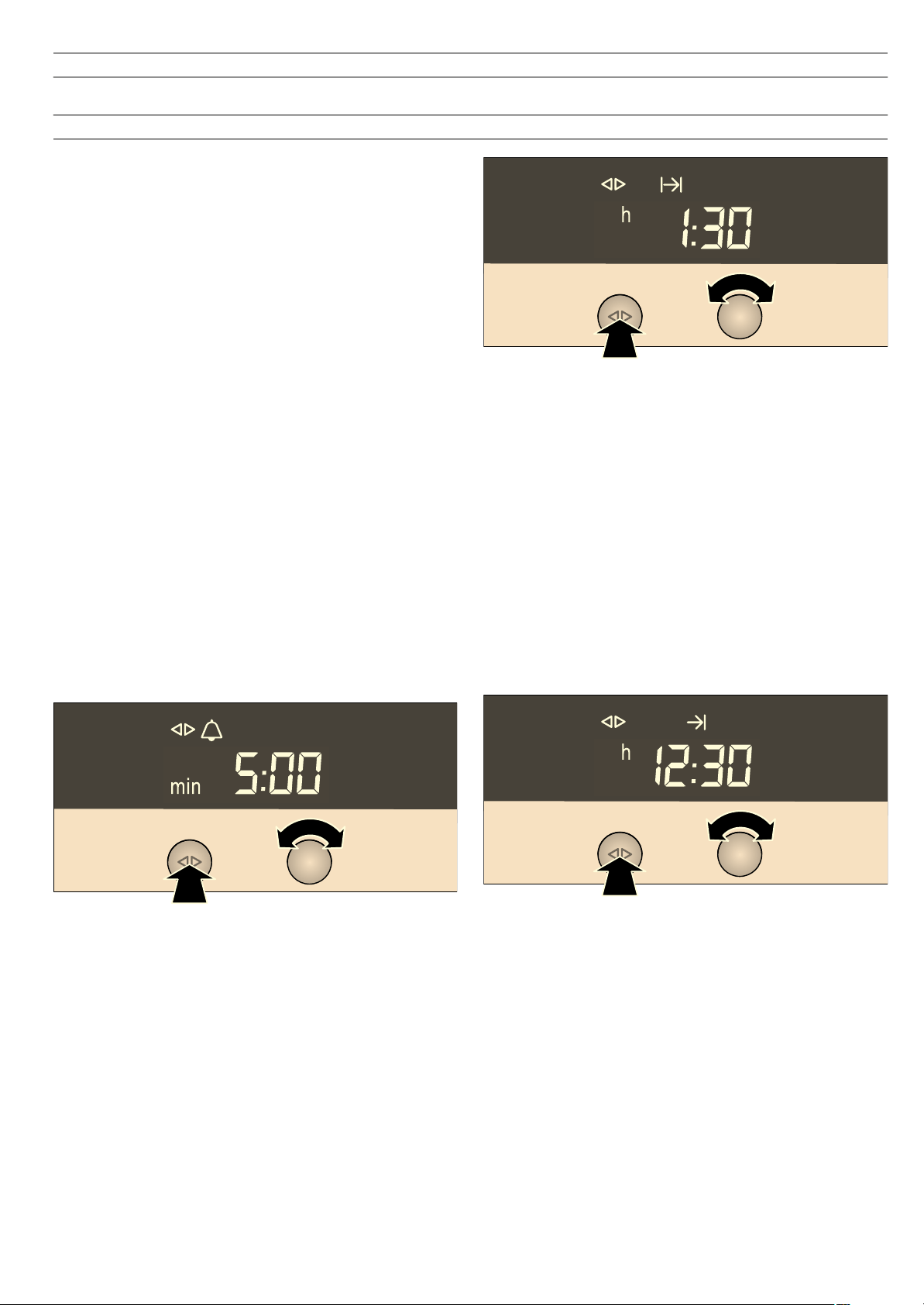
Timer
1. Press the KJclock function button repeatedly until the KJ
and
Q symbols light up.
2. Set the duration using the rotary selector (e.g. †:‹‹ minutes).
The setting is applied automatically. Then the clock is
displayed again and the minute minder starts counting down.
Cooking time
Automatic switch-off after a cooking time setting has elapsed.
1. Set the operating mode and temperature.
2. Press the KJ clock function button repeatedly until the KJ
and
x symbols light up.
3. Set the cooking time with the rotary selector
(e.g.
‚:„‹ hours).
4. Press the Start button.
When
é steam cooking, the cooking time does not start until
the heating up time has elapsed.
Once the cooking time has elapsed, the appliance switches off
automatically.
1. Turn the operating mode selector back to the Û position.
2. Press the KJ clock function button to exit the clock function.
End of operation
Automatic switch-off at a set time. This function is only possible
for operating modes that do not use steam.
1. Set the operating mode and temperature. Press the Start
button.
The appliance heats up.
2. Press the KJ clock function button repeatedly until the KJ
and
y symbols light up.
3. Set the end of operation using the rotary selector
(e.g.
‚ƒ:„‹ o'clock).
The setting is applied automatically. The clock is then
displayed again.
The appliance switches off automatically at the time set for the
end of operation.
1. Turn the operating mode selector back to the Û position.
2. Press the KJ clock function button to exit the clock function.
Preset operation
The appliance switches on automatically, then switches off
automatically at the time preselected for the end of operation.
Bear in mind that food that spoils easily must not stay in the
cooking compartment for too long.
Preselection mode is not possible with some of the automatic
programmes.
When
é Steam cooking, the cooking time does not start until
the heating up time has elapsed. The end of operation which
was set is therefore delayed by the length of time required for
heating-up.
1. Set the operating mode and temperature.
Preset operation The appliance switches on and off automatically. Cooking time and end of operation
have been combined.
3
Clock Setting the clock
Clock function Use
11
2. Press the clock function button repeatedly until the KJ and
x symbols light up.
3. Set the cooking time with the rotary selector
(e.g.
‚:„‹ hours).
4. Press the clock function button repeatedly until the KJ
and
y symbols light up.
5. Set the end of operation using the rotary selector
(e.g.
‚ƒ:„‹).
6. Press the Start button.
The appliance waits until the appropriate time to switch on (in
the example at
‚‚:‹‹).
The appliance switches off automatically at the time set for the
end of operation (
‚ƒ:„‹). A signal sounds and the y symbol
flashes.
1. Turn the operating mode selector back to the Û position.
2. Press the clock function button to end the preselection mode.
Setting the clock
You can only change the clock when no other clock function is
active.
1. Press the KJ clock function button repeatedly until
the
KJand 3 symbols light up.
2. Set the clock using the rotary selector.
The setting is applied automatically.
Checking, correcting or deleting settings
1. To check your settings, press the KJ clock function button
repeatedly until the corresponding symbol lights up.
2. If necessary, you can correct your setting using the rotary
selector.
3. If you wish to cancel your setting, turn the rotary selector anti-
clockwise to the original value.
Automatic programmes
You can prepare food really easily with 40 different
programmes.
In this section, you will find out
■ how to set one of the automatic programmes
■ hints and tips on the programmes
■ which programmes you can set
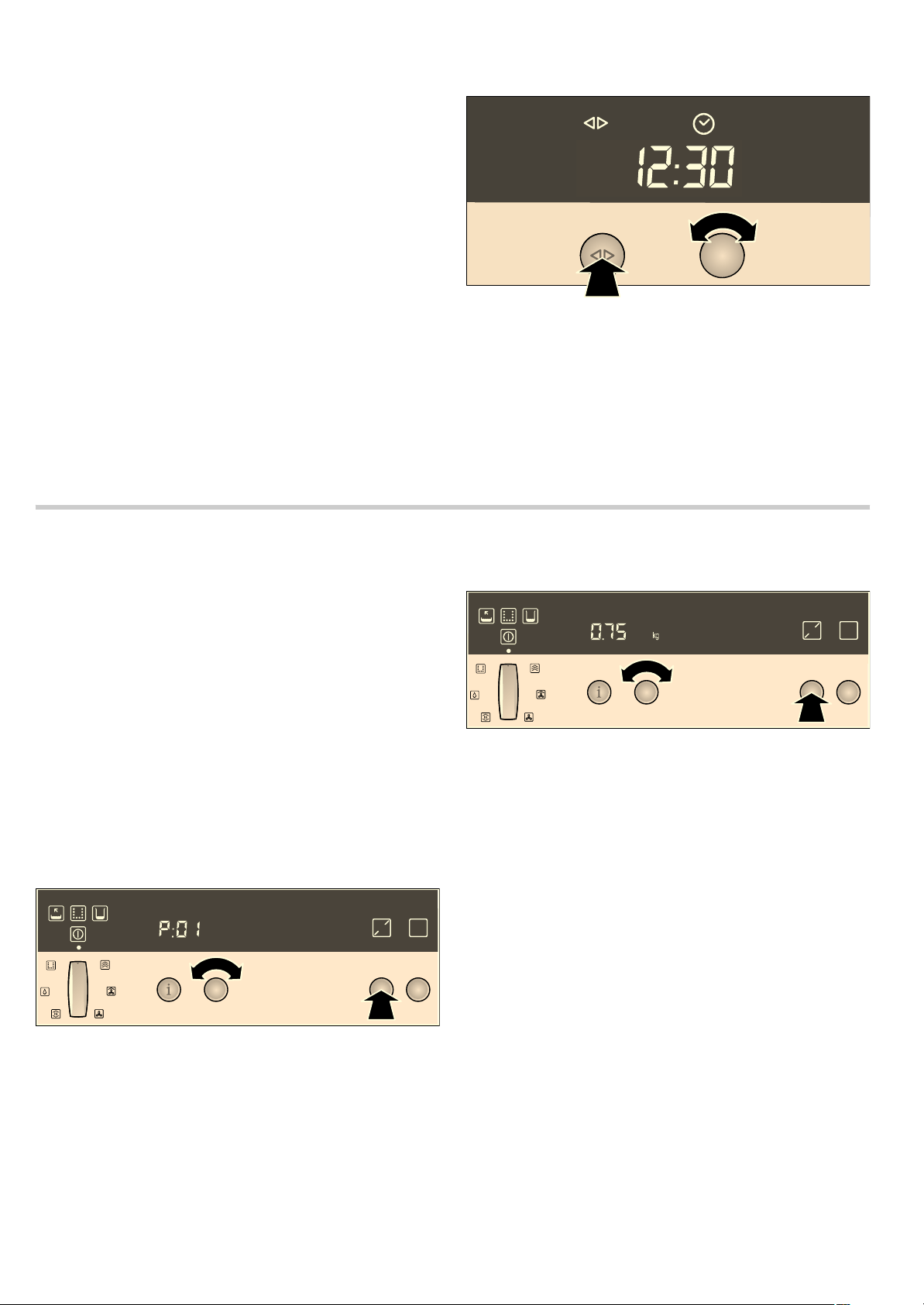
Setting a programme
Select the appropriate programme from the programme table.
Follow the instructions for the programmes.
1. Press on the operating mode selector to turn on the
appliance.
2. Press the n button.
The first programme
˜:‹‚ appears on the temperature
display.
3. Select the programme with the temperature selector.
4. Press the n button again.
A default weight appears on the temperature display.
For some programmes, you do not have to enter a weight. In
such cases, no default weight is displayed.
5. Turn the temperature selector to set the weight.
6. Press the Start button.
No heating indicator appears.
Checking the cooking time
Press the clock function button
KJ repeatedly until the KJ
and
x symbols light up.
Programme with preselected mode
y
For some programmes, you can set a
y Preselection mode.
The programme will be started later and finish at the desired
time (see Section: Electronic clock).
Cancelling the programme
Press and hold the Stop button.
End of the programme
An audible signal sounds. Cooking has finished. To turn off the
appliance, press in the operating mode selector so that it clicks
into place.
: Risk of scalding!
Hot steam may escape when the appliance door is opened.
Open the appliance door carefully during or after cooking.
When opening the door, do not lean over it. Ensure that,
depending on the temperature, steam is not visible.
Notes about the programmes
All programmes are designed for cooking on one level.
The cooking result can vary according to the size and quality of
the food.
6WDUW
3
NJ
6WDUW
3
NJ

12
Ovenware
Use the suggested ovenware. All meals have been tested using
this ovenware. The cooking result may change if you use
different ovenware.
When cooking in the perforated cooking container, also insert
the solid cooking container at level 1. Dripping liquid is caught.
Amount/weight
Do not fill the food more than 4 cm deep in the accessories.
The automatic programmes require the weight of the food. With
individual pieces, always enter the weight of the largest. The
total weight must be within the specified weight range.
Cooking time
After the programme is started the cooking time is displayed. It
may change during the first 10 minutes, as the heating-up time
depends, among other things, on the temperature of the food
and the water.
Preparing vegetables P1 P8
Do not season vegetables until after cooking.
Preparing rice P9 - P 10
Weigh the rice and add to the water in a ratio of 1:1.5. Enter the
weight excluding liquid. Stir the rice after cooking. The
remaining water is then quickly absorbed.
Cook poultry P 11 P 13
Do not place chicken breasts or chicken portions on top of
each other in the ovenware. The chicken portions can be
marinated beforehand.
Cook sirloin at low temperature P 15
With sirloin, it is recommended that you use a thick piece. Sear
the meat well beforehand.
Slow-cooked leg of lamb P 19
Sear the meat well beforehand.
Steam fish P 21 P 22
When preparing fish, grease the perforated cooking container.
Do not place whole fish or fish fillets on top of each other. Enter
the weight of the heaviest fish and choose pieces as similar in
size as possible.
Bake plaited loaf P 24
Leave the yeast dough to prove in the combination steam oven
for half an hour in Steam cooking mode at 40 °C.
Prepare rice pudding P 25
Weigh the rice and add 2.5 times the amount of milk. Ensure
the amount of rice and milk in the accessory is no deeper than
2.5 cm. Stir after cooking. The remaining milk is quickly
absorbed.
Prepare yoghurt P 26
Heat the milk to 90 °C on the hob. Then leave to cool to 40 °C.
If you are using UHT milk, you do not need to heat it.
Stir in one to two teaspoons of natural yoghurt per 100 ml milk,
or the corresponding amount of yoghurt culture into the milk.
Pour the mixture into clean jars and seal them.
After preparation, leave the glass jars to cool in the refrigerator.
Bake bread P 27 P 28
The programmes are designed for baking loaves of bread
without a tin. The dough should not be too soft. Cut into the
dough several times with a sharp knife to a depth of approx.
1 cm before baking.
Bake bread rolls P 29
The bread rolls should all be the same weight. Enter the weight
of an individual bread roll.
Defrost P 35 P 37
When freezing, lay the food as flat as possible and in portion-
sized pieces at -18 °C. Do not freeze excessively large
quantities. Once defrosted, food will not keep for as long and
spoils more quickly than fresh food.
Leave the food to defrost in the freezer bag, on a plate or on
the perforated cooking container. Always insert the baking tray
underneath. The food is then not left lying in the defrost water
and the cooking compartment remains clean.
All defrost programmes apply to raw food.
If necessary, the food can occasionally be split apart or pieces
which have already defrosted can be removed from the
appliance.
After defrosting, allow the food to stand for a further 5 -
15 minutes to come up to room temperature.
: Health risk!
When defrosting food from animal sources, you must remove
the liquid that escapes during defrosting. It must never come
into contact with other food. Bacteria could be transferred. After
defrosting, operate the combination steam oven for 15 minutes
using Hot air at 180 °C.
Defrosting fish fillets (P 35): Never place the fish fillets on top of
each other.
Defrosting whole poultry (P 36): Remove the packaging before
defrosting. Leave the poultry to stand after defrosting. With
large poultry (e.g. small turkeys), you can remove the giblets
after approximately 30 minutes standing time.
Disinfect bottles P 38
Always clean baby bottles with a bottle brush immediately after
feeding. Then clean them in the dishwasher.
Place the bottles in the perforated cooking container so that
they do not touch one another.
Dry the bottles with a clean cloth after disinfecting. The process
corresponds to normal sterilisation by boiling.
Preserve P 39
This programme is suitable for fruits with a stone or core and
for vegetables (except beans).
Blanch pumpkin before preserving.
The programme is designed for 1 litre jars.
After the end of the programme, open the appliance door to
prevent cooking from continuing. Leave the jars to cool down
for a few minutes in the cooking compartment.
Cook eggs P 40
Pierce the eggs before cooking. Do not place eggs on top of
each other. Size M corresponds to a unit weight of approx.
50 g.
Programme table
This section contains all your combination steam oven
programmes. Follow the instructions for the programmes.
Programme Notes Accessories Level
˜‚*
Steam cauliflower florets florets of equal size Perforated cooking container +
Baking tray
3
1
˜ƒ*
Steam broccoli florets florets of equal size Perforated cooking container +
Baking tray
3
1
˜„*
Steam green beans - Perforated cooking container +
Baking tray
3
1
˜…*
Steam sliced carrots slices, approx. 3 mm thick Perforated cooking container +
Baking tray
3
1
* You can set a preselection mode for this programme

13
˜†*
Steam white asparagus - Perforated cooking container +
Baking tray
3
1
˜‡
Steam frozen mixed vegetables - Perforated cooking container +
Baking tray
3
1
˜ˆ*
Boiled potatoes medium-sized, quartered,
30 - 40 g each
Perforated cooking container +
Baking tray
3
1
˜‰*
Unpeeled boiled potatoes medium-sized, dia. 4 - 5 cm Perforated cooking container +
Baking tray
3
1
˜Š
Long grain rice max. 0.75 kg Solid cooking container 2
˜‚‹
Basmati rice max. 0.75 kg Solid cooking container 2
˜‚‚
Fresh chicken total weight 0.7 - 1.5 kg Wire rack + baking tray 2
˜‚ƒ
Fresh chicken portions 0.04 - 0.35 kg each Wire rack + baking tray 2
˜‚„
Steam fresh chicken breast total weight 0.2 - -1.5 kg Perforated cooking container +
Baking tray
3
1
˜‚…*
Fresh pot roast 1 - 1.5 kg Baking tray 2
˜‚†
Cook fresh sirloin (medium) at low tem-
perature
total weight 1-2kg Baking tray 2
˜‚‡*
Fresh lean joint of veal 1 - 2 kg Wire rack + baking tray 2
˜‚ˆ*
Stuffed breast of veal 1-2kg Wire rack + baking tray 2
˜‚‰*
Fresh joint of pork (neck), boned 0.8 - 2 kg Wire rack + baking tray 2
˜‚Š
Cook fresh leg of lamb (boned) at low
temperature (medium)
1-2kg Baking tray 2
˜ƒ‹
Meat loaf made from fresh minced meat total weight 0.5 - 2 kg Baking tray 2
˜ƒ‚
Steam whole fresh fish 0.3 - 2 kg Perforated cooking container +
Baking tray
3
1
˜ƒƒ
Steam fresh fish fillet max. 2.5 cm thick Perforated cooking container +
Baking tray
3
1
˜ƒ„
Blue mussels - Perforated cooking container +
Baking tray
3
1
˜ƒ…
Plaited loaf 0.6 - 1.8 kg Baking tray + greaseproof
paper
2
˜ƒ†
Rice pudding - Baking tray 2
˜ƒ‡
Yogurt in glass jars - Jars +
Perforated cooking container
2
˜ƒˆ*
Bake multigrain bread 0.6 - 2 kg Baking tray + greaseproof
paper
2
˜ƒ‰*
Bake rye bread 0.6 - 2 kg Baking tray + greaseproof
paper
2
˜ƒŠ*
Bake fresh bread rolls weight per piece 0.05 0.1 kg Baking tray + greaseproof
paper
2
˜„‹*
Reheat 1 portion - Wire rack 2
˜„‚*
Reheat cooked side dishes - Baking tray 2
˜„ƒ*
Reheat cooked vegetables - Baking tray 2
˜„„*
Reheat cooked pizza (thin base) - Wire rack + baking tray 3
˜„…*
Reheat cooked pizza (deep-pan base) - Wire rack + baking tray 3
˜„†
Defrost fish fillet max. 2.5 cm thick Perforated cooking container +
Baking tray
3
1
˜„‡
Defrost whole poultry max. 1.5 kg Perforated cooking container +
Baking tray
3
1
˜„ˆ
Defrost berries - Perforated cooking container +
Baking tray
3
1
˜„‰*
Disinfect bottles - Perforated cooking container 2
˜„Š
Preserve in 1 litre jars Perforated cooking container +
Baking tray
3
1
˜…‹*
Soft-boiled eggs eggs, size M, max. 1 kg Perforated cooking container +
Baking tray
3
1
Programme Notes Accessories Level
* You can set a preselection mode for this programme

14
Childproof lock
In this section, you can read about
■ how to lock your appliance
■ how to lock your appliance permanently
Lock
Once it has been locked, the appliance cannot be switched on
accidentally or by unauthorised users (e.g. by children playing).
To switch the appliance on again, you must unlock it. After
appliance operation, the appliance is not automatically locked.
Lock it again if necessary or activate the permanent lock.
Lock appliance
1. Switch off the appliance.
2. Press and hold the ± info button until ™‚‹ appears in the
temperature display.
3. Turn the temperature selector until ™‚‚ appears on the
temperature display.
4. Press and hold the ± info button until the ‚ symbol appears
in the temperature display.
Note: If you try to switch the appliance on when it is locked, -
†-
appears in the temperature display.
Unlocking the appliance
1. Press and hold the ± info button until ™‚‚ appears in the
temperature display.
2. Turn the temperature selector until ™‚‹ appears on the
temperature display.
3. Press and hold the ± info button until the ‚ symbol goes
out.
Permanent lock
Once it has been permanently locked, the appliance cannot be
switched on accidentally or by unauthorised users (e.g. by
children playing).
To switch the appliance on, you must interrupt the permanent
lock briefly. After you have switched your appliance off, it locks
again automatically.
Locking the appliance permanently
1. Switch off the appliance.
2. Press and hold the ± info button until ™‚‹ appears in the
temperature display.
3. Turn the temperature selector until ™ƒ‚ appears on the
temperature display.
4. Press and hold the ± info button for 3 seconds.
Your appliance will be locked after 30 seconds. The
‚
symbol appears on the temperature display.
Note: If you try to switch the locked appliance on, -
†˜ appears
in the temperature display.
Interrupting permanent lock
1. Press and hold the ± info button until ™ƒ‚ appears in the
temperature display.
2. Turn the temperature selector until ™ƒ‹ appears on the
temperature display.
3. Press and hold the ± info button until the ‚ symbol goes
out.
The permanent lock is interrupted.
4. Switch the appliance on within 30 seconds.
After the permanent lock is switched off, it is reactivated after
30 seconds.
Unlocking the appliance permanently
1. Press and hold the ± info button until ™ƒ‚ appears in the
temperature display.
2. Turn the temperature selector until ™ƒ‹ appears on the
temperature display.
3. Press and hold the ± info button until the ‚ symbol goes
out.
4. Within 30 seconds, press and hold the info button again for
3seconds.
5. Turn the temperature selector until ™‚‹ appears on the
temperature display.
6. Press and hold the ± info button for 3 seconds.
The appliance is permanently unlocked.
Basic settings
Your appliance has various basic settings, which are preset at
the factory. You can change the basic settings as you require.
If you want to cancel all the changes, you can restore the
factory settings.
You can only change the basic settings if the appliance is
switched on.
1. If required, turn the operating mode selector to Û.
2. Press and hold the ± information button until ™‚‹ (Lock is
not activated) appears in the temperature display.
3. Briefly press the ± information button repeatedly until the
desired basic setting is displayed.
4. Use the temperature selector to change the basic setting.
5. Press and hold the ± info button for 3 seconds.
The change is saved.
You can change the following basic settings:
Basic settings menu
Submenu Basic setting Setting
symbol
Childproof lock Lock is not activated
™‚‹
Lock is activated
™‚‚
Permanent lock is activated
™ƒ‚
* Restore the appliance to the factory settings:
■ all changes to the basic settings are cleared
■ Automatic calibration is carried out again

15
Automatic safety cut-out
The automatic safety cut-out is only activated if you have not
made any settings on your appliance for a prolonged period.
The length of time after which your appliance switches itself off
depends on the settings that you make.
‹‹‹ flashes in the temperature display. Cooking is interrupted.
Turn the operating mode selector back to the
Û position to
deactivate the automatic safety switch-off function. You can now
make new settings.
Care and cleaning
In this section, you will find information on
■ Care and cleaning of your appliance
■ Oven cleaning aid EasyClean®
■ Descaling
: Risk of short circuit!
Do not use high-pressure cleaners or steam jet cleaners to
clean your appliance.
Caution!
Risk of surface damage: Do not use
■ harsh or abrasive cleaning agents
■ oven cleaners
■ corrosive or aggressive cleaners, or those containing
chlorine
■ cleaning agents with a high alcohol content
If such an agent comes into contact with the front of the
appliance, wash it off immediately with water.
Caution!
Risk of surface damage: If descaler or the oven and grill
cleaning gel comes into contact with the front of the appliance
or other sensitive surfaces, wash it off immediately with water.
Remove food residues from the cooking compartment as soon
as the appliance has cooled. Burnt-on remains will be much
harder to remove later.
For heavy soiling use the cleaning aid (see section: Cleaning
aid EasyClean®).
Salts are very corrosive and can cause rust. Remove remains
of acidic sauces (ketchup, mustard) or salted food from the
cooking compartment immediately after cooling.
Do not use hard scouring pads or cleaning sponges.
Audible signal Audible signal off
™„‹
Audible signal duration
30 seconds
™„‚
Audible signal duration
2 minutes
™„ƒ
Audible signal duration
10 minutes
™„„
Auto start off
™…‹
on
™…‚
Basic settings menu
Submenu Basic setting Setting
symbol
* Restore the appliance to the factory settings:
■ all changes to the basic settings are cleared
■ Automatic calibration is carried out again
Water hardness
range
softened
™†‹
soft (I)
™†‚
medium (II)
™†ƒ
hard (III)
™†„
very hard (IV)
™†…
Steam heating up
signal
off
™‡‹
on
™‡‚
Factory settings* Do not restore
™ˆ‹
Restore
™ˆ‚
Basic settings menu
Submenu Basic setting Setting
symbol
* Restore the appliance to the factory settings:
■ all changes to the basic settings are cleared
■ Automatic calibration is carried out again

16
Cleaning agents
Cleaning sponge
The enclosed cleaning sponge is very absorbent. Use the
cleaning sponge only for cleaning the cooking compartment
and for removing residual water from the evaporator dish.
Wash the cleaning sponge thoroughly before using for the first
time. You can wash the cleaning sponge in the washing
machine (hot wash).
Microfibre cloth
The honeycomb microfibre cloth is particularly suitable for
cleaning sensitive surfaces such as glass, glass ceramic,
stainless steel or aluminium (product no. 460 770, also
available from our online eShop). It removes liquid and greasy
deposits in one go.
Roasting set
If possible use the roasting set when roasting (ordering
no. Z1684X3, also available online in the eShop). This
considerably reduces the amount of spatter from the roast and
therefore the amount of soiling in the cooking compartment.
Oven cleaning aid
The cleaning aid loosens dirt in the cooking compartment using
steam. It can then be removed easily.
The cleaning process consists of:
■ Cleaning (approx. 30 minutes), then empty the evaporator
dish and wipe out the appliance
■ 1st rinse (20 seconds), then empty the evaporator dish
■ 2nd rinse (20 seconds), then remove the remaining water
All three steps must be completed in full. The appliance is
ready for operation again only after the 2nd rinse.
Preparation
Allow the cooking compartment to cool down and remove the
accessories. Clean the evaporator dish with the enclosed
cleaning sponge.
Put a drop of washing-up liquid into the evaporator dish on the
cooking compartment floor.
Starting the cleaning aid
1. Press the operating mode selector to make it pop out.
The appliance switches on.
2. Turn the operating mode selector to > EasyClean®.
3. Fill the water tank with water up to the "max" mark and slide it
in.
4. Press the Start button.
The cleaning aid starts running. The light in the cooking
compartment remains switched off.
“’† appears in the
temperature display.
Emptying the evaporator dish and wiping out the appliance
A signal sounds after approx. 30 minutes. The
Ì (Empty
evaporator dish) symbol and
x: ‹‹:…‹ min appear.
1. Open the appliance door.
2. Take the rails out of the cooking compartment and clean
them (see section: Cleaning the rails).
3. Wipe out all loosened food residues from the cooking
compartment and the evaporator dish using a soft washing-
up brush and the cleaning sponge.
Appliance exterior (with aluminium front) Use soapy water and dry with a soft cloth.
Mild window cleaning agent – wipe the aluminium front horizontally and without apply-
ing pressure using a soft window cloth or a lint-free microfibre cloth
Appliance exterior (with stainless-steel
front)
Use soapy water and dry with a soft cloth.
Always remove any flecks of limescale, grease, starch and albumin (e.g. egg white)
immediately. Special stainless steel cleaning agents can be obtained from the after-
sales service or from specialist retailers
Cooking compartment interior with evapo-
rator dish
Hot, soapy water or a vinegar solution – use the enclosed cleaning sponge or a soft
dish brush.
Caution!
The cooking compartment could rust.: Do not use steel pads or scourers.
If the cooking compartment is very dirty, use only the oven and grill cleaning gel rec-
ommended by the after-sales service (product no. 463 582, also available online in the
eShop). Follow the manufacturers instructions. Other oven cleaners could damage the
appliance.
The cooking compartment light and the seals around the door, light and evaporator
dish must not come into contact with the gel. Allow the gel to act for a maximum of
12 hours and do not switch on the appliance during this time. Then rinse the cooking
compartment thoroughly with water (e.g. with a spray bottle) to remove all traces of the
gel
Water tank Soapy water – do not clean in the dishwasher.
Tank recess Rub dry after every use
Seal in the water tank lid Thoroughly dry after every use
Rails See section: Cleaning the rails
Door panels See section: Cleaning the door panels
Caution!
Risk of surface damage: After cleaning, wipe the door panels with glass cleaner, then
dry. Otherwise, stains will be caused that will not be able to be removed.
Door seal Hot soapy water
Accessories Soak in hot soapy water. Clean with a washing-up brush or sponge, or in the dish-
washer.
Clean stains caused by starchy food (e.g.rice) with a vinegar solution

17
4. If required, fill the water tank with water and reinsert it.
5. Close the appliance door.
1st rinse
Press the Start button.
The appliance starts rinsing.
Empty evaporator dish
Ì (Empty evaporator dish) and x ‹‹:ƒ‹ min appear after
20 seconds.
1. Open the appliance door.
2. Thoroughly rinse out the cleaning sponge.
3. Remove the remaining water from the evaporator dish using
the cleaning sponge.
4. Close the appliance door.
2nd rinse
Press the Start button.
The appliance starts rinsing.
Removing the remaining water
After 20 seconds,
Ì (Empty evaporator dish) and ‹‹:‹‹
appear.
1. Open the appliance door.
2. Remove the remaining water from the evaporator dish using
the cleaning sponge.
3. Wipe out the cooking compartment using the cleaning
sponge and then dry with a soft cloth.
4. Turn the operating mode selector back to Û.
5. To turn off the appliance, press in the operating mode
selector so that it clicks into place.
The cleaning aid is complete.
Cancelling the cleaning aid
Note: After cancelling the cleaning aid, the appliance must be
rinsed twice. The appliance is locked against other applications
until the second rinsing operation is complete.
1. Press and hold the Stop button to cancel the Cleaning aid.
x ‹‹:…‹ min appears in the clock display.
To ensure that no washing-up liquid remains in the appliance,
it must be rinsed twice after a cancellation.
2. Press the Start button.
The
Ì symbol (empty evaporator dish) appears.
3. If required, fill the water tank with water, reinsert it and press
the Start button.
Now proceed as described in the section "Emptying the
evaporator dish and wiping out the appliance".
Descaling
The appliance must be descaled at regular intervals in order for
it to continue operating correctly. The
Ê indicator reminds you
to do this.
You can only dispense with descaling completely if you
exclusively use softened water.
The descaling operation consists of:
■ Descale (approx. 30 minutes), then refill the water tank and
empty the evaporator dish
■ 1st rinse (20 seconds), then empty the evaporator dish
■ 2nd rinse (20 seconds), then remove the remaining water
All three steps must be completed in full. The appliance is
ready for operation again only after the 2nd rinse.
Descaler
Only use the liquid descaler recommended by the after-sales
service for descaling (product no. 311 138, also available
online from the eShop). Other descalers may damage the
appliance.
1. Prepare a descaling solution by mixing 300 ml water and
60 ml liquid descaler.
2. Empty the water tank and fill with descaling solution.
Caution!
Risk of surface damage: If descaler comes into contact with the
front of the appliance or any other sensitive surfaces, wash it off
immediately with water.
Starting descaling
The cooking compartment must have cooled down completely.
1. Press the operating mode selector to make it pop out.
The appliance switches on.
2. Turn the operating mode selector to Í Descale.
3. Slide in the water tank containing the descaling solution and
close the appliance door.
4. Press the Start button.
The descaling process starts. The light in the cooking
compartment remains switched off.
Emptying the evaporator dish and refilling the water tank
A signal sounds after approx. 30 minutes. The
Î symbol (Fill
water tank) and
x ‹‹:…‹ min are displayed.
1. Open the appliance door.
2. Rinse the water tank thoroughly, fill with water and reinsert.
The
Ì symbol (empty evaporator dish) appears.
3. Remove the descaling solution from the evaporator dish
using the cleaning sponge provided.
4. Close the appliance door.
1st rinse
Press the Start button.
The appliance starts rinsing.
Empty evaporator dish
Ì (Empty evaporator dish) and x ‹‹:ƒ‹ min appear after
20 seconds.
1. Open the appliance door.
2. Thoroughly rinse out the cleaning sponge.
3. Remove the remaining water from the evaporator dish using
the cleaning sponge.
4. Close the appliance door.
2nd rinse
Press the Start button.
The appliance starts rinsing.
Removing the remaining water
After 20 seconds,
Ì (Empty evaporator dish) appears.
1. Open the appliance door.
2. Remove the remaining water from the evaporator dish using
the cleaning sponge.
3. Wipe out the cooking compartment using the cleaning
sponge and then dry with a soft cloth.
4. Turn the operating mode selector back to Û.
5. To turn off the appliance, press in the operating mode
selector so that it clicks into place.
Descaling is complete.
18
Cancelling descaling
Note: After cancelling, the appliance must be rinsed twice. The
appliance is locked against other applications until the second
rinsing operation is complete.
Press and hold the Stop button to cancel the descaling
process.
The
Î symbol (Fill water tank) and x ‹‹:…‹ min are
displayed.
To ensure that no descaling solution remains in the appliance,
it must be rinsed twice after a cancellation.
Now proceed as described in the section: "Emptying the
evaporator dish and refilling the water tank".
Descaling the evaporator dish only
You can also use "Descale" if you do not wish to descale the
whole appliance, but only the evaporator dish in the cooking
compartment.
The only difference is as follows:
1. Prepare a descaling solution by mixing 100 ml water and
20 ml liquid descaler.
2. Completely fill the evaporator dish with descaling solution.
3. Fill the water tank with water only.
4. Start "Descale" as described.
You can also descale the evaporator dish manually.
Removing and fitting the appliance door
You can remove the appliance door to clean it more
thoroughly.
: Risk of injury!
The hinges of the appliance door may snap shut with great
force. Always open the hinge locking lever fully when removing
the appliance door and close it fully after refitting. Do not reach
into the hinge.
: Risk of injury!
If the appliance door has only been unhinged on one side, do
not reach into the hinge. The hinge can snap back with great
force. Call the aftersales service.
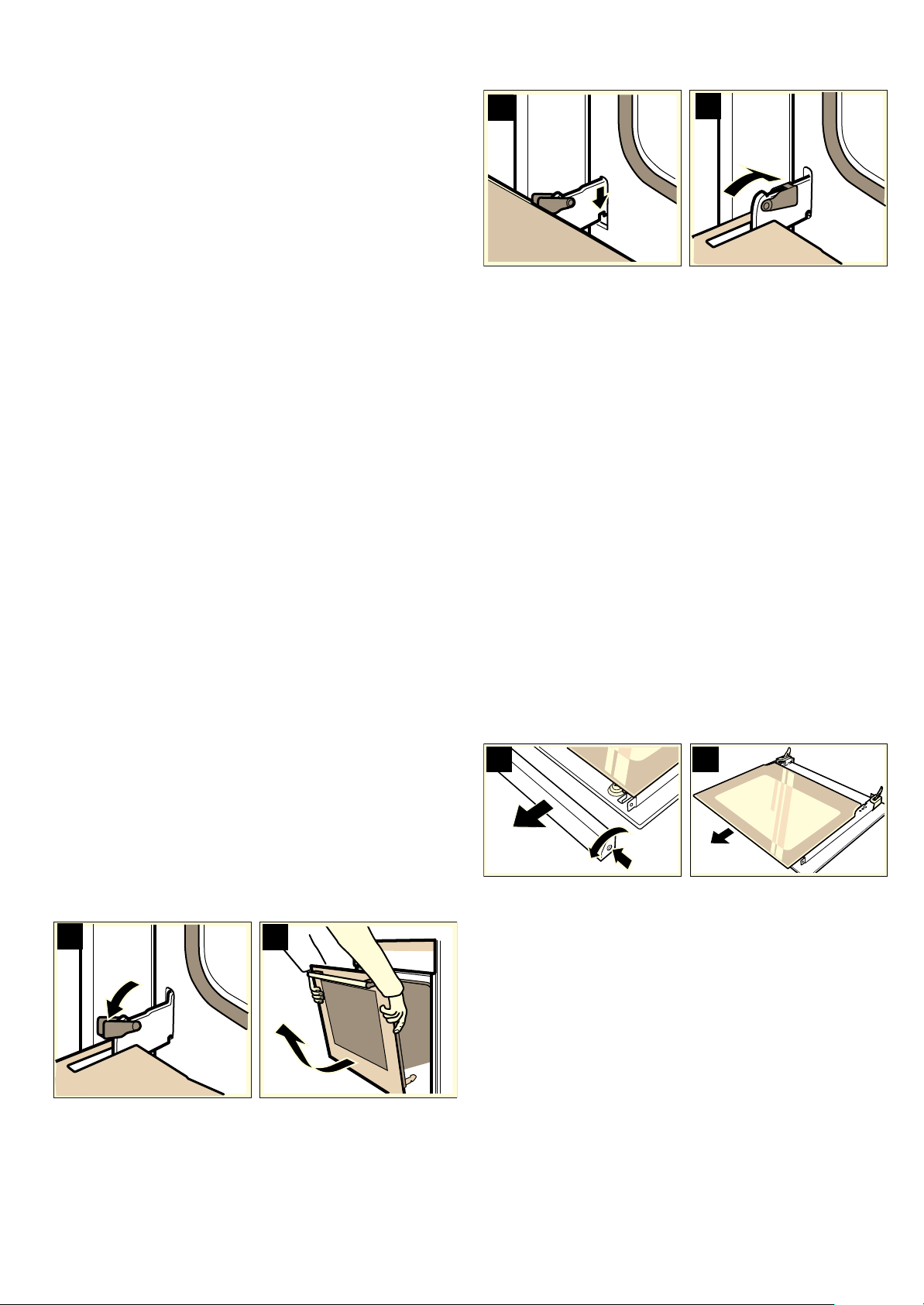
Removing the appliance door
1. Open the appliance door fully.
2. Fold out the locking levers on the left and right fully (figure A).
The hinges are secured and cannot snap closed.
3. Close the appliance door until you feel some resistance.
4. With both hands, grip the door on the left and right-hand side,
close the door a little more and pull it out (Fig. B).
Fitting the appliance door
Refit the appliance door after cleaning.
1. Insert the hinges in the left and right-hand bracket (figure C).
The notch on both hinges must engage.
2. Open the appliance door fully.
3. Close the locking levers on the left and right-hand side fully
(figure D).
The appliance door is secured and can no longer be
removed.
4. Close the appliance door.
Cleaning the door panels
To assist with cleaning, the inner door panel can be removed
from the appliance door.
: Risk of injury!
The components inside the appliance door may have sharp
edges. Take care not to cut yourself. Wear protective gloves.
: Risk of injury!
The appliance must not be used again until the door panels
and appliance door have been correctly fitted.
Removing the door panel
Note: Before removing, make a note of the orientation in which
the door panel is fitted, so that it is not refitted the wrong way
round.
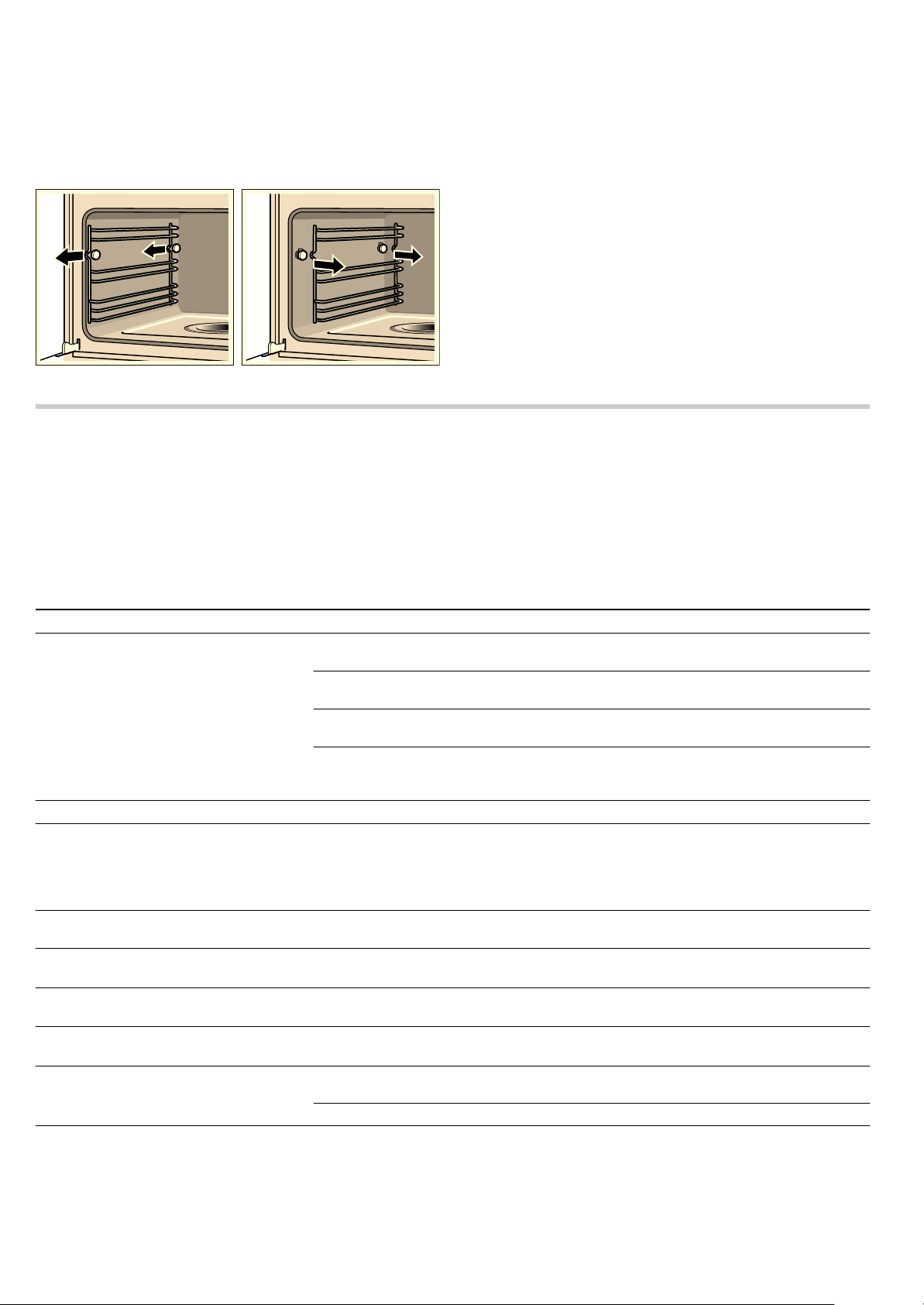
1. Unhook the appliance door and lay it on a soft, clean surface
with the front side facing downwards (see section: Removing
and installing the appliance door).
2. Unscrew the cover at the top left and right of the appliance
door and detach it (figure A).
3. Lift the door panel and remove it (figure B).
Cleaning
Clean the door panel with glass cleaner and a soft cloth.
Caution!
Do not use any sharp or abrasive medium or a glass scraper.
The glass could be damaged.
Fitting the door panel
1. Slide in the door panel all the way.
2. Put the cover back in place and screw it in.
3. Refit the appliance door.
$
%
&
'
$
%
19
Cleaning the rails
The rails can be removed for cleaning.
: Risk of burning due to hot components in the cooking
compartment!
Wait until the cooking compartment has cooled down.
1. Pull the rails forwards and unhook them to the side.
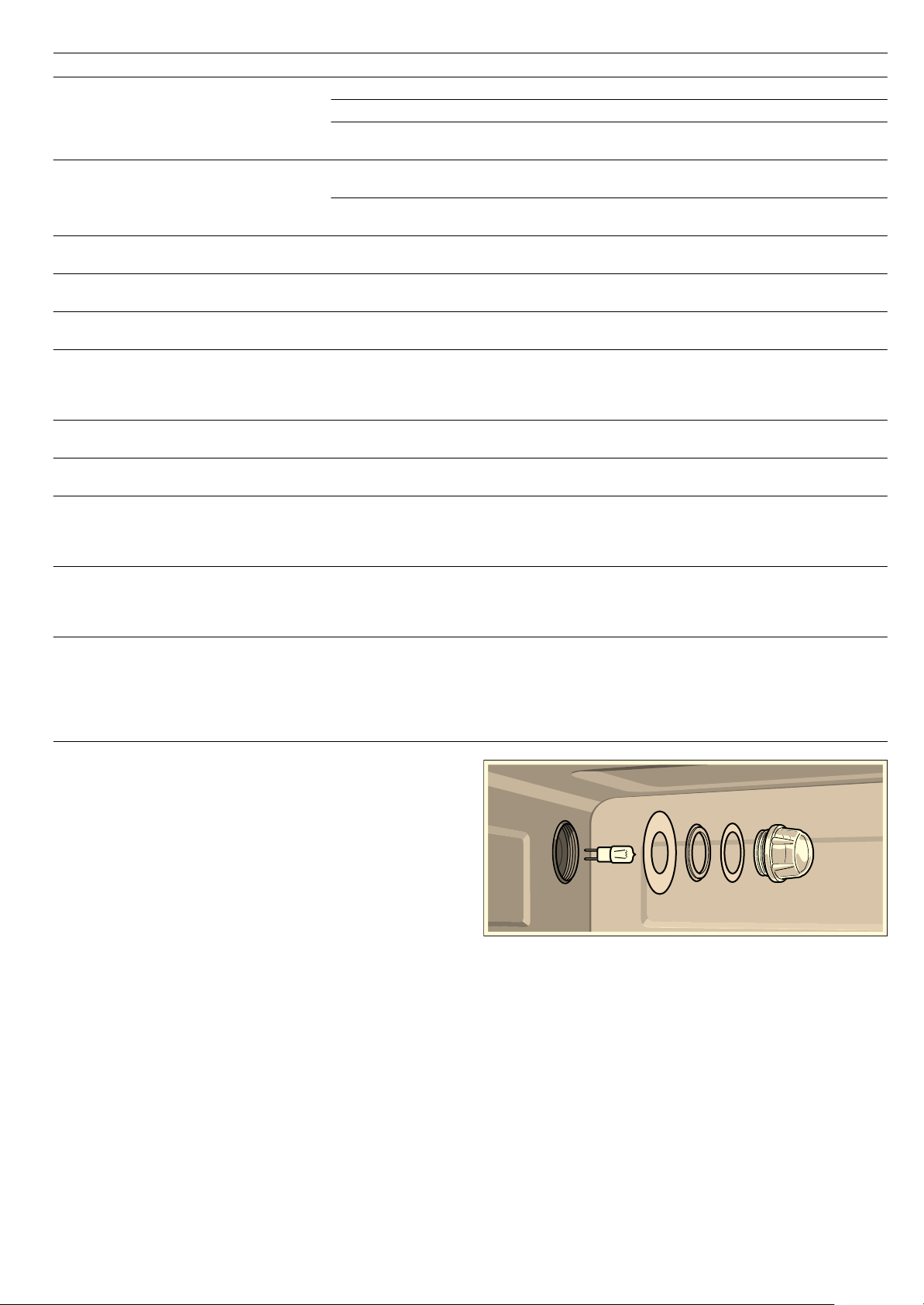
2. Clean the rails with washing-up liquid and a sponge/brush
or
Clean the rails in the dishwasher.
3. Hook the rails in at the back and front and slide them back
until they engage.
Each set of rails only fits on one side.
Troubleshooting
Malfunctions often have simple explanations. Please read the
following instructions before calling the after-sales service.
Repairs may only be carried out by fully trained after-sales
service technicians. Incorrect repairs to your appliance may
present considerable risks for the user.
: Risk of electric shock!
■ Work on the appliance electronics may only be performed by
a specialist.
■ Always disconnect the appliance from the power supply
when work is carried out on the electronics. Switch off the
circuit breaker or remove the fuse from your household fuse
box.
Problem Possible cause Notes/remedy
The appliance does not work The plug is not plugged into the mains. Connect the appliance to the electricity
supply
Power cut Check whether other kitchen appliances
are working
Fuse defective Check in the fuse box to make sure that
the fuse for the appliance is OK
Faulty operation Switch the appliance off using the fuse in
the fuse box. Wait approximately 10 sec-
onds and then switch it back on.
The appliance cannot be started The appliance door is not fully closed Close the appliance door.
The appliance cannot be started,
x and
‹‹:…‹ min appear in the clock display
Cleaning aid or descaling was cancelled
Turn the operating mode selector to the
>
EasyClean® cleaning aid or
Í Descale,
and rinse the appliance twice (see the sec-
tion: Cancelling the cleaning aid or Cancel-
ling descaling)
‹:‹‹ flashes in the clock display
Power cut Reset the clock (see section: Electronic
clock)
‹:‹‹ flashes in the clock display, §§§
appears in the temperature display
Power cut during cooking
Press the KJ clock function button, reset
the clock (see section: Electronic clock)
The appliance is not in operation. A cook-
ing time is shown in the clock display
The Start button was not pressed after the
setting had been made
Press the Start button or delete the setting
with the Stop button
‹‹‹ flashes in the temperature display
Automatic Safety cut-out is active Turn the operating mode selector back to
Û.
The
Î indicator appears even though the
water tank is full
The water tank has not been inserted
properly
Slide in the water tank until it engages
The detection system is not working Call the after-sales service
The
Î indicator appears even though the
water tank is not yet empty, or the water
tank is empty but the
Î indicator does not
appear
The water tank is dirty. The mobile water
level indicators are jammed
Shake and clean the water tank. If the
parts cannot be released, obtain a new
water tank from the after-sales service
20
Replacing the cooking compartment bulb
Heat-resistant 230 V/25 W halogen bulbs with seals are
available from the after-sales service. Please specify the E
number and FD number of your appliance.
: Risk of burns!
Allow the cooking compartment and cooking compartment light
to cool before changing the bulb.
Always use a dry cloth to remove a new halogen bulb from the
packaging, otherwise it will not last as long.
1. Switch off the fuse in the fuse box or unplug at the mains.
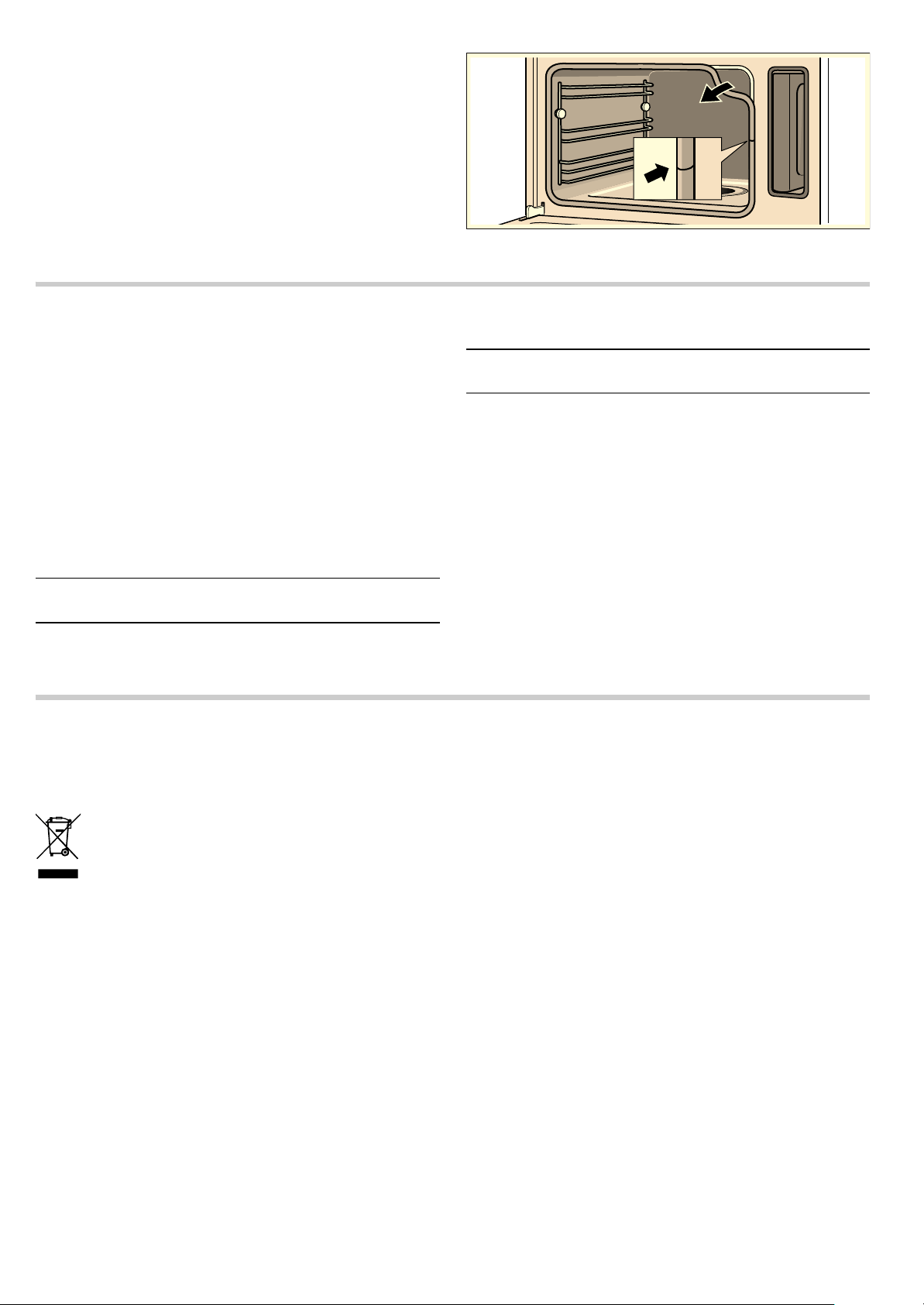
2. Turn the cover anti-clockwise to remove.
3. Remove the bulb and replace with a bulb of the same type.
4. Slide the new seals and the clamping ring onto the glass
cover in the right order.
5. Screw the glass cover with the seals back on again.
6. Connect the appliance to the mains and reset the clock.
Never operate the appliance without the glass cover and seals.
Replacing the glass cover or seals
Any damaged glass cover or seals must be replaced. Please
provide the after-sales service with the E number and FD
number of your appliance.
The water tank drains for no discernible
reason. The evaporator dish is overflowing
The water tank was not closed properly Close the lid until you feel it engage
The tank lid seal is dirty Clean the seal
The seal in the tank cover is defective Obtain a new water tank from the after-
sales service
Liquid in the evaporator dish has fully
evaporated, even though the water tank is
full.
The water tank has not been inserted
properly
Slide in the water tank until it engages
The feed line is blocked Descale the appliance. Check whether the
water hardness range is set correctly
The
Î indicator appears
The appliance has not been used for at
least two days and the water tank is full
Empty and clean the water tank. Always
empty the water tank after cooking
There is a "pop" noise during cooking Cold/warm effect with frozen food, caused
by the steam
This is normal.
When you cook with steam, a lot of steam
is created
The appliance is being automatically cali-
brated
This is normal.
When cooking with steam, a lot of steam is
produced repeatedly
The appliance is unable to calibrate itself
automatically if cooking times are too
short
Restore the appliance to the factory set-
ting (see section: Basic settings). Then
start
é Steam cooking at 100 °C for
20 minutes
Steam escapes from the ventilation slots
during cooking
This is normal.
The appliance is not producing steam
properly
Limescale has formed in the appliance Descale the appliance (see section: Des-
caling).
Error message
“‹‚‚ appears in the tem-
perature display
A button was pressed for too long or is
jammed
Press the
KJ clock function button to
delete the error message. Press all of the
buttons individually and check whether
they are clean
An error message
“‹... appears in the
temperature display
Technical fault
Press the KJ clock function button to
delete the error message, and reset the
clock if necessary. If the error message
appears again, call the after-sales service
The appliance is not heating. The colon is
flashing in the clock display. For example,
‚‹‹© appears in the temperature display
A button combination was activated Switch off the appliance.
Press and hold the
± info button for
3 seconds, then press and hold the
KJ
clock function button for 4 seconds, then
press and hold the
± info button for
3seconds
Problem Possible cause Notes/remedy
21
Changing the door seal
If the seal around the outside of the cooking compartment is
faulty, it must be replaced. Replacement seals for your
appliance can be obtained from the after-sales service. Please
specify the E number and FD number of your appliance.
1. Open the appliance door.
2. Pull off the old seal.
3. Push in the new door seal at one point and pull it in all the
way round. The joint must be at the side.
4. Check again that the seal is correctly fitted in the corners.
After-sales service
Our after-sales service is there for you if your appliance needs
to be repaired. We will always find the right solution in order to
avoid unnecessary visits from a service technician.
E number and FD number
When calling us, please give the product number (E no.) and
the production number (FD no.) so that we can provide you with
the correct advice. The rating plate bearing these numbers can
be found on the lower left-hand side when you open the
appliance door.
You can make a note of the numbers of your appliance and the
telephone number of the after-sales service in the space below
to save time should it be required.
Please note that there will be a fee for a visit by a service
technician in the event of a malfunction, even during the
warranty period.
Please find the contact data of all countries in the enclosed
customer service list.
To book an engineer visit and product advice
Trust the expertise of the manufacturer, and rest assured that
the repair will be carried out by trained service technicians
using original spare parts for your domestic appliance.
Environmental protection
Environmentally-friendly disposal
Dispose of packaging in an environmentally-friendly manner.
Tips for saving energy
■ Only preheat the appliance if this is specified in the recipe or
in the operating instructions table.
■ Open the appliance door as infrequently as possible while
the food is cooking.
■ Use dark, black lacquered or enamelled baking tins for
baking. They absorb the heat particularly well.
■ It is best to bake several cakes one after the other. The
combination steam oven will still be hot. This reduces the
baking time for the second cake. You can also place two loaf
tins next to each other.
■ If the cooking time is relatively long, you can switch off the
combination steam oven 10 minutes before the end of the
cooking time and use the oven's residual heat to complete
the cooking process.
■ When steaming, you can cook on several levels at the same
time. When preparing foods with different cooking times,
those with the longest cooking time should be placed in the
oven first.
E no.
FD no.
After-sales service O
GB 0844 8928989
Calls from a BT landline will be charged at up to
3 pence per minute. A call set-up fee of up to 6 pence
may apply.
IE 01450 2655
This appliance is labelled in accordance with European
Directive 2012/19/EU concerning used electrical and
electronic appliances (waste electrical and electronic
equipment - WEEE). The guideline determines the
framework for the return and recycling of used
appliances as applicable throughout the EU.

22
Tables and tips
The tables contain a selection of dishes which are particularly
suitable for your combination steam oven. You can find out
which operating mode, accessories and cooking time to select.
Unless otherwise stated, the information given applies to
inserting accessories when the appliance is cold.
Accessories
Use the accessories provided.
When steaming in the perforated cooking container, always
insert the baking tray underneath. Dripping liquid is caught.
Ovenware
When using ovenware, always place it in the middle of the wire
rack.
Ovenware must be heat and steam resistant. Cooking times are
increased if thick-sided ovenware is used.
Food which would normally be prepared in a bain-marie should
always be covered with foil (e.g.when melting chocolate).
Steam cooking
Steaming is a particularly gentle way of cooking food. The
steam surrounds the dish thereby preventing a loss of nutrients
from the food. Cooking takes place without excess pressure.
As a result, the shape, colour and typical aroma of the dishes
are retained.
Cooking times and quantities
The cooking times when steaming depend on the item size, but
do not depend on the total quantity. The appliance can steam
food to a maximum of 2 kg.
Follow the unit sizes given in the tables. The cooking time is
reduced for smaller pieces and increased for larger ones.
Cooking time is also influenced by the quality and ripeness of
the food. The values quoted can therefore only serve as a
guideline.
Distributing food evenly
Always distribute the food evenly in the ovenware. It will not
cook evenly if the layers are of different depths.
Pressure-sensitive food
When layering delicate foods in the cooking container, do not
pile them too high. It is better to use two containers.
Cooking a menu
With steam, you can cook a whole menu at once, without the
different flavours mixing. Place the food with the longest
cooking time in the appliance first and delay the rest until the
appropriate time. This means that all the food will be ready at
the same time.
The overall cooking time is extended with menu cooking, as a
little steam escapes each time the appliance door is opened
and has to be reheated.
Hot air
The Hot Air operating mode is ideal for sweet and savoury
baking, pot roasts and various cakes.
CircoSteam®
The CircoSteam® operating mode uses a combination of hot
air and steam, and is particularly suitable for the preparation of
roast dishes, chicken and baked items such as yeast-risen
pastry and bread.
Roasts and chicken are nice and crisp on the outside and juicy
inside. What is more, meat loses less of its weight.
Baked items, such as yeast-risen pastry and bread, take on a
particularly attractive surface shine and they do not dry out.
Vegetables
Place the vegetables in the perforated cooking container and
insert at level 3. Insert the baking tray underneath at level 1.
Dripping liquid is caught.
Food Size Accessories Operating
mode
Temperature in °C Cooking time
in min.
Artichokes whole Perforated + baking
tray
Steam cooking 100 30 - 35
Cauliflower whole Perforated + baking
tray
Steam cooking 100 30 - 40
Cauliflower Florets Perforated + baking
tray
Steam cooking 100 10 - 15
Broccoli Florets Perforated + baking
tray
Steam cooking 100 8 - 10
Peas - Perforated + baking
tray
Steam cooking 100 5 - 10
Fennel Slices Perforated + baking
tray
Steam cooking 100 10 - 14
Stuffed vegetables
(courgettes, aubergines, peppers)
Do not pre-
cook vege-
tables
Baking tray at level 2 CircoSteam® 160 - 180 15 - 30
Vegetable flan - 1.5 l bain-marie dish +
wire rack at level 2
Steam cooking 100 50 - 70
Green beans - Perforated + baking
tray
Steam cooking 100 15 - 20
Carrots Slices Perforated + baking
tray
Steam cooking 100 10 - 20
Kohlrabi Slices Perforated + baking
tray
Steam cooking 100 15 - 20
* Preheat the appliance

23
Side dishes and pulses
Add water or liquid in the proportion specified. Example: 1:1.5 =
for every 100 g of rice add 150 ml of liquid.
You may select any shelf position you wish for the solid
cooking container.
Leeks Slices Perforated + baking
tray
Steam cooking 100 4 - 6
Sweetcorn whole Perforated + baking
tray
Steam cooking 100 25 35
Swiss chard* Shredded Perforated + baking
tray
Steam cooking 100 8 - 10
Green asparagus* whole Perforated + baking
tray
Steam cooking 100 7 - 12
White asparagus* whole Perforated + baking
tray
Steam cooking 100 10 - 15
Spinach* - Perforated + baking
tray
Steam cooking 100 2 - 3
Romanesco Florets Perforated + baking
tray
Steam cooking 100 8 - 10
Brussels sprouts Florets Perforated + baking
tray
Steam cooking 100 20 30
Beetroot Whole Perforated + baking
tray
Steam cooking 100 40 50
Red cabbage shredded Perforated + baking
tray
Steam cooking 100 30 - 35
White cabbage shredded Perforated + baking
tray
Steam cooking 100 25 35
Courgettes Slices Perforated + baking
tray
Steam cooking 100 2 - 3
Mangetout - Perforated + baking
tray
Steam cooking 100 8 - 12
Food Size Accessories Operating
mode
Temperature in °C Cooking time
in min.
* Preheat the appliance
Food Ratio Accessories Level Operating
mode
Temperature in °C Cooking time
in min.
Unpeeled boiled pota-
toes
(medium size)
-Perforated +
Baking tray
3
1
Steam cooking 100 35 45
Boiled potatoes
(quartered)
-Perforated +
Baking tray
3
1
Steam cooking 100 20 25
Potato gratin - Baking tray 2 Hot air 170 180 35 45
Brown rice 1:1.5 Solid - Steam cooking 100 30 - 40
Long grain rice 1:1.5 Solid - Steam cooking 100 20 30
Basmati rice 1:1.5 Solid - Steam cooking 100 20 30
Parboiled rice 1:1.5 Solid - Steam cooking 100 15 - 20
Risotto 1:2 Solid - Steam cooking 100 30 - 35
Lentils 1:2 Solid - Steam cooking 100 30 45
Canellini beans, pre-
softened
1:2 Solid - Steam cooking 100 65 - 75
Couscous 1:1 Solid - Steam cooking 100 6 - 10
Unripe spelt grain,
coarse ground
1:2.5 Solid - Steam cooking 100 15 - 20
Millet, whole 1:2.5 Solid - Steam cooking 100 25 35
Wheat, whole 1:1 Solid - Steam cooking 100 60 70
Dumplings - Perforated +
Baking tray
3
1
Steam cooking 95 20 25

24
Poultry and meat
Insert the wire rack and baking tray together at the same level. When the roast is cooked, switch off the combination steam
oven and leave it to rest for a further 10 minutes with the door
closed. This will keep the meat juicy.
Using the CircoSteam® operating mode, the meat remains
particularly tender on the inside while crispy on the outside.
Poultry
Beef
Veal
Pork
Food Amount Accessories Level Operating
mode
Temperature in °C Cooking time
in min.
Chicken, whole 1.2 kg Wire rack + baking tray 2 CircoSteam® 180 190 50 - 60
Chicken, halved 0.4 kg each Wire rack + baking tray 2 CircoSteam® 180 190 35 45
Chicken breast 0.15 kg each Perforated +
Baking tray
3
1
Steam cooking 100 15 25
Chicken portions 0.12 kg each Wire rack + baking tray 2 CircoSteam® 180 200 20 35
Duck, whole 2 kg Wire rack + baking tray 2 CircoSteam® 170 60 80
Hot air 210 15 - 20
Duck breast* 0.35 kg each Wire rack + baking tray 2 CircoSteam® 170 180 10 - 15
Rolled turkey joint 1.5 kg Wire rack + baking tray 2 CircoSteam® 150 160 70 90
Turkey breast 1 kg Wire rack + baking tray 2 CircoSteam® 150 160 60 80
* Sear first
Food Amount Accessories Level Operating
mode
Temperature in °C Cooking time
in min.
Pot-roasted beef* 1.5 kg Wire rack + baking tray 2 Reheat 140 - 150 100 - 140
Fillet of beef, medium* 1 kg Wire rack + baking tray 2 Reheat 170 180 20 - 28
Thin slice of sirloin,
medium*
1 kg Wire rack + baking tray 2 Hot air 170 180 40 - 55
Thin slice of sirloin,
rare*
1 kg Wire rack + baking tray 2 Hot air 170 180 30 45
Thick piece of sirloin,
medium*
1 kg Wire rack + baking tray 2 Hot air 170 180 45 60
Thick piece of sirloin,
rare*
1 kg Wire rack + baking tray 2 Hot air 170 180 35 50
* Sear first
Food Amount Accessories Level Operating
mode
Temperature in °C Cooking time
in min.
Joint of veal, marbled 1 kg Wire rack + baking tray 2 CircoSteam® 160 170 60 70
Joint of veal, lean 1 kg Wire rack + baking tray 2 CircoSteam® 160 170 50 - 60
Veal back* 1 kg Wire rack + baking tray 2 CircoSteam® 160 - 180 15 25
Breast of veal, stuffed 1.5 kg Wire rack + baking tray 2 CircoSteam® 140 - 160 75 - 120
* Sear first
Food Amount Accessories Level Operating
mode
Temperature in °C Cooking time
in min.
Joint without rind (e.g.
neck)
1.5 kg Wire rack + baking tray 2 CircoSteam® 170 180 70 80
Joint with rind (crack-
ling)
1.5 kg Wire rack + baking tray 2 Steam cooking 100 20 25
CircoSteam® 140 - 160 40 50
Hot air 210 - 220 20
Pork fillet* 0.5 kg Wire rack + baking tray 2 CircoSteam® 160 - 180 20 30
Fillet in puff pastry 1 kg Baking tray 2 CircoSteam® 180 200 40 60
* Sear first

25
Miscellaneous
Roasting tips
Fish
Smoked pork on the
bone
1 kg Wire rack + baking tray 2 CircoSteam® 120 140 60 70
Smoked pork ribs sliced Baking tray 2 Steam cooking 100 15 - 20
Rolled joint 1.5 kg Wire rack + baking tray 2 CircoSteam® 170 180 70 80
Food Amount Accessories Level Operating
mode
Temperature in °C Cooking time
in min.
Meat loaf made from
0.5 kg minced
meat
Baking tray 2 CircoSteam® 140 - 150 45 60
Saddle of venison on
the bone*
0.6 - 0.8 kg Wire rack + baking tray 2 CircoSteam® 150 - 170 15 - 30
Boned leg of lamb 1.5 kg Wire rack + baking tray 2 CircoSteam® 170 180 60 80
Saddle of lamb on the
bone*
1.5 kg Wire rack + baking tray 2 CircoSteam® 160 170 15 25
Rabbit portions 1.5 kg Wire rack + baking tray 2 CircoSteam® 150 160 40 60
Wiener sausages - Perforated +
Baking tray
3
1
Steam cooking 80 - 85 12 - 18
Bavarian veal sau-
sages
-Perforated +
Baking tray
3
1
Steam cooking 80 - 85 15 - 20
* Sear first
Food Amount Accessories Level Operating
mode
Temperature in °C Cooking time
in min.
* Sear first
Using the roasting set Using the roasting set will give optimum results and the cooking compartment will stay
as clean as possible. You can purchase the roasting set as an accessory from specialist
retailers (see section: Accessories)
When is the roast ready? Use a meat thermometer (available from specialist retailers) or carry out the "spoon test":
press down on the roast with a spoon. If it feels firm, it is ready. If the spoon can be
pressed in, it needs to be cooked for a little longer.
The roast is too dark and the outside is
burnt in places.
Check the shelf height and temperature.
The roast looks good but the juices are
burnt.
Next time, choose a smaller roasting dish or add more liquid.
The roast looks good, but the juices are
too clear and watery.
Next time, choose a larger roasting dish or add less liquid.
Food Amount Accessories Level Operating
mode
Temperature in °C Cooking time
in min.
Sea bream, whole per 0.3 kg Perforated +
Baking tray
3
1
Steam cooking 80 90 15 25
Sea bream fillet per 0.15 kg Perforated +
Baking tray
3
1
Steam cooking 80 90 10 - 20
Fish terrine Bain marie 1.5 l Wire rack 2 Steam cooking 70 80 40 - 80
Trout, whole per 0.2 kg Perforated +
Baking tray
3
1
Steam cooking 80 90 12 - 15
Cod fillet per 0.15 kg Perforated +
Baking tray
3
1
Steam cooking 80 90 10 - 14
Salmon fillet per 0.15 kg Perforated +
Baking tray
3
1
Steam cooking 100 8 - 10
Mussels 1.5 kg Baking tray 2 Steam cooking 100 10 - 15
Ocean perch fillet per 0.15 kg Perforated +
Baking tray
3
1
Steam cooking 80 90 10 - 20
Sole rolls, stuffed - Perforated +
Baking tray
3
1
Steam cooking 80 90 10 - 20

26
Bakes, soup ingredients, etc.
Dessert, compote
Compote:
Weigh the fruit and add approximately
Y the amount of water,
then add sugar and spices to taste.
Rice pudding
Weigh the rice and add 2.5 times the amount of milk. Ensure
the level of rice and milk in the accessory is no higher than
2.5 cm. Stir after cooking. The remaining milk is quickly
absorbed.
Yoghurt
Heat the milk to 90 °C on the hob. Then leave to cool to 40 °C.
If you are using UHT milk, you do not need to heat it.
Stir in one to two teaspoons of natural yoghurt per 100 ml milk,
or the corresponding amount of yoghurt culture into the milk.
Pour the mixture into clean jars and seal them.
After preparation, leave the glasses to cool in the refrigerator.
Cakes and pastries
It is best to use dark-coloured metal baking tins.
The temperature and cooking time depend on the quantity and
composition of the dough. That is why ranges of temperatures
are given in the tables.
First set the lower temperature. This will brown the dish more
evenly. A higher temperature can be selected next time, if
required.
Do not overpack the wire rack or baking tray with food.
Cakes in tins
Food Accessories Level Operating
mode
Temperature in °C Cooking time
in min.
Savoury bake made from cooked
ingredients
Ovenproof dish + wire
rack
2 CircoSteam® 150 - 170 30 - 40
Sweet bake Ovenproof dish + wire
rack
2 CircoSteam® 150 - 170 30 45
Lasagne Baking tray 2 CircoSteam® 160 170 35 45
Soufflé Mould + wire rack 2 CircoSteam® 180 200 15 25
Royale Solid 2 Steam cooking 90 15 - 20
Semolina dumplings Perforated +
Baking tray
3
1
Steam cooking 90 - 95 7 - 10
Hard-boiled eggs
(Size M, max. 1.8 kg)
Perforated +
Baking tray
3
1
Steam cooking 100 10 - 12
Soft-boiled eggs
(Size M, max. 1 kg)
Perforated +
Baking tray
3
1
Steam cooking 100 6 - 8
Food Accessories Operating
mode
Temperature in °C Cooking time
in min.
Yeast dumplings Baking tray Steam cooking 100 20 25
Crème caramel Mould + wire rack Steam cooking 90 - 95 15 - 20
Sweet bake (e.g. semolina pudding) Ovenproof dish + wire
rack
CircoSteam® 160 170 50 - 60
Rice pudding* Baking tray Steam cooking 100 25 35
Yoghurt* Portion-sized glasses +
wire rack
Steam cooking 40 300 - 360
Apple compote Baking tray Steam cooking 100 10 - 15
Pear compote Baking tray Steam cooking 100 10 - 15
Cherry compote Baking tray Steam cooking 100 10 - 15
Rhubarb compote Baking tray Steam cooking 100 10 - 15
Plum compote Baking tray Steam cooking 100 15 - 20
* You can also use the appropriate programme (see section: Automatic programmes)
Food Accessories Level Operating
mode
Temperature in °C Cooking time
in min.
Sponge cake Ring/loaf tin 2 Hot air 150 160 60 70
Sponge flan base Flan tin 2 Hot air 150 160 30 45
Delicate fruit flan, sponge Springform cake tin 2 Hot air 150 160 45 - 55
Sponge base (2 eggs) Flan tin 2 Hot air 180 190 12 - 16
Fatless sponge cake (6 eggs) Springform cake tin 2 Hot air 150 160 25 35
Shortcrust pastry base with crust Springform cake tin 2 Hot air 150 160 40 50
Swiss flan Springform cake tin 2 Hot air 180 190 35 - 60

27
Cakes on trays
Bread, bread rolls
Small baked items
Baking tips
Ring cake Ring cake tin 2 CircoSteam® 150 160 35 45
Savoury cakes (e.g. quiche) Quiche dish 2 Hot air 180 190 35 - 60
Apple tart Flan-base cake tin 2 Hot air 170 190 35 50
Food Accessories Level Operating
mode
Temperature in °C Cooking time
in min.
Yeast cake with dry topping Baking tray 2 CircoSteam® 150 160 35 45
Yeast cake with moist topping (fruit) Baking tray 2 Hot air 150 160 35 45
Swiss roll Baking tray 2 Hot air 180 200 10 - 15
Plaited loaf (500 g flour) Baking tray + greaseproof
paper
2 CircoSteam® 150 160 25 35
Strudel, sweet Baking tray 2 CircoSteam® 160 - 180 40 60
Onion cake Baking tray 2 CircoSteam® 170 180 30 - 40
Food Accessories Level Operating
mode
Temperature in °C Cooking time
in min.
White bread (750 g flour) Baking tray + greaseproof
paper
2 CircoSteam® 200 210 15 - 20
Hot air 160 170 20 25
Sourdough bread (750 g flour) Baking tray + greaseproof
paper
2 CircoSteam® 200 220 15 25
Hot air 150 160 40 60
Multigrain bread (750 g flour) Baking tray + greaseproof
paper
2 CircoSteam® 200 220 15 - 20
Hot air 160 170 25 40
Wholemeal bread (750 g flour) Baking tray + greaseproof
paper
2 CircoSteam® 200 220 20 30
Hot air 140 - 150 40 60
Rye bread (750 g flour) Baking tray + greaseproof
paper
2 CircoSteam® 200 220 20 30
Hot air 150 160 50 - 60
Bread rolls (70 g each, unbaked) Baking tray + greaseproof
paper
2 CircoSteam® 190 200 25 - 30
Bread rolls made with sweet yeast
dough (70 g each, unbaked)
Baking tray + greaseproof
paper
2 CircoSteam® 170 180 20 30
Food Accessories Level Operating
mode
Temperature in °C Cooking time
in min.
Meringue Baking tray 2 Hot air 80 90 120 - 180
Macaroons Baking tray 2 Hot air 140 - 160 15 25
Puff pastry Baking tray 2 CircoSteam® 170 190 10 - 20
Muffins Bun tray 2 Hot air 170 180 20 30
Choux pastry Baking tray 2 Hot air 170 190 27 - 35
Biscuits Baking tray 2 Hot air 150 160 12 - 17
Leavened cake Baking tray 2 Hot air 150 160 15 - 20
You want to bake according to your own
recipe
Use similar items in the baking tables as a guide
How to tell whether sponge cake is
baked through
Approx. 10 minutes before the end of the baking time stated in the recipe, insert a cock-
tail stick into the cake at its deepest point. If the cocktail stick comes out clean, the cake
is ready.
The cake collapses Next time, use less liquid or set the baking temperature 10 °C lower. Note the stirring
times indicated in the recipe.
The cake has risen in the middle but is
lower around the edge
Do not grease the edge of the springform cake tin. After baking, carefully loosen the
cake using a knife
Food Accessories Level Operating
mode
Temperature in °C Cooking time
in min.
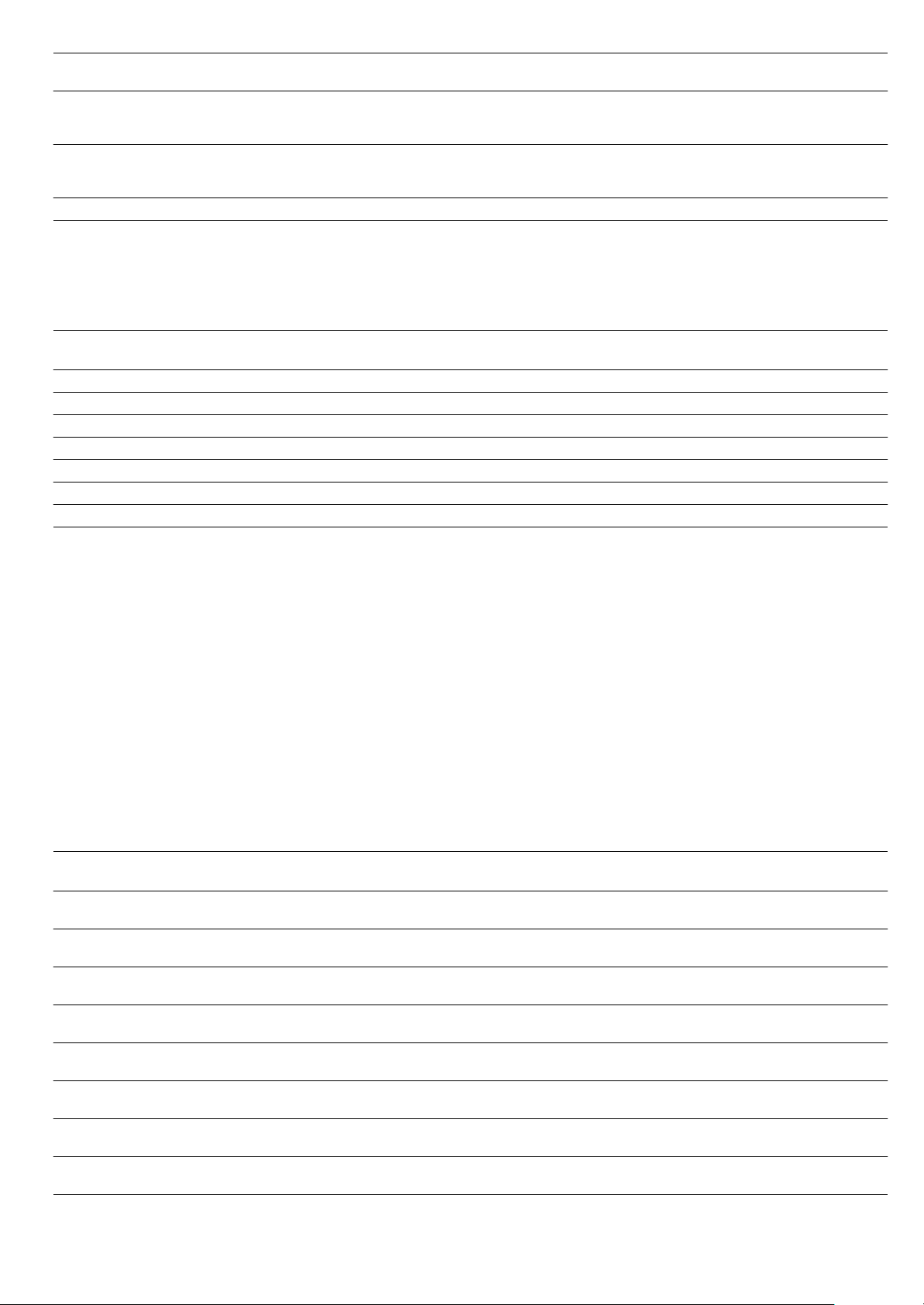
28
Reheating food
Using Reheat, dishes can be gently reheated. They taste and
look like they have been freshly prepared. Even baked items
from the day before can be recrisped.
Defrosting
When freezing, lay the food as flat as possible and in portion-
sized pieces at -18 °C. Do not freeze excessively large
quantities. Once defrosted, food will not keep for as long and
spoils more quickly than fresh food.
Leave the food to defrost in the freezer bag, on a plate or on
the perforated cooking container. Always insert the baking tray
underneath. The food is then not left lying in the defrost water
and the cooking compartment remains clean.
Use the Steam cooking operating mode.
If necessary, the food can occasionally be split apart or pieces
which have already defrosted can be removed from the
appliance.
After defrosting, allow the food to stand for a further 5 -
15 minutes to come up to room temperature.
: Health risk!
When defrosting food from animal sources, you must remove
the liquid that escapes during defrosting. It must never come
into contact with other food. Bacteria could be transferred.
After defrosting, operate the combination steam oven for
15 minutes using Hot air at 180 °C.
Defrost meat
Allow pieces of meat which are to be breadcrumbed to defrost
to the point where seasoning and breadcrumbs adhere to the
meat.
Defrosting poultry
Remove from packaging before defrosting. You must tip the
defrost liquid away.
Cakes baked in a tray or tin are over-
browned at the back
Place the baking tray in the middle of the accessories, not directly against the rear wall
The cake is too dry Make tiny holes in the finished cake using a cocktail stick. Then drizzle fruit juice or an
alcoholic drink over it. Next time, set the temperature 10 °C higher and shorten the bak-
ing times or use the CircoSteam® operating mode
The bread or cake looks good but it is
soggy inside (overmoist with wet
streaks)
Next time, use less liquid. Bake at a lower temperature for a little longer. For cakes with a
moist topping, bake the base first. Cover the base with almonds or bread crumbs first
and then apply the topping. Observe the baking time in the recipe
The cake or pastry is unevenly browned Next time, set the temperature a little lower
Food Accessories Level Operating
mode
Temperature in °C Cooking time
in min.
Meals on plates Wire rack 2 Reheat 120 12 - 18
Vegetables Baking tray 3 Reheat 100 12 - 15
Pasta, potatoes, rice Baking tray 3 Reheat 100 5 - 10
Bread rolls* Wire rack 2 CircoSteam® 170 180 6 - 8
Baguette* Wire rack 2 CircoSteam® 170 180 5 - 10
Bread* Wire rack 2 CircoSteam® 170 180 8 - 12
Pizza Wire rack + baking tray 3 Reheat 170 180 12 - 15
* Preheat for 5 minutes
Food Amount Accessories Level Temperature in°C Cooking time in
min.
Chicken 1 kg perforated +
baking tray
3
1
45 - 50 60 70
Chicken drumsticks 0.4 kg perforated +
baking tray
3
1
45 - 50 30 - 35
Vegetables frozen in blocks
(e.g.spinach)
0.4 kg perforated +
baking tray
3
1
45 - 50 20 30
Berries 0.3 kg perforated +
baking tray
3
1
45 - 50 5 - 8
Fish fillet 0.4 kg perforated +
baking tray
3
1
45 - 50 15 - 20
Whole fish 1 kg perforated +
baking tray
3
1
45 - 50 40 50
Goulash - perforated +
baking tray
3
1
45 - 50 40 50
Joint of beef - perforated +
baking tray
3
1
45 - 50 70 80

29
Proving dough
With Steam cooking, dough will prove considerably more
quickly than at room temperature.
You can select any shelf position you wish for the wire rack or
you can place the wire rack carefully on the cooking
compartment floor.
Caution: Do not scratch the cooking compartment floor.
Stand the dough bowl on the wire rack. Do not cover the
dough.
Juicing
Before juicing, place the berries in a bowl and sprinkle with
sugar. Leave to stand for at least one hour to draw out the
juice.
Add the berries to the perforated cooking container and insert
at level 3. Slide the baking tray into level 1 to catch the juice.
Finally, place the berries in a cloth and squeeze out the rest of
the juice.
Preserve
Preserve food which is as fresh as possible. When foods are
stored for a relatively long period, their vitamin content is
reduced and they cook more readily.
Only use fruit and vegetables which are in perfect condition.
The following foods cannot be preserved with your appliance:
Contents of tins, meat, fish or pastry dough.
Check preserving jars, rubber rings, clips and springs.
Clean rubber rings and jars thoroughly with hot water. The
"Sterilise bottles" programme is also suitable for cleaning
glasses.
Place the jars in the perforated cooking container. They must
not be in contact with each other.
After the specified cooking time, open the appliance door.
Do not remove the preserving jars from the appliance until they
have completely cooled down.
Frozen products
Observe the instructions on the packaging. The cooking times indicated apply to dishes placed in a cold
cooking compartment.
Food Amount Accessories Temperature in °C Cooking time
in min.
Yeast dough 1 kg Bowl + wire rack 35 20 30
Sourdough 1 kg Bowl + wire rack 35 20 30
Food Accessories Level Operating
mode
Temperature in °C Cooking time
in min.
Raspberries Perforated cooking con-
tainer
+ baking tray
3
1
Steam cooking 100 30 - 45
Redcurrants Perforated cooking con-
tainer
+ baking tray
3
1
Steam cooking 100 40 - 50
Food Accessories Level Operating
mode
Temperature in °C Cooking time
in min.
Vegetables 1-litre preserving jars 2 Steam cooking 100 30 - 120
Stone fruits 1-litre preserving jars 2 Steam cooking 100 25 - 30
Pip fruits 1-litre preserving jars 2 Steam cooking 100 25 - 30
Food Accessories Level Operating
mode
Temperature in °C Cooking time
in min.
Chips Baking tray + greaseproof
paper
2 Hot air 170 190 25 35
Croquettes Baking tray + greaseproof
paper
2 Hot air 180 200 18 - 22
Rösti Baking tray + greaseproof
paper
2 Hot air 180 200 25 - 30
Pasta, fresh, refrigerated* Baking tray 2 Steam cooking 100 5 - 10
Lasagne, frozen Baking tray + wire rack 2 CircoSteam® 190 210 35 - 55
Pizza, thin base Baking tray + wire rack 2 Hot air 180 200 15 - 23
Pizza, deep pan Baking tray + wire rack 2 Hot air 180 200 18 - 25
Pizza baguette Baking tray + wire rack 2 Hot air 180 200 18 - 22
Pizza, chilled Baking tray 2 Hot air 170 180 12 - 17
* Add a little liquid

30
Herb butter baguette, refrigerated Baking tray 2 Hot air 180 200 15 - 20
Bread rolls, baguette, frozen Baking tray + wire rack 2 Hot air 180 200 18 - 22
Pretzels, frozen Baking tray + greaseproof
paper
2 Hot air 180 200 18 - 22
Croissant, frozen Baking tray + greaseproof
paper
2 CircoSteam® 180 200 20 25
Part-cooked rolls or baguette, pre-
baked
Baking tray + greaseproof
paper
2 Hot air 150 - 170 12 - 15
Strudel, frozen Baking tray + greaseproof
paper
2 CircoSteam® 160 - 180 45 60
Fish fingers Baking tray + greaseproof
paper
2 Hot air 195 - 205 20 - 24
Trout Perforated +
Baking tray
3
1
Steam cooking 80 100 20 25
Frozen fish fillet Baking tray + wire rack 2 CircoSteam® 180 200 35 50
Salmon fillet Perforated cooking con-
tainer +
Baking tray
3
1
Steam cooking 80 100 20 25
Squid rings Baking tray + greaseproof
paper
2 Hot air 190 210 25 - 30
Broccoli Perforated cooking con-
tainer +
Baking tray
3
1
Steam cooking 100 4 - 6
Cauliflower Perforated cooking con-
tainer +
Baking tray
3
1
Steam cooking 100 5 - 8
Beans Perforated cooking con-
tainer +
Baking tray
3
1
Steam cooking 100 4 - 6
Peas Perforated cooking con-
tainer +
Baking tray
3
1
Steam cooking 100 4 - 6
Carrots Perforated cooking con-
tainer +
Baking tray
3
1
Steam cooking 100 3 - 5
Mixed vegetables Perforated cooking con-
tainer +
Baking tray
3
1
Steam cooking 100 4 - 8
Brussels sprouts Perforated cooking con-
tainer +
Baking tray
3
1
Steam cooking 100 5 - 10
Food Accessories Level Operating
mode
Temperature in °C Cooking time
in min.
* Add a little liquid

31
Test dishes
These tables have been produced for test institutes to facilitate
the inspection and testing of the various appliances.
Baking
Test dishes tested in accordance with standards EN 50304/
EN 60350 (2009) and IEC 60350.
The values in the table apply to dishes placed in a cold cooking
compartment.
Note: For baking, use the lower of the temperatures indicated
first.
Steaming
Test dishes tested in accordance with standard EN 60350-1.
Food Accessories Level Operating
mode
Temperature in °C Cooking time
in min.
Piped cookies Baking tray 2 Hot air 160 170 17 - 20
Small cakes Baking tray 2 Hot air 160 170 25 - 33
Hot water sponge cake 26 cm springform cake tin 2 Hot air 150 160 35 - 40
Double crust apple pie 20 cm springform cake tin 2 Hot air 160 170 60 - 70
Food Accessories Level Operating
mode
Temperature in °C Cooking time
in min.
Broccoli
(Steam distribution)
Perforated +
baking tray
3
1
Steam cooking 100 *
Broccoli
(Steam supply)
Perforated +
baking tray
3
1
Steam cooking 100 *
Peas**
(Maximum load)
Perforated +
baking tray
3
1
Steam cooking 100 ***
* The cooking time for "al dente" must be established beforehand.
** Spread out 2.0 kg of peas evenly in the container.
*** The end of the cooking time has been reached when the peas at the coldest point have reached a temperature of 85 °C.

930524
*9000604592*
9000604592
Constructa Neff
Vertriebs-GmbH
Carl-Wery-Straße 34
D-81739 München