Owners' Guide Refrigeration
Operating Instructions
About the features
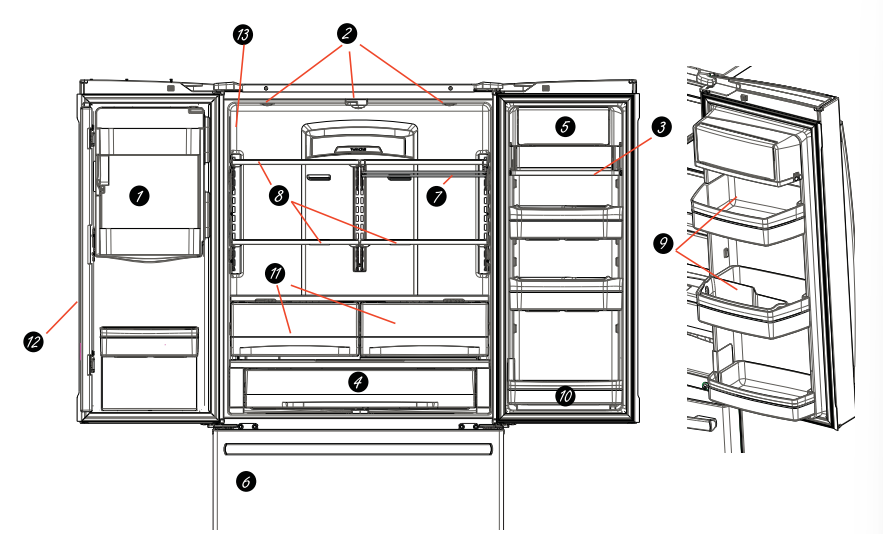
- Space-saving icemaker
Icemaker and bin are located on the door creating more usable storage space.
- Showcase LED lighting
LED lighting is positioned throughout the interior to spotlight areas in the refrigerator.
LEDs are located under the fresh food door to light the freezer when opened.
- Drop-down tray jon some models)
Allows for extra door storage when you need it and tucks away when you don't.
- Full-width temperature controlled drawer fon some models}
Adjustable temperature control bin that can accommodate larger items.
- Dairy bin
Separate compartment for your items.
- Dual icemaker/utility bin on some models)
An icemaker in both compartments gives you more ice whenever you need oro utility bin designed for flexible storage.
- QuickSpace shelf
Functions as a normal full-sized shelf when needed and easily slides back to store tall tems below.
- Spillproof shelves
Designed to capture your spills for easier clean up.
- Removable condiment bin
Separate bin designed for easy removal and storage.
- Removable door bin
Can be removed for those with a wal imiting the door opening.
- Climate zone bin
Separate bins for produce storage.
- In-the-door filter (select models)
Located in the door for more available space in the fresh-food section ond easy replacement.
- Water filter (select models)
Filters water & Ice
- Door ice bin
1. Open left fresh food door.
2. Pull down latch to release bin door.
3. Using handhold lft ice bucket up and out to clear locators in bottom of bin.
4. To replace the ice bucket. set it on the guide brackets and push until the ice bucket seats properly.
5. If bucket cannot be replaced. rotate the
Ice Bucket Fork 1/4 turn clockwise.
- Drop down dairy bin
1. Open right fresh food
2. Depress both buttons on lower sides and bin will drop down.
3. Reverse to reinstall.

- Door ice/water filter
Remove filter/bypass plug
1. Push the indent on the cover and open filter door. Pull up on filter/bypass plug and pull straight out to remove.
Installing the filter cartridge
1. Push the indent at the bottom of the cover and open. Lift door and align tabs on filter to filter/holder and push filter into place.

Filter cover is designed to be reinstalled if accidently removed.
About the controls with temperature settings

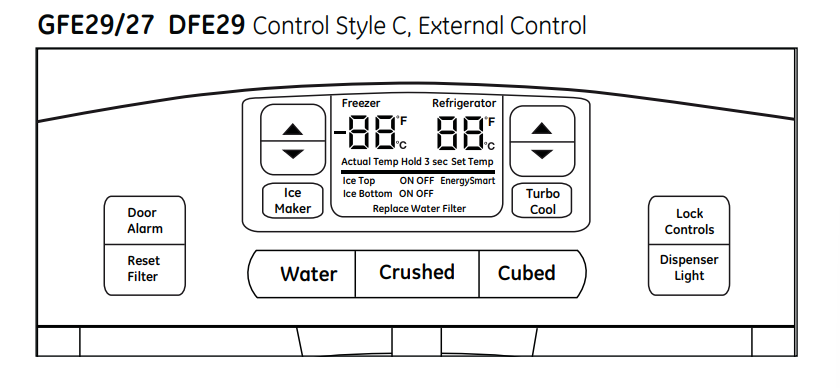

NOTE: The refrigerator is shipped with protective film covering the temperature controls.
If this film was not removed during installation. remove it now.
The temperature controls are preset in the factory at 37°F for the refrigerator compartment and 0°F for the freezer compartment. Allow 24 hours for the temperature to stabilize to the preset recommended settings.
The temperature controls can display both the SET temperature as well as the actual temperature in the refrigerator and freezer. The actual temperature may vary slightly from the SET temperature based on usage and operating environment.
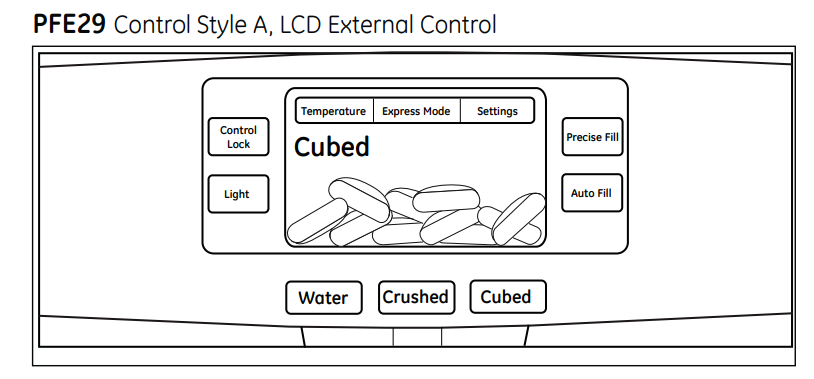
Changing the Temperature for Control Style A
Access By: Temperature Buttor 
Activate By: Below the word “Refrigerator”. use the arrows to select the desired temperature. Press DONE when finished to return to HOME screen.
To Change the Freezer Temperature:
Access By: Temperature Button 
Activate By: Below the word “Freezer”. use the arrows to select the desired temperature.
Press DONE when finished to return to HOME screen.
To turn OFF cooling system. access SETTINGS from the HOME screen. Page over and tap COOLING SYSTEM ON. Press DONE to return to HOME screen.
To turn ON cooling system. access SETTINGS from the HOME screen. Page over and tap COOLING SYSTEM OFF. Press DONE to return to HOME screen.
Turning the cooling system off stops the cooling to. refrigerator. but it does not shut off the electrical power.
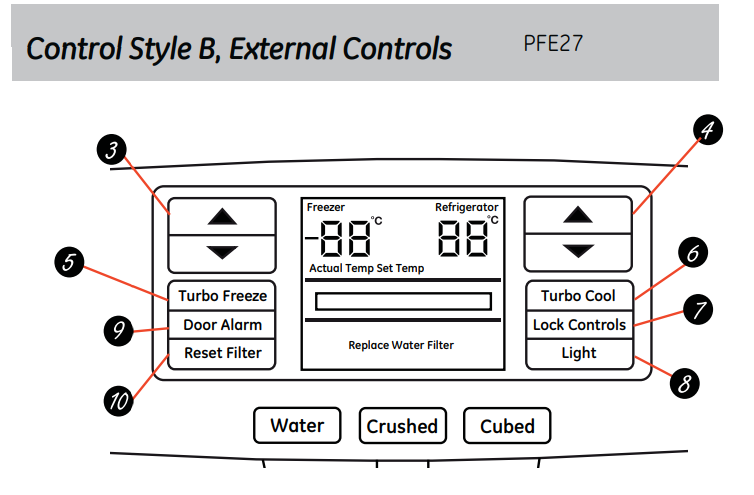
Changing the Temperature for Control Style B
To change the temperature. press and release the  pad. The ACTUAL TEMP light will come on and the display will show the actual temperature. To change the temperature, tap either the
  BS temperature is displayed, pad until the desired
To turn OFF cooling system. press and hold the Freezer  ] pads simultaneously for 3 seconds. When the cooling system is OFF the display should read 0 FF.
To turn ON cooling system. press either  ] pad. The display will show ON and then the actual temperature for the refrigerator and the freezer. Turning the cooling system OFF stops the cooling to the refrigerator. but it does not shut OFF the electrical power.
Changing the Temperature for Control Style C
To change the temperature. press and release the  pad. The ACTUAL TEMP light will come on and the display will show the actual temperature. To change the temperature tap either the
  pad until the desired temperature is displayed.
To turn OFF cooling system. press and hold the Freezer  pads simultaneously for 3 seconds. When the cooling system is OFF the display should read OFF.
To turn ON cooling system. press either  ] pad. The display will show the preset temperature settings of 37°F for refrigerator and 0°F for freezer. Turning the cooling system off stops the cooling to refrigerator. but it does not shut off the electrical power.
Changing Temp. for Control Style D
Temperature Display is located on inside of left-hand refrigerator door. To change the temperature. press and release the REFRIGERATOR or FREEZER pad. The ACTUAL TEMP light will come on and the display will show the actual temperature. To change the temperature. tap either the REFRIGERATOR or FREEZER pad until the desired temperature is displayed.
To turn OFF cooling system. press and hold the REFRIGERATOR and FREEZER pads simultaneously for 3 seconds. When the cooling system is OFF the display should read OFF.
To turn ON cooling system. press either REFRIGERATOR or FREEZER pad. The display will show the preset temperature settings of 37°F for refrigerator and O°F for freezer. Turning the cooling system off stops the cooling to refrigerator. but it does not shut off the electrical power.
About the controls - features ( on some models)
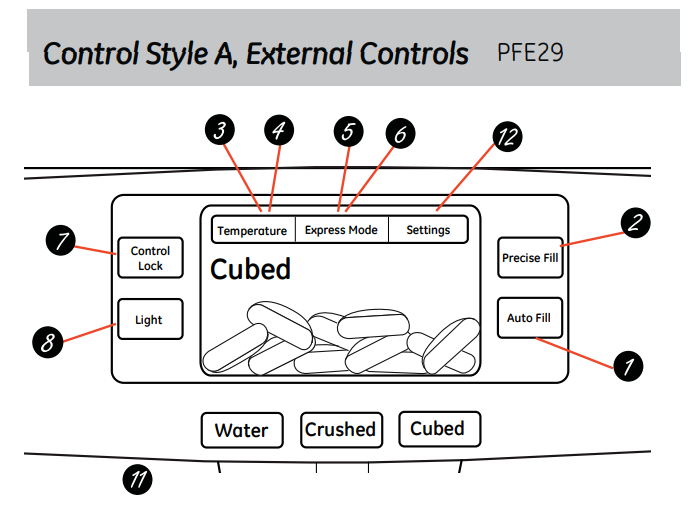
- Hands-free
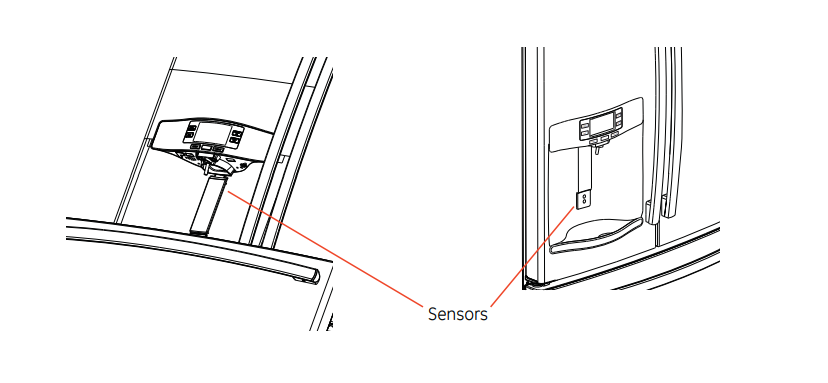
AutofillHands-free Autofill uses sensors to monitor container height to automatically dispense filtered woter without having to activate the paddle.
- PreciseFill setting
Precisely dispenses filtered water in accurate measurements in ounces. cups. quarts. or liters using paddle.
- Refrigerator temp control
Adjust freezer compartment temperature.
- Fresh food temp control
Adjust fresh food compartment temperature.
- TurboFreeze setting
Activate TurboFreeze to quickly restore freezer temperatures after frequent door openings.
- Turbocool setting
Activate TurboCool to quickly restore fresh food temperature after frequent door openings.
- Lock controls
Press and hold 3 seconds to lock out ice and water dispenser and all feature and temperature buttons.
- LED dispenser light
LED lighting that can be turned on/off to light your dispenser.
- Alarm
Sounds to alert when the freezer or fresh food doors have been left open.
- Reset filter
Press and hold for 3 seconds after replacing the filter.
- Photo upload
Insert USB memory stick to upload personal photos to the refrigerator LCD screen.
LCD will provide on screen prompts to load and view slideshow.

- Additional settings:
+ Connected Home ready
+ Sideshow
+ Reset fter
+ Ice moker on/off
+ Door alarm
+ Sound control
+ Cooling system On/Off
+ Metric/Englsh units
Additional Modes
Press and hold lock & light simultaneously for 3 seconds to enter/exit Sabbath mode.
Activate Sabbath Mode to turn off interior lights. temperature control and advanced features. Compressor will run on a timed defrost when in Sabbath mode.
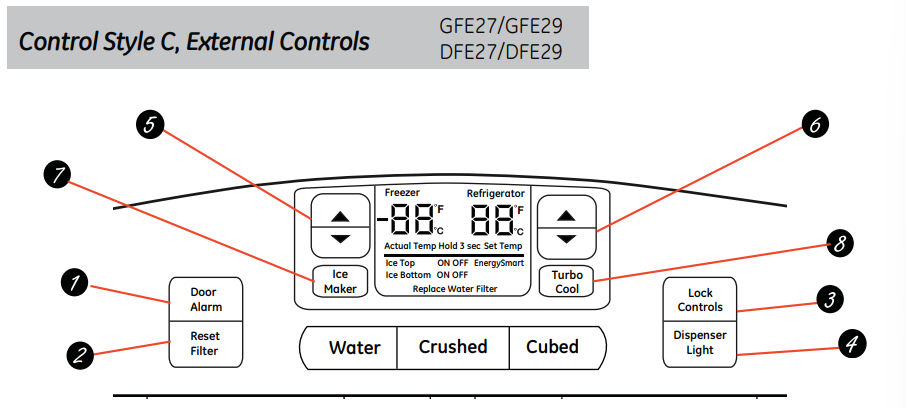
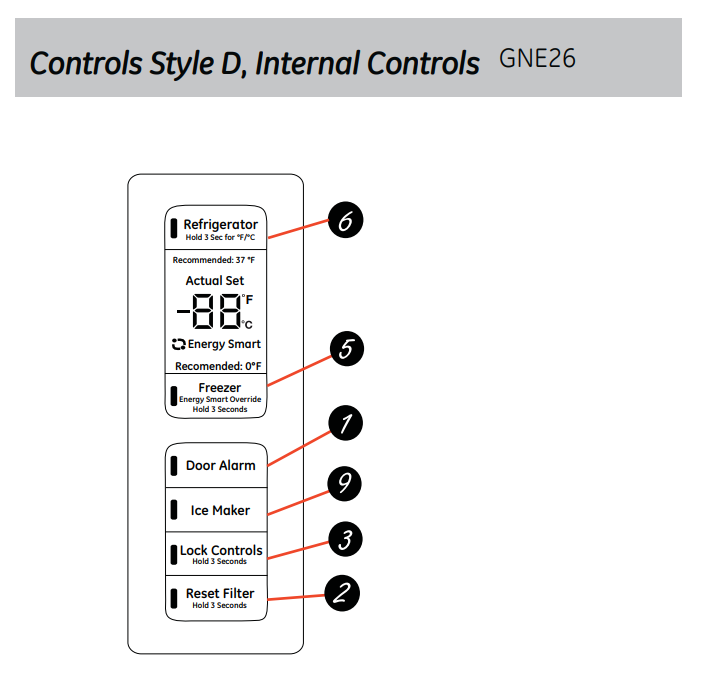
- Alarm
Sounds to alert when the freezer or fresh food doors have been left open
- Reset Filter
Hold for 3 seconds after replacing filter.
- Lock controls
Press and hold 3 seconds to lock outice ond water dispenser ond all feature and temperature buttons.
- LED dispenser light
LED lighting that can be turned on/off to light your dispenser.
- Freezer temp contro
Adjust freezer compartment temperature
- Refrigerator temp control
Adjust fresh food compartment temperature
- Dual Ice maker control( select models)
Turn your ice makers on/off.
- Turbocool setting
Activate TurboCoo! to quickly restore refrigerator temperature after frequent door openings.
- Ice maker setting
Turn your ice makers on/off.
About the dispenser

If no water is dispensed when the refrigerator is first installed. there may be air in the water line system. Press the dispenser paddle for at least two minutes to remove trapped air from the water line and to fill the water system. To flush out impurities in the waterline. throw away the first six full glasses of water.
CAUTION: Never put fingers any ther objects into the ice crusher discharge opening.
To remove Dispenser Tray
- Pull Dispenser Tray out until it stops.
- Locate tab in the center on the bottom and push in.
- Pull Dispenser Tray assembly out.
- Lift metal Dispenser Tray out at center notch to clean.
To reinstall Dispenser Tray
- Place the Dispenser Tray cover on top of catch tray and position under the two plastic retainers on either side.
- Center Dispenser tray. and align with center guides.
- Push in until it firmly in place.
Important Facts About Your Dispenser
- Do not add ice from trays or bags to the door icemaker bucket. it may not crush or dispense.
- Avoid overfiling glass with ice and use of narrow glasses.
Backed-up ice can jam the chute or couse the door in the chute to freeze shut fice is blocking the chute remove the ice bucket. poke it through with a wooden spoon.
- Beverages and foods should not be quick-chilled in the door icemaker bin, bottles or food packages in the storage drawer may cause the icemaker or auger to jar.
- To keep dispensed ice from missing the glass. put the glass close to. but not touching. the dispenser opening.
- Some crushed ice may be dispensed even though you selected CUBED ICE. This happens occasionally when a few cubes accidentally get directed to the crusher.
- After crushed ice is dispensed. some water may drip from the chute.
- Sometimes a small mound of snow will form on the door in the ice chute. This condition is normal and usually occurs when you have dispensed crushed ice repeatedly. The snow will eventually evaporate.
About autofill
To Use HANDS FREE AUTO FILL:
- Center container on Recess Dispenser Tray (not touching bottom sensors) and remove hand from container
- Press AUTO FILL
To Stop AUTO FILL
- Press CANCEL. to resume filing press AUTO FILL.
Important Facts about AUTO FILL
- For optimum results. use a uniform container between 4-8" tall and 2-6" wide. Container should be as tall as the bottom sensors.
- Container shape. fill level and functionality may vary on containers taller than 8”.
- Container volumes may vary. if error message “Container Not Found is given. try a different container.
- AUTO FILL will time out.
- Handles and garnishes on the rim of the container my cause overfilling or variation in fill volumes.
- Splashing may occur depending on the location of the container. water flow rate. container shape. and ice cubes.
- Keep sensors clean with a clean damp cloth. and do not spray liquid or cleaners directly on sensors
- AUTO FILL works best with household water pressure of 60 to 100 psi.
About the GE® RPWF water filter cartridge
Water Filter Cartridge
The water filter cartridge is located in one of the following places:
Bottom freezer (BF refrigerators):
- Inthe left-hand fresh food door recessed in the door flangel
- Inthe fresh food interior on the left side wall. near the top.
Side-by-side [SxS] refrigerators:
- Inthe bottom of the fresh food compartment. Access the filter using the flip cover without moving the vegetable pan.
Note: May have to move the pan to access in counter-depth models)
When to replace the filter cartridge
The filter cartridge should be replaced every six months or earlier ifthe flow of water to the dispenser or icemaker decreases.
Touch Screen Models: fiter status message will appear on the screen when the water filter needs to be replaced. The iter status message must be reset manually.
The “Water Filter Replace” status message can be reset by entering the Settings menu from the home screen. Then. select the Water Fitter menu and press the RESET button. This will reset the iter status.
Non-touch Screen Models: filter indicator message wil ilurninate in the screen when the water fitter needs to be replaced. This light must be reset by pressing and holding the Reset Filter button for three seconds.
The filter cartridge has an expected lfe of six months and should be replaced when indicated by the fer indicator on the refrigerator. or sooner if significant reduction in flow occurs.
Removing the filter cartridge
To replace the fier. frst remove the old cartridge by gentl lifting the filter oway from housing untifirst release. then lift again to remove.
DO NOT TWIST. A small amount of water may drip out.
Installing the Filter Cartridge

- Align top of fter with cartridge holder and push until cartridge isfully seated
- While continuing to ensure cartridges fully seated in the holder. gently rotate the fitter (inward for BF models or downward for SxS models) until it can no longer rotate. If rotation is difficult. check to ensure filter is properly aligned and fully seated within the holder.
- Run water from the dispenser lopprox. 2 gallons or about 5 minutes) to clear any particles. and remove air from the system.
- Reset Fitter Status.
Touch Screen Models: Access RESET button through the Water Filter menu.
Non-touch Screen Models: Press and hold the Reset Filter button for three seconds.
Note: A newly installed water fiter cartridge may cause water to spurt from the dispenser during the first 5 minutes of operation. Use a large pitcher or sports bottle to catch the water spray.
Note: is normal for water to appear discolored during the initial system flush. Water color will return to normal after first few minutes. of dispensing.
Filter Bypass Plug
Toreduce the risk of property damage due to water leakage. you
MUST use the fiter bypass plug when a replacementfiter cartridge isnot available. The dispenser and icemaker will not operate without either the fer or bypass plug installed. The bypass plug is installed in the same way as a filter cartridge.
Warning
To reduce the risk associated with choking. do not allow children under 3 years of age to have access to small parts during the installation of this product. The disposable filter cartridge should be replaced every 6 months at the rated capacity. ar sooner if a noticeable reduction in flow rate occurs.
For the maximum benefit of your filtration system. GE recommends the use of GE-branded filters only. Using GE-branded filters in GE and Hotpoint refrigerators provides optimal performance and reliability. GE fitters meet rigorous industry NSF standards for safety and quality that are important for products that are filtering your water. GE has not qualified non-GE-branded filters for use in GE and Hotpoint refrigerators and there is no assurance that non-GE-branded filters meet GE's standards for quality. performance and reliability.
About the fresh food storage options
Rearranging the Shelves
Shelves in the refrigerator compartment are adjustable.
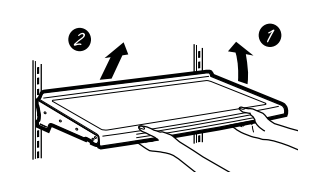
To remove:
- Ferove ulliterns from the shelf.
- Tit the shelf up at the front.
- Lift the shelf up at the back and bring the shelf out.
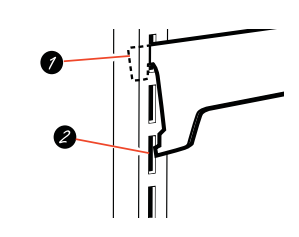
To replace:
- Mri titing the shetf up. insert the top hook at the back of the shetf in a slot on the track.
- Lower the front of the shelf until the bottom of the shelf locks into place.
Spillproof Shelves
Spillproof shelves have special edges to help prevent spills from dripping to lower shelves.
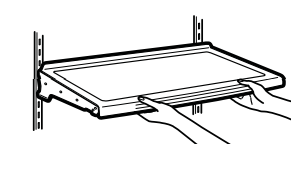
Quick Space Shelf
This shelf splits in half and slides under itself for storage of tal items on the shelf below.

This shelf can be removed and replaced or relocated (ust lke spillproof shelves)
NOTE: The location of the upper Quick Space Shelfis not adjustable.
Non-Adjustable Dairy Bin

To remove: Lift the dairy bin straight up. then pull out.
To replace: Engage the bin in the molded door supports and push down. The bin will lock in place.
Adjustable Bins on the Door
Adjustable bins can easily be carried from refrigerator to work area.

To remove: Lift bin straight up. then pull out.
To replace or relocate: Slide in the bin just above the molded door supports. and push down. The bin will lock in place.
Drop down tray * (tray open)

- Open right fresh food
- Depress both buttons on lower sides of bin and bin will drop down.
- Reverse to reinstall.
Non-Adjustable Bins on the Door (can be tilted)
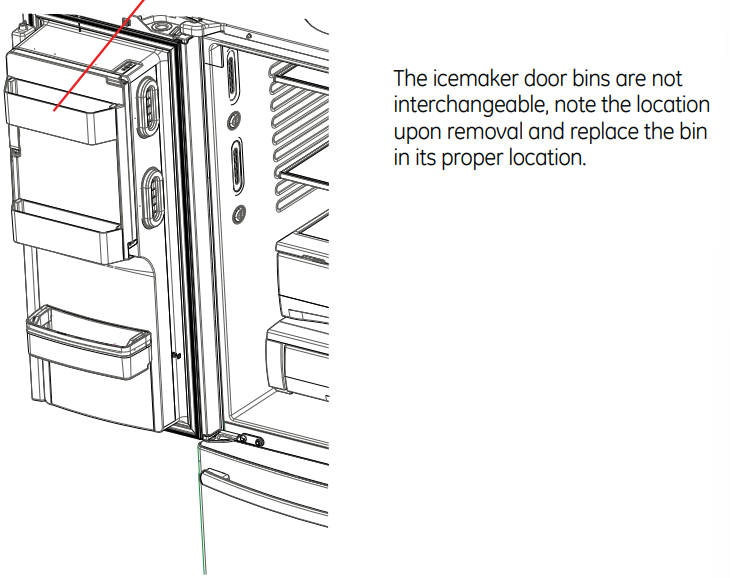
To remove: Lift the bin straight up. then pull out.
To replace: Engage the bin in the molded supports on the door and push down. it will lock in place.
About the climate zone and temperature controlled drawer
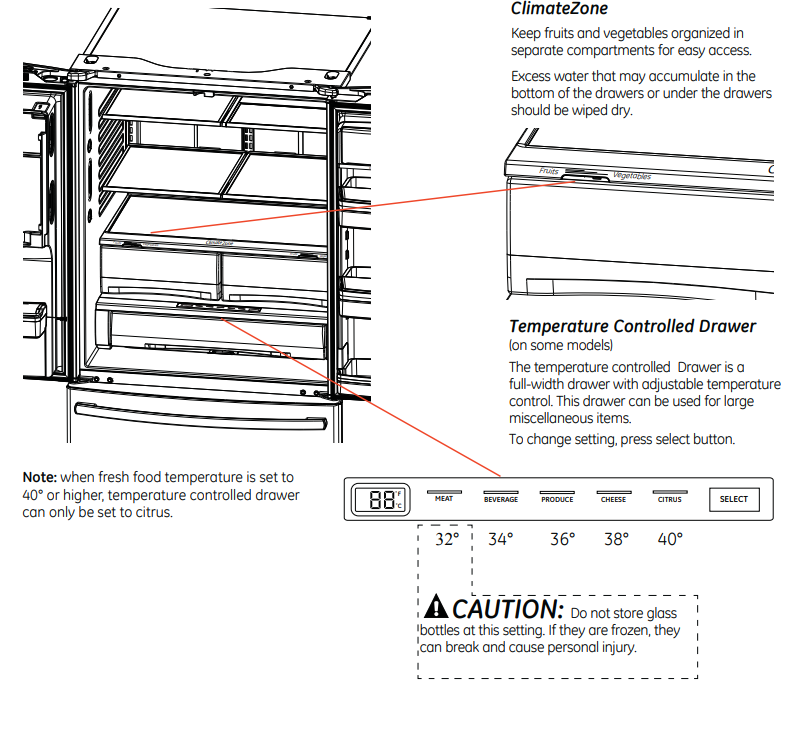
How to Remove and Replace the Adjustable Deli/Produce Drawer

To remove:
- Pull the drawer out to the stop position.
- Lift the front ofthe drawer up and out. extended.
To replace:
- Pull left and right slides until fully
- Place drawer back in first and rotate drawer front down to seat on slide.
- Push the drawer in to closed position.
How to Remove and Replace Drawer Divider
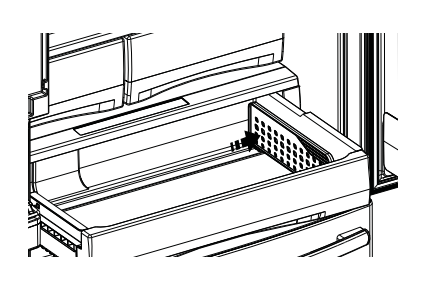
To remove:
- Pullthe drawer out to the stop position.
- Raise the front side of the divider wall ofthe drawer. to unhook it from the rear wall of the drawer.
To replace:
- Hook the back of the divider over the rear
- Push the divider down.
About the freezer
Freezer Basket and Drawer
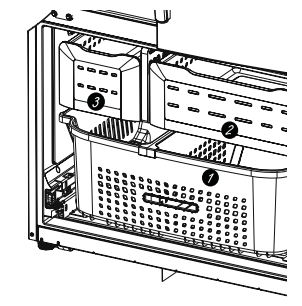
- Basket.
- Drawer
- Utility Bin / Ice Bucket
Non-Adjustable Bin in the Freezer

To remove: push in plastic tab on either left or right side
To replace: side bin into location untilit locks into place.
Basket Removal

To remove:
- Remove freezer door bin by pushing plastic tab on either left or right side to release bin hinge pin.
- Pull basket out to the stop position.
- Remove freezer basket by lifting up the rear of the basket and moving basket rearward nti the front of the basket can be rotated upward ond out.
- Lift it out to remove.
To replace:
- Reverse step 1 thru 4 to replace.
Basket Divider Removal/ Adjustment
To remove:
- Pull basket out of the stop position.
- Tilt up the rear of the bin.
- Lift it out to remove.
- Remove divider screw.
To replace:
- Hook the top comers of the divider over the hole of the basket.
- Reinstall divider bottom screw.
About the automatic icemaker
Automatic Icemaker (on some models)
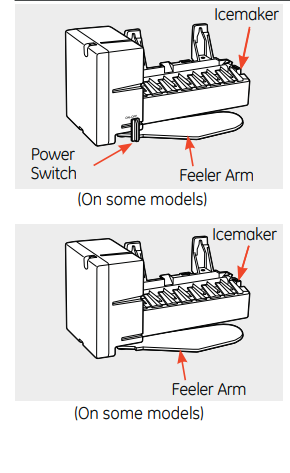
The icernoker will produce seven cubes per cycle approximately 100-130 cubes in a 24-hour period. depending on freezer compartment temperature. room temperature. number of door openings and other use conditions.
See below for how to access ice and reach the power switch
If the refrigerators operated before the water connection is made to the icemaker. set the power switch in the 0 (off postion or tum icemaker off on control panel.
When the refrigerator has been connected to the water supply. set the power switch tothe Ifonl position. The icemaker power ight willtum green when the freezer ight switch is pressed in or when the freezer door's closed.
The icemaker wil fil with water when it cools to 15°F [-10°C. Anew installed refigerator may toke
112 to 24 hours to begin making ice cubes.
You may hear a buzzing sound each time the icemaker fils with water.
Throw awoy the first few batches of ice to alow the waterline to clear.
Be sure nothing interferes with the sweep of the feeler arm.
When the bin fils to the level ofthe feeler arm, the icemaker will stop producing ice. It is normal for several cubes to be joined together.
If ice is not used frequently. old ice cubes will become cloudy. taste stale and shrink.
NOTE: In hornes with lower-than-average water pressure. you may hear the icemaker cycle mtple times when making one batch of ice.
NOTE: Set the power switch on ice maker or control panel to O (off position ifthe water supply is shut off.
Accessing Ice {on some models)
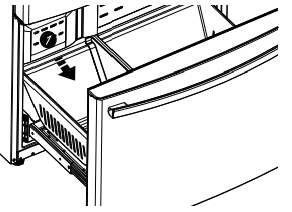
Open the freezer drawer and pull forward the ice bucket. The Ice bucket is on the left side below the mullion
- Ice bucket
Ice Bucket and Dispenser
- Pull up and out on the ice bucket to remove it from the compartment.
- To replace the ice bucket. set it on the guide brackets and push until the ice bucket seats properly.
- If bucket cannot be replaced. rotate the Ice Bucket Fork 1/4 turn clockwise.

Extra Ice Storage
- There is additional ice storage in the freezer compartment drawer.
Accessing Ice and Reaching the Power Switch (ice and water models)
To access Ice: open the Ice box door located on the refrigerator door and remove the bucket.

To reach the icemaker power switch:
To access the icemaker power switch remove the ice bucket (PFE27 models only).
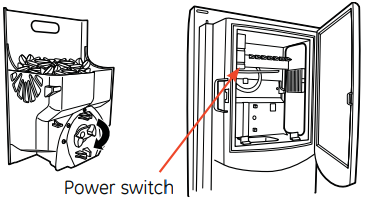
All other models use control (p.18)
Care and cleaning of the refrigerator
Cleaning the Outside
The stainless steel panels. oor handles and trim.
Do not use appliance wax. polish. bleach. or other products containing chlorine on stainless steel.
Stainless steel (on some models) can be cleaned with a commercially available stainless steel cleaner. A spray-on stainless steel cleaner works best.
Silver-accented plastic parts.
Wash parts with soap or other mild detergents.
Wipe clean with a sponge. damp cloth or paper towel.
Do not use scouring pads. powdered cleaners. bleach or cleaners containing bleach because these products can scratch and weaken the paint finish.
Should spill tray need cleaning use lime remover.
Cleaning the Inside
To help prevent odors, leave an open box of baking soda in the refrigerator and freezer compartments.
Unplug the refrigerator before cleaning.
If this is not practical. wring excess moisture out of sponge or cloth when cleaning around switches. lights or controls.
Use an appliance wax polish on the inside surface between the doors.
Use warm water and baking soda solution—about a tablespoon (15 mil of baking soda to a quart (1 liter) of water.
This both cleans and neutralizes odors.
Rinse and wipe dry.
Behind the Refrigerator
Be careful when moving the refrigerator away from the wall ll types of floor coverings can be damaged. particularly cushioned coverings and those with embossed surfaces.
Raise the leveling legs located at the bottom front of the refrigerator.
Pull the refrigerator straight out and return it to position by pushing it straight in. Moving the refrigerator in a side direction may result in damage to the floor covering or refrigerator.
Lower the leveling legs until they touch the floor.
When pushing the refrigerator back. make sure you don't roll over the power cord or water supply line.
Preparing for Vacation
For long vacations or absences. remove food and unplug the refrigerator. Clean the interior with a baking soda solution of one tablespoon (15 mil of baking soda to one quart (1 liter! of water. Leave the doors open.
Non-LCD Models: Turn the icemaker switch to off ipg. 18) nd shut off the water supply to the refrigerator.
LCD Models: turn refrigerator off at control (pg 7).
If the temperature can drop below freezing. have a qualified service technician drain the water supply system to prevent serious property damage due to flooding.
- Tum refrigerator off (pg. 7) or unplug the refrigerator.
- Empty ice bucket
- Turn water supply off
If you cut the water supply off, turn off the icemaker (pg. 18)
Preparing to Move
Secure all loose items such as shelves and drawers by taping them securely in place to prevent damage.
When using a hand truck to move the refrigerator. do not rest the front or back of the refrigerator against the hand truck. This could damage the refrigerator.
Handle only from the sides of the refrigerator.
Be sure the refrigerator stays in an upright position during moving.
Replacing the lights
Refrigerator Lights( LEDs)

Troubleshooting Tips
Normal operating sounds
Do you hear what I hear? These sounds are normal

- The new high efficiency compressor may run faster and longer than your old refrigerator and you may hear a high-pitched hum or pulsating sound while it is operating.
- You may hear a whooshing sound when the doors close. This is due to pressure equalizing within the refrigerator.
- After dispending ice, a motor will close the ice chute to keep warm room air from entering the ice bucket, maintaining ice at a freezing temperature. The hum of the motor closing the ice chute is normal, shortly after dispending ice.

- You may hear the fans spinning at high speeds. This happens when the refrigerator is first plugged in, when the doors are opened frequently or when a large amount of food is added to the refrigerator or freezer compartments. The fans are helping to maintain the correct temperatures.
- The fans change speeds in order to provide optimal cooling and energy savings.

- You may hear cracking or popping sounds when the refrigerator is first plugged in. This happens as the refrigerator cools to the correct temperature.
- The compressor may cause a clicking or chirping sound when attempting to restart (this could take up to 5 minutes).
- Expansion and contraction of cooling coils during and after defrost can cause a cracking or popping sound.
- On models with an icemaker, after an icemaking cycle, you may hear the ice cubes dropping into the ice bucket.

- The flow of refrigerant through the freezer cooling coils may make a gurgling noise like boiling water.
- Water dropping on the defrost heater can cause a sizzling, popping or buzzing sound during the defrost cycle.
- A water dripping noise may occur during the defrost cycle as ice melts from the evaporator and flows into the drain pan.
- Closing the door may cause a gurgling sound due to pressure equalization.
For additional information on normal icemaker operating sounds, see the About the automatic icemaker section.
Before you call for service…
| Problem |
Possible Causes |
What to do |
| Water filter indicator light remains lit after replacing filter |
Water filter indicator must be reset |
Non-LCD models:
- Press and hold the ICE & WATER pad for 3 seconds.
See About the water filter for more information
LCD models:
- On the LCD screen, select SETTING , then WATER FILTER
Select REPLACE and follow the instructions given.
|
| Water filter indicator is not lit |
This is normal. This indicator will turn on to tell you that you need to replace the filter soon. |
See About the Water Filter for more information |
| Handle is loose/handle has a gap. |
Handle needs adjusting |
See Attach Fresh Food Handle and
Attach the Freezer Handle sections for detailed instructions. |
| Refrigerator beeping |
This is door alarm |
“Tum off or disable with door closed
If door open and alarm is sounding. you can only snooze the alarm |
| Not cooling |
The cooling system is off |
NON-LCD models:
See About Controls.
LCD models:
See About Controls.
|
| Water has poor taste/odor |
Water dispenser has not been used for along time |
Dispense water. until all water in system is replenished |
|
Water in glass is warm
|
Normal when refrigerators first installed
Water dispenser hos not been used for a long time
Water system has drained
|
Wait 24 hours for the refrigerator to completely cool down.
Dispense water. until al watern system is replenished
Allow several hours for replenished supply to chill
|
|
Water dispenser does not work
|
Water supply line turned off or not connected
Water filter clogged or filter/bypass plug not installed
Air may be trappedin the water system
Water in reservoir is frozen because the controls are set too cold
|
See installing the Water Line
Replace fiter cartridge or remove filter and install bypass plug
Press the dispenser arm for at least minutes.
Set the refrigerator control to 0 wormer setting and wait 24 hours. ifthe water does not dispense after 24 hours. call for service
|
| Water spurting from dispenser |
Newly installed filter cartridge |
Run water from the dispenser for 5 minutes (about 2 gallons) |
|
No water orice cube production
|
Supply line or shutoff valve is clogged
Water filter is clogged
Filter cartridge not properly installed
|
Call a plumber
Remove filter cartridge or remove filter and install bypass plug
Remove and reinstall fiter cartridge, being certain that it locks in place.
|
| Water is leaking from dispenser |
Air may be present in the water line system causing water to drip after remove air from being dispensed |
Dispense water for at least 2 minutes to remove air from system |
| Photos not found |
Photos not in root directory of USB
Photos not in JPEG format Camera/PC used with USB cord
|
Make sure the photos are in the root directory in your USB.
Photos must be in JPEG format
Must use a USB drive
|
| AUTO FILL underfill/no fill |
Not all containers work with AUTO FILL
- Container not found
- Unstable container
- Misaligned container
|
Try different container
See pg. 11
|
| AUTO FILL overfills |
Not all containers work with AUTO FILL |
Try different container |
| PRECISE FILL will not fill container |
Normal PRECISE FILL requires use of dispenser paddle |
For a specific amount of water, select PRECISE FILL to dispense water |
| Freezer cooling, fresh food not cooling |
Normal. when refrigerator first plugged in or after extended power outage |
Wait 24 hours for temperature in both cooling compartments to reach selected outage temperatures. |
| Ice dispenser opens after closing freezer drawer |
Normal |
The ice dispenser door may open after closing freezer door to allow access |