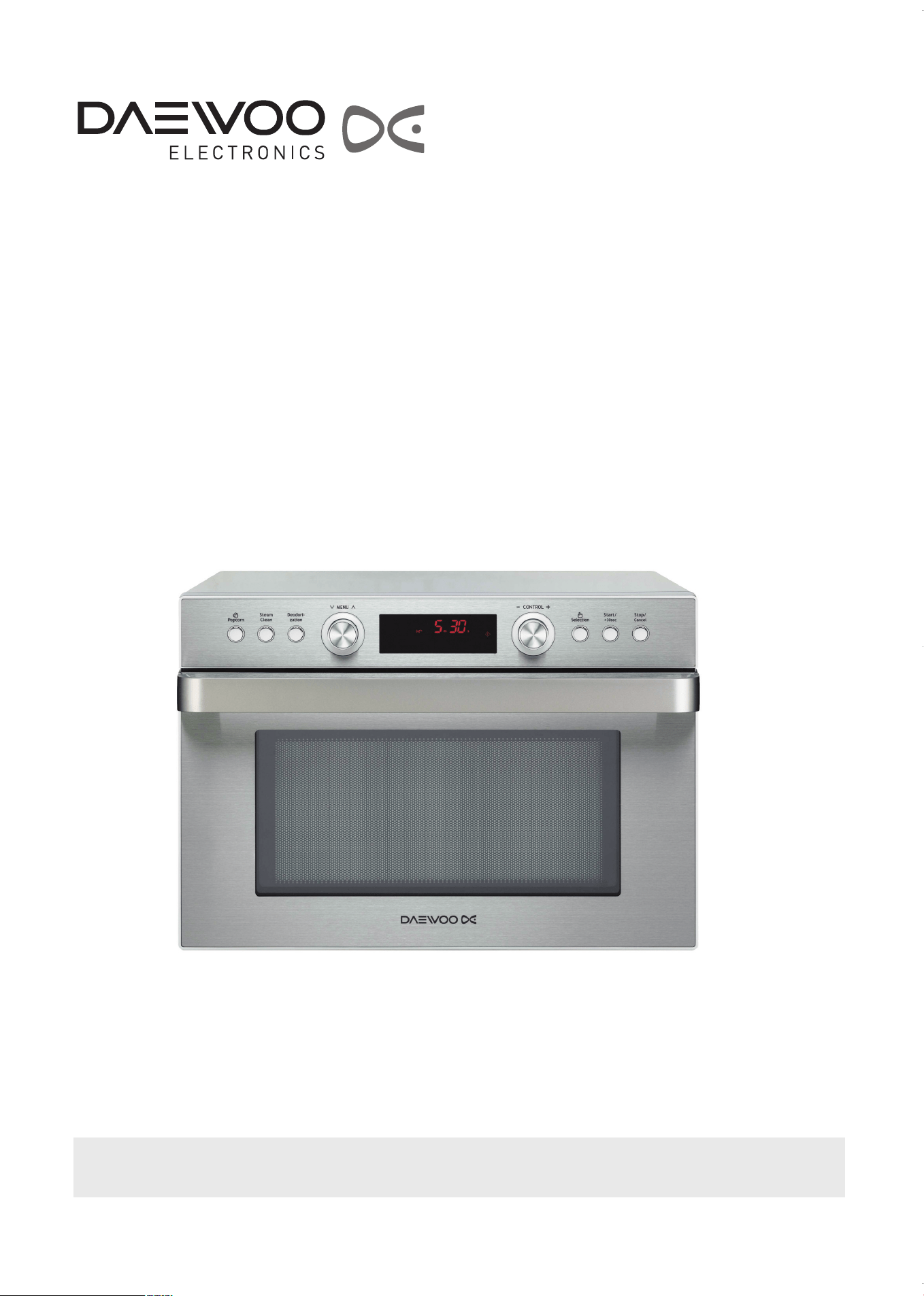
OWNER’S MANUAL
COMPACT MULTI FUNCTION OVEN
PLEASE READ THESE INSTRUCTIONS CAREFULLY BEFORE USING THIS PRODUCT. FOLLOW THE
INSTRUCTIONS AND OBSERVE ALL WARNINGS AND CAUTIONS. SAVE THIS MANUAL FOR FUTURE USE.
COMMERCIAL SERIES
Model No: KOC-1C4K
KOC-1C4K5AV0_REV_110214:KOC-1C4K5AV0_(㦖_㦖㦖㦖) 2011-02-28 㦖㦖 1:56 Page 1

IMPORTANT SAFETY INSTRUCTIONS .................... 2
INSTALLATION............................................................3
GROUNDING INSTRUCTIONS
.....................................4
FEDERAL COMMUNICATIONS COMMISSION RADIO
FREQUENCY INTERFERENCE STATEMENT...........4
GENERAL USE............................................................5
CAUTIONS WHEN MICROWAVING FOOD............... 6
MICROWAVE UTENSIL GUIDE ................................. 6
CHILD SAFETY LOCK.................................................7
STOP OPERATION .................................................... 7
IMPORTANT ERROR MESSAGES............................ 7
ARCING ...................................................................... 7
POWER SAVE MODE .................................................7
REMINDER ..................................................................7
ACCESSORIES ...........................................................8
BEFORE OPERATING ................................................9
CONTROL PANEL.......................................................9
DISPLAY WINDOW ICON GUIDE............................ 10
SETTING THE VOICE GUIDE VOLUME...................11
SETTING THE CLOCK ..............................................12
AUTO DEFROST BY WEIGHT..................................13
AUTO DEFROST BY TIME........................................14
EXPRESS COOK...................................................... 15
MANUAL COOLING FAN.......................................... 15
MICROWAVE POWER LEVEL CHART.....................15
MICROWAVE COOK .................................................16
COOK WITH CONVECTION......................................17
PREHEAT AND COOK USING CONVECTION.........18
COMBINATION COOK ..............................................19
GRILL COOK .............................................................20
AUTO COOK.........................................................21-22
INSTANT COOK ...................................................23-24
MEMORY COOK........................................................25
PROGRAMMING MEMORY COOK...........................25
POPCORN .................................................................26
PROOFING ................................................................27
GENERAL GUIDELINES ......................................28-29
MICROWAVE COOKWARE GUIDE..........................29
MICROWAVE COOKING INSTRUCTIONS...............30
CARE AND CLEANING ........................................31-32
CLEANING THE OVEN............................................. 31
STEAM CLEANING................................................... 32
DEODORIZATION .................................................... 32
BEFORE CALLING FOR SERVICE.......................... 33
QUESTIONS AND ANSWERS ................................. 34
SPECIFICATIONS .....................................................35
WARRANTY..............................................................36
TABLE OF CONTENTS
PRECAUTIONS TO AVOID POSSIBLE EXPOSURE
TO EXCESSIVE MICROWAVE ENERGY
(a) Do not attempt to operate this oven with the door open since open-door operation can result in
harmful exposure to microwave energy. It is important not to defeat or tamper with the safety interlocks.
(b) Do not place any object between the oven front face and the door or allow soil or cleaner residue to
accumulate on sealing surfaces.
(c) Do not operate the oven if it is damaged. It is particularly important that the oven door close properly
and that there is no damage to the: (1) door (bent), (2) hinges and latches (broken or loosened), (3)
door seals and sealing surfaces.
(d) The oven should not be adjusted or repaired by anyone except properly qualified service personnel.
(e) WARNING : It is hazardous for anyone other than a competent person to carry out any service or repair
operation that involves the removal of a cover which gives protection against exposure to microwave
energy.
(f) WARNING : Liquids and other foods must not be heated in sealed containers since they are liable to
explode.
(g) WARNING : Only allow children to use the oven without supervision when adequate instructions have
been given so that the child is able to use the oven in a safe way and understands the hazards of
improper use.
(h) WARNING : When the appliance is operated in the combination mode, children should only use the
oven under adult supervision due to the temperature generated. (if provided)
1
KOC-1C4K5AV0_REV_110214:KOC-1C4K5AV0_(㦖_㦖㦖㦖) 2011-02-28 㦖㦖 1:56 Page 1

SAVE THESE INSTRUCTIONS
11. Read all instructions before using the appliance.
12. Read and follow the specific “PRECAUTIONS TO
AVOID POSSIBLE EXPOSURE TO EXCESSIVE
MICROWAVE ENERGY” found on page 1.
13. This appliance must be grounded. Connect only to
properly grounded outlet.See “GROUNDING
INSTRUCTIONS” found on page 4.
14. Install or locate this appliance only in accordance with
the provided installation instructions.
15. Some products such as whole eggs and sealed
containers - for example, closed glass jars-are able to
explode and should not be heated in this oven.
16. As with any appliance, close supervision is necessary
when used by children.
17. Only allow children to use the oven without
supervision when adequate instructions have been
given so that the child is able to use the oven in a
safe way and understands the hazards of improper
use.
18. Do not operate this appliance if it has a damaged
cord or plug, if it is not working properly, or if it has
been damaged or dropped.
19. This appliance should be serviced only by qualified
service personnel. Contact nearest authorized
service facility for examination, repair or adjustment.
10. Do not cover or block any openings on the appliance.
11. Do not store this appliance outdoors. Do not use this
product near water — for example, near a kitchen
sink, in a wet basement, or near a swimming pool, or
similar locations.
12. Do not immerse cord or plug in water.
13. Keep cord away from heated surfaces.
14. Do not let cord hang over edge of table or counter.
15. When cleaning surfaces of door and oven that comes
together on closing the door, use only mild, non-
abrasive soaps or detergents applied with a sponge
or soft cloth
16. To reduce the risk of fire in the oven cavity:
a) Do not overcook food. Carefully attend appliance
when paper, plastic, or other combustible materials
are placed inside the oven to facilitate cooking.
b) Remove wire twist-ties from paper or plastic bags
before placing bag in oven.
c) If materials inside the oven ignite, keep oven door
closed, turn oven off, and disconnect the power
cord, or shut off power at the fuse or circuit breaker
panel.
d) Do not use the cavity for storage purposes. Do not
leave paper products, cooking utensils, or food in
the cavity when not in use.
17. Do not use this microwave oven to heat corrosive
chemicals (for example, sulfides and chlorides).
Vapours from such corrosive chemicals may interact
with the contact and springs of the safety interlock
switches thereby rendering them inoperable.
18. Keep the waveguide cover clean at all times. Wipe
the oven interior with a soft damp cloth after each
use.
If you leave grease or fat anywhere in the cavity it
may overheat, smoke or even catch fire when next
using the oven.
19. Never heat oil or fat for deep frying as you cannot
control the temperature and doing so may lead to
overheating and fire.
20. Liquids, such as water, coffee, or tea are able to be
overheated beyond the boiling point without
appearing to be boiling due to surface tension of the
liquid. Visible bubbling or boiling when the container
is removed from the microwave oven is not always
present. THIS COULD RESULT IN VERY HOT
LIQUIDS SUDDENLY BOILING OVER WHEN A
SPOON OR OTHER UTENSIL IS INSERTED INTO
THE LIQUID.
To reduce the risk of injury to persons:
1 Do not overheat the liquid.
2 Stir the liquid both before and halfway through
heating it
3 Do not use straight-sided containers with narrow
necks.
4 After heating, allow the container to stand in the
microwave oven for a short time before removing
the container.
5 Use extreme care when inserting a spoon or other
utensil into the container.
21. Oversized foods or oversized metal utensils should
not be inserted in a microwave as they may create a
fire or risk of electric shock.
22. Do not clean with metal scouring pads. Pieces can
bum off the pad and touch electrical parts involving a
risk of electric shock.
23. Do not store any materials, other than manufacturer’s
recommended accessories, in this oven when not in
use.
24. Do not cover racks or any other part of the oven with
metal foil. This will cause overtheating of the oven.
25. Do not operate the oven without the metal tray in
place.
When using electrical appliances, basic safety precautions should be followed, including the following:
WARNING - To reduce the risk of burns, electric shock, fire, injury to persons or exposure to excessive
microwave energy:
2
IMPORTANT SAFETY INSTRUCTIONS
KOC-1C4K5AV0_REV_110214:KOC-1C4K5AV0_(㦖_㦖㦖㦖) 2011-02-28 㦖㦖 1:56 Page 2
1. Examine the oven after unpacking.
Check for damage such as a misaligned door, broken door or dent in the cavity. If any damage is visible, DO NOT
INSTALL, and notify your dealer immediately.
2. Level, flat location.
Install the microwave oven on a level, flat surface. Install the microwave oven more than 3ft. (914 mm) above the
floor.
3. Ventilation.
Do not block air vents. If they are blocked during operation, the oven may overheat and eventually cause a failure.
For proper ventilation, allow 4 inches of space between oven top, sides, rear and adjacent surfaces.
4. Away from radio and TV sets.
Poor television reception and radio interference may result if the oven is located close to a TV, radio, antenna,
feeder, etc. Place the oven as far from them as possible.
5. Away from heating appliances and water taps.
Keep the oven away from heat, steam or splashing liquids. These things can adversely affect oven wiring and
contacts.
6. Power supply.
• Check your local power source.
This microwave oven requires a current of approximately 15 amperes, 120 Volts, 60 Hz grounded outlet.
1. A short power-supply cord is provided to reduce the risks resulting from becoming entangled in or tripping over a
longer cord.
2. Longer cord sets or extension cords may be used if care is exercised in their use.
3. If a longer cord or extension cord is used:
• The marked electrical rating of the cord set or extension cord should be at least as great as the electrical rating
of the appliance.
• The extension cord must be a grounding type 3-wire cord.
• The longer cord should be arranged so that it will not drape over the counter top or tabletop where it can be
pulled on by children or tripped over.
7. The minimum free space necessary above the top surface of the oven is 4 inches.
3
INSTALLATION
IMPORTANT:
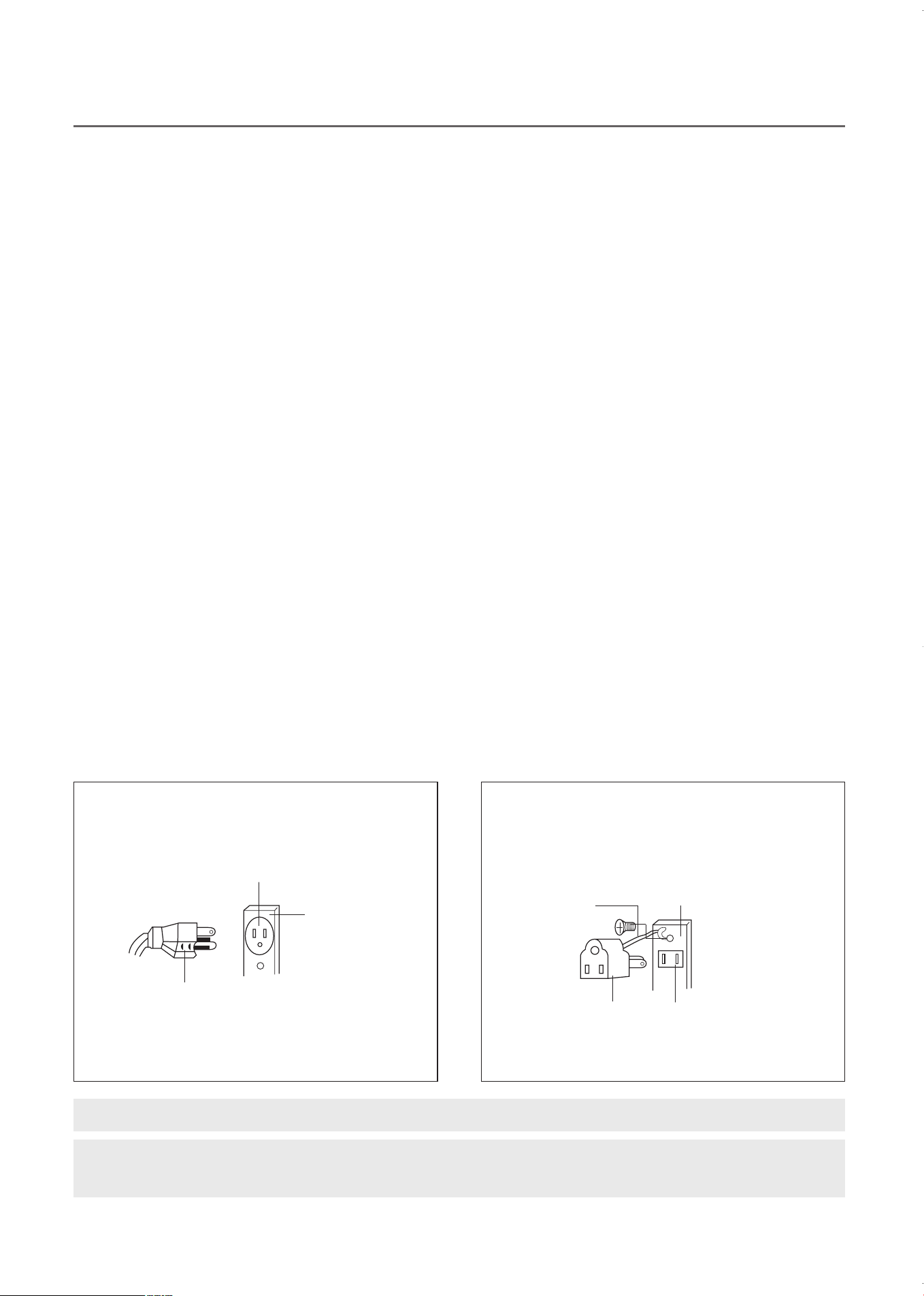
THE CANADIAN ELECTRICAL CODE DOES NOT ALLOW THE USE OF THE GROUNDING ADAPTOR.
WARNING:
When the oven door is open,
Do NOT place anything, or put any weight on it. The weight may cause the
oven to fall over. ALWAYS CLOSE THE OVEN DOOR WHEN NOT IN USE.
When using 3-pronged plug
3-prong Receptacle
Receptacle
Box cover
3-prong plug
When using grounding adaptor, make sure
the receptacle box is fully grounded.
Receptacle Box Cover
Receptacle
Grounding
Lead
Grounding
Adaptor
KOC-1C4K5AV0_REV_110214:KOC-1C4K5AV0_(㦖_㦖㦖㦖) 2011-02-28 㦖㦖 1:56 Page 3

This appliance must be grounded. In the event of an electrical short circuit, the grounding plug reduces the risk of
electric shock by providing an escape wire for electric current. This appliance is equipped with a cord having
agrounding wire with a grounding plug. The plug must be plugged into an outlet that is properly installed and
grounded.
WARNING:
Improper use of the grounding can result in a risk of electric shock.
Consult a qualified electrician or serviceman if the grounding instructions are not completely understood, or if
doubt exists as to whether the appliance is properly grounded, and either :
(1) If it is necessary to use an extension cord, use only a 3-wire extension cord that has a 3-blade grounding
plug, and a 3-slot receptacle that will accept the plug on the appliance. The marked rating of the extension
cord shall be equal to or greater than the electrical rating of the appliance.
or
(2) Do not use an extension cord, if the power supply cord is too short, have a qualified electrician or serviceman
install an outlet near the appliance.
WARNING:
Do not cut or remove the third (ground) prong from the power cord under any circumstances.
FEDERAL COMMUNICATIONS COMMISSION
RADIO FREQUENCY INTERFERENCE STATEMENT
WARNING:
This equipment generates and uses ISM frequency energy and if not installed and used properly, that is in
strict accordance with the manufacturer's instructions, may cause interference to radio and television
reception.
It has been type-tested and found to comply with limits for an ISM Equipment pursuant to part 18 of FCC
Rules, which are designed to provide reasonable protection against such interference in a residential
installation.
However, there is no guarantee that interference will not occur in a particular installation.
If this equipment does cause interference to radio or television reception, which can be determined by turning
the equipment off and on, the user is encouraged to try to correct the interference by one or more of the
followings.
• Reorient the receiving antenna of radio or television.
• Relocate the Microwave oven with respect to the receiver.
• Move the microwave oven away from the receiver.
• Plug the microwave oven into a different outlet so that microwave oven and receiver are on different
branch circuits.
THE MANUFACTURER is not responsible for any radio or TV interference caused by
UNAUTHORIZED MODIFICATION to this microwave oven. It is the responsibility of the user to correct such
interference.
PRIOR TO USE
In order to protect your oven during transportation and storage, the grill element is covered with a protective
coating.
To remove this coating the grill element must be heated for 5 minutes.
This procedure will produce unpleasant odors as the protective coating on the element disappears.
4
GROUNDING INSTRUCTIONS
KOC-1C4K5AV0_REV_110214:KOC-1C4K5AV0_(㦖_㦖㦖㦖) 2011-02-28 㦖㦖 1:56 Page 4

11. Do not use the oven for any reason other than food
preparation, such as for drying clothes, paper, or
any other nonfood items or for sterilizing purposes.
They may catch on fire.
12. Do not use the oven when empty, this could
damage the oven.
13. Do not use the oven cavity for any type of storage,
such as papers, cookbook, cookware, etc.
14. Do not operate the oven without the metal tray in
place. Be sure it is properly sitting on the rotating
base.
15. Be caution when removing the metal tray after
cooking meats that may have caused an
accumulation of grease in the tray.
16. Unlike microwave-only ovens, this oven may
become hot on the cabinet and oven door.
Always use hot pads or oven mitts when placing or
removing food and/or accessories from the oven.
Be cautions about touching parts other then control
panel during or immediately following grill or
combination cooking.
17. If the oven is hot from combination cooking, do not
use plastic or Styrofoam cookware for microwave
cooking.
They may melt.
18. Do not use recycled paper products for cooking.
They may contain impurities which could cause
sparks and/or fires when used during cooking.
19. Do not continue to cook with metal utensils if
sparking appears. See “Accessories” section on
page 8 for proper use of cookware.
10. Do not leave the oven unattended during short
cooking times. Overcooking and fire may result.
11. Do not cook any food surrounded by a membrane,
such as egg yolks, potatoes, chicken livers, etc.,
without first piercing them several times with a fork.
12. Do not pop popcorn unless popped in a microwave
approved popcorn popper or unless it's
commercially packaged and recommended
especially for microwave ovens. Microwave popped
corn produces a lower yield than conventional
popping; there will be a number of unpopped
kernels. Do not use oil unless specified by the
manufacturer.
13. Do not attempt to operate this appliance with the
door open.
14. Do not attempt to remove covers, panels, etc.
15. Look at the oven from time to time when food is
heated or cooked in disposable containers of
plastic, paper or other combustible materials.
16. If smoke is observed, switch off or unplug the
appliance and keep the door closed in order to
stifle any flames.
17. Microwave heating of beverages can result in
delayed eruptive boiling, therefore care has to be
taken when handling the container.
18. Make sure you remove caps or lids prior to cooking
when you cook food sealed in bottles.
19. Do not put foreign material between the oven
surface and door. It could result in excessive
leakage of microwave energy.
20. When heating food in plastic or paper containers,
keep an eye on the oven due to the possibility of
ignition.
21. Always test the temperature of food or drink which
has been heated in a microwave oven before you
give it to somebody, especially to children or elderly
people. This is important because things which
have been heated in a microwave oven carry on
getting hotter even though the microwave oven
cooking has stopped.
22. Eggs in their shell and whole hard-boiled eggs
should not be heated in microwave ovens since
they may explode, even after microwave heating
has ended;
23. Keep the waveguide cover clean at all times. Wipe
the oven interior with a soft damp cloth after each
use. If you leave grease or fat anywhere in the
cavity it may overheat, smoke or even catch fire
when next using the oven.
24. Never heat oil or fat for deep frying as you cannot
control the temperature and doing so may lead to
overheating and fire.
25. During use the appliance becomes hot. Care
should be taken to avoid touching heating elements
inside the oven.
Listed below are, as with all appliances, certain rules to follow and safeguards to assure top
performance from this oven:
GENERAL USE
5
KOC-1C4K5AV0_REV_110214:KOC-1C4K5AV0_(㦖_㦖㦖㦖) 2011-02-28 㦖㦖 1:56 Page 5
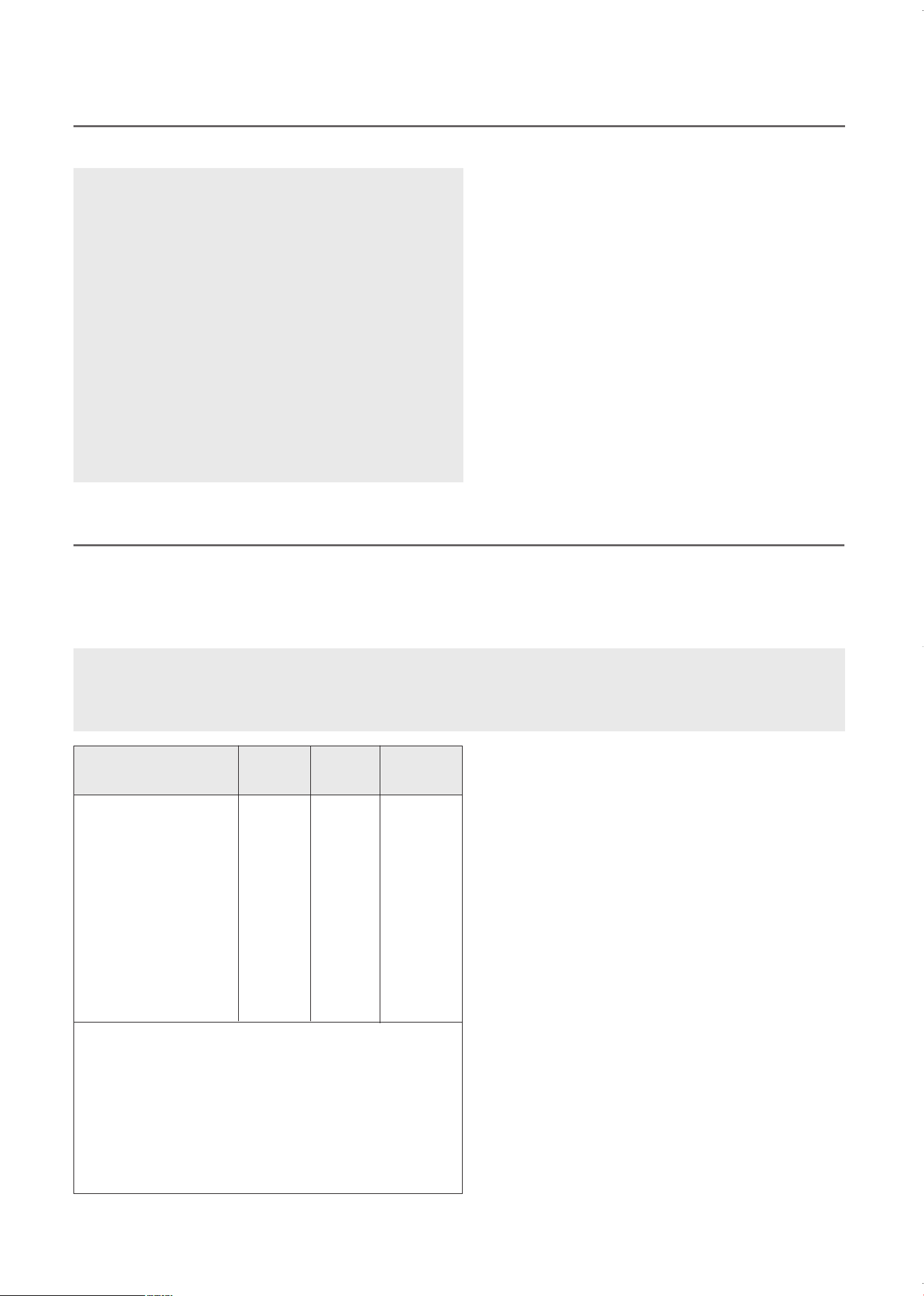
MICROWAVE UTENSIL GUIDE
Utensils and cooking containers designed for microwave use are made of materials that do not act as a barrier to microwave
energy. Generally this means that you should cook in either paper, plastic, glass or ceramic. Metal pans reflect microwave energy
and inhibit cooking, and should not be used. In addition to material, the shape of the container should also be considered. Round
oval shapes give the most even cooking. Square or rectangular containers may overcook foods in the corners because more
energy is absorbed there. Shallow containers offer more even cooking results.
Utensils made of china and ceramic are excellent for use in
your microwave oven. Most types of glass are also
acceptable.
Lead crystal glass can crack and should not be used.
Plastics and paper can also be used, provided they can
withstand the temperature of the heated food. For cooking
only use plastics which will withstand a temperature of over
250˚F, e.g. polypropylene and polyamide. Some plastic
materials, e.g. melamine, will be heated by the microwave,
and be damaged. To find out if a certain container is
suitable, the following simple test can be made:
Place the empty container and a glass of water inside the
microwave oven. The water is needed because the oven
must not be operated empty or with empty containers only.
Run the microwave on full power for one minute. A suitable
container will only be lukewarm.
Metal containers like saucepans or frying pans should not be
used in microwave ovens. Plates or vessels with decorations
should not be used, since metal e.g. gold, might be part of
the decoration and will be damaged.
Small pieces of aluminum foil can be used for shielding the
areas that may over-cook (e.g. for covering chicken wings,
leg tips and fish tails) but the foil must not touch the side of
the oven as damage may occur.
6
Glass (general) No Yes (1) No
Glass (heat resistant) Yes Yes Yes
Glass-ceramic and
ceramic (heat resistant) Yes Yes (1) Yes (1)
Earthenware Yes Yes Yes
China (heat resistant) Yes Yes Yes
Plastic (general) No Yes (2) No
Plastic (heat resistant) Yes (2) Yes (2) Yes (2)
Aluminum containers
and aluminum foil Yes Yes (3) Yes
Metal baking tins Yes (4) No Yes (4)
Metal (pots.pans, etc) Yes No No
Paper No Yes No
1. Without metal parts or metal trims.
2. Some plastics are heat-proof only to certain
temperatures. Check carefully!
3. It is possible to use aluminum foil to shield delicate
areas of food to prevent over-cooking.
4. Metal tins can be used in combination cooking modes,
however if the tins are very deep, they will greatly
reduce the efficiency, as metal shields the microwave
energy from the food.
Material
Grill &
Convection
cooking
Microwave
cooking
Combined
cooking
CAUTIONS WHEN MICROWAVING FOOD
TO AVOID EXPLOSION AND SUDDEN BOILING
1
. Eggs
Never cook eggs in their shells. Steam will build up inside
the shell during cooking and the egg will explode.
When cooking or reheating eggs which have not been
broken by scrambling or mixing, always pierce the yolks
as these will also explode. Remove the shell and slice
hard boiled eggs before reheating in the microwave oven.
2. Piercing
Always pierce food which has a skin or membrane, for
example, potatoes, tomatoes, apples, sausage etc. If you
don't pierce them, steam will build up inside and they may
explode.
3. Lids
Always remove the lids of jars and containers and take
away food containers, before you cook using your
microwave oven. If you don't, then steam and pressure
might build up inside and cause an explosion even after
the microwave cooking has stopped.
WARNING
Liquids, such as water, coffee, or tea are liable to overheat
beyond the boiling point without appearing to be boiling due
to surface tension of the liquid. Visible bubbling or boiling
when the container is removed from the microwave oven is
not always present. This could result in very hot liquids
suddenly boiling over when a spoon or other utensil is
inserted into the liquid.
To reduce the risk of injury to persons:
a) Do not overheat the liquid.
b) Stir the liquid both before and halfway through heating it
c) Do not use straight-sided containers with narrow necks.
d) After heating, allow the container to stand in the
microwave oven for a short time before removing the
container.
e) Use extreme care when inserting a spoon or other utensil
into the container.
CAUTION: Only use utensils that are suitable for use in microwave ovens. To avoid discolorization of your
oven, make sure that food, dishes and accessories or coverings do not come in direct contact with any of
the internal walls or the ceiling of the oven cavity.
KOC-1C4K5AV0_REV_110214:KOC-1C4K5AV0_(㦖_㦖㦖㦖) 2011-02-28 㦖㦖 1:56 Page 6
The child lock feature prevents children from accidentally starting or using the oven. It does not lock the door.
To lock or unlock the controls, press and hold the Stop/Cancel button for 3 seconds. While the control panel is
locked, “Loc” will be displayed briefly when any button is pressed.
T
o stop cooking, either open the door or press the Stop/Cancel button. To resume cooking, close the door and press
the Start button.
If you see arcing, press Stop/Cancel button and correct the problem.
Arcing is the microwave term for sparks in the oven. Arcing is caused by:
• Metal or foil touching the side of the oven.
• Foil not molded to food (upturned edges act like antennas).
• Metal, such as twist-ties, poultry pins, or gold rimmed dishes, in the microwave.
• Recycled paper towels containing small metal pieces being used in the microwave.
ARCING
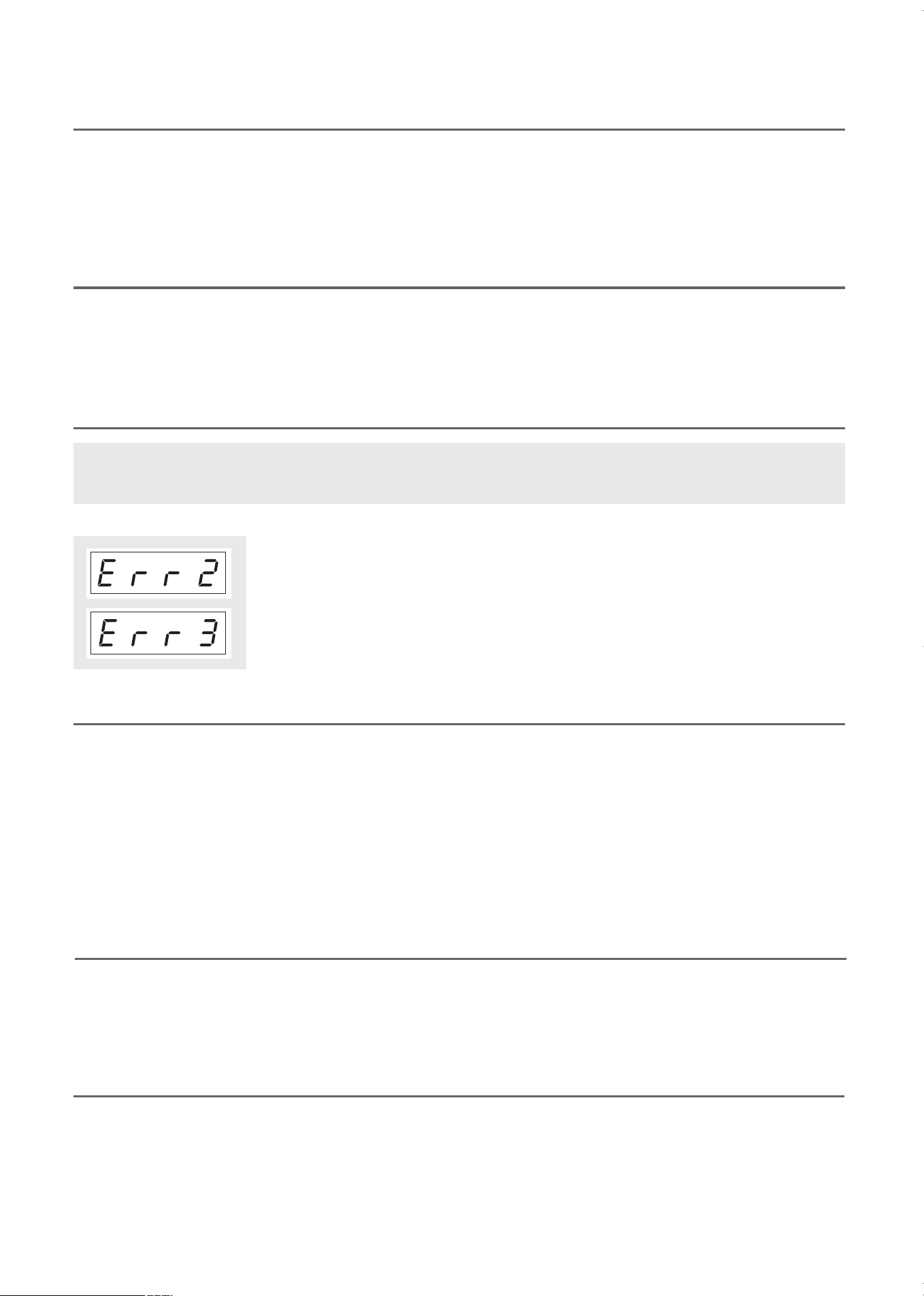
IMPORTANT ERROR MESSAGES
• “Err 2” message is displayed when the inside temperature of the oven is higher
than expected or the temperature sensor doesn't work properly.
• Unplug the power immediately and contact our technical service.
• “Err 3” message is displayed when the temperature sensor is disconnected,
• Unplug the power immediately and contact our technical service.
CHILD SAFETY LOCK
STOP OPERATION
7
Power save mode is designed to save energy by turning the display off when not in use, and will automatically
be activated whenever the oven hasn’t been touched in 10 minutes. The power save mode will be cancelled
when you press a button, turn a dial or open the oven door.
To remind you that you have food in the oven, the oven beep once a minute for 5 minutes and display “End”
until you either open the oven door or press any button.
POWER SAVE MODE
REMINDER
WARNING: If either error messages Err2 or Err3 are displayed, unplug the power immediately and contact
technical service.
KOC-1C4K5AV0_REV_110214:KOC-1C4K5AV0_(㦖_㦖㦖㦖) 2011-02-28 㦖㦖 1:56 Page 7
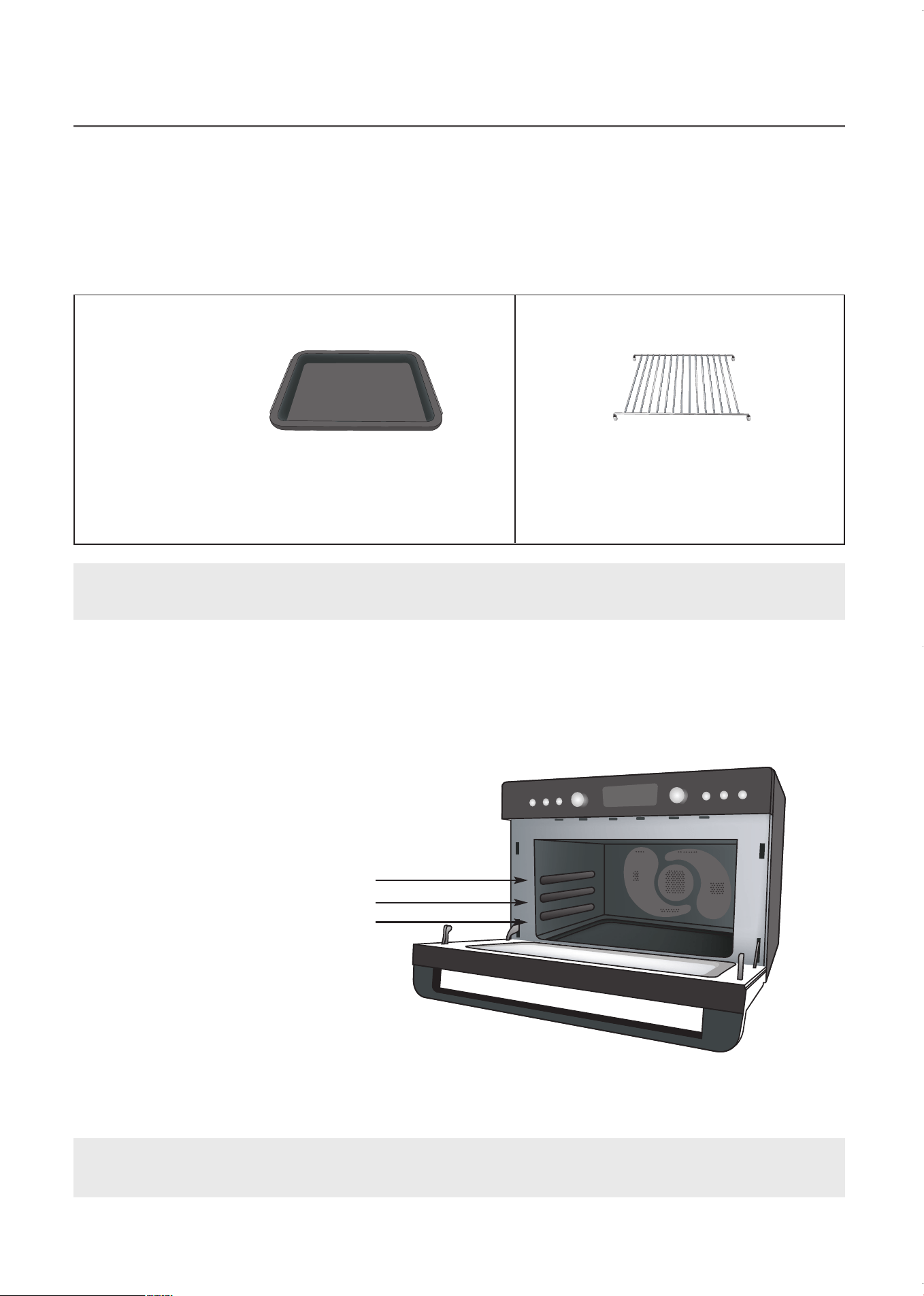
T
his is a commercial grade oven, engineered to spread heat waves without a turntable like most household
microwaves. Instead, like most wall ovens, it has rack holders on the sides. Slide the accessories in either the
lower, middle or upper position.
The metal tray should be used with all the cooking modes. Only the rack position, additional cookware or
accessories will vary.
The grill rack fits inside the metal tray and should be used with the cooking modes and menu items listed
below.
NOTE: The metal tray and grill rack are packed inside the protective foam on the left side of the oven. Make
sure you unpack it when removing the oven from the carton.
ACCESSORIES
8
• Microwave Cook
• Auto Defrost
• Convection Cook
• Steam Clean
• proofing.
• Grill Cook
•
A
ut
o
C
ook
m
enu
i
t
em
s:
3,
5
•
I
nst
ant
C
ook
m
enu
i
t
em
s:
1,
5
•
M
em
or
y
C
ook
• Convection Cook (If necessary)
• Grill Cook (If necessary)
• Auto Cook menu items: 1, 2, 4, 6
• Instant Cook menu items: 2, 3, 4
• Popcorn
When placing the metal tray in the oven make sure the long side of the tray is parallel with the oven door. There
are three shelf positions. Be sure the tray slides into the same position on each side of the oven so it is level.
METAL TRAY
Place food or cookware on tray and slide into either lower,
middle or upper shelf.
GRILL RACK
Always place on the metal tray.
IMPORTANT: Place the metal tray in one of the three shelf positions when cooking. Do NOT place
anything directly on the bottom of the oven when operating.
Upper shelf position
Middle shelf position
Lower shelf position
KOC-1C4K5AV0_REV_110214:KOC-1C4K5AV0_(㦖_㦖㦖㦖) 2011-02-28 㦖㦖 1:56 Page 8
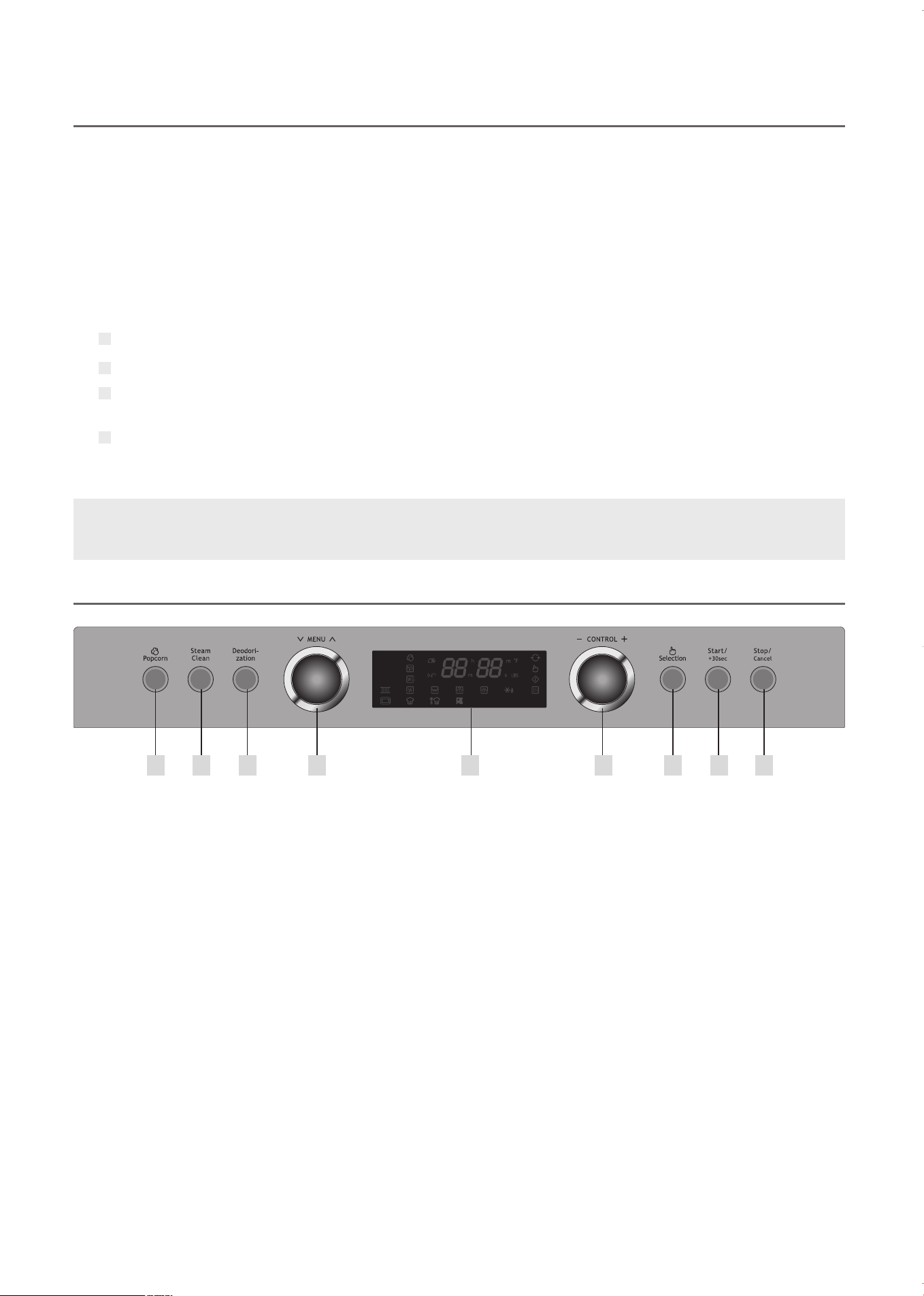
1 Display Window
Displays information such as cooking time, menu,
quantity and temperature.
2 Popcorn Button
Press and set time to pop either 3.0 or 3.5 ounces
of popcorn.
3 Steam Clean Button
With a glass of water inside the oven, press to
steam clean the oven. The process takes 15
minutes.
4 Deodorization Button
Press to begin deodorization, a special function to
remove unpleasant odors after cooking.
5 MENU Dial
Turn to select cooking menus and functions.
6 CONTROL Dial
Turn to enter cooking time, quantity, weight, and
temperature.
7 Selection Button
Press to confirm selection.
8 Start / +30 Sec Button
- Press once to begin Microwave cooking at power
level 10 for 30 seconds. Press again to add 30
seconds. Continue pressing to add up to 5
minutes.
- Press to start cooking after selection is confirmed.
- Press again after selection is confirmed to add 30
seconds to the cooking time, and continue to
press to add up to 5 minutes.
9 Stop/Cancel Button
Press to stop operation or clear settings.
BEFORE OPERATING
CONTROL PANEL
9
2
4
5
1
3
6
8
9
7
BEFORE USING YOUR OVEN FOR THE FIRST TIME:
IMPORTANT: BEFORE OPERATING THE COMPACT MULTI FUNCTION OVEN, READ THIS MANUAL
CAREFULLY AND UNDERSTAND THE INSTRUCTIONS.
Remove any stickers from the surface of the oven.
Open oven door and remove all printed documents and paper from inside the oven.
Clean the grill rack and metal tray with hot water, a small amount of dishwashing liquid and a non-abrasive sponge or
cleaning pad.
Before cooking food in the oven, heat the oven for 10 minutes at 430° (CONVECTION COOK). This will
eliminate the protective coating for the grill element and any manufacturing residue. This process could
result in smoke and unpleasant odors.
The Compact Multi Function Oven combines Microwave Cooking, Convection Baking, Grilling, and
Combination Convection Microwave Cooking to give you a broad range of cooking options. Enjoy a
c
ombination of the speed of a microwave, the quality of convection baking, and the browning of a grill.
T
his manual will help you learn how to use all the cooking modes and special features. A Quick Reference
Guide is included. Keep the guide near your oven for easy reference.
This commercial grade oven includes Voice Guide, a feature which verbally directs you through each step of
operation. When muted, rely on the icons on the display screen as visual guides.
KOC-1C4K5AV0_REV_110214:KOC-1C4K5AV0_(㦖_㦖㦖㦖) 2011-02-28 㦖㦖 1:56 Page 9
1
2
3
4
5
10
DISPLAY WINDOW ICON GUIDE
2
4
5
1
3
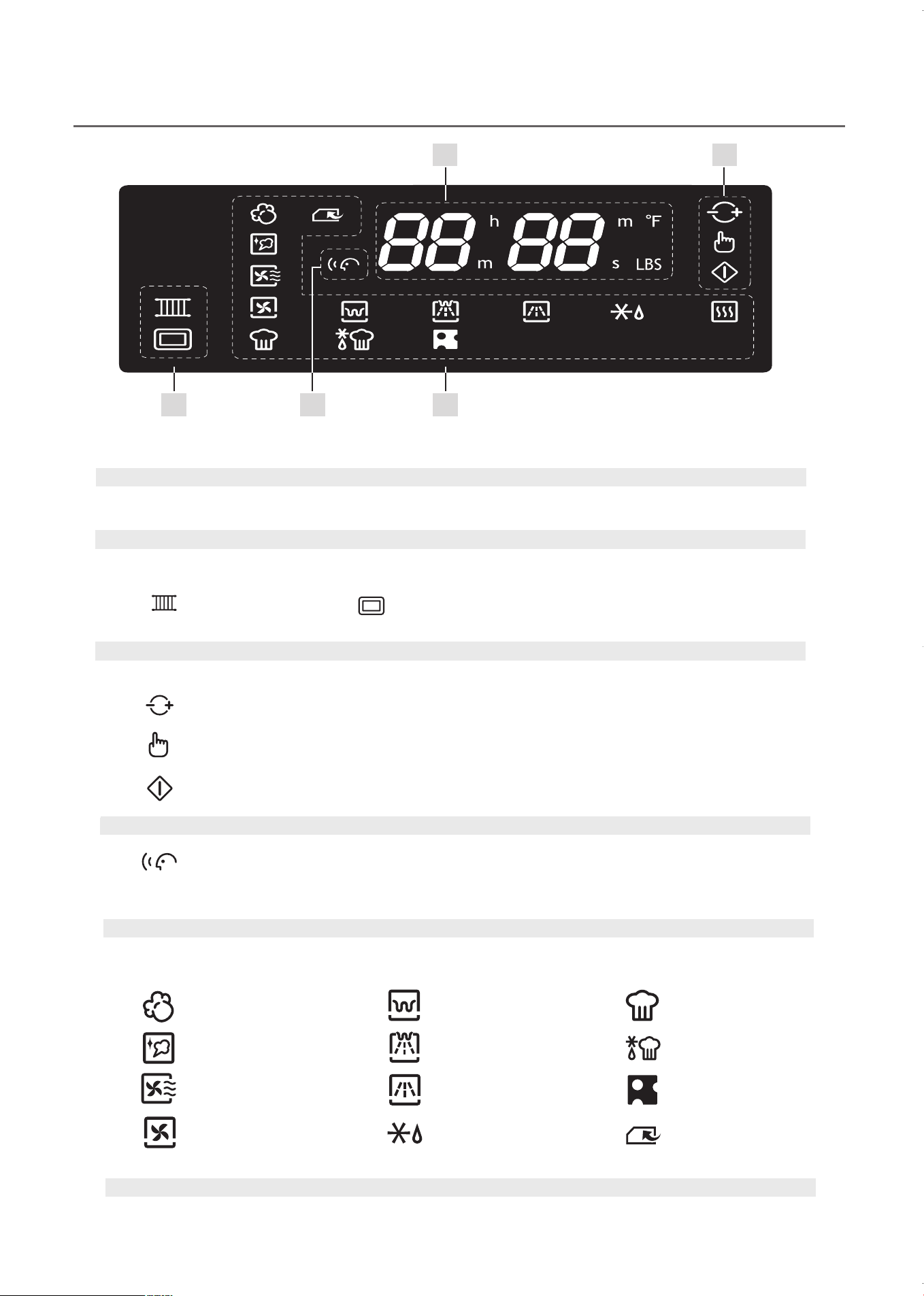
Operating Mode Icons
Icons are lit during operation to indicate the selected cooking or cleaning mode.
Operating Control Icons
Icons blink to indicate which control must be used to continue.
Voice Guide Icon
Metal Tray
CONTROL dial icon blinks when the dial should be adjusted.
Selection button icon blinks when the button should be pressed.
Start button icon blinks when the button should be pressed.
When lit, the icon indicates the Voice Guide function is on and the machine will verbally
guide you through the steps in each function. Volume level may be set from 0 (mute) to 5
(maximum).
Popcorn
Steam Clean
Deodorization
Convection Cook
Grill Cook
Combination Cook
Microwave
Auto Defrost
Auto Cook
Instant Cook
Proofing
Memory Cook
Display Screen
Displays information such as cooking time, menu, quantity and temperature.
Accessory Icons
Icons are lit to indicate the proper cooking accessories for the selected operating mode.
10
Grill Rack
KOC-1C4K5AV0_REV_110214:KOC-1C4K5AV0_(㦖_㦖㦖㦖) 2011-02-28 㦖㦖 1:56 Page 10
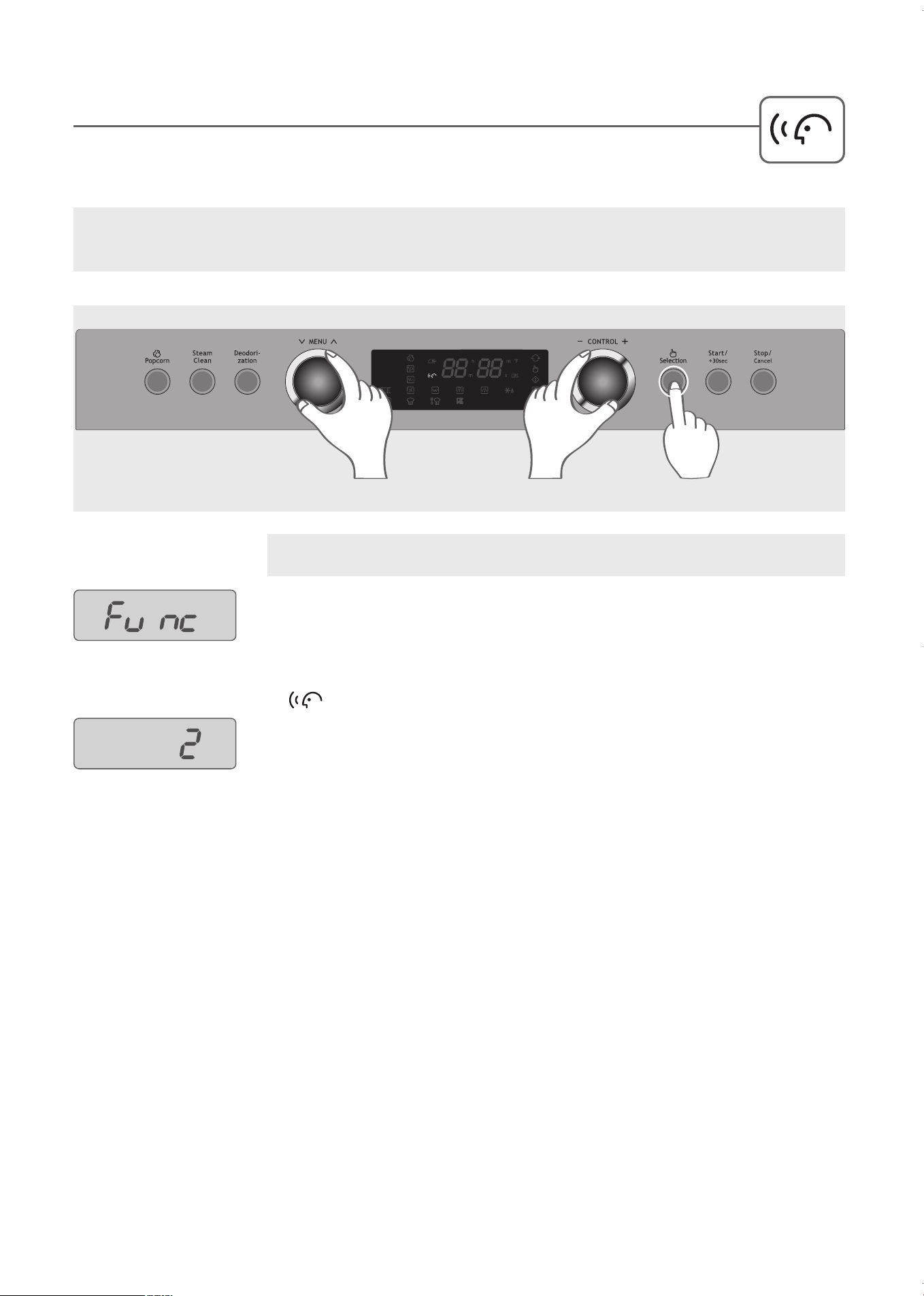
The Voice Guide will verbally guide you through the steps in performing each function.
T
he volume level can be adjusted from 0 to 5. (0= Mute, 1=Whisper, 2=Low, 3=Normal, 4=Loud,
5=Maximum)
1
. Press and hold the Selection button for 3 seconds until “Func” is displayed in the
window.
2
. Turn the MENU dial to select the Voice Guide.
NOTE: The factory default for the Voice Guide volume is set to level 3.
When the Voice Guide is set to level 0, the volume is muted and the icon will not be lit in the display.
SETTING THE VOICE GUIDE VOLUME
Example: Set the Voice Guide volume to level 2.
3
. Turn the CONTROL dial until level 2 is displayed.
4
. Press the Selection button to confirm and set.
The Voice Guide icon is displayed.
STEP
2
STEPS
3
STEPS
1,4
11
KOC-1C4K5AV0_REV_110214:KOC-1C4K5AV0_(㦖_㦖㦖㦖) 2011-02-28 㦖㦖 1:56 Page 11
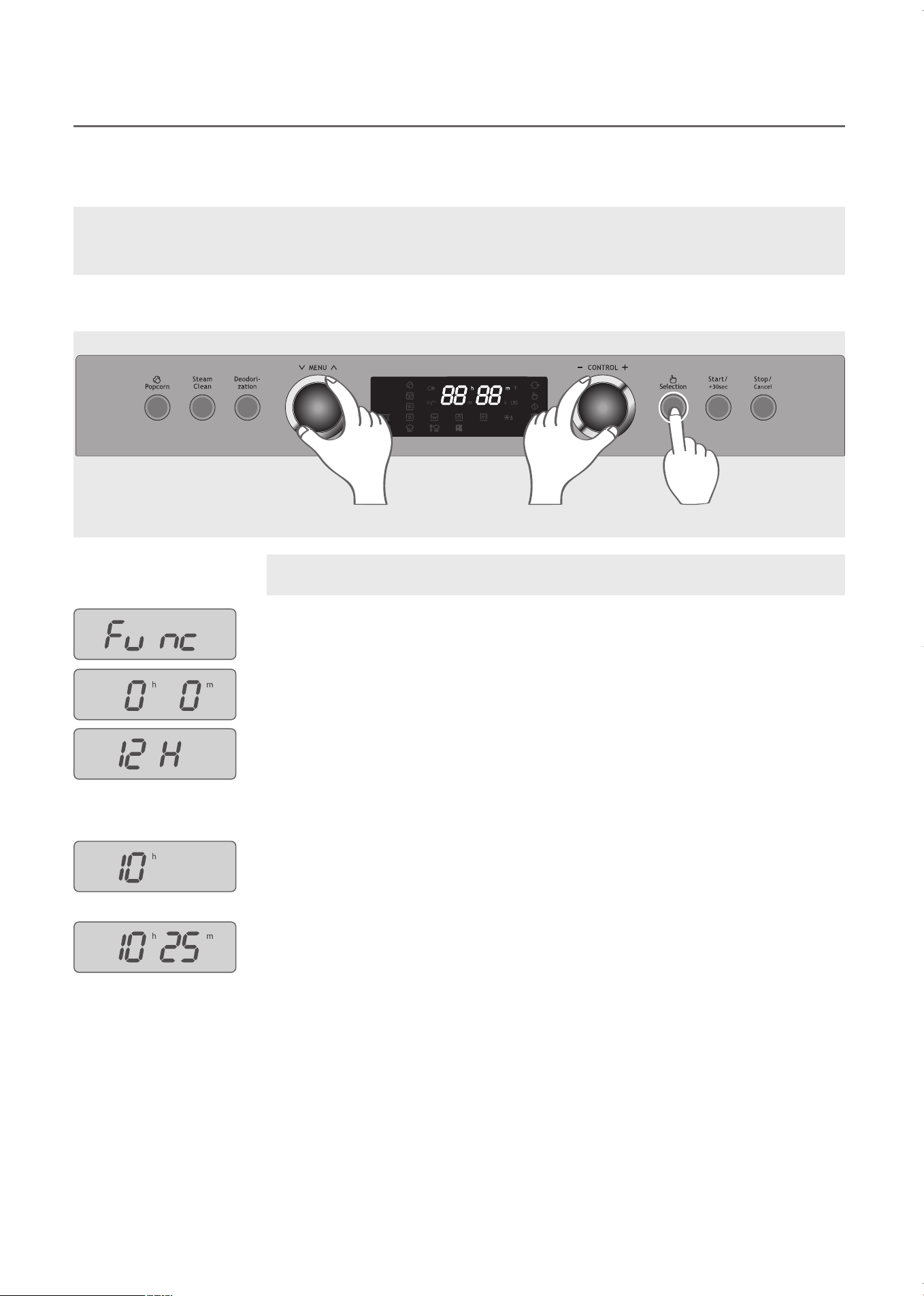
When the oven is first plugged in, the oven will beep and “0” appears in the display. Follow the steps below to
s
et the time using either a 12 hour or 24 hour time format.
1
. Press and hold the Selection button for 3 seconds until “Func” is displayed in the
window.
2
. Turn the MENU dial until “0h 0m” appears in the display.
3
. Turn the CONTROL dial to select time format.
“12H” for 12-hour time format.
“24H” for 24-hour time format.
4
. Press the Selection button.
5
. Turn the CONTROL dial to select current hour.
6
. Press the Selection button.
7
. Turn the CONTROL dial to select current minutes.
8
. Press the Selection button to confirm and set.
SETTING THE CLOCK
12
Example: Set the clock to 10:25.
NOTE: During Power Save mode, the clock will not be displayed. Set the clock from 1:00 to 12:59, when
using the 12 hour time format. Set the clock from 0:00 to 23:59 when using the 24 hour time format,
STEP
2
STEPS
3,5,7
STEPS
1,4,6,8
KOC-1C4K5AV0_REV_110214:KOC-1C4K5AV0_(㦖_㦖㦖㦖) 2011-02-28 㦖㦖 1:56 Page 12
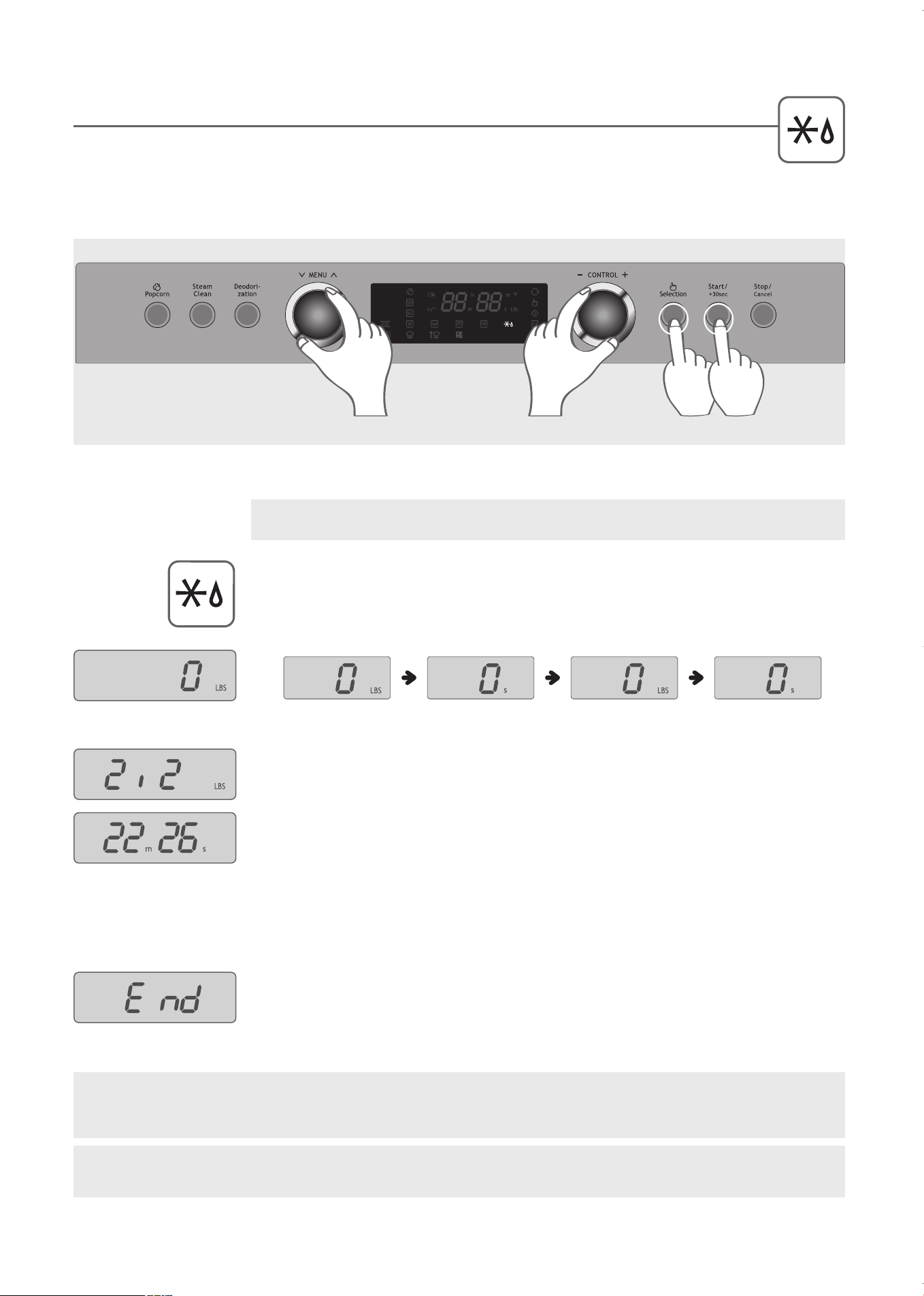
AUTO DEFROST BY WEIGHT
Weight Defrost automatically sets the defrosting times and power levels to give consistant defrosting
r
esults for frozen food. During the defrosting process the oven will beep to remind you to check the
food. When the oven beeps, open the door and turn the frozen food over. Close the door and press the Start
button to resume defrosting.
1
. Turn the MENU dial to select AUTO DEFROST, indicated by the AUTO DEFROST
icon.
2
. Turn the CONTROL dial to set “0 LBS” in display.
3
. Press the Selection button.
4
. Turn the CONTROL dial to enter the weight. You can enter food weight from 0.5 lb
to 6.5 lb.
5
. Press the Start button. The defrosting time is automatically determined by the
weight.
6
. When the oven beeps, open the door, turn the frozen food over and close the door.
Press the Start button again.
7
. When defrosting is complete, the oven will beep and display “End”.
Example: Set AUTO DEFROST to 2.2 lbs.
13
STEP
1
STEPS
2,4
STEP
3
STEP
5
13
WARNING: The oven cabinet, cavity, door, racks and dishes will become hot. To PREVENT BURNS,
always use thermal oven gloves while handling and removing food or accessories from the oven.
IMPORTANT: Place the metal tray on the lower shelf when defrosting. Do NOT place anything directly on
bottom of oven during operation.
KOC-1C4K5AV0_REV_110214:KOC-1C4K5AV0_(㦖_㦖㦖㦖) 2011-02-28 㦖㦖 1:56 Page 13
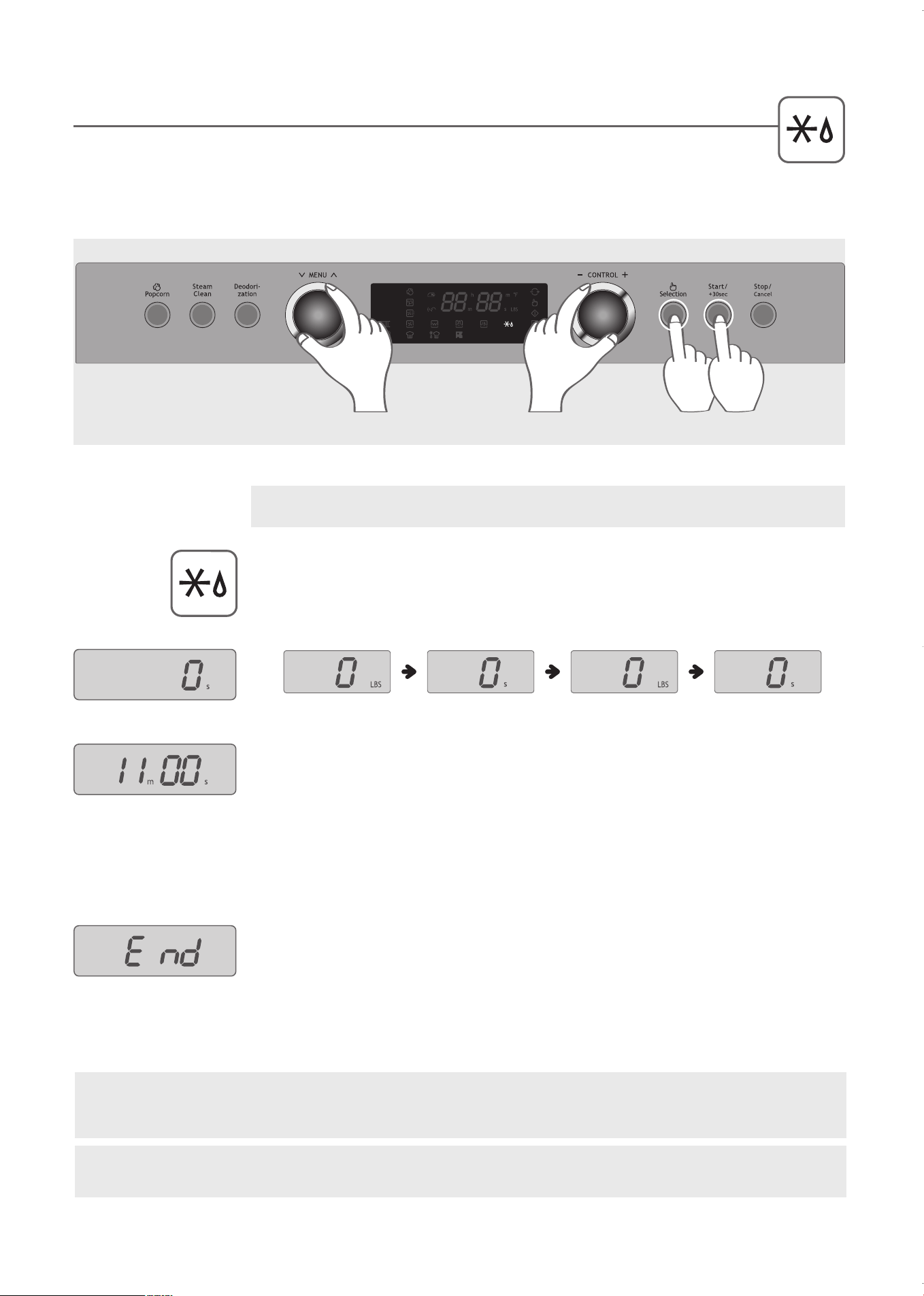
AUTO DEFROST BY TIME
During the defrosting process the oven will beep to remind you to check the food. When the oven
b
eeps, open the door and turn the frozen food over. Close the door and press the Start button to
resume defrosting.
1
. Turn the MENU dial to select AUTO DEFROST, indicated by the AUTO
DEFROST icon.
2
. Turn the CONTROL dial to set “0 s” in display.
3
. Press the Selection button.
4
. Turn the CONTROL dial to enter the defrosting time. You can enter up to 60
minutes.
5
. Press the Start button.
6
. When the oven beeps, open the door, turn the frozen food over and close the door.
Press the Start button again.
7
. When defrosting is complete, the oven will beep and display “End”.
Example: Set AUTO DEFROST to 11 minutes.
STEP
1
STEPS
2,4
STEP
3
STEP
5
14
WARNING: The oven cabinet, cavity, door, racks and dishes will become hot. To PREVENT BURNS,
always use thermal oven gloves while handling and removing food or accessories from the oven.
IMPORTANT: Place the metal tray on the lower shelf when defrosting. Do NOT place anything directly on
bottom of oven during operation.
KOC-1C4K5AV0_REV_110214:KOC-1C4K5AV0_(㦖_㦖㦖㦖) 2011-02-28 㦖㦖 1:56 Page 14
15
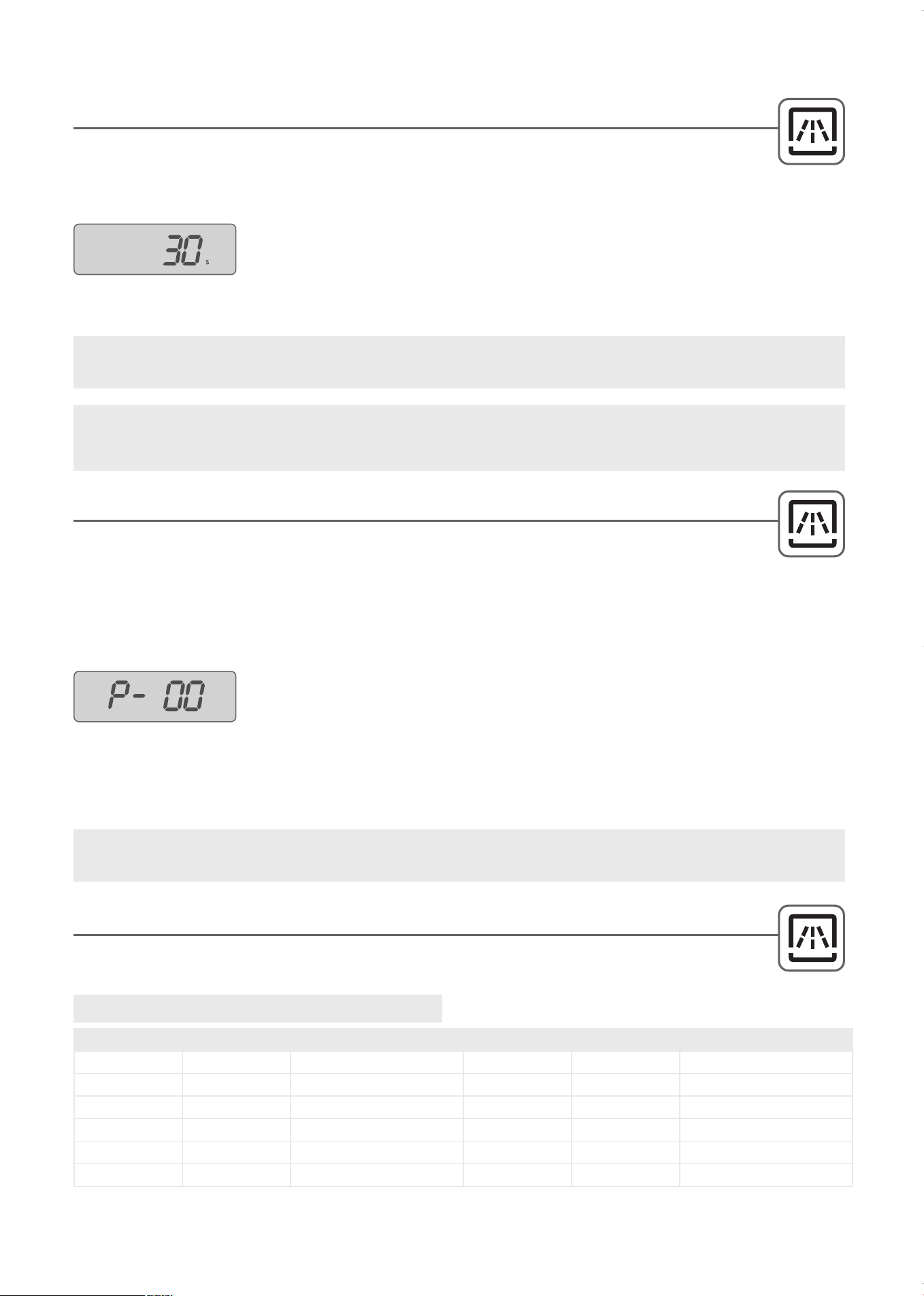
EXPRESS COOK
This function allows you to cook immediately at full microwave power. Press the Start button once to
cook for 30 seconds. Press the start button again to add another 30 seconds. Continue to press the
Start button to reach up to 5 minutes.
WARNING: The oven cabinet, cavity, door, racks and dishes will become hot. To PREVENT BURNS,
always use thermal oven gloves while handling and removing food or accessories from the oven.
IMPORTANT: Place the metal tray on the lower shelf when using microwave. Do NOT place anything
directly on bottom of oven during operation.
1. Press the Start button. The oven will start immediately and display “30s”.
Press the start button again to add another 30 seconds. Continue to press
the Start button to reach up to 5 minutes.
MANUAL COOLING FAN
The oven will automatically cool after any function that raises the oven temperature is paused or
complete. The convection fan with the blower motor will run between 2 to 5 minutes. However, if at
any point the temperature in the oven is too high and you would like to cool it down immediately, follow the
steps below to manual cool for 5 minutes.
1
. Turn the MENU dial to select MICROWAVE COOK, indicated by the
MICROWAVE COOK icon.
2
. Turn the CONTROL dial to select P-00 power level for COOLING FAN.
3
. Press the Selection button.
4
. Turn the CONTROL dial to enter a cooking time of 5 minutes.
5
. Press the Start button.
6
.
When cooling is complete, the oven will beep and display “End”.
Microwave Power Level Chart
IMPORTANT: Place the metal tray on the lower shelf when using microwave. Do NOT place anything
directly on bottom of oven during operation.
MICROWAVE POWER LEVEL CHART
Refer to the Microwave Power Level Chart below when selecting the power level for manual
microwave cooking, defrosting or cooling modes.
Power Level
Percentage Output
Power Level
Percentage Output
P-HI 100% 800W (High) P-40 40% 320W
P-90 90% 720W P-30 30% 240W (Defrost)
P-80 80% 640W P-20 20% 160W
P-70 70% 560W (Medium High) P-10 10% 80W (Low)
P-60 60% 480W P-00 0% 0W (Cooling Fan)
P-50 50% 400W (Medium)
KOC-1C4K5AV0_REV_110214:KOC-1C4K5AV0_(㦖_㦖㦖㦖) 2011-02-28 㦖㦖 1:56 Page 15
STEP
1
STEPS
2,4
STEP
3
STEP
5
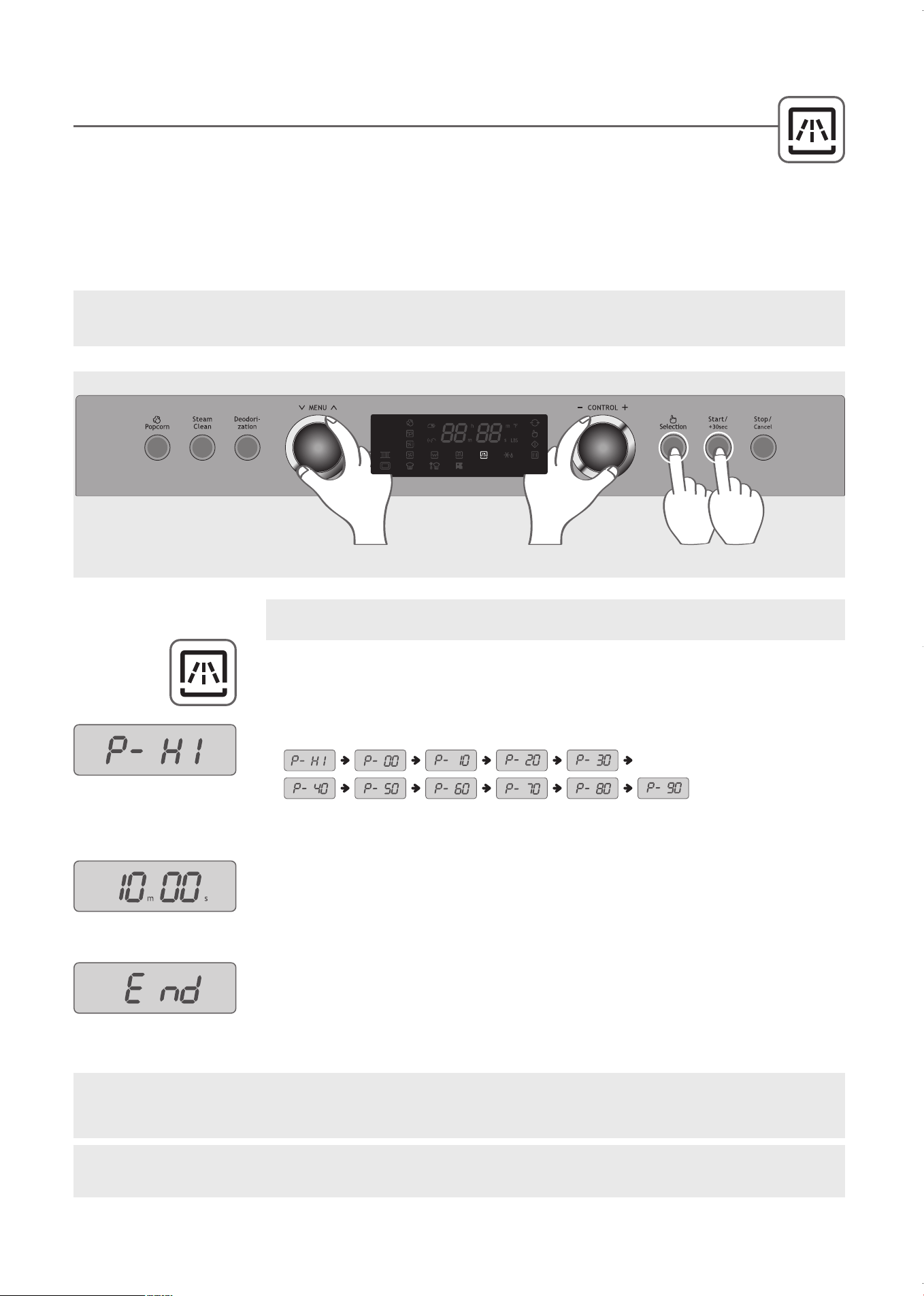
MICROWAVE COOK
This function allows you to microwave cook for up to one hour at one of eleven power levels. A higher power
level will cook the food more quickly but food may need more frequent stirring, rotating or turning over. A lower
power level will cook food more evenly with less stirring or rotating.
If the oven is still warm after using grill cook, convection cook, or combination cook, let it cool down before beginning
microwave cooking. Never operate the microwave oven without food or liquids inside to absorb the microwave energy. It
may cause fire.
1
. Turn the MENU dial to select MICROWAVE COOK, indicated by the
MICROWAVE COOK icon.
2
. Turn the CONTROL dial to select the desired power level.
3
. Press the Selection button.
4
. Turn the CONTROL dial to enter the cooking time up to 60 minutes.
5
. Press the Start button.
6
. When cooking is complete, the oven will beep and display “End”.
16
Example: Set MICROWAVE COOK to maximum (P-HI) power for 10 minutes.
WARNING: The oven cabinet, cavity, door, racks and dishes will become hot. To PREVENT BURNS,
always use thermal oven gloves while handling and removing food or accessories from the oven.
IMPORTANT: Place the metal tray on the lower shelf when using microwave. Do NOT place anything
directly on bottom of oven during operation.
NOTE: T
o stop cooking, either open the door or press the Stop/Cancel button. To resume cooking, close the
door and press the Start button.
KOC-1C4K5AV0_REV_110214:KOC-1C4K5AV0_(㦖_㦖㦖㦖) 2011-02-28 㦖㦖 1:56 Page 16
1
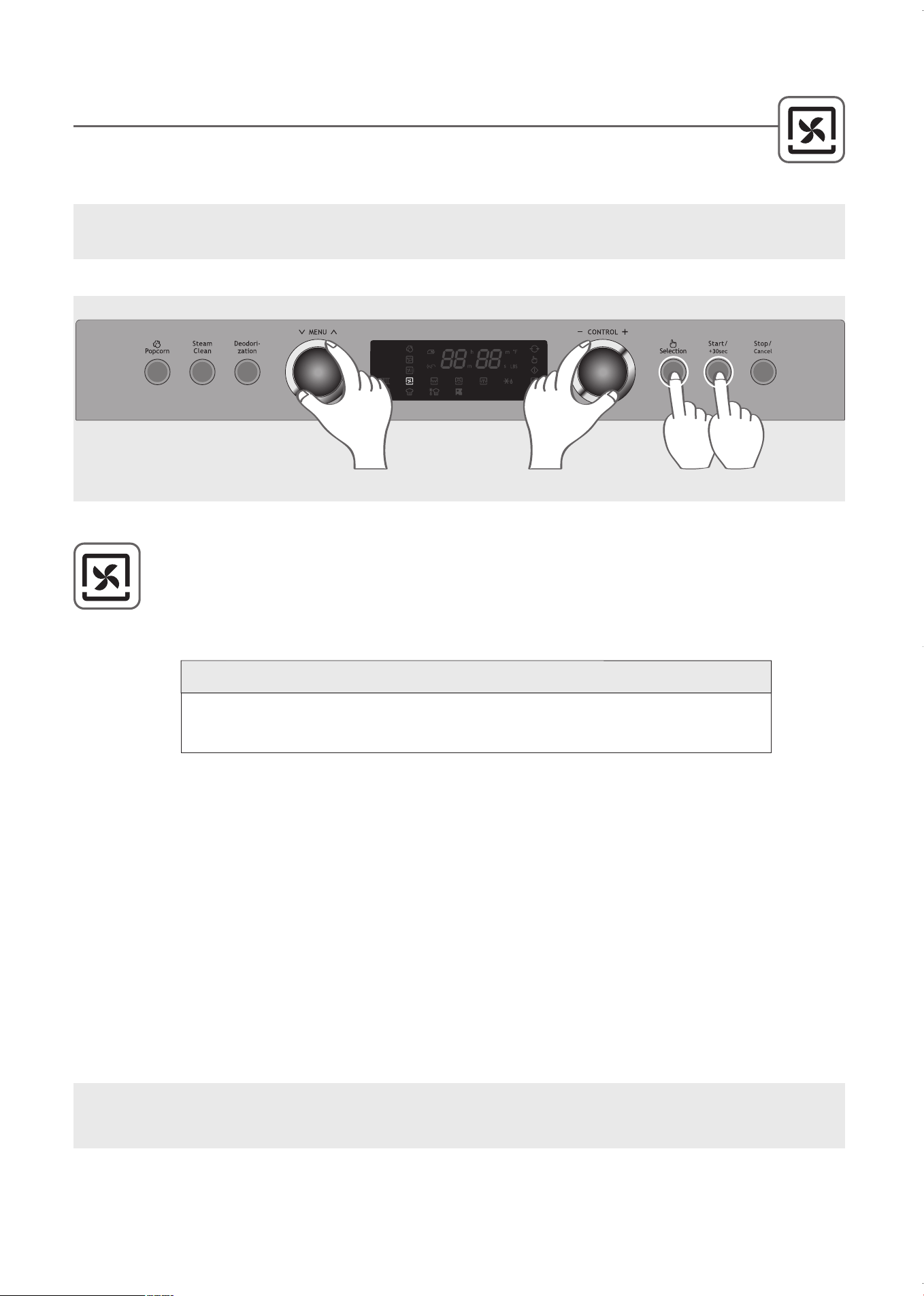
. Turn the MENU dial to select CONVECTION COOK, indicated by the icon.
2
. Turn the CONTROL dial to select the temperature. The sequence begins at 355˚F, the most
frequently used temperature. Turn the dial right or left to select desired temperature.
3
. Press the Selection button.
4
. Turn the CONTROL dial to enter a cooking time of up to 2 hours.
5
. Press the Start button.
6
. When cooking is complete, the oven will beep and display “End”.
During convection heating, hot air is circulated throughout the oven cavity to brown and crisp foods
q
uickly and evenly. This oven can be programmed for thirteen different convection temperatures for
up to two hours.
NOTE:
The cooling fan will run after cooking. The display alternates between “Cool” and “0” or “current
time” while the cooling fan is operating.
COOK WITH CONVECTION
17
WARNING: The oven cabinet, cavity, door, racks and dishes will become hot. To PREVENT BURNS,
always use thermal oven gloves while handling and removing food or accessories from the oven.
2
1
0
˚
F
↔
2
3
0
˚
F
↔
2
5
0
˚
F
↔
2
6
5
˚
F
↔
2
8
5
˚
F
↔
3
0
0
˚
F
↔
3
2
0
˚
F
↔
3
4
0
˚
F
↔
3
5
5
˚
F
↔
3
7
5
˚
F
↔
3
9
0
˚
F
↔
4
1
0
˚
F
↔
4
3
0
˚
F
T
e
m
p
e
r
a
t
u
r
e
S
e
q
u
e
n
c
e
STEP
1
STEPS
2,4
STEP
3
STEP
5
KOC-1C4K5AV0_REV_110214:KOC-1C4K5AV0_(㦖_㦖㦖㦖) 2011-02-28 㦖㦖 1:56 Page 17
1
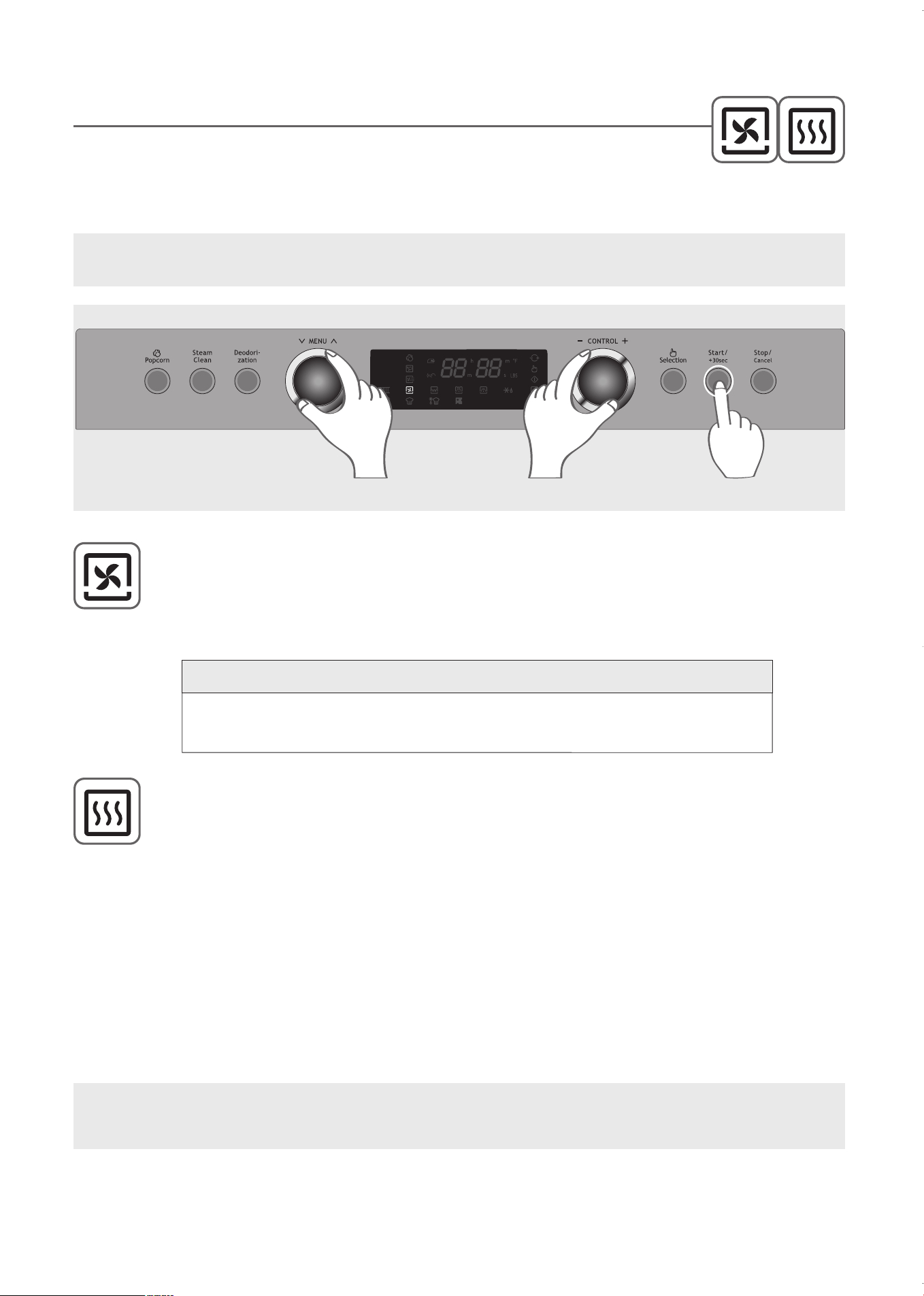
. Turn the MENU dial to select CONVECTION COOK, indicated by the CONVECTION COOK
icon.
2
. Turn the CONTROL dial to select the temperature. The sequence begins at 355˚F, the most
frequently used temperature. Turn the dial right or left to select desired temperature.
3
. Press the Start button. The oven will begin preheating, indicated by the preheat icon flashing
and the temperature displayed.
4
. The oven beeps and the temperature flashes in the display when the selected temperature is
reached. Open the door and place your food in the oven.
5
. Turn the CONTROL dial to enter the cooking time of up to 2 hours.
6
. Press the Start button.
7
. When cooking is complete, the oven will beep and display “End”.
Preheating the oven before placing food inside is recommended for many recipes.
I
f the cooking is not started immediately after preheating, the preheat icon will continue to
flash and the preheated oven temperature will be displayed.
The temperature is maintained for 15 minutes and then automatically switched off.
PREHEAT AND COOK USING CONVECTION
NOTE:
The cooling fan will run after cooking. The display alternates between “Cool” and “0” or “current
time” while the cooling fan is operating.
18
WARNING: The oven cabinet, cavity, door, racks and dishes will become hot. To PREVENT BURNS,
always use thermal oven gloves while handling and removing food or accessories from the oven.
2
1
0
˚
F
↔
2
3
0
˚
F
↔
2
5
0
˚
F
↔
2
6
5
˚
F
↔
2
8
5
˚
F
↔
3
0
0
˚
F
↔
3
2
0
˚
F
↔
3
4
0
˚
F
↔
3
5
5
˚
F
↔
3
7
5
˚
F
↔
3
9
0
˚
F
↔
4
1
0
˚
F
↔
4
3
0
˚
F
T
e
m
p
e
r
a
t
u
r
e
S
e
q
u
e
n
c
e
STEP
1
STEPS
2,5
STEPS
3,6
KOC-1C4K5AV0_REV_110214:KOC-1C4K5AV0_(㦖_㦖㦖㦖) 2011-02-28 㦖㦖 1:57 Page 18
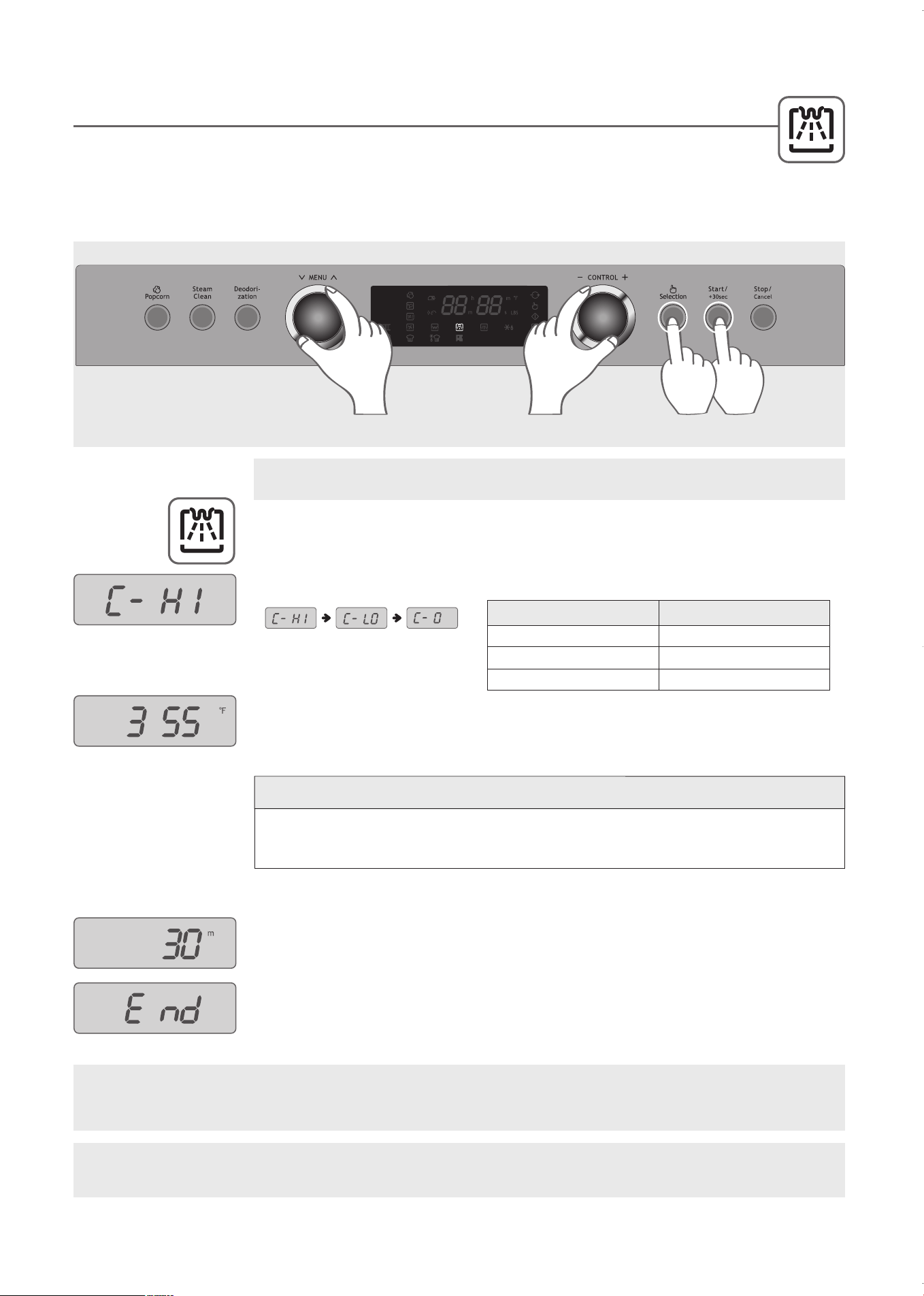
1
. Turn the MENU dial to adjust to COMBINATION COOK, indicated by the
COMBINATION COOK icon.
2
. Turn the CONTROL dial to desired Combination power level.
3
. Press the Selection button.
4
. Turn the CONTROL dial to select the temperature. The sequence begins at 355˚F,
the most frequently used temperature. Turn the dial right or left to select desired
temperature.
5
. Press the Selection button.
6
. Turn the CONTROL dial to enter the cooking time of up to one hour.
7
. Press the Start button.
8
. When cooking is complete, the oven will beep and display “End”.
This function allows you to combine Convection cooking with Microwave cooking to produce
traditional baked or roasted results in less time. Always use microwave-safe and oven-proof
cookware.
Glass or ceramic dishes are ideal as they allow the microwaves to penetrate the food evenly.
COMBINATION COOK
19
C-HI 50%
C-LO 30%
C-0 40%
DISPLAY Microwave Power
Example: set COMBINATION COOK to 50% (C-HI) power at 355˚F for 30 minutes.
STEP
1
STEP
2,4,6
STEP
7
STEP
3,5
WARNING: The oven cabinet, cavity, door, racks and dishes will become hot. To PREVENT BURNS,
always use thermal oven gloves while handling and removing food or accessories from the oven.
IMPORTANT: Place the metal tray on the lower shelf when using microwave. Do NOT place anything
directly on bottom of oven during operation.
2
1
0
˚
F
↔
2
3
0
˚
F
↔
2
5
0
˚
F
↔
2
6
5
˚
F
↔
2
8
5
˚
F
↔
3
0
0
˚
F
↔
3
2
0
˚
F
↔
3
4
0
˚
F
↔
3
5
5
˚
F
↔
3
7
5
˚
F
↔
3
9
0
˚
F
↔
4
1
0
˚
F
↔
4
3
0
˚
F
T
e
m
p
e
r
a
t
u
r
e
S
e
q
u
e
n
c
e
KOC-1C4K5AV0_REV_110214:KOC-1C4K5AV0_(㦖_㦖㦖㦖) 2011-02-28 㦖㦖 1:57 Page 19
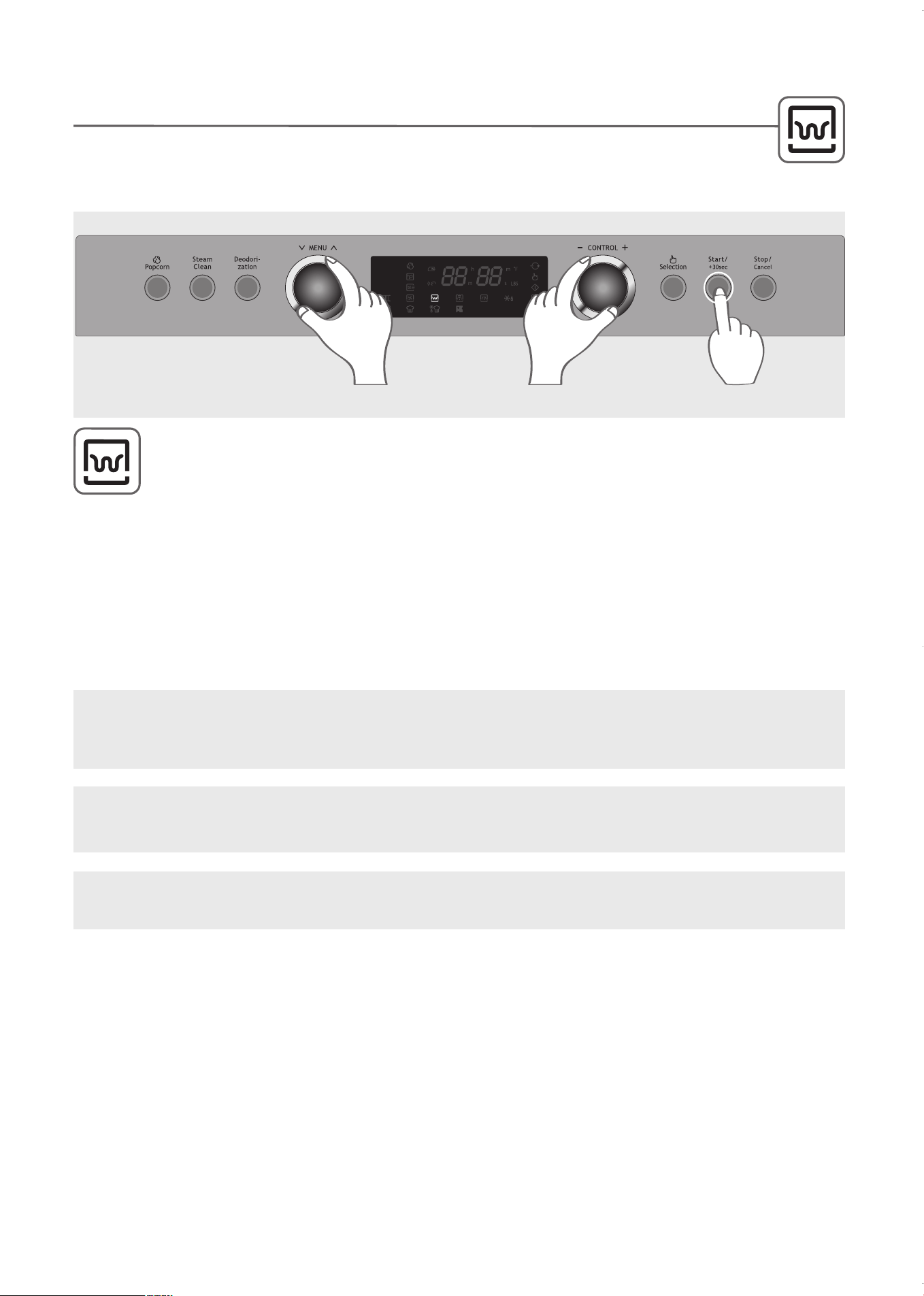
Grill Cook enables you to heat and brown food quickly without using microwave energy.
1
. Turn the MENU dial to select GRILL COOK, indicated by the GRILL COOK icon.
2
. Turn the CONTROL dial to enter the cooking time of up to 1 hour 30 minutes.
3
. Press the Start button.
4
. When cooking is complete, the oven will beep and display “End”.
GRI
LL C
OOK
20
NOTE:
The cooling fan will run after grilling. The display alternates between “Cool” and “0” or “current
time” while the cooling fan is operating.
STEP
1
STEPS
2
STEP
3
WARNING: The oven cabinet, cavity, door, racks and dishes will become hot. To PREVENT BURNS,
always use thermal oven gloves while handling and removing food or accessories from the oven.
IMPORTANT: Place the metal tray on the upper shelf when grilling. If necessary, place the grill rack on the
metal tray.
Placing food on the grill rack on the metal tray helps brown the food.
Do NOT place anything directly
on bottom of oven during operation.
KOC-1C4K5AV0_REV_110214:KOC-1C4K5AV0_(㦖_㦖㦖㦖) 2011-02-28 㦖㦖 1:57 Page 20
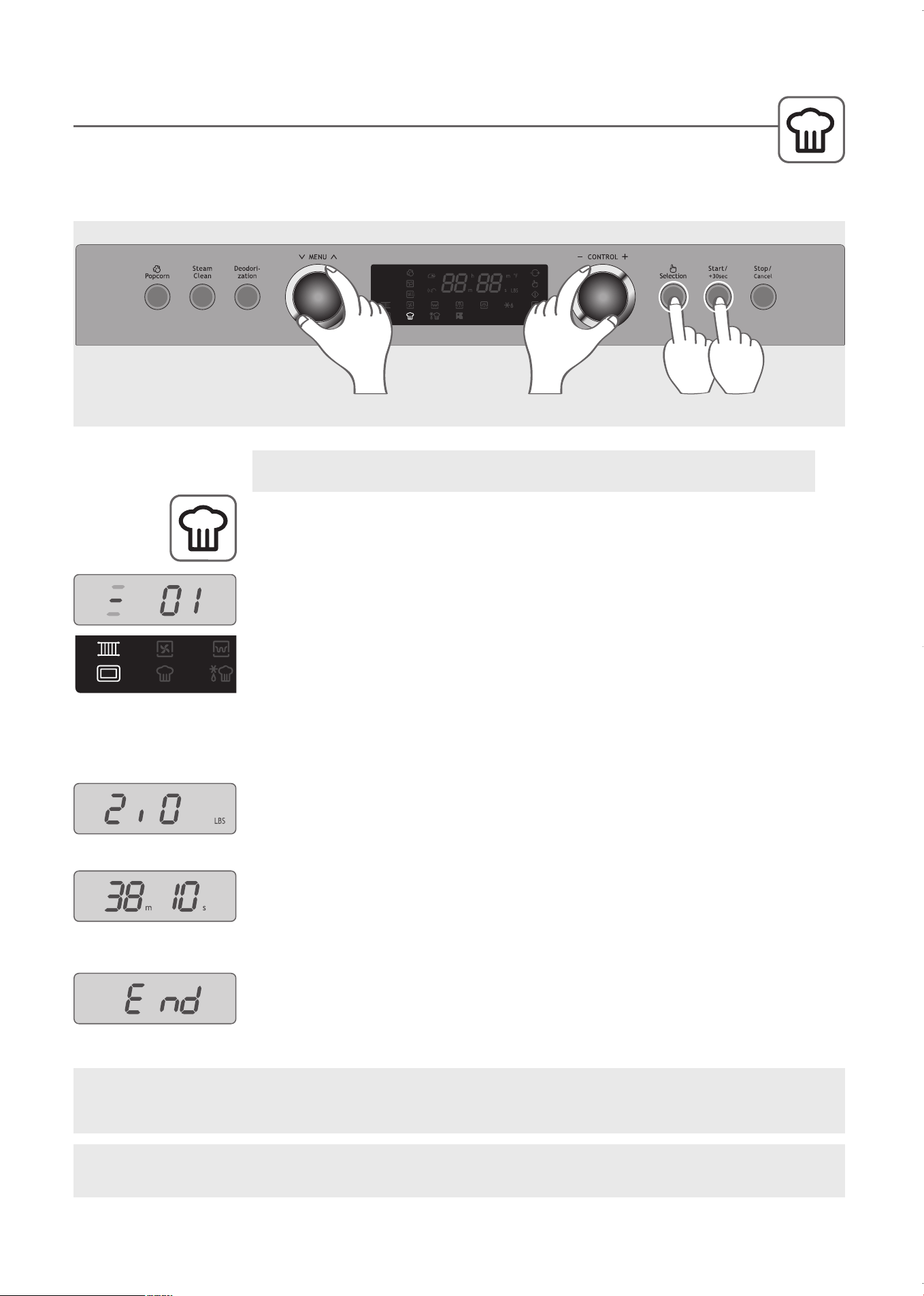
The cooking modes, temperature and times have been programmed for some popular foods. Refer
to the AUTO COOK menu for hints on how to prepare the food, which cookware works best and how
the food should be placed in the oven.
1
. Turn the MENU dial to select AUTO COOK, indicated by the AUTO COOK icon.
2
. Turn the CONTROL dial to select AUTO COOK menu item 01 (Roast Pork). See
the AUTO COOK menu chart on the following page.
The icons displayed indicate the accessories needed and placement in the oven for
each setting. To the left of the menu setting, three horizontal lines are lit with one
flashing. The flashing line indicates the correct shelf. The accessories are indicated
by the icons lit.
In this example, the grill rack and metal tray icons are lit and the middle line is
flashing. Use the grill rack with the metal tray on the middle shelf when cooking.
3
. Press the Selection button.
4
. Turn the CONTROL dial to select the weight.
5
. Press the Selection button.
The cooking time is automatically determined by the weight and displayed. You
may adjust the cooking time by turning the CONTROL dial to add or subtract
cooking time before proceeding.
6
. Press the Start button.
7
. When cooking is complete, the oven will beep and display “End”.
AUTO COOK
Example: Set AUTO COOK to prepare 2.0 lbs of Roast Pork (menu item 01).
STEP
1
STEPS
2,4
STEPS
3,5
STEP
6
21
WARNING: The oven cabinet, cavity, door, racks and dishes will become hot. To PREVENT BURNS,
always use thermal oven gloves while handling and removing food or accessories from the oven.
NOTE: Refer to the AUTO COOK Menu Chart for detailed cooking instructions. The chart and the
accessory icons are shown on the following page
.
KOC-1C4K5AV0_REV_110214:KOC-1C4K5AV0_(㦖_㦖㦖㦖) 2011-02-28 㦖㦖 1:57 Page 21
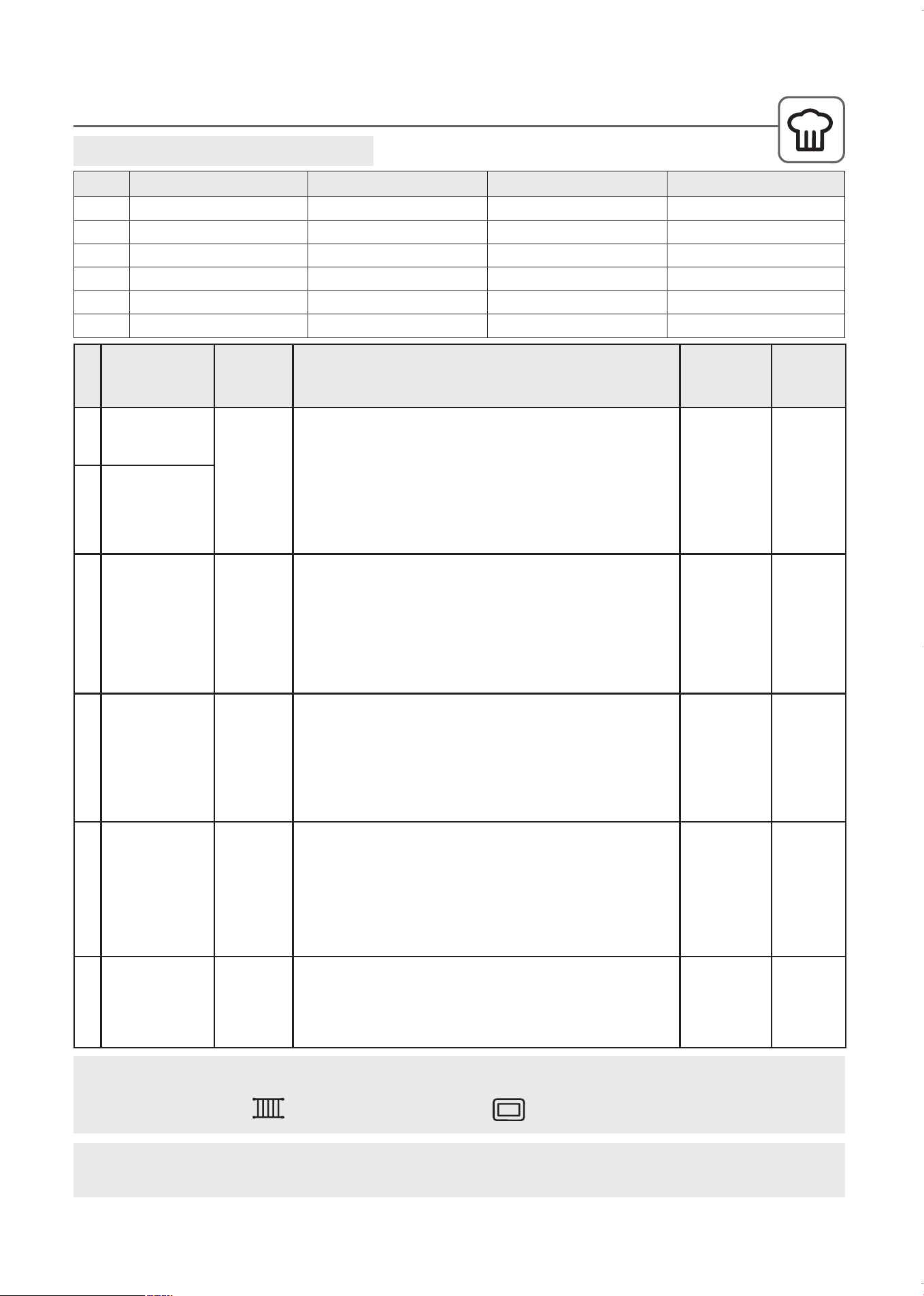
Auto Cook Menu Chart
AUTO COOK MENU CHART
01 ROAST PORK
02 ROAST BEEF
03 ROAST CHICKEN
04 BAKED FISH
05 FRESH VEGETABLE
06 CHICKEN PIECES
NO Auto Cook Menu Minimum Weight Maximum Weight Weight Step
2.0 lb
2.0 lb
2.0 lb
0.6 lb
0.4 lb
0.6 lb
4.0 lb
4.0 lb
3.4 lb
1.8 lb
1.0 lb
1.6 lb
0.2 lb
0.2 lb
0.2 lb
0.2 lb
0.1 lb
0.2 lb
22
IMPORTANT: Place the metal tray in one of the three shelf positions when cooking. Do NOT place
anything directly on the bottom of the oven when cooking.
NO MENU ITEM
START
TEMP
COOKING DIRECTIONS COOKWARE
COOK
MODE
01
02
ROAST PORK
ROAST BEEF
Chilled temp.
1. Tie the joint into a neat shape.
2. Place the meat on the metal tray.
3. Brush with oil.
4. Place roast fat-side down on the grill rack on the metal tray.
5. Cook on “AUTO COOK-ROAST PORK or ROAST BEEF”.
6. When oven beeps, turn food over.
7. Remove from oven. Drain off excess juices.
8. Stand for 10 minutes in foil before serving.
Grill rack on
metal tray
Place on
middle shelf
Combination
03
ROAST
CHICKEN
Chilled temp.
1. Wash and dry chicken. Tie the legs loosely together with string.
2. Pierce the skin a couple of times just under the legs.
3. Brush butter on chicken.
4. Place chicken breast-side up on the metal tray.
5. Cook on “AUTO COOK-ROAST CHICKEN”.
6. Remove from oven. Drain off any excess juices. Season with salt if
required. Stand for 10 minutes in foil before serving.
.
Metal tray
Place on
lower shelf
Combination
04 BAKED FISH
Chilled temp.
1. All types of fresh fish (except battered or bread crumbed fish) can
be cooked whether whole, fillets or steaks.
2. Place the prepared fish in a buttered dish.
3. Season with salt and pepper, sprinkle with lemon juice and dot with
butter. Do not cover dish.
4. Place on dish on the grill rack on the metal tray.
5. Cook on “AUTO COOK- BAKED FISH”.
Grill rack on
metal tray
Place on
middle shelf
Combination
05 FRESH
VEGETABLES
1. Wash and trim.
2. Place prepared vegetables into a suitable sized container.
3. Sprinkle with 2 tbsp. of water.
4. Cover with pierced plastic wrap or a lid.
5. Place in dish on the metal tray.
6. Cook on “AUTO COOK- FRESH VEGETABLES.
* For best results cut vegetables into similar sized pieces.
Metal tray
Place on
lower shelf
Microwave
only
06 CHICKEN
PIECES
1. Place the chicken pieces on the grill rack on the metal tray.
2. Cook on “AUTO COOK - CHICKEN PIECES”.
3. When oven beeps, turn food over.
4. Press start to continue cooking.
5. After cooking, stand covered with foil for 2-5 minutes.
Grill rack on
metal tray
Place on
middle shelf
Combination
Grill Rack
Accessory Icons are lit to indicate the proper cooking accessories for selected menu item.
Metal Tray
KOC-1C4K5AV0_REV_110214:KOC-1C4K5AV0_(㦖_㦖㦖㦖) 2011-02-28 㦖㦖 1:57 Page 22
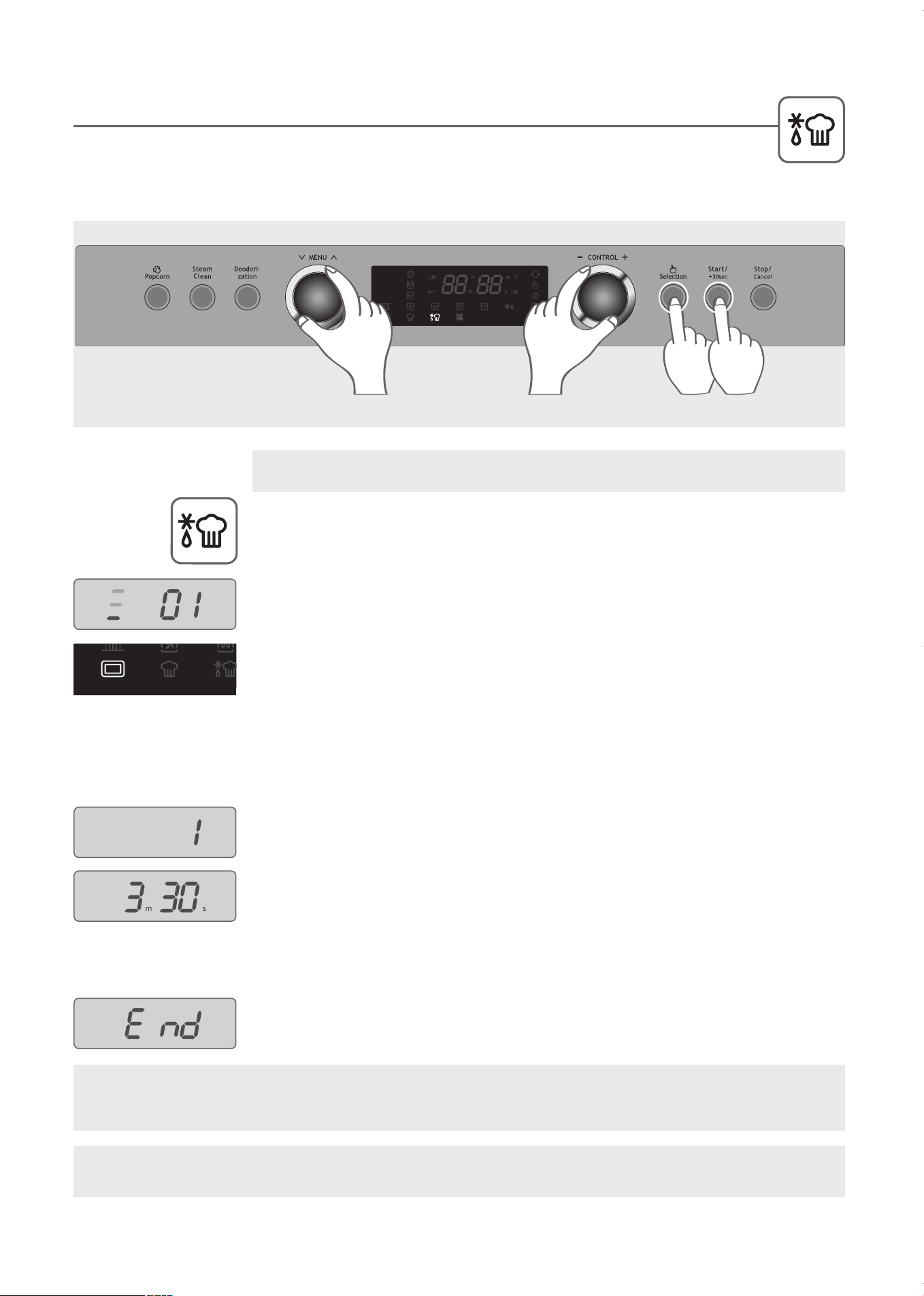
The cooking modes, temperature and times have been programmed for some popular foods. Refer
to the INSTANT COOK menu for hints on how to prepare these foods, which cookware works best
and how the food should be placed in the oven. This function is similar to AUTO COOK, with simple food menu
items.
1
. Turn the MENU dial to select Instant Cook, indicated by the INSTANT COOK
icon.
2
. Turn the CONTROL dial to select Instant Cook menu item 01. See the INSTANT
COOK menu chart on the following page.
The icons displayed indicate the accessories needed and placement in the oven
for each setting. To the left of the menu setting, three horizontal lines are lit with
one line flashing. The flashing line indicates the correct shelf. The accessories
are indicated by the icons lit.
In this example, the metal tray icon is lit and the lower line is flashing. Use the
metal tray on the lower shelf when cooking.
3
. Press the Selection button.
4
. Turn the CONTROL dial to select the weight or quantity.
5
. Press the Selection button.
The cooking time is automatically determined by the weight and displayed. You
may adjust the cooking time by turning the CONTROL dial to add or subtract
cooking time before proceeding.
6
. Press the Start button.
7
. When cooking is complete, the oven will beep and display “End”.
INSTANT COOK
Example: Set INSTANT COOK to prepare 1 Frozen Hamburger (menu item 01).
STEP
1
STEPS
2,4
STEPS
3,5
STEP
6
23
WARNING: The oven cabinet, cavity, door, racks and dishes will become hot. To PREVENT BURNS,
always use thermal oven gloves while handling and removing food or accessories from the oven.
NOTE: Refer to the INSTANT COOK Menu Chart for detailed cooking instructions. The chart and the
accessory icons are shown on the following page
.
KOC-1C4K5AV0_REV_110214:KOC-1C4K5AV0_(㦖_㦖㦖㦖) 2011-02-28 㦖㦖 1:57 Page 23
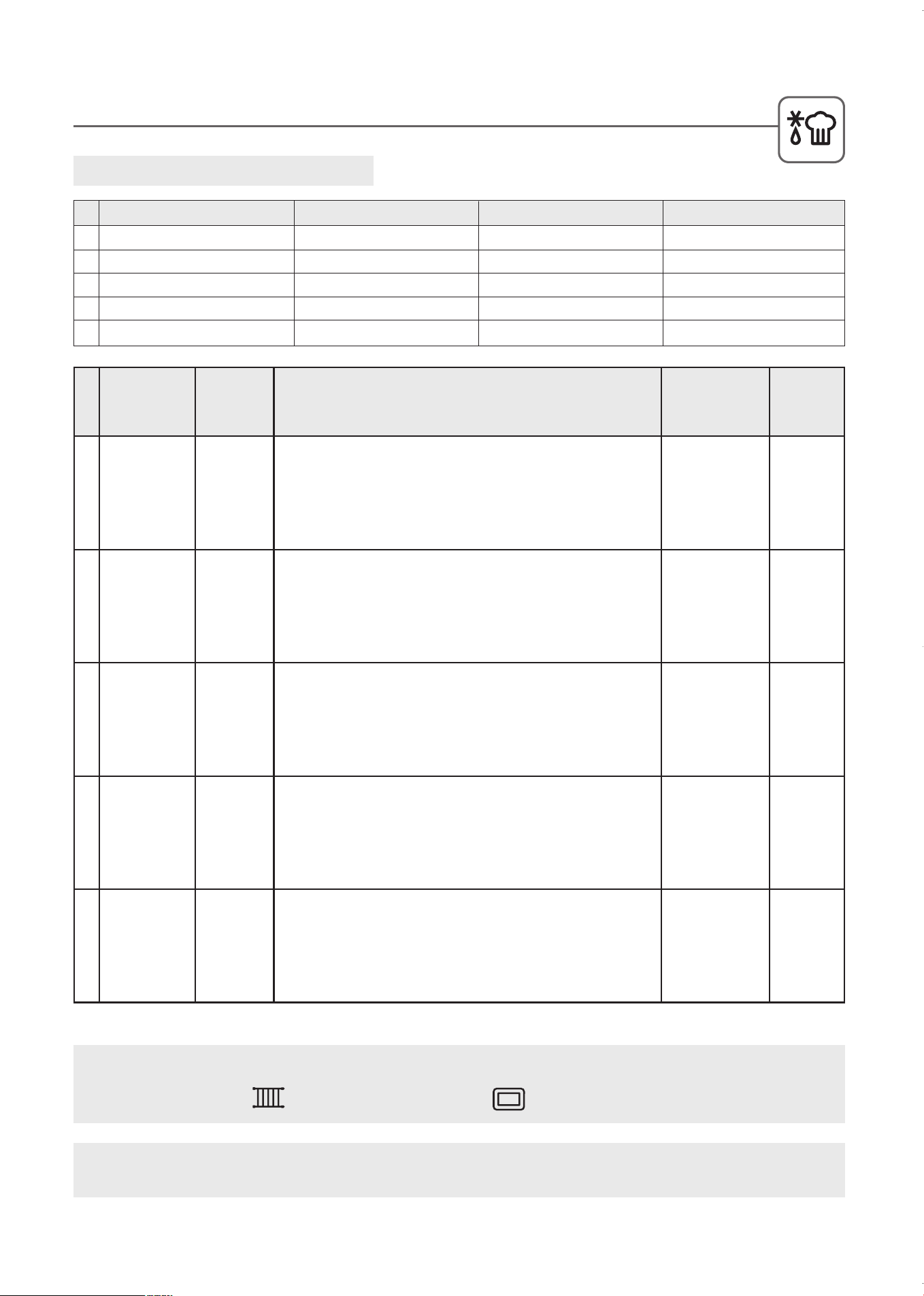
Instant Cook Menu Chart
01 FROzEN HAMBURGER
02 SAUSAGE
03 BAKED POTATO
04 FROzEN PIzzA
05 FROzEN VEGETABLE
No Instant Cook Menu Minimum Weight Maximum Weight Weight Step
1 pcs
0.2 lb
1 pcs
0.2 lb
0.4 lb
4 pcs
1.0 lb
5 pcs
1.4 lb
1.0 lb
1 pcs
0.2 lb
1 pcs
0.1 lb
0.1 lb
INSTANT COOK MENU CHART
24
IMPORTANT: Place the metal tray in one of the three shelf positions when cooking. Do NOT place
anything directly on the bottom of the oven when cooking.
NO MENU ITEM WEIGHT COOKING DIRECTIONS COOKWARE
COOK
MODE
01 Frozen
Hamburger
1 pcs-4 pcs
Remove from package and wrap in paper towel.
Place hamburgers directly on the metal tray.
Set the weight and press Start button.
Metal tray
Place on lower
shelf
Microwave
only
02 Sausage
Remove the skin from the outside of the sausages and pierce with fork.
Place sausages on the grill rack on the metal tray.
Set the weight and press Start button.
Turn over when oven beeps.
Grill rack on
metal tray
Place on middle
shelf
Combination
03 Baked
Potato
1 pcs-5 pcs
Choose medium sized .4 - .5 lb potatoes. Wash and pierce with fork.
Place potatoes on the grill rack on the metal tray.
Set the weight and press Start button.
Grill rack on
metal tray
Place on middle
shelf
Combination
04 Frozen
Pizza
Remove from package. Place pizza on the grill rack on the metal tray.
Set the weight and press Start button.
Grill rack on
metal tray
Place on middle
shelf
Combination
05 Frozen
Vegetables
Place in a suitable sized container. Add to 2 tbsp. of water.
Cover with pierced plastic wrap or a lid.
Set the weight and press Start button.
Stir after cooking.
*Frozen vegetables may be cooked without any added water if preferred.
Metal tray
Place on lower
shelf
Microwave
only
Grill Rack
Accessory Icons are lit to indicate the proper cooking accessories for selected menu item.
Metal Tray
KOC-1C4K5AV0_REV_110214:KOC-1C4K5AV0_(㦖_㦖㦖㦖) 2011-02-28 㦖㦖 1:57 Page 24
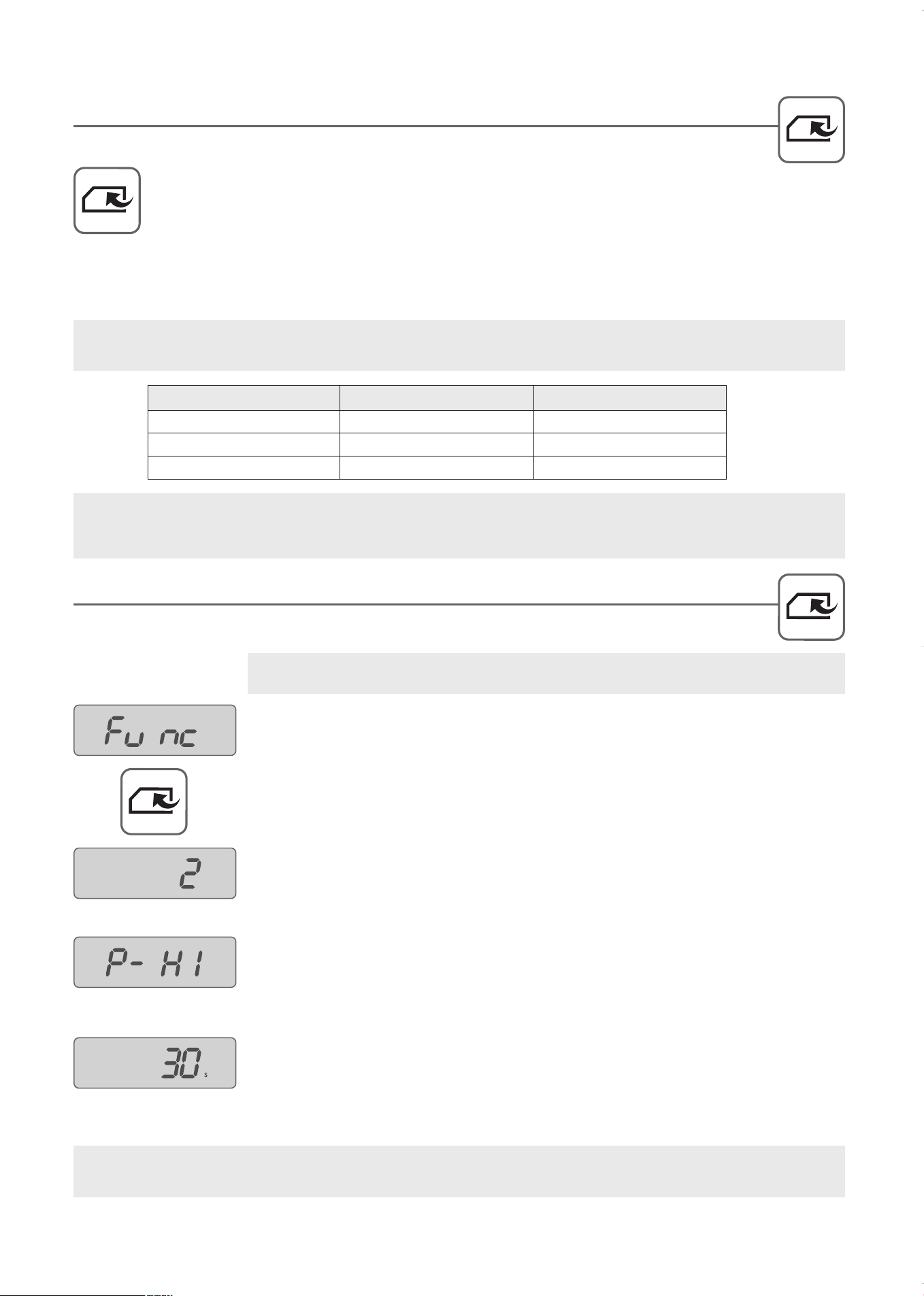
MEMORY COOK
Program and save three custom microwave cooking settings (time and power level) for easy access.
1
.
Turn the MENU dial to select MEMORY COOK, indicated by the MEMORY COOK icon.
2
. Turn the CONTROL dial to select one of the three MEMORY COOK numbers.
3
. Press the Start button.
4
. When cooking is complete, the oven will beep and display “End”.
25
1 0:40 P-HI (100%)
2 1:20 P-HI (100%)
3 2:00 P-HI (100%)
No Cooking Time Microwave Power Level
Program and save up to three frequently used Microwave Cook settings in MEMORY COOK.
PROGRAMMING MEMORY COOK
1
. Press and hold the Selection button for 3 seconds until “Func” is displayed in the
window.
2
. Turn the MENU dial until MEMORY COOK icon is displayed.
3
. Turn the CONTROL dial to select MEMORY NUMBER.
4
. Press the Selection button.
5
. Turn the CONTROL dial to select microwave power level.
6
. Press the Selection button.
7
. Turn the CONTROL dial to enter cooking time.
8
. Press the Selection button to confirm and set.
Example: Set the 2nd MEMORY COOK for 30 seconds at full microwave power.
25
WARNING: The oven cabinet, cavity, door, racks and dishes will become hot. To PREVENT BURNS,
always use thermal oven gloves while handling and removing food or accessories from the oven.
NOTE: The factory presets for the MEMORY COOK settings are listed below. Follow the instructions for
PROGRAMMING MEMORY COOK to set your own favorites.
NOTE: If the power is interrupted all MEMORY COOK settings will revert to factory presets. You may only
program microwave cooking settings in MEMORY COOK.
KOC-1C4K5AV0_REV_110214:KOC-1C4K5AV0_(㦖_㦖㦖㦖) 2011-02-28 㦖㦖 1:57 Page 25
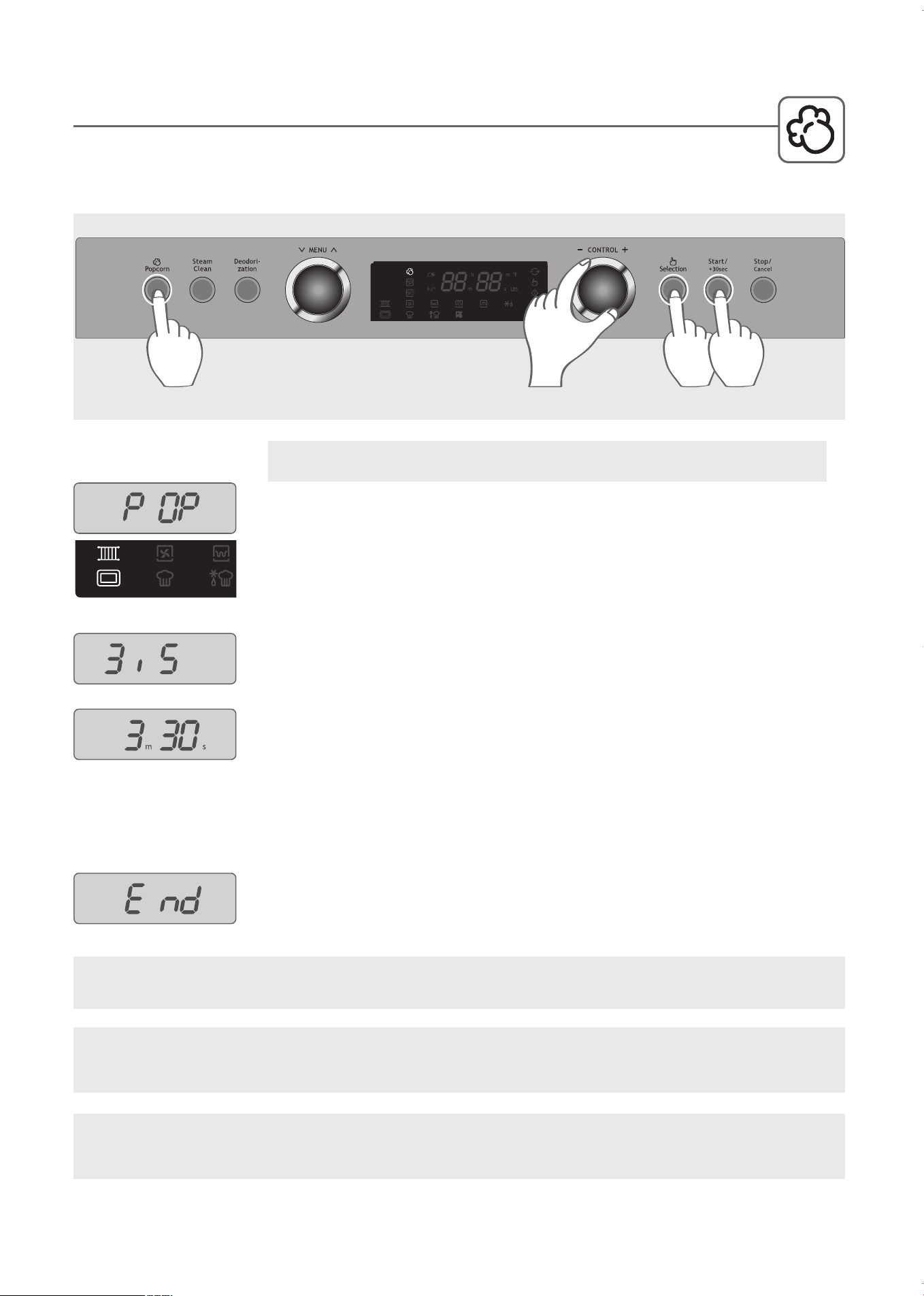
Use the Popcorn button for prepackaged microwave popcorn weighing either 3.0 or 3.5 ounces. The
c
ooking time is automatically determined by the weight. Use the Control dial to add or subtract
between 1 to 5 minutes to the cooking time.
1
. Press the Popcorn button. The grill rack and metal tray are displayed indicating
these are the accessories to use. “POP” is displayed indicating the oven is in
POPCORN mode.
2
. Turn the CONTROL dial to set the weight.
3
. Press the Selection button.
NOTE: Turn the Control dial to add or subtract cooking time to the automatic
cooking time (Min: 1 min, Max : 5 min).
4
. Press the Start button.
5
. When cooking is completed, the oven will beep and display “End”.
POPCORN
Example: Use Popcorn button to pop one 3.5 ounce bag.
STEP
2
STEP
3
STEP
4
STEP
1
26
IMPORTANT: Place the popcorn on the grill rack on the metal tray on the lower shelf. Do NOT place
anything directly on bottom of oven during operation.
WARNING: The oven cabinet, cavity, door, racks and dishes will become hot. To PREVENT BURNS,
always use thermal oven gloves while handling and removing food or accessories from the oven.
CAUTION: NEVER LEAVE THE OVEN UNATTENDED. If popping slows to 3 seconds between pops, stop
the oven. Overcooking can ca
use fire.
KOC-1C4K5AV0_REV_110214:KOC-1C4K5AV0_(㦖_㦖㦖㦖) 2011-02-28 㦖㦖 1:57 Page 26
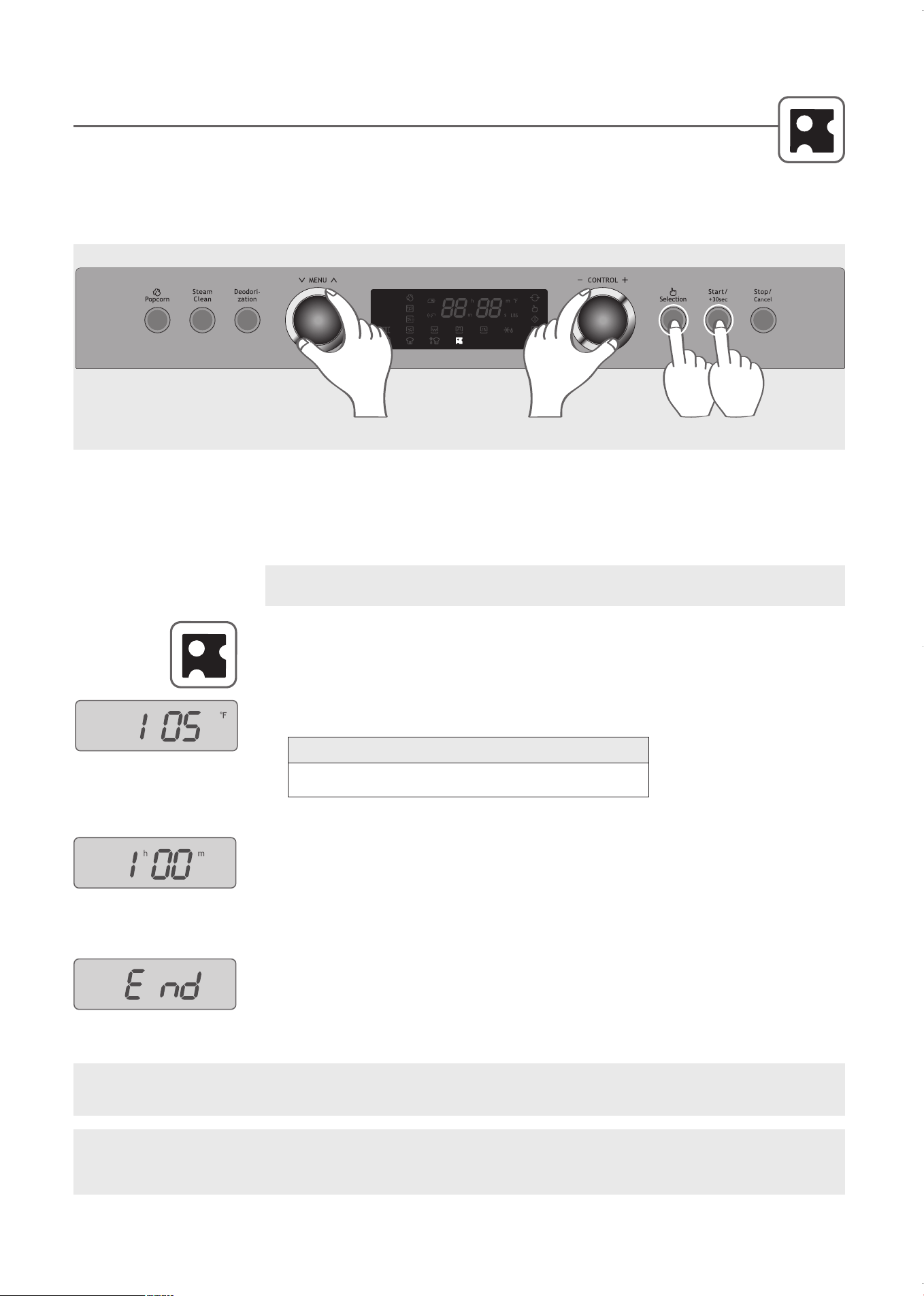
1
. Turn the MENU dial to select PROOFING, indicated by the PROOFING icon.
Note: the Voice Guide may use fermentation instead of proofing.
2
. Turn the CONTROL dial to select the temperature.
3
. Press the Selection button.
4
. Turn the CONTROL dial to enter the proofing time of up to 10 hours.
5
. Press the Start button.
Proof bread until dough has doubled in volume. Check bread products early
to avoid over-proofing.
6
. When the operation is complete, the oven will beep and display “End”.
27
PROOFING
The Proofing function can be used to raise yeast-based bread products prior to baking. Proofing bread prepares
the dough for baking by activating the yeast, a process also referred to as fermentation.
If the temperature inside the oven is high, allow the oven to cool to room temperature before starting the proofing function
so the dough rises at a constant rate.
Example: Set PROOFING function for one hour at 105˚F .
WARNING: The oven cabinet, cavity, door, racks and dishes will become hot. To PREVENT BURNS,
always use thermal oven gloves while handling and removing food or accessories from the oven.
HELPFUL HINTS: Use a large, deep ceramic or glass bowl to keep the dough at a constant temperature.
Grease the bowl with butter or oil and spray the dough with vegetable oil before placing it inside the bowl to
prevent the dough from sticking to the bowl. Cover the dough with a tightly woven cloth or with greased plastic
wrap. Place the bowl on the tray in the lower position in the oven.
IMPORTANT: Place bowl on the metal tray on the lower shelf. Allow at least 1” between edges of bowl and
walls of the oven. Do NOT place anything directly on bottom of oven during operation.
1
0
5
˚
F
↔
1
1
5
˚
F
↔
1
2
0
˚
F
↔
9
5
˚
F
T
e
m
p
e
r
a
t
u
r
e
S
e
q
u
e
n
c
e
STEP
1
STEPS
2,4
STEP
3
STEP
5
KOC-1C4K5AV0_REV_110214:KOC-1C4K5AV0_(㦖_㦖㦖㦖) 2011-02-28 㦖㦖 1:57 Page 27

GENERAL GUIDELINES
28
Since microwave cooking is to some extent different
from traditional cooking, the following general
guidelines should be considered whenever you use
your microwave oven:
If the food is undercooked
Check to see if:
• You have selected the correct power level.
• The selected time is sufficient. The times given in
the recipes are approximate. They depend on initial
temperature, weight and density of the food.
• The container is appropriate.
If the food is overcooked
(eg dried out or burnt)
Before you cook again, consider whether:
• The power level was too high.
• The set time was too long-the times in the recipes
are approximate. They depend on initial
temperature, weight and density of the food.
Points to remember when defrosting
• The shape of the package alters the defrosting time.
Shallow rectangular packets defrost more quickly
than a deep block. Separate pieces as they begin to
defrost. Loosely arranged slices defrost more easily.
• Shield areas of food with small pieces of foil if they
start to become warm.
• When defrosting, it is better to under thaw the food
slightly and allow the process to finish during the
standing time.
The amount of food
The more food you want to prepare the longer it
takes. A rule of thumb is that double amount of food
requires almost double the time. If one potato takes
four minutes to cook, approximately seven minutes
are required to cook two potatoes.
Starting temperature of food
The lower the temperature of the food which is being
put into the microwave oven, the longer time it takes.
Food at room temperature will be heated more
quickly than food at refrigerator temperature.
Composition of the food
Food with a lot of fat and sugar will be heated faster
than food containing a lot of water. Fat and sugar will
also reach a higher temperature than water in the
cooking process.
The more dense the food, the longer it takes to heat.
“Very dense” food like meat takes longer time to
reheat than lighter, more porous food like sponge
cakes.
Size and shape
Smaller pieces of food will cook more quickly than
larger pieces and uniform pieces of food cook more
evenly than irregularly shaped foods.
With unevenly shaped food, the thinner parts will
cook faster than the thicker areas. Place the thinner
chicken wings and legs to the center of the dish.
Stirring, turning of foods
Stirring and turning of foods are techniques used in
conventional as well as in microwave cooking to
distribute the heat quickly to the center of the dish to
avoid over-cooking at the outer edges of the food.
Covering food helps
• To reduce spattering
• To shorten cooking times
• To retain food moisture
All covering, which will allow microwaves to pass
through are suitable. See “Which utensils can be
used in the oven?”
Releasing pressure in foods
Several foods are tightly covered by a skin or
membrane. These foods should be pierced with a
fork or cocktail stick to release the pressure and to
prevent bursting as steam builds up within them
during cooking. This applies to potatoes, chicken
livers, sausages, egg yolks and some fruits.
Standing time
Always allow food to stand for some time after using
the oven. Standing time after defrosting,cooking or
reheating usually improves the result since the
temperature will then be evenly distributed through
out the food.
In a microwave oven foods continue to cook even
when the microwave energy is turned off. While they
are no longer cooking by microwaves, they are still
being cooked by the conduction of the high residual
heat to the center of the food.
The length of standing time depends on the volume
and density of the food. Sometimes it can be as short
as the time it takes you to remove the food from the
oven and take it to the serving table. However, with
larger, denser foods, the standing time may be as
long as 10 minutes. During ‘standing’, the internal
temperature of the food will rise by as much as 45˚F
and the food will finish cooking in this time.
28
KOC-1C4K5AV0_REV_110214:KOC-1C4K5AV0_(㦖_㦖㦖㦖) 2011-02-28 㦖㦖 1:57 Page 28
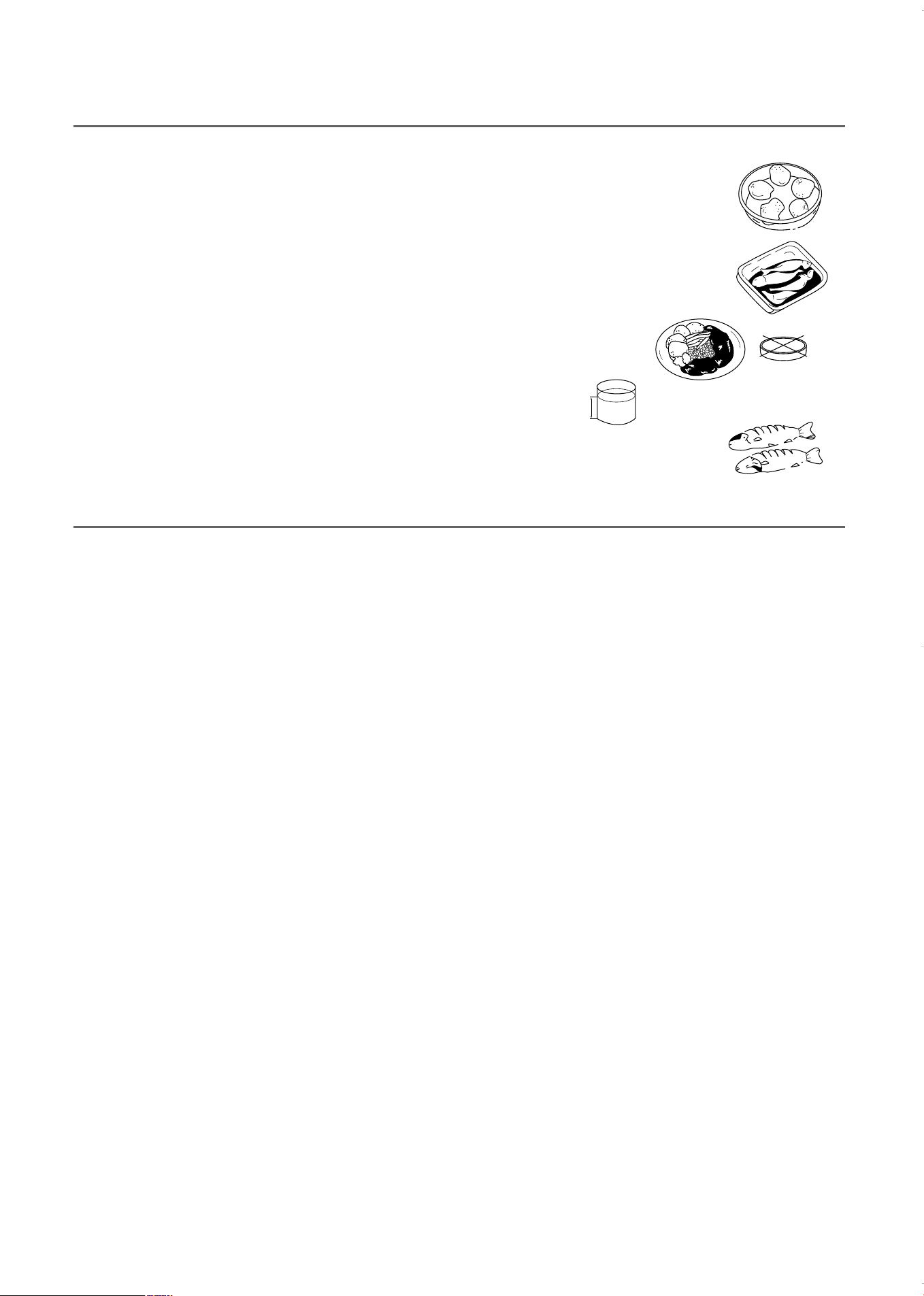
Arranging food
T
his is done in several ways in microwave cooking to give more even cooking results.
I
f you are cooking several items of the same food such as jacketed potatoes, place them in a
r
ing pattern for uniform cooking. When cooking foods of uneven shapes or thickness, place the
s
maller or thinner area of the food towards the center of the dish where it will be heated last.
Uneven foods such as fish should be arranged in the oven with the tails pointing to the center.
If you are saving a meal in the refrigerator or ‘plating’ a meal for reheating, arrange the thicker,
denser foods to the outside of the plate and the thinner or less dense foods in the middle.
Place thin slices of meat on top of each other or interlace them. Thicker slices such
as meat loaf and sausages have to be placed close to each other. Gravy or sauce
should be heated in a separate container.
When heating gravy, sauce or soup, do not fill the container more than
2/3. Select a tall, narrow container rather than a low and wide container.
When you cook or reheat whole fish, score the skin as this prevents cracking. Shield the tail
and head with small pieces of foil to prevent overcooking but ensure the foil does not touch
the sides of the oven.
2/3
GENERAL GUIDELINES
29
Before use, cookware and dishes should be checked to ensure that they are suitable for microwave ovens.
MICROWAVE COOKWARE GUIDE
Utensil Test
Dishes that do not absorb microwave energy are best for
microwave cooking. Look on the label to verify that cups,
glasses, plates and especially paper goods are suitable. If
you are not sure, try this utensil test to check.
1. Put the empty utensil in the microwave oven.
2. Put one cup of water in a glass measuring cup next to
the empty utensil.
3. Heat on P-HI (maximum) for 1 minute.
4. After 1 minute the water should be warm but the utensil
should not. If the utensil is warm, it is not suitable for
microwave cooking.
Limited Use
ALUMINUM FOIL - Use narrow strips of foil to prevent
overcooking of exposed areas. Using too much foil can
damage your oven, so be careful.
CERAMIC, PORCELAIN, AND STONEWARE - use these
if they are labeled “Microwave Safe.” If they are not
labeled, test them to make sure they can be used safely.
Never use dishes with metallic trim.
PLASTIC - Use only if labeled “Microwave Safe.” Other
plastics can melt.
STRAW, WICKER, AND WOOD - Use only for short-term
heating, as they can be flammable.
Recommended Use
Glass and glass-ceramic bowls and dishes - Use for
heating or cooking.
MICROWAVE BROWNING DISH - Use to brown the
exterior of small items such as steaks, chops, or pancakes.
Follow the directions provided with the browning dish.
MICROWAVEABLE PLASTIC WRAP - Use to retain
steam. Leave a small opening for some steam to escape
and avoid placing it directly on the food.
WAX PAPER - Use as a cover to prevent spattering.
Paper towels and napkins - Use for short term heating and
covering; they absorb excess moisture and prevent
spattering.
THERMOMETERS - Use only those labeled “Microwave
Safe” and follow all directions. Check the food in several
places.
Not Recommended
GLASS jARS AND BOTTLES - Regular glass is too thin
to be used in a microwave, and can shatter.
PAPER BAGS - These are a fire hazard, except for
popcorn bags that are designed for microwave use.
STYROFOAM PLATES AND CUPS - These can melt and
leave an unhealthy residue on food.
PLASTIC STORAGE AND FOOD CONTAINERS -
Containers such as margarine tubs can melt in the
microwave.
METAL UTENSILS - These can damage your oven.
Remove all metal before cooking.
Do not use recycled paper towels, which may contain
metal and can catch fire.
Do not use conventional thermometers during microwave
cooking.
KOC-1C4K5AV0_REV_110214:KOC-1C4K5AV0_(㦖_㦖㦖㦖) 2011-02-28 㦖㦖 1:57 Page 29
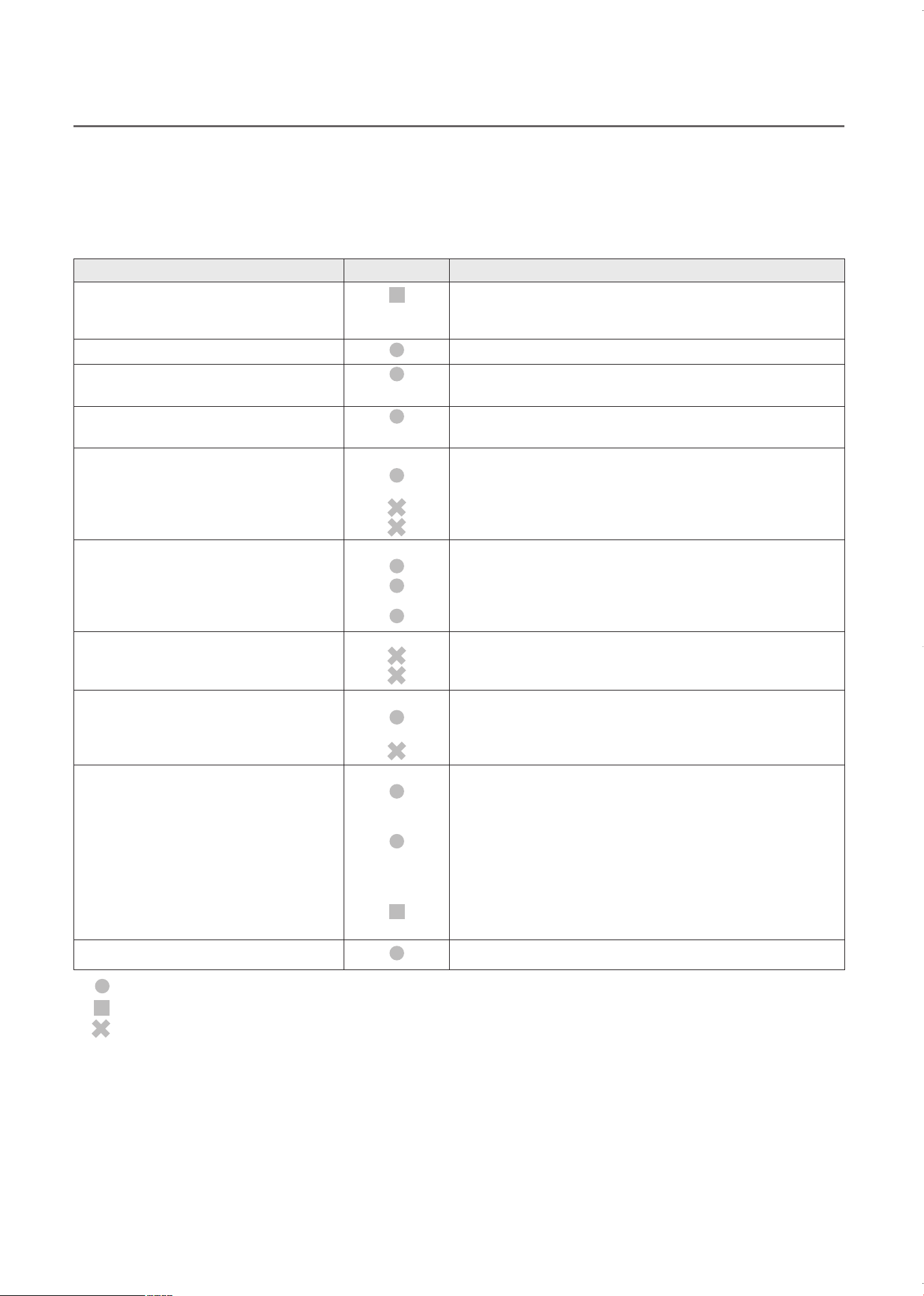
In order to cook food, microwaves must be able to penetrate the food without being reflected or absorbed by the cooking utensil.
Use only cooking utensils that are suitable for use in microwave ovens. If the utensil is not marked microwave-safe, refer to the
following list to determine if it should be used in the microwave oven.
: Recommended use
: Limited Use
: Not Recommended
Aluminum foil
Crust plate
China and earthenware
Disposable polyester
cardboard dishes
Fast-food packaging
• Polystyrene cups containers
• Paper bags or newspaper
• Recycled paper or metal trims
Glassware
• Oven-to-table ware
• Fine glassware
• Glass jars
Metal
• Dishes
• Freezer bag twist ties
Paper
• Plates, cups, napkins and
Kitchen paper
• Recycled paper
Plastic
• Containers
• Plastic wrap
• Freezer bags
Wax or grease-proof paper
Utensil Safe Comments
Can be used in small quantities to protect areas against
overcooking. Arcing can occur if the foil is too close to the
oven wall or if too much foil is used.
Do not preheat for more than 8 minutes.
Porcelain, pottery, glazed earthenware and bone china
are usually suitable, unless decorated with a metal trim.
Some frozen foods are packaged in these dishes.
Can be used to warm food. Overheating may cause the
polystyrene to melt.
May catch fire.
May cause arcing.
Can be used, unless decorated with a metal trim.
Can be used to warm foods or liquids.
Delicate glass may break or crack if heated suddenly.
Must remove the lid. Suitable for warming only.
May cause arcing or fire.
For short cooking times and warming. Also to absorb
excess moisture.
May cause arcing.
Particularly if heat-resistant thermoplastic. Some other
plastics may warp or discolor at high temperatures. Do not
use Melamine plastic.
Can be used to retain moisture. Should not touch the
food.
Take care when removing the film as hot steam will
escape.
Only if boilable or oven-proof. Should not be airtight. Prick
with a fork, if necessary.
Can be used to retain moisture and prevent spattering.
30
MICROWAVE COOKING INSTRUCTIONS
KOC-1C4K5AV0_REV_110214:KOC-1C4K5AV0_(㦖_㦖㦖㦖) 2011-02-28 㦖㦖 1:57 Page 30

CARE AND CLEANING
CLEANING THE OVEN
IMPORTANT:
• DO NOT USE ANY TYPE OF OVEN CLEANER ON ANY PART OF THE OVEN. It will damage some of
the interior and exterior surfaces of the oven.
• Clean the oven regularly and remove any food deposits.
• Failure to maintain the oven in a clean condition could damage the surface and adversely affect the life of
the appliance and possibly result in a hazardous situation.
INSIDE THE OVEN
The interior three side walls and floor are stainless steel.
For easy cleaning, wipe spills and spatters as they occur with a damp cloth or sponge with water and a mild
detergent. Rinse the cavity of any cleaning residue with a clean damp cloth or sponge after cleaning. Dry with a
soft cloth.
These areas can also be cleaned using plastic or nylon scouring pads recommended for use Teflon and
Silverstone.
For hard to remove soil, use a mild non-abrasive cleaner. Use on the stainless steel areas only.
TOP SURFACE
One grill element is installed on the top surface. As they are fragile, be careful not to press or grip them too
firmly. Do not remove the grill elements to clean the surface.
DOOR
While the oven door is still warm, any spatters or food soils should be wiped off with a damp sudsy cloth or
sponge. Rinse with water and wipe dry with a cloth.
If steam or condensation appears around this area, wipe with a cloth. This may occur when the oven is
operating under high humidity and with foods containing excess moisture. This is a normal part of microwave
cooking.
EXTERIOR CONTROL PANEL
Exercise care when cleaning this area. To clean, wipe the panel with a slightly dampened cloth, using only
water. Wipe dry. Do not scrub this area or use any sort of chemical cleaner. Avoid use of excess water.
OUTSIDE SURFACE
The outside surfaces should be cleaned with soap and water, rinsed and dried with a soft cloth. Do not use any
type of household or abrasive cleanser.
31
WARNING: just as your traditional oven becomes hot, this oven will become hot during use of the
convection, grill and combination functions. Children should be supervised at all times when using the oven.
KOC-1C4K5AV0_REV_110214:KOC-1C4K5AV0_(㦖_㦖㦖㦖) 2011-02-28 㦖㦖 1:57 Page 31
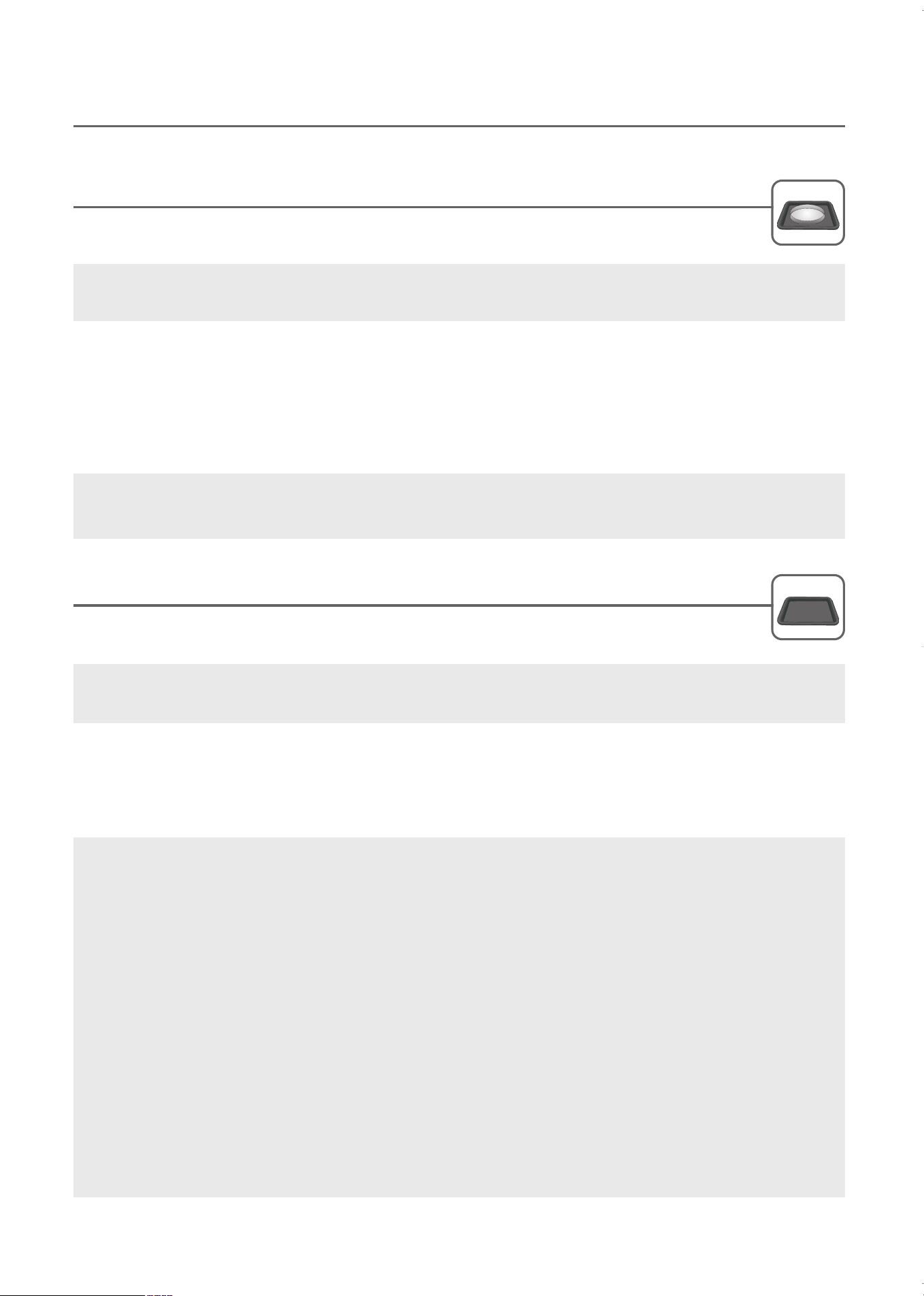
IMPORTANT:
Although your oven is provided with safety features, it is important to observe the following:
1. Do not attempt to defeat or tamper with safety interlocks.
2. Do not place any object between the oven front face and the door or allow residue to accumulate on
sealing surfaces. Wipe the sealing area frequently with a mild detergent, rinse and dry. Never use
abrasive powders or pads.
3. When opened, the door must not be subjected to strain, for example, a child hanging on an opened door
or any load could cause the oven to fall forward to cause injury and also damage to the door. Do not
operate the oven if it is damaged. Wait until it has been repaired by a service technician. It is paticularly
important that the oven closes properly and that there is no damage to the:
1) Door(bent)
2) Hinge and Hooks(broken or loosened)
3) Door seals and sealing surface.
4. The oven should not be adjusted or repaired by anyone except a competent service technician.
5.The oven should be cleaned regularly and any food deposits removed.
6.Failure to maintain the oven in a clean condition could lead to deterioration of the surface that could
adversely affect the life of the appliance and possibly result in a hazardous situation.
STEAM CLEANING
Steams the inside of your oven to make wiping down the surface easy.
Steam Clean uses Microwave mode.
1. Place about 200 cc (or 7 fluid ounces) of water in a microwave safe cup or small bowl in the middle of the
metal tray on the lower shelf in the oven. Do NOT place tray directly on bottom of oven.
2. Press the Steam Clean button. The oven will run for 15 minutes.
3. When the process is finished, “door” and “open” will flash in the display and continue for 5 minutes or until the
door is opened.
4. Open the door and wait for the steam to clear. Use a soft dry cloth to wipe the inner cavity.
DEODORIZATION
Use this function to remove strong odors after cooking fish and other foods.
DEODORIZATION uses Convection Cook mode.
1. Place the metal tray on the lower shelf of oven.
2. Press the Deodorization button. The oven will run for 10 minutes.
3. When the operation is complete, the oven will beep and display “End”.
The oven includes Steam Clean and Deodorization functions to assist in easy cleaning.
CARE AND CLEANING
32
IMPORTANT: Place metal tray on the lower shelf. Do NOT place anything directly on bottom of oven during
operation.
WARNING: The oven cabinet, cavity, door, racks and dishes will become hot. To PREVENT BURNS,
always use thermal oven gloves while handling and removing food or accessories from the oven.
CAUTION: Do not place water in narrow-necked containers. Pressure can build up, possibly causing the
container to burst and result in injury.
KOC-1C4K5AV0_REV_110214:KOC-1C4K5AV0_(㦖_㦖㦖㦖) 2011-02-28 㦖㦖 1:57 Page 32
BEFORE CALLING FOR SERVICE
You can often resolve operating problems yourself.
If your microwave/grill oven fails to work properly, locate the operating problem in the chart below and try the
solutions marked for each problem.
If the microwave/grill oven still does not work properly, contact the nearest Service Center.
CAUTION:
1. Do not attempt to operate the oven while empty as this
will cause damage.
2. As an exhaust fan is located in the rear of the oven.
Install the oven so as not to block the outlet.
NOTE: If the microwave/grill oven still does not
work properly, contact the nearest Service Center.
NOTE:
It is quite normal for steam to be emitted around
the door during the cooking cycle. The door is
not intended to seal the oven cavity completely.
Its special design contributes to the total safety
of the appliance.
PROBLEM
Oven will not start
Arcing or sparking
Unevenly cooked foods
Overcooked foods
Undercooked foods
Improper defrosting
SOLUTION
XXXX
XX
XXXX
X
XXXX
XXXXX
Ensure Start button has been pressed.
Ensure power cord is plugged in.
Ensure door is closed.
Set the cooking time.
Use approved cookware only.
Do not operate with oven empty.
Supplied tray must be used.
Turn or stir food.
Completely defrost food.
Check the operating instructions to ensure you are using correct functions and controls.
Verify that oven ventilation parts are not blocked.
Oven had not finish cooling to room temperature before beginning defrosting. Manual cool for 5 minutes first.
33
KOC-1C4K5AV0_REV_110214:KOC-1C4K5AV0_(㦖_㦖㦖㦖) 2011-02-28 㦖㦖 1:57 Page 33

QUESTIONS AND ANSWERS
Q : I accidentally ran my microwave oven without any
food in it. Is it damaged?
* A : Running the oven empty for a short time will not damage
the oven. However, this is not recommended.
Q : Can I open the door when the oven is operating?
* A : The door can be opened anytime during the cooking
operation. Then microwave energy will be instantly
switched off and the time setting will maintain until the
door is closed.
Q : Why do I have moisture in my microwave oven after
cooking?
* A : The moisture on the side of your microwave oven is
normal. It is caused by steam from cooking food hitting
the cool oven surface.
Q : Does microwave energy pass through the viewing
screen in the door?
* A : No. The metal screen bounces energy back to the oven
cavity. The holes in the screen allow light to pass
through. They do not let microwave energy pass
through.
Q : Why do eggs sometimes pop?
* A : When baking or poaching eggs, the yolk may pop due to
steam build-up inside the yolk membrane. To prevent
this, simply pierce the yolk with a toothpick before
cooking. Never cook eggs without piercing their shells.
Q : Why this standing time recommended after the
cooking operation has been completed?
* A : Standing time is very important. With microwave
cooking, the heat is in the food, not in the oven. Many
foods build up enough internal heat to allow the cooking
process to continue, even after the food has been
removed from the oven. Standing time for joints of meat,
large vegetables and cakes allows the inside to cook
completely, without overcooking the outside.
Q : What does “standing time” mean?
* A : ”Standing time” means that food should be removed
from the oven and covered for additional time to allow it
to finish cooking.
Q : Why does my oven not always cook as fast as the
microwave cooking guide says?
* A : Check your cooking guide again to make certain you’ve
exactly followed directions, and to see what might cause
variations in cooking time. Cooking guide times and heat
settings are suggestions to help prevent over-cooking.
This is the most common problem in getting used to a
microwave oven.
Variations in the size, shape and weights could require
longer cooking time. Use your own judgment along with
the cooking guide suggestions to check whether the
food has been properly cooked just as you would do
with a conventional cooker.
Q : Will the microwave oven be damaged if it operates
while empty?
* A : Yes. Never run it empty.
34
KOC-1C4K5AV0_REV_110214:KOC-1C4K5AV0_(㦖_㦖㦖㦖) 2011-02-28 㦖㦖 1:57 Page 34
Power supply
Power consumption
Microwave Output power
Frequency
Grill power consumption
Convection power consumption
Combination heating power consumption
Outside Dimension (W x D x H)
Cavity Dimensions (W x D x H)
Net Weight
Microwave
Grill
Maximum
Convection
Cooking time
Combination
Proofing*
Select function
Microwave power level
120V AC, 60Hz SINGLE PHASE WITH GROUNDING
1500 W
800 W
2,450 MHz
1250 W
1450 W
1600 W
20.6 X 18.8 X 14.6 in
15.7 X 14.4 X 9.2 in
Approx. 59.4 lbs
60 minutes
1 hour and 30 minutes
2 hours
1 hour
10 hours
Microwave / Grill / Convection / Combination
11 stages
35
SPECIFICATIONS
DISPOSAL OF USED ELECTRICAL & ELECTRONIC EQUIPMENT
The meaning of the symbol on the product, its accessories or packaging indicates that this product shall not be treated
as household waste. Please dispose of this equipment at your applicable collection point for the recycling of electrical &
electronic equipment waste. In the European Union and other European countries in which there are separate
collection systems for used electrical and electronic product. By properly disposing this product, you will help prevent
potential hazards to the environment and to human health, which could otherwise be caused by unsuitable waste
handling of this product. The recycling of materials will help conserve natural resources. Please do not dispose of your
old electrical and electronic equipment with your household waste. For more detailed information about recycling of this
product, please contact your local city office, your household waste disposal service or the shop where you purchased
the product.
Microwave oven is Group 2 ISM equipment in which radio-frequency energy is intentionally generated and used in the form
of electromagnetic radiation for the treatment of material. This oven is Class B equipment suitable for use in domestic
establishments and in establishments directly connected to a low voltage power supply network which supplies buildings
used for domestic purposes.
Specifications are subject to change without notice.
*Proofing is also referred to as
Fermentation.
© 2011 Daewoo Electronics America, Inc. All rights reserved.
KOC-1C4K5AV0_REV_110214:KOC-1C4K5AV0_(㦖_㦖㦖㦖) 2011-02-28 㦖㦖 1:57 Page 35
Limited Warranty
DAEWOO ELECTRONICS AMERICA, INC. warrants the following Microwave to be free from
defective material and workmanship and agrees to remedy any such defect or to furnish a new
part (at the Company’s option) in exchange for any part of any unit of its manufacture which
under normal installation, use and service disclosed such defect, provided the unit is delivered
by the owner to store or dealer where purchased or Daewoo authorized service center. To
establish and receive warranty service at our store, dealer or our authorized service center, a
sales receipt or a bill of sale is required for proof of purchase.
This warranty does not extend to any of our electronic products which have been subjected to
misuse, neglect, accident, incorrect wiring not our own, improper installation, unauthorized
modification or to use in violation of instructions furnished by us, nor units which have been
repaired or altered outside of our factory, nor to cases where the serial number thereof has
been removed, defaced, or changed.
This warranty is in lieu of all warranties expressed or implied and no representative or person is
authorized to assume for us any other liability in connection with the sales of our electronic
products.
OVER THE COUNTER EXCHANGE FOR UNITS THAT ARE INITIALLY DEFECTIVE. Initially
defective is described as when the dealer opens the unit and finds that it is inoperative or an
individual customer opening a new unit and finding that it is initially defective. This unit may be
returned to the factory by the dealer for exchange. Under no circumstances will an individual
customer be permitted to return defective unit directly to factory. Exchange must be directly with
the dealer. When this unit is returned to dealer, a copy of the purchase evidence stating the date
of purchase is to be put in the individual box for dealer’s further control with the factory.
Model Parts Labor
KOC-1C4K 1 year 1 year
Note: The warranty service center list is constantly changing with the addition of our current
qualified service centers. If there is inadequate or no local service facility subject individual
contact DAEWOO Customer Service to be provided with further information.
Toll free number: 1-877-DWESV3 (1-877-393-7823) www.e-daewoo.com
KOC-1C4K5AV0_REV_110214:KOC-1C4K5AV0_(㦖_㦖㦖㦖) 2011-02-28 㦖㦖 1:57 Page 36
VISION CREATIVE, INC.
서울 종로구 통의동
6
번지 이룸빌딩 4층
ABOUT THIS MANUAL
ABOUT THIS MANUAL
연락처
VISION
담 당
방 문 수(chois)
TEL: 730-0660 FAX: 730-3788
담 당
이태희 님
F.MODEL
KOC-1C4K5AV0
B.MODEL
KOC-1C4K 언 어 영어
B U Y E R
COUNTRY
1차
2차
일 정
3차
4차
5차
제 판
한
인쇄
MEMO
원본 받아서 작업(Quark8)_총 37p
110214 - 신규 총 18p(목차,2~5,8,11,13,14,15,18,19,20,22,
24,27, 31,35)
110228 - 수정 1p(보증서)
KOC-1C4K5AV0_REV_110214:KOC-1C4K5AV0_(㦖_㦖㦖㦖) 2011-02-28 㦖㦖 1:57 Page 37