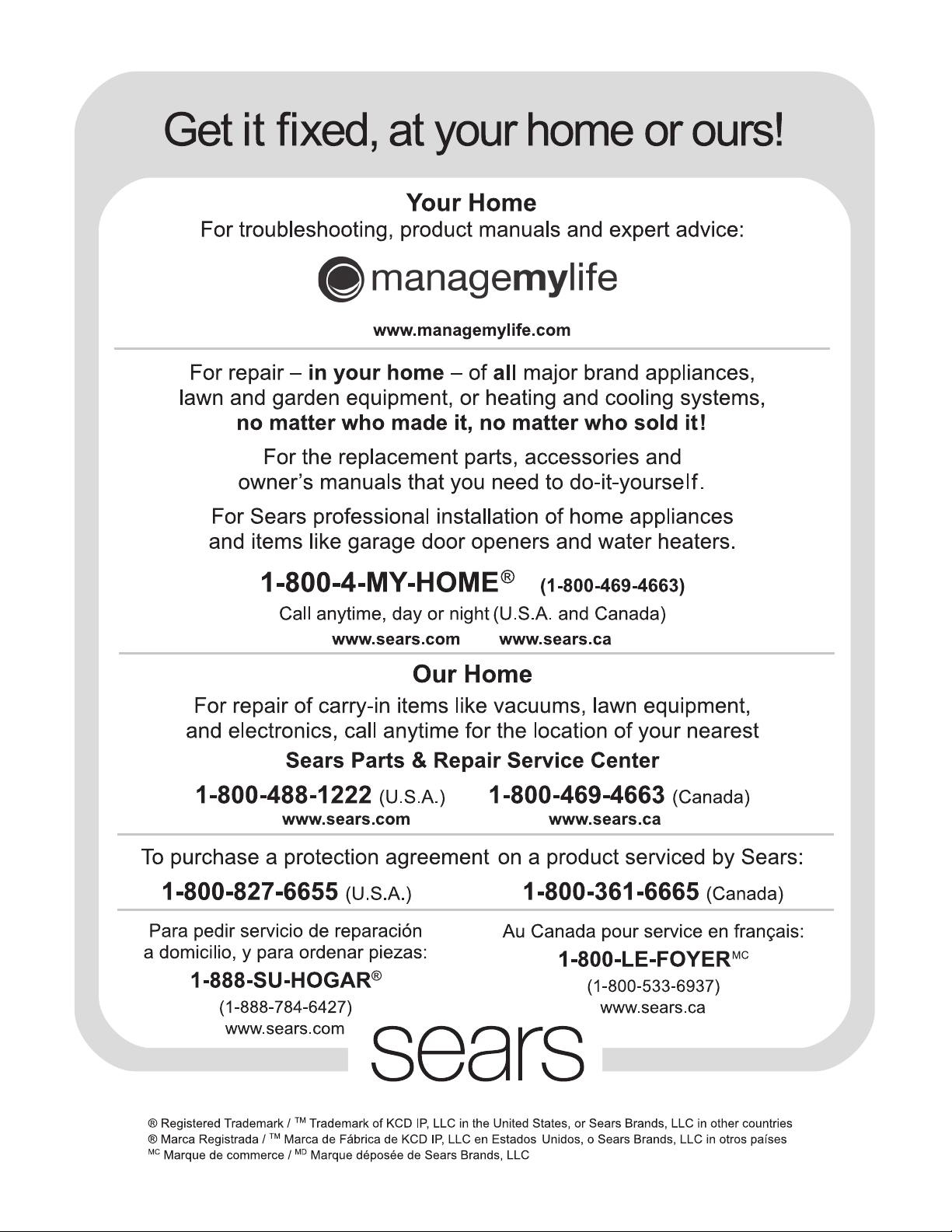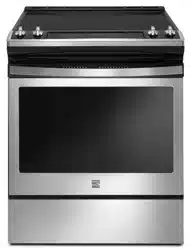

Kenmore®
Electric Range
Estufa eléctrica
* = color number, numéro de color
Use & Care Guide
Guía de uso y cuidada
English / Español
Model/Modelos: 790-9418*
P/N 807190601 Rev A
Sears Brands Management Corporation
Hoffman Estates, IL 60179 U.S.A.
www.kenmore.com.
www.sears.com

All rights reserved. Printed in the USA.
2
Table of Contents
Please carefully read and save these instructions ...............................2
Kenmore Limited Warranty .....................................................................2
Before Setting Surface Controls.................................................................. 7
Setting Surface Controls................................................................................ 9
Before Setting Oven Controls................................................................... 12
Oven vent location ...................................................................................12
Oven Controls ............................................................................................. 13
Care and Cleaning ..................................................................................... 22
Before You Call........................................................................................... 26
Oven Baking .............................................................................................26
Solutions to Common Problems ..............................................................27
Please carefully read and save these instructions
This Use & Care Guide contains operating instructions for your appliance and feature information for several models. Your product
may not have all the described features. The graphics shown are representative. The graphics on your appliance may not look
exactly like those shown. Common sense and caution must be practiced with installing, operating and maintaining any appliance.
Kenmore Limited Warranty
When installed, operated and maintained according to all instructions supplied with the product, if this appliance fails due to a
defect in material and workmanship within one year from the date of purchase, call 1-800-4-MY-HOME® to arrange for free repair.
This warranty applies for only 90 days from the date of purchase if this appliance is ever used for other than private family
purposes.
This warranty covers only defects in material and workmanship. Sears will NOT pay for:
1. Cracks in a ceramic glass cooktop that are not a result of thermal shock.
2. Stains and scratches on a ceramic glass cooktop resulting from failure to maintain it properly according to all instructions
supplied with the product.
3. Expendable items that can wear out from normal use, including but not limited to filters, belts, light bulbs, and bags.
4. A service technician to instruct the user in correct product installation, operation or maintenance.
5. A service technician to clean or maintain this product.
6. Damage to or failure of this product if it is not installed, operated or maintained according to all instructions supplied with the
product.
7. Damage to or failure of this product resulting from accident, abuse, misuse or use for other than its intended purpose.
8. Damage to or failure of this product caused by the use of detergents, cleaners, chemicals or utensils other than those recom-
mended in all instructions supplied with the product.
9. Damage to or failure of parts or systems resulting from unauthorized modifications made to this product.
Disclaimer of implied warranties; limitation of remedies
Customer’s sole and exclusive remedy under this limited warranty shall be product repair as provided herein. Implied warranties,
including warranties of merchantability or fitness for a particular purpose, are limited to one year or the shortest period allowed by
law. Sears shall not be liable for incidental or consequential damages. Some states and provinces do not allow the exclusion or limi-
tation of incidental or consequential damages, or limitation on the duration of implied warranties of merchantability or fitness, so
these exclusions or limitations may not apply to you.
This warranty applies only while this appliance is used in the United States.
This warranty gives you specific legal rights, and you may also have other rights which vary from state to state.
-
Sears Brands Management Corporation, Hoffman Estates, IL 60179 U.S.A.
Save these instructions for future reference.
3
IMPORTANT SAFETY INSTRUCTIONS
Read all instructions before using this appliance.
This manual contains important safety
symbols and instructions. Pay attention to
these symbols and follow all instructions
given.
Do not attempt to install or operate your
appliance until you have read the safety
precautions in this manual. Safety items
throughout this manual are labeled with a
WARNING or CAUTION statement based on
the hazard type.
DEFINITIONS
This is the safety alert symbol. It is used to
alert you to potential personal injury hazards.
Obey all safety message that follow this
symbol to avoid possible injury or death.
Storage In or On Appliance—
Flammable materials should not be stored in
an oven. This includes paper, plastic, and
cloth items, such as cookbooks, plastic ware,
and towels, as well as flammable liquids. Do
not store explosives, such as aerosol cans, on
or near the oven.
Do Not Leave Children Alone -
Children should not be left alone or unat-
tended in the area where appliance is in use.
They should never be allowed to sit or stand
on any part of the appliance, including the
storage drawer, lower broiler drawer, warmer
drawer, or lower double oven.
When heating fat or grease,
watch it closely. Grease may catch fire if it
becomes too hot
Stepping, leaning, or sitting on the
door or drawers of an oven can result in
serious injuries and also cause damage to the
appliance. Do not allow children to climb or
play around the oven. The weight of a child
on an open over door may cause the oven to
tip, resulting in serious burns or other injury.
Never cover any slots, holes, or
passages in the oven bottom or cover an
entire oven rack with materials, such as
aluminum foil. Aluminum foil linings may trap
heat, causing a fire hazard.
- Indicates a potentially
hazardous situation which, if not avoided,
may result in death or serious injury
.
- Indicates a potentially
hazardous situation which, if not avoided,
may result in minor or moderate injury.
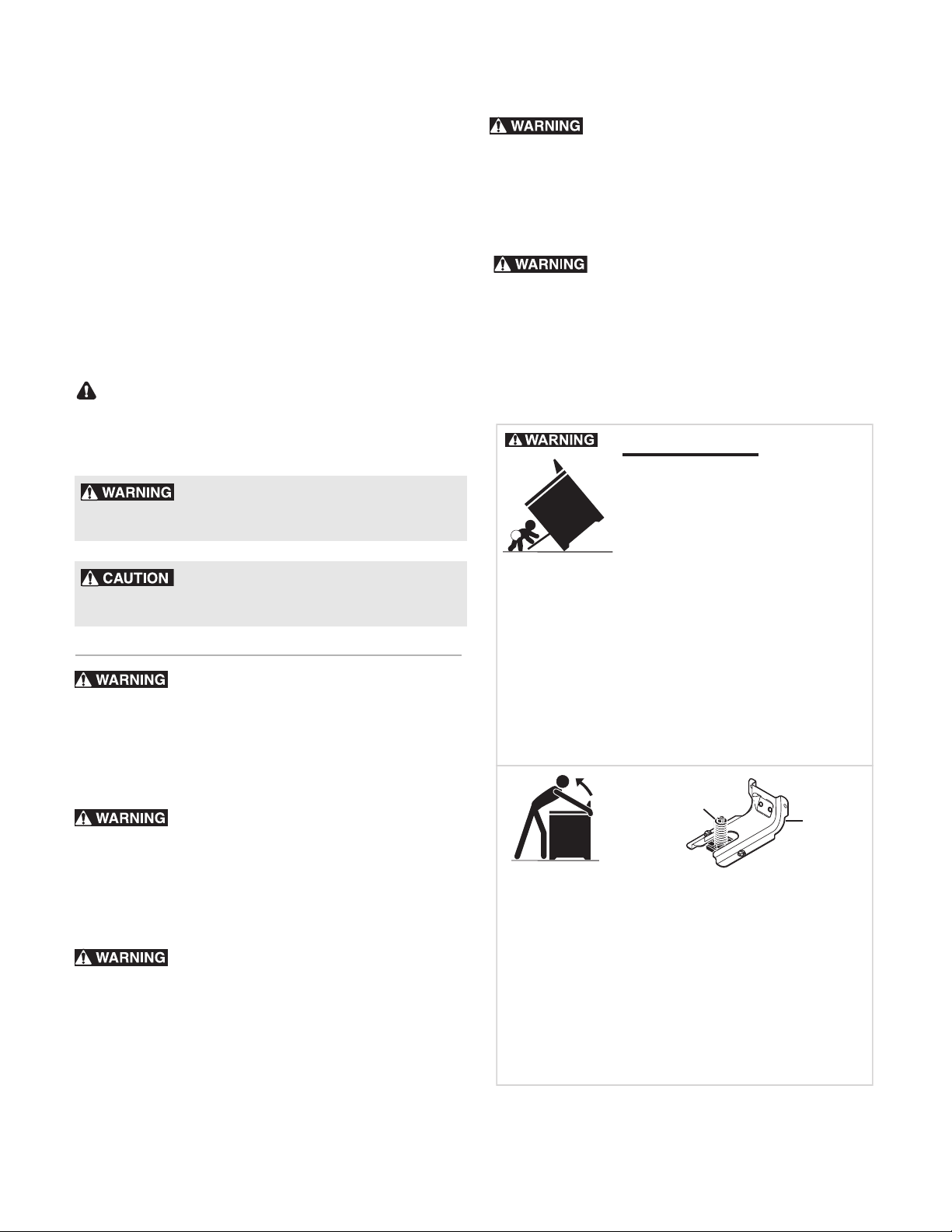
Tip Over Hazard
To check if the anti-tip bracket is installed
properly, use both arms and grasp the rear
edge of the range back. Carefully attempt
to title range forward. When properly
installaed, the range should not tilt forward.
Refer to the anti-tip bracket installation
instructions supplied with your range for
proper installation.
Range
leveling leg
Anti-tip
bracket
• A child or adult can tip the
range and be killed.
• Verify the anti-tip device
has been installed to floor or
wall.
• Ensure the anti-tip device is re-engaged to
floor or wall when the range is moved.
• Do not operate the range without the
anti-tip device in place and engaged.
• Failure to follow these instructions can
result in death or serious burns to children
and adults.
IMPORTANT SAFETY INSTRUCTIONS
Read all instructions before using this appliance.
Save these instructions for future reference.
4
Do not heat unopened food
containers. Build-up of pressure may cause
container to burst and result in injury.
Do not use water or flour on
grease fires. Cover the fire with a pan lid, use
baking soda, or use a dry chemical or foam
type extinguisher.
Wear proper apparel when
cooking. Loose-fitting or hanging garments
should never be worn while using this appli-
ance. Do not let clothing or other flammable
materials come into contact with hot
surfaces
.
Use dry potholders. Moist or
damp potholders on hot surfaces may result
in burns from steam.Do not let potholders
touch hot cooking areas. Do not use towels or
other bulky cloths.
The California Safe Drinking
Water and Toxic Enforcement Act requires
the governor of California to publish a list of
substances known to cause cancer, birth
defects, or other reproductive harms, and it
requires businesses to warn customers of
potential exposures to such substances.
Read and follow all the warnings,
cautions and important notes regarding the
instructions and precautions for unpacking,
installing, and servicing your appliance:
Remove all tape and packaging before using
the oven. Destroy the carton and plastic bags
after unpacking the oven. Never allow
children to play with packaging material.
Do not touch heating elements or
interior surfaces of oven. Heating elements
may be hot even though they are dark in
color. Interior surfaces of ovens become hot
enough to cause burns. During and after use,
do not touch, or let clothing or other
flammable materials contact heating
elements
or interior surfaces of oven until
they have sufficient time to cool. Other
surfaces of the appliance may become hot
enough cause burns such as the oven door,
windows, and the oven vent.
• Proper Installation—Be sure your
appliance is properly installed and
grounded by a qualified technician in
accordance with the National Electrical
Code ANSI/NFPA No. 70 latest edition
and local electrical code requirements. In
Canada, install in accordance with CSA
Standard C22.1, Canadian Electrical
code, Part 1, and local electrical code
requirements. Install only per installation
instructions provided in the literature
package for this oven.
•User Servicing—Do not repair or replace
any part of the appliance unless specifi-
cally recommended in the manuals. All
other servicing should be done only by a
qualified technician. This reduces the risk
of personal injury and damage to the
oven.
• Ask your dealer to recommend a qualified
technician and an authorized repair
service. Know how to disconnect the
power to the oven at the circuit breaker or
fuse box in case of an emergency.
• Never modify or alter the construction of
an oven by removing the leveling legs,
panels, wire covers, anti-tip brackets/
screws, or any other part of the oven.
• Remove the oven door from any unused
oven if it is to be stored or discarded.
• Do not attempt to operate the oven
during a power failure. If the power fails,
always turn off the oven. If the oven is not
turned off and the power resumes, the
oven will begin to operate again. Once
the power resumes, reset the clock and
oven function.

IMPORTANT SAFETY INSTRUCTIONS
Read all instructions before using this appliance.
Save these instructions for future reference.
5
• Cold temperatures can damage the elec-
tronic control. When using this appliance
for the first time, or when the appliance
has not been used for an extended period
of time, be sure the appliance has been in
temperatures above 32ºF (0ºC) for at
least 3 hours before turning on the power
to the appliance.
• Be sure to have an appropriate foam-type
fire extinguisher available, visible, and
easily located near the appliance.
IMPORTANT INSTRUCTIONS FOR USING
YOUR COOKTOP
• Know which knob or keypad controls each
surface heating area. Place cookware
with food on the cooking area before
turning it on. Turn the cooking area off
before removing the cookware.
• Use proper pan size. This appliance is
equipped with one or more surface units
of different sizes. Select cookware with
flat bottoms that match the surface unit
heating element. The use of undersized
cookware may expose a portion of the
heating element to direct contact and
may result in the ignition of clothing or
other items. Using the proper cookware on
the cooking zone will improve efficiency.
• To reduce the risk of burns, ignition of
flammable materials, and spills due to
unintentional contact with the utensil, the
utensil handles should be turned inward
and not extend over other cooking areas.
• Never leave surface elements unattended.
Boil-overs may cause smoking and greasy
spills may ignite. A pan that has boiled
dry could be damaged and may damage
the cooktop.
• Only certain types of glazed cookware,
glass, ceramic, earthenware, or other
types of glazed utensils are suitable for
use on the cooktop. Improper cookware
may break due to sudden changes in
temperature. Check the cookware manu-
facturer’s recommendations for cooktop
use.
• When you are flaming foods under a
ventilating hood, turn on the fan.
IMPORTANT INSTRUCTIONS FOR
CERAMIC GLASS COOKTOPS
• Do not cook on a broken cooktop. If the
cooktop is broken, cleaning solutions and
spills may penetrate the cooktop and
create a risk of electric shock. Contact a
qualified technician immediately.
• Clean cooktop with caution. If a wet
sponge or cloth is used to wipe spills on a
hot cooking area, be careful to avoid
steam burns. Some cleaners can produce
noxious fumes if applied to a hot surface.
IMPORTANT INSTRUCTIONS FOR USING
YOUR OVEN
• Never use your appliance for warming or
heating the room.
• Use care when opening oven door, lower
oven door, or warmer drawer (some
models). Stand to the side of the oven
when opening the door of a hot oven. Let
hot air or steam escape before you
remove or replace food in the oven.
• Keep oven vent ducts clear. Touching
surfaces in this area when the oven is on
may cause severe burns. Do not place
plastic or heat-sensitive items on or near
the oven vent. These items can melt or
ignite.
IMPORTANT SAFETY INSTRUCTIONS
Read all instructions before using this appliance.
Save these instructions for future reference.
6
• Always handle oven racks when the oven
is cool. Place oven racks in desired
positions while the oven is cool. if a rack
must be moved while the oven is hot, use
extreme caution. Use potholders and
grasp the rack with both hands to reposi-
tion. Do not let potholders contact the hot
heating elements in the oven. Remove all
bakeware and utensils before moving the
rack.
• Do not use a broiler pan without its insert.
Do not cover the broiler insert with
aluminum foil; exposed fat and grease
could ignite.
• Do not use aluminum foil or other protec-
tive liners to line the oven bottom. Only
use aluminum foil as recommended in this
manual. Improper installation of these
liners may result in risk of electric shock or
fire.
• Do not cook food on the oven bottom.
Always use proper bakeware and use the
oven racks.
IMPORTANT INSTRUCTIONS FOR CLEANING YOUR
OVEN
Before manually cleaning any
part of the oven, be sure all controls are
turned off and the oven is cool. Cleaning a
hot oven can cause burns.
Clean the oven regularly to keep all parts
free of grease that could catch fire. Do not
allow grease to accumulate. Always follow
the manufacturer’s recommended directions
for use of kitchen cleaners and aerosols. Be
aware that excess residue from cleaners and
aerosols may ignite causing damage and
injury.
Clean ventilating hoods frequently. Grease
should not be allowed to accumulate on the
hood or filter. Follow the manufacturer’s
instructions for cleaning hoods.
SELF-CLEANING OVENS
• Use the self-clean cycle to clean only the
parts listed in this manual. Before using
self-clean, remove the broiler pan, any
food, utensils, and bakeware from the
oven. Remove oven racks unless otherwise
instructed.
• Do not use oven cleaners. No commercial
oven cleaner, oven liner, or protective
coating of any kind should be used in or
around any part of the oven.
• Do not clean the oven door gasket. The
door gasket is essential for a good seal.
Do not rub, damage, or move the gasket.
• Some birds are extremely sensitive to the
fumes given off during the self-clean
cycle of any oven. Move birds to another
well-ventilated room.
GROUNDING INSTRUCTIONS
Do not use an adapter plug or an
extension cord, or remove grounding prong
from the power cord. Failure to follow this
warning may cause serious injury, fire, or
death
.
For personal safety, this appliance must be
properly grounded.
For models factory-equipped with a power
cord:
For maximum safety, the power cord must be
plugged into an electrical outlet that is the
correct voltage, is correctly polarized, and
properly grounded in accordance with local
codes.
For ovens to be wired into a junction box:
It is the personal responsibility of the
consumer to have the appropriate outlet with
the correct, properly grounded wall recep-
tacle installed by a qualified electrician. See
the installation instructions packaged with
this appliance for complete installation and
grounding instructions.
7
Before Setting Surface Controls
Using proper cookware
The size and type of cookware used will influence the radiant
element power level setting needed for best cooking results.
Be sure to follow the recommendations for using proper
cookware shown on this page.
Cookware material types
The cookware material determines how evenly and quickly heat
is transferred from the surface element to the pan bottom.
Aluminum - Excellent heat conductor. Some types of food will
cause it to darken (Anodized aluminum cookware resists staining
& pitting). If aluminum pans slide across the ceramic cooktop,
they may leave metal marks which will resemble scratches.
Remove these marks immediately.
Copper - Excellent heat conductor but discolors easily. May
leave metal marks on ceramic glass (see Aluminum).
Stainless - Slow heat conductor with uneven cooking results. Is
durable, easy to clean and resists staining.
Cast Iron - A slow heat conductor however will retain heat very
well. Cooks evenly once cooking temperature is reached. Not
recommended for use on ceramic cooktops.
Porcelain-enamel on metal - Heating characteristics will vary
depending on base material. Porcelain-enamel coating must be
smooth to avoid scratching ceramic
Glass - Slow heat conductor. Not recommended for ceramic
cooktop surfaces because it may scratch the glass.
Important note:
Do not place empty aluminum, glass or porcelain-enamel
coated cookware on the ceramic cooktop! The melting point of
cookware made with these materials may be reached quickly
especially if left empty & they may bond to the ceramic
cooktop. If the cookware melts it will damage the cooktop! Be
sure to follow all the cookware manufacturer’s suggestions when
using any type of cookware on the ceramic cooktop.
About the ceramic glass cooktop
The ceramic cooktop has radiant surface elements located
below the surface of the glass. The design of the ceramic
cooktop outlines the area of the surface element underneath. Be
sure to match the pan size with the diameter of the element
outline on the cooktop and only flat-bottomed cookware should
be used.The type and size of cookware, the number of surface
elements in use and their settings are all factors that will affect
the amount of heat that will spread to areas beyond the surface
elements. The areas surrounding the elements may become hot
enough to cause burns.
About the radiant surface elements
The element temperature rises gradually and evenly. As the
temperature rises, the element will glow red. To maintain the
selected setting the element will cycle on and off. The heating
element retains enough heat to provide a uniform and consistent
heat during the off cycle.For efficient cooking, turn off the
element several minutes before cooking is complete. This will
allow residual heat to complete the cooking process.
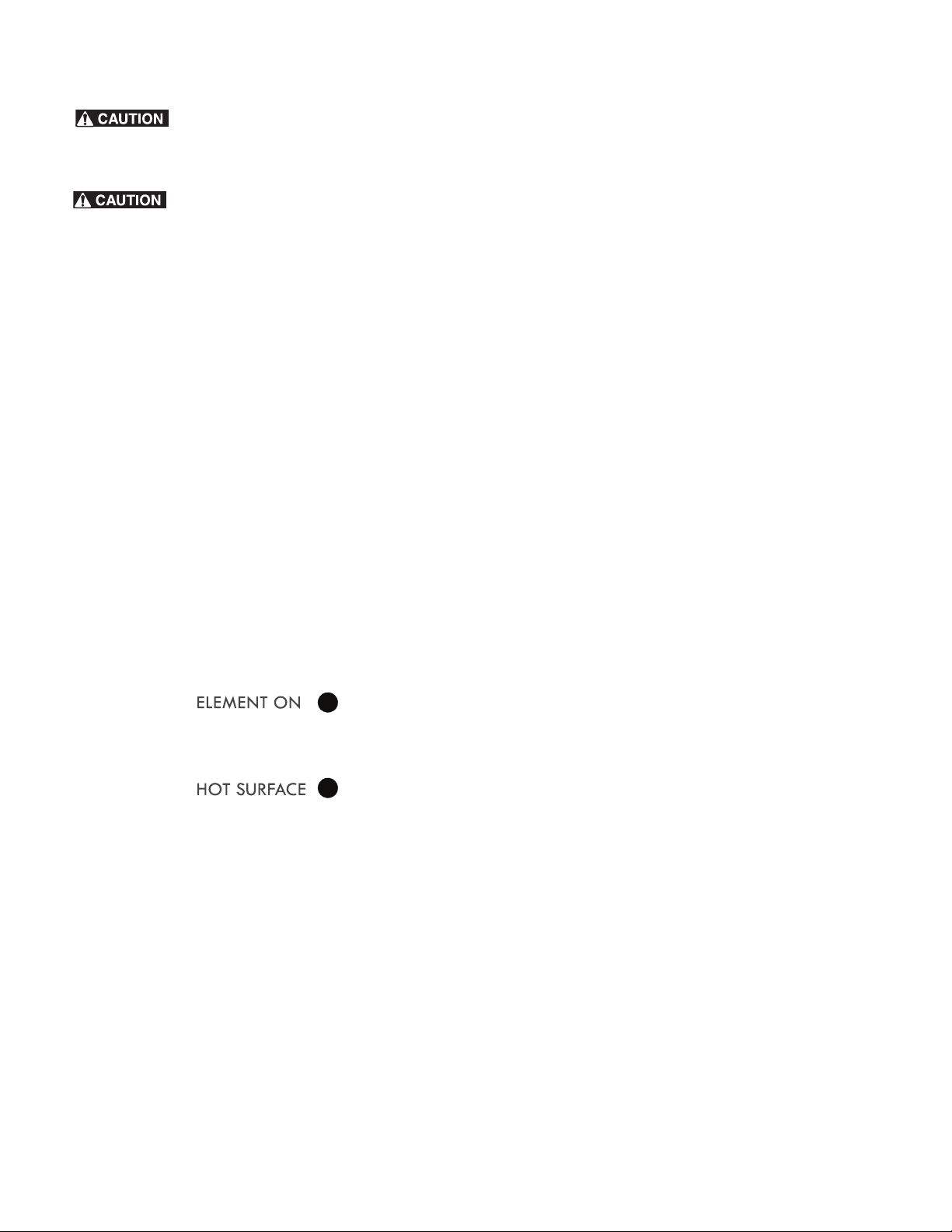
Figure 1: Check pan for flat bottom using ruler
• Flat bottom and straight
sides.
• Tight fitting lids.
• Weight of handle does
not tilt pan. Pan is well
balanced
.
• Pan sizes match the
amount of food to be
prepared and the size
of the surface element.
• Made of material that
conducts heat well.
• Easy to clean.
• Always match pot
diameter to element
size.
• Curved and warped pans.
• Cookware larger than
cooking area marked on
cooktop by more than
one-half inch or 12mm.
• Heavy handle tilts pan.
• Pan is smaller than the
heating area marked on
cooktop.
8
Before Setting Surface Controls
Radiant surface elements may appear to have
cooled after they have been turned off. The glass surface may
still be hot and burns may occur if the glass surface is touched
before it has cooled sufficiently.
Do not place plastic items such as salt and
pepper shakers, spoon holders or plastic wrappings on top of
the range when it is in use. These items could melt or ignite.
Potholders, towels or wooden spoons could catch fire if placed
too close to the surface elements.
Do not allow aluminum foil, empty glass-porcelain cookware or
ANY material that can melt to make contact with the ceramic
cooktop. If these items melt on the cooktop they may damage
the ceramic cooktop.
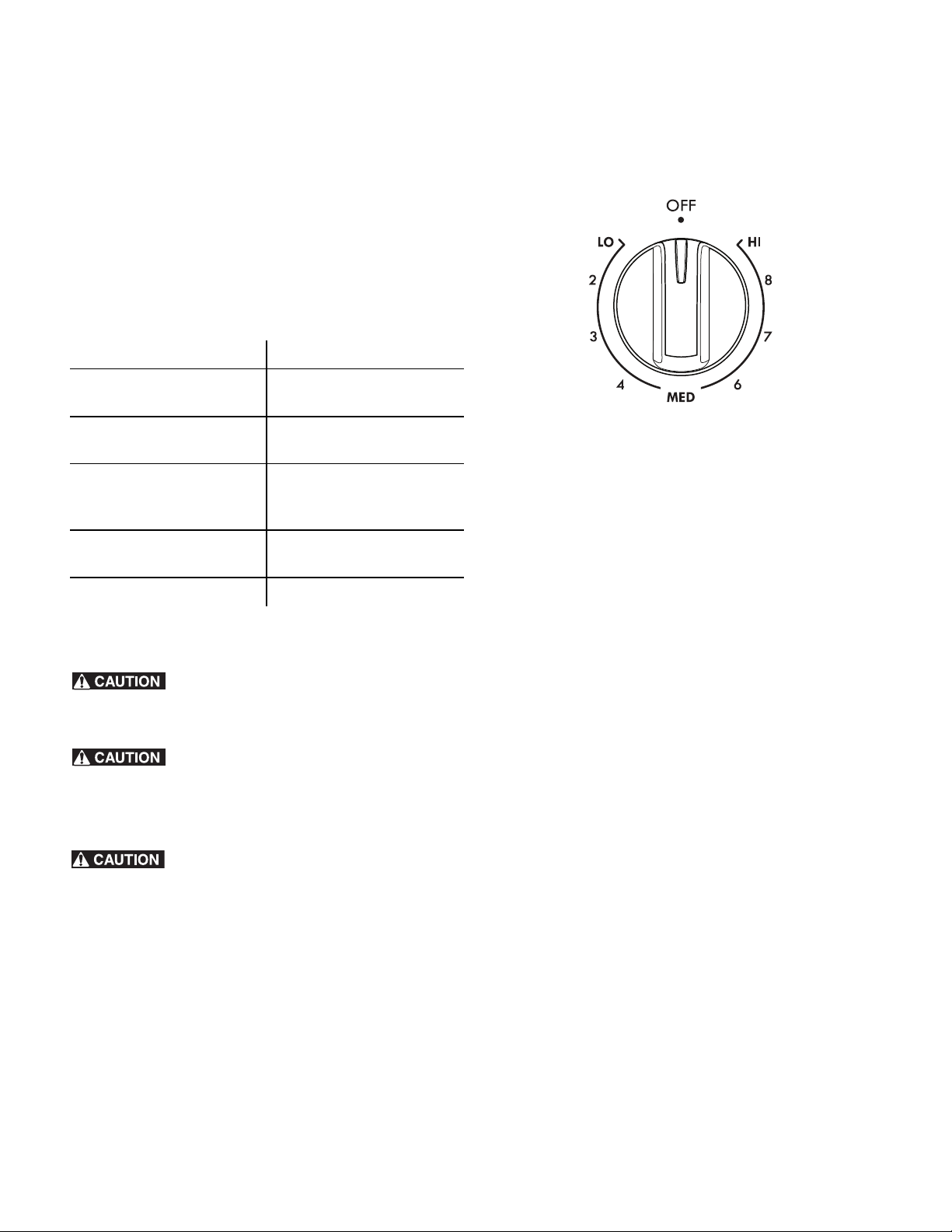
ELEMENT ON and HOT SURFACE indicator lights
Your appliance is equipped with different types of surface
indicator lights that will glow on the control panel — the
ELEMENT ON and HOT SURFACE indicator lights.
The ELEMENT ON indicator light is marked on the control panel
and will glow when a surface cooking element is turned on. A
quick glance at this indicator light after cooking is an easy
check to be sure all surface controls are turned off.
The HOT SURFACE indicator light will glow when any surface
cooking element heats up and will remain on until the cooktop
has cooled to a moderate level
Important notes:
• Radiant elements have a limiter that allows the radiant
heating element to cycle on and off, even at the HI setting.
Cycling at the HI setting is normal and will occur more often
if the cookware is too small for the radiant element or if the
cookware bottom is not flat.
• Be sure to read the detailed instructions for ceramic glass
cooktop maintenance and cleaning in the Care & Cleaning
and Before You Call sections of this Use & Care Guide.
Types of cooktop surface elements
The ceramic glass cooktop has radiant surface elements located
below the surface of the glass. The patterns on the ceramic glass
will outline the size and type of element available.
The single radiant element or elements will have one round
outline pattern shown on the cooktop. The warmer zone feature
(on some models), located on the center rear area of the
cooktop, uses one round outline and is designed to keep food
warm only.
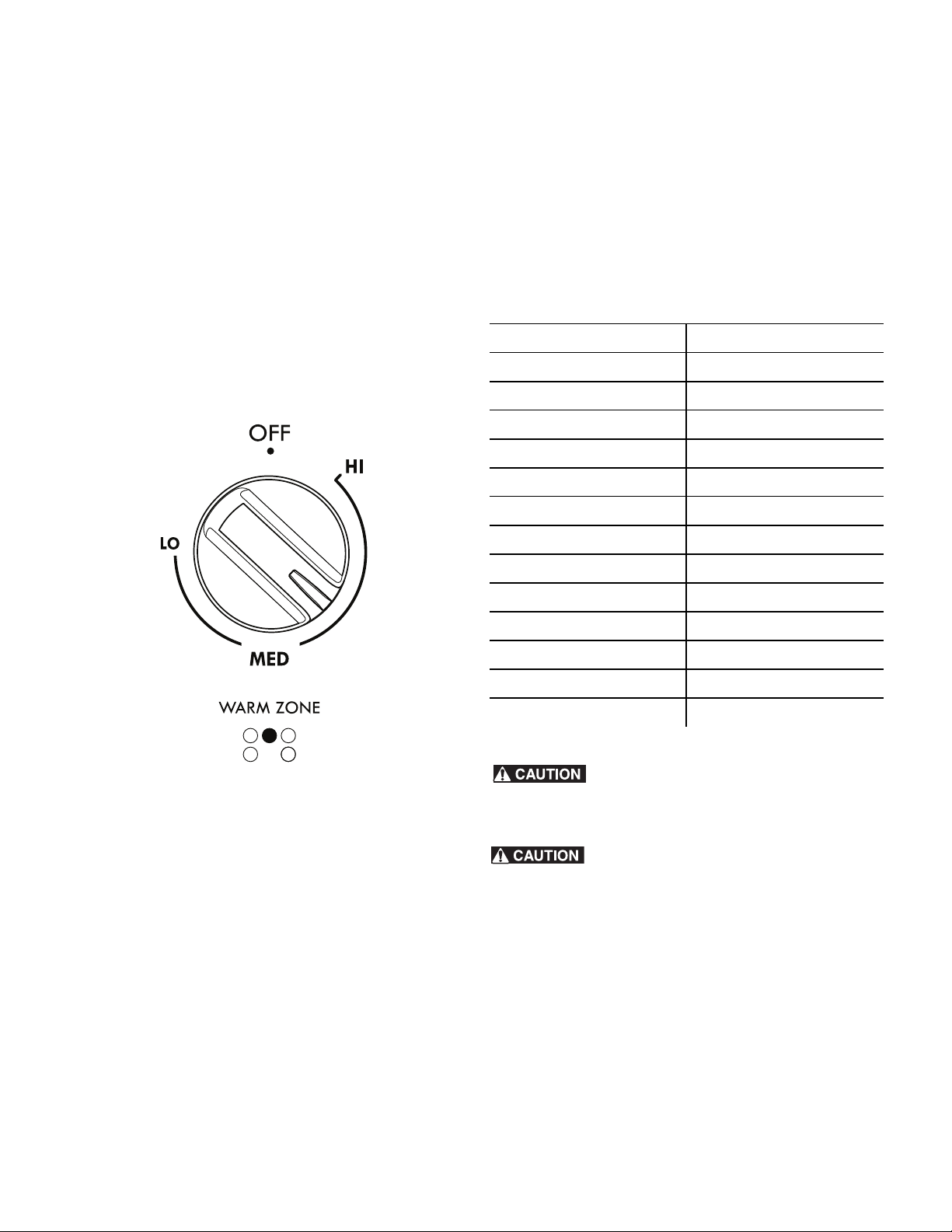
A dual (on some models) radiant element allows the user to set
the smaller inner portion as a single element or both inner and
outer portions may be set to heat together.
Home Canning
Be sure to read and observe all the following points when home
canning with your appliance. Check with the USDA (United
States Department of Agriculture) website and be sure to read
all the information they have available as well as follow their
recommendations for home canning procedures.
Tips and procedures for canning foods:
• Use only quality flat bottom canners when home canning.
Use a straight-edge to check canner bottom.
• Use only a completely flat bottom canner with no ridges
that radiate from the bottom center when home canning
using a ceramic cooktop.
• Make sure the diameter of the canner does not exceed 1
inch beyond the surface element markings or burner. It is
recommended to use smaller diameter canners on electric
coil and ceramic glass cooktops. Start with hot tap water to
bring water to boil more quickly.
• Use the highest heat seating when first bringing the water to
a boil. Once boiling is achieved, reduce heat to lowest
possible setting to maintain that boil.
• Never place or straddle a cooking utensil over 2 different
surface cooking areas at the same time. This will cause
uneven heating results and may cause the ceramic cooktop
to fracture.
Figure 2: Element and hot surface indicator
9
Setting Surface Controls
Setting Surface Controls
Radiant surface element settings
The suggested settings below are based when cooking with
medium-weight aluminum pans with lids. Settings may vary
when using other types of pans.
Suggested settings for single and dual (some models) radiant
surface elements
Radiant surface elements may appear to have
cooled after they have been turned off. The
glass surface may still be hot and burns may occur if the glass
surface is touched before it has cooled sufficiently.
Do not place plastic items such as salt and
pepper shakers, spoon holders or plastic wrappings on top of
the range when it is in use. These items could melt or ignite.
Potholders, towels or wooden spoons could catch fire if placed
too close to the surface elements.
Do not allow aluminum foil, empty glass-
porcelain cookware or ANY material that can melt to make
contact with the ceramic cooktop. If these items melt on the
cooktop they may damage the ceramic cooktop
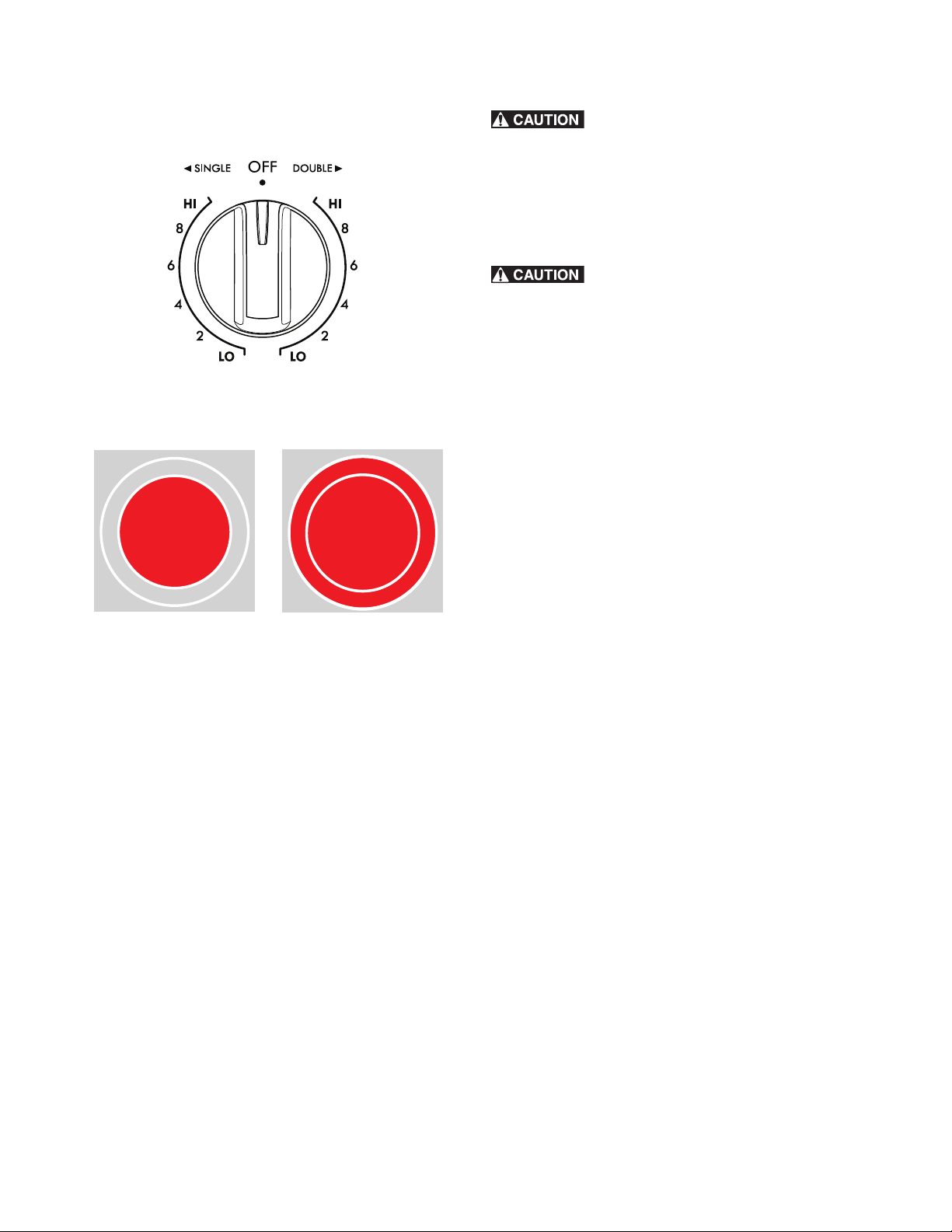
Single radiant surface elements (all models)
To operate the single radiant element:
1. Place correctly sized cookware on single radiant surface
element.
2. Push in and turn the surface control knob in either direction
to the desired setting (Figure 3).
3. When cooking is complete, turn the radiant surface element
off before removing the cookware.
Important notes:
• For efficient cooking, turn off the element several minutes
before cooking is complete. This will allow residual heat to
complete the cooking process.
• The surface control knobs do not have to be set exactly on
a particular spot. Use the graphics provided as a guide and
adjust the control knob as needed. Each surface element
provides a constant amount of heat at each setting.
• Refer to the suggested radiant surface element settings for
suggested power level settings (Table 1). A glowing red
surface heating area extending beyond the bottom edge of
the cookware indicates the cookware is too small for the
surface heating area.
Table 1: Suggested settings for various cooking needs
Settings Type of Cooking
High (HI-9) Start most foods, bring water
to boil, pan broiling
Medium high (7-8) Continue a rapid boil, fry,
deep fat fry
Medium (5-6) Maintain a slow boil, thicken
sauces and gravies, steam
vegetables
Medium-low ( 2-4) Keep foods cooking, poach,
stew
Low (LO-1) Keep warm, melt, simmer
Figure 3: Single radiant element control
10
Setting Surface Controls
Dual radiant surface element (some models)
To operate the dual radiant element:
1. Place correctly sized cookware on single radiant surface
element.
2. Push in and turn the surface control knob clockwise to begin
heating both the inner and outer portions of the element. If
only the inner heating portion is needed for smaller
cookware, push in and turn the knob counter-clockwise to
start.
3. When cooking is complete, turn the radiant surface
element off before removing the cookware.
Radiant surface elements may appear to have
cooled after they have been turned off. The glass surface may
still be hot and burns may occur if the glass surface is touched
before it has cooled sufficiently. Do not place plastic items such
as salt and pepper shakers, spoon holders or plastic wrappings
on top of the range when it is in use. These items could melt or
ignite. Potholders, towels or wooden spoons could catch fire if
placed too close to the surface elements.
Do not allow aluminum foil, empty glass/
porcelain cookware or ANY material that can melt to make
contact with the ceramic cooktop. If these items melt on the
cooktop they may damage the ceramic cooktop
Important notes:
• For efficient cooking, turn off the element several minutes
before cooking is complete. This will allow residual heat to
complete the cooking process.
• The surface control knobs do not have to be set exactly on
a particular spot. Use the graphics provided as a guide and
adjust the control knob as needed. Each surface element
provides a constant amount of heat at each setting.
• Start most cooking operations on a higher setting and then
turn to a lower setting to finish cooking.
• Radiant elements have a limiter that allows the radiant
heating element to cycle on and off, even at the HI setting.
This helps prevent damage to the ceramic smoothtop.
Cycling at the HI setting is normal and will occur more often
if the cookware is too small for the radiant element or if the
cookware bottom is not flat.
• A glowing red surface heating area extending beyond the
bottom edge of the cookware indicates the cookware is too
small for the surface heating area.
Figure 4: Dual radiant element control
Figure 5: Dual burner set to single (L) and double (R).
11
Setting Surface Controls
Warmer Zone (some models)
The purpose of the warmer zone is to keep hot cooked
foods at serving temperature. Use the warmer zone feature to
keep cooked foods hot such as; vegetables,
gravies, casseroles, soups, stews, breads, pastries and oven safe
dinner plates.
Always start with hot food. Do not heat cold food with the
warmer zone. All food placed on the warmer zone should be
covered with a lid to maintain quality. For best results, when
warming pastries or breads, the cover should have an opening
to allow moisture to escape. Use only dish ware, utensils and
cookware recommended for oven and cooktop use on the
warmer zone.
1. Push in either direction and turn the warmer zone control
knob to the desired temperature level. The temperatures are
approximate, and are designated by HI (high), MED
(medium) and LO (low). However, the control can be set at
any position between HI and LO for different levels of
warming.
2. When ready to serve, turn the warmer zone control knob to
OFF position. The warmer zone will remain hot until the hot
surface indicator light turns off.
Important notes:
• Use only plates, utensils and cookware recommended for
oven and ceramic cooktop use. Do not use plastic wrap or
aluminum foil to cover food. Plastic or aluminum foil can
melt onto the cooktop.
Refer to the warmer zone recommended food settings below. If
a particular food is not listed, start with the medium level, and
adjust as needed.
Unlike other radiant surface elements, the
warmer zone will not glow red when it is HOT. The glass surface
may still be hot and burns can occur if the glass surface is
touched before it has cooled sufficiently.
Do not place flammable items such as plastic
salt and pepper shakers, spoon holders or plastic wrappings on
top of the range when it is in use. These items could melt or
ignite. Potholders, towels or wooden spoons could catch fire if
placed too close to the surface elements.Do not allow aluminum
foil, empty glass-porcelain cookware or any material that can
melt to make contact with the ceramic cooktop.
Table 2: Suggested settings for Warmer Zone
Food Item Heating level
Breads/ Pastries LO (Low)
Casseroles LO (Low)
Dinner Plates with food LO (Low)
Eggs LO (Low)
Gravies LO (Low)
Meats MED (Medium)
Sauces MED (Medium)
Soups (Cream) MED (Medium)
Stews MED (Medium)
Vegetables MED (Medium)
Fried foods HI (High)
Hot beverages HI (High)
Soups (clear) HI (High)
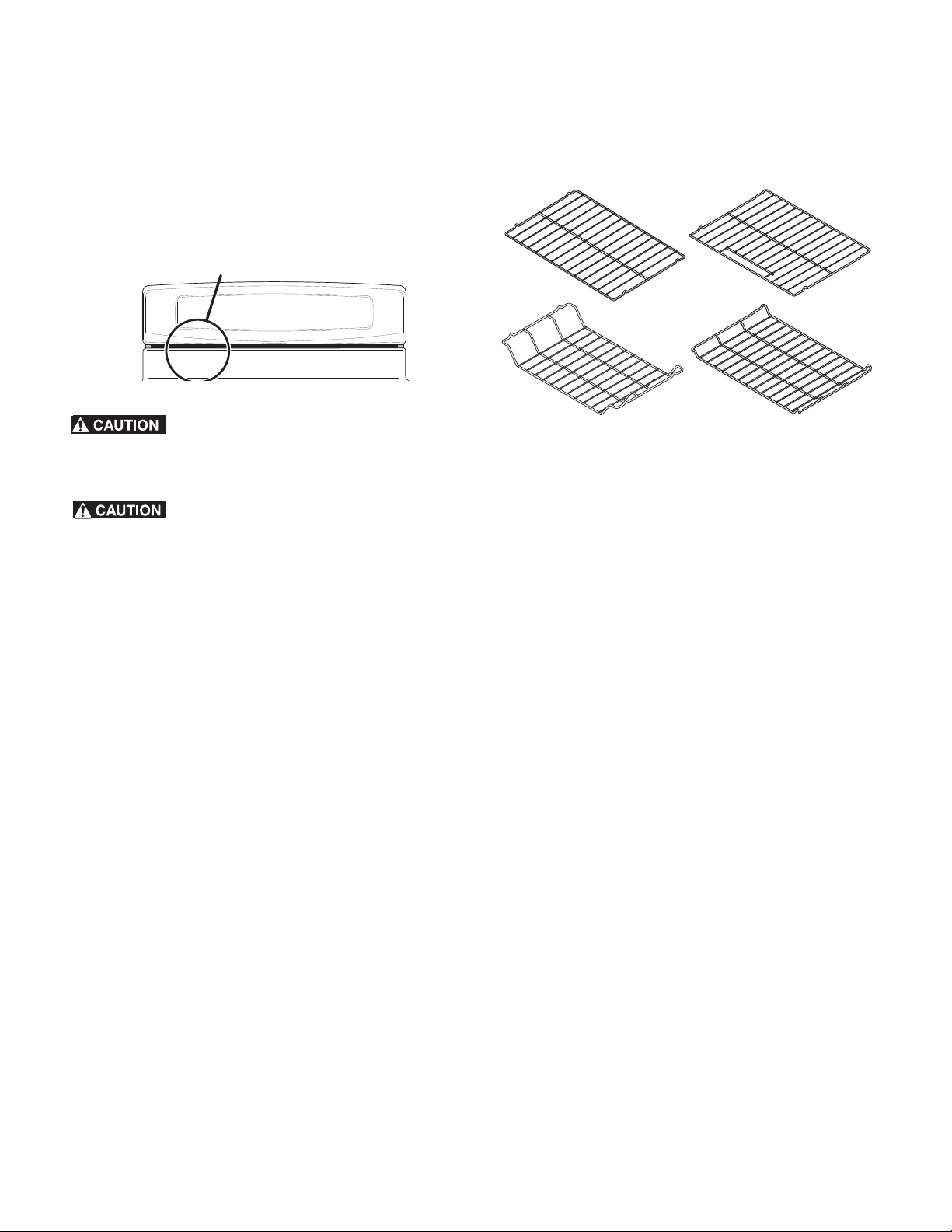
12
Before Setting Oven Controls
Oven vent location
The oven vent is located under the left side of the control panel
(Figure 6). When the oven is on, warm air passes through this
vent. This venting is necessary for proper air circulation in the
oven and good baking results. Do not block oven vent:
Always use pot holders or oven mitts when
using the oven. When cooking, the oven interior and exterior,
oven racks and cooktop will become very hot which can cause
burns.
Protective Liners — Do not use aluminum foil to
line the oven bottom. Only use aluminum foil as recommended
in this manual. Improper installation of these liners may result in
risk of electric shock, or fire
Air circulation in the oven
For best baking results allow 2-4" (5-10 cm) around the
cookware for proper air circulation and be sure pans and
cookware do not touch each other, the oven door, sides or back
of the oven cavity. Hot air must be able to circulate around the
cookware in the oven for even heat to reach around the food.
Type of oven racks
The flat oven rack (some models) or flat handle oven rack (some
models) may be used for most cooking needs.
The offset oven rack (on some models) is designed to place the
base of the rack about 1/2 of a rack position lower than flat
oven racks. This design allows several additional positions
between the flat rack positions.
To maximize oven cooking space place the bottom oven rack
(on some models) in the lowest rack position for roasting large
cuts of meat.
Figure 6: Oven vent location
oven vent location
Figure 7:
at oven rack
bottom oven
rack
at handle
oven rack
oset
oven rack
13
Oven Controls
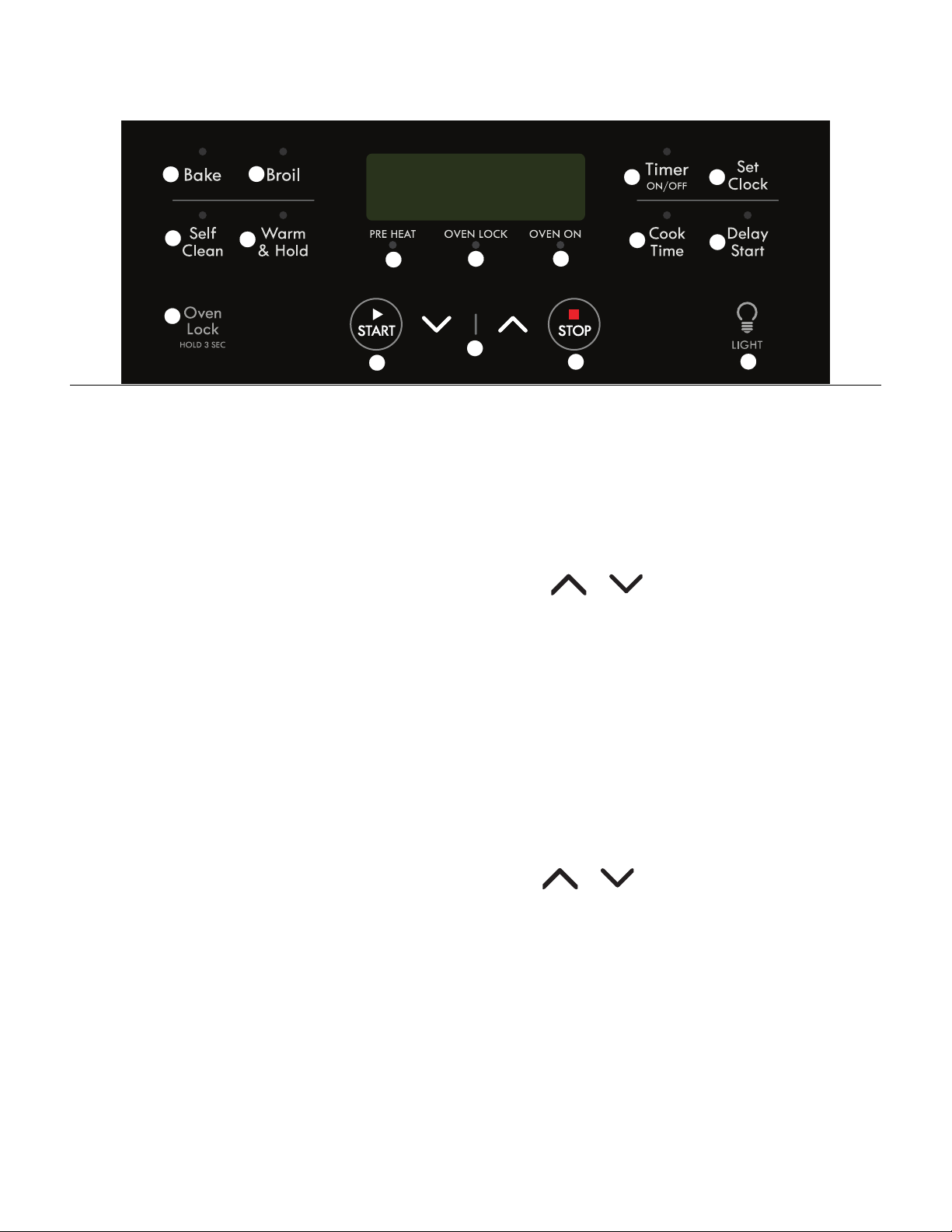
1. Bake - Selects Bake function.
2. Broil - Selects Broil function.
3. Self Clean - Use to select 2, 3, or 4hr Self-Clean cycle.
4. Warm & Hold - Use to keep cooked food warm and at
serving temperature for up to 3 hours.
5. Oven Lock - Use to lock oven door and oven functions.
6. PREHEAT indicator light - Is on when oven is preheating.
Stays on until the oven reaches the desired temperature.
7. OVEN LOCK indicator light - Is on when door locks or
unlocks and when oven lockout is active.
8. OVEN ON indicator light - Glows each time the oven
cycles on to maintain the set oven temperature.
9. START - Use to start all cooking functions.
10. Up / Down arrows - Use with the function keys to accept
settings and adjust temperature and times.
11. STOP - Cancels any active oven function except clock and
timer.
12. Timer Set/Off - Use to set and cancel the timer and to set
the Continuous Bake feature.
13. Set Clock - Use with arrow keys to set time of day.
14. Cook Time - Use to set a specific amount of time needed
for cooking. Automatically cancels cooking process at end
of set time.
15. Delay Start - Use with Bake and Self Clean functions to
program a delayed start bake or delayed start self clean
cycle.
16. LIGHT - Use to turn internal oven light on and off.
Setting Clock
When the appliance is first powered up or when the power sup-
ply to the appliance has been interrupted, 12:00 will flash in
the display. The time of day must first be set before operating
the oven.
To set the clock
1. Press Set Clock once. CLO appears in display.
2. Press or and the time appears in the display.
Continue to hold arrow key until the correct time of day
appears in the display.
3. Press START to accept time of day.
Important note:
The time of day cannot be changed when the oven is set for
cooking.
Silent or audible control mode
1. Press and hold Delay Start until the control beeps once
(about 3 seconds). The present mode appears as OFF
(silent operation) or ON (for audible operation).
2. Use or to toggle between audible or silent
modes. To save press START when the desired mode of
operation appears in the display
1
2
3
4
5
6
7
8
9
10
11
12
13
14
15
16

14
Oven Controls
Changing Temperature Display (ºF or ºC)
The electronic oven control is set to display °F (Fahrenheit) when
shipped from the factory. The display may be changed to show
either Fahrenheit or ºC (Celsius) oven temperatures.
To change temperature display mode from °F to °C or from
°C to °F
1. Press Broil. HI appears in the display.
2. Press and hold Broil until F or C appears in the display.
3. Press either or to toggle between F or C mode
choices.
4. Press START to accept change. The display will return to
the time of day.
Important note:
The temperature display mode cannot be changed when the
oven is set for cooking.
Oven Lock
The OVEN LOCK feature allows you to lock the oven portion of
the appliance while the oven is not in use.
To activate OVEN LOCK feature:
1. Be sure the door is completely closed.
2. Press and hold OVEN LOCK for 3 seconds. Loc will
appear in the display. The OVEN LOCK indicator light will
flash while the motor driven door latch begins locking the
oven door. Do not open the door during this time. Allow 15
seconds for the door to completely lock. Once oven door is
locked, the time of day will appear in the display.
To cancel the OVEN LOCK feature
1. Press and hold OVEN LOCK for 3 seconds. The OVEN
LOCK indicator light will flash and the motor driven door
latch will begin to unlock. Do not open the door at this time.
The door will unlock completely in about 15 seconds.
2. The oven control keys will be available and the oven door
can be opened again.
Important notes:
• To avoid possible damage to the oven door latch
mechanism, do not attempt to open of close the oven door
whenever the OVEN LOCK indicator light is flashing.
• If a control key is pressed when the OVEN LOCK is active,
Loc will appear in the display as a reminder that the oven
keys are inactive when the OVEN LOCK feature is active.
Changing between continuous bake setting or 12-Hour
Energy Saving feature
The oven control has a factory-preset 12-Hour Energy Saving
feature that will turn the oven off automatically if the oven is
left on for more than 12 hours. The control may be programmed
to override this feature to continuously bake.
To change to continuous bake mode
Press and hold Timer Set/Off until the control beeps once
(about 6 seconds). - - hr will appear in display. The control
is set for continuous bake. Press Clean key to toggle
between continuous bake and 12hr Energy Saving.
To save the selected mode press START. The display will
return to idle.
Setting Timer
The timer may be set from 1 minute to 11 hours and 59 minutes.
To set the timer
1. Press Timer Set/Off.
2. Press and hold to increase the time. Release
when the desired time appears in the display.
3. Press START and timer will begin to count down.
4. When the set time has run out, the Timer will sound with 3
beeps and will continue to beep 3 times every 60 seconds
until Timer Set/Off is pressed.
To change time remaining in Timer, press and hold or
to increase or decrease any time remaining.
To cancel the Timer before at any time, press Timer Set/Off
once.
Important notes:
• The timer does not start or stop the cooking process. It
serves as an extra timer in the kitchen that will beep when
the set time has run out. The timer may be used alone or
when any other oven function is active.
• The indicator light located above Timer Set/Off will glow
when the timer is active.
• The timer will display hours and minutes until 1 hour
remains. When less than 1 hour remains, the display will
count down in minutes and seconds. Once the timer has less
than 1 minute remaining only seconds will display.
• If the timer is active when oven cooking, the minute timer
will show in the display by default. To view information of
any other active oven function, press the key once for the
active function to view status.
15
Oven Controls
Setting Bake
Use the bake function whenever the recipe calls for baking
using normal temperatures. A reminder tone will sound when the
set bake temperature is reached. Bake may be programmed
for any temperature from 170°F to 550°F (77°C to 288°C).
The factory preset bake temperature is 350°F (177°C).
Always use pot holders or oven mitts when using
the oven. When cooking the oven interior, oven racks and cook-
top will become very hot which can cause burns.
To set Bake
1. Arrange oven racks and close oven door.
2. Press Bake. 350° appears in display.
3. Within 15 seconds, press or . The display will
show the default oven temperature of 350°F (177°C). By
pressing or , the oven temperature may be
adjusted in 5°F increments (1°C if the control is set to dis-
play Celsius).
4. Press START when desired temperature appears, the oven
will begin heating to the selected temperature. When the
oven temperature reaches the set temperature, the PRE-
HEAT indicator light will turn off and the oven control will
beep 3 times.
To cancel bake at anytime Press .
To change the oven temperature after Bake has started
1. Press Bake. The current set oven temperature will display.
2. Press or to increase or decrease the current set
temperature to the new oven temperature.
Important notes:
• The oven will bake no longer than 12 hours. If you wish to
bake for a longer period, see Changing between
continuous bake setting or 12-Hour Energy Saving mode
for detailed information.
• Dark or dull pans absorb more heat than shiny bakeware,
resulting in dark or over-browning of foods. It may be
necessary to reduce the oven temperature or cook time to
prevent over-browning of some foods. Dark pans are
recommended for pies; shiny pans are recommended for
cakes, cookies and muffins.
Baking tips
• Fully preheat the oven before cooking items like cookies,
biscuits and breads.
• When using any single rack, position the rack so that the
food is in the center of the oven.
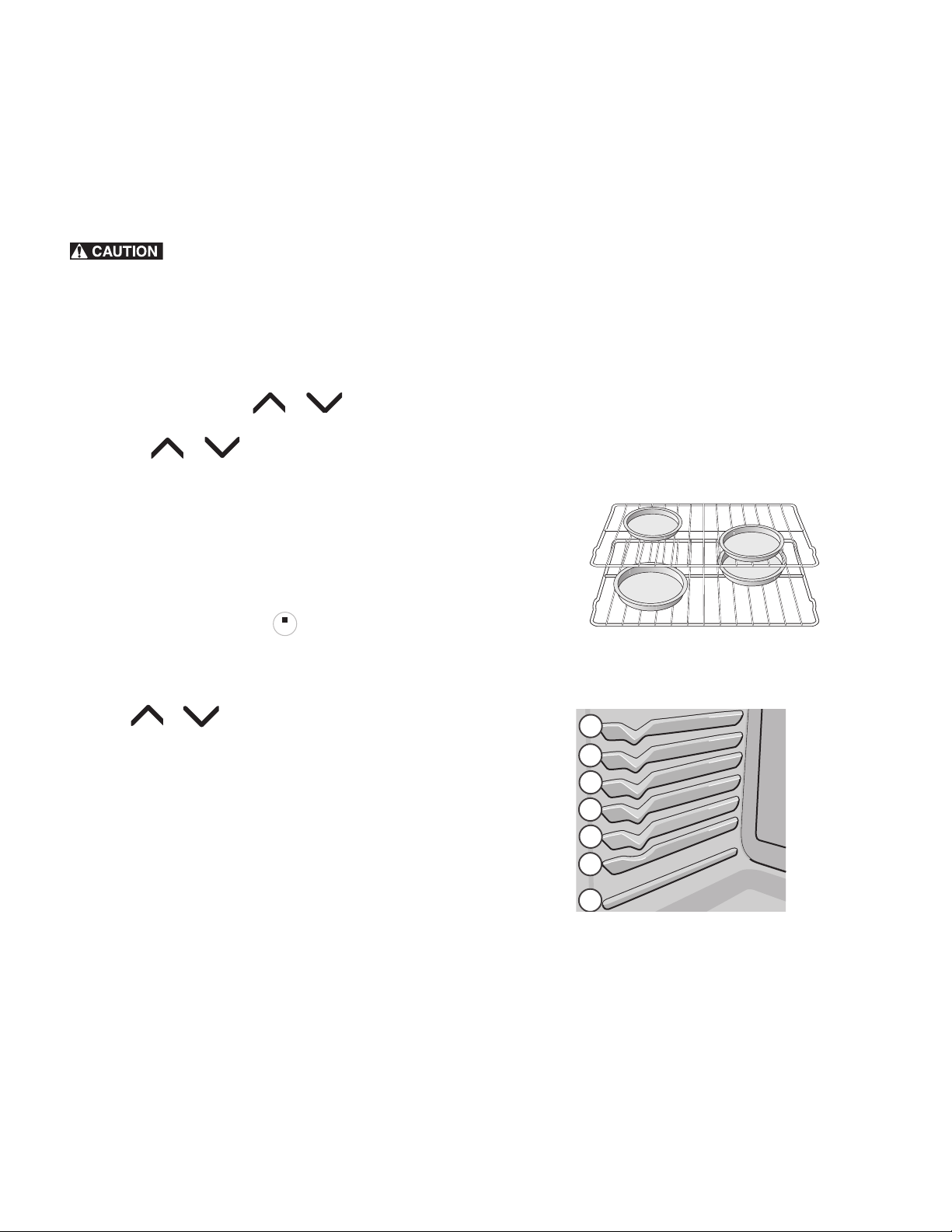
• For best results when baking cakes using two oven racks,
place racks in positions 3 and 6. (Fig. 9, on page 15)
• Dark or dull bakeware absorbs more heat than shiny
bakeware. It may be necessary to reduce oven temperature
and cook time to prevent overbrowning of some foods. Dark
bakeware is recommended for pies. Shiny bakeware is
recommended for cakes, cookies, and muffins.
• For best results when baking cakes or cookies using 2 oven
racks, place cookware in rack positions 3 & 6 and pans as
shown in Fig. 8, on page 15
STOP
STOP
Figure 8: Baking on multiple levels
Fig. 9 Oven rack positions
1
5
7
6
4
3
2
16
Oven Controls
Setting Cook Time
Use Cook Time to set the amount of time needed for baking.
The oven will turn on immediately and stop automatically after
the set cook time ends.
FOOD POISONING HAZARD. Do not let food
sit for more than one hour before or after cooking. Doing so can
result in food poisoning or sickness.
To program the oven to begin baking immediately and to
shut off automatically
1. Be sure that the clock displays the correct time of day.
2. Arrange oven racks and close oven door.
3. Press Bake. 350 ° appears in display.
4. Within 15 seconds, press or . The display will
show the default oven temperature of 350°F (177°C). By
pressing or , the temperature may be adjusted
in 5°F increments (1°C if the control is set to display Cel-
sius).Press START to accept.
5. Press Cook Time.:00 will appear in display.
6. Press or to reach the desired cook time.
7. Press START to accept. When the oven temperature
reaches the set temperature, the PREHEAT indicator light
turns off and the oven control will beep once
8. To cancel at anytime press .
When the cook time runs out End will appear in the display. The
oven control will beep 3 times every minute as a reminder until
STOP is pressed.
To change the oven temperature or cook time after baking
has started
1. Press Bake (for oven temperature) or Cook Time.
2. To adjust temperature or cook time press or and
release when the desired temperature or cook time setting
appears in the display.
Important notes:
• Cook Time and Delay Start may be set with Bake but are
not available for use with Broil.
• While baking with Cook Time, press Cook Time to display
any cook time remaining.
• Cook Time and Delay Start can be set with Bake or
Convection (on some models). Cook Time and Delay Start
will not operate with Broil function.
• The maximum Cook Time or Delay Start setting is 11 hours
and 59 minutes.
Setting Delay Start
Delay Start allows you to set a delayed starting time to the
oven baking or cleaning functions.
FOOD POISONING HAZARD. Do not let food
sit for more than one hour before or after cooking. Doing so can
result in food poisoning or sickness. Foods that can easily spoil
such as milk, eggs, fish, meat or poultry, should be chilled in the
refrigerator first. Even when chilled, they should not stand in the
oven for more than 1 hour before cooking begins, and should
be removed promptly when finished cooking.
Always use pot holders or oven mitts when using
the oven. When cooking the oven interior, oven racks and cook-
top will become very hot which can cause burn
To program oven for a delayed starting time and to shut off
automatically
1. Be sure that the clock displays the correct time of day.
2. Arrange oven racks and close oven door.
3. Press Bake. 350° appears in display.
4. Within 15 seconds, press or . The display will
show the default oven temperature of 350°F (177°C). By
pressing or , the oven temperature may be
adjusted in 5°F increments (1°C if the control is set to dis-
play Celsius). When desired temperature is reached press
START to accept.
5. Press Cook Time.:00 will appear in display.
6. Press the or to set the desired cook time and
press START to accept.
7. Press Delay Start. The time of day will appear in the dis-
play. Press or until the desired starting time
appears in the display and press START.
8. The oven will turn on at the set delayed starting time and
begin heating. When the oven temperature reaches the set
temperature, the PREHEAT indicator light will turn off and
the oven control will beep 3 times.
To cancel at anytime press .
To change the oven temperature or cook time after baking
has started
1. Press Bake (for oven temperature) or Cook Time.
2. Press or and release when the desired temper-
ature or cook time setting appears in the display.
When the cook time runs out:
End will appear in the display. The oven control will beep 3
times every minute until is pressed.
STOP
STOP
STOP
STOP
STOPSTOP
17
Oven Controls
Setting Broil
Use the broil function to cook meats that require direct exposure
to flame heat for optimum browning results. The Broil function is
factory preset to broil at 550°F. The suggested broil settings
are recommendations only. Increase or decrease broiling times,
or move to a different rack position to suit for doneness.
To set Broil
1. Arrange the oven racks when cool. For optimum browning
results, preheat oven for 2 minutes before adding food.
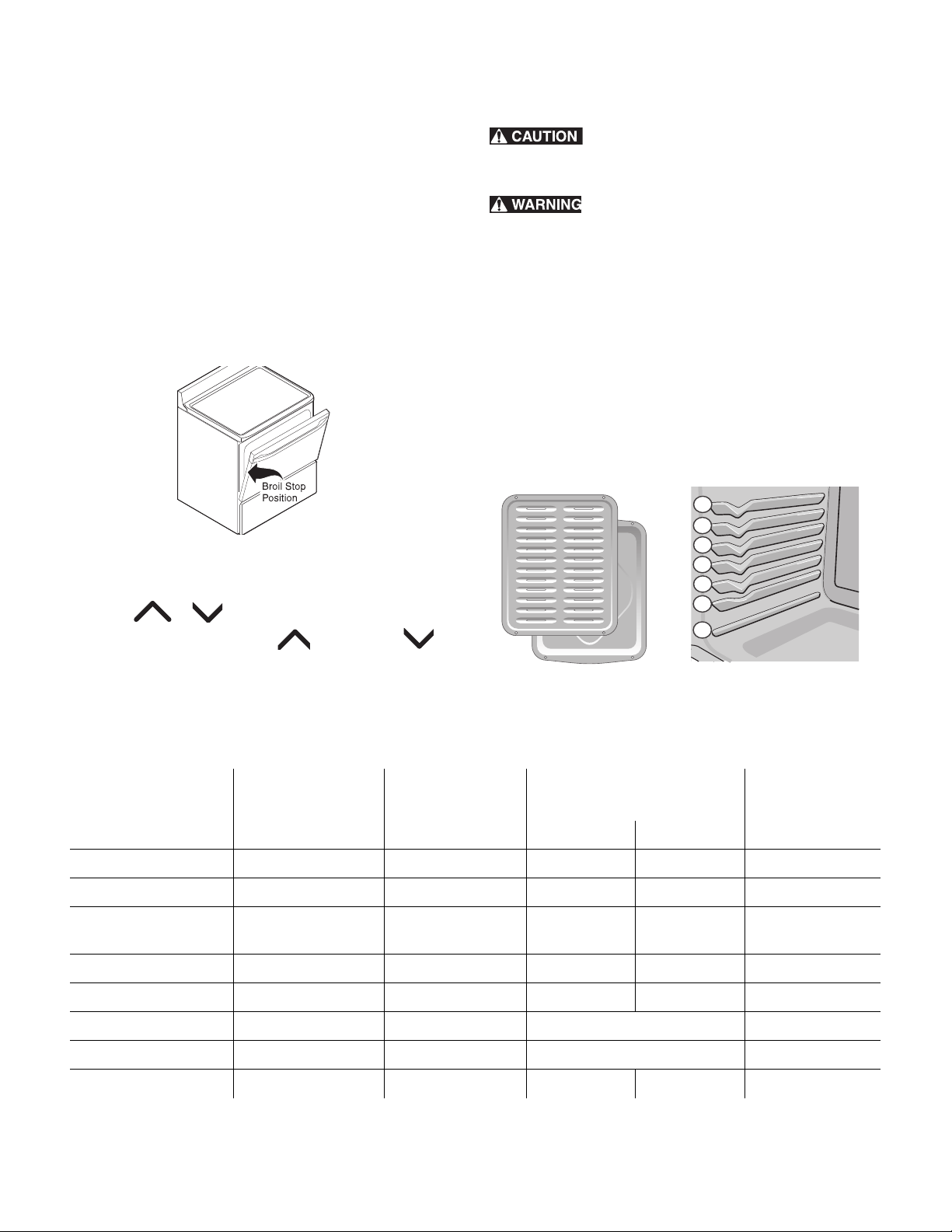
2. Position cookware in oven. Leave door open at broil stop
position.
3. Press Broil. HI will appear in display.
4. Press or until the desired broil setting level
appears in the display. Press for HI broil or for
LO broil setting.
5. Press START. Broil on one side until food is browned. Turn
and broil food on other side. When finished broiling press
STOP.
Always use pot holders or oven mitts when using
the oven. When cooking the oven interior, oven racks and cook-
top will become very hot which can cause burns.
Should an oven fire occur, close the oven door
and turn the oven off. If the fire continues, use a fire extin-
guisher. Do not put water or flour on fire. Flour may be explo-
sive.
Important notes:
• Always arrange oven racks when the oven is cool.
• For best results when broiling, use a broil pan with broil pan
insert designed to drain the fat from the food and help
avoid spatter and reduce smoking. To purchase them, call
Sears at 1-800-4-MY-HOME (1-800-4663) and order
broil pan kit 5304442087.
• When broiling, always pull the oven rack out to the stop
position before turning or removing food..
Fig. 10 Door open for broiling
Fig. 11 Broiler pan and insert
Fig. 12
Rack positions
1
5
7
6
4
3
2
Table 3: Suggested Broil Settings
Food
Rack Position Setting
Cook time in minutes
1st side 2nd side
Doneness
Steak, 1 inch thick 6th or 7th* Hi 8 6 Medium
Steak, 1 inch thick 5th or 6th* Hi 10 8 Medium-well
Steak, 1 inch thick 5th or 6th* Hi 11 10 Well
Pork Chops, 3/4 inch
thick
5th Hi 12 8 Well
Chicken, bone-in 5th Lo 25 15 Well
Chicken, boneless 5th Lo 10 8 Well
Fish 5th Hi as directed Well
Shrimp 4th Hi as directed Well
Hamburger, 1 inch 5th or 6th Hi 12 10 Medium
Cook times are suggestions and should only be used as a guide.

18
Oven Controls
Warm & Hold™
Warm & Hold will keep cooked foods warm and ready for
serving for up to 3 hours after cooking has finished. After 3
hours the Warm & Hold will shut off automatically. Warm &
Hold should only be used with foods that are already at serving
temperatures. Warm & Hold will maintain the oven temperature
at 170° F (77°C).
Example - To set Warm & Hold:
• If needed, arrange oven racks and place cooked food in
oven.
• Press Warm & Hold. HLd will appear in the display. If no
other keys are touched within 25 seconds the request for
Warm & Hold will clear.
• Press START.
•Warm & Hold. will automatically turn off after 3 hours.
To turn Warm & Hold off at any time press .
To set Warm & Hold to start after a Timed Bake automatically
1. Press Bake. Press or to set temperature.
2. Press START.
3. Press Cook Time. Press or to set time.
4. Press START.
5. Press Warm & Hold.
6. Press START. Warm & Hold is set to turn on automatically
after the Timed Bake or Delay Timed Bake has finished. The
Warm & Hold indicator light will glow indicating that the
Warm & Hold feature is set to start when the timed bake is
finished.
Operating Oven Light
The oven light will automatically turn on when the oven door is
opened.
Press OVEN LIGHT on the control panel to turn the oven light on
or off whenever the oven door is closed. The oven light will not
operate during the self clean operation.
The oven light is located at the upper left rear wall of the oven
interior and is covered with a glass shield held in place by a
wire holder. The glass shield protects the bulb from high tem-
peratures and should always be in place when the oven is in
use.
To replace the interior oven light see “Replacing the oven light”
in the “Care and Cleaning” section.
Adjusting oven temperature
Your appliance has been factory calibrated and tested to
ensure an accurate baking temperature. For the first few uses,
follow your recipe times and temperature recommendations
carefully. If you think the oven is cooking too hot or too cool for
your recipe times, you may adjust the UPO (User Programmable
Offset) so the oven cooks hotter or cooler than the oven temper-
ature displayed.
The oven temperature may be increased as much as +35 °F
(+19 °C) or decreased -35 °F (-19 °C) from the factory cali-
brated settings.
To adjust oven temperature
1. Press Bake. and hold for 3 seconds. The UPO value will
appear in the display with a degree sign.
2. The display now indicates the amount of degrees offset
from the original factory temperature setting. If the control
still has the original factory calibration, the display will
read 0.
3. The temperature may be adjusted up or down 35 °F
(19°C), in 1°F increments by pressing and holding or
. Adjust until the desired amount of temperature off-
set appears in the display and press START to save.
4. If the STOP key is pressed during the programming mode,
the UPO value will remain unchanged.
Important notes:
• Oven temperature adjustments made will not change the
Broil or Self-Clean operating temperatures.
• Do not use oven thermometers such as those found in
grocery stores to check the temperature settings inside your
oven. These oven thermometers may vary as much as 20 to
40 °F degrees from actual temperatures.
• The oven temperature adjustment may be made if your
oven control has been set to display °C (Celsius)
temperatures. Minimum and maximum settings for Celsius is
plus (+) or minus (-) 19 °C.
• If the display mode is set for Celsius, adjustments made will
be in 1 °C increments on each press of or .
STOPSTOP
19
Oven Controls
Steam Clean
Steam cleaning works best for spot cleaning and light soils on
the oven bottom. Steam clean may also be used before manu-
ally cleaning the oven or before Self Clean to help loosen soils
on the oven bottom.
Do not set the cleaning temperature higher than
the temperature listed in these instructions. Higher temperatures
will dry the steam too soon and may lead to burns or serious
injury when cleaning.
Do not attempt to wipe out the oven before the
cooling off period or attempt to shorten the cooling off period.
Doing so may lead to burns or other serious injury when
cleaning.
Do not add ammonia, oven cleaners, or any
other household cleaners or chemicals to the water used for
steam cleaning.
To set the controls for steam clean:
1. Oven should be at room temperature. Remove all racks
and oven accessories.
2. Scrape or wipe loose debris from the oven bottom.
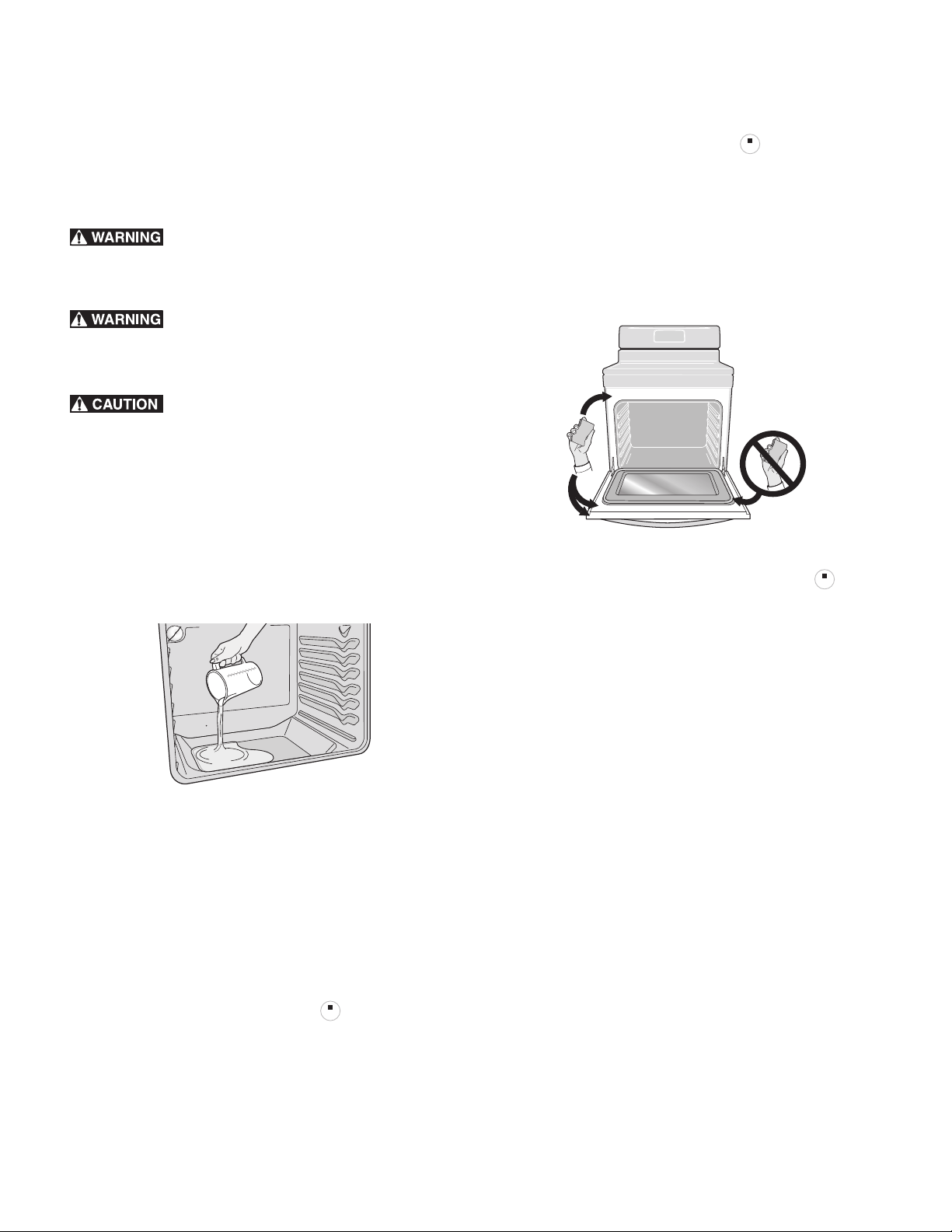
3. Pour 8 oz (235 ml) distilled or filtered water onto the oven
bottom (see Figure X). Close the oven door.
4. Press Bake.
5. Enter 170ºF (77ºC) using the arrow keys or the numeric key-
pad and press START.
6. Set the minute timer for 10 minutes.
7. Allow the oven to heat. Do not open the oven door while the
oven is heating.
8. An alert will sound when the timer is finished. Press Timer
Set/Off to stop the timer and press to return to the
clock.
9. Set the minute timer for 10 minutes to allow for a cool-down
period. Do not attempt to wipe out the oven before a 10
minute cool-down period.
10. An alert will sound when the timer is finished. Press Timer
Set/Off to stop the timer and press to return to the
clock.
11. Stand to the side of the range out of the way of escaping
vapor
when opening the oven door.
12.
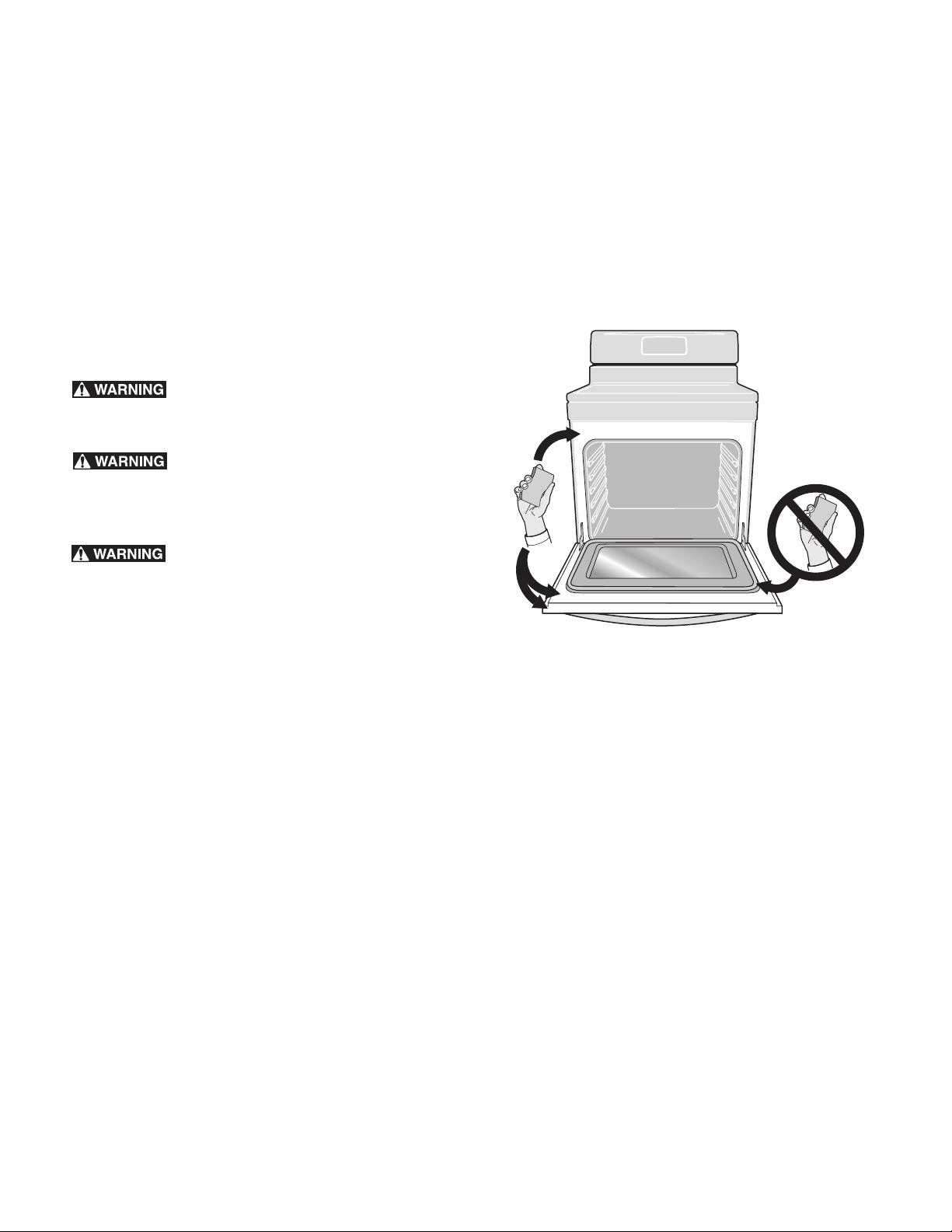
Wipe oven cavity and bottom. Do not clean oven door gas-
ket
(Fig. 14, on page 19).
To stop the steam cleaning cycle at any time, press .
Important notes:
• Always stay close to the oven when steam cleaning, so you
can hear the timer alert.
• For best results, wipe out oven immediately after the cool-
down period is complete.
• Removal of especially stubborn or baked-on soils may
require a manual cleaning or a self clean cycle. See
instructions in the “Steam Clean” section.
• Some condensation or water vapor may appear close to
the oven vent, and some water may remain on the oven
bottom. This is normal. Wipe with a soft cloth or sponge
when the cool-down period is complete.
• The oven gasket may become damp; do not wipe dry.
Open door to broil position and allow to air dry.
• Local water sources often contain minerals (hard water) and
will leave deposits on the oven cavity surfaces. If this occurs,
wipe cavity surfaces with diluted vinegar or lemon juice.
Use distilled or filtered water.
If the door is opened during steam cleaning or cool-down
period, steam will escape and the oven may be more difficult to
clean. Keep oven door closed during steam cleaning.
Fig. 13 Pour water onto the oven bottom
STOPSTOP
Fig. 14 Do not clean the oven door gasket
STOPSTOP
STOPSTOP
20
Oven Controls
Self Clean
A self cleaning oven cleans itself with high temperatures (well
above normal cooking temperatures) which eliminate soils com-
pletely or reduces them to a fine powdered ash you can wipe
away afterwards with a damp cloth.
The Self Clean function allows you to select 3 different cleaning
times from 2, 3 or 4 hours. A 3-hour cleaning time is best used
for normal cleaning; 2-hour time for light soils and a 4-hour
clean time for heavier stubborn soils.
Read before starting Self Clean
Be sure to read all following caution and important state-
ments before starting a self clean cycle
Do not leave small children unattended near
appliance. During self clean cycle the outside of the oven can
become very hot and cause burns if touched.
Do not line the oven walls, racks, oven bottom
or any part of the range with aluminum foil. This will cause per-
manent damage to the oven interior and destroy heat distribu-
tion, and will met to the oven interior.
Do not force the oven door open. This will
damage the automatic door locking system. Use caution when
opening the oven door after the self clean cycle ends. The oven
may still be very hot and cause burns. To avoid possible burns
stand to side of oven when opening door to allow steam or hot
air to escape.
The health of some birds is extremely sensitive to fumes given
off during the self clean cycle of any range. Move birds to a
well ventilated room.
Important notes:
• Completely remove all oven racks and any accessories
from oven cavity to avoid damage to oven racks. If the
oven racks are not removed they may discolor. Remove all
items from the oven and cooktop including cookware,
utensils and any aluminum foil. Aluminum foil will not
withstand high temperatures from a self clean cycle and
will melt.
• Do not use oven cleaners or oven protective coatings in or
around any part of the oven interior. Clean any soil from
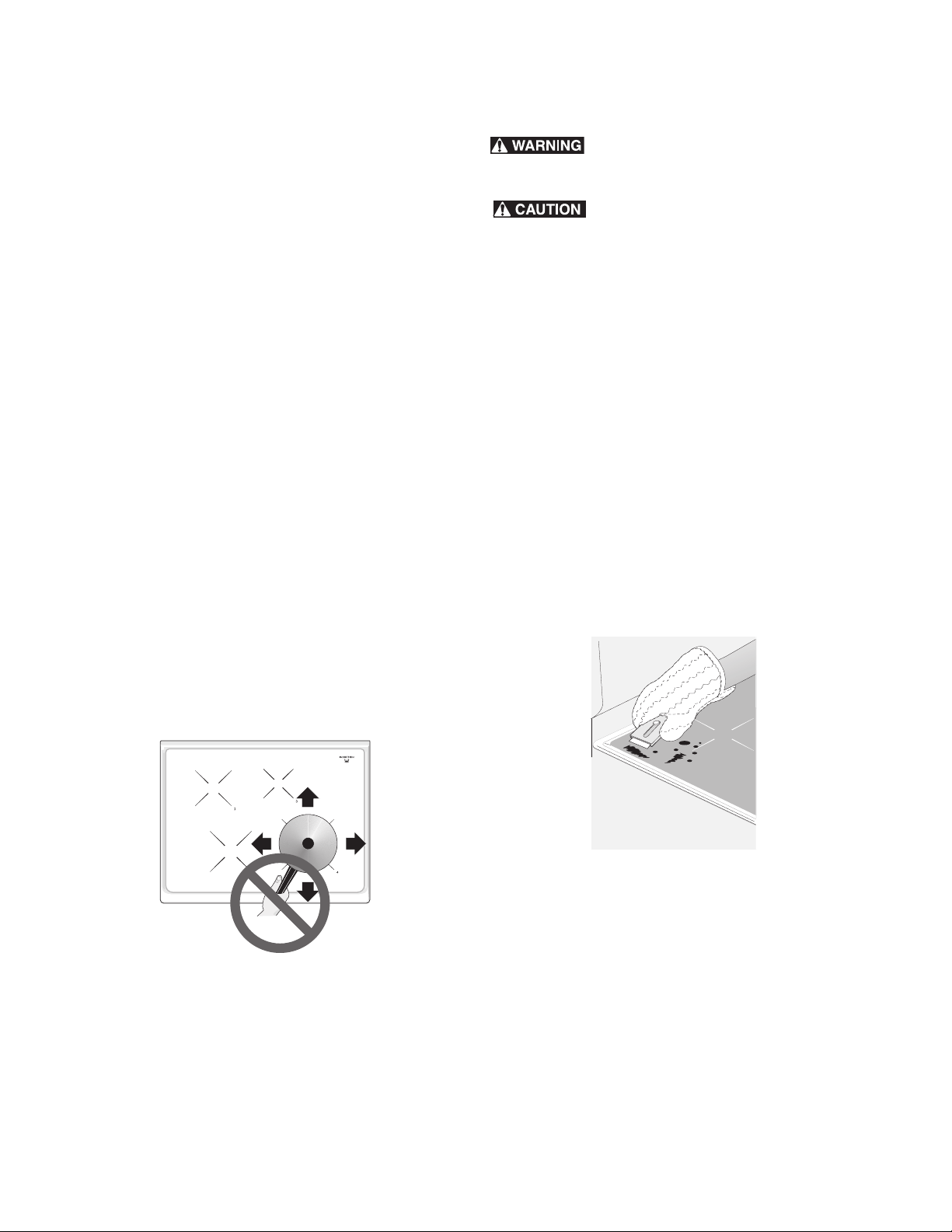
the oven frame, the door liner outside the oven door gasket
and the small area at the front center of the oven bottom
(Fig. 15, on page 20). These areas heat sufficiently to burn
soil on. Clean using soap and water prior to starting Self
Clean.
• Remove any excessive spills. Any spills on the oven bottom
should be wiped up and removed before starting a self
clean cycle. To clean use hot, soapy water and a cloth.
Large spills can cause heavy smoke or fire when subjected
to high temperatures. Do not allow food spills with high
sugar or acid content (such as milk, tomatoes, sauerkraut,
fruit juices or pie fillings) to remain on the surface as they
may leave a dull spot even after cleaning.
• Do not clean the oven door gasket (figure). The woven
material in the gasket is essential for a good seal. Care
should be taken not to rub, damage or remove the oven
door gasket. Doing so could cause damage to the door
gasket and compromise the performance of the oven.
Important notes:
• The kitchen area should be well ventilated using an open
window, ventilation fan or exhaust hood during the 1st self
clean cycle. This will help eliminate the normal odors
associated with the 1st self clean cycle.
• Do not attempt to open the oven door when the OVEN
LOCK indicator light is flashing. Allow about 15 seconds for
the motorized door latch mechanism to completely lock or
unlock the oven door.
• When the clean time finishes the oven door will remain
locked until the range has cooled sufficiently. In addition to
the clean time that was programmed, you must allow about
1 additional hour for the oven to cool before you will be
able to open the oven door.
• The Self Clean function will not operate whenever a radiant
surface element is ON or the oven lockout is active.
Fig. 15 Areas to clean and to avoid
21
Oven Controls
Setting Self Clean
To set Select Clean to start immediately:
1. Be sure the oven in empty and all oven racks are removed.
Remove all items from the cooktop. Be sure the oven door is
completely closed.
2. Press Self Clean.
3:00 appears in the display.
3. To change to a 2 hour clean time press ; 2:00
appears in the display. To select a 4 hour clean time press
: 4:00 appears in the display.
4. After selecting the clean time press START to activate the
self clean. The OVEN LOCK indicator light will light and
CLn will appear in the display.
When Self Clean begins the cleaning cycle, the motorized door
latch mechanism will automatically start to lock the oven door
and the OVEN LOCK indicator light will flash. Do not open the
oven door when the OVEN LOCK indicator light is flashing.
Allow about 15 seconds for the oven door to completely lock.
Once the oven door has locked the OVEN LOCK indicator light
will glow steady. When CLn will appears in the display Self
Clean is active.
Use caution when opening the oven door after
self cleaning. The oven may still be VERY HOT and can cause
burns. To avoid possible burns stand to the side of the oven
when opening the oven door to allow hot air or steam to
escape.
When Self Clean is finished:
1. The time of day will appear in the display window and the
and the OVEN LOCK indicator light will continue to glow.
2. Once the oven has cooled down (about 1 hour) and the
OVEN LOCK indicator light has turned off the oven door
may be opened.
3. When the oven interior has completely cooled, wipe away
any residue or powdered ash with a damp cloth or paper
towel.
Delayed Start Self Clean:
To start Delay Start Self Clean:
1. Be sure the oven is empty and all oven racks are removed.
Remove all items from the cooktop. Be sure oven door is
completely closed.
2. Be sure the clock shows the correct time of day.
3. Press Delay Start.
4. Press and hold to scroll to the time desired to start
the self clean cycle. Press START when the desired start
time is displayed.
5. Press Self Clean. 3:00 appears in the display.
6. To select a 2 hour clean time press ; 2:00 appears
in the display. To select a 4 hour clean time press ;
4:00 appears in the display.
7. After selecting the desired clean time press START. Self
Clean is set to activate. The OVEN LOCK indicator light will
turn on and the oven door will lock in advance of the start-
ing time. Once the starting time is reached CLn will appear
in the display.
If it becomes necessary to stop Self Clean when active
1. Press .
2. If Self Clean has heated the oven to a high temperature,
allow enough time for the oven to cool and for the OVEN
LOCK indicator light to turn off. When this indicator light
turns off the oven door may be opened.
3. Restart Self Clean if needed.
Important notes:
• If Self Clean is active and a power failure occurs, the oven
may not have thoroughly cleaned. This would depend on
how much cleaning time had elapsed before the power
failure. If needed after power is restored, set Self Clean
again.
STOPSTOP

22
Care and Cleaning
Cleaning Various Parts of Your Oven
Before cleaning any part of the oven, be sure all controls are turned off and the oven is cool. Remove spills and any heavy soiling as
soon as possible. Regular cleaning will reduce the difficulty of major cleaning later.
Surface Type Recommendation
Aluminum and Vinyl • Use hot, soapy water and a cloth. Dry with a clean cloth.
Painted body parts
Painted decorative trims
• Use a soft cloth and clean with mild dish detergent and water or a 50/50 solution of
vinegar and water. Follow by rinsing the area with clean water; dry and polish with a
soft cloth. Glass cleaners may be used if sprayed on a soft cloth first. Do not spray
liquids directly on the oven control and display area. Do not use large amounts of water
on the control panel. Excess water on the control area may cause damage to the appli-
ance. Do not use other liquid cleaners, abrasive cleaners, scouring pads, or paper towels.
They will damage the finish.
Easy Clean™ Stainless Steel • Your oven finish may be Easy Clean™ Stainless Steel (some models). Clean the stainless
with warm soapy water using a clean sponge or cloth. Rinse with clean water and dry
with a soft clean cloth. Do not use any store bought cleaners like stainless steel cleaners
or any other types of cleaners containing any abrasive, chlorides, chlorine, or ammonia.
It is recommended to use mild dish soap and water or a 50/50 solution of water and
vinegar.
Porcelain enamel broiler pan and
insert (available by mail order)
Door liner and body parts
• Gentle scouring with a soapy scouring pad will remove most spots. Rinse with a 1:1
solution of clear water and ammonia. If necessary, cover difficult spots with an
ammonia-soaked paper towel for 30 to 40 minutes. Rinse with clean water and a damp
cloth, and then scrub with a soap-filled scouring pad. Rinse and wipe dry with a clean
cloth. Remove all cleaners or the porcelain may become damaged during future heating.
Oven racks • Oven racks must be removed from oven cavity. Clean by using a mild, abrasive cleaner
following manufacturer’s instructions. Rinse with clean water and dry.
Oven door • Use soap and water to thoroughly clean the top, sides, and front of the oven door. Rinse
well. You may use a glass cleaner on the outside glass of the door. Do not immerse the
door in water. Do not spray or allow water or the glass cleaner to enter the door vents.
Do not use oven cleaners, cleaning powders, or any harsh abrasive cleaning materials on
the outside of the oven door.
• Do not clean the oven door gasket. On self-clean models, the oven door gasket is made
of a woven material which is essential for a good seal. Care should be taken not to rub,
damage, or remove this gasket.
23
Care and Cleaning
Cooktop maintenance
Consistent and proper cleaning is essential to maintaining your
ceramic glass cooktop.
Prior to using your cooktop for the first time, apply the recom-
mended CookTop® Cleaning Creme to the ceramic surface (on
the web visit www.sears.com for replacement cooktop cleaner,
item number 40079). Buff with a nonabrasive cloth or no-
scratch cleaning pad. This will make cleaning easier when soiled
from cooking. The special cooktop cleaning cream leaves a
protective finish on the glass to help prevent scratches and
abrasions.
Sliding aluminum or copper clad bottom pans on the cooktop
can cause metal markings on the cooktop surface. These marks
should be removed immediately after the cooktop has cooled
using the cooktop cleaning cream. Metal marks can become
permanent if not removed priorto future use.
Cookware (cast iron, metal, ceramic or glass) with rough
bottoms can mark or scratch the cooktop surface.
Do not:
• Slide anything metal or glass across the cooktop.
• Use cookware with dirt or dirt build up on bottom; replace
with clean cookware before using.
• Use your cooktop as a cutting board or work surface in the
kitchen.
• Cook foods directly on the cooktop surface without a pan.
• Drop heavy or hard objects on the ceramic glass cooktop,
they may cause it to crack.
Cooktop cleaning
DO NOT use a cooktop cleaner on a hot
cooktop. The fumes can be hazardous to your health, and can
chemically damage the ceramic-glass surface.
Before cleaning the cooktop, be sure the
controls are turned to OFF and the cooktop is COOL. The glass
surface could be hot and burns may occur if the glass surface is
touched before it has cooled sufficiently.
For light to moderate soil:
Apply a few drops of CookTop® Cleaning Creme directly to the
cooktop. Use a paper towel or use a non-abrasive plastic type
no-scratch cleaning pad to clean the entire cooktop surface.
Make sure the cooktop is cleaned thoroughly, leaving no
residue.
For heavy, burned on soil:
Apply a few drops of CookTop® Cleaning Creme directly to the
soiled area. Rub the soiled area using a non-abrasive plastic
type no-scratch cleaning pad, applying pressure as needed. Do
not use the pad you use to clean the cooktop for any other
purpose.
If soils remain, carefully scrape soils with a metal razor blade
scraper, holding scraper at a 30 degree angle to the surface.
Remove loosened soils with cooktop cleaning cream and buff
surface clean.
Plastic or foods with a high sugar content:
These types of soils need be removed immediately if spilled or
melted onto the ceramic cooktop surface. Permanent damage
(such as pitting of the cooktop surface) may occur if not
removed immediately. After turning the surface elements OFF,
use a razor blade scraper or a metal spatula with a mitt and
scrape the soil from the hot surface (as illustrated). Allow the
cooktop to cool, and use the same method for heavy or burned
on soils
.
Figure 16: Do not slide pans
Figure 17: Using razor blade to remove burned on matter
30°
24
Care and Cleaning
Care and Cleaning (cont)
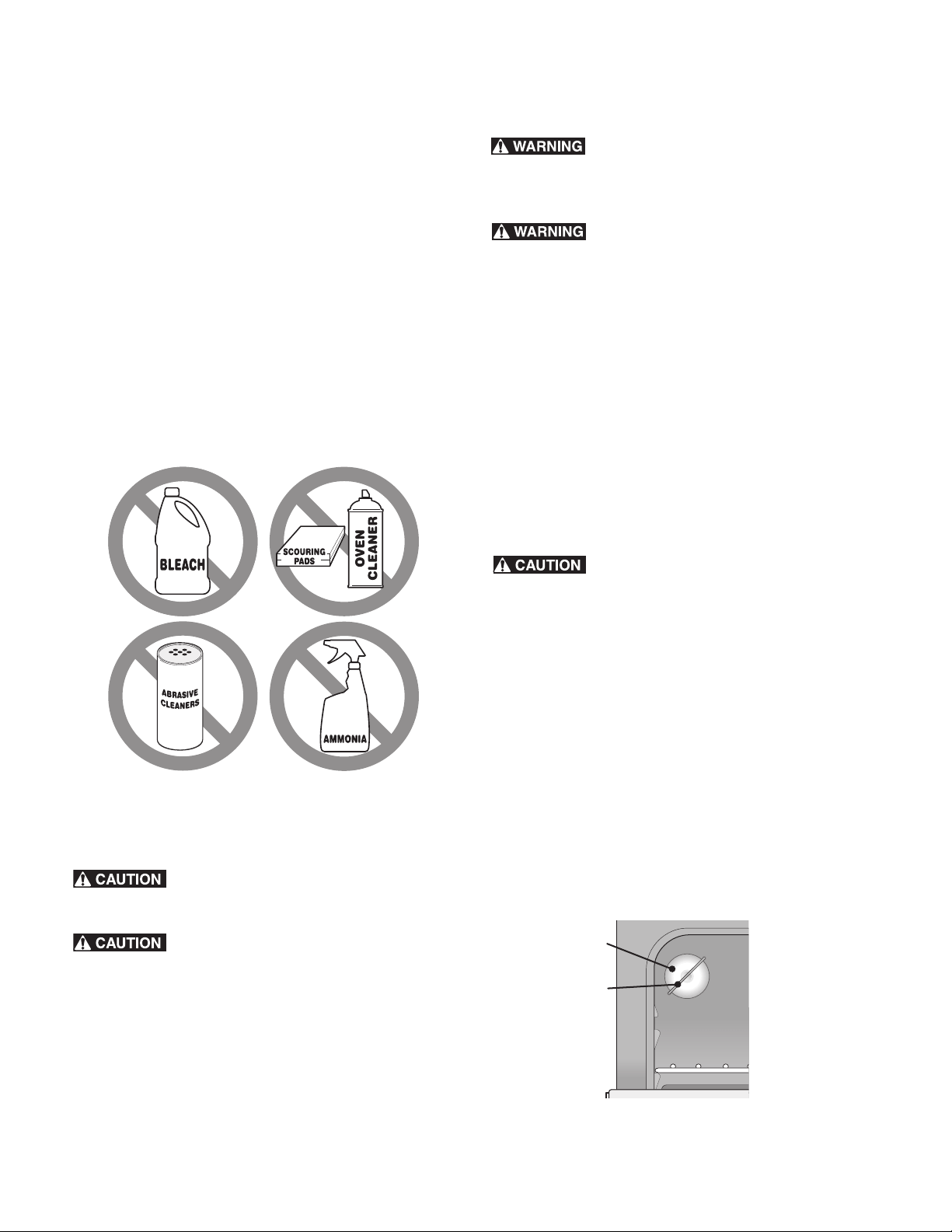
Do not use the following on the cooktop:General Cleaning
• Do not use abrasive cleaners and scouring pads, such as
metal and some nylon pads. They may scratch the cooktop,
making it more difficult to clean.
• Do not use harsh cleaners, such as chlorine bleach,
ammonia or oven cleaners, as they may etch or discolor the
cooktop.
• Do not use dirty sponges, cloths or paper towels, as they
can leave soil or lint on the cooktop which can burn and
cause discoloration.
Important note:
Damage to the ceramic glass cooktop may occur if you use an
abrasive type cleaning pad. Only use cleaning products that
have been specifically designed for ceramic glass cooktops.
General Cleaning
Refer to the Cleaning recommendation table in the Care &
Cleaning section for more detailed information about cleaning
specific parts of the range.
Before manually cleaning any part of the range,
be sure all controls are turned OFF and the range is COOL. The
range may be hot and can cause burns.
Ammonia must be rinsed before operating the
oven. Provide adequate ventilation.
Aluminum foil and utensils
NEVER cover any slots, holes or passages in the
oven bottom or cover an entire oven rack with materials such as
aluminum foil. Aluminum foil linings may trap heat, causing a
fire hazard.
Protective Liners — DO NOT USE ALUMINUM
FOIL to line the oven bottom. Only use aluminum foil as recom-
mended in this manual. Improper installation of these liners may
result in risk of electric shock, or fire.
• Aluminum foil - Use of aluminum foil on a hot cooktop can
damage the cooktop. Do not use thin aluminum cooking
utensils or allow aluminum foil to touch the surface elements
under ANY circumstances.
• Aluminum utensils - The melting point of aluminum is much
lower than that of other metals. Care must be taken when
aluminum pots or pans are used on the cooktop. If
aluminum pans are allowed to boil dry when using the
cooktop, not only will the utensil be damaged or destroyed,
but it may fuse to, break or mark the ceramic glass surface,
permanently damaging the cooktop surface.
Replacing the oven light
Be sure the oven is unplugged and all parts are
cool before replacing oven light.
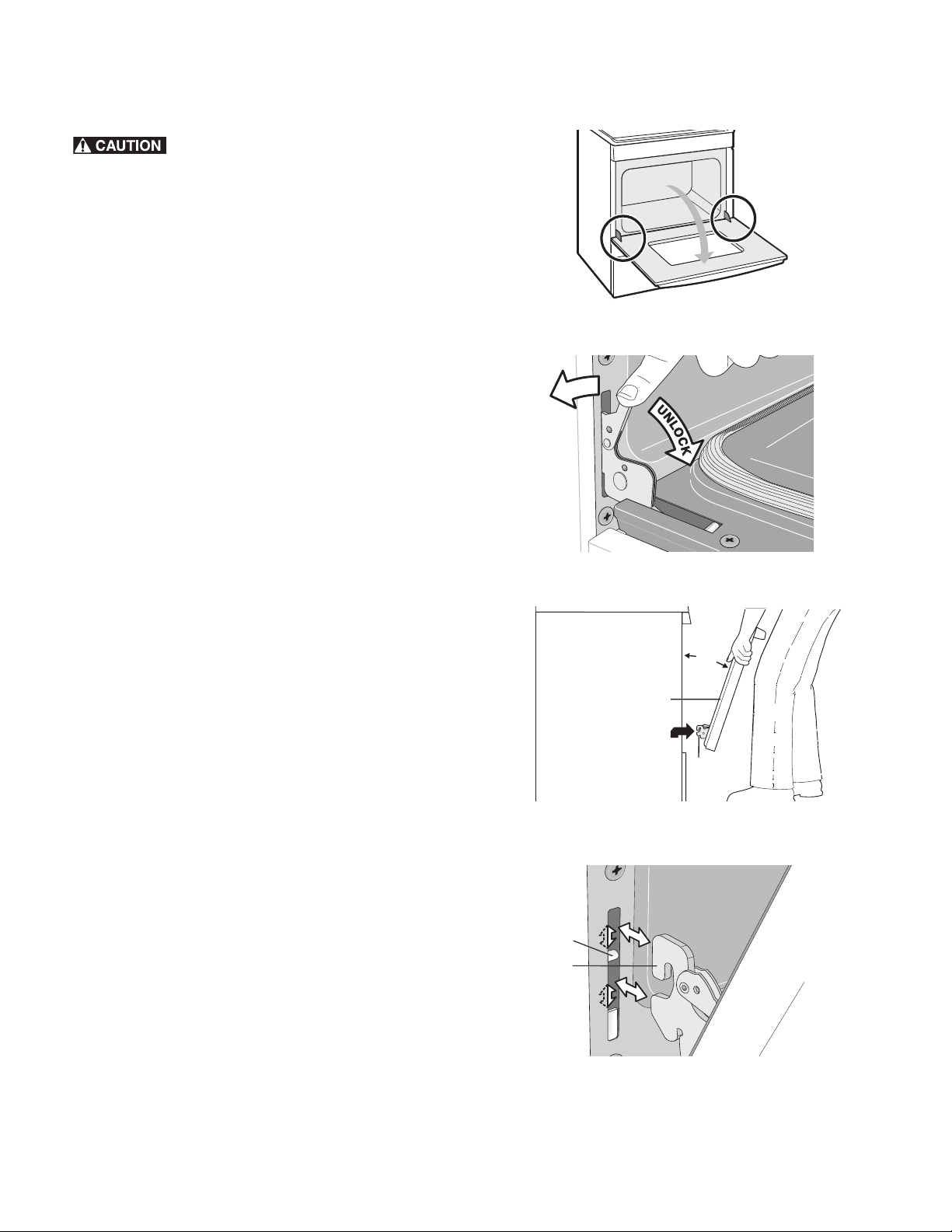
The interior oven light is located at the rear of the oven cavity.
(See Figure 20).
To replace the oven interior light bulb:
Important note:
Use a paper towel or cotton glove while handling the new bulb
when installing.
1. Turn electrical power off at the main source or unplug the
appliance.
2. Replace bulb with a new 40 watt appliance bulb.
3. Turn power back on again at the main source (or plug the
appliance back in).
4. Be sure to reset the time of day on the clock.
Figure 18: Replacing oven light
wire
holder
glass
shield
25
Care and Cleaning
Removing and Replacing the Oven Door
The door is heavy. For safe, temporary storage,
lay the door flat with the inside of the door facing down.
To remove the oven door:
1. Open oven door completely, horizontal with floor (See
Figure 19).
2. Pull the door hinge locks on both left and right door hinges
down from the oven frame completely toward the oven
door (See Figure 20). A tool such as a small flat-blade
screwdriver may be required.
3. Firmly grasp both sides of oven door along the door sides.
Do not use the oven door handle (See Figure 21).
4. Close the door to approximately 10 degrees from the oven
door frame.
5. Lift the oven door hinge arms over the roller pins located on
each side of the oven frame (See Figure 21).
To Replace Oven Door:
1. Firmly grasp both sides of oven door along the door sides.
Do not use the oven door handle (See Figure 21).
2. Holding the oven door at the same angle as the removal
position (See Figure 21), seat the hook of the hinge arm over
the roller pins located on each side of the oven door frame
(See Figure 22). The hook of the hinge arms must be fully
seated onto the roller pins.
3. Fully open the oven door, horizontal with floor (See
Figure 19).
4. Push the door hinge locks up toward and into the oven
frame on both left and right oven door hinges to the locked
position (Figure 20).
5. Close the oven door.
Important:
Special Door Care Instructions - Most oven doors contain glass
that can break. Do not close the oven door until all the oven
racks are fully in place. Do not hit the glass with pots, pans, or
any other object. Scratching, hitting, jarring, or stressing the
glass may weaken its structure causing an increased risk of
breakage at a later time.
Figure 19: Door hinge location
Figure 20: Door hinge locks
Figure 21: Holding door for removal
Figure 22: Location of hinge arm and roller pin
Oven door
hinge
locations
L
O
C
K
about
10°
hinge
oven
door
roller
pin
hinge
arm
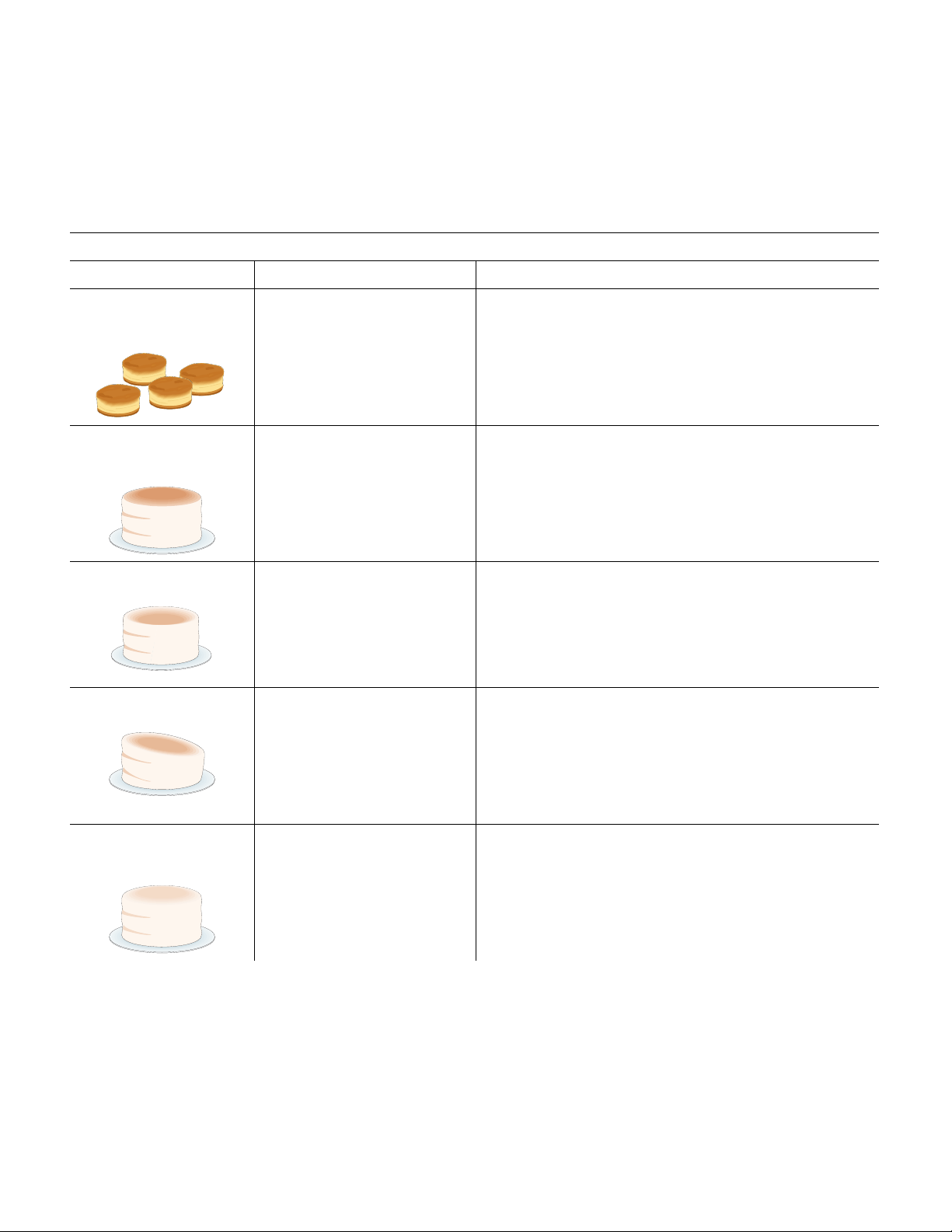
26
Before You Call
Oven Baking
For best cooking results, heat the oven before baking cookies, breads, cakes, pies or pastries, etc. There is no need to preheat the
oven for roasting meat or baking casseroles.
The cooking times and temperatures needed to bake a product may vary slightly from your previously owned appliance.
Baking Problems and Solutions
Baking Problems Causes Corrections
Cookies and biscuits burn
on the bottom.
• Cookies and biscuits put into
oven before the preheating
time is completed.
• Oven rack is overcrowded.
• Dark pans absorbs heat too
fast.
• Allow oven to preheat to desired temperature before
placing food in oven.
• Choose pan sizes that will permit 2” to 4” of air space (5.1
cm o 10.2 cm) on all sides when placed in the oven.
• Use a medium weight baking sheet.
Cakes too dark on top or
bottom
• Cakes put in oven before
preheating time is completed.
• Rack position too high or too
low.
• Oven too hot.
• Allow oven to preheat to the selected temperature before
placing food in the oven.
• Use proper rack position for baking needs.
• Set oven temperature 25°F/13°C lower than recommended.
Cakes not done in center • Oven too hot.
• Incorrect pan size.
• Pan not centered in oven.
• Set oven temperature 25°F/13°C lower than recommended.
• Use pan size suggested in recipe.
• Use proper rack position and place pan so there is 5.1 cm to
10.2 cm (2” to 4”) of space on all sides of pan.
Cakes not level. • Oven not level.
• Pan too close to oven wall or
rack overcrowded.
• Pan warped.
• Place a marked glass measuring cup filled with water on
the center of the oven rack. If the water level is uneven,
refer to the installation instructions for leveling the oven.
• Be sure to allow 5.1 cm to 10.2 cm (2” to 4”) of clearance
on all sides of each pan in the oven.
• Do not use pans that are dented or warped.
Foods not done when
cooking time is over.
• Oven too cool.
• Oven overcrowded.
• Oven door opened too
frequently.
• Set oven temperature 25°F/13°C higher than suggested
and bake for the recommended time.
• Be sure to remove all pans from the oven except the ones to
be used for baking.
• Open oven door only after shortest recommended baking
time.

27
Before You Call
Solutions to Common Problems
Before you call for service, review the following list. It may save you time and expense. Possible solutions are provided with the
problem listed:
Problem Solution
Poor baking results Many factors effect baking results. Use proper oven rack position. Center food in the oven
and space pans to allow air to circulate. Preheat oven to the set temperature before placing
food in the oven. Try adjusting the recipe's recommended temperature or baking time. See
“Setting Self Clean” on page 21 if you feel the oven is too hot or cold.
Oven does not operate. The time of day is not set. The oven clock must first be set in order to operate the oven.
Be sure oven controls are set properly. See “Setting Clock” on page 13 and review instruc-
tions for the desired cooking function in this manual.
Service wiring is not complete.
Oven light does not work. Be sure the oven light is secure in the socket. See “Replacing the oven light” on page 24.
Flames inside oven or smoking from
oven vent.
Excessive spills in oven. Grease or food spilled onto oven bottom or oven cavity. Wipe up
excessive spills before starting oven. If flames or excessive smoke are present when using
broil, see “Setting Broil” on page 17.
Self clean does not work. Oven control not set properly. Review “Setting Self Clean” on page 21.
Oven racks discolored or do not
slide easily.
Oven racks left in oven cavity during self clean. Always remove oven racks from oven cavity
before starting a self-clean cycle. Clean using a mild abrasive cleaner following manufac-
turer's instructions. Rinse with clean water, dry, and replace in oven.
Oven smokes excessively when
broiling.
Incorrect setting. Follow broiling instructions in “Setting Broil” on page 17
Meat too close to the broil element. Reposition broil rack to provide proper clearance
between the meat and broil element. Remove excess fat from meat. Cut remaining fatty
edges to prevent curling.
Grease build up on oven surfaces. Regular cleaning is necessary when broiling frequently.
Grease or food splatters will cause excessive smoking.
Oven control panel beeps and
displays any F or E code error.
Oven control has detected a fault or error condition. Press STOP to clear the error code. Try
bake or broil function. If the F or E code error repeats, turn off power to appliance, wait 5
minutes and then repower appliance. Set clock with correct time of day. Try bake or broil
function again. If fault recurs, press STOP to clear.
Soil not completely removed after
self clean.
Self Clean was interrupted. Review instructions in “Setting Self Clean” section on page 21.
Excessive spills on oven bottom. Clean before starting self clean.
Failure to clean soil from the oven frame, the door liner outside the oven door gasket, and
the small area at the front center of the oven bottom. These areas are not in the self-
cleaning area, but they get hot enough to burn on residue. Clean these areas before starting
the self-cleaning cycle. Burned-on residue can be cleaned with a stiff nylon brush and water
or a nylon scrubber. Be careful not to damage the oven gasket.



Kenmore®
Electric Range
Estufa eléctrica
* = color number, número de color
Use & Care Guide
Guía de uso y cuidado
English/Español
Model/Modelos: 790-9418*
P/N807190601 Rev. A
Sears Brands Management Corporation
Hoffman Estates, IL 60179 EE. UU.
www.kenmore.com.
www.sears.com

Reservados todos los derechos. Impreso en los EE.UU.
2
Índice
Lea atentamente y conserve estas instrucciones ..................................2
Garantía limitada Kenmore ....................................................................2
Antes de ajustar los controles superiores................................................... 7
Ajuste de los controles superiores ............................................................... 9
Antes de ajustar los controles del horno................................................. 12
Ubicación del respiradero del horno ...................................................12
Controles del horno ................................................................................... 13
Cuidado y limpieza .................................................................................... 22
Antes de solicitar servicio técnico............................................................. 25
Horneado ..................................................................................................25
Soluciones de problemas comunes .......................................................26
Lea atentamente y conserve estas instrucciones
Esta Guía de uso y cuidado contiene instrucciones generales de funcionamiento sobre su electrodoméstico, así como información sobre las
características de varios modelos. Es posible que el producto no incluya todas las características descritas. Las ilustraciones son sólo de
ejemplo. Es posible que su electrodoméstico no correspondan de forma precisa al aspecto real del microondas. Al instalar, utilizar o
reparar/mantener cualquier artefacto, se debe proceder con cuidado y sentido común.
Garantía limitada Kenmore
Si esta cubierta, instalada y utilizada de acuerdo con las instrucciones de instalación y la guía de uso y cuidado, falla debido a defectos
de material y mano de obra durante el primer año a partir de la fecha de compra, llame al 1-800-4-MY-HOME® para hacer arreglos
para que sea reparada (o reemplazada si no se puede reparar) gratuitamente. Si este electrodoméstico se utiliza para otros fines que no
sean el uso familiar privado, esta garantía rige únicamente durante 90 días a partir de la fecha de compra.
Esta garantía cubre únicamente defectos de material y de mano de obra. Sears NO pagará:
1. Grietas en la cubierta de vidrio cerámico que no sean resultado de choque térmico.
2. Manchas y rayas en la cubierta de vidrio cerámico causadas por mal mantenimiento según todas las instrucciones proporcionadas
con el producto.
3. Componentes desechables que pueden gastarse debido al uso habitual, incluyendo, y sin limitarse a los filtros, las correas, las
lámparas y las bolsas.
4. Técnicos de servicio que instruyan al usuario en la manera adecuada de instalar, utilizar o mantener el producto.
5. Un técnico que limpie o realice el mantenimiento de este producto.
6. Daños o fallas de este producto si el mismo no fue instalado, utilizado o mantenido de acuerdo con todas las instrucciones
proporcionadas con el producto.
7. Daños o fallas en el producto que sean el resultado de accidentes, abuso, mal uso u otra clase de uso que no sea el apropiado.
8. Daños o fallas en el producto causados por el uso de detergentes, limpiadores, productos químicos o elementos que no sean los
recomendados en las instrucciones provistas con el producto.
9. Daños o fallas de las piezas o sistemas como resultado de modificaciones no autorizadas hechas al producto.
Renuncia de responsabilidades de garantías implícitas; limitación de acciones legales
La única y exclusiva opción del cliente en virtud de esta garantía limitada será la reparación del producto según lo indicado en el presente
documento. Las garantías implícitas, incluyendo las garantías de aptitud para la venta o de idoneidad para un fin en particular, están
limitadas a un año o al período más corto permitido por la ley. Sears no se responsabiliza por daños incidentales o consecuentes. Algunos
estados y provincias no permiten la exclusión o limitación de daños incidentales o consecuentes o las limitaciones de duración de las
garantías implícitas de comercialización o aptitud, por lo que estas exclusiones o limitaciones pueden no aplicarse en su caso.
Esta garantía se aplica únicamente mientras este producto se use dentro de los Estados Unidos.
Esta garantía le otorga derechos legales específicos. Usted puede tener además otros derechos que varían de un estado a otro.
Sears Brands Management Corporation, Hoffman Estates, IL 60179 EE. UU.
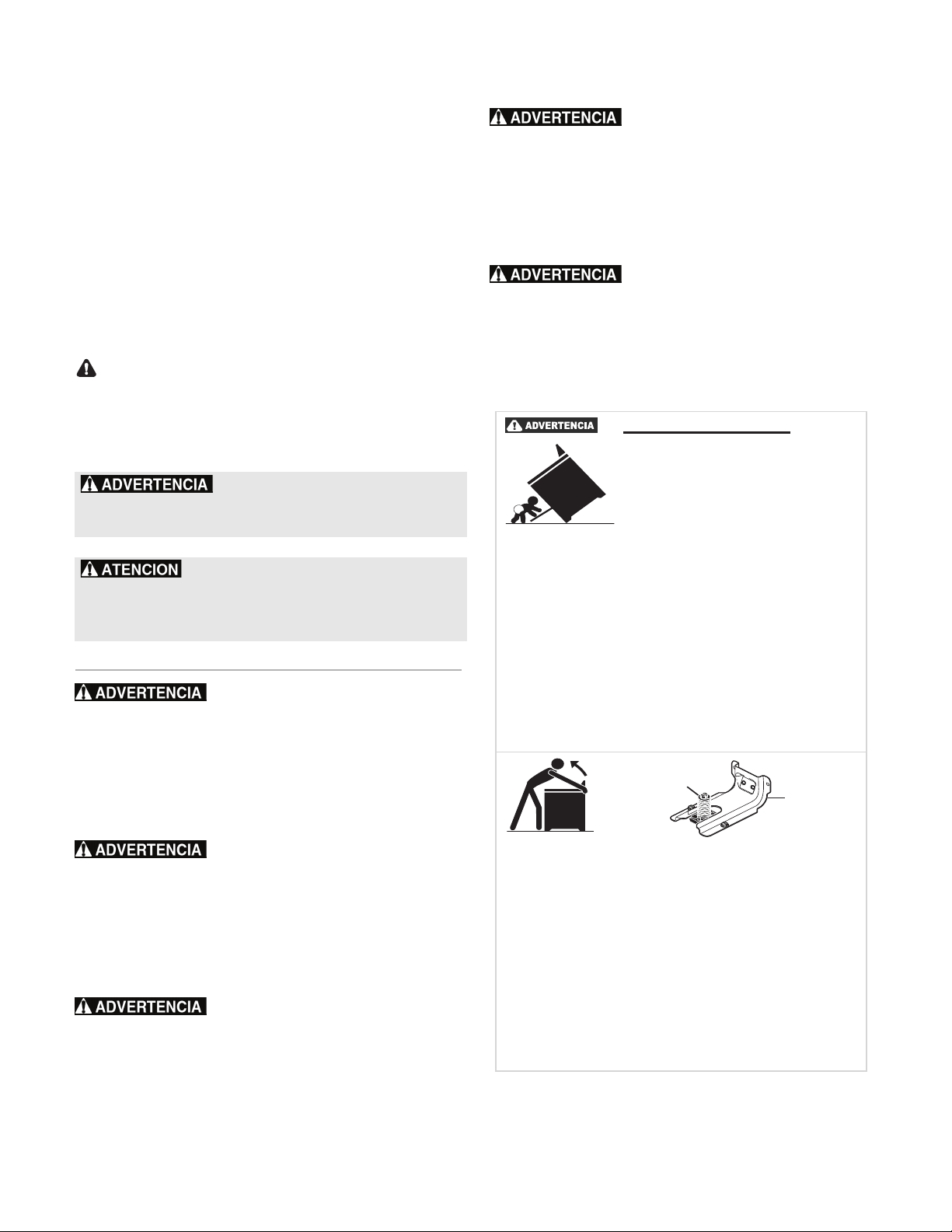
Conserve estas instrucciones para referencia futura.
3
INSTRUCCIONES IMPORTANTES DE SEGURIDAD
Lea todas las instrucciones antes de usar este electrodoméstico.
Este manual contiene símbolos e instrucciones de
seguridad importantes. Preste mucha atención a
estos símbolos y siga todas las instrucciones.
No intente instalar o usar su producto hasta
haber leído las precauciones de seguridad
indicadas en este manual. Las indicaciones de
seguridad presentes en este manual están
etiquetadas como "ADVERTENCIA" o
"PRECAUCIÓN" de acuerdo con el nivel de
riesgo.
DEFINICIONES
Este es el símbolo de alerta de seguridad. Se
usa para alertar sobre peligros potenciales de
lesiones personales. Obedezca todos los mensajes
de seguridad que tengan este símbolo para evitar
posibles lesiones personales o la muerte.
Almacenamiento dentro o
sobre el electrodoméstico: no se deben guardar
materiales inflamables en el horno. Esto incluye
artículos de papel, plástico y tela, tales como
libros de cocina, objetos de plástico y toallas, así
como líquidos inflamables. No almacene
artículos explosivos, tales como latas de aerosol,
cerca de o sobre el horno
.
No deje a los niños solos. No se
debe dejar a los niños solos o sin vigilancia en el
área donde se usa el electrodoméstico. Nunca
permita que los niños se sienten o se paren sobre
ninguna pieza del electrodoméstico, incluyendo
el cajón de almacenamiento, el cajón asador
inferior, el cajón calentador o el horno doble
inferior.
Cuando caliente grasa o
aceite, vigílelo atentamente. La grasa puede
encenderse si se calienta demasiado.
Pararse, apoyarse o sentarse en
la puerta o los cajones de un horno puede
causar lesiones graves y además dañar el
electrodoméstico. No permita que los niños
trepen o jueguen alrededor del horno. El peso de
un niño sobre una puerta abierta puede volcar el
horno, lo que podría devenir en quemaduras
graves u otro tipo de lesiones
.
Nunca cubra ninguna ranura,
agujero o pasaje en el fondo del horno ni cubra
una parrilla completa con materiales como
papel de aluminio. Las envolturas con papel de
aluminio pueden absorber el calor y causar un
riesgo de incendio
.
- Indica una situación
potencialmente peligrosa que, si no se evita,
podría causar lesiones graves o la muerte
.
- Indica una situación
potencialmente peligrosa que, si no se evita,
podría causar lesiones personales leves o
moderadas.
WARNING:
Riesgo de volcamientoRiesgo de volcamiento
Riesgo de volcamientoRiesgo de volcamiento
Riesgo de volcamiento
• Un niño o adulto puede
volcar la estufa y acabar
meurto.
• Verifique que se haya
instalado el dispositivo
antivuelco en el piso o en la
pared.
• Asegúrese de que el dispositivo antivuelco
se haya reacoplado cuando mueva la estufa
sobre el piso o a la pared.
• No utilice la estufa sin el dispositivo
antivuelco instalado y acoplado
• Si no se siguen estas instrucciones, se
puede provocar la muerte o quemaduras
graves en niños y adultos.
Tornillo
nivelador de
la estufa
Soporte
antivuelco
Para verificar si el soporte antivuelco está
instalado correctamente, sostenga el borde
trasero de la parte trasera de la estufa
usando ambos brazos.
Intente inclinar la estufa hacia adelante con
cuidado. Se está instalada correctamente,
la estufa no debería inclinarse hacia
adelante. Consulte las instrucciones de
instalacíon del soporte antivuelco
proporcionadas con la estufa para
instalarlo adecuadamente.
INSTRUCCIONES IMPORTANTES DE SEGURIDAD
Lea todas las instrucciones antes de usar este electrodoméstico.
Conserve estas instrucciones para referencia futura.
4
No caliente envases no abiertos de
alimentos. La acumulación de presión puede
hacer que el envase explote y cause lesiones
.
No use agua ni harina en incendios
de grasa. Extinga las llamas con la tapa de una
sartén; use bicarbonato de sodio o un extintor de
químico seco o de espuma.
Vista ropa adecuada cuando cocine.
Nunca use prendas de vestir holgadas o sueltas
cuando use este electrodoméstico. No deje que la
ropa u otros materiales inflamables entren en
contacto con las superficies calientes
.
Utilice tomaollas (textiles) secos. Los
tomaollas mojados o húmedos en superficies
calientes pueden causar quemaduras por el
vapor.No deje que los tomaollas toquen las áreas
calientes de cocción. No use toallas ni ningún otro
tipo de paño grueso.
La Ley del Estado de California
sobre Seguridad y Contaminación del Agua
Potable (California Safe Drinking Water and Toxic
Enforcement Act) exige que el gobernador de
California publique una lista de las sustancias que
según el Estado de California causan cáncer,
defectos congénitos o daños al sistema
reproductor, y exige que los negocios adviertan a
sus clientes de la exposición potencial a tales
sustancias.
Lea y siga todas las
instrucciones, advertencias, precauciones y notas
importantes a la hora de desempacar, instalar y
realizar el mantenimiento del electrodoméstico:
Retire todas las cintas adhesivas y los materiales
de empaque antes de usar el horno. Destruya la
caja de cartón y las bolsas de plástico después de
desempacar el horno. Nunca deje que los niños
jueguen con el material de empaque.
No toque los elementos calentadores
ni las superficies interiores del horno. Dichos
elementos pueden estar calientes aunque su color
sea oscuro. Las superficies interiores del horno
pueden calentarse lo suficiente como para causar
quemaduras. Durante y después del uso del
electrodoméstico, no toque ni deje que la ropa u
otros materiales inflamables toquen los elementos
calentadores
o las superficies interiores del horno
hasta que estos se hayan enfriado. Otras
superficies del electrodoméstico pueden
calentarse lo suficiente como para causar
quemaduras; entre ellas, la puerta, la ventanilla y
el respiradero del horno.
• Instalación correcta: asegúrese de que su
electrodoméstico haya sido correctamente
instalado y puesto a tierra en forma
adecuada por un técnico calificado, de
acuerdo con la norma ANSI/NFPA N.º70
del Código Eléctrico Nacional (última
edición) y con los requisitos de los códigos
eléctricos locales. Si se instala en Canadá,
este artefacto debe instalarse según la
norma CSA Estándar C22.1 del Código
Canadiense de Electricidad (Canadian
Electrical Code), Parte 1, y los códigos
eléctricos locales. Instale siguiendo solamente
las instrucciones de instalación
proporcionadas en la documentación de este
horno.
• Mantenimiento por el usuario: no repare ni
reemplace ninguna pieza del
electrodoméstico a menos que se recomiende
específicamente en los manuales. Las
reparaciones adicionales deben ser
realizadas por un técnico calificado. Esto
reduce el riesgo de lesiones personales y
daños al horno.
• Consulte con su distribuidor para que le
recomiende un técnico calificado y un centro
de servicio autorizado. Aprenda a
desconectar la energía eléctrica del horno en
el disyuntor o en la caja de fusibles en caso
de una emergencia.
• No modifique ni altere la construcción de un
horno a través de la extracción de los
tornillos niveladores, los paneles, los
protectores de cables, los tornillos o soportes
antivuelco u otra pieza del horno.
• Saque la puerta del horno de todo
electrodoméstico que ya no se utilice cuando
lo guarde o lo descarte.
• No intente usar el horno durante una falla
eléctrica. Apague el horno siempre que se
interrumpa la energía eléctrica. Si el horno
no se apaga y se restablece el suministro
eléctrico, el horno comenzará a funcionar
nuevamente. Una vez que la electricidad se
reanude, vuelva a programar el reloj y el
horno.

INSTRUCCIONES IMPORTANTES DE SEGURIDAD
Lea todas las instrucciones antes de usar este electrodoméstico.
Conserve estas instrucciones para referencia futura.
5
• Las temperaturas bajas pueden dañar el
control electrónico. Cuando use el
electrodoméstico por primera vez, o cuando
este no se haya usado por un período largo
de tiempo, asegúrese de que la unidad esté
en temperaturas superiores a los 32°F (0°C)
durante al menos 3 horas antes de
encenderla.
• Asegúrese de que haya un extintor de
espuma adecuado disponible, ubicado de
manera visible y fácilmente accesible cerca
del electrodoméstico.
INSTRUCCIONES IMPORTANTES PARA EL USO
DE LA CUBIERTA
• Familiarícese con cada una de las perillas y
teclas que controlan el área de cocción.
Coloque el utensilio con el alimento en el
área de cocción antes de encenderla.
Apague el área de cocción antes de retirar el
utensilio.
• Use el tamaño de utensilio adecuado. Este
electrodoméstico viene equipado con una o
más unidades superiores de diferentes
tamaños. Seleccione utensilios con fondos
planos para que coincidan con la unidad de
calentamiento o el elemento superior. El uso
de utensilios demasiado pequeños dejará
expuesta a contacto directo parte del
elemento calefactor y se puede quemar la
ropa u otros elementos. Utilizar los utensilios
adecuados en la zona de cocción mejorará
la eficacia.
• Para reducir el riesgo de sufrir quemaduras,
incendios de materiales inflamables y
derrames causados por el contacto
accidental con el utensilio, las manijas del
utensilio deben estar colocadas hacia
adentro y no deben extenderse sobre otras
áreas de cocción.
• Nunca deje los elementos superiores
desatendidos. Los derrames hirvientes o de
grasa pueden encenderse. Un utensilio cuyos
contenidos se hayan secado podría dañarse
o dañar la cubierta
.
• Solo ciertos tipos de vidrio, vidrio cerámico,
cerámica, arcilla u otros utensilios de vidrio
son adecuados para su uso en la cubierta.
Los utensilios de cocina inapropiados pueden
romperse debido a cambios repentinos de
temperatura. Consulte las recomendaciones
del fabricante de utensilios de cocina sobre
el uso en la cubierta de la estufa.
• Cuando prepare alimentos flameados bajo
una campana de ventilación, encienda el
ventilador
.
INSTRUCCIONES IMPORTANTES PARA
CUBIERTAS DE VIDRIO CERÁMICO
• No cocine sobre una cubierta rota. Si se
rompe la cubierta, las soluciones de limpieza
y los derrames podrían penetrar en la
cubierta rota y causar un riesgo de choque
eléctrico. Póngase en contacto con un técnico
de servicio inmediatamente.
• Limpie la cubierta con precaución. Si se usa
una esponja o paño húmedo para limpiar los
derrames en un área de cocción caliente,
tenga cuidado para evitar quemaduras por
vapor. Algunos limpiadores pueden producir
gases tóxicos si se utilizan sobre una
superficie caliente.
INSTRUCCIONES IMPORTANTES PARA USAR EL
HORNO
• Nunca utilice su electrodoméstico para
calentarse o calentar la habitación.
• Abra con cuidado la puerta del horno, del
horno inferior o del cajón calentador (si viene
provisto). Manténgase a un lado cuando
abra la puerta del horno caliente. Deje salir
el aire caliente o el vapor antes de retirar o
volver a colocar los alimentos en el horno.
• Evite la obstrucción de los conductos de
ventilación del horno. No toque las
superficies en esta área cuando el horno esté
funcionando, ya que podría sufrir
quemaduras graves. No coloque objetos de
plástico o sensibles al calor sobre el
respiradero del horno o cerca de él. Estos
objetos pueden derretirse o encenderse.
INSTRUCCIONES IMPORTANTES DE SEGURIDAD
Lea todas las instrucciones antes de usar este electrodoméstico.
Conserve estas instrucciones para referencia futura.
6
• Siempre organice las parrillas del horno
cuando el horno esté frío. Coloque las
parrillas del horno en las posiciones
deseadas mientras el horno esté frío. Si debe
mover una parrilla a otra posición cuando el
horno está caliente, hágalo con sumo
cuidado. Use tomaollas y sujete la parrilla
con ambas manos para volver a colocarla.
No deje que los tomaollas toquen los
elementos calientes del horno. Quite todos
los utensilios y accesorios de la parrilla antes
de retirarla.
• No use una asadera sin el inserto. No cubra
el inserto de la asadera con papel de
aluminio, ya que la grasa podría encenderse.
• No use papel de aluminio u otros
revestimientos protectores para revestir la
parte inferior del horno. Use papel de
aluminio solamente como se recomienda en
este manual. La instalación inadecuada de
estos revestimientos puede resultar en un
riesgo de choque eléctrico o incendio.
• No cocine en la parte inferior del horno.
Siempre utilice el utensilio adecuado y las
parrillas del horno.
INSTRUCCIONES IMPORTANTES PARA LIMPIAR EL
HORNO
Antes de limpiar manualmente
cualquier pieza del horno, asegúrese de que todos
los controles estén apagados y el horno esté frío.
La limpieza del horno en caliente puede ocasionar
quemaduras.
Limpie regularmente el horno para mantener sin
grasa todas las piezas que puedan incendiarse.
No deje que se acumule grasa. Siga siempre las
instrucciones de uso recomendadas por el
fabricante en cuanto a los aerosoles y agentes de
limpieza para la cocina. Tenga presente que los
residuos de los agentes de limpieza y aerosoles
pueden ser inflamables, lo que puede ocasionar
daños y lesiones.
Limpie las campanas de ventilación con
frecuencia. No debe permitir que se acumule
grasa en la campana o el filtro. Siga las
instrucciones del fabricante para la limpieza de
las campanas de ventilación.
HORNOS CON AUTOLIMPIEZA
• Limpie en el ciclo de autolimpieza solo las
piezas que se indican en este manual. Antes
de la autolimpieza, retire la asadera y todo
utensilio, accesorio o alimento que se
encuentre en el horno. Retire las parrillas a
menos que se indique lo contrario.
• No use productos químicos para la limpieza
de hornos. No se deben usar agentes de
limpieza para hornos o revestimientos de
protección de ningún tipo en ninguna pieza
del horno o alrededor de esta.
• No limpie la junta de la puerta del horno. La
junta de la puerta es esencial para un buen
sellado. Tenga cuidado de no frotar, dañar o
mover la junta.
• Los vapores emitidos durante el ciclo de
autolimpieza de cualquier horno pueden
afectar la salud de algunos pájaros sensibles
a ellos. Lleve los pájaros a una habitación
bien ventilada.
INSTRUCCIONES DE PUESTA A TIERRA
No utilice un enchufe
adaptador ni un cable de extensión. Tampoco
quite la clavija de conexión a tierra del cable de
alimentación. De lo contrario, podrían
producirse lesiones graves, incendios o incluso la
muerte.
Para su seguridad personal, este electrodoméstico
debe estar debidamente puesto a tierra.
Para los modelos equipados con cable de
alimentación:
Para una máxima seguridad, el cable de
alimentación debe estar enchufado a un
tomacorriente del voltaje adecuado, que esté
correctamente polarizado y debidamente puesto
a tierra de acuerdo con los códigos locales.
Para los hornos conectados a una caja de
empalme:
Es la responsabilidad personal del consumidor
hacer que un electricista calificado instale un
tomacorriente adecuado con un receptáculo de
pared debidamente puesto a tierra. Vea las
instrucciones de instalación que se incluyen con
este electrodoméstico para obtener información
completa sobre su instalación y puesta a tierra.
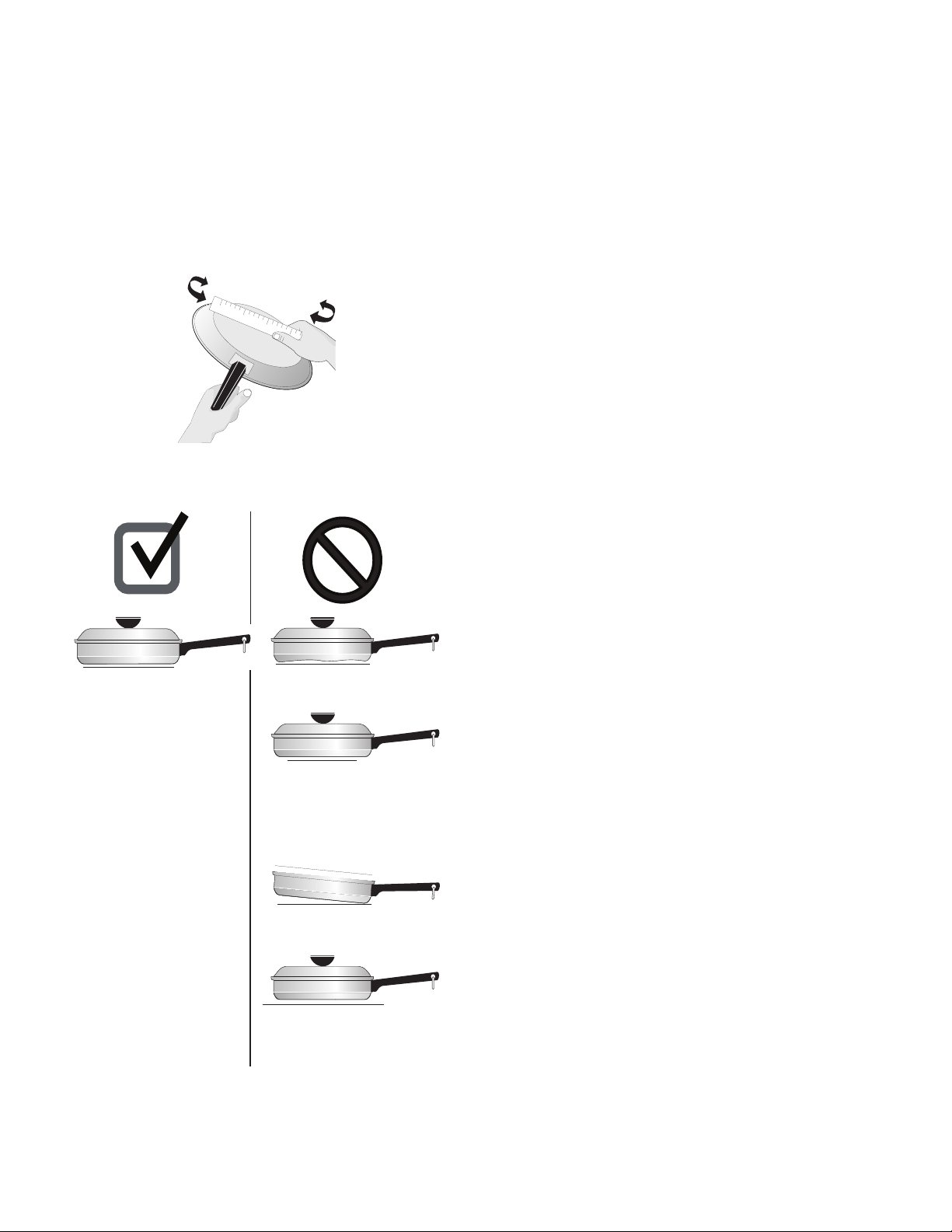
7
Antes de ajustar los controles superiores
Uso de los utensilios correctos
El tamaño y tipo de utensilios que use influirán en el ajuste
necesario del nivel de potencia del elemento radiante para obtener
los mejores resultados de la cocción.
Asegúrese de seguir las recomendaciones sobre los utensilios
correctos a utilizar como se muestra en esta página.
Tipos de materiales de los utensilios
El material del utensilio determina qué tan uniforme y rápido se
transfiere el calor del elemento superior al fondo del utensilio.
Aluminio: excelente conductor de calor. Algunos tipos de alimentos
lo harán oscurecerse (los utensilios de aluminio anodizado son
resistentes a las manchas y picaduras). Si los utensilios de aluminio
se deslizan sobre la superficie de cocción de cerámica pueden
dejar marcas metálicas que parecerán rayaduras. Limpie estas
marcas inmediatamente.
Cobre: excelente conductor de calor, pero se decolora fácilmente.
Puede dejar marcas metálicas en el vidrio cerámico (vea la sección
sobre el Aluminio).
Acero inoxidable: conductor lento de calor que proporciona
resultados de cocción irregulares. Es duradero, fácil de limpiar y
resiste las manchas.
Hierro fundido: conductor lento de calor, pero lo retiene muy bien.
Cocina de manera uniforme una vez que alcanza la temperatura
de cocción. No se recomienda su uso en superficies de cocción de
vidrio cerámico.
Porcelana esmaltada sobre metal: las características de
calentamiento variarán de acuerdo con el material base. La
porcelana esmaltada debe ser lisa para evitar rayar la cerámica.
Vidrio: conductor lento de calor. No se recomienda su uso en
superficies de cocción de vidrio cerámico porque puede rayar el
vidrio.
Nota importante:
No coloque utensilios de aluminio, vidrio o porcelana esmaltada
VACÍOS en la cubierta de vidrio cerámico. El punto de
derretimiento de los utensilios fabricados con estos materiales
puede ser alcanzado rápidamente, especialmente si se dejan
vacíos, y se pueden pegar a la cubierta de vidrio cerámico. Si el
utensilio se derrite, dañará la cubierta. Asegúrese de seguir todas
las sugerencias del fabricante del utensilio cuando use cualquier
tipo de utensilio en la cubierta de vidrio cerámico.
Información sobre la cubierta de vidrio cerámico
La cubierta de vidrio cerámico tiene elementos radiantes superiores
ubicados debajo de la superficie del vidrio. El diseño de la cubierta
de cerámica marca los bordes del elemento superior que se
encuentra debajo. Asegúrese de usar utensilios del mismo diámetro
del borde del elemento sobre la cubierta y sólo utilice utensilios de
fondo plano. El tipo y tamaño del utensilio, así como la cantidad de
elementos superiores que estén en uso y sus ajustes respectivos, son
factores que afectarán la cantidad de calor que se distribuirá a las
áreas cercanas a los elementos superiores. Las áreas que rodean los
elementos pueden calentarse lo suficiente como para causar
quemaduras.
Información sobre los elementos radiantes superiores
La temperatura del elemento se eleva de manera gradual y
uniforme. A medida que la temperatura sube, el elemento brillará
de color rojo. Para mantener el ajuste seleccionado, el elemento
pasará por un ciclo de encendido y apagado. El elemento
calefactor retiene suficiente calor para proporcionar un
calentamiento uniforme y constante durante el ciclo de apagado.
Para una cocción eficiente, apague el elemento varios minutos
antes de terminar la cocción. Esto permitirá que el calor residual
complete el proceso de cocción.
Figura 1: Controle el utensilio de fondo plano con una regla.
• Utensilios con fondo curvo y
deformado.
• La pesada manija del utensilio
lo inclina hacia un lado.
• Utensilios más pequeños que
el área de cocción marcada
en la cubierta.
• Utensilios de más de media
pulgada (o 12 mm) más
grandes que el área de
cocción marcada en la
cubierta.
• Utensilio con fondo
plano y lados rectos.
• Tapas bien ajustadas.
• El peso de la manija no
inclina el utensilio.
El utensilio está bien
balanceado.
• El tamaño de los
utensilios concuerda con
la cantidad de alimento
a preparar y el elemento
superior.
• Fabricado con material
que es buen conductor
de calor.
• Fácil de limpiar.
• El diámetro del utensilio
debe concordar siempre
con el tamaño del
elemento.
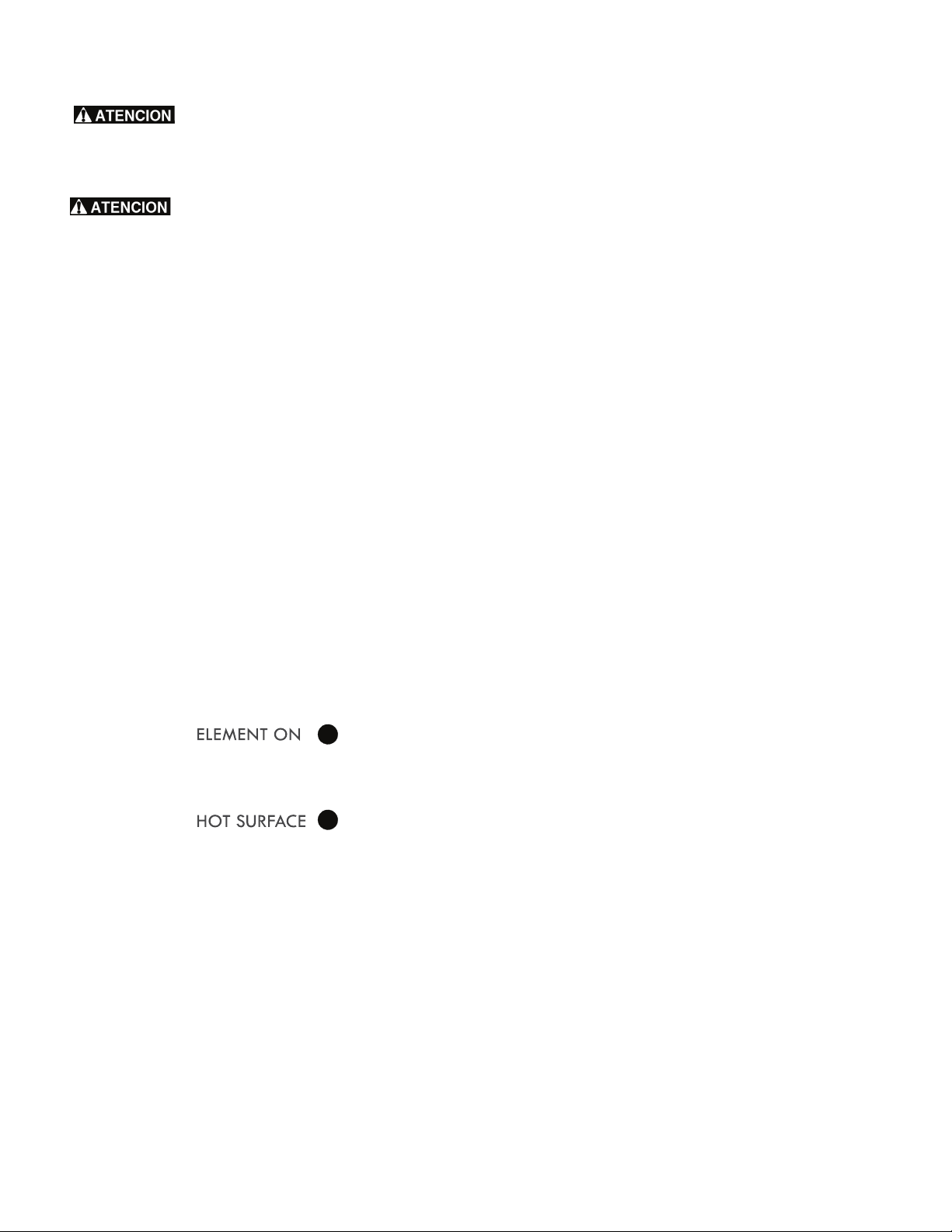
8
Antes de ajustar los controles superiores
Puede que los elementos radiantes superiores
parezcan haberse enfriado después de haberlos apagado. La
superficie de vidrio aún puede estar caliente, y se pueden causar
quemaduras si se toca la superficie de vidrio antes de que se haya
enfriado lo suficiente.
No coloque artículos de plástico tales como
saleros y pimenteros, portacucharas o envoltorios de plástico sobre
la cubierta mientras esté en uso. Estos objetos pueden derretirse o
encenderse. Los portaollas, las toallas y las cucharas de madera
pueden encenderse si se colocan demasiado cerca de los elementos
superiores.
No permita que papel de aluminio, los utensilios vacíos de vidrio o
porcelana o CUALQUIER otro material que se pueda derretir entre
en contacto con la cubierta de vidrio cerámico. Si estos materiales
se derriten sobre la cubierta, la dañarán.
Luces indicadoras "ELEMENT ON" (Elemento encendido) y de
SUPERFICIE CALIENTE.
Este electrodoméstico viene equipado con dos tipos diferentes de
luces indicadoras de control de las superficies en el panel de
control: la luz indicadora "ELEMENT ON" (elemento encendido) y
las luces indicadoras "HOT SURFACE" (superficie caliente).
La luz indicadora "ELEMENT ON" (elemento encendido) que se
encuentra en el panel de control se encenderá cuando haya un
elemento encendido. Una vista rápida a esta luz indicadora
después de terminar la cocción es una manera fácil de verificar
que todos los controles de los elementos superiores están
apagados.
Las luces indicadoras "HOT SURFACE" (superficie caliente) se
encenderán cada vez que cualquier elemento de cocción superior
se caliente y permanecerán encendidas hasta que la cubierta se
haya enfriado a un nivel moderado de temperatura.
Notas importantes:
• Los elementos radiantes cuentan con un limitador que permite
que el elemento radiante pase por un ciclo de encendido y
apagado, incluso en el ajuste ALTO. Este ciclo en el ajuste
ALTO es normal y ocurrirá más a menudo si el utensilio es
demasiado pequeño para el elemento radiante o si el fondo
del utensilio no es plano.
• Asegúrese de leer las instrucciones detalladas para la limpieza
y mantenimiento de la cubierta de vidrio cerámico en la
sección "Cuidado y limpieza" y en la sección "Antes de
solicitar servicio" de esta Guía de uso y cuidado.
Tipos de elementos superiores de la cubierta
La cubierta de vidrio cerámico tiene elementos radiantes superiores
ubicados debajo de la superficie del vidrio. Los patrones del vidrio
cerámico delinearán los tamaños y tipos de elementos disponibles.
El elemento (o elementos) radiante sencillo tiene un solo diseño
circular sobre la cubierta. El área de calentamiento (algunos
modelos) ubicada en la zona trasera central de la cubierta utiliza
un diseño circular y está diseñada sólo para mantener alimentos
calientes..
El elemento radiante doble (algunos modelos) le permite usar
solamente la porción interior más pequeña como elemento sencillo
o para calentar las porciones interna y externa a la vez.
Enlatado de conservas
Asegúrese de leer y seguir todas las siguientes pautas cuando
enlate conservas con su electrodoméstico. Consulte la página web
de la USDA (Departamento de Agricultura de los EE.UU.) y lea
toda la información disponible además de seguir sus
recomendaciones para los procedimientos de enlatado de
conservas en el hogar.
Consejos y procedimientos de enlatado de conservas:
• Solo use utensilios de enlatado de conservas de fondo plano
de alta calidad. Utilice un borde recto para verificar el fondo
del utensilio de enlatado.
• Cuando enlate conservas en una cubierta de vidrio cerámico,
sólo use un utensilio de enlatado de conservas con fondo
completamente plano sin bordes que salgan desde el centro
del fondo del utensilio.
• Asegúrese de que el diámetro del utensilio de enlatado no
sobresalga más de 1 pulgada (2,5 cm) de las marcas del
elemento superior o del quemador. Se recomienda usar
utensilios de enlatado de conservas más pequeños sobre
elementos de serpentín eléctricos y sobre cubiertas de vidrio
cerámico. Comience con agua de grifo caliente para hacer
hervir el agua más rápidamente.
• Use el nivel de calentamiento más alto para hacer hervir el
agua por primera vez. Una vez que el agua esté hirviendo,
reduzca el nivel de calentamiento al ajuste más bajo posible
que mantenga el hervor.
• Nunca coloque o extienda un utensilio de cocina sobre 2 áreas
de cocción diferentes a la vez. Esto hará que el calentamiento
no sea uniforme y podría quebrar la cubierta cerámica.
Figura 2: Luces indicadoras de elemento encendido y de superficie
caliente
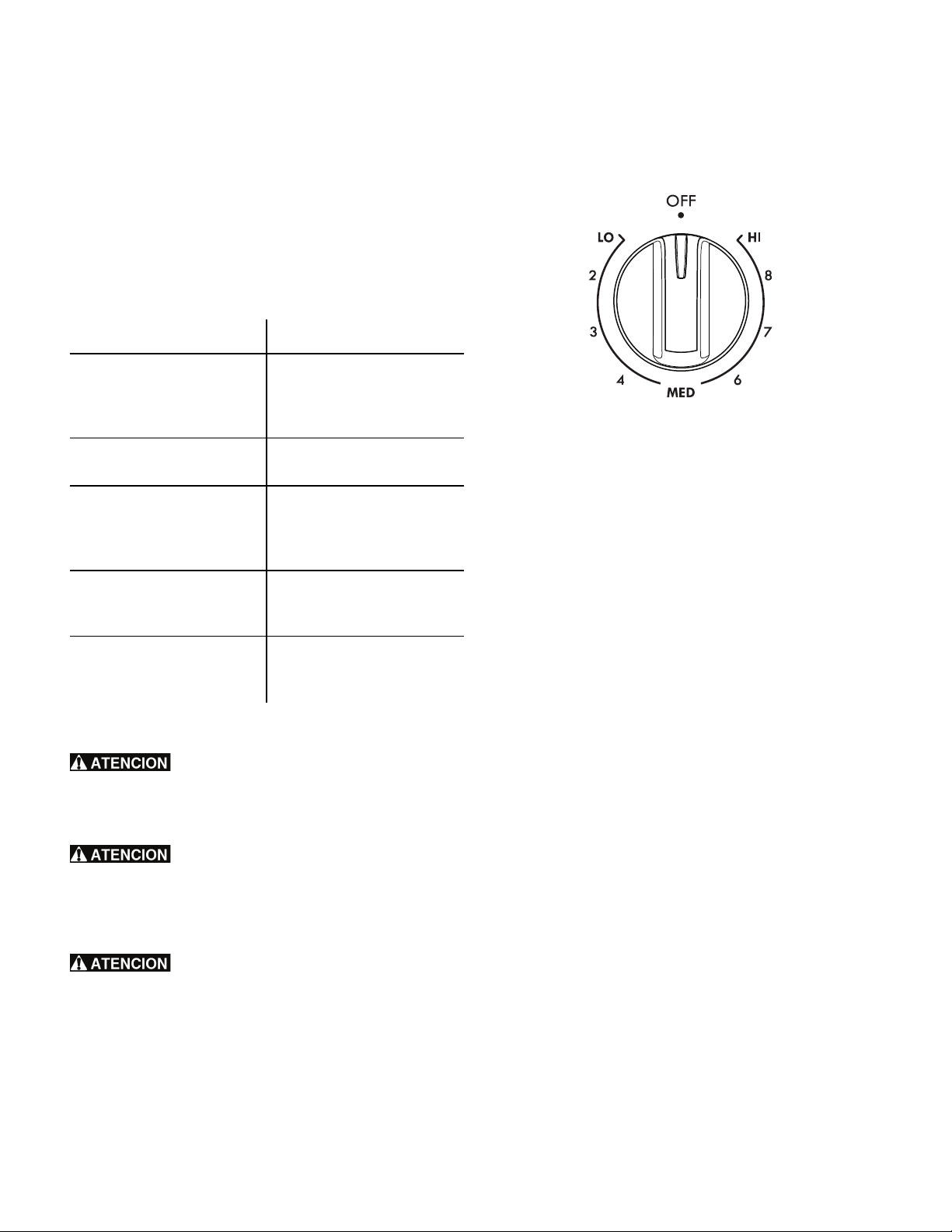
9
Ajuste de los controles superiores
Ajuste de los controles superiores
Ajustes del elemento superior radiante
Los ajustes sugeridos a continuación se basan en la cocción con
utensilios de peso mediano fabricados de aluminio y con tapas. Los
ajustes pueden variar cuando se utilizan otros tipos de utensilio.
Ajustes sugeridos para los elementos superiores radiantes sencillos
y dobles (algunos modelos)
Puede que los elementos radiantes superiores
parezcan haberse enfriado después de haberlos apagado. La
superficie de vidrio aún puede estar caliente, y se pueden causar
quemaduras si se toca la superficie de vidrio antes de que se haya
enfriado lo suficiente.
No coloque artículos de plástico tales como
saleros y pimenteros, portacucharas o envoltorios de plástico sobre
la cubierta mientras esté en uso. Estos objetos pueden derretirse o
encenderse. Los portaollas, las toallas y las cucharas de madera
pueden encenderse si se colocan demasiado cerca de los elementos
superiores.
No permita que papel de aluminio, los utensilios
vacíos de vidrio o porcelana o CUALQUIER otro material que se
pueda derretir entre en contacto con la cubierta de vidrio
cerámico. Si estos materiales se derriten sobre la cubierta de vidrio
cerámico, la dañarán.
Elementos radiantes superiores sencillos (todos los modelos)
Para usar un elemento radiante superior sencillo:
1. Coloque un utensilio del tamaño apropiado sobre el elemento
radiante superior sencillo.
2. Oprima y gire la perilla de control del elemento superior hacia
cualquier lado hasta llegar al ajuste deseado (Figura 3).
3. Cuando termine la cocción, apague el elemento radiante
superior antes de retirar el utensilio.
Notas importantes:
• Para una cocción eficiente, apague el elemento varios minutos
antes de terminar la cocción. Esto permitirá que el calor
residual complete el proceso de cocción.
• No es necesario ajustar las perillas de control con exactitud en
un ajuste en particular. Use los gráficos proporcionados como
guía y ajuste las perillas como sea necesario. Cada elemento
superior ofrece una cantidad de calor constante en cada
ajuste.
• Consulte los ajustes sugeridos para los elementos radiantes
superiores para obtener sugerencias de niveles de potencia
(Tabla 1). Si puede observar una superficie brillante de color
rojo que se extiende más allá del fondo del utensilio significa
que este es demasiado pequeño para el área de calefacción
superior.
Tabla 1: Ajustes sugeridos para diferentes necesidades de cocción
Ajustes Tipo de cocción
Alto ("HI" - 9) Para iniciar la cocción de la
mayoría de los alimentos,
hervir agua, asar en la
asadera
Medio alto (7 a 8) Para mantener un hervor
rápido, freír y freír en grasa
Medio (5 a 6) Para mantener un hervor
lento, espesar salsas y salsas
para carne y para hervir
verduras al vapor
Intermedio bajo (2 a 4) Para mantener los alimentos
cocinándose, escalfar y hacer
estofados
Bajo ("LO" - 1) Para mantener alimentos
calientes, derretir y hervir a
fuego lento
Figura 3: Control del elemento radiante sencillo
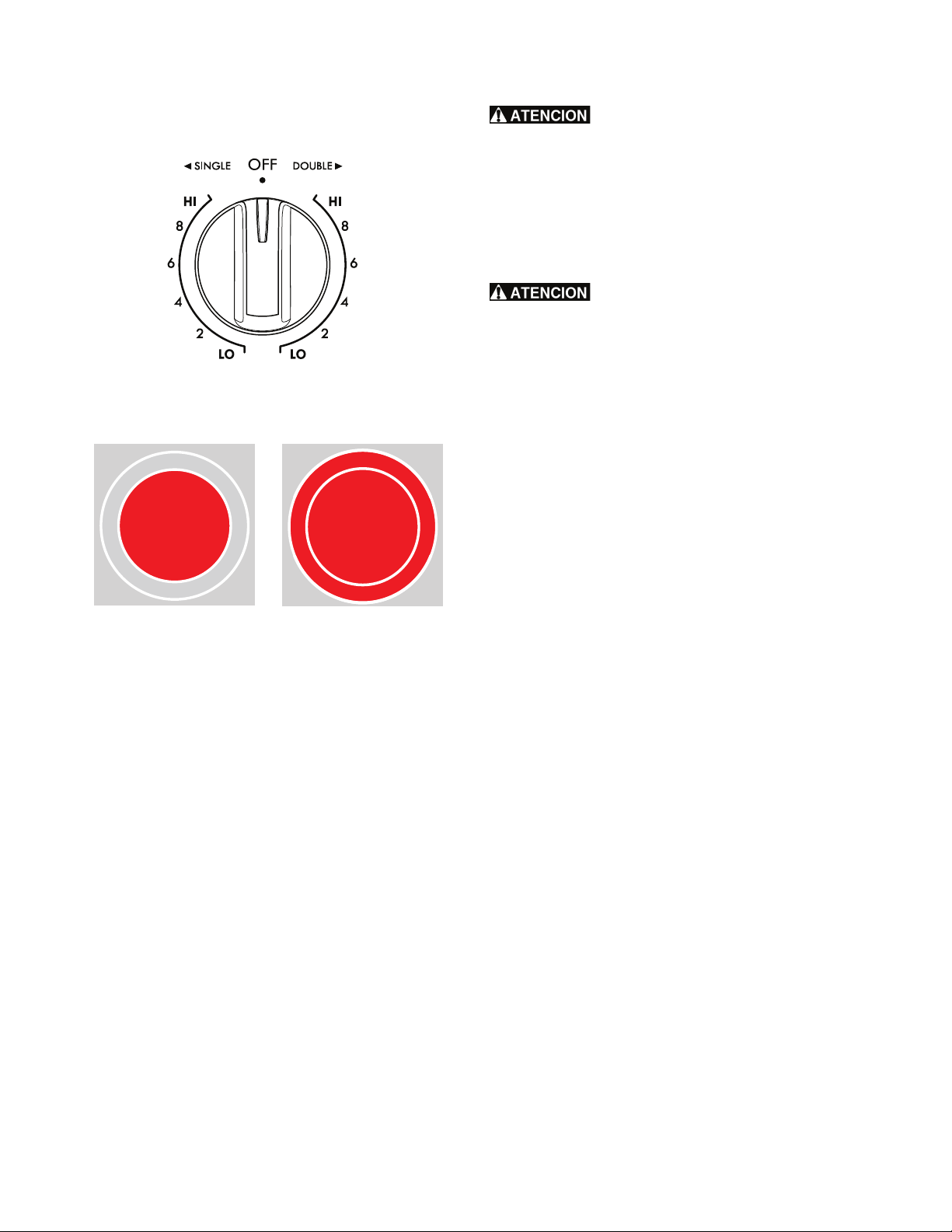
10
Ajuste de los controles superiores
Elemento radiante superior doble (algunos modelos)
Para hacer funcionar un elemento radiante doble:
1. Coloque un utensilio del tamaño apropiado sobre el elemento
radiante superior sencillo.
2. Presione y gire la perilla de control hacia la derecha para
comenzar a calentar las porciones interior y exterior del
elemento. Si sólo requiere la porción interior para utensilios
más pequeños, presione la perilla y gírela a la izquierda.
3. Cuando termine la cocción, apague el elemento radiante
superior antes de retirar el utensilio.
Puede que los elementos radiantes superiores
parezcan haberse enfriado después de haberlos apagado. La
superficie de vidrio aún puede estar caliente, y se pueden causar
quemaduras si se toca la superficie de vidrio antes de que se haya
enfriado lo suficiente. No coloque artículos de plástico tales como
saleros y pimenteros, portacucharas o envoltorios de plástico sobre
la cubierta de la estufa mientras esté en uso. Estos objetos pueden
derretirse o encenderse. Los portaollas, las toallas y las cucharas de
madera pueden encenderse si se colocan demasiado cerca de los
elementos superiores.
No permita que papel de aluminio, los utensilios
vacíos de vidrio o porcelana o CUALQUIER otro material que se
pueda derretir entre en contacto con la cubierta de vidrio
cerámico. Si estos materiales se derriten sobre la cubierta de vidrio
cerámico, la dañarán.
Notas importantes:
• Para una cocción eficiente, apague el elemento varios minutos
antes de terminar la cocción. Esto permitirá que el calor
residual complete el proceso de cocción.
• No es necesario ajustar las perillas de control con exactitud en
un ajuste en particular. Use los gráficos proporcionados como
guía y ajuste las perillas como sea necesario. Cada elemento
superior ofrece una cantidad de calor constante en cada
ajuste.
• Inicie la mayoría de las funciones de cocción en un ajuste
mayor y luego bájelo a un ajuste menor para terminar de
cocinar.
• Los elementos radiantes cuentan con un limitador que permite
que el elemento radiante pase por un ciclo de encendido y
apagado, incluso en el ajuste ALTO. Esto ayuda a evitar daños
a la superficie de cocción de vidrio cerámico. Este ciclo en el
ajuste ALTO es normal y ocurrirá más a menudo si el utensilio
es demasiado pequeño para el elemento radiante o si el fondo
del utensilio no es plano.
• Si puede observar una superficie brillante de color rojo que se
extiende más allá del fondo del utensilio significa que este es
demasiado pequeño para el área de calefacción superior.
Figura 4: Control del elemento radiante doble
Figura 5: Quemador doble ajustado para función única (izq.) o
doble (der.).
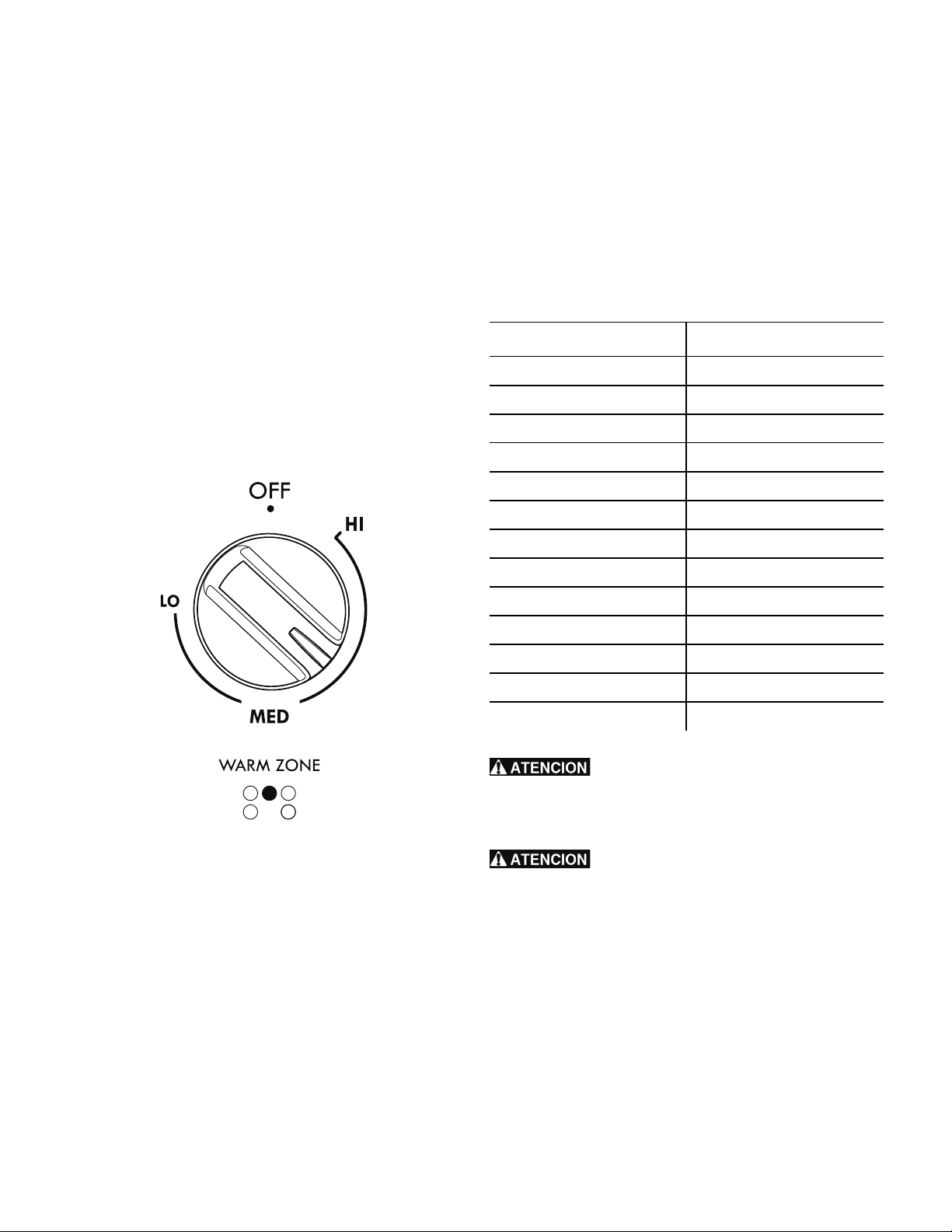
11
Ajuste de los controles superiores
Área calentadora (algunos modelos)
El propósito del área calentadora es mantener calientes
y a temperatura de servir los alimentos cocinados. Use el área
calentadora para mantener calientes alimentos cocinados tales
como las verduras,
salsas, guisos, sopas, estofados, pan, pastelería y platos para
hornos.
Siempre comience el uso del cajón calentador con alimentos
calientes. No caliente alimentos fríos mediante el área
calentadora. Todos los alimentos que se coloquen en la zona
calentadora deben cubrirse con una tapa para mantener la
calidad del alimento. Para obtener los mejores resultados
cuando caliente panes o pasteles, la tapa que utilice para
cubrirlos debe tener una abertura para permitir que escape la
humedad. Sólo use utensilios recomendados para uso en hornos
y estufas en el área calentadora.
1. Oprima y gire la perilla de control del área calentadora hacia
cualquier lado hasta llegar al ajuste de temperatura deseado.
Las temperaturas son aproximadas y están designadas por
"HI" (alto), "MED" (intermedio) y "LO" (bajo). Sin embargo, el
control se puede colocar en cualquier posición entre "HI" (alto)
y "LO" (bajo) para diferentes niveles de calentamiento.
2. Cuando esté listo para servir los alimentos, gire la perilla de
control del área calentadora a la posición "OFF" (apagado). El
área calentadora permanecerá caliente hasta que la luz
indicadora de superficie caliente se apague.
Notas importantes:
• Sólo use platos y utensilios recomendados para uso en hornos y
cubiertas de vidrio cerámico. No use envoltura de plástico o
papel de aluminio para cubrir el alimento. El plástico o el
papel de aluminio pueden derretirse sobre la cubierta.
A continuación, consulte los ajustes recomendados para calentar
alimentos en el área calentadora. Si un alimento específico no se
encuentra en la lista, comience en el nivel intermedio y ajuste según
sea necesario.
A diferencia de los elementos radiantes
superiores, el área calentadora no brillará de color rojo cuando
esté CALIENTE. La superficie de vidrio aún puede estar caliente, y
se pueden causar quemaduras si se toca la superficie de vidrio
antes de que se haya enfriado lo suficiente.
No coloque artículos inflamables tales como
saleros y pimenteros, portacucharas o envoltorios de plástico sobre
la superficie de cocción mientras esté en uso. Estos objetos pueden
derretirse o encenderse. Los portaollas, las toallas y las cucharas de
madera pueden encenderse si se colocan demasiado cerca de los
elementos superiores. No permita que el papel de aluminio, los
utensilios vacíos de vidrio o porcelana o cualquier otro material que
se pueda derretir entre en contacto con la cubierta de vidrio
cerámico.
Tabla 2: Ajustes sugeridos para la zona calentadora
Alimento Nivel de temperatura
Panes/Pasteles "LO" (bajo)
Guisos "LO" (bajo)
Platos con comida "LO" (bajo)
Huevos "LO" (bajo)
Salsas para carne "LO" (bajo)
Carnes "MED" (medio)
Salsas "MED" (medio)
Sopas (crema) "MED" (medio)
Estofados "MED" (medio)
Verduras "MED" (medio)
Frituras "HI" (alto)
Bebidas calientes "HI" (alto)
Sopas (caldo) "HI" (alto)
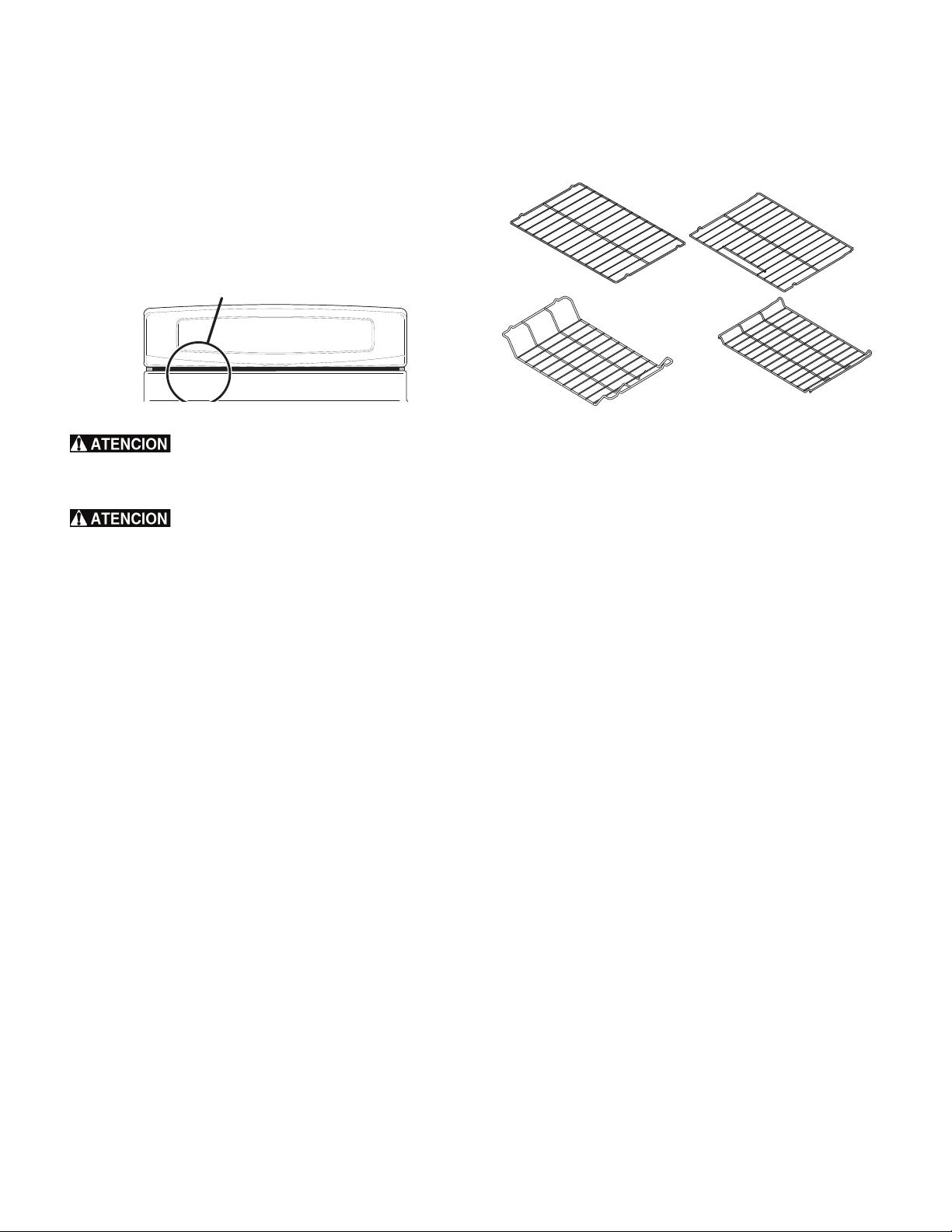
12
Antes de ajustar los controles del horno
Ubicación del respiradero del horno
La rejilla de ventilación del horno se encuentra debajo del lado
izquierdo del panel de control (Figura 6). Cuando el horno está
encendido, pasa aire caliente a través de este respiradero. Esta
ventilación es necesaria para una circulación adecuada del aire
dentro del horno y para obtener buenos resultados de horneado.
No bloquee el respiradero del horno:
Use siempre tomaollas o guantes para hornear
cuando utilice el horno. Al usar el horno, el interior y el exterior del
horno, las parrillas y la cubierta se calientan mucho, lo que podría
causar quemaduras.
Revestimientos protectores: no use papel de
aluminio para revestir la parte inferior del horno. Use papel de
aluminio solamente como se recomienda en este manual. La
instalación inadecuada de estos revestimientos puede resultar en un
riesgo de choque eléctrico o incendio.
Circulación del aire en el horno
Para obtener los mejores resultados del horneado, deje entre
2" (5 cm) y 4" (10 cm) de espacio alrededor de los utensilios para
una mejor circulación del aire y asegúrese de que estos no se
toquen entre sí ni entren en contacto con la puerta del horno, los
costados o la pared trasera del horno. El aire caliente debe poder
circular alrededor de los utensilios en el horno para que el calor se
distribuya uniformemente.
Tipo de parrillas del horno
La parrilla plana (algunos modelos) o la parrilla plana con manija
(algunos modelos) pueden ser utilizadas para la mayoría de los
requerimientos de cocción.
La parrilla irregular (algunos modelos) está diseñada para ubicar la
base de la parrilla aproximadamente 1/2 posición más baja que
las parrillas planas. Este diseño de parrilla permite varias
posiciones adicionales entre las posiciones de parrilla plana.
Para maximizar el espacio de cocción en el horno, coloque la
parrilla inferior (algunos modelos) en la posición inferior para las
funciones de asado de cortes grandes de carne.
Figura 6: Ubicación del respiradero del horno
ubicación del respiradero del horno
Figura 7:
parrilla plana
parrilla trasera
parrilla plana
con manija
parrilla irregular
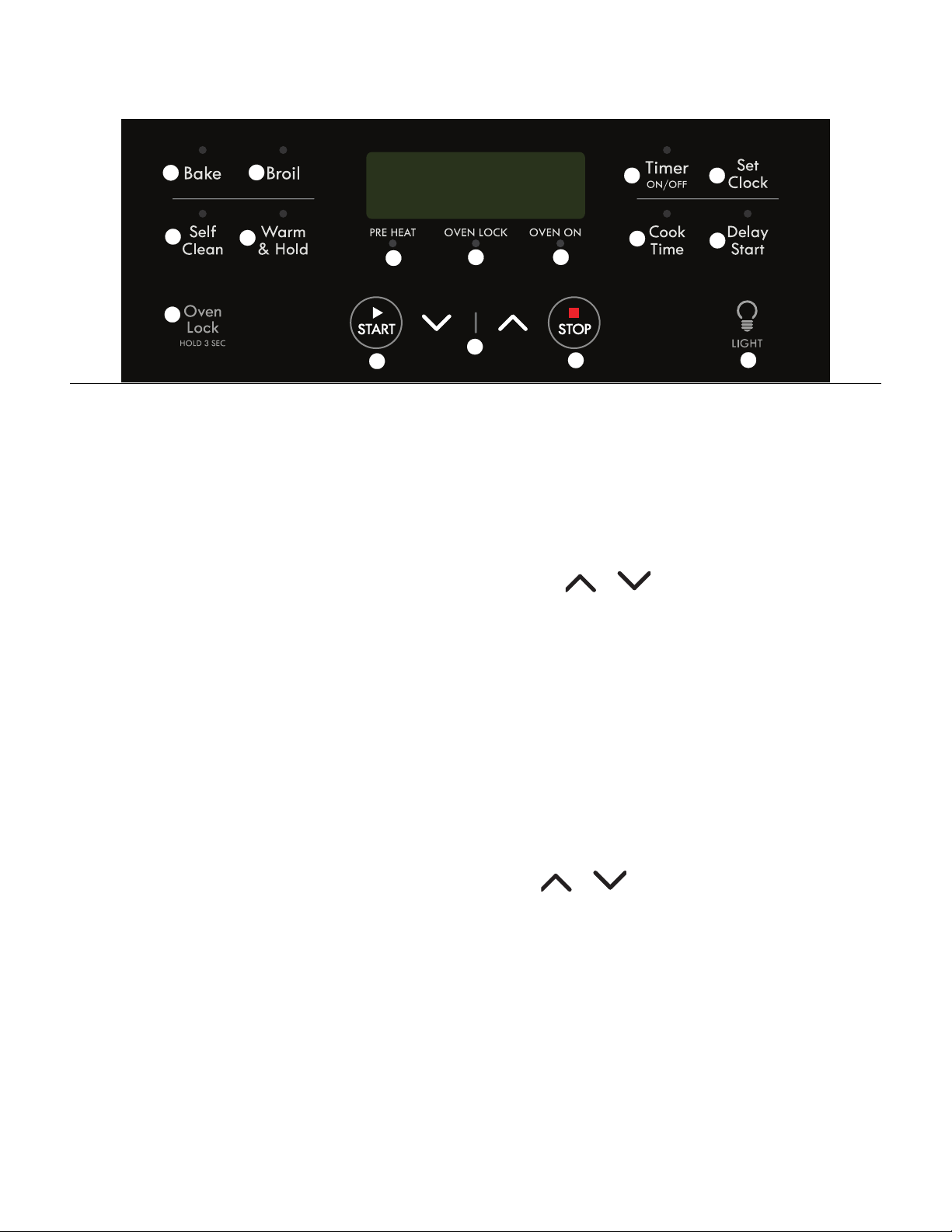
13
Controles del horno
1. "Bake" (horneado): selecciona la función de horneado.
2. "Broil" (asado a la parrilla): selecciona la función de asado a
la parrilla.
3. "Self Clean" (autolimpieza): se usa para seleccionar un ciclo
de autolimpieza de 2, 3 o 4 horas.
4. "Warm & Hold" (calentar y mantener caliente): se usa para
mantener los alimentos horneados calientes y listos para servir
hasta 3 horas después de la cocción.
5. "Oven Lock" (bloqueo del horno) : se usa para bloquear la
puerta y las funciones del horno.
6. Luz indicadora "PREHEAT" (precalentamiento): se enciende
cuando el horno se está precalentando. Permanecerá
encendido hasta que el horno alcance la temperatura
deseada.
7. Luz indicadora "OVEN LOCK" (bloqueo del horno): se
enciende cuando la puerta se bloquea y desbloquea, y
cuando se activa el bloqueo de la puerta.
8. Luz indicadora "OVEN ON" (horno encendido): se ilumina
cada vez que se enciende el horno para mantener la
temperatura programada del horno.
9. "START" (encendido): se usa para iniciar funciones de cocción.
10. Flechas hacia arriba y hacia abajo: utilice las teclas de
función para aceptar el ajuste y para ajustar las temperaturas
y los tiempos.
11. "STOP" (apagar): anula cualquier función activa del horno
excepto el reloj o el temporizador.
12. "Timer Set/Off" (encendido/apagado del temporizador): se
usa para configurar y cancelar el temporizador y para
ajustar la función de horneado continuo.
13. "Set Clock" (ajuste del reloj): se usa con las teclas de flecha
para ajustar la hora del día.
14. "Cook Time" (tiempo de cocción): se usa para ajustar una
cantidad específica de tiempo necesaria para la cocción.
Anula automáticamente el proceso de cocción al final del
tiempo programado.
15. "Delay Start" (encendido diferido): utilice esta opción con las
funciones de horneado y de autolimpieza para programar un
horneado con encendido diferido o un ciclo de autolimpieza
con encendido diferido.
16. "LIGHT" (luz): se usa para encender y apagar la luz interna
del horno.
Ajuste del reloj
Cuando enchufe el electrodoméstico por primera vez o cuando se
haya interrumpido el suministro eléctrico, 12:00 destellará en la
pantalla. Primero debe programar la hora del día antes de utilizar
el horno.
Ajuste del reloj
1. Oprima "Set Clock" (ajustar reloj) una vez. CLO aparecerá en
la pantalla.
2. Oprima o y el tiempo aparecerá en la pantalla.
Oprima y mantenga oprimida la tecla de flecha hasta que
aparezca en el indicador visual la hora del día correcta.
3. Oprima "START" (encendido) para aceptar la hora del día.
Nota importante:
No se puede cambiar la hora del día una vez que se haya
ajustado el horno para cocinar.
Modo de control silencioso o sonoro
1. Mantenga oprimida la tecla "Delay Start" (encendido
diferido) hasta que el control emita una señal sonora (aprox. 3
segundos). El modo presente aparece como "OFF" (apagado)
(funcionamiento silencioso) u "ON" (encendido)
(funcionamiento sonoro).
2. Use o para alternar entre el modo silencioso y
sonoro. Para guardar, presione "START" (encendido) cuando
el modo de funcionamiento deseado aparezca en la pantalla.
1
2
3
4
5
6
7
8
9
10
11
12
13
14
15
16

14
Controles del horno
Cambio del formato de temperatura del horno (ºF o ºC)
El control electrónico del horno está programado de fábrica para
mostrar °F (Fahrenheit). La pantalla puede ser cambiada para
mostrar las temperaturas del horno en grados Fahrenheit o ºC
(Celsius).
Para cambiar la unidad de temperatura de °F a °C o de °C a °F:
1. Oprima la tecla "Broil" (asado a la parrilla). "HI" (alto)
aparece en la pantalla.
2. Oprima y mantenga oprimida la tecla "Broil" (asado a la
parrilla) hasta que F o C aparezcan en la pantalla.
3. Presione o para cambiar las unidades entre
F o C.
4. Oprima "START" (encendido) para aceptar los cambios. La
pantalla mostrará nuevamente la hora del día.
Nota importante:
No se puede cambiar el formato de temperatura del horno una
vez que se haya ajustado el horno para cocinar.
Bloqueo del horno
Esta función le permite bloquear la sección del horno cuando no
está en uso.
Para activar la función de bloqueo del horno:
1. Asegúrese de que la puerta esté completamente cerrada.
2. Mantenga oprimida la tecla "OVEN LOCK" (bloqueo del
horno) durante 3 segundos. Loc aparecerá en la pantalla. La
luz indicadora "OVEN LOCK" (bloqueo del horno) destellará
mientras el mecanismo motorizado de cierre de la puerta
comienza a bloquear automáticamente la puerta. No abra la
puerta del horno durante este proceso. Espere 15 segundos
para que la puerta se bloquee completamente. Una vez que
la puerta se haya bloqueado, la hora del día aparecerá en el
indicador visual.
Para anular la función de bloqueo del horno:
1. Mantenga oprimida la tecla "OVEN LOCK" (bloqueo del
horno) durante 3 segundos. La luz indicadora "OVEN LOCK"
(bloqueo del horno) destellará y el cierre de la puerta
motorizado comenzará a desbloquear la puerta. No abra la
puerta del horno en este momento. La puerta se desbloqueará
completamente en unos 15 segundos.
2. Las teclas de control del horno estarán disponibles y podrá
abrir la puerta del horno.
Notas importantes:
• Para evitar posibles daños al mecanismo de cierre de la
puerta, no intente abrir o cerrar la puerta mientras la luz
indicadora "OVEN LOCK" (bloqueo del horno) esté
destellando.
• Si oprime una tecla de control cuando el "OVEN LOCK"
(bloqueo del horno) está activo, Loc aparecerá en la pantalla
como recordatorio de que las teclas del horno no están activas
cuando la función de "OVEN LOCK" (bloqueo del horno) está
activada.
Cambio entre horneado continuo y la función de ahorro de
energía después de 12 horas
El control del horno tiene una característica de ahorro de energía
después de 12 horas de funcionamiento que permite que el horno
se apague automáticamente si el control se deja encendido por
más de 12 horas. El control puede ser programado para
desactivar esta característica y programar el horneado continuo.
Para cambiar al modo de horneado continuo:
Mantenga presionada la tecla "Timer Set/Off" (encendido/
apagado del temporizador) hasta que el control emita una
señal sonora (aprox. 6 segundos). - - hr se desplegará en la
pantalla. El control está programado para horneado continuo.
Oprima la tecla "Clean" (limpieza) para cambiar entre las
funciones de horneado continuo y ahorro de energía de 12
horas.
Para guardar el modo seleccionado, oprima "START"
(encendido). La pantalla regresará al modo inactivo.
Ajuste del temporizador
El temporizador se puede programar entre 1 minuto y 11 horas y
59 minutos.
Para programar el temporizador
1. Oprima la tecla "Timer Set/Off" (encendido/apagado del
temporizador).
2. Mantenga oprimida la tecla para aumentar el tiempo.
Libere la tecla cuando el tiempo deseado aparezca en
la pantalla.
3. Presione "START" (encendido) y el temporizador comenzará
un conteo regresivo.
4. Cuando el tiempo programado se haya terminado, el
temporizador emitirá 3 señales sonoras y seguirá emitiendo 3
señales sonoras cada 60 segundos hasta que oprima la tecla
"Timer Set/Off" (encendido/apagado del temporizador).
Para cambiar el tiempo restante en el temporizador, mantenga
oprimida la tecla o para aumentar o reducir el tiempo
restante.
Para cancelar el temporizador antes en cualquier momento,
oprima "Timer Set/Off" (encendido/apagado del temporizador)
una vez.
Notas importantes:
• El temporizador no enciende ni detiene el proceso de cocción.
El mismo sirve como un contador adicional en la cocina que
sonará cuando se acabe el tiempo programado. Puede
utilizar el temporizador por sí solo o cuando otras funciones
estén activas.
• La luz indicadora ubicada sobre la tecla "Timer Set/Off"
(encendido/apagado del temporizador) se encenderá
cuando se active el temporizador.
• El temporizador mostrará las horas y los minutos hasta que
quede 1 hora. Una vez que quede menos de 1 hora, la
pantalla hará conteo regresivo en minutos y segundos. Una
vez que quede menos de 1 minuto, sólo se mostrarán los
segundos.
• Si el temporizador está activo durante la cocción, la pantalla
mostrará el temporizador por defecto. Para ver la
información sobre cualquier otra función activa del horno,
oprima la tecla una vez para mostrar el estado de la función
activa.
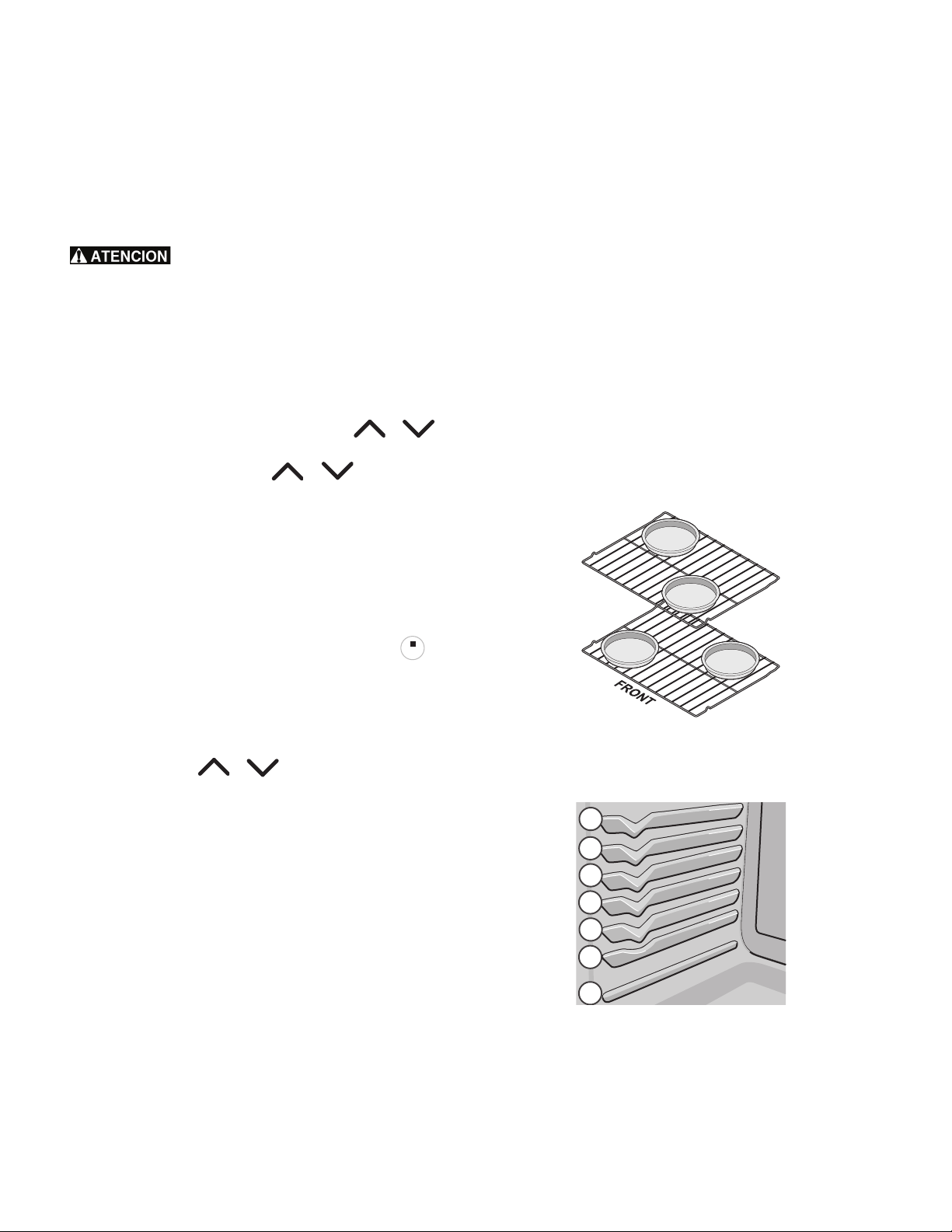
15
Controles del horno
Ajuste del horneado
Utilice la función de horneado cuando la receta requiera el
horneado con temperaturas normales. Escuchará una señal sonora
una vez que el horno alcance la temperatura programada. El
horno se puede programar para cualquier temperatura desde
170°F a 550°F (77°C a 288°C). La temperatura
predeterminada de fábrica para el horneado es 350°F (177°C).
Siempre use tomaollas o guantes para hornear
cuando utilice el horno. Al usar el horno, el interior del horno, las
parrillas y la cubierta se calientan mucho, lo que podría causar
quemaduras.
Para programar el horneado
1. Organice las parrillas y cierre la puerta del horno.
2. Oprima la tecla "Bake" (horneado). "350°" aparecerá en la
pantalla.
3. Durante los siguientes 15 segundos, oprima o . La
pantalla mostrará la temperatura predeterminada del horno
de 350°F (177°C). Si oprime o , la temperatura
puede ajustarse en incrementos de 5°F (1°C si el control está
programado para mostrar la temperatura en grados Celsius).
4. Presione "START" (encendido) cuando aparezca la
temperatura deseada; el horno comenzará a calentarse hasta
alcanzar la temperatura deseada. Cuando la temperatura
desplegada alcance la temperatura de horneado, la luz
indicadora de "PREHEAT" (precalentamiento) se apagará y
el control emitirá 3 señales sonoras.
Para anular el horneado en cualquier momento, oprima .
Para cambiar la temperatura del horno después de haber
comenzado a hornear
1. Oprima la tecla "Bake" (horneado). La temperatura
programada actual se mostrará en la pantalla.
2. Presione la tecla o para aumentar o reducir la
temperatura programada actual hasta alcanzar la nueva
temperatura.
Notas importantes:
• El horno no funcionará de manera continua por más de 12
horas. Si desea hornear por un período más prolongado,
consulte la sección "Cambio entre horneado continuo y la
función de ahorro de energía después de 12 horas" para
obtener más información.
• Los utensilios oscuros u opacos absorben más calor que los
utensilios brillantes, lo que puede hacer que los alimentos
queden más tostados o dorados de lo esperado. Es posible
que sea necesario reducir la temperatura del horno o el
tiempo de cocción para evitar que ciertos alimentos se doren
demasiado. Se recomienda utilizar los utensilios oscuros para
hornear pasteles; se recomienda utilizar los utensilios brillantes
para hornear tortas, galletas y bizcochos.
Consejos de horneado
• Precaliente totalmente el horno antes de cocinar alimentos
como galletas, bizcochos y panes.
• Cuando utilice una sola parrilla, colóquela de modo tal que
los alimentos queden en el centro del horno.
• Para obtener los mejores resultados cuando hornee tortas con
dos parrillas, coloque las parrillas en las posiciones 3 y 6.
(Figura 9)
• Los u
tensilios oscuros u opacos absorben más calor que los
utensilios brillantes. Es posible que sea necesario reducir la
temperatura del horno y el tiempo de cocción para evitar que
ciertos alimentos se doren demasiado. Se recomienda utilizar
los utensilios oscuros para hornear pasteles. Se recomienda
utilizar los utensilios brillantes para hornear tortas, galletas y
bizcochos.
• Para obtener los mejores resultados cuando hornee tortas o
galletas con 2 parrillas, coloque los utensilios en las posiciones
3 y 6, y moldes como se muestra en Figura 8.
STOP
STOP
Figura 8: Horneado en diferentes niveles
Figura 9: Posiciones de la parrilla del horno
1
5
7
6
4
3
2

16
Controles del horno
Ajuste del tiempo de cocción
Utilice la opción de tiempo de cocción para programar la cantidad
de tiempo necesaria para hornear. El horno se encenderá
inmediatamente y se apagará automáticamente después de que el
tiempo programado de cocción se haya terminado.
PELIGRO DE INTOXICACIÓN POR
ALIMENTOS. No deje reposar el alimento por más de una hora
antes o después de la cocción. Esto puede causar intoxicación por
alimentos o enfermedades.
Para programar el horno para comenzar a hornear
inmediatamente y para que se apague automáticamente
1. Asegúrese de que el reloj indique la hora correcta del día.
2. Organice las parrillas y cierre la puerta del horno.
3. Oprima la tecla "Bake" (horneado). 350 ° aparece en la
pantalla.
4. Durante los siguientes 15 segundos, oprima o . La
pantalla mostrará la temperatura predeterminada del horno
de 350°F (177°C). Si oprime la tecla o , la
temperatura puede ser ajustada en incrementos de 5 °F
(1 °C si el control está programado para mostrar la
temperatura en grados Celsius). Presione "START"
(encendido) para aceptar.
5. Oprima "Cook Time" (tiempo de cocción). :00 aparecerá en
la pantalla.
6. Oprima o para lograr el tiempo de cocción
deseado.
7. Oprima "START" (encendido) para aceptar los cambios.
Cuando la temperatura del horno alcance la temperatura
programada, la luz indicadora de "PREHEAT"
(precalentamiento) se apagará y el control emitirá una señal
sonora.
8. Para anular en cualquier momento, oprima .
Cuando el tiempo de cocción termine "End" (Fin) aparecerá en la
pantalla. El control emitirá 3 señales sonoras cada minuto a modo
de recordatorio hasta que oprima la tecla "STOP" (apagado).
Para cambiar la temperatura del horno o el tiempo de cocción
después de haber comenzado a hornear:
1. Oprima "Bake" (horneado) (para la temperatura del horno) o
"Cook Time" (tiempo de cocción).
2. Para ajustar la temperatura o el tiempo de cocción, oprima
o y suelte cuando aparezca la temperatura o el
tiempo de cocción deseados en la pantalla.
Notas importantes:
• "Cook Time" (tiempo de cocción) y "Delay Start" (encendido
diferido) pueden programarse con "Bake" (horneado) pero
no están disponibles para usar con "Broil" (asado a la
parrilla).
• Mientras cocina con la opción de tiempo de cocción, oprima la
tecla "Cook Time" (tiempo de cocción) para mostrar el tiempo
de cocción restante.
• Puede programar el tiempo de cocción y el encendido
diferido con la función de horneado o de convección (algunos
modelos). Las opciones de tiempo de cocción y de encendido
diferido no funcionarán con la función de asado a la parrilla.
• El tiempo máximo de la función de tiempo de cocción o de
encendido diferido es de 11 horas y 59 minutos.
Ajuste del encendido diferido
El encendido diferido le permite programar una hora de
encendido diferido para las funciones de horneado o de limpieza.
PELIGRO DE INTOXICACIÓN POR
ALIMENTOS. No deje reposar el alimento por más de una hora
antes ni después de la cocción. Esto puede causar intoxicación por
alimentos o enfermedades. Los alimentos que se dañan fácilmente,
tales como la leche, los huevos, el pescado, la carne de res o la
carne de ave, deben refrigerarse en el refrigerador primero.
Incluso cuando han sido refrigerados, estos productos no deben
permanecer en el horno por más de 1 hora antes de que comience
la cocción, y deben ser retirados inmediatamente cuando se
termine la cocción.
Siempre use tomaollas o guantes para hornear
cuando utilice el horno. Al usar el horno, el interior del horno, las
parrillas y la cubierta se calientan mucho, lo que podría causar
quemaduras.
Para ajustar un tiempo de encendido diferido y un apagado
automático
1. Asegúrese de que el reloj indique la hora correcta del día.
2. Organice las parrillas y cierre la puerta del horno.
3. Oprima la tecla "Bake" (horneado). "350°" aparecerá en la
pantalla.
4. Durante los siguientes 15 segundos, oprima o . La
pantalla mostrará la temperatura predeterminada del horno
de 350°F (177°C). Si oprime o , la temperatura
puede ajustarse en incrementos de 5°F (1°C si el control está
programado para mostrar la temperatura en grados Celsius).
Cuando se alcance la temperatura deseada, oprima "START"
(encendido) para aceptar.
5. Oprima "Cook Time" (tiempo de cocción). :00 aparecerá en
la pantalla.
6. Oprima o para programar el tiempo de cocción
deseado y luego oprima "START" (encendido) para aceptar.
7. Oprima la tecla "Delay Start" (encendido diferido). La hora
del día aparecerá en la pantalla. Oprima la tecla o
hasta que el tiempo de cocción deseado aparezca en
la pantalla y oprima "START" (encendido).
8. El horno se encenderá a la hora de encendido diferido
programada y comenzará a calentar. Cuando la temperatura
desplegada alcance la temperatura de horneado, la luz
indicadora de "PREHEAT" (precalentamiento) se apagará y
el control emitirá 3 señales sonoras.
Para anular en cualquier momento, oprima .
Para cambiar la temperatura del horno o el tiempo de cocción
después de haber comenzado a hornear:
1. Oprima "Bake" (horneado) (para la temperatura del horno) o
"Cook Time" (tiempo de cocción).
2. Oprima la tecla o y libérela cuando la
temperatura o el tiempo de cocción deseado aparezca en la
pantalla.
Cuando el tiempo de cocción programado termine:
"End" (fin) aparecerá en la pantalla. El control del horno emitirá 3
señales sonoras cada minuto hasta que oprima la tecla .
STOPSTOP
STOPSTOP
STOPSTOP
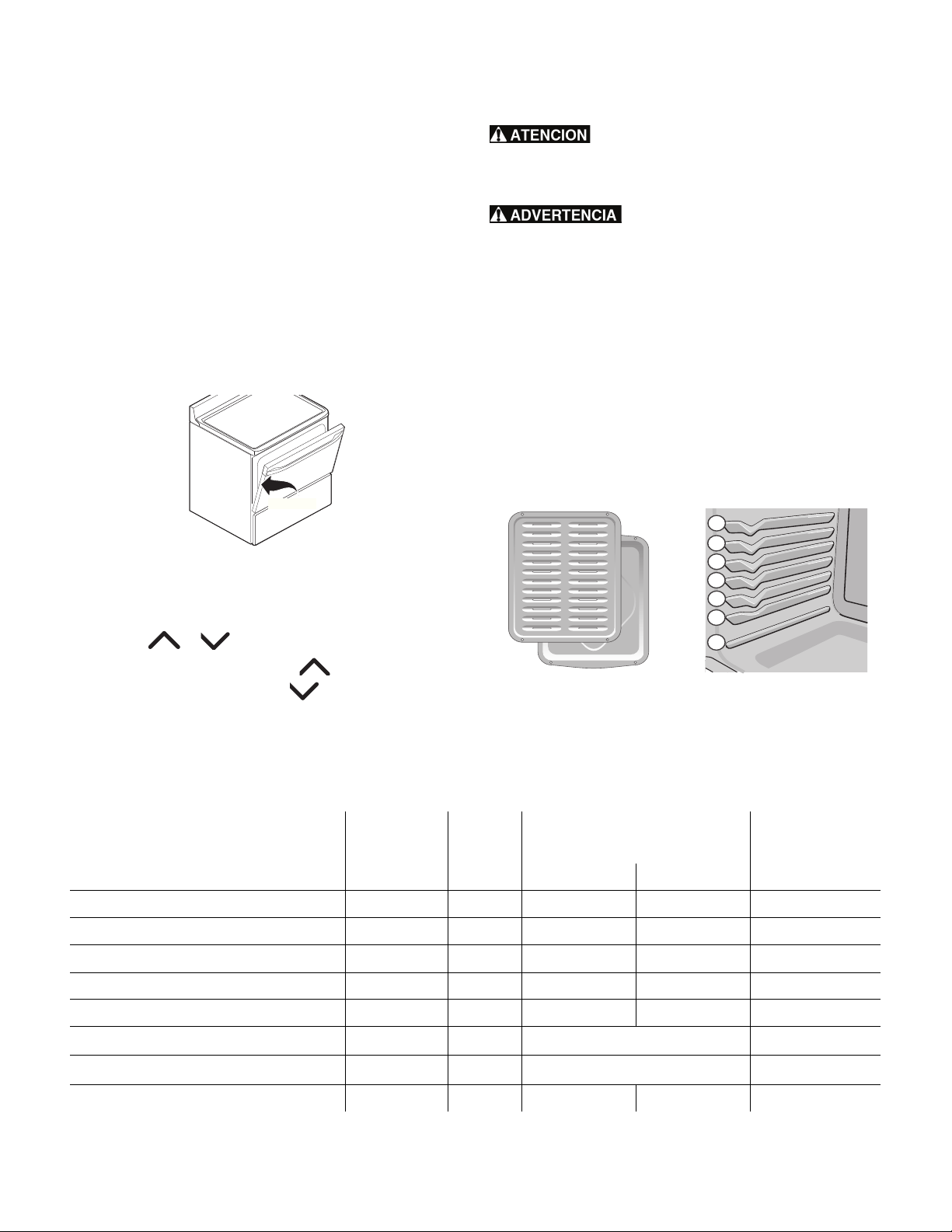
17
Controles del horno
Ajuste para asar a la parrilla
Use la función de asado a la parrilla para cocinar carnes que
requieran exposición directa al calor de la llama y obtener un
dorado ideal. La función de asado a la parrilla está ajustada
para comenzar a asar a 550 °F (288 °C). Las sugerencias de
ajustes de asado a la parrilla son solo recomendaciones. Aumente
o reduzca los tiempos de asado o mueva el alimento a una
posición diferente que se ajuste al nivel de cocción que desea.
Para ajustar el asado a la parrilla
1. Organice las parrillas del horno cuando estén frías. Para
obtener resultados óptimos de dorado, precaliente el horno
durante 2 minutos antes de agregar los alimentos.
2. Coloque el utensilio en el horno. Deje la puerta del horno
abierta hasta el tope de asado a la parrilla.
3. Oprima la tecla "Broil" (asado a la parrilla). "HI" se
desplegará en la pantalla.
4. Oprima o hasta que aparezca el nivel deseado
para asar en la pantalla. Oprima para un ajuste de
asado a la parrilla "HI" (alto) o para un ajuste de
asado a la parrilla "LO" (bajo).
5. Oprima la tecla "START" (encendido). Ase el alimento por un
lado hasta que se dore. Voltéelo y áselo en el segundo lado.
Cuando termine de asar, oprima "STOP" (detener).
Siempre use tomaollas o guantes para hornear
cuando utilice el horno. Al usar el horno, el interior del horno, las
parrillas y la cubierta se calientan mucho, lo que podría causar
quemaduras.
En caso de que se produzca un incendio en
el horno, cierre la puerta y apague el horno. Si continúa el
incendio, use un extintor. No vierta agua o harina en el fuego. La
harina puede ser explosiva.
Notas importantes:
• Siempre organice las parrillas del horno cuando el mismo esté
frío.
• Para obtener los mejores resultados de asado a la parrilla,
use una asadera con inserto diseñada para drenar la grasa
de los alimentos y ayudar a evitar las salpicaduras y reducir
el humo. Para adquirirlas, llame a Sears al
1-800-4-MY-HOME (1-800-4663) y solicite el kit de asadera
5304442087.
• Cuando ase a la parrilla, siempre tire de la parrilla hasta que
llegue al tope antes de dar vuelta o sacar los alimentos.
Fig. 10 Puerta abierta para asado a la parrilla
Posición tope de
asar a la parilla
Fig. 11 Asadera e inserto Fig. 12 Posiciones de las
parrillas
1
5
7
6
4
3
2
Tabla 3: Sugerencias de ajustes para asar a la parrilla
Alimento
Posición de la
parrilla
Ajuste
Tiempo de cocción en minutos
1º lado 2º lado
Nivel de cocción
Filete de 1 pulgada de grueso 6ª o 7ª* "Hi" (alto) 8 6 Término medio
Filete de 1 pulgada de grueso 5ª o 6ª* "Hi" (alto) 10 8 Término medio
Filete de 1 pulgada de grueso 5ª o 6ª* "Hi" (alto) 11 10 Bien cocido
Chuletas de cerdo de 3/4" (1,9 cm) de grueso 5ª "Hi" (alto) 12 8 Bien cocido
Pollo (con hueso) 5ª "Lo" (bajo) 25 15 Bien cocido
Pollo (deshuesado) 5ª "Lo" (bajo) 10 8 Bien cocido
Pescado 5ª "Hi" (alto)
como se indica
Bien cocido
Camarones 4ª "Hi" (alto)
como se indica
Bien cocido
Hamburguesa de 1 pulgada de grueso 5ª o 7ª* "Hi" (alto) 12 10 Término medio
Los tiempos de cocción son sugerencias y solo deben ser utilizados como recomendación.

18
Controles del horno
Warm & Hold™
La función "Warm & Hold" (calentar y mantener caliente)
mantendrá los alimentos horneados calientes y listos para servir
hasta 3 horas después de que la cocción haya terminado. Después
de 3 horas, la función "Warm & Hold" (calentar y mantener
caliente) se apaga automáticamente. La función "Warm & Hold"
(calentar y mantener caliente) solo se debe utilizar con alimentos
que ya se encuentren calientes. La función "Warm & Hold"
(calentar y mantener caliente) mantendrá el horno a una
temperatura de 170 °F (77 °C).
Por ejemplo, para programar la función "Warm & Hold" (calentar
y mantener caliente)
• De ser necesario, organice las parrillas del horno y coloque el
alimento ya cocido en el horno.
• Oprima la tecla "Warm & Hold" (calentar y mantener
caliente). "HLd" aparecerá en la pantalla. Si no se oprimen
teclas adicionales durante los 25 segundos siguientes, la
función de calentar y mantener caliente quedará anulada.
• Oprima la tecla "START" (encendido).
• La función "Warm & Hold" (calentar y mantener caliente) se
apagará automáticamente después de 3 horas.
Para apagar la función de calentar y mantener caliente en
cualquier momento, oprima la tecla .
Para ajustar Warm & Hold para que se encienda automáticamente
después del tiempo de horneado.
1. Oprima la tecla "Bake" (horneado). Oprima o
para ajustar la temperatura.
2. Oprima la tecla "START" (encendido).
3. Oprima la tecla "Cook Time" (tiempo de cocción). Oprima
o para ajustar el tiempo.
4. Oprima la tecla "START" (encendido).
5. Oprima la tecla "Warm & Hold" (calentar y mantener
caliente).
6. Oprima la tecla "START" (encendido). La función 'Warm &
Hold' (Calentar y mantener caliente) está programada para
encenderse automáticamente después de que un ciclo de
horneado programado o de horneado diferido haya
terminado. La luz indicadora de la función "Warm & Hold"
(Calentar y mantener caliente) se mantendrá iluminada para
indicar que esta función para ajustada para encenderse
cuando el tiempo de horneado haya terminado.
Funcionamiento de la luz del horno
La luz del horno se encenderá automáticamente cuando se abra la
puerta.
Oprima "OVEN LIGHT" (luz del horno) ubicado en el panel de
control para encender y apagar la luz del horno cuando la puerta
está cerrada. La luz del horno no se puede utilizar durante un ciclo
de autolimpieza.
La luz del horno se encuentra en la parte trasera superior
izquierda del horno y está cubierta con un protector de vidrio
sostenido por un soporte metálico. El protector de vidrio protege la
bombilla de las altas temperaturas y siempre debe estar instalado
cuando utilice el horno.
Para cambiar la luz interior del horno, vea el apartado
“Reinstalación de la luz del horno” en la sección página 24.
Ajuste de la temperatura del horno
Su electrodoméstico ha sido calibrado de fábrica y sometido a
prueba, a fin de asegurar una temperatura de horneado precisa.
Durante los primeros usos, siga cuidadosamente las instrucciones de
tiempo y temperatura de sus recetas. Si piensa que el horno está
cocinando a temperaturas más altas o más bajas que las de sus
recetas, usted puede ajustar la diferencia programable por el
usuario ("UPO") para que el horno cocine a mayor o menor
temperatura de la que se muestra.
Puede elevar la temperatura normal del horno hasta en +35 °F
(+19 °C) o reducirla en -35 °F (-19 °C) de su valor
predeterminado calibrado en la fábrica.
Para ajustar la temperatura del horno:
1. Mantenga oprimida la tecla Bake (hornear) durante
3 segundos. El valor Diferencia programable por el usuario
(UPO) aparecerá en la pantalla con el signo de grado.
2. La pantalla muestra ahora la cantidad de grados de
diferencia entre la temperatura original regulada de fábrica
y el ajuste actual de la temperatura. Si el control del horno
tiene el ajuste de fábrica original, la pantalla mostrará 0.
3. Puede ajustar la temperatura hasta en 35 °F (19 °C) en
incrementos de 1 °F oprimiendo y manteniendo oprimidas las
teclas o . Ajuste hasta que aparezca la
diferencia de temperatura deseada en la pantalla y presione
"START" (encendido) para guardar.
4. Si la tecla "STOP" (detener) se oprime durante el modo de
programación, el valor de UPO permanecerá sin cambios.
Notas importantes:
• Los ajustes de temperatura no afectarán las temperaturas de
las funciones de asado a la parrilla o de autolimpieza.
• No utilice termómetros de horno como los que se consiguen en
supermercados para medir la temperatura interior del horno.
Estos termómetros pueden tener una variación de 20 a 40 °F
con respecto a la temperatura real.
• También puede realizar el ajuste de la temperatura del horno
si el control del horno ha sido modificado para funcionar en el
modo de despliegue de temperatura °C (grados Celsius). Los
ajustes mínimos y máximos en grados Celsius son de más (+) o
menos (-) 19 °C.
• Si la pantalla está programada para mostrar la temperatura
en grados centígrados, los ajustes serán en incrementos de
1 °C cada vez que se opriman las teclas o .
STOP
STOP
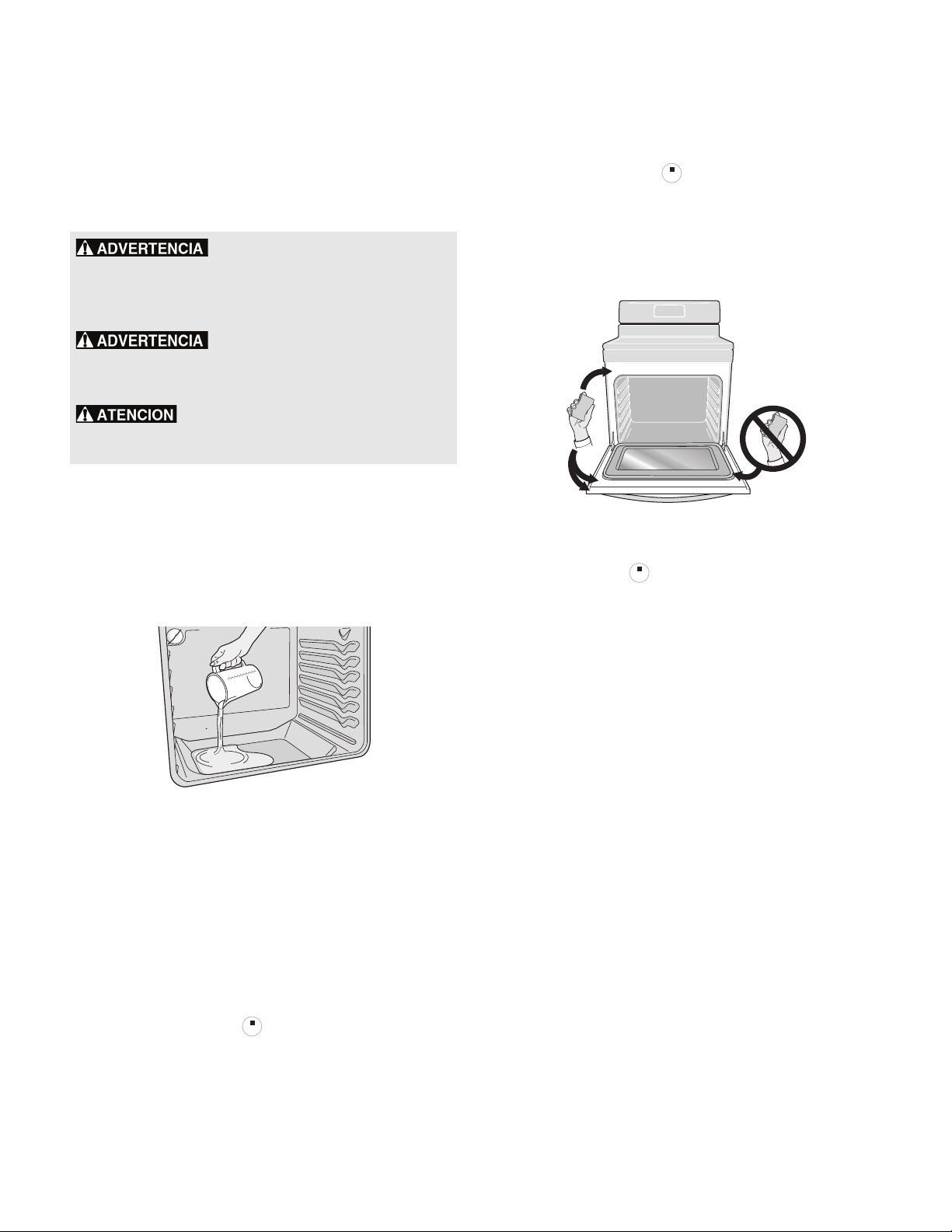
19
Controles del horno
Limpieza a vapor
La limpieza a vapor funciona mejor en la limpieza de manchas y la
suciedad leve de la parte inferior del horno. La limpieza a vapor
se puede utilizar antes de la limpieza manual del horno o antes de
la autolimpieza para ayudar a remover la suciedad en la parte
inferior del horno.
Para ajustar los controles para la limpieza a vapor:
1. El horno debe estar a temperatura ambiente. Retire todas las
parrillas y accesorios del horno.
2. Raspe o limpie la basura suelta de la parte inferior del horno.
3. Vierta 8 oz (235 ml) de agua destilada o filtrada en la parte
inferior del horno (vea la Fig. X). Cierre la puerta del horno.
4. Oprima la tecla "Bake" (horneado).
5. Seleccione 170 ºF (77 ºC) usando las teclas de flechas o el
teclado numérico y oprima "START" (encendido).
6. Ajuste el temporizador en 10 minutos.
7. Espere a que el horno se caliente. No abra al puerta del
horno mientras este se calienta.
8. Sonará una alerta cuando haya transcurrido el tiempo
seleccionado en el temporizador. Presione "Timer Set/Off"
(encendido/apagado del temporizador) para detener el
temporizador y oprima para volver al reloj.
9. Ajuste el temporizador en 10 minutos para permitir que
transcurra el período de enfriamiento. No intente limpiar el
horno antes de un período de enfriamiento de 10 minutos.
10. Sonará una alerta cuando haya transcurrido el tiempo
seleccionado en el temporizador. Presione "Timer Set/Off"
(encendido/apagado del temporizador) para detener el
temporizador y oprima para volver al reloj.
11. Manténgase al costado de la estufa y alejado de la salida de
vapor cuando abra la puerta del horno.
12. Limpie la cavidad del horno y la parte inferior. No limpie la
junta de la puerta del horno (Figura 14).
Para detener el ciclo de limpieza a vapor en cualquier
momento, oprima
.
Notas importantes:
• Siempre manténgase cerca del horno cuando realice la
limpieza a vapor para poder oír la alerta del temporizador.
• Para obtener mejores resultados, limpie el horno
inmediatamente después de que haya finalizado el período
de enfriamiento.
• La eliminación de la suciedad especialmente difícil o quemada
es posible que necesite una limpieza manual o un ciclo de
autolimpieza. Vea las instrucciones en la sección “Limpieza a
vapor” .
• Puede aparecer condensación o vapor de agua cerca del
respiradero del horno, y puede haber presencia de agua en
la parte inferior del horno. Esto es normal. Limpie con un paño
suave o una esponja cuando se complete el ciclo de
enfriamiento.
• La junta del horno puede estar húmeda; no la seque. Abra la
puerta en la posición para asar y deje secar con aire.
• Las fuentes de suministro agua locales con frecuencia
contienen minerales (agua dura) y dejarán depósitos en las
superficies de la cavidad del horno. Si esto ocurre, limpie las
superficies de la cavidad con vinagre diluido o jugo de limón.
Utilice agua destilada o filtrada.
Si se abre la puerta durante la limpieza a vapor o período de
enfriamiento, el vapor puede salir y puede ser más difícil limpiar el
horno. Mantenga la puerta del horno cerrada durante la limpieza
a vapor.
No ajuste la temperatura de limpieza a
una temperatura superior a la indicada en estas instrucciones.
Las temperaturas superiores secarán el vapor muy rápidamente,
lo que puede provocar quemaduras y lesiones graves al
momento de la limpieza.
No intente limpiar el horno antes del
período de enfriamiento ni intente acortar el período de
enfriamiento. Hacerlo puede provocar quemaduras u otras
lesiones graves al momento de la limpieza.
No agregue amoníaco, limpiadores de hornos
ni ningún otro producto de limpieza o productos químicos al
agua que se utiliza para la limpieza a vapor.
Fig. 13Vierta agua en la parte inferior del horno
STOPSTOP
Fig. 14 No limpie la junta de la puerta del horno.
STOP
STOP
STOPSTOP
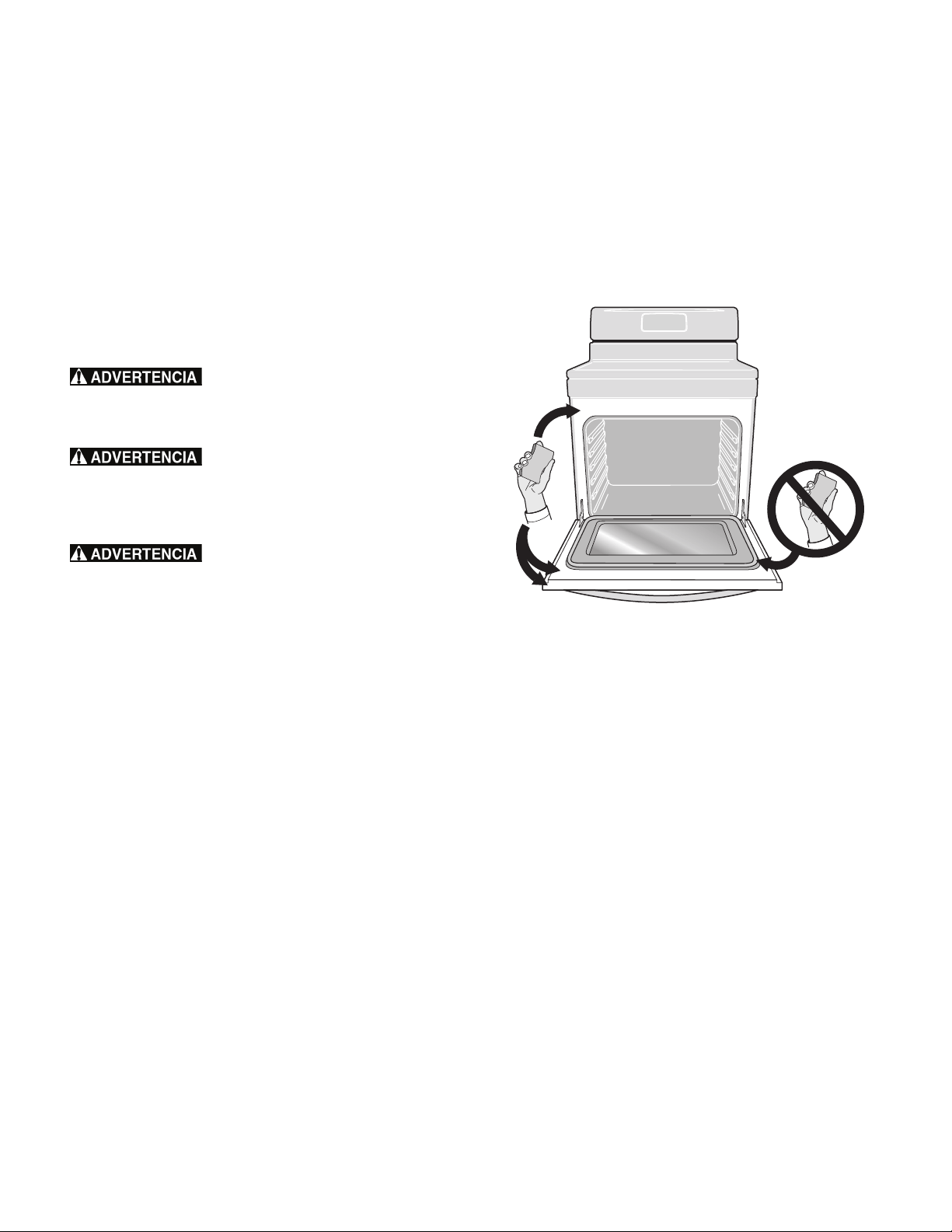
20
Controles del horno
Autolimpieza
La autolimpieza permite que el horno se limpie por sí mismo a
altas temperaturas (muy superiores a las temperaturas de cocción
normal), lo que elimina completamente la suciedad o la reduce a
una ceniza fina que se puede limpiar con un paño húmedo.
La función "Self Clean" (autolimpieza) le permite seleccionar
3 duraciones diferentes: 2, 3 o 4 horas. El ciclo de limpieza de
3 horas es ideal para limpieza normal; use el ciclo de 2 horas
para suciedad leve y el ciclo de 4 horas para eliminar las manchas
más difíciles.
Lea esto antes de iniciar la autolimpieza
Asegúrese de leer todas las siguientes precauciones y notas
importantes antes de comenzar un ciclo de autolimpieza:
No deje a los niños sin vigilancia en el área
donde se usa el electrodoméstico. Durante el ciclo de autolimpieza,
la parte exterior del horno puede calentarse mucho y causar
quemaduras si se la toca.
No coloque papel de aluminio en las
paredes del horno, en las parrillas, en el fondo del horno o en
ninguna otra pieza de la estufa. Esto causará daños permanentes
en el interior del horno y destruirá la distribución de calor;
además, derretirá el interior del horno.
No fuerce la puerta para abrirla. Esto
puede dañar el sistema de cierre automático de la puerta. Tenga
cuidado cuando abra la puerta después de que haya terminado el
ciclo de autolimpieza. El horno puede estar aún muy caliente y
causar quemaduras. Para evitar posibles quemaduras, hágase a un
lado del horno cuando abra la puerta para permitir que el vapor
o aire caliente escape.
Los vapores emitidos durante el ciclo de autolimpieza de
cualquier estufa pueden afectar la salud de algunos pájaros. Lleve
los pájaros a una habitación bien ventilada.
Notas importantes:
• Retire completamente todos los artículos y accesorios de la
cavidad del horno para evitar daños a las parrillas del horno.
De lo contrario, se decolorarán. Retire todos los artículos del
horno y de la cubierta, incluyendo los utensilios, accesorios y
cualquier pieza de papel de aluminio. El papel de aluminio no
soporta las altas temperaturas de la autolimpieza y se
derretirá.
• No use agentes de limpieza para hornos o capas protectoras
en las piezas del interior del horno o alrededor de estas.
Limpie toda la suciedad pegada al marco del horno, al
revestimiento de la puerta fuera de la junta de la puerta del
horno y al área pequeña en la parte delantera central de la
parte inferior del horno (Figura 15). Estas áreas se calientan
lo suficiente como para quemar la suciedad acumulada sobre
la superficie. Limpie usando jabón y agua antes de iniciar el
ciclo de autolimpieza.
• Limpie cualquier derrame excesivo. Limpie cualquier derrame
en el fondo del horno antes de iniciar el ciclo de autolimpieza.
Para limpiar, use agua caliente con detergente y un paño. Los
derrames grandes pueden causar humo denso o un incendio
cuando se exponen a altas temperaturas. No deje que
queden en la superficie del horno derrames con alto contenido
de azúcar o ácido (tales como leche, tomates, chucrut, jugo de
frutas o rellenos de tartas), pues pueden dejar una mancha
opaca incluso después de la limpieza.
• No limpie la junta de la puerta del horno (figura). El tejido del
material de la junta es esencial para un buen aislamiento. Se
debe tener mucho cuidado de no frotar, dañar ni extraer la
junta de la puerta del horno. Esto podría dañar la junta de la
puerta y afectar el funcionamiento del horno.
Notas importantes:
• La cocina debe estar bien ventilada; se debe dejar una
ventana abierta, o usar el ventilador o la campana extractora
durante el primer ciclo de autolimpieza. Esto ayudará a
eliminar los olores normales asociados con el primer ciclo de
autolimpieza.
• No intente abrir la puerta del horno cuando la luz indicadora
"OVEN LOCK" (bloqueo del horno) esté destellando. Espere
aproximadamente 15 segundos hasta que el mecanismo
motorizado del seguro de la puerta bloquee o desbloquee
completamente la puerta del horno.
• Cuando el tiempo de limpieza termine, la puerta del horno
permanecerá bloqueada hasta que la estufa se haya
enfriado lo suficiente. Además del tiempo de limpieza
programado, debe esperar por lo menos 1 hora adicional
hasta que el horno se enfríe antes de poder abrir la puerta
del horno.
• La función "Self Clean" (autolimpieza) no funcionará si hay un
elemento radiante superior ENCENDIDO o si el bloqueo del
horno está activo.
Fig. 15 Áreas a limpiar y a evitar
21
Controles del horno
Ajuste de la autolimpieza
Para ajustar un ciclo de limpieza "Select Clean" (autolimpieza)
para que comience inmediatamente:
1. Asegúrese de que el horno esté vacío y de haber retirado
todas las parrillas. Retire todos los artículos de la cubierta.
Asegúrese de que la puerta del horno esté completamente
cerrada.
2. Oprima "Self Clean" (autolimpieza). "
3:00" se desplegará
en la pantalla.
3. Para cambiar el ajuste a un ciclo de autolimpieza de 2 horas,
oprima la tecla ("2:00" aparecerá en la pantalla).
Para seleccionar un ciclo de autolimpieza de 4 horas, oprima
: 4:00 se desplegará en la pantalla.
4. Después de seleccionar el tiempo de autolimpieza, oprima
"START" (encendido) para activar la autolimpieza. La luz
indicadora "OVEN LOCK" (bloqueo del horno) se encenderá
y "CLn" aparecerá en la pantalla.
Cuando se inicie el ciclo de autolimpieza, el mecanismo motorizado
de la cerradura de la puerta comenzará a bloquear
automáticamente la puerta del horno y la luz indicadora "OVEN
LOCK" (bloqueo del horno) destellará. No abra la puerta del
horno cuando la luz indicadora "OVEN LOCK" (bloqueo del
horno) esté destellando. Espere aproximadamente 15 segundos
para que la puerta se bloquee completamente.
Una vez que la puerta del horno se haya bloqueado, la luz
indicadora "OVEN LOCK" (bloqueo del horno) permanecerá
encendida. Cuando "CLn" aparezca en la pantalla, la función
"Self Clean" (autolimpieza) estará activa.
Tenga cuidado cuando abra la puerta del horno
después del ciclo de autolimpieza. La estufa puede estar aún MUY
CALIENTE y causar quemaduras. Para evitar posibles quemaduras,
hágase a un lado del horno cuando abra la puerta para permitir
que el aire o vapor caliente escape.
Cuando la autolimpieza haya terminado:
1. La hora del día aparecerá en la pantalla y las luces
indicadoras "OVEN LOCK" (bloqueo del horno) seguirán
destellando.
2. Podrá abrir la puerta del horno una vez que se haya enfriado
(aproximadamente 1 hora) y que se haya apagado la luz
indicadora "OVEN LOCK" (bloqueo del horno).
3. Cuando el interior del horno se haya enfriado completamente,
limpie cualquier residuo en polvo o ceniza con un paño o
toalla de papel húmeda.
"Self Clean" (autolimpieza) diferida:
Para encender un ciclo diferido de autolimpieza:
1. Asegúrese de que el horno esté vacío y de haber retirado
todas las parrillas. Retire todos los artículos de la cubierta.
Asegúrese de que la puerta esté completamente cerrada.
2. Asegúrese de que el reloj indique la hora correcta del día.
3. Oprima la tecla "Delay Start" (encendido diferido).
4. Oprima y mantenga oprimida la tecla para
programar la hora de inicio deseada del ciclo de
autolimpieza. Oprima "START" (encendido) cuando se
muestre la hora de encendido deseada.
5. Oprima "Self Clean" (autolimpieza). "3:00" se desplegará en
la pantalla.
6. Para seleccionar un ciclo de autolimpieza de 2 horas, oprima
la tecla ("2:00" aparecerá en la pantalla). Para
seleccionar un ciclo de autolimpieza de 4 horas, oprima la
tecla ("4:00" aparecerá en la pantalla).
7. Después de seleccionar el tiempo de autolimpieza deseado,
oprima "START" (encendido). La autolimpieza está ajustada
para activarse. La luz indicadora "OVEN LOCK" (bloqueo del
horno) se encenderá y la puerta del horno se bloqueará antes
de la hora de inicio. Una vez que se haya alcanzado la hora
de inicio, "CLn" aparecerá en la pantalla.
Si debe anular el ciclo de autolimpieza cuando está activo:
1. Oprima .
2. Si la función de autolimpieza calentó el horno a una
temperatura alta, espere el tiempo suficiente para que el
horno se enfríe y hasta que la luz indicadora "OVEN LOCK"
(bloqueo del horno) se apague. Cuando esta luz indicadora se
apague, la puerta podrá ser abierta.
3. Vuelva a iniciar la autolimpieza de ser necesario.
Notas importantes:
• Si la función de autolimpieza está activa y ocurre una falla
eléctrica, es posible que el horno no haya quedado bien
limpio. Esto dependerá de cuánto tiempo de limpieza haya
transcurrido antes de la falla eléctrica. Si es necesario,
después de que se haya restablecido el suministro eléctrico,
vuelva a iniciar la autolimpieza.
STOPSTOP

22
Cuidado y limpieza
Limpieza de las diferentes piezas de su horno
Antes de limpiar cualquier pieza del horno, asegúrese de que todos los controles estén apagados y el horno esté frío. Remueva los
derrames y las manchas grandes lo más pronto posible. La limpieza frecuente reduce la dificultad de las limpiezas posteriores.
Tipo de superficie Recomendación
Aluminio y vinilo Use agua caliente jabonosa y un paño. Seque con un paño limpio.
Piezas pintadas del armazón
Molduras decorativas pintadas
Use un paño suave y limpie con detergente suave para lavar platos y agua o con una solución
50/50 de vinagre y agua. A continuación, enjuague el área con agua limpia. Seque y pula con un
paño suave. Se pueden usar limpiadores de vidrio si se rocían primero en un paño suave. No rocíe
líquidos directamente en las áreas de las teclas de control y pantalla del horno. No use grandes
cantidades de agua en el panel de control. El exceso de agua en el área de control puede causar
daños al electrodoméstico. No use otros limpiadores líquidos o abrasivos, esponjas de restregar o
toallas de papel. Podrían dañar el acabado.
Acero inoxidable Easy Clean™ El acabado de su horno puede haber sido fabricado con acero inoxidable Easy Clean™ (algunos
modelos). Limpie el acero inoxidable con agua jabonosa tibia y una esponja o paño limpio.
Enjuague con agua limpia y seque con un paño suave y limpio. No use ningún limpiador comercial
de acero inoxidable o cualquier otro tipo de producto de limpieza que contenga sustancias
abrasivas, cloruros, cloro o amoníaco. Se recomienda usar jabón para platos suave y agua en una
solución 50/50 de agua y vinagre.
Asadera de porcelana esmaltada e
inserto (disponible a solicitud)
Revestimiento de la puerta y piezas del
armazón
Restriegue suavemente con una esponja jabonosa de fregar para sacar la mayoría de las
manchas. Enjuague con una solución 1:1 de agua y amoníaco. Si es necesario, cubra las manchas
difíciles con una toalla de papel impregnada en amoníaco por 30 a 40 minutos. Enjuague con
agua limpia y con un paño húmedo y luego frote con una esponja jabonosa de fregar. Enjuague y
seque con un paño limpio. Saque todos los residuos de agentes de limpieza o de lo contrario la
porcelana se puede dañar cuando se vuelva a calentar.
Parrillas del horno Debe retirar las parrillas del horno. Límpielas con un agente de limpieza suave siguiendo las
instrucciones del fabricante. Enjuague con agua limpia y seque.
Puerta del horno Use agua y jabón para limpiar bien la parte superior, delantera y los costados de la puerta del
horno. Enjuague bien. Puede usar limpiavidrios en el exterior de la ventanilla del horno. No
sumerja la puerta en agua. No rocíe o permita que el agua o el limpiavidrios entre en los
respiraderos de la puerta. No use limpiadores para hornos, limpiadores en polvo o cualquier otro
agente de limpieza abrasivo en el exterior de la puerta del horno.
No limpie la junta de la puerta del horno. En los modelos con autolimpieza, la junta de la puerta
está hecha de un material tejido que es indispensable para que selle correctamente. Se debe
tener mucho cuidado de no frotar, dañar ni sacar la junta de la puerta.
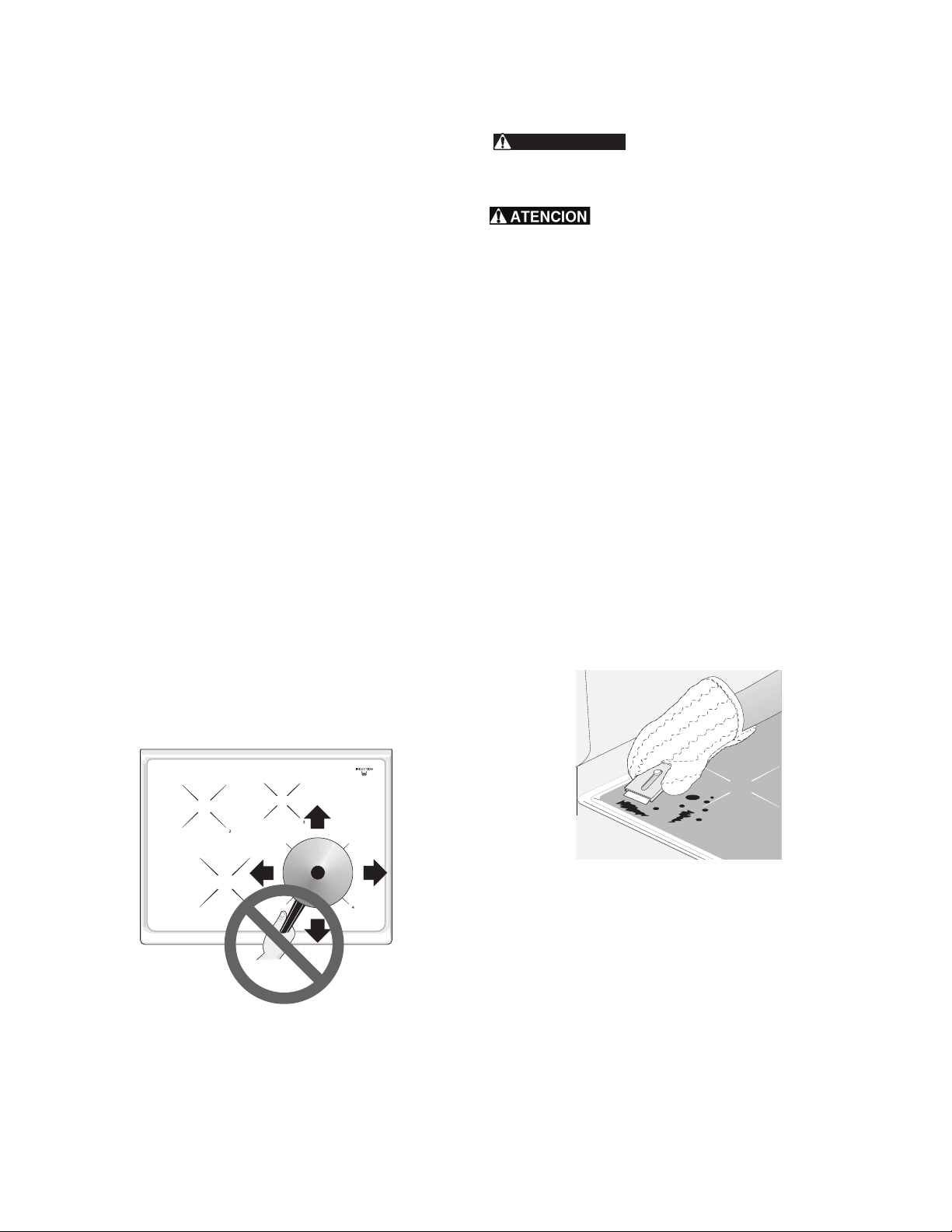
23
Cuidado y limpieza
Mantenimiento de la cubierta
Es esencial la limpieza adecuada y consistente de la cubierta de
vidrio cerámico para mantenerla.
Antes de usar la cubierta por primera vez, aplique la crema
recomendada de limpieza para cubiertas de cocción (CookTop®
Cleaning Creme; visite www.sears.com en Internet para obtener un
limpiador de repuesto, artículo número 40079). Pula con un paño
no abrasivo o una esponja de limpieza antirayaduras. Esto
facilitará la limpieza cuando la superficie de cocción se ensucie al
cocinar. La crema especial de limpieza para superficies de cocción
deja una capa protectora en el vidrio para ayudar a prevenir
rayaduras y abrasiones.
Si desliza utensilios con fondos de aluminio o de cobre, pueden
dejar marcas metálicas sobre la superficie de cocción. Estas
marcas deben ser eliminadas inmediatamente después de que la
superficie de cocción se haya enfriado, con una crema de limpieza
para superficies de cocción. Las marcas metálicas pueden hacerse
permanentes si no se quitan antes del siguiente uso.
Los utensilios (de hierro fundido, metal, cerámica o vidrio) con
fondos ásperos o sucios pueden marcar o rayar la superficie
decocción.
No:
• Deslice ningún objeto de metal o de vidrio sobre la cubierta.
• Use utensilios sucios o con acumulación de suciedad en el
fondo. Reemplácelos con utensilios limpios antes de cocinar.
• Use la cubierta como tabla para cortar o como mesa de
trabajo en la cocina.
• Cocine alimentos directamente sobre la superficie de la
cubierta sin un utensilio.
• Deje caer objetos pesados o duros sobre la cubierta de vidrio
cerámico, ya que la pueden quebrar.
Limpieza de la cubierta
NO use un limpiador sobre la superficie de
cocción si la superficie está caliente. Los vapores que se
desprenden pueden ser peligrosos para su salud y pueden dañar
químicamente la superficie de vidrio cerámico.
Antes de limpiar la cubierta, asegúrese de que los
controles estén en la posición “OFF” (apagado) y que la cubierta
esté FRÍA. La superficie de vidrio aún puede estar caliente, y se
pueden causar quemaduras si se toca la superficie de vidrio antes
de que se haya enfriado lo suficiente.
Para las manchas leves a moderadas:
Aplique algunas gotas de la crema de limpieza para superficies de
cocción (CookTop® Cleaning Creme) directamente sobre la
superficie. Use una toalla de papel o una esponja de limpieza
antirayaduras de plástico no abrasiva para limpiar la superficie
completa de la cubierta. Asegúrese de que la superficie de cocción
esté completamente limpia y sin residuos.
Para las manchas fuertes y quemadas:
Aplique algunas gotas de la crema de limpieza para superficies de
cocción (CookTop® Cleaning Creme) directamente sobre el área
manchada. Frote el área manchada usando una esponja de
limpieza antirayaduras de plástico no abrasiva y aplique presión
cuando sea necesario. No use la esponja que utilice para limpiar la
superficie de cocción para ningún otro propósito.
Si queda suciedad en la superficie de cocción, ráspela
cuidadosamente con una hojilla de afeitar de metal, sosteniéndola
a un ángulo de 30 grados en relación con la superficie. Retire la
suciedad raspada con una crema de limpieza para superficies de
cocción y pula la superficie hasta que quede limpia.
Plástico o alimentos con alto contenido de azúcar:
Estos tipos de manchas deben ser eliminadas inmediatamente si
ocurre un derrame o se derriten sobre la superficie de cocción de
vidrio cerámico. Pueden ocurrir daños permanentes (como
picaduras sobre la superficie de cocción) si estos derrames no se
limpian inmediatamente. Después de APAGAR los elementos
superiores, use un raspador con hojilla de afeitar o una espátula de
metal con guantes de hornear y raspe el derrame de la superficie
caliente (como se muestra). Permita que la superficie de cocción se
enfríe y use el mismo método de limpieza que para las manchas
fuertes o quemadas.
ADVERTENCIA
30°
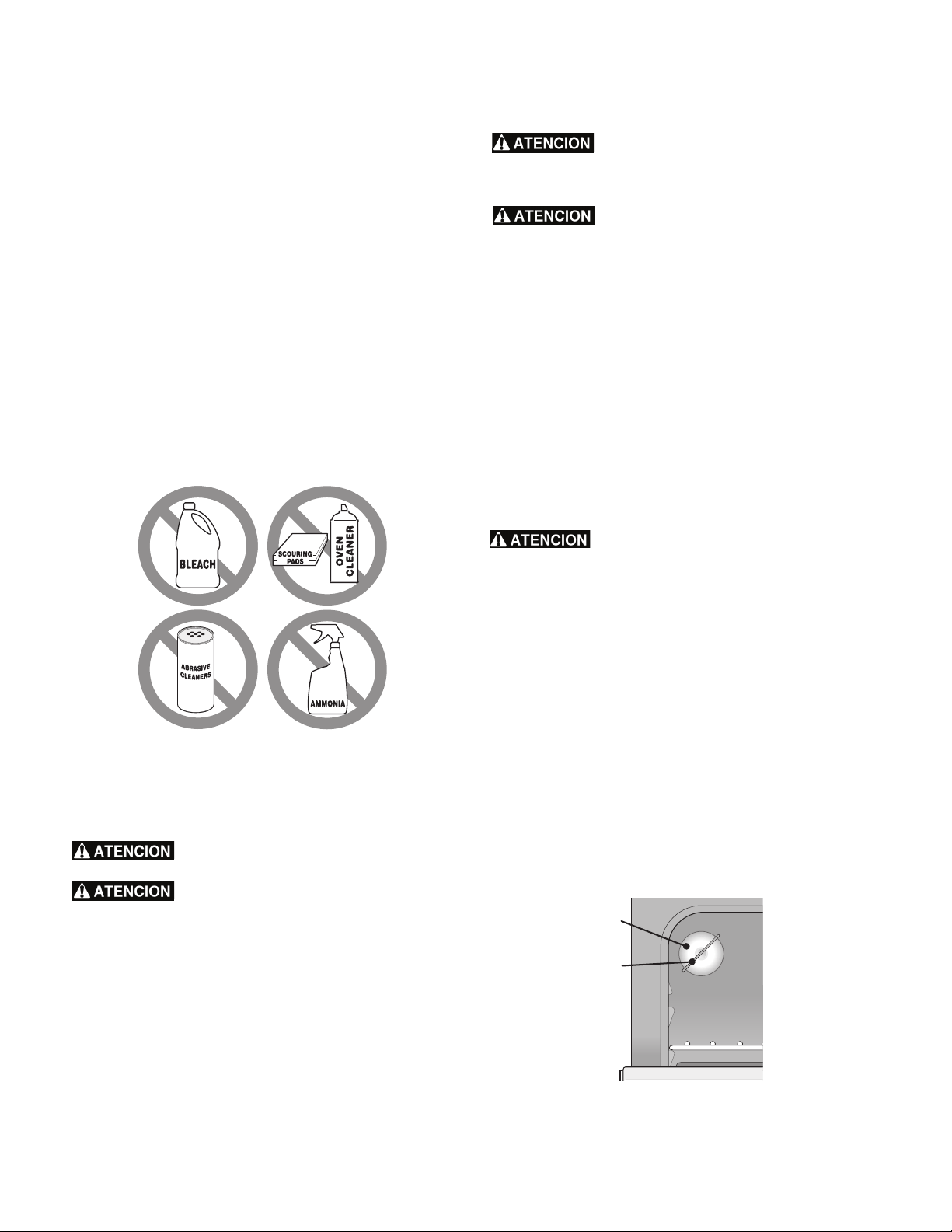
24
Cuidado y limpieza
Limpieza de la cubierta (cont.)
No use lo siguiente en la cubierta:
• No use limpiadores abrasivos ni esponjas ásperas tales como
las esponjas de metal o de nylon. Éstas pueden rayar la
superficie de cocción y dificultar su limpieza.
• No use limpiadores abrasivos tales como el blanqueador con
cloro, el amoníaco o los limpiadores para hornos, ya que
pueden rayar o decolorar la cubierta.
• No use esponjas, paños o toallas de papel sucios, ya que
pueden dejar sucio o pelusas sobre la cubierta que se pueden
quemar y causar decoloración.
Nota importante:
Si utiliza una esponja de limpieza abrasiva, la superficie de
cocción de vidrio cerámico puede sufrir daños. Sólo use productos
de limpieza que hayan sido diseñados específicamente para
superficies de cocción de vidrio cerámico.
Limpieza general
Antes de limpiar manualmente cualquier pieza de la estufa,
asegúrese de que todos los controles estén APAGADOS y que la
estufa esté FRÍA. La estufa puede estar caliente y causar
quemaduras.
Enjuague el amoníaco antes de utilizar el horno.
Proporcione ventilación adecuada.
Consulte la Tabla de recomendaciones de
limpieza en la sección de Cuidado y limpieza para obtener
información más detallada sobre la limpieza de piezas específicas
de la estufa.
Papel de aluminio y sus utensilios
NUNCA cubra ninguna ranura, agujero o pasaje
en el fondo del horno ni cubra una parrilla completa con materiales
como papel de aluminio. Las envolturas con papel de aluminio
pueden atrapar el calor y producir un riesgo de incendio.
Revestimientos protectores: NO USE PAPEL DE
ALUMINIO para revestir la parte inferior del horno. Use papel de
aluminio solamente como se recomienda en este manual. La
instalación inadecuada de estos revestimientos puede resultar en un
riesgo de choque eléctrico o incendio.
Papel de aluminio: el uso del papel de aluminio sobre una cubierta
caliente podría dañar la cubierta. No use utensilios de aluminio
ligero y no permita que el papel de aluminio entre en contacto con
los elementos superiores bajo NINGUNA circunstancia.
Utensilios de aluminio: el punto de fusión del aluminio es mucho
más bajo que el de otros metales. Se debe tener cuidado cuando se
usen utensilios de aluminio sobre la superficie de cocción. Si
permite que el contenido de los utensilios de aluminio se seque
durante el uso de la cubierta, no solo se dañará el utensilio, sino
que puede fundirse sobre la superficie de vidrio cerámico, romperla
o marcarla, dañándola permanentemente.
Reinstalación de la luz del horno
Asegúrese de que el horno esté desenchufado y
que todas las piezas estén frías antes de reemplazar las bombillas
del horno.
La luz interior del horno se encuentra en la parte trasera en el
interior del horno. (Consulte la Figura 16.)
Para cambiar la bombilla del interior del horno:
Nota importante:
Use una toalla de papel o un guante de algodón para cubrir la
bombilla nueva cuando la instale.
1. Desconecte el suministro eléctrico en la fuente principal o
desenchufe el electrodoméstico.
2. Reemplace la bombilla por una bombilla nueva de 40 vatios
para electrodomésticos.
3. Vuelva a conectar el suministro eléctrico en la fuente principal
(o vuelva a enchufar el electrodoméstico).
4. Asegúrese de volver a programar la hora del día.
Figura 16: Reemplazo de la luz del horno
Soporte
de alambre
Protector
de vidrio
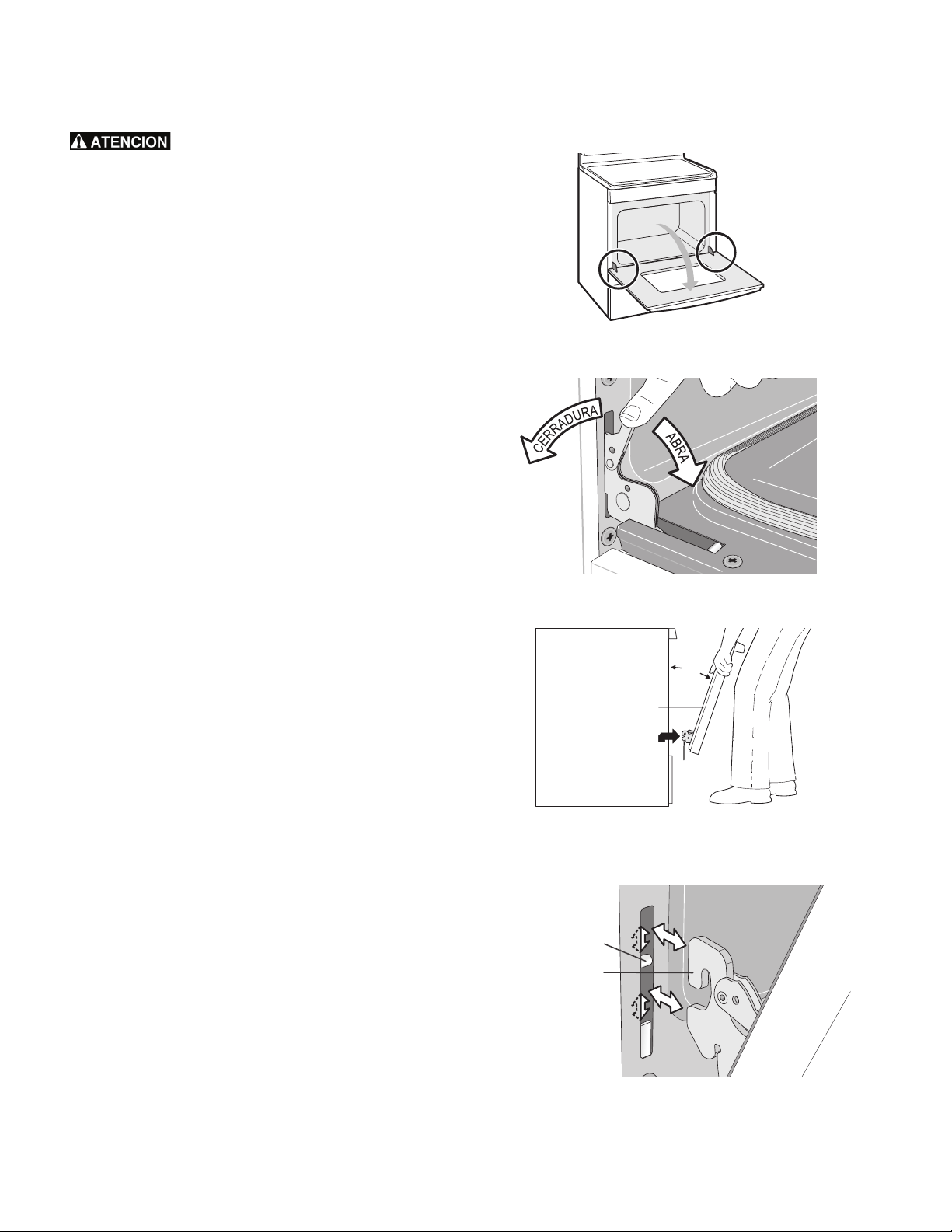
25
Cuidado y limpieza
Desmontaje y reinstalación de la puerta del horno
La puerta es pesada. Para guardarla
temporalmente de manera segura, coloque la puerta
horizontalmente con el lado interior dirigido hacia abajo.
Para extraer la puerta del horno:
1. Abra completamente la puerta del horno, dejándola horizontal
con el piso (vea la Figura 17).
2. Tire de los seguros de ambas bisagras (izquierda y derecha)
hacia abajo desde el marco del horno completamente hacia la
puerta del horno (vea la Figura 18). Es posible que necesite una
herramienta como un destornillador pequeño de cabeza
plana.
3. Sostenga firmemente ambos lados de la puerta del horno en
sus costados. No levante la puerta del horno por la manija
(vea la Figura 19).
4. Cierre la puerta aproximadamente a 10 grados del marco de
la puerta del horno.
5. Levante los brazos de las bisagras de la puerta sobre los
pasadores de rotación ubicados a cada lado del marco del
horno (vea la Figura 19).
Para reinstalar la puerta del horno:
1. Sostenga firmemente ambos lados de la puerta del horno en
sus costados. No levante la puerta del horno por la manija
(vea la Figura 19).
2. Sosteniendo la puerta en el mismo ángulo de extracción (vea
la Figura 19), coloque el gancho del brazo de la bisagra sobre
los pasadores de rotación ubicados a cada lado del marco de
la puerta (vea la Figura 20). El gancho de los brazos de las
bisagras debe estar completamente asentado sobre los
pasadores de rotación.
3. Abra completamente la puerta del horno, dejándola horizontal
en relación con el piso (vea la Figura 17).
4. Empuje los seguros de las bisagras izquierda y derecha hacia
arriba y hacia el interior del marco del horno a su posición
bloqueada (Figura 18).
5. Cierre la puerta del horno.
Importante:
Instrucciones especiales de cuidado de la puerta: la mayoría de las
puertas tienen piezas de vidrio que se pueden romper. No cierre la
puerta del horno hasta que todas las parrillas estén en su lugar. No
golpee el vidrio con ollas, sartenes ni ningún otro objeto. Si se raya,
golpea, raspa o se aplica presión sobre el vidrio, su estructura se
puede debilitar, lo que puede aumentar el riesgo de que se rompa
más adelante.
Figura 17: Ubicación de las bisagras de la puerta
Figura 18: Seguros de las bisagras de la puerta
Figura 19: Cómo sujetar la puerta para su extracción
Figura 20: Ubicación del brazo de la bisagra y el pasador de
rotación
Ubicación de las
bisagras de la
puerta del horno
Aprox.
10º
Bisagra
de la
puerta
Puerta del horno
Pasador de
rotación
Gancho del
brazo de la
bisagra
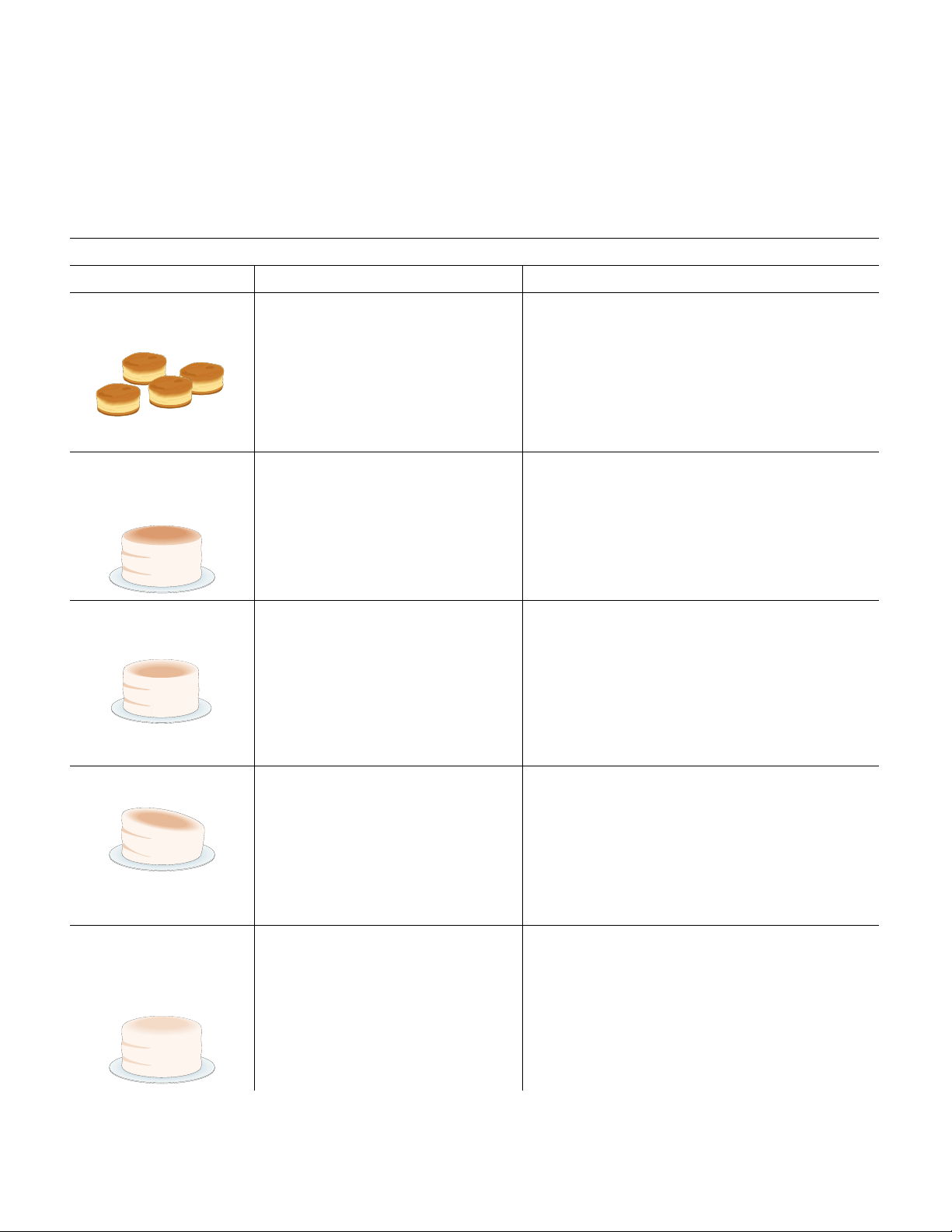
27
Antes de solicitar servicio técnico
Horneado
Para obtener mejores resultados de horneado, caliente el horno antes de hornear galletas, panes, tortas, pasteles, etc. No es necesario
precalentar el horno para asar carnes o preparar guisos.
Los tiempos y temperaturas de cocción necesarios para hornear un alimento pueden variar levemente con respecto a su electrodoméstico
anterior.
Problemas y soluciones de horneado
Problemas de horneado Causas Soluciones
Las galletas y bizcochos se
queman en su parte inferior.
• Las galletas y bizcochos se introdujeron
en el horno antes de que el tiempo de
precalentamiento terminara.
• La parilla está demasiado llena.
• Las bandejas oscuras absorben calor
demasiado rápido.
• Deje que el horno se caliente a la temperatura
deseada antes de colocar los alimentos en el horno.
• Elija tamaños de bandejas que dejen entre 2" y 4"
(5,1 y 10,2 cm) de espacio en todos los costados
cuando se coloquen en el horno.
• Use una bandeja de hornear de peso medio.
Las tortas quedan demasiado
oscuras en la parte superior o
inferior.
• Las tortas se introdujeron en el horno
antes de que el tiempo de
precalentamiento terminara.
• La parrilla estaba en una posición
demasiado baja o alta.
• El horno está demasiado caliente.
• Deje que el horno se caliente a la temperatura
preseleccionada antes de colocar los alimentos en el
horno.
• Use las parrillas en la posición correcta para sus
necesidades de horneado.
• Ajuste la temperatura del horno a 25°F/12°C por
debajo de lo recomendado.
Las tortas quedan crudas en
el centro.
• El horno está demasiado caliente.
• Tamaño de bandeja incorrecto.
• La bandeja no está centrada en el
horno.
• Ajuste la temperatura del horno a 25°F/12°C por
debajo de lo recomendado.
• Use una bandeja del tamaño sugerido en la receta.
• Use las parrillas en la posición correcta y coloque la
bandeja en el horno de manera que queden entre
2" y 4" (5,1 y 10,2 cm) de espacio en todos los lados
de la bandeja.
Las tortas quedan inclinadas. • El horno no está nivelado.
• La bandeja está demasiado cerca de
la pared o la parrilla está demasiado
llena.
• La bandeja está deformada.
• Coloque una taza de medir de vidrio marcada llena
de agua en el centro de la parrilla del horno. Si el
agua no está nivelada, consulte las instrucciones de
instalación para nivelar el horno.
• Asegúrese de dejar entre 2" y 4" (5,1 y 10,2 cm) de
espacio en todos los lados de la bandeja en el horno.
• No use bandejas abolladas o deformadas.
Los alimentos no están
completamente cocidos
cuando se termina el tiempo
de cocción.
• El horno está demasiado frío.
• E
l horno está demasiado lleno.
• Se abrió la puerta del horno con
demasiada frecuencia.
• Ajuste el horno a 25°F/12°C por encima de la
temperatura sugerida y hornee durante el tiempo
recomendado.
• Asegúrese de retirar todas las bandejas del horno
excepto las utilizadas para hornear.
• Abra la puerta del horno solamente después del
tiempo mínimo de horneado recomendado.

28
Antes de solicitar servicio técnico
Soluciones de problemas comunes
Consulte la siguiente lista antes de solicitar servicio. Puede ahorrarle tiempo y dinero. Las posibles soluciones son proporcionadas con los
problemas indicados:
Problema Solución
Resultados de horneado
deficientes.
Muchos factores pueden afectar los resultados al hornear. Use la posición de parrilla correcta. Coloque
el alimento en el centro del horno y separe las asaderas para permitir que circule el aire. Caliente el
horno a la temperatura preseleccionada antes de colocar los alimentos en el horno. Trate de ajustar la
temperatura o el tiempo de horneado recomendados en la receta. Vea “Ajuste de la autolimpieza” en
la página 21 si considera que el horno está demasiado caliente o demasiado frío.
El horno no funciona. La hora del día no está programada. Primero se debe programar el reloj del horno para que el horno
funcione.
Asegúrese de que los controles del horno estén configurados adecuadamente. Vea “Ajuste del reloj” en
la página 13 y repase las instrucciones de la función de cocción deseada en este manual.
El cableado de servicio está incompleto.
La luz del horno no funciona. Asegúrese de que la luz del horno esté instalada firmemente en el casquillo. Vea “Reinstalación de la
luz del horno” en la página 24.
Hay llamas en el horno o sale
humo por el respiradero del
horno.
Hay derrames excesivos en el horno. Ha caído grasa o comida en la parte inferior o en el interior del
horno. Limpie los derrames excesivos antes de encender el horno. Si hay llamas o humo excesivo
presentes cuando se asa a la parrilla, vea “Ajuste para asar a la parrilla” en la página 17.
"Self Clean" (autolimpieza) no
funciona.
El control del horno no está ajustado correctamente. Repase “Ajuste de la autolimpieza” en la
página 21.
Las parrillas presentan
decoloración o no se deslizan
con facilidad.
Se dejaron las parrillas en el interior del horno durante la autolimpieza "Self Clean". Siempre retire las
parrillas del interior del horno antes de iniciar el ciclo de autolimpieza. Límpielas con un agente de
limpieza suave siguiendo las instrucciones del fabricante. Enjuáguelas con agua limpia, séquelas y
vuelva a colocarlas en el horno.
Sale mucho humo del horno
cuando se asa a la parrilla.
Ajuste incorrecto. Siga las instrucciones de asado a la parrilla en “Ajuste para asar a la parrilla” en la
página 17.
La carne está demasiado cerca del elemento de asar. Vuelva a acomodar la parrilla de asar de modo
que quede un espacio más grande entre la carne y el elemento. Quite el exceso de grasa de la carne.
Corte los bordes de grasa restantes para evitar que la carne se pandee.
Se ha acumulado grasa en las superficies del horno. Es necesario efectuar una limpieza regular cuando
ase en forma frecuente. La grasa acumulada o las salpicaduras de alimentos pueden causar humo
excesivo.
El panel de control del horno
emite señales sonoras y
muestra cualquier código de
error "F" o "E".
El control del horno ha detectado una condición de falla o de error. Oprima "STOP" (apagado) para
anular el código de error. Pruebe la función de horneado o de asado a la parrilla. Si se repite el error
"F" o "E", desconecte el electrodoméstico, espere 5 minutos y vuelva a conectarlo. Vuelva a programar
el reloj con la hora correcta del día. Pruebe nuevamente la función de horneado o de asado a la
parrilla. Si la falla vuelve a aparecer, oprima "STOP" (apagado) para anular el mensaje.
No se eliminó la suciedad
completamente después del
ciclo de autolimpieza.
Se interrumpió la autolimpieza. Repase las instrucciones de la sección “Ajuste de la autolimpieza” en la
página 21.
Derrames excesivos en el fondo del horno. Limpie
antes de iniciar la autolimpieza.
No se limpió toda la suciedad pegada al marco del horno, al revestimiento de la puerta fuera de la
junta de la puerta del horno y al área pequeña en la parte delantera central de la parte inferior del
horno. Estas áreas no entran en el ciclo de autolimpieza, pero se calientan lo suficiente como para que
se quemen los residuos. Limpie estas áreas antes de iniciar el ciclo de autolimpieza. El residuo quemado
se puede limpiar con un cepillo de nylon duro y agua o con un restregador de nylon. Trate de no dañar
la junta del horno.