OWNER’S MANUAL
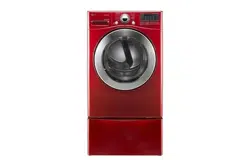
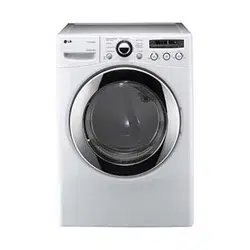
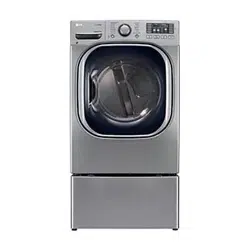
DRYER
Please read this owner’s manual thoroughly before operating and keep it
handy for reference at all times.
MFL67731027
ENGLISH ESPAÑOL
DLEX4270* DLGX4271*
www.lg.com
Copyright © 2014 - 2017 LG Electronics Inc. All Rights Reserved.
MFL67731027_en_170830.indd 1 2017.8.30 4:24:53 PM
2
TABLE OF CONTENTS
3
IMPORTANT SAFETY
INSTRUCTIONS
3 WHAT TO DO IF YOU SMELL GAS
4 BASIC SAFETY PRECAUTIONS
4 CALIFORNIA SAFE DRINKING WATER AND
TOXIC ENFORCEMEN ACT
5 GROUNDING INSTRUCTIONS
5 SAFETY INSTRUCTIONS FOR INSTALLATION
6 SAFETY INSTRUCTIONS FOR STEAM
FUNCTIONS
7 SAFETY INSTRUCTIONS FOR CONNECTING
ELECTRICITY
8
SPECIAL FEATURES
9 INTRODUCING YOUR DRYER
9 Parts
9 Accessories
10 Control Panel Features
11 Display
12
INSTALLATION INSTRUCTIONS
12 Preview Installation Order
13 Installation Location Requirements
13 Clearances
14 Installation with Optional Pedestal Base or
Stacking Kit
15 Leveling the Dryer
16 Reversing the Door
18 Installing the Side Vent Kit
19 Venting the Dryer
21 Connecting Gas Dryers
23 Connecting Electric Dryers
28 Special Requirements for Manufactured or
Mobile Homes
28 Final Installation Check
29 Installation Test (Duct Check)
31
HOW TO USE
31 Operating the Dryer
32 Cycle Guide
33 Sorting Load
33 Loading the Dryer
33 Check the Lint Filter before Every Load
34 Cycle Modifier Buttons
35 Special Functions
36 Custom Program
36 Steam Functions
38 Steam Cycle Guide
39 Before Using the Tag On Function
40 Tag On
46
MAINTENANCE
46 Regular Cleaning
47
TROUBLESHOOTING
47 Before Calling for Service
50
SPECIFICATIONS
51
USING SMART DIAGNOSIS
TM
52
OPTIONAL ACCESSORIES
52 Stacking Kit Installation
54
WARRANTY
TABLE OF CONTENTS
MFL67731027_en_170830.indd 2 2017.8.30 4:24:53 PM
3
ENGLISH
IMPORTANT SAFETY INSTRUCTIONS
READ ALL INSTRUCTIONS BEFORE USE
w
WARNING
For your safety, the information in this manual must be followed to minimize the risk of fire or explosion, electric
shock, or to prevent property damage, injury to persons, or death.
Your safety and the safety of others is very important.
We have provided many important safety messages in this manual and on your appliance. Always read and obey all
safety messages.
This is the safety alert symbol.
This symbol alerts you to potential hazards that can kill or hurt you and others.
All safety messages will follow the safety alert symbol and either the word DANGER, WARNING, or CAUTION.
These words mean:
w
DANGER
You will be killed or seriously injured if you don’t immediately follow instructions.
w
WARNING
You can be killed or seriously injured if you don’t follow instructions.
w
CAUTION
You may be slightly injured or cause damage to the product if you do not follow instructions.
All safety messages will tell you what the potential hazard is, tell you how to reduce the chance of injury, and tell
you what can happen if the instructions are not followed.
w
WARNING
Failure to follow safety warnings exactly could result in serious injury, death or property damage.
- Do not store or use gasoline or other flammable vapors and liquids in the vicinity of this or any other appliance.
- WHAT TO DO IF YOU SMELL GAS
• Do not try to light any appliance.
• Do not touch any electrical switch; do not use any phone in your building.
• Clear the room, building or area of all occupants.
• Immediately call your gas supplier from a neighbor’s phone. Follow the gas supplier’s instructions.
• If you cannot reach your gas supplier, call the fire department.
- Installation and service must be performed by a qualified installer, service agency or the gas supplier.
w
WARNING:
This product contains chemicals known to the State of California to cause cancer and birth defects or
other reproductive harm.
Wash hands after handling.
w
IMPORTANT SAFETY INSTRUCTIONS
MFL67731027_en_170830.indd 3 2017.8.30 4:24:53 PM

4
IMPORTANT SAFETY INSTRUCTIONS
READ ALL INSTRUCTIONS BEFORE USE
w
WARNING
For your safety, the information in this manual must be followed to minimize the risk of fire or explosion, electric
shock, or to prevent property damage, injury to persons, or death.
w
WARNING
To reduce the risk of fire, electric shock, or injury to persons when using this appliance, follow basic precautions,
including the following:
This act requires the governor of California to publish a list of substances known to the state to cause cancer, birth
defects, or other reproductive harm and requires businesses to warn customers of potential exposure to such
substances.
Gas appliances can cause minor exposure to four of these substances, namely benzene, carbon monoxide,
formaldehyde, and soot, caused primarily by the incomplete combustion of natural gas or LP fuels.
Properly adjusted dryers will minimize incomplete combustion. Exposure to these substances can be minimized
further by properly venting the dryer to the outdoors.
• Read all instructions before using the dryer.
• Before use, the dryer must be properly installed as
described in this manual.
•
• Do not dry articles that have been previously cleaned
in, washed in, soaked in, or spotted with gasoline, dry-
cleaning solvents, or other flammable or explosive
substances as they give off vapors that could ignite or
explode.
•
• Do not repair or replace any part of the dryer
or attempt any servicing unless specifically
recommended in this owner’s manual or in published
user-repair instructions that you understand and have
the skills to carry out.
•
• Before the dryer is removed from service or discarded,
remove the door to the drying compartment.
• Do not allow children to play on or in the dryer. Close
supervision of children is necessary when the dryer is
used near children.
• Do not use fabric softeners or products to eliminate
static unless recommended by the manufacturer of
the fabric softener or product.
•
• Keep area around the exhaust opening and adjacent
surrounding areas free from the accumulation of lint,
dust, and dirt.
• The interior of the dryer and exhaust vent should be
cleaned periodically by qualified service personnel.
• Do not install or store the dryer where it will be
exposed to the weather.
• Always check the inside of the dryer for foreign
objects.
• Clean lint screen before or after each load.
•
IMPORTANT SAFETY INSTRUCTIONS
MFL67731027_en_170830.indd 4 2017.8.30 4:24:53 PM
5
ENGLISH
IMPORTANT SAFETY INSTRUCTIONS
READ ALL INSTRUCTIONS BEFORE USE
w
WARNING
For your safety, the information in this manual must be followed to minimize the risk of fire or explosion, electric
shock, or to prevent property damage, injury to persons, or death.
w
WARNING
Improper connection of the equipment-grounding conductor can result in a risk of electric shock. Check with a
qualified electrician or service person if you are in doubt that the appliance is properly grounded.
w
WARNING
To reduce the risk of fire, electric shock, or injury to persons when using this appliance, follow basic precautions,
including the following:
•
Follow details in
the installation instructions. Electric shock can result if
the dryer is not properly grounded.
• as
described in this manual. Electric shock can result if
the dryer is not properly grounded.
•
•
Failure to follow this
warning can cause serious injury, fire, electric shock, or
death.
•
Failure to follow this
warning can cause serious injury, fire, electric shock, or
death.
•
Improper
power circuit can melt, creating electric shock and/or
fire hazard.
•
Failure to do so can
result in death, explosion, fire, or burns.
•
Failure to do so can result in
death, explosion, fire, or burns.
• Packaging
material can be dangerous for children. There is a risk
of suffocation.
•
Failure to do so can cause
deform, smoke and fire.
•
Dripping wax,
smoke, or fire can result.
•
Failure to do so can cause product damage, smoke or
fire.
This appliance must be grounded. In the event of
malfunction or breakdown, grounding will reduce
the risk of electric shock by providing a path of least
resistance for electric current. This appliance must be
equipped with a cord having an equipment-grounding
conductor and a grounding plug. The plug must be
plugged into an appropriate outlet that is properly
installed and grounded in accordance with all local
codes and ordinances.
Do not modify the plug provided with the appliance. If
it will not fit the outlet, have a proper outlet installed by
a qualified electrician.
This appliance must be connected to a grounded metal,
permanent wiring system or an equipment-grounding
conductor must be run with the circuit conductors and
connected to the equipment-grounding terminal or
lead on the appliance.
Electric shock can result if the dryer is not properly
grounded.
IMPORTANT SAFETY INSTRUCTIONS
MFL67731027_en_170830.indd 5 2017.8.30 4:24:54 PM
6
IMPORTANT SAFETY INSTRUCTIONS
READ ALL INSTRUCTIONS BEFORE USE
w
WARNING
For your safety, the information in this manual must be followed to minimize the risk of fire or explosion, electric
shock, or to prevent property damage, injury to persons, or death.
w
WARNING
To reduce the risk of injury to persons, follow all industry recommended safety procedures including the use of long
sleeved gloves and safety glasses. Failure to follow all of the safety warnings in this manual could result in property
damage, injury to persons, or death.
Exhaust/Ducting:
w
WARNING
To reduce the risk of fire, electric shock, or injury to persons when using this appliance, follow basic precautions,
including the following:
• Failure
to follow these instructions can result in fire or death.
•
. An
accumulation of lint in any area of the home can create
a health and fire hazard.
•
Punctured
ductwork can cause a fire if it collapses or becomes
otherwise restricted in use or during installation.
•
Failure to
follow these instructions can result in fire or death.
•
Failure to follow these instructions can result in fire or
death.
•
Failure to
follow these instructions can result in fire or death.
•
Secure
all joints with duct tape. For complete details, follow
the Installation Instructions. Failure to follow these
instructions can result in fire or death.
w
WARNING
Failure to follow safety warnings exactly could result
in serious injury, death or property damage.
Do not install a booster fan in the exhaust duct.
Install all clothes dryers in accordance with the
installation instructions of the manufacturer of the
dryer.
IMPORTANT SAFETY INSTRUCTIONS
•
Failure to follow these instructions can result in a burn
hazard.
•
Failure to follow these
instructions can result in fire or death.
•
Failure to follow these instructions can
result in fire or death.
•
Failure to follow these
instructions can result in a burn hazard.
•
Failure to follow these instructions can result
in a burn hazard.
MFL67731027_en_170830.indd 6 2017.8.30 4:24:54 PM
7
ENGLISH
IMPORTANT SAFETY INSTRUCTIONS
READ ALL INSTRUCTIONS BEFORE USE
w
WARNING
For your safety, the information in this manual must be followed to minimize the risk of fire or explosion, electric
shock, or to prevent property damage, injury to persons, or death.
w
WARNING
To reduce the risk of fire, electric shock, or injury to persons when using this appliance, follow basic precautions,
including the following:
•
To prevent
injury to persons or damage to the dryer, the electrical
power cord must be plugged into a properly grounded
outlet.
•
Failure to do so can result in electric shock
or injury.
•
Failure to follow these instructions can create an
electric shock hazard and/or a fire hazard.
•
Failure to follow these instructions can create an
electric shock hazard and/or a fire hazard.
•
This provides
sparkling performance and also prevents overloading
house wiring circuits which could cause a fire hazard
from overheated wires.
•
The power cord can be damaged,
resulting in a risk of fire and electric shock.
•
The power cord can
melt, creating an electric shock and/or fire hazard.
•
This will
prevent injury and prevent damage to the dryer from
fire and electric shock.
IMPORTANT SAFETY INSTRUCTIONS
MFL67731027_en_170830.indd 7 2017.8.30 4:24:54 PM
8
SPECIAL FEATURES
EASY-TO-USE CONTROL PANEL
Rotate the cycle selector knob to select the desired dry cycle. Add cycle options or adjust settings with the touch
of a button.
EASY-ACCESS REVERSIBLE DOOR
The wide-opening door provides easy access for loading and unloading. The door hinge can be reversed to adjust
for installation location.
ULTRA-CAPACITY STAINLESS STEEL DRUM WITH DRUM LIGHT
The ultra-large stainless steel drum offers superior durability. The drum is equipped with a yellow light that
illuminates when the dryer door is open and turns off when the door is closed.
STEAM FUNCTIONS
LG’s steam technology allows you to inject fabrics with a swirling jet of hot steam to refresh clothes, reduce static,
and make ironing easier. Simply select the STEAM FRESH™ cycle, or you can add a Steam option to selected cycles.
FLOW SENSE™ DUCT BLOCKAGE SENSING SYSTEM INDICATOR
The FLOW SENSE™ duct blockage sensing system detects and alerts you to restrictions in the installed household
ductwork that reduce exhaust airflow through the dryer. If you see the alert: Clean or repair the ducts to remove
the restrictions. Keep your ducts clean to help increase efficiency and reduce long drying times caused by blocked
ducts.
SMART DIAGNOSIS™
Should you experience any technical difficulty with your dryer, it has the capability of transmitting data via your
telephone to the Customer Information Center. The call center agent records the data transmitted from your
machine and uses it to analyze the issue, providing a fast and effective diagnosis.
C
E
R
T
I
F
I
E
D
D
E
S
I
G
N
Protocol P154
Sanitization Performance of
Residential Clothes dryer
SPECIAL FEATURES
MFL67731027_en_170830.indd 8 2017.8.30 4:24:55 PM
9
ENGLISH
INTRODUCING YOUR DRYER
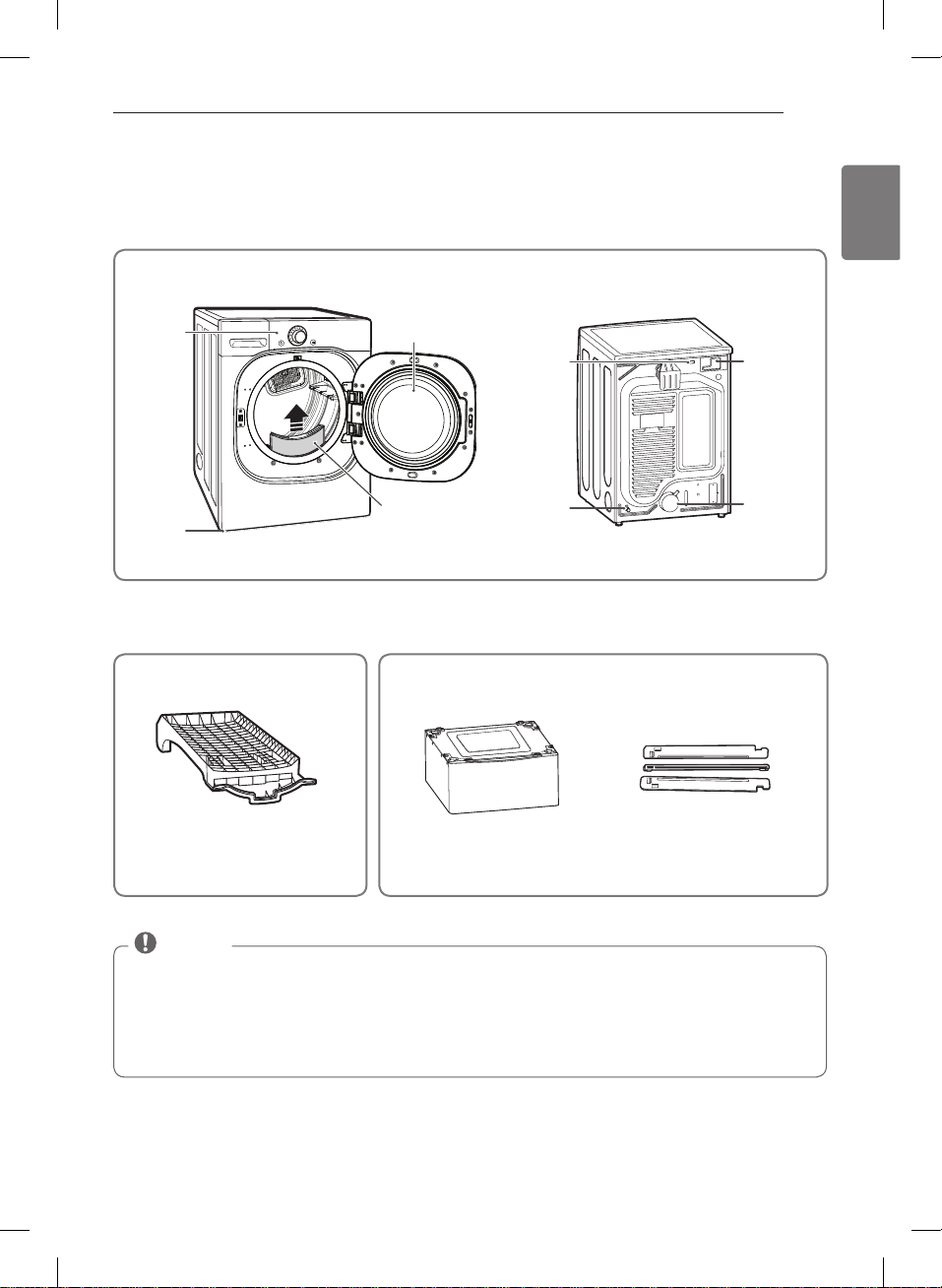
PARTS AND ACCESSORIES
Parts
Accessories
Control
panel
Leveling
feet
Reversible
door
Lint filter
Power Cord
Location
(Gas
Models)
Gas
Connection
Location
(Gas Models)
Terminal
Block
Access
Panel
(Electric
Models)
Exhaust
Duct
Outlet
NOTE
• Contact LG Customer Service at 1-800-243-0000 (1-888-542-2623 in Canada) if any accessories are missing.
• For your safety and for extended product life, use only authorized components. The manufacturer is not
responsible for product malfunction or accidents caused by the use of separately purchased unauthorized
components or parts.
• The images in this manual may be different from the actual components and accessories, and are subject to
change by the manufacturer without prior notice for product improvement purposes.
INTRODUCING YOUR DRYER
MFL67731027_en_170830.indd 9 2017.8.30 4:24:58 PM
10
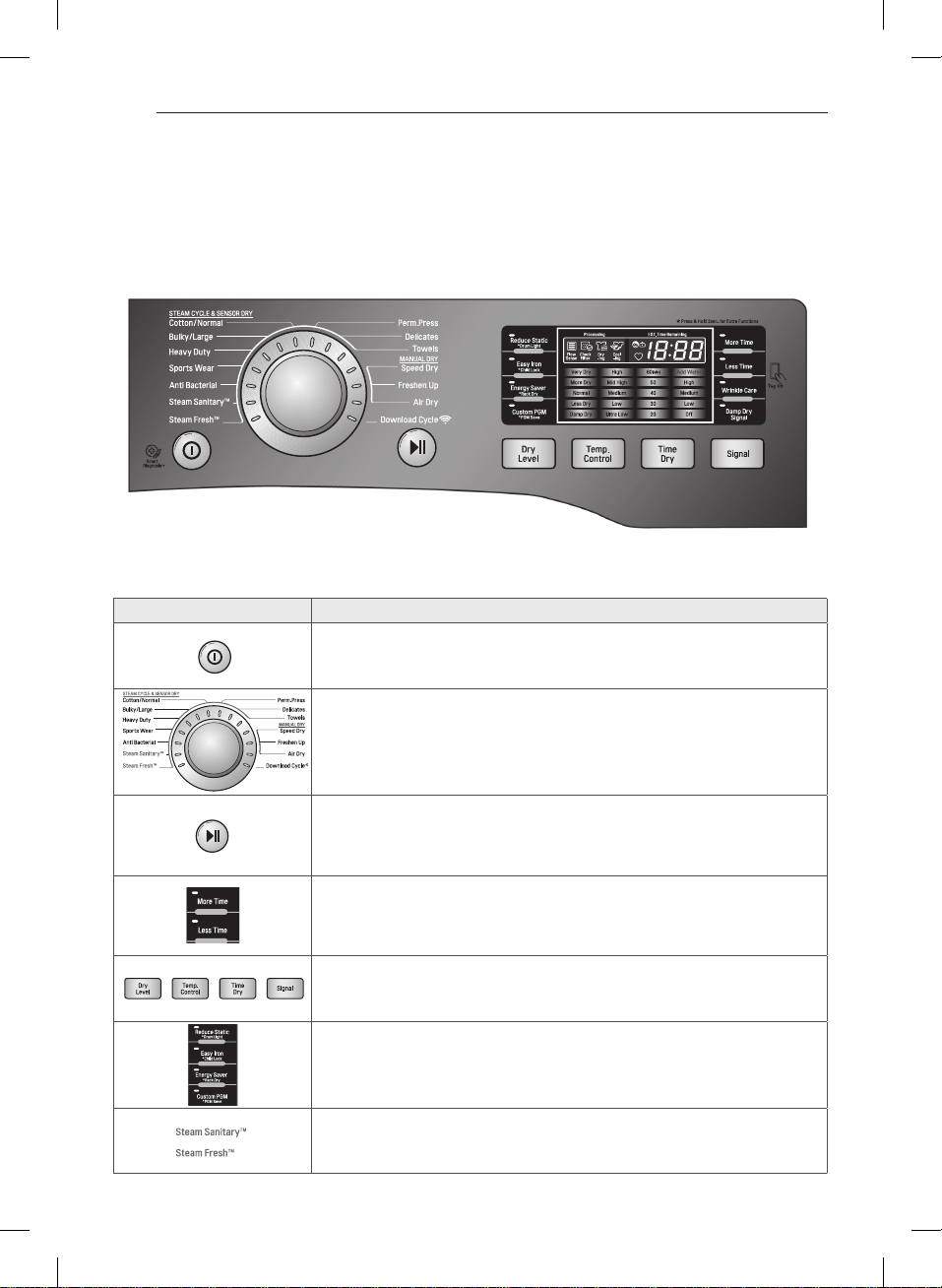
Control panel features
Following are instructions for starting and using your new dryer. Please refer to specific sections of this
manual for more detailed information.
w
WARNING :
To reduce the risk of fire, electric shock, or injury to persons, read this entire manual,
including the Important Safety Instructions, before operating this dryer.
Button
- Press to turn the dryer ON. Press again to turn the dryer OFF.
Pressing the ON/OFF button during a cycle will cancel that cycle and any
load settings will be lost.
- Turn this knob to select the desired cycle. Once the desired cycle has been
selected, the standard presets will be shown in the display. On MANUAL DRY
cycles, these settings can be adjusted using the cycle setting buttons anytime
before starting the cycle.
- Press this button to START the selected cycle. If the dryer is running, use this
button to PAUSE the cycle without losing the current settings.
If you do not press the START/PAUSE button to resume a cycle within 4
minutes, the dryer turns off automatically.
- To adjust the drying time, use these buttons with MANUAL DRY, TIME DRY, and
STEAM FRESH™ cycles, as well as the REDUCE STATIC and EASY IRON options. Press
the MORE TIME button to increase the selected manual cycle time by a minute;
press LESS TIME to decrease the cycle time by a minute.
- Use these buttons to select the desired cycle settings for the selected cycle. The
current settings are shown in the display. Press the button for that option to view
and select other settings.
- The OPTION buttons allow you to select additional cycle options. Certain buttons
also allow you to activate special functions by pressing and holding the button
for 3 seconds.
- LG’s steam technology allows you to inject fabrics with a swirling jet of hot steam
to refresh clothes, reduce static, and make ironing easier. Simply select the steam
fresh™ cycle, or you can add a STEAM option to selected cycles.
Operation
INTRODUCING YOUR DRYER
MFL67731027_en_170830.indd 10 2017.8.30 4:28:47 PM
11
ENGLISH
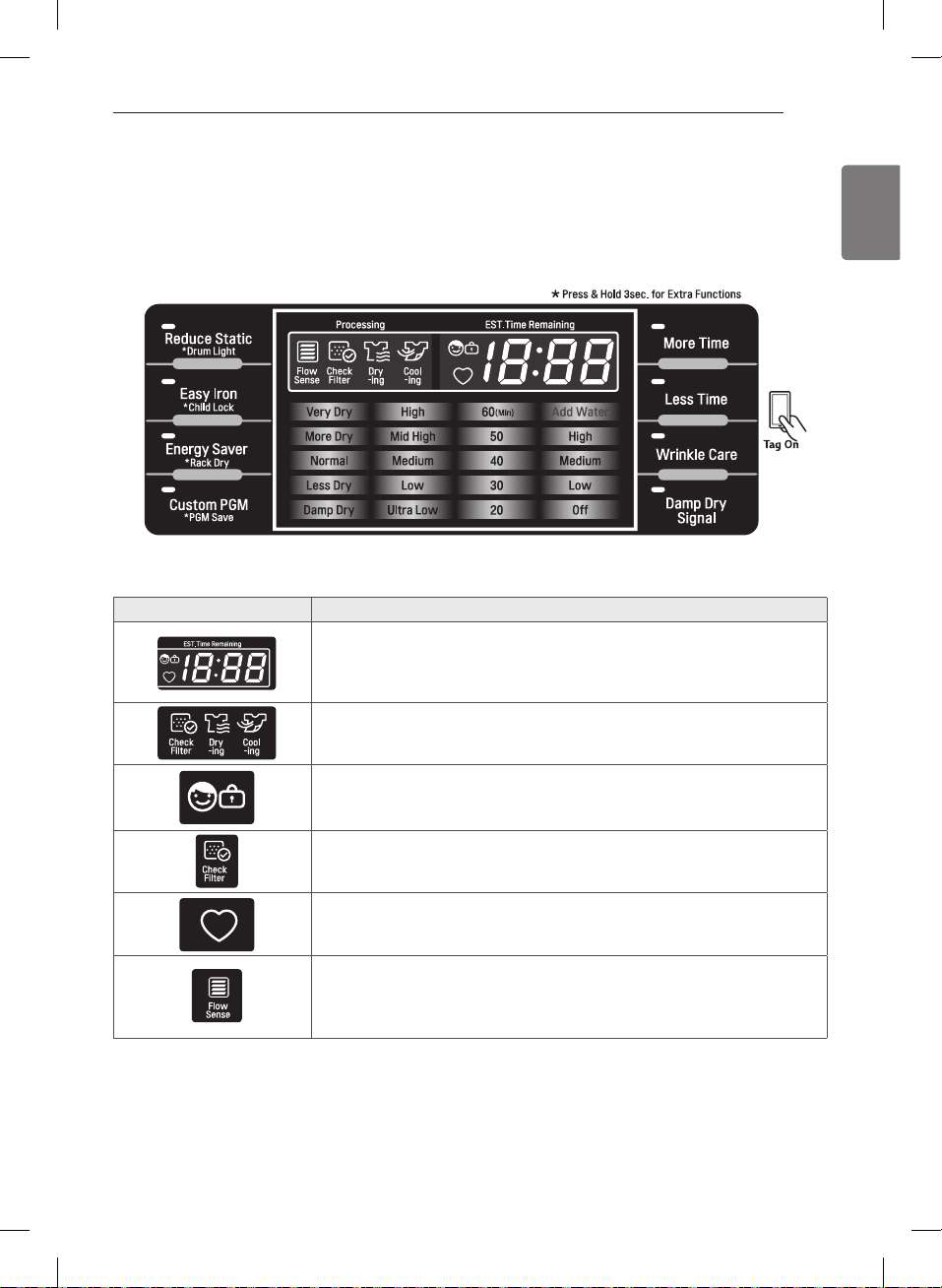
Display
The display shows the settings, estimated time remaining, options, and status messages for your dryer.
When the dryer is turned on, the light in the display will illuminate.
w
WARNING :
To reduce the risk of fire, electric shock, or injury to persons, read this entire manual,
including the Important Safety Instructions, before operating this dryer.
- When the START/PAUSE button is pressed, the dryer will display the estimated
(SENSOR DRY) or set time (TIME DRY) remaining, and begin tumbling.
The cycle time on SENSOR DRY cycles may fluctuate as the dryer
recalculates drying time for optimal results
- This portion of the display shows which stage of the drying cycle is currently
underway (CHECK FILTER, DRYING, or COOLING).
- When CHILD LOCK is set, the CHILD LOCK indicator will appear and all buttons are
disabled except the POWER button. This prevents children from changing settings
while the dryer is operating
- The display will show CHECK FILTER when the dryer is turned on as a reminder to
check the filter. It turns off when the START/PAUSE button is pressed.
- If you have a special combination of settings that you use frequently, you can
save these settings as a CUSTOM PROGRAM.
- The FLOW SENSE™ duct blockage sensing system detects and alerts you to
blockages in the ductwork that reduce exhaust flow from the dryer. This improves
operating efficiency and helps minimize service calls, saving your money.
INTRODUCING YOUR DRYER
MFL67731027_en_170830.indd 11 2017.8.30 4:29:54 PM
12
INSTALLATION INSTRUCTIONS
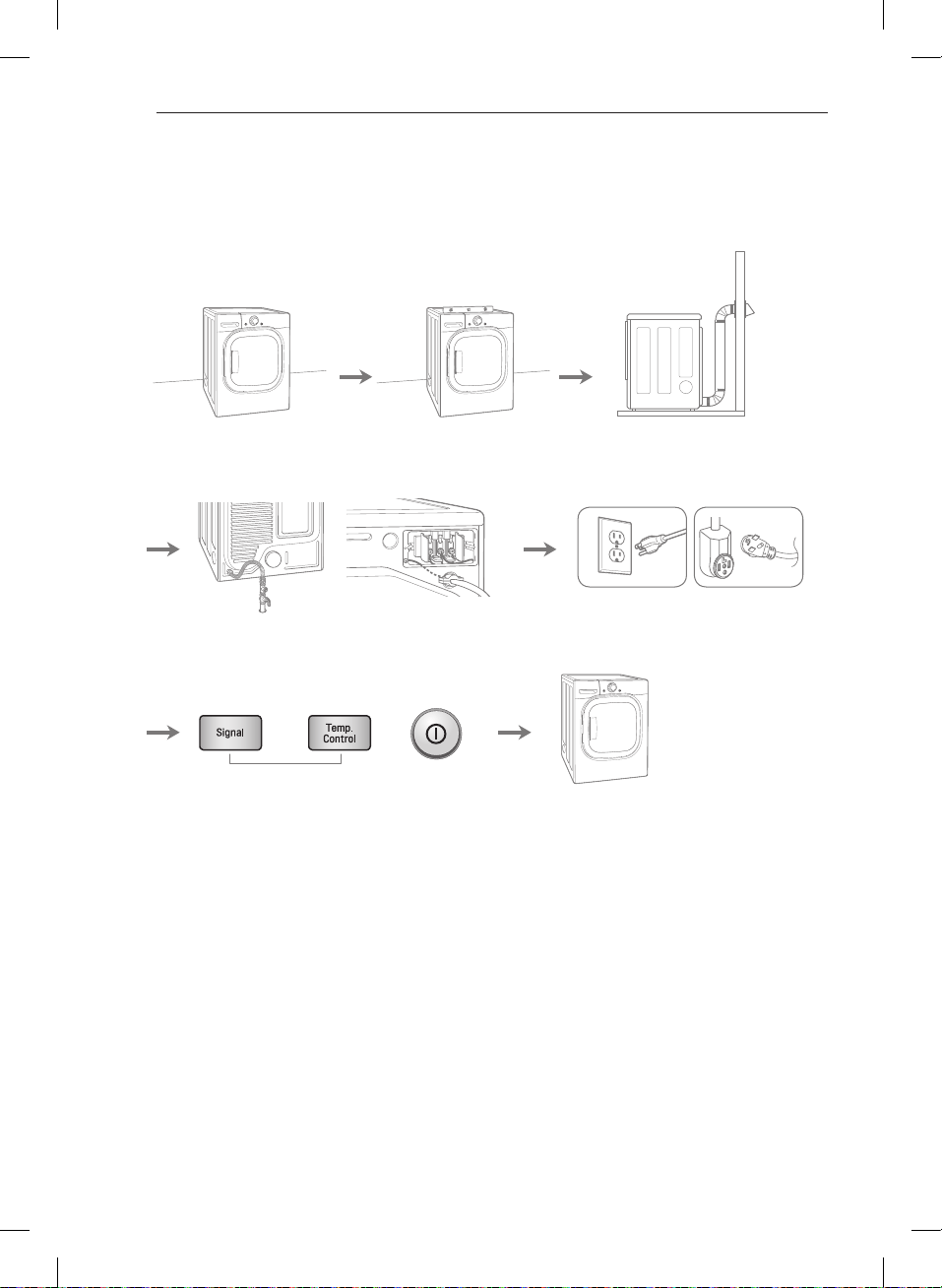
Preview installation order
Checking and
choosing the proper
location
Leveling the dryer Venting the Dryer
Installation test
(Refer to page 29.)
Connecting Gas Dryers
(Gas Dryer Type)
Connecting Electric Dryers
(Electric Dryer Type)
Plugging in the power cord
and grounding
Test run
Press and hold
120V
240V(USA)
230V(CANADA)
INSTALLATION INSTRUCTIONS
MFL67731027_en_170830.indd 12 2017.8.30 4:29:58 PM
13
ENGLISH
Installation location requirements
w
WARNING
It is important that
you review this entire manual before installing and using your dryer. Detailed instructions concerning electrical
connections, gas connections, and exhaust requirements are provided on the following pages.
Do not operate your dryer at temperatures below 45°F (7°C). At lower temperatures, the dryer might not shut off
at the end of an automatic cycle. This can result in longer drying times. The dryer must not be installed or stored in
an area where it will be exposed to water and/or weather. Check code requirements. Some codes limit, or do not
permit, installation of the dryer in garages, closets, mobile homes or sleeping quarters. Contact your local building
inspector.
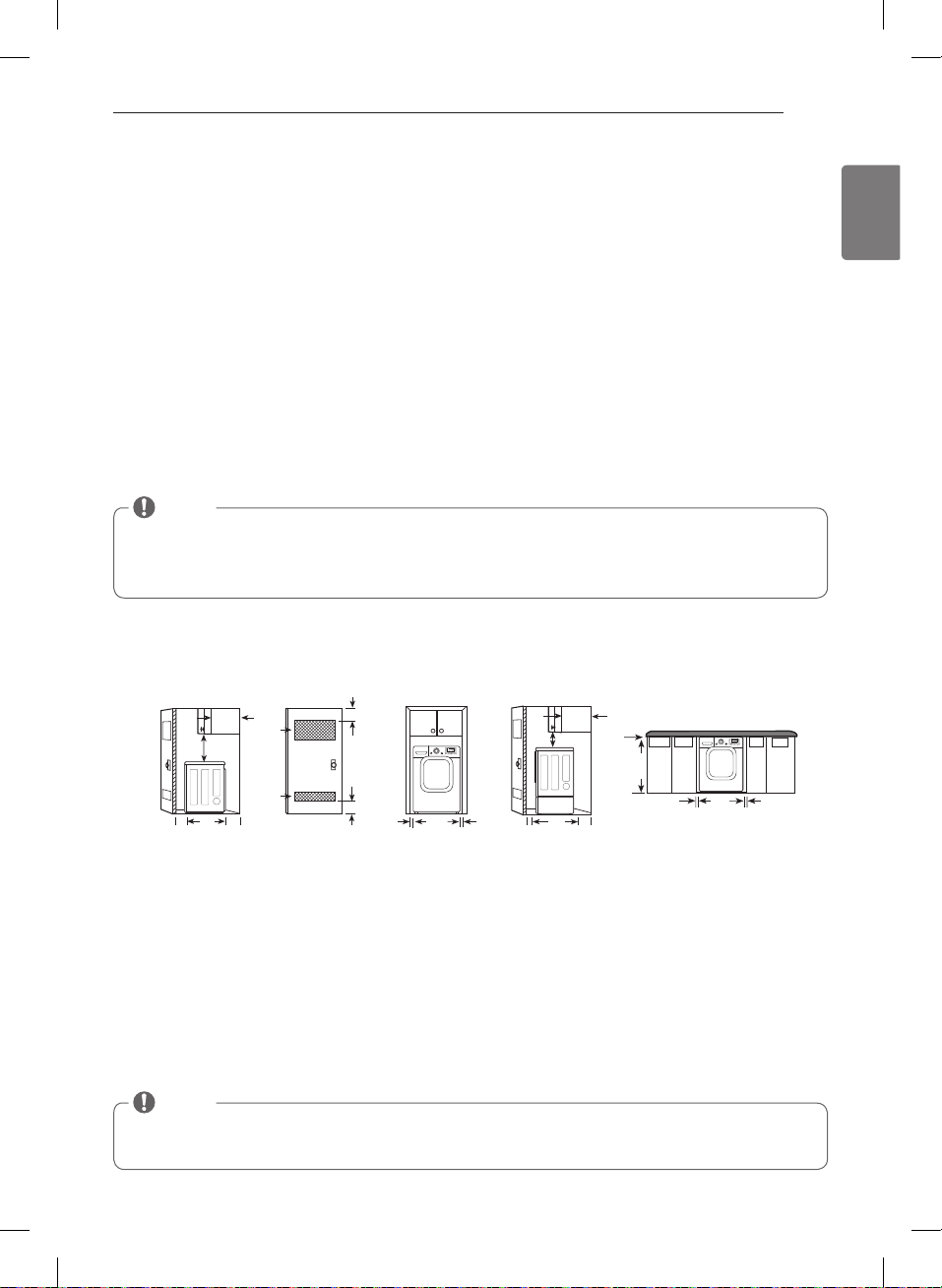
Clearances
INSTALLATION SPACING FOR RECESSED AREA OR CLOSET INSTALLATION
The following spacing dimensions are recommended for this dryer. Although this dryer has been tested for spacing
of 1inch (2.5cm) clearance on the sides and rear, the recommended spacing should be considered for the following
reasons:
• A location that allows for proper exhaust installation.
A gas dryer must be exhausted to the outdoors. See
.
• A grounded electrical outlet located within 2 ft.
(61 cm) of either side of the dryer. See
.
• A sturdy floor to support the total dryer weight of 200
lbs (90.7 kg). The combined weight of a companion
appliance should also be considered.
• No other fuel-burning appliance can be installed in the
same closet as a dryer.
• Additional spacing should be considered for ease of
installation and servicing.
• Additional clearances might be required for wall, door
and floor moldings.
• Additional spacing should be considered on all sides
of the dryer to reduce noise transfer.
For closet installation, with a door, minimum
ventilation openings in the top and bottom of the
door are required. Louvered doors with equivalent
ventilation openings are acceptable.
• Companion appliance spacing should also be
considered.
24 in.
2*
(155 cm
2
)
18" min.*
(45.72 cm)
1"*
(2.5 cm)
5"**
(12.7 cm)
48 in.
2*
(310 cm
2
)
14" max.*
(35.6 cm)
3"
*
(7.6 cm)
3"
*
(7.6 cm)
1"
(2.5 cm)
27"
(68.6 cm)
1"
(2.5 cm)
1"*
(2.5 cm)
5"**
(12.7 cm)
14" max.*
(35.6 cm)
18" min.*
(45.72 cm)
0"
(0 cm)
38" min.
(96.52 cm)
1"*
(2.5 cm)
27"
(68.6 cm)
1"*
(2.5 cm)
24 in.
2*
(155 cm
2
)
18" min.*
(45,72 cm)
1"*
(2,5 cm)
5"**
(12,7 cm)
48 in.
2*
(310 cm
2
)
14" max.*
(35,6 cm)
3"
*
(7,6 cm)
3"
*
(7,6 cm)
1"
(2,5 cm)
27"
(68,6 cm)
1"
(2,5 cm)
1"*
(2,5 cm)
5"**
(12,7 cm)
14" max.*
(35,6 cm)
18" min.*
(45,72 cm)
0"
(0 cm)
38" min.
(96,52 cm)
1"*
(2,5 cm)
27"
(68,6 cm)
1"*
(2,5 cm)
7"* (17.8 cm)
9"*
(22.9 cm)
7"* (17.8 cm)
5"**
(12.7 cm)
27"
(68.6 cm)
1"*
(2.5 cm)
(2.5 cm)
(2.5 cm)
48 in.
2
*
(310 cm
2
)
3"* (7.6 cm)
3"* (7.6 cm)
1"* (2.5 cm)
24 in.
2
*
(155 cm
2
)
6"* (15.2 cm)
76"
(193 cm)
27"
(68.6 cm)
1"
(2.5 cm)
1"
(2.5 cm)
5
"**
(14 cm)
1/2
7"* (17,8 cm)
9"*
(22,9 cm)
7"* (17,8 cm)
5"**
(12,7 cm)
27"
(68,6 cm)
1"*
(2,5 cm)
(2,5 cm)
(2,5 cm)
48 in.
2
*
(310 cm
2
)
3"* (7,6 cm)
3"* (7,6 cm)
1"* (2,5 cm)
24 in.
2
*
(155 cm
2
)
6"* (15,2 cm)
76"
(193 cm)
27"
(68,6 cm)
1"
(2,5 cm)
1"
(2,5 cm)
5
"**
(14 cm)
1/2
30"
(76.1 cm)
30"
(76.1 cm)
30"
(76,1 cm)
30"
(76,1 cm)
24 in.
2*
(155 cm
2
)
18" min.*
(45,72 cm)
1"*
(2,5 cm)
5"**
(12,7 cm)
48 in.
2*
(310 cm
2
)
14" max.*
(35,6 cm)
3"
*
(7,6 cm)
3"
*
(7,6 cm)
1"
(2,5 cm)
27"
(68,6 cm)
1"
(2,5 cm)
1"*
(2,5 cm)
5"**
(12,7 cm)
14" max.*
(35,6 cm)
18" min.*
(45,72 cm)
0"
(0 cm)
38" min.
(96,52 cm)
1"*
(2,5 cm)
27"
(68,6 cm)
1"*
(2,5 cm)
30"
(76,1 cm)
30"
(76,1 cm)
30"
(76.1 cm)
30"
(76,1 cm)
7"* (17,8 cm)
9"*
(22,9 cm)
7"* (17,8 cm)
5"**
(12,7 cm)
27"
(68,6 cm)
1"*
(2,5 cm)
(2,5 cm)
(2,5 cm)
48 in.
2
*
(310 cm
2
)
3"* (7,6 cm)
3"* (7,6 cm)
1"* (2,5 cm)
24 in.
2
*
(155 cm
2
)
6"* (15,2 cm)
76"
(193 cm)
27"
(68,6 cm)
1"
(2,5 cm)
1"
(2,5 cm)
5
"**
(14 cm)
1/2
30"
(76,1 cm)
NOTE
• A level floor with a maximum slope of 1 inch (2.5 cm) under entire dryer. Clothes may not tumble properly, and
automatic sensor cycles may not operate correctly if dryer is not level.
• For a garage installation, you will need to place the dryer at least 18 inches (46 cm) above the floor. If using a
pedestal, you will need 18 inches (46 cm) to the bottom of the dryer.
NOTE
There should be at least a little space around the dryer (or any other appliance) to eliminate the transfer of
vibration from one to the other. With enough vibration, the appliances will make noise or touch each other
causing paint damage and making even more noise.
INSTALLATION INSTRUCTIONS
MFL67731027_en_170830.indd 13 2017.8.30 4:30:1 PM
14
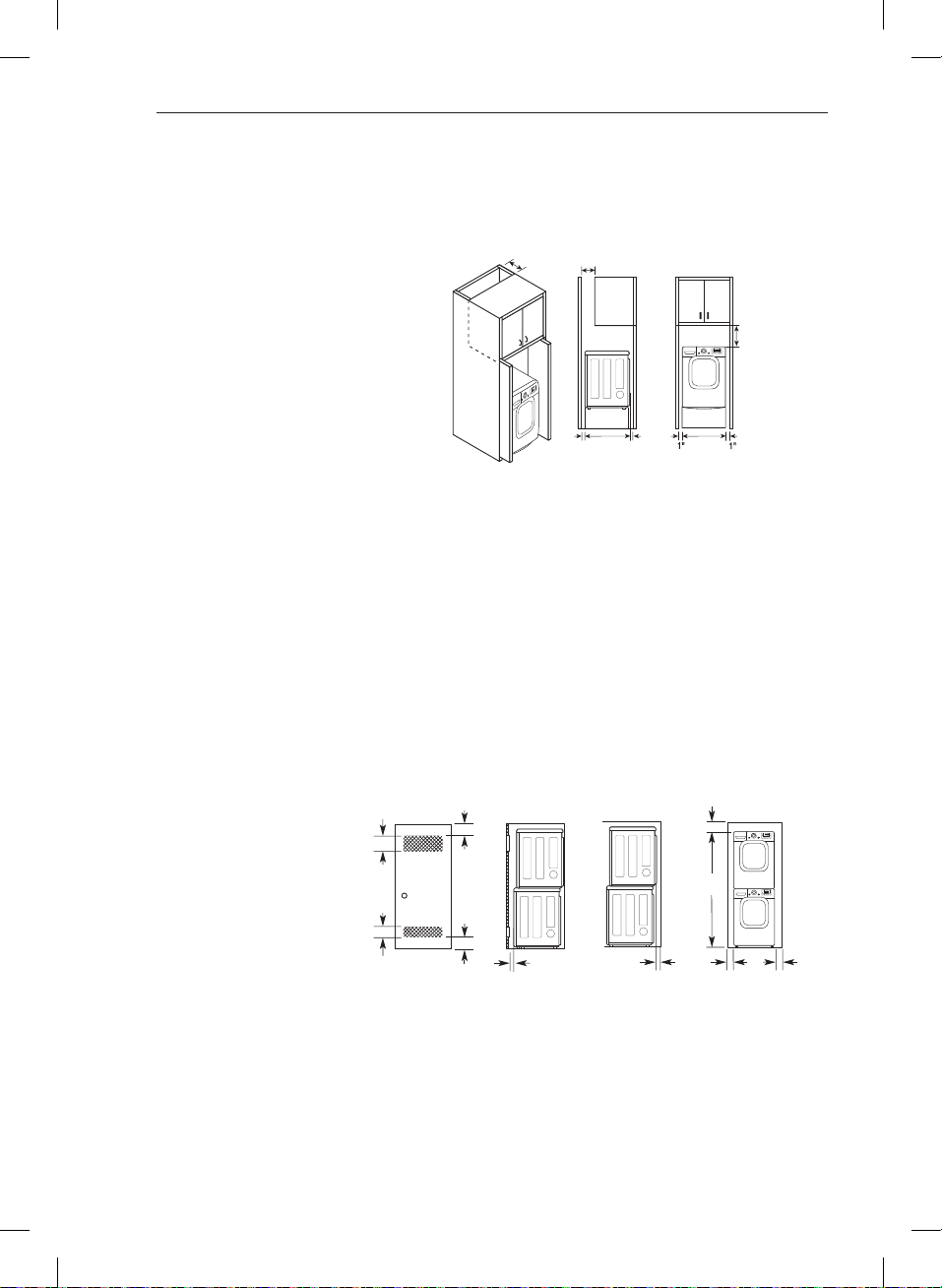
Installation with optional pedestal base or stacking kit
RECOMMENDED INSTALLATION SPACING FOR CABINET INSTALLATION
• For cabinet installation with a door, minimum ventilation openings in the top of the cabinet are required.
*Required spacing
** For side or bottom venting,
2 inches (5.1 cm) spacing is allowed.
CLOSET VENTILATION REQUIREMENTS
Closets with doors must have both an upper and lower vent to prevent heat and moisture buildup in the closet. One
upper vent opening with a minimum opening of 48 sq. in. (310 cm
2
) must be installed no lower than 6 feet above the
floor. One lower vent opening with a minimum opening of 24 sq. in. (155 cm
2
) must be installed no more than one
foot above the floor. One example shown uses vent grilles in the door.
RECOMMENDED INSTALLATION SPACING FOR RECESSED OR CLOSET INSTALLATION, WITH STACKED WASHER
AND DRYER
• The dimensions shown are for the recommended spacing.
*Required spacing
** For side or bottom venting,
2 inches (5.1 cm) spacing is allowed.
24 in.
2*
(155 cm
2
)
18" min.*
(45.72 cm)
1"*
(2.5 cm)
5"**
(12.7 cm)
48 in.
2*
(310 cm
2
)
14" max.*
(35.6 cm)
3"
*
(7.6 cm)
3"
*
(7.6 cm)
1"
(2.5 cm)
27"
(68.6 cm)
1"
(2.5 cm)
1"*
(2.5 cm)
5"**
(12.7 cm)
14" max.*
(35.6 cm)
18" min.*
(45.72 cm)
0"
(0 cm)
38" min.
(96.52 cm)
1"*
(2.5 cm)
27"
(68.6 cm)
1"*
(2.5 cm)
24 in.
2*
(155 cm
2
)
18" min.*
(45,72 cm)
1"*
(2,5 cm)
5"**
(12,7 cm)
48 in.
2*
(310 cm
2
)
14" max.*
(35,6 cm)
3"
*
(7,6 cm)
3"
*
(7,6 cm)
1"
(2,5 cm)
27"
(68,6 cm)
1"
(2,5 cm)
1"*
(2,5 cm)
5"**
(12,7 cm)
14" max.*
(35,6 cm)
18" min.*
(45,72 cm)
0"
(0 cm)
38" min.
(96,52 cm)
1"*
(2,5 cm)
27"
(68,6 cm)
1"*
(2,5 cm)
7"* (17.8 cm)
9"*
(22.9 cm)
7"* (17.8 cm)
5"**
(12.7 cm)
27"
(68.6 cm)
1"*
(2.5 cm)
(2.5 cm)
(2.5 cm)
48 in.
2
*
(310 cm
2
)
3"* (7.6 cm)
3"* (7.6 cm)
1"* (2.5 cm)
24 in.
2
*
(155 cm
2
)
6"* (15.2 cm)
76"
(193 cm)
27"
(68.6 cm)
1"
(2.5 cm)
1"
(2.5 cm)
5
"**
(14 cm)
1/2
7"* (17,8 cm)
9"*
(22,9 cm)
7"* (17,8 cm)
5"**
(12,7 cm)
27"
(68,6 cm)
1"*
(2,5 cm)
(2,5 cm)
(2,5 cm)
48 in.
2
*
(310 cm
2
)
3"* (7,6 cm)
3"* (7,6 cm)
1"* (2,5 cm)
24 in.
2
*
(155 cm
2
)
6"* (15,2 cm)
76"
(193 cm)
27"
(68,6 cm)
1"
(2,5 cm)
1"
(2,5 cm)
5
"**
(14 cm)
1/2
30"
(76.1 cm)
30"
(76.1 cm)
30"
(76,1 cm)
30"
(76,1 cm)
24 in.
2*
(155 cm
2
)
18" min.*
(45,72 cm)
1"*
(2,5 cm)
5"**
(12,7 cm)
48 in.
2*
(310 cm
2
)
14" max.*
(35,6 cm)
3"
*
(7,6 cm)
3"
*
(7,6 cm)
1"
(2,5 cm)
27"
(68,6 cm)
1"
(2,5 cm)
1"*
(2,5 cm)
5"**
(12,7 cm)
14" max.*
(35,6 cm)
18" min.*
(45,72 cm)
0"
(0 cm)
38" min.
(96,52 cm)
1"*
(2,5 cm)
27"
(68,6 cm)
1"*
(2,5 cm)
30"
(76,1 cm)
30"
(76,1 cm)
30"
(76.1 cm)
30"
(76,1 cm)
7"* (17,8 cm)
9"*
(22,9 cm)
7"* (17,8 cm)
5"**
(12,7 cm)
27"
(68,6 cm)
1"*
(2,5 cm)
(2,5 cm)
(2,5 cm)
48 in.
2
*
(310 cm
2
)
3"* (7,6 cm)
3"* (7,6 cm)
1"* (2,5 cm)
24 in.
2
*
(155 cm
2
)
6"* (15,2 cm)
76"
(193 cm)
27"
(68,6 cm)
1"
(2,5 cm)
1"
(2,5 cm)
5
"**
(14 cm)
1/2
30"
(76,1 cm)
24 in.
2*
(155 cm
2
)
18" min.*
(45.72 cm)
1"*
(2.5 cm)
5"**
(12.7 cm)
48 in.
2*
(310 cm
2
)
14" max.*
(35.6 cm)
3"
*
(7.6 cm)
3"
*
(7.6 cm)
1"
(2.5 cm)
27"
(68.6 cm)
1"
(2.5 cm)
1"*
(2.5 cm)
5"**
(12.7 cm)
14" max.*
(35.6 cm)
18" min.*
(45.72 cm)
0"
(0 cm)
38" min.
(96.52 cm)
1"*
(2.5 cm)
27"
(68.6 cm)
1"*
(2.5 cm)
24 in.
2*
(155 cm
2
)
18" min.*
(45,72 cm)
1"*
(2,5 cm)
5"**
(12,7 cm)
48 in.
2*
(310 cm
2
)
14" max.*
(35,6 cm)
3"
*
(7,6 cm)
3"
*
(7,6 cm)
1"
(2,5 cm)
27"
(68,6 cm)
1"
(2,5 cm)
1"*
(2,5 cm)
5"**
(12,7 cm)
14" max.*
(35,6 cm)
18" min.*
(45,72 cm)
0"
(0 cm)
38" min.
(96,52 cm)
1"*
(2,5 cm)
27"
(68,6 cm)
1"*
(2,5 cm)
7"* (17.8 cm)
9"*
(22.9 cm)
7"* (17.8 cm)
5"**
(12.7 cm)
27"
(68.6 cm)
1"*
(2.5 cm)
(2.5 cm)
(2.5 cm)
48 in.
2
*
(310 cm
2
)
3"* (7.6 cm)
3"* (7.6 cm)
1"* (2.5 cm)
24 in.
2
*
(155 cm
2
)
6"* (15.2 cm)
76"
(193 cm)
27"
(68.6 cm)
1"
(2.5 cm)
1"
(2.5 cm)
5
"**
(14 cm)
1/2
7"* (17,8 cm)
9"*
(22,9 cm)
7"* (17,8 cm)
5"**
(12,7 cm)
27"
(68,6 cm)
1"*
(2,5 cm)
(2,5 cm)
(2,5 cm)
48 in.
2
*
(310 cm
2
)
3"* (7,6 cm)
3"* (7,6 cm)
1"* (2,5 cm)
24 in.
2
*
(155 cm
2
)
6"* (15,2 cm)
76"
(193 cm)
27"
(68,6 cm)
1"
(2,5 cm)
1"
(2,5 cm)
5
"**
(14 cm)
1/2
30"
(76.1 cm)
30"
(76.1 cm)
30"
(76,1 cm)
30"
(76,1 cm)
24 in.
2*
(155 cm
2
)
18" min.*
(45,72 cm)
1"*
(2,5 cm)
5"**
(12,7 cm)
48 in.
2*
(310 cm
2
)
14" max.*
(35,6 cm)
3"
*
(7,6 cm)
3"
*
(7,6 cm)
1"
(2,5 cm)
27"
(68,6 cm)
1"
(2,5 cm)
1"*
(2,5 cm)
5"**
(12,7 cm)
14" max.*
(35,6 cm)
18" min.*
(45,72 cm)
0"
(0 cm)
38" min.
(96,52 cm)
1"*
(2,5 cm)
27"
(68,6 cm)
1"*
(2,5 cm)
30"
(76,1 cm)
30"
(76,1 cm)
30"
(76.1 cm)
30"
(76,1 cm)
7"* (17,8 cm)
9"*
(22,9 cm)
7"* (17,8 cm)
5"**
(12,7 cm)
27"
(68,6 cm)
1"*
(2,5 cm)
(2,5 cm)
(2,5 cm)
48 in.
2
*
(310 cm
2
)
3"* (7,6 cm)
3"* (7,6 cm)
1"* (2,5 cm)
24 in.
2
*
(155 cm
2
)
6"* (15,2 cm)
76"
(193 cm)
27"
(68,6 cm)
1"
(2,5 cm)
1"
(2,5 cm)
5
"**
(14 cm)
1/2
30"
(76,1 cm)
INSTALLATION INSTRUCTIONS
MFL67731027_en_170830.indd 14 2017.8.30 4:30:4 PM
15
ENGLISH
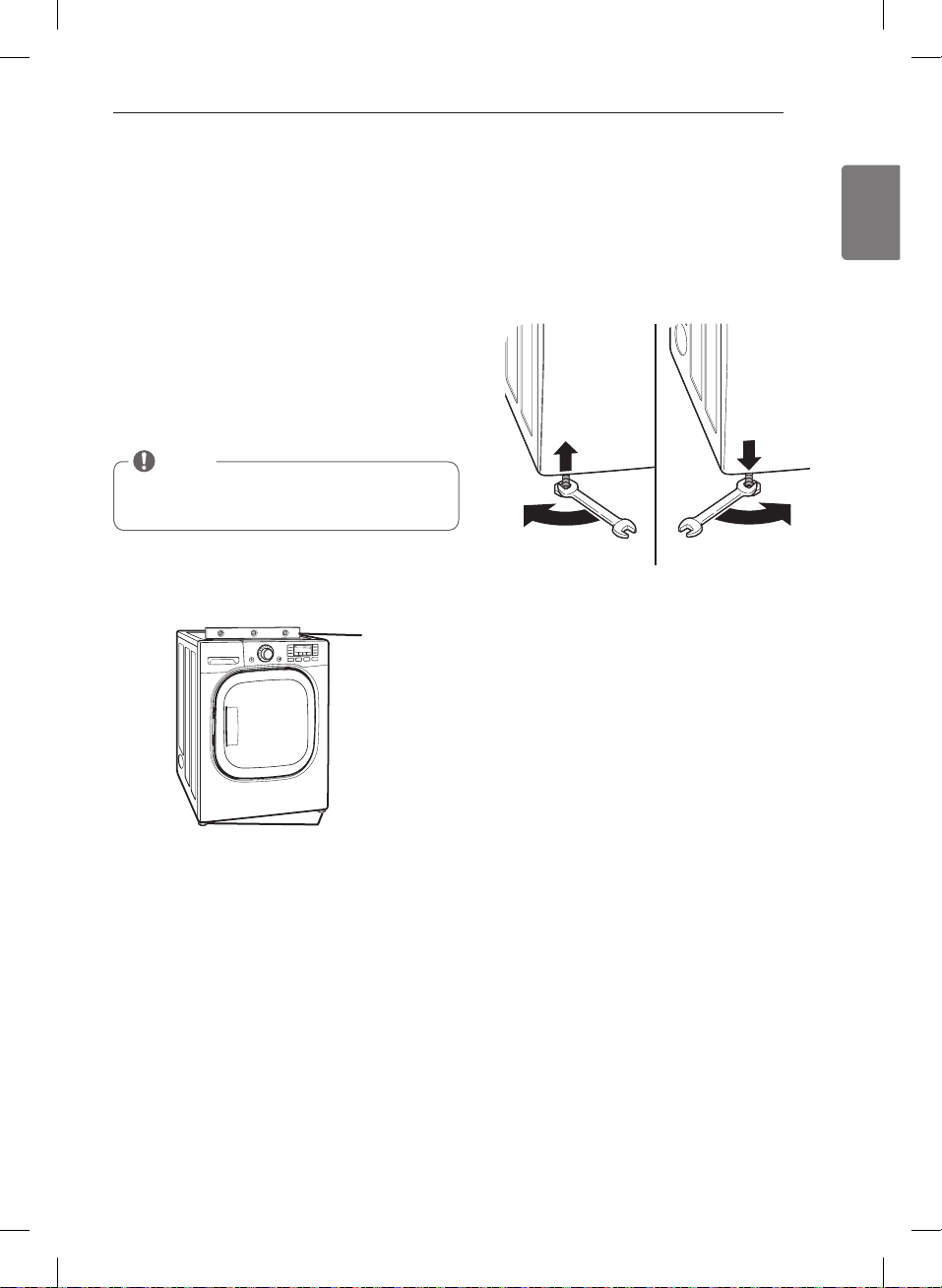
Leveling the dryer
w
WARNING
Failure to follow this warning can cause serious injury
or death.
Failure to follow
this warning can cause serious injury or death.
To ensure that the dryer provides optimal drying
performance, it must be level. To minimize vibration,
noise, and unwanted movement, the floor must be a
perfectly level, solid surface.
1. Position the dryer in the final location. Place a level
across the top of the dryer.
• All four leveling feet must rest solidly on the floor.
Gently push on the top corners of the dryer to make
sure that the dryer does not rock from corner to corner.
If you are installing the dryer on the optional pedestal,
you must use the leveling feet on the pedestal to
level the dryer. The dryer leveling feet should be fully
retracted.
2. Use an adjustable wrench to turn the leveling feet.
Turn clockwise to raise the dryer or counterclockwise
to lower it. Raise or lower the leveling feet until dryer
is level from side to side and front to back.
Make sure that all 4 leveling feet are in firm contact with
the floor.
Level
Leveling Feet
NOTE
Adjust the leveling feet only as far as necessary to
level the dryer. Extending the leveling feet more than
necessary can cause the dryer to vibrate.
INSTALLATION INSTRUCTIONS
MFL67731027_en_170830.indd 15 2017.8.30 4:30:6 PM
16
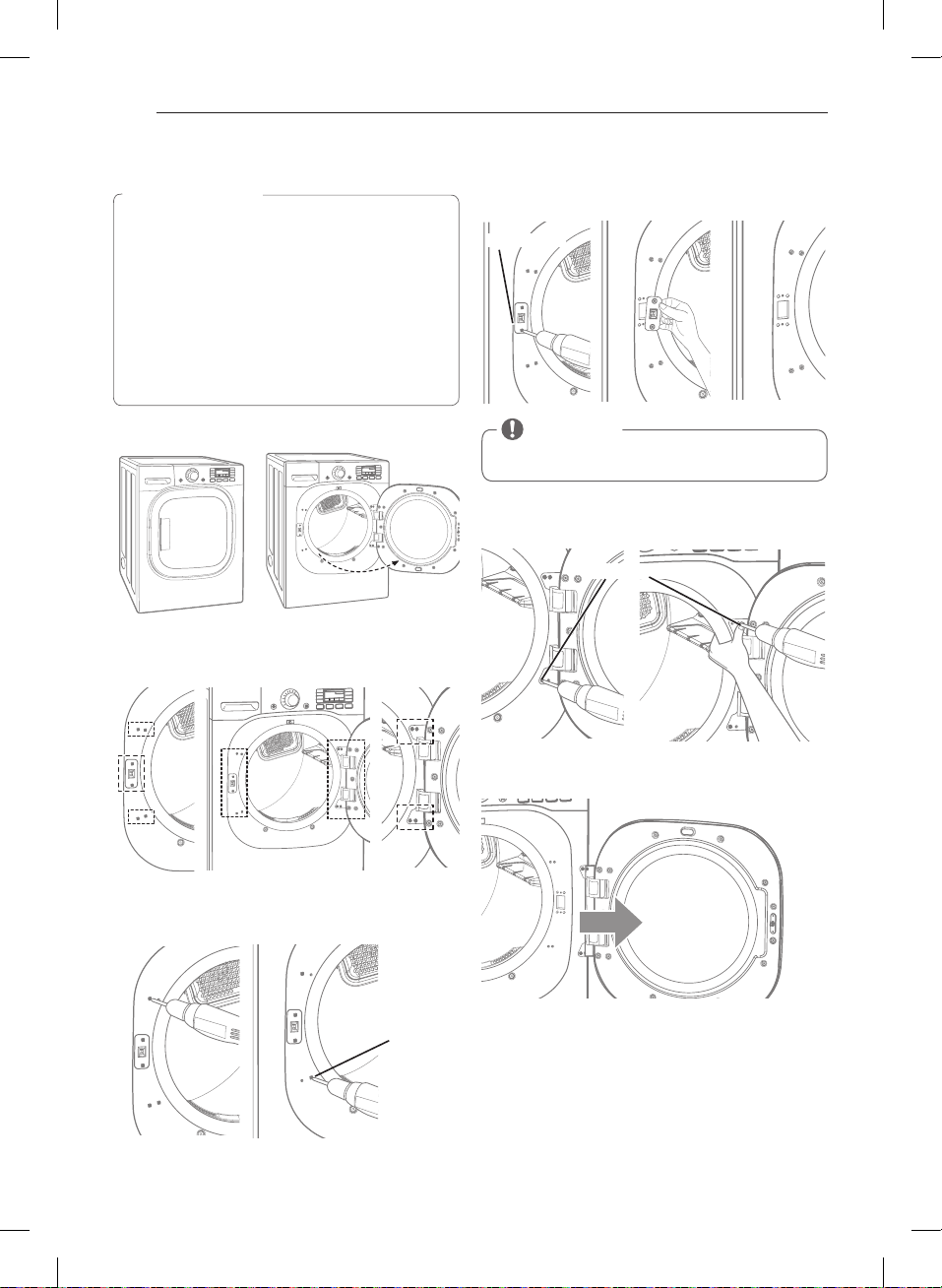
4. Remove the two latch screws and the latch.
5. Hold the hinge in place while removing the four hinge
screws (to prevent the door from dropping).
6. Remove the door from the cabinet cover.
1. Open the dryer door.
2. You will be removing the screws shown below
(6 on left, 4 on right).
3. Remove the four decorative screws on the left using a
screwdriver.
Reversing the door
Decorative
Hinge
Screw
Open Door
Remove
Door
Hinge Screw
Latch Screw
w
WARNING
the door.
THE DRYER DOOR IS VERY LARGE AND HEAVY. Failure
to follow the instructions below can result in damage
to the dryer, property damage or injury to persons.
INSTALLATION INSTRUCTIONS
CAUTION
Be sure to support the weight of the door before
removing the hinge screws.
MFL67731027_en_170830.indd 16 2017.8.30 4:30:11 PM
17
ENGLISH
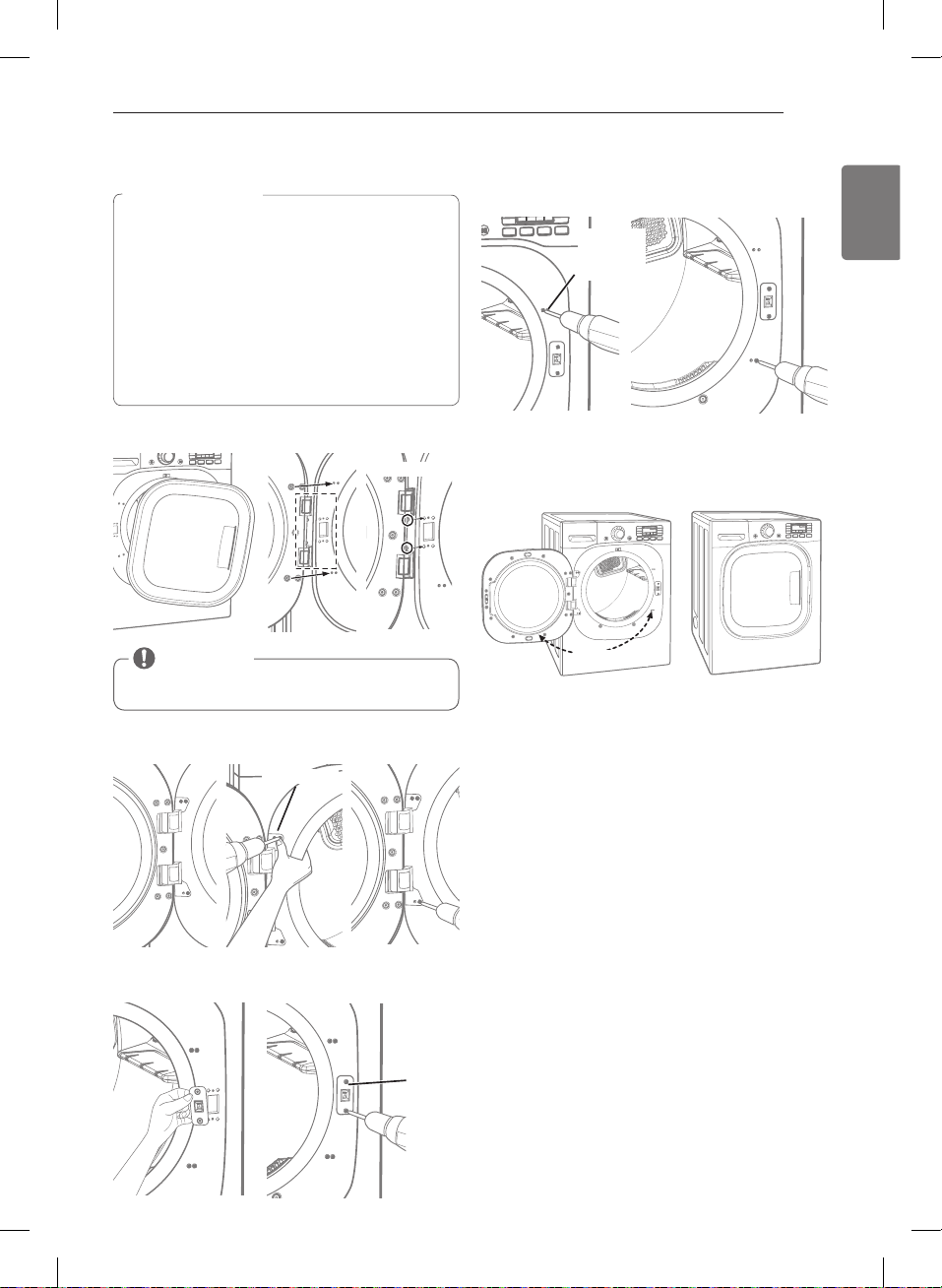
4. Insert the four decorative screws on the right side.
5. Check that the door closes and latches properly.
1. Move the door to the left side and line up the holes in
the hinge with the holes in the cabinet.
2. Hold the hinge in place while inserting the two hinge
screws (to prevent the door from dropping).
3. Insert the latch on the right side and install the latch
screws.
Reversing the door (cont.)
w
WARNING
the door.
THE DRYER DOOR IS VERY LARGE AND HEAVY. Failure
to follow the instructions below can result in damage
to the dryer, property damage or injury to persons.
Latch
Screw
Hinge Screw
Decorative
Hinge
Screw
Swing Door
Hinge hole
INSTALLATION INSTRUCTIONS
CAUTION
Be sure to support the weight of the door before
installing the hinge screws.
MFL67731027_en_170830.indd 17 2017.8.30 4:30:17 PM
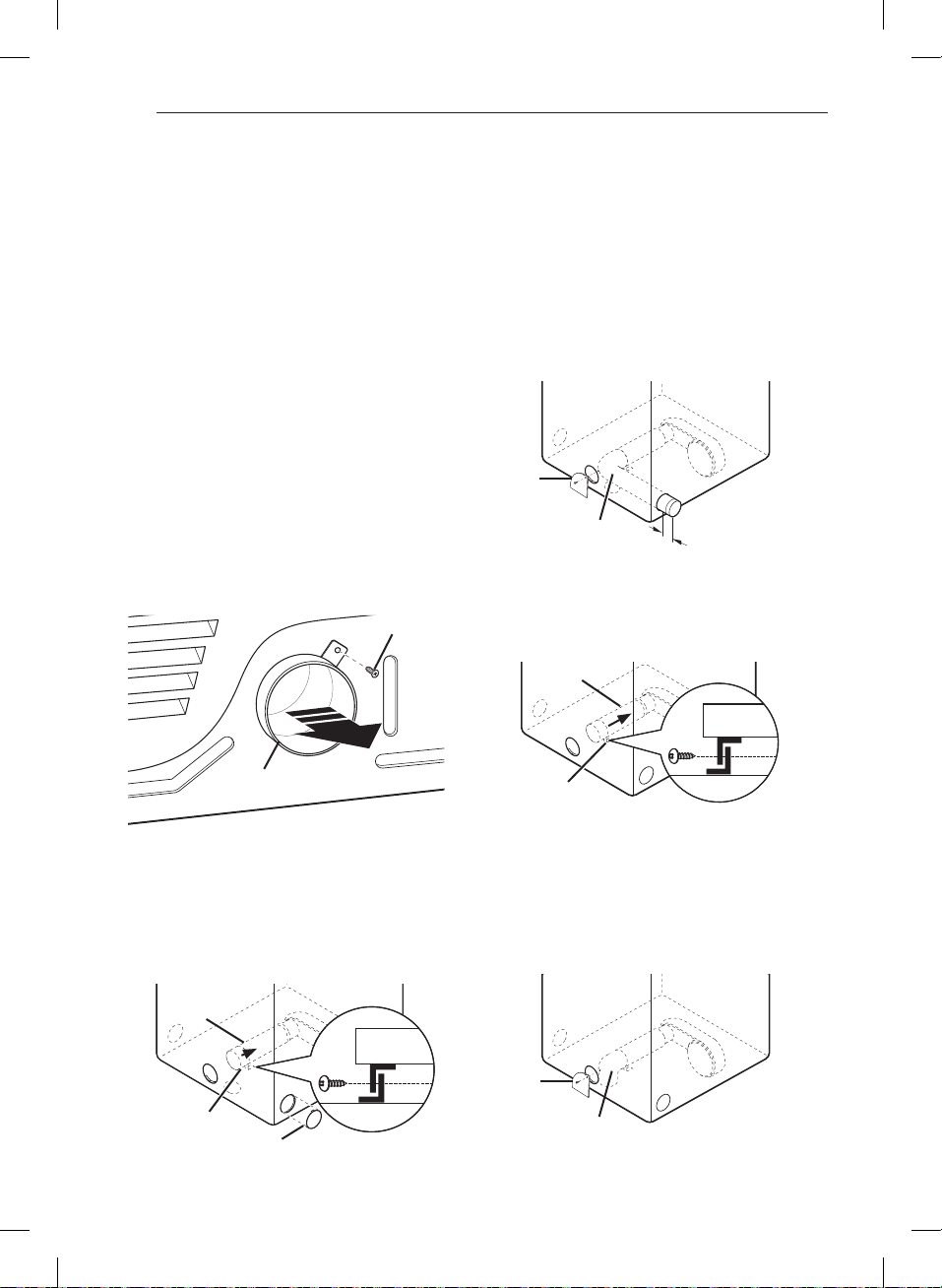
18
Installing the Side Vent Kit
w
WARNING
• Failure to follow all of the safety warnings in this
manual could result in property damage, injury to
persons, or death.
Your new dryer is shipped to vent to the rear.
It can also be configured to vent to the bottom or side
(right-side venting is not available on gas models).
An adapter kit, part number , may be
purchased from your LG retailer. This kit contains the
necessary duct components to change the dryer vent
location.
1. Remove the rear exhaust duct retaining screw. Pull
out the exhaust duct.
OPTION 1: SIDE VENTING
2. Press the tabs on the knockout and carefully remove
the knockout for the desired vent opening (right-
side venting is not available on gas models). Press the
adapter duct onto the blower housing and secure to
the base of the dryer as shown.
3. Preassemble a 4-inch (10.2 cm) elbow to the next
4-inch (10.2 cm) duct section, and secure all joints
with duct tape. Be sure that the male end of the elbow
faces AWAY from the dryer. Insert the elbow/duct
assembly through the side opening and press it onto
the adapter duct. Secure in place with duct tape.
Be sure that the male end of the duct protrudes 1½
inches (3.8 cm) to connect the remaining ductwork.
Attach the cover plate to the back of the dryer with
the included screw.
OPTION 2: BOTTOM VENTING
2. Press the adapter duct onto the blower housing and
secure it to the base of the dryer as shown.
3. Insert the 4-inch (10.2 cm) elbow through the rear
opening and press it onto the adapter duct. Be sure
that the male end of the elbow faces down through
the hole in the bottom of the dryer. Secure it in place
with duct tape.
Attach the cover plate to the back of the dryer with
the included screw.
Rear
Exhaust Duct
Retaining
Screw
Elbow
Cover
Plate
Knockout
Bracket
Adapter
Duct
Bracket
Adapter
Duct
Elbow
Cover
Plate
1
2/4
”
(3.8 cm)
INSTALLATION INSTRUCTIONS
MFL67731027_en_170830.indd 18 2017.8.30 4:30:19 PM
19
ENGLISH
Venting the Dryer
w
WARNING
To reduce the risk of fire, electric shock, or injury to persons when using this appliance, follow basic precautions,
including the following:
• Failure to follow
these instructions can result in fire or death.
•
Failure to follow these instructions can result
in fire or death.
•
Failure to follow these instructions can result in fire or
death.
•
Failure to follow these instructions can result in fire or
death.
•
Failure to follow these instructions can result in fire or
death.
•
outside. Failure to follow these instructions can result
in fire or death.
•
Failure to follow these instructions can result
in fire or death.
•
Failure to follow these instructions can result in fire or
death.
•
dryer. Failure to follow these instructions can result in
fire or death.
•
Failure to
follow these instructions can result in fire or death.
•
Failure to follow these
instructions can result in fire or death.
•
Failure to follow these instructions can
result in fire or death.
•
Failure to
follow these instructions can result in fire or death.
•
•
In the
United States, only those foil-type flexible ducts, if any,
specifically identified for use with the appliance by the
manufacturer and that comply with the Outline for
Clothes Dryer Transition Duct, Subject 2158A, shall be
used.
INSTALLATION INSTRUCTIONS
MFL67731027_en_170830.indd 19 2017.8.30 4:30:19 PM
20
Venting the Dryer (cont.)
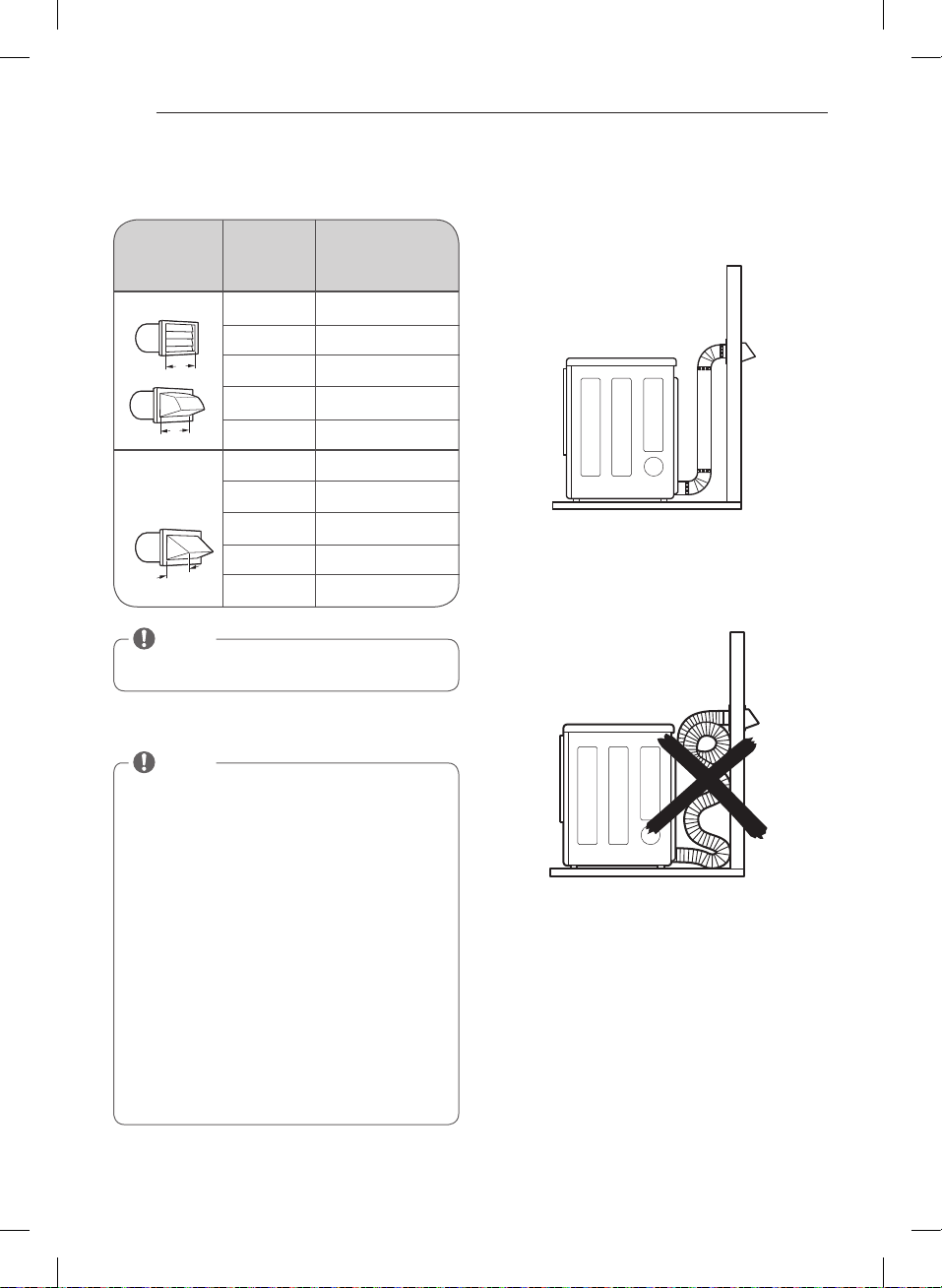
ROUTING AND CONNECTING DUCTWORK
NOTE
Deduct 6 ft. (1.8 m) for each additional elbow. Use of
more than four 90* elbows is not recommended.
NOTE
Follow the guidelines below to maximize drying
performance and reduce lint buildup and
condensation in the ductwork.
Ductwork and fittings are NOT included and must be
purchased separately.
• Use 4-inch (10.2 cm) diameter rigid or semirigid
metal ductwork.
• The exhaust duct run should be as short as possible.
• Use as few elbow joints as possible.
• The male end of each section of exhaust duct must
point away from the dryer.
• Use duct tape on all duct joints.
• Insulate ductwork that runs through unheated areas
in order to reduce condensation and lint buildup on
duct surfaces.
• Failure to exhaust the dryer correctly will void the
dryer’s warranty.
Ductwork
0
1
2
3
4
0
1
2
3
4
65 ft. (19.8 m)
55 ft. (16.8 m)
47 ft. (14.3 m)
36 ft. (11.0 m)
28 ft. (8.5 m)
55 ft. (16.8 m)
47 ft. (14.3 m )
41 ft. (12.5 m)
30 ft. (9.1 m)
22 ft. (6.7 m)
Recommended
Use only for
short run
installations
4”
(10.2 cm)
4”
(10.2 cm)
2
2
/
4
”
(6.35 cm)
INSTALLATION INSTRUCTIONS
MFL67731027_en_170830.indd 20 2017.8.30 4:30:21 PM
21
ENGLISH
Connecting Gas Dryers
w
WARNING
To reduce the risk of fire, electric shock, or injury to persons when using this appliance, follow basic precautions,
including the following:
Electrical requirements for gas models only
w
WARNING
To reduce the risk of fire, electric shock, or injury to persons when using this appliance, follow basic precautions,
including the following:
•
Failure
to follow this warning can result in fire, explosion, or
death.
•
Failure to follow this warning can result in
fire, explosion, or death.
•
Failure to follow this warning can
result in fire, explosion, or death.
•
Failure to follow this
warning can result in fire, explosion, or death.
•
•
Failure
to follow this warning can result in fire, explosion, or
death.
•
Failure to do
so can result in fire, explosion, or death.
•
Failure to do so can result in fire, explosion, or death.
•
Failure to do so can result in fire, explosion, or
death.
•
Failure to do so can result in fire,
explosion, or death.
•
Failure to do so can result in fire,
explosion, or death.
•
Failure to
do so can result in fire, explosion, or death.
•
Failure
to do so can result in fire, explosion, or death.
• Failure to do
so can result in fire, explosion, or death.
•
Failure to do so can result in fire, explosion,
or death.
•
Failure to do so can result in fire, explosion, or death.
INSTALLATION INSTRUCTIONS
w
WARNING
Failure to follow safety warnings could result in serious
injury or death.
This dryer is equipped with a three-prong grounding
plug for protection against shock hazard and should
be plugged directly into a properly grounded three-
prong receptacle. Do not cut or remove the grounding
prong from this plug.
MFL67731027_en_170830.indd 21 2017.8.30 4:30:21 PM
22
Connecting Gas Dryers (cont.)
w
WARNING
To reduce the risk of fire, electric shock, or injury
to persons when using this appliance, follow basic
precautions, including the following:
•
Failure to do so can result in fire, explosion,
or death.
•
Failure to do so
can result in fire, explosion, or death.
•
Failure to do so can result in fire,
explosion, or death.
•
Failure to do so can result in fire,
explosion, or death.
•
Failure to do so can
result in fire, explosion, or death.
•
. Failure to do so can result in
fire, explosion, or death.
• Failure to
do so can result in fire, explosion, or death.
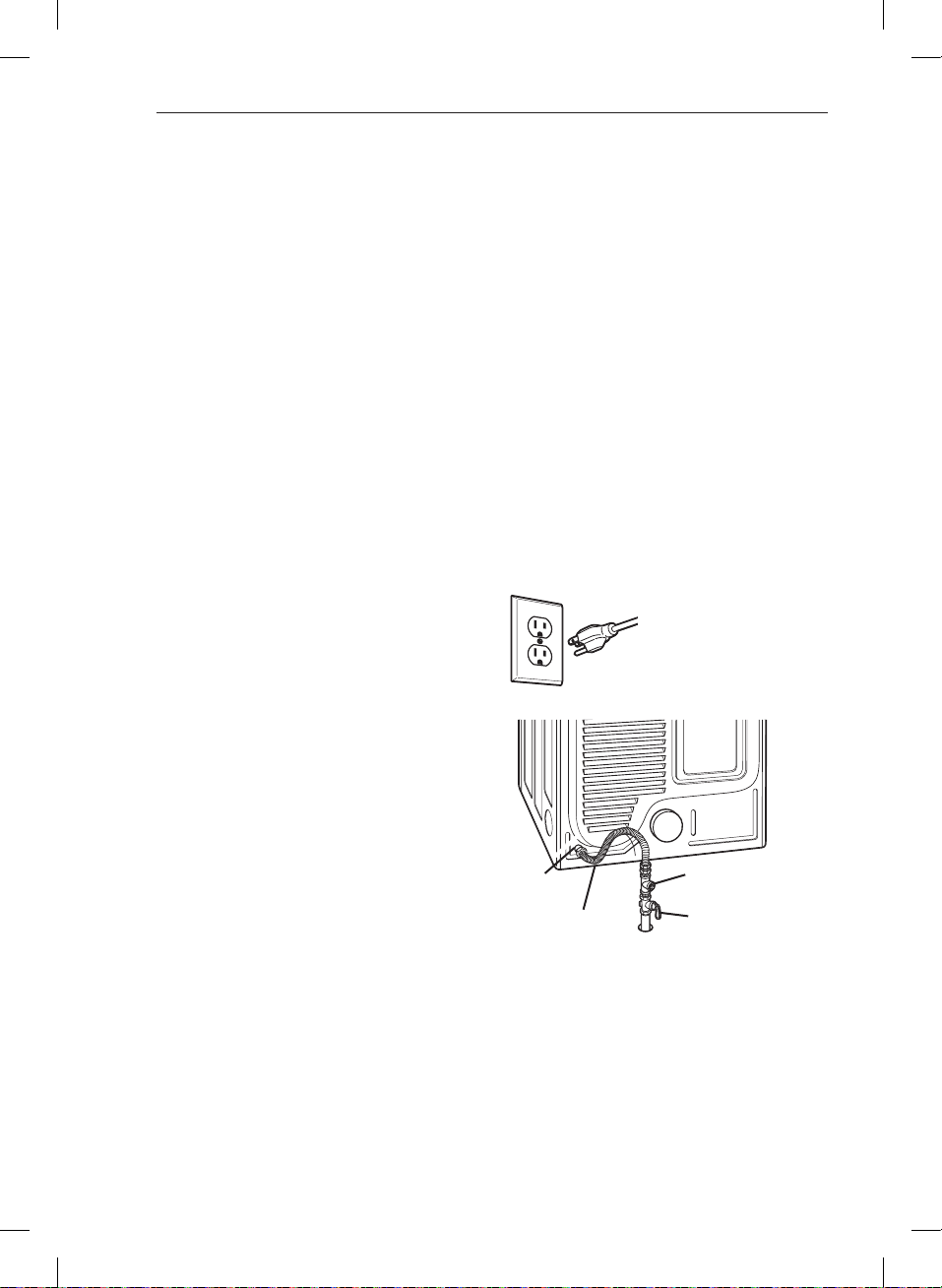
Connecting the gas supply
1. Make sure that the gas supply to the laundry room is
turned OFF. Confirm that the type of gas available in
your laundry room is appropriate for the dryer. The
dryer is prepared for Natural Gas with a
3
⁄₈ - inch NPT
gas connection.
2. Remove the shipping cap from the gas connection
at the back of the dryer. Be careful not to damage
the threads of the gas connector when removing the
shipping cap.
3. Connect the dryer to your laundry room’s gas supply
using a new flexible stainless steel connector with a
3
⁄₈
- inch NPT fitting.
4. Securely tighten all connections between the
dryer and your laundry room’s gas supply. Turn on
your laundry room’s gas supply and check all pipe
connections (both internal and external) for gas leaks
with a noncorrosive leak-detection fluid.
Electrical connection
High-altitude installations
The BTU rating of this dryer is AGA-certified for
elevations below 10,000 feet.
If your gas dryer is being installed at an elevation above
10,000 feet, it must be derated by a qualified technician
or gas supplier.
Plug dryer into a
grounded 3-prong
outlet.
Gas Supply
Shutoff Valve
3/8” NPT Gas
Connection
1/8” NPT Pipe
Plug
AGA/CSA-Certified
Stainless Steel Flexible
Connector
INSTALLATION INSTRUCTIONS
MFL67731027_en_170830.indd 22 2017.8.30 4:30:22 PM
23
ENGLISH
Connecting Electric Dryers
w
WARNING
To help prevent fire, electric shock, serious injury,
or death, the wiring and grounding must conform
to the latest edition of the National Electrical Code,
ANSI/NFPA 70 and all applicable local regulations.
Please contact a qualified electrician to check your
home’s wiring and fuses to ensure that your home has
adequate electrical power to operate the dryer.
Electrical requirements for electric models only
w
WARNING
To reduce the risk of fire, electric shock, or injury
to persons when using this appliance, follow basic
precautions, including the following:
•
Failure to
do so can result in fire, explosion, or death.
•
Failure to follow
these instructions can result in fire, explosion, or
death.
•
Failure to do so can result in fire,
explosion, or death.
•
Failure to follow these instructions can result in fire,
explosion, or death.
•
Failure
to do so can result in fire, explosion, or death.
w
WARNING
To reduce the risk of fire, electric shock, or injury
to persons when using this appliance, follow basic
precautions, including the following:
w
WARNING
To reduce the risk of fire, electric shock, or injury
to persons when using this appliance, follow basic
precautions, including the following:
•
•
Failure to
do so can result in fire, explosion, or death.
INSTALLATION INSTRUCTIONS
MFL67731027_en_170830.indd 23 2017.8.30 4:30:22 PM
24
Connecting Electric Dryers (cont.)
USA only
w
WARNING
•
fire or death.
•
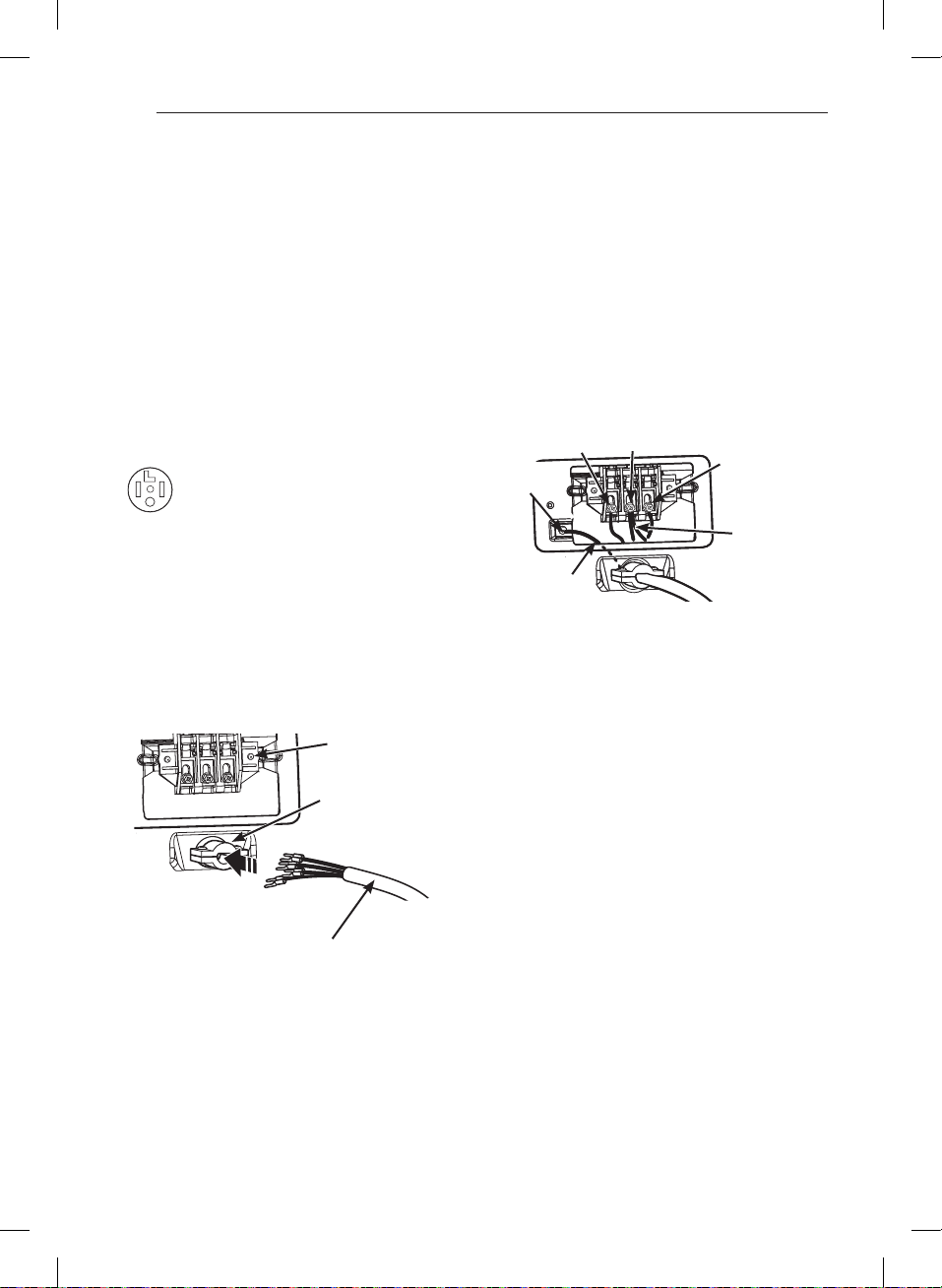
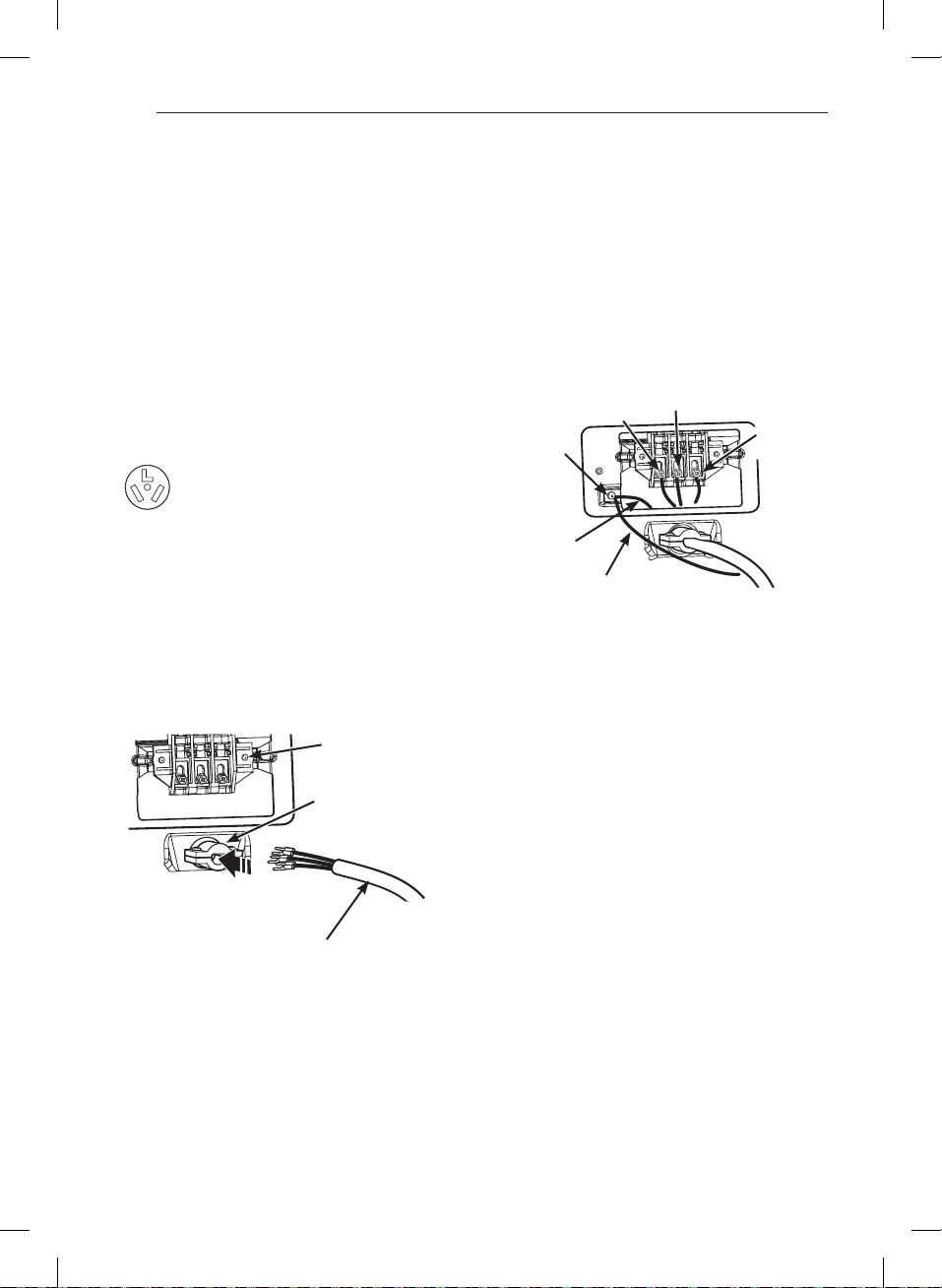
Four-wire connection for electric dryers:
Power cord
• A 4-wire connection is required for all mobile and
manufactured home installations, as well as all new
construction after January 1, 1996.
• A UL-listed strain relief is required.
1. Remove the terminal block access cover on the upper
back of the dryer. Install a UL-listed strain relief into
the power cord through-hole; then thread a UL-listed,
conductor power cord through the strain relief.
•
conductor and closed loop or
forked terminals with upturned ends.
2. Transfer the dryer’s ground wire from behind the
green ground screw to the center screw of the
terminal block. Attach the two hot leads of the power
cord to the outer terminal block screws. Attach the
white neutral wire to the center terminal block screw.
Attach the power cord ground wire to the green
ground screw. .
Reinstall the terminal block access cover.
Hot
(Black)
Power Cord
Ground Wire
Ground
Screw
White Wire
moved from
Ground Screw
Neutral
(White)
Hot
(Red)
UL-Listed
Strain Relief
UL-Listed
4-Wire Power
Cord
Terminal
Block
INSTALLATION INSTRUCTIONS
MFL67731027_en_170830.indd 24 2017.8.30 4:30:23 PM
25
ENGLISH
w
WARNING
•
•
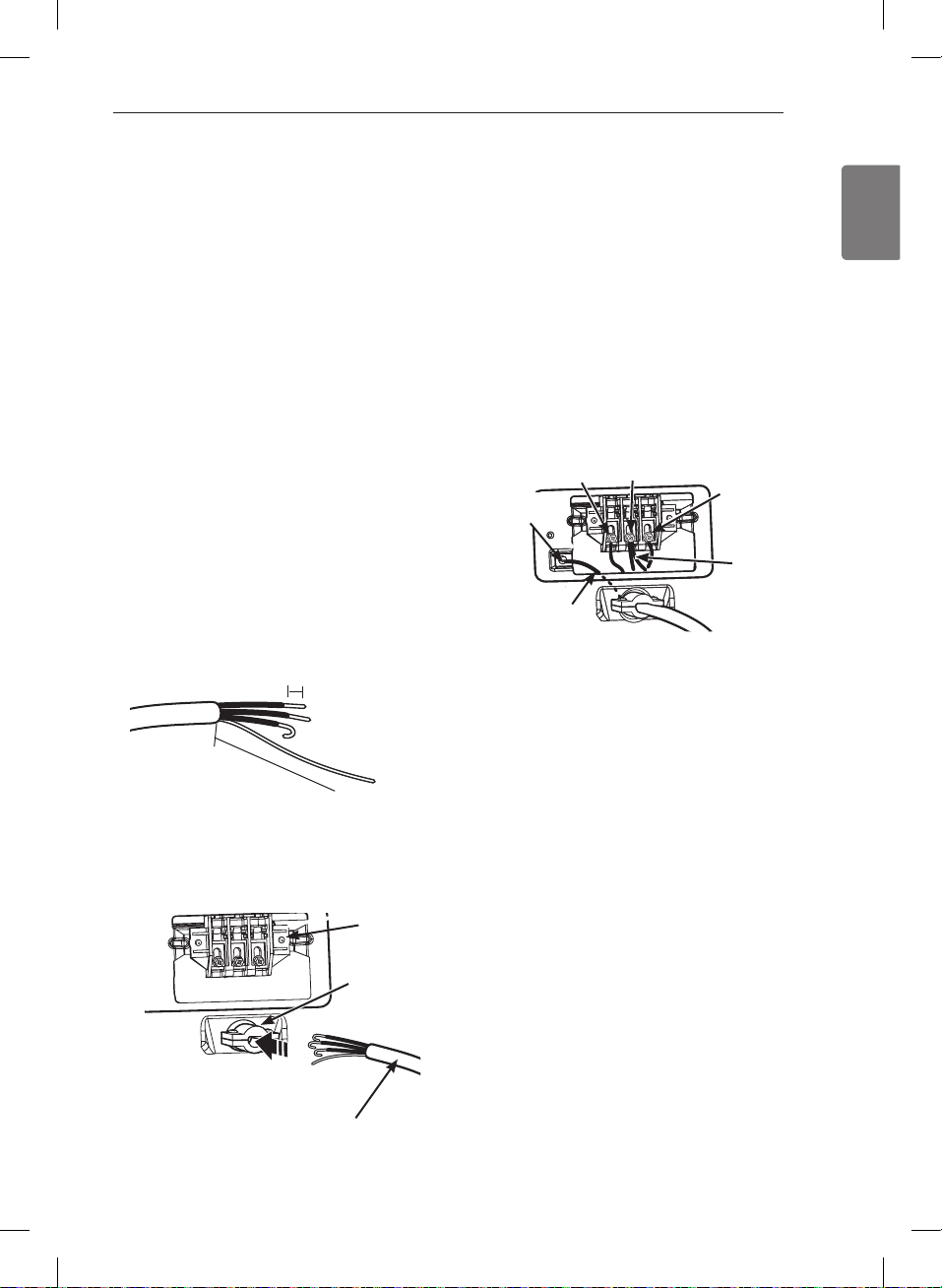
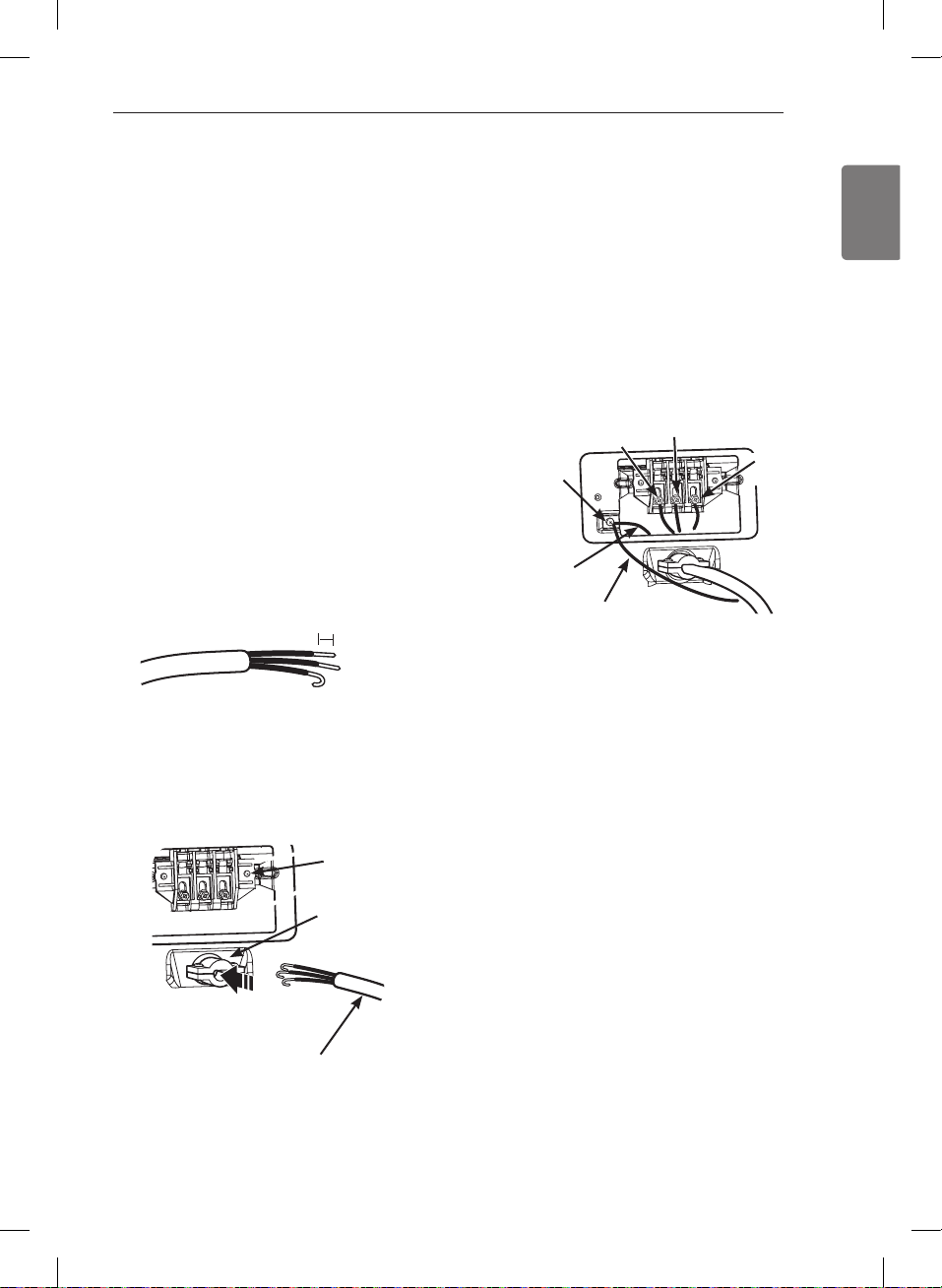
Four-wire connection for electric dryers: Direct wire
• A 4-wire connection is required for all mobile and
manufactured home installations, as well as all new
construction after January 1, 1996.
• A UL-listed strain relief is required.
1. Remove 5 inches (12.7 cm) of the outer covering from
the wire. Remove 5 inches of insulation from the
ground wire. Cut off approximately 1
1
⁄₂ inches (3.8 cm)
from the other three wires and strip 1 inch (2.5 cm)
insulation from each wire. Bend the ends of the three
shorter wires into a hook shape.
2. Remove the terminal block access cover on the upper
back of the dryer. Install a UL-listed strain relief into
the power cord through-hole; then thread the power
cable prepared in Step 1 through the strain relief.
Ground Wire
5"
(12.7 cm)
1" (2.5 cm)
Connecting Electric Dryers (cont.)
USA only
• Use UL-listed
conductor cable.
• Allow at least 5 ft. (1.5 m) length to allow for removal
and reinstallation of the dryer.
3. Transfer the dryer’s ground wire from behind the
green ground screw to the center screw of the
terminal block. Attach the two hot leads of the power
cable to the outer terminal block screws. Attach the
white neutral wire to the center terminal block screw.
Attach the power cable ground wire to the green
ground screw. .
Reinstall the terminal block access cover.
UL-Listed
Strain Relief
UL-Listed 4-Wire
Power Cord
Terminal
Block
Hot
(Black)
Power Cord
Ground Wire
Ground
Screw
White Wire
moved from
Ground Screw
Neutral
(White)
Hot
(Red)
INSTALLATION INSTRUCTIONS
MFL67731027_en_170830.indd 25 2017.8.30 4:30:24 PM
26
Connecting Electric Dryers (cont.)
USA only
w
WARNING
•
•
Three-wire connection for electric dryers:
Power cord
• A 3-wire connection is NOT permitted on new
construction after January 1, 1996.
• A UL-listed strain relief is required.
1. Remove the terminal block access cover on the
upper back of the dryer. Install a UL-listed strain relief
into the power cord through-hole; then thread a UL-
listed,
conductor power cord through the strain
relief.
• Use a
conductor and closed loop or
forked terminals with upturned ends.
2. Attach the two hot leads of the power cord to the
outer terminal block screws. Attach the neutral wire to
the center terminal block screw. Connect the external
ground (if required by local codes) to the green
ground screw. .
Reinstall the terminal block access cover.
UL-Listed
Strain Relief
UL-Listed
3-Wire Power
Cord
Terminal
Block
Ground
Screw
Neutral
(White)
Hot
(Black)
Hot
(Red)
External Ground
Wire (If required
by local codes)
White Wire
from Dryer
harness
INSTALLATION INSTRUCTIONS
MFL67731027_en_170830.indd 26 2017.8.30 4:30:25 PM
27
ENGLISH
Connecting Electric Dryers (cont.)
USA only
w
WARNING
•
fire or death.
•
Three-wire connection for electric dryers: Direct wire
• A 3-wire connection is NOT permitted on new
construction after January 1, 1996.
• A UL-listed strain relief is required.
1. Remove 3
1
⁄₂ inches (8.9 cm) of the outer covering from
the wire. Strip 1 inch (2.5 cm) insulation from each
wire. Bend the ends of the three wires into a hook
shape.
2. Remove the terminal block access cover on the upper
back of the dryer. Install a UL-listed strain relief into
the power cord through-hole; then thread the power
cable prepared in Step 1 through the strain relief.
• Use UL-listed
conductor cable.
• Allow at least 5 ft. (1.5 m) length to allow for removal
and reinstallation of the dryer.
3. Attach the two hot leads of the power cord to the
outer terminal block screws. Attach the neutral wire to
the center terminal block screw. Connect the external
ground (if required by local codes) to the green
ground screw. .
Reinstall the terminal block access cover.
1" (2.5 cm)
UL-Listed
Strain Relief
UL-Listed 3-Wire
Power Cord
Terminal
Block
Ground
Screw
Neutral
(White)
Hot
(Black)
Hot
(Red)
External Ground
Wire (If required
by local codes)
White Wire
from Dryer
harness
INSTALLATION INSTRUCTIONS
MFL67731027_en_170830.indd 27 2017.8.30 4:30:26 PM
28
Special Requirements for
Manufactured or Mobile Homes
Any installation in a manufactured or mobile home must
comply with the Manufactured Home Construction and
Safety Standards Title 24 CFR, Part 3280 or Standard
CAN/CSA Z240 MH and local codes and ordinances. If
you are uncertain whether your proposed installation
will comply with these standards, please contact a
service and installation professional for assistance.
• A gas dryer must be permanently attached to the floor.
• The electrical connection for an electric dryer must
be a 4-wire connection. More detailed information
concerning the electrical connection is provided in the
section Connecting Electric Dryers.
• To reduce the risk of combustion and fire, the dryer
must be vented to the outside.
• DO NOT vent the dryer under a manufactured home or
mobile home.
• Electric dryers may be vented to the outside using the
back, left, right, or bottom panel.
• Gas dryers may be vented to the outside using the
back, left, or bottom panel. Gas dryers may not be
vented to the outside using the right side panel
because of the burner housing.
• The dryer exhaust duct must be affixed securely to
the manufactured or mobile home structure, and the
exhaust duct must be made of a material that will resist
fire and combustion.
It is recommended that you use a rigid or flexible metal
duct.
• DO NOT connect the dryer exhaust duct to any other
duct, vent, chimney, or other exhaust duct.
• Make sure the dryer has adequate access to outside
fresh air to ensure proper operation. The opening for
outside fresh air must be at least 25 in
2
(163 cm
2
).
• It is important that the clearance of the duct from any
combustible construction be at least 2 inches (5 cm),
and when venting the dryer to the outdoors, the dryer
can be installed with a clearance of 1 inch (2.5 cm) at
the sides and back of the dryer.
• Please be aware that venting materials are not supplied
with the dryer. You should obtain the venting materials
necessary for proper installation.
Final Installation Check
Once you have completed the installation of the dryer
and it is in its final location, confirm proper operation
with the following tests and Installation Test (Duct
Check) on the following page.
Testing dryer heating
Close the dryer door, press the ON/OFF button to turn
the dryer on, and start the dryer on a heat setting.
When the dryer starts, the igniter should ignite the main
burner.
Close the dryer door, press the ON/OFF button to turn
the dryer on, and start the dryer on a heat setting. The
exhaust air should be warm after the dryer has been
operating for 3 minutes.
Checking airflow
Effective dryer operation requires proper airflow.
The adequacy of the airflow can be measured by
evaluating the static pressure. Static pressure in the
exhaust duct can be measured with a manometer,
placed on the exhaust duct approximately 2 ft. (60.9 cm)
from the dryer.
Static pressure in the exhaust duct should not exceed 0.6
inches (1.5 cm). The dryer should be checked while the
dryer is running with no load.
Checking levelness
Once the dryer is in its final location, recheck the dryer
to be sure it is level. Make sure it is level from front to
back and side to side, and that all four leveling feet are
firmly on the floor.
NOTE
If all air is not purged from the gas line, the gas igniter
may turn off before the main burner ignites. If this
happens, the igniter will reattempt gas ignition after
approximately two minutes.
INSTALLATION INSTRUCTIONS
MFL67731027_en_170830.indd 28 2017.8.30 4:30:27 PM
29
ENGLISH
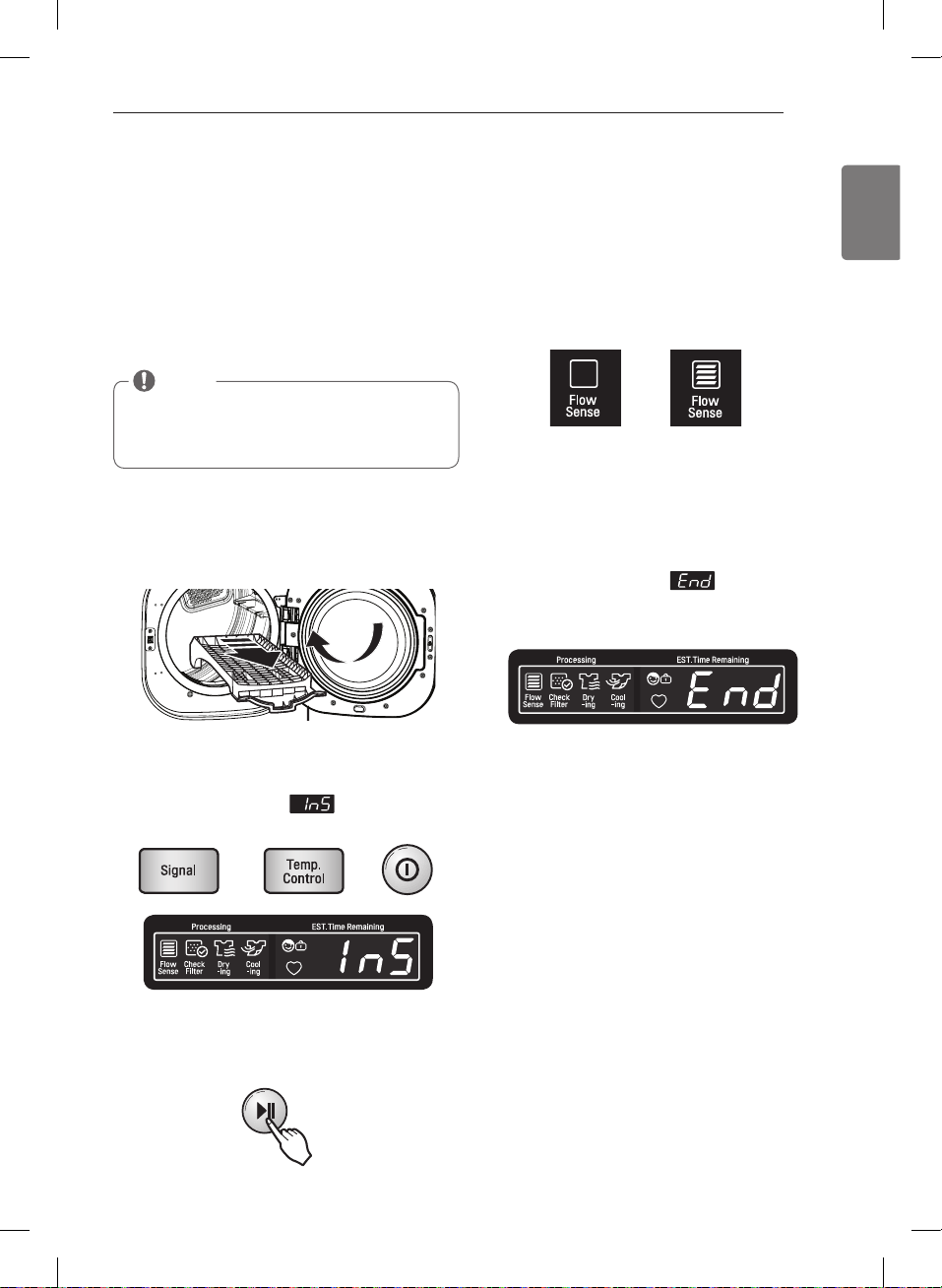
Installation test (Duct check)
Once you have completed the installation of the dryer,
use this test to make sure the condition of the exhaust
system is adequate for proper operation of the dryer.
This test should be performed to alert you to any serious
problems in the exhaust system of your home.
• Your dryer features FLOW SENSE
TM
, an innovative
sensing system that automatically detects blockages
and restrictions in dryer ductwork. Keeping ductwork
clean of lint buildup and free of restrictions allows
clothes to dry faster and reduces energy use.
1.
Do not load anything in the drum for this test, as it
may affect the accuracy of the results.
2.
This button sequence activates the
installation test. The code
will display if the
activation is successful.
3.
The dryer will start the test, which will last about
two minutes. The heat will be turned on and the
temperatures in the drum will be measured.
4.
During the test cycle, monitor the FLOW SENSE
TM
display on the control panel. If no bars are displayed,
when the cycle ends, the exhaust system is
adequate. If the exhaust system is severely restricted,
the display will show four bars.
Other problems may also be shown with error codes.
Refer to the next page for error code details and
solutions.
Four bars indicates that the exhaust system is severely
restricted. Have the system checked immediately, as
performance will be poor.
5.
At the end of the test cycle,
will display.
The test cycle will end and the dryer will shut off
automatically after a short delay.
NOTE
The dryer should be cool before starting this test. If
the dryer was warmed up during installation, run the
AIR DRY cycle for a few minutes to reduce the interior
temperature.
NO BARS:
OK
FOUR BARS:
RESTRICTED
INSTALLATION INSTRUCTIONS
MFL67731027_en_170830.indd 29 2017.8.30 4:31:34 PM
30
Installation test (Duct check) (cont.)
• Check the Error Code before you call for service
If the FLOW SENSE
TM
LED is turned on, check the
exhaust system for restrictions and damage. Repair or
replace the exhaust system as needed.
Error Code Possible Causes Solutions
or
• Temperature sensor failure • Turn o the dryer and call for service.
• Humidity Sensor failure. • Turn o the dryer and call for service.
or
or
• Electric dryer power cord is not
connected correctly, or house power
supply is incorrect.
• House fuse is blown, circuit breaker has
tripped, or power outage has occurred.
• Check the power supply or the connection of
power cord to the terminal block. Refer to the
section of this
manual for complete instructions.
• Reset circuit breaker or replace fuse. Do not
increase the fuse capacity. If the problem is a
circuit overload, have it corrected by a quali-
ed electrician.
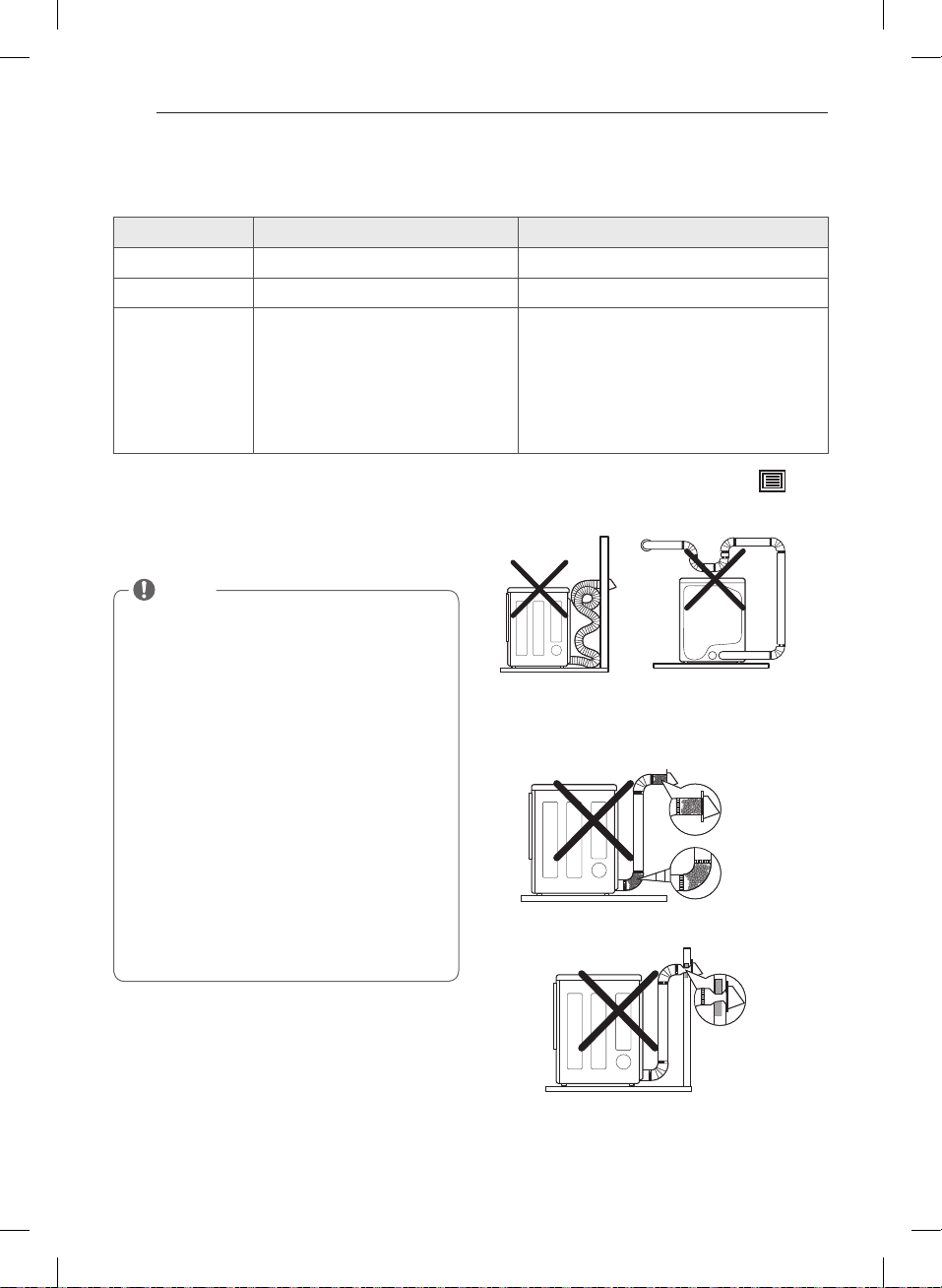
Avoid long runs or runs with multiple elbows or
bends.
Excess or crushed
transition duct
Too many elbows or
exhaust too long
Check for blockages and lint buildup.
Make sure the ductwork is not crushed or restricted.
Crushed or
damaged
exhaust
Lint buildup
or blockage
NOTE
When the dryer is rst installed, this test should be
performed to alert you to any existing problems with
the exhaust duct in your home. However, since the
test performed during normal operation provides
more accurate information on the condition of the
exhaust duct than does the installation test, the num-
ber of bars displayed during the two tests may not be
the same.
Do not interrupt the test cycle, as this could result in
inaccurate results.
Even if no bars are displayed during the test cycle,
some restrictions may still be present in the exhaust
system. Refer to the Venting the Dryer section of this
manual for complete exhaust system and venting
requirements.
Your dryer features Flow Sense™, an innovative sens-
ing system that automatically detects blockages and
restrictions in dryer ductwork. Keeping ductwork
clean of lint buildup and free of restrictions allows
clothes to dry faster and reduces energy use.
INSTALLATION INSTRUCTIONS
MFL67731027_en_170830.indd 30 2017.8.30 4:31:40 PM
31
ENGLISH
HOW TO USE
Operating the Dryer
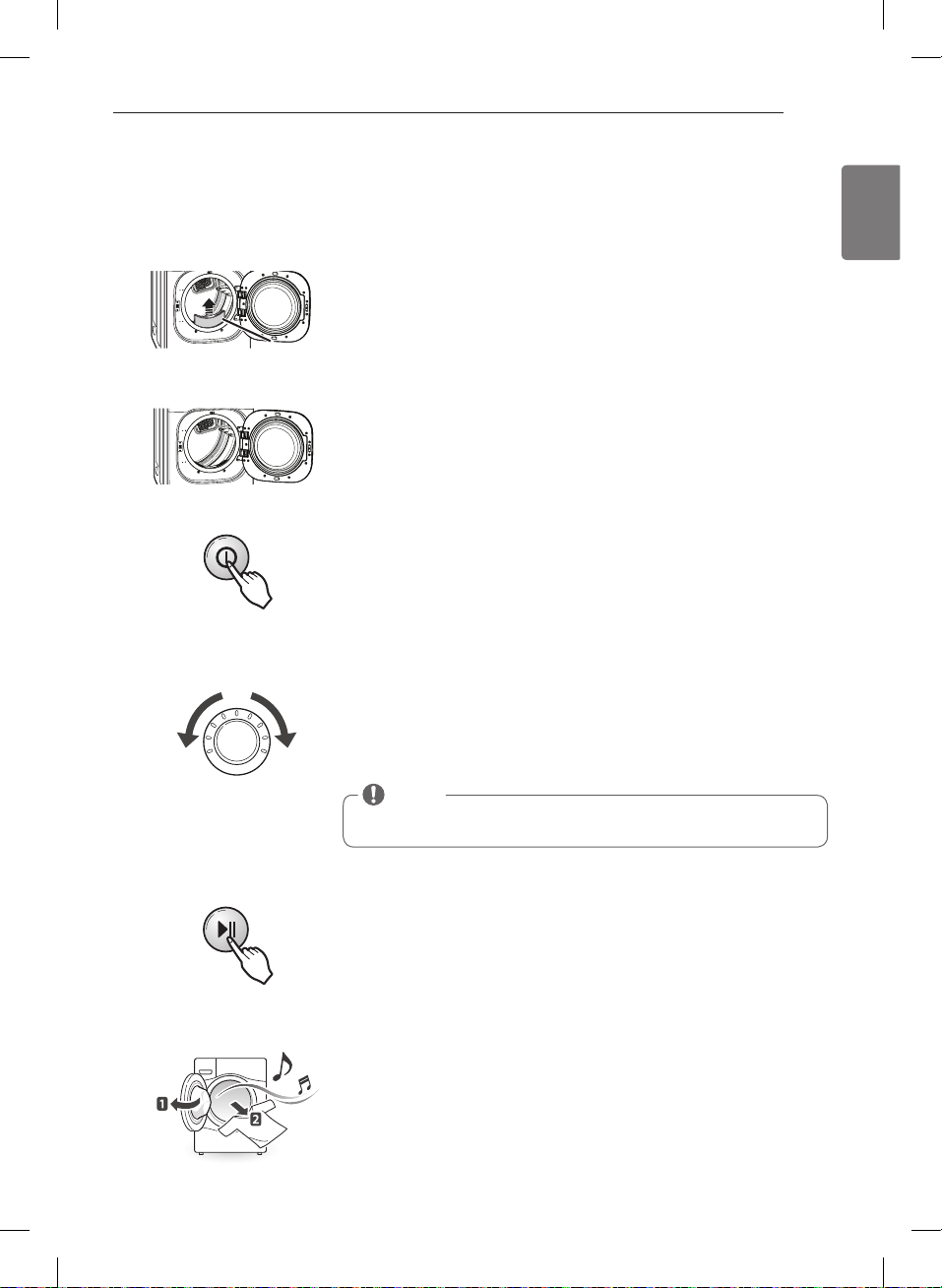
Press the POWER button to turn on the dryer. The cycle LEDs will illuminate
and a signal will sound, if turned on. Refer to page 10.
3
Press the START/PAUSE button to begin the cycle. The cycle can be paused at
any time either by opening the door or by pressing the START/PAUSE button. If
the cycle is not restarted within 4 minutes, the dryer will shut off and the cycle
settings will be lost.
5
Turn the cycle selector knob either direction until the LED for the desired cycle
is on. The preset temperature, dry level, and option settings for that cycle will
be shown. Refer to page 32. Default settings for the selected cycle can now be
changed if desired. This can be done using the cycle modifier buttons as shown
on page 34. Cycle options can be added using the option buttons as shown on
page 34-36.
4
NOTE
Not all options or modifiers are available on all cycles. A different chime will
sound and the LED will not come on if the selection is not allowed.
When the cycle is finished, the chime will sound if it is set. Remove your
clothing from the dryer immediately to reduce wrinkling. If WRINKLE CARE
is selected, the dryer will tumble briefly every few minutes to help prevent
wrinkles from setting in the clothes.
6
Load the dryer with the wet laundry from the washer. If the load is extra large,
you may need to divide it into smaller loads for proper performance and fabric
care.
2
If the lint filter has not already been cleaned, lift out the filter and remove the
lint from the last load. This will help ensure the fastest and most efficient drying
performance.
1
Lint Filter
HOW TO USE
MFL67731027_en_170830.indd 31 2017.8.30 4:32:13 PM
32
STEAM
FRESH
TM
Comforter, shirts,
trousers (except
especially delicate
fabrics)
OFF
MID HIGH 20
ADJUSTABLE
ADJUSTABLE
STEAM
SANITARY
TM
Comforter, bedding,
children’ clothing
OFF HIGH 39
ANTI
BACTERIAL
Do not use this cycle
with delicate fabrics.
VERY
HIGH
70
BULKY/
LARGE
Comforters, pillows,
shirts
NORMAL
MEDIUM 55
ADJUSTABLE
PERM.
PRESS
Permanent press,
synthetic items
NORMAL
LOW 32
ADJUSTABLE
COTTON/
NORMAL
Work clothes, corduroys,
etc.
NORMAL
MEDIUM
Elec. : 67
Gas : 63
ADJUSTABLE
HEAVY
DUTY
Jeans, heavyweight
items
NORMAL
HIGH
54
ADJUSTABLE
SPORTS
WEAR
Sports wear
OFF OFF 27
DELICATES
Lingerie, sheets, blouses
NORMAL
LOW 28
ADJUSTABLE
TOWELS
Denim, towels, heavy
cottons
NORMAL
MID HIGH 55
ADJUSTABLE
SPEED
DRY
For small loads with
short drying times
OFF
HIGH 25
ADJUSTABLE
ADJUSTABLE
FRESHEN
UP
For removing light
wrinkles from clothing
OFF
MID HIGH 20
ADJUSTABLE
ADJUSTABLE
AIR DRY
For items that require
heat-free drying such
as plastics or foam filled
items
OFF NO HEAT
30
ADJUSTABLE
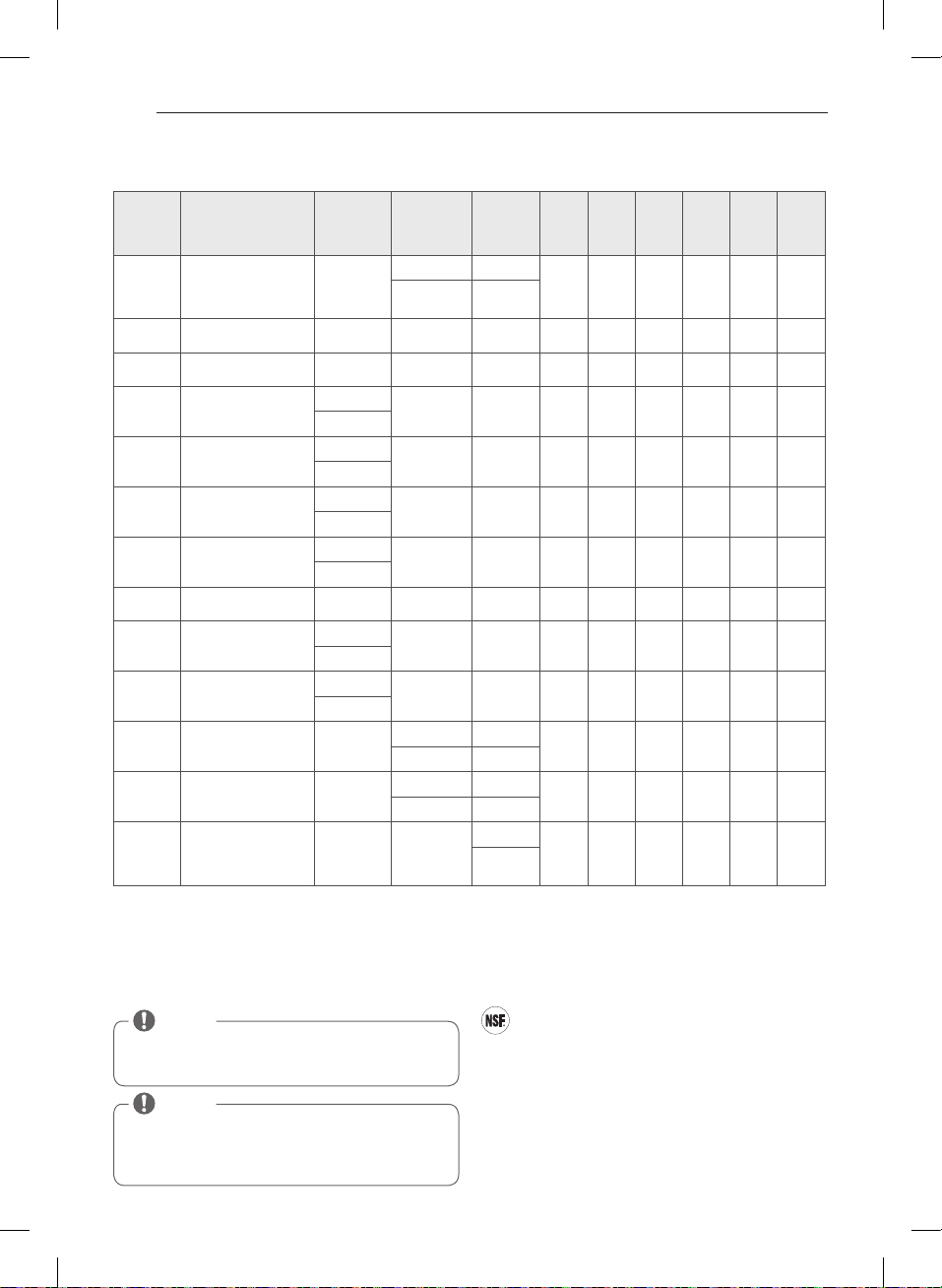
Cycle Guide
= Available option
Sensor Dry Cycles
Sensor Dry cycles utilize LG’s unique dual sensor system to
detect and compare the moisture level in clothes and in the
air and adjust the drying time as needed to ensure superior
results. The dryer automatically sets the dryness level and
temperature at the recommended setting for each cycle.
The estimated time remaining will be shown in the display.
Manual Dry Cycles
Use Manual Dry cycles to select a specific amount of
drying time and a drying temperature. When a Manual
Dry cycle is selected, the ESTIMATED TIME REMAINING
display shows the actual time remaining in your cycle.
You can change the actual time in the cycle by pressing
MORE TIME or LESS TIME.
NSF International (formerly the National Sanitation
Foundation), certifies that the cycle
reduces 99.9% of bacteria on laundry, and none of the
bacteria will carry over onto the next laundry load.
• The default settings for the cycle are
temperature and .
These default settings cannot be changed.
• Do NOT use this cycle with delicate items or fabrics.
NOTE
To protect your garments not every dryness level,
temperature, or option is available with every cycle.
See the Cycle Guide for details.
NOTE
The Energy Saver option is turned on by default in the
Cotton/Normal cycle.
For faster drying in the Cotton/Normal cycle, turn off
the Energy Saver option.
HOW TO USE
MFL67731027_en_170830.indd 32 2017.8.30 4:32:16 PM
34
Your dryer features several additional cycle options to
customize cycles to meet your individual needs. Certain
option buttons also feature a special function (see the
following page for details) that can be activated by
pressing and holding that option button for 3 seconds.
To Add Cycle Options to a Cycle:
1. Turn on the dryer and turn the cycle selector knob to
select the desired cycle.
2. Use the cycle modifier buttons to adjust the settings
for that cycle.
3. Press the cycle option button(s) for the option you
would like to add. A confirmation message will be
shown in the display.
4. Press the START/PAUSE button to start the cycle. The
dryer will start automatically.
SIGNAL
Adjusts the volume of the Signal or turns off the Signal.
Press the button repeatedly until the desired volume
setting is illuminated.
Cycle Modifier Buttons
SENSOR DRY cycles have preset settings that are
selected automatically. MANUAL DRY cycles have
default settings, but you may also customize the
settings using the cycle modifier buttons.
Press the button for that option to view and select other
settings.
DRY LEVEL
Selects the level of dryness for the cycle. Press the DRY
LEVEL button repeatedly to scroll through available
settings.
• This option is only available with SENSOR DRY cycles.
• The dryer will automatically adjust the cycle time.
Selecting MORE DRY or VERY DRY will increase the
cycle time, while LESS DRY or DAMP DRY will decrease
the cycle time.
• Use a LESS DRY or DAMP DRY setting for items that you
wish to iron.
TEMP. CONTROL
Adjusts the temperature setting from ULTRA LOW
to HIGH. This allows precise care of your fabrics and
garments. Press the TEMP. CONTROL button repeatedly
to scroll through available settings.
TIME DRY
Allows you to manually select the drying time, from 20
to 60 minutes, in 10-minute increments. Use this for
small loads or to remove wrinkles. Use the MORE TIME/
LESS TIME buttons to add or reduce the drying time in
1-minute increments.
NOTE
To protect your garments, not every dryness level,
temperature, or option is available with every cycle.
See the Cycle Guide for details.
HOW TO USE
MFL67731027_en_170830.indd 34 2017.8.30 4:32:17 PM
35
ENGLISH
Special functions
The option buttons also activate special functions,
including CHILD LOCK and RACK DRY.
Select the option by pressing the option button. Press
and hold the option button for special features marked
with the asterisk (*), such as Child Lock.
* RACK DRY
Use RACK DRY with items, such as wool sweaters, silk,
and lingerie, that should dry flat. RACK DRY can also be
used with items that should not be tumbled dry, such as
gym shoes or stuffed animals.
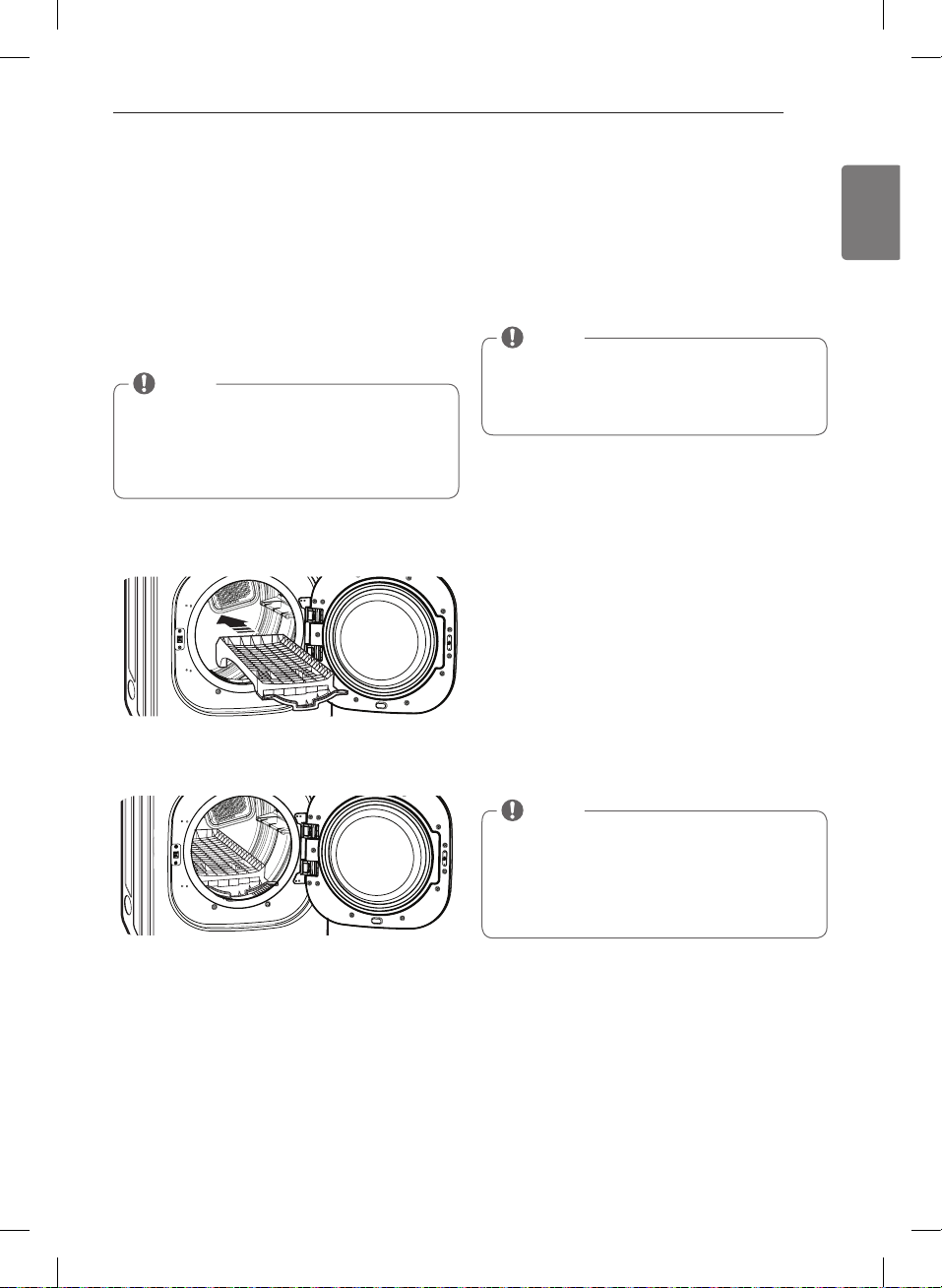
To Install the Drying Rack
1. With the dryer door open, slide the rack into the dryer
drum.
2. Make sure it is seated evenly on the edge of the inner
door rim and resting flat on the inside of the dryer.
* CHILD LOCK
Use this option to prevent unwanted use of the dryer
or to keep cycle settings from being changed while the
dryer is operating.
Press and hold the EASY IRON button for 3 seconds to
activate or deactivate the CHILD LOCK function.
The CHILD LOCK icon will be shown in the display, and
all controls are disabled except the POWER button.
DAMP DRY SIGNAL
With this option, the dryer will signal when the load
is approximately 80% dry. This allows you to remove
faster- drying lightweight items or items that you would
like to iron or hang while still slightly damp. Press the
DAMP DRY SIGNAL button.
WRINKLE CARE
Selecting this option will tumble the load periodically for
up to 3 hours after the selected cycle, or until the door is
opened. This is helpful in preventing wrinkles when you
are unable to remove items from the dryer immediately.
ENERGY SAVER
This option helps to reduce the energy consumption in
the Cotton/Normal cycle, depending on the load size.
When the Energy Saver option is selected, the cycle
begins with an air dry section and the drying time is
increased.
NOTE
Once set, CHILD LOCK remains active until it is
manually deactivated. CHILD LOCK must be turned off
to run another cycle.
To deactivate CHILD LOCK, press and hold the EASY
IRON button for three seconds.
HOW TO USE
NOTE
The Energy Saver option is turned on by default in the
Cotton/Normal cycle.
Turn off the Energy Saver option for a faster Normal
cycle which begins with heated drying.
To turn the Energy Saver default off, press and hold
the Wrinkle Care button for three seconds.
ON or OFF appears in the display.
NOTE
NEVER tumble dry a load of clothing with the rack
installed. When the rack is installed, the drum will
rotate as usual, but the rack will not move. Make sure
all articles to be dried remain completely on the rack
and cannot fall off or be pulled off by the turning
drum. Be sure to remove the rack after use.
MFL67731027_en_170830.indd 35 2017.8.30 4:32:18 PM
36
Custom program
If you have a special combination of settings that you
use frequently, you can save these settings as a CUSTOM
PROGRAM.
To Save a Custom Program:
1. Turn on the dryer and turn the cycle selector knob to
select the desired cycle.
2. Use the cycle modifier buttons to adjust the settings
for that cycle.
3. Press the cycle option button(s) for the option you
would like to add. A confirmation message will be
shown in the display.
4. Press and hold the CUSTOM PROGRAM button for 3
seconds.
To Recall a Custom Program:
1. Turn on the dryer.
2. Press the CUSTOM PROGRAM button.
3. Press the START/PAUSE button to start the cycle.
Steam functions
To Fill the Steam Feeder
1. Pull out the drawer.
2. Lift out the steam feeder.
3. Fill the steam feeder just to the filter screen.
4. Place the steam feeder in the drawer; then push in the
drawer until it clicks into place.
w
WARNING
•
Failure to follow this warning
can cause serious injury or death.
• Failure to
follow this warning can cause serious injury or death.
NOTE
You may save only one custom program at a time.
Pressing and holding the CUSTOM PROGRAM button
will overwrite any previously saved custom program.
NOTE
Before using a Steam Cycle, the steam feeder must be
filled with water up to the MAX line. If not, an error will
be displayed. Make sure that the steam feeder is filled
with water or the drawer is fully closed. Turn the dryer
off then restart the Steam Cycle.
• Only use Tap Water. Do not fill the steam feeder with
foreign substances, rinse agents, or detergents.
• Before moving the dryer, make sure the steam feeder
is empty.
• Do not use distilled water; the water level sensor in
the steam generator will not work.
• Be careful when inserting the Steam Feeder
otherwise water will overflow.
• Wipe up any spilled water around the Steam Feeder
and the drawer before starting the dryer.
• Do not fill the steam feeder with hot water (over
86°F/30°C).
Drawer
Steam
Feeder
Tap Water
ONLY
HOW TO USE
MFL67731027_en_170830.indd 36 2017.8.30 4:32:20 PM
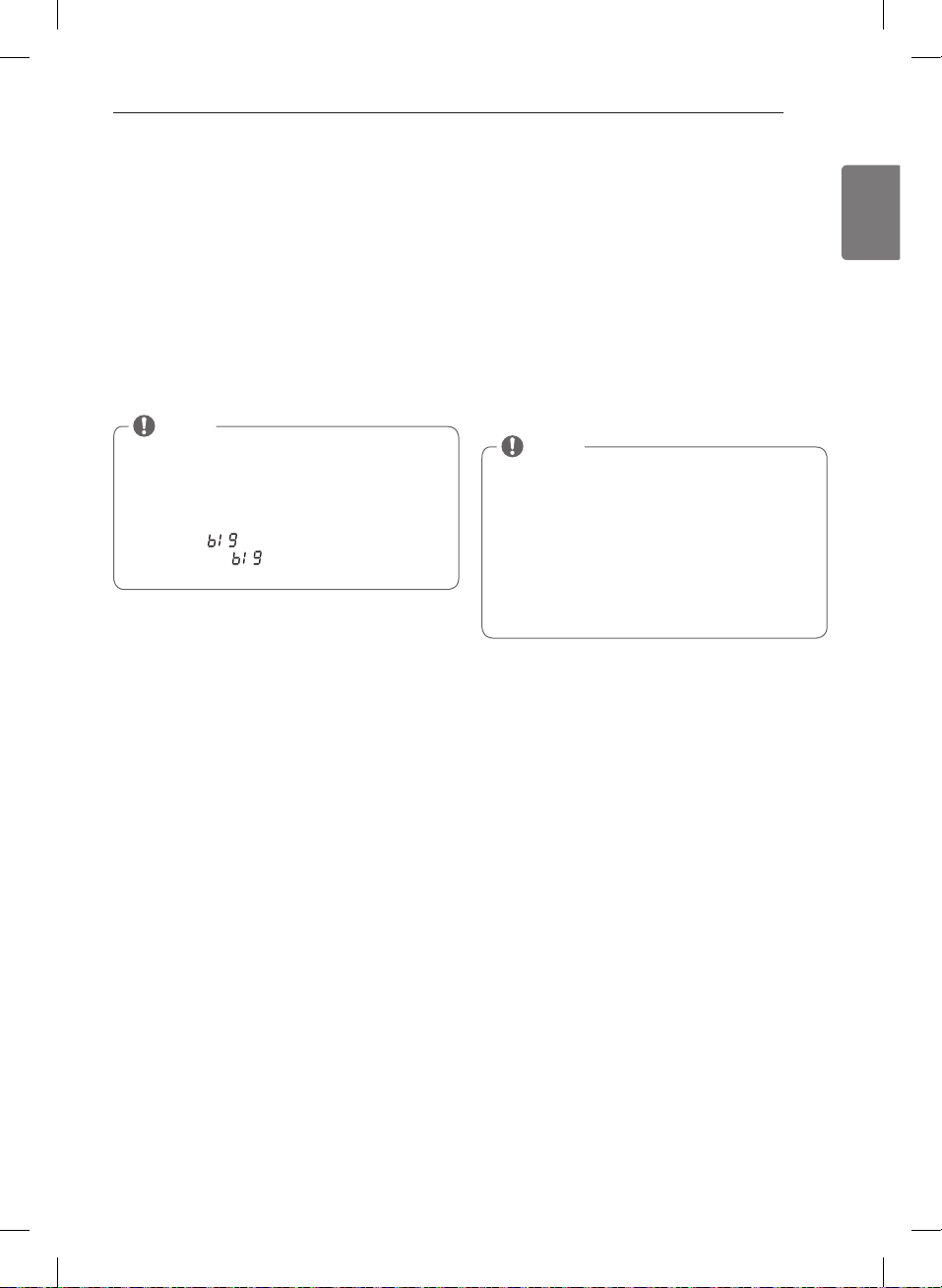
37
ENGLISH
Steam functions (cont.)
LG’s new steam technology allows you to inject fabrics
with a swirling jet of hot steam to refresh clothes, reduce
static, and make ironing easier.
Simply select the STEAM FRESH™ cycle, or you can add a
Steam option to selected cycles.
Using the STEAM FRESH
TM
Cycle
STEAM FRESH™ uses the power of steam alone to quickly
reduce wrinkles and odor in fabrics. It brings new life to
wrinkled clothes that have been stored for an extended
time and makes heavily wrinkled clothes easier to iron.
STEAM FRESH™ can also be used to help reduce odors in
fabrics.
To Use the STEAM FRESH
TM
Cycle:
1. Turn on the dryer and turn the cycle selector knob to
select the STEAM FRESH ™ cycle.
2. To add an option function, select REDUCE STATIC,
EASY IRON, or WRINKLE CARE.
3. Depending on the load (quantity of items), steam time
can be changed by pressing the MORE TIME or LESS
TIME buttons.
4. Press START/PAUSE button to start the cycle.
To Add STEAM to a Standard Cycle:
1. Turn on the dryer and turn the cycle selector knob to
select the desired cycle.
2. Use the cycle modifier buttons to adjust the settings
for that cycle.
3. Press the Steam option button for the Steam option
you would like to add. Then adjust for the load size
using the MORE TIME or LESS TIME buttons.
4. Press START/PAUSE button to start the cycle.
Using the Steam Options:
The REDUCE STATIC option injects steam late in the
drying cycle to reduce the static electricity caused by
dry fabrics rubbing together. Change the amount of
time for the cycle by pressing the MORE TIME or LESS
TIME button, depending on the load (quantity of items).
The display will show the recommended number of
items, such as 7, 9, 11, 14, 16, or 18.
The EASY IRON option provides uniform, properly
dampened fabrics for ironing, which can save time and
make ironing easier. Change the amount of time for the
cycle by pressing the MORE TIME or LESS TIME button,
depending on the load (quantity of items). The display
will show the recommended number of items, such as 1,
2, 3, 4, or 5.
Using the STEAM SANITARY
TM
cycle
New STEAM SANITARY
TM
cycle is ideal for sanitizing non
washable items quickly and easily using the power of
steam alone.
This cycle is recommended for use with cotton and
polyester materials only. (Do NOT use for urethane foam,
down feathers or delicate items)
NOTE
• REDUCE STATIC or EASY IRON options can also be
used during the STEAM FRESH™ cycle.
• Depending on the load (quantity of items), you may
change the amount of time for the cycle by pressing
the MORE TIME or LESS TIME button. The display will
show 3, 5, or
. 3 means 3 or fewer items, 5 is for
4 or 5 items, and
indicates a large load such as
a comforter.
NOTE
• When Sensor Dry is selected with the REDUCE
STATIC option, a Dry level of Less or DAMP cannot be
selected.
• The REDUCE STATIC or EASY IRON option may also be
selected during TIME DRY cycles.
• After the Steam option is selected in TIME DRY, the
MORE TIME or LESS TIME buttons will change the
steam time ONLY.
• After pressing START/PAUSE, the MORE TIME or LESS
TIME buttons will be disabled.
HOW TO USE
MFL67731027_en_170830.indd 37 2017.8.30 4:32:20 PM
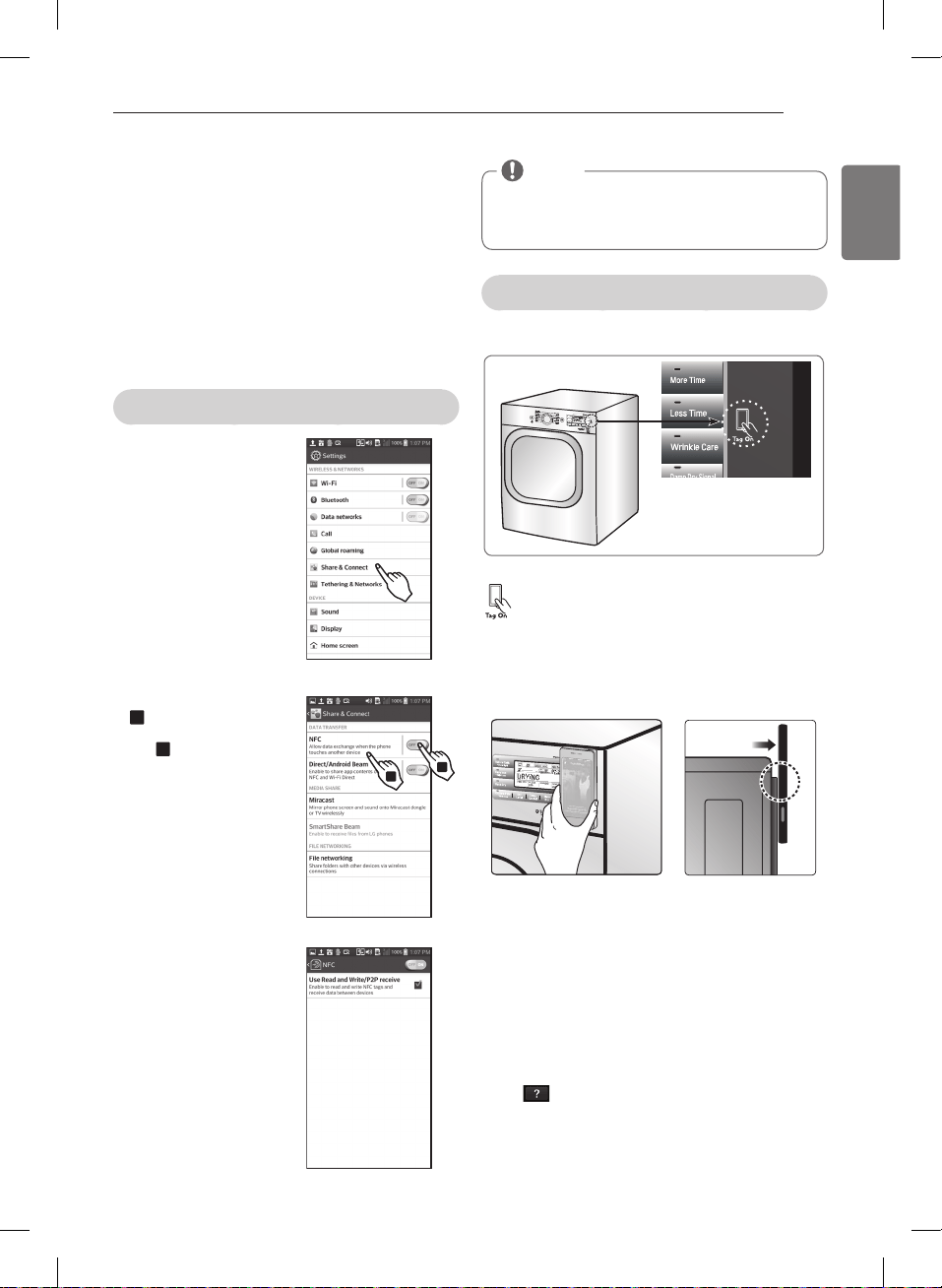
39
ENGLISH
Before using the Tag On function
- The Tag On function allows you to conveniently use the
LG Smart Diagnosis
TM
and Cycle Download features to
communicate with your appliance right from your own
smart phone. To use the Tag On function:
1. Download the LG Smart Laundry&DW App to your
smart phone.
2. Turn on the NFC (Near Field Communication) function
in your smart phone.
- The Tag On function can only be used with smart
phones equipped with the NFC function and based on
the Android operating system (OS).
Turning on the NFC function of the smart phone
1. Enter the “Settings” menu of
the smart phone and select
“Share & Connect” under
“WIRELESS & NETWORKS.”
2. 1 Set “NFC“ and
“Direct/Android Beam” to
ON, 2 and select “NFC”.
3. Check “Use Read and Write/
P2P receive”.
1
2
HOW TO USE
1
2
1
2
1
2
1
2
The Tag On guide
The Tag On icon
Tag On position
Look for the Tag On icon next to the LED screen
on the control panel. This is where you position
your smart phone when using the Tag On
function with the LG Smart Diagnosis™, Cycle
Download, and Laundry Stats features of the LG
Smart Laundry&DW application.
When you use the Tag On function, position your smart
phone so that the NFC antenna on the back of your
smart phone matches the position of the Tag On icon
on the appliance. If you do not know the position of
your NFC antenna, move your smart phone very slightly
in a circular motion until the application verifies the
connection.
Because of the characteristics of NFC, if the transmission
distance is too far, or if there is a metal sticker or a thick
case on the phone, transmission will not be good.
Press [
] in the LG Smart Laundry&DW app for a
more detailed guide on how to use the Tag On function.
NOTE
Depending on the smart phone manufacturer and
Android OS version, the NFC activation process may
differ. Refer to the manual of your smart phone for
details.
MFL67731027_en_170830.indd 39 2017.8.30 4:32:25 PM
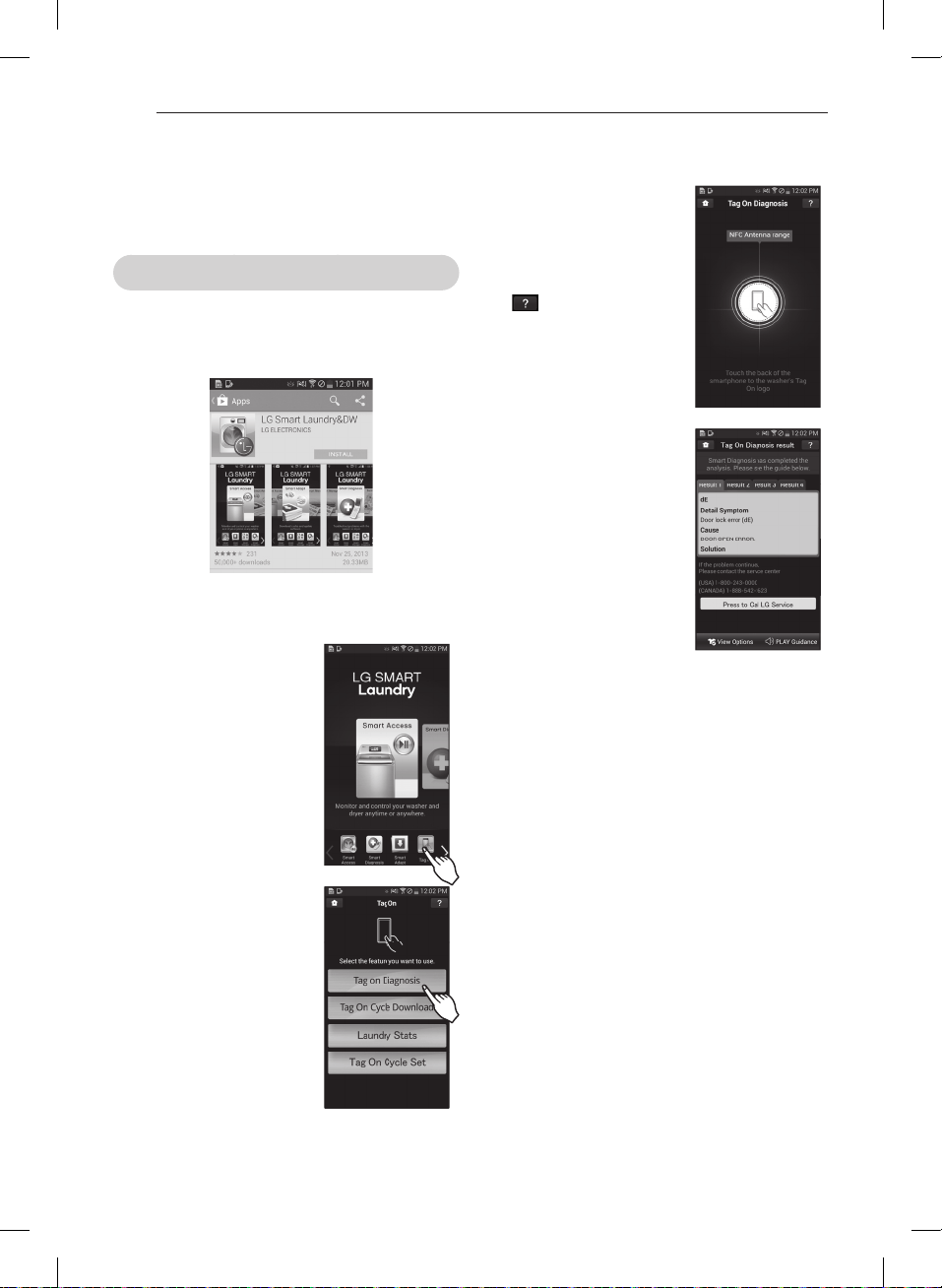
40
- When a Tag On screen
appears (see at right), tap
your smart phone on the Tag
On icon on the right side of
the dryer’s control panel.
- If it isn’t recognized, touch
[
] on the upper right of
the Tag On screen on your
‘LG Smart Laundry&DW’
application to see the
detailed guide. (This might
happen due to the different
NFC antenna positions for
each phone.)
- It shows the diagnosis results
on the cycles recently used.
※
Images are for reference only. The actual LG Smart
Laundry&DW application may be different.
Tag On
This feature uses LG Smart Diagnosis™, Cycle Download,
and Laundry Stats when you touch the LG appliance’s
Tag On logo with your NFC equipped smartphone.
Tag On self-diagnosis using LG Smart Laundry&DW application
- Install the application from the Play store and run it.
- Select “Tag On” by using
the top icons or the bottom
icons.
HOW TO USE
MFL67731027_en_170830.indd 40 2017.8.30 4:32:27 PM
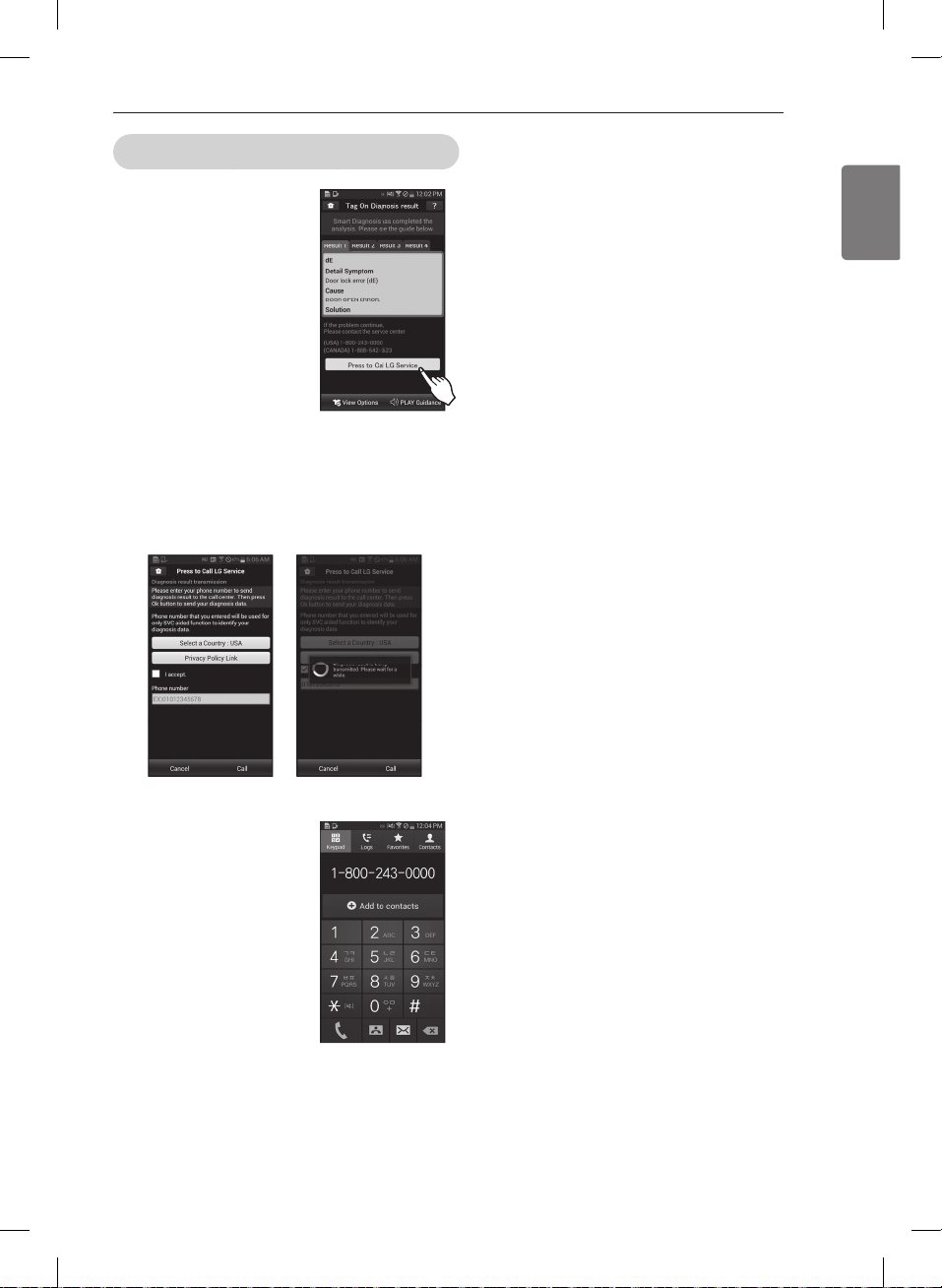
41
ENGLISH
Tag On Smart Diagnosis
※
Images are for reference only. The actual LG Smart
Laundry&DW application may be different.
HOW TO USE
MFL67731027_en_170830.indd 41 2017.8.30 4:32:29 PM
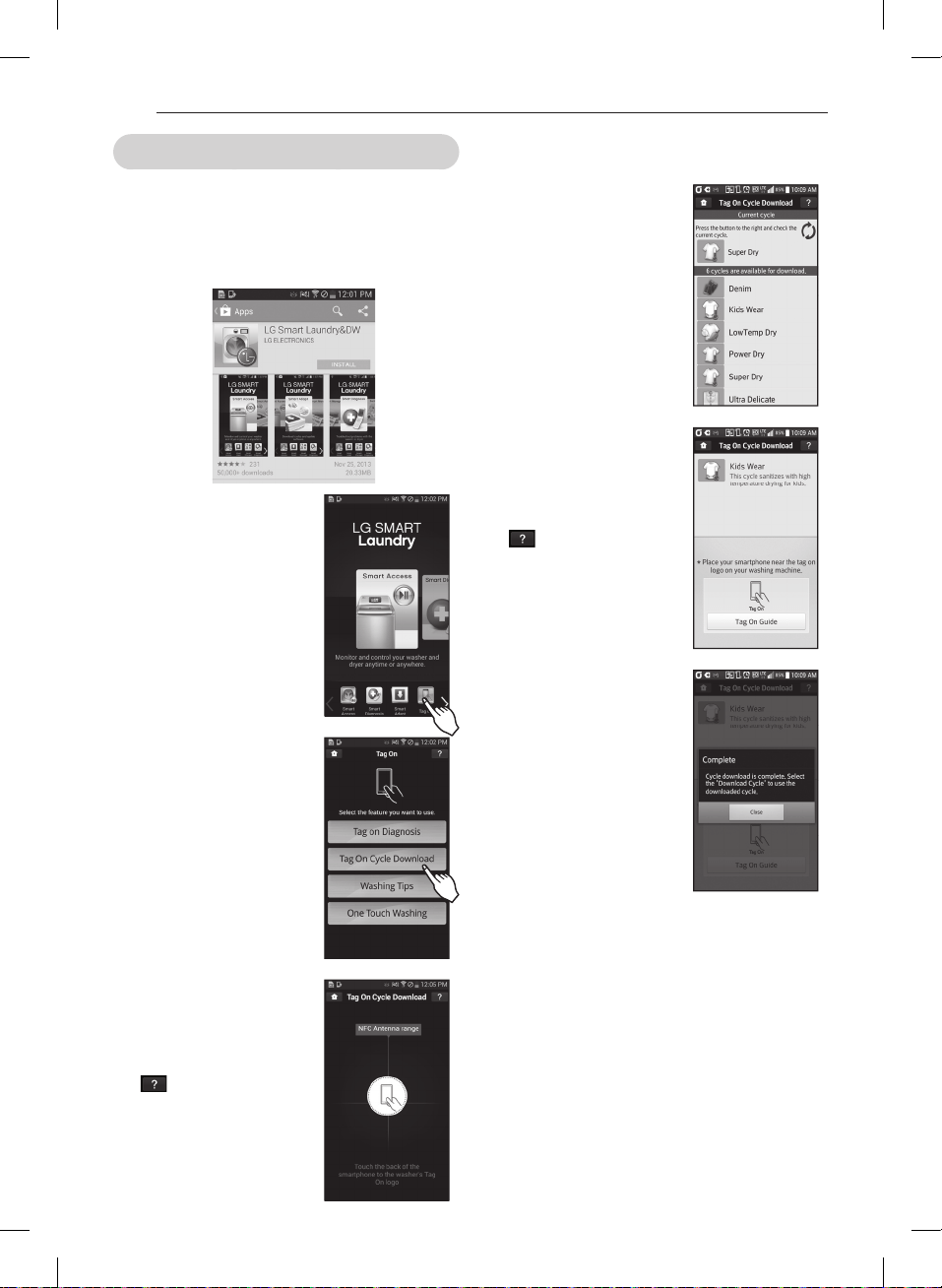
42
- You can also check the existing
cycles already downloaded.
- When a Tag On screen
appears (see at right), tap
your smart phone on the Tag
On icon on the right side of
the dryer’s control panel.
- If it isn’t recognized, touch
[
] on the upper right of
the Tag On screen on your
‘LG Smart Laundry&DW’
application to see the detailed
guide. (This might happen
due to the different NFC
antenna positions for each
phone.)
- Check whether the new cycle
is downloaded by turning
the cycle selector knob to
Download Cycle.
※
Images are for reference only. The actual LG Smart
Laundry&DW application may be different.
Tag On cycles download using LG Smart Laundry&DW application
Tag On Cycles allows you to download cycles for later use.
The cycle is available at the Download Cycle position on
the control panel until another cycle is downloaded.
- Install the application from the Play store and run it.
- Select “Tag On” by using the
top icons or the bottom icons.
- When a Tag On screen appears
(see at right), tap your smart
phone on the Tag On icon on
the right side of the dryer’s
control panel.
- If it isn’t recognized, touch
[
] on the upper right of
the Tag On screen on your
‘LG Smart Laundry&DW’
application to see the detailed
guide. (This might happen due
to the different NFC antenna
positions for each phone.)
HOW TO USE
MFL67731027_en_170830.indd 42 2017.8.30 4:32:31 PM
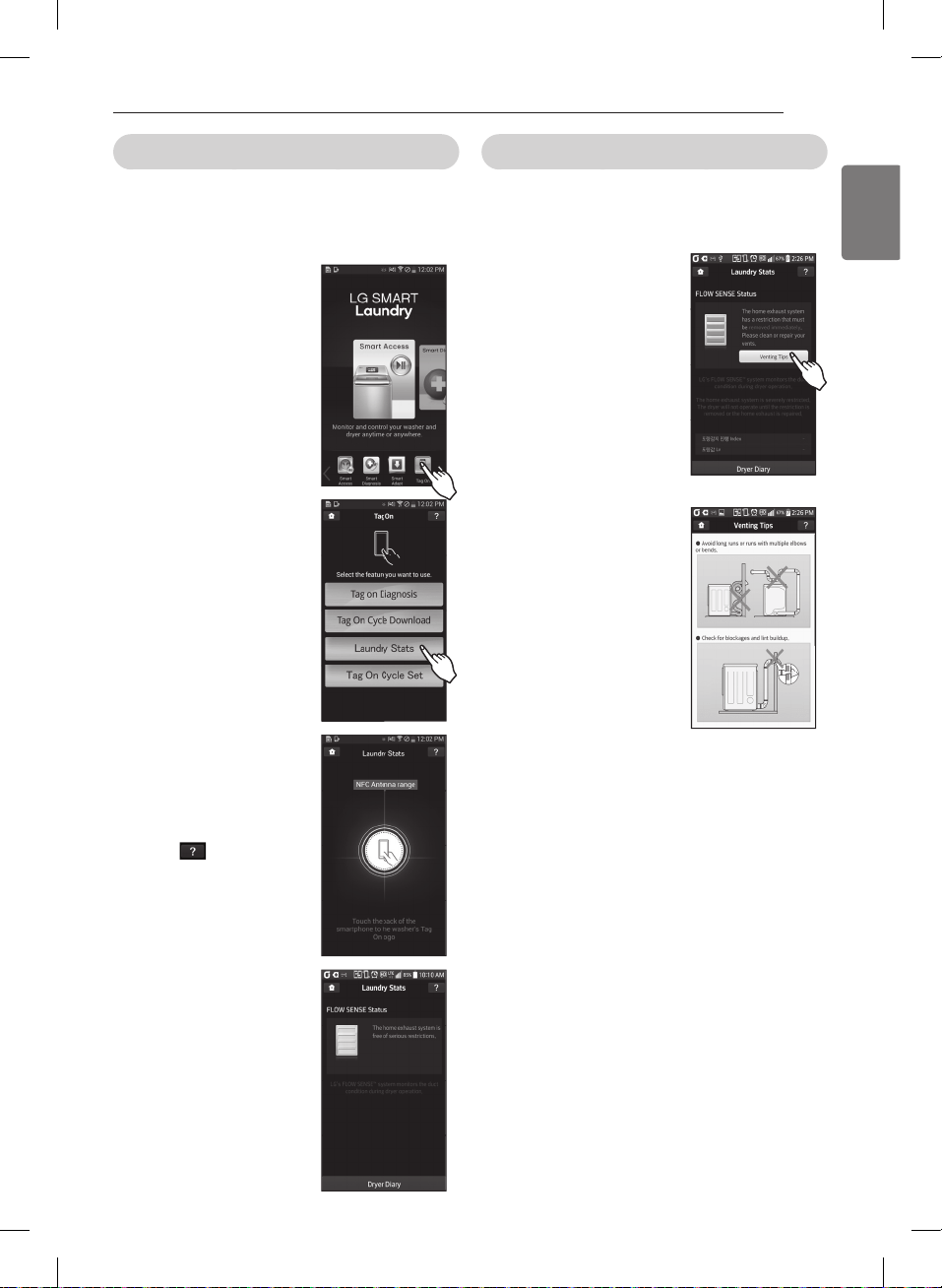
43
ENGLISH
Laundry Stats
Laundry Stats can monitor the Flow Sense result in case
your home exhaust system is clogged.
Laundry Stats can also tell you details of your last 10
cycles.
- When a Tag On screen
appears (see at right), tap
your smart phone on the Tag
On icon on the right side of
the dryer’s control panel.
-
If the phone isn’t recognized,
touch [ ] on the upper
right of the Tag On screen on
your ‘LG Smart Laundry&DW’
application to see the detailed
guide.(This might happen due
to the different NFC antenna
positions for each phone.)
Check the FLOW SENSE
TM
Status
LG’s Flow Sense
TM
duct blockage sensing system detects
and alerts you to restrictions in the installed household
ductwork that reduce exhaust airflow through the dryer.
.
※
Images are for reference only. The actual LG Smart
Laundry&DW application may be different.
HOW TO USE
MFL67731027_en_170830.indd 43 2017.8.30 4:32:34 PM
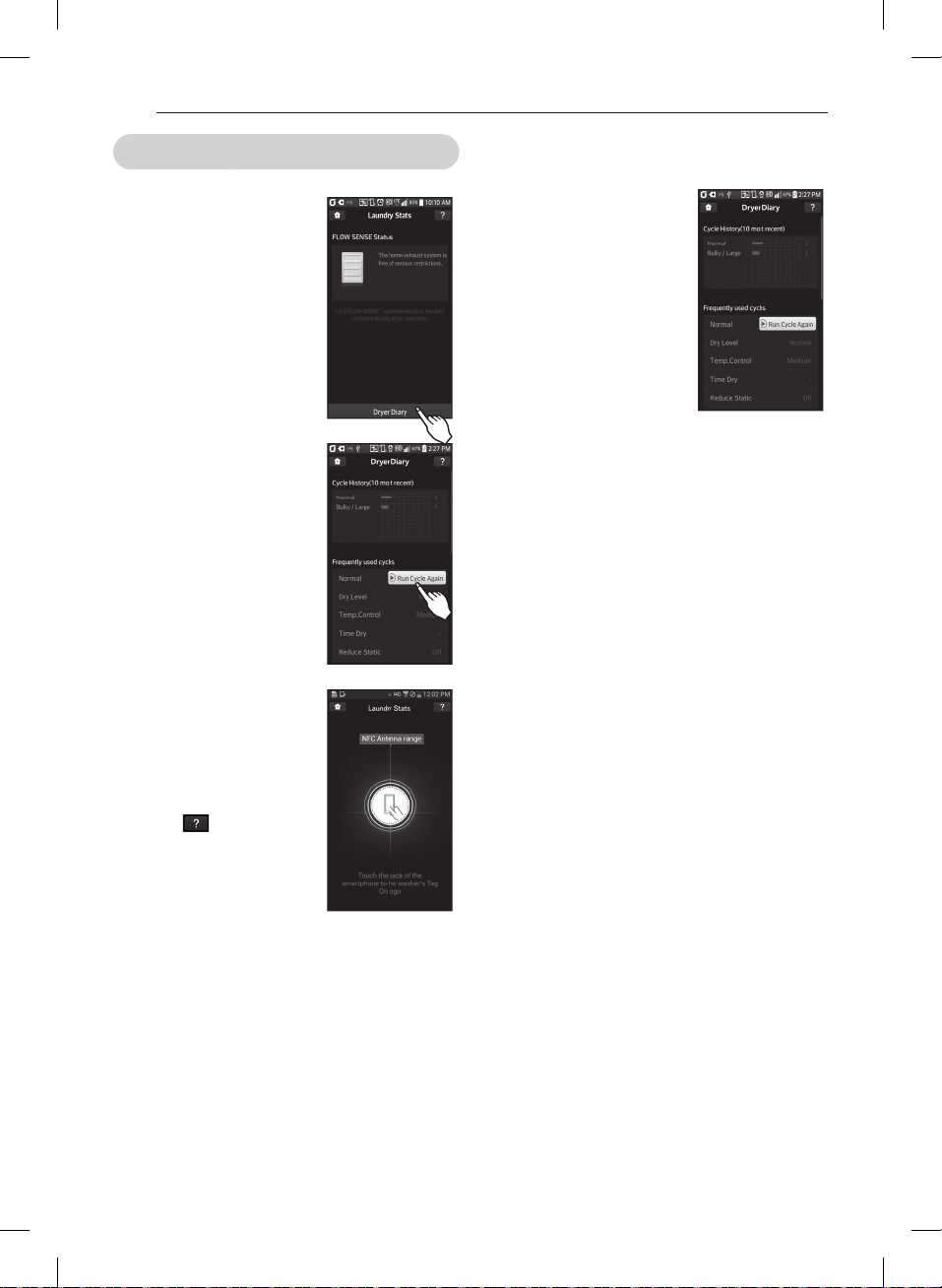
44
Laundry Stats (Run Cycle Again) using LG Smart Laundry&DW application
- Select ‘Dryer Diary’ at the
bottom of the Laundry Stats
screen.
- The Dryer Diary display a
chart showing the last 10
cycles used.
- Details of the Most Used
Cycle and the Most Recent
cycle will also be displayed.
- The Most Used cycle or
Most Recent cycle can be
immediately started by
selecting the ‘Run Cycle Again’
button.
When a Tag On screen
appears(shown at right), tap
your smart phone on the Tag
On icon on the right side of
the dryer’s control panel.
- If the phone isn’t recognized,
touch [
] on the upper
right of the Tag On screen on
your ‘LG Smart Laundry&DW’
application to see the
detailed guide. (This might
happen due to the different
NFC antenna positions for
each phone.)
- The screen shown at right
appears and Drying starts
immediately on the selected
cycle.
※
Images are for reference only. The actual LG Smart
Laundry&DW application may be different.
HOW TO USE
MFL67731027_en_170830.indd 44 2017.8.30 4:32:36 PM
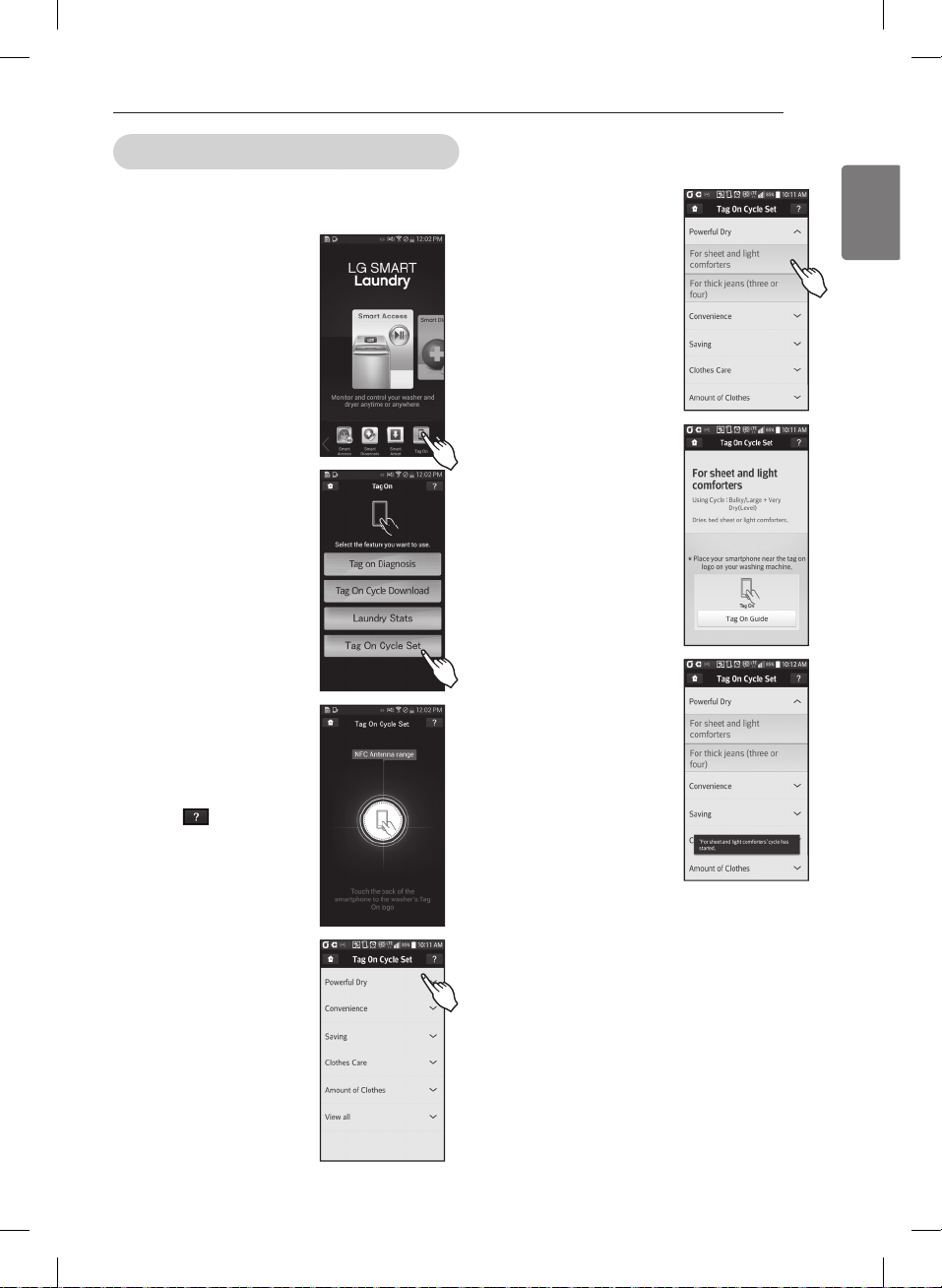
45
ENGLISH
Tag On Cycle Set
Tag On Cycle Set allows you to automatically adjust the
cycle and settings based on your laundry needs.
- When a Tag On screen
appears(shown at right), tap
your smart phone on the Tag
On icon on the right side of
the dryer’s control panel.
- If the phone isn’t recognized,
touch [
] on the upper
right of the Tag On screen on
your ‘LG Smart Laundry&DW’
application to see the
detailed guide. (This might
happen due to the different
NFC antenna positions for
each phone.)
needs.
tap your smart phone to
※
Images are for reference only. The actual LG Smart
Laundry&DW application may be different.
HOW TO USE
MFL67731027_en_170830.indd 45 2017.8.30 4:32:39 PM
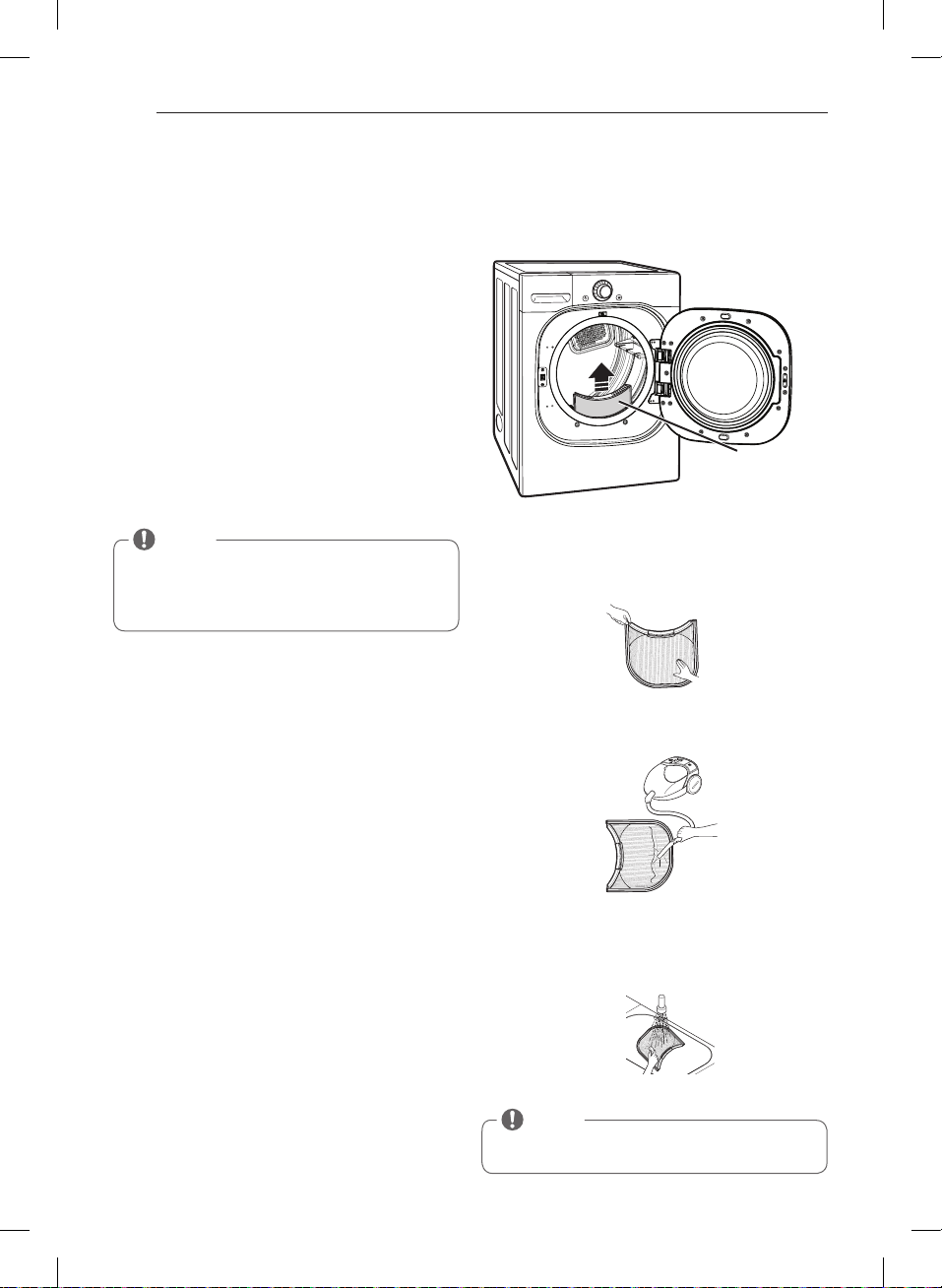
46
MAINTENANCE
Regular Cleaning
w
WARNING
To reduce the risk of fire, electric shock, or personal
injury when using this appliance, follow basic
precautions, including the following:
•
Failure to follow this warning can
cause serious injury, fire, electrical shock, or death.
•
They will damage the
finish.
Cleaning the Exterior
Proper care of your dryer can extend its life.
The outside of the machine can be cleaned with warm
water and a mild, nonabrasive household detergent.
Immediately wipe off any spills with a soft, damp cloth.
Cleaning the Interior
Wipe around the door opening and seal with a soft,
damp cloth to prevent lint and dust buildup that could
damage the door seal.
Clean the window with a soft cloth dampened with
warm water and a mild, nonabrasive household
detergent; then wipe dry.
The stainless steel drum can be cleaned with a
conventional stainless steel cleaner, used according to
the manufacturer’s specifications.
Never use steel wool or abrasive cleansers; they can
scratch or damage the surface.
Cleaning Around and Under the Dryer
Vacuum lint and dust from around the dryer and
underneath it regularly. Vent ductwork should be
checked for lint buildup and cleaned at least once per
year. If any noticeable reduction in airflow or drying
performance occurs, immediately check ductwork for
obstructions and blockages.
Maintaining Ductwork
Vent ductwork should be checked for lint buildup
and cleaned at least once per year. If any noticeable
reduction in airflow or drying performance occurs,
immediately check ductwork for obstructions and
blockages. Contact a qualified technician or service
provider.
Cleaning the Lint Filter
Always clean the lint filter after every cycle.
To clean, open the dryer door and pull the lint filter
straight up. Then:
1. Roll any lint off the filter with your fingers, or
2. Vacuum the lint filter, or
3. If the lint filter has become very dirty or clogged with
fabric softener, wash the lint filter in warm, soapy
water and allow to dry thoroughly before reinstalling.
Lint
Filter
NOTE
NEVER operate the dryer without the lint filter in
place. NEVER operate the dryer with a wet lint filter.
NOTE
Do not use methylated spirits, solvents, or similar
products.
Never use steel wool or abrasive cleansers; they can
damage the surface.
MAINTENANCE
MFL67731027_en_170830.indd 46 2017.8.30 4:32:40 PM
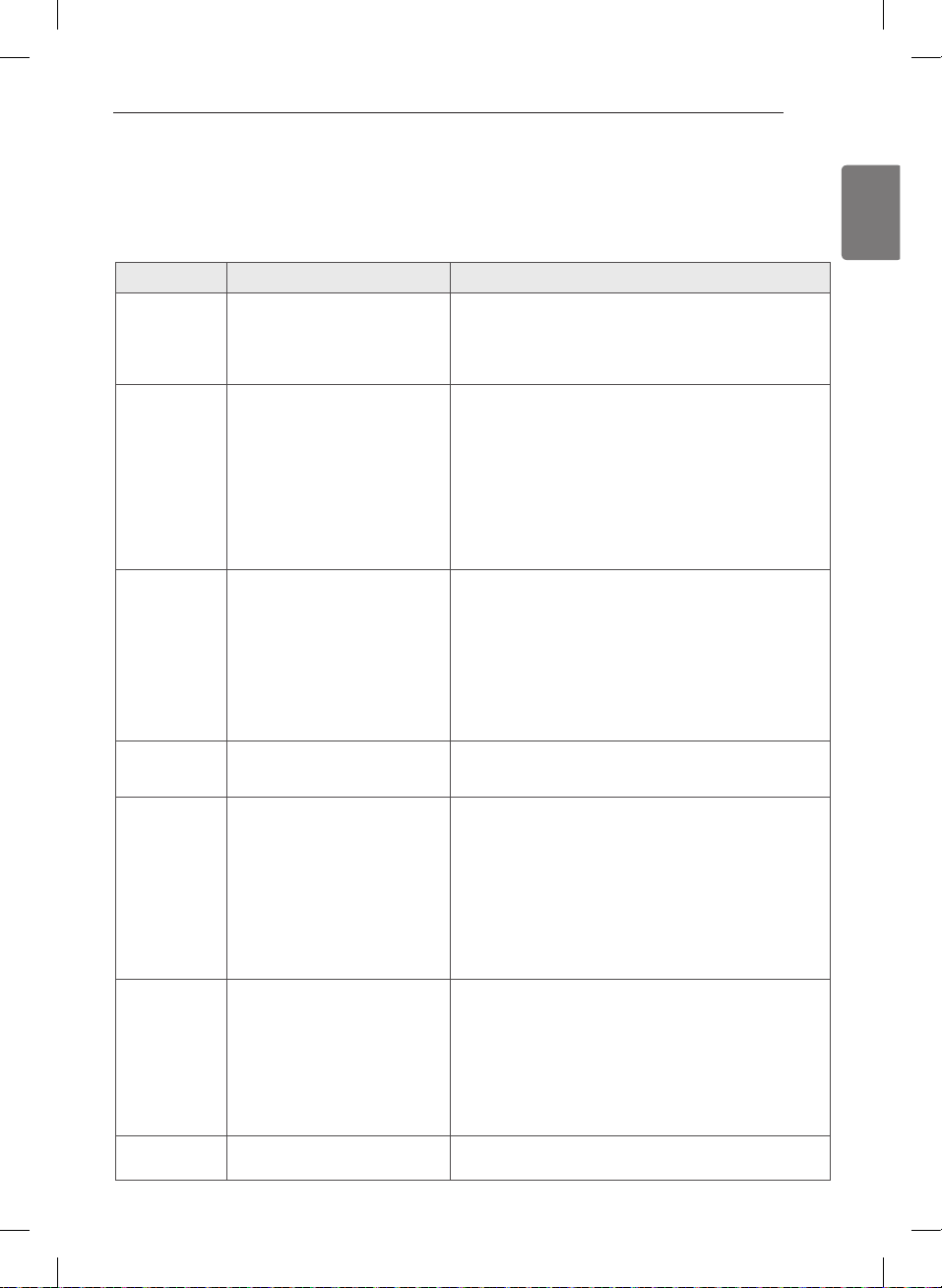
47
ENGLISH
TROUBLESHOOTING
Before calling for service
Your dryer is equipped with an automatic error-monitoring system to detect and diagnose problems at an early
stage. If your dryer does not function properly or does not function at all, check the following before you call for
service.
Dryer will not
turn on
• Power cord is not properly
plugged in.
• House fuse is blown, circuit
breaker has tripped, or power
outage has occurred.
• Make sure that the plug is plugged securely into a
grounded outlet matching the dryer’s rating plate.
• Reset circuit breaker or replace fuse. Do not increase
fuse capacity. If the problem is a circuit overload, have it
corrected by a qualified electrician.
Dryer does not
heat
• House fuse is blown, circuit
breaker has tripped, or power
outage has occurred.
• Gas supply or service turned off
(gas models only).
• Energy Saver option selected
• Reset circuit breaker or replace fuse. Do not increase
fuse capacity. If the problem is a circuit overload, have it
corrected by a qualified electrician.
• Confirm that the house gas shutoff and the dryer gas
shutoff are both fully open.
• If using the Cotton/Normal cycle, deselect the Energy
Saver option. The Energy Saver option is selected by
default. This option reduces energy use by adding an air
dry section to the beginning of the cycle. It is normal to
feel no heat at the beginning of the cycle while in Energy
Saver mode.
Greasy or
dirty spots on
clothes
• Fabric softener used incorrectly.
• Clean and dirty clothes being
dried together.
• Confirm and follow the instructions provided with your
fabric softener.
• Make sure to use your dryer to dry only clean items,
because dirty items can soil clean clothes placed in the
same or subsequent loads.
• Stains on dried clothes are actually stains that were not
removed during the washing process.
Make sure that clothes are being completely cleaned
according to the instructions for your washer and
detergent.
Display shows
error code tE1
or tE2
• Thermistor is malfunctioning. • Turn off the dryer and call for service.
Lint on clothes • Lint filter not cleaned properly.
• Laundry not sorted properly.
• Excess static in clothes.
• Dryer is overloaded.
• Tissue, paper, etc., left in pockets.
• Make sure the lint filter is cleaned before every load. With
some loads that produce high amounts of lint, it may be
necessary to clean the filter during the cycle.
• Some fabrics are lint producers (i.e., a fuzzy white cotton
towel) and should be dried separately from clothes that
are lint trappers (i.e., a pair of black linen pants).
• See the Excess static in clothes after drying section below.
• Divide larger loads into smaller loads for drying.
• Check pockets thoroughly before washing and drying
clothes.
Excess static in
clothes after
drying
• Fabric softener not used or used
incorrectly.
• Clothes dried too long
(overdried).
• Drying synthetics, permanent
press, or synthetic blends.
• Use a fabric softener to reduce static electricity correctly.
Do not use fabric softeners or products to eliminate static
unless recommended by the manufacturer of the fabric
softener or product.
• Overdrying a load of laundry can cause a buildup of static
electricity. Adjust settings and use a shorter drying time,
or use SENSOR DRY cycles.
• These materials can cause static buildup. Try using a fabric
softener.
Display shows
error code PS
• Power cord connection is
incorrect.
• Check the connection of power cord to the terminal block.
Refer to pages 23-27 in this manual.
TROUBLESHOOTING
MFL67731027_en_170830.indd 47 2017.8.30 4:32:40 PM
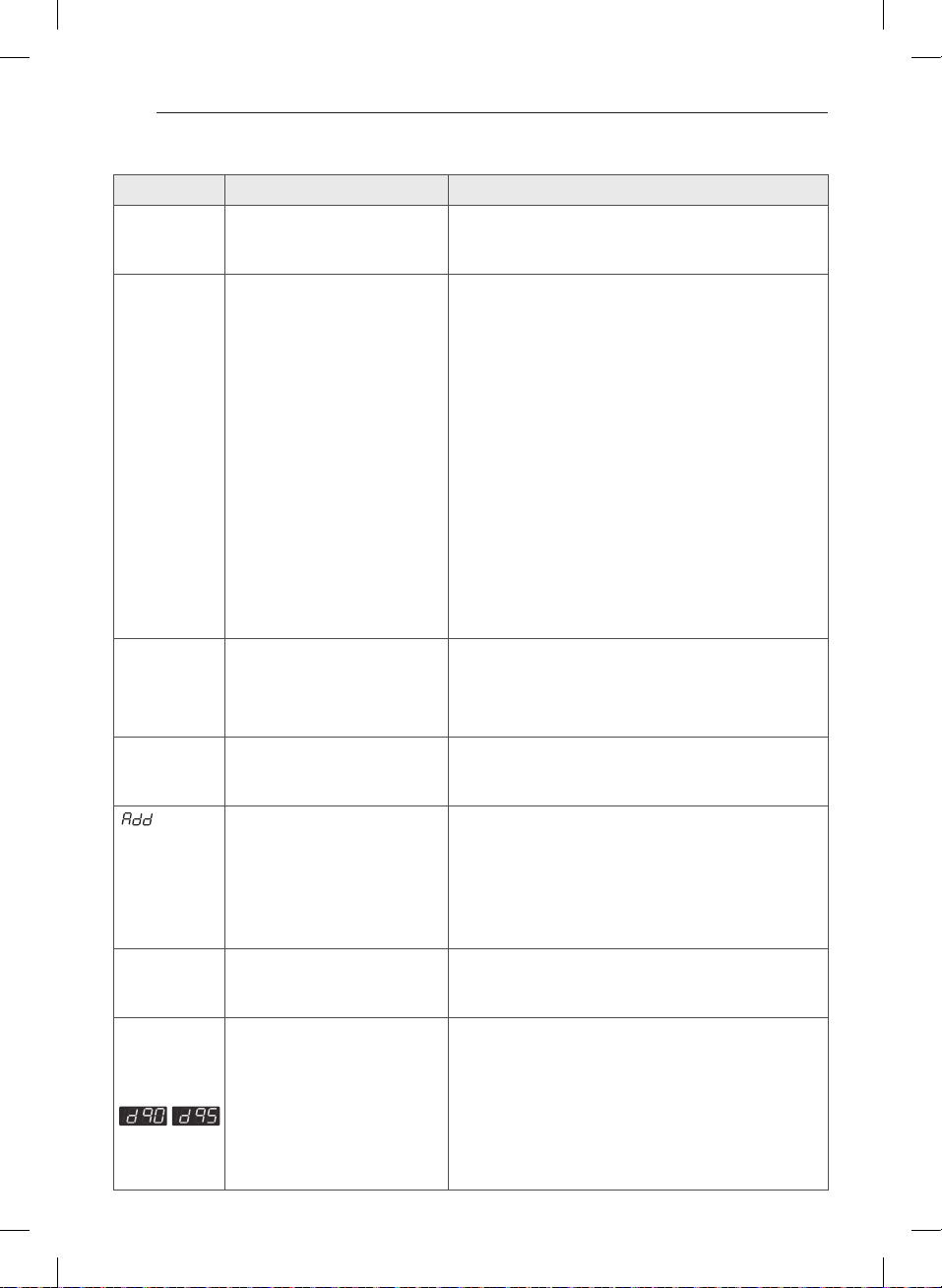
48
Before Calling For Service (cont.)
Drying time is
not c onsistent
• Heat settings, load size, or
dampness of clothing is not
consistent.
•
The drying time for a load will vary depending on the heat
setting, the type of heat used (electric, natural gas, or LP gas),
the size of the load, the type of fabrics, the wetness of the
clothes, and the condition of the exhaust ducts and lint filter.
Clothes take
too long to dry
• Load is not properly sorted.
• Large load of heavy fabrics.
• Dryer controls are not set
properly.
• Lint filter needs to be cleaned.
• Exhaust ducts blocked, dirty, or
duct run is too long.
• House fuse is blown, circuit
breaker has tripped, or power
outage has occurred.
• Dryer is overloaded.
• Dryer is underloaded.
•
Energy Saver option selected
• Separate heavy items from lightweight items. Larger and
heavier items take longer to dry.
• Heavy fabrics take longer to dry because they tend to
retain more moisture. To help reduce and maintain more
consistent drying times for large and heavy fabrics,
separate these items into smaller loads of a consistent size.
• Use the appropriate control settings for the type of load
you are drying.
• Make sure the lint filter is cleaned before every load. With
some loads that produce high amounts of lint, it may be
necessary to clean the filter during the cycle.
• Confirm that the exhaust ductwork is properly configured
and free of debris, lint, and obstructions. Make sure that
outside wall dampers can open properly and are not
blocked, jammed, or damaged.
• Reset circuit breaker or replace fuse. Do not increase
fuse capacity. If the problem is a circuit overload, have it
corrected by a qualified electrician.
• Divide larger loads into smaller loads for drying.
• If you are drying a very small load, add a few extra items to
ensure proper tumbling action.
• If using the Cotton/Normal cycle, deselect the Energy Saver
option. This option reduces energy use by adding an air dry
section to the beginning of the cycle.
Clothes are
wrinkled
• Clothes dried too long
(overdried).
• Clothes left in dryer too long
after cycle ends.
• Overdrying a load of laundry can lead to wrinkled clothes.
Try a shorter drying time, and remove items while they
still retain a slight amount of moisture.
• Remove items from the dryer immediately at the end
of the cycle. Use the WRINKLE CARE option to continue
tumbling clothes at the end of the cycle, for up to 3 hours.
Clothes are
shrinking
• Garment care instructions are
not being followed.
•
To avoid shrinkage, please carefully follow the fabric care
instructions for your garment, because some fabrics will
naturally shrink when washed. Other fabrics can be washed but
will shrink when dried in a dryer. Use a low or no heat setting.
indicator
light is on
during the
drying cycle
• Water supply error. • Check steam feeder drawer:
(1) Make sure steam feeder is filled with water to MAX line.
(2) Make sure steam feeder is seated properly and drawer is
fully closed.
(3) Turn the dryer off then restart the Steam cycle.
• Do not use distilled water; the water level sensor in the
steam generator will not work.
• The pump is not working. Unplug the dryer and call for
service.
Water drips
from nozzle
when Steam
Cycle starts
• This is normal. • This is steam condensation. The dripping water will stop
after a short time.
The display
shows “d90”,
“d95”
• The duct work is about 90%-
95% blocked.(“d90” or “d95” error
code displayed 2 hours only)
• House exhaust system blocked.
•
Using the dryer with a
severely restricted exhaust is dangerous and could result
in a fire or other property damage.
• Check the outside dryer vent while the dryer is operating
to make sure there is strong airflow.
• If the exhaust system is extremely long, have it repaired or
rerouted.
• Keep the area around the dryer clean and free of clutter.
• Check the vent hood for damage or lint clogging.
• Make sure the area around the vent hood is clear.
TROUBLESHOOTING
MFL67731027_en_170830.indd 48 2017.8.30 4:32:41 PM
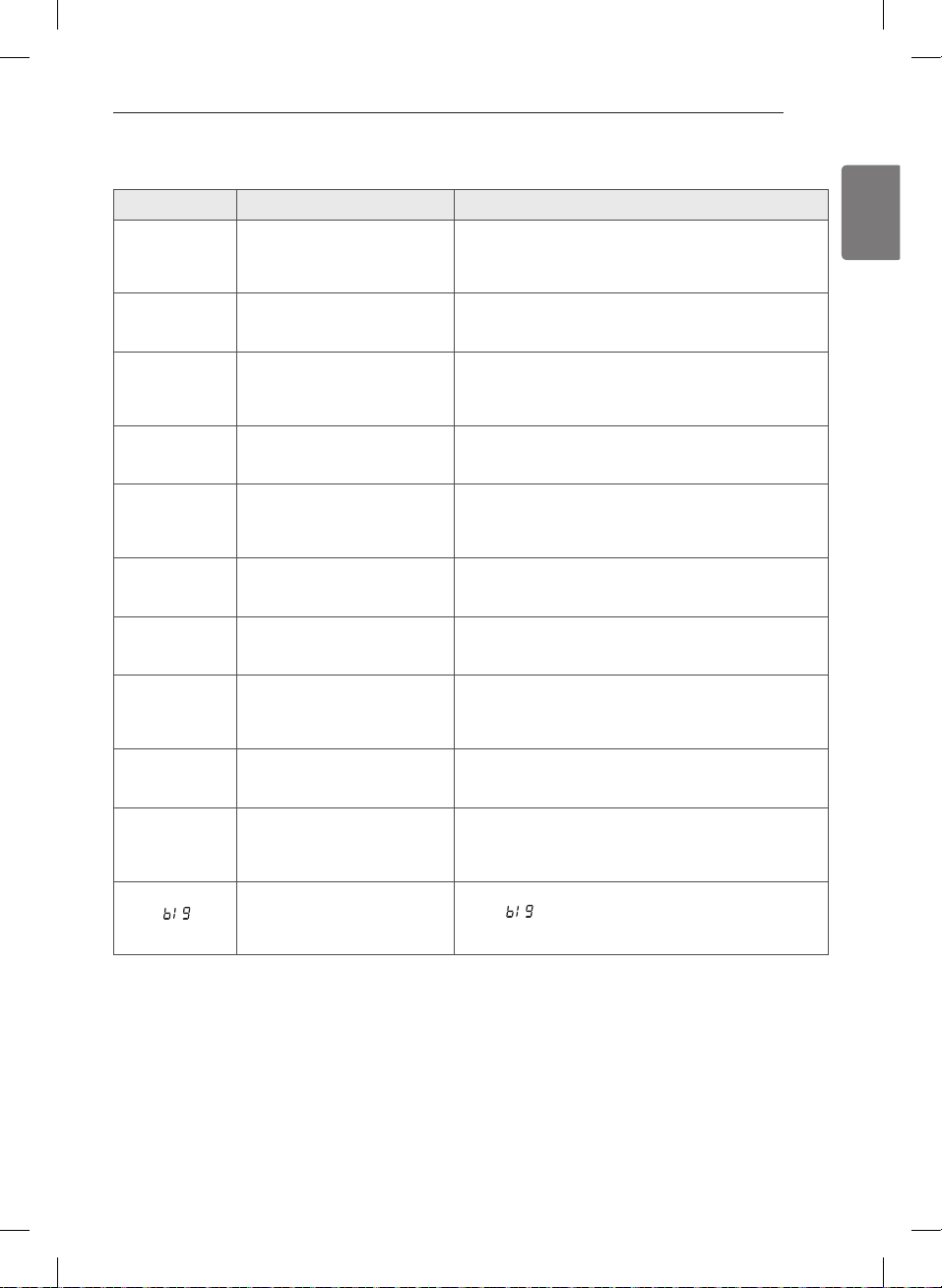
49
ENGLISH
Before calling for service (cont.)
Steam does not
generate but
no error code is
shown
• Water level error. • Unplug dryer and call for service.
Garments still
wrinkled after
STEAM FRESH™
• Too many or too different types
of garments in dryer.
• Small loads of 1 to 5 items work best.
• Load fewer garments. Load similar-type garments.
There are no
creases left on
garment after
STEAM FRESH™
• The function of this cycle is to
remove wrinkles from fabric.
• Use an iron to make creases.
Garments have
static after
REDUCE STATIC
• This is normal. • Depends on individual moisture level in skin.
Garments are
too damp or too
dry after REDUCE
STATIC
• Correct drying options not
selected.
• Select load weight manually before starting REDUCE
STATIC option.
Garments are not
uniformly damp
after EASY IRON
• Number of garments or load
size not properly selected at
the beginning of the cycle.
• Select the correct number or garments or load size
before starting the cycle.
Water drips from
door during
Steam Cycle
• This is normal. • Condensation will normally form on the inside of the
dryer door during steam operation. Some condensation
may drip out the bottom of the door.
Steam is not
visible during
Steam Cycle
• This is normal. • Steam vapor is difficult to see when the door is closed.
However, condensation will normally form on the
inside of the dryer door if the steam system is operating
normally.
Drum does not
turn during
Steam Cycle
• This is normal. • The drum is turned off so that the steam vapor remains
in the drum. The drum will normally turn for about 2
seconds once a minute.
Cannot see
steam vapor at
the beginning of
cycle
• This is normal. • Steam is released at different stages of the cycle for each
option.
The display
shows
• MORE TIME button pressed. • This display indicates that the steam option has been set
for a “ ” item such as a comforter.
Press the LESS TIME button to reduce the indicated load
size.
TROUBLESHOOTING
MFL67731027_en_170830.indd 49 2017.8.30 4:32:41 PM
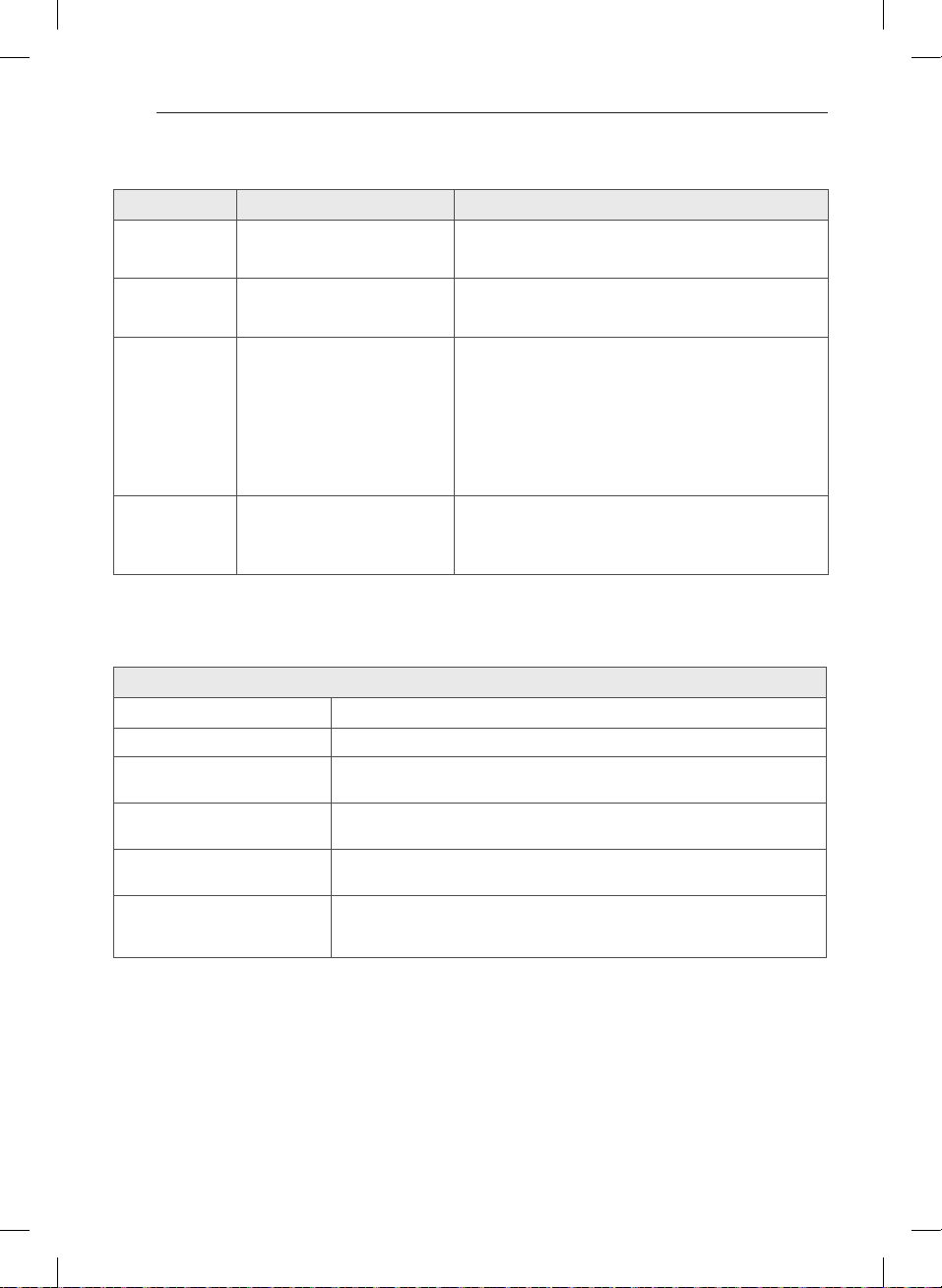
50
Before calling for service (cont.)
Odors remain
in clothing after
STEAM FRESH™
• STEAM FRESH™ did not remove
odor completely.
• Fabrics containing strong odors should be washed in a
normal cycle.
CHECK FILTER
light is on during
the drying cycle
• Lint filter is almost clogged or
full.
• Pause the drying cycle and clean the lint filter.
FLOW SENSE
TM
indicator shows
four bars during
the drying cycle
or the display
shows “d80” after
drying.
• Ductwork is too long or has too
many turns/restrictions.
• Significant blockage of the
ductwork due to lint buildup or
debris.
• The appliance has detected a
restriction in the external dryer
venting.
• Install a shorter or straighter duct run. See the Installation
Instructions.
• Ductwork should be checked/cleaned soon.
Dryer can be used in this condition, but drying times may
be longer.
• If exhaust restrictions are sensed by the FLOW SENSE
TM
system, the indicator will remain on for two hours after
the end of the cycle. Opening the door or pressing the
POWER button will turn off the display.
Display show
error code or
• Power cord connection is
incorrect.
• Gas supply or service turned off
(Gas models only).
• Check the connectriction of power cord to the terminal
block.
• Confirm that house gas shutoff and the dryer gas shutoff
are both fully open
Description Steam Dryer
Electrical Requirements* Please refer to the rating label regarding detailed information.
Gas Requirements* NG 4-10.5 inches WC
LP: 8–13 inches WC (Gas Models only)
Dimensions 27” (W) X 30” (D) X 38
11
/
16
” (H), 51” (D with door open)
68.6 cm (W) X 76.1 cm (D) X 98.3 cm (H), 129.7 cm (D with door open)
Net Weight Gas : 148.4lbs (67.3kg)
Electrical : 146.8lbs (66.6kg)
Drying Capacity
- Normal Cycle
- Steam Cycle
IEC 7.4 cu.ft. (22.5 lb/10.2 kg)
IEC 7.4 cu.ft. (8lb/3.6 kg)
SPECIFICATIONS
TROUBLESHOOTING / SPECIFICATIONS
MFL67731027_en_170830.indd 50 2017.8.30 4:32:41 PM
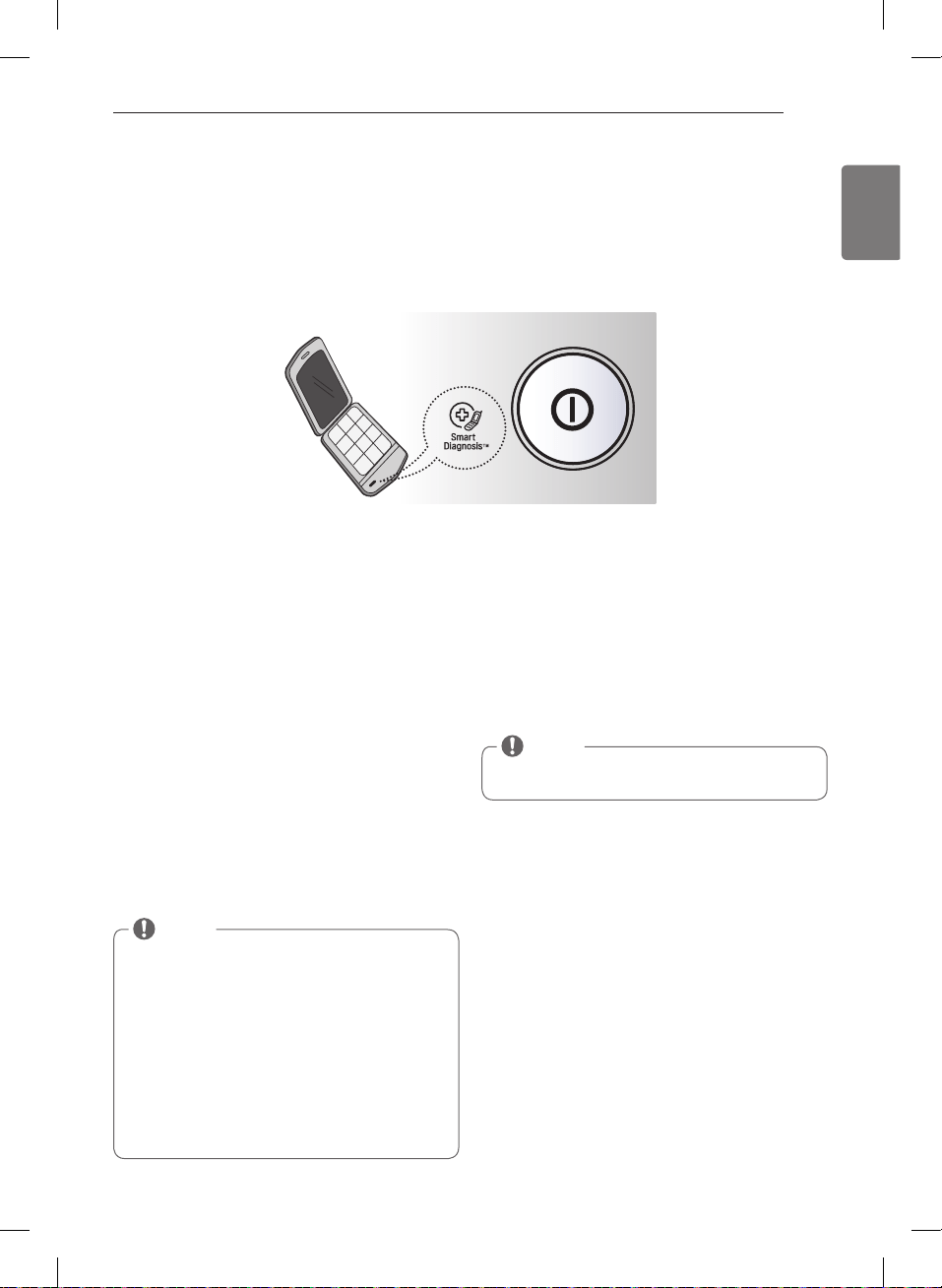
51
ENGLISH
USING Smart Diagnosis™
Audible Diagnosis
Should you experience any problems with your dryer, it has the capability of transmitting data to your Smart Phone
using the LG Smart Laundry Application or via your telephone to the LG call center.
Smart Diagnosis™ cannot be activated unless your dryer is turned on by pressing the POWER button. If your dryer is
unable to turn on, then troubleshooting must be done without using Smart Diagnosis™.
Smart Diagnosis™ Using Your
Smart Phone
1. Download the LG Smart Laundry application on your
smart phone.
2. Open the LG Smart Laundry application on your
smart phone. Press the right arrow button to advance
to the next screen.
3. Press the RECORD button on the smart phone and
then hold the mouth piece of the smart phone near
the Smart Diagnosis™ logo on the dryer.
4. With the phone held in place, press and hold Temp.
Control button the display will count down the time.
5. Keep the phone in place until the tone transmission
has finished. The display will count down the time.
6. When the recording is complete, view the diagnosis
by pressing the Next button on the phone.
Smart Diagnosis™ Through the Call
Center
1. Call the LG call center at: (LG U.S.) 1-800-243-0000
(LG Canada) 1-888-542-2623.
2. When instructed to do so by the call center agent,
hold the mouthpiece of your phone over the Smart
Diagnosis™ logo on the machine. Hold the phone no
more than one inch (but not touching) the machine.
3. Press and hold the Temp. Control button for three
seconds.
4. Keep the phone in place until the tone transmission
has finished. The display will count down the time.
5. Once the countdown is over and the tones have
stopped, resume your conversation with the call
center agent, who will then be able to assist you in
using the information transmitted for analysis.
NOTE
Smart Diagnosis is a troubleshooting feature
designed to assist, not replace, the traditional method
of troubleshooting through service calls. The
effectiveness of this feature depends upon various
factors, including, but not limited to, the reception
of the cellular phone being used for transmission,
any external noise that may be present during the
transmission, and the acoustics of the room where the
machine is located.
Accordingly, LG does not guarantee that Smart
Diagnosis would accurately troubleshoot any given
issue.
NOTE
Do not touch any other buttons or icons on the
display screen.
USING SMART DIAGNOSIS™
MFL67731027_en_170830.indd 51 2017.8.30 4:32:42 PM
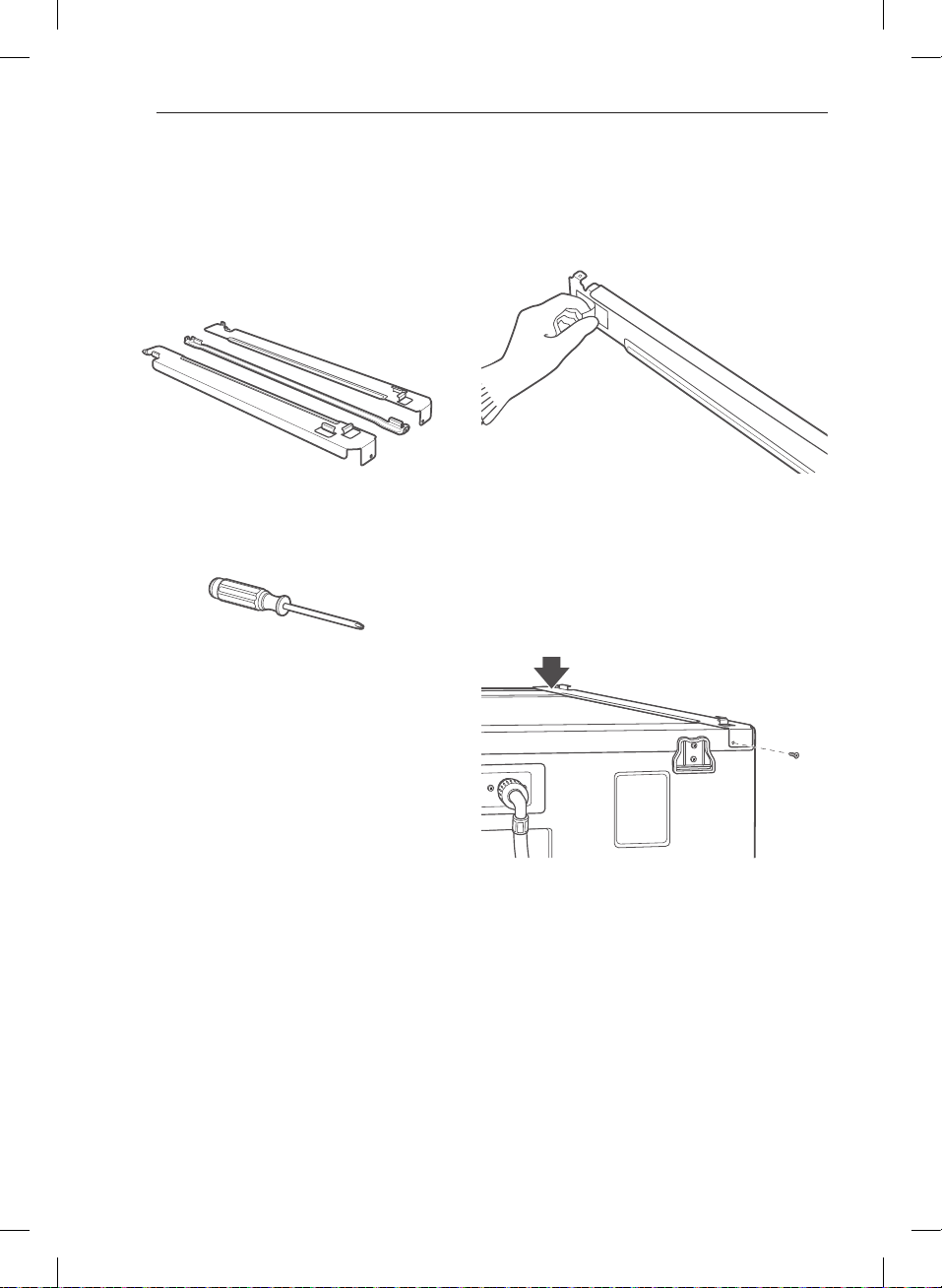
52
Stacking kit installation
This stacking kit includes:
• Two (2) side rails
• One (1) front rail
• Four (4) screws
Tools Needed for Installation:
• Phillips screwdriver
To ensure safe and secure installation, please observe
the following instructions.
w
WARNING
•
•
There is a risk of
serious back injury or other injuries.
•
home. Failure to follow this warning can result in
serious injury.
•
Failure to follow this warning can result in
serious injury.
• Failure
to follow this warning can result in serious injury.
•
Failure to do so can result in
electrical shock, fire, explosion, or death.
1. Make sure the surface of the washer is clean and dry.
Remove the paper backing from the tape on one of
the stacking kit side brackets.
2. Fit the side bracket to the side of the washer top
as shown in the above illustration. Firmly press the
adhesive area of the bracket to the washer surface.
Secure the side bracket to the washer with a screw on
the back side of the bracket. Repeat steps 1 and 2 to
attach the other side bracket.
OPTIONAL ACCESSORIES
OPTIONAL ACESORIES
MFL67731027_en_170830.indd 52 2017.8.30 4:32:43 PM
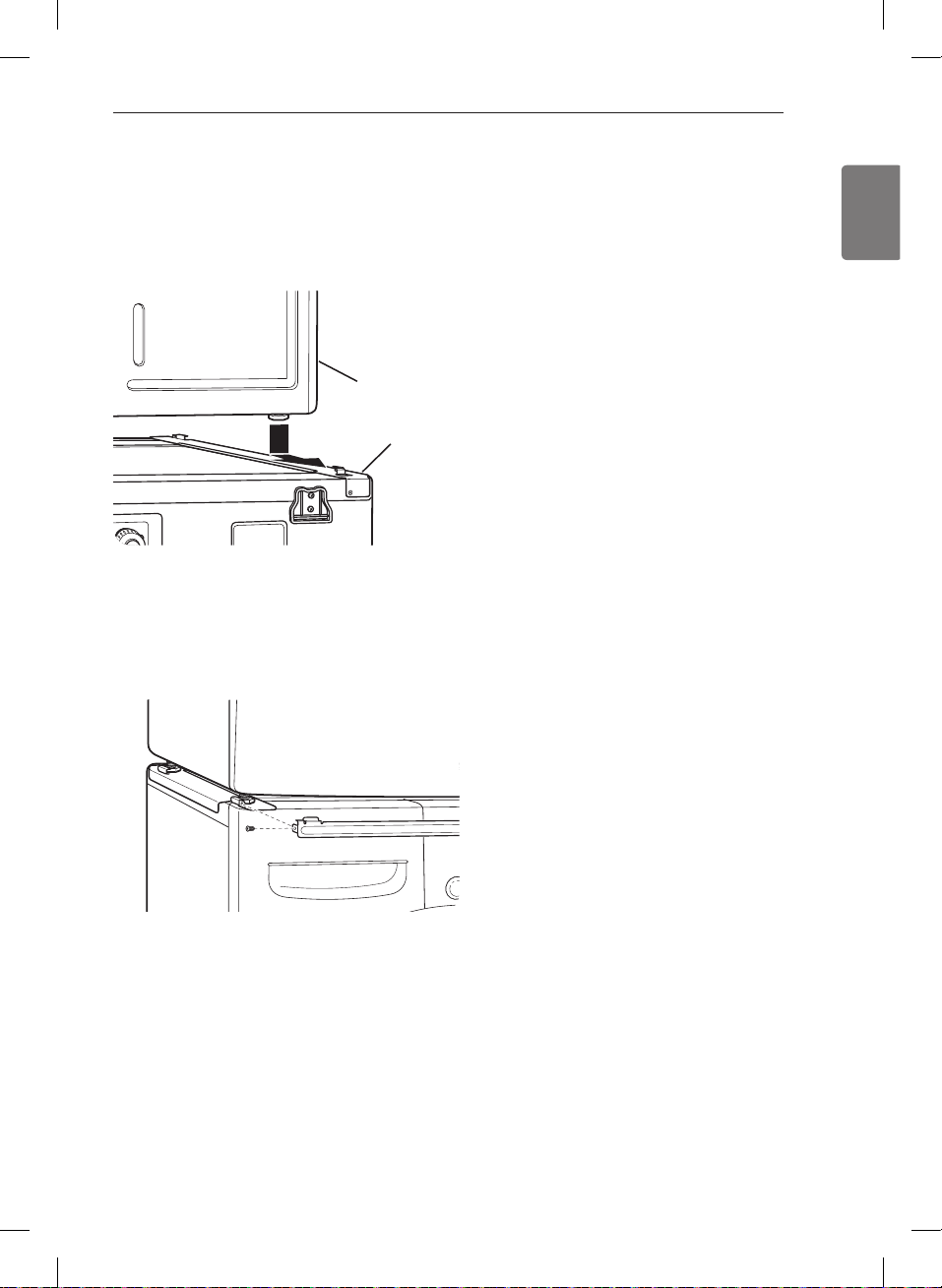
53
ENGLISH
Stacking kit installation (cont.)
3. Place the dryer on top of the washer by fitting the
dryer feet into the side brackets as illustrated. Avoid
finger injuries; do not allow fingers to be pinched
between the washer and dryer.
Slowly slide the dryer toward the back of the washer
until the side bracket stoppers catch the dryer feet.
4. Insert the front rail between the bottom of the dryer
and the top of the washer. Push the front rail toward
the back of the washer until it comes in contact with
the side rail stoppers.
Install the two remaining screws to secure the front
rail to the side rails.
Washer
Dryer
OPTIONAL ACESORIES
MFL67731027_en_170830.indd 53 2017.8.30 4:32:43 PM
54
WARRANTY
WARRANTY (USA)
Should your LG Dryer (“Product”) fail due to a defect in materials or workmanship under normal home use, during the
warranty period set forth below, LG will at its option repair or replace the product. This limited warranty is valid only
to the original retail purchaser of the product and applies only when purchased and used within the United States
including U.S. Territories. Proof of original retail purchase is required to obtain warranty service under this limited
warranty.
Warranty Period Scope of Warranty HOW SERVICE IS HANDLED
One (1) year from date of
original retail purchase
Parts and Labor
LG will provide parts and labor to repair or replace
defective parts.
Ten (10) years from date
of original retail purchase
Dryer drum
Parts only. Customer will be responsible for any labor or
in-home service to replace defective parts
Replacement products and parts are warranted for the remaining portion of the original warranty period or ninety
•
(90) days, whichever is greater.
Replacement products and parts may be new or remanufactured.
•
THIS WARRANTY IS IN LIEU OF ANY OTHER WARRANTY, EXPRESS OR IMPLIED, INCLUDING WITHOUT
LIMITATION, ANY WARRANTY OF MERCHANTABILITY OR FITNESS FOR A PARTICULAR PURPOSE. TO THE
EXTENT ANY IMPLIED WARRANTY IS REQUIRED BY LAW, IT IS LIMITED IN DURATION TO THE EXPRESS
WARRANTY PERIOD ABOVE. NEITHER THE MANUFACTURER NOR ITS U.S. DISTRIBUTOR SHALL BE
LIABLE FOR ANY INCIDENTAL, CONSEQUENTIAL, INDIRECT, SPECIAL, OR PUNITIVE DAMAGES OF ANY
NATURE, INCLUDING WITHOUT LIMITATION, LOST REVENUES OR PROFITS, OR ANY OTHER DAMAGE
WHETHER BASED IN CONTRACT, TORT, OR OTHERWISE.
Some states do not allow the exclusion or limitation of incidental or consequential damages or limitations on how long
an implied warranty lasts, so the above exclusion or limitation may not apply to you. This warranty gives you specific
legal rights and you may also have other rights that vary from state to state.
THIS LIMITED WARRANTY DOES NOT COVER:
Service trips to deliver, pick up, or install or repair the product; instruction to the customer on operation of the
•
product; repair or replacement of fuses or correction of wiring or plumbing, or correction of unauthorized repairs/
installation.
Failure of the product to perform during power failures and interruptions or inadequate electrical service.
•
Damage caused by leaky or broken water pipes, frozen water pipes, restricted drain lines, inadequate or
•
interrupted water supply or inadequate supply of air.
Damage resulting from operating the Product in a corrosive atmosphere or contrary to the instructions outlined in
•
the Product’s owner’s manual.
Damage to the Product caused by accidents, pests and vermin, lightning, wind, fire, floods, or acts of God.
•
Damage or failure caused by unauthorized modification or alteration, or if it is used for other than the intended
•
purpose, or any water leakage where the unit was not properly installed.
Damage or failure caused by incorrect electrical current, voltage, or plumbing codes, commercial or industrial use,
•
or use of accessories, components, or consumable cleaning products that are not approved by LG.
Damage caused by transportation and handling, including scratches, dents, chips, and/or other damage to the
•
finish of your product, unless such damage results from defects in materials or workmanship and is reported within
one (1) week of delivery.
Damage or missing items to any display, open box, discounted, or refurbished Product.
•
Products with original serial numbers that have been removed, altered, or cannot be readily determined. Model
•
and Serial numbers, along with original retail sales receipt, are required for warranty validation.
Increases in utility costs and additional utility expenses.
•
MFL67731027_en_170830.indd 54 2017.8.30 4:32:43 PM
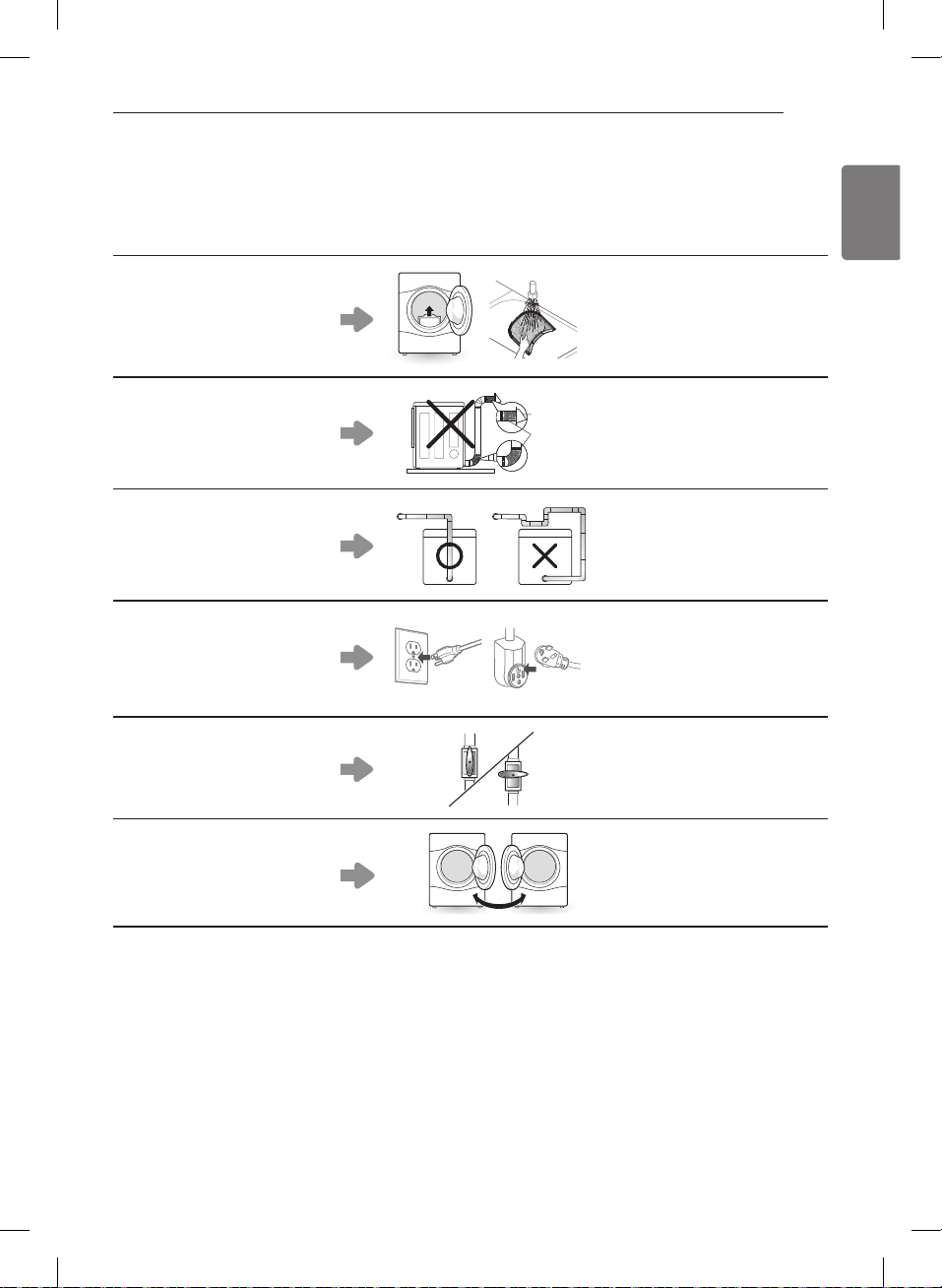
55
ENGLISH
WARRANTY
Repairs when your Product is used in other than normal and usual household use (e.g. commercial use, in offices
•
and recreational facilities) or contrary to the instructions outlined in the Product’s owner’s manual.
Costs associated with removal of your Product from your home for repairs.
•
The removal and reinstallation of the Product if it is installed in an inaccessible location or is not installed in
•
accordance with published installation instructions, including LG’s owner’s and installation manuals.
Damage resulting from misuse, abuse, improper installation, repair, or maintenance. Improper repair includes use
•
of parts not approved or specified by LG.
Filter is clogged.
Not heating, long dry time
•
Clean the lint filter.
•
Duct is clogged.
Not heating, long dry time
•
Clean the hood and duct.
•
Excessive duct length and/
or multiple elbows
Not heating, long dry time
•
Keep exhaust ducts as short as
•
possible, using as few elbows
and bends as possible.
Improperly connected power
cord or electrical outlet
issue.
No Power
•
Not Heating
•
Reconnect power cord, replace
•
house fuse or reset breaker. If
outlet is issue, electrician may
be required.
Gas valve is not turned on.
(Gas Dryer)
Not heating
•
Open the gas valve
•
Door Reversal
Instructions for door reversal
•
can be found in the owner’s
manual.
The cost of repair or replacement under these excluded circumstances shall be borne by the consumer.
OBTAIN WARRANTY SERVICE AND ADDITIONAL INFORMATION
If you do not have access to the internet and you need assistance using your product or you would like to schedule
service, you may contact LG Electronics at the number below.
For assistance or service, call 1-800-243-0000.
If you need further assistance, you can write to LG with any questions or concerns at the address below:
LG Electronics, 201 James Record Road, Huntsville, Alabama 35813
For additional product information, visit our website at http://www.lg.com
MFL67731027_en_170830.indd 55 2017.8.30 4:32:49 PM
MFL67731027_en_170830.indd 56 2017.8.30 4:32:50 PM
21
ESPAÑOL
Conexión de secadoras a gas
w
ADVERTENCIA
Para reducir el riesgo de incendio, descargas eléctricas o heridas al usar su electrodoméstico, siga las precauciones
básicas, incluyendo lo siguiente:
Requisitos eléctricos para modelos a gas únicamente
w
ADVERTENCIA
Para reducir el riesgo de incendio, descargas eléctricas o heridas al usar su electrodoméstico, siga las precauciones
básicas, incluyendo lo siguiente:
Si no se
cumple con esto se podrá producir una explosión,
incendio o muerte.
Si no
se cumple con esto se podrá producir una explosión,
incendio o muerte.
Si no se cumple
con esto se podrá producir una explosión, incendio o
muerte.
conectado a tierra adecuadamente. Si no se cumple con
esto se podrá producir una explosión, incendio o muerte
suministro de gas. Si no se cumple con esto se podrá
producir una explosión, incendio o muerte.
suministro de gas. Si no se cumple con esto se podrá
producir una explosión, incendio o muerte.
Si no se cumple con esto se podrá
producir una explosión, incendio o muerte.
Si no se cumple con esto se podrá producir una
explosión, incendio o muerte.
Si no se cumple con esto se podrá producir
una explosión, incendio o muerte.
purgue el aire y sedimento del suministro de gas antes
a gas. Si no se cumple con esto se podrá producir una
explosión, incendio o muerte.
Si no se cumple con esto se podrá producir una
explosión, incendio o muerte.
Si no se cumple con esto
se podrá producir una explosión, incendio o muerte.
Si no se cumple con esto se podrá producir una explosión,
incendio o muerte.
Si no se cumple
con esto se podrá producir una explosión, incendio o
muerte.
Si no se cumple con esto se podra
producir una explosion, incendio o muerte.
INSTRUCCIONES PARA LA INSTALACIÓN
w
ADVERTENCIA
Si no se observan las advertencias de seguridad, pueden
producirse lesiones graves o la muerte.
Esta secadora está equipada con un enchufe de tres clavijas
con conexión a tierra a fin de brindar protección contra
descargas eléctricas y debe conectarse directamente a un
receptáculo de tres terminales con una conexión a tierra
adecuada. No corte ni quite la clavija de conexión a tierra
de este enchufe.
MFL67731027_sp_170830.indd 21 2017.8.30 4:17:40 PM
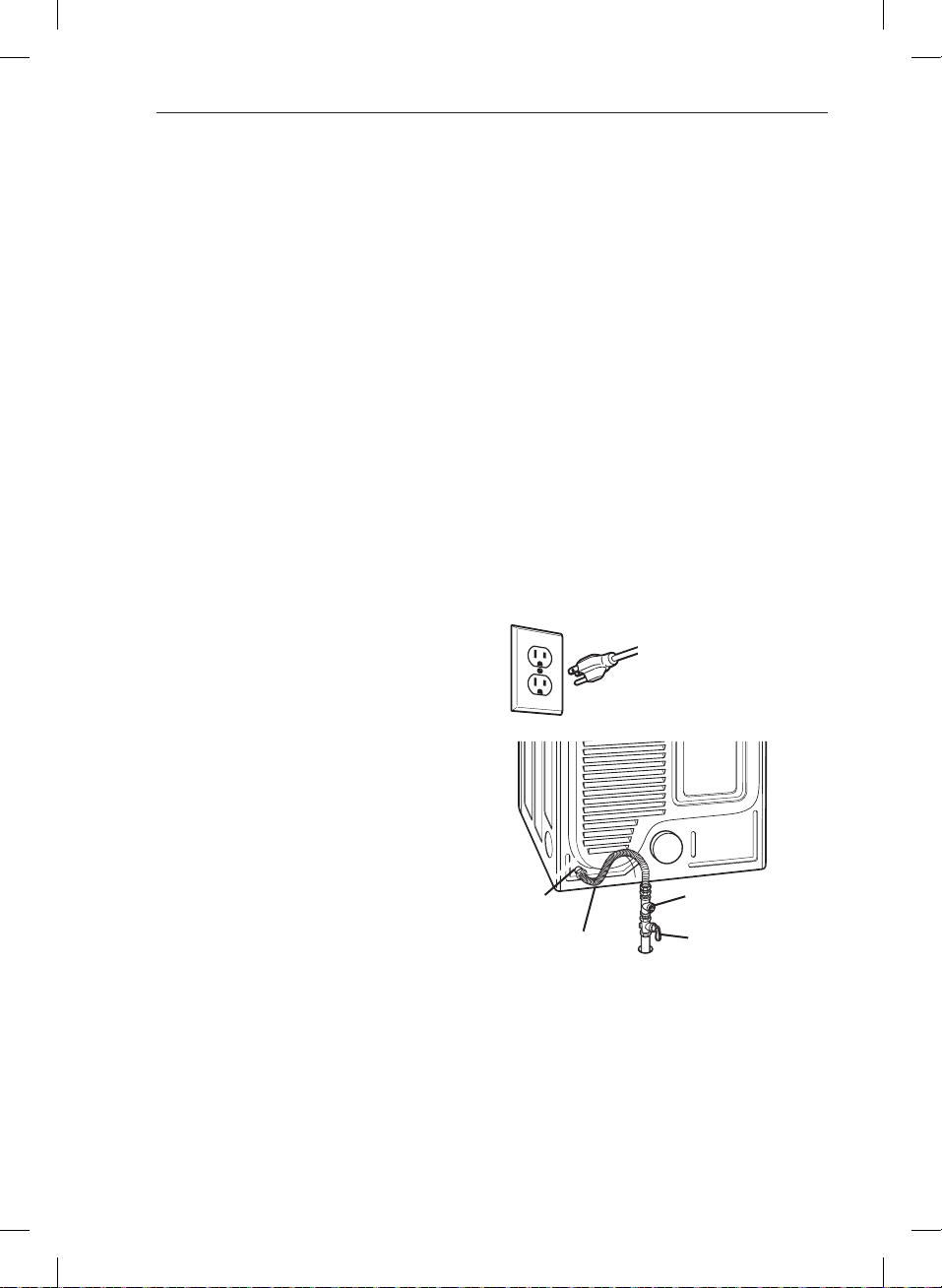
22
Conexión de secadoras a gas (cont.)
w
ADVERTENCIA
Para reducir el riesgo de incendio, descargas eléctricas
o heridas al usar su electrodoméstico, siga las
precauciones básicas, incluyendo lo siguiente:
Si no se cumple
con esto se podrá producir una explosión, incendio o
muerte.
Si no se cumple con esto se podrá producir una
explosión, incendio o muerte.
Si no se cumple con esto se podrá producir una
explosión, incendio o muerte.
Si no se cumple
con esto se podrá producir una explosión, incendio o
muerte.
Si no
se cumple con esto se podrá producir una explosión,
incendio o muerte.
Si no se cumple
con esto se podrá producir una explosión, incendio o
muerte.
Si no se cumple con esto se podrá producir
una explosión, incendio o muerte.
Conexión del suministro de gas
lavado se encuentre APAGADO.Confirme que el
tipo de gas disponible en su cuarto de lavado sea el
adecuado para la secadora. La secadora está lista para
la conexión de gas natural de
de la parte trasera de la secadora.Asegúrese de no
dañar la rosca del conector de gas al quitar la tapa de
envío.
de lavado usando un conector de acero inoxidable
el suministro de gas de su cuarto de lavado. Abra el
suministro de gas de su cuarto de lavado y verifique
que no haya fugas en todas las conexiones de tubería
(tanto interiores como exteriores) usando un fluido
anticorrosivo para detección de fugas.
Conexión eléctrica
Instalaciones en lugares de gran altitud
La clasificación BTU para esta secadora es certificación
ser desclasificada por un técnico calificado o compañía
de gas.
Enchufe la secadora en un
tomacorriente de
de tres patas
conectado a tierra.
Válvula de corte
de suministro
de gas
Conexión de
Tapón de tubería
Conector flexible
de acero inoxidable
certificado por AGA/CSA
INSTRUCCIONES PARA LA INSTALACIÓN
MFL67731027_sp_170830.indd 22 2017.8.30 4:17:41 PM
23
ESPAÑOL
Cómo conectar las secadoras eléctricas
w
ADVERTENCIA
Para ayudar a evitar incendios, descargas eléctricas, heridas
graves o muerte, el cableado e instalación a tierra deben
cumplir con la última edición del Código Eléctrico Nacional,
Por favor comuníquese con un electricista calificado para
que controle el cableado y los fusibles y así asegurar que
su casa posee energía eléctrica adecuada para operar la
secadora.
Requisitos eléctricos únicamente para modelos eléctricos
w
ADVERTENCIA
Para reducir el riesgo de incendio, descargas eléctricas o
heridas al usar su electrodoméstico, siga las precauciones
básicas, incluyendo lo siguiente:
la secadora. Si no se cumple con esto se podrá producir
una explosión, incendio o muerte.
Si no se cumple con esto se podrá producir una
explosión, incendio o muerte.
Si no se cumple
con esto se podrá producir una explosión, incendio o
muerte.
y las instrucciones indicadas en las siguientes páginas.
Si no se cumple con esto se podrá producir una explosión,
incendio o muerte.
Si no se cumple con
esto se podrá producir una explosión, incendio o muerte.
w
ADVERTENCIA
Para reducir el riesgo de incendio, descargas eléctricas o
heridas al usar su electrodoméstico, siga las precauciones
básicas, incluyendo lo siguiente:
una adecuada.
Requisitos eléctricos especiales para viviendas móviles
o prefabricadas
w
ADVERTENCIA
Para reducir el riesgo de incendio, descargas eléctricas o
heridas al usar su electrodoméstico, siga las precauciones
básicas, incluyendo lo siguiente:
locales.
Si no se cumple
con esto se podrá producir una explosión, incendio o
muerte.
INSTRUCCIONES PARA LA INSTALACIÓN
MFL67731027_sp_170830.indd 23 2017.8.30 4:17:41 PM
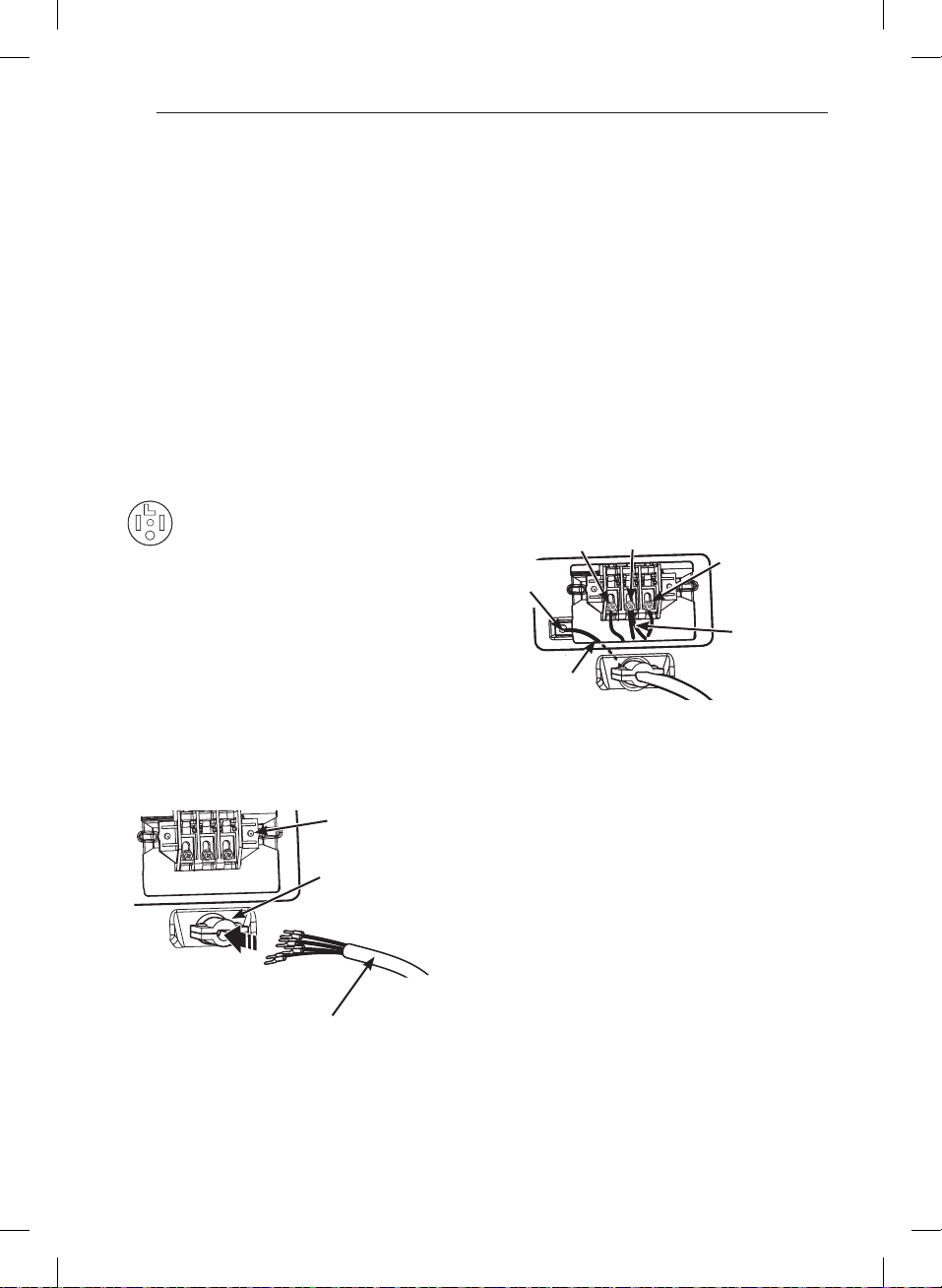
24
Cómo conectar las secadoras eléctricas (cont.)
SÓLO EE.UU.
w
ADVERTENCIA
tierra por el conductor neutro.
Conexión de cuatro hilos para secadoras
eléctricas: Cable eléctrico con enchufe
instalaciones de viviendas móviles y prefabricadas, así
como en todas las construcciones nuevas posteriores
localizado en la parte superior trasera de la secadora.
Instale un protector de tensión listado por UL en el
orificio de pase del cable eléctrico; luego pase un
protector de tensión.
como
mínimo y terminales de bucle cerrado o de horquilla
con extremos doblados hacia arriba.
secadora detrás del tornillo de conexión a tierra de
color verde al tornillo central del bloque terminal.
Conecte los dos conductores calientes del cable
eléctrico a los tornillos del bloque terminal exterior.
Conecte el cable neutro de color blanco al tornillo
del bloque terminal central. Conecte el alambre de
conexión a tierra del cable eléctrico al tornillo de
conexión a tierra de color verde.
. Reinstale la
cubierta de acceso del bloque terminal.
Caliente
(negro)
Alambre de
conexión
a tierra del
cable eléctrico
Tornillo de
conexión a
tierra
Cable blanco
movido de
tornillo de
conexión a
tierra
Neutro
(blanco)
Caliente
(rojo)
Protector de tensión
listado por UL
Cable eléctrico
de cuatro hilos
listado por UL
Bloque
terminal
INSTRUCCIONES PARA LA INSTALACIÓN
MFL67731027_sp_170830.indd 24 2017.8.30 4:17:42 PM
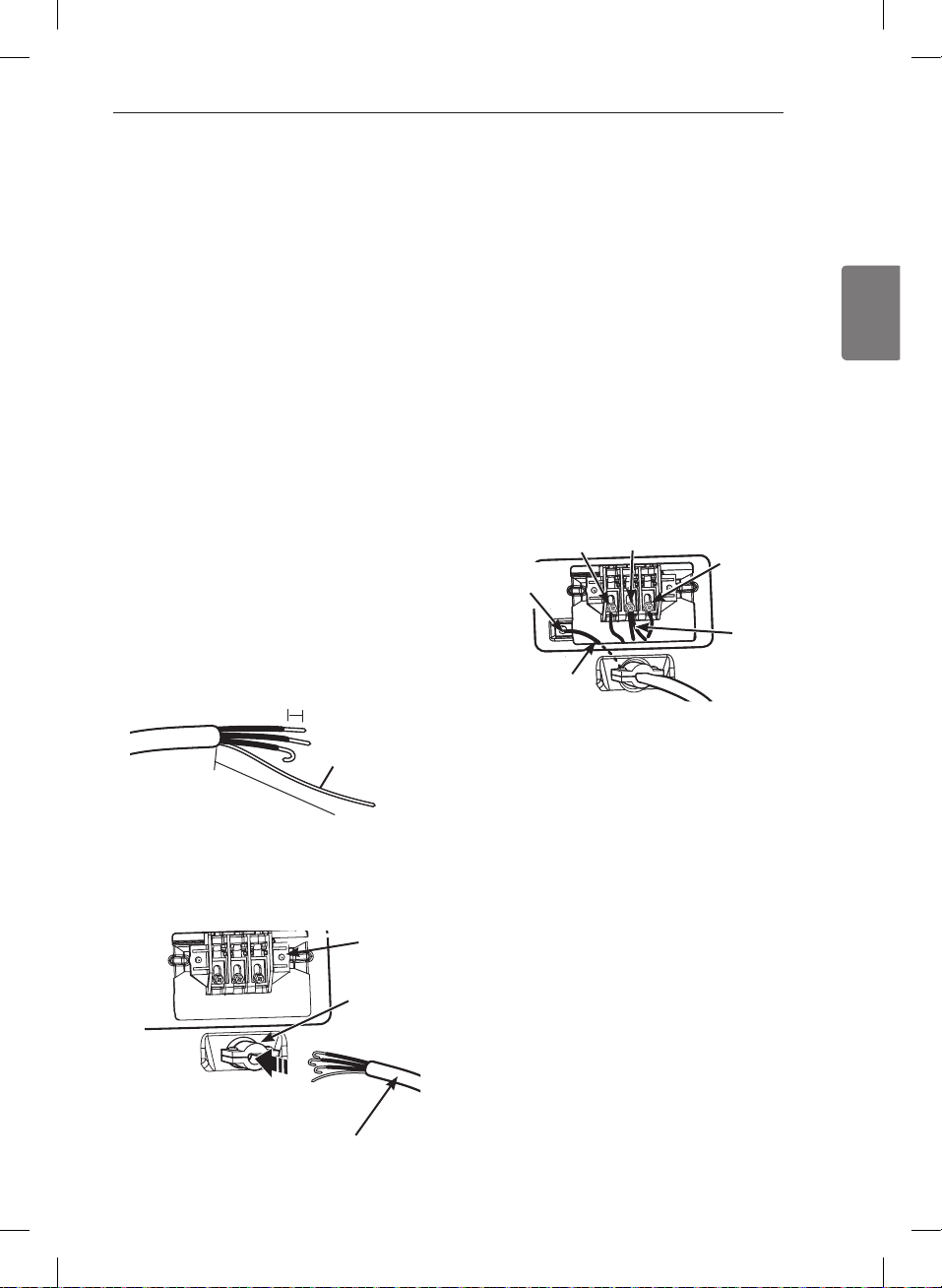
25
ESPAÑOL
w
ADVERTENCIA
a tierra por el conductor neutro.
Conexión de cuatro hilos para secadoras eléctricas:
Conexión directa
instalaciones de viviendas móviles y prefabricadas, así
como en todas las construcciones nuevas posteriores
del final. Descubra 5 pulg. de aislamiento del cable de
cm) del aislamiento del cado uno. Haga los finales de
localizado en la parte superior trasera de la secadora.
Instale un protector de tensión listado por UL en el
orificio de pase del cable eléctrico; luego pase el cable
tensión.
Alambre de
conexión a tierra
5"
Cómo conectar las secadoras eléctricas (cont.)
SÓLO EE.UU.
.
poder quitar y reemplazar la secadora.
secadora detrás del tornillo de conexión a tierra de
color verde al tornillo central del bloque terminal.
Conecte los dos conductores calientes del cable
eléctrico a los tornillos del bloque terminal exterior.
Conecte el cable neutro de color blanco al tornillo
del bloque terminal central. Conecte el alambre
de conexión a tierra del cable eléctrico al tornillo
de conexión a tierra de color verde.
. Reinstale la cubierta de
acceso del bloque terminal.
Protector de
tensión listado
por UL
Cable eléctrico de cuatro
hilos listado por UL
Bloque
terminal
Caliente
(negro)
Alambre de
conexión
a tierra del
cable eléctrico
Tornillo de
conexión a
tierra
Cable blanco
movido de
tornillo de
conexión a
tierra
Neutro
(blanco)
Caliente
(rojo)
INSTRUCCIONES PARA LA INSTALACIÓN
MFL67731027_sp_170830.indd 25 2017.8.30 4:17:43 PM
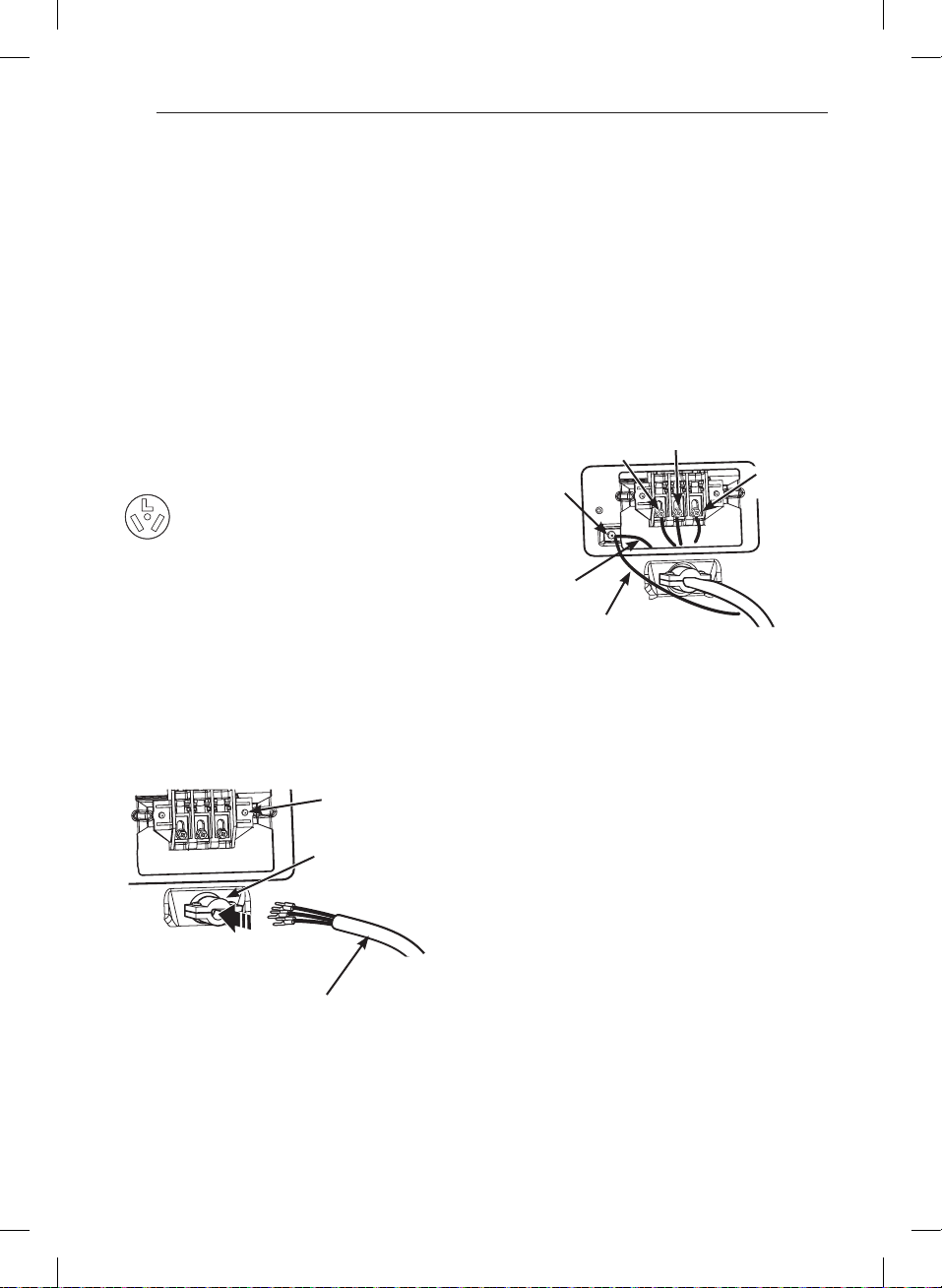
26
Cómo conectar las secadoras eléctricas (cont.)
SÓLO EE.UU.
w
ADVERTENCIA
incendio o muerte.
Conexión de tres hilos para secadoras
eléctricas: Cable eléctrico con enchufe
localizado en la parte superior trasera de la secadora.
Instale un protector de tensión listado por UL en el
orificio de pase del cable eléctrico; luego pase un
cable eléctrico conductor de cobre Núm.
por UL
por el protector de tensión.
y terminales de bucle cerrado o de horquilla
con extremos doblados hacia arriba.
eléctrico a los tornillos del bloque terminal exterior.
Conecte el cable neutro al tornillo del bloque terminal
central. Conecte la conexión a tierra exterior (de
ser requerido por los códigos locales) al tornillo de
color verde. .
Reinstale la cubierta de acceso del bloque terminal.
Protector de tensión
listado por UL
Cable eléctrico
de tres hilos
listado por UL
Bloque
terminal
Tornillo de
conexión
a tierra
Neutro
(blanco)
Caliente
(negro)
Caliente
(rojo)
Conexión a tierra
exterior (de ser
requerido por los
códigos locales)
Hilo
blanco de
estructura
de secadora
INSTRUCCIONES PARA LA INSTALACIÓN
MFL67731027_sp_170830.indd 26 2017.8.30 4:17:44 PM
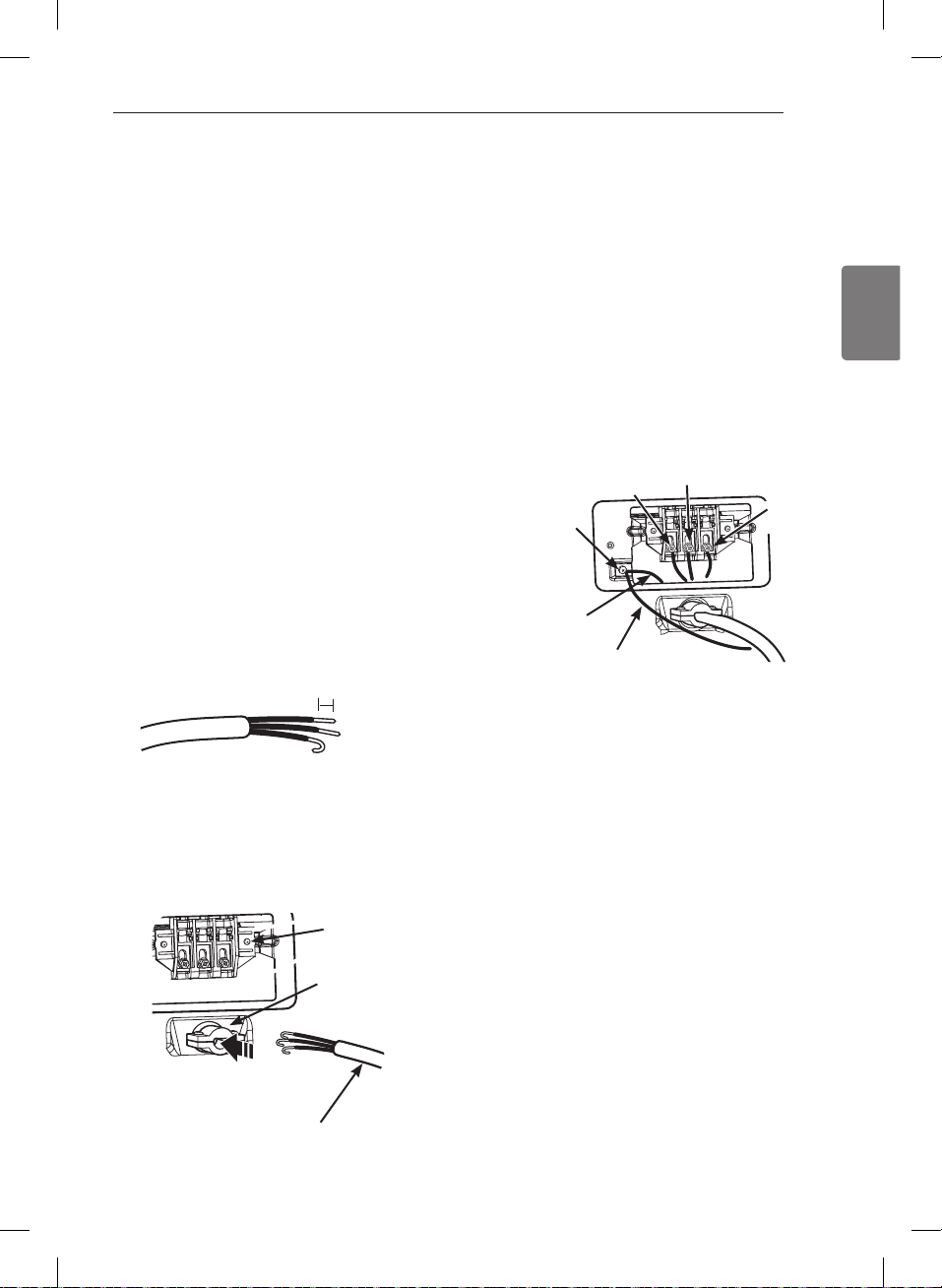
27
ESPAÑOL
Cómo conectar las secadoras eléctricas (cont.)
SÓLO EE.UU.
w
ADVERTENCIA
a tierra por el conductor neutro.
Conexión de tres hilos para secadoras eléctricas:
Conexión directa
forma de gancho.
localizado en la parte superior trasera de la secadora.
Instale un protector de tensión listado por UL en el
orificio de pase del cable eléctrico; luego pase el cable
tensión.
.
poder quitar y reemplazar la secadora.
eléctrico a los tornillos del bloque terminal exterior.
Conecte el cable neutro al tornillo del bloque terminal
central. Conecte la conexión a tierra exterior (de
ser requerido por los códigos locales) al tornillo de
color verde. .
Reinstale la cubierta de acceso del bloque terminal.
Protector de tensión
listado por UL
Cable eléctrico de tres
hilos listado por UL
Bloque
terminal
Tornillo de
conexión
a tierra
Neutro
(blanco)
Caliente
(negro)
Caliente
(rojo)
Conexión a tierra
exterior (de ser
requerido por los
códigos locales)
Hilo
blanco de
estructura
de secadora
INSTRUCCIONES PARA LA INSTALACIÓN
MFL67731027_sp_170830.indd 27 2017.8.30 4:17:46 PM
28
Requisitos especiales para viviendas
móviles o prefabricadas
Cualquier instalación en una vivienda móvil o
prefabricada debe realizarse de conformidad con los
Estándares de seguridad y construcción de viviendas
Si no está seguro de si la instalación que ha propuesto
cumple con estos estándares, llame a un técnico de
mantenimiento e instalación para obtener ayuda.
sobre el piso.
más detallada pertinente a la conexión eléctrica en la
sección Cómo conectar las secadoras eléctricas.
debe ventilar la secadora hacia el exterior.
prefabricada.
exterior usando el panel trasero, izquierdo, derecho o
inferior.
el panel trasero, izquierdo o inferior. Las secadoras a
gas no deben ventilarse hacia el exterior usando el
panel derecho debido a la carcasa del quemador.
bien fijado a la estructura de la vivienda móvil o
prefabricada, y el conducto de escape debe estar
fabricado de un material resistente al fuego y la
combustión. Se recomienda el uso de un conducto de
metal rígido o flexible.
ningún otro conducto, respiradero, chimenea ni a
ningún otro tipo de conducto de escape.
adecuado al aire fresco del exterior para garantizar un
funcionamiento adecuado. La abertura para la toma
pulgadas
).
con respecto a cualquier material combustible de
y que, cuando se ventile la secadora al exterior, se
pueda instalar la secadora dejando un espacio libre de
secadora.
no se proveen con la secadora. Debe obtener los
materiales de ventilación necesarios para una
instalación adecuada.
Revisión de instalación final
Una vez que haya completado la instalación de la
secadora y la misma se encuentre en su ubicación final,
confirme que funcione correctamente realizando las
siguientes pruebas.
Comprobación del calentamiento de la secadora
Cierre la puerta de la secadora, apriete el interruptor
ON/OFF para encender la secadora, e iniciar la secadora
en un ajuste de calor.Cuando inicia la secadora, el
encendedor deberá encender el quemador principal.
Cierre la puerta de la secadora, apriete el interruptor
ON/OFF para encender la secadora, e iniciar la secadora
en un ajuste de calor. El escape de aire deberá estar
caliente después de que la secadora haya funcionado
Revisión del flujo de aire
El funcionamiento efectivo de la secadora requiere de
un flujo de aire adecuado. La corrección del flujo de aire
puede medirse evaluando la presión estática. La presión
estática del conducto del escape se puede medir con
un manómetro, colocado en el conducto de escape
secadora. La presión estática del conducto de escape
revisar la secadora mientras está funcionando sin carga
Revisión del nivelado
Una vez que la secadora se encuentra en su ubicación
final, vuelva a revisar que la misma se encuentre
nivelada. Asegúrese de que esté nivelada de adelante
hacia atrás y de lado a lado, y de que las cuatro patas
niveladoras se encuentren asentadas en el piso
firmemente.
NOTA
Si no se purga todo el aire de la línea de gas, el
encendedor de gas podría apagarse antes de que se
encienda el quemador. Si esto sucede, el encendedor
volverá a intentar encender el gas después de
aproximadamente dos minutos.
INSTRUCCIONES PARA LA INSTALACIÓN
MFL67731027_sp_170830.indd 28 2017.8.30 4:17:46 PM
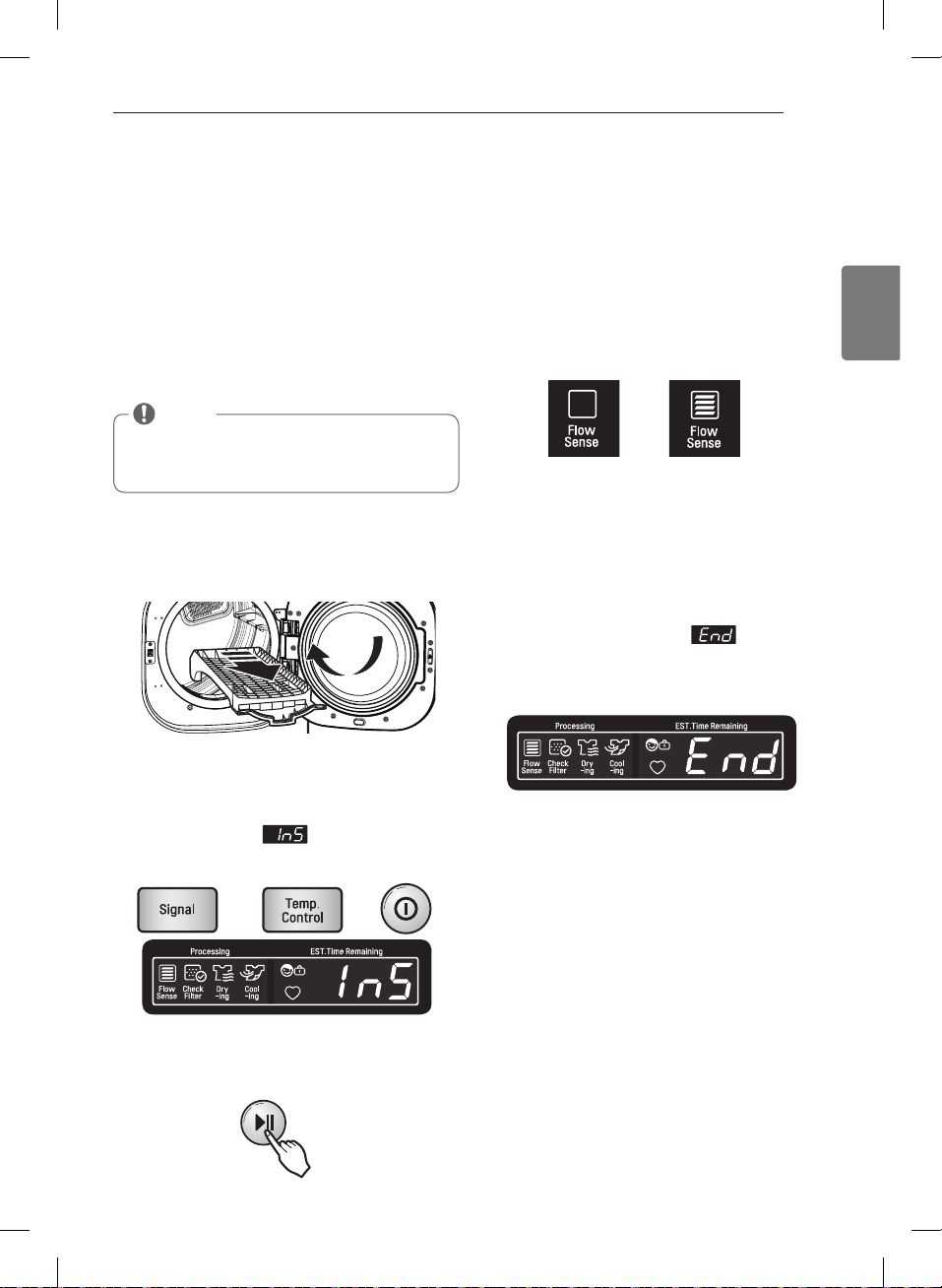
29
ESPAÑOL
Prueba de Instalación
(Comprobación del sistema de
evacuación)
Una vez haya instalado la secadora, haga este prueba
para asegurarse de que las condiciones del sistema de
evacuación son las adecuadas para el funcionamiento
correcto de la secadora. Este prueba tiene como
objetivo mostrarle si existe algún problema importante
en el sistema de evacuación de su vivienda.
FLOW SENSE™, un
sistema innovador que detecta automáticamente los
bloqueos y restricciones en la tubería de la secadora.
Mantener la tubería sin acumulación de pelusa y libre
de restricciones le permitirá secar la ropa más rápido y
reducir el gasto de energía.
cierre la puerta. No meta nada en el tambor cuando
se disponga a hacer este prueba porque podría influir
en la precisión de los resultados.
Esta secuencia de botones activa el prueba de
instalación. El código
aparecerá en la
pantalla de visualización si la activación se ha
realizado con éxito.
La secadora iniciará el prueba, que durará alrededor
de dos minutos. Se encenderá el calor y se medirán
las temperaturas en el tambor.
Durante el ciclo de prueba, observe la pantalla de
Flow Sense™ en el panel de control. Si al terminar
el prueba no muestra ninguna barra, el sistema de
evacuación es adecuado. Si el sistema de evacuación
sufre restricciones importantes, el ícono mostrará
indicarán con códigos de error. Consulte en la
página siguiente el listado de códigos de error y sus
soluciones.
evacuación está considerablemente bloqueado. Revise
el sistema de inmediato, ya que de no hacerlo el
funcionamiento será muy deficiente.
5.
Al finalizar el prueba aparecerá
en la pantalla
de visualización. Una vez haya terminado este ciclo,
la secadora se apagará automáticamente después de
unos momentos.
NOTA
La secadora deberá estar fría antes de iniciar el prueba.
Si la unidad se ha calentado durante la instalación,
active el sistema SECADO CON AIRE (AIR DRY) durante
unos minutos para reducir la temperatura interior.
SIN BARRAS:
CORRECTO
RESTRICCIÓN
INSTRUCCIONES PARA LA INSTALACIÓN
MFL67731027_sp_170830.indd 29 2017.8.30 4:18:54 PM
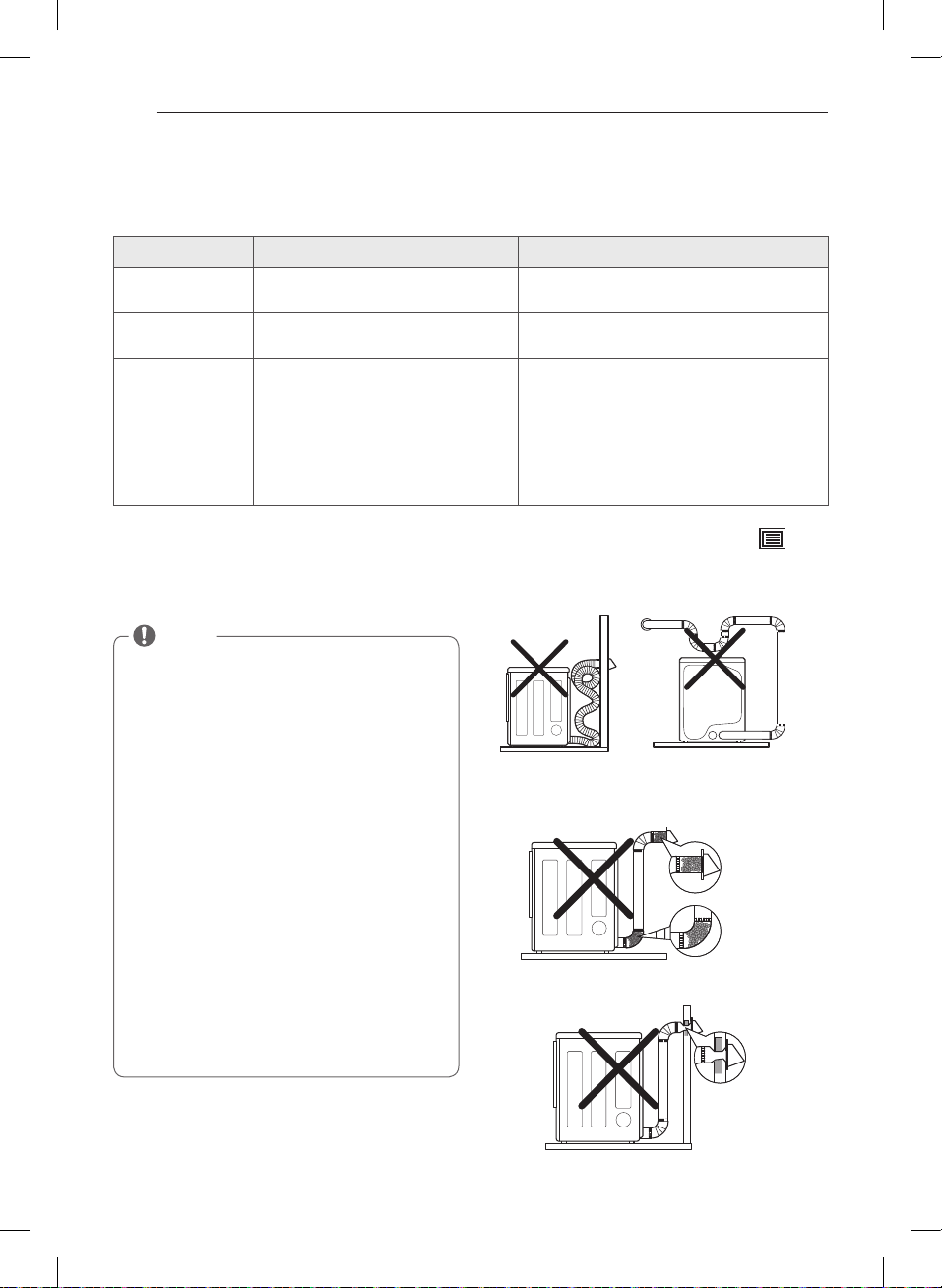
30
Prueba de instalación (Conducto de comprobar) (cont.)
-
cio técnico
Si el LED de FLOW SENSE se enciende, compruebe que
no haya restricciones o daños en el sistema de vaciado.
Repare o reemplace el sistema de evacuación según
sea necesario.
Código de error Causas posibles Soluciones
o
Apague la secadora y llame al
servicio técnico.
Apague la secadora y llame al
servicio técnico.
o
o
conectado correctamente o el
suministro eléctrico de la vivienda es
incorrecto.
el disyuntor o ha habido un apagón.
Compruebe el suministro eléctrico o la conexión
del cable de alimentación al enchufe. Consulte la
sección “Cómo conectar las secadoras eléctricas” de
este manual para las instrucciones completas.
Reactive el disyuntor o reemplace el fusible. No
incremente la capacidad del fusible. Si el problema
es una sobrecarga del circuito, solicite los servicios
de un electricista calicado.
NOTA
Cuando recién se instala la secadora, debe realizarse
esta prueba para alertarlo sobre cualquier clase de
problemas con el conducto de extracción de su hogar.
Sin embargo, puesto que la prueba realizada durante
un funcionamiento normal ofrece una información
más precisa información más precisa sobre el estado
del conducto de extracción que la prueba de insta-
lación, la cantidad de barras visualizadas durante las
dos pruebas puede no ser la misma.
No interrumpa el prueba, ya que de caso contrario
podría obtener resultados erróneos.
Aunque no se ilumine ninguna barra tras el ciclo de
prueba, es posible que existan algunas restricciones
en el sistema de evacuación. Consulte la sección
“Instalación del conducto de ventilación” en este
manual para conocer todos los requisitos del sistema
de evacuación y de ventilación.
Esta secadora cuenta con el sistema Flow Sense™, un
sistema innovador que detecta automáticamente los
bloqueos y restricciones en la tuberia de la secadora.
Mantener la tuberia sin acumulacion de pelusa y libre
de restricciones le permitirá secar la ropa más rápido y
reducir el gasto de energia.
INSTRUCCIONES PARA LA INSTALACIÓN
Evite funcionamientos prolongados o
funcionamientos con múltiples formaciones de
torceduras o codos.
Conducto demasiado
largo o muy torcido
Tubería demasiado larga
o con demasiados codos
Controle los bloqueos y la acumulación de pelusa.
Asegúrese que la tubería no posea cortes ni restricciones.
Tubería
estrangulada
o bloqueada
Acumulación
de pelusa o
bloqueo
MFL67731027_sp_170830.indd 30 2017.8.30 4:18:59 PM
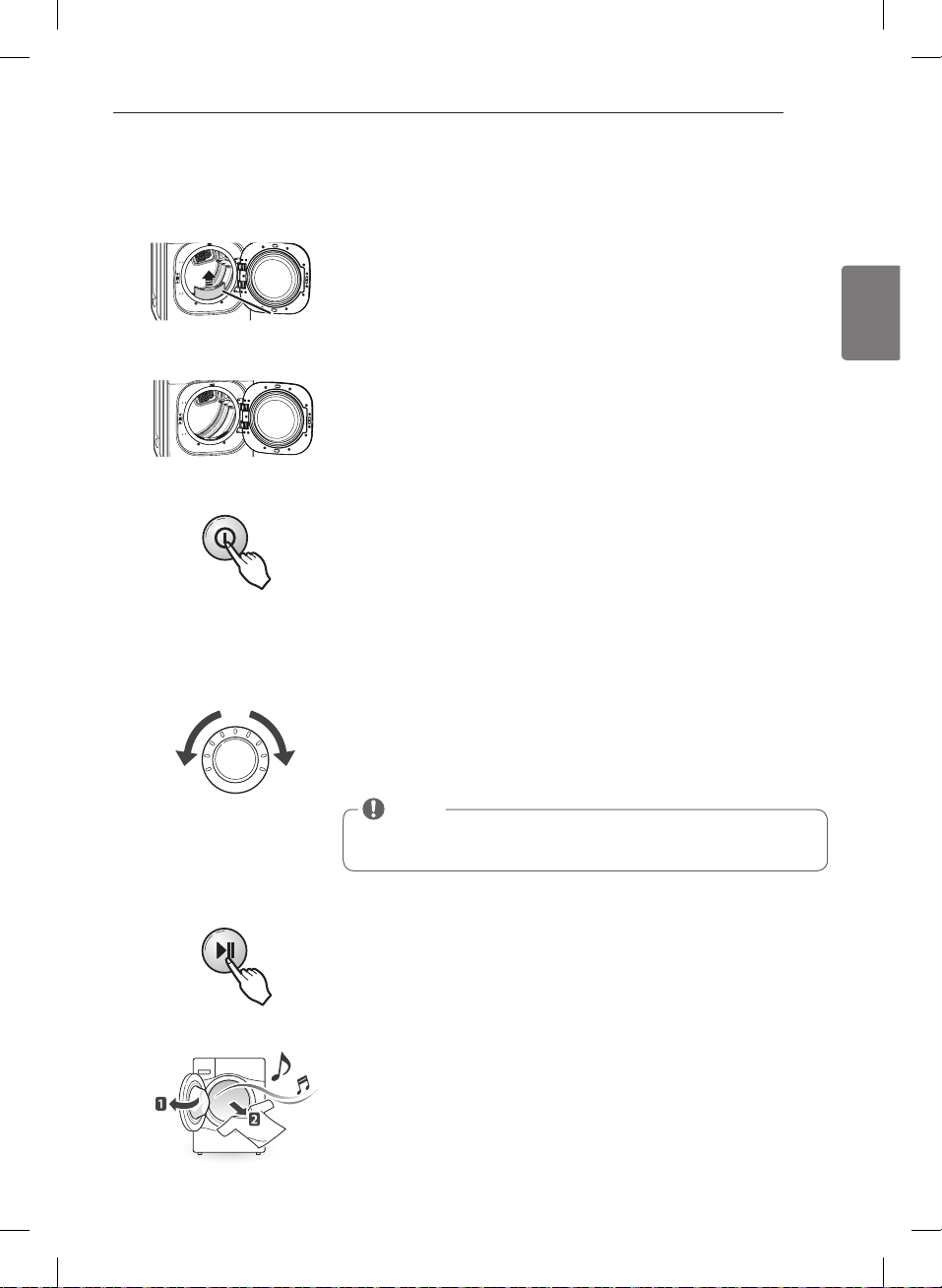
31
ESPAÑOL
CÓMO USAR
Funcionamiento de la secadora
Presione el botón ENCENDIDO/APAGADO (POWER) para encender la secadora.
Si se enciende, los LEDs de ciclo se iluminarán y se emitirá un aviso sonoro.
3
Presione el botón INICIO/PAUSA(START/PAUSE) para que comience el ciclo.
El ciclo puede ser pausado en cualquier momento abriendo la puerta o
presionando el botón INICIO/PAUSA (START/PAUSE). Si no vuelve a iniciarse el
5
Gire el mando del selector de ciclo en cualquier sentido hasta que se ilumine
el LED del ciclo que desee. Se mostrarán los ajustes preestablecidos de
Los ajustes predeterminados para el ciclo seleccionado podrán cambiarse
ahora si lo desea. Esto puede llevarse a cabo utilizando los botones
ciclo pueden añadirse utilizando los botones de opción tal y como se muestra
4
NOTA
No todas las opciones ni modificadores están disponibles para todos los
ciclos. Se escuchará un sonido diferente y la luz LED no se iluminará si la
selección no está permitida.
Al finalizar el ciclo, si lo tiene ajustado, oirá un aviso sonoro. Retire
inmediatamente sus prendas de la secadora para reducir las arrugas. Si tiene
seleccionada la función CUIDADO DE ARRUGAS (WRINKLE CARE), la secadora
volteará brevemente la carga cada pocos minutos para ayudar a prevenir la
aparición de arrugas en sus prendas.
6
Cargue en la secadora la carga húmeda procedente de la lavadora. Si la carga
es muy grande, deberá dividirla en cargas más pequeñas para obtener un buen
rendimiento y proteger los tejidos.
2
Si aún no ha limpiado el filtro de pelusas, extráigalo y elimine las pelusas
procedentes de la última carga. Esto le ayudará a asegurar un funcionamiento
más rápido y eficiente de secado.
1
Filtro de
pelusa
CÓMO USAR
MFL67731027_sp_170830.indd 31 2017.8.30 4:19:34 PM
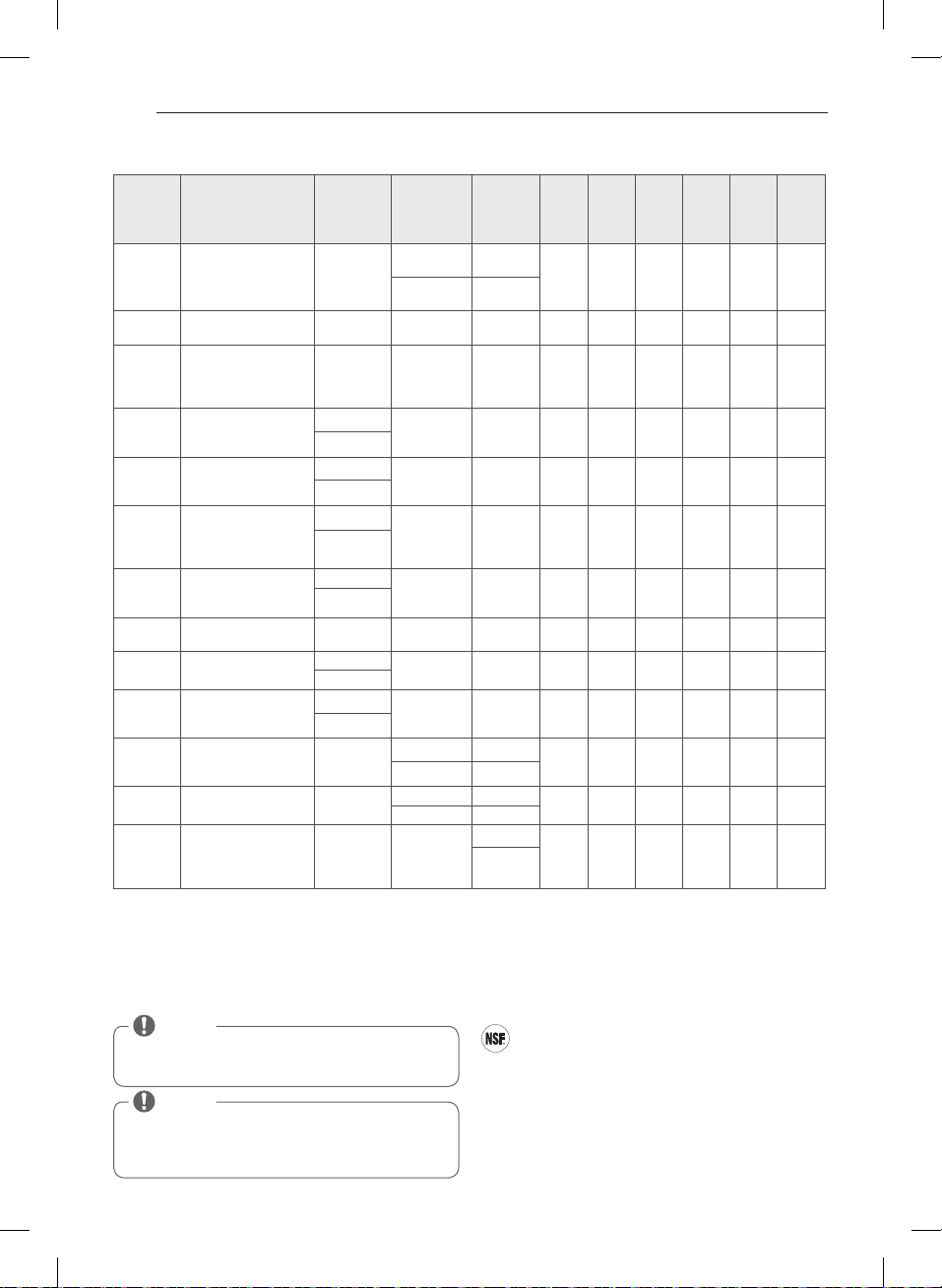
32
secado
en min.
tiempo
de
arrugas
Sonido de
secado
estática
STEAM
FRESH
TM
Acolchados, camisas,
pantalones (excepto
prendas muy
delicadas)
APAGADO
MEDIANO ALTO
REGULABLE
REGULABLE
STEAM
SANITARY
TM
Acolchados, ropa de
cama, ropa de niños.
APAGADO
ALTO
ANTI
BACTERIAL
(ANTI
BACTERIAL)
No utilizar este
ciclo con prendas
delicadas.
MUY SECO
ALTO
BULKY/ LARGE
(VOLUMINOSO/
GRANDE
Acolchados,
almohadas, camisas.
NORMAL
MEDIANO 55
REGULABLE
PERM. PRESS
(PLANCHADO
PERM.)
Prendas sintéticas,
planchado
permanente.
NORMAL
BAJO
REGULABLE
COTTON/
NORMAL
(ALGODÓN/
NORMAL)
Ropa de trabajo,
pana, etc.
NORMAL
MEDIANO
REGULABLE
HEAVY DUTY
(MUY
POTENTE)
Vaqueros, prendas
pesadas.
NORMAL
ALTO
REGULABLE
ROPA DE
PORTIVA
Ropa deportiva APAGADO APAGADO
DELICATES
(DELICADO)
Lencería, sábanas,
blusas
NORMAL
BAJO
REGULABLE
TOWELS
(TOALLAS)
Prendas vaqueras,
toallas, algodón
resistente.
NORMAL
MEDIANO
ALTO
55
REGULABLE
SPEED DRY
(SECADO
RÁPIDO)
Para poca carga con
tiempos de secado
cortos.
APAGADO
ALTO
REGULABLE
REGULABLE
REFRESCADO
Para quitar arrugas
menores de la ropa
APAGADO
MEDIANO ALTO
REGULABLE
REGULABLE
AIR DRY
(SECADO
CON AIRE)
Para artículos que
requieren secado
sin calor tales como
plásticos o cauchos.
APAGADO SIN CALOR
REGULABLE
Guía de ciclos
= Available option
Ciclos de SECADO CON SENSOR (SENSOR DRY)
Los ciclos de SECADO CON SENSOR utilizan el sistema exclusivo
de sensor doble de LG para detectar y comparar el nivel de
humedad en las prendas y en el aire, y programar el tiempo
de secado del modo necesario para asegurar resultados
superiores. La secadora ajusta automáticamente el nivel de
sequedad y temperatura del ajuste recomendado para cada
ciclo. El tiempo restante estimado se mostrará en la pantalla.
Ciclos de SECADO MANUAL (MANUAL DRY)
Use los ciclos de SECADO MANUAL para seleccionar una
cantidad especifica de tiempo y temperatura de secado.
Cuando se selecciona el ciclo de SECADO MANUAL, la
pantalla de TIEMPO RESTANTE ESTIMADO (ESTIMATED
TIME REMAINING) muestra el tiempo restante real en su
ciclo. Puede cambiar el tiempo real en el ciclo apretando
MÁS TIEMPO (MORE TIME) o MENOS TIEMPO (LESS TIME).
NSF International (anteriormente, National Sanitation
Foundation, Fundación Nacional de Saneamiento),
certifica que el ciclo de desinfección reduce
el 99,9% de las bacterias presentes en la colada y que no
se transmitirá ninguna bacteria a la siguiente carga.
son temperatura y secado . Estos ajustes
predeterminados no se pueden cambiar.
NOTA
Para proteger sus prendas, no todos los niveles, temperatura u
opciones están disponible con cada ciclo. Consulte la guía de
ciclos para los detalles.
CÓMO USAR
NOTA
El ahorro de energía es la opción por defecto en el ciclo
Algodón/Normal.
Si desea un secado más rápido que los ajustes del ciclo Algodón/
Normal, puede desactivar la opción de ahorro de energía.
MFL67731027_sp_170830.indd 32 2017.8.30 4:19:37 PM
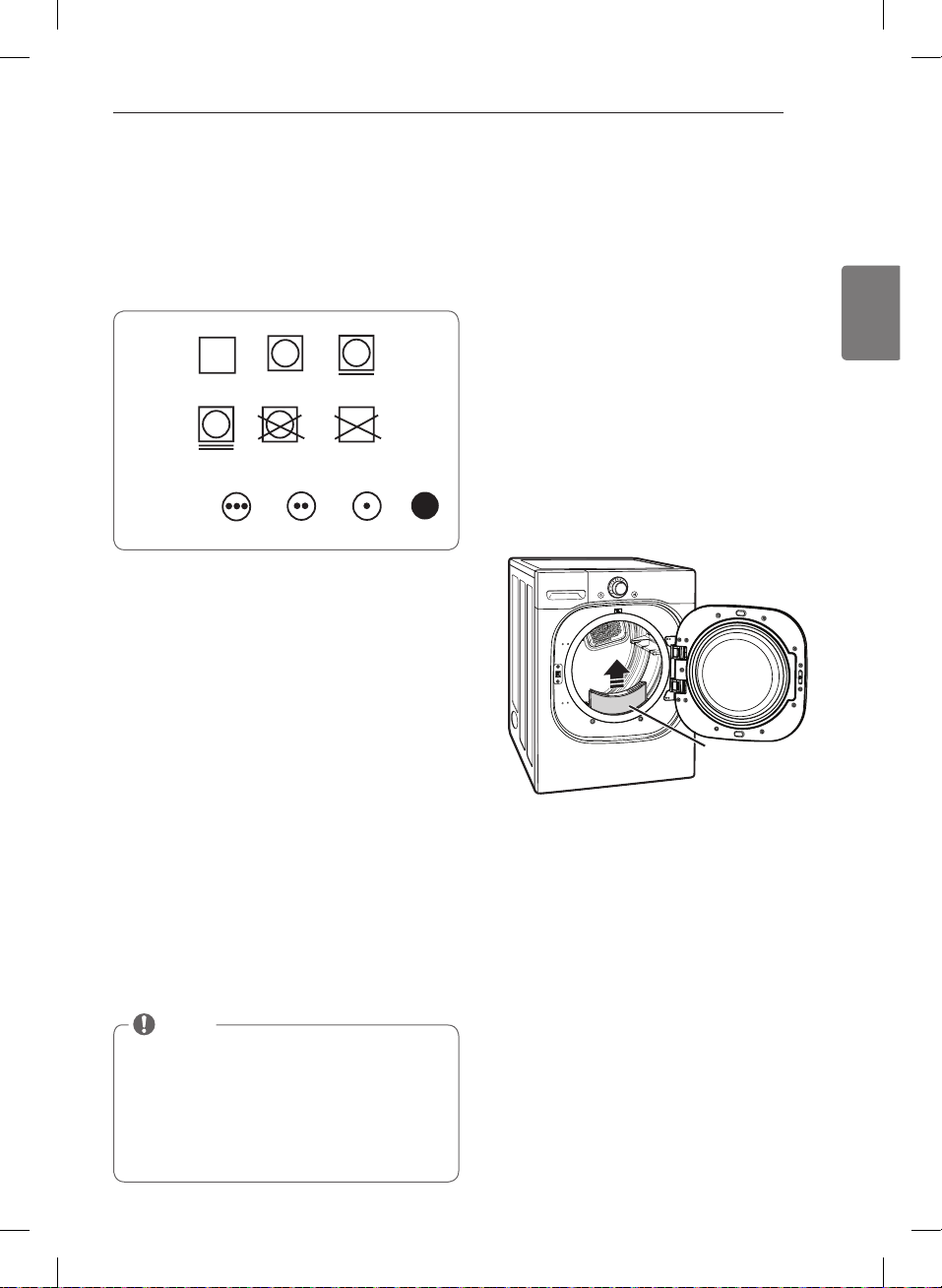
33
ESPAÑOL
A continuación encontrará instrucciones para comenzar a usar su secadora nueva. Para más información por favor
consulte las secciones específicas de este manual.
Revise el filtro de pelusa antes de
cada uso
Asegúrese siempre de que el filtro de pelusa esté limpio
antes de iniciar una carga nueva; un filtro de pelusa
bloqueado incrementará los tiempos de secado.
Para limpiarlo, tire del filtro de pelusa verticalmente y,
con los dedos, enrolle cualquier pelusa para retirarla del
filtro. No enjuague ni lave el filtro para eliminar la pelusa.
Empuje el filtro de pelusa firmemente en su lugar.
Para informacaión adicional, vea la sección LIMPIEZA
REGULAR.
Asegúrese siempre de que el filtro de pelusa esté
instalado adecuadamente antes de poner en
funcionamiento la secadora. Hacer funcionar la secadora
sin el filtro o con un filtro de pelusa suelto podría dañar
la secadora y los artículos en el interior de la misma.
Clasificación de cargas
Etiquetas de mantenimiento de las telas
La mayoría de las prendas de vestir tienen etiquetas
de mantenimiento de las telas para lograr un
mantenimiento adecuado.
Agrupamiento de prendas similares
Para obtener los mejores resultados, clasifique las prendas en
cargas que puedan secarse con el mismo ciclo de secado.
Los diferentes tipos de telas tienen diferentes requisitos de
cuidado, y algunas telas se secarán más rápido que otras.
Cómo cargar la secadora
w
ADVERTENCIA
Para reducir el riesgo de incendio, descargas eléctricas
o heridas al usar su electrodoméstico, siga las
precauciones básicas, incluyendo lo siguiente:
Si no se cumple con esto se
podrá producir una explosión, incendio o muerte.
residuos de aceite. Si no se cumple con esto se podrá
producir una explosión, incendio o muerte.
NOTA
Consejos útiles de carga
se secan. No sobrecargue la secadora; las
prendas necesitan de espacio para girar y secar
adecuadamente.
prevenir que estos artículos se enganchen o enreden
en otras prendas.
Secado a
máquina
Seco
Planchado permanente
/
antiarrugas
Suave/
delicado
No secar
a máquina
No secar
(utilizado junto
a “no lavar”)
Normal
Etiquetas de cuidado de las telas
Ajuste
de calor
Alto
Mediano
Bajo
Sin calor/aire
Secado a
máquina
Seco
Planchado permanente
/
antiarrugas
Suave/
delicado
No secar
a máquina
No secar
(utilizado junto
a “no lavar”)
Normal
CÓMO USAR
Filtro de
pelusa
MFL67731027_sp_170830.indd 33 2017.8.30 4:19:38 PM
34
Su secadora dispone de varias opciones de ciclo
adicionales, las cuales personalizan los ciclos para
satisfacer sus necesidades individuales.Ciertos botones
de opción también incorporan una función especial (vea
la siguiente página para obtener mayor información)
que puede activarse apretando y manteniendo apretado
Para añadir opciones de ciclo a un ciclo:
ciclos para seleccionar el ciclo deseado.
los ajustes para ese ciclo.
opción que desea añadir. Aparecerá en la pantalla un
mensaje de confirmación.
iniciar el ciclo. La secadora iniciará automáticamente.
SEÑAL (SIGNAL)
Ajuste el volumen del aviso sonoro o apaguelo.
Presione repetidamente el boton hasta que se ilumine el
volumen deseado.
Botones modificadores de ciclo
Los ciclos de SECADO CON SENSOR (SENSOR DRY)
tienen ajustes preprogramados que se seleccionan
automaticamente. Los ciclos de SECADO MANUAL
(MANUAL DRY) tienen ajustes predeterminados, pero
pueden Personalizarse usando los botones de ajustes
de ciclos. Apriete el botón de esa opción para ver y
seleccionar otros ajustes.
NIVEL DE SECADO (DRY LEVEL)
Selecciona el nivel de sequedad para el ciclo. Apriete el
botón de NIVEL DE SECADO (DRY LEVEL) varias veces
para navegar por los ajustes disponibles.
de SECADO CON SENSOR (SENSOR DRY).
automaticamente. Al seleccionar MÁS SECO (MORE
DRY) o MUY SECO (VERY DRY) se incrementará el
tiempo del ciclo, mientras que HUMEDO SECO (DAMP
DRY) o MENOS SECO (LESS DRY) disminuira el tiempo
del ciclo.
SECO (LESS DRY) en los artículos que desee planchar.
CONTROL DE TEMPERATURA (TEMP. CONTROL)
Regula el ajuste de temperatura desde ULTRA BAJO
(ULTRA LOW) a ALTO (HIGH). Esto permite el cuidado
preciso de sus telas y prendas. Apriete el botón
CONTROL DE TEMPERATURA (TEMP. CONTROL) varias
veces para navegar por los ajustes disponibles.
SECADO DE TIEMPO (TIME DRY)
Le permite seleccionar el tiempo de secado
para eliminar arrugas. Use los botones de MÁS TIEMPO/
MENOS TIEMPO (MORE TIME/LESS TIME) para anadir
minuto.
NOTA
Para proteger las prendas, no todos los niveles de
secado, temperatura u opción están disponibles en
todos los ciclos. Vea la Guía de ciclos para obtener más
detalles.
CÓMO USAR
MFL67731027_sp_170830.indd 34 2017.8.30 4:19:38 PM
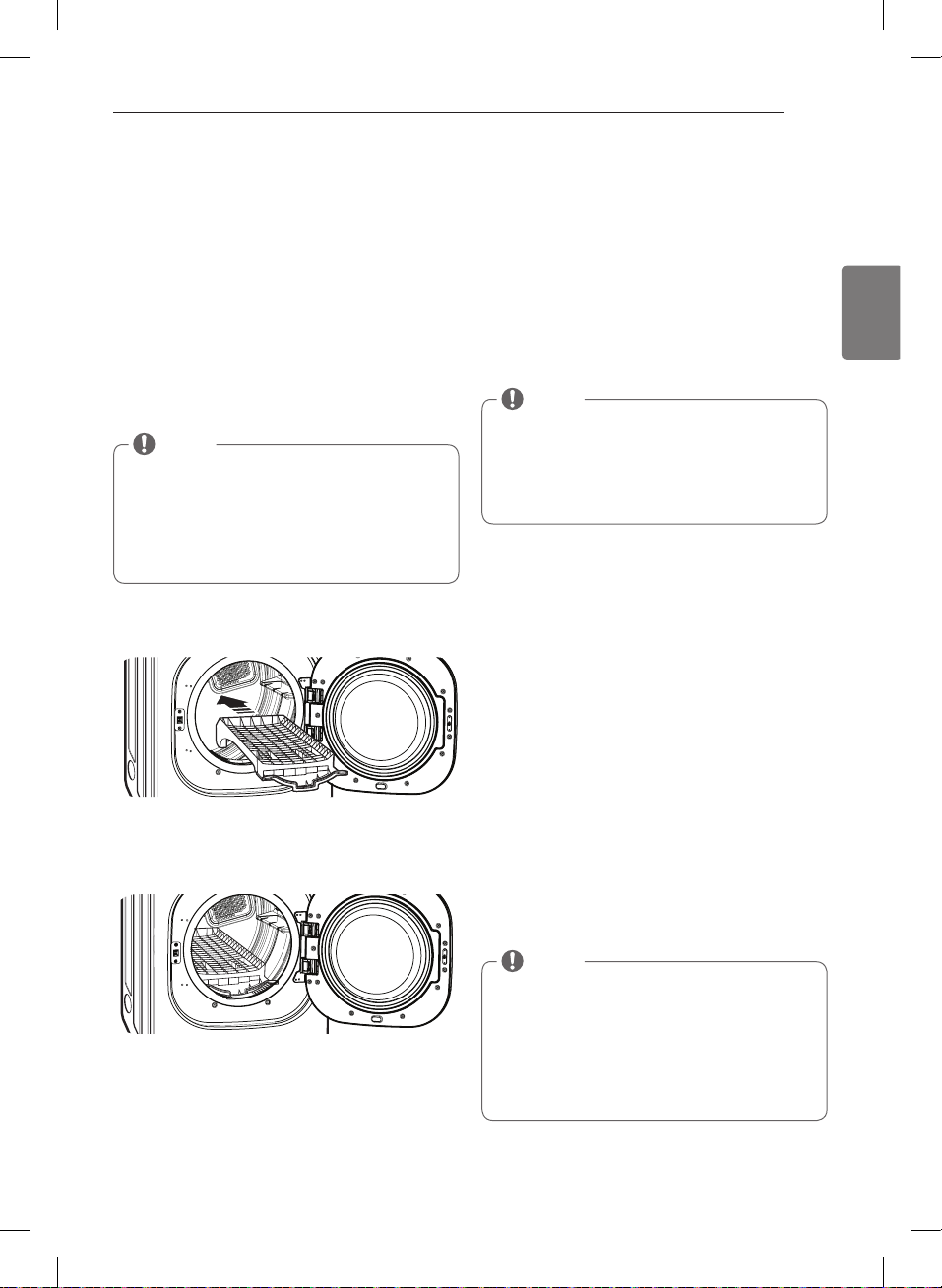
35
ESPAÑOL
Funciones especiales
Los botones de opción también activan las funciones
especiales, incluyendo, SEGURO A PRUEBA DE NIÑOS
(CHILD LOCK), SECADO EN PARRILLA (RACK DRY).
Seleccione la opción deseada presionando el botón. Al
pulsar y mantener presionado el botón se activarán las
características especiales marcadas con el asterisco (*),
tales como Seguro a prueba de niños.
* SECADO EN PARRILLA (RACK DRY)
Use el ciclo SECADO EN PARRILLA (RACK DRY) con
artículos tales como suéteres de lana, sedas, y lencería,
que se deberían secar en posición horizontal. También
se puede usar SECADO EN PARRILLA (RACK DRY) con
artículos que no deben secarse girando, tales como
calzado deportivo o animales de peluche.
Para instalar la rejilla de secado
la rejilla en el tambor de la secadora.
sobre el borde interior de la puerta y descanse
horizontalmente sobre el interior de la secadora.
* CERRADURA A PRUEBA DE NIÑOS (CHILD LOCK)
Utilice esta opción para evitar usos indeseados
de la secadora o para evitar modificaciones en
las configuraciones de ciclo mientras la secadora
esta funcionando. Presione y sostenga el botón de
para activar o desactivar la funcion SEGURO A PRUEBA
DE NIÑOS (CHILD LOCK).
Cuando se ha fijado el seguro infantil, aparecerá
el indicador de seguroinfantil en la pantalla y se
desactivarán todos los botones excepto el botón de
ENCENDIDO/APAGADO (POWER).
SEÑAL DE SECADO HÚMEDO (DAMP DRY SIGNAL)
Con esta opción, la secadora hará sonar una alarma
permite retirar el(los) artículo(s) liviano(s) que seca(n)
rápidamente o que desea planchar o colgar mientras
aún se encuentran húmedos. Presione el botón
SEÑAL DE SECADO HÚMEDO (DAMP DRY SIGNAL).
CUIDADO DE ARRUGAS (WRINKLE CARE)
Al seleccionar esta opción, hará girar la carga
del ciclo seleccionado, o hasta que se abra la puerta.
Esto es de ayuda para prevenir la formación de arrugas
cuando no le sea posible retirar las prendas de la
secadora inmediatamente.
DE AHORRO DE ENERGÍA ENERGY SAVER
Esta opción le permite reducir el consumo de energía en
el ciclo Algodón/Normal, dependiendo del tamaño de la
carga.
Cuando se seleccione el ahorro de energía, el ciclo
comienza con una sección de secado por aire y se
aumenta el tiempo de secado .
NOTA
Una vez seleccionado, el SEGURO A PRUEBA DE
NIÑOS permanece activo hasta que se desactiva
manualmente. El SEGURO A PRUEBA DE NIÑOS
debe estar desactivado para ejecutar otro ciclo. Para
desactivar el SEGURO A PRUEBA DE NIÑOS, mantenga
pulsado el botón PLANCHADO FÁCIL (EASY IRON) por
tres segundos.
NOTA
El ahorro de energía es la opción por defecto en el
ciclo Algodón/Normal.
Puede desactivar la opción de ahorro de energía para
un ciclo Normal más rapido que comienza con secado
caliente.
Para desactivar la opción predeterminada de ahorro
de energía, mantenga presionado durante tres
segundos el botón Cuidado de Arrugas.
En la pantalla aparece Activado o Desactivado.
CÓMO USAR
NOTA
NUNCA seque a máquina una carga de ropa con la
bandeja instalada. Cuando la bandeja está instalada,
el tambor girará de manera habitual, pero la bandeja
no se moverá. Asegúrese de que todas las prendas a
secar permanezcan por completo sobre la bandeja y
no se caigan o no sean arrastradas fuera por el tambor
en funcionamiento. Asegúrese de extraer la bandeja
luego de su uso.
MFL67731027_sp_170830.indd 35 2017.8.30 4:19:40 PM
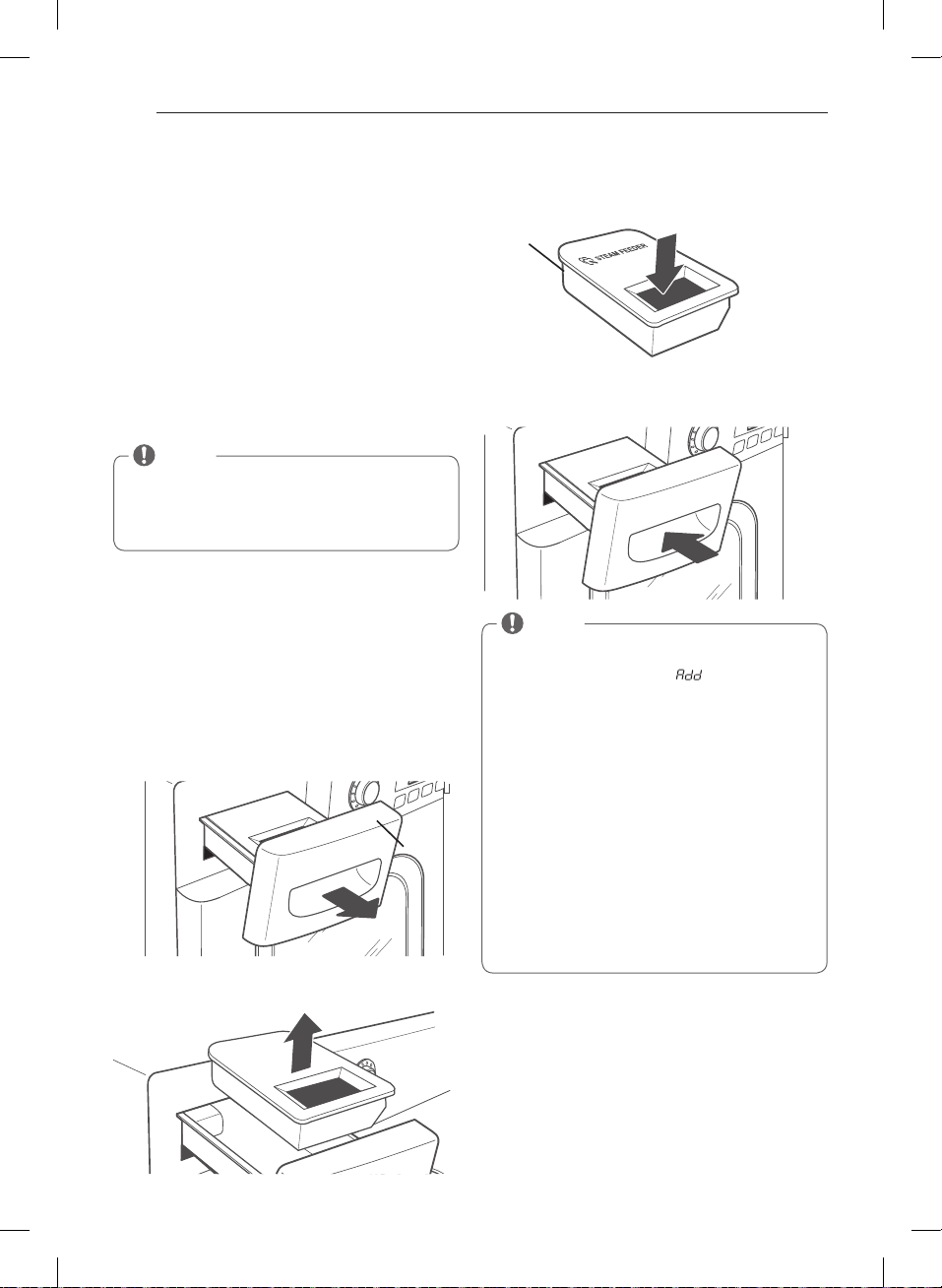
36
Programa personalizado
Si tiene una combinacion especial de ajustes que usa
con frecuencia, puede guardar estos ajustes a manera
de PROGRAMA PERSONALIZADO (CUSTOM PROGRAM).
Para guardar un programa personalizado:
ciclos para seleccionar el ciclo deseado.
los ajustes para ese ciclo.
opción que desea añadir. Aparecerá en la pantalla un
mensaje de confirmación.
PERSONALIZADO (CUSTOM PROGRAM) por tres
segundos.
Para recuperar un programa personalizado:
(CUSTOM PROGRAM).
iniciar el ciclo.
Funciones de vapor
Para llenar el alimentador de vapor
pantalla del filtro.
el cajón hasta que se trabe en su lugar.
w
ADVERTENCIA
Si no
se cumple con esta advertencia se podrán producir
heridas graves o muerte.
Si no se
cumple con esta advertencia se podrán producir
heridas graves o muerte.
NOTA
Puede guardar sólo un programa personalizado a
la vez. Al pulsar y mantener presionado el botón
PROGRAMA PERSONALIZADO (CUSTOM PROGRAM),
reemplazará cualquier programa personalizado que
haya guardado anteriormente.
NOTA
Antes de usar el ciclo de vapor, debe llenarse el
alimentador de vapor con agua hasta la línea MAX. Si
no lo hace, la pantalla muestra
. Asegúrese de que
el alimentador de vapor está lleno de agua y el cajón
está cerrado completamente. Apague la secadora,
luego vuelva a iniciar el ciclo de vapor.
vapor con sustancias extrañas, agentes para enjuague,
o detergentes.
alimentador de vapor esté vacío.
generador de vapor no funcionará.
mismo no se instala se producirán desbordes de agua.
Alimentador de Vapor y del cajón antes de encender
la secadora.
Cajón
Alimentador de
vapor
SÓLO agua
corriente
CÓMO USAR
MFL67731027_sp_170830.indd 36 2017.8.30 4:19:41 PM
37
ESPAÑOL
Funciones de vapor (cont.)
La nueva tecnologia de vapor de LG le permite inyectar
las telas con un chorro giratorio de vapor caliente para
refrescar las prendas, reducir la estática, y facilitar el
planchado. Simplemente seleccione el ciclo STEAM
FRESH™ o agregue la opción Vapor (Steam) a los ciclos
seleccionados.
Cómo usar el ciclo STEAM FRESH™
STEAM FRESH™ utiliza sólo el poder del vapor para
rápidamente reducir arrugas y olores de las telas. Da
nueva vida a las prendas arrugadas que han estado
guardadas por mucho tiempo y facilita el planchado
en ropa muy arrugada. STEAM FRESH™ también puede
usarse para reducir los olores en las telas.
Para usar el ciclo STEAM FRESH™:
.
REDUCCIÓN ESTÁTICA (REDUCE STATIC), PLANCHADO
FÁCIL (EASY IRON), o CUIDADO DE ARRUGAS (WRINKLE
CARE).
puede modificarse el tiempo de vapor presionando
los botones MÁS TIEMPO (MORE TIME) o MENOS
TIEMPO (LESS TIME)
para iniciar el ciclo.
Para agregar VAPOR (STEAM) a un ciclo estándar:
deseado.
ajustar las configuraciones para ese ciclo.
le gustaría agregar. Luego ajuste el tamaño de carga
utilizando los botones MAS TIEMPO (MORE TIME) o
MENOS TIEMPO (LESS TIME).
para iniciar el ciclo.
Cómo usar las opciones de vapor
La opcíon REDUCCIÓN ESTÁTICA (REDUCE STATIC)
inyecta vapor al final del ciclo de secado para reducir la
electricidad estatica producida por la fricción de telas.
Modifique el tiempo del ciclo presionando el botón MAS
TIEMPO (MORE TIME) o MENOS TIEMPO (LESS TIME). La
pantalla muestra la cantidad de prendas recomendadas,
La opcíon PLANCHADO FÁCIL (EASY IRON) deja las
telas adecuadamente húmedas para planchado, lo que
puede ahorrar tiempo y facilitar el planchado. Modifique
el tiempo del ciclo presionando el botón MÁS TIEMPO
(MORE TIME) o MENOS TIEMPO (LESS TIME). La pantalla
muestra la cantidad de prendas recommendadas, por
Cómo usar el ciclo STEAM SANITARY™
El nuevo ciclo STEAM SANITARY™ es idóneo para la
higienización rápida y sencilla de elementos que no
pueden lavarse, utilizando sólo el poder del vapor.
Recomendamos utilizar este ciclo para tejidos de
algodón y poliéster. (NO use para espuma de uretano,
plumas o prendas delicadas).
NOTA
REDUCCIÓN ESTÁTICA (REDUCE STATIC)
o PLANCHADO FÁCIL (EASY IRON) tambien pueden
usarse durante el ciclo STEAM FRESH™.
puede modificarse el tiempo del ciclo presionando
los botones MÁS TIEMPO (MORE TIME) o MENOS
o
5 prendas, y
indica una carga grande, como un
edredón.
NOTA
DRY) con la opcíon REDUCCIÓN ESTÁTICA (REDUCE
STATIC) no puede seleccionarse NIVEL DE SECADO
(DRY LEVEL) de MENOS (LESS) o HUMEDO (DAMP).
REDUCCIÓN ESTÁTICA (REDUCE
STATIC) o PLANCHADO FÁCIL (EASY IRON) también
pueden seleccionarse durante los ciclos TIEMPO DE
SECADO(TIME DRY).
los botones MÁS TIEMPO (MORE TIME) o MENOS
TIEMPO (LESS TIME) TIME cambiarán el tiempo de
vapor ÚNICAMENTE.
los botones MÁS TIEMPO (MORE TIME) o MENOS
TIEMPO (LESS TIME) TIME no funcionarán.
CÓMO USAR
MFL67731027_sp_170830.indd 37 2017.8.30 4:19:42 PM
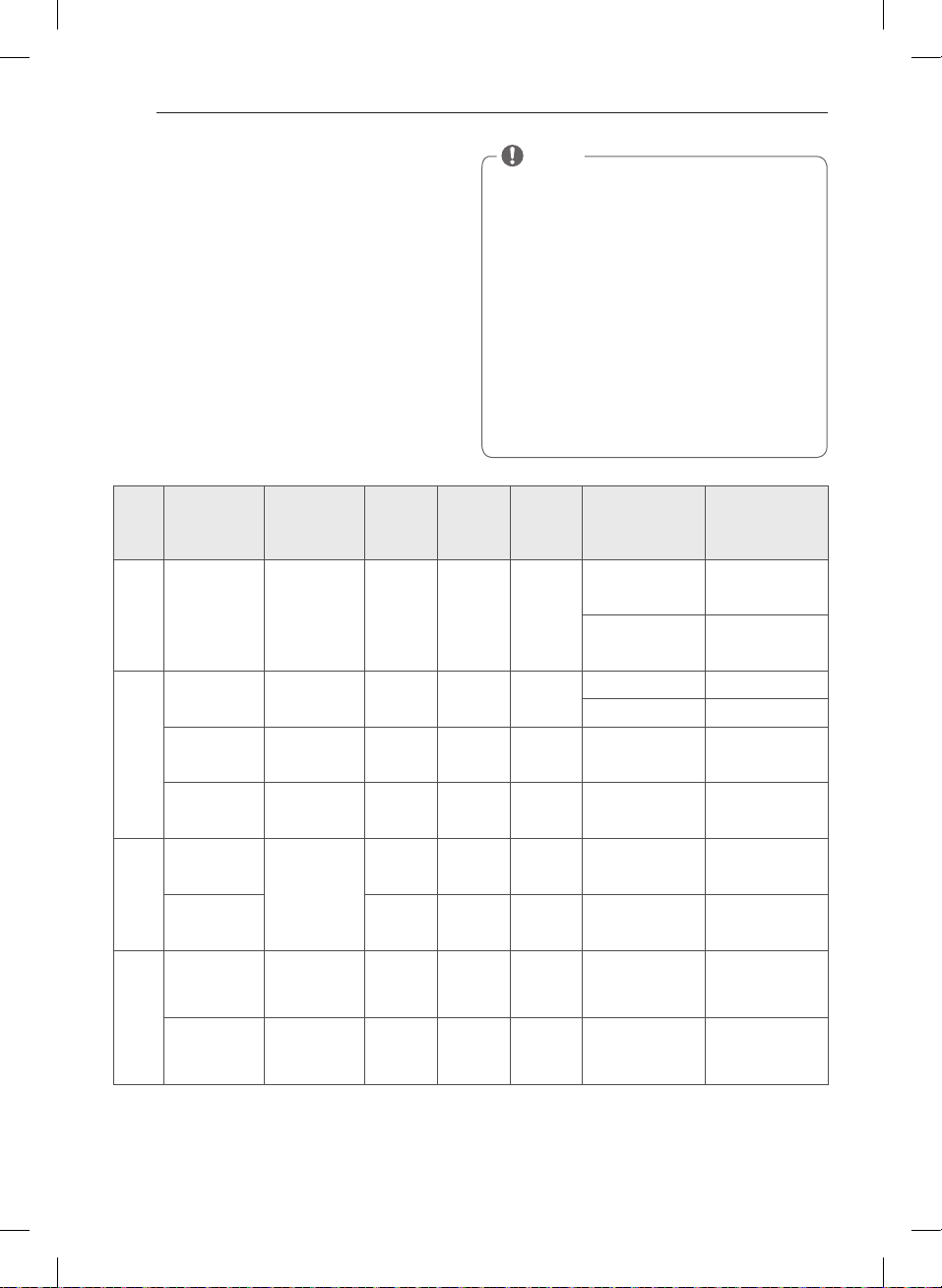
38
Funciones de vapor (cont.)
w
WARNING
Si no se cumple con esto se podrá producir una
explosión, incendio, quemaduras o muerte.
Si no se cumple con esto se
podrá producir una explosión, incendio, quemaduras o
muerte.
Si no se cumple con
esta advertencia se podrán producir heridas graves o
muerte.
Guía de ciclo de vapor
NOTA
durante los ciclos de vapor. Esto es normal.
STEAM FRESH™ con elementos como
lana, manta de lana, camperas de cuero, seda, ropa
húmeda, lencería, productos de espuma o mantas
eléctricas.
tamaños y de tipos de tela similares. No sobrecargue
la secadora.
(steam) puede no tener resultados óptimos.
utilizada, el tambor se detendrá para permitir que el
vapor permanezca en el tambor.
hasta la línea MAX. De otro modo, se mostrará un
mensaje de Error.
programado
por la
temp.
Secado
de tela
Seca
Camisas, Ropa de
cama
Ropa de niños
Seca
Edredón
Camisas* 5 cada
+
Seca Camisas*
+
Seca Camisas* Camisas* (5 cada)
+
SIGA EL CICLO
SELECCIONADO
Mojada
Varía según
el ciclo
seleccionado
+
Mojada
Varía según
el ciclo
seleccionado
Camisas* (5 cada)
+
Mojada
Varía según
el ciclo
seleccionado
+
Mojada
Varía según
el ciclo
seleccionado
Camisas* (5 cada)
CÓMO USAR
MFL67731027_sp_170830.indd 38 2017.8.30 4:19:42 PM
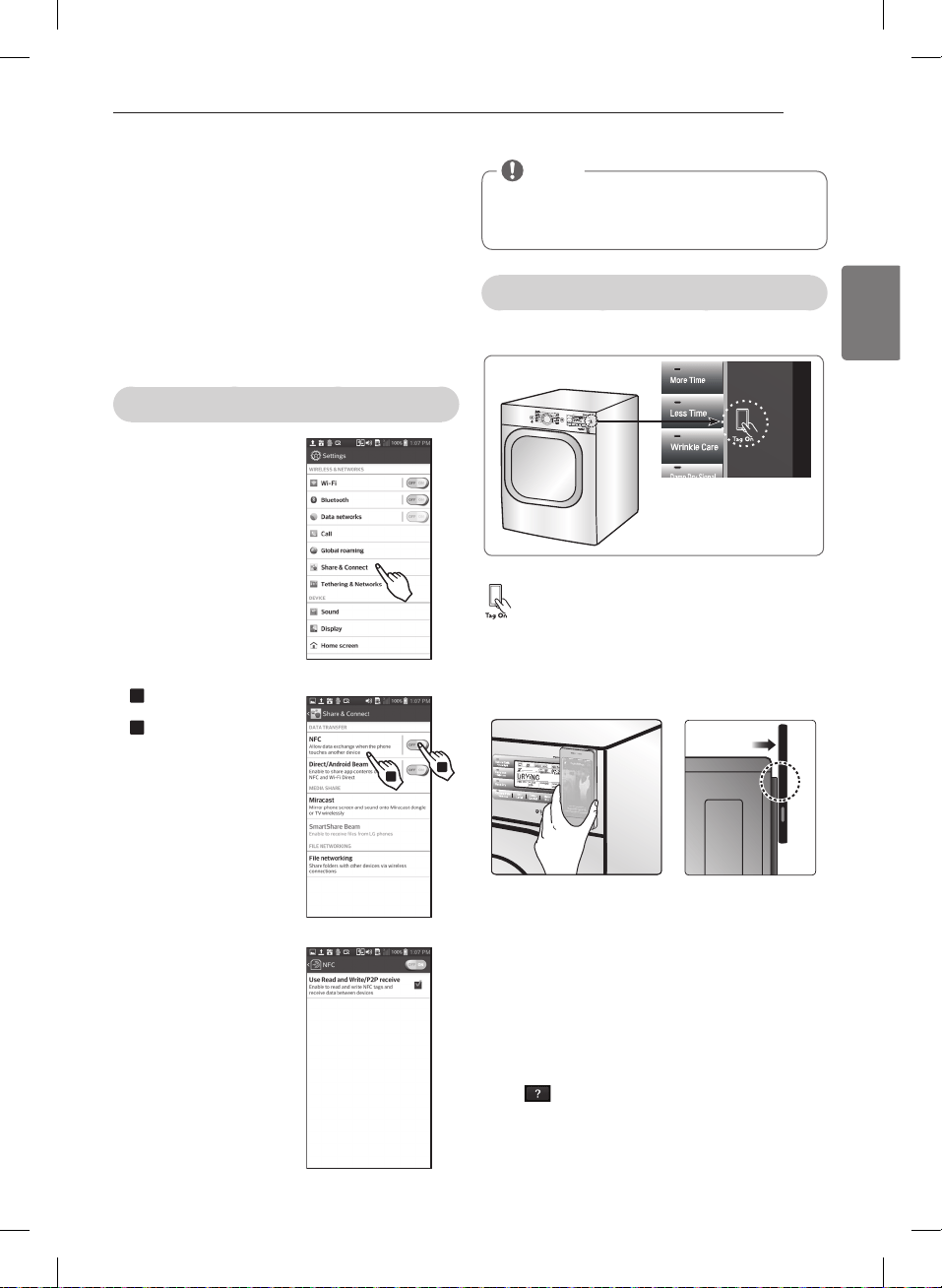
39
ESPAÑOL
Antes de utilizar la función Tag On
- La función Tag On le permite utilizar cómodamente
las funciones LG Smart Diagnosis
TM
y de Descarga
de ciclos para comunicarse con su electrodoméstico
directamente desde su propio smartphone. Para
utilizar la función Tag On:
smartphone.
Cercano) en el smartphone.
La función Tag On solo se puede usar con smartphones
equipados con la función NFC y con sistemas operativos
(SO) Android.
Activación de la función NFC del smartphone
smartphone y seleccione
“Compartir y conectar” bajo
“INALÁMBRICO Y REDES.”
Ponga “NFC“ y “Direct/
Android Beam” en ON,
y seleccione “NFC”.
1
2
1
2
1
2
NOTA
El proceso de activación de NFC puede variar
dependiendo del fabricante del smartphone y la
versión del SO Android. Para más información,
consulte el manual del smartphone.
1
2
1
2
La guía Tag On
El icono Tag On.
Posición Tag On
Busque el icono Tag On junto a la pantalla LED
del panel de control. Aquí deberá colocar el
smartphone cuando utilice la función Tag On con
las funciones LG Smart Diagnosis™, Descarga de
ciclos y Estadísticas de lavado de la aplicación LG
Para utilizar la función Tag On, coloque el smartphone
de modo que la antena NFC de la parte trasera del
smartphone coincida con el icono Tag On del aparato.
Si no conoce la posición de su antena NFC, mueva el
smartphone ligeramente de forma circular hasta que la
aplicación verifique la conexión
Debido a las características de NFC, si la distancia de
transmisión es excesiva, o si hay un adhesivo metálico o
una funda gruesa en el teléfono, la transmisión no será
buena.
Pulse [
para acceder a una guía más detallada sobre el uso de la
función Tag On.
CÓMO USAR
MFL67731027_sp_170830.indd 39 2017.8.30 4:19:46 PM
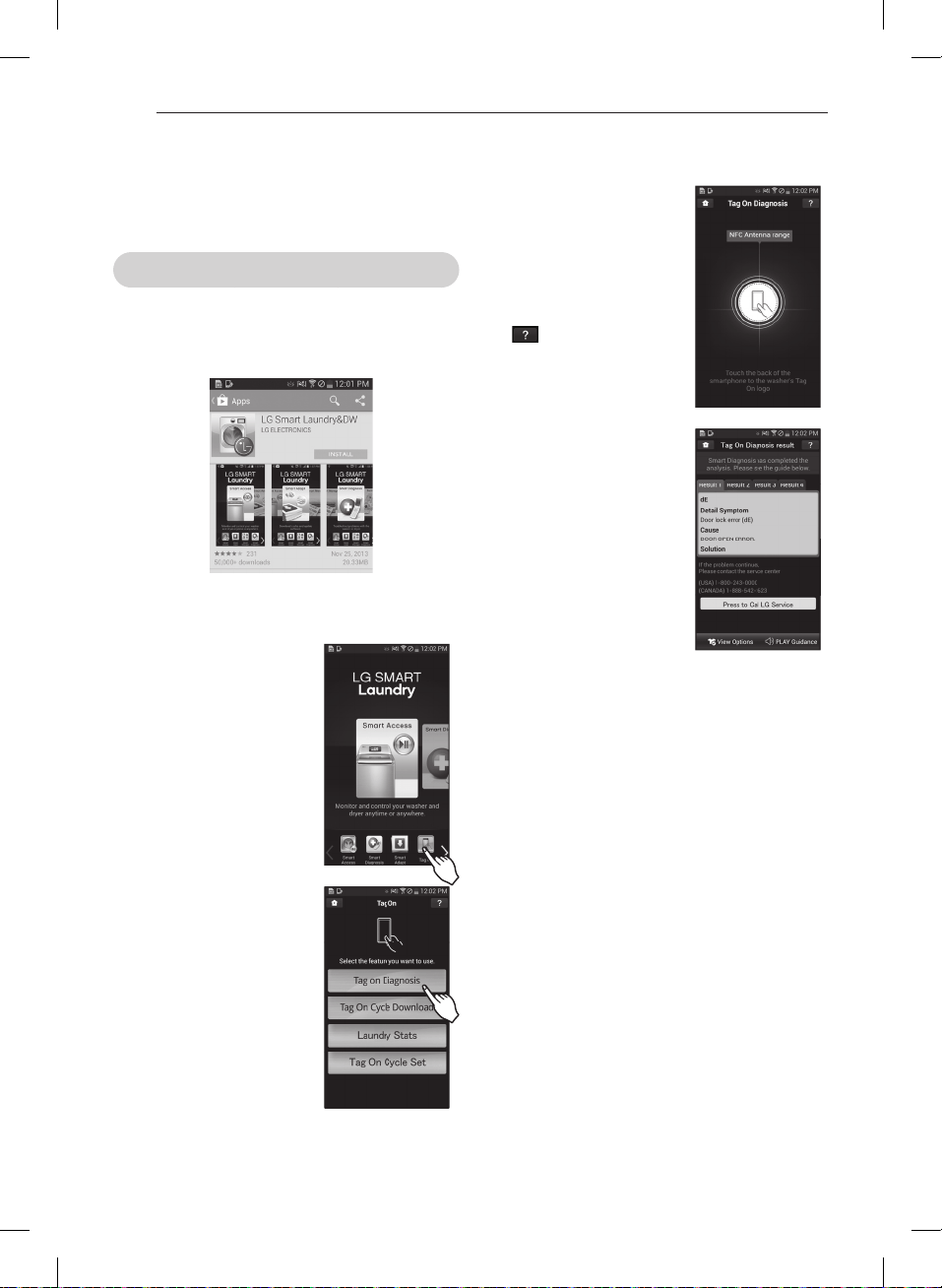
40
- Cuando aparezca una
pantalla Tag On (como se
muestra a la derecha), ponga
el smartphone sobre el icono
Tag On del lado derecho
del panel de control de la
lavadora.
- Si no es reconocido, toque
[
] en el ángulo superior
derecho de la pantalla Tag
On de la aplicación ‘LG Smart
guía detallada. (Esto puede
ocurrir debido a las diferentes
posiciones de la antena NFC
para cada teléfono.)
soluciones.
- Muestra los resultados
diagnósticos de los ciclos
utilizados más recientemente.
※
Las imágenes solo sirven como referencia. La
diferente.
Tag On
Esta función utiliza LG Smart Diagnosis™, Descarga de
ciclos y Estadísticas de lavado cuando se toca el logotipo
Tag On del aparato LG con un smartphone equipado
con NFC.
Autodiagnóstico Tag On con la aplicación LG Smart Laundry&DW
- Instale la aplicación desde el Play store y ejecútela.
- La ficha de inicio y todos los
iconos de la parte inferior de
la pantalla están disponibles
para su uso.
CÓMO USAR
MFL67731027_sp_170830.indd 40 2017.8.30 4:19:49 PM
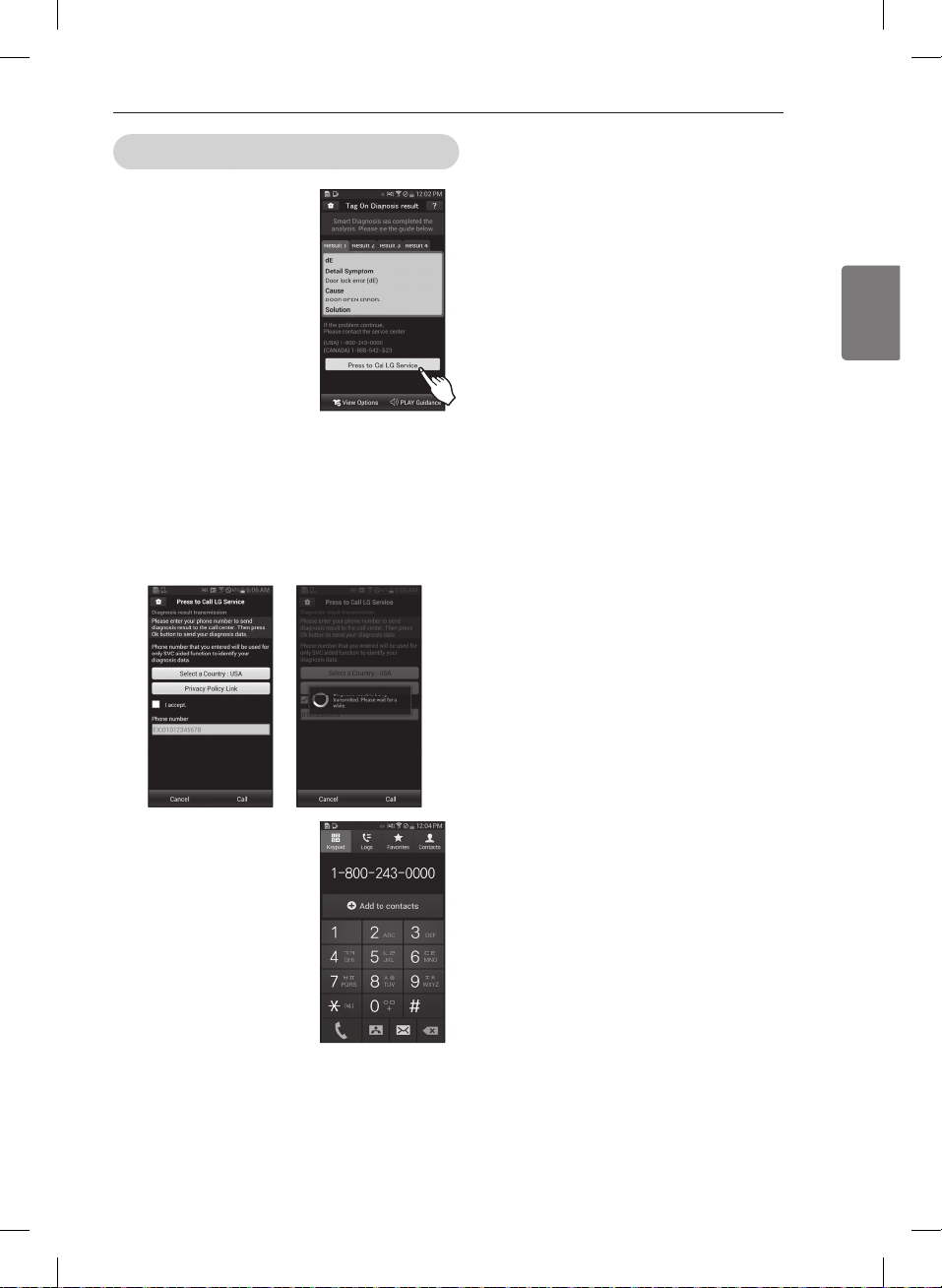
41
ESPAÑOL
Diagnóstico inteligente Tag On
en la pantalla de resultados
conectarse con el centro de
※
Las imágenes solo sirven como referencia. La
diferente.
CÓMO USAR
MFL67731027_sp_170830.indd 41 2017.8.30 4:19:50 PM
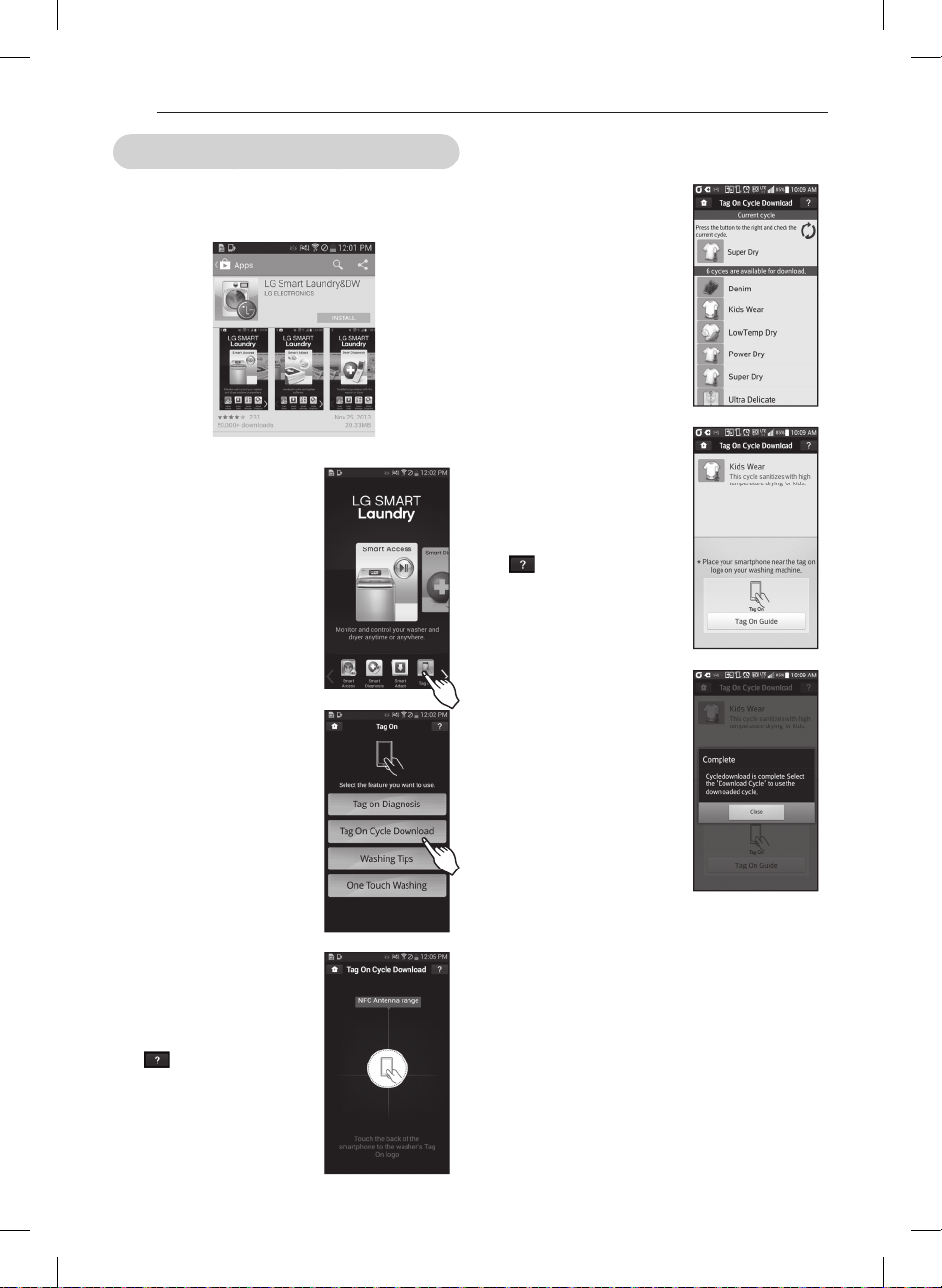
42
descarga.
- También puede comprobar
los ciclos existentes ya
descargados.
- Cuando aparezca una
pantalla Tag On (como se
muestra a la derecha), ponga
el smartphone sobre el icono
Tag On del lado derecho
del panel de control de la
lavadora.
- Si no es reconocido, toque
[
] en el ángulo superior
derecho de la pantalla Tag
On de la aplicación ‘LG Smart
guía detallada. (Esto puede
ocurrir debido a las diferentes
posiciones de la antena NFC
para cada teléfono.)
- Compruebe si se ha
descargado el nuevo ciclo
girando la perilla selectora de
ciclos hacia Descargar ciclo
※
Las imágenes solo sirven
real puede ser diferente.
Descarga de los ciclos Tag On con la aplicación LG Smart Laundry&DW
- Instale la aplicación desde el Play y ejecútela.
- La ficha de inicio y todos los
iconos de la parte inferior de
la pantalla están disponibles
para su uso.
- Cuando aparezca una pantalla
Tag On (como se muestra
a la derecha), ponga el
smartphone sobre el icono
Tag On del lado derecho
del panel de control de la
lavadora.
- Si no es reconocido, toque
[
] en el ángulo superior
derecho de la pantalla Tag
On de la aplicación ‘LG Smart
guía detallada. (Esto puede
ocurrir debido a las diferentes
posiciones de la antena NFC
para cada teléfono.)
CÓMO USAR
MFL67731027_sp_170830.indd 42 2017.8.30 4:19:52 PM
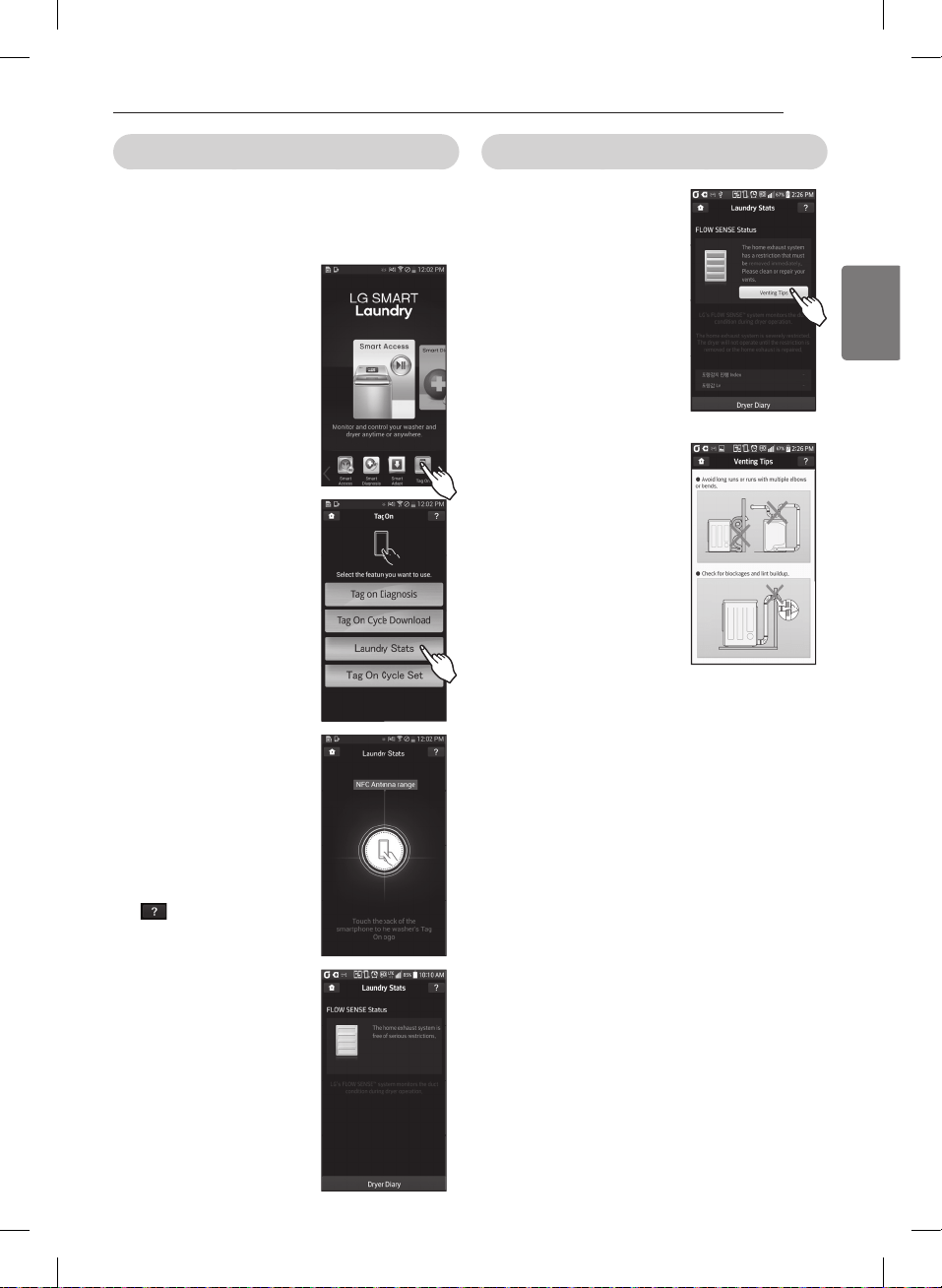
43
ESPAÑOL
Estadísticas de lavado
Estadística de lavado puede monitorear los resultados
de la Detección de Caudal (Flow Sense) en caso que el
Las estadísticas de lavado también le proporcionan
los iconos superiores o los
- Cuando aparezca una
pantalla Tag On (como se
muestra a la derecha), ponga
el smartphone sobre el icono
Tag On del lado derecho
del panel de control de la
lavadora.
- Si no es reconocido, toque
[
] en el ángulo superior
derecho de la pantalla Tag
On de la aplicación ‘LG Smart
guía detallada. (Esto puede
ocurrir debido a las diferentes
posiciones de la antena NFC
para cada teléfono.)
Comprobar el estado de DETECCIÓN DE CAUDAL
※
Las imágenes solo sirven como referencia. La
diferente.
CÓMO USAR
MFL67731027_sp_170830.indd 43 2017.8.30 4:19:56 PM

44
Estadísticas de lavado (Ejecutar ciclo de nuevo) usando la aplicación LG Smart Laundry&DW
- Seleccione ‘Diario de
de la pantalla de Estadísticas
de Lavado.
- El Diario de Secadora le
mostrará una tabla en la que
usados.
- Detalles sobre el Ciclo Más
Usado y el ciclo Más Reciente
también serán mostrados.
- sEl Ciclo Más Usado o el
Ciclo Más Reciente puede
ser iniciado inmediatamente
seleccionando el botón
- Cuando aparezca una
pantalla Tag On (a la derecha),
ponga el smartphone sobre
el icono Tag On del lado
derecho del panel de control
de la secadora.
- Si no es reconocido, toque
[
] en el ángulo superior
derecho de la pantalla Tag
On de la aplicación ‘LG Smart
guía detallada. (Esto puede
ocurrir debido a las diferentes
posiciones de la antena NFC
para cada teléfono.)
seleccionado.
- Aparece la pantalla que se
muestra a continuación
y el secado comienza
inmediatamente en el ciclo
seleccionado.
※
Las imágenes solo sirven como referencia. La
diferente.
CÓMO USAR
MFL67731027_sp_170830.indd 44 2017.8.30 4:19:58 PM
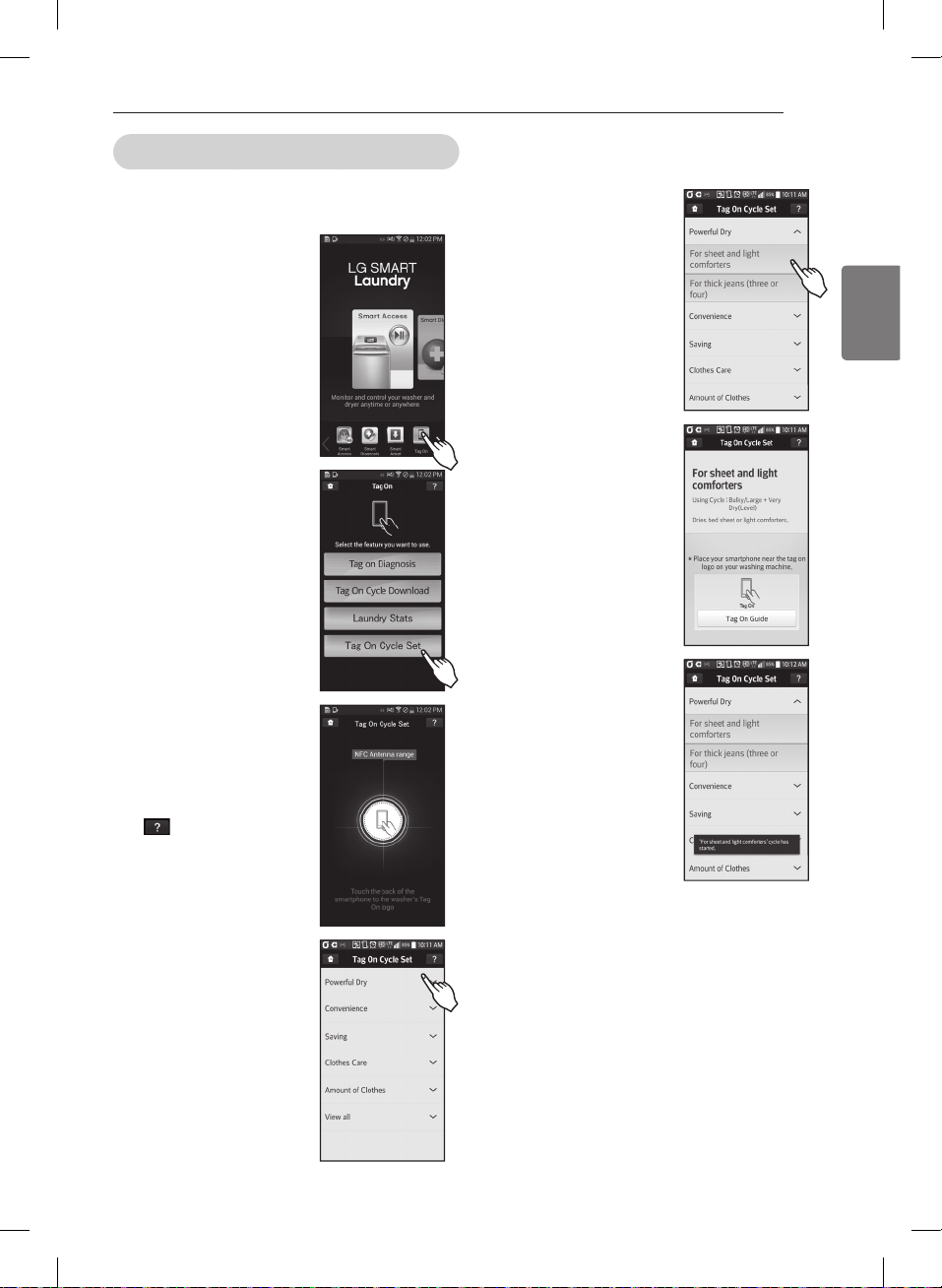
45
ESPAÑOL
Ajuste de Ciclos Tag On
Ajuste de Ciclos Tag On le permite ajustar
automáticamente el ciclo y su configuración según las
necesidades su ropa.
iconos superiores o lo iconos
- Cuando aparezca una
pantalla Tag On (a la derecha),
ponga el smartphone sobre
el icono Tag On del lado
derecho del panel de control
de la secadora.
- Si no no es reconocido, toque
[
] en el ángulo superior
derecho de la pantalla Tag
On de la aplicación ‘LG Smart
guía detallada. (Esto puede
ocurrir debido a las diferentes
posiciones de la antena NFC
para cada teléfono.)
sus necesidades.
del panel de control de la
iniciará automáticamente.
seleccionado el ciclo y los
※
Las imágenes solo sirven como referencia. La
diferente.
CÓMO USAR
MFL67731027_sp_170830.indd 45 2017.8.30 4:20:0 PM
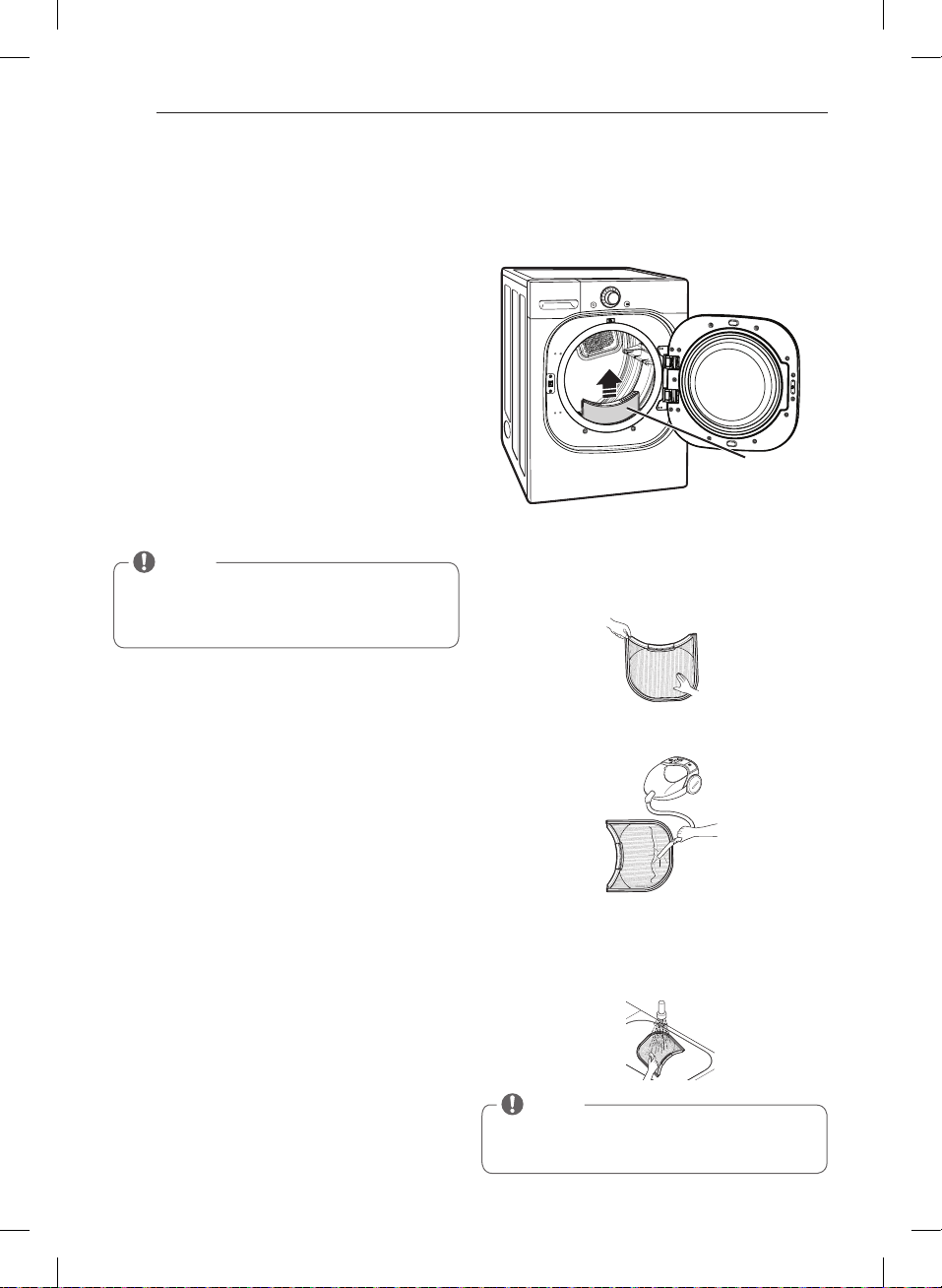
46
MANTENIMIENTO
Limpieza regular
w
ADVERTENCIA
Para reducir el riesgo de incendio, descargas eléctricas o
heridas al usar su electrodoméstico, siga las precauciones
básicas, incluyendo lo siguiente:
Si no se cumple con esta advertencia se podrán producir
heridas graves, incendios, descargas eléctricas o muerte.
Los mismos dañarán su aspecto.
Limpieza del exterior
El mantenimiento adecuado de su secadora podría prolongar
su vida útil. El exterior de la unidad puede limpiarse con agua
tibia y un detergente de jabón medio, no abrasivo.
Limpie inmediatamente cualquier clase de fuga, con un trapo
suave y húmedo.
Limpieza del interior
Limpie con un paño alrededor de la abertura y el sello
de la puerta con un paño suave húmedo para prevenir la
acumulación de pelusa y polvo que podrían dañar el sello de
la puerta.
Limpie la ventanilla con un paño suave humedecido con agua
caliente y un detergente suave no abrasivo para el hogar;
luego seque con un paño.
Se puede limpiar el tambor de acero inoxidable con un
limpiador de acero inoxidable convencional, usado según
las especificaciones del fabricante. Nunca use limpiadores
abrasivos ni de lana metálica; pueden raspar o dañar la
superficie.
Limpieza alrededor y debajo de la secadora
Aspire la pelusa y polvo alrededor de la secadora y debajo
de ella con regularidad. Se debe revisar que el sistema de
conductos de ventilación no tenga acumulación de pelusa y
se debe limpiar una vez por año. Si se percibe una reducción
del flujo de aire o desempeño del secado notorios, revise
que el sistema de conductos no esté bloqueado ni tenga
obstrucciones.
Mantenimiento del sistema de conductos
Se debe revisar que el sistema de conductos de ventilación
no tenga acumulación de pelusa y se debe limpiar una
vez por año. Si se percibe una reducción del flujo de aire o
desempeño del secado notorios, revise que el sistema de
conductos no esté bloqueado ni tenga obstrucciones. Llame
a un técnico o proveedor de mantenimiento calificados.
Limpieza del filtro de pelusa
Limpie siempre el filtro de pelusa después de cada ciclo.
Para limpiarlo, tire del filtro de pelusa verticalmente.
Luego:
del filtro, o
obstruido con suavizante de tejido, lávelo en agua
caliente jabonosa y déjelo secar completamente antes
de volverlo a colocar.
NOTA
NUNCA opere la secadora sin haber colocado antes
el filtro de pelusa. NUNCA haga funcionar la secadora
con un filtro de pelusas húmedo.
NOTA
No use alcohol desnaturalizado, disolventes o
productos similares.
Nunca use limpiadores abrasivos o de lana metálica;
pueden dañar la superficie.
MANTENIMIENTO
Filtro de
pelusa
MFL67731027_sp_170830.indd 46 2017.8.30 4:20:1 PM
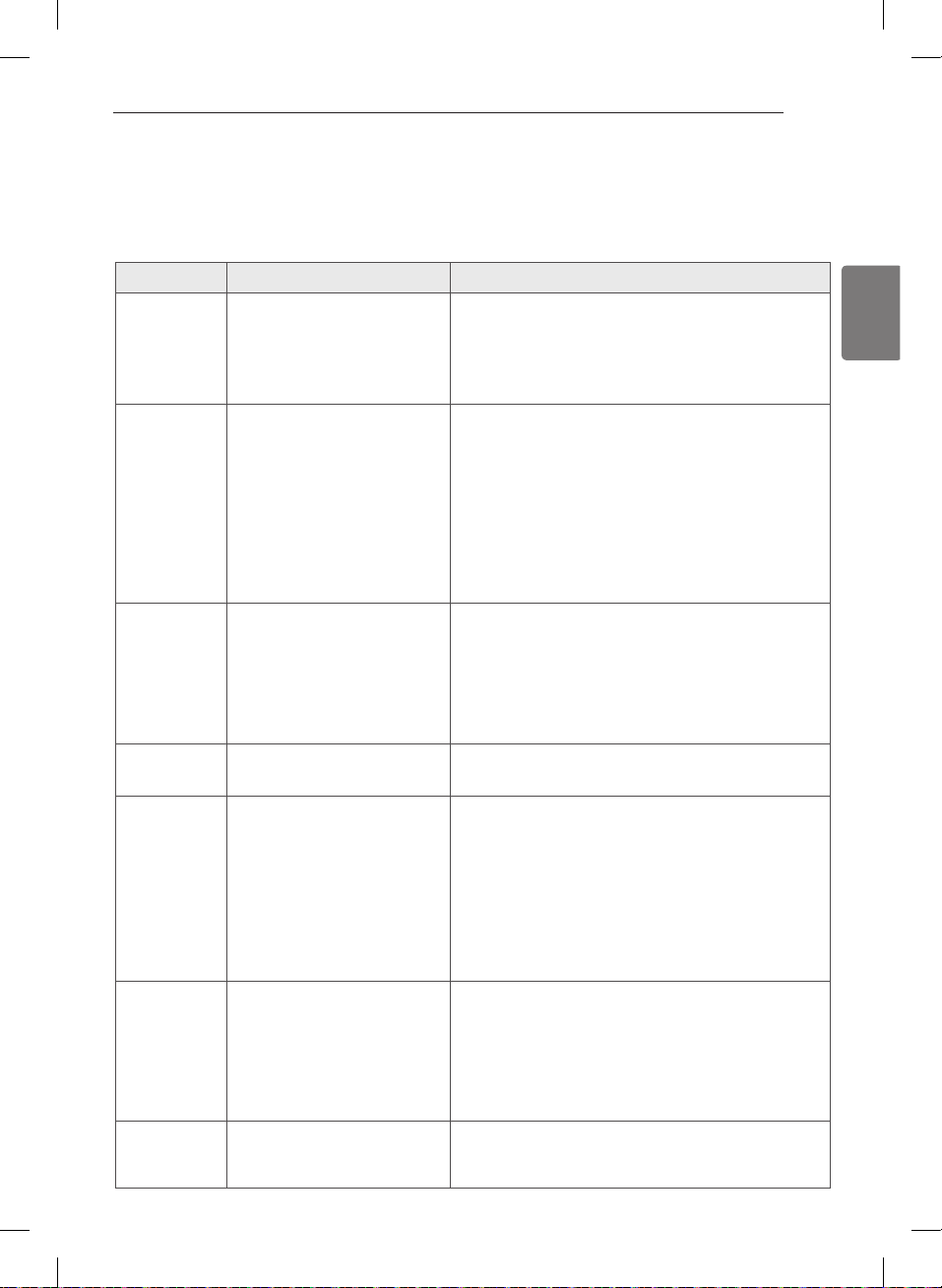
47
ESPAÑOL
RESOLUCIÓN DE PROBLEMAS
Antes de llamar a mantenimiento
Su secadora está equipada con un sistema de monitoreo de errores automático para la detección y el diagnóstico de
problemas en una etapa temprana. Si su secadora no funciona adecuadamente o no funciona en lo absoluto, revise
lo siguiente antes de llamar a mantenimiento.
Soluciones
La secadora no
se enciende
enchufado adecuadamente.
quemado, el cortacircuitos se
ha accionado, o ha ocurrido una
interrupción eléctrica.
segura en un tomacorriente con conexión a tierra, que se
corresponda con la placa de clasificación.
la capacidad del fusible. Si el problema se debe a una
sobrecarga de circuito, pida a un electricista calificado que
solucione el problema.
La secadora no
calienta
quemado, el cortacircuitos se
ha accionado, o ha ocurrido una
interrupción eléctrica.
servicio de gas (sólo modelos a
gas).
(Energy Saver) está seleccionada
la capacidad del fusible. Si el problema se debe a una
sobrecarga de circuito, pida a un electricista calificado que
solucione el problema.
y la válvula de corte de gas de la secadora estén
completamente abiertas.
Si utiliza el ciclo Algodón/Normal, desactive la opción de ahorro
de energía. La opciónde ahorro de energía se selecciona de forma
predeterminada y permite reducir elconsumo de energía, ya que
incorpora una sección de secado por aire al comienzo delciclo.
Es normal que sienta que la secadora no calienta al comienzo del
ciclo cuando elmodo de ahorro de energía está seleccionado.
Manchas
de grasa o
suciedad en las
prendas
incorrectamente.
juntas.
juntas.
suavizador de telas.
limpios, ya que los artículos sucios pueden ensuciar las
prendas limpias en la misma carga o en las subsiguientes.
Las manchas en ropas secas son en realidad manchas que
no se eliminaron durante los procesos de lavado. Asegúrese
de que las ropas queden completamente limpias de
acuerdo con las instrucciones de su lavadora y detergente.
La pantalla
muestra los
calefactor.
Pelusa en las
prendas
el filtro de pelusa.
clasificadas adecuadamente.
prendas.
dejados en los bolsillos.
Asegúrese de limpiar el filtro de pelusa antes de cada carga.
Con algunas cargas que producen altas cantidades de
pelusa, puede ser necesario limpiar el filtro durante el ciclo.
Algunas telas producen pelusas (por ejemplo: una toalla de
algodón peluda blanca) y deben secarse aparte de las prendas
que atrapan pelusa (por ejemplo: un par de pantalones de lino).
secadora indicado de la sección más abajo.
realizar el secado.
prendas.
Exceso de
estática en
las prendas
después del
secado
usa incorrectamente.
por demasiado tiempo
(excesivamente secas).
Secado de telas sintéticas, planchado
permanente o combinación de
materiales sintéticos.
Use un suavizador de telas para reducir la electricidad
estática. Asegúrese de seguir las instrucciones del fabricante.
acumulacion de electricidad estatica. Programe los ajustes
y use un tiempo de secado menos prolongado; o use los
ciclos SECADO CON SENSOR (SENSOR DRY).
Intente usar un suavizador de telas.
El tiempo de
secado no es
constante
de la carga o la humedad de las
prendas no son constantes.
El tiempo de secado para una carga variará dependiendo del ajuste
de calor, tipo de calor utilizado (eléctrico, natural, o gas LP), el tamaño
de la carga, el tipo de tela, el nivel de humedad de las prendas y la
condición de los conductos de escape y el filtro de pelusa.
RESOLUCIÓN DE PROBLEMAS
MFL67731027_sp_170830.indd 47 2017.8.30 4:20:2 PM
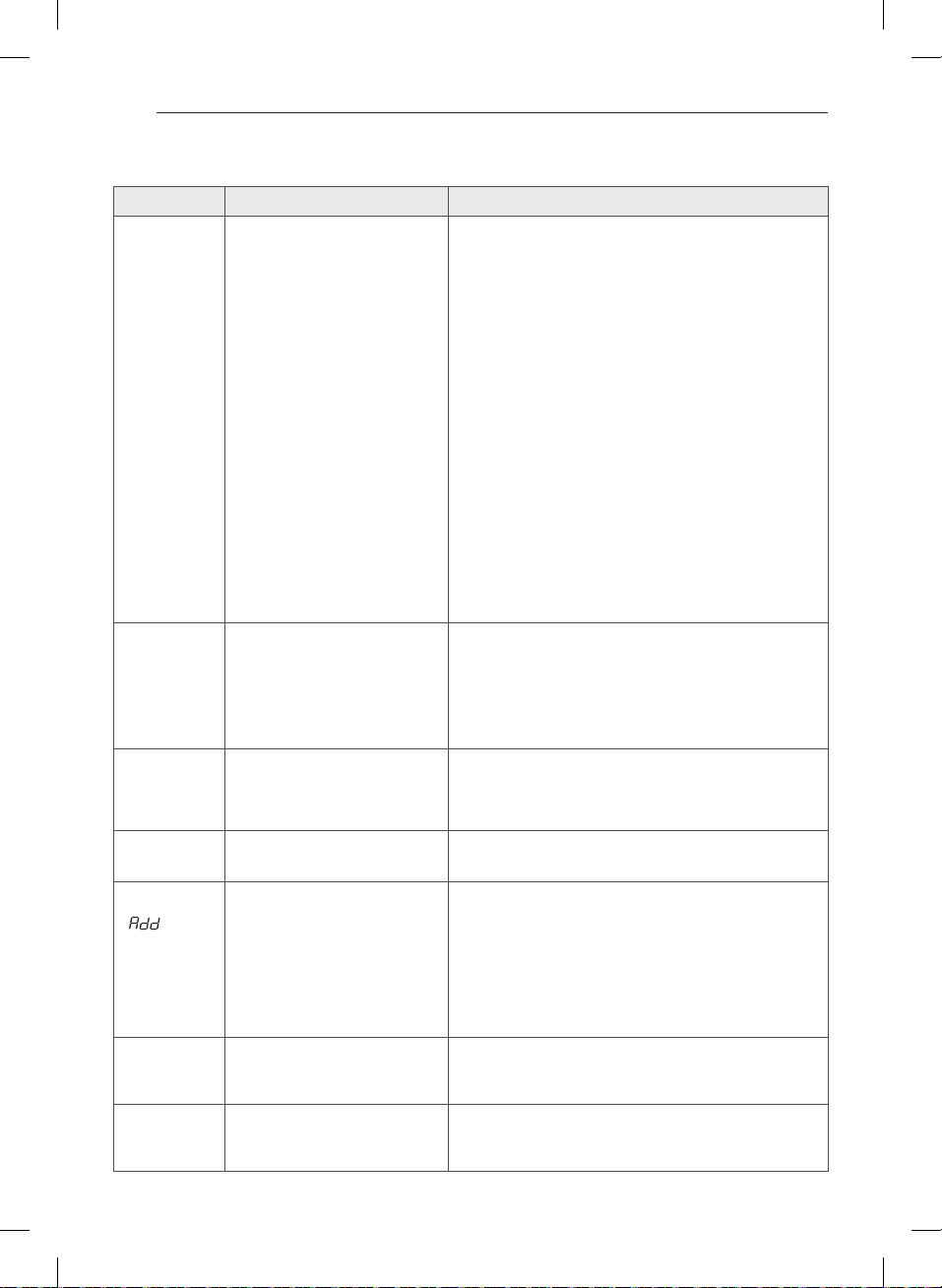
48
Antes de llamar a mantenimiento (cont.)
Soluciones
Las prendas
tardan
demasiado
tiempo en
secarse
clasificada.
adecuadamente los controles de la
secadora.
bloqueados, sucios o el tendido de los
conductos es demasiado largo.
cortacircuitos se ha accionado, o ha
ocurrido una interrupción eléctrica.
(Energy Saver) está seleccionada
grandes y pesados requieren de mayor tiempo de secado.
tienden a retener mayor humedad. Para ayudar a reducir y mantener
tiempos de secado más constantes para telas pesadas y de mayor
tamaño, separe estos artículos en cargas más pequeñas de un
tamaño sistemático.
secando.
algunas cargas que producen altas cantidades de pelusa, puede ser
necesario limpiar el filtro durante el ciclo.
configurado correctamente y no tenga desechos, pelusa ni
obstrucciones. Asegúrese de que los reguladores de tiro exteriores
abran adecuadamente y no estén bloqueados, atascados ni dañados.
del fusible. Si el problema se debe a una sobrecarga de circuito, pida
a un electricista calificado que solucione el problema.
secado.
adicionales para asegurar una acción de giro apropiada.
Si utiliza el ciclo Algodón/Normal, desactive la opción de ahorro
de energía. Esta opción permite reducir el consumo de energía, ya
que incorpora una sección de secado poraire al comienzo del ciclo.
Las prendas
están
arrugadas
tiempo (excesivamente secas).
secadora por demasiado tiempo una
vez finalizado el ciclo.
arrugas en las prendas. Intente secar por un período menos
prolongado y retire los artículos mientras aún retienen una cantidad
leve de humedad.
del ciclo. Use la opcíon CUIDADO DE ARRUGAS (WRINKLE CARE)
para continuar girando las prendas al final de un ciclo, por un plazo
Las prendas
encogen
etiqueta de la prenda.
instrucciones de cuidado de telas correspondiente a su prenda,
ya que algunas telas encogen naturalmente cuando se lavan.
Otras telas se pueden lavar, pero encogen cuando se secan en una
secadora. Use un ajuste de calor bajo o sin calor.
La pantalla
muestra el código
de error PS
conectado.
La luz de
AÑADIR AGUA
( ) esta
encendida
durante el ciclo
de secado
MAX.
cajón esté completamente cerrado.
vapor no funcionará.
técnico.
Gotea agua de la
boquilla cuando
comienza el ciclo
de vapor
un tiempo.
No se produce
vapor pero no
aparece ningún
código de error
RESOLUCIÓN DE PROBLEMAS
MFL67731027_sp_170830.indd 48 2017.8.30 4:20:3 PM
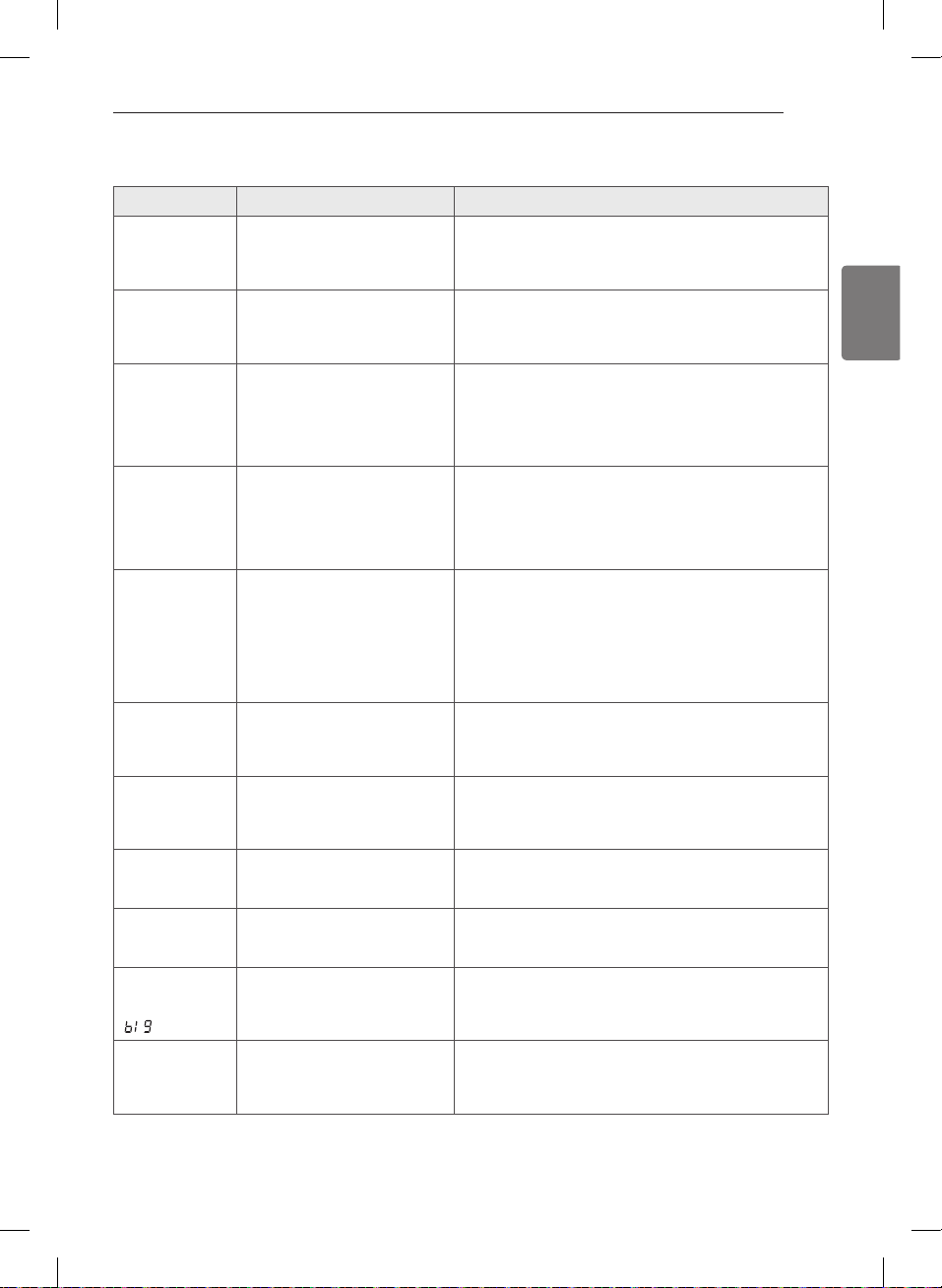
49
ESPAÑOL
Antes de llamar a mantenimiento (cont.)
Soluciones
Las prendas
siguen arrugadas
después del ciclo
STEAM FRESH™
muy diferentes en la secadora.
No quedan
rayas en la ropa
después de
STEAM FRESH™
quitar las arrugas de las telas.
Las prendas
tienen estática
después de
REDUCCIÓN
ESTÁTICA
(REDUCE STATIC)
Las están muy
húmedas o muy
secas después
de REDUCCIÓN
ESTÁTICA
(REDUCE STATIC)
no seleccionadas.
comenzar la opcíon REDUCCIÓN ESTÁTICA (REDUCE
STATIC).
Las prendas
no quedan
uniformemente
húmedas
después de
PLANCHADO
FÁCIL (EASY
IRON)
de la carga no seleccionado
correctamente al inicio del
ciclo.
de la carga antes de iniciar el ciclo.
Gotea agua de la
puerta durante el
ciclo de vapor
la puerta de la secadora durante el funcionamiento de
vapor. Puede gotear la condensación desde el fondo de
la puerta.
No se ve vapor
durante el ciclo
de vapor
Sin embargo, la condensación se forma normalmente
en el interior de la puerta de la secadora si el sistema
funciona con normalidad.
El tambor no gira
durante el ciclo
de vapor
en el tambor. Normalmente, el tambor gira
No se ve vapor
al comienzo del
ciclo
opción.
La pantalla
muestra carga
voluminosa
TIME) está presionado.
ajustado para un elemento “grande”, por ejemplo, un
edredón. Pulse el botón para
reducir el tamaño de carga indicado.
Olores restantes
en la ropa
después de
STEAM FRESH™
completamente el olor.
lavado normal.
RESOLUCIÓN DE PROBLEMAS
MFL67731027_sp_170830.indd 49 2017.8.30 4:20:3 PM
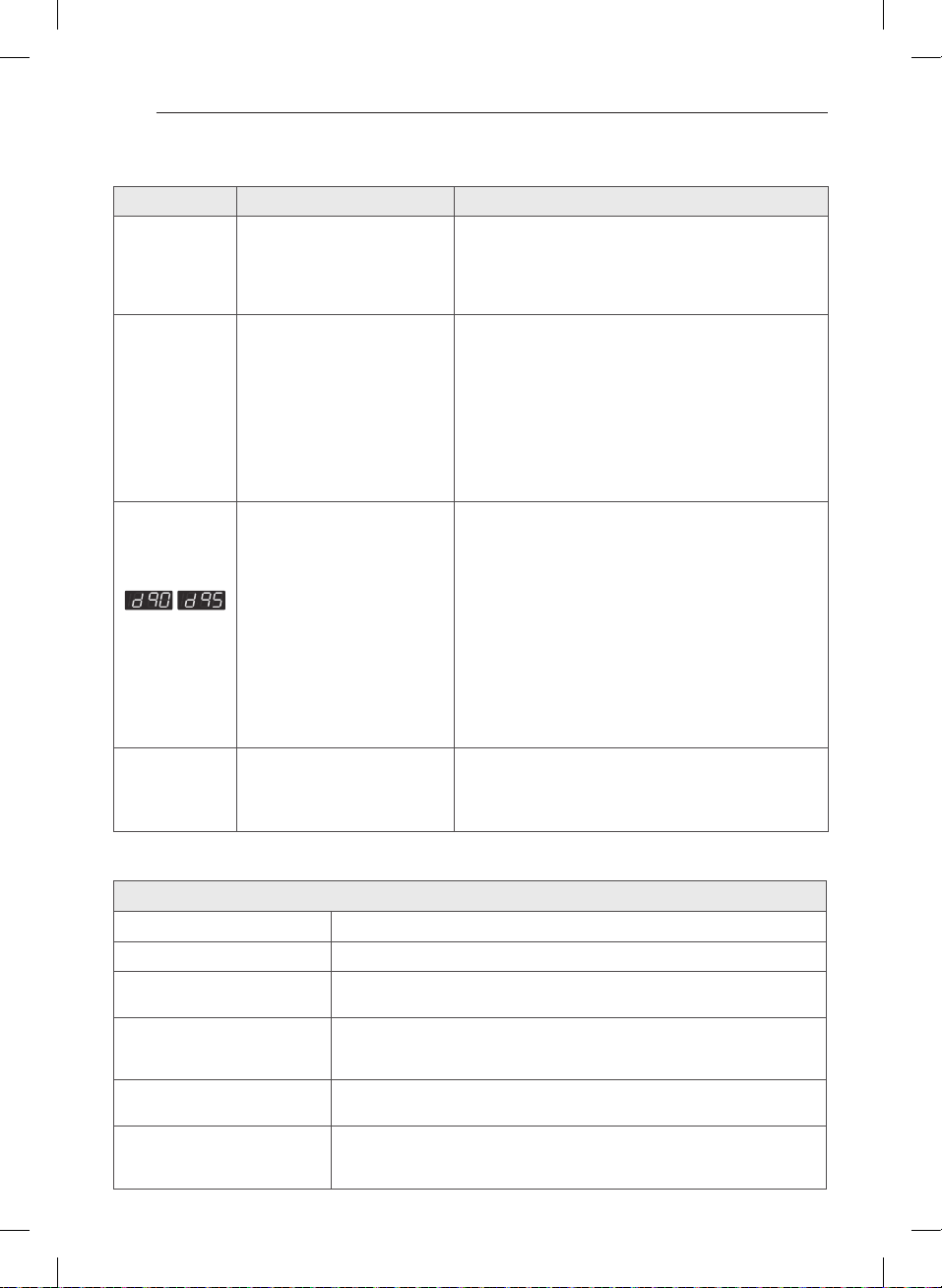
50
Antes de llamar a mantenimiento (cont.)
Soluciones
La luz de REVISE
EL FILTRO
(CHECK FILTER)
esta encendida
durante el ciclo
de secado
atascado o lleno.
El indicador
FLOW SENSE™
muestra cuatro
barras durante el
ciclo de secado
o la pantalla
luego del secado.
larga o posee muchos giros/
restricciones.
tubería por acumulación de
pelusa o escombros.
detectado una obstrucción
en la ventilación externa de la
secadora.
Instrucciones de Instalación.
para eliminar la pelusa acumulada y otros bloqueos.
La secadora se puede usar, pero su funcionamiento y
eficacia se verán reducidos de forma importante.
FLOW SENSE
TM
detecta restricciones de
salida, el indicador permanecerá encendido durante dos
horas tras finalizar el ciclo. Si abre la puerta o pulsa el
botón , se apagará la
pantalla.
El visualizador
“d95”
aproximadamente.
horas)
bloqueado.
Utilizar
la secadora con un escape gravemente restringido es
peligroso y podría conllevar un incendio u otros daños a
la propiedad.
la misma está funcionando para asegurarse que el flujo
de aire es potente.
reparar o desviar.
de desorden.
el atasco de pelusas.
ventilación está despejada.
La pantalla
muestra el
código de error
o
mal conectado.
servicio de gas(solo modelos a
gas).
bloque de terminales.
y la válvula de corte de gas de la secadora estén
completamente abiertas.
Descripción Secadora con vapor
Requisitos eléctricos* Consulte la placa de clasificación para información en detalles.
Requisitos de gas*
Dimensiones
/
Peso neto
Capacidad de secado
- Ciclo de normal
- Ciclo de vapor
ESPECIFICACIONES
RESOLUCIÓN DE PROBLEMAS / ESPECIFICACIONES
MFL67731027_sp_170830.indd 50 2017.8.30 4:20:3 PM
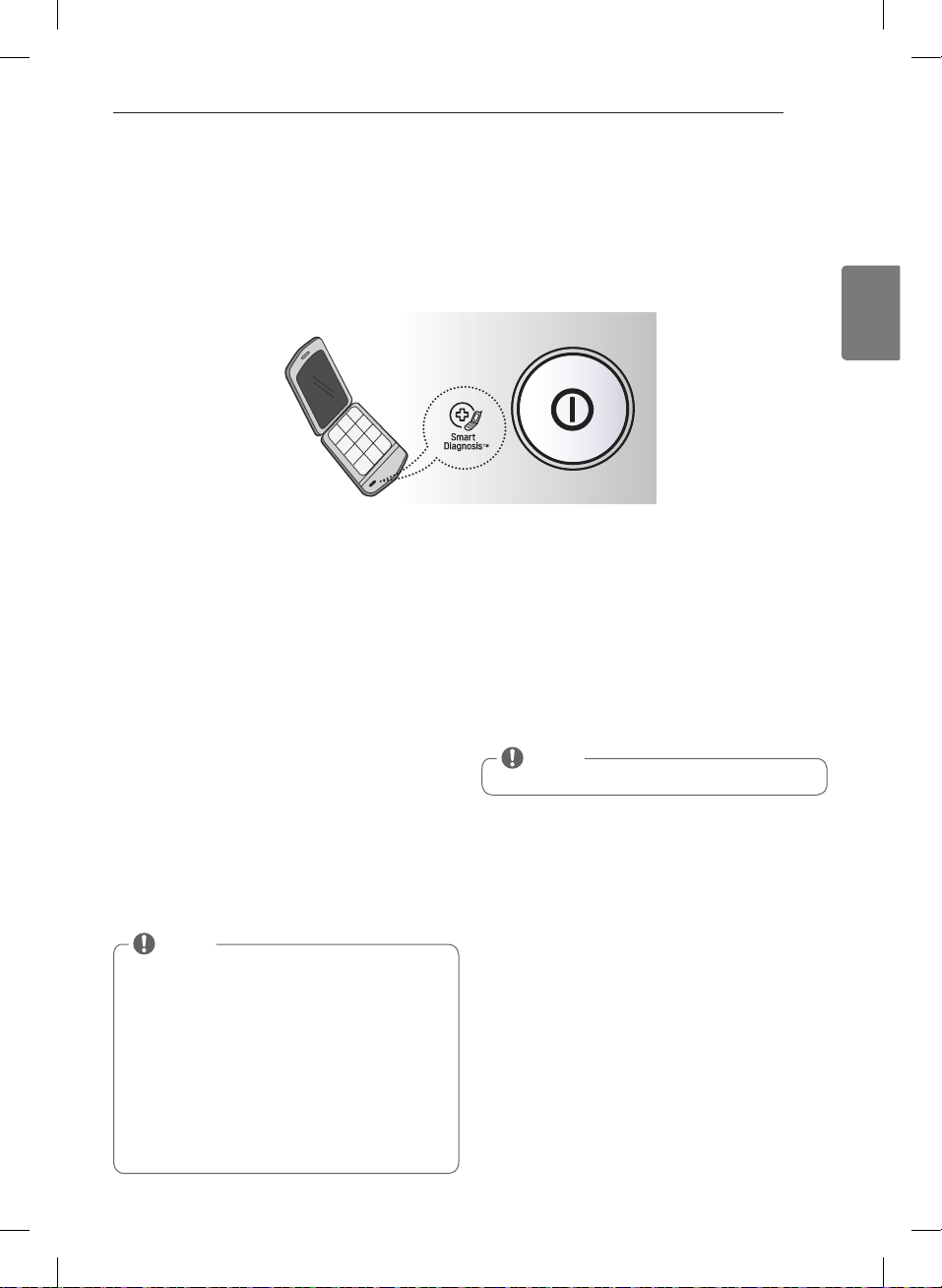
51
ESPAÑOL
UTILIZACIÓN DEL Smart Diagnosis™
Diagnóstico sonoro
Si tuviera algún problema con su secadora, la misma posee la capacidad de transmitir datos a un teléfono inteligente
utilizando la aplicación Smart Laundry de LG o mediante el teléfono al Centro de atención telefónica de LG.
SMART DIAGNOSIS™ no puede ser activado a menos que su secadora esté encendida pulsando el botón de
ALIMENTACIÓN(POWER). Si su secadora no puede encenderse, tendrá que localizar y solucionar los problemas sin
utilizar Smart Diagnosis™.
Smart Diagnosis™ utilizando su
teléfono inteligente
teléfono inteligente.
inteligente. Presione el botón flecha hacia la derecha
para avanzar a la siguiente pantalla.
y mantenga la boquilla del teléfono inteligente junto
al logotipo de Smart Diagnosis™ de la secadora.
el botón de Control De La Temperatura(Temp.
Control) la pantalla mostrará la cuenta regresiva de
tiempo.
5. Mantenga el teléfono en el sitio hasta que la
transmisión del tono haya terminado. La pantalla
mostrará la cuenta regresiva de tiempo.
Al finalizar la grabación, vea el resultado del diagnóstico
presionando el botón Siguiente del teléfono.
Smart Diagnosis™ a través del
Centro de atención telefónica
atención telefónica, mantenga el micrófono de
su teléfono sobre el logotipo Smart Diagnosis™
del equipo. Sostenga el teléfono a no más de una
Pulse y mantenga pulsado el botón de Control De La
Temperatura(Temp.Control) durante tres segundos.
transmisión del tono haya terminado. La pantalla
mostrará la cuenta regresiva de tiempo.
5. Una vez que la cuenta regresiva haya finalizado y los
tonos se hayan detenido, reanude la conversación
con el agente del Centro de atención telefónica,
que será capaz de ayudarle en la utilización de la
información transmitida para su análisis.
NOTA
Smart Diagnosis(Diagnóstico Inteligente) es una
función de resolución de problemas diseñada
para asistir, no reemplazar, al método tradicional
de resolución de problemas a través de llamadas
de servicio técnico. La efectividad de esta función
depende de diversos factores, entre los cuales se
incluyen, la recepción del teléfono celular utilizado
para la transmisión, cualquier ruido externo que
pueda presentarse durante la transmisión, y la acústica
de la habitación donde está ubicada la lavadora. Por
lo tanto, LG no garantiza que SmartDiagnosis resuelva
con precisión cualquier cuestión dada.
NOTA
No toque ningún otro botón ni icono de la pantalla.
UTILIZACIÓN DEL SMARTDIAGNOSIS™
MFL67731027_sp_170830.indd 51 2017.8.30 4:20:4 PM
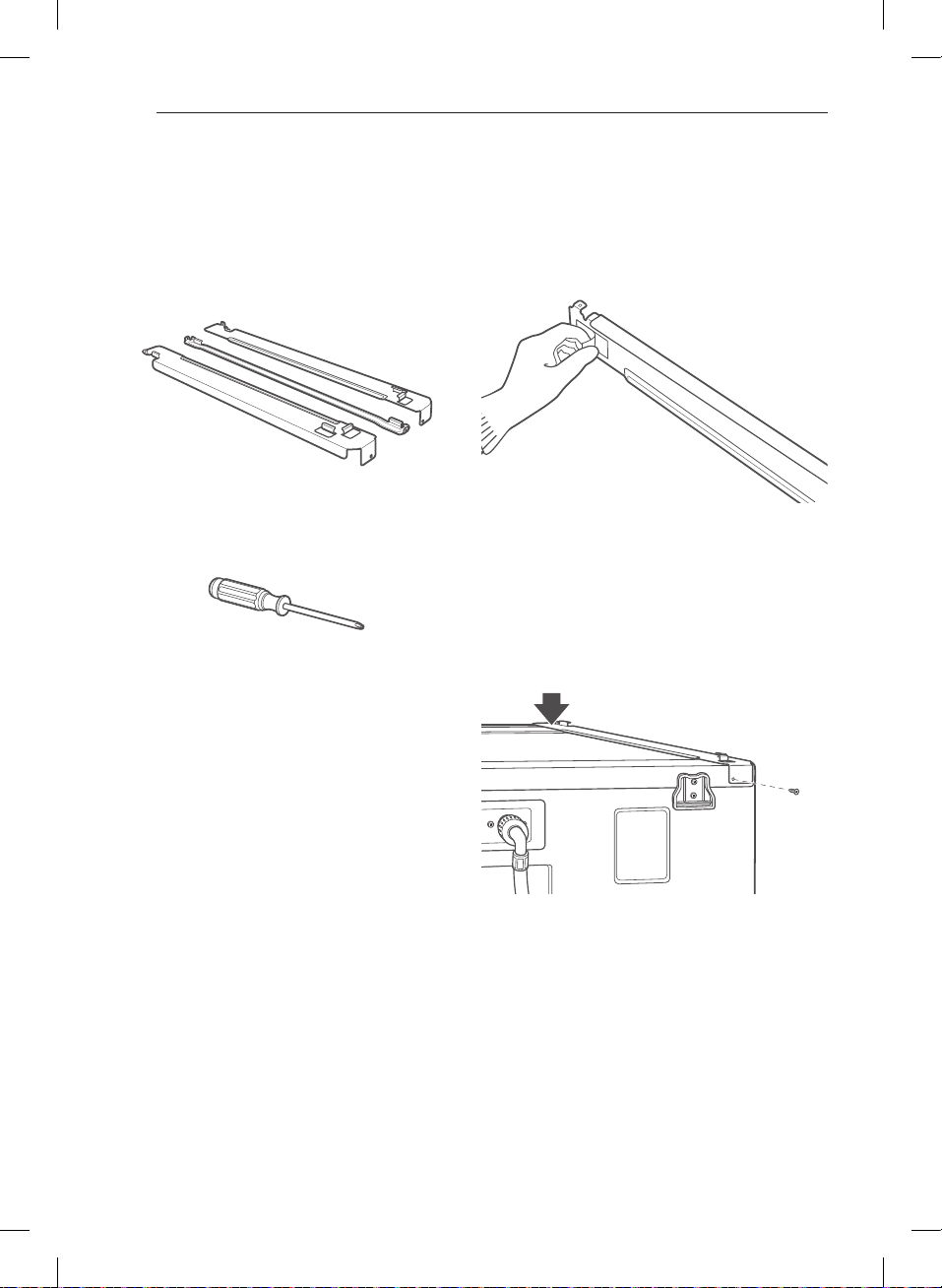
52
Instalación del kit de apilado
Este kit de apilado incluye:
Herramientas necesarias para la instalación:
Para asegurar la instalación segura, siga las siguientes
instrucciones.
w
ADVERTENCIA
persona. Si esto no se cumple se podrán sufrir daños
en la espalda u otras heridas.
como una casa rodante. Si lo hace se podrán producir
heridas graves.
Si
no se cumple con esta advertencia se podrán producir
heridas graves
Si lo hace se podrán producir
heridas graves.
Si no se cumple
con esta advertencia se podrán producir incendios,
explosión, descargas eléctricas o muerte.
limpia y seca. Quite el papel de respaldo de la cinta
apilado.
parte superior de la lavadora como se indica en
la ilustración anterior. Apriete firmemente el área
adhesiva de la abrazadera a la superficie de la
lavadora. Asegure la abrazadera lateral a la lavadora
ACESORIS OPCIONALES
ACCESORIS OPCIONALES
MFL67731027_sp_170830.indd 52 2017.8.30 4:20:5 PM
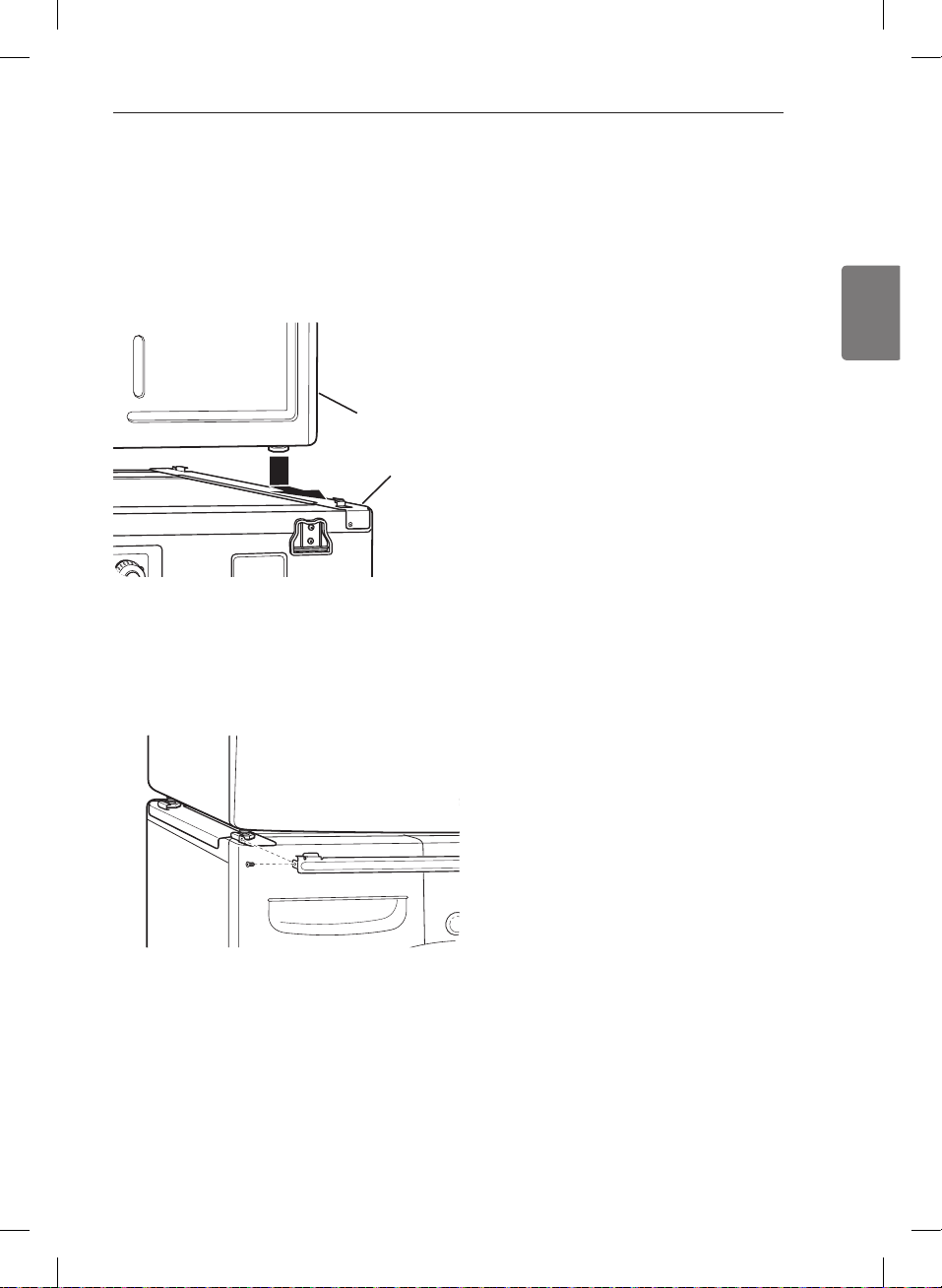
53
ESPAÑOL
Instalación del kit de apilado (cont.)
coincidir las patas en las abrazaderas laterales como
se indica. Evite lesionarse los dedos; no deje que
los dedos queden atrapados entre la lavadora y
la secadora. Deslice despacio la secadora hacia la
parte trasera de la lavadora hasta que los topes de
la abrazadera lateral coincidan con las patas de la
secadora.
secadora y la parte superior de la lavadora. Empuje el
riel frontal hacia la parte trasera de la lavadora hasta
que entre en contacto con los topes del riel lateral.
Instale los dos tornillos restantes para asegurar el riel
frontal a los laterales.
Lavadora
Secadora
ACCESORIS OPCIONALES
MFL67731027_sp_170830.indd 53 2017.8.30 4:20:6 PM
54
GARANTÍA
GARANTÍA (EE. UU.)
Si su secadora LG (el “Producto”) fallara debido a defectos de materiales o de fabricación en el uso doméstico
normal, durante el período de garantía que se establece a continuación, LG tendrá la opción de reparar o reemplazar
el producto. Esta garantía limitada solo es válida para el comprador minorista original del producto y será vigente
solo cuando se compre y use dentro de los Estados Unidos y de los territorios estadounidenses. Se exige el
comprobante de compra minorista original para solicitar servicio por garantía según esta garantía limitada.
Período de garantía
Alcance de la garantía
CÓMO SE MANEJA EL SERVICIO TÉCNICO
Un (1) año a partir de la fecha
de compra minorista original
Piezas y mano de
obra
LG suministrará las piezas y la mano de obra para
reparar o reemplazar las piezas defectuosas.
Diez (10) años a partir de la
fecha de compra minorista
original
Tambor de la
secadora
Solo las piezas. El cliente será responsable de
cualquier trabajo o servicio realizado en su casa para
reemplazar las piezas defectuosas.
Los productos y las piezas de repuesto están garantizados durante el tiempo restante del período original de
•
garantía o noventa (90) días, lo que resulte mayor.
Los productos y las piezas de repuesto pueden ser nuevos o reparados.
•
ESTA GARANTÍA REEMPLAZA CUALQUIER OTRA GARANTÍA, EXPRESA O IMPLÍCITA, LO QUE INCLUYE SIN
LÍMITE, LAS GARANTÍAS DE APTITUD COMERCIAL O IDONEIDAD PARA UN FIN EN PARTICULAR. SALVO
POR LAS GARANTÍAS IMPLÍCITAS EXIGIDAS POR LA LEY, ES DE DURACIÓN LIMITADA AL PERÍODO DE
GARANTÍA EXPRESA MENCIONADO ANTERIORMENTE. NI EL FABRICANTE NI SU DISTRIBUIDOR EN LOS
ESTADOS UNIDOS SERÁN RESPONSABLES DE NINGÚN DAÑO INCIDENTAL, EMERGENTE, INDIRECTO
NI PUNITIVO DE NINGÚN TIPO, LO QUE INCLUYE SIN LÍMITE, INGRESOS O GANANCIAS PERDIDOS O
CUALQUIER OTRO DAÑO CONTRACTUAL, EXTRACONTRACTUAL O DE OTRO TIPO.
Algunos estados no permiten la exclusión o limitación de daños incidentales o emergentes, o limitaciones a la duración de la
garantía implícita, por lo que la exclusión o limitación anteriormente mencionadas podrían no corresponder en su caso. Esta
garantía le otorga derechos legales específicos y es posible que usted cuente con otros derechos que varían según el estado.
ESTA GARANTÍA LIMITADA NO CUBRE LO SIGUIENTE:
Viajes del servicio técnico para entregar, buscar, o instalar o reparar el producto; instrucciones al cliente sobre la
•
operación del producto; reparación o reemplazo de fusibles o corrección de cableado o fontanería, o corrección
de reparaciones/instalaciones no autorizadas.
Incapacidad del producto para funcionar debido a fallas e interrupciones del suministro eléctrico, o a un servicio
•
eléctrico inadecuado.
Daños causados por tuberías de agua rotas o con fugas, tuberías de agua congeladas, líneas de drenaje
•
restringidas, suministro de agua inadecuado o interrumpido, o suministro de aire inadecuado.
Daños resultantes de operar el producto en una atmósfera corrosiva o contraria a las instrucciones esbozadas en
•
el manual del propietario del producto.
Daños al producto causados por accidentes, pestes y alimañas, rayos, viento, incendio, inundaciones o hechos
•
de fuerza mayor.
Daños o fallas causados por modificaciones o alteraciones no autorizadas, o si se usa para otro fin que no sea el
•
previsto, o por fugas de agua donde la unidad no se haya instalado correctamente.
Daños o fallas causados por corriente o voltaje eléctricos incorrectos, o por códigos de fontanería, por uso
•
comercial o industrial, o por uso de accesorios, componentes o productos de limpieza consumibles no aprobados
por LG.
Daños causados por el transporte y el manejo, incluye rayas, muescas, astillado y otros daños al acabado del
•
producto, a menos que tales daños resulten de defectos de los materiales o de la fabricación y se informen dentro
del plazo de una (1) semana de la entrega.
Daños o artículos faltantes a productos reacondicionados, comprados con descuento, con la caja abierta o que
•
hayan estado en exhibición.
Productos cuyos números de serie originales hayan sido retirados, alterados o no se puedan determinar
•
fácilmente. Los números de serie y de modelo, junto con el comprobante de venta minorista original, son
necesarios para validar la garantía.
Aumentos en los costos de los servicios públicos y otros gastos adicionales de dichos servicios.
•
MFL67731027_sp_170830.indd 54 2017.8.30 4:20:6 PM
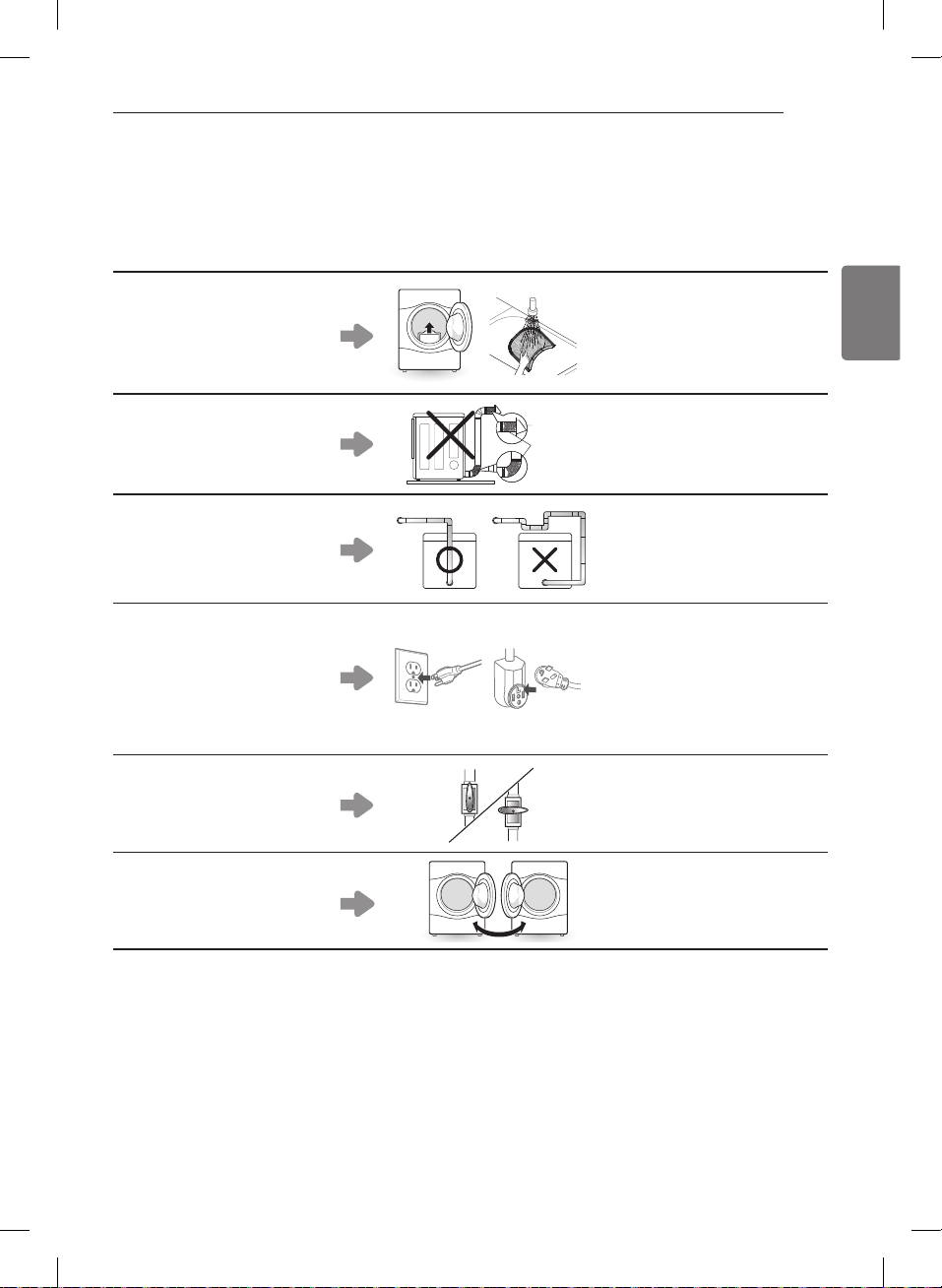
55
ESPAÑOL
GARANTÍA
Reparaciones cuando el producto se use de otra forma que no sea uso doméstico usual y normal (p. ej., uso
•
comercial, en oficinas e instalaciones recreativas) o contraria a las instrucciones esbozadas en el manual del
propietario del producto.
Costos asociados con el retiro del producto de su casa para realizar reparaciones.
•
El retiro y la reinstalación del producto si está instalado en un lugar inaccesible o no está instalado de acuerdo
•
con las instrucciones de instalación publicadas, lo que incluye los manuales de instalación y del propietario de LG.
Daños resultantes de mal uso, abuso, instalación, reparación o mantenimiento incorrectos. Una reparación
•
incorrecta incluye el uso de piezas no aprobadas o especificadas por LG.
El filtro está tapado.
La secadora no calienta,
•
tiempo de secado
prolongado.
Limpie el filtro de pelusa.
•
El conducto está tapado.
La secadora no calienta,
•
tiempo de secado
prolongado.
Limpie la campana y el
•
conducto.
Conducto demasiado largo
y/o con múltiples codos.
La secadora no calienta,
•
tiempo de secado
prolongado.
Mantenga los conductos de
•
escape lo más cortos que sea
posible y use la menor cantidad
de codos y curvas como le sea
posible.
Cable de alimentación mal
conectado o problema con la
toma de corriente eléctrica.
Sin corriente
•
No calienta
•
Vuelva a conectar el cable
•
de alimentación, reemplace
el fusible de la casa o vuelva
a iniciar el disyuntor. Si el
problema es la toma de
corriente, es probable que
necesite llamar a un electricista.
La válvula de gas no está
abierta. (Secadora de gas).
No calienta
•
Abra la válvula de gas.
•
Inversión de la puerta.
Las instrucciones para la
•
inversión de la puerta pueden
encontrarse en el manual del
usuario.
El costo de la reparación o el reemplazo en estas circunstancias excluidas estarán a cargo del consumidor.
CÓMO OBTENER SERVICIO EN GARANTÍA E INFORMACIÓN ADICIONAL
Si usted no tiene acceso a Internet y necesita asistencia para el uso de su producto o desea programar un servicio
técnico, puede comunicarse con LG Electronics al número que aparece a continuación.
Para obtener asistencia o servicio técnico, llame al 1-800-243-0000.
Si necesita más ayuda, puede escribir a LG para dirigir sus preguntas o inquietudes a la dirección que aparece a
continuación:
LG Electronics, 201 James Record Road, Huntsville, Alabama 35813
Para obtener más información sobre el producto, visite nuestro sitio web en http://www.lg.com
MFL67731027_sp_170830.indd 55 2017.8.30 4:20:11 PM
56
MFL67731027_sp_170830.indd 56 2017.8.30 4:20:13 PM
57
ESPAÑOL
MFL67731027_sp_170830.indd 57 2017.8.30 4:20:13 PM
58
MFL67731027_sp_170830.indd 58 2017.8.30 4:20:13 PM
59
ESPAÑOL
MFL67731027_sp_170830.indd 59 2017.8.30 4:20:13 PM
1-800-243-0000
USA
1-888-542-2623
CANADA
LG Customer Information Center
Register your product Online!
www.lg.com
This product qualifies for ENERGY STAR in
the “factory default (Home Use)” setting.
Changing the factory default settings or
enabling other features may increase power
consumption that could exceed the limits
necessary to qualify for ENERGY STAR.
MFL67731027_sp_170830.indd 60 2017.8.30 4:20:13 PM