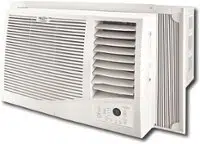
Operating your air conditioner properly helps you to obtain the best possible results.
This section explains proper air conditioner operation.
IMPORTANT:
If you turn off the air conditioner, wait at least 3 minutes before turning it back on. This prevents the air conditioner from blowing a fuse or tripping a circuit breaker.
Do not try to operate your air conditioner in Cool mode when outside temperature is below 65°F (18°C). The inside evaporator coil will freeze up, and the air conditioner will not operate properly.
NOTE: In the event of a power failure, your air conditioner will operate at the previous settings when the power is restored.
Operation
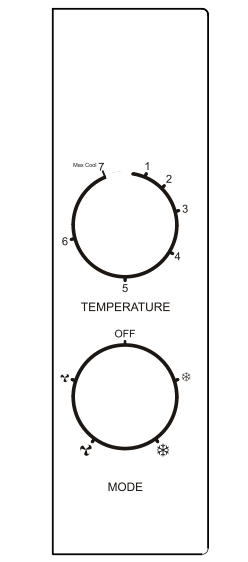
Turn the Operation knob to the desired operating mode.
Power-Turn on air conditioner by turning mode dial to the desired setting.
Cool Low ( )-Cools with the fan at low speed.
Cool High ()-Cools with the fan at high speed. Use this setting for maximum cooling.
Fan Low ( )-The fan runs at low speed without cooling.
Fan High ()-The fan runs at high speed without cooling.
Off-Turns the air conditioner off.
Thermostat
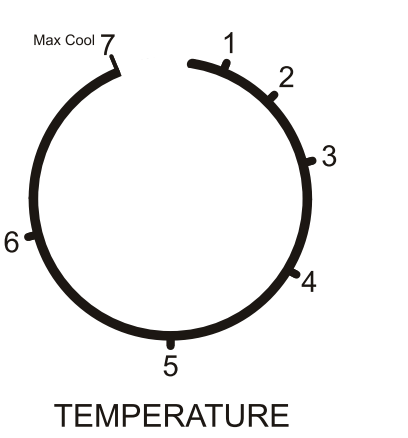
The thermostat will automatically control room temperature by cycling the compressor on and off.
The fan will continue to run.
Turn to 6 (coolest) for cooler room temperatures.
Turn to 1 (cool) for warmer room temperatures.
A middle setting with the knob turned to 5 is TEMPERATURE normal for average conditions.
Changing Air Direction
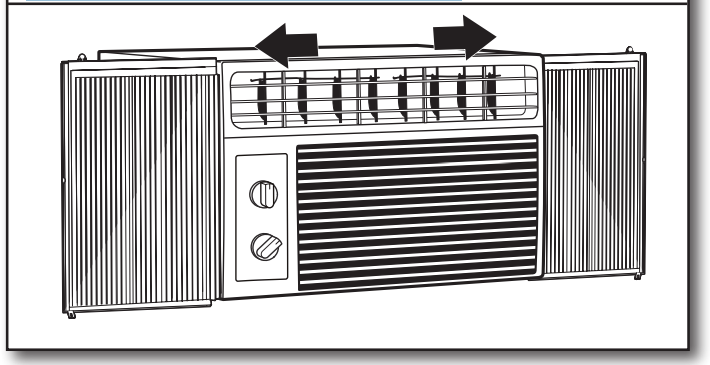
Use tab to adjust air direction
Use the lever on the vent louvers to adjust the air direction left or right.
Normal Operating Sounds
When your air conditioner is operating normally, you may hear sounds such as:
Droplets of water hitting the condenser, causing a pinging or clicking sound. The water droplets help cool the condenser.
Air movement from the fan.
Clicks from the thermostat cycle.
Vibrations or noise due to poor wall or window construction.
A high-pitched hum or pulsating noise caused by the modern high-efficiency compressor cycling on and off.
AIR CONDITIONER CARE
Your new air conditioner is designed to give you many years of dependable service. This section tells you how to clean and care for your air conditioner properly.
Cleaning the Air Filter
The air filter is removable for easy cleaning. A clean filter helps remove dust, lint, and other particles from the air and is important for best cooling and operating efficiency. Check the filter every 2 weeks to see whether it needs cleaning.
NOTE: Do not operate the air conditioner without the filter in place. Cooling performance will be effected when the coil becomes dirty.
Use a vacuum cleaner to clean air filter. If the air filter is very dirty, wash it in warm water with a mild detergent and rinse well.
NOTE: Do not wash the air filter in the dishwasher or use any chemical cleaners; it may damage the filter. Air dry the air filter completely before replacing to ensure maximum efficiency.
Air Filter Removal
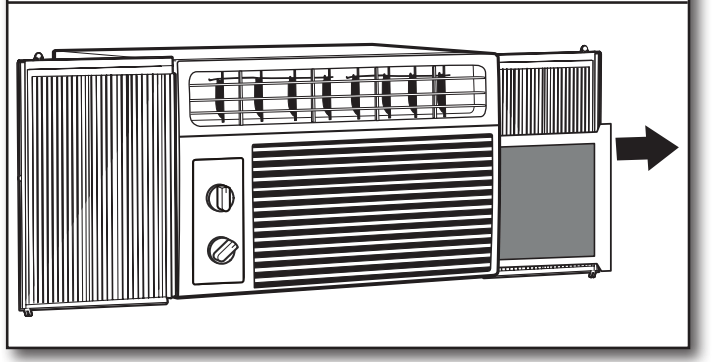
Remove the air filter
Remove the filter by grasping the tab on the filter and pulling it out of the grille to the side.
Reinstalling the air filter:
Slide the filter back into the grille.
Cleaning the Front Panel
Turn off the air conditioner.
Wipe the front panel with a soft, damp cloth.
Air dry the front panel completely.
TROUBLESHOOTING
Before calling for service, try the suggestions below to see whether you can solve your problem without outside help.
Air conditioner will not operate
WARNING
Electrical Shock Hazard
Plug into a grounded 3 prong outlet.
Do not remove ground prong.
Do not use an adapter.
Do not use an extension cord.
Failure to follow these instructions can result in death, fire, or electrical shock.
If you experience
Possible Causes
Solution
Air conditioner will not start
Check electrical supply.
Plug the power cord into a grounded 3 prong outlet.
Do not use an extension cord.
Make sure there is power to the outlet. Plug in a lamp to see if the outlet is working.
Reset a tripped circuit breaker. Replace any blown fuses.
NOTE: If problems continue, contact an electrician.
The power supply cord has tripped (Reset button has popped out). Press and release RESET (listen for click; Reset button will latch and on some devices, a green light will turn on) to resume operation.
Blows fuses or trips circuit breakers.
Too many appliances are being used on the same circuit. Unplug or relocate appliances that share the same circuit.
Use time-delay fuse or circuit breaker of the wrong capacity is being used. Replace with a time-delay fuse or circuit breaker of the correct capacity. See “Electrical Requirements.”
You are trying to restart the air conditioner too soon after turning off the air conditioner. Wait at least 3 minutes after turning off the air conditioner before trying to restart the air conditioner.
Power failure
Air conditioner will restart when power is restored.
Time-delay fuse (approx. 3 minutes) to prevent tripping of the compressor. Wait at least 3 minutes before trying to restart the air conditioner.
Power supply cord trips (Reset button pops out).
Disturbances in your electrical current can trip (Reset button will pop out) the power supply cord. Press and release RESET (listen for click; Reset button will latch to resume operation.
Electrical overload, overheating, a pinched cord, or aging can trip the power supply cord (Reset button will pop out). After correcting the problem, press and release RESET (listen for click; Reset button will latch to resume operation.
NOTE: A damaged power supply cord must be replaced with a new power supply cord obtained from the product manufacturer and must not be repaired.
Before calling for service, try the suggestions below to see whether you can solve your problem without outside help.
Air conditioner will not operate
If you experience
Possible Causes
Solution
Air conditioner cycles on and off too much or does not cool room in Cooling mode
Air conditioner seems to run too much.
The current air conditioner replaced an older model. The use of more efficient components may cause the air conditioner to run longer than an older model, but the total energy consumption will be less. Newer air conditioners do not emit the “blast” of cold air you may be accustomed to from older air conditioners, but this is not an indication of lesser cooling capacity or efficiency. Refer to the efficiency rating (EER) and capacity rating (in BTU/h) marked on the air conditioner.
The air conditioner is in a heavily occupied room, or heat-producing appliances are in use in the room. Use exhaust vent fans while cooking or bathing and try not to use heat-producing appliances during the hottest part of the day. A higher-capacity air conditioner may be required, depending on the size of the room being cooled.
Airflow is restricted.
The louvers are blocked. Install the air conditioner in a location where the louvers are free from curtains, blinds, furniture, etc.
The temperature control may not be set correctly.
The temperature setting is not set to a cool-enough setting. Adjust the cooling mode and/or thermostat to a cooler setting.
The air filter is dirty.
The filter is dirty or obstructed by debris. Clean the filter.
The room may be too warm.
Allow extra time for the air conditioner to cool off a very hot room.
The air conditioner is not properly sized for your room. Check the cooling capabilities of your room air conditioner. Room air conditioners are not designed to cool multiple rooms.
There is excessive heat or moisture (open container cooking, showers, etc.) in the room. Use a fan to exhaust heat or moisture from the room. Try not to use heat-producing appliances during the hottest part of the day.
Windows or doors to the outside are open. Close all windows and doors.
Cold air is escaping.
Check for open furnace registers and cold-air returns.
Windows or doors to the outside are open. Close all windows and doors.
The cooling coils are frozen.
The inside evaporator and outside condenser coils are dirty or obstructed by debris.
The outside temperature is below 65°F (18°C ). Do not try to operate your air conditioner in the cooling mode when the outside temperature is below 65°F (18°C). This reduces the risk of freezing up or damage to the unit.
The air conditioner is freezing up
Ice blocks the air flow and stops the air conditioner from cooling the room.
Set Mode dial to high fan or high cool and set Temp dial to 1 or 2. You may have to turn off the air conditioner to allow ice to thaw before using.
Water is dripping outside
Hot and humid weather.
This is normal.
Water is dripping inside the room
The air conditioner is not properly leveled.
For proper water drainage, make sure the air conditioner is slightly tilted downward toward the outside.
NOTE: Do not drill a hole into the bottom of the metal base and condensate pan; doing so will reduce cooling performance.
Water collects in the base pan
Moisture removed from the air is draining into the base pan.
This is normal for a short period in areas with low humidity and normal for a longer period in areas with high humidity.
ASSISTANCE OR SERVICE
Before calling for assistance or service, please check “Troubleshooting.” It may save you the cost of a service call. If you still need help, follow the instructions below
When calling, please know the purchase date and the complete model and serial numbers of your appliance. This information will help us to better respond to your request.
Q: How does the filter go back in? It keeps hitting a piece in the middle- with metal. The face doesn't pop off or open, so I can't get it to slide by this part blocking it from going in. Reply
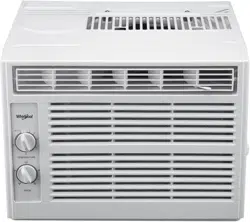
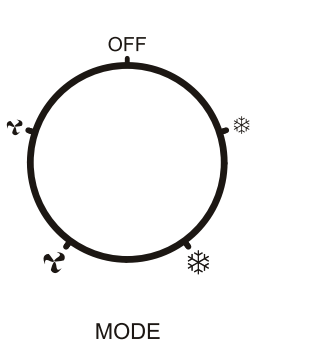
 )-Cools with the fan at low speed.
 )-Cools with the fan at high speed. Use this setting for maximum cooling.
 )-The fan runs at low speed without cooling.
 )-The fan runs at high speed without cooling.