OWNER´S MANUAL
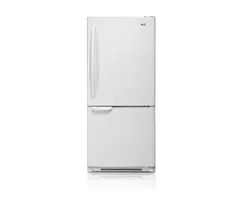
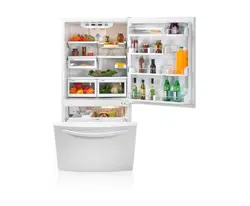
REFRIGERATOR
Please read this manual carefully before operating
your set and retain it for future reference.
Model Name
www.lge.com
ENGLISH
ESPAÑOL
FRANÇAIS
P/No. MFL65001701
LBC20514
LBC22520
LBN20513
LBN20514
LBN20518
LDC22720
LDC22738
LBN20517
LDN20718
LRBC20512
LRBN20512
2
Visit our web site http://www.lgservice.com
LG Electronics
United States of America
LG Electronics will repair or at its option replace, without charge, your product which proves to be defective
in material or workmanship under normal use during the warranty period listed below from the date of
original purchase.
This warranty is good only to the original purchaser of the product during the warranty period as long as it is
in the U.S. including Alaska, Hawaii, and U.S. Territories.
LG Refrigerator / Freezer Warranty Period
Product Parts Labor
Refrigerator / Freezer 1 year 1 year [In-Home Service (Except Model GR-051)]
Sealed System 7 years 1 year [In-Home Service (Except Model GR-051)]
(Compressor, Condenser, Evaporator)
No other express warranty is applicable to this product. THE DURATION OF ANY IMPLIED WARRANTIES.
INCLUDING THE IMPLIED WARRANTY OF MERCHANTABILITY, IS LIMITED TO THE DURATION OF
THE EXPRESS WARRANTY HEREIN. LG ELECTRONICS SHALL NOT BE LIABLE FOR THE LOSS OF
USE OF THE PRODUCT, INCONVIENCE, LOSS OR ANY OTHER DAMAGES, DIRECT OR
CONSEQUENTIAL, ARISING OUT OF THE USE OF OR INABILITY TO USE, THIS PRODUCT OR FOR
ANY BREACH OF ANY EXPRESS OR IMPLIED WARRANTY, INCLUDING THE IMPLIED WARRANTY
OF MERCHANTABILITY APPLICABLE TO THIS PRODUCT.
Some States do not allow the exclusion or limitation of incidental or consequential damages or limitations on how
long an implied warranty lasts; so these limitations or exclusions may not apply to you. This warranty gives you
specific legal rights and you may also have other rights which vary from state to state.
THE ABOVE WARRANTY DOES NOT APPLY TO:
1. Service trips to your home to deliver and pickup, install, instruct, or replace house fuses or correct house wiring or
plumbing, or correction of unauthorized repairs.
2. Damage to the product caused by accident, pests, fire, floods, or acts of God.
3. Repairs when your LG product is used in other than normal, single-family household use.
4. Damage resulting from accident, alteration, misuse, abuse, or improper installation.
Therefore, these costs are paid by the consumer.
If the product is installed outside the normal service area, any cost of transportation involved in the repair of the product, or the
replacement of defective parts, shall be borne by the owner.
CUSTOMER ASSISTANCE NUMBERS:
To obtain Warranty Coverage: Retain your Bill of Sale to prove date of purchase.
A Copy of your Sales Receipt must be submitted at the time
warranty service is provided.
To obtain Product or Customer
(24 hrs a day, 7 days per week, 365 days per year)
Service Assistance: Press the appropriate menu option, and have your product type
(Refrigerator), model number, serial number, and ZIP/Postal
Code ready.
To obtain the nearest
Authorized Service Center:
Press the appropriate option, and have your product type
(Refrigerator), model number, serial number, and ZIP/Postal
Code ready.
LIMITED WARRANTY
(24 hrs a day, 7 days per week, 365 days per year)
Call 1-800-243-0000
Call 1-800-243-0000
Damages caused during and/or after delivery.
Display, discount, or refurbished units purchased with scratches, dents, or defects.
Proof of purchase is required and must be provided to LG in order to validate warranty.
5.
6.

TABLE OF CONTENTS
English Version
6
Warranty (USA)
2 - 3
Important Safety Instructions 7 - 8
Requirements for Ground Connection
8
Parts and Features
9 - 11
Refrigerator Installation
12 - 19
17 - 19
Unpacking
12
Installation
12
Installation of Base Grille
Refrigerator Doors: How to
remove and reverse
13 - 19
Closing and Aligning the doors
20
Using your Refrigerator
21 - 28
Ensuring Proper Air Circulation
Multi Flow
Door Alarm
Adjusting the Controls
Adjusting Control Settings
21
Food Storage Guide
Storing Frozen Food
Refrigerator Shelves
Frozen Meat Comparment (Chef Fresh
Spanish Version
39
For Models with Pull-out Drawer
For Models with Swinging Door
13 - 14
French Version 74
Warranty (Canada)
4 - 5
How to remove and Install Pull-Out Drawer
6
12
15 - 16
21
21
21 - 22
22
23
23
24
25
Optibin Crispers
Crisper cover with interior lattice
26
When Going on Vacation
Glide Out Drawer
25
About the Automatic Ice Maker
Connecting the Water Line
Troubleshooting Guide
35 - 38
Door Racks
26
Design-A-Door
27
Dairy Compartment
27
Ice Box
27
DuraBase
27
Tilting Door
28
Wired Durabase (Swing Models)
28
Durabase Divider
28
Freezer Shelf
Refrigerator Care and Cleaning
29 - 30
Refrigerator Cleaning
29
Outside
Inside Walls
Door Lining & Gaskets
Plastic Parts (Covers and Panel)
Replacing Refrigerator Lights
Power Interruptions
28
26
When Moving
29
29
29
29
29 - 30
30
30
30
32 - 34
31
Egg Compartment
27
Cover Back
29
/ Snack Pan)
Crisper Humidity Control
26
This manual contains several important safety notices. Always read and obey all of the following safety messages.
This is the safety alert symbol. This symbol is a warning to potential dangers that could cause death,
injury or damage to you, others or the product.
“WARNING”. These words mean:
All safety messages inform you of potential danger,advise you on how to reduce the risk of injury and tell you what can
occur if the instructions are not followed.
SAFETY MESSAGES
WARNING
To reduce the risk of fire, electrical shock or personal injury,
the following precaution measures should be followed:
NEVER disconnect the refrigerator by pulling the power cord,
always grip the plug firmly and disconnect it directly from the
outlet.
Immediately repair or replace all faulty or damaged service
cables. Do not use cords that have cracks or abrasion damage
on the length of the cord or on the plug.
When moving your refrigerator, take care not to roll over the
electrical cord.
DO NOT store or use gasoline or other combustible liquids
or vapors in proximity with this or any other electrical appliance.
DO NOT permit children to climb, stand or swing from the doors
or shelves of the refrigerator. This can cause serious injury to
them and damage to the product.
Keep your fingers away from areas in which they can become
Unplug the refrigerator before cleaning or repairing.
NOTE: We strongly recommend that any repair services be
performed by a qualified professional.
Before replacing a burned-out light bulb, unplug the refrigerator
or shut down the circuit breaker to avoid contact with a live
wire (the bulb could break while being replaced). NOTE:
Setting the control to the OFF position does not disconnect the
power from the light bulb circuit.
Read all instructions before utilizing the product.
Utilize this product only as explicitly expressed in this guide.
Once the refrigerator is operating, avoid touching cold
surfaces of the freezer with damp or wet hands; the skin
could become adhered to these surfaces.
In refrigerators with an automatic ice dispenser, avoid
contact with moving parts of the ejector mechanism or with
the heating mechanism that discharges the cubes. DO NOT
place your fingers or hands in the ice dispenser mechanism
while the refrigerator is connected.
DO NOT refreeze foods which have already thawed. The
Department of Agriculture of the United States, in your
Bulletin of Home and Gardens No. 69 establishes that:
“...You can refreeze food that have thawed if they contain
ice crystals or are cold and below 40 °F (4 °C)”.
“...Ground beef, perishable food or seafood that is discolored
or has an unpleasant odor should not be frozen or consumed.
Consumption of melted ice cream should also be avoided.
If the odor or color of food is questionable, discard it. The
food may be dangerous to consume”.
“Partial thawing or refreezing reduces the quality of the food,
especially fruit, vegetables and prepared meals. The quality
of red meat is less affected than that of other foods. Use
refrozen products as soon as possible in order to maintain
their quality”.
IMPORTANT SAFETY INSTRUCTIONS
KEEP THESE INSTRUCTIONS
caught, such as the doors, hinges and cabinets. Be careful
closing the doors when children are near.
For your safety, this product should be properly grounded.
Have a qualified professional check the electrical circuit and
outlet to ensure a proper ground connection.
Do not keep bottles in the freezer compartment, they could
explode after freezing and cause damage.
WARNING
CAUTION
You may be killed or seriously injured if you do not follow instructions.
Indicates a potentially hazardous situation which, if not avoided, may result in minor
injury or damage to the product.
DANGER
You may be killed or suffer fatal damage if you do not follow instructions.
7
All safety messages will follow after this warning symbol and the word “DANGER”, “CAUTION” or
Your old refrigerator may have a cooling system that uses If you decide to throw out your old refrigerator, ensure that
CFC’s (chlorofluorocarbons). CFC affects the stratospheric CFC contaminants are properly disposed of by a qualified
layer of the ozone. professional. If you intentionally remove the CFC
refrigerant, you could be subject to fines or prison in
accordance with environmental legislation in effect.
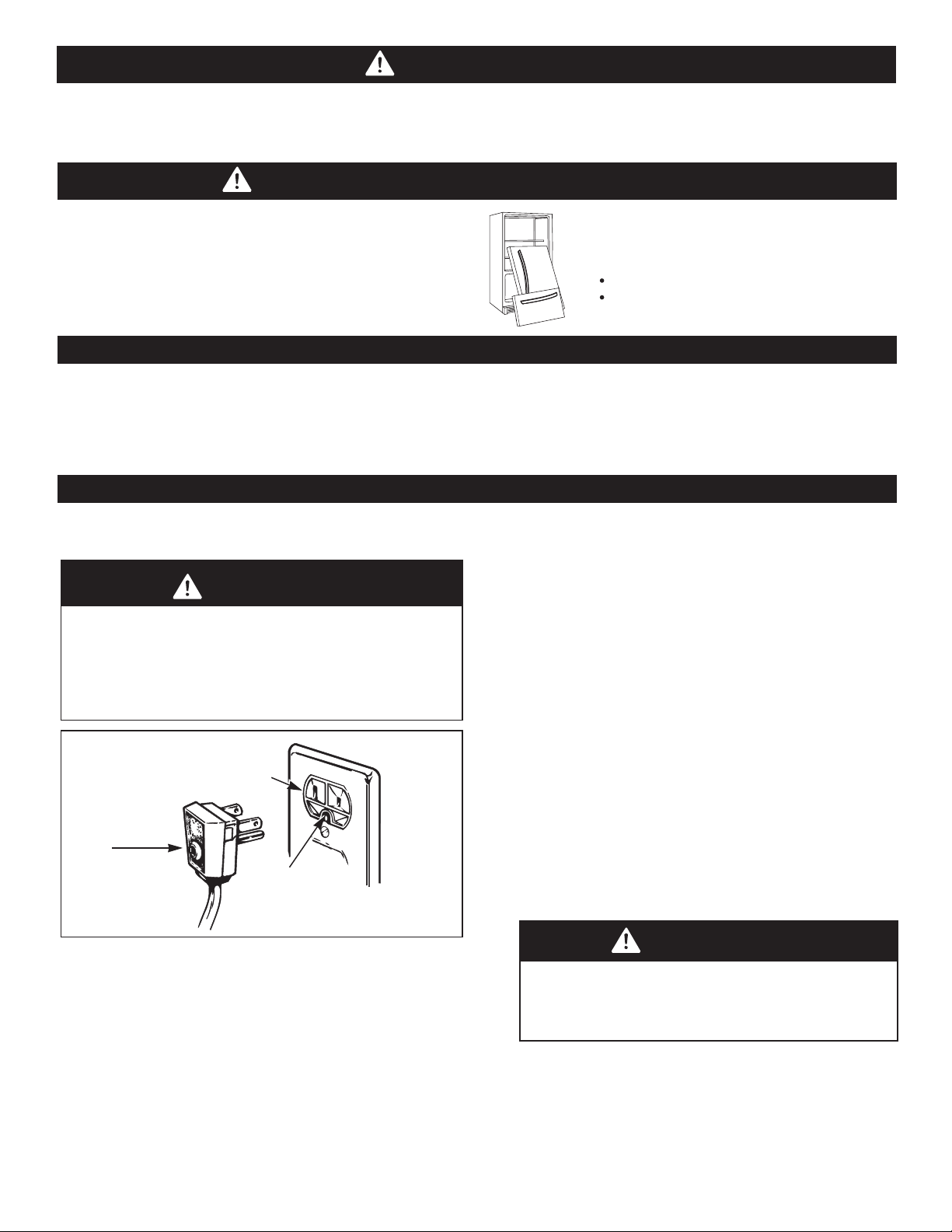
DANGER:CHILDREN MAY BECOME TRAPPED
BEFORE DISPOSING YOUR
REFRIGERATOR OR FREEZER
WHEN NO LONGER IN USE:
Remove the doors.
Leave the shelves in place so that children
cannot easily become stuck in them.
CFC DISPOSAL
REQUIREMENTS FOR GROUND CONNECTION
Children becoming trapped or suffocated is not a problem
of the past. Discarded and abandoned refrigerators are a
hazard, even if they remain there “for just a few days”.
If you would like to dispose of your old refrigerator, please
follow the instructions below to prevent any accidents.
IMPORTANT:
Attentively read the following.
TO CONNECT ELECTRICITY
RECOMMENDED GROUNDING METHOD
Your refrigerator must always be connection to its own
outlet which is adequately grounded. The energy current
should only be 115 V, 60 Hz, C.A. and fused at 15 or 20 A.
This provides the best performance and prevents an
overload which could cause a fire from the overheating of
the cables. It is recommended that a separate circuit be
used for this appliance, as well as a receptacle that cannot
be disconnected with a switch. Do not use an extension
cable.
WARNING
Electrical Shock Hazard
FOR YOUR PERSONAL SAFETY, this appliance must
be properly grounded. Have a qualified electrician
check your wall outlet to ensure that the plug is
grounded properly.
Ensure proper
ground exists
before use.
3-prong
grounding
plug
3-prong
grounding type
wall receptacle
It is your responsibility and obligation to replace
two-prong outlets with that of an adequately
grounded three-prong outlet. Do not, under any
circumstance, cut or extract the third prong from
the plug.
NOTE: Before installation, cleaning or replacing light
bulbs, you must disconnect the appliance from the
power source. When finished, plug the appliance back
in and adjust the thermostat to the desired position.
USE OF EXTENSION CABLES
We do not recommend the use of extension cables.
However, if you still choose to utilize an extension cable,
it is absolutely necessary that it is listed in the UL (in
WARNING
REPLACING ELECTRICAL CABLE
If the power cord is damaged, it must be replaced
by our service center or qualified LG technician to
avoid any risk.
the United States) or CSA (in Canada), that it supports
three-pronged plugs and that the electrical current
support a minimum of 15 A and 120 V.
The use of an extension cable will increase the amount
of space needed behind the refrigerator.
CAUTION
This appliance is not intended for use by children, persons with physical or mental disabilities, persons with reduced
sensory or mental capacity, or persons that lack experience or know-how, unless they have supervision or instruction in
relation to the use of the appliance by the person responsible for their safety. Children should be supervised to assure that
they do not play with the appliance.
8
Ice Bin
Durabase
Divider
Egg Compartment
Fixed Refrigerator Rack
Freezer Light
Pull out Drawer
*On some models
B
C
D
A
F
E
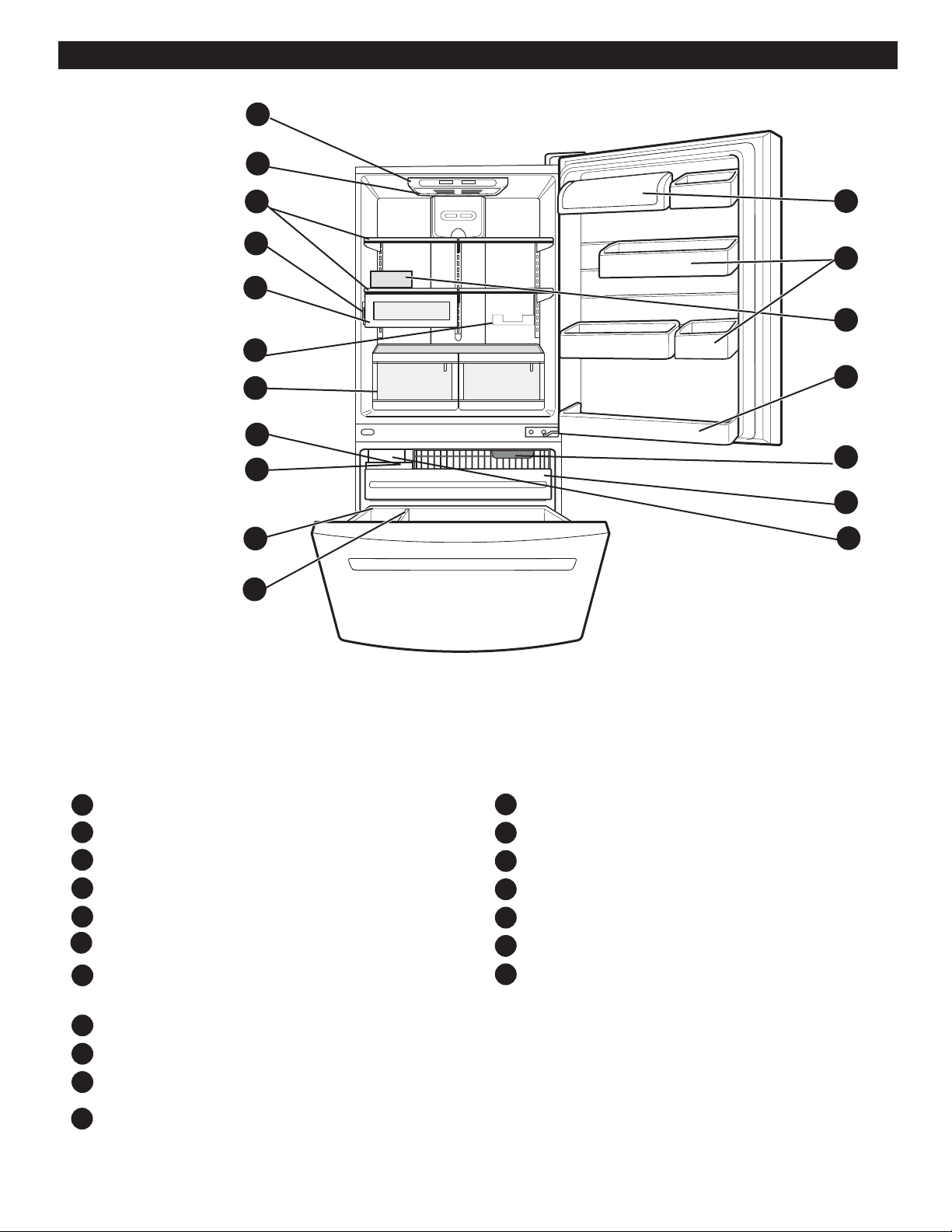
Read this section to familiarize yourself with the parts and features of your new refrigerator.
NOTE: This guide covers different models. Your refrigerator could have some or all of the features and parts listed below.
The location of some of the parts may not correspond to that of your model.
PARTS AND FEATURES
G
H
I
J
K
M
N
L
O
P
Q
R
A
B
C
D
E
F
G
H
J
L
N
O
P
K
M
I
Q
R
Ice Tray (Inside H) *
Optibin Crisper
(Keeps your vegetables and fruits fresh and crisp)
Chef Fresh/Snack Pan *
Can Dispenser *
Temperature Control *
Shelves
Refrigerator Light
Digital Sensor Control
Dairy Compartment
Design-A-Door
Icemaker *
9
A
B
C
D
E
J
K
N
M
L
F
G
HH
I
N
O
Ice Bin
Durabase
Divider
Fixed Refrigerator Rack
Freezer Light
Pull out Drawer
*On some models
B
C
D
A
F
E
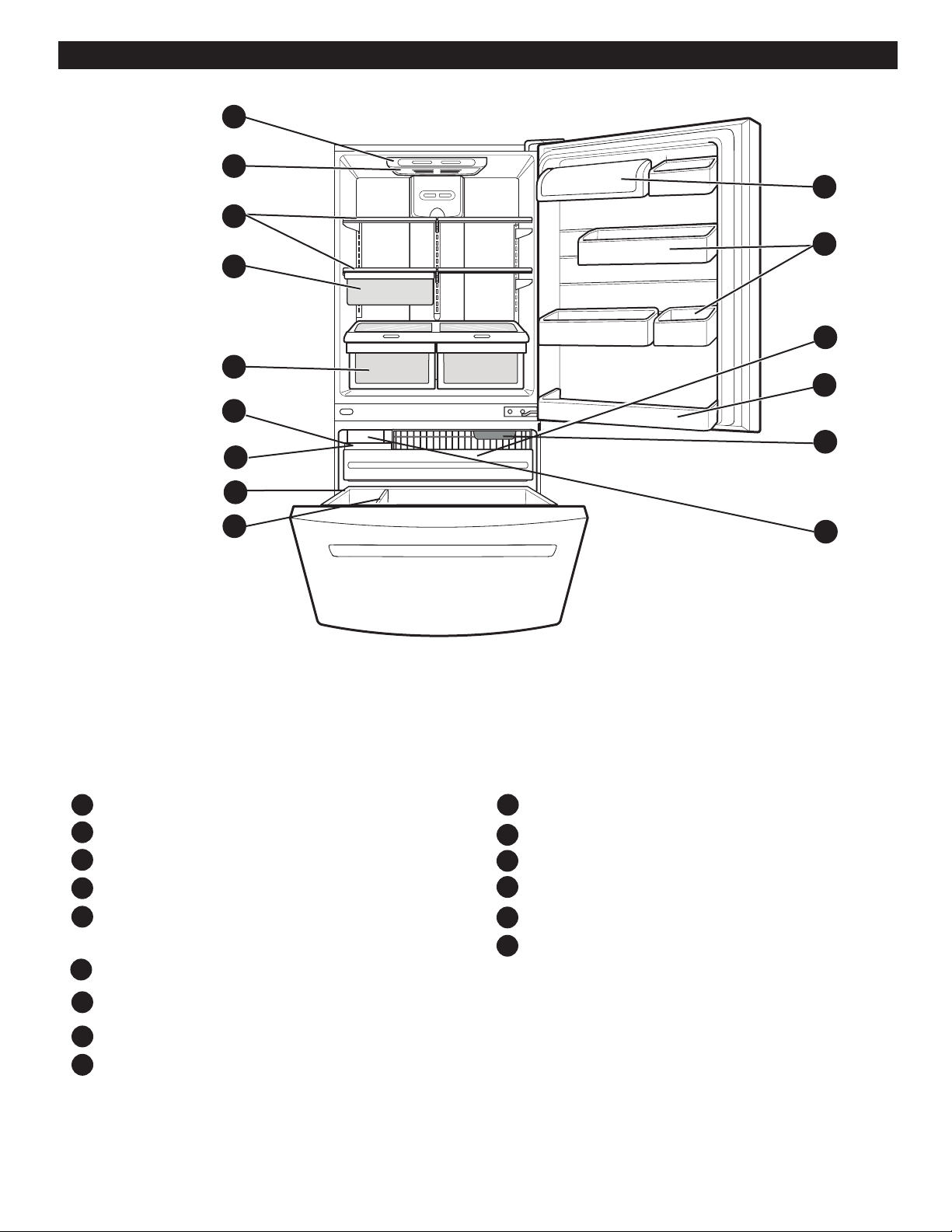
Read this section to familiarize yourself with the parts and features of your new refrigerator.
NOTE: This guide covers different models. Your refrigerator could have some or all of the features and parts listed below.
The location of some of the parts may not correspond to that of your model.
G
H
I
J
K
M
N
L
O
Ice Tray (Inside of F) *
Optibin Crisper
Keeps fruits and vegetable fresh and crisper
Chef Fresh/Snack Pan *
Shelves
Refrigerator Light
Digital Sensor Control
Dairy Compartment
Design-A-Door
Icemaker *
PARTS AND FEATURES
10
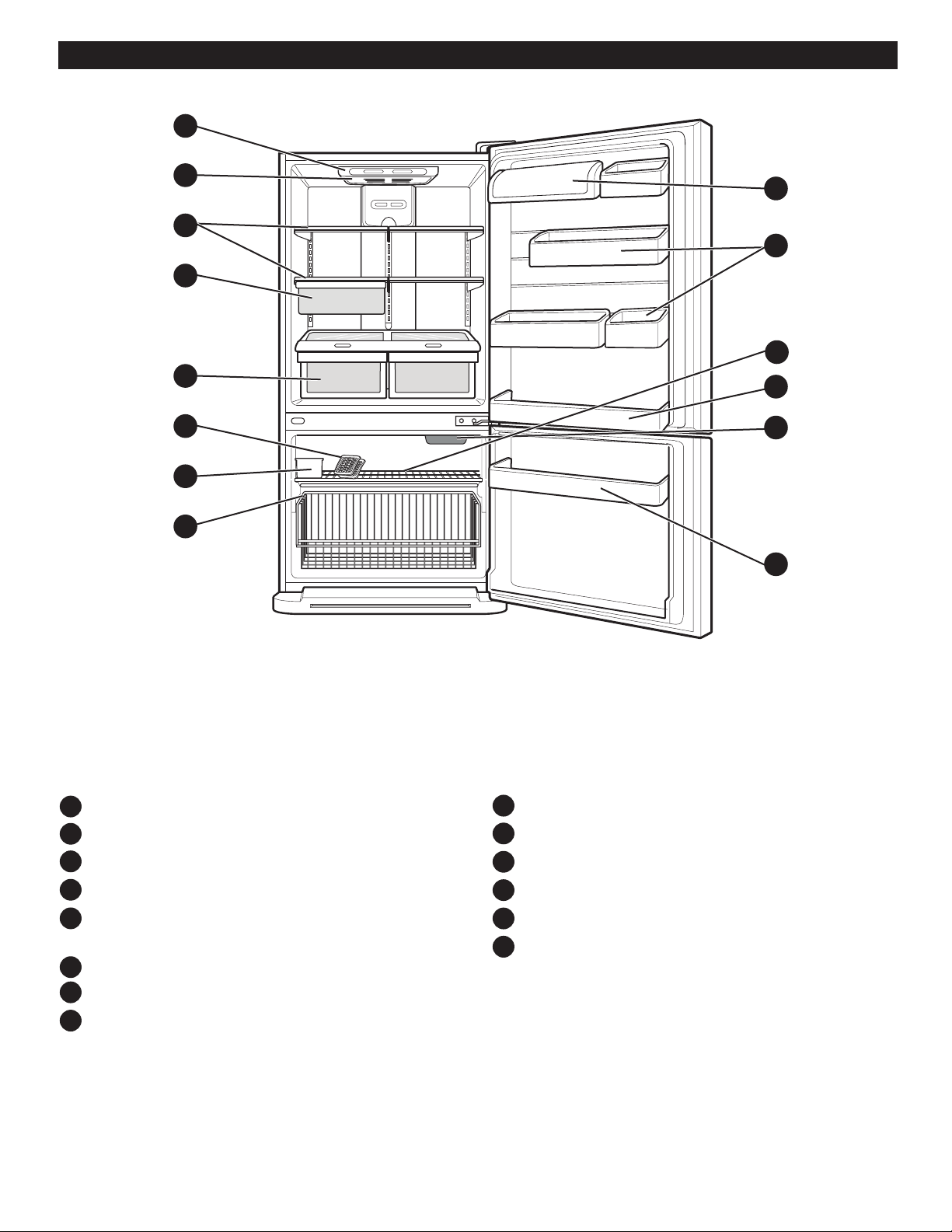
Read this section to familiarize yourself with the parts and features of your new refrigerator.
NOTE: This guide covers different models. Your refrigerator could have some or all of the features and parts listed below.
The location of some of the parts may not correspond to that of your model.
PARTS AND FEATURES
Digital Sensor Control
Refrigerator Light
Shelves
Optibin Crisper
Keeps fruits and vegetable fresh and crisp
Ice Trays*
Ice Bin
Wired Durabase
Dairy Compartment
Design-A-Door
Wire Freezer Shelf
Fixed Refrigerator Rack
Freezer Light
Freezer Door Rack
B
C
D
A
F
E
G
H
I
J
L
M
K
N
A
B
C
D
E
F
G
H
I
J
M
N
L
K
*On some models
11
Chef Fresh/Snack Pan *
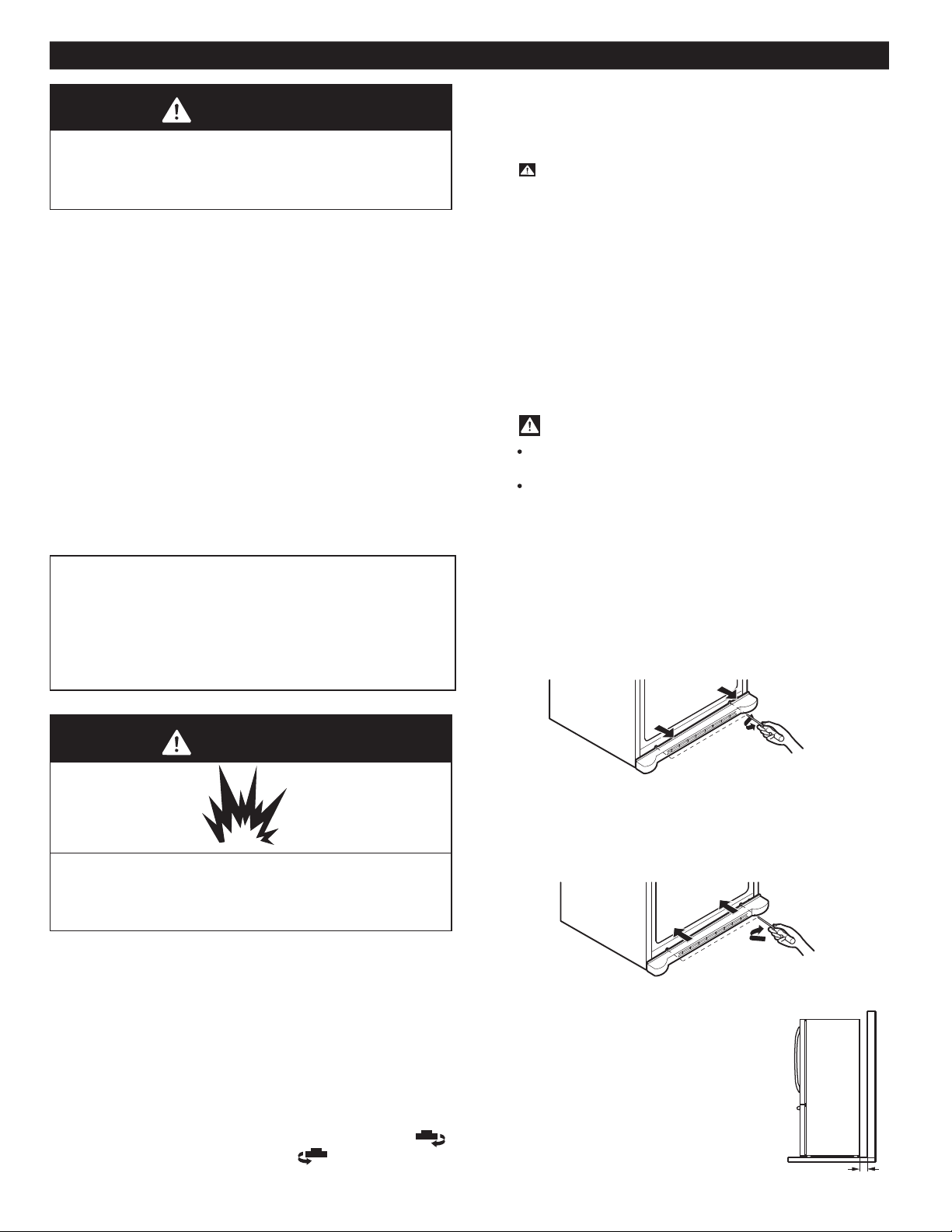
Figure B
UNPACKING
Before installing your refrigerator, remove any tape or
temporary stickers. Do not remove any stickers that feature
warnings, the model serial number or the technical label of
the product located on the back of the refrigerator.
To remove adhesive tape residue, rub it well with your
fingers and a little liquid detergent. Clean with warm water
and let dry.
Do not use sharp instruments, rubbing alcohol, flammable
liquids or abrasive cleaning products to remove the
adhesive tape or glue. These products can damage the
surface of your refrigerator. For more information, see the
section on “Important Safety Instructions”.
The shelves come already installed in their factory position.
Remove the shelves and replace them according to your
spacing needs.
Moving Your Refrigerator:
Your refrigerator is extremely heavy. Make sure you
protect the floor when moving your refrigerator for
cleaning or servicing. Always pull your refrigerator
straight out when moving it. Do not shift from side to side
or “walk” the refrigerator when attempting to move it as
INSTALLATION
1. Avoid placing the unit near heat sources, direct sunlight,
or humidity.
2. To avoid vibration, the unit should be leveled. If needed,
adjust the leveling screws to compensate for an unlevel
floor. The front should be slightly taller than the rear to
ensure that the doors close properly. The leveling screws
can easily be turned by slightly tilting the front of the
refrigerator, turning the leveling screws clockwise ( )
to raise it and counter-clockwise ( ) to lower it.
3. Install the refrigerator in an area between 55 ° F
(13 °C) and 110° F (43 °C). If the surrounding
temperature is lower or higher than previously
mentioned, it can adversely affect the unit.
ONCE INSTALLED
1. Carefully clean your refrigerator and remove and
dust accumulated during shipping.
2. Install accessories such as the ice tray, drawers,
shelves, etc., in their proper places. These are already
packed to prevent any possible damage during shipping.
3. Leave your refrigerator on for 2 to 3 hours before
storing food inside. Verify that there is a flow of cold
air in the freezer compartment to ensure proper
cooling. Your refrigerator is now ready for use.
WARNING:
Take care when working with the hinges, base cover
and stops, etc. You may injure yourself.
DO not place your hands or any tools in the air vents,
the base cover or in the bottom of the refrigerator. This
may cause injury or electrical shock.
REFRIGERATOR INSTALLATION
WARNING
Excessive Weight Hazard
Use the assistance of two or more persons to move or
install the refrigerator. Not following these instructions
may cause injury to the back and other parts of the body.
WARNING
Keep all flammable materials and vapors (such as
gasoline) away from the refrigerator. Not following
these instructions may cause death, explosion or fire.
CAUTION: Avoid placing the unit near heat sources,
direct sunlight or humidity.
Explosion Hazard
Keep a Proper Distance from Adjacent
Please keep the refrigerator at an
Insufficient spacing can reduce the
increase electricity consumption.
(5.08 cm) 2”
INSTALLATION OF BASE GRILLE
Installing the Base Grille
Uninstalling or Replacing the Base Grille
1. Remove the 2 screws from the bottom front part of
your refrigerator (see Figure A).
2. Take off the cover.
1. Align the bottom cover and place in position. Insert
the 2 screws and twist in place (see Figure B).
12
refrigerator's freezing efficiency and
adequate distance from other objects.
Figure A
this can cause damage to the floor.
Objects

REFRIGERATOR INSTALLATION
IMPORTANT: Before you begin, unplug the refrigerator or disconnect the power source. Remove all food and any
adjustable doors or bins from the refrigerator doors.
HOW TO REVERSE DOOR SWING (When converting from left-opening mode to right-opening mode )
(when converting from the left-opening type to right-
opening type)
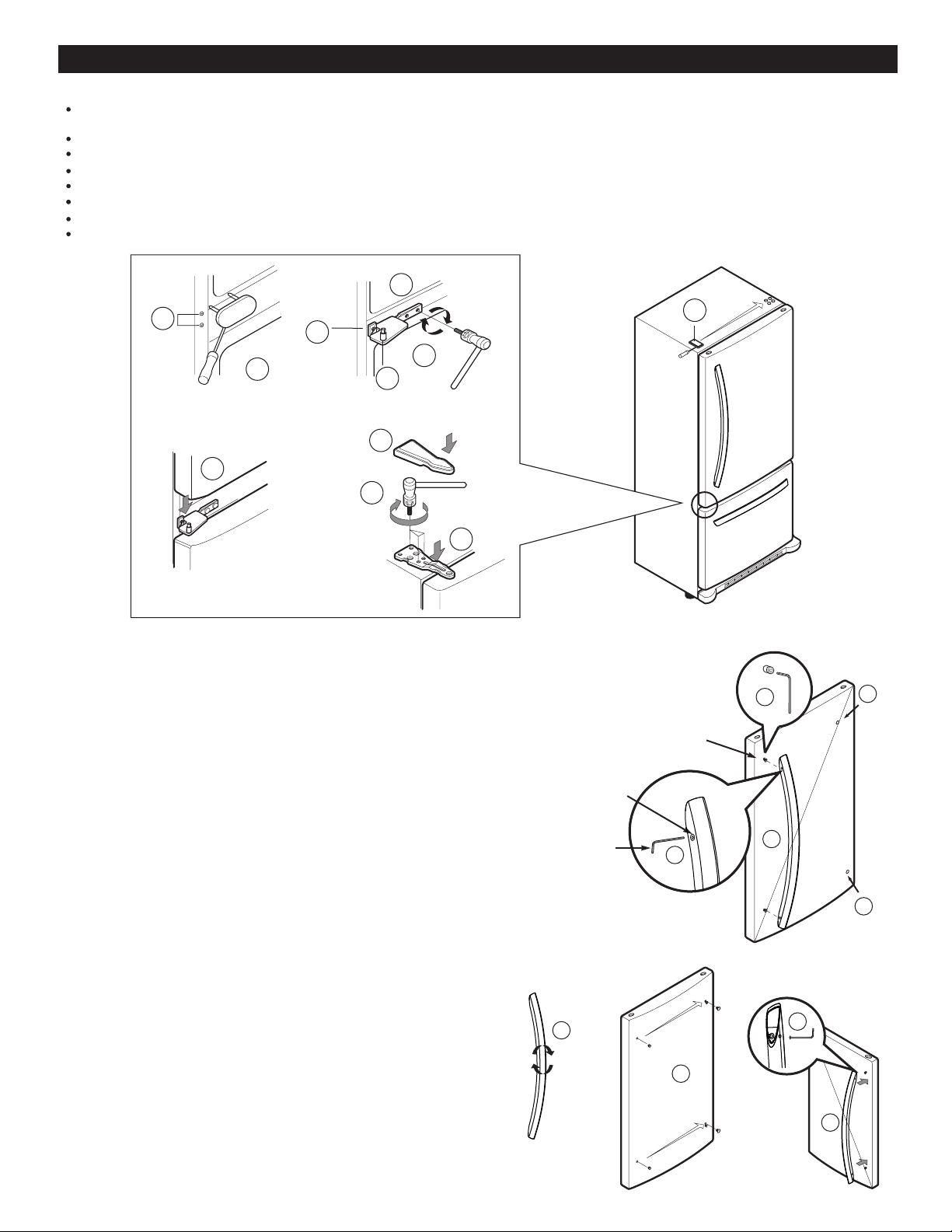
1. Removing Refrigerator Door
Once the door has been removed, remove the screws (6), the stopper (7) Hinge Pin (8) located below this and remove
•
•
•
REFRIGERATOR DOORS: HOW TO REMOVE AND REVERSE (OPTIONAL) For Models with
T O O L S N E E D E D
Hex Socket Wrench
Phillips Screwdriver
Flat Head Screwdriver
Allen Wrench
10 mm
1/4 in
3/8 in
1/4 in
3/32 in
You may find it more convenient to have the doors converted from the left-opening type (factory installed) to the
1/4 inch socket wrench 10mm open-end wrench
Adjustable wrench Flat 2-inch putty knife
•
•
•
•
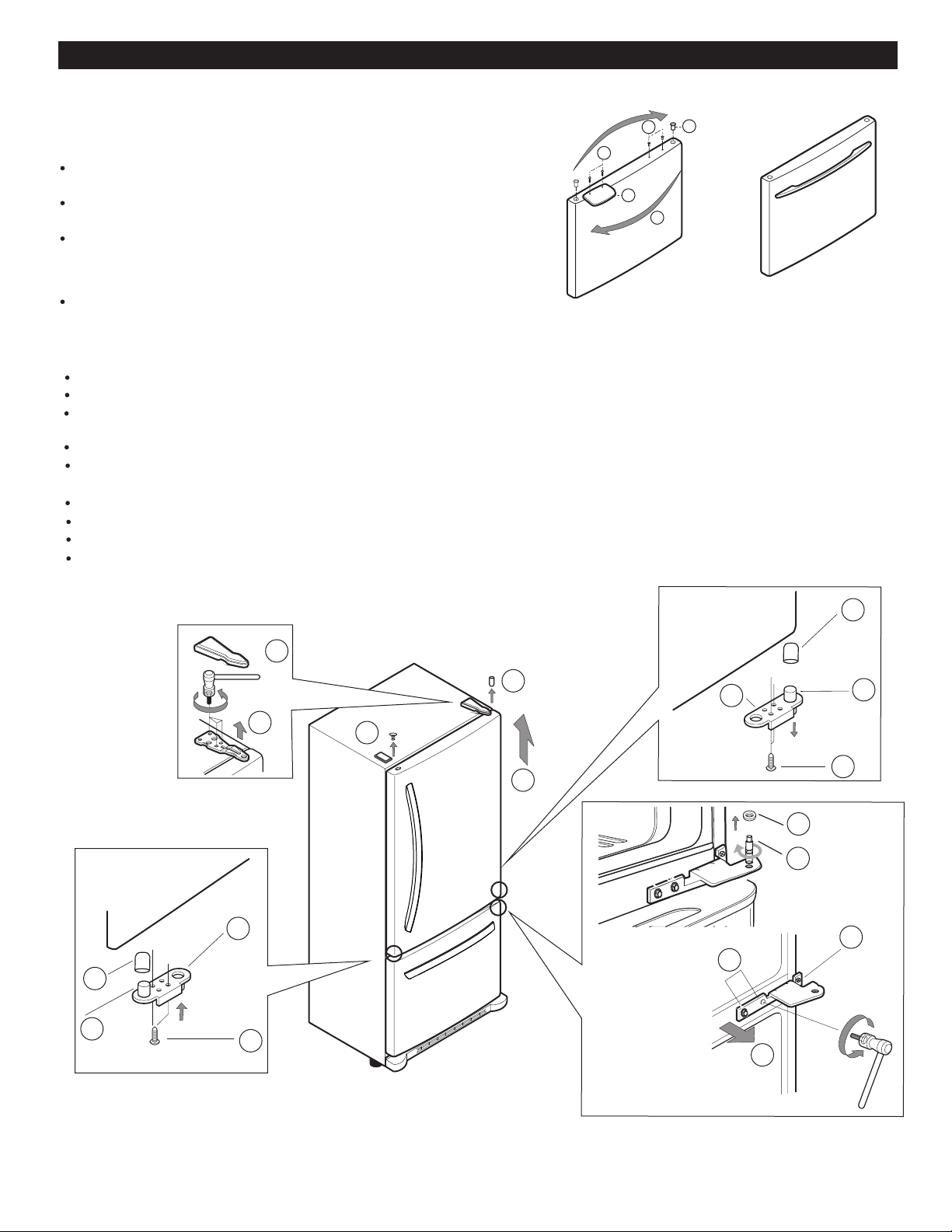
Gently pry the Top Hinge Cover with a flat head screwdriver and remove (1).
Using 10mm spcket wrench, remove the 3 bolts and lift off the Top Hinge. Set parts aside (2).
Remove the pivot (3) and the cap (4) and place them in the opposite side.
Gently lift the refrigerator door (5) a little and remove.
Install the hinge (10) on the opposite side of the door replace the screws (11), the stopper (12) and Hinge Pin (13).
Using the ¼ inch socket wrench, loosen the pin (14) and remove it.
Remove the 4 screws (15 and 16) and remove the hinge (17).
13
Pull-out Drawer
right-opening type. Directions refer to the right side as your right when facing the unit.
Other necessary tools are:
•
•
the hinge (9).
15
16
17
5
10
11
12
13
1
2
14
6
7
8
9
4
3
REFRIGERATOR INSTALLATION
14
7
1
2
6
5
3
4
8
9
10
11
1
Fixation
Assembly
Screws
Screws
1
2
Allen
Wrench
3
4
4
2
3
4
2. Installing the Refrigerator Door
Remove the cover (1) using a flat head screwdriver (this requires a little force), loosen the 2 screws (2) and place on the
opposite side.
Place the hinge (3) on the opposite side and install the 4 screws (4 and 5).
Insert the pin (6) in the hinge (3).
Remove the cover (7) and install on the right side.
Place the door and line up with the pin holes (8), making sure that both parts are aligned.
Place the top hinge (9) and insert the 3 screws (10).
Position the cover of the hinge over this (11).
Check that the door has been installed correctly.
NOTE: The appearance of the handle may appear different.
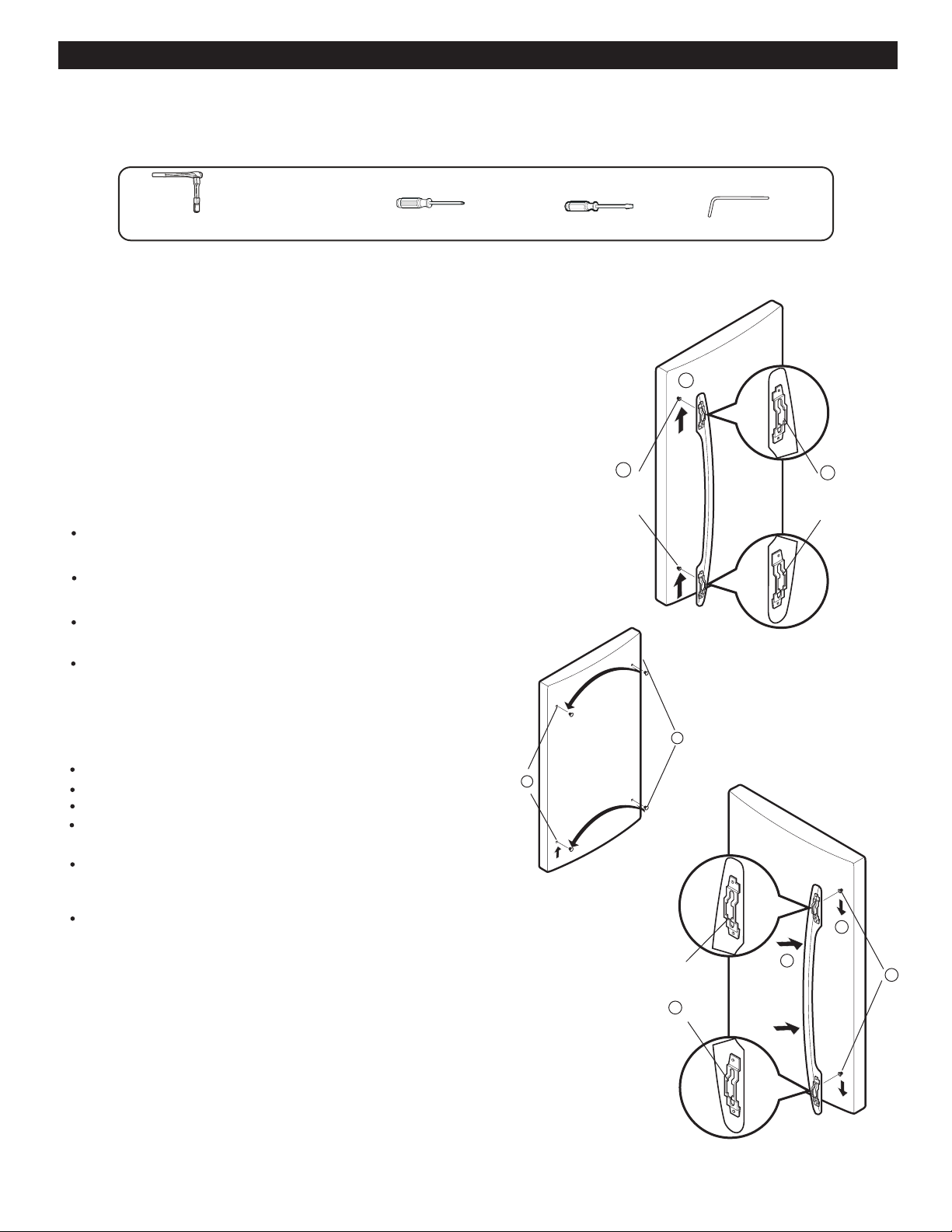
• Loosen the fixation screws (1) with a 3/32 Allen wrench and
remove the handle (2).
•
•
•
Remove the assembly screws (3) with a ¼ Allen wrench.
Carefully remove the plug buttons from the door (4).The
Install the buttons (4) on the left side.
buttons can be unscrewed using your fingers, turning
counter-clockwise. Continue turning until the screw is
HOW TO REMOVE THE DOOR HANDLES
3. Removing the Refrigerator Handle
• Rotate handle upside down (1).
• Insert the assembly screws on the opposite side of the
door (2).
4. Replacing the Refrigerator Handles
Hold the handle in place with the holes lined up with the
screw holes (3) and tighten the screws(4) in place with
•
loose and falls out.
the 3/32 Allen wrench.
REFRIGERATOR INSTALLATION
CAUTION:When removing the drawer, do not hold
the handle. If it comes off, it could cause personal
CAUTION: To place the drawer on the floor, take
care not to damage the floor or hurt your feet with
the sharp edgeson the side with the hinges.
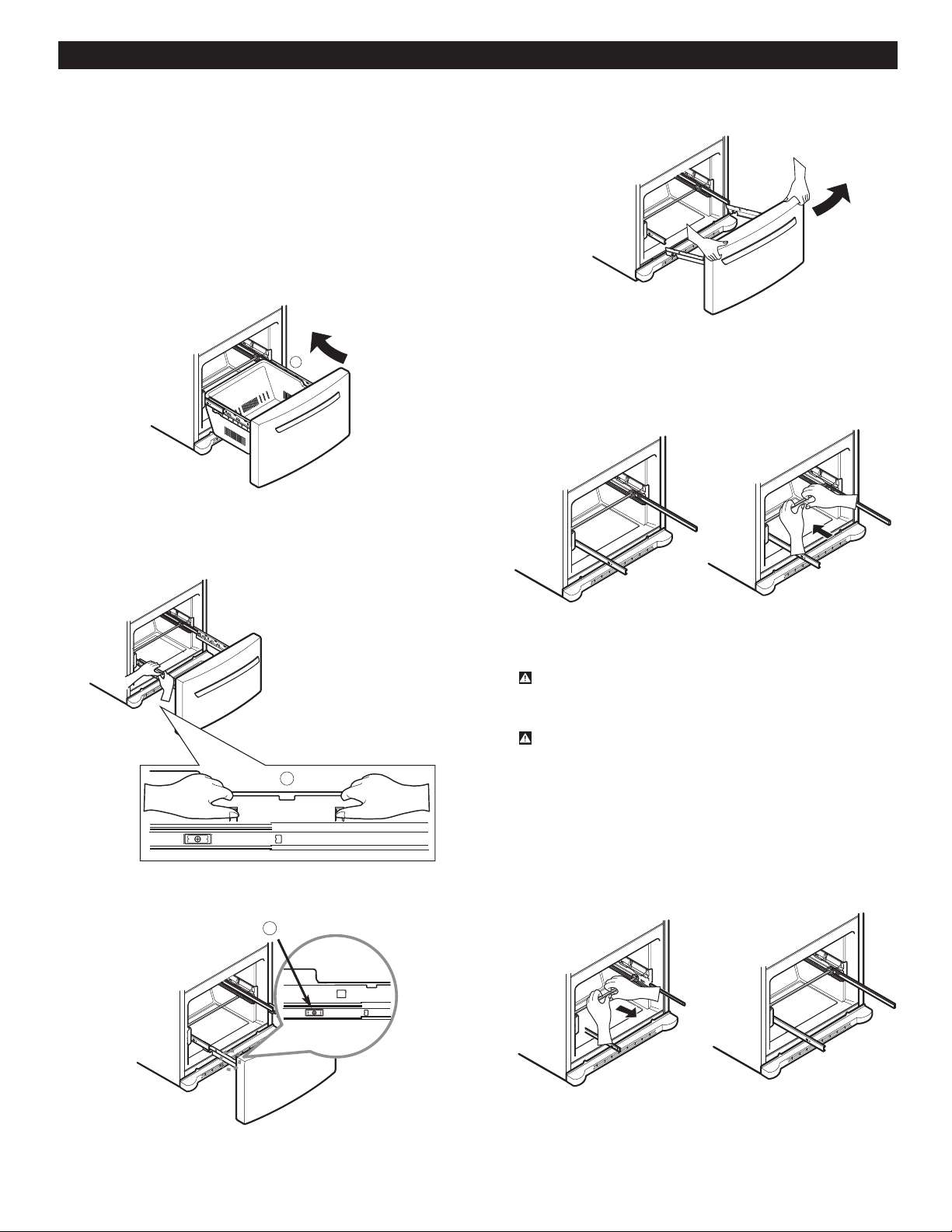
HOW TO REMOVE AND INSTALL THE
PULL - OUT DRAWER
IMPORTANT: To avoid possible injury or damage to the
product or your property, please use two people to perform
the following instructions:
1.Removing the Pull out Drawer
• Pull the drawer out to maximum extension. Remove the
bottom rack (1) by tilting it back a little and then lifting it
• Put pressure on the two hangers (2) with your thumbs in
• Remove the screws (3) from both sides of the rail track.
• With both hands, hold both sides of the door and
pull up to separate it.
• With both hands, hold the center of the bar and push
it in so that it is fit to both rails simultaneously.
15
1
2
3
off the railing tracks.
order to lift it up.
Separate the left and right rail cover.
•
injury.
2. Installing the Pull out Drawer
• With both hands, hold the center of the bar and pull
it outward so that the two rails extend out at the same
time.
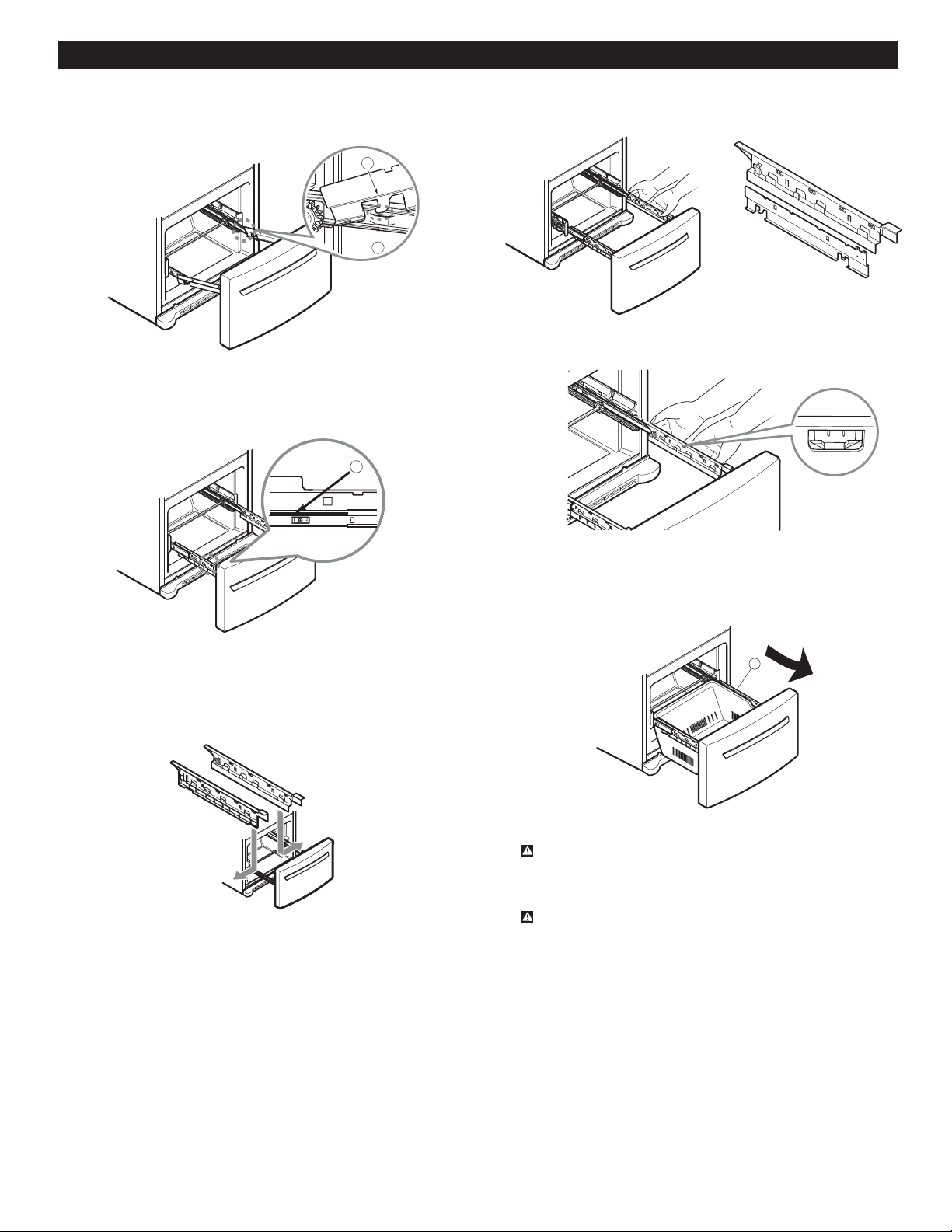
• Mount door supports (1) into the tabs on the railing
•
Push the drawer down into position and tighten the
• Compare the left and right rail covers on each side.
• Align the top holes of the rail cover with the top holes
of the door supports to mount the cover.
• With the drawer fully extended, insert the lower
basket over the front part of the rail assembly and
WARNING:To prevent entrapment risk and
accidental child or animal suffocation, DO NOT
permit them to play inside of the drawer.
WARNING:DO NOT step ot sit on the Freezer Door.
REFRIGERATOR INSTALLATION
16
1
2
3
Right
Rail
Left
Rail
alignment
Verify the hole’s
4
track (2), starting in the back first and then connecting
the part in the front last, as shown in the figure.
screws (3).
then the back part (4).
REFRIGERATOR INSTALLATION
REFRIGERATOR DOORS: HOW TO REMOVE AND REVERSE (OPTIONAL) For Swing Models
REVERSING DOOR OPENING DIRECTION FROM T
LEFT TO RIGHT (when you prefer the door to open
from the right instead of the left)
1. Removing and Installing the Refrigerator Handles
handle up (1) (this might require some force).
The keyhole slots (2) on the back of the handle allow the
handle to separate from the screws in the door.
Use the 10mm open-end wrench to remove the
mounting screws in the door (3).
back of the handle with the screws on the front of the door.
Press the handle against the front of the door, ensuring
Install the plug buttons (6) on the right side.
Hold the handle so that the masking tape is at the bottom.
Align the keyhole slots (7) on the top and bottom of the
that the screws are inside of the keyhole slots of the
handle (8).
Grasp the handle with both hands and slide the handle
downward. (9) (this may require some force).
NOTE: To assist in the installation of the handles on the right
before removing it.
side, place a piece of masking tape near the top of the handle
Grasp the handle firmly with both hands and slide the
Carefully loosen the plug buttons (4) with your fingers.
The buttons can be unscrewed with the fingers by rotating
and fall out. The buttons were installed without pressure,
them counter-clockwise and continuing until they loosen
Install the plug buttons (5) on the left side.
and for this reason, they can be unscrewed using your
index finger, thumb or both.
17
1
3
2
Keyhole slots in the
back of the handle
Mounting
screws in
the door
5
4
9
6
Alignment of
the keyhole slots
with the screws
7
8
You may find it more convenient to have the doors open on the right instead of opening on the left (factory installed).
Directions refer to the right side as your right when facing the unit.
T O O L S N E E D E D
Hex Socket Wrench
Phillips Screwdriver
Flat Head Screwdriver
Allen Wrench
10 mm
1/4 in
3/8 in
1/4 in
3/32 in
IMPORTANT: Before you begin, unplug the refrigerator
adjustable doors or bins from the refrigerator doors.
1/4 inch socket wrench 10mm open-end wrench
Adjustable wrench Flat 2-inch putty knife
•
•
•
•
Other necessary tools are:
or disconnect the power source. Remove all food and any
5
10
11
12
13
1
2
4
3
16
17
18
15
6
7
8
9
14
REFRIGERATOR INSTALLATION
18
1
2
3
4
Handle Type 2
Handle Type 1
5
2. Removing and Installing The Freezer Handle
Remove the cap (1) and two screws (2) with a flat head
screwdriver.
Loosen the two screws (3), remove the handle (4) and
install all on the right side.
Attach the cap and the two screws (that were previously
removed) on the left side (5).
NOTE: Before beginning, check the handle type of your model.
Handle Type 1
Handle Type 2
It is not necessary to remove this type of handle.
3.
Removing the refrigerator Door
Gently remove the top hinge cover with a flat head screwdriver (1).
Using the 10mm open-end wrench, remove the 3 bolts and raise the top hinge and place aside (2).
Once the door has been taken off, remove the screws (6), the bolt (7) and the pivot (8) located below this and remove
Slightly raise the refrigerator door (5) and remove it.
the hinge (9).
Take off the washer (14).
Remove the 4 screws (16 and 17) and the hinge (18).
Install the hinge (10) on the opposite side of the door, replacing the screws (11), the bolt (12) and the pivot (13).
Remove the pivot (3) and the cap (4), place them in the oppsite side (the cap will be placed in the right side and the
pivot on the left side).
Using the ¼ inch hex socket wrench loosen the pin (15) and remove.
REFRIGERATOR INSTALLATION
19
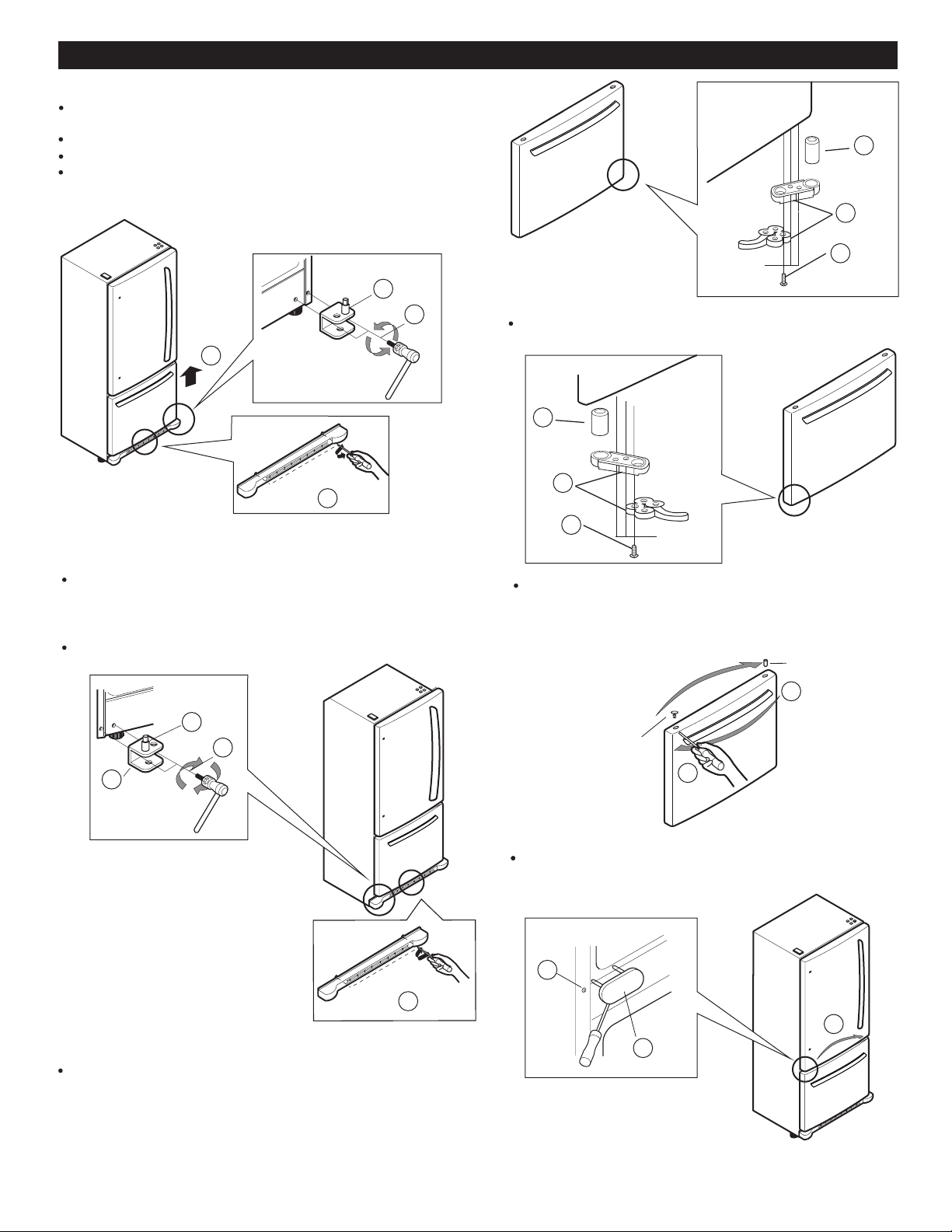
4. Removing the Freezer Door
Before beginning, make sure you completely remove the
refrigerator door.
Loosen the 2 screws from the base grill and remove (1).
Raise and remove the freezer door (4) and set aside.
1
3
2
4
On the bottom left side, you will find a screw, remove it
and re-screw it in on the right side. In the remaining space,
place the hinge (1) and connect it with the 2 screws (2)
Loosen and remove the 2 screws (2) and the pin (3).
and the bolt (3).
4
Install the base grill (4).
On the bottom right side of the door, you will find 2
screws (5), a bolt (6) and 1 pivot (7). Remove them.
Installing the Freezer Door
5.
them on the right side (11).
In the middle section of the refrigerator, you will find a
screw (9) and a cover (10). Remove them and reinstall
9
10
11
3
2
1
On the top part of the door, you will find a cap (8) and
a pivot (9). Remove them with a flat head screwdriver
and install them on the opposite side (the cap stays
on the right and the pivot on the left).
8
9
Pivot
Cap
5
6
7
Reinstall the pivot (8), the bolt (9) and screws (10)
on the bottom left side of the door.
8
9
10
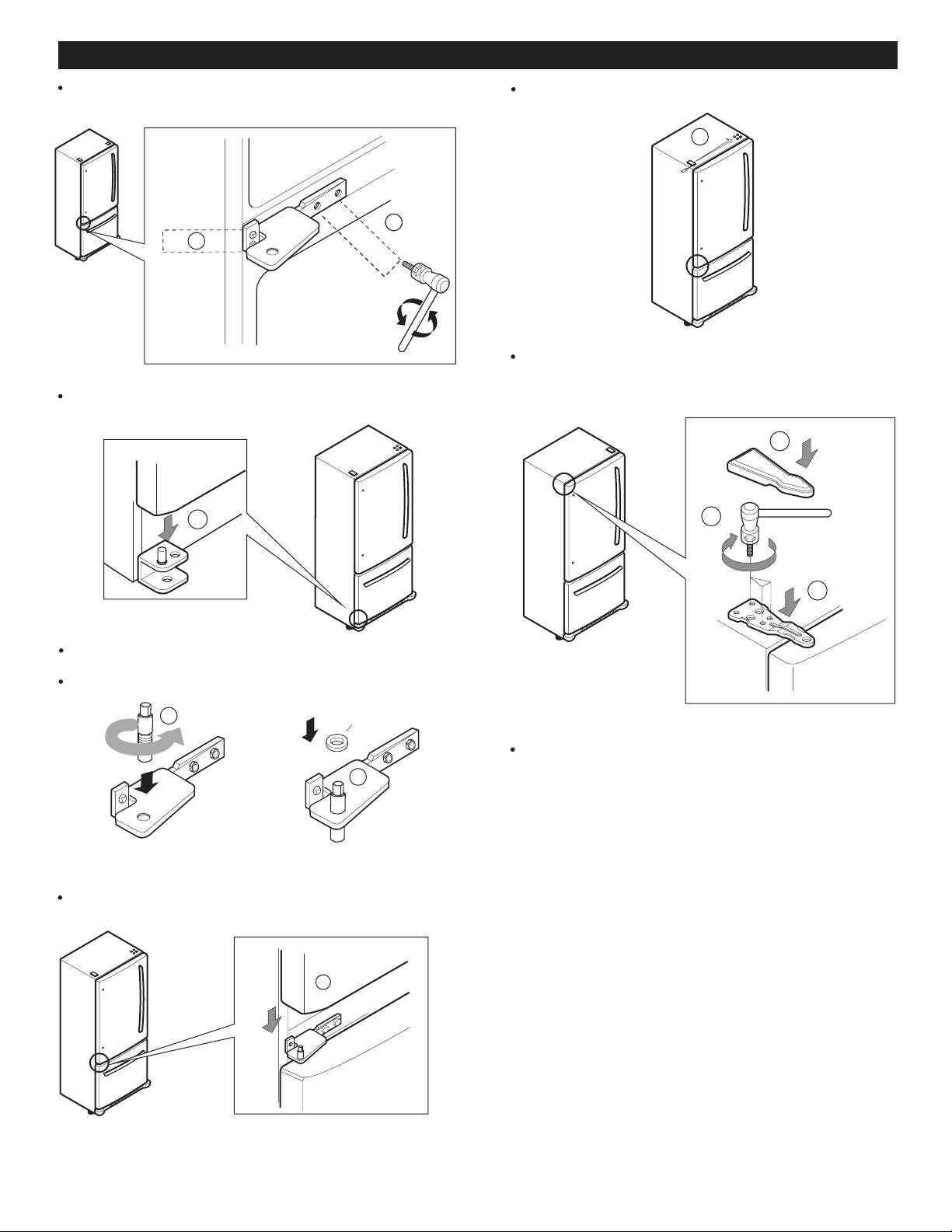
REFRIGERATOR INSTALLATION
19
6. Installing the Refrigerator Door
Remove the cover (2) and place on the opposite side.
Install the hinge (3), assemble the 3 screws (4) and
replace the hinge cover (5).
3
4
5
Check to make sure that both doors close correctly.
Place the hinge in the middle part of the refrigerator and
install the 4 screws into the hinge (12 and 13).
2
13
12
14
Take the freezer door and align the pivot holes up with
the bolt holes and assemble them (14).
Insert the pin into the hinge (15). (Ensure that it is
between the pivot and the freezer door).
Replace the washer over the pin (16).
Insert he door over the axis of the pin (1).
15
Washer
16
1
2
REFRIGERATOR INSTALLATION
Open both doors again and check to make sure that
they close easily. If not, slightly tilt the refrigerator
further back by turning both leveling screws clockwise.
It may take several more turns. Make sure that you
turn both leveling screws the same amount.
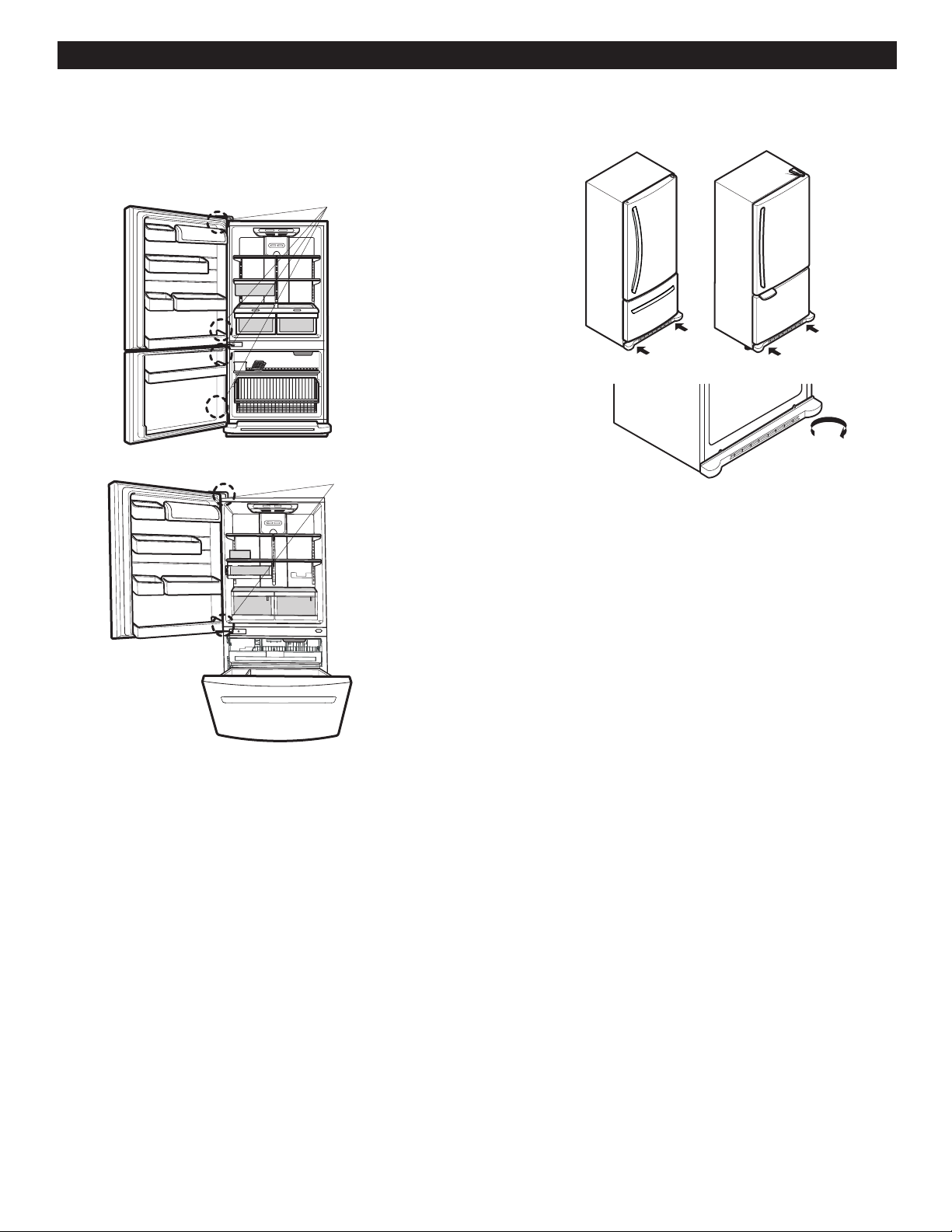
CLOSING AND ALIGNING THE DOORS
Closing the Doors
Your refrigerator has two front leveling screws, one on the
right and one on the left. If your refrigerator seems unstable
or if you would like the doors to close more easily, simply
adjust the inclination of the refrigerator by following the
1. Plug the refrigerator into a 3 prong grounded outlet.
Move the refrigerator into its final position.
2. Remove the base grill (Refer to the section on
“Installing the Base Grill”).
Use a flat head screwdriver to adjust the leveling screws,
turning clockwise to raise the side of the refrigerator and
counter-clockwise to lower it. It may take several turns to
NOTE: Having someone push against the top of the
refrigerator takes some weight off the leveling screws.
This will make it easier to adjust the screws.
3.
4. Ensure that the refrigerator is even by using a level.
5. Replace the base grill.
Aligning the Doors
If the spacing between the doors is uneven, follow the
instructions below to align them:
1. Pry off the top hinge cover.
2. Loosen the screws from the top hinge using a 10mm
socket or wrench.
3. Have someone help you hold the door in place or
place a spacer between the doors while tightening
the top hinge screws.
4. Replace the top hinge cover.
AFTER COMPLETING INSTALLATION
Make sure that the corners of the door seals are not f
olded over. To ensure a good seal, apply a little silicon .
grease on them.
20
Corners
Corners
instructions below:
3.
adjust it to the inclination you would like.
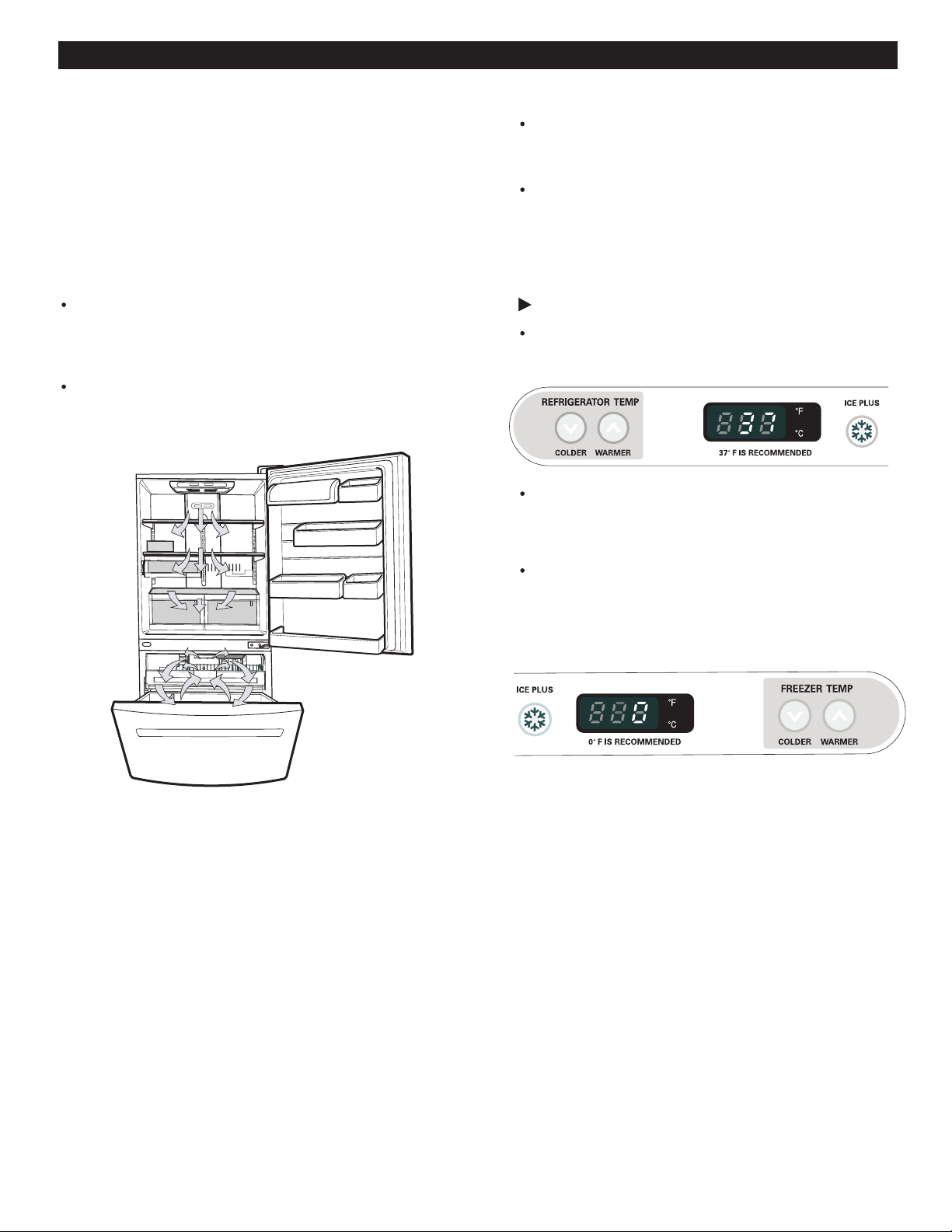
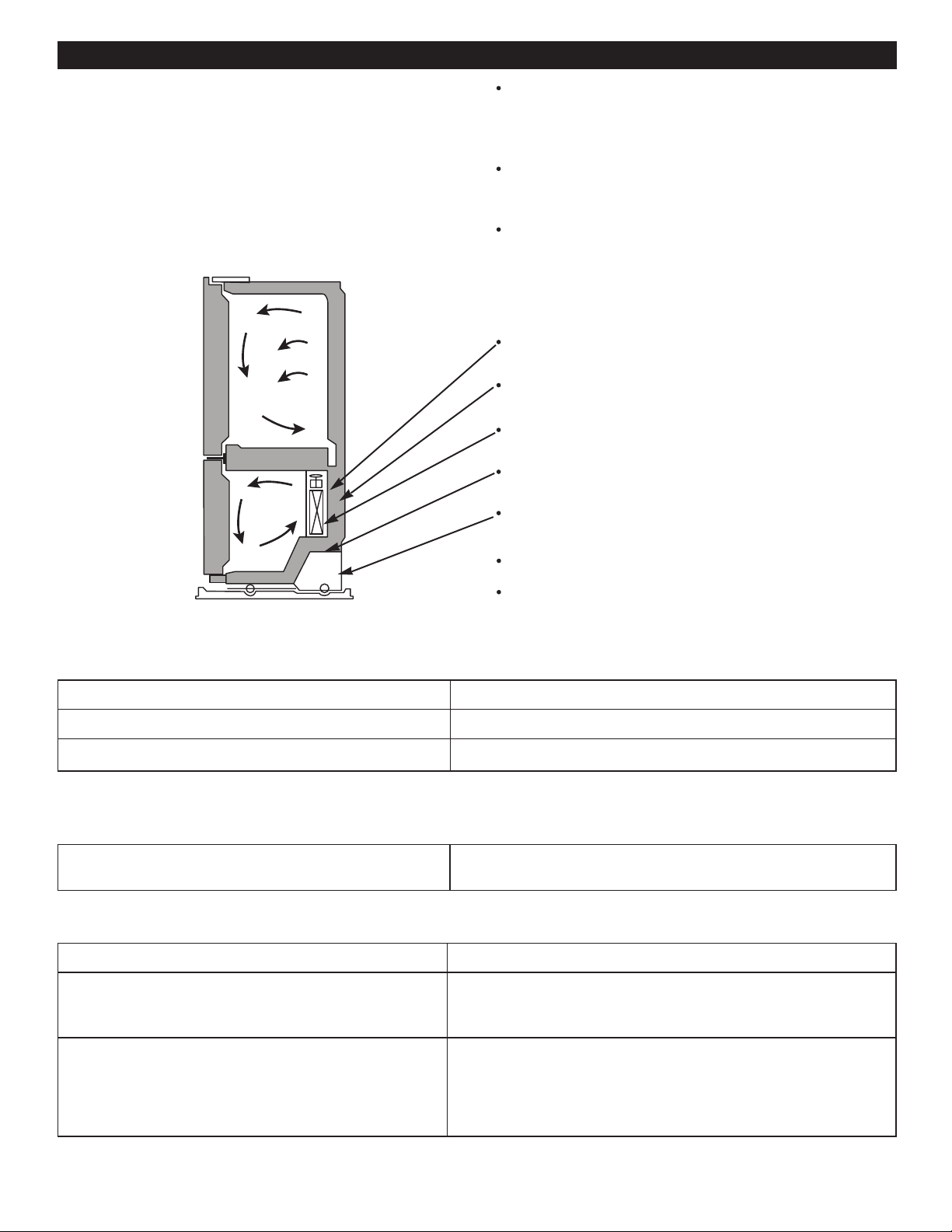
ENSURING PROPER AIR CIRCULATION
In order to obtain stable temperature, the air must flow
between the freezer and refrigerator sections. As shown
in the illustration below, the cold air enters through the
bottom part and circulates upward. This air returns below
the freezer floor and the rest of the air enters the
refrigerator section through the top vent.
MULTI FLOW
The cooling fan operates more powerful and effective
If the lining is damaged, water or other substances
could enter through the cool air vent causing decreased
efficiency.
Do not block any of these vents with packages of food.
This can interrupt the flow of air and cause temperature
and moisture problems.
IMPORTANT: Because air circulates between both sections,
DOOR ALARM
any odors formed in one section will transfer to the other.
You must thoroughly clean both sections to eliminate odors.
To prevent odor transfer and drying out of food, make sure
you wrap or cover foods tightly (See the Food Storage
Guide section for details).
ADJUSTING THE CONTROLS
Your refrigerator has two controls that allow you to
regulate the temperature the freezer ?and refrigerator
compartments.
Initially set the REFRIGERATOR CONTROL to 37 °F
(3 °C) and the FREEZER CONTROL to 0 °F (-18 °C).
Leave it on these settings for 24 hours (one day) in
order to stabilize the refrigerator. After this you may
adjust the compartments to your desired temperature.
Refrigerator Control: 32 °F to 47 °F (0 °C to 8 °C)
The lower the degree, the colder the refrigerator
compartment will become.
Freezer Control: -6°F to 9°F (- 21°C to -13°C)
The lower the degree, the colder the freezer
compartment will become.
NOTE: To change °F to °C, press and hold the COLDER
button in the freezer and refrigerator at the same time
for 1 second.
USING YOUR REFRIGERATOR
than when in normal operation. This is especially
noticeable when new food is placed in the refrigerator
Ice Plus:
Press the button Ice Plus. The LED light will turn on.
This function will remain activated for 24 hours and
intensify the cooling speed of the freezer and increase
ice production.
With this feature you will hear an alarm when the freezer or
refrigerator door is ajar for more than 1 minute. These tones
will repeat every 30 seconds. The alarm is cancelled when
the door is properly shut.
Identify the Control Type
21
compartment
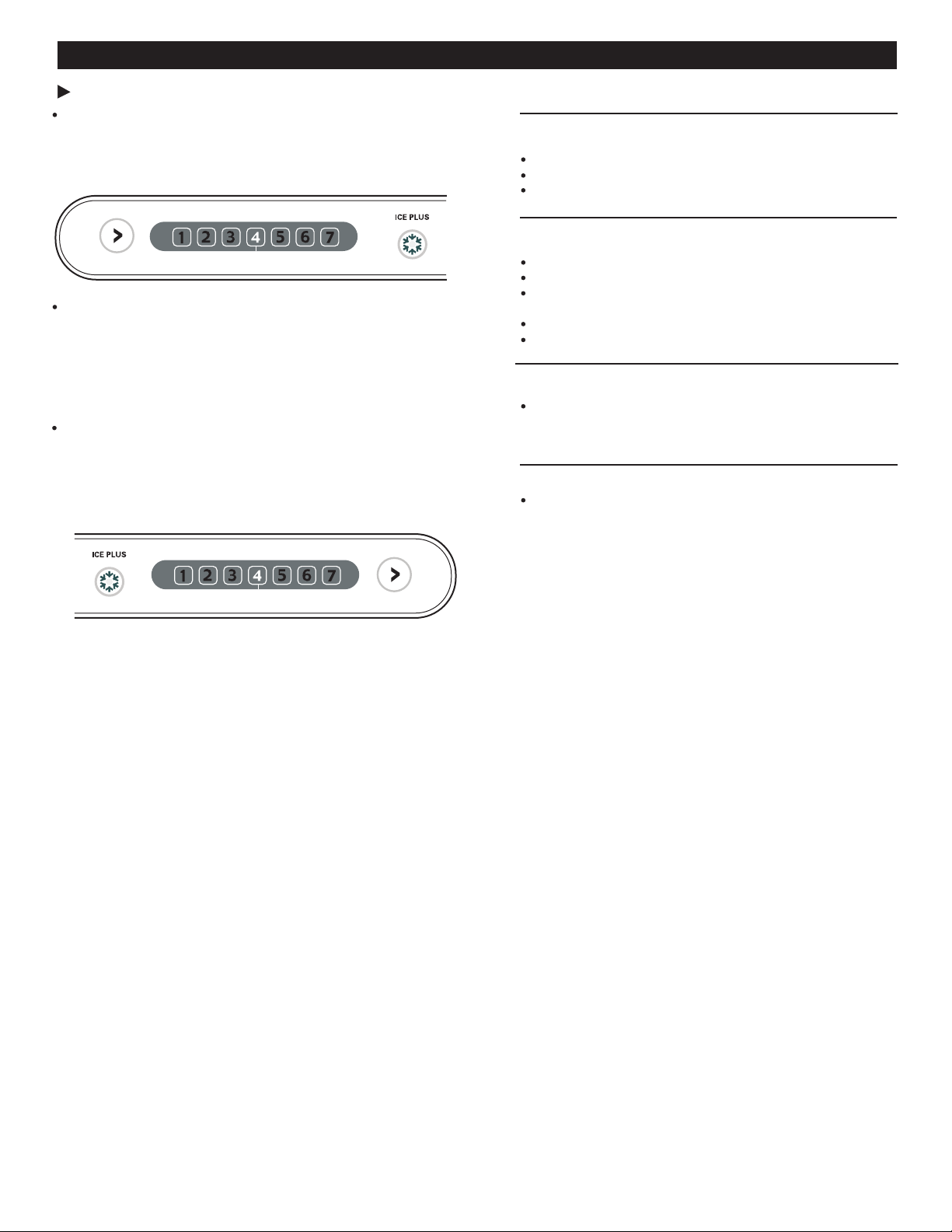
Refrigerator Control: Position 1 to 7 (32 ° F to 47 °F
or 0 °C to 8 °C)
The lower the degree, the colder the refrigerator
compartment will become.
Freezer Control: Position 1 to 7 (-6 °F to 9 °F or
-21 °C to -13 °C)
The lower the degree, the colder the freezer compartment
will become. Despite this, the compartment of the
ADJUSTING CONTROL SETTINGS
Give the refrigerator time to cool down completely before
adding food. It is best to wait 24 hours before adding food
to the refrigerator. The mid-settings indicated int eh previous
section should be correct for normal household refrigerator
usage. The controls are set correctly when milk or juice is
cold to your liking and ice cream is firm.
The refrigerator control functions as the thermostat for the
entire appliance. The higher the number setting, the longer
the compressor will run to keep the temperature colder.
The freezer control adjusts the cold air flow from the freezer
to the refrigerator. Setting the freezer control to a lower
temperature keeps more cold air in the freezer compartment
to make it colder.
If you need to adjust the temperature in the refrigerator or
freezer, begin by adjusting the refrigerator first. Wait 24
hours after the refrigerator adjustment to check the freezer
temperature. If it is too warm or too cold, then adjust the
freezer control as well.
Use the settings listed in the table below as a guide.
RECOMMENDED
CONDITION/REASON: ADJUSTMENT:
REFRIGERATOR section Adjust the
is too warm
REFRIGERATOR
Opening the door often setting to the next
Adding a large amount of food highest number
Room temperature is very warm and wait 24 hours,
then check
FREEZER section is too warm/
ice is made too slowly
Opening the door often
Adding a large amount of food
Room temperature is very
low (not cycling often enough)
Using ice frequently
Air vents blocked by objects
Remove any
REFRIGERATOR section is too
cold
Controls not set correctly for
your conditions
FREEZER section is too cold
Controls not set correctly for
your conditions
USING YOUR REFRIGERATOR
Press the button Ice Plus. The LED light will turn on.
This function will remain activated for 24 hours and
intensify the cooling speed of the frezer and increase ice
production.
Ice Plus
Identify the Control
22
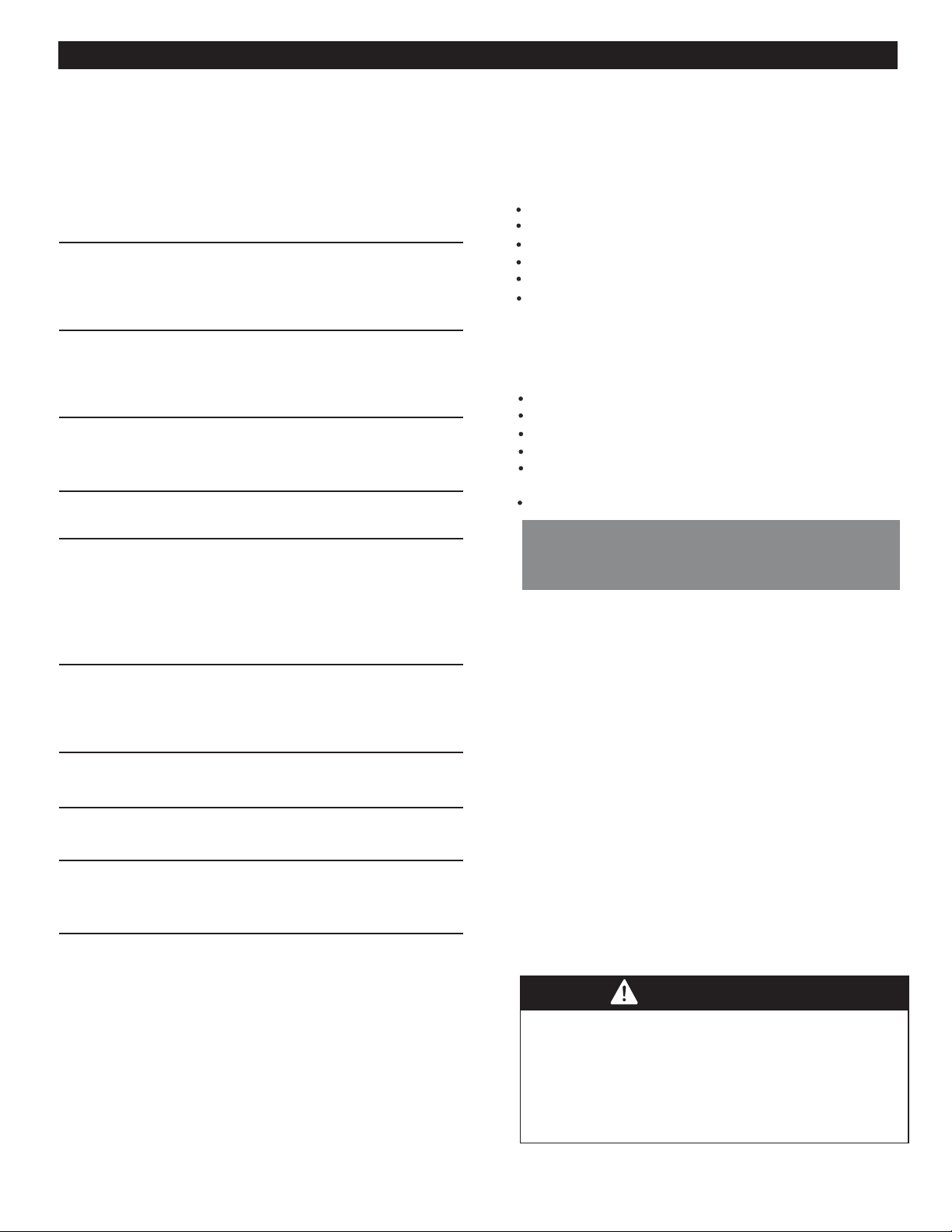
WARMER
ADJUST
REFRIGERATOR TEMP
4 IS RECOMMENDED
FREEZER TEMP
WARMER
ADJUST
4 IS RECOMMENDED
COLDER
refrigerator will be less cold because air flows in smaller
quantities.
Adjust the
FREEZER
setting to the next
highest number
and wait 24 hours,
then check
objects blocking
blocking air flow.
Adjust the
REFRIGERATOR
setting to the next
highest number
and wait 24 hours,
then check
Adjust the
FREEZER
setting to the next
highest number
and wait 24 hours,
then check
FOOD STORAGE GUIDE
Storing Fresh Food
Wrap or store food in the refrigerator in airtight and
moisture-proof material unless otherwise noted. This
prevents food odor and taste transfer throughout the
refrigerator. For dated products, check date code to
ensure freshness.
Butter or margarine
Store opened butter in a covered dish or in a closed
compartment. When storing a larger quantity, wrap in
freezer packing and freeze.
Cheese
Store in original packaging until you are ready to use it.
Once opened, tightly rewrap with plastic wrap or aluminum
foil.
Milk
Clean the cartion. For best storage, place on an interior
shelf, not in the door.
Eggs
Store in original carton or in the egg compartment.
Fruit
Wash and let dry; store in plastic bags in the refrigerator.
Do not wash or pit berries until you are ready to eat them.
Berries should be selected and kept in their original
packaging (if there is any) or in a paper bag closed
halfway and set on a shelf.
Leafy vegetables
Remove original packaging and trim any dirty or discolored
parts. Wash in cold water and drain. Place in a plastic bag
or plastic container and store in the crisper.
Vegetables with skins (carrots,peppers)
Place in bags or plastic containers inside the crisper.
Fish
Chef fresh
Store any meat in original airtight, moisture-proof packaging.
Rewrap if necessary.
Leftovers
Cover leftovers with plastic wrap or aluminum foil. Plastic
containers with airtight lids can also be used.
USING YOUR REFRIGERATOR
Consume fish or seafood the same day purchased.
23
STORING FROZEN FOOD
NOTE: For more information on how to prepare food to
be frozen such in a way to see the period they can be
stored consult a frozen food guide or a cook book.
Packaging
Do not use:
Freezing
WARNING
remove all excess air and do not allow humidity.
A package that is incorrectly sealed will result in the
transmission of bad odors, contaminants inside your
refrigerator, and will cause your foods to dry.
Packaging Recommendations:
Use sealed plastic containers.
Use plastic containers with a smooth surface.
Package with aluminum foil of high resistance.
Wrap with paper layered with plastic.
Use water proof plastic.
Use recommended plastic bags to store frozen foods.
Follow these packaging or container instructions in
order to reach the best freezing.
Bread wrapping.
Plastic container not safe for storing.
Containers without lids or seals.
Waxed paper or waxed plastic.
Thin wrapping paper or not water proof
IMPORTANT: Do not keep bottles in the freezer
compartment; they may explode after freezing and
cause damage.
For the maximum use of your freezer do not store
excess food. Do not introduce a large amount of
unfrozen foods that cannot be frozen within 24 hours
(no more than 2 - 3 pounds or .91kg - 1.36 kg of food
per square inch of space in the freezer.) Sufficient
space must be left in order for the air to circulate
properly around the packages. Leave enough space
in order to close your refrigerator with out difficulty.
Storage times can vary depending on the type and
quality of the food, the way its package, or packaging
container used, (in comparison to air and humidity),
and the temperature it being stored in. Ice crystals
formed inside your package are normal it indicates
the air and humidity inside your package have
condensed.
NOTE: Let warm foods cool off at room temperature for
approximately 30 min, then wrap accordingly with the
methods mention above and freeze. By letting your
warm foods cool off before you introduce them to your
freezer it will save you energy.
SUFFOCATING DANGER
Adequate ventilation is required when using dry ice.
Dry ice is Carbon Dioxide. When it evaporates it
produces oxygen, causing dizziness, slight headaches,
unconsciousness or death. Do not inhale these
vapors and properly ventilate the room while in use of
Dry Ice.
A great freezing depends on how great you package
the foods. When you seal the package make sure you
USING YOUR REFRIGERATOR
24
REFRIGERATOR SHELVES
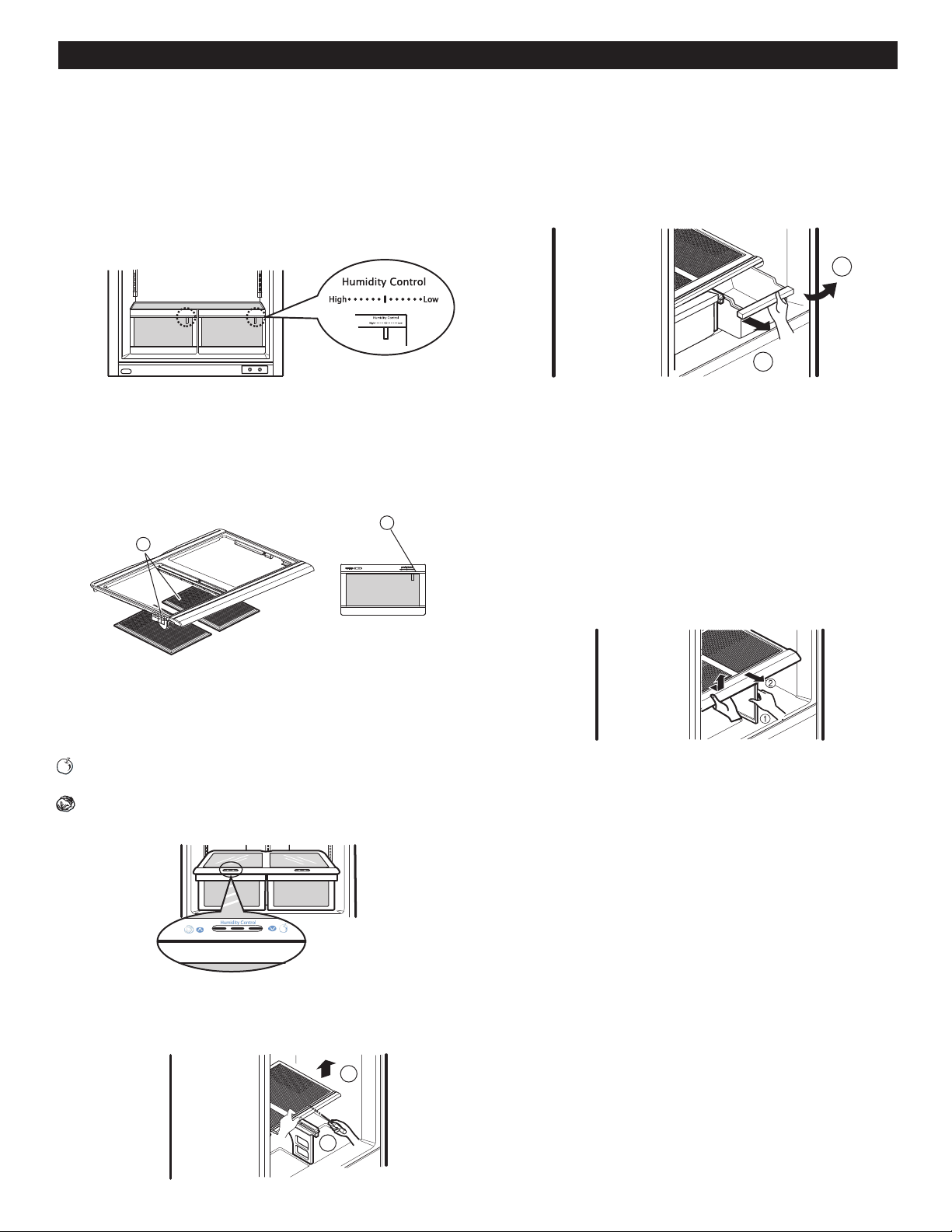
Adjusting Shelves
3
Figure A
Figure B
The shelving of your refrigerator can be adjusted to comply
with your storage necessities; Depending on the model you
have in can include glass shelving or wired shelving.
The storing of your foods together and adjusting the shelving
to different heights will ease to help you locate what you
need. This also helps your refrigerator to stay shut longer
which will save you energy.
IMPORTANT: While your refrigerator glass shelving are
cold do not clean with hot or warm water. The glass
shelving may break if exposed to rapid temperature
changes or hard impacts. For your safety the glass
shelving are made out of tempered glass so when at
breaking they will fracture into tiny fragments.
NOTE: Be careful while moving or relocating the shelves
they are heay. If moving the shelves is required keep in
mind to locate them in a safe environment to prevent them
from breaking.
Remove the shelves and adjust them to your convenience.
Removing Shelves
Incline the front of the shelve in the direction indicated
by figure 1 and lift in the direction indicated by figure 2.
Pull the shelve towards you.
Replacing Shelves
incline the frontal part of the shelve (1) and guide the
shelve hooks towards the openings at the height desired.
Then lower the front of the shelve (2) so the hooks can be
inserted (3) in the shelve supports.
NOTE: Make sure that the shelve is installed in the
horizontal manner. if not secured it can cause the shelves
to fall, which will cause your stored food to spill.
Sliding Shelves (in some models)
You can slide some of the shelving in your refrigerator
towards inside or outside like explained below.
To slide the shelve towards the outside:
Pull towards you, figure A
To slide the shelve towards the inside:
Push until it stops, figure B
In order to remove a shelve from a metal frame
1. Pull the shelve until it stops.
2. Incline the front of the shelve towards the top and
pull forward.
3. Lift the shelve in the manner it moves across the
support openings.
To put back into place just reverse these steps
Functional Shelves (in some models)
Functional Shelves
You can store tall articles like gallons or bottles just by
simply folding the shelve in half.
FROZEN MEAT COMPARMENT (in some
models)
To remove the frozen meat compartment
Pull the frozen meat compartment forward while holding
it with your other hand, slightly lift and pull.
To replace the frozen meat compartment just follow the
steps in reverse.
On some models
applied an in dependant
temperature control.
USING YOUR REFRIGERATOR
25
1
2
2
1
1
2
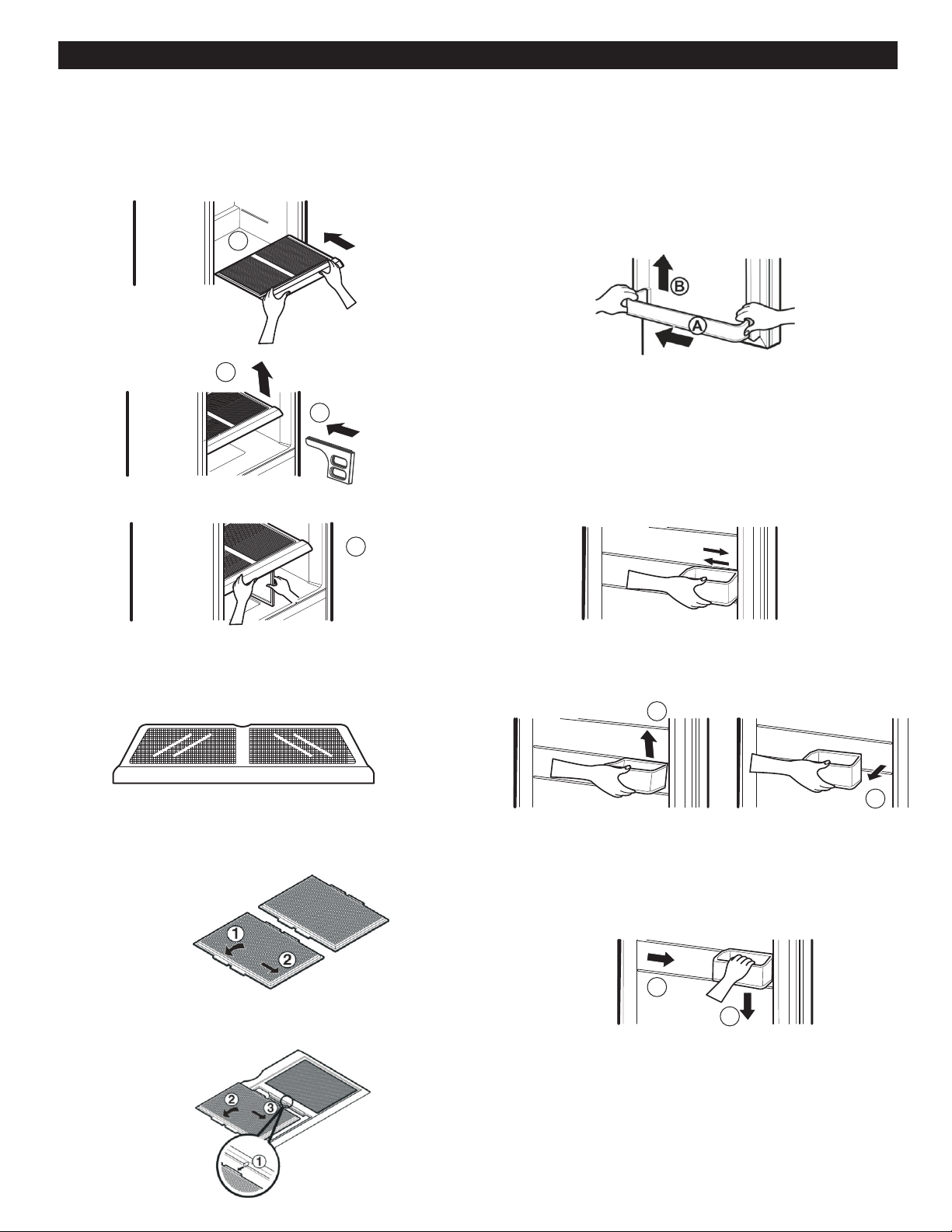
CRISPER HUMIDITY CONTROL (in some models)
For the conservation of fruits you can control and adjust
the humidity level (high or low) in the drawers.
High: Allows air to leave the vegetable drawer for the best
conservation of fruits.
Low: Allows air to be stored in the drawer for the best
conservation of vegetables.
CRISPER HUMIDITY CONTROL (in some models)
You can adjust the amount of humidity inside the drawers
by adjusting the control in a position.
For better preservation of the fruits allow air to leave the
vegetable drawer.
For a better conservation of vegetables allow the
maximum air in the drawer.
OPTIBIN CRISPERS
The OptiBin drawers maintains fruits and vegetables fresh
allowing you to easily control the humidity inside the drawers.
The Optibin drawers include 1) a front humidity control and
2) a system that allows you to preserve or avoid humidity.
Removing the glass:
1. Lift the opening of the drawers and use a flat head screw
driver.
2. Pull towards the top and then out.
Removing the Vegetable Drawer/Crisper:
1. Slip out the drawer towards the outside until it stops.
2. Slightly lift the front part and pull the rest, in order to
completely remove the drawer.
3. To relocate the drawer slip out towards the front until
it stops.
CRISPER COVER WITH INTERIOR LATTICE
(in some models)
Removing the Vegetable Drawer Cover:
1.Remove both drawers (see removing vegetable
drawer)
2.Hold onto the support (1) and pull towards the top and
then towards the outside (2)
USINGYOURREFRIGERATORUSING YOUR REFRIGERATOR
1
2
26
2
1
Installing the Vegetable Drawer Cover
1. Put the cover over the supports (1).
2. Slightly lift the cover (2) while introducing it to the support
(3).
3. Put the inferior piece of the cover in the superior support
(4).
CAUTION: Be careful when you handle the glass cover
because it could loose.
Removing the Interior Lattice:
1. Remove the cover (See Remove the Vegetable Drawer
Cover)
2. Hold the glass and spin the drawer cover.
3. Hold the rack and pull the sides of the drawer cover out
to take them off.
Replacing the Interior Lattice:
1. For each rack insert the central edge 1 (near the glass
cover) and pull the cover sides to insert it.
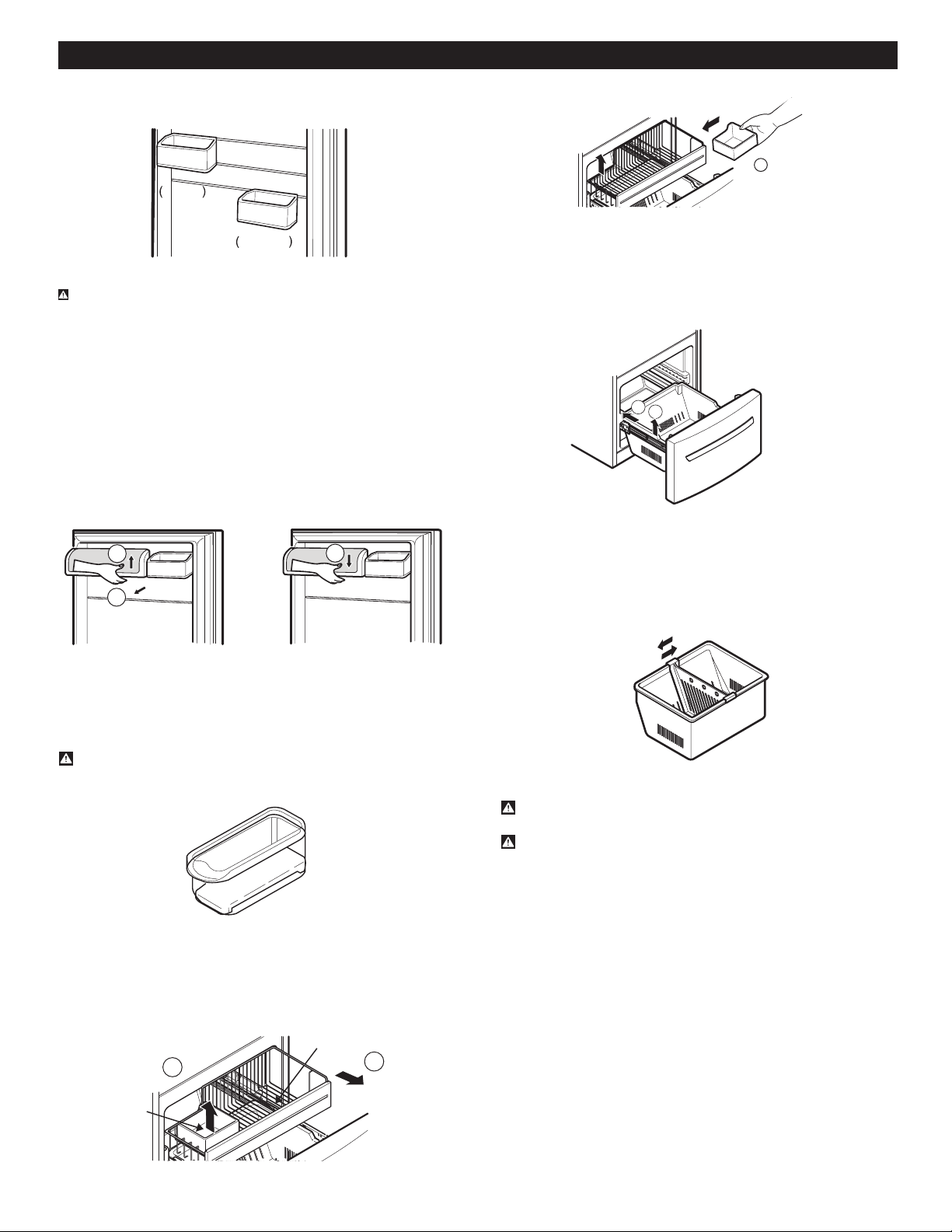
DOOR RACKS
Door racks can be taken off in order to clean them
better.
Snap-on Door Racks
Removing the Snap-on Door Racks
1. Remove the content from the rack.
2. Press the rack against the door's inner wall (A) and
then pull it up (B).
Replacing the Snap-on Door Racks:
1. Hold the rack's edge against the door's inner wall.
2. Press the rack until it stays in its position.
DESIGN-A-DOOR
1. The racks can be moved along the door.
2. To remove the rack, raise it (1) and pull it (2).
3. To replace the rack again, slide it on the desirable
guide (1) and push it down (2) until it is tighten
(You will listen a “tick”).
1
2
3
4
USING YOUR REFRIGERATOR
27
1
2
Figure A
1
Figure B
Correct
Incorrect
3
1
2
4. To move it to the last position, make sure all the racks
are well assembled and that they are not loosen.
WARNING: Someone could get hurt if the racks are not
well assembled.
NOTE: Empty the food charge before you move the
containers.
DAIRY COMPARTMENT
1. Take out the Dairy Compartment, take it from the
down side, raise it (1) and pull it out (2) (See Figure A).
2. Put the Dairy Compartment, slide it into the selected
rail and push down (1) until it is in place (See Figure B).
EGG COMPARTMENT (in some models)
Keep the eggs box in an inner grill, not in a door
compartment.
CAUTION: Do not use the eggs compartment as a
container for keeping ice in the freezer compartment.
If it freezes, it could break easily.
ICE BOX (In some models)
1. Pull the drawer as much as possible.
2. Raise the ice box and take it out carefully.
3. Take the drawer off as much as possible and put the
ice box in the right position.
Drawer
Ice Bin
1
2
DURABASE (in some models)
1. To remove the Durabase , push it back, raise the
front part and pull it up
2.To put it back, insert the Durabase in the rail
assembly.
DURABASE DIVIDER (in some models)
The Durabase Divider allows to organize the Durabase
area in 2 sections.
WARNING: Make sure there is enough space for the
children to play.
WARNING: In order to prevent accidents, such as
suffocation, DO NOT let children and pets play inside
the box.
USING YOUR REFRIGERATOR
1
2
Figure A
1
2
Figure B
28
1
2
1
2
3
1
1
2
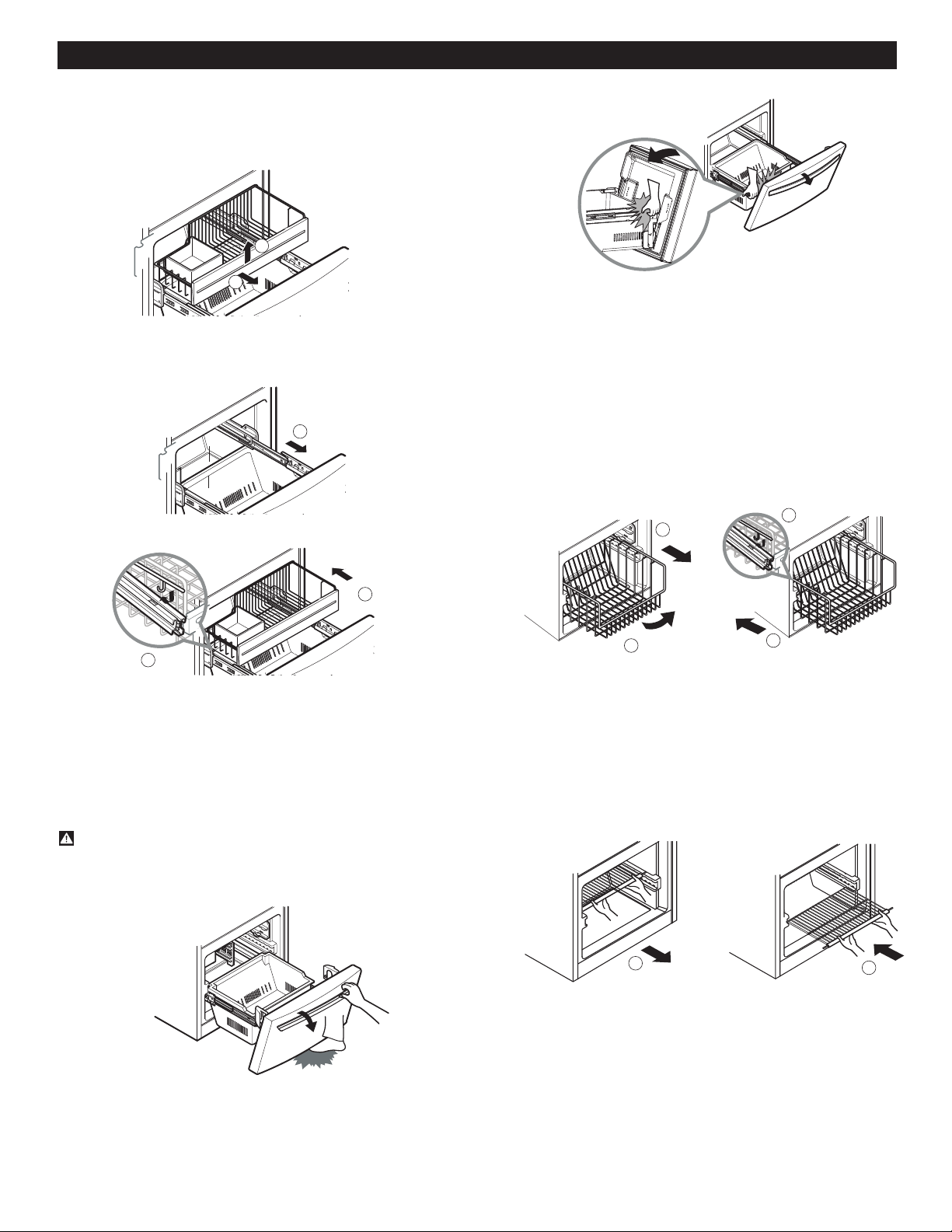
GLIDE-OUT DRAWER BASKET (in some
models)
Pull the box as much as possible, pick up the basket a bit (1)
and pull it out (2).
To install, pull the cords to their fullest (1). Lock the supports of
the basket into the slides of the cords (2) and push it all the way
through (3).
TILTING DOOR (in some models)
The tilting door provides an easy access to the frozen food.
How to use:
Incline the door downwards, and pull it out.
WARNING: Be careful when opening the door, do not place
your feet under the door or your hands inside the freezer;
you may hurt them in doing so.
WIRED DURABASE (in some models)
To take the wired durabase off, pull it to its maximum
extension (1) incline the frontal part of it a bit (2) and
then pull it out (see figure A).
To install it again, insert the wired database in the
frame of rails (1) and push it until the end (2)
(see figure B).
FREEZER SHELF (in some models)
1. To take the shelf off, hold on to the front part of it
and pull it towards you.
2. To put it back in, just push it back.
REFRIGERATOR CARE AND CLEANING
WARNING
Electric Shock Hazard
Before replacing a burned-out
light bulb, either
unplug the refrigerator or turn off power at the
circuit breaker or fuse box.
NOTE:
Moving the control to the OFF position
does not remove power to the light circuit.
WARNING
1
2
1
2
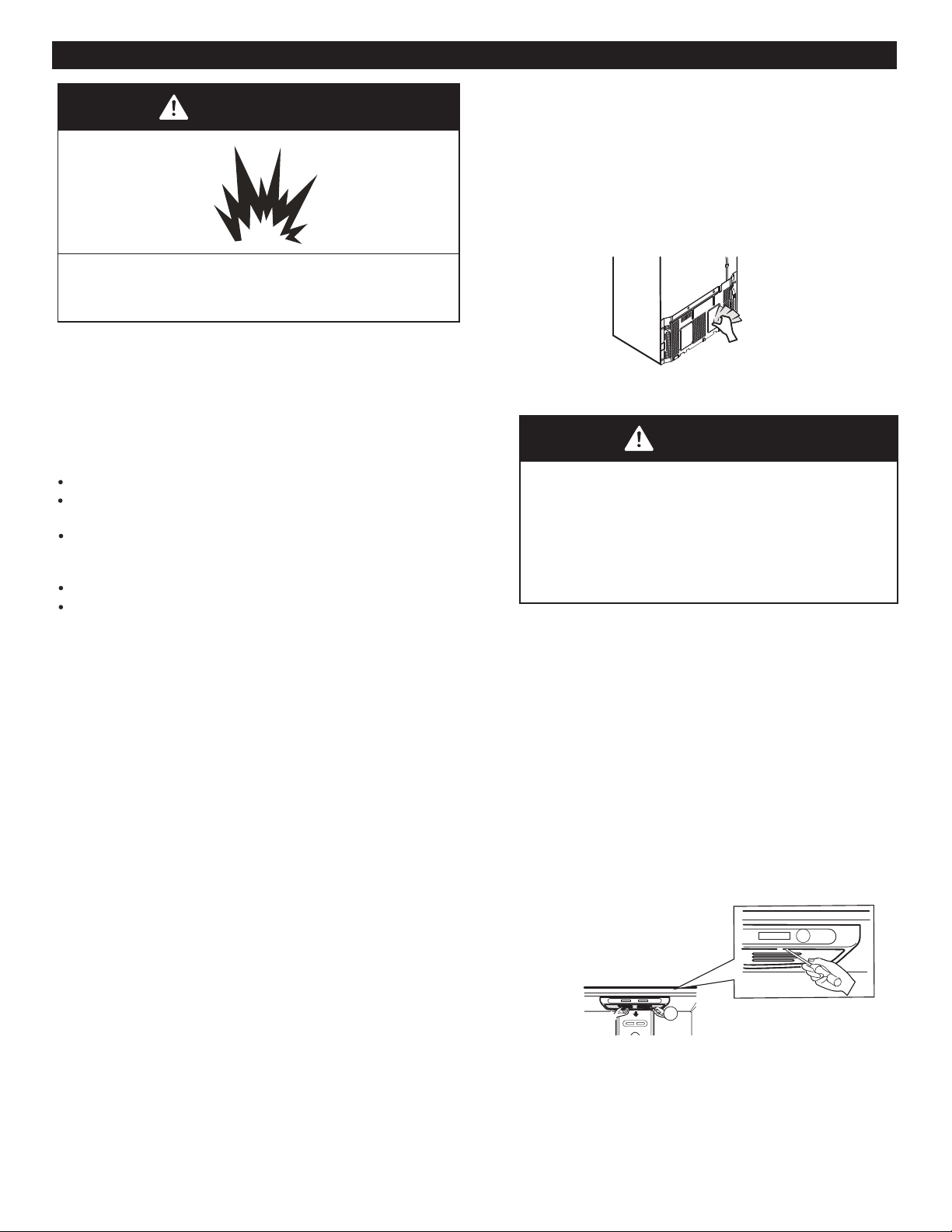
Explosion Hazard
Do not use flammable cleaners. Not following these
instructions can cause death, explosion or fire.
The refrigerator, as well as the freezer, do their own
de-freezing. This process does not prevent the build up
of contaminants, therefore it is suggested that you clean
both parts once a month; clean spilled liquids immediately.
REFRIGERATOR CLEANING
Unplug your refrigerator.
Pull out all of the removable parts (such as the vegetable
and dairy doors).
Use a clean sponge (or a soft rag) and use it with
lukewarm water mixed with detergent. Do not use
abrasive or concentrated cleaners.
Hand wash it, and dry it throughly.
Plug the refrigerator back in.
OUTSIDE
Wax the outside in order to create better protection. Make
sure you use a product specifically design to be used for
electro-domestic products (car wax is acceptable). Use
a clean, soft rag, and perform this task twice a year.
For metal-made refrigerators, do not wax, simply clean
it with water and detergent. Do not use concentrated or
abrasive products.
Note: Avoid the usage of chemical products that contain
phosphates or bleach.
INSIDE
(Allow freezer to slightly warm up a small degree to
prevent cloth from sticking)
In order to eliminate bad odors, clean the inside of the
refrigerator with a mixture of baking powder and lukewarm
water (one teaspoon of baking powder per cup of water.
Ensure that the powder dissolves throughly, in order to
prevent any sort of damage.
DOOR LINING AND GASKETS
Use only a mild detergent (such as dish soap).
PLASTIC PARTS (Covers and Panels)
Do not use abrasive, paper or rough products. These
could damage the product.
COVER BACK
In order to get an efficient performance of your
refrigerator, clean the rear part of it at least twice a year.
REPLACING REFRIGERATOR LIGHTS
NOTE: Not all light bulbs for electric-domestic products
will fit your refrigerator. When replacing them, make
sure they are the same size, shape, and of a potency
of 40 watts.
NOTE: The light bulbs will turn off, if the door of the
refrigerator is left open for seven minutes. If the door is
shut, the bulbs will turn on again.
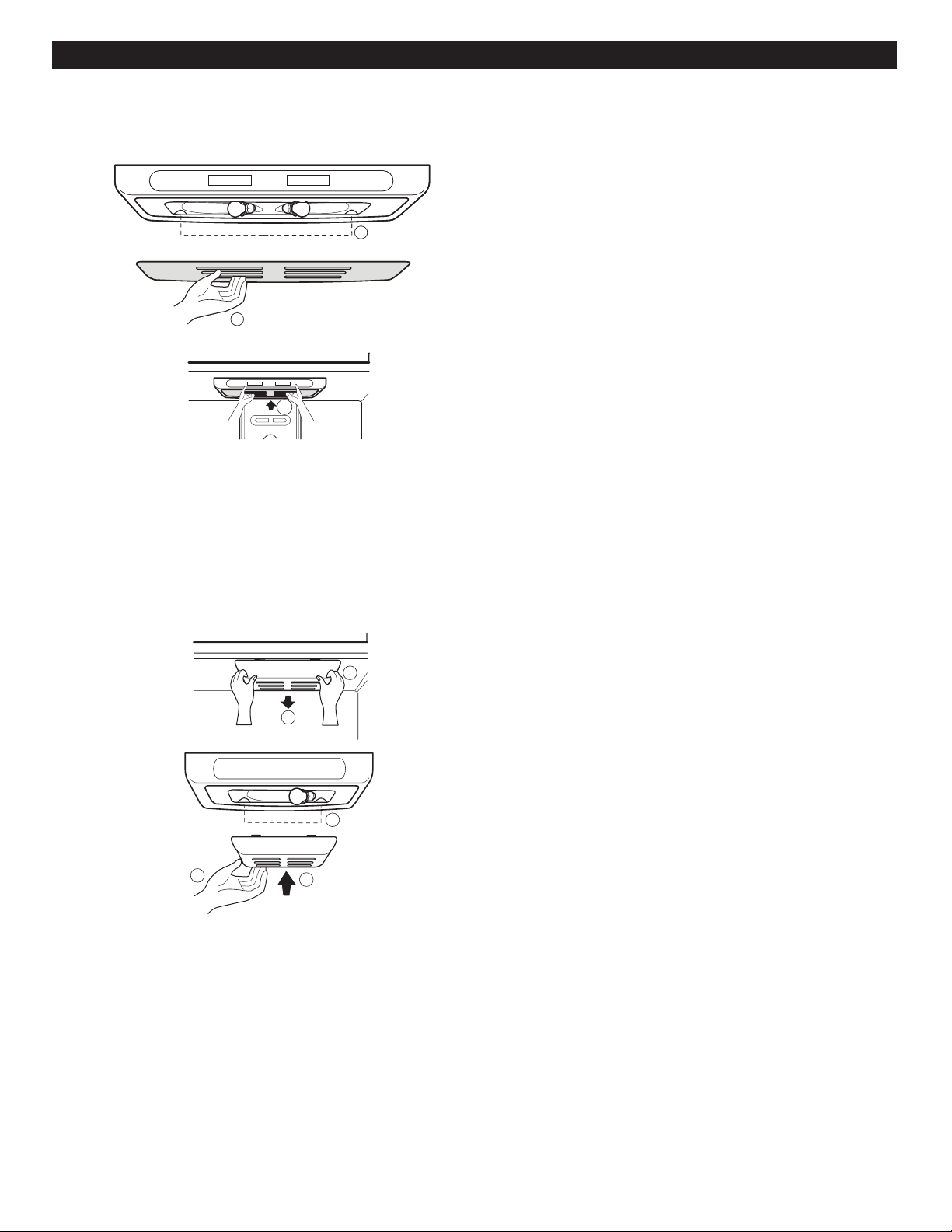
Replacing the Refrigerator Light:
1. Unplug your refrigerator
2. Pull out all of the trays
3. Slide a flat screwdriver (1) into the opening of the
light bulb, and pull it downwards (2).
29
30
1
2
3
1
2
4. Turn the bulb counter clockwise and remove it.
5. Install the new light bulb.
6. Take the cover (1), lock the hooks (2) from the rear part
of the light bulb and push it upwards (3).
Replacing the Freezer light
1. Unplug the refrigerator.
2. Unlock the cover of the light bulb using your thumbs (2)
3. Remove the light bulb and replace it with a new one.
4. Take the cover (3), lock the hooks of it (4), and push it
upwards (5).
5. Plug the refrigerator back in.
1
2
4
5
3
POWER INTERRUPTIONS
In case of a black out, call your electric company and
ask how long it will last.
1. In case of a 24 hour or less black out, do not open the
refrigerator; this will keep the food fresh.
2. In case of a longer black out, do one of the following
options:
a. Pull out all of the frozen food and keep them in an
ice chest.
b. Put 2 lbs (907g) of frozen ice (make sure you use
gloves) for each square foot (28 L) inside the
freezer. This task will preserve the food for 2 to
4 days.
REMEMBER: A full freezer will stay cooler than a
partially empty one. Also, a freezer containing meat will
also maintain cooler than one containing bread, pastries,
or any other baked food.
Food containing icicles can be frozen once again
(this process could alter the quality and flavor of the
product). If the food is in doubtful condition, get rid of it.
WHEN GOING ON VACATION
If you decide to leave your refrigerator on when going
away, consider these steps:
1. Consume all of the perishable items and freeze
the rest.
2. Empty the ice tray.
If you decide to leave your refrigerator off:
1. Remove all of the food
2. Unplug your refrigerator
3. Clean, and dry it well.
4. Make sure the doors stay open (use blocks or tape)
in order to prevent bad odors and fungi from
happening.
WHEN MOVING
If you decide to take your refrigerator with you when
moving, consider the following:
1. Remove all of the food from it, and place the frozen
food in an ice chest with dry ice.
2. Unplug your refrigerator.
3. Empty the water from its tray.
4. Clean and dry it with a rag.
5. Pull out all of the removable parts, and wrap them
with adhesive tape.
6. Depending on the model of the refrigerator, lift the
top part of the refrigerator so it can roll with ease,
or screw the levelers so it won´t scratch the floor.
Consult to the section Closing and Aligning Doors.
7. Keep the doors closed with the cable glued to the
refrigerator cabinet with an adhesive tape.
When your refrigerator arrives to your home, put
everything back into place and read the section
instalation instructions in order to obtain instalation
preparation. In case your refrigerator has a factory ice
maker, remember you have to reconnect the water
supply.
REFRIGERATOR CARE AND CLEANING
c. In case you do not possess neither ice chest or dry ice,
consume your food as soon as possible.
ABOUT THE AUTOMATIC ICEMAKER
ABOUT THE AUTOMATIC ICE MAKER
WARNING
Avoid contact with any moving parts of the
ejector mechanism or with the heater that
releases the ice cubes. DO NOT place your
fingers in the automatic ice maker when the
refrigerator is plugged in.
OPERATING INSTRUCTIONS
After turning on your refrigerator, the ice will
start to be made between 12 and 24 hours.
The ice maker produces 8 cubes per cycle (in between
temperature of the freezer, the times in which the door
opens, and other using conditions (amount of food in the
freezer, etc)
If the refrigerator is used before the connection of water
to the ice maker was performed, you must turn its dial
to 0 (off).
When the water connections are performed, turn its dial
to 1 (on).
The ice maker will fill up (and start making ice) between
Throw away the first batch of ice. Make sure that nothing
interferes with the sensor.
When the ice reaches the sensor, the ice maker will stop
to make ice immediately.
Its normal that some ice gets stuck. If the ice is not used
frequently, the older cubes of ice will be opaque in color,
smaller, and with a strange flavour.
NOTE: If the size of the ice cube is smaller or bigger than
what you desire, you can adjust its size by pushing the
selective button. This button changes the pressure of the
water, which can give considerable results.
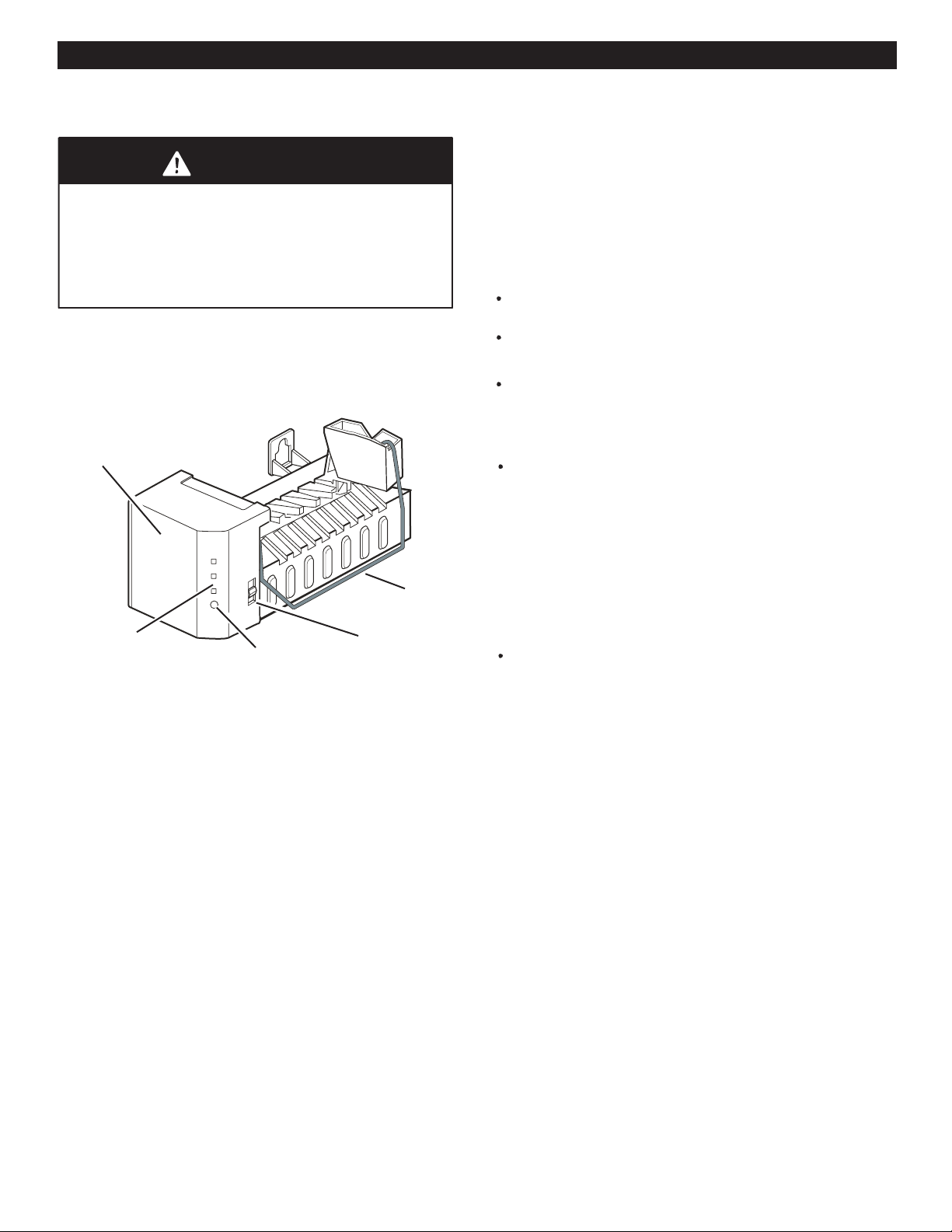
Each time you push the selective button, a light will turn on.
The bigger the amount that turns on, the bigger the size of
the cubes will be.
YOU MUST TURN THE DIAL TO O (OFF)
When the water supply is interrupted for many hours
When the ice container is left out of its place for more
than one or two minutes.
When the refrigerator will not be in use for various days.
NORMAL SOUNDS
The valve will emit a buzzing sound when the icemaker
is full of water. If the switch is placed in the off position
the buzz will still be heard even when the water pipe has
not been connected. To avoid this sound, move switch to
NOTE: The icemaker can get damaged if the switch is kept
in the ON position before the water pipe has been connected.
While the icemaker is filling up with water and producing
ice, you will hear the sound of the ice falling and water
flowing through the pipes.
PREPARING FOR VACATIONS
Move the icemaker switch to the O (off) position and cut the
flow of water going into the refrigerator.
If room temperature is at freezing point, have a specialized
technician drain the flow of water from the inner pipes
(certain models) to avoid broken pipe related damage.
NOTE: The automatic Ice maker is only included in some
models. Check your specifications of your refrigerator.
Sensor
Ice Maker
Cube Size Light
Cube Size Button
Switch
12 and 24 hours after the refrigerator is turned on.
31
Personal Injury Hazard
100 and 130 cubes in a 24 hour period), depending on the
BEFORE START
The water source is not guaranteed by the refrigerator
manufacturer. Follow instructions carefully in order to
Air located inside the water pipes can cause hammering
or tapping causing damage to the inner pipes or water
spillage in the inside of the refrigerator.
Call a qualified plumber to fix such hammering on the
connections before installing the water pipe.
To avoid burn damage or such, never connect refrigerator
to hot water pipes.
If you are to use the refrigerator before connecting it to the
water source, make sure the icemaker is the off position.
Never attempt to install the icemaker pipes in areas where
room temperature is below freezing point.
When using any electrical device (like a drill) during the
installation, make sure device is doubly isolated or making
ground to prevent risk of electrical surge or discharge.
All installations should be done considering local water
and drainage requirements.
REQUIREMENTS
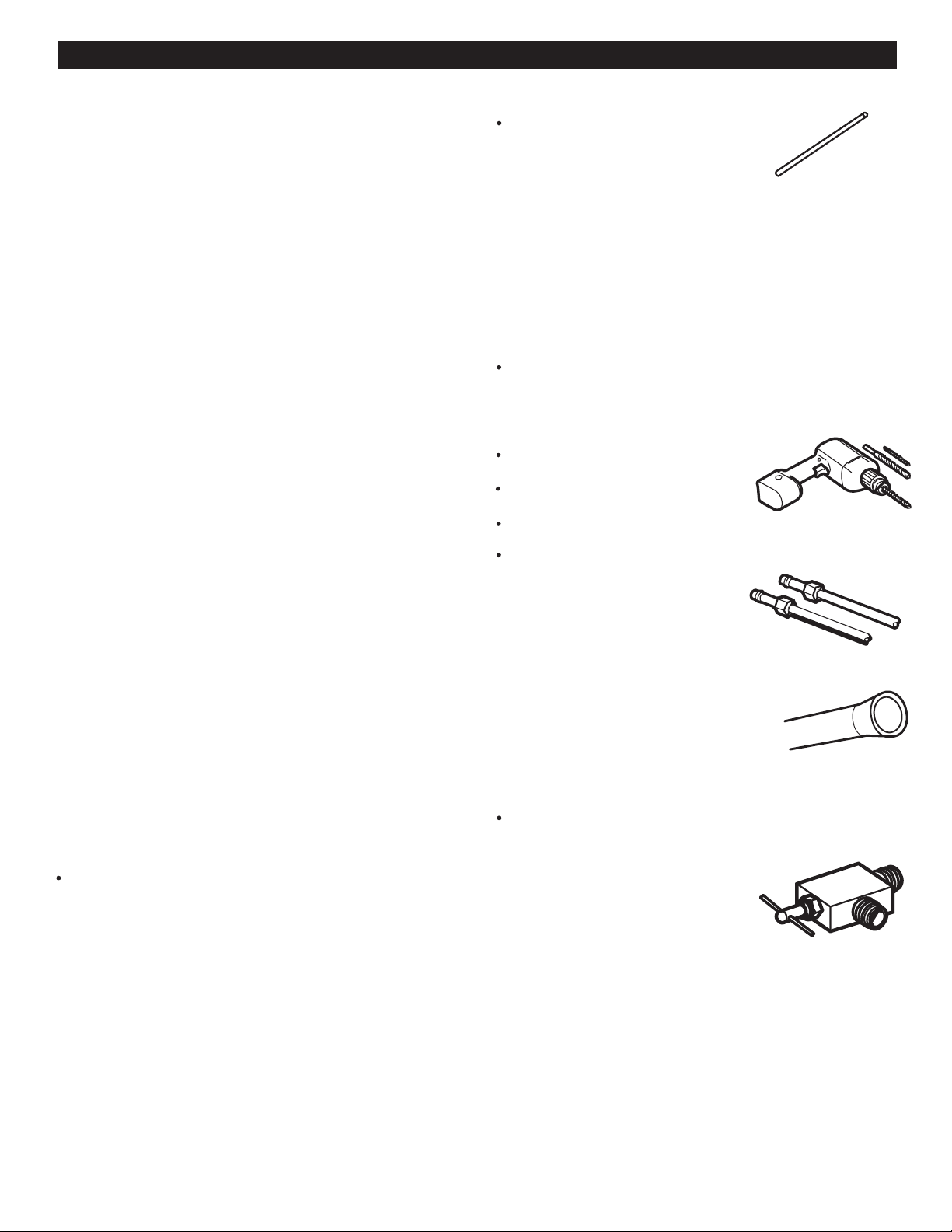
1/4" (6,35 mm) in diameter copper
pipe to connect refrigerator to the
water pipe. Make sure both
terminals are cut in a squared
To determine how much pipe material is needed, measures
the distances between the valves located behind the
refrigerator and the source of water and add to that 8 feet
(2,4m). Make sure there is sufficient pipe material to allow
the free movement of the refrigerator from the wall.
A cold water source. Water pressure should be between
0,137 and 0,82 MPa or 20 and 120 PSI for models not
containing water filter and between 0,275 and 0,82 MPa or
A drill
Adjustable ½”(12,7 mm) key.
Flat and Phillips style (star) screwdriver.
Two ¼” (6,35 mm) diameter compression nuts
with two sides to connect the
copper pipe to the refrigerator
valve.
If your current copper pipe has some reduction
on the ends, it will be necessary to get and adaptor
(found in hardware stores) to connect the
water line to the refrigerator.
It is also possible to cut such reductions
with a pipe cutter and use the
compression connections mentioned above.
Bypass valve to connect to the cold water line. The valve
must have a water opening with an interior 5/32” (3,46 mm)
diameter in the cold-water connection point.
These valves can be located in any
cold-water connection package.
Before buying make sure such
valve meets local standards and
requirements.
NOTE: It is necessary to have a water source when
both water and/or ice dispensers are available in your
product.
40 and 120 PSI for models containing water filter.
If an inverted osmosis water filtration system is
connected to the cold water source, the water hose
installation is not assured or guaranteed by the
refrigerator or automated icemaker manufacturer. Follow
the next instructions carefully to minimize costly water
related damages.
When having an inverted osmosis water filtration
system connected to the cold-water flow, the water
pressure for such system must be at least between
40-60 PSI or 0,27 MPa (2,8 kg · f / cm ² ~ 4,2 kg · f / cm ²,
(2,8 kg · f / cm ² ~ 4,2 kg · f / cm ², menos de 2 ~ 3
less than 2 ~ 3 seconds to fill a 7 oz of capacity cup
If the inverted osmosis water filtration system pressure
is less than 21 PSI or 0,14 MPa (1,5 kg · f / cm ², more than
four (4) seconds to fill a 7 oz pf capacity cup [0,2 liters]):
[0,2 litros]):
a) Identify if the sediments filter in the inverted osmosis
system is being blocked. Replace filter if necessary.
b) Allow inverted osmosis system storage tank to refill after
extensive usage.
c) Call a qualified plumber if the inverted osmosis water
pressure problem continues.
reduce damage.
32
manner.
INSTALLATION INSTRUCTIONS
Install the valve to the pipe that you use to drink water.
(Connect only to a potable water source).
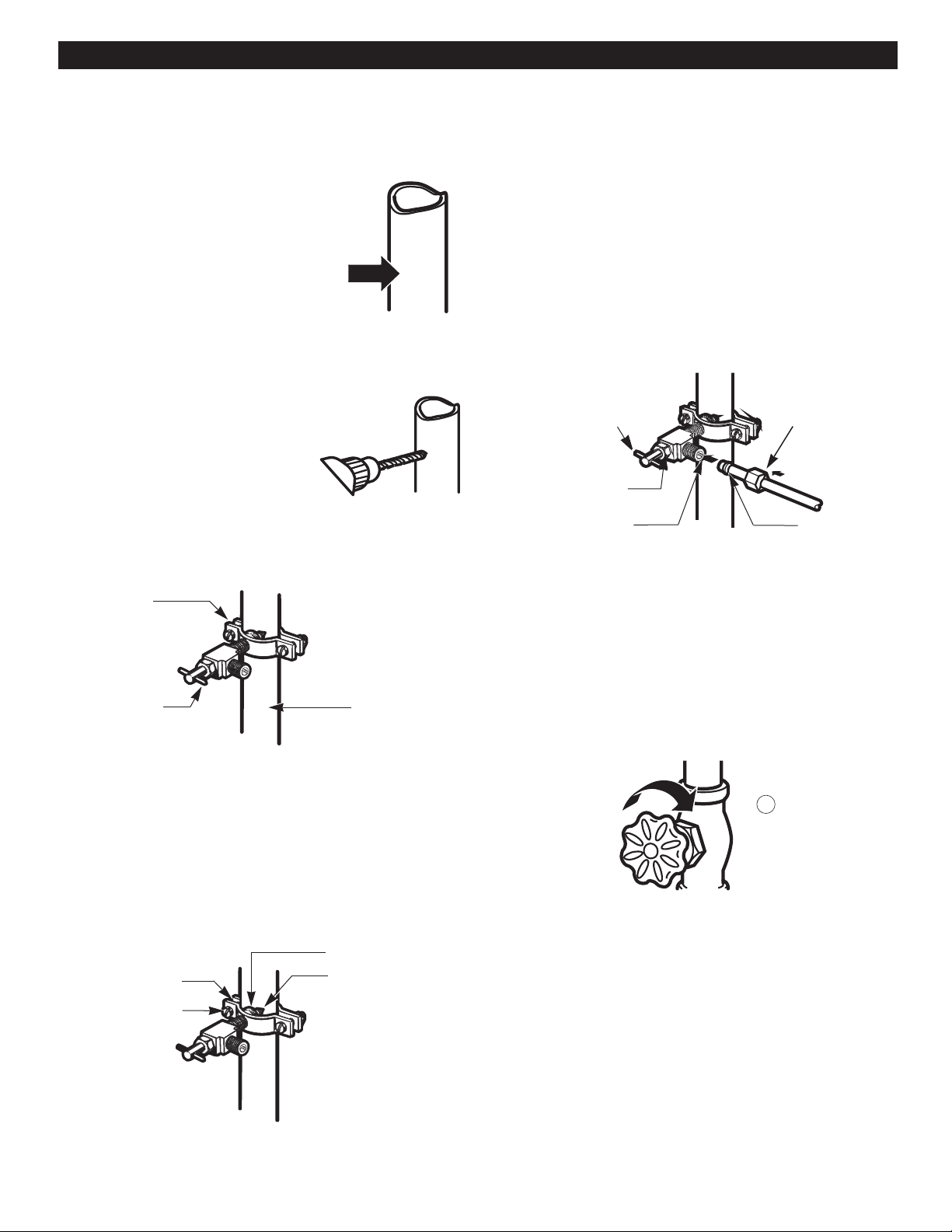
1. CLOSE THE MAIN WATER SOURCE
Open the nearest water faucet to let water flow
and empty pipes.
drinking water.
ABOUT THE AUTOMATIC ICE MAKER
[0,2 liters]).
CONNECTING THE WATERLINE
33
1
Vertical Cold
Saddle-Type
Pipe Clamp
Water pipe
(CONTINUED)
Washer
Inlet End
Pipe Clamp
Clamp Screw
Packing Nut
Oulet Valve
Ferule (sleeve)
Compression Nut
2. SELECT THE LOCATION OF THE VALVE.
Select the location of the valve that will
provide a better access. It is best to connect
to a vertical pipeline. When connecting to a
horizontal pipeline is necessary, make the
connection in the lateral or upper area
instead of the lower area to prevent
accumulation of sediment.
3. DRILL A HOLE FOR THE VALVE.
Drill a ¼”(6,35 mm) diameter hole in the water
pipeline. Remove jagged edges produces after
perforation. Make sure water does not reach
the drill. Not performing the ¼”(6,35 mm)
perforation can lead to a low or smaller ice
production.
4. Tighten the valve.
Tight the valve into the cold water pipeline with a tube trap.
Shutoff valve
NOTE: Codes for 248 CMR pipelines of the state of
Massachusetts must be attached to the connection.
Valves of this type are banned in Massachusetts.
Call an authorized plumber.
5. TIGHTEN THE TRAP.
Tighten the trap until the sealing ring begins to grow.
NOTE: Make sure it is not too tight, this can break the pipe.
6. PLACE THE PIPELINE.
Place the pipeline between the cold water pipe and the
refrigerator. Place it through a hole in the wall or floor
(behind the refrigerator or next to the cabinet) as close
to the wall as possible.
NOTE: Make sure there is a sufficient amount of extra
pipeline (8 feet [244 mm] coiled up three times with a
10” [25 cm] in diameter) to allow free movement of the
refrigerator from the wall after installation was made.
7. CONNECT PIPELINE TO VALVE
Place the compression nut and the copper pipe ferule
at the end of the pipe and connect to the valve. Make
sure the pipe is completely inserted into the valve.
Tighten nut carefully.
Saddle-Type
Shutoff valve
NOTE: Codes for 248 CMR pipelines of the state of
Massachusetts must be attached to the connection.
Valves of this type are banned in Massachusetts.
Call an authorized plumber.
8. DRAIN THE PIPE.
Open the main water source (1) and drain the pipe
until water comes out clear.
INSTALLATION INSTRUCTIONS
CONNECTING THE WATERLINE
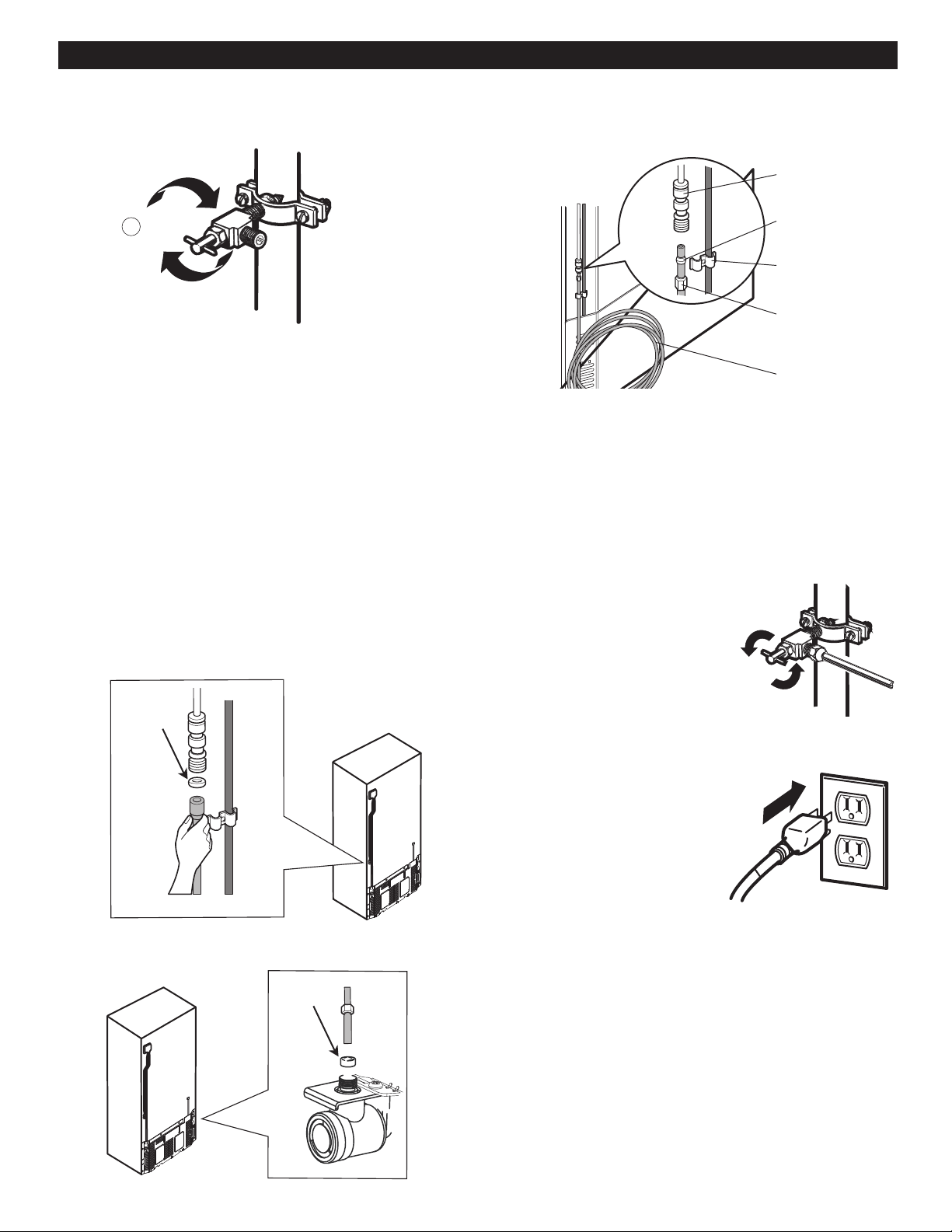
Refrigerator
Ferule
Handle
(Grabbers)
Compression
Nut
1/4" (6,35 mm)
Pipeline
Connection
1/4" (6,35 mm)
Ring Plug
34
2
Figure 1
Tapón
Ring Plug
Allow water flow from the bypass valve (2) and close after
draining ¼ of a gallon (1L) of water.
9. CONNECT PIPE TO REFRIGERATOR
NOTES: Before making connection to refrigerator, make
sure it is not connected to any energy source.
If your refrigerator does not have a water filter, it is advised
to install one. If your water source contains sand or related
particles that can travel to the valve, install a water filter near
the refrigerator.
Important: Never use old or used hoses. Always use new
ones to have a better use and experience. Connect always
to a potable water source to avoid security and health issues.
Remove the ring plug from the valve or the connector
(depending on the model of your refrigerator, see following
figure) located at the top of such device.
Figure 1, models with House-Connector connection.
Figure 2, models with House-Valve connection.
Place compression nut and ferule at the end of the
pipeline. Insert pipeline into the connection valve as far
as possible. Hold tightly while holding pipeline.
Hold on to the pipe from the handles or grabbers
located behind the refrigerator, loosing first the bolt
holding the handle. Afterwards, insert pipe into the
hole and tighten bolt to finalize.
Fix pipeline in a way that
it does not vibrate on the
refrigerator or wall. Push
refrigerator against wall.
Tighten all connections
containing leaks. Place
access cover back on
compressor.
Turn icemaker switch into the ON position. Icemaker
will start only after reaching its operating temperature
of 15 °F (-9 °C) or less. It will automatically begin the
ice production if switch is located in the ON position.
Figure 2
10. OPEN THE BYPASS VALVE
11. CONNECT TO REFRIGERATOR
12. TURN ICEMAKER ON
THE REFRIGERTOR WON´T TURN ON
The plug is correctly positionated. Firmly plug the cord into a live outlet with proper voltage.
A fuse has gone bad or the circuit presents failures. Replace the fuse or reset the circuit breaker.
The refrigerator is in the defrosting cycle. Wait about 30 minutes for defrost cycle to end.
STRANGE SOUNDS OR SNOZZING/VIBRATIONS
The refrigerator is not correctly positioned. You need to adjust the leveling screws due the floor is
unleveled or weak. Read the Installation section.
THE LIGHT WON'T TURN ON
The refrigerator is plugged. Plug the refrigerator in a right voltage plug.
The light bulbs are loose. Unplug the refrigerator.Unscrew the Light bulb and screw it
again (Read the section Refrigerator Care and Cleaning).
Plug again.
A light bulb has gone bad.
TROUBLESHOOTING GUIDE
UNDERSTANDING SOUNDS YOU MAY HEAR
Your new refrigerator might produce certain noises that
your previous refrigerator did not. It is normal if you worry.
Most of the new sounds you will be hearing are actually
normal and expected. Hard surfaces like walls or floor
can increase sounds and make them sound louder than
they really are. The following list has a description of such
sounds along with their causes.
The thawing timer will make a "click" sound when such
timer will start and finish. Temperature controlling device
will also make a "click" sound at the beginning and ending
of the refrigerator cycle.
You will hear a bell sound caused by the flow of the
refrigerant, water pipe or objects located on the superior
part of the refrigerator.
Your refrigerator is designed to work efficiently to preserve
your food at the desired temperature using the least of
energy. You will be able to hear a pulsing sound coming
from the ventilators and the evaporator. The speed of the
ventilator can speed up when you open the refrigerator
door.
After each cycle you will hear a dripping sound due to the
refrigerant liquid in your refrigerator.
Contraction and expansion of the inner walls can cause
a slight popping sound.
You will hear a dripping sound caused during the
thawing cycle.
During the defrosting cycle the water might cause a
dripping sound.
You can hear some tight air sound over the capacitor
caused by the fan.
Check if... Then...
Check if... Then...
Running water can be heard during the defrosting cycle.
Due to its low energy consume design of the refrigerator;
the fans will remain of, while the on-?off switch activated
Check if... Then...
Unplug the refrigerator before changing the light bulb. Replace
the bulb with a same 40 watts bulb for your local store.
(Read the section Replacing Refrigerator Lights).
35
the internal light of the bin.
TROUBLESHOOTING GUIDE
IT LOOKS LIKE THE COMPRESSOR MOTOR STAYS ON TOO LONG.
Check if... Then...
The replaced refrigerator was an older model. Modern refrigerators with a bigger storage capacity require
longer periods of operation.
The room temperature is hotter that usual. The motor will continue working when the room temperature is
high. The motor might be on between 40% or 80% of the time.
In high temperature conditions, the capacitor might run on
periods of time.
The door is being opened very often or there When adding or opening the door of the refrigerator, it warms
has been a big amount of food in storage. it up. It's normal that the refrigerator to run more that usual in
order to cool the bins. (Read the section Food Storage Guide).
To save energy, take what you need at once, order your food
in order so it can be easily found and closet he door
immediately soon after you took out the food.
The refrigerator is plugged and the control has The refrigerator will take 24 hours to cool down completely
Doors won't close correctly. Push firmly the Doors. If they don't close. Read Doors will
not close completely below.
The condenser pipes are dirty. This will stop the air transfer and marked the motor to work
longer and harder. Clean the pipes of the condenser.
THERE´S ICE ON THE FOOD
The door hasn't been closed completely. Read “The Door Will not Close Completely” already
The door is frequently opened. When the door is opened, warm, humid air is allowed in
the freezer resulting in frost.
DOORS WILL NOT CLOSE COMPLETELY
The refrigerator is not leveled. Read Refrigerator Installation section to level refrigerator.
The food packages are blocking the doors. Adjust the food bins in order to free space between the doors
The ice chest container, the vegetable bin, the panels, Push the containers and place the vegetable cover lid, the
and the shelves the food containers from the door are panels, shelves and any other container or bin in their right
positions. Read the section Using your Refrigerator.
The gaskets are sticking. Clean the sealrings and the surface they might be in contact
with. Use a piece of cloth with a small amount of paraffin and
Level the refrigerator. Read the section Closing and Aligning
The doors were removed during the installation Remove and place again the door according to the section
and they weren't properly setup Refrigerator Doors: How to remove and reverse.
been adjusted correctly.
Check if... Then...
Check if... Then...
36
out of place or position.
and the shelves.
apply it over the sealrings.
The refrigerator wabbles or looks instable.
mentioned.
the Doors.
TROUBLESHOOTING GUIDE
THERE IS A WEIRD TASE AND SMELL IN THE ICE
The ice maker has been installed correctly. Don't use the first ices made.
The ice has been on storage to long. Dispose of that old ice and make new.
The food hasn't been packed in the correct way Pack again the food because it can transfer odors and tastes
to the ice.
The water supply contains mineral and sulfur. You might need to install a filter in order to eliminate the odors
and taste problems.
The inside of the refrigerator need cleaning. Red the section Refrigerator Care and Cleaning
The ice box needs cleaning. Empty the box and discard the old ice cubes.
THERE´S WATER IN THE DRAINING BIN
The refrigerator is in defrosting cycle The water will evaporate. It is normal that dome water falls
on the bin.
It's more humid that usual. It might take a while for the water to evaporate. This is normal
when the weather is hot and humid.
THE REFRIGERATOR SEEMS TO MAKE TOO MUCH NOISE
The sounds may be normal for your refrigerator. Refer to the Understanding Sounds You May Hear section.
THE ICEMAKER IS NOT PRODUCING ICE OR ICE CUBES ARE FREEZING TOO SLOWLY
The smallest size of ice cubes is selected. Wait 24 hours after hook-up for ice production. See the
Adjusting the Controls section.
Door left open. Check to see if something is holding the door open.
THE DOORS ARE HARD TO OPEN
The sealrings are dirty or sticky. Clean the sealrings and surface that the are in contact with.
Use a damp cloth with paraffin also apply over the sealrings.
The door opens itself as soon as you close it. When you open the door, the warm air enters the refrigerator.
When this air is cooled down it occupies less volume and
creates a vacuum effect. If it is difficult to open wait 5 minutes
then check.
THE ICE CUBES ARE TOO SMALL
Smaller cube size level is selected. Select a bigger size for the icecubes.
The water supply valve is blocked. Call a plumber to clean the valve.
Check if... Then...
Check if... Then...
Check if... Then...
Check if... Then...
Check if... Then...
Check if... Then...
37
REFRIGERATOR
The air vents are blocked. The cool air flows from the With your hand find the vents and move and package that
freezer to the refrigerator and returns thru the vents might be blocking the air flow. See the Multi Flow Section.
that dive this section.
The doors open very easily. When the doors are opened the warm and humid air enters.
To keep your refrigerator cool, take what you need once and
you're your food organized to make it easy to find it. Close
the door a soon as you can.
The refrigerator control has not been adjusted for Wait 24 hours to stabilize the temperature. If the temperature is
the room conditions. cold or hot, move the control until the desire temperature is
reached.
A large amount of food is just been placed inside the After adding food to the refrigerator this will warm up. It might
refrigerator. take some hours for the refrigerator to reach its temperature.
Wrap the food evenly and before parking anything dry all the
bins to avoid humidity. If it is necessary, pack the food
according to the section Food Storage Guide.
The weather is humid. In humid weathers, the air contains humidity, which
introduces it self if the doors are opened.
The auto-defrosting cycle is over. It's normal the some water props. Get formed after the
defrosting cycle is completed.
TROUBLESHOOTING GUIDE
THE ICE MAKER DOESN´T WORK
The ice maker is off. Turn the ice maker to the position on (I).
The water supply is down or not plugged. Read the section Connecting the Water Line.
The freezer temperature is warm. Wait 24 hrs for the freezer to reach its ideal temperature.
The ice cubes turn off the ice maker. Hand level the icecubes.
Check if... Then...
Check if... Then...
The doors hasn't been closed correctly.
Read The Doors will not Close Correctly section.
38
THE TEMPEREATURE IS TOO HOT OR THERE´S HUMIDITY FORMED INSIDE THE
The food has not been well packed in each bin
1-800-243-0000
1-888-865-3026
1-888-542-2623
USA, Consumer User
USA, Commercial User
CANADA
LG Customer Information Center