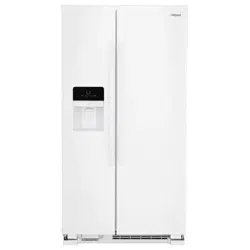
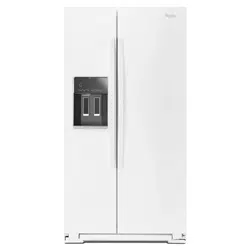
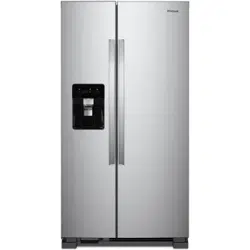
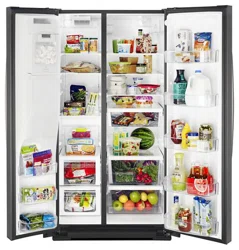
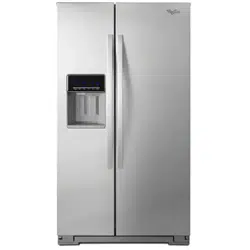
User Guide Side by Side Refrigerator
OPERATING YOUR REFRIGERATOR
Using the Controls
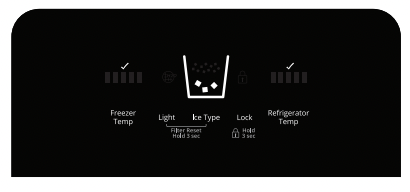
The refrigerator and freezer controls are located on the dispenser panel.
IMPORTANT: The display screen on the dispenser control panel will turn off automatically and enter “sleep” mode when the control buttons and dispenser lever have not been used for 2 minutes or more. While in “sleep” mode, the first press of a control button will only reactivate the display screen, without changing any settings.
- Touch any control button on the dispenser panel to activate the display screen. The home screen will appear as shown.
Adjusting the Controls
For your convenience, your refrigerator and freezer controls are preset at the factory. When you first install your refrigerator, make sure that both the refrigerator and freezer controls are still set to the recommended “mid-setting”, this will be displayed in the sequence of bars with three illuminated bars.
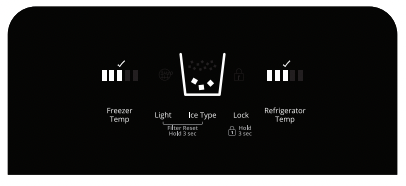
IMPORTANT:
- Wait 24 hours before you put food into the refrigerator. If you add food before the refrigerator has cooled completely, your food may spoil.
NOTE: Adjusting the set points to a colder than recommended setting will not cool the compartments any faster.
- If the temperature is too warm or too cold in the refrigerator or freezer. first check the air vents to be sure they are not blocked before adjusting the controls.
- The preset settings should be correct for normal household usage. The controls are set correctly when milk or juice is as cold as you like and when ice cream is firm.
- Wait at least 24 hours between adjustments. Recheck the temperatures before other adjustments are made.
When adjusting set points, use the following chart as a guide.
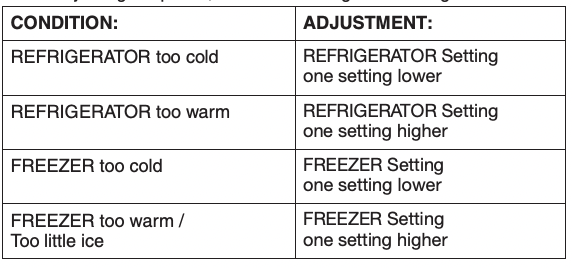
The set point range is “1 bar” (least cold) to “5 bars” (coldest).
Refrigerator Control:
- Press REFRIGERATOR TEMP to view the current set point for the refrigerator.
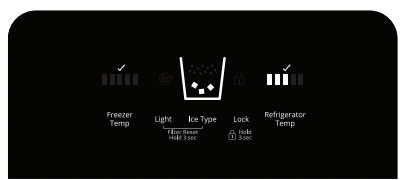
- Press REFRIGERATOR TEMP again to adjust the set point. The setting will increase by 1 bar with each press of the button. returning to 1 bar after reaching 5. After 2 minutes of inactivity. any changes will be saved and the display will return to the home screen.
Freezer Control:
- Press FREEZER TEMP to view the current set point for the freezer.
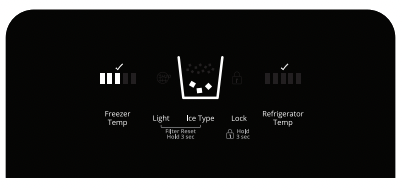
- Press FREEZER TEMP again to adjust the set point. The setting will increase by 1 bar with each press of the button. returning to 1 bar after reaching 5. After 2 minutes of inactivity. any changes will be saved and the display will return to the home screen.
Crisper Humidity Control
You can control the amount of humidity in the moisture-sealed crisper. Adjust the control to any setting between LOW and HIGH.
LOW (open) for best storage of fruits and vegetables with skins.
HIGH (closed) for best storage of fresh, leafy vegetables.
ICE AND WATER
Water and Ice Dispensers
NOTES:
- The dispensing system will not operate when the freezer door is open.
- Allow 24 hours for the refrigerator to cool down and chill water.
- Allow 24 hours to produce the first batch of ice. Discard the first three batches of ice produced. Wait 72 hours for full ice production.
- The display screen on the dispenser control panel will turn off automatically and enter “sleep” mode when the control buttons and dispenser lever have not been used for 2 minutes or more. While in “sleep” mode, the first press of a control button will only reactivate the display screen, without changing any settings.
Flush the Water System
Air in the water dispensing system can cause the water dispenser to drip. After connecting the refrigerator to a water source or replacing the water filter, flush the water system. Flushing the water dispensing system forces air from the water line and filter, and prepares the water filter for use.
NOTE: As air is cleared from the system, water may spurt out of the dispenser.
- Using a sturdy container, depress and hold the water dispenser lever for 5 seconds, then release it for 5 seconds.
- Repeat Step 1 until water begins to flow.
- Once water begins to flow, continue depressing and releasing the dispenser lever (5 seconds on, 5 seconds off) until a total of 3 gal. (12 L) has been dispensed.
Additional flushing may be required in some households.
The Water Dispenser
IMPORTANT:
- Dispense at least 1 qt (1 L) of water every week to maintain a fresh supply.
- If the flow of water from the dispenser decreases, it could be caused by low water pressure.
- With the water filter removed, dispense 1 cup (237 mL) of water. If 1 cup of water is dispensed in 8 seconds or less, the water pressure to the refrigerator meets the minimum requirement.
- If it takes longer than 8 seconds to dispense 1 cup of water, the water pressure to the refrigerator is lower than recommended. See “Water Supply Requirements” (in the User Instructions or the Installation Instructions and Owner’s Manual) or “Troubleshooting” for suggestions.
To Dispense Water:
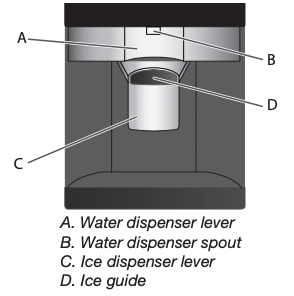
1. Press a sturdy glass against the water dispenser lever. Hold the glass close to the water dispenser spout to ensure that the water dispenses into the glass.
2. Remove the glass to stop dispensing.
IMPORTANT: The small tray at the bottom of the dispenser is designed to catch small spills and allow for easy cleaning. There is no drain in the tray.
The Ice Dispenser
Ice dispenses from the ice maker storage bin in the freezer when the dispenser lever is pressed. To turn off the ice maker, see “Ice Maker and Storage Bin.”
Your ice maker can produce both crushed and cubed ice. Before dispensing ice, select which type of ice you prefer by pressing the Ice Type button.
The display screen indicates which type of ice is selected.
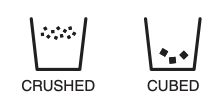
For crushed ice, cubes are crushed before being dispensed. This may cause a slight delay when dispensing crushed ice. Noise from the ice crusher is normal, and pieces of ice may vary in size. When changing from crushed to cubed, a few ounces of crushed ice will be dispensed along with the first cubes.
To Dispense Ice:
1. Make sure the desired type of ice is selected.
 WARNING
 Cut Hazard
Use a sturdy glass when dispensing ice. Failure to do so can result in cuts.
2. Press a sturdy glass against the dispenser lever. Hold the glass close to the ice guide to ensure that the ice dispenses into the glass.
IMPORTANT: You do not need to apply a lot of pressure to the lever in order to activate the ice dispenser. Pressing hard will not make the ice dispense faster or in greater quantities.
3. Remove the glass to stop dispensing.
NOTE: Ice may continue to dispense for several seconds after removing the glass from the lever. The dispenser may continue to make noise for a few seconds after dispensing.
The Dispenser Light
When you use the dispenser, the light will automatically turn on.
- If you want the light to be on continuously, press LIGHT
- Press LIGHT again to turn the dispenser light off.
The dispenser lights are LEDs that cannot be changed. If it appears that your dispenser lights are not working. see “Troubleshooting” for more information.
The Dispenser Lock
The dispenser can be turned off for easy cleaning or to avoid unintentional dispensing by small children and pets.
NOTE: The lock feature does not shut off power to the refrigerator, to the ice maker, or to the dispenser light. It simply deactivates the controls and dispenser lever. To turn off the ice maker, see “Ice Maker and Storage Bin.”
- Press and hold LOCK for 3 seconds to lock the dispenser.
- Press and hold LOCK a second time to unlock the dispenser.

The display screen indicates when the dispenser is locked.
Ice Maker and Storage Bin
- Allow 24 hours to produce the first batch of ice. Discard the first three batches of ice produced.
- The quality of your ice will be only as good as the quality of the water supplied to your ice maker. Avoid connecting the ice maker to a softened water supply. Water softener chemicals (such as salt) can damage parts of the ice maker and lead to poor quality ice. If a softened water supply cannot be avoided, make sure the water softener is operating properly and is well maintained.
- Do not use anything sharp to break up the ice in the storage bin. This can cause damage to the ice container and the dispenser mechanism.
- Do not store anything on top of or in the ice maker or storage bin.
Turning the Ice Maker On/Off
Style 1
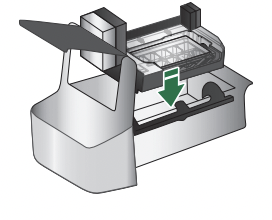
- To turn on the ice maker, lift open the ice maker door and lower the wire shutoff arm to the On position
- To manually turn off the ice maker, lift the wire shutoff arm to the Off (arm up) position and listen for the click. Ice can still be dispensed, but no more can be made.
NOTE: The ice maker has an automatic shutoff to keep the storage bin from overfilling during normal operation. As ice is made. the ice cubes will fill the ice storage bin. and the ice cubes will raise the wire shutoff arm to the Off (arm up) position. Do not force the wire shutoff arm up or down.
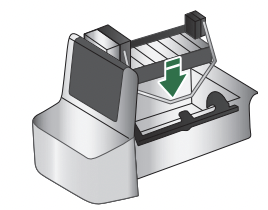
Removing and Replacing the Ice Storage Bin
- Pull the covering panel up from the bottom.
- Lift the wire shutoff arm so it clicks into the Off (up) position.
- Lift up the front of the storage bin and pull it out.
- Replace the bin by pushing it in all the way or the dispenser will not work.
- To restart ice production. lower the wire shutoff arm into the On (down) position. Make sure the door is closed tightly.
Style 2
The On/Off switch is located on the bottom of the Ice Maker. can be accessed by lifting and opening the ice maker door.
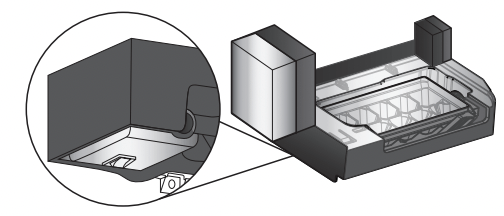
- To turn on the ice maker, lift open the ice maker door switch to the On (right) position.
- To manually turn off the ice maker, lift open the ice maker door, flip the switch to the Off (left) position. Ice can still be dispensed, but no more can be made.
NOTE: Your ice maker has an automatic shutoff to keep the storage bin from overfilling during normal operation. As ice is made, the ice cubes will fill the ice storage bin, and the ice cubes will raise the shutoff arm to the Off (arm up) position. When the storage bin is at full capacity. the ice maker will automatically stop ice production, but the ice maker On/Off switch will remain in the On position.
Water Filtration System
Do not use with water that is microbiologically unsafe or of unknown quality without adequate disinfection before or after the system. Systems certified for cyst reduction may be used on disinfected waters that may contain filterable cysts.
Water Filter Status Light
The filter status light will help you know when to change your water filter.
It is recommended that you replace the filter when the status light changes to red or water flow to your water dispenser or ice maker decreases noticeably.
NOTE: The filter should be replaced at least every 6 months depending on your water quality and usage.
Resetting the Filter Status
After changing the �lter, reset the filter status light by pressing and hold LIGHT and ICE TYPE button for 3 seconds. The status light will turn off when the system is reset.
Changing the Water Filte
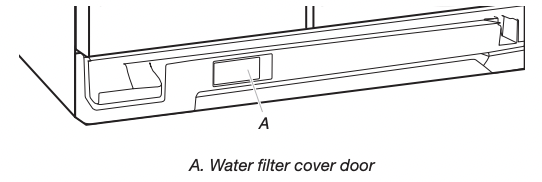
1. Locate the water filter cover door in the base grille, and pull open the filter door. The filter will be released and then be ejected as the door is opened.
2. When the door is completely open, pull the filter straight out.
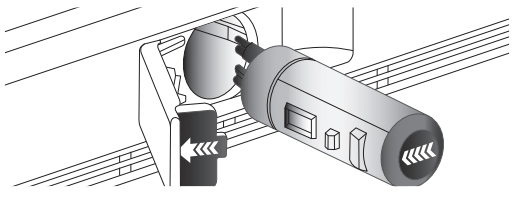
NOTE: There may be some water in the filter. Some spilling may occur. Use a towel to wipe up any spills.
3. Take the new filter out of its packaging and remove the covers from the O-rings. Be sure the O-rings are still in place after the covers are removed.
4. With the arrow pointing to the left (toward the filter cover door’s hinge), align the new filter with the filter housing and slide it into place. The filter cover door will automatically begin to close as the new filter is inserted.
5. Close the filter cover door completely in order to snap the filter into place. You may need to press hard.
6. Flush the water system. See “Water and Ice Dispensers.”
Style 2
1. Locate the water filter cover door in the base grille, and pull open the filter door
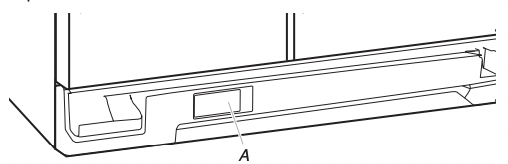
2. Twist the water filter and turn 90° counterclockwise to unlock.
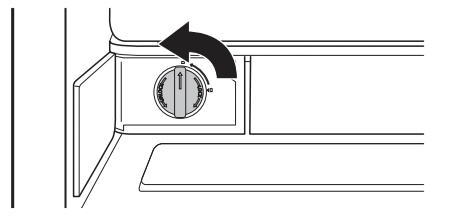
3. Pull the filter out of the housing.
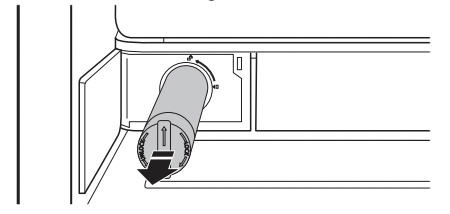
4. Remove the water filter cap from the water filter.
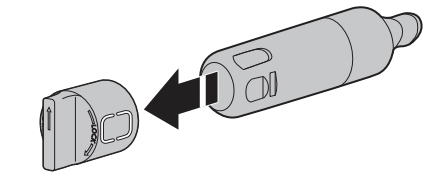
5. Install the water filter cap onto the new filter. Be sure to align the arrows so the grooves in filter align with ribs in filter cap.
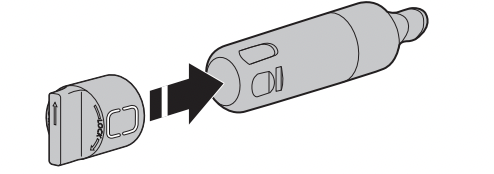
6. Insert the filter into the housing.
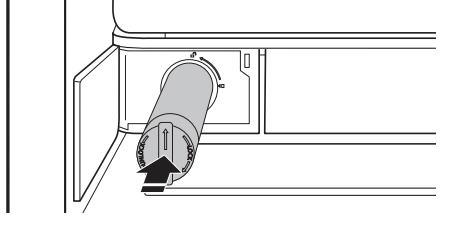
7. Twist the water filter and turn 90° clockwise until it locks into place and that arrows are aligned
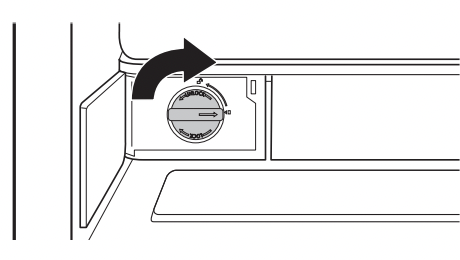
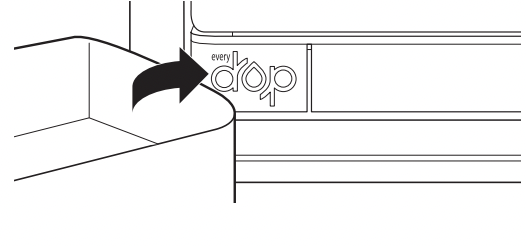
8. Push the water filter door closed.
TROUBLESHOOTING
For a complete Troubleshooting listing with more information about additional topics, see the Installation Instructions and Owner’s Manual provided with your refrigerator. or visit our website and download the User Instructions for your model.
WARNING Electrical Shock Hazard
Plug into a grounded 3 prong outlet. Do not remove ground prong. Do not use an adapter. Do not use an extension cord. Failure to follow these instructions can result in death, fire, or electrical shock.
Refrigerator will not operate
- Not connected to an electrical supply - Plug the power cord into a grounded 3 prong outlet. Do not use an extension cord.
- No power to the electrical outlet - Plug in a lamp to see if the outlet is working.
- Household fuse has blown or circuit breaker has tripped - Replace the fuse or reset the circuit breaker. If the problem continues. contact a licensed electrician.
- New installation - Following installation. allow 24 hours for the refrigerator and freezer to cool completely.
NOTE: Adjusting the temperature control(s) to the coldest setting will not cool either compartment (refrigerator or freezer) more quickly.
Refrigerator seems noisy
The compressor in your new refrigerator regulates temperature more efficiently and uses less energy than older models. During various stages of operation. you may hear normal operating sounds that are unfamiliar.
The following noises are normal:
- Buzzing/Clicking - Heard when the water valve opens and closes to dispense water or fill the ice maker. If the refrigerator is connected to a water line. this is normal. If the refrigerator is not connected to a water line. turn off the ice maker.
- Cracking/Crashing - Heard when ice is ejected from the ice maker mold.
- Popping - Heard when the inside walls contract/expand. especially during initial cooldown.
- Pulsating/Whirring - Heard when the fans/compressor adjust to optimize performance during normal operation.
- Rattling - Heard when water passes through the water line. or due to the flow of refrigerant. Rattling may also come from items placed on top of the refrigerator.
- Water running or gurgling - Heard when ice melts during the defrost cycle and water runs into the drain pan.
- Sizzling - Heard when water drips onto the heater during the defrost cycle.
Motor seems to run too much
- Your new refrigerator has an energy-efficient motor - The refrigerator may run longer than you’re used to. because the compressor and fans operate at lower speeds that are more energy-efficient. This is normal.
NOTE: Your refrigerator may run even longer if the room is warm. a large load of food is added. the doors are opened often. or if a door has been left open.
Temperature is too warm
- New installation - Following installation. allow 24 hours for the refrigerator and freezer to cool completely.
NOTE: Adjusting the temperature control(s) to the coldest setting will not cool either compartment (refrigerator or freezer) more quickly.
- Doors are opened often or not closed completely - This allows warm air to enter the refrigerator. Minimize door openings. keep the doors fully closed. and make sure both doors are properly sealed.
- Air vents are blocked - Remove items that are immediately in front of the vents.
- Large amount of warm food recently added - Allow several hours for the refrigerator to return to its normal temperature.
- Controls are not set correctly for the surrounding conditions - Adjust the controls to a colder setting. Check the temperature again in 24 hours.
Temperature is too cold
- Controls are not set correctly for the surrounding conditions - Adjust the controls to a warmer setting. Check the temperature again in 24 hours.
- Top refrigerator shelf is colder than lower shelves - On some models, air from the freezer enters the refrigerator compartment through vents near the top refrigerator shelf. As a result, the top shelf can be slightly colder than lower shelves.
- Air vents are blocked - Remove items that are immediately in front of the vents.
Interior moisture buildup
NOTE: Some moisture buildup is normal. Clean with a soft dry cloth.
- Room is humid - A humid environment contributes to moisture buildup. Only use the refrigerator in an indoor location, with as little humidity as possible.
- Doors are opened often or not closed completely - This allows humid air to enter the refrigerator. Minimize door openings, keep the doors fully closed, and make sure both doors are properly sealed.
User interface not responding
- Pressing user interface too fast - Wait 10 seconds before pressing any key.
- User interface in Lock Mode - Press and hold LOCK for 3 seconds to exit Lock Mode.