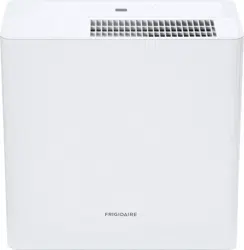

Frigidaire.com USA 1-800-944-9044 Frigidaire.ca Canada 1-800-265-8352
use
&
care
Dehumidifier
16120100A15994 (July 2019)
Introduction...................................................... 2
Important Safety Instructions.................... 3
Location............................................................. 4
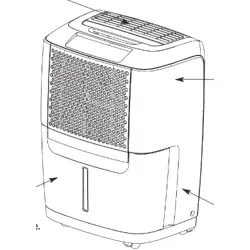
How It Works................................................... 5
Dehumidifier Features.................................. 6
Operating Instructions................................. 6
Care And Cleaning......................................... 11
Storage............................................................. 12
Normal Sounds.............................................. 12
Before You Call............................................. 13
Major Appliance Limited Warranty........ 14

2 INTRODUCTION
Welcome to our
family
Model Number
Serial Number
Purchase Date
Thank you for bringing Frigidaire into your
home! We see your purchase as the
beginning of a long relationship together.
This manual is your resource for the use and
care of your product. Please read it before
using your appliance. Keep it handy for
quick reference. If something doesn’t seem
right, the troubleshooting section will help
you with common issues.
FAQs, helpful tips and videos, cleaning
products, and kitchen and home accessories
are available at www.frigidaire.com.
We are here for you! Visit our website, chat
with an agent, or call us if you need help. We
may be able to help you avoid a service visit.
If you do need service, we can get that
started for you.
Let’s make it ocial! Be sure to register your
product.
Keep your product info here so it’s easy to
find.

3
For Your Safety
IMPORTANT SAFETY INSTRUCTIONS
WARNING
Electrical Information
WARNING
• For your safety and protection, this
dehumidifier is equipped with a
three-prong grounding plug on the power
cord. Do not, under any circumstances, cut
or remove the round ground prong from
the plug.
• Your dehumidifier must be plugged
directly into a properly grounded and
polarized three-prong receptacle. lf the
wall receptacle you intend to use will not
accept a three-prong plug, or if you are
not sure the outlet is adequately grounded
or protected by a time delay fuse or circuit
breaker, have a qualified electrician install
the proper outlet according to the National
Electrical Code and applicable local codes
and ordinances. Do not use an extension
cord or an adapter plug.
• Never unplug the dehumidifier by pulling
on the power cord. Always grip the plug
firmly and pull straight out from the
receptacle.
•
Do not pinch, bend, or knot the power cord.
• Do not store or use gasoline or other
flammable vapors and liquids in the vicinity
of this or any other appliance. Read
product labels for flammability and other
warnings.
• Discard water from bucket. Water is not
potable and cannot be used for drinking.
• Do not leave children unattended in an
area where the appliance is operating. Do
not allow them to sit or stand on the
appliance.
• This appliance is not intended for use by
persons (including children) with reduced
physical, sensory or mental capabilities or
lack of experience and knowledge, unless
they have been given supervision or
instruction concerning use of the appliance
by a person responsible for their safety.
• Children should be supervised to ensure
that they do not play with the appliance.
Child Safety Precautions
WARNING
• Destroy the carton, plastic bags, and any
packing materials immediately after the
dehumidifier is unpacked. Children should
never use these items for play.
DANGER! Avoid Serious Injury or Death
SAFETY PRECAUTIONS
• This dehumidifier contains no
user-serviceable parts. Always call an
authorized Electrolux servicer for repairs.
• Do not insert or place fingers or objects
into the air discharge area or back grille of
the unit.
• Do not start or stop the dehumidifier by
unplugging the power cord or turning off
the power at the electrical box.
• Do not cut or damage the power cord. Do
not pull on the power cord.
• If the power cord is damaged, it should
only be replaced by an authorized
Electrolux servicer.
• In the event of a malfunction (sparks,
burning smell, etc.), immediately stop the
operation, disconnect the power cord, and
call an authorized Electrolux servicer.
• Do not operate the dehumidifier with wet
hands. Do not drink any water from the
dehumidifier.
• If the supply cord is damaged, it must be
replaced by the manufacturer, its service
agent or similarly qualified persons in order
to avoid a hazard.
• The appliance shall be installed in
accordance with national wiring
regulations.

4 IMPORTANT SAFETY INSTRUCTIONS & LOCATION
CAUTION! Avoid Injury or damage to the
unit or other property
SAFETY PRECAUTIONS
• Do not direct airflow at fireplaces or other
heat related sources as this could cause
flare ups.
• Do not climb on or place objects on the
unit. Do not hang objects off the unit.
• Do not place containers with liquids on the
unit.
• Turn off the dehumidifier at the power
source when it will not be used for an
extended period of time.
• Operate the unit with air filter in place.
• Do not block or cover the intake grille,
discharge area and outlet ports.
• Ensure that any electrical/electronic
equipment is one yard away from the unit.
• Do not use or store flammable gases near
the unit.
WARNING
Avoid fire hazard or electric shock. Do not
use an extension cord or an adaptor plug.
Do not remove any prong from the power
cord.
Grounding type wall receptacle
Do not, under any
circumstances, cut,
remove, or bypass the
grounding prong.
Power supply cord
with 3-prong grounding
plug
Location
IMPORTANT:
1. Dehumidifier must be operated in an
enclosed area to be most eective. Close
all doors, windows, and other outside
openings to the room. The eectiveness of
the dehumidifier depends on the rate at
which new moisture-laden air enters the
room.
2. Place dehumidifier in a location that does
not restrict the airflow of the air intake and
air outlet.
3. A dehumidifier operating in a basement
will have little or no eect in drying an
adjacent enclosed storage area, such as a
closet, unless there is adequate circulation
of air in and out of the area. lt may be
necessary to install a second dehumidifier
in the enclosed area for satisfactory
drying.
4. The dehumidifier must be installed on a
level floor that will support it with a full
bucket of water.
5. There should be a minimum of 12 inches
clearance around the dehumidifier. The
unit will produce heat while in operation
and should not be operated in an enclosed
small space like a closet.
Selecting a Location
Do not Block at least 24"
12"
12"

5HOW IT WORKS
How It Works
Wiring Diagram
When the unit is started, the fan begins to
pull moisture-laden air across the
dehumidifying coils. The coils condense or
draw moisture from the air, and air flows
through the air outlet louvers into the room
as dry, warm air. Moisture removed from air
is collected in a bucket on the front of the
dehumidifier.
The unit is designed to operate between 41
°F (5 °C), and 89 °F (32 °C). The unit will not
work properly if the temperature is out of
this temperature range, or the performance
of the unit will fall greatly.
The "Compressor" circuit has an automatic 3
minute time delayed start if the unit is turned
o and on quickly. This prevents overheating
of the compressor and possible circuit
breaker tripping. Make sure the tank is fitted
correctly otherwise unit will not turn on.
D ISPLAY
B O A R D
M A IN B O AR D
FA N
PO W E R
CN10
CN1
CN3
CN5
P8
CN4
CN2
WATER
SWITCH
PIPE
TEMP.
HUMI.
SENSOR
BLACK(OR BROWN OR RED)(L)
RED
WHITE(OR BLUE OR BLACK)(N)
RED
Y/G
Y/G(or GREEN)
BLACK
BLUE
BROWN
FAN
CAPACITOR
Y/G
M
C
S
M
~
C O M P.
BLUE
This symbol
indicates
the element
is optional,
the actual
shape shall
prevail
Notes:
OverLoad
Protector
P7
P6
ION
Y/G
P9
(or CN6/CN6A /CN6B/CN6C/CN10)
(or CN13)
Notes:
Display and Fan's conntors must be match the actual indicates.
CN11
TO U C H
PA N E L
POWER
BOARD
CN1
CN2
CN14
CN15
1 3
1 2
3
1
1
2
CN7
SWITCH
P2
P1
CN10
WIFI
CN1
PUMP
D C PO W ER
B OA R D
CN2
RED
OPT I ONAL
P10
P4
BLACK(or BLUE)
BLACK
WHITE
YELLOW
TO P
STE P
M
CN5
CN12
W IF I
1 6 0 2 0 1 0 0 0 0 1 5 7 3
COMP.
CAPACITOR
BLUE
BLACK
RED
RED
BLACK(or BLUE)
6
DEHUMIDIFIER FEATURES & OPERATING INSTRUCTIONS
ELECTRONIC CONTROL
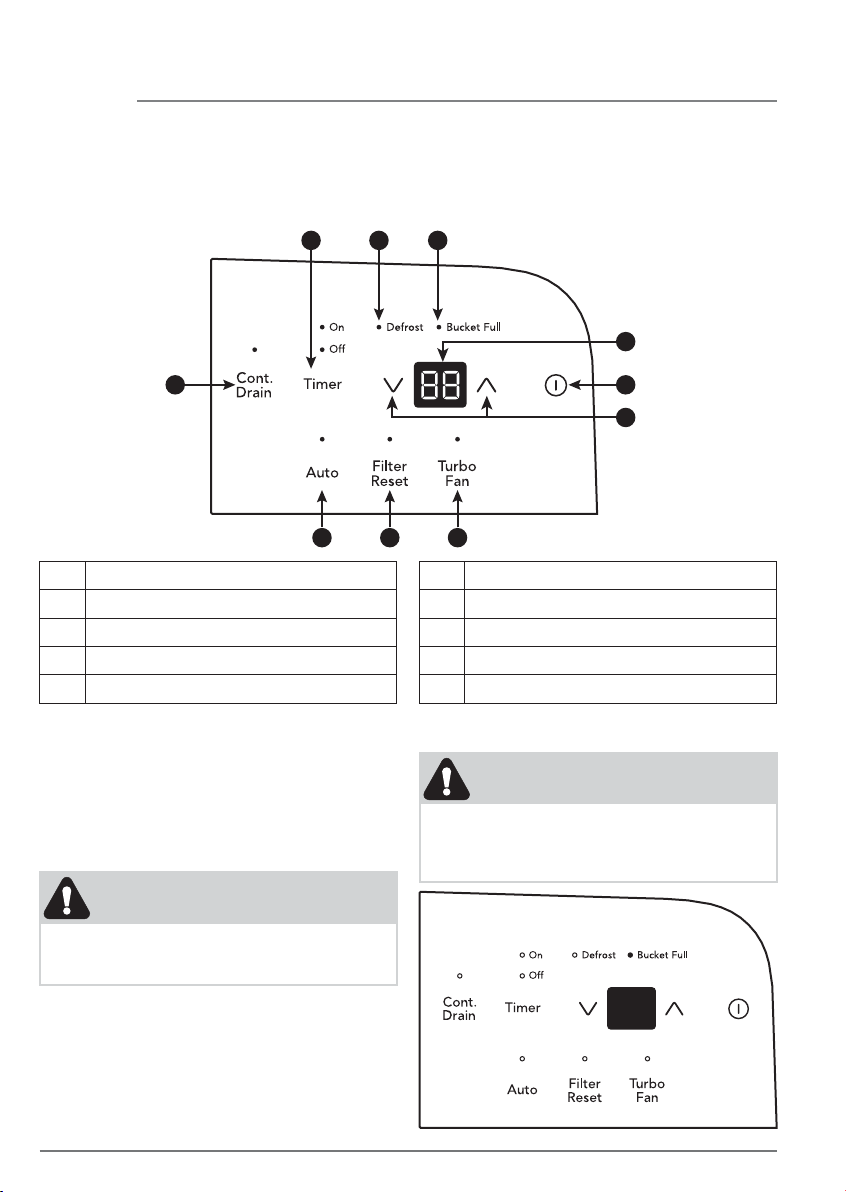
Before you begin, thoroughly familiarize yourself with the control panel and all its functions
(as shown below).
Dehumidifier Features
A Auto Mode Button
B Continue Drain Button
C Sets Timer
D Defrost Indicator
E Bucket Full Indicator
NOTE
Unit must be upright for one hour prior to
operating.
NOTE
If the "BUCKET FULL" light is on, remove
the bucket and re-install to reset the float
switch.
Allow the unit to reach room temperature
before operating.
To begin operating the dehumidifier, follow
these steps:
Operating Instructions
1. Plug the power cord into a properly
grounded 115 volt AC outlet.
A J I
B
C D E
G
F
H
F Displays Humidity
G Turns Unit On Or O
H Adjusts Humidity
I Turbo Fan Button
J Check Filter Reset Button

7OPERATING INSTRUCTIONS
2. To turn the unit on, press the button.
The unit will run in Auto mode. In this
mode, the unit will automatically set a
comfortable humidity and fan speed
according to the indoor environment.
When room temperature < 65˚F, the
humidity will be set as 55% When room
temperature ≥ 65˚F and ≤ 77˚F, the
humidity will be set as 50%; When the
room temperature T > 77˚F, the humidity
will be set as 45%. In Auto mode press
or button will cancel this feature.
4. Press the Turbo Fan button to activate the
Turbo Fan feature. In this feature the unit
will run in high fan speed to maximize the
dehumidification speed.
5. After a few days when the Relative
Humidity has declined, press the Cont.
Drain button to deactivate the Cont. Drain
feature then press the HUMIDITY or
buttons to choose a value between 35% to
85%, so the room is kept at a comfortable
humidity. Pressing the or buttons will
change the humidity selection in 5%
increments. After you have set the desired
humidity, the readout will display the
actual room humidity.
3. It is recommended to press the Cont.
Drain button to use the CONTINUOUS
setting for the first three or four days until
the sweating and dampness odors have
stopped. In this setting the unit will run in
the maximum power and the display will
show actual room humidity.

8 OPERATING INSTRUCTIONS
6. When the unit is on, first press the Timer
button, the Timer O indicator light
illuminates. It indicates the Auto Stop
program is initiated. Press it again the Time
On indecator light illuminates. It indicates
the Auto Start is initiated.
When the unit is o, first press the Timer
button, the TIMER ON indicator light
illuminates. It indicates the Auto Start
program is initiated. Press it again the Time
O indecator light illuminates. It indicates
the Auto Stop is initiated.
Press or hold the UP or DOWN pad to
change the Auto time by 0.5 hour
increments, up to 10 hours, then at 1 hour
increments up to 24 hours. The control will
count down the time remaining until start.
The selected time will register in 5 seconds
and the system will automatically revert
back to display the previous humidity
setting.
When the Auto start & Auto stop times are
set, within the same program sequence,
TIMER ON OFF indicator lights illuminate
identifying both ON and OFF times are
now programmed.
Turning the unit ON or OFF at any time or
adjusting the timer setting to 0.0 will
cancel the Auto Start/Stop function.
When LED display window displays the
code of P2, the Auto Start/Stop function
will also be cancelled.
7. The CLEAN FILTER light will illuminate
after 250 hours of operation. At this time
refer to the care and cleaning section to
remove and clean the filter. Once the filter
has been cleaned and replaced, simply
press the FILTER button to extinguish the
light.
8. When frost builds up on the evaporator
coils, the compressor will cycle o and the
fan will continue to run until the frost
disappears.
NOTE:
1. Before entering TIMER setting, make sure
power is being supplied to the unit.
2. Before entering TIMER setting, make sure
pressing HUMIDITY or button sets one
desired room humidity first.

9OPERATING INSTRUCTIONS
9. To shut the unit down, press the ON/OFF
button.
Note: After a power outage, the unit will
memorize the last setting and return the unit
to the same setting once power is restored.
Fault Codes
1. If the display reads "AS" or "ES" , a sensor
has failed. Contact your Authorized
Frigidaire Service Center.
2. If the display reads "P2", Bucket is full or
removed or not in right position. Replace
the bucket in the right position.
Removing Collected Water
1. Emptying the Bucket:
a. When the bucket is full, the unit will shut
down and the BUCKET FULL indicator
will illuminate.
b. Do not move the unit at this time
otherwise water may spill on the floor.
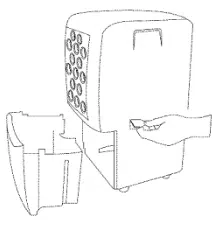
c. Press sides of bucket gently to unclip
the bucket from the unit.
d. Remove the bucket as shown in the
photographs below and empty the
bucket.

10
OPERATING INSTRUCTIONS
e. Replace the empty bucket back into the
unit and once seated correctly, the unit
will start up again.
f. You should hear a click when the bucket
is in the correct position.
WARNING
Discard water from bucket. Water is not
potable and cannot be used for drinking.
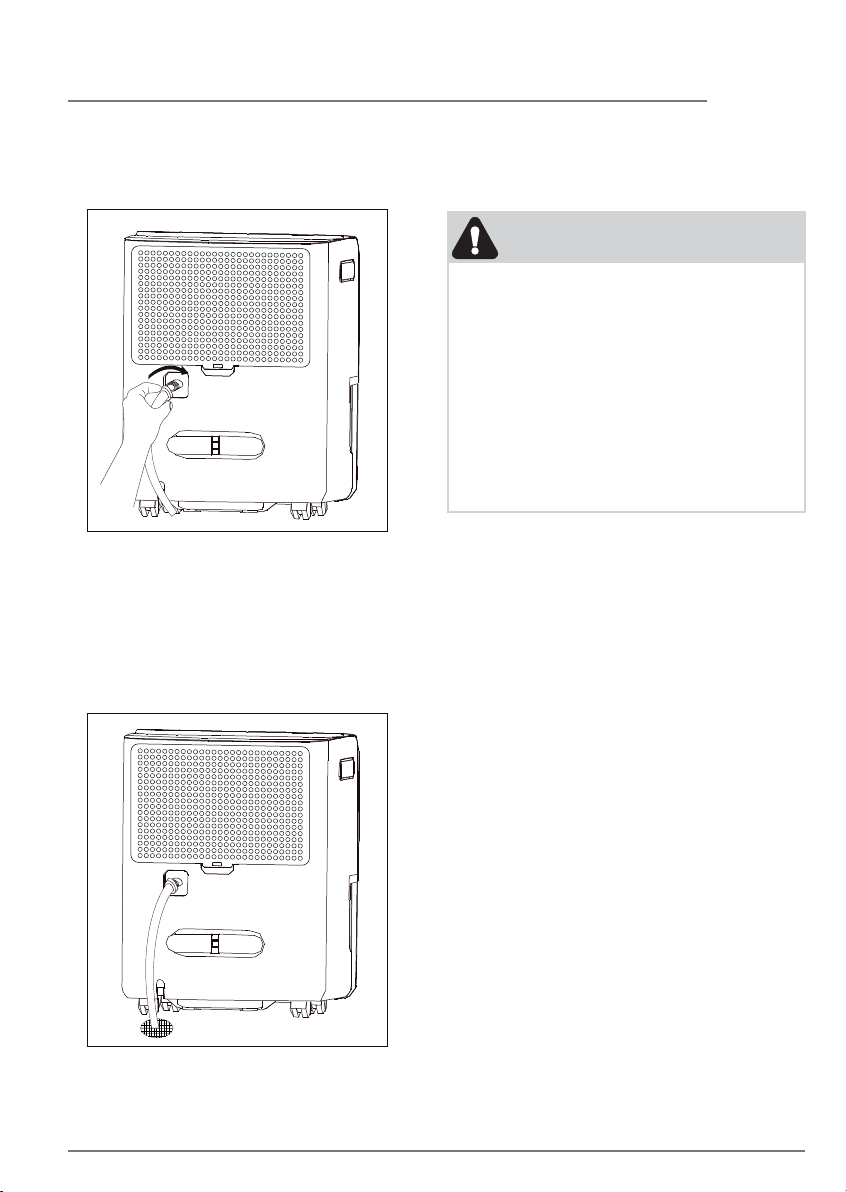
2. Continuous Drainage:
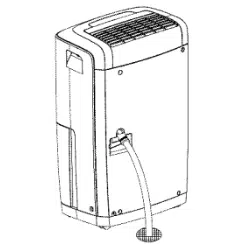
a. For continuous drainage operation, you
will need a garden hose and a drain
nearby to discharge the water into.
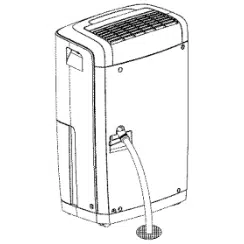
b. Unscrew the drain cap on the back side
of the unit. (fig.1)
c. Insert the female threaded end of the
hose onto the drain connector of the
unit. (fig.2)
fig.1
fig.2
11
OPERATING INSTRUCTIONS & CARE AND CLEANING
d. Screw the garden hose onto the
threaded portion of the drain connector.
(fig.3)
fig.3
e. Make sure the hose is secure so there
are no leaks.
f. Direct the hose toward the drain, making
sure that there are no kinks that will
stop the water flowing.
g. Place the end of the hose into the drain.
(fig.4)
h. Select the desired humidity setting and
fan speed on the unit for continuous
draining to start.
NOTE
1. Check the seal between the hose and the
drain connector. If there is a small leak
then replace the hose gasket and
re-tighten the hose.
2. It is recommended that a Dehumidifier
Drain Hose - 1/2" (12.7 mm) or larger be
used. Make sure there are no kinks or
elevations in the hose.
3. When a hose is not attached to the drain
connector, please ensure drain cap is
screwed securely to the connector to
prevent leakages.
Care and Cleaning
1. Filter
Clean the filter every two weeks based on
normal operating conditions.
To remove the filter:
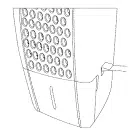
a. Remove the back grille every two weeks
based on normal operating conditions.
b. To remove the back grille, pull back
grille outwards (see figure on the left).
c. Wash the back grille with clean water
then dry.
d. Re-install the back grille.
2. Cabinet
a. Dust cabinet with an oil-free cloth, or
using a damp cloth.
b. Vacuum grill using brush attachment.
3. Water Bucket
a. Clean bucket with warm water and
detergent.

12 STORAGE & NORMAL SOUNDS
Storage
When unit is not in use, unplug and use the
cord wrap shown for your model type.
Normal Sounds
1
2
3
4
Dripping Sound
The sound of dripping water may be
heard during the dehumidification
cycle.
1
Sound of Rushing Air
At the top of the unit, you may hear the
sound of rushing air being moved by
the fan.
2
Gurgle/Hiss
“Gurgling or hissing” noise may be
heard due to refrigerant passing
through evaporator during normal
operation.
3
High pitched Chatte
Today’s high eciency compressors
may have a high pitched chatter during
the dehumidification cycle.
4

13BEFORE YOU CALL
Fan noise.
• Air is moving through the dehumidifier. This is a normal sound.
Frost appears on coils
behind the filter
• Dehumidifier has been turned on recently. This is normal due to refrigerant
rushing through the coil. Frost will usually disappear within 60 minutes.
• Room Temperature is too low. All models will operate satisfactorily at
temperatures greater than 41 °F (5 °C).
Dehumidifier is
operating but room is
not dry enough.
• Humidity setting is too high. Press the HUMIDITY button or rotate knob to a
lower setting or choose CONTINUOUS for maximum dryness.
• Dehumidifier has been installed or restarted recently. The higher the
moisture in the room air, the longer it takes for the room air to become dry.
• Dehumidifier does not have sufficient clearance to operate. Air flow to the
air outlet is blocked. See “Selecting a Location”.
• Room temperature is too low. Unit will not operate satisfactorily if the
room temperature is below 41 °F(5 °C). See “Operating Conditions”.
• Refer to causes under DEHUMlDIFIER RUNS TOO MUCH.
Before calling for service, review this list. It may save you time and expense. This list
includes common occurrences that are not the result of defective workmanship or materials
in this appliance.
SOLUTIONOCCURRENCE
Dehumidifier does not
operate.
• Wall plug disconnected. Push plug firmly into wall outlet.
• House fuse blown or circuit breaker tripped. Replace fuse with time delay
type or reset circuit breaker.
• The dryness level you selected has been reached. Dehumidifier automati-
cally shuts o when selected amount of moisture has been removed from
the air. If you want to remove more moisture, Select 'CONTINUOUS' by
using the humidity button or knob. After the dehumidifier starts, reset the
control to the desired setting.
• Bucket not installed properly. See “Removing Collected Water“.
• Water in the bucket has reached its preset level. Dehumidifier automatically
turns o when this occurs. Empty bucket and return bucket to position.
• Dehumidifier is not turned on. Turn unit on.
• “BUCKET FULL“ light is on. Remove bucket, empty water and re-install
correctly.
Dehumidifier runs too
much.
• Windows or doors near dehumidifier are open to outdoors. Close all
windows or doors to outside.
• Area to be dehumidified is too large. Check with your dealer to see if
capacity is adequate.
• Air movement through dehumidifier is blocked. Grill may be dirty. Use brush
attachment of vacuum cleaner to clean grill. See “Care and Cleaning“.
Dehumidifier must be placed in a space that does not restrict air flowing into
the rear coil or out of the front grill.
• Dehumidifier has been installed or restarted recently. The higher the
moistuire in the room, the longer the dehumidifier will operate.
• Dehumidifier is in the CONTINUOUS mode and will remain on in this mode,
use the humidity button or knob to set a RH% higher level.
If These Solutions Fail, Call 1-800-944-9044(US)/1-800-265-8352(Canada)
For Frigidaire Service.
Exclusions
This warranty does not cover the following:
DISCLAIMER OF IMPLIED WARRANTIES; LIMITATION OF REMEDIES
If You Need
Service
Canada
1.800.265.8352
Electrolux Canada Corp.
5855 Terry Fox Way
Mississauga, Ontario, Canada
L5V 3E4
USA
1.800.944.9044
Electrolux Major Appliances
10200 David Taylor Drive
Charlotte, NC 28262
Your appliance is covered by a limited one-year warranty for functional repairs only. For one year from your
original date of purchase, Electrolux will pay all costs for repairing or replacing any parts of this appliance that
prove to be defective in materials or workmanship when such appliance is installed, used and maintained in
accordance with the provided instructions. After one year from your original date of purchase, the consumer
will be responsible for diagnostic, labor and parts costs as well as any removal, transportation and
reinstallation expenses which are incurred during service on components.
CUSTOMER'S SOLE AND EXCLUSIVE REMEDY UNDER THIS LIMITED WARRANTY SHALL BE PRODUCT
REPAIR OR REPLACEMENT AS PROVIDED HEREIN. CLAIMS BASED ON IMPLIED WARRANTIES, INCLUDING
WARRANTIES OF MERCHANTABILITY OR FITNESS FOR A PARTICULAR PURPOSE, ARE LIMITED TO ONE
YEAR OR THE SHORTEST PERIOD ALLOWED BY LAW, BUT NOT LESS THAN ONE YEAR. ELECTROLUX
SHALL NOT BE LIABLE FOR CONSEQUENTIAL OR INCIDENTAL DAMAGES SUCH AS PROPERTY DAMAGE
AND INCIDENTAL EXPENSES RESULTING FROM ANY BREACH OF THIS WRITTEN LIMITED WARRANTY OR
ANY IMPLIED WARRANTY. SOME STATES AND PROVINCES DO NOT ALLOW THE EXCLUSION OR
LIMITATION OF INCIDENTAL OR CONSEQUENTIAL DAMAGES, OR LIMITATIONS ON THE DURATION OF
IMPLIED WARRANTIES, SO THESE LIMITATIONS OR EXCLUSIONS MAY NOT APPLY TO YOU. THIS WRITTEN
WARRANTY GIVES YOU SPECIFIC LEGAL RIGHTS. YOU MAY ALSO HAVE OTHER RIGHTS THAT VARY
FROM STATE TO STATE.
Keep your receipt, delivery slip, or some other appropriate payment record to establish the
warranty period should service be required. If service is performed, it is in your best interest to
obtain and keep all receipts. Service under this warranty must be obtained by contacting
Electrolux at the addresses or phone numbers below.
This limited warranty only applies in the USA and Canada. In the USA, your appliance is warranted by
Electrolux Major Appliances North America, a division of Electrolux Home Products, Inc. In Canada, your
appliance is warranted by Electrolux Canada Corp. Electrolux authorizes no person to change or add to any
obligations under this warranty. Obligations for service and parts under this warranty must be performed by
Electrolux or an authorized service company. Product features or specifications as described or illustrated are
subject to change without notice.
1. Products with original serial numbers that have been removed, altered or cannot be readily determined.
2. Product that has been transferred from its original owner to another party or removed outside the USA or
Canada.
3. Rust on the interior or exterior of the unit.
4. Products purchased "as-is" are not covered by this warranty.
5. Food loss due to any refrigerator or freezer failures.
6. Products used in a commercial setting.
7. Service calls which do not involve malfunction or defects in materials or workmanship, or for appliances
not in ordinary household use or used other than in accordance with the provided instructions.
8. Service calls to correct the installation of your appliance or to instruct you how to use your appliance.
9. Expenses for making the appliance accessible for servicing, such as removal of trim, cupboards, shelves,
etc., which are not a part of the appliance when it is shipped from the factory.
10. Service calls to repair or replace appliance light bulbs, air filters, water filters, other consumables, or
knobs, handles, or other cosmetic parts.
11. Surcharges including, but not limited to, any after hour, weekend, or holiday service calls, tolls, ferry trip
charges, or mileage expense for service calls to remote areas, including the state of Alaska.
12. Damages to the finish of appliance or home incurred during installation, including but not limited to
floors, cabinets, walls, etc.
13. Damages caused by: services performed by unauthorized service companies; use of parts other than
genuine Electrolux parts or parts obtained from persons other than authorized service companies; or
external causes such as abuse, misuse, inadequate power supply, accidents, fires, or acts of God.
14 MAJOR APPLIANCE LIMITED WARRANTY

welcome
home
Frigidaire.com
1-800-944-9044
Frigidaire.ca
1-800-265-8352
owner support
accessories
service
Our home is your home. Visit us if you
need help with any of these things:
registration
(See your registration card
for more information.)