User Manual
FEATURES AT A GLANCE
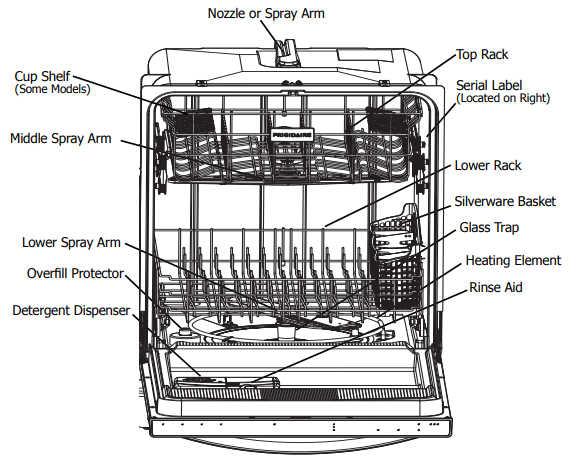
Your dishwasher cleans by spraying a mixture of hot water and detergent through the spray arms against soiled surfaces. First, the dishwasher fills with water covering the filter area. Water is then pumped through the spray arms. Soil particles go through and across the filter and down the drain as the water is pumped out. This series of steps are repeated as needed. The number of water fills vary with the cycle being used.
Features may vary according to model
OPERATING INSTRUCTIONS
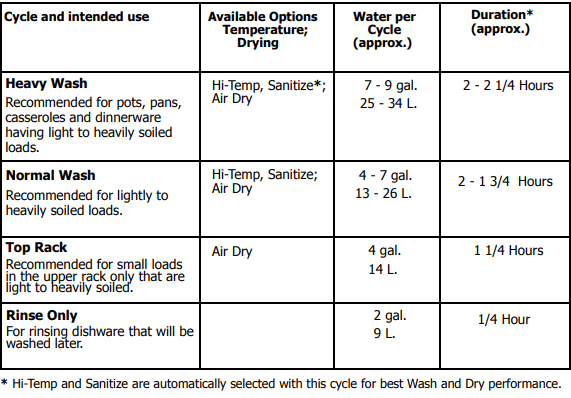
Wash Cycle Selections
Cycle times are approximate and will vary with options selected. Hot water is necessary to activate dishwasher detergent and melt fatty food soils. An automatic sensor will check the incoming water temperature and, if it is not hot enough, the cycle will be lengthened for automatic water heating in the main wash and final rinse of all cycles. This happens even when HIGH TEMP WASH option has not be selected. When HIGH TEMP WASH is selected, an even higher temperature will be reached to handle heavier soil loads.
Option Selections
Sanitize Option
To sanitize your dishes and glassware, select SANITIZE option. When selected, the light above the pad will come on and remain on until end of cycle. The water temperature in the final rinse will be raised to 155oF (68oC) and will maintain that temperature for 9 minutes. This option is available in Heavy and Normal Cycles. Only these sanitization cycles have been designed to meet NSF requirements.
The cycle time will be extended until the proper water temperature is reached. Washing action will continue during the water heating delay. For best results, the incoming water temperature should be at least 120oF (49oC).
The sanitize criteria may not be satisfied if there is an interruption of the cycle, power failure or if the incoming water temperature is below 120oF (49oC).
To turn off the SANITIZE option, press the pad a second time. The light above the pad will turn off.
High Temp Wash Option
When HI-TEMP WASH option is selected, the dishwasher heats water in the main wash to approximately 140oF (60oC).
This increase in water temperature helps the dishwasher detergent remove food grease and soil from dishes more effectively and aids in improved drying performance. HIGH TEMP WASH option can be used with all cycles except RINSE ONLY. HIGH TEMP WASH is automatically provided when the HEAVY WASH cycle is selected.
When HIGH TEMP WASH option is selected, the light above the pad will come on and remain on until end of cycle. To turn off the HIGH TEMP WASH option, press the pad a second time. The light above the pad will turn off.
Child Lock Controls
To prevent children from accidently changing the dishwasher cycle or starting the dishwasher, lock the dishwasher controls by pressing and releasing the AIR DRY pad for 3 seconds while the door is open. An indicator light on the lock graphic pad will illuminate when the controls are locked and no new selections can be made until the lock is released. To unlock the controls, press the AIR DRY pad until the indicator light goes out.
Status Indicator Lights
The WASHING light comes on at the beginning of the cycle and remains on until the end of the main wash.
Whether heated or unheated dry is selected the DRYING light will come on during the drying portion of the cycle.
When the SANITIZE option is selected, the SANITIZED light will glow when the SANITIZE cycle is fi nished. If the dishwasher did not properly sanitize the dishes, the light will not come on. This can happen if the cycle is interrupted. The light will remain on until the door is opened.
The CLEAN light will come on at the end of cycle and remain on until the door is opened.
The DishSenseTM Technology checks the soil level on your dishes in the HEAVY WASH, NORMAL WASH and TOP RACK cycles. Depending on soil level, the sensor will determine if additional water fi lls are needed to clean the dishes or if water fi lls can be deleted. Cycle time and water usage will vary based on the amount of soil on the dishes. Cycle time will also vary based on the options selected and the incoming water temperature.
Delay Start
The DELAY START option allows you to automatically delay starting your dishwasher from 2-4-6 hours.
To activate delay start option, press the pad once for a 2 hour delay, twice for 4 hours and three times for 6 hours. A light will come on indicating the delay start hours and will remain on until cycle starts.
Press the START/CANCEL pad to start the delay option. If the delay option is interrupted, the START/CANCEL pad will have to be pressed again to return to delay option. To cancel the DELAY START option and to begin the selected cycle before the delay period is over, press and hold START/CANCEL pad for 3 seconds.
To Cancel a Cycle
You can cancel a cycle anytime during the cycle. Press and hold the START/CANCEL pad for 3 seconds. The light above the cycle and option selected will go out, the START/CANCEL light will remain illuminated, the dishwasher will start a 90 second drain. At the end of the drain, select the next desired cycle.
Air Dry
When AIR DRY is selected the heater will be de-activated during the drying phase of the selected wash cycle. This will slightly lower the energy use but will increase the likelihood that the dishware will not dry completely. If AIR DRY is not selected the heater will be activated during the drying phase of the selected wash cycle.

Cycle Chart
PREPARING AND LOADING DISHES
Dish Preparation
Scrape away large pieces of food, bones, pits, toothpicks, etc. The continuously filtered wash fluid will remove remaining food particles. Burned-on foods should be loosened before loading. Empty liquids from glasses and cups. Foods such as mustard, mayonnaise, vinegar, lemon juice and tomato based products may cause discoloration of stainless steel and plastics if allowed to sit for a long period of time. Unless the dishwasher is to be operated at once, it is best to pre-rinse or use the rinse only cycle to rinse off these food soils.
- Load racks so that large items do not prevent the detergent dispenser from opening.
- Check manufacturer’s recommendations before washing items in question.
- If the dishwasher drains into a Food Disposer, be sure disposer is completely empty before starting dishwasher.

Loading the Top Rack
Features and appearance of racks and silverware basket may vary from your model.
The upper rack is designed for fl exibility in loading a wide variety of items including cups, glasses, stemware, small plates, bowls, etc.
Load glasses in top rack only. Damage may occur if placed in bottom rack. Load plastic items in top rack only. Melting may occur if placed in bottom rack.
Load items with open ends facing down for better cleaning and draining.
Damage may occur if delicate items touch each other during dishwasher operation.
Long-handled knives and utensils can be placed in top rack.
Be sure nothing protrudes through the bottom of the rack to block rotation of middle spray arm.

Top Rack
The TOP RACK option can be used to wash a wide assortment of items when you don’t have a full load. Also, when the upper rack fills up with glasses and the lower rack is still empty, you don’t have to wait anymore for clean glasses.
STEMWARE HOLDER/CUPSHELF not available on all models.
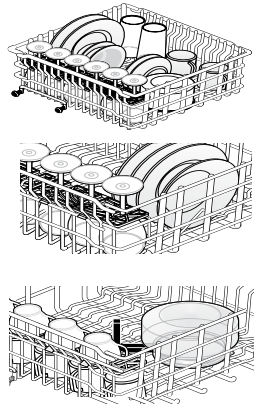
Some models have fold-down cup shelf or a cup shelf/stemware holder. They can be used to load two levels of cups, juice glasses, and other short items. Stagger items on upper level so that water can reach all inside surfaces. Fold up to load tall glasses.
Loading the Bottom Rack
Features and appearance of racks and silverware basket may vary from your model.
The lower rack is best for plates, saucers, bowls, and cookware. Large items should be placed along the edge so they do not block the spray arm rotation. For best results, place bowls, casseroles, and sauce pans with soiled surface facing down or toward the center. Tilt slightly for better drainage.
Spin the middle spray arm to make sure that tall items do not block the rotation.
Be sure pan handles do not protrude through the bottom of the rack and block the spray arm rotation.

Loading the Silverware Basket
Features and appearance of racks and silverware basket may vary from your model. Load the silverware basket while it is in the bottom rack or take the basket out for loading on a counter or table.

Use suggested loading patterns, as shown, to increase washability of the silverware. Be sure nothing protrudes through bottom of basket or rack to block the spray arm. Do not mix silver and stainless to avoid damaging the silver finish. Mix items in each section of the basket with some pointing up and some down to avoid nesting. Water spray cannot reach nested items.

To add or remove items after wash cycle starts:
- Unlatch door and wait a few seconds until wash action stops before opening.
- Add the item and wait a few seconds to allow cold air to slowly expand inside dishwasher.
- Close door firmly to latch and press the START/CANCEL pad to resume.
DISHWASHER DISPENSER & DETERGENTS
Filing the Detergent Dispenser
The detergent dispenser has two detergent cups. The smaller one is for addition to the pre-wash and the larger is for release to the main wash.
- Use only fresh automatic dishwashing detergent. Other detergents may cause oversudsing.
- When using automatic dishwashing detergent tabs, place one tab in main wash cup and close.
- Add detergent just before starting cycle.
- Store detergent in a cool, dry location. Moist or caked detergent may not dissolve properly.

If the cover is closed on the Main Wash Cup open by pressing the Cover Latch.
How much Detergent to use
The amount of detergent to use depends on the water hardness. Water hardness is measured in grains per gallon. Using too little detergent can result in poor cleaning and hard water filming or spotting. Using too much detergent in soft water can cause etching to some glassware which is surface damage that appears like a film but cannot be wiped off. Your local water company, water softener company or county extension agent can tell you the water hardness in your area.
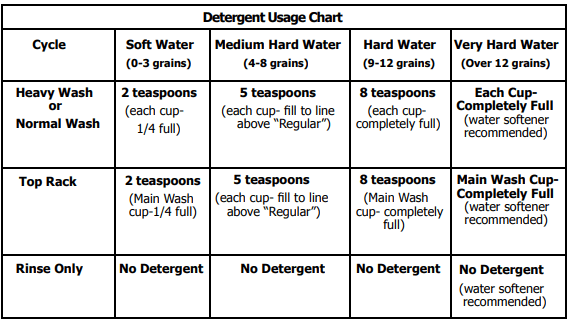
As a rule, use 1 teaspoon for each grain above 12. For very hard water, detergent alone may not be enough and then a water softener is recommended to improve water quality and dishwashing performance. However, when - using automatic dishwashing detergent tablets or packets simply place one in the main wash cup
Rinse Aid
Rinse aid greatly improves drying, reduces water spots, filming, and lubricates wash arm bearing for proper rotation. With it water “sheets” off dishes rather than forming water droplets that cling and leave spots.
A dispenser, located next to the detergent cup, automatically releases a measured amount of rinse aid during the last rinse. If spotting and poor drying are problems, increase the amount of rinse aid dispensed by rotating the dial to a higher number. The dial is located under the dispenser cap. The indicator will be dark when full and will show clear when it is time to refill.
To add liquid rinse aid, turn dispense cap 1/4 turn counterclockwise and lift out. Pour in rinse aid until liquid touches the indicated fill level Replace cap.
Do not overfill since this can cause oversudsing. Wipe up any spills with a damp cloth.
The dispenser holds enough for 35 to 140 washes, depending on setting.

Water Pressure
The hot water line to dishwasher must provide water pressure between 20 and 120 psi.
Low Water pressure may occur when laundry or showers are in operation. If you experience poor wash performance you may need to wait until water use is reduced before starting dishwasher.
Water Temperature
Hot water is needed for best dishwashing and drying results. Water entering dishwasher should be at least 120oF (49oC) to give satisfactory results.
To check water temperature entering dishwasher:
- Turn on hot water faucet nearest dishwasher for several minutes to clear cool water from pipes.
- Hold a candy or meat thermometer in the water stream to check the temperature.
- If temperature is below 120oF (49oC), have a qualified person raise the hot water heater thermostat setting.
CARE AND CLEANING

To empty the glass trap:
1. Grasp the glass trap’s handle and rotate it 900 clockwise while pressing down on the center of the wash arm.
2. Grab the spray arm in the center and lift the spray arm and glass trap assembly up and out form the dishwasher.
3. Tip the assembly over an appropriate container and tap it to empty the glass trap.
OR, separate the glass trap - pull the glass trap handle toward you, then up, then further toward you to slide it away from the rest of the assembly; empty it into an appropriate container; then slide the glass trap back into the assembly.
4. Place the assembly back into position, press down on the arm at the center and rotate the glass trap handle 900 counterclockwise being sure the glass trap ends in the orientation shown in the image above. To avoid damage to your unit make sure the spray arm and glass trap are fully snapped in place.
Outer Door - Clean outer door with warm soapy water and a dishcloth or sponge. Rinse with clean water and a dry cloth. Do not use harsh cleaners.
Inside - The inside of the dishwasher and filter are self-cleaning with normal use. If needed, clean around the tub gasket area with a damp cloth. The filter is self-cleaning. A glass trap located in the center of the fi lter is designed to collect pieces of broken glass, straws, bones and pits.
NOTE Hard water may cause lime deposit buildup on the interior of the dishwasher. For cleaning instructions see “Removing Spots and film” section.
Overfill Protector- keeps dishwasher from overfilling and is located in the left front corner of the tub.
- Clean occasionally with household cleaner containing vinegar or bleach to dissolve any buildup.
- Overfill Protector should move up and down freely about one inch. If it does not move, lift and clean underneath.

Care of Drain Air Gap
If a drain air gap was installed for your built-in dishwasher, check to make sure it is clean so the dishwasher will drain properly. A drain air gap is usually mounted on countertop and can be inspected by removing the cover. This is not part of your dishwasher and is not covered by warranty
Winterizing
A dishwasher left in an unheated place should be protected from freezing. Have a qualified person do the following:
To Disconnect Service:
1. Turn off electrical power to the dishwasher at the supply source by removing fuses or tripping circuit breaker.
2. Shut off water supply
3. Place a pan under the inlet valve. Disconnect water line from inlet valve and drain into pan.
4. Disconnect drain line from pump and drain water into pan.
To Restore Service:
1. Direct water line discharge into a pan and open the valve to fl ush the line.
2. Reconnect the water, drain, and electrical power supply.
3. Turn on water and electrical power supply.
4. Fill both detergent cups and run dishwasher through a HEAVY WASH cycle.
5. Check connections to make sure they do not leak.
Before You Call
Food Soils Left on Dishes
- Choose another cycle for longer washing time.
- Check rack loading section for proper loading-avoid nesting items.
- Do not overload the dishwasher (See Preparing and Loading Dishes).
- Check to verify that the glass trap is maintained and installed properly (See Care and Cleaning).
- Home water pressure may be too lowshould be 20 to 120 pounds per square inch (psi).
- Check incoming water temperature. It should be about 120oF (49oC). (See Factors Affection Performance).
- Check water hardness. For extremely hard water, it may be necessary to install a water softener. (See Detergent Chart).
- Use Fresh Detergent.
- Make sure items are not blocking the spray arms, preventing them from rotating.
Dishes not Dry
- By selecting Heat Dry, Hi-Temp Wash or Sanitize options this will improve drying.
- Make sure the rinse aid dispenser is filled.
- Increase the discharge setting of rinse aid. (See Rinse Aid).
- Check the incoming water temperature. Be sure it is at least 120oF (49oC).
- Check for proper loading-avoid nesting items.
- Plastic items may need to be towel dried.
- Cups with a concave bottom will collect water. Load them at the far left of the upper rack so they will be held in a tilted position.
- Containers, bowls, pots/pans, and any dishware with concave surfaces that can collect water should be placed in the rack facing or angled down so that water is able to drain even from the lowest point.
Glassware/Flatware Spotted or Cloudy
- Check water hardness. For extremely hard water, it may be necessary to install a water softener. (See Detergent Chart).
- Water temperature may be low. Avoid extremely low or high temperatures. (See Factors Affecting Performance).
- Avoid overloading and improper loading. (See Preparing and Loading Dishes).
- Use fresh detergent. Old detergent is ineffective.
- Make sure rinse aid dispenser is filled.
- Check to see that proper amount of detergent is being used for cycle selected. (See Detergent Dispenser).
- Home water pressure may be too low-it should be 20 to 120 pounds per square inch (psi).
Dishware Chipped
- Load with care and do not overload. (See Preparing and Loading Dishes).
- Place delicate items in top rack.
- Place glasses securely against pins and not over pins.
- Load items so they are secure and don’t jar loose when moving racks in and out. Move racks in and out slowly.
- Make sure tall glasses and stemware will clear top of tub when rack is pushed in.
- Fine antique china and crystal should be hand-washed.
Vapor at Vent
- Spilled rinse aid can cause foam and lead to overfl owing. Wipe up any spills with a damp cloth.
Dishware Stained or Discolored
- ea and coffee can stain cups. Remove the stains by hand washing in a solution of 1/2 cup (120 ml) bleach and one quart (1L) of warm water. Rinse thoroughly.
- Iron deposits in water can cause a yellow or brown film. A special filter installed in the water supply line will correct this problem. (See Removing Spots and Film).
- Aluminum utensils can leave gray/black marks when they rub against other items. Load Properly.
- Certain high acid foods can cause discoloration of stainless steel and plastics if allowed to sit for a long period. Use the Rinse Only cycle or rinse by hand if not operating dishwasher at once.
- Mixing stainless steel and silver utensils in silverware basket can cause pitting of the stainless steel blades. Avoid mixing stainless steel and silver.
Etching
- Using too much detergent especially in soft or softened water causes damage that looks like a film but cannot be removed.
- Adjust the amount of detergent based on the water hardness. (Check Detergent Chart).
- Lower the water temperature by selecting the Normal Cycle. Detergent Left in Cups
- Detergent may be old. Discard and use fresh detergent.
- Be sure the dish load doesn’t spray from entering the detergent cup.
- Check to see if cycle has been completed.
- Make sure items do not prevent the detergent dispenser from opening.
Normal Sounds You Will Hear
- Normal sounds include water fill, water circulation and motor sounds.
- There is a noticeable change in sound when the wash action switches between the lower and middle spray arm. This is normal since each spray arm has it’s own sound.
- It is normal for the dishwasher to pause (no sound) when the wash action is switching between the lower and middle spray arms.
Water in Bottom of Tub
- Water left in the tub bottom after the cycle is complete is not normal. If water remains in the bottom of the tub, the dishwasher may not be draining properly. (See Dishwasher Does not Drain Properly).
Cycle Takes a Long Time
- The cycle may have been automatically lengthened to reach key temperatures due to some factor such as a cool water supply or a large load of dishes.
- Delay Start option may have been selected.
- Choose lower temperature options to shorten the cycle.
- Cycles that are soil-sensing adjust automatically to assure a good wash - heavier soils will elicit a longer cycle response.
Detergent Left in Cups
- Detergent may be old. Discard and use fresh detergent.
- Be sure the dish load doesn’t block spray from entering the detergent cup.
- Check to see if cycle has been completed.
- Make sure items do not prevent the detergent dispenser from opening.
Dishwasher Leaks
- Check that the door gasket is pressed into its mounting channel, reaches to the bottom of the tub and does not extend beyond the end rib so as to interfere with door closure.
- Spilled rinse aide can cause foam and lead to overflowing. Wipe up any spills with a damp cloth.
- Check to see that the dishwasher is level. (See Installation Instructions).
- Avoid oversudsing by using the correct amount of detergent designed for automatic dishwashers.
- Check to see that dishwasher is level. (See Installation Instructions).
Dishwasher Won’t Fill
- Assure the water supply is turned on.
- Check that the overfill protector moves up and down freely. (See Overfill Protector section).
Dishwasher Won’t Run
- Check to see if circuit breaker is tripped or if a fuse is blown.
- Make sure water supply is turned on.
- Check to see if cycle is set correctly. (See Operating Instructions).
- Is dishwasher set for Delay Start Option?
- Make sure door is closed and latched.
- Make sure START/CANCEL pad is pressed after the cycle has been selected.
Dishwasher Does Not Drain Properly
- If unit is hooked up to a food waste disposer, make sure the disposer is empty.
- Assure the knockout plug has been removed from inside the food waste disposer inlet.
- Assure the drain hose isn’t kinked.
- Make sure cycle is complete, not in a pause.
- Assure the glass trap is maintained and installed properly assuring no clogs (See Care and Cleaning).
Dishwasher has an Odor
- Soiled dishes left in dishwasher too long can create an odor. Use Rinse Only cycle.
- There will be a “new” smell when first installed. This is normal.
- Check to see if unit is draining properly. (See Dishwasher Does Not Drain Properly)
Stains on Tub Interior
- Washing large amounts of dishware with tomato based soil can cause a pink/ orange appearance. This will not affect performance and will gradually fade over time. Pre-rinsing or using the Rinse Only cycle will reduce the chance of staining. Using no heat dry option will lessen staining.
Opening the door during cycle
- If the dishwasher door is opened while the unit is running, the START/CANCEL pad must be pressed and the door shut immediately to return the unit to the selected cycle and option, this must happen within 10 minutes for the unit to continue the cycle.
Removing Spots and Film
Hard water can cause lime deposit buildup on the interior of the dishwasher. Dishes and glasses may also get spots and film for a number of reasons. (See Glassware/Flatware Spotted or Cloudy section). To remove buildup, and film, clean using the following instructions:
1. Load clean dishes and glasses in normal manner. Do not load any metal utensils or silverware.
2. Do not add detergent.
3. Select the NORMAL WASH cycle. Close and latch door. Press START/CANCEL pad.
4. Allow dishwasher to run until it starts the second water fill (approximately 10 minutes).
5. Unlatch and open door and pour 2 cups of white vinegar into the bottom of dishwasher.
6. Close and latch door and allow cycle to finish.