The glass cooking surface retains heat and stays hot after the element(s) have been turned off. The retained heat may be used to hold foods at serving temperatures for a short time. If a hot surface light is on, use caution when working or cleaning around the cooktop as the cooktop is still hot.
Hot Surface Indicator
The cooktop displays a hot indicator light to show when the cooking surface is too hot to touch. If a hot surface light is on, use caution when working or cleaning around the cooktop as the cooktop is still hot.
Oven Features
Cooling Fan
The cooling fan runs during all cooking modes. The fan can be heard when it is running, and warm air may be felt as it is released from the oven vent. The fan may also run after the oven is off.
Convection Fan
The convection fan operates during all convection modes. When the oven is operating in a convection mode, the fan turns off automatically when the door is opened. The convection fan may also run during Fast Preheat and Self-Clean.
Oven Bottom
The oven bottom conceals the lower heating element. As a result the element is protected from damage and spills. Tip: Do not place food directly on the oven bottom.
WARNING: Do not use aluminum foil or protective liners to line any part of the appliance, especially the oven bottom. Installation of these liners may result in a risk of electric shock or fire.
Oven Vent
The oven vent is located at the bottom of the unit. Warm air may be released from the vent before, during and after cooking. It is normal to see steam escaping from the vent, and condensation may collect in this area. This area may be warm when the oven is in use. Do not block the vent, since it is important for air circulation.
Automatic Shutoff
The oven will automatically shut off after 24 hours.
Self-cleaning
The oven features a self-cleaning function that eliminates the manual labor involved with cleaning your oven.
Indicators and Other Features
Default Settings - The cooking modes automatically select the default temperature. These can be changed when a different one is needed.
E Number Codes - These codes display when there is a problem with the range.
Standby Mode - Standby mode means that the oven has power but no cooking mode or timer is running.
Accessories
Probe The probe can be used to determine the internal doneness or the end temperature of many foods, especially meats and poultry.
Do not clean in the Self Clean oven or dishwasher.
Flat Rack Use for most cooking. Can use multiple racks in some modes.
Do not clean in the self-clean oven.
Telescopic Rack (some models) Additional 30-inch racks available from e-Shop: #HEZTR301 Use with heavier dishes to make easier to place dishes into the oven. Check on food while cooking and remove dishes from oven when done.
Do not clean in the self-clean oven.
Broiling Pan (available from e-Shop) Pan: #00449757 Grill top: #00449756 Use for broiling and roasting.
Do not clean in the self-clean oven.
Inserting Racks
CAUTION
To avoid burns, place oven racks in desired positions before turning oven on. Always use oven mitts when the oven is warm. If a rack must be moved while the oven is hot, do not let oven mitts contact hot heating elements.
Use caution when removing oven racks from the lowest rack position to avoid contact with the hot oven door.
To avoid possible injury or damage to the appliance, ensure racks are installed exactly per installation instructions and not backwards or upside down.
Flat Rack The rack is designed with a stop so it will stop before coming completely out of the oven and not tilt.
To insert Flat Rack into Oven:
Grasp rack firmly on both sides.
Insert rack (see picture).
Tilt rack up to allow stop into rack guide.
Bring rack to a horizontal position and push the rest of the way in. Rack should be straight and flat, not crooked.
To remove Flat Rack from Oven:
Grasp rack firmly on both sides and pull rack toward you.
When the stop is reached, tilt rack up and pull the rest of the way out.
Telescopic Rack
To insert Telescopic Rack into Oven:
Slide the rack in evenly until the rear of the rack is about two (2) inches from the back of the oven.
Tilt the front of the rack up about 3/4” (A) and finish pushing the rack all the way back (B). Note: Avoid striking the oven light cover glass when pushing the rack into position.
The back of the telescopic rack drops in to place.
Pull the rack forward to engage the bottom of the rack onto the rear of the rack position guide.
Lower the front of the rack to finish seating it on the rack guide. The rack should feel stable when properly seated.
Slide the movable part of the telescopic rack in and out a few times to make sure it is able to move freely and that the non-moving part of the telescopic rack is securely anchored.
CAUTION: To avoid possible injury or damage to the appliance, ensure the telescopic rack is installed exactly per installation instructions and not backwards or upside down.
To Remove Telescopic Rack from the Oven:
Lift the front of the telescopic rack assembly about 1/2” and push the rack to the rear about 3/4”. This allows the rack to disengage from the rack position guide.
Lift the rear of the telescopic rack assembly so it clears the rack position guide and gently pull the rack from the oven.
Note: Take care to avoid pulling the rack unevenly which will cause it to bind during removal, catching on the oven walls.
Before Using the Appliance for the First Time
Remove all packaging materials and labels from the range.
Range must be properly installed by a qualified technician before use.
Remove packing materials from inside the oven and inside the drawer.
While cool, wipe with clean, damp sponge and dry.
Apply the glass ceramic cooktop cleaner to the glass ceramic cooktop. Buff with a clean cloth. See Care and Cleaning Section.
There may be a slight odor during first uses. This is normal and will disappear.
Optimum cooking results depend on proper cookware and bakeware being used.
The cooking surface will hold the heat and remain hot after the elements have been turned off.
Read and understand all safety precautions and Use and Care Manual information prior to operating.
Getting familiar with the appliance
In this section we describe the control panel, elements and displays. These instructions apply to more than one cooktop, your appliance might vary slightly.
Control panel (Benchmark Series)
Touch control When the cooktop heats up, the keys for the touch controls available at this time light up. Touching a key activates the respective function.
Notes
The corresponding keys for the controls light up depending on whether they are available. The displays for the elements or the selected functions get brighter.
Always keep the control panel clean and dry. Moisture can prevent it from working properly.
The elements
Residual heat indicator
The cooktop has a residual heat indicator for each element. This indicates that an element is still hot. Do not touch an element while the residual heat indicator is lit up.
The following are shown depending on the amount of residual heat:
Display : High temperature
Display : Low temperature
If you remove the cookware from the element during cooking, the residual heat indicator and the selected heat setting will flash alternately
When the element is switched off, the residual heat indicator will light up. Even after the cooktop has been switched off, the residual heat indicator will stay lit for as long as the element is still warm.
Operation
Main power switch
Use the main switch to turn on the electronic circuitry for the control panel. The cooktop is now ready to use.
Turning the cooktop on Touch the On/Off touch key. An acoustic signal will sound. The __ indicator located on top of the On/Off touch key and the symbols for the cooking zones light up. lights up next to the cooking zones. The cooktop is ready to use.
Turning the cooktop off Touch the On/Off touch key. The __ indicator goes out. The cooktop is switched off. The residual heat indicators will remain on until the elements have cooled off sufficiently.
Note: The cooktop switches off automatically when all the elements have been switched off for more than 20 seconds. The residual heat indicator remains lit until the elements have cooled down sufficiently. is displayed next to the corresponding element symbol.
Setting the cooktop
This section will show you how to set the elements. The table contains details on the heat settings for a variety of dishes.
Setting the element
Select the desired heat level using the number keys 1 to 9.
Heat level 1 = minimum power
Heat level 9 = maximum power
Each heat setting has an intermediate level. This level is indicated by .5 in the element display and is set by touching the symbols between the number keys.
Selecting the heat level The cooktop must be turned on.
Select the desired element with by touching the or symbol of the desired element. In the cooking zone display lights up brighter.
Within the following 10 seconds, set the desired power level using the number keys.
The power level is set. symbols between the number keys.
Changing the power level
Select the cooking zone and then set the required power level in the control panel.
Turning off the the cooking zone Select the cooking zone and set the power level to 0. The cooking zone is turned off and the residual heat indicator is displayed.
Notes
If there is no cookware on the induction cooking zone, the heat setting display blinks. After a while, the cooking zone will switch itself off.
If cookware has been placed on the cooking zone before you turn on the cooktop, it will be detected within 20 seconds after you have touched the main switch and the cooking zone will be selected automatically. Once detected, set the power level within the next 20 seconds, otherwise the cooking zone will turn off. Even if there are several pots and pans on the cooktop when it is switched on, only one piece of cookware is automatically selected.
Recommendations for cooking
Set heat setting 8 to 9 for preheating ; for delicate dishes like milk, pudding, rice pudding or cereals heat up with setting 8 - 8.5.
When cooking with the lid on, turn the heat setting down as soon as steam escapes between the lid and the cookware. Steam does not need to escape for a good cooking result.
After cooking, keep the lid on the cookware until you serve the food.
To cook with the pressure cooker, observe the manufacturer's instructions.
Do not cook food for too long, otherwise more nutrients than necessary will be lost. The kitchen timer can be used to set the optimum cooking time.
For a more healthy cooking result, smoking oil should be avoided.
To brown food, fry small portions in succession.
Cookware may reach high temperatures while the food is cooking. We recommend that you use oven mitts.
Settings table The following table provides some examples. Cooking times may vary depending on the type of food, its weight and quality. Deviations are therefore possible.
CAUTION: During cooking, stews or liquid meals such as soups, sauces or drinks can heat up too quickly unnoticed and overflow or spatter. For this reason we recommend that you stir continuously, gradually heating the food at a suitable power level.
* ongoing cooking without lid ** without lid
FlexInduction® cooking zone
You can combine the elements into a large cooking zone as needed or use two elements that are independent of one another. The FlexInduction® cooking zone consists of 4 inductors, which are controlled independently of one another. When FlexInduction® is in use, only the area is activated that is covered by cookware.
Cookware use recommendations
Place the cookware in the middle. This guarantees optimal pot detection and heat distribution.
As two independent elements
The flexible cooking zone is used like two independent elements.
Turning on
See section on → "Setting the cooktop".
As a single element
Using the entire cooking zone by connecting both elements.
Linking the two elements
The cooktop must be turned on.
Set down the cookware. Select one of the two elements assigned to the flexible cooking zone and set the power level.
Touch the Flex Join/Split key. The display lights up.
The heat setting appears in the display for the lower element.
The flexible cooking zone is activated.
Changing the power level
Select one of the element in the flexible cooking zone and change the power level with the number keys.
Add another piece of cookware
Set the new item of cookware down on the cooktop, select one of the two elements in the flexible cooking zone and then touch the Flex Join/Split key twice. The new item of cookware will be detected and the power level that was previously selected will be retained.
Note: If the cookware is moved to the element being used or lifted up, the element begins an automatic search and the heat setting selected previously is retained.
Separating the two elements
Select one of the two elements in the flexible cooking zone and touch the Flex Join/Split key.
This deactivates the flexible cooking zone. The two elements will now function independently.
Notes
If the element is switched off, and then switched back on again later, the flexible cooking zone is reset to function as two independent elements.
To change the configuration settings for the flexible cooking zone, refer to the section on -> "Basic settings".
PowerMove function
This function activates the entire flexible cooking zone, which is divided into three cooking areas and which has preset power levels.
Only use one item of cookware. The size of the cooking area depends on the cookware used and whether it is positioned correctly.
Cooking areas
This means that an item of cookware can be moved during the cooking process to another cooking area with another power level:
Preset power levels:
Front area = power level
Middle area = power level
Rear area = power level
The preset power levels can be changed independently of one another. You can find out how to change these in the section on → "Basic settings"
Notes
If more than one item of cookware is detected on the flexible cooking zone, the function is deactivated.
If the cookware is moved within the flexible cooking zone or lifted up, the cooktop automatically starts searching and the power level of the area in which the cookware was detected is set.
You can find information on the size and positioning of the cookware in the section on the function→FlexInduction® cooking zone".
Activation
Select one of the two elements in the flexible cooking zone.
Touch the Power Move key. The indicator beside the Power Move key lights up. The flexible cooking zone is activated as a single cooking zone. The power level in the area in which the cookware is located lights up in the cooking zone display.
The function has now been activated.
Changing the power level
The power levels for the individual cooking areas can be changed during the cooking process. Set the cookware down on the cooking area and change the power level using the number keys.
Notes
Only the power level in the area in which the cookware is located is changed.
If the function is deactivated, the power levels for the three cooking areas are reset to the preset values.
Deactivating
Touch the Power Move key. The indicator beside the Power Move key goes out.
The function was deactivated.
Note: If one of the cooking areas is set to ‹, the function deactivates after a few seconds.
Time-setting options
Your cooktop has three timer functions:
Programming the cooking time
Kitchen timer
Stopwatch function
Programming the cooking time
The element automatically switches off after the set time has elapsed.
Setting procedure:
Select the element and the required power level.
Touch the Cook Timer key. The symbol and the indicator light up in the Cook Timer display. lights up in the display for the element.
Within the next 10 seconds, set the required cooking time using the number keys.
Touch the Cook Timer key to confirm the selected setting.
The cooking time begins to elapse.
Notes
The same cooking time can be set automatically for all elements. The set time for each of the elements counts down independently. You can find information on automatically programming the cooking time in section on “Cook timer”.
If the flexible cooking zone is selected as the only element, the set time for the entire cooking zone is the same.
If the Move function is selected for the combined cooking zone, the set time for the three elements is the same.
Changing or deleting the time
Select the element and then touch the Cook Timer key.
Change the cooking time using the number keys or set to delete the programmed cooking time.
Touch the Cook Timer key to confirm the selected setting.
When the time has elapsed
The element switches off, the display flashes and the element switches to power level An acoustic signal sounds. and the indicator flash in the timer display.
When the symbol is touched, the indicators go out and the acoustic signal ceases.
Notes
To set a cooking time of under 10 minutes, always touch 0 before you select the required value.
If a cooking time was set for several elements, the time information for the selected element is shown in the timer display.
Select the relevant element to call up the remaining cooking time.
You can set a cooking time of up to minutes.
Kitchen timer
The timer can be set for periods of up to 99 minutes. It is independent of the other settings. You can also use the kitchen timer when the cooktop is turned off or locked.
This function does not automatically switch off an element.
Setting procedure
Touch the Kitchen Timer key. The symbol and the indicator light up in the timer display.
Select the required time on the control panel and touch the Kitchen Timer key to confirm.
After a few seconds, the time begins to elapse.
Changing or deleting the time
Touch the Kitchen Timer key.
Change the cooking time using the number keys or set to delete the programmed cooking time.
Touch the Kitchen Timer key to confirm the selected setting.
When the time has elapsed
An audible signal sounds once the time has elapsed. and the symbol flash in the timer display. The indicators go out after touching the Kitchen Timer key.
Count-up timer function
The count-up timer function displays the time that has elapsed since activation.
This functions independently from the elements and from other settings. This function does not automatically switch off an element.
Activating
Touch the Count Up Timer key. Thesymbol and the indicator light up in the timer display.
The time begins to count up.
Deactivating
Touching the Count Up Timer key the stopwatch function. The timer displays remain lit.
If you touch the Count Up Timer key again, the displays go out.
The function is deactivated.
SpeedBoost® function
The SpeedBoost® function enables you to heat up large quantities of water faster than when using heat setting This function can always be activated for an element, provided the other element in the same group is not in use (see illustration).
Note: The SpeedBoost® function can also be activated in the FlexInduction® area if it is being used as a single cooking zone
Activating
Select an element.
Touch the Speed Boost key. The lights up on the display.
The function is activated.
Deactivating
Select the element.
Touch the Speed Boost key. The goes out on the display and the element switched back to heat setting .
The function is deactivated.
Note: In certain circumstances, the function may be deactivated automatically to protect the internal electronic components of the cooktop.
ShortBoost function
The ShortBoost function enables you to heat cookware faster than when using heat setting .
After deactivating the function, select the appropriate heat setting for your food.
This function can always be activated for an element, provided the other element in the same group is not in use (see illustration).
Note: The ShortBoost function can also be activated in the FlexInduction® area if it is being used as a single cooking zone.
Recommendations for use
Always use cookware that has not been pre-heated.
Use pots and pans with a flat base. Do not use containers with a thin base.
Never leave empty cookware, oil, butter or lard to heat up unattended.
Do not place a lid on the cookware.
Place the cookware on the center of the element. Ensure that the diameter of the base of the cookware corresponds to the size of the element.
You can find information on the type, size and positioning of the cookware in section Cooking with Induction.
Activating
Select an element.
Touch the Speed Boost key twice.
The indicator lights up.
The function is activated.
Deactivating
Select an element.
Touch the Speed Boost key.
Thedisplay goes out and the element switches back to heat setting
The function is deactivated.
Note: In certain circumstances, the ShortBoost function can switch itself off automatically to protect the electronic elements inside the cooktop.
Keep Warm function
This function is suitable for melting chocolate or butter and for keeping food warm.
Activating
Select the required power level.
Within the next 10 seconds, touch the Keep Warm key.
The indicator lights up.
The function is activated.
Deactivating
Select an element.
Touch the Keep Warm key.
The display goes out. The element switches itself off and the residual heat indicator appears.
The function is deactivated.
Panel lock
You can use the child safety panel lock to prevent children from accidentally turning the cooktop on.
Activating and deactivating the panel lock
The cooktop must be turned off.
To activate:
Switch on the cooktop using the main switch. Touch the Panel Lock key for approx. 4 seconds. The indicator lights up for 10 seconds. The cooktop is now locked.
To deactivate:
Switch on the cooktop using the main switch.
. Touch the Panel Lock key for approx. 4 seconds The lock is released.
Automatic panel lock
With this function, the panel lock is automatically activated whenever you turn off the cooktop.
Turning on and off- See "Basic settings" section.
Wipe Protection
Cleaning the control panel while the cooktop is on may change the settings. In order to avoid this the cooktop has a wipe protection function.
To activate: Touch the Panel Lock key. An acoustic signal sounds. The control panel is locked for 35 seconds. You can now wipe over the surface of the control panel without altering any settings.
To deactivate: The control panel will be unlocked once 35 seconds have elapsed. To release the function early, touch the Panel Lock key.
Notes
An acoustic signal sounds 30 seconds after activation. This indicates that the function is about to finish.
The wipe protection function does not lock the main switch. The cooktop can be switched off at any time.
Automatic time limitation
If the element is used for prolonged periods of time without changes in the settings being made, the automatic time limitation function is triggered.
The element stops heating. and the residual heat indicator flash alternately in the display.
The indicator goes out when any symbol is pressed. The element can now be reset.
When the automatic time limitation is activated depends on the selected heat level (from 1 to 10 hours).
Basic settings
The appliance has various basic settings. You can adjust these settings to the way you usually cook.
*factory settings
Changing the basic settings The cooktop must be turned off.
Turn on the cooktop with the main switch.
Within10 seconds, touch the Timer key for about 4 seconds. The first four displays provide product information. Touch the settings area to view the individual displays.
Touching the Timer key again takes you to the basic settings. In the display light up alternately and in the timer display lights up as a default setting.
Touch Timer repeatedly until the indicator for the desired function appears in the element display.
Set the required value with the number keys
Touch Timer again for 4 seconds. The setting is stored.
Quit basic settings Turn the cooktop off with the main switch.
Energy consumption indicator
This function indicates the total amount of energy consumed by this cooktop the last time it was used for cooking.
Once switched off, the energy consumption in kWh is displayed for 10 seconds.
The picture shows an example with an energy consumption of kWh.
You can find out how to turn this function on in the section on ~ "Basic settings".
Cooking with Induction
Advantages of induction cooking
Induction cooking is very different from traditional cooking methods, as heat builds up directly in the item of cookware. This offers numerous advantages:
Saves time and energy when boiling and frying.
Easier to care for and clean. Spilled food does not burn on as quickly.
Heat control and safety – the cooktop increases or decreases the heat supply as soon as the user changes the setting. The induction element stops the heat supply as soon as the cookware is removed from the element, without having to switch it off first.
Cookware
Only use ferromagnetic cookware for induction cooking, such as:
Cookware made from enameled steel or cast iron
Special induction-compatible cookware made from stainless steel.
To check whether your cookware is suitable for induction cooking, refer to the section on "Suitability test of cookware".
To achieve a good cooking result, the ferromagnetic area on the base of the pan should match the size of the element. If a element does not detect an item of cookware, try placing it on another element with a smaller diameter.
Some induction cookware does not have a fully ferromagnetic base:
If the base of the cookware is only partially ferromagnetic, only the area that is ferromagnetic will heat up. This may mean that heat will not be distributed evenly. The non-ferromagnetic area may not heat up to a sufficient temperature for cooking.
The ferromagnetic area will also be reduced if the material of which the base of the cookware is made contains aluminum, for example. This may mean the cookware will not become sufficiently hot or detected.
Unsuitable cookware Do not ever use adapter plates for induction or cookware made of:
Traditional Stainless Steel, Copper, Aluminum
Glass
Clay
Properties of the base of the cookware
The material(s) of which the base of the cookware is made can affect the cooking result. Using pots and pans made from materials that distribute heat evenly through them, such as stainless-steel pans with a three-layer base, saves time and energy.
Use cookware with a flat base; if the base of the cookware is uneven, this may impair the heat supply.
No pan or improper size
If no pan is placed on the selected element, or if it is made of unsuitable material or is not the correct size, the power level displayed on the element indicator will flash. Place a suitable pan on the element to stop the flashing. If you take longer than 90 seconds to place a suitable pan on the element, it will automatically turn off.
Empty pans or pans with a thin base
Do not heat up empty pans, or use pans with a thin base. The cooktop is equipped with an internal safety system. However, an empty pan may heat up so quickly that the "automatic switch off" function may not have time to react and the pan may reach very high temperatures. The pan base could melt and damage the cooktop glass. In this case, do not touch the pan and switch the cooktop off. If the cooktop fails to work after it has cooled down, please contact the technical service.
Pan detection
Each element has a lower limit for pan detection. This depends on the diameter of the ferromagnetic area of the cookware and the material of which its base is made. For this reason, you should always use the element that best matches the diameter of the base of the pan.
Cleaning and Maintenance-Cooktop
Daily Cleaning
Notes
Clean only parts listed in manual.
Bosch cleaners have been tested and approved for use on Bosch appliances. Other recommended cleaners do not constitute an endorsement of a specific brand.
Cleaning the Cooktop
WARNING - DO NOT TOUCH SURFACE UNITS OR AREAS NEAR UNITS Surface units may be hot even though they are dark in color. Areas near surface units may become hot enough to cause burns. During and after use, do not touch, or let clothing or other flammable materials contact surface units or areas near units until they have had sufficient time to cool. Among those areas are the cooktop and surfaces facing the cooktop.
CAUTION: Do not use any kind of cleaner on the glass while the surface is hot. The resulting fumes can be hazardous to your health. Heating the cleaner can chemically attack and damage the surface.
Precautions for Long Life and Good Appearance of the Surface
Regular, daily care using the glass ceramic cooktop cleaner will protect the surface and make it easier to remove food soil and water spots.
The glass ceramic cooking surface is a durable material resistant to impact but not unbreakable if a pan or other object is dropped on it.
Never cook food directly on the glass.
Avoid placing a wok support ring, trivet or other metal stand on glass surface.
Do not use the glass surface as a cutting board.
Do not slide cookware across the cooking surface as it may scratch the surface.
Do not place wet pans on the glass surface.
Care Before Use
Care is easy when preventative steps are taken. For example, apply a small amount of glass ceramic cooktop cleaner (packaged with range) on a daily basis. This provides a protective film that makes it easy to remove water spots or food spatters. The temperature of the cooking surface reduces the protective qualities of this cleaner. It must be reapplied before each use. Use a clean cloth and apply glass ceramic cooktop cleaner before each use to remove dust or metal marks that can occur on the counter level surface between uses.
Daily Cleaning Techniques
WARNING - RISK OF BURNS Be extremely careful as the cooking surface is hot. If using damp sponge or cloth, wait until the cooktop has cooled sufficiently to prevent steam burns. Also, some cleaners give off noxious fumes when applied to hot surfaces.
Clean the surface when it is completely cool with glass ceramic cooktop cleaner. Exception: Remove dry sugar, sugar syrup, tomato products and milk with the razor blade scraper once the cooktop has sufficiently cooled. See Cooktop Care Chart on the next page.
Wipe off spatters with a clean, damp sponge or a paper towel. Rinse and dry. Use white vinegar if smudge remains; rinse.
Apply a small amount of the glass ceramic cooktop cleaner. When dry, buff surface with a clean paper towel or cloth.
Using the Razor Blade Scraper
Use the scraper to remove dried or baked on foods. Wait until the cooktop has cooled sufficiently. Hold the scraper at a 30° angle. Move it over the soil to lift it off of the cooktop. Finish with a clean, damp sponge or paper towel. Apply white vinegar if smudge remains and rinse.
WARNING - RISK OF INJURY The blade is extremely sharp. Risk of cuts. Protect the blade when not in use. Replace the blade immediately when any imperfections are found. Follow manufacturer’s instructions.
Cleaning guidelines
When using a cleaner, use only a small amount; apply to a clean paper towel or cloth. Wipe on the surface and buff with a clean dry towel.
Avoid these cleaners
Glass cleaners which contain ammonia or chlorine bleach. These ingredients may damage or permanently stain the cooktop.
Caustic cleaners such as Easy Off® may stain the cooktop surface.
Abrasive cleaners.
Metal scouring pads and scrub sponges such as Scotch Brite® can scratch and/or leave metal marks.
Soap-filled scouring pads such as SOS® can scratch the surface.
Powdery cleaners containing chlorine bleach can permanently stain the cooktop.
Flammable cleaners such as lighter fluid or WD-40.
Cleaning charts
Type of Soil
Possible Solution
Dry sugar, sugar syrup, milk or tomato spills. Melted plastic film or foil. All these items require removal after the cooktop has sufficiently cooled. Be extremely careful as the cooking surface is hot. Failure to remove these can permanently damage the surface.
Remove these types of spills after the surface has sufficiently cooled using the razor blade scraper. Use a new, sharp razor in the scraper. Remove pan and turn off the element. Wearing an oven mitt, hold scraper at 30° angle, using care not to gouge or scratch the glass. Push soil off the heated area. After the surface has cooled, remove the residue and apply the glass ceramic cooktop cleaner.
WARNING - RISK OF INJURY The blade is extremely sharp. Risk of cuts. Protect the blade when not in use. Replace the blade immediately when any imperfections are found. Follow manufacturer’s instructions.
Burned-on food soil, dark streaks, and specks
Soften by laying a damp paper towel or sponge on top of soil for 30 minutes. Use a plastic scrubber and glass ceramic cooktop cleaner or use the razor blade scraper. Rinse and dry.
Greasy spatters
Use a soapy sponge or cloth to remove grease; rinse thoroughly and dry. Apply glass ceramic cooktop cleaner.
Metal marks: Iridescent stain
Pans with aluminum, copper or stainless steel bases may leave marks. Treat immediately after surface has cooled with glass ceramic cooktop cleaner. If this does not remove the marks, try a mild abrasive (Bon Ami®, Soft Scrub® without bleach) with a damp paper towel. Rinse and reapply glass ceramic cooktop cleaner. Failure to remove metal marks before the next heating makes removal very difficult.
Hard water spots: Hot cooking liquids dripped on surface
Minerals in some water can be transferred onto the surface and cause stains. Use undiluted white vinegar, rinse and dry. Recondition with glass ceramic cooktop cleaner. Remove boilovers and stains before using the cooktop again.
Surface scratches: Small scratches are common and do not affect cooking. They become smoother and less noticeable with daily use of the glass ceramic cooktop cleaner.
Apply glass ceramic cooktop cleaner before using to remove sand-like grains and grit such as salt and seasoning. Scratches can be reduced by using pans with bases that are smooth, clean, and dry before use. Use recommended glass ceramic cooktop cleaner daily.
NOTE: Diamond rings may scratch the surface.
Maintenance
This appliance requires no maintenance other than daily cleaning. For best results, apply cooktop cleaning cream daily.
Operation-Oven
Oven Control Panel
Mode Selection Buttons
Display
Numeric Keypad Buttons
Special Function Buttons
Note: You only need to press lightly on the buttons to operate them.
Button Descriptions
More Modes
Additional modes are available by pressing the More Modes button. These modes include Convection Broil, Warm, Pizza, Proof and Roast. These are discussed in the Getting the Most Out of Your Appliance section later in this manual.
Display Symbols
About the Oven
Your new oven combines premium cooking results and simple operation.
The oven design has been optimized to improve heat distribution in the oven cavity. The result is even browning, shorter cooking times and lower energy consumption.
Thanks to the Self Clean mode, hours of scrubbing into the darkest corners of the oven is a thing of the past. The oven burns off soil simply and easily. All that is left to do is to remove a few ashes from the oven when Self Clean is done.
Clear labeling of the touch pads makes operating the oven very easy. This manual includes all instructions for operating the oven.
Please call us if you ever have any questions. Our telephone number is located at the beginning of this manual. We welcome your comments and suggestions.
Basic Features
Setting the Clock
The oven includes time functions that require the current time to be set. It is therefore important to set the clock before beginning to use the oven. The oven cannot be in a cooking mode to access the clock set mode.
To set the clock:
The oven must be in Standby mode (oven is powered on, but no cooking mode or timer in operation).
To access the clock set mode: Press the Settings button. The display shows “SET CLOCK”. Press Enter to edit the clock.
Use the numeric keypad to enter the desired time. Each number pressed is entered at the right and moving previously entered digits to the left. To set “12:45 pm”, press 1,2,4,5.
When the desired time is entered, set the time by pressing Enter. The clock is now set and running.
Setting the Cooking Mode and Temperature There are two alternate methods to set cooking mode and temperature.
To set the Cooking Mode first, then the temperature:
Press the desired Cooking Mode button. The cooking mode and default temperature are displayed. The temperature flashes to show it can be edited.
Press Enter to start the mode using the default temperature.
To change the temperature, enter the new temperature using the numeric buttons. For example, changing temperature to 375°. Press Enter to set the updated temperature. Note: The new temperature is automatically set after 10 seconds if Enter is not pressed.
Preheating starts. Note: If a temperature is entered that is not within the allowed range for the mode, an error tone will sound and the lower part of the screen will display “TEMP NOT ALLOWED”.
To set the Temperature first and then the Cooking Mode (not for Broil or Convection Broil):
Press the numeric keys to enter the desired temperature setting. The temperature entered is displayed beside the current time.
Select a cooking mode that is compatible with the temperature entered. If no cooking mode is selected within 5 seconds of setting the temperature, an error tone sounds and a “SELECT MODE” message is displayed and blinks.
Press a Mode Selection button to select a cooking mode. The new mode and temperature set automatically after 10 seconds if Enter is not pressed. Note: If a temperature is entered that is not within the allowed range for the mode selected, an error tone will sound and the lower part of the screen will display “TEMP NOT ALLOWED”.
To change the Oven Temperature:
Press the Cooking Mode button.
The current temperature flashes. Use the numeric buttons to enter a new temperature. Press Enter.
Heating Time Limitation
The maximum heating time is limited. If you forget to turn off the oven, it turns off automatically after a set period of time.
The maximum time for Sabbath Mode is 74 hours. For all other cooking modes the maximum allowed time is 24 hours.
Timer Your new oven is equipped with two types of timers.
Kitchen Timer - is a countdown timer that has no affect on oven heating. The kitchen timer is used for general kitchen timing needs.
Oven Timer - is a countdown timer which upon reaching 00:00 turns the oven off, stopping the current mode. The oven timer is used to set how long a mode will run. Not available for Broil, Convection Broil or Proof.
To set a kitchen timer (for general kitchen timer needs):
Press the Kitchen Timer On/Off button. 0:00 is displayed and blinks in the display. Enter the desired timer value in H/MM format using the numeric keypad.
Press Enter. The kitchen timer starts.
When the kitchen timer has counted down to zero an alarm tone sounds every 10 seconds for 2 minutes and the message “TIMER END” is displayed.
Cancel the kitchen timer - press the Kitchen Timer On/ Off button.
Note: The timer does not change when other settings are changed.
To edit a kitchen timer (for setting a timer to turn the oven off):
Press the Kitchen Timer On/Off button.
The current time value blinks and can be edited.
To set an oven timer:
Note: An oven timer cannot be run during Self Clean.
Press Oven Timer button.
Select mode, press Enter. 0:00 is displayed and blinks in the display. Enter the desired timer value in H/MM format using the numeric keypad. Press the Enter button. The oven timer counts down to 0:00.
When the timer reaches :00 the cooking mode ends and the message “OVEN TIMER FINISHED” is displayed. The oven alarm tone sounds every 10 seconds for 2 minutes.
Editing the oven timer:
If the oven timer is running and the time remaining needs to be changed, enter the oven timer mode by pressing the Oven Timer button
The temperature blinks, indicating it can be edited. Input a new temperature or press Enter for no change.
The timer value blinks, indicating it can be edited. Input the new time and restart the timer by pressing the Enter button.
The oven timer may be cleared by entering 0:00.
Fast Preheat
Fast Preheat heats the oven quicker than standard preheat. It is available for Bake, Convection Multi Rack, Convection Bake, Convection Roast, Roast and Pizza.
Roast is found in the “More Modes” menu. If Fast Preheat is not allowed for the selected cooking mode an error tone sounds. Fast Preheat is not available for Broil, Convection Broil, Proof or Warm.
To set Fast Preheat:
Press Fast Preheat. The fast preheat icon appears in the display just above the mode name.
Press Start. Fast Preheat can be turned off by pressing Fast Preheat again.
Special Features
The special features provide you with additional conveniences when cooking.
Learn more about these special features in the following sections:
Probe (some models)
Sabbath Mode
Panel Lock
Probe
The probe measures the internal temperature of the food. The probe is available for Bake, Roast and all convection cooking modes except Convection Broil.
Some models include a temperature probe used to sense internal temperature of meats during cooking.
The probe ships with a black plastic safety cap over the pointed metal end of the probe. The cap must be removed prior to use.
Inserting the probe:
Insert the tip of the probe in the middle and thickest part of the meat or the breast for poultry. Make sure the probe is not touching fat, bone or parts of the oven or the pan.
Note: Food must be completely thawed before inserting the probe into the meat.
To use the probe:
Insert the probe into the meat as described above. The probe symbol is displayed.
Connect the probe to the oven. If the probe is not connected to the oven prior to starting Probe mode, an error tone sounds and the message “INSERT PROBE” is displayed.
Set the cooking mode and temperature.
The Set Probe Temp screen is displayed. A three digit input prompt “- - -” blinks in the lower right corner. Use the numeric keypad to enter the desire probe temperature and press Enter. Note: The minimum probe temperature that can be set is 100°F (40°C) and the maximum is 200°F (100°C). If the probe temperature entered is outside this range, an error is displayed.
The probe current temperature and target temperature are both displayed in the format “105/180” at the lower right corner of the display. The actual temperature will display <80 until the food temperature reaches 80°F. The displayed probe temperature is updated in increments of 5° during the cooking process.
When the probe temperature reaches the set temperature, the cooking mode turns off. The current time is displayed and the message “COOKING COMPLETE” blinks at the bottom left of the display. An alarm tone sounds every 10 seconds for 2 minutes. This screen remains in the display until it is cleared by pressing the Oven Clear/Off button or until the probe is removed. The display then goes back to Standby mode.
Notes
Probe is not available when an Oven Timer has been set.
To change the probe temperature, press the Probe button. The display enters probe temperature editing mode and displays the message “SET PROBE TEMP”. Enter the new probe temperature and press Enter to accept the new value.
Do not store the probe in the oven.
Always use the handle of the probe for inserting and removing.
Always use a potholder to remove the probe since it becomes hot.
Since meat continues to cook after being removed from the oven, set the internal (probe) temperature 5°-10° below the desired final internal temperature except with poultry.
Sabbath Mode
The Sabbath Mode enables those of particular faiths to use their ovens on the Sabbath.
The Sabbath Mode can be entered in a Bake mode only. The bake temperature must be within the Sabbath Mode temperature range of 100° to 450°F.
If the oven light is on at the start of Sabbath Mode, it remains on throughout the Sabbath Mode operation. If the oven light is off at the start of Sabbath Mode, it remains off throughout the Sabbath Mode operation.
To set the Sabbath Mode:
No kitchen timers or oven timers may be running when Sabbath Mode is entered.
Begin a Bake operation. While Bake is running, press and hold the Oven Timer button for 5 seconds. The message:”SABBATH NOT AVAILABLE” is displayed if a timer is running or the set temperature is outside the allowable range. If no timers are running, the Sabbath Mode settings appear in the display. The Sabbath Mode timer blinks showing the value can be edited. The default value is 74:00 (the maximum number of hours for which Sabbath Mode can be set).
Press Enter to accept the default 74:00 hours and start Sabbath Mode or use the numeric keypad to enter the desired Sabbath Mode timer value. Timer values between 0:01 and 74:00 can be entered. Note: If no changes are made within 10 seconds, Sabbath Mode auto starts.
Once Sabbath Mode has begun, the display changes to show the message “SABBATH ON”.
After the Sabbath Mode countdown reaches zero, the oven displays the current time and the message “SABBATH”. No changes can be made at this point. To end the Sabbath Mode and return to normal function, press the Oven Clear/Off button.
Notes:
The temperature range in Sabbath Mode is 100°F to 450°F.
The Sabbath Mode timer can be set between 0:01 and 74:00 hours.
To edit the Sabbath Temperature:
While editing the temperature in Sabbath Mode there is no feedback from the control. If an invalid temperature is set, the oven will default back to the previous running temperature.
Press the Bake button.
Enter the new desired set temperature.
Press Enter.
The oven will adjust its set temperature after randomized delay.
Panel Lock Allows the user to disable all buttons on the control panel. Panel Lock can only be enabled in Standby mode.
To enable Panel Lock, press and hold the Panel Lock button for 3 seconds (in Standby mode).
To disable Panel Lock, press and hold the Panel Lock button for 3 seconds. The display returns to Standby mode.
Settings
The oven setup menu is used to customize certain oven settings. The oven must be in Standby mode (no cooking mode or timer running) in order to access the setup menu.
To make changes to Settings menu items:
Press the Settings button.
The fist setup item is displayed. The display shoes “SET CLOCK”. Press Settings again to access the settings menu.
To display a different setup item, press the number corresponding to that setting (see table following or press the Settings button to cycle through available options).
To change the value for the displayed setting, press the Enter button to enter the edit mode. Use the numeric keypad to change the setting value. The corresponding setting value is shown in the table following. For the temperature offset, with the item in edit mode, press “-” or “+” first, then the numeric offset value. The new value is automatically accepted as the display reverts from edit mode back to display mode.
To exit the Settings menu: Press the Oven Clear/Off button.
Oven Temperature Offset
The oven is calibrated to provide accurate results. This feature is useful if you prefer your foods lighter or darker. When an offset temperature is selected, the actual oven temperature is raised or lowered by this value.
Do not use residential oven thermometers to evaluate oven temperatures as they will fluctuate throughout cooking.
The oven must be turned off in order to set an offset value. Refer to Temperature Offset in Settings Menu Options for setting.
Note: This process can be repeated until a satisfactory result is achieved. Each time these steps are repeated, the oven temperature sets to zero. In other words, if the offset was changed by 5° the first time, the second time it will need to be offset by 10°. The oven will not add to the original offset.
Settings Menu Options
Getting the Most Out of Your Appliance
General Tips
Pan Placement Baking results are better if pans are placed in the center of the oven. If baking more than one pan on a rack, allow at least 1’’ to 1 1/2’’ of air space around the pan. When baking four cake layers at the same time, stagger pans on two racks so that one pan is not directly above the other.
Rack Position
Rack positions are numbered from 1 to 6, from bottom to top. Consult the food cooking charts at the back of this manual for recommended rack positions.
The rail at the top of the oven is used as the guide for the top rack (position 6). Use rack postions 1 through 6 only. DO NOT attempt to use the top guide to support an oven rack.
Aluminum Foil
WARNING: Do not use aluminum foil or protective liners to line any part of the appliance, especially the oven bottom. Installing these liners may result in risk of electric shock or fire.
Preheating the Oven
Place oven racks in desired position before heating the oven.
Preheat the oven when using the Bake, Convection Bake, Convection Multi Rack, Pizza, Broil, Convection Broil and Warm modes.
Preheat is not used for Roast, Convection Roast and Proof modes.
Allow oven to preheat while preparing recipe ingredients or food items.
Setting a higher temperature does not shorten preheat time.
Once oven is preheated, place food in the oven as quickly as possible to minimize the loss of heat and reduction of oven temperature.
Use Fast Preheat to speed up preheating.
Preheat Reminders
Your oven has one of the fastest preheat times in the market using a concealed bake element. The lower element is hidden under the oven bottom. It is normal that the preheat time is different than your previous oven that had an exposed element on the bottom.
The hidden lower element is protected from food soils and spills. Wiping up excess spills is easy.
Preheating is not necessary for meats, poultry, casseroles and some frozen foods.
Preheat time will be longer when the electrical supply to your house is less than 240 volts.
Increasing the oven temperature will require a longer preheat time. For example, the preheat time for 425° F is longer than the preheat time for 350° F.
When broiling, preheat the oven 3-4 minutes. Do not preheat for more than 5 minutes.
For Best Results
Use the cooking recommendation charts as a guide.
See charts at the end of the book.
Open the door as briefly as possible to avoid temperature reduction.
Use the interior oven light to view the food through the oven window rather than opening the door frequently.
Use the Timer to keep track of cooking times.
Baking Pans and Dishes
Glass baking dishes absorb heat. Some cookware manufacturers recommend reducing the temperature 25°F when using this type of dish. Follow manufacturers’ recommendations.
Preheat the oven before adding glass baking dishes.
Use pans that provide the desired browning. For tender, light, golden brown crusts, use light, anodized or shiny metal bakeware.
Dark, rough or dull pans (nonstick or anodized) will absorb heat and result in a browner, crisper crust. Some manufacturers recommend reducing the temperature 25°F when using this type of pan. Follow manufacturers’ recommendations.
Insulated cookie sheets or bakeware may increase the length of cooking time.
Do not set broil pans or any other heavy object on the open oven door.
Do not keep empty pans or pizza stones in the oven during cooking as this changes cooking performance. Store pans outside the oven.
Opening the Oven Door
Open and close the appliance door only by holding the door handle. To avoid risk of burns, do not touch any other parts of the door.
High Altitude Baking
When cooking at high altitudes, recipes and cooking times will vary.
For accurate information, write the Extension Service, Colorado State University, Fort Collins, Colorado 80521. There may be a cost for the guides. Specify which high altitude food preparation guide you prefer: general information, cakes, cookies, breads, etc.
Condensation
It is normal for certain amount of moisture to evaporate from the food during any cooking process. The amount depends on the moisture content of the food. The moisture may condense on any surface cooler than the inside of the oven, such as the control panel.
Temperature Range by Cooking Mode Temperatures shown are in Fahrenheit.
Bake
Bake is cooking with dry, heated air. Both the upper and lower elements cycle to maintain the oven temperature. The Bake mode can be used to prepare a variety of food items, from pastries to casseroles. Refer to recipe or package directions for oven temperature and baking time.
Tips
Preheat the oven if the recipe recommends it.
Baking time will vary with the size, shape and finish of the bakeware. Dark metal pans or nonstick coatings will cook faster with darker results. Insulated bakeware will lengthen the cook time for most foods.
For best results, bake food on a single rack with at least 1-1^” space between pans or dishes and oven walls.
Eliminate heat loss from the oven by using the window to periodically check food for doneness instead of opening the door.
Auto Convection Conversion
Convection Bake and Convection Multi-Rack modes require a 25°F reduction in temperature. Auto Convection Conversion reduces the temperature you enter automatically. Simply enter the package or recipe temperature when setting the mode. The control calculates the correct temperature and it is shown in the display.
The Auto Convection Conversion feature can be turned on to allow for automatic temperature adjustments. See “Auto Convection Conversion” in the Settings section for details.
Convection Bake
Convection Bake is similar to Bake. Heat comes from the upper and lower heating elements. The main difference in convection baking is that the heat is circulated throughout the appliance by the convection fan.
The Convection Bake mode is well suited for cakes, bar cookies and breads to take advantage of the bottom heat, yielding a better crust on baked items.
The benefits of Convection Bake include:
Slight decrease in cook time.
Higher volume (yeast items rise higher).
Tips
Reduce recipe temperature by 25°F. Refer to the cooking chart at end of this manual.
Place food in shallow, uncovered pans, such as cookie sheets without sides.
If baking more than one pan on a rack, allow at least 1-11/2'' of air space around the pan.
For cakes use rack positions 2 and 5. Stagger pans so that one is not directly above the other (see following graphic).
Convection Multi-Rack
Convection Multi-Rack cooks with heat from a third element behind the back wall of the oven. The heat is circulated throughout the oven by the convection fan. The Convection Multi-Rack is well suited for cooking individual serving-sized foods such as cookies and biscuits. It is also good for cooking on multiple racks (2 or 3) at the same time. Baking cookies is possible on 6 racks simultaneously. In this case, the baking time increases slightly.
The benefits of Convection Multi-Rack include:
Even browning.
Time savings as a result of using multiple racks at one time.
Tips
Reduce recipe temperature by 25°F if Auto Convection Conversion is not activated.
Place food in low-sided, uncovered pans such as cookie sheets without sides.
If baking more than one pan on a rack, allow at least 1“ to 1 “ of air space around the pan. Stagger pans so that one is not directly above the other.
Pizza
In the Pizza mode, heat from the upper and lower elements is circulated throughout the oven by the convection fan. Use the Pizza mode for fresh or frozen pizza.
Tips
There might be a slight decrease in baking time.
Check before minimum package time.
When baking a frozen pizza: For a crispy crust, place directly on the rack. For a softer crust, use a pizza pan.
When proofing pizza dough, coat dough with olive oil and cover it in a bowl tightly with plastic wrap to prevent crust formation.
Sprinkle cornmeal on the pizza pan to prevent sticking.
If using a pizza paddle, sprinkle the paddle liberally with cornmeal for ease in transferring the dough to the pan.
If par baking handmade pizza dough, prick the dough with a fork before baking.
If using a pizza pan, choose a dark, perforated pan for a more crisp crust and a non-perforated pan for a softer crust.
Preheat baking stones following manufacturer’s recommendations while the oven is preheating.
Bake homemade pizzas on rack position 2 in the center of the rack.
Follow manufacturer’s directions for frozen pizza.
The convection fan cycles on and off when using pizza mode.
Roast
Roast uses both the upper and lower elements to maintain the oven temperature. Roasting uses more intense heat from the upper element than the lower element. This results in more browning of the exterior while the inside remains especially moist.
Roast is best suited for large cuts of meat and poultry.
Tips
Preheating the oven is not necessary.
Use a high-sided broil pan or roasting pan. Cover dish with a lid or foil for less tender cuts of meat.
For less tender cuts of meat, add liquids, such as water, juice, wine, bouillon or stock for flavor and moisture.
Roasting bags and using a liquid are suitable for use in this mode.
When roasting whole chicken or turkey, tuck wings behind back and loosely tie legs with kitchen string.
Convection Roast
Convection Roast uses heat from the top and bottom elements as well as heat circulated by the convection fan.
The Convection Roast mode is well suited for preparing tender cuts of meat and poultry. It is also suitable for roasting vegetables.
The benefits of Convection Roast mode include:
As much as 25% faster cooking than non-convection modes.
Rich, golden browning.
Tips
Preheating the oven is not necessary.
Use the same temperature as indicated in the recipe.
Check doneness early, since roasting time may decrease.
Do not cover meat or use cooking bags.
Use a broil pan with a rack and grid or a shallow, uncovered pan with a rack for roasting.
Use a meat thermometer to determine the internal temperature of the meat.
If the meat is browned to your liking, but is not yet done, foil can be placed over the meat to prevent overbrowning.
Let meat stand covered with foil 10-15 minutes after removing it from the oven.
See charts for recommended rack positions.
Broil
Broil uses intense heat radiated from the upper element.
The Broil mode is best suited for cooking thin, tender cuts of meat (1“or less), poultry and fish. It can also be used to brown breads and casseroles. Always broil with the door closed.
The benefits of broiling include:
Fast and efficient cooking.
Cooking without the addition of fats or liquids.
Tips
Preheat oven 3-4 minutes. Do not preheat for more than 5 minutes.
Steaks and chops should be at least 3/4” thick.
Brush fish and poultry with butter or oil to prevent sticking.
Use the broil pan and grid or a deep pan with a metal rack, for broiling.
Do not cover the broil grid with foil. It is designed to drain fats and oils away from the cooking surface to prevent smoking and spattering.
Turn meats (other than fish) once during the recommended cook time. Fish does not need to be turned.
When top browning casseroles, use only metal or glass ceramic dishes such as Corningware®.
Never use heat-proof glass (Pyrex®); it cannot tolerate the high temperature.
For broil times, refer to the Meat/Poultry Cooking Chart.
Convection Broil
Convection Broil is similar to Broil. It combines intense heat from the upper element with heat circulated by a convection fan.
Convection Broil mode is well suited for cooking thick, tender cuts of meat, poultry and fish. Convection Broil is not recommended for browning breads, casseroles and other foods. Always use Convection Broil with the door closed.
In addition to the benefits of standard broiling, convection broiling is faster.
Temperature must be set within 450° - 550°F to enable Broil and Convection Broil.
Tips
Preheat oven 3-4 minutes. Do not preheat for more than 5 minutes.
Steaks and chops should be at least 11/2'' thick.
Use the broil pan and grid or a deep pan with a metal rack, for broiling.
Do not cover the broil grid with foil. It is designed to drain fats and oils away from the cooking surface to prevent smoking and spattering.
Turn meats (other than fish) once during the recommended cook time. Fish does not need to be turned.
Never use heat-proof glass (Pyrex®); it cannot tolerate the high temperature.
For Convection Broil times, refer to the Meat/Poultry Cooking Chart.
Proof
In Proof, the appliance uses the upper and lower elements to maintain a low temperature to proof bread or other yeast doughs.
No preheat is necessary.
Proofing is the rising of yeast dough.
The Proof mode temperature is 85°F to 125°F.
The default temperature in Proof mode is 100°F.
Loosely cover the bowl or pan and use any rack that accommodates the size of the container.
Keep the door closed and use the oven light to check the rising of the dough.
Warm
In Warm, the upper and lower elements maintain a low temperature in the oven cavity in order to keep food at serving temperature.
Use the Warm mode to keep cooked foods hot for up to one hour until ready to serve.
Warm mode temperatures are 150°F to 225°F.
The default temperature in the Warm mode is 170°F.
Foods that must be kept moist should be covered with a lid or aluminum foil.
CAUTION - WHEN USING WARM MODE, FOLLOW THESE GUIDELINES:
Do not use the Warm mode to heat cold food.
Be sure to maintain proper food temperature. The USDA recommends holding hot food at 140°F (60°C) or warmer.
DO NOT warm food longer than one hour.
Cleaning and Maintenance-Oven
Cleaning the Oven
Self-Clean
WARNING - WHEN USING THE SELF-CLEAN SETTING
During the elimination of soil during self-cleaning, small amounts of Carbon Monoxide can be created and the fiberglass insulation could give off very small amounts of formaldehyde during the first several cleaning cycles. To minimize exposure to these substances, provide good ventilation with an open window, or use a ventilation fan or hood.
Children should not be left alone or unattended in an area where appliances are in use. During the Self Clean cycle, parts of the appliance may become potentially harmful to persons who lack adult knowledge of appliances and adult reactions to potentially harmful conditions.
Do not block the oven vent(s) during the self-cleaning cycle. Always operate the unit according to the instructions in this manual.
When self-cleaning, confirm that the door locks and will not open. If the door does not lock, do not run Self-Clean. Contact service.
During Self-Clean, the oven is heated to a very high temperature. Soil is burned off at this temperature.
CAUTION - AVOID RISK OF DAMAGE
Wipe out excessive spillage before self-cleaning the oven.
Do not clean parts or accessories in the self- clean oven.
Self Clean
Remove all accessories and racks from the oven.
If there is a cooking mode on, press Oven Clear/Off to end the running mode.
Press the Self Clean button below the display. The Self Clean icon appears in the display. The Self Clean timer default (4:00 hours) blinks to indicate it can be accepted or changed. To accept the 4:00 hour default Self Clean time, press Enter on the numeric keypad. To enter a different number of hours, use the numeric keypad. The value entered must be within the range of 2:00 to 4:00 hours. Entering a value less than 2:00 or greater than 4:00 results in an error tone and message. Use a longer setting for a heavily soiled oven.
When the desired Self Clean time is displayed, press Enter on the numeric keypad. The oven door locks prior to starting Self Clean. The door lock symbol is displayed and blinks while the door is being locked. Once locked, the door lock symbol is continuously illuminated but not blinking. The door lock symbol remains illuminated as long as the Self Clean mode is running. Note: The door remains locked until the oven has cooled down after self-cleaning. The door can be opened again only after “Self Clean” disappears from the display.
Self Clean starts and the oven Self Clean timer begins its countdown. To Cancel Self Clean Press the Oven Clear/Off button to cancel Self Clean. For Safety, when the Self Clean timer ends, the unit must cool down before the door can unlock. During this period the message “COOLING DOWN” is displayed.
When the cool down is complete, the message “SELF CLEAN FINISHED” is displayed. Continue to use caution when opening the oven door.
Press Oven Clear/Off to clear the display when Self Clean is finished.
After the oven has cooled down and the door is unlocked, wipe remaining ash from the oven using a moist cloth.
Notes
The oven light cannot be turned on during self-cleaning.
The special heat-resistant enamel and the polished components in the oven can become discolored over time. This is normal and does not affect operation. Do not use scouring pads or abrasive cleaners to treat discolorations.
Avoid These Cleaners
Do not use commercial oven cleaners such as Easy Off®. They may damage the oven finish or parts.
Chlorine or chlorine compounds in some cleansers are corrosive to stainless steel. Check ingredients on label.
Never use scouring pads or abrasive cleaners.
Oven Cleaning Guide
Part
Recommendations
Flat Rack
Wash with soapy water. Rinse thoroughly and dry, or gently rub with cleansing powder or soapfilled pads as directed. DO NOT clean the rack in the self-cleaning oven.
If the flat racks are cleaned in the oven during the self-clean mode, they will loose their shiny finish and may not glide smoothly. If this happens, wipe the rack edges with a small amount of vegetable oil. Then wipe off excess.
Telescopic Rack
Wash with soapy water. Rinse thoroughly and dry, or gently rub with cleansing powder or soapfilled pads as directed. Avoid getting cleansing powder in the telescopic slides. Re-lubrication may become necessary. Use only high-temperature food-grade lubricants to re-lubricate slides.
DO NOT clean the rack in the self-cleaning oven.
Fiberglass Gasket
Do Not Clean Door Gasket-The door gasket is essential for a good seal. Care should be taken not to rub, damage or move the gasket.
Glass
Wash with soap and water or glass cleaner. Use Fantastik® or Formula 409® to a clean sponge or paper towel and wipe clean. Avoid using powder cleaning agents, steel wool pads and oven cleaners.
Painted Surfaces
Clean with hot soapy water or apply Fantastik® or Formula 409® to a clean sponge or paper towel and wipe clean. Avoid using powder cleaning agents, steel wool pads and oven cleaners.
Porcelain Surfaces
Immediately wipe up acid spills like fruit juice, milk and tomatoes with a dry cloth. Do not use a moistened sponge/cloth on hot porcelain. When cool, clean with hot soapy water or apply BonAmi® or Soft Scrub® to a damp sponge. Rinse and dry. For stubborn stains, use soap-filled pads. It is normal for porcelain to show fine lines with age due to exposure to heat and food soil.
Stainless Steel Surfaces
Never allow food stains or salt to remain on stainless steel for any length of time. Always wipe or rub in the direction of the grain. Clean with a soapy sponge, then rinse and dry, or wipe with Fantastik® or Formula 409® sprayed on a paper towel. Protect and polish with Stainless Steel Magic® and a soft cloth. Remove water spots with a cloth dampened with white vinegar. Use Bar Keeper´s Friend® to remove heat discoloration. Chlorine or chlorine compounds in some cleansers are corrosive to stainless steel. Check ingredients on label.
Plastic & Controls
When cool, clean with soapy water, rinse and dry.
Probe
Wipe with soapy water. Do not submerge. Do not wash in the dishwasher.
Printed Areas (Words & Numbers)
Do not use abrasive cleaners or petroleum based solvents.
Maintenance
Replacing an Oven Light
CAUTION - WHEN REPLACING AN OVEN LIGHT:
Make sure the appliance and lights are cool and power to the appliance has been turned off before replacing the light bulb(s). Failure to do so could result in electrical shock or burns.
The lenses must be in place when using the appliance.
The lenses serve to protect the light bulb from breaking.
The lenses are made of glass. Handle carefully to avoid breaking. Broken glass could cause an injury.
Light socket is live when door is open.
Bulb Specifications:
40 watt, appliance bulb, standard Edison base.
To Change the Bulb:
Turn off the power to the oven at the main power supply (fuse or breaker box).
Remove the glass cover by unscrewing it. Turn the glass counterclockwise to remove it.
Remove the bulb. The bulb unscrews counterclockwise.
Grasp the new bulb with a clean, dry cloth to prevent depositing skin oils on the glass which could lead to premature bulb failure. Replace the bulb by screwing it in turning the bulb clockwise.
Screw the glass cover back on.
Turn power back on at the main power supply (fuse or breaker box).
How to Remove the Oven Door
WARNING
Make sure oven is cool and power to the oven has been turned off before removing the door. Failure to do so could result in electrical shock or burns.
The oven door is heavy and parts of it are fragile. Use both hands to remove the oven door. The door front is glass. Handle carefully to avoid breakage.
Grasp only the side of the oven door. Do not grasp the handle as it may swing in your hand and cause damage or injury.
Failure to grasp the oven door firmly and properly could result in personal injury or product damage.
To avoid injury from hinge bracket snapping closed, be sure both levers are securely in place before removing the door. Also, do not force door open or closed-the hinge could be damaged and injury could result.
Do not lay removed door on sharp or pointed objects as this could break the glass. Lay on a flat, smooth surface, positioned so that the door cannot fall over.
To help avoid injury or damage, be sure to read the above WARNING before attempting to remove the oven door.
Open the oven door to its fully open position.
Flip levers on hinges toward you. Note: It may be necessary to use a tool, such as a screwdriver, to gently pry the upper part of the lever away from the housing. Take care to avoid scratching the housing.
Bring both door hinge levers to their fullest down position as shown in the illustration. The left and right door hinges differ slightly but operate in the same manner.
Close the oven door until it catches on the hinge stop levers, locking the hinges at the proper angle for door removal. The door will be open about 7 inches at the top. This takes the spring tension off the hinges so the door can be easily lifted out.
The door is heavy. Use both hands to firmly grip it by the sides. Do not grip the door by the handle. Maintaining the door angle, lift the door straight up approximately 3/4” to unhook the hinges from the slots and then pull it out towards you until the hinges are clear of the oven housing.
Place the door in a convenient and stable location for cleaning.
How to Replace the Oven Door
Holding the door firmly in both hands, grip it on either side, not by the handle.
Tilt the door back slightly towards you until it opens about 7 inches at the top.
Slide the hinges into the slots as far as they will go and then lower the door straight down. The angle of the door may need to be adjusted slightly to allow the hinges to engage properly and the door to lower into place. The door should lower about 3/4” and stop. If not, the hinges have not engaged properly and the door could fall if it is released.
Once both hinges are fully engaged as described in Step 3, gently open the door until it is fully open.
Push the levers on both the hinges up and forward until they are locked into the slot and flush with the front of the oven body.
Close and open the door slowly to be sure it is correctly and securely in place.
Operation-Warming Drawer
This section explains how to operate the warming drawer. See “Getting the Most Out of Your Warming Drawer” for guidelines to improve warming drawer results.
About the Warming Drawer
The warming drawer will keep hot, cooked foods at serving temperature. Warming drawer settings are Low, Medium and High.
Warming Drawer Specifications
Drawer Interior: 25”W x 17”D x 3”H
Dish Sizes:
2- 9” x 13” Pyrex 3-quart dishes, side by side
2- 9 1/2” x 15” Pyrex 4 quart dishes, side by side
4- 10 1/2” plates, single or stacked
3- 11” plates, single or stacked
Operation
CAUTION To maintain food safety, follow these guidelines:
DO NOT use the warming drawer to heat cold food (exception: it is safe to use the drawer to crisp crackers, chips or dry cereal and to warm plates).
Be sure to maintain proper food temperature. The USDA recommends holding hot food at 140°F or warmer.
DO NOT warm food for longer than one hour.
Plastic containers, plastic wrap or aluminum foil can melt if in direct contact with the drawer or a hot cooking container. If it melts onto the drawer, it may not be removable.
Preheating For best results, preheat the warming drawer when warming food.
Preheat Times:
Low: 10 minutes
Medium: 15 minutes
High: 20 minutes
Turning the Warming Drawer On and Off
Press the Warming Drawer button.
WARMING DRAWER will be displayed with the default setting “MED”. The warming drawer amber icon is displayed below the clock.
To accept the “MED” setting, press the Enter button. The setting is accepted and the warming drawer icon remains illuminated. If enter is not pressed, the warming drawer setting is not accepted and the warming drawer turns off.
To change the setting, when “MED” is displayed, press the Warming Drawer button again. The setting changes to “HIGH”. Press the Warming Drawer button again to change the setting to “LOW”. To accept a setting press Enter. The displayed setting will be accepted and the warming drawer icon is illuminated below the clock, indicating that the warming drawer is active.
To turn the warming drawer off, press the Warming Drawer button and the warming drawer will turn off. The warming drawer icon will no longer appear under the clock.
Sabbath Mode
The warming drawer may also operate in Sabbath Mode but ONLY while the oven is in Sabbath Mode. It is not possible to run Sabbath Mode in the warming drawer only. Simply start the desired warming drawer operation and then start Sabbath Mode in the oven cavity. The warming drawer and oven will operate in Sabbath Mode until the timer reaches zero. It is not possible to change the warming drawer temperature while in Sabbath Mode.
Warming Empty Serving Bowls and Plates
Use only heat-safe dishes.
Warm on low setting for cooking containers.
Check dish temperature during warming period.
Place empty plates or dishes in a cold warming drawer. Do not preheat drawer prior to placing dishes.
Getting the Most Out of Your Warming Drawer
About the Appliance
The warming drawer will keep hot, cooked foods at serving temperature. Always start with hot food. DO NOT use to heat cold food. It is safe to use the drawer to crisp crackers, chips or dry cereal and to warm plates.
The warming drawer has a push-to-open feature. Push in the front of the drawer to activate opening.
General Tips
Refer to the Warming Drawer Chart for recommended settings.
To keep several different foods hot, set the temperature for the food needing the highest setting.
Place items needing the highest setting toward the side of the drawer and items needing less heat in the center of the drawer.
Food should be at serving temperature (above 140°F) before being placed in the warming drawer. DO NOT use to heat cold food other than crisping crackers, chips and dry cereal or warming dishes or plates.
Preheat empty serving dish while preheating drawer if desired.
Place cooked, hot food in warming drawer in its original cooking container or in a heat-safe serving dish.
Aluminum foil may be used to cover food. DO NOT line the warming drawer with aluminum foil.
Do not use the warming drawer for storage.
Use of Your Appliance
CAUTION: To maintain food safety, do not leave food in the drawer for more than one hour before or after cooking.
IMPORTANT: Plastic containers or plastic wrap can melt if in direct contact with the drawer or a hot utensil. If it melts onto the drawer, it may not be removable.
Note: Use only heat-safe dishes.
Preheating
For best results, preheat the warming drawer when warming food.
Preheat Times:
Low: 10 minutes
Medium: 15 minutes
High: 20 minutes
Warming Empty Serving Bowls and Plates
Use only heat-safe dishes.
Warm on low setting for cooking containers.
Check dish temperature during warming period.
Place empty plates or dishes in a cold warming drawer. Do not preheat drawer prior to placing dishes.
Crisping Stale Items
Place food in low-sided dishes or pans.
Press LOW.
Preheat for 10 minutes, then place dish in drawer.
Set the warming timer.
Check crispness after 45 minutes. Add time as needed.
Temperature Recommendations
Cleaning and Maintenance-Warming Drawer
CAUTION: To prevent burns, do not remove drawer while hot. Be sure drawer is empty before removing.
Note: The warming drawer is opened with a Push-ToOpen mechanism. It is referred to in this chapter as a PTO mechanism.
Cleaning the Warming Drawer
Part
Recommendations
Drawer Interior (polished stainless steel)
Use dish detergent. Wash, rinse well and dry. For hard water spots or scale, use white vinegar. Apply with a sponge or cloth, rinse and dry. Chlorine or chlorine compounds in some cleansers are corrosive to stainless steel and can cause injury. Check ingredients on label.
Painted Surfaces
Use hot, soapy water or mild cleaners such as Fantastik® or Formula 409®. Wash, rinse well and dry. Avoid using abrasive cleaning agents, stell wool pads and oven cleaners.
Drawer Exterior Frame (brushed stainless steel)
Always wipe or rub in the direction of the grain. Clean with a soapy sponge, then rinse and dry or wipe with Fantastik® or Formula 409® sprayed on a paper towel. Protect and polish with Stainless Steel Magic® and a soft cloth. Remove water spots with a cloth dampened with white vinegar. Use Bar Keeper’s Friend® to remove heat discoloration. Chlorine or chlorine compounds in some cleansers are corrosive to stainless steel. Check ingredients on label.
Removing Drawer from Housing
NOTICE: The following is the manufacturer’s recommendations for removing and installing the drawer to minimize the risk of damage to the PTO mechanism.
Remove the drawer from the drawer housing. Pull drawer to fully open position. Press down right drawer release lever. Lift up left drawer release lever. Firmly pull the drawer straight out. Retract cabinet rails while drawer is removed.
Grasp both sides of the drawer and pulling straight and level, carefully remove the drawer housing. This step may require light to moderate force to completely remove drawer.
Install or service (clean) housing with drawer removed.
Installing Drawer to Housing
The slides mounted to each side of the housing wall have two moving components, an inner rail and a ball bearing carrier which need to be in the proper orientation for accurate installation and alignment.
There is also a visible locking mechanism located at the rear of each slide.
Note: The housing of your warming drawer should match the image below identically before starting your installation. The ball bearing carrier should be locked in to the inner rail’s black plastic rail tip at the front of the inner rail.
With the drawer removed, set the slide inner rail to the drawer locked position by pushing the slide inner rail toward the rear of the housing until it locks in place. Note: A moderate force pushing on the black plastic ball carrier locking mechanism is required to set the slide to the drawer locked position. The drawer is locked when it remains in place and does not spring back to the open position.
Position the drawer assembly in front of the housing assembly and align the rail (plastic rail tip) to the slide ball carrier assembly. Keeping the drawer assembly level and square to the housing, gently insert the drawer to the housing assembly. Notes: A slight side-to-side wiggle motion may be required to properly get the ball bearings to accurately align. Remember: You are attempting to align two sets of ball bearings at this point. If more than a moderate force is required to insert the drawer at this time, remove the drawer and repeat the installation procedure to this point.
Continue to insert the drawer keeping the drawer level and square to the housing until a slight increase in resistance is felt at the approximate position shown below. NOTICES: At this position, a slight increase in closure force is required with several small increments of force applied to the drawer to accurately align and set the drawer for proper operation. An audible “click” should be heard when the drawer is properly closed causing the drawer to lock in the closed position.
Test the operation of the PTO drawer by pushing on the center lower portion of the drawer front (optimum location for function). Note: It should be noted the recommended and optimum location for opening the drawer is the lower center front. The drawer will operate with an opening force applied to any location on the drawer front, however a slight increase in opening force may be required.
Service
Frequently-asked questions and answers (FAQ)
Using the appliance
Why can't I switch on the cooktop and why is the child lock symbol lit?
The child lock is activated. You can find information about this function in section "Panel lock"
Why are the displays flashing and why can I hear an acoustic signal?
Remove any liquid or food remains from the control panel. Remove any objects from the control panel. You can find instructions on how to deactivate the audible signal in the section on "Basic settings"
Noises
Why I can hear noises while I'm cooking?
Noises may be generated while using the cooktop depending on the base material of the cookware. These noises are a normal part of induction technology. They do not indicate a defect.
Possible noises:
A low humming noise like the one a transformer makes: Occurs when cooking at a high heat setting. The noise disappears or becomes quieter when the heat setting is reduced.
Low whistling noise: Occurs when the cookware is empty. This noise disappears when water or food is added to the cookware.
Crackling: Occurs when using cookware made from different layers of material or when using cookware of different sizes and different materials at the same time. The volume of the noise can vary depending on the quantity of food being cooked or the cooking method.
High-pitched whistling noises: Can occur when two elements are used on the highest heat setting at the same time. The whistling noises disappear or become quieter when the heat setting is reduced.
Fan noise: The cooktop is equipped with a fan that switches on automatically at high temperatures. The fan may continue to run even after you have switched off the cooktop if the temperature detected is still too high.
Cookware
Which types of cookware can be used with an induction cooktop?
You can find information on which types of cookware can be used with an induction cooktop in the section on "Cooking with Induction".
Why is the element not heating up and why is the heat setting flashing?
The element on which the cookware is standing is not turned on. Check that you have turned on the correct element.
The cookware is too small for the element that is turned on or it is not suitable for induction cooking. Check that the cookware is suitable for induction cooking and that it is placed on the element that best corresponds to its size. You can find information on the type, size and positioning of cookware in the sections on "Cooking with Induction".
Cookware
Why is it taking so long for the cookware to heat up or why is it not heating up sufficiently despite being on a high heat setting?
The cookware is too small for the element that is turned on or it is not suitable for induction cooking. Check that the cookware is suitable for induction cooking and that it is placed on the element that best corresponds to its size. You can find information on the type, size and positioning of cookware in the sections on "Cooking with Induction".
Cleaning
How do I clean the cooktop?
Using a special glass-ceramic cleaning agent produces the best results. We advise against using harsh or abrasive cleaning agents, dishwater detergent (concentrated) or scouring pads. You can find more information about cleaning and caring for your cooktop in the section on “Cleaning and Maintenance-Cooktop.”
Fixing Malfunctions
Malfunctions are usually due to small details. Before calling the Customer Support, you should consider the following advice and warnings.
CAUTION:
Repairs should only be done by an authorized servicer. Improper repair of your appliance may result in risk of severe physical injury or death.
Display
Possible cause
Solution
None
The power supply has been disconnected.
The device has not been connected in accordance with the connection diagram.
Electronics error.
Use other electrical devices to check whether a short-circuit has occurred in the power supply.
Ensure that the device has been connected in accordance with the connection diagram.
If the error cannot be eliminated, inform the technical after-sales service.
The displays flash
The control panel is damp or an object is covering it.
Dry the control panel or remove the object.
The - indicator flashes in the element displays
An error has occurred in the electronics.
To confirm the error, cover the control panel with your hand.
The electronics have overheated and have switched off the corresponding element.
Wait until the electronics have cooled down sufficiently. Then touch any symbol on the cooktop.
The electronics have overheated and have switched off all elements.
+ heat setting and acoustic signal
There is a hot pan in the area of the control panel. There is a risk that the electronics will overheat.
Remove the pan. The error display goes out shortly afterwards. You can continue to cook.
and acoustic signal
There is a hot pan in the area of the control panel. To protect the electronics, the element has been switched off.
Remove the pan. Wait for a few seconds. Touch any control. If the error display goes out, you can continue to cook.
The element has overheated and switched itself off to protect the work surface.
Wait until the electronics have cooled down sufficiently and switch the element on again.
The element was operating for an extended period without interruption.
The automatic safety switch-off function has been activated. See section “Automatic time limitation”
The supply voltage is incorrect; outside of the normal operating range.
Contact your electrical utility provider.
The cooktop is not connected properly.
Disconnect the cooktop from the power supply. Ensure that it has been connected in accordance with the connection diagram.
The demo mode is activated
Disconnect the cooktop from the power supply. Wait 30 seconds and reconnect it. Touch any touch control in the next three minutes. The demo mode is deactivated.
Do not place hot pans on the control panel.
Notes
If appears on the display, the sensor for the element in question must be held down in order to be able to read off the fault code.
If the fault code is not listed in the table, disconnect the cooktop from the power supply, wait 30 seconds, and then reconnect it again. If the display appears again, contact Technical Assistance Service and tell them the precise fault code.
Suitability test of cookware
This function can be used to check the speed and quality of the cooking process depending on the cookware. The result is a reference value and depends on the properties of the cookware and the element being used.
With the cookware still cold, fill it with approx. 8 oz. (200 ml) of water and place it on the center of the cooking zone with the diameter that most closely matches that of the base of the cookware.
Go to the basic settings and select the setting.
Touch the settings range. - will flash on the cooking zone display. The function has now been activated.
After 10 seconds, the result for the quality and speed of the cooking process will appear on the cooking zone display.
Check the result using the table below:
Result
The cookware is not suitable for the element and will therefore not heat up.*
The cookware is taking longer to heat up than expected and the cooking process is not going as well as it ought to.*
The cookware is heating up correctly and cooking is progressing well.
To reactivate this function, touch the settings range.
Notes
The flexible cooking zone only counts as a single element; place no more than one item of cookware on it.
If the diameter of the used cooking zone is much smaller than the diameter of the cookware, only the middle of the cookware can be expected to heat up. This may result in the cooking results not being as good as expected or being less than satisfactory.
You can find information on this function in the section "Basic settings"
You can find information on the type, size and positioning of the cookware in the section “Cookware”.
Oven Troubleshooting
Use these suggestions before calling for service to avoid service charges.
Oven Problem
Possible Causes and Suggest Solutions
The oven mode or temperature selected orthe numbers selected do not appear in the display
Review manual instructions when setting clock, timer, or Self Clean.
Oven door is locked and will not release, even after cooling
Turn the oven off at the circuit breaker and wait 5 minutes. Turn breaker back on. The oven should reset itself and will be operable.
Oven is not heating
Check circuit breaker or fuse box to your house. Make sure there is proper electrical power to the oven. Be sure oven temperature has been selected.
Oven is not cooking evenly
Adjust oven calibration if necessary (see “Change the Oven Temperature Offset” in this manual). Refer to cooking chartsfor recommended rack position.
Baking results are not as expected
Refer to cooking charts for recommended rack position. Check “Getting the Most out of Your Oven” for tips and suggestions. Adjust oven calibration if necessary (see “Change the Oven Temperature Offset” in this manual).
Food takes longer to cook than expected
The oven is carefully calibrated to provide accurate results. However, the temperature can be offset if food is consistently too brown or too light. See “Change the Oven Temperature Offset”.
Food is overcooked
The oven is carefully calibrated to provide accurate results. However, the temperature can be offset if food is consistently too brown or too light. See “Change the Oven Temperature Offset”.
Convection Bake or Convection Multi-Rack Results are not as Expected
If the Automatic Convection Conversion Feature is turned off, the temperature must be manually reduced by 25°F. If the feature is active, the temperature is automatically adjusted. See “Turn Automatic Convection Conversion ON or OFF” for more information. Refer to cooking charts and tips for rack positions, cooking times and pan selection. Adjust oven calibration if necessary. See “Change the Oven Temperature Offset”.
Oven temperature is too hot or too cold
The oven thermostat needs adjustment. See Oven Temperature Offset. See “Change the Oven Temperature Offset”.
Oven light is not working properly
Replace or reinsert the light bulb if loose or defective. Touching the bulb with fingers may cause the bulb to burn out.
Oven light will not turn off
Check for obstruction in oven door. Check to see if hinge is bent. When the Sabbath feature is activated, the oven light will stay on or off (as selected during set-up) during the entire Sabbath Mode.
Cannot remove lens cover on light
There may be soil build-up around the lens cover. Wipe lens cover area with a clean dry towel prior to attempting to remove the lens cover.
Oven will not Self Cleanproperly
Allow the oven to cool before running Self Clean. Always wipe out loose soils or heavy spill overs before running Self Clean. If oven is badly soiled, set oven for a four-hour Self Clean. See Preparing the Oven to Self Clean.
Clock and timer are not working properly
Make sure there is electrical power to oven. See Clock and Timer sections.
Porcelain chips
When oven racks are removed and replaced, always tilt racks upward and do not force them to avoid chipping the porcelain.
“F” and a number appears in display and control beeps
This is a fault code. Press Off to clear the display and stop beeping. Reset oven if necessary. If fault code remains and beep continues, record fault code, cancel oven and call authorized service technician.
With a new range there is a strong odor when oven is turned on
This is normal with a new range and will disappear after a few uses. Operating the Self Clean cycle will also “burn-off” the smell more quickly.
Control does not react when the pad is touched
Be sure that pad is clean. Touch the center of the button. Use the flat part of your finger.
Fan is running during modes that don’t use convection
On some models, the convection fan will run while the oven is preheating for the bake mode. This is normal. Slide-in models also have a cooling fan that runs during every cooking mode.
Warm air or steam escapes from oven vent
It is normal to see or feel steam or warm air escaping from the oven vent. Do not block the vent.
Cooling fan runs after oven is turned off (Slide-in ranges only)
This is normal. When the oven has cooled to a pre-determined temperature, the cooling fan turns off
The cooktop does not operate during Self Clean
This is normal for some models. Operation will return once Self Clean is complete.
How to Obtain Service or Parts
To reach a service representative, see the contact information at the front of the manual. Please be prepared with the information printed on your data plate when calling.
Data Plate
The data plate shows the model and FD number. Refer to the rating label on the appliance when requesting service. The rating label is located on the back side of the drawer front. Open the drawer to view it.
Model number and FD number
The model number and the FD number of your appliance are found on the data plate. Make a note of these numbers in the space below to save time in the event your appliance requires service.
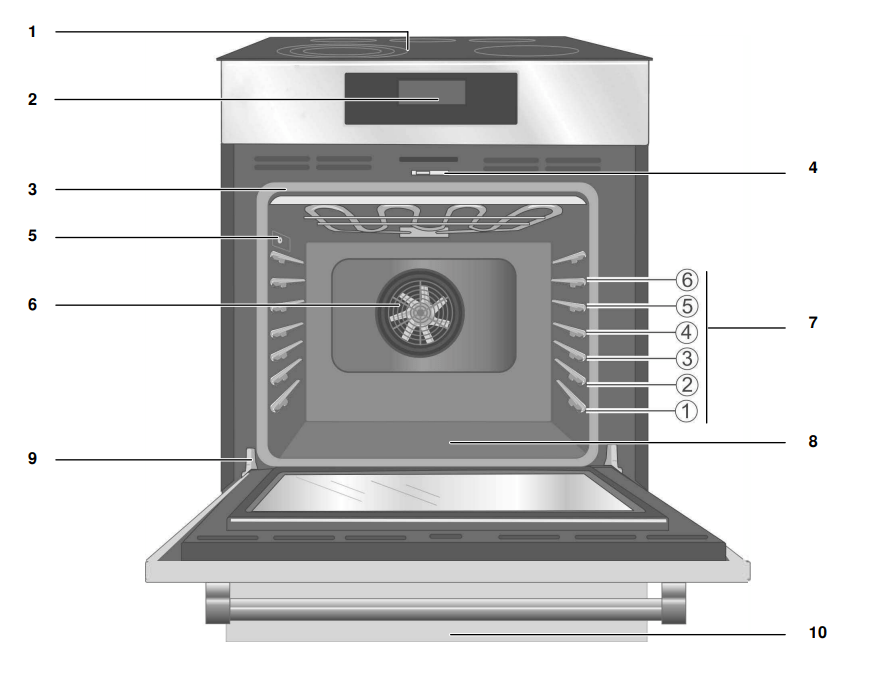


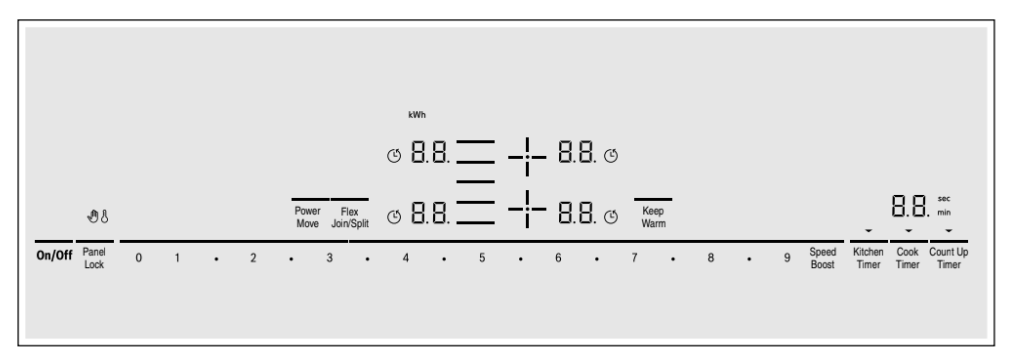
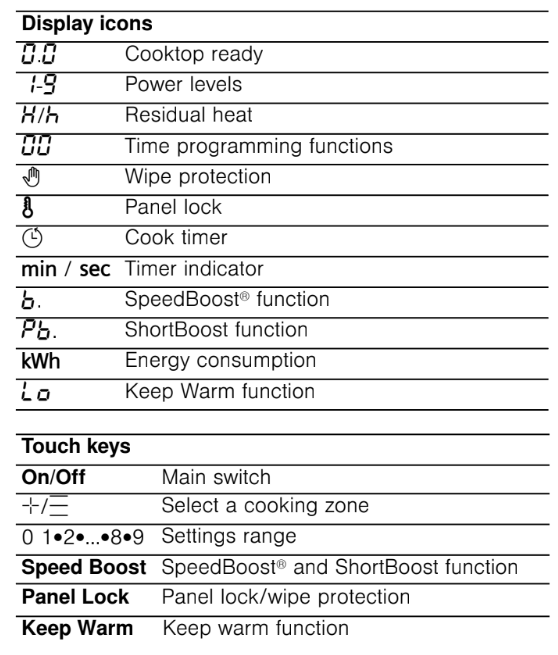
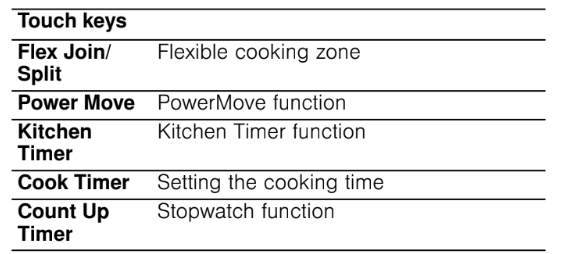

 : High temperature
 : Low temperature
 lights up next to the cooking zones. The cooktop is ready to use.
 is displayed next to the corresponding element symbol.
 symbols between the number keys.
 or
or symbol of the desired element. In the cooking zone display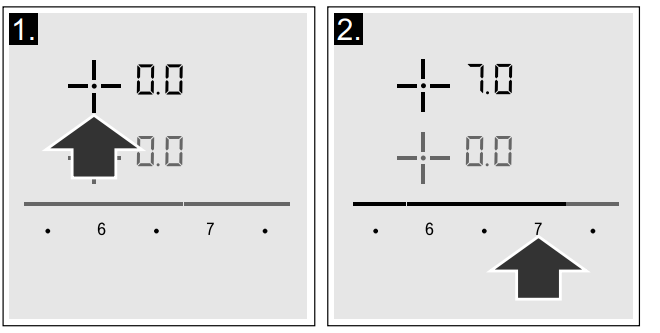
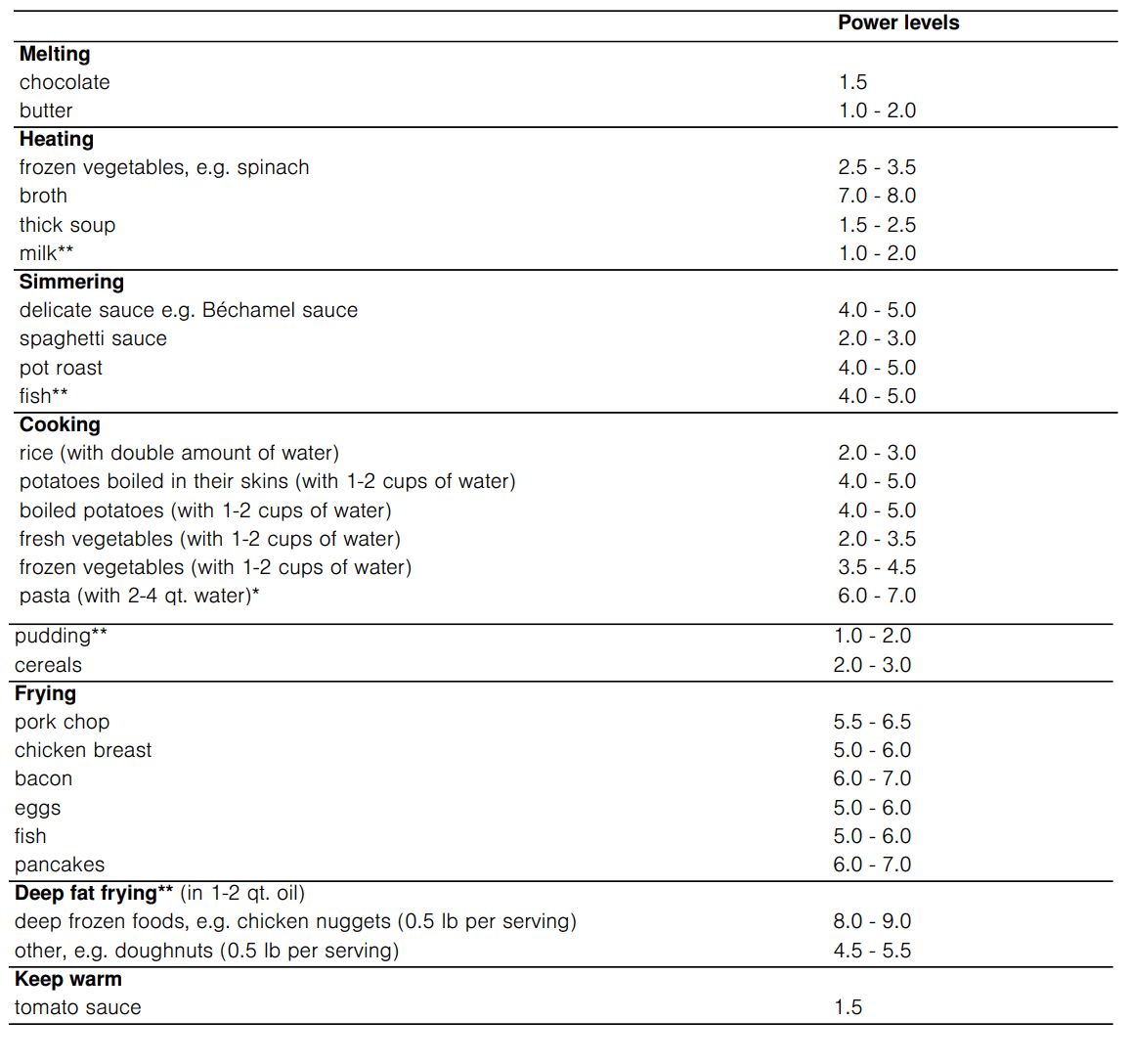
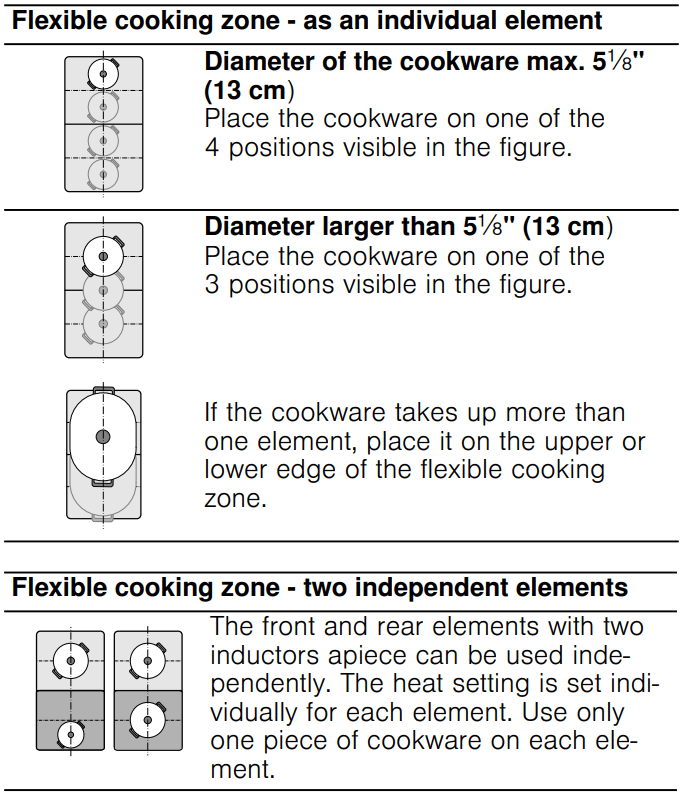
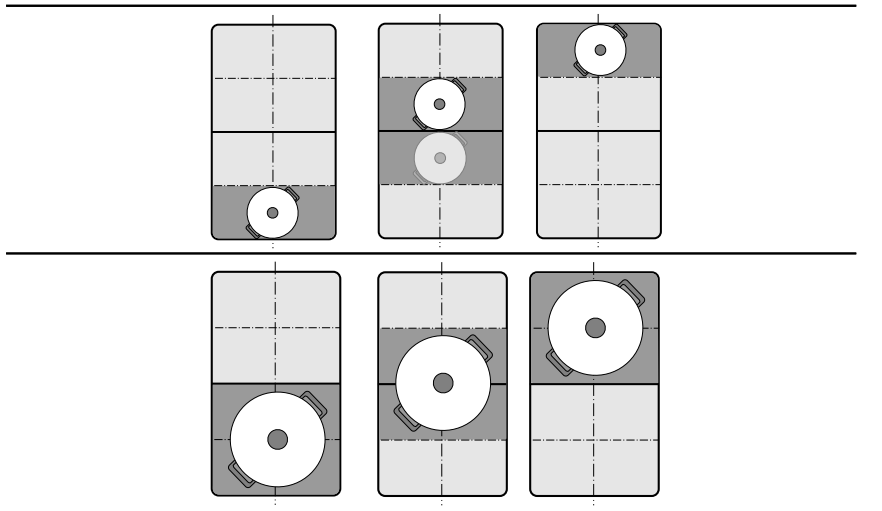
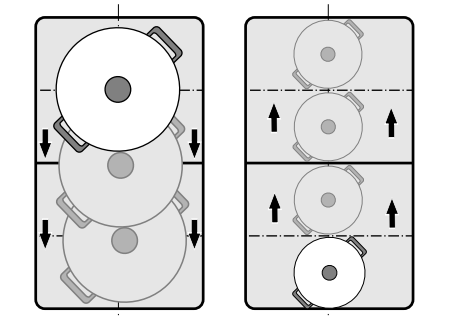


 symbol and the
  indicator light up in the Cook Timer display.
 lights up in the display for the element.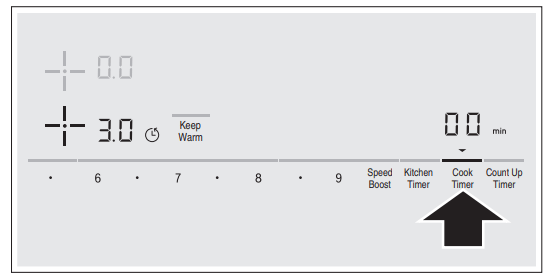
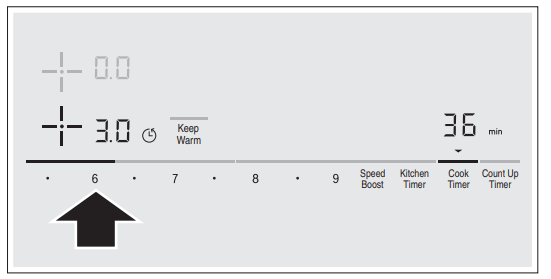
 minutes.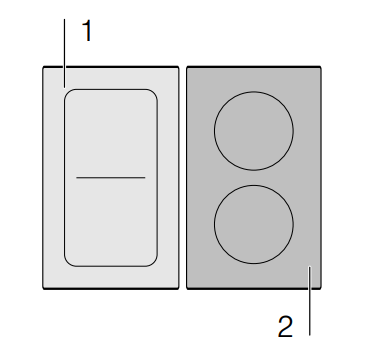
 lights up on the display.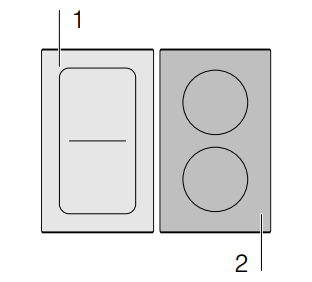
 indicator lights up.
 indicator lights up.
 indicator lights up for 10 seconds. The cooktop is now locked.
 and the residual heat indicator
  flash alternately in the display.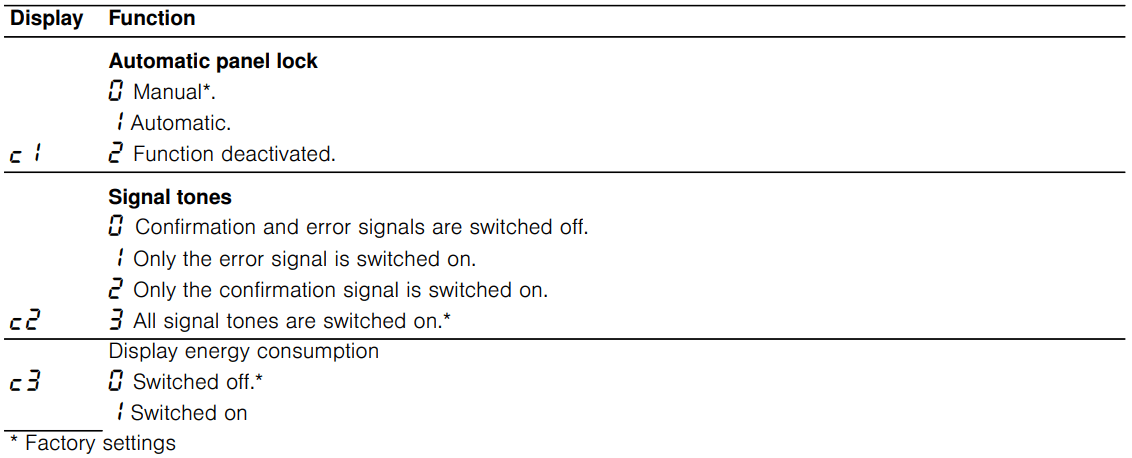
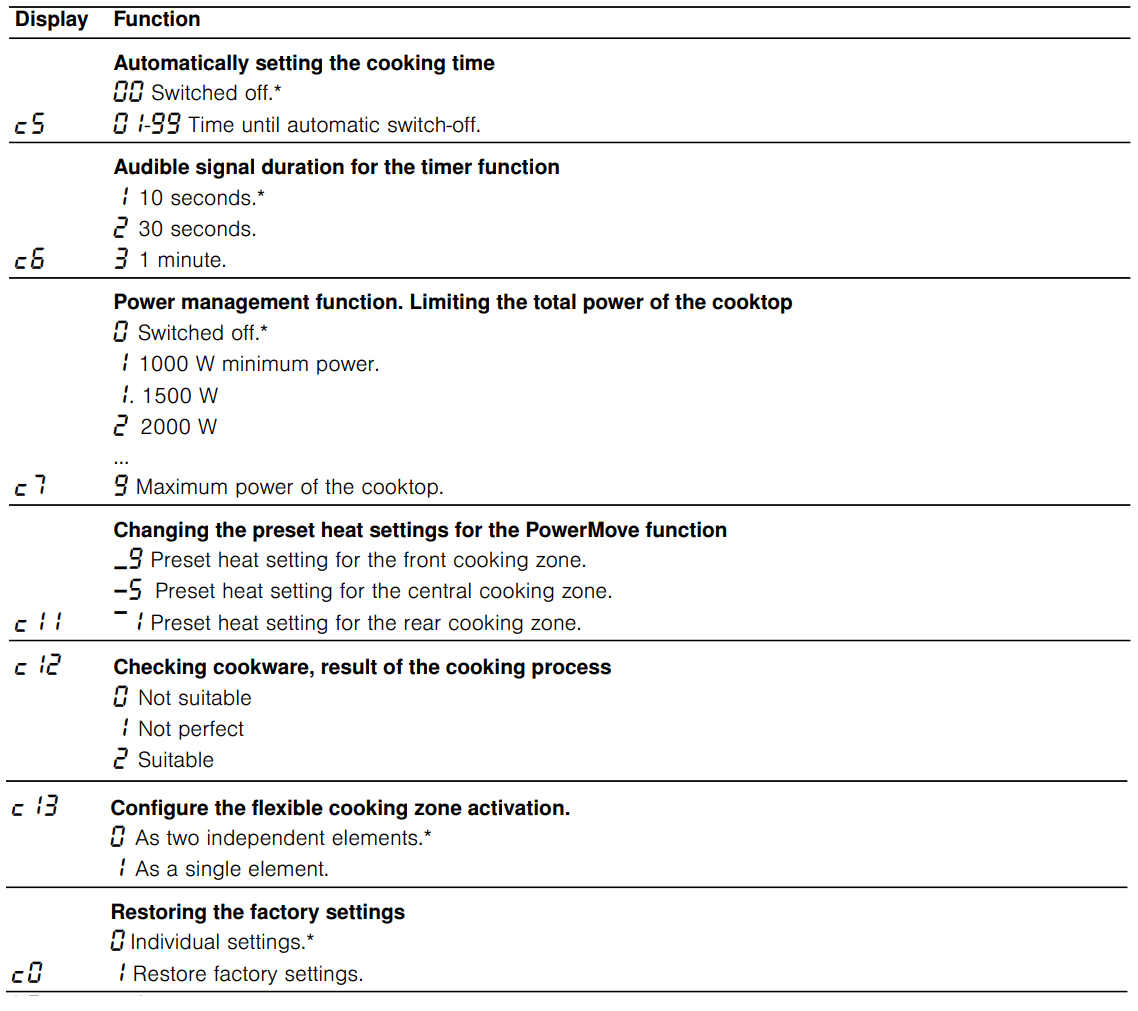


 light up alternately and in the timer display
  lights up as a default setting.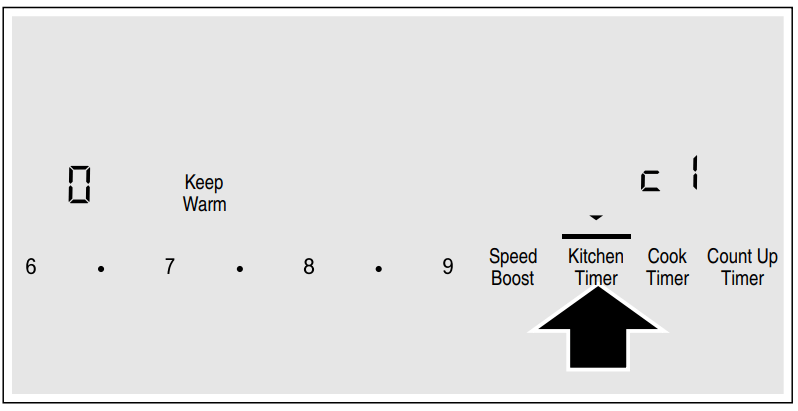
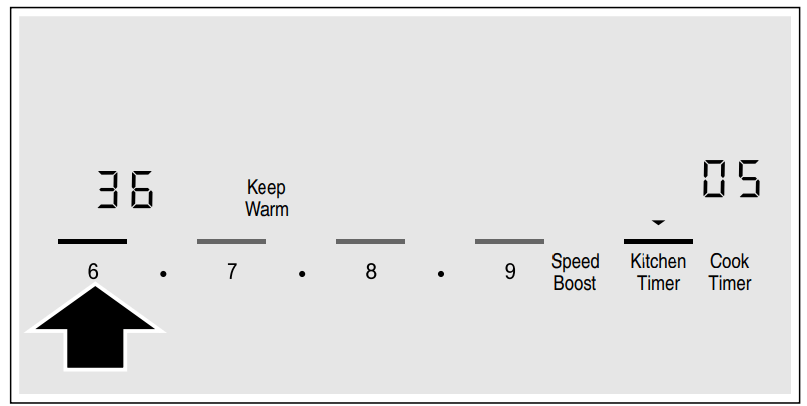
 kWh.
kWh.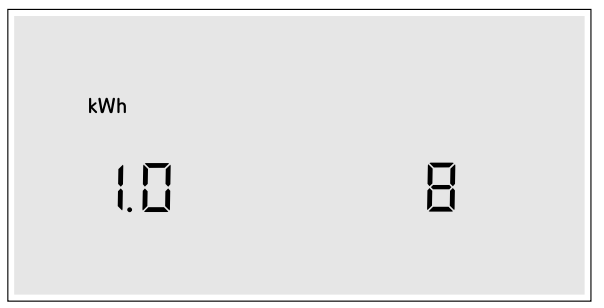


 appears in the display. The Self Clean timer default (4:00 hours) blinks to indicate it can be accepted or changed.
 is displayed and blinks while the door is being locked. Once locked, the door lock symbol is continuously illuminated but not blinking.


 + heat setting and acoustic signal


 appears on the display, the sensor for the element in question must be held down in order to be able to read off the fault code.
 setting.