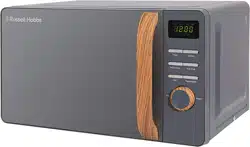
Owner Guide Compact Digital Microwave
PRODUCT OVERVIEW
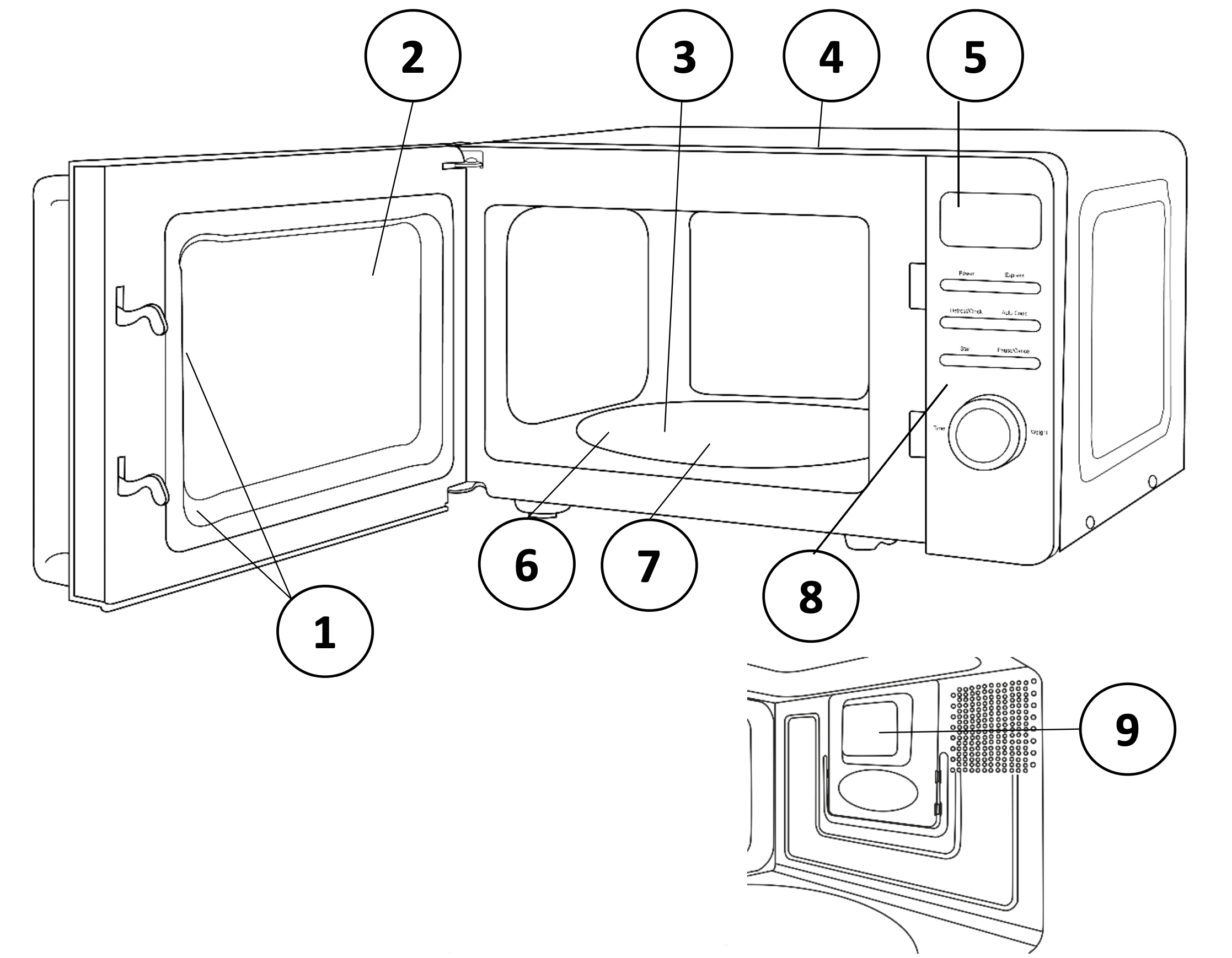
- Safety interlock latches
- Door assembly and window
- Glass turntable
- Microwave top
- Screen display
- Turntable ring
- Turntable coupling
- Control panel - buttons and dial
- Plastic waveguide cover (do not remove)
TURNTABLE INSTALLATION
- Before first use, check that any securing tape and all packaging has been removed from the glass tray and turntable ring assembly.
- These parts must never be restricted from rotating.
- Never place the glass tray upside down.
- To assemble the turntable, follow the steps below in number order.
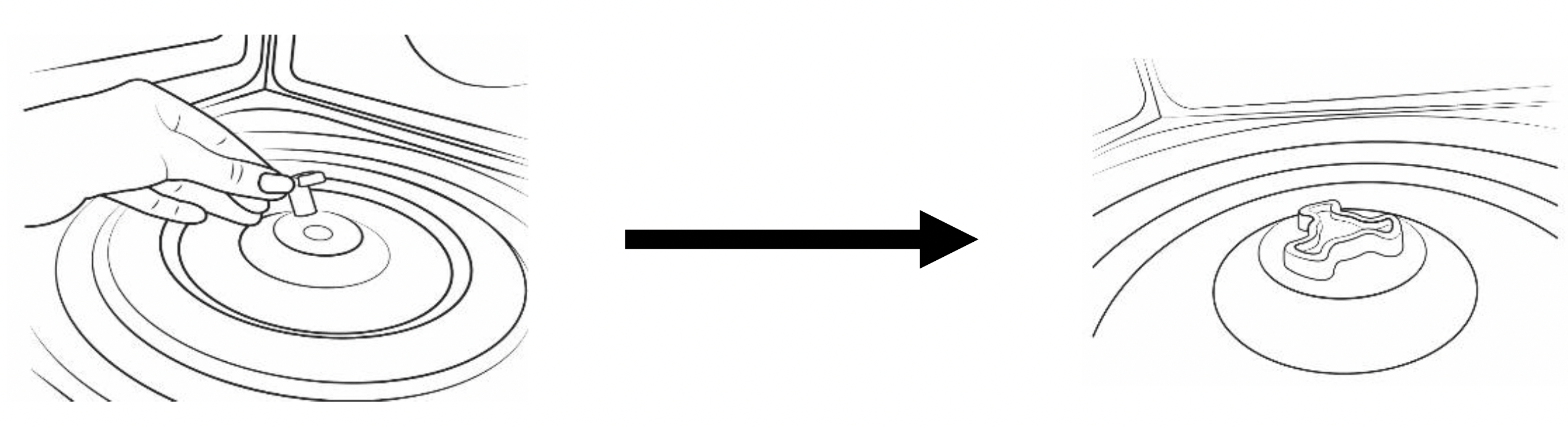
STEP 1: The turntable coupling should slot into the centre of microwave
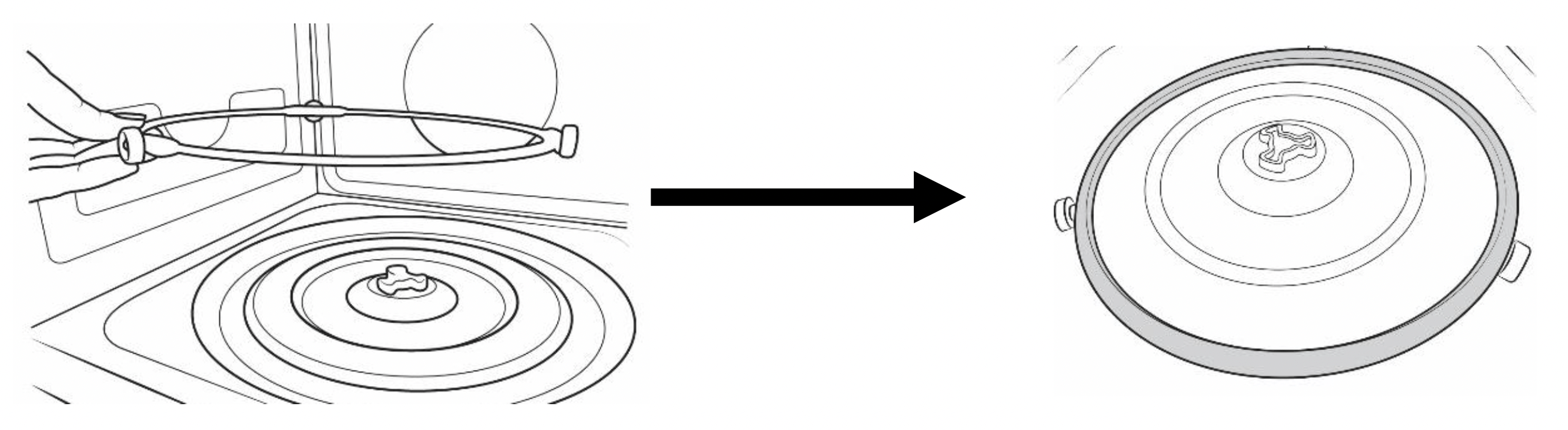
STEP 2: The turntable ring slots into the indents in the middle
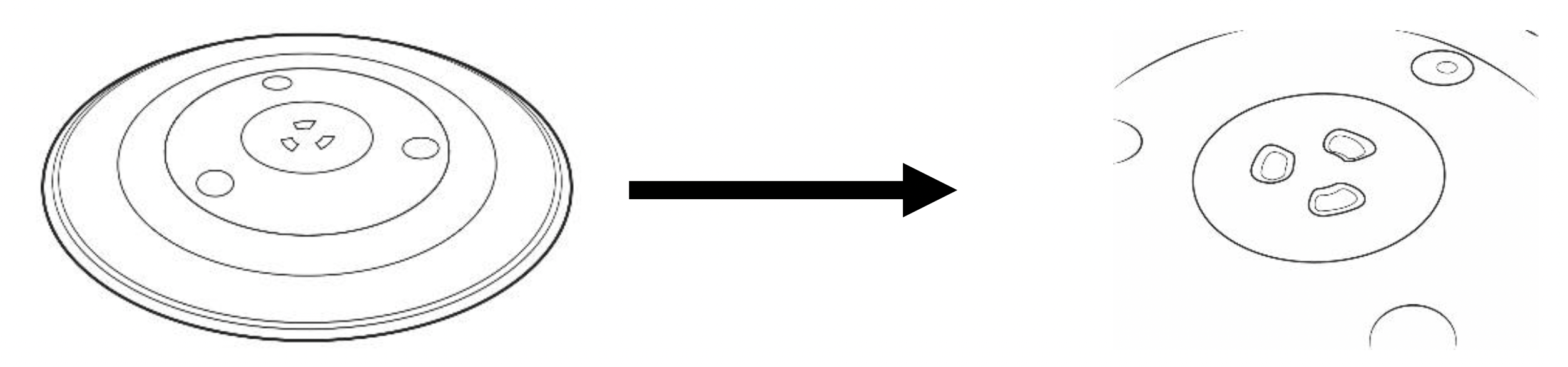
STEP 3: The glass tray should align with the turntable coupling
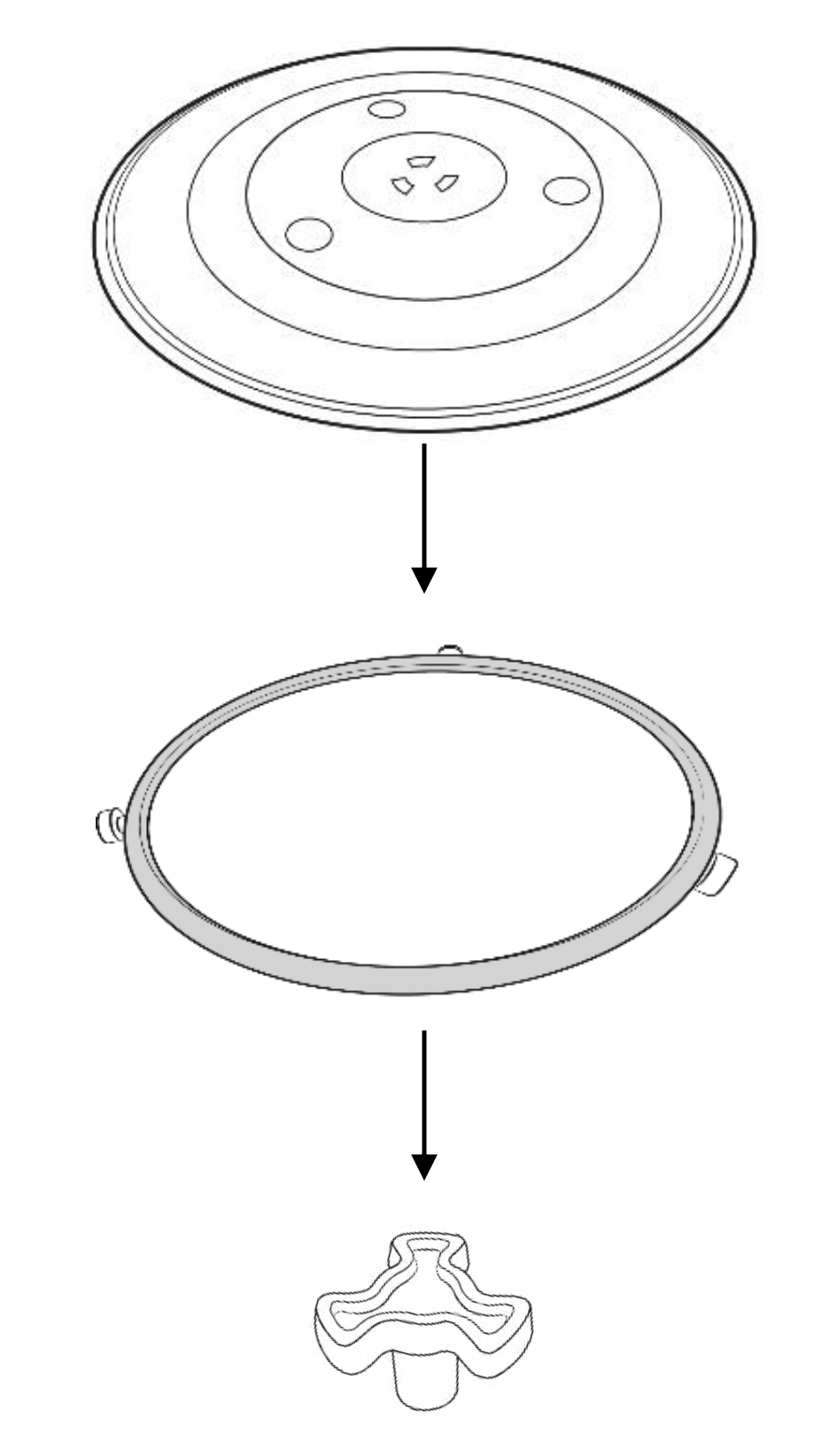
The glass tray, turntable ring, and turntable coupling assembly must always be used during cooking (as shown below).
- Do not place the food directly onto the glass tray, always place on or in suitable microwaveable cookware.
Please check that crockery is microwave safe before using.
- If the glass tray or turntable ring assembly has been damaged in any way, please call our Customer Service team on 0345 209 7461.
CONTROL PANEL
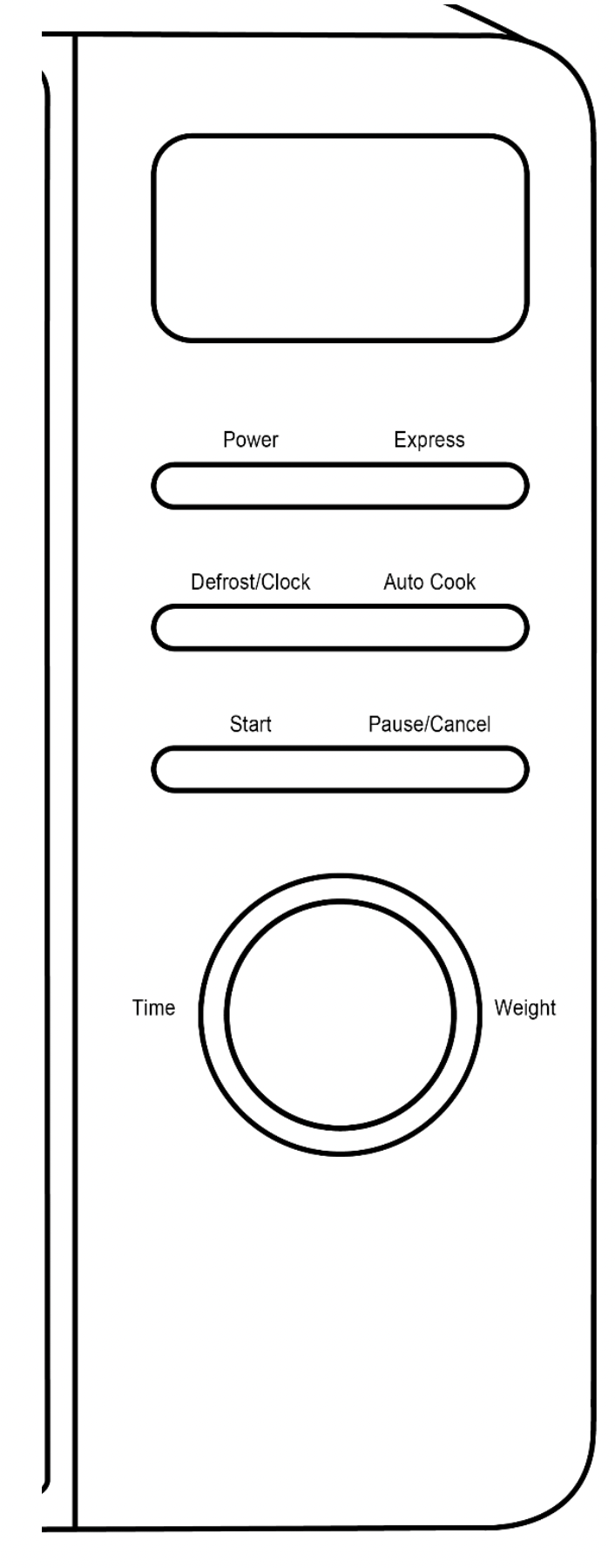
Screen Display
Cooking time, power, action indicators, and clock time are displayed.
Power
Press this button a number of times to set a cooking power level.
Express
Press to automatically add 30 seconds each time to the cooking time until 1 minute and 30 seconds.
Defrost/Clock
Press to set a pre-set defrost programme or set a pre-set cooking programme or to set clock.
Auto Cook
Press to choose 8 auto cook menus. Start Press to start the cooking process once you have selected a setting. Pause/Cancel Press once to pause a cooking cycle or twice to cancel and clear it.
Time/Weight Dial
Turn to select food you want to cook from the auto menu, or to select weight for defrost, or time for normal microwave power cooking. Confirm using the Start button.
HOW TO USE THE MICROWAVE
Turn on the power
Connect the main plug into a suitable 13amp mains socket.
Note: Make sure the voltage is the same as on the rating label located on the back of the microwave (do not use extension cables or mains socket adaptors.) The LED light in the microwave display window will flash 3 times and then enter standby mode by showing ‘1:00’.
Setting the clock (24 hour)
For example, if you want to set the time to 08:30 (am:)
- Press the ‘Defrost/Clock' button for 3 seconds. The display will show '1:00', and the clock symbol will be displayed.
- Turn the 'Time/Weight' dial clockwise until the display shows '8:'.
Press the ‘Clock’ button to confirm.
- The display will show '8:00' and the clock symbol will continue to flash.
- Set the minutes by turning the 'Time/Weight’ dial clockwise until the display shows '08:30'. Press the 'Clock' button to confirm.
The clock is now set, the colon will continue to flash and the 'Clock' symbol will stay lit.
Note: If you do not turn the dial and press the 'Clock' button to confirm the time fairly quickly, the microwave will default to the time currently set on the screen.
Microwave Cooking
Once you have correctly installed the unit, turned on the power and set the clock, you are ready to start cooking.
Your microwave has 5 power levels, the lowest at 20%, then 40%, 60%, 80%, up to 100% (full power.)
Most recipes are cooked on full power – this should be indicated on the packaging of microwavable food.
- To select a power level, press the ‘ Power’ button.
When pressed once the screen display will show ‘100P’ (100% power)
When pressed twice the screen display will show ‘80P’ (80% power) will
When pressed three times the screen display will show ‘60P’ (60% power)
When pressed four times the screen display will show ‘40P’ (40% power)
When pressed five times the screen display will show ‘20P’ (20% power)
- Once you have selected your microwave power you can turn the 'Time/Weight' dial clockwise to set the cooking time desired.
- Press the ‘Start’ button to commence cooking.
The maximum cooking time is 60 minutes. To add more time during cooking, simply turn the 'Time/Weight' dial clockwise.
Do not operate the oven empty, this can cause irreparable damage.
Pausing cooking
If you want to pause the cooking to turn over or stir contents, simply open the door, then close again and press the ‘Start’ button to continue the cycle.
If you wish to stop cooking with time left on the display, take out the contents, close the door and press the ‘Pause/Cancel’ button twice to clear.
Auto reminder
When cooking has finished the microwave will beep 3 times and the screen display will flash. If the door is not opened or ‘Pause/Cancel’ button not pressed, the microwave will continue to beep once every 3 minutes.
Express function
For quick and easy microwave cooking, you can press the ‘Express’ button to automatically add 30 seconds of cooking time each time until 1 minute and 30 seconds.
Defrost function
Ensure food is thoroughly defrosted before starting the cooking process.
- To defrost food, simply press the ‘Defrost’ button, and the screen display will flash. ‘d1-d3’ will be displayed. Turn the 'Time/Weight' dial clockwise to select the defrost weight desired.
- Once the weight is selected, press the ‘Start’ button to commence defrosting.

During defrosting, beep sounds will be heard two times to prompt you turn over the food. Open the door and turn over the food. Then close the door. Press ‘Start’ button again to continue defrosting.
When defrosting has finished the microwave will beep 3 times and the screen display will flash. ‘End’ will be displayed to indicate that the microwave has stopped operating and prompt you to take out your food.
The microwave generally penetrates 4cm into most foods. For even defrosting results, ensure you turn the food over during the cycle. Defrosting generally takes longer than the cooking time of food. Defrosted food should be consumed as soon as possible, do not put it back in the fridge or freeze again.
Defrosting example
As an example, to defrost 0.4kg of poultry:
- Press the ‘Defrost/Clock’ button – ‘d2’ will be displayed.
- Turn the 'Time/Weight' dial clockwise until you reach the desired weight ‘0.4’
- To commence defrosting, press the ‘ Start’ button.
- Half way through the defrosting cycle, three beeps will sound to prompt you to turn over the food. Open the door and turn over the food.
- Close the door and press the ‘ Start’ button to continue defrosting.
Auto cooking function
As a digital microwave, the RHMD714 features a default cooking menu, convenient for simple cooking. If the colon on the display is flashing you are able to activate the auto menu by keep pressing the ‘Auto Cook’ button until you reach the desired cooking menu.
This will display: ‘A1 – A8’
You will need to use your discretion regarding food type, temperature and weight as times may vary - below is a guideline for each auto cooking setting.
Automatic Delayed Function
As an example, if it is 12:30 mid-day, you want the microwave to start cooking at 14:20 for 9 minutes and 30 seconds.
- Make sure the clock is set as current time 12:30
- Press ‘Power’ button to select 100P full power.
- Turn the ‘Time/Weight’ dial to set the cooking time as 9 minutes and 30 seconds.
- Press the ‘Defrost/Clock’ button for 3 seconds to return to the current clock.
- Turn the ‘Time/Weight’ dial to set the auto cook starting time as 14:20.
- Press ‘Defrost/Clock’ button to confirm the delay programme.
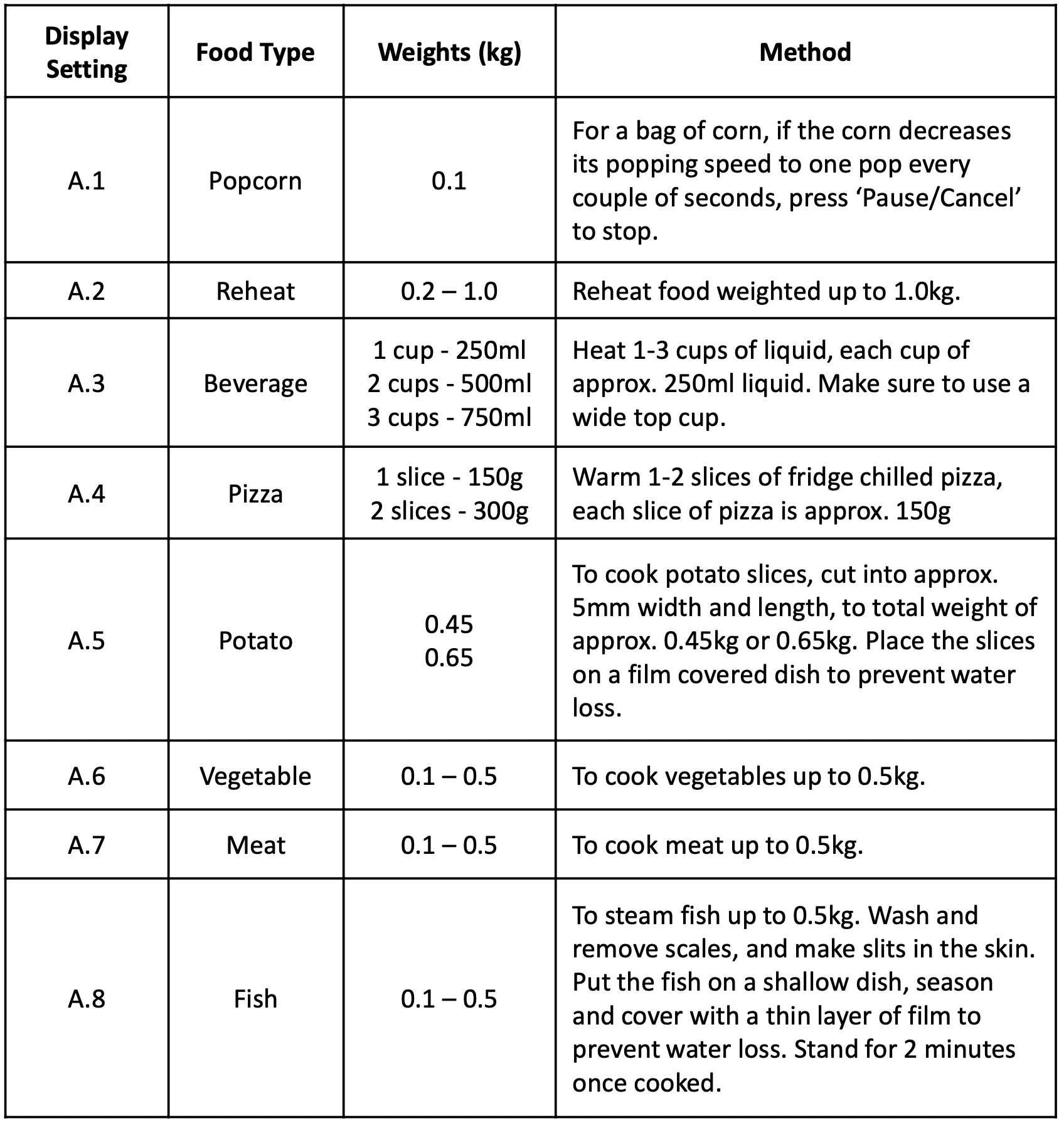
Once you have turned the dial to select the appropriate setting, press the ‘Start’ button to commence cooking.
Make sure you monitor cooking progress as times can vary.
Multi Stage Cooking
As an example, if you want to cook the foods with 100% power for 3 minutes and then cook at 20% power for 9 minutes.
- Press the ‘Power’ button to set the microwave power to 100%. The screen shows ‘100P’.
- Turn the ‘Time/Weight’ Dial to set the cooking time for 3 minutes.
- Press the ‘Power’ button to set the microwave power to 20%. The screen shows ‘20P’.
- Turn the ‘Time/Weight’ Dial to set the cooking time for 9 minutes.
- Press ‘Start’ button to start the cooking.
Child lock function
The child lock function is ideal to stop children from altering cooking times if unsupervised. No buttons will function in this mode.
To set the lock, press and hold the ‘Pause/Cancel’ button for 3 seconds. The lock is now functional.
To cancel the lock, again press and hold the ‘Pause/Cancel’ button for 3 seconds.
- Do not use metal pans or dishes with metal handles.
- Do not use anything with a metal trim.
- Do not use paper-covered wire twist-ties on plastic bags.
- Do not use melamine dishes as they contain a material which will absorb microwave energy. This may cause the dishes to crack or burn, and will slow down the cooking speed.
- Use only cookware that is approved to be used in a microwave oven.
- Do not cook using a container with a restricted opening, such as bottles, as they may explode.
- Do not heat baby bottles with the teat left on. Remove it if replacing the bottle back into the oven.
- Only use thermometers that are approved for microwave ovens.
- Do not use the microwave oven for heating utensils.
COOKING TIPS
Defrosting tips
Microwaves penetrate around 4cm into most food. To maximize defrosting effectiveness follow the below guidelines.
- For thick foods, turn regularly during operation in order to defrost evenly.
- If food weighs over 500g, it is advised to turn at least 2 times.
- Defrosted food should be consumed as soon as possible, it is not advisable to put back into the fridge or freeze again.
Cooking tips - The following may affect cooking results:
Food arrangement
If possible, thicker bits of food should be placed around the outside of the dish and the thinner parts toward the centre, spread out as evenly as possible. Do not overlap food if possible as this could result in uneven cooking results.
Cooking length
If you are unsure of cooking times it is advisable to start with a short cooking time and monitor cooking progress before adding further time. Overcooking could lead to a risk of fire. Ensure food is cooked thoroughly before consuming.
Cooking food evenly
Foods such as meat should be turned frequently to ensure more even cooking results. If the food is liquid based, stirring during the cooking time is advisable.
Allow standing time
When the microwave has stopped cooking, leave the food to rest for an adequate length of time to allow for cooking completion and cooling.
CLEANING THE MICROWAVE
- Before you clean the oven, turn it off and unplug it.
- Keep the inside of the oven clean. When food or liquids stick to the oven walls, wipe with a damp cloth. We recommend that you do not use harsh detergent or abrasives.
- On the right hand side wall of the cavity is the waveguide cover, microwaves are passed through this to enable your food to cook. It is important that this waveguide cover is kept clean at all times. To do this wipe with mild detergent and water, then dry.
- You should clean the outside of the oven with a damp cloth. Do not allow water to seep into the ventilation openings.
- Do not allow the control panel to become wet. Clean with a soft, damp cloth. Do not use detergents, abrasives or spray-on cleaners on the control panel.
- If steam builds up inside or around the outside of the oven door, wipe with a soft cloth. This may happen when the microwave oven is used in humid conditions.
- Regularly remove the glass turntable to clean it, and wash it in warm soapy water. Regularly clean the turntable support and oven floor. Simply wipe the bottom surface of the oven with mild detergent and water, then dry. You can wash the turntable support in mild soapy water.
- When removing the turntable support of the oven, make sure you put it back properly.
- If the inside of the oven smells, put a cup of water with the juice and skin of one lemon in a deep microwave bowl. Microwave it for three minutes, wipe thoroughly and then dry with a soft cloth.
PROBLEM SOLVING
WARNING: To reduce the risk of personal injury, always unplug the microwave before performing maintenance or trouble shooting checks.
The microwave oven may cause interference to your radio, TV or similar equipment. If this happens, you can stop the interference by moving the radio, TV or equipment as far away from your microwave oven as possible.
|
Problem
|
Potential reason
|
Potential solution
|
|
If the microwave doesn’t work
|
Microwave is not plugged in
|
Make sure the plug is plugged in securely into the mains and the plug is switched on. If it is not, remove the plug from the socket, wait 10 seconds and plug it in again securely.
|
|
Plug is not working
|
The plug socket that the microwave is plugged into may have become faulty. Plug the microwave into another known good plug socket, ensure that the socket is turned on and check if the microwave now works.
|
|
The plug has a blown fuse or the mains circuit has a blown fuse/tripped fuse
|
Check the plug for a blown circuit fuse or a tripped main circuit breaker. If these seem to be working properly, test the socket with another appliance.
|
|
Microwave has developed a fault
|
Contact customer services to talk through the problem to see if any solution for the fault can be found. If not and the product is within its warranty period, then the microwave should be returned to the retailer it was purchased from for a replacement or refund.
|
|
If the microwave power will not work
|
Door is not closed
|
Make sure the door is securely closed. Otherwise, the microwave will not engage oroperate.
|
|
The power has not been set the timer dial has not been turned.
|
Set the microwave power by pressing the ‘Power’ button. Select the time by turning the dial and pressing ‘Start’ to confirm.
|
|
Not heating
|
Magnetron not working
|
The component that produces the microwaves is called a magnetron, if food is not being heated or is 'luke' warm then it is likely this component has developed a fault. If the microwave is within its warranty period, please contact customer services for further advice or take the microwave back to the retailer it was purchased from for a refund or replacement.
|
|
Sparking
|
Burnton food debris
|
Spillages or splashes can burn and catch fire, all food that is put into the microwave should be appropriately covered. All spillages or splashes must be cleaned, and all areas of microwave cleaned after each use. Burnt on food debris in the microwave, on the wave guide and the behind the wave guide can cause the microwave to 'spark'. This is because burnt on debris can be focused on by the microwaves and spark. Microwaves must be thoroughly cleaned after every use to ensure no food is burnt on to any part of the microwave. If the microwave does 'spark' the wave guide must be disposed, the microwave must be cleaned thoroughly and then contact customer services for are placement wave guide. The replacement wave guide should be fitted and the microwave should operate normally. However, if the microwave 'sparks' again on first use (after the waveguide has been replaced and the microwave cleaned), please contact customer services for further advice.
|
|
Metalor foil
|
No metal or foil should be put inside a microwave as it can cause 'sparking' which can damage the microwave. The only metal accessories that should be used inside the microwave are the ones supplied by the manufacturer.
|
|
Pressure build upin food
|
Food with none porous skins (potatoes for example), must be pierced to allow steam to escape. As the build up of pressure can cause food to burst and create a 'fire hazard‘.
|
|
Heat spots
|
Operated empty or with no moisture
|
Microwaves cannot be run empty, microwaves need moisture to operate correctly. If microwaves are operated empty or are used to heat up plates (this is not permitted), the microwaves can focus on a single point inside the microwave. This can cause a heat spot, which can cause the area to become deformed, warped or start to melt. If microwaves are operated empty or to heat up foreign objects this will void the warranty.
|
|
Condensation or excess water
|
Food that is being cooked
|
By the very nature of how a microwave works, it ‘excites’ the water molecules in the food it is heating, causing them to move about and generate heat from within the food. Often when the food heats up it reaches the point where steam is released. Dependant on the food type being heated (and its water content level), the length of time being heated for – and so the amount of steam generated – it is inevitable that some of the steam will condense and form back into water droplets with in the microwave cavity. This can usually be found on the inner walls or most commonly on the back of the glass door. If not cleaned up, these droplets can start to form small ‘pools’ of water.
|
|
Cooling vents covered
|
Cooling vents allow the heat and steam to escape from the microwave. These cannot be covered as it can cause excessive water to settle inside the microwave or the microwave too verheat. The installation instructions in the instruction manual must be followed or the warranty will be void.
|
|
Paint damage/peeling
|
Maintenance
|
If the microwave is within its warranty period, please contact customer services for further advice or take the microwave back to the retailer it was purchased from for a refund or replacement
|
|
Light not working
|
Bulb not working
|
Due to the construction of microwaves and certain 'dangerous' components inside, the light bulb can only be changed by a qualified service engineer. If the microwave is within its warranty period, please contact customer services for further advice or take the microwave back to the retailer it was purchased from for a refund or replacement
|
|
Over heating
|
Cooling vents covered
|
Cooling vents allow the heat and steam to escape from the microwave. These cannot be covered as it can cause excessive water to settle inside the microwave or the microwave too verheat. The installation instructions in the manual must be followed or the warranty will bevoid.
|
|
Too noisy
|
Glass turntable fitted incorrectly
|
Check that the glass turntable has been placed correctly on the turntable and is not hitting the walls/doors of the microwave during operation.
|
|
Dishes/plate are too large for the microwave
|
Check that the dishes/plates are the correct size for the microwave and that they are not hitting the walls/door of microwave during operation.
|
|
Door not shutting/locking
|
Glass turntable fitted in correctly
|
Check that the glass turntable has been placed correctly on the turntable and is not stopping the door from shutting correctly.
|
|
Latches have become deformed
|
If the microwave is within its warranty period, please contact customer services for further advice or take the microwave back to the retailer it was purchased from for are fund or replacement.
|
|
Turntable not rotating
|
Turntable coupling not fitted or tape not removed
|
Check that the turntable coupling is fitted correctly and the transportation tape has been removed.
|
|
Turntable roller ring not fitted or fitted incorrectly
|
Check that the coupling has be placed under the turntable and that it is position correctly.
|
|
Glass turntable fitted incorrectly
|
Check that the glass turntable has been placed correctly on the turntable.
|
|
Turntable has developed a fault
|
If the microwave is within its warranty period, please contact customer services for further advice or take the microwave back to the retailer it was purchased from for are fund or replacement.
|