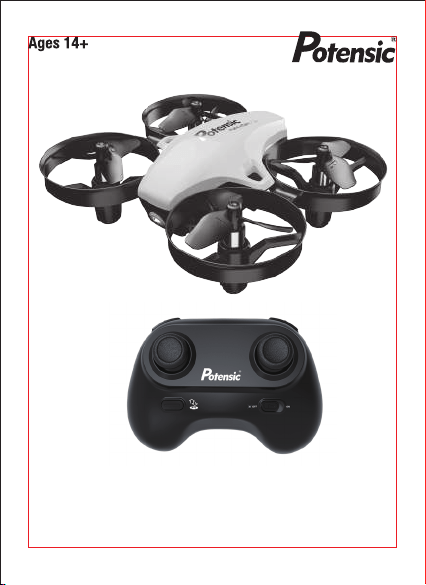
Operations Guide
A20


2
Overview of drone and transmitter
3
Parts loading and unloading
8
Precautions before ying
10
Flying procedures
11
Function Introductions
17
Assembly Parts list
20
Troubleshooting
22
http://www.ipotensic.com
3
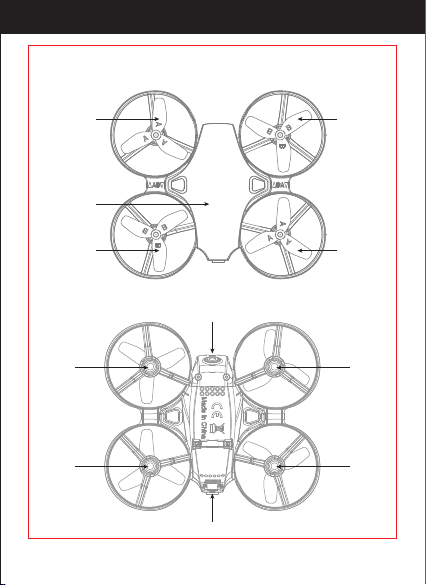
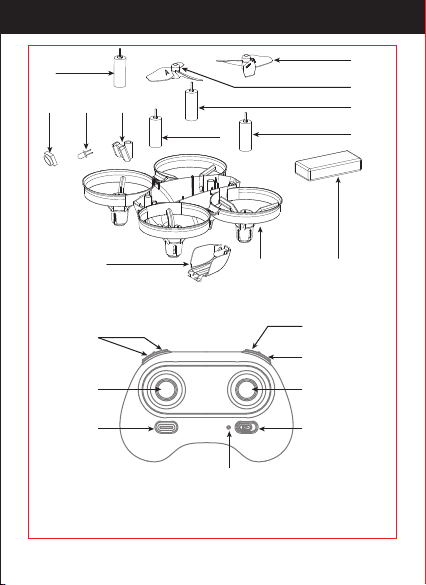
Propeller A
Propeller B
Propeller B
Propeller A
Left
Front
Right
Rear
Motor
Holder
Motor
Holder
Motor
Holder
Motor
Holder
LED light
Power switch
Drone cover
http://www.ipotensic.com
4
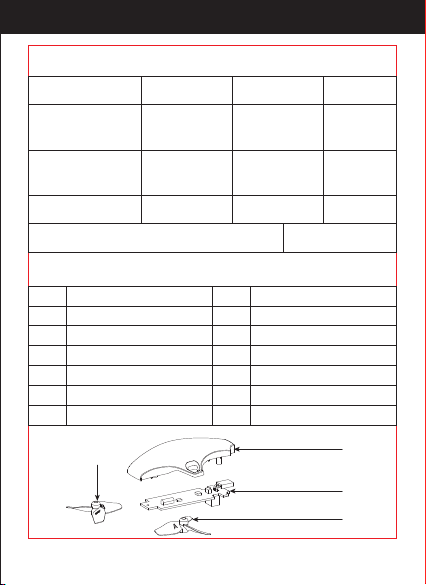
Drone size
Weight of drone
Propeller diameter
The drone battery
90x80x32mm
25.8g
Ø32mm
3.7Vx180mAh
The charging time of the drone battery 40 mins
0615x4
5~6 mins
Remote
control mode
2.4Ghz
Flying distance 10~15 m
Flying time
The main
motor
1
2
3
4
5
6
NO. Name NO. Name
1 7
2 8
3 9
4 10
5 11
6
Drone cover
Receiver Board
Counterclockwise Motor
Propeller A
LED light
Propeller B
Light shade
Battery cover
Forward motor Drone bottom
12
Drone batteryRehearsal motor
1
2
3
4
http://www.ipotensic.com
5
4
5
6
10
9
11
3
6
78
12
5
Left Stick
Non function
Right Stick
High / Medium/
Low Speed button
Headless
One button
Take O /
Landing /
Emergency
Stop Button
Power Switch
Power indicator
http://www.ipotensic.com
6
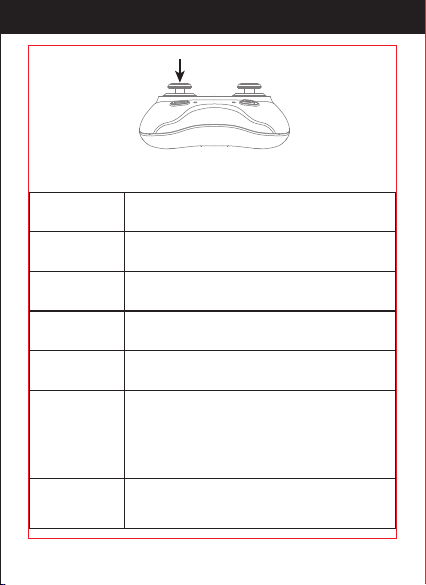
Trimmer mode button (Press down)
Left Stick
Right Stick
Power Switch
Move the Stick to forward / backward / left / right to
y the drone up / down / turn left / turn right.
Move the Stick to forward / backward / left / right to
y the drone forward / backward / left / right.
Pull right the power switch key to power on the
transmitter, power o when returns.
High / Medium/
Low Speed Button
Press the key to switch to High /Medium/ Low
Speed.
Headless Mode
Press the key to enter the headless mode;
Press again to exist.
Trimmer Mode
Button
Press this button and move the right stick to the required
trimmer direction, then it will adjust the direction
accordingly. Release the stick to end trimmer mode.
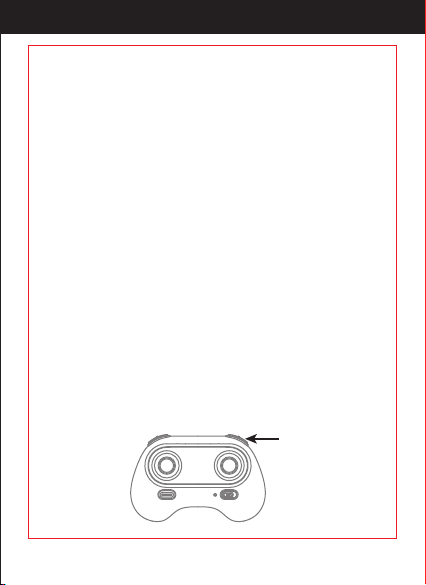
Take O / Landing
/Emergency Stop
Button
After frequency pairing, press once and the drone will take
o automatically. Press again and the drone will land
automatically. Press and hold the button for more than 1
second for an emergency landing. The drone propellers will
stop and land.
http://www.ipotensic.com
7
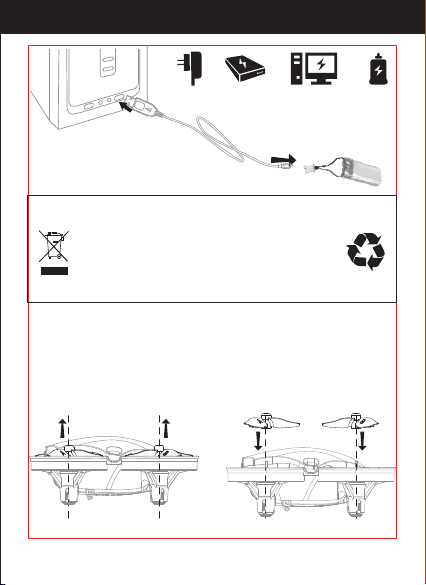
1. Connect the drone battery with USB cable rst and then choose one of
the chargers as below shown to connect with USB plug.
2. The red USB indicator light keeps bright when charging and the light
turns green when fully charged.
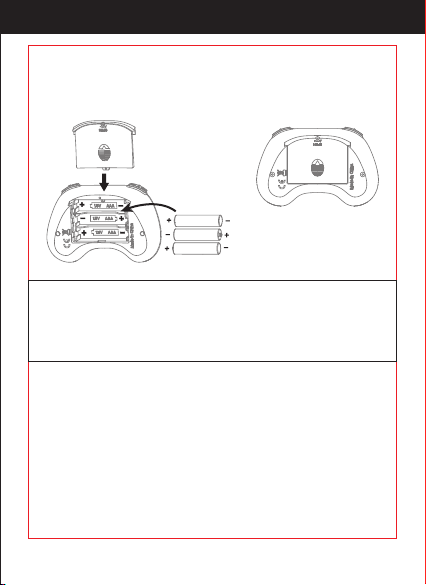
3X1.5V
Alkaline Batteries
Battery Cover
1. Make sure the electrodes are
correct.
2. Do not mix new with old
batteries.
3. Do not mix dierent kinds of
batteries.
4. Do not charge the non
rechargeable battery.
Notice:
Open the battery cover of the transmitter, insert 3 AAA batteries
following the polarity indicators ( Picture below, battery is not included)
and then close it.
http://www.ipotensic.com
8
To disassemble, gently lift the propeller upward.(Picture 1)
To install the propeller, align and snap on the propeller blade to the
motor.(Picture 2)
Picture 1 Picture 2
* For faster charging, it is recommended to
use an adapter with 5V 2A output current
(not included) to charge the battery
Phone Charger Power Bank Computer Charging Car Charger
Wasted Lithium-Polymer batteries must not
be placed with household trash. Please
contact local environmental or waste
agency or the supplier of your model or your
nearest Li-Po battery recycling center.
http://www.ipotensic.com
9
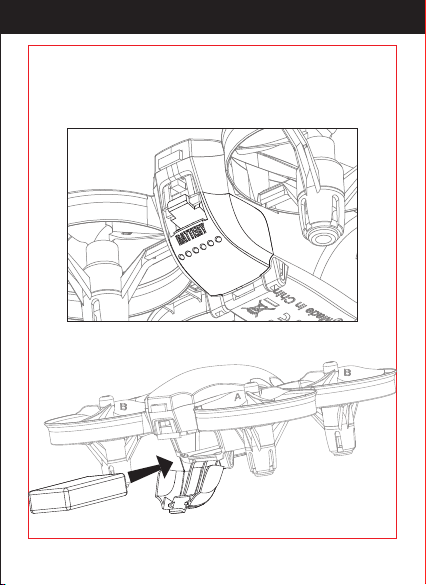
Picture 3
Buckle down the battery cover, put the battery into the drone, and then
buckle up the battery cover ( Picture 3/4).
Picture 4
http://www.ipotensic.com

10
1. Make sure the transmitter and the battery of the drone are fully
charged.
2. Before starting, please conrm that the left stick of the transmitter is
in the middle position.
3. Please follow the correct steps to turn on the drone/transmitter.
Before ight, turn on transmitter and then the the drone. After ight,
turn o the drone and then transmitter. Turning ON/OFF incorrectly
may cause the drone to lose control.
4. Make sure to correctly install the battery, motor, etc.
5. Improper operation may cause drone crash, which may cause a
motor defect, prevent you from ying, and other issues. Please go to
the local distributor to buy new parts for replacement so that the
drone will return to its best
http://www.ipotensic.com
11
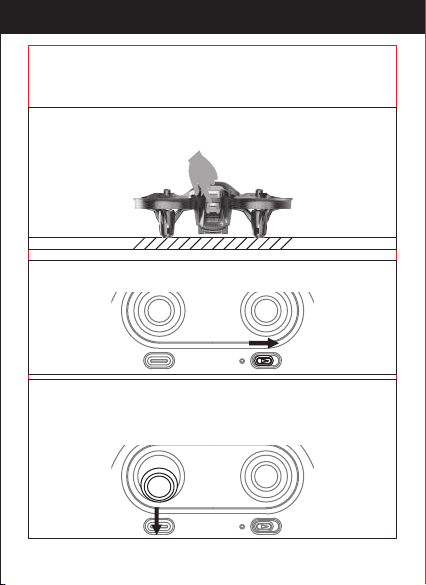
Turn on the transmitter and the power indicator light on it ashes rapidly.
Pull the left stick to the lowest position and then release. The power
indicator on transmitter will turn a solid color and the transmitter will
beep, indicating successful
frequency pairing
Turn on the drone. The drone body lights will ash rapidly at rst.
When it ashes slowly, indicating entering frequency pairing.
It must be placed on a surface!
http://www.ipotensic.com
12
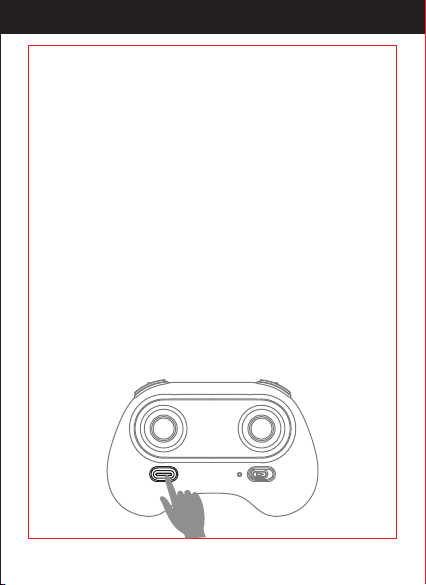
After calibration successfully, press this button, the drone will y up
and keep ying at an altitude of approximately 1.2 meters
automatically.
Press it to land the drone automatically. (In this mode, DO NOT touch
the left stick, otherwise it might not work).
In an emergency situation, such as if it is about to hit people or
obstacles, press the Take O/ Landing / Emergency Stop Button and
hold it for more than 1 second. The propellers will stop immediately
and the drone will fall.
Tip: Do not activate this function unless in emergency situation.
Because the drone will fall when the motors stop working.
http://www.ipotensic.com
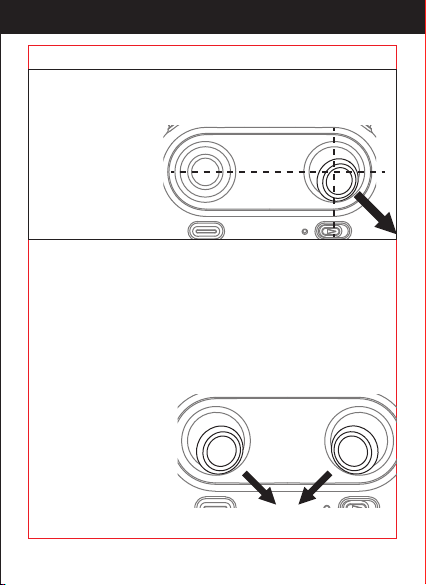
13
Push the right stick as picture shown after successful frequency
pairing(DO NOT push the left stick before it) . Please loose it when the
drone front body light ash 3 times and turn a solid color , indicating
that calibration is
completed.
Tips: Crashing the drone may cause the connection to fail, making the
drone hard to control. If this occurs, try repairing and calibration. It
must be placed on a surface!
(This action is used in case of ight abnormality)
Unlock the motor:
Lock the motor:
Move the left stick and right stick at the same time 45 degrees inward.
When the motor is working,
it could be used to stop
the motor urgently
(Move the left stick
and right stick at the
same time 45 degrees inward).
http://www.ipotensic.com
14
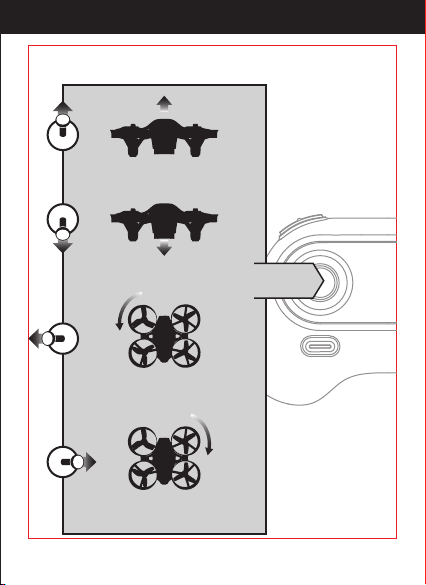
Left Stick
Move the stick to the left, the
drone rotates counterclockwise
Move the stick to the right, the drone
rotates clockwise.
Push the stick, then
the drone ies up.
Pull the stick,
the drone goes down.
http://www.ipotensic.com
15
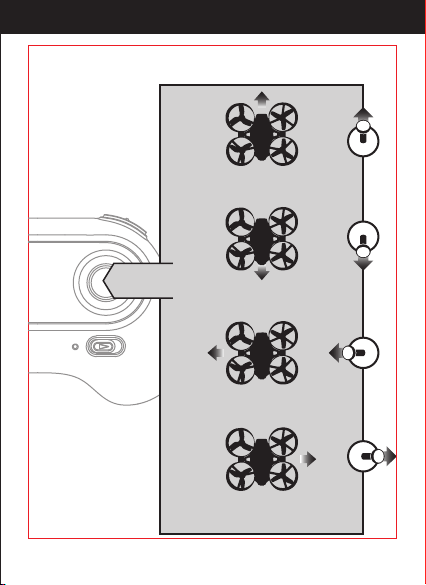
Right Stick
Push the stick,
the drone ies forward.
Pull the stick,
the drone goes backward.
Move the stick to the left, the drone
moves the left
Move the stick to the right, the drone
moves to the right
http://www.ipotensic.com
16
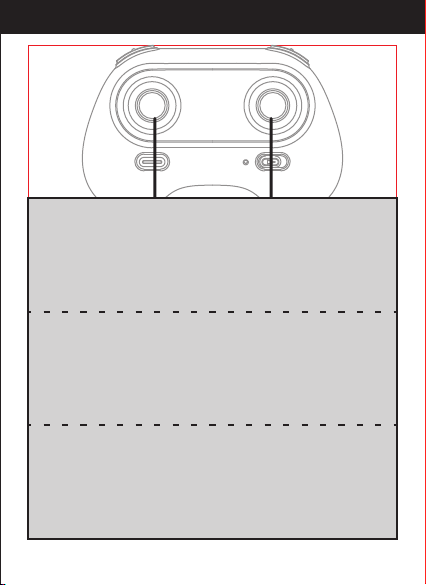
Forward and backward trimmer
When ying, if the drone tilts forward, press down the trimmer
button, and push the right stick backwards.
Otherwise push forwards.
Left/Right Rotates Trimmer
When ying, if the drone head rotates to the left, press the
trimmer button, and push left stick to right. Otherwise
push to the left.
Left/Right Tilts Trimmer
When ying, if the drone tilts to the left, press the trimmer
button, and push the right stick to the right. Otherwise
push to the left.
http://www.ipotensic.com
17
Note: If there’s propeller or motor is damaged, the constant height
function will not work. Due to atmospheric pressure instability or
unsuitable weather, the high altitude hold function will not work
either.
Intelligent ight control system calculates the hovering position, makes it
easier for beginners to control. Release the stick, the drone will keep
hovering, capturing clear aerial photos & videos.
High / Medium/Low
Speed mode
It’s suitable for those practicing (hobbyists) to
operate, with or without breeze.
2. Medium speed Mode(Mode 2)
It’s suitable for the beginners to operate in calm
weather, with no breeze.
1. Low Speed Mode(Mode 1)
Note: The default
setting is Medium
Speed.
It’s suitable for the professionals in most outdoor wind conditions.
3. High Speed Mode(Mode 3)
http://www.ipotensic.com
18
The default setting is NOT Headless Mode.
Under headless mode, the users can operate the drone without worrying
about the orientation (left is left and right is right all the time, regardless
of where your drone is pointing at).Headless Mode is designed for
beginners, users who y the drone in daylight or at far distances, or those
with diculty identifying the drone orientation.
You can activate the headless mode function before taking o or in ight.
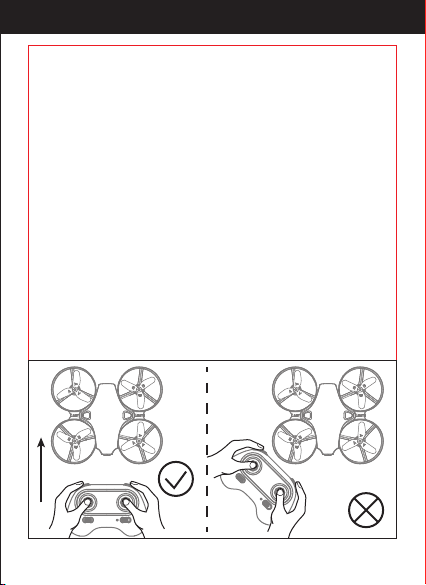
Flying under headless mode, your drone direction should be aligned with
you. DO NOT change the direction of your transmitter, keep it ying in
front of you at all the times. (See below picture).
WARNING: THE DRONE SHOULD BE IN FRONT OF YOUR TRANSMITTER
BEFORE ENTERING THIS MODEL. OR THE DRONE MIGHT LOSE
CONTROL OR FLY AWAY.
Left
Front
Right
Rear
Left
Front
Right
Rear
http://www.ipotensic.com
19
When the transmitter has a low battery, the transmitter will beep to
remind the user to land the drone as soon as possible and replace the
batteries. Or the drone might be out of control.
When the drone has a low battery, the LED light on the rear of drone will
keep shiny for once and stop for 1 second. Then please land the drone as
soon as possible and replace the battery.
When the drone is out of range or almost at the max remote control
distance, the LED light on the rear of drone will keep shiny for twice and
stop for 1 second. Then please y the drone back to suitable range as
soon as possible or it may be out of control.
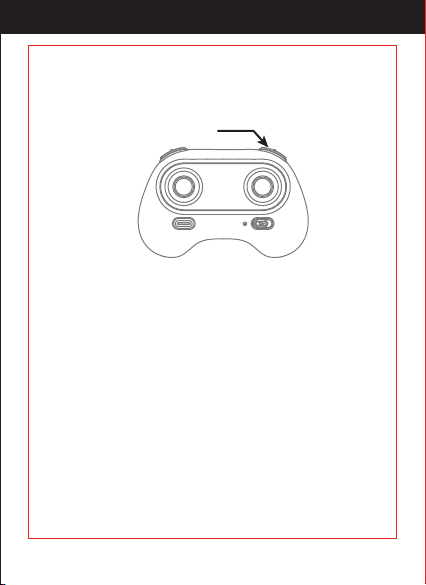
* Press headless mode button to activate the function, at this time the
LED light on the rear of drone keeps shiny for three times and stops for
1s; To exit the Headless Mode, press the button again, at this time the
LED light on the rear of drone will turn a solid color.
Headless Mode
http://www.ipotensic.com
20
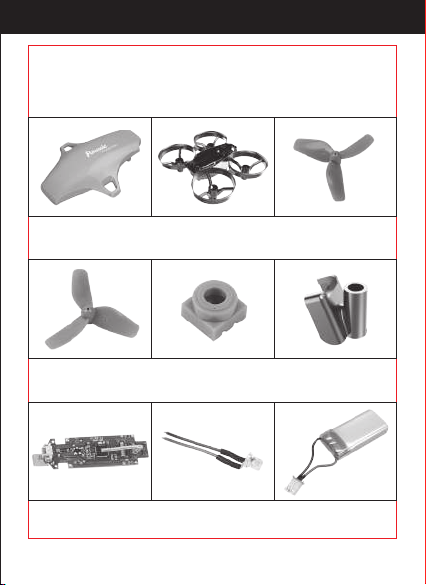
A20-01
Drone Cover
A20-02
Drone Bottom
A20-03
Propeller A
A20-04
Propeller B
A20-05
Lampshade
A20-06
Pressure Parts
A20-07
Receiver Board
A20-08
LED Light
A20-09
Drone Battery
For convenience, the spare parts are listed for you to choose, which can
be purchased from the local seller.
(Sold separately)
http://www.ipotensic.com
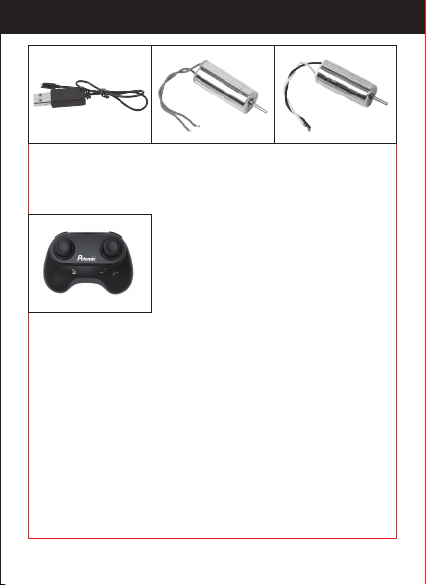
21
A20-10
USB Cable
A20-11
Clockwise Motor
(Red and Blue wire)
A20-12
Counterclockwise
Motor
(Black and White wire)
A20-13
Transmitter
Important Notice
Our company's products are improving all the time, design and
specications are subject to change without notice.
All the information in this manual has been carefully checked to ensure
accuracy, if any printing errors, our company reserve the nal
interpretation right.
http://www.ipotensic.com
22
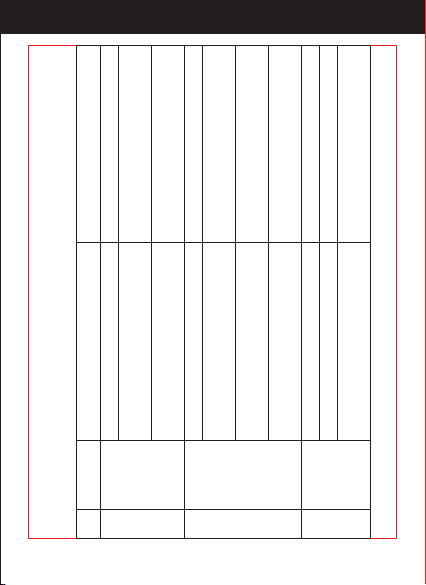
Problem
Problem Cause Solution
No.
The
transmitter
indicator
light is o
1
1. Low battery. 1. Replace the transmitter battery.
2. The battery positive pole and
negative pole are in reverse order.
2. Install the battery in accordance with
the user manual.
3.Poor Connection
3. Clean the dirt between the battery and
the battery slice.
Fail to pair
the drone
with
transmitter
2
1. Indicator light is o. 1. The same as above 1.2.3.
2. There is interfering signal nearby.
2. Turn o and turn on the drone and
transmitter again.
3. Mis-operation.
3. Operate the drone step by step in
accordance with the user manual.
4. The electronic component is damaged
for frequent crash.
4. To buy spare parts from local seller
and replace damaged parts.
The drone
is under-
powered or
can not y.
3
1. The propeller deformed seriously. 1. Replace the propeller.
2. Low battery. 2. Recharge the drone battery.
3. Incorrect installation of propeller.
3. Install the propeller in accordance
with the user manual .
http://www.ipotensic.com
23
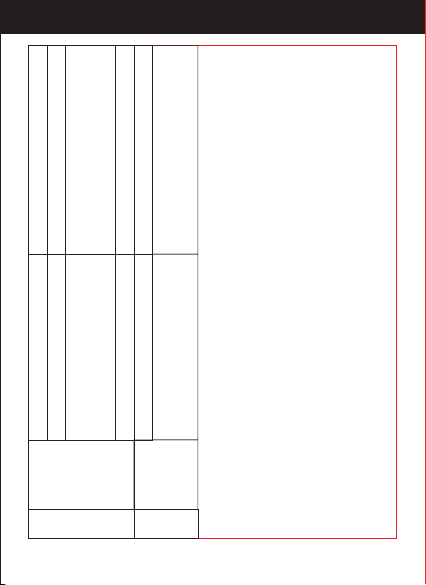
The drone
could not
hover and
tilts to
one side.
4
The drone
indicator
light is o.
5
1. Low battery. 1. Recharge the drone battery.
2. The battery is expired or over
discharge protection.
2. Buy a new battery from local seller to
replace the battery or charge the battery
in accordance with the use manual.
1. The propeller deformed seriously. 1. Replace propeller.
2. The motor holder deformed. 2. Replace the motor holder.
3. The gyro did not reset after violent
crash.
3. Put the drone on the at ground for
about 10s or restart the the drone to
calibrate again.
4. The motor is damaged. 4. Replace motor.
http://www.ipotensic.com

24
FCC Note
This equipment has been tested and found to comply with the limits
These limits are designed to provide reasonable protection against
harmful interference in a residential installation. This equipment generates
uses and can radiate radio frequency energy and, if notinstalled and used
in accordance with the instructions, may cause harmful interference to
radio communications. However, there is no guarantee that interference
will not occur in a particular installation.
If this equipment does cause harmful interference to radio or television
reception, which can be determined by turning the equipment o and on,
the user is encouraged to try to correct the interference by one or more of
the following measures:
● Reorient or relocate the receiving a ntenna.
● Increase the separation between the equipment and receiver.
● Connect the equipment into an outlet on a circuit dierent from that
to which the receiver is connected.
WARNING: Changes or modications not expressly approved by the party
esponsible for compliance could void the user's authority to
operate the equipment.
http://www.ipotensic.com

25
MADE IN CHINA
This device complies with Part 15 of the FCC Rules. Operation is subject to
the following two conditions:
(1) This device may not cause harmful interference.
(2) This device must accept any interference received, including
interference that may cause undesired operation.
The equipment may generate or use radio frequency energy. Changes
unless the modications are expressly approved in the instruction
manual. Modications not authorized by the manufacturer may void
user’s authority to operate this device.
FCC Notice
http://www.ipotensic.com