Instructions
ENG
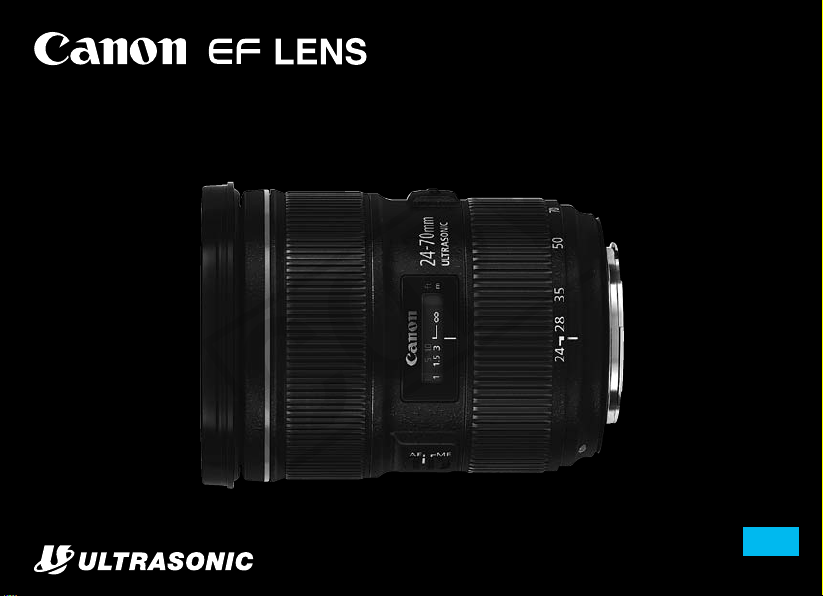
EF24-70mm f/2.8L II USM
COPY

ENG-1
Thank you for purchasing a Canon product.
Canon’s EF24-70mm f/2.8L II USM is a high-
performance standard zoom lens, for use with EOS
cameras.
“USM” stands for Ultrasonic Motor.
Features
1. Use of super UD lens elements, UD lens
elements, and two types of aspherical lens
elements giving superior denition.
2. Using a uorine coating on the foremost and
rearmost lens surfaces allows adhered dirt to be
removed more easily than before.
3. Ultrasonic motor (USM) for fast, quiet autofocus.
4. Manual focusing is available after the subject
comes into focus in autofocus mode (ONE
SHOT AF).
5. Circular aperture for producing beautiful
softfocus images.
6. Tight seal structure ensures excellent dustproof
and drip-proof performance.
COPY
ENG-2
Safety Precautions
Safety Precautions
Do not look at the sun or a bright light source
through the lens or camera. Doing so could result in
loss of vision. Looking at the sun directly through the
lens is especially hazardous.
Whether it is attached to the camera or not, do not
leave the lens under the sun without the lens cap
attached. This is to prevent the lens from concentrating
the sun’s rays, which could cause a re.
Conventions used in this instruction
Warning to prevent lens or camera malfunction
or damage.
Supplementary notes on using the lens and
taking pictures.
Handling Cautions
If the lens is taken from a cold environment into a
warm one, condensation may develop on the lens
surface and internal parts. To prevent condensation
in this case, rst put the lens into an airtight plastic bag
before taking it from a cold to warm environment. Then
take out the lens after it has warmed gradually. Do the
same when taking the lens from a warm environment
into a cold one.
Do not leave the lens in excessive heat such as in a car
in direct sunlight. High temperatures can cause the
lens to malfunction.
COPY

ENG-3
This device complies with Part
15 of the FCC Rules.
Operation is subject to the following two conditions: (1) This
device may not cause harmful interference, and (2) this
device must accept any interference received, including
interference that may cause undesired operation.
Do not make any changes or modications to the equipment
unless otherwise specied in the instructions. If such
changes or modications should be made, you could be
required to stop operation of the equipment.
This equipment has been tested and found to comply with
the limits for a class B digital device, pursuant to part 15
of the FCC Rules. These limits are designed to provide
reasonable protection against harmful interference in a
residential installation. This equipment generates, uses and
can radiate radio frequency energy and, if not installed and
used in accordance with the instructions, may cause harmful
interference to radio communications.
However, there is no guarantee that interference will not
occur in a particular installation. If this equipment does
cause harmful interference to radio or television reception,
which can be determined by turning the equipment off and
on, the user is encouraged to try to correct the interference
by one or more of the following measures:
• Reorient or relocate the receiving antenna.
• Increase the separation between the equipment and
receiver.
• Consult the dealer or an experienced radio/TV technician
for help.
Safety Precautions
This Class B digital apparatus complies with Canadian ICES-
003.
COPY
ENG-4
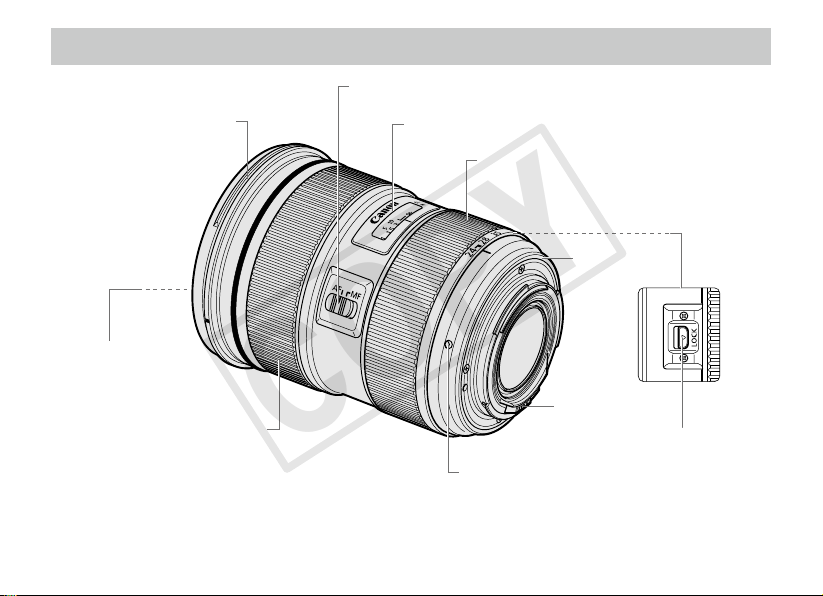
Nomenclature
For detailed information, reference page numbers are provided in parentheses (→ **).
Distance scale (→ 8)
Focus mode switch (→ 6)
Hood mount (→ 9)
Lens mount index (→ 5)
Contacts
(→ 5)
Rubber ring
(→ 5)
Zoom ring (→ 6)
Filter Mounting Thread
(→ 10)
Focusing ring (→ 6)
Zoom ring lock lever
(→ 7)
COPY
ENG-5
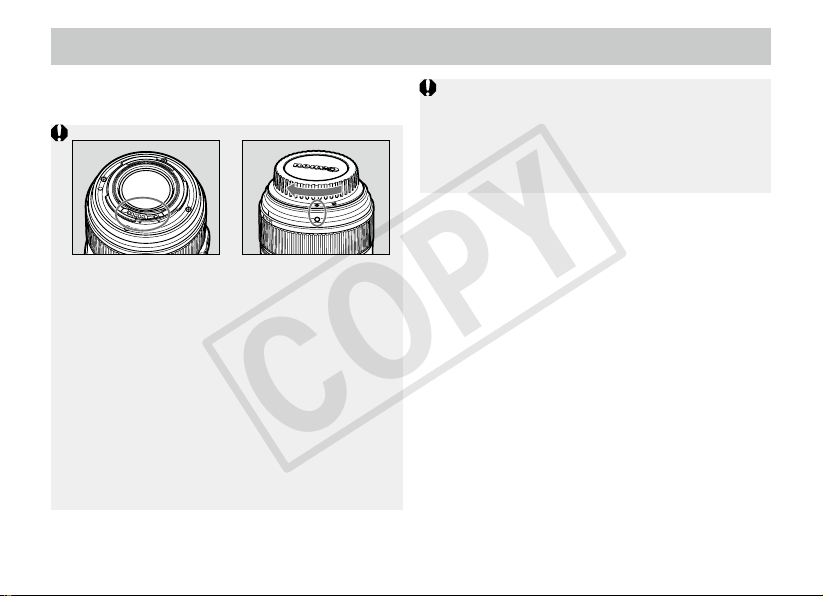
1. Mounting and Detaching the Lens
See your camera’s instructions for details on
mounting and detaching the lens.
The lens mount has a rubber ring for enhanced
dust- and water-resistance. The rubber ring may
cause slight abrasions around the camera’s lens
mount, but this will not cause any problems. If the
rubber ring becomes worn, it is replaceable by a
Canon Service Center at cost.
After detaching the lens, place the lens with
the rear end up to prevent the lens surface and
contacts from getting scratched.
If the contacts get soiled, scratched, or have
ngerprints on them, corrosion or faulty
connections can result. The camera and lens
may not operate properly.
If the contacts get soiled or have ngerprints on
them, clean them with a soft cloth.
If you remove the lens, cover it with the dust
cap. To attach it properly, align the lens mount
index and the index of the dust cap as shown
in the diagram, and turn clockwise. To remove it,
reverse the order.
COPY
ENG-6
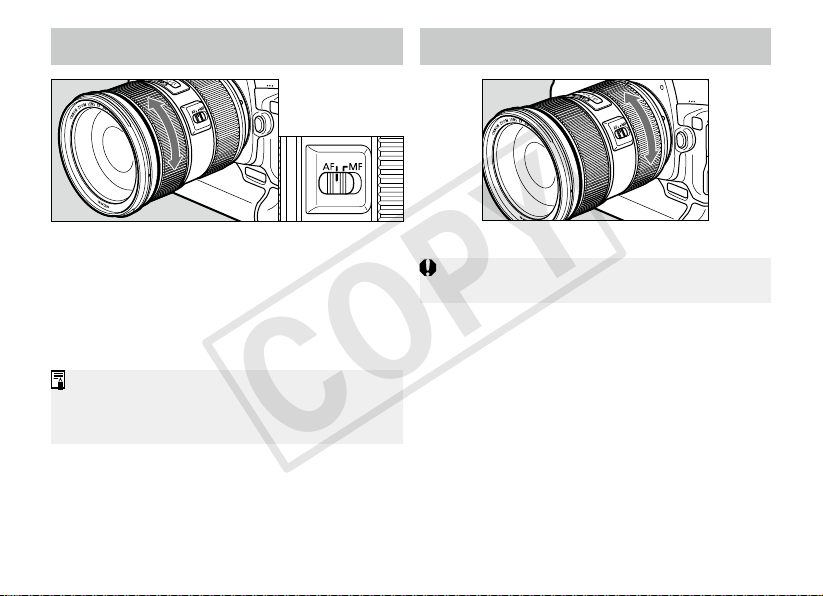
2.
Setting the Focus Mode
3.
Zooming
After autofocusing in ONE SHOT AF mode, focus
manually by pressing the shutter button halfway
and turning the focusing ring. (Full-time manual
focus)
To shoot in autofocus (AF) mode, set the focus
mode switch to AF.
To shoot in manual focus (MF) mode, set the
focus mode switch to MF, and focus by turning
the focusing ring.
The focusing ring always works, regardless of
the focus mode.
To zoom, rotate the zoom ring.
Be sure to nish zooming before focusing. Zooming
after focusing can affect the focus.
COPY
ENG-7
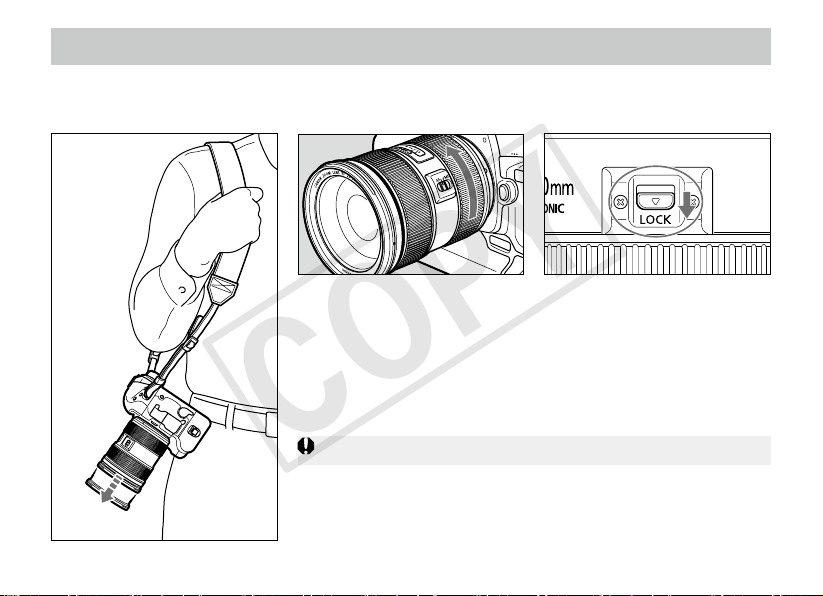
4. Fixing the Zoom Ring
The zoom ring can be xed to keep the lens at the shortest point. This function is convenient for
carrying a camera on a strap because it prevents the lens from extending.
2 Slide the zoom ring lock
lever in the direction
indicated by the arrow.
To release the zoom ring,
slide the zoom ring lock lever
in the direction opposite to
the arrow.
1 Rotate the zoom ring to the
widest position (24 mm).
The zoom ring can only be locked at maximum wide angle.
COPY
ENG-8
5.
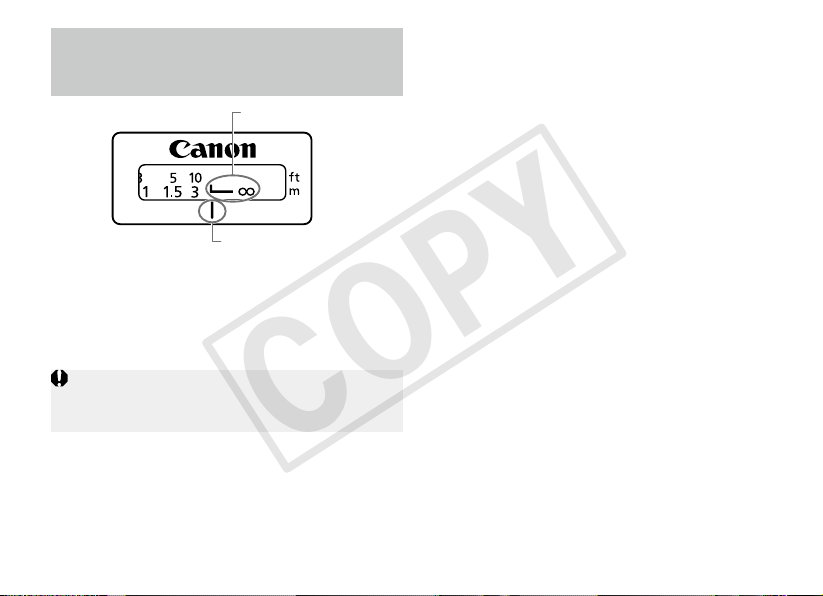
Innity Compensation
Mark
For accurate focusing in MF on subjects at innity
distance, look through the viewnder while rotating
the focusing ring.
To compensate for shifting of the innity focus
point that results from changes in temperature.
The innity position at normal temperature is the
point at which the vertical line of the distance
scale L mark is aligned with the distance index.
Distance index
Innity compensation mark
COPY
ENG-9
6. Hood
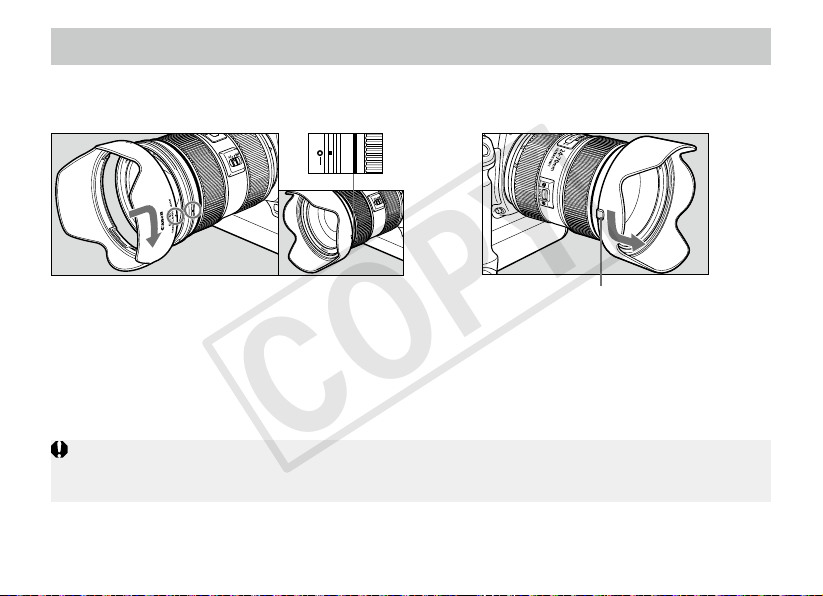
●Attaching
To attach the hood, align the hood’s attachment
position mark with the red dot on the front of the
lens, then turn the hood as shown by the arrow
until the lens’ red dot is aligned with the hood’s
stop position mark.
●Removing
To remove the hood, hold down the button on
the side and turn the hood in the direction of the
arrow until the position mark on the hood aligns
with the red dot. The hood can be reverse-
mounted on the lens for storage.
If the hood is not attached properly, vignetting (darkening of the perimeter of the picture) may occur.
When attaching or detaching the hood, grasp the base of the hood to turn it. To prevent deformation, do not
grasp the rim of the hood to turn it.
The EW-88C hood cuts out unwanted light and protects the front of the lens from rain, snow, and
dust.
Button
COPY
ENG-10
8. Extension Tubes
(Sold Separately)
7. Filters
(sold separately)
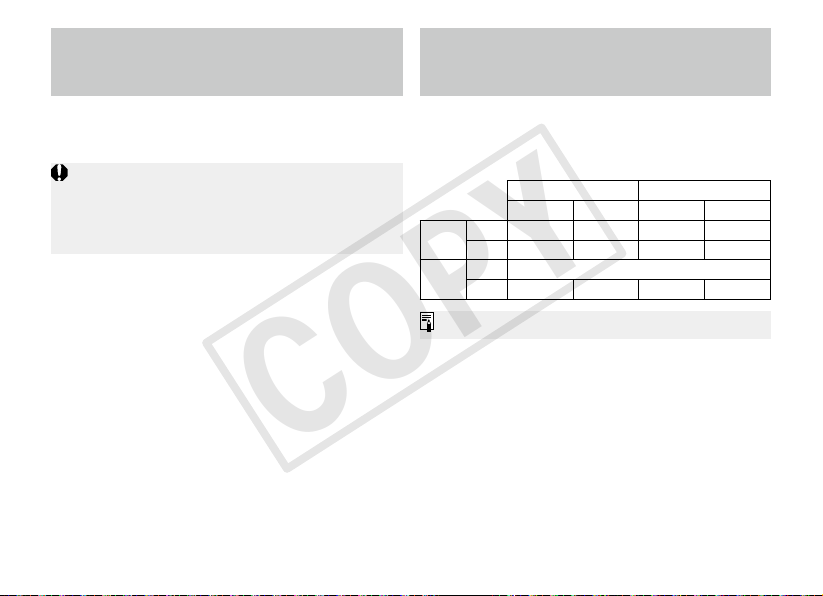
You can attach extension tube EF12 II or EF25
II for magnied shots. The shooting distance
and magnication are shown below.
MF mode is recommended for accurate focusing.
Focusing Distance Range (mm)
Magnication (×)
Close distance Long distance Close distance Long distance
EF12 II
24mm 178 190 0.63 0.50
70mm 259 523 0.45 0.18
EF25 II
24mm Incompatible
70mm 229 331 0.74 0.41
You can attach lters to the lter mounting
thread on the front of the lens.
Only one lter may be attached.
If you need a polarizing lter, use the Canon
Circular Polarizing Filter PL-C B (82 mm).
To adjust the polarizing lter, rst remove the
lens hood.
COPY
ENG-11
Specications
The lens length is measured from the mount surface to the front end of the lens.
Add 21.5 mm to include the E-82U lens cap and dust cap, and 24 mm for the E-82 II.
The size and weight listed are for the lens only, except as indicated.
Extenders cannot be used with this lens. In addition, there are no close-up lenses designed for use
with this lens.
Aperture settings are specied on the camera.
All data listed is measured according to Canon standards.
Product specications and appearance are subject to change without notice.
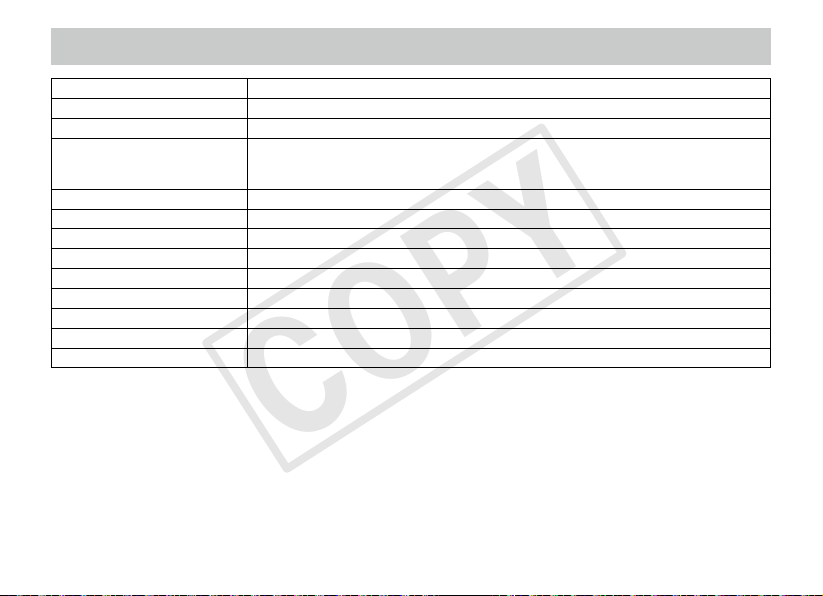
Focal Length/Aperture 24-70mm f/2.8
Lens Construction 13 groups, 18 elements
Minimum Aperture f/22
Angle of View
Diagonal: 84° – 34°
Vertical: 53° – 19° 30′
Horizontal: 74° – 29°
Min. Focusing Distance 0.38 m/1.25 ft.
Max. Magnification 0.21x (at 70 mm/2.76 inch)
Field of View
369 x 554
–
134 x 202 mm/14.53 x 21.81
–
5.28 x 7.95 inch (at 0.38 m/1.25 ft.)
Filter Diameter 82 mm/3.23 inch
Max. Diameter and Length 88.5 x 113.0 mm/3.48 x 4.45 inch
Weight Approx. 805 g/28.4 oz
Hood EW-88C
Lens Cap E-82U/E-82 II
Case LP1219
COPY

CT1-8579-003 0812Ni © CANON INC. 2012
COPY