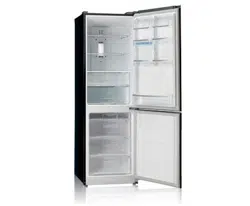
OWNER’S MANUAL
BOTTOM FREEZER
FRIDGE
Please read this owner’s manual thoroughly before
operating and keep it handy for reference at all times.
GF-6D725BGL
www.lg.com
2
TABLE OF CONTENTS
TABLE OF CONTENTS
3 PRODUCT FEATURES
4 IMPORTANT SAFETY
INSTRUCTIONS
7 COMPONENTS
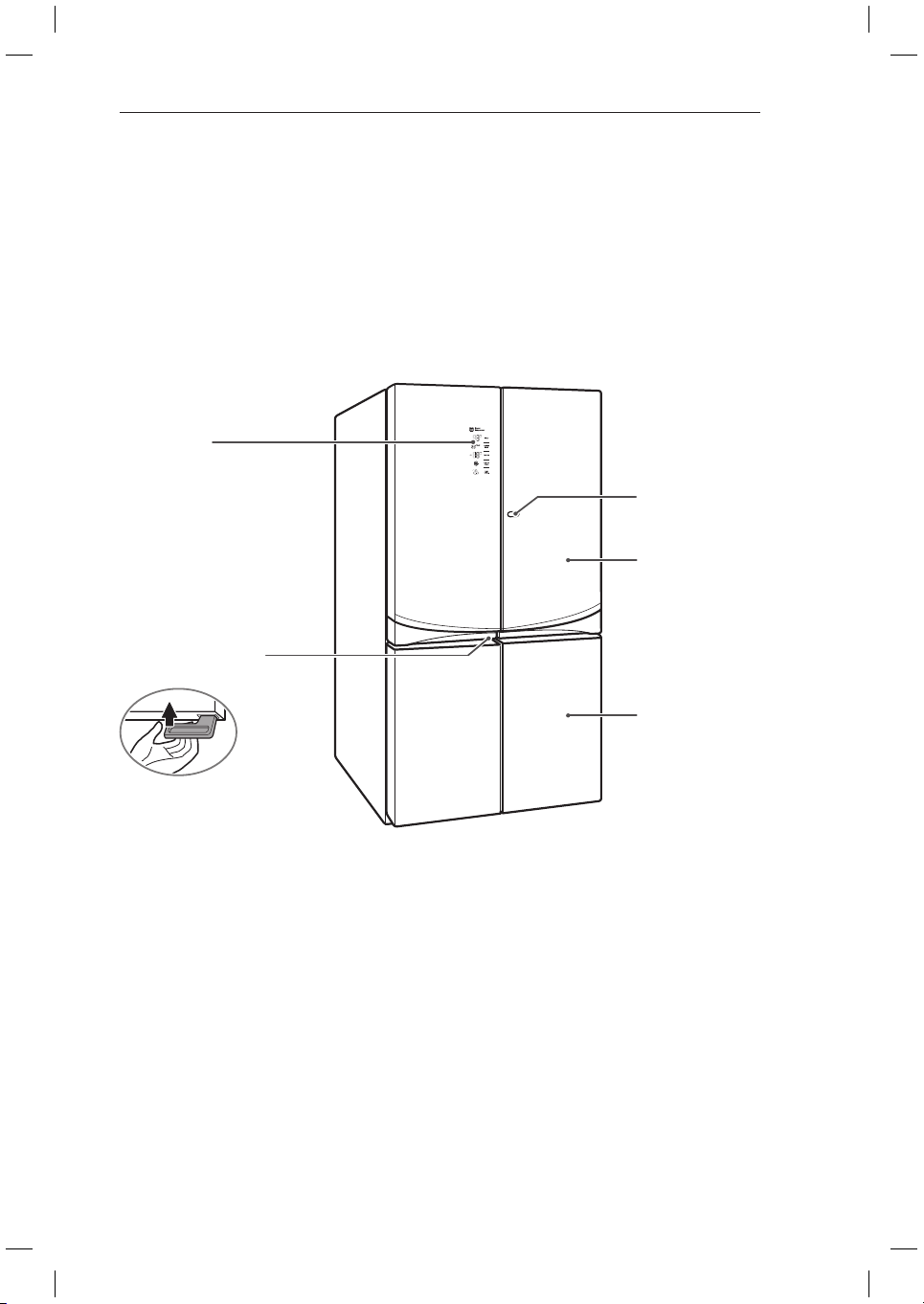
7 Fridge Exterior
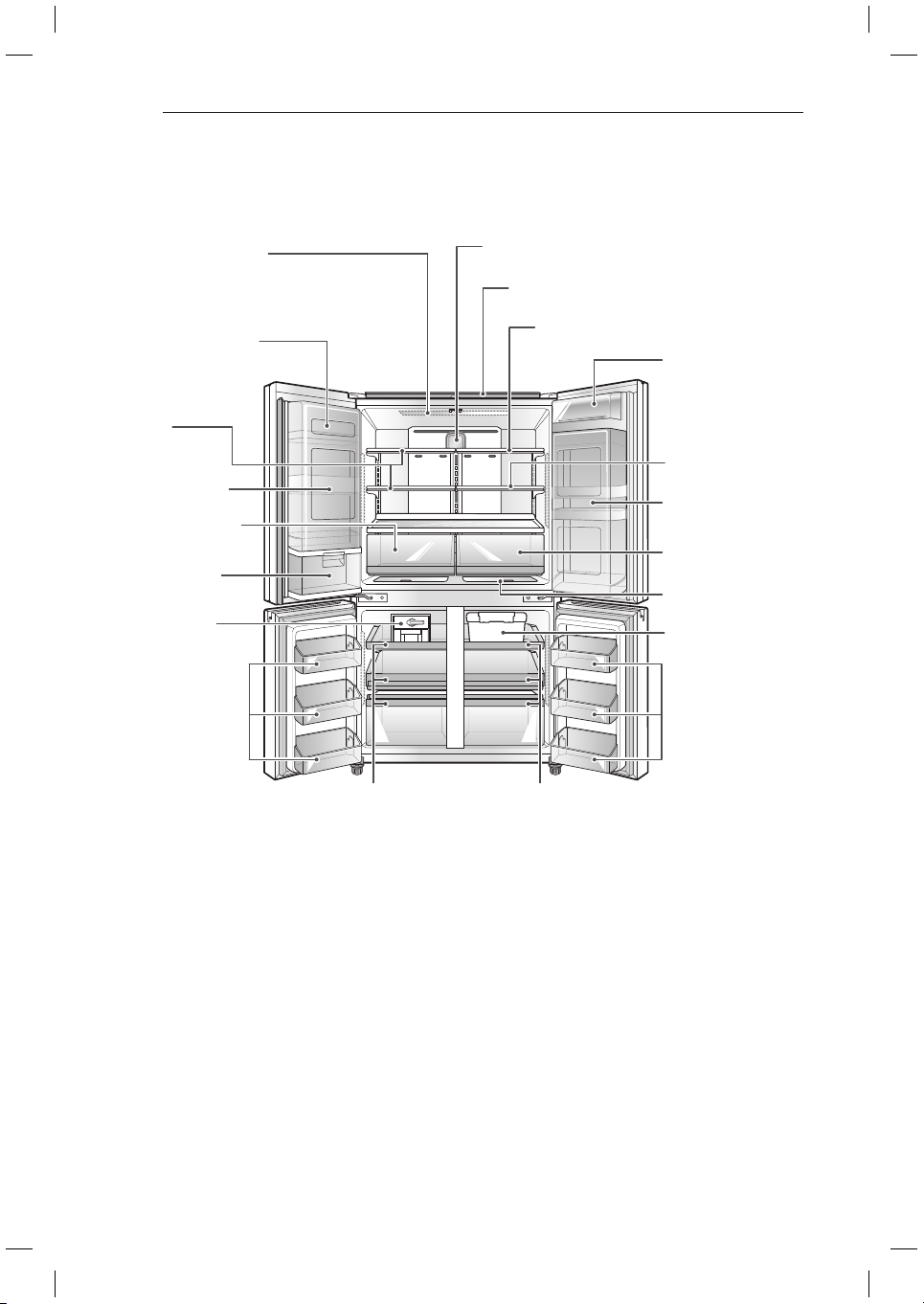
8 Fridge Interior
9 INSTALLATION
9 Installation Overview
10 Unpacking Your Fridge
10 Choosing the Proper Location
10 - Flooring
11 - Ambient Temperature
11 Turning On the Power
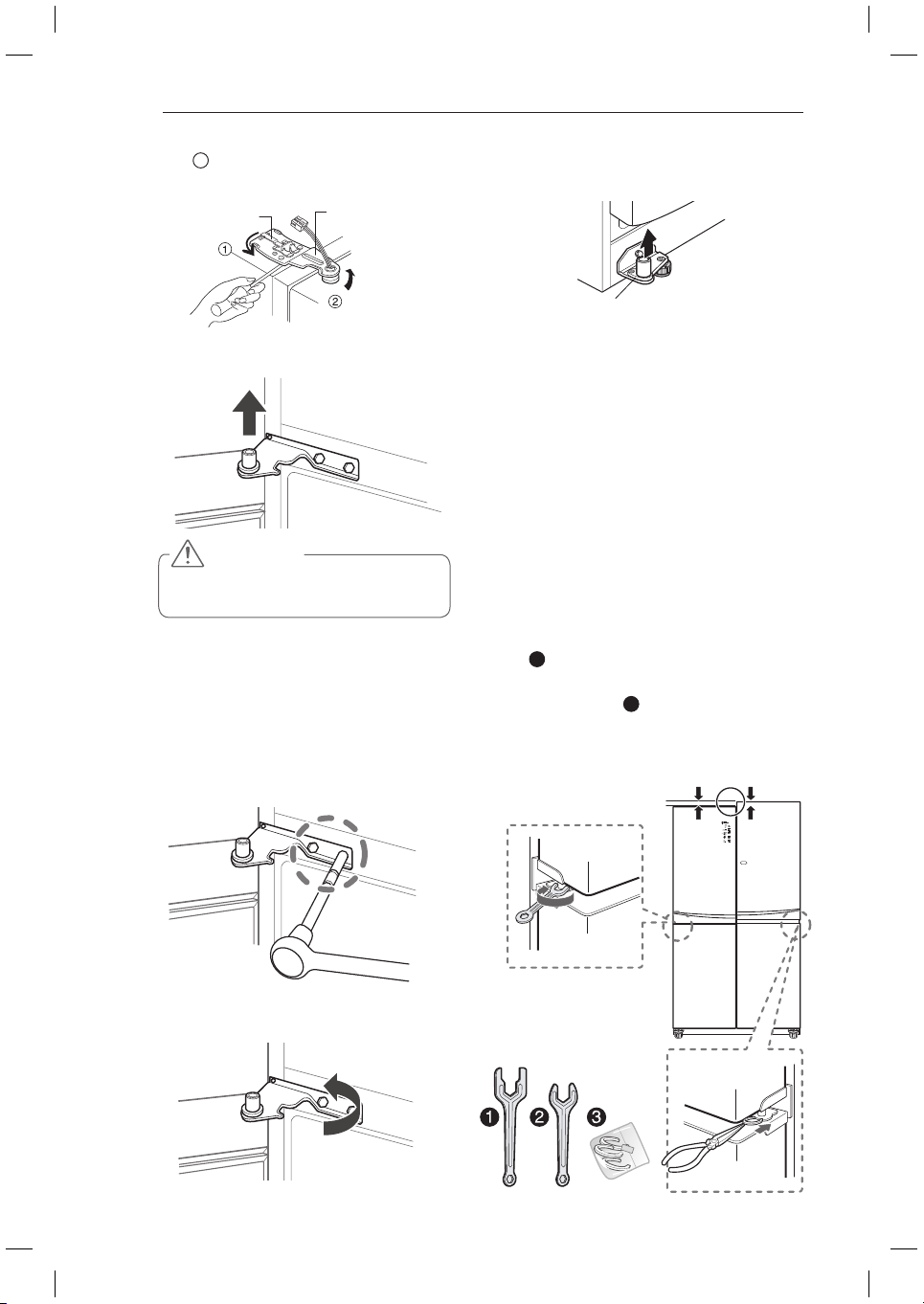
11 How to Remove the Fridge Door
12 How to Remove the Freezer Door
12 Height Adjustment
12 - Fridge Door Height Adjustment
13 - When the Freezer Door is Lower
14 HOW TO USE
14 Before Use
15 Control Panel
15 - Control Panel Features
16 Storing Food
16 - Food Storage Location
18 - Food Storage Tips
18 - Storing Frozen Food
19 Adjusting the Fridge Shelves
19 - Detaching the Shelf
19 - Refitting the Shelf
20 - Using the Folding Shelf
20 - When Closing the Door
21 Big Fresh Zone
21 - Removal of the Big Fresh Zone drawer
21 - Refitting the Big Fresh Zone drawer
22 How to disassemble and assemble the
vegetable box
23 Extra Space
23 Tilting Fresh Basket
24 - Tilting Fresh Basket Disassembly
24 Dairy Corner
24 Door-In-Door
25 - Door-In-Door Shelf Disassembly
26 Adjustable Moving Basket
26 Ice Maker
27 Fresh Zone
27 Freezer Drawer
27 - Freezer Drawer Removal
28 - Refitting the Freezer Drawer
28 Freezer/Fridge Basket
29 MAINTENANCE
29 Cleaning
30 Replacing the Pure N Fresh filter
31 SMART DIAGNOSIS
31 Using Smart Diagnosis
32 TROUBLESHOOTING
3
PRODUCT FEATURES
PRODUCT FEATURES
* Depending on the model, some of the following functions may not be available.
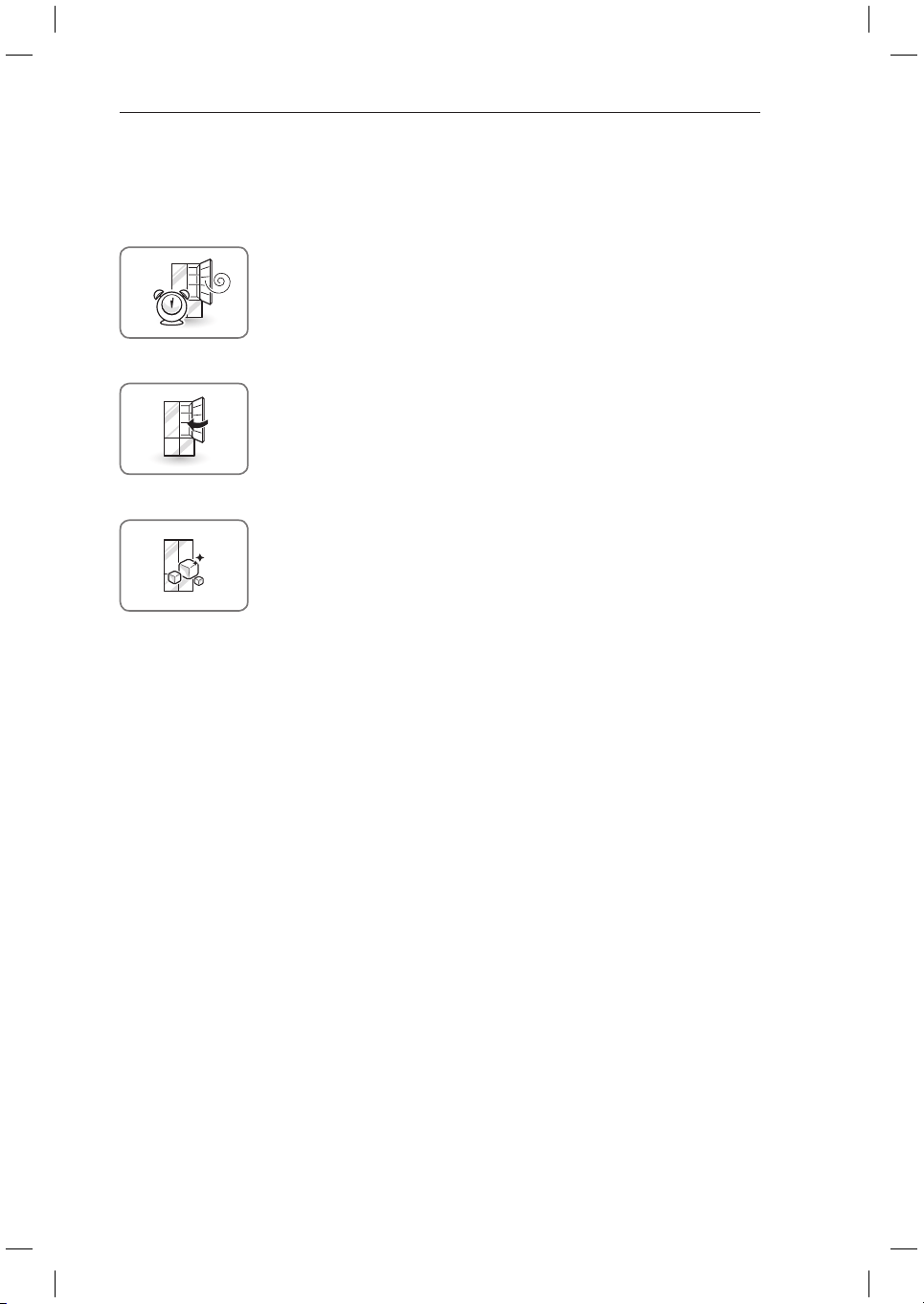
DOOR ALARM
The Door Alarm function is designed to prevent fridge malfunctioning that
could occur if a fridge door or freezer door remains open. If a fridge door or
freezer door is left open for more than 60 seconds, a warning alarm sounds
in 30 second intervals until it is closed.
EXPRESS FREEZE
The freezer section is maintained at the coldest temperature for a 24-hour
period before automatically resuming normal operation. The freezer display
temperature will not change when Express Freeze is engaged. It will also
enhance ice production whilst it is on.
AUTO CLOSING HINGE
The fridge doors close automatically with a slight push. (The door only
closes automatically when it is open at an angle less than 30°.)
4
IMPORTANT SAFETY INSTRUCTIONS
IMPORTANT SAFETY INSTRUCTIONS
READ ALL INSTRUCTIONS BEFORE USING THE APPLIANCE.
This guide contains many important safety messages. Always
read and obey
all safety messages.
WARNING
You can be killed or seriously injured if you do not follow instructions.
CAUTION
Indicates an imminently hazardous situation which, if not avoided, may result
in minor or moderate injury, or product damage.
WARNING
To reduce the risk of fire, electric shock, or personal injury when using your product, basic safety
precautions should be followed, including the following.
Power
NEVER unplug your fridge by pulling on the power cord. Always grip the plug firmly and pull it straight
y
out from the outlet.
If the supply cord is damaged, it must be replaced by the manufacturer or its service agent or a similarly
y
qualified person in order to avoid a hazard. Do not use a cord that shows cracks or abrasion damage
along its length or at either the plug or connector end.
Do not use an uncertified power outlet.
y
Unplug the power plug immediately in the event of a blackout or thunderstorm.
y
Plug in the power plug with the power cord facing downward.
y
Installation
Contact an authorized service center when you install or relocate the fridge.
y
When moving your fridge away from the wall, be careful not to roll over or damage the power cord.
y
Connect this product to a dedicated grounded electric outlet conforming with the rating prior to use. It is
y
the user’s responsibility to replace a standard 2-prong wall outlet with a standard 3-prong wall outlet.
Do not install the fridge where there may be a danger of it falling. Installation on a non sturdy timber floor
y
may cause difficulty in door alignment and cause the cabinet to deform.
Use
DO NOT allow children to climb, stand, or hang on the fridge doors or shelves in the fridge. They could
y
damage the fridge and seriously injure themselves.
Where fitted, do not place heavy objects on the dispenser of the fridge or hang onto it.
y
Do not place heavy or dangerous objects (bottles or vases with liquid) on the fridge.
y
Do not put live animals inside of the fridge.
y
Do not allow children to climb into the product when it is in or out of use.
y
In the event of a gas leak (propane/LPG), ventilate sufficiently and contact an authorized service center
y
before use. Do not touch or disassemble the electric outlet of the fridge.
In the event of a refrigerant leak, move flammable objects away from the fridge. Ventilate sufficiently
y
and contact an authorized service center.
Do not use or place flammable substances (chemicals, medicine, cosmetics, etc) near the fridge or store
y
them inside the fridge. Do not place the fridge in the vicinity of flammable gas.
The tempered glass on door can be broken by impact. Do not touch the broken parts. You may be
y
injured.
This is the safety alert symbol. It alerts you to safety messages that inform you of
hazards that can kill or hurt you or others, or cause damage to the product.
All safety messages will be preceded by the safety alert symbol and the hazard
signal word WARNING or CAUTION. These words mean:
5
IMPORTANT SAFETY INSTRUCTIONS
This appliance is intended to be used in household and similar applications such as
y
- staff kitchen areas, offices and other working environments;
- farm houses and by clients in hotels, motels and other residential type environments;
- bed and breakfast type environments.
Do not use this product for special purposes or mobile applications (storage of medicine or test materials
y
or on ships, etc).
Unplug the power plug before cleaning or repairing the fridge.
y
If the fridge is fitted with light bulbs and require replacing, unplug the fridge or turn off the power before
y
doing so.
Do not modify or extend the power cord.
y
Do not use a hair dryer to dry the interior. Do not light a candle to remove any interior odor.
y
For your safety, this appliance must be properly grounded. Have the wall outlet and the circuit checked
y
by a qualified electrician to make sure the outlet is properly grounded.
Do not use an outlet that can be turned off via a remote switch. Do not use an extension cord. It is the
y
user’s responsibility to replace a standard 2-prong wall outlet with a standard 3-prong wall outlet.
Do not, under any circumstances, cut or remove the third (ground) prong from the power cord.
y
Do not use an adapter plug and plug the power plug into a multi-outlet extension cord.
y
Disconnect the power cord immediately if you hear a noise, smell a strange odor or detect smoke.
y
Turn the power off if dust or water from above or below penetrates into the fridge. Call a service agent.
y
Do not disassemble or modify the fridge.
y
Do not put hands, feet, or metal objects below or behind the fridge.
y
Do not operate the fridge or touch the power cord with wet hands.
y
In fridges with automatic icemakers, avoid contact with the moving parts of the ejector mechanism or
y
with the heating element that releases the cubes. Do not place fingers or hands on the automatic ice-
making mechanism while the fridge is plugged in.
When dispensing ice from the dispenser, do not use crystal ceramics.
y
Do not touch the cold surfaces in the freezer compartment with wet or damp hands, when your fridge is
y
in operation.
Do not put glass containers, glass bottles or beverage cans in the freezer.
y
Do not store explosive substances such as aerosol cans with a flammable propellant in this appliance.
y
This appliance is not intended for use by persons (including children) with reduced physical, sensory or
y
mental capabilities, or lack of experience and knowledge, unless they have been given supervision or
instruction concerning the use of the appliance by a person responsible for their safety.
Do not refreeze frozen foods that have thawed completely. It may result in serious health issues.
y
If you are throwing away your old fridge, make sure the CFC coolant is removed for proper disposal by
y
a qualified servicer. If you release CFC coolant, you may be fined or imprisoned in accordance with the
relevant environmental law.
Disposed or abandoned fridges are dangerous, even if they are sitting for only a few days. When
y
disposing the fridge, remove the packing materials from the door or take off the doors but leave the
shelves in place so that children may not easily climb inside.
If the refrigerant gas has leaked, do not touch the fridge or the power outlet and ventilate the room
y
immediately. A spark could trigger an explosion causing a fire or burns. Because this fridge uses
natural gas (isobutene, R600a) as the environment-friendly refrigerant, even a small amount (50~60g) is
combustible. If gas leaks from severe damage during delivering, installing or using the fridge, any spark
may cause fire or burns.
READ ALL INSTRUCTIONS BEFORE USING THE APPLIANCE.
To reduce the risk of fire, electric shock, or personal injury when using your product, basic safety
precautions should be followed, including the following.
6
IMPORTANT SAFETY INSTRUCTIONS
CAUTION
Installation
The fridge must be properly installed in accordance with the Installer Instructions that were taped to
y
the front of the fridge.
Be careful when you unpack and install the fridge. Immediately dispose of packing materials (plastic)
y
out of reach of children.
Use
Close the doors carefully when children are around.
y
Keep fingers out of pinch point areas; clearances between the doors and cabinets are necessarily
y
small. Be careful closing doors when children are in the area.
If food is stacked or stored poorly on the shelves, it may fall and cause injury when the door is opened.
y
Do not move fridge while the fridge is operating. A Compressor rattling noise may occur as a result
y
and will only stop when the compressor cycles off, or when the power to the unit is turned off and
back on again. (This is normal and will not impact on the performance or the life of the compressor.
The rattling will stop after the compressor comes to a rest.)
Maintenance
Do not use strong detergents like wax or thinners for cleaning. Clean with a soft fabric.
y
Wipe foreign objects (dust, water, etc) off the prongs of the power plug and contact areas before
y
connecting.
READ ALL INSTRUCTIONS BEFORE USING THE APPLIANCE.
To reduce the risk of fire, electric shock, or personal injury when using your product, basic safety
precautions should be followed, including the following.
SAVE THESE INSTRUCTIONS
This appliance contains a small amount of isobutane refrigerant (R600a), natural gas with high
environmental compatibility, but it is also combustible. When transporting and installing the
appliance, care should be taken to ensure that no parts of the refrigerating circuit are damaged.
Refrigerant squirting out of the pipes could ignite or cause an eye injury. If a leak is detected,
avoid any naked flames or potential sources of ignition and air the room in which the appliance is
standing for several minutes.
In order to avoid the creation of a flammable gas air mixture if a leak in the refrigerating circuit
occurs, the size of the room in which the appliance may be sited depends on the amount of
refrigerant used. The room must be 1m
2
in size for every 8g of R600a refrigerant inside the
appliance. The amount of refrigerant in your particular appliance is shown on the identification
plate inside the appliance. Never start up an appliance showing any signs of damage. If in doubt,
consult your dealer.
WARNING
Keep ventilation openings, in the appliance enclosure or in the built-in structure, clear of obstruction.
y
Do not use mechanical devices or other means to accelerate the defrosting process, other than those
y
recommended by the manufacturer.
Do not damage the refrigerant circuit.
y
Do not use electrical appliances inside the food storage compartments of the appliance, unless they
y
are of the type recommended by the manufacturer.
The refrigerant and insulation blowing gas used in the appliance require special disposal procedures.
y
When disposal, please consult with service agent or a similarly qualified person.
WARNING
Use drinkable water for ice making.
y
7
COMPONENTS
COMPONENTS
Use this page to become more familiar with the parts and features of your fridge.
Page references are included for your convenience.
*The appearance and specifications of the actual product may differ depending on the model.
Fridge Exterior (Applicable to some models only)
LED Display
Displays the fridge and freezer’s
target temperature, the water
filter condition and the dispenser
status.
Door in Door release
Button
Fridge
Freezer
Door in Door release
Button
8
COMPONENTS
Fridge Interior (Applicable to some models only)
Dairy Product Bin
Used to preserve dairy
products.
Freezer Basket
Ice Maker
Door-In-Door
Folding Shelf
Big Fresh Zone
Fresh Zone
Freezer Basket
Extra Space
DrawerDrawer
LED interior lamps
The interior lamps light up the inside of
the fridge.
Dairy Product Bin
Used to preserve dairy
products.
Shelf
Big Fresh Zone
Door-In-Door
Tilting Fresh
Basket
Shelf
Bluetooth Sound Bar
Pure N Fresh Filter

9
INSTALLATION
INSTALLATION
Installation Overview
Please read the following installation instructions first after purchasing this product or transporting
it to another location.
1 Unpacking your
fridge
2 Choosing the proper
location
3 Leveling and Door
Alignment
SUGGESTION FOR ENERGY SAVING
Please do not keep the door open for a long time, close door in the shortest time.
y
Too much food are not advised to be put in. Enough space should be kept for cool air circulating
y
freely.
Do not set the temperature of fridge lower than needed. Do not put the food near the temperature
y
sensor.
Allow hot food to cool prior to storing. Placing hot food in the fridge-freezer could spoil other food,
y
and lead to higher electric bills.
Do not block air vents with food. Smooth circulation of cold air keeps fridge-freezer temperature
y
even.
Do not open the door frequently. Opening the door lets warm air enter the fridge-freezer, and
y
cause temperature to rise.
10
INSTALLATION
Choosing the Proper Location
The fridge should always be plugged
y
into its own individual properly grounded
electrical outlet rated for 240 Volts, 50 Hz,
AC only, and fused at 15 or 20 amperes.
This provides the best performance and
also prevents overloading house wiring
circuits which could cause a fire hazard from
overheated wires. It is recommended that a
separate circuit serving only this appliance
be provided.
Unpacking Your Fridge
WARNING
Use two or more people to move and install
y
the fridge. Failure to do so can result in back
or other injury.
Your fridge is heavy. When moving the fridge
y
for cleaning or service, be sure to protect
the floor. Always pull the fridge straight
out when moving it. Do not wiggle or walk
the fridge when trying to move it, as floor
damage could occur. Wind the leveling feet
up first so that the unit is on its rollers.
Keep flammable materials and vapors, such
y
as gasoline, away from the fridge. Failure to
do so can result in fire, explosion, or death.
Remove tape and any temporary labels from your
fridge before using. Do not remove any warning-
type labels, the model and serial number label, or
the Tech Sheet that is located under the front of
the fridge.
To remove any remaining tape or glue, rub the
area briskly with your thumb. Tape or glue residue
can also be easily removed by rubbing a small
amount of liquid dish soap over the adhesive with
your fingers. Wipe with warm water and dry.
Do not use sharp instruments, rubbing alcohol,
flammable fluids, or abrasive cleaners to remove
tape or glue. These products can damage the
surface of your fridge.
Fridge shelves are installed in the shipping
position. Please reinstall shelves according to
your individual storage needs.
Flooring
To avoid noise and vibration, the unit must be
leveled and installed on a solidly constructed
floor. If required, adjust the leveling legs to
compensate for unevenness of the floor. The
front should be slightly higher than the rear to
aid in door closing. Leveling legs can be turned
easily by tipping the cabinet slightly. Turn the
leveling legs to the left to raise the unit or to
the right to lower it. Poorly constructed timber
flooring can cause a limit in door adjustment
and the cabinet to become out of shape. (See
Leveling and door AlIgnment.)
NOTE
Installing on carpeting, soft tile surfaces,
a platform or weakly supported structure
is not recommended.
WARNING
To reduce the risk of electric shock, do not
install the fridge in a wet or damp area.
do not install in any outdoor or sheltered
outdoor location or direct sunlight.
11
INSTALLATION
Ambient Temperature
Install this appliance in an indoor area where
the temperature is between 55°F (13°C) and
110°F (43°C). If the temperature around the
appliance is too low or high, the cooling ability
may be adversely affected.
1
Place your appliance where it is easy to
use.
2
Avoid placing the unit near heat sources,
direct sunlight or moisture.
3
To ensure proper air circulation around the
fridge -freezer, please maintain sufficient
space on both the sides as well as top and
maintain at least 2 inches (5.08 cm) from
the rear wall.
4
To avoid vibrations, the appliance must be
leveled.
5
Don’t install the appliance below 41°F
(5°C). It may affect the performance.
2” (5.08 cm)
24” (61 cm)
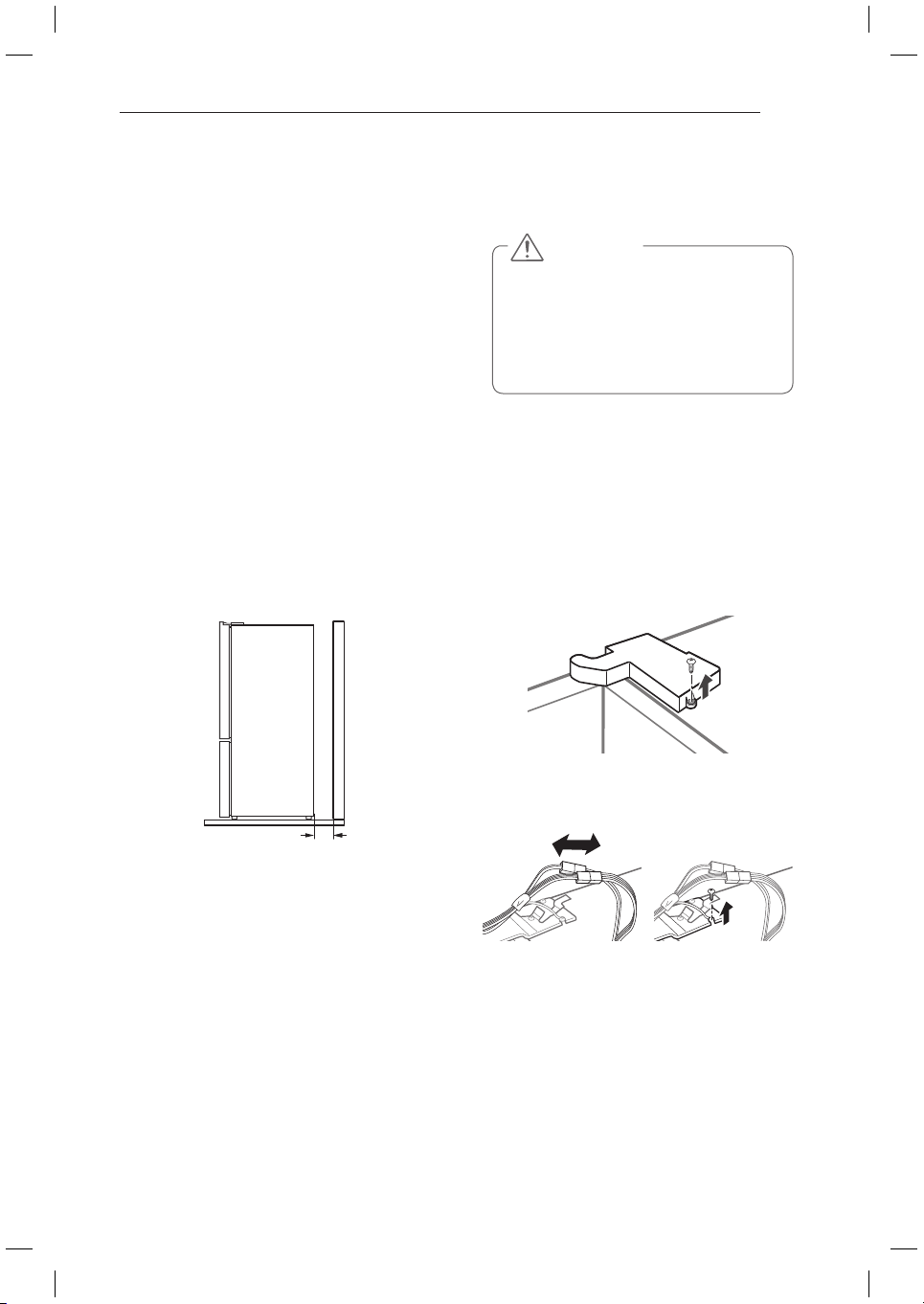
How to Remove the Fridge
Door (TURN OFF THE MAIN
POWER. Same procedure for
left and right doors)
1
Remove the fridge door hinge cover. (left
side)
2
Disassemble connection plugs and ground
wires.
Turning On The Power
Plug in the fridge.
CAUTION
Connect to a rated power outlet.
y
Have a certified electrician check
y
the wall outlet and wiring for proper
grounding.
Do not damage or cut off the ground
y
terminal of the power plug.
12
INSTALLATION
Height Adjustment
Leveling the doors may not be possible when
the floor is not leveled, or is of weak or poor
construction. The fridge is heavy and should
be installed on a rigid and solid surface. Some
Timber flooring may cause levelling difficulties
if it flexes excesively.
Fridge Door Height Adjustment
If the left door is lower, lift the door and screw
y
a door hinge bolt using a spanner as illustrated
in the figure.
Use
y
1
spanner in fridge.
If the right door is lower, lift the right door and
y
insert an additional
3
snap ring using a long
nose plier until both doors are level.
3
Remove the door by raising it from the
lower hinge.
How to Remove the Freezer
Door (TURN OFF THE MAIN
POWER. Same procedure for
left and right doors)
1
Remove the inner hinge bolt.
2
Twist the hinge to raise the pivoting end
so that the door can be lifted off.
3
Turn
1
around to release lock and raise
hinge up.
4
Disassemble Door, raising it from Hinge
Center.
Upper hinge
Keeper
CAUTION
Remove it after you open Door to 90
degrees.
Lower hinge
Fridge door
Height difference
Freezer door
Fridge door
Freezer door
13
INSTALLATION
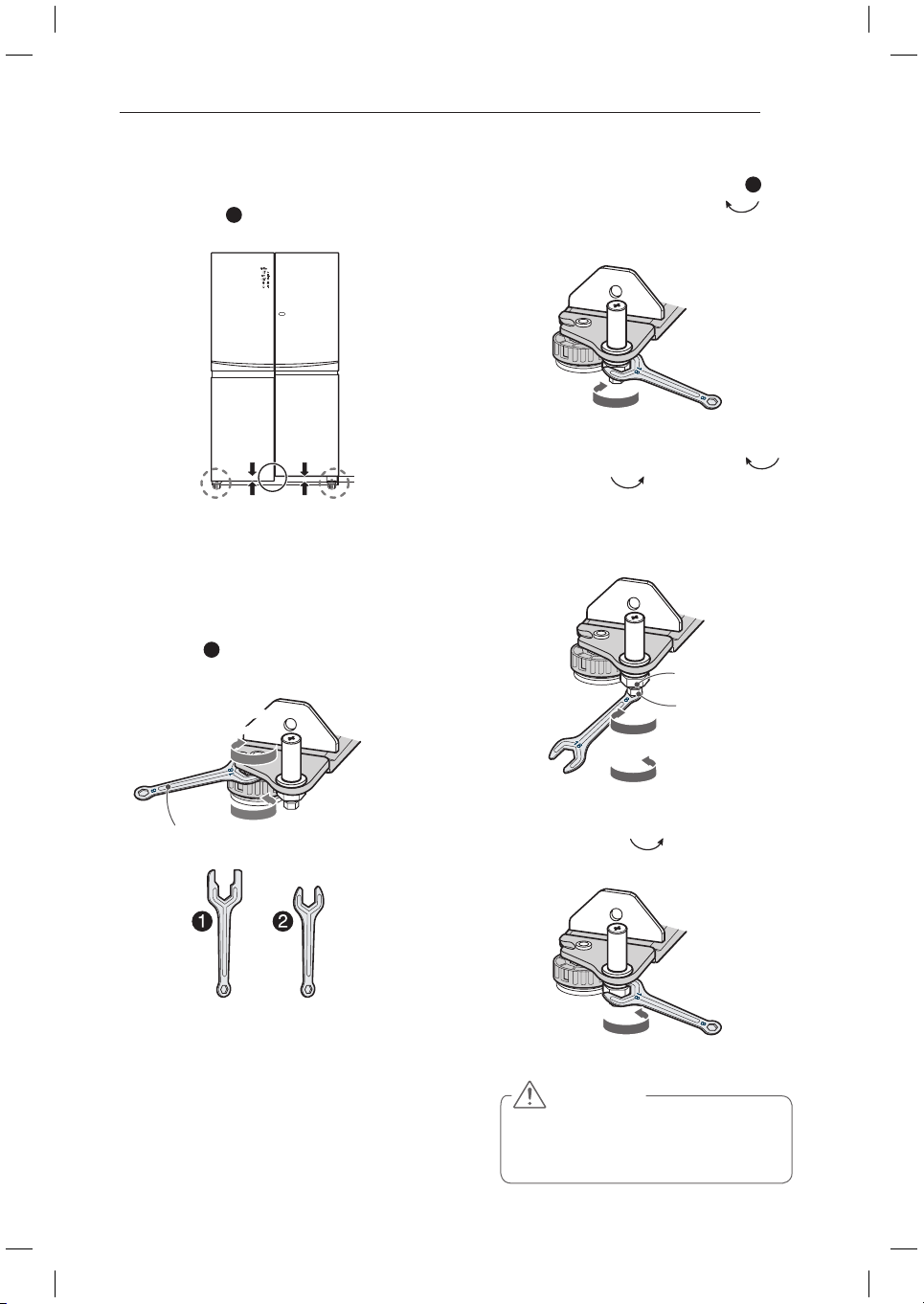
When the Freezer Door is Lower
Method 1 is recommended.
y
Use spanner
y
2
for freezer door adjustment.
1
(Method 1 recommended.)
Open the door and adjust the level by
using the nut on the adjustable round foot
of the lower side first by using the supplied
number
2
spanner as per the below
diagram.
2
(
Method 2)
(1) Using the large side of the number
2
spanner, rotate the locking nut (
)
clockwise to unlock it before adjusting the
Adjust-Hinge pin.
(2) Rotate the Adjust-hinge pin either (
)
clockwise or ( ) counter-clockwise
using the narrow side of the spanner
spanner to adjust the level difference
between the fridge door and freezer door
(this method provides limited adjustment).
(3) After adjusting door height, firmly tighten
the Locking nut (
) counter-clockwise
until secured.
CAUTION
Do not adjust the hinge pin height level
too much. The hinge pin can fall out.
(Range of height adjustment : Max. 3mm)
Height difference
Spanner
Release Locking
Nut
Adjust Hinge Pin
Lower Door Down
Raising Door Up
Nut Releasing
Nut Tightening
Lower Door
Down
Raising
Door Up
Raising
Door Up
14
HOW TO USE
HOW TO USE
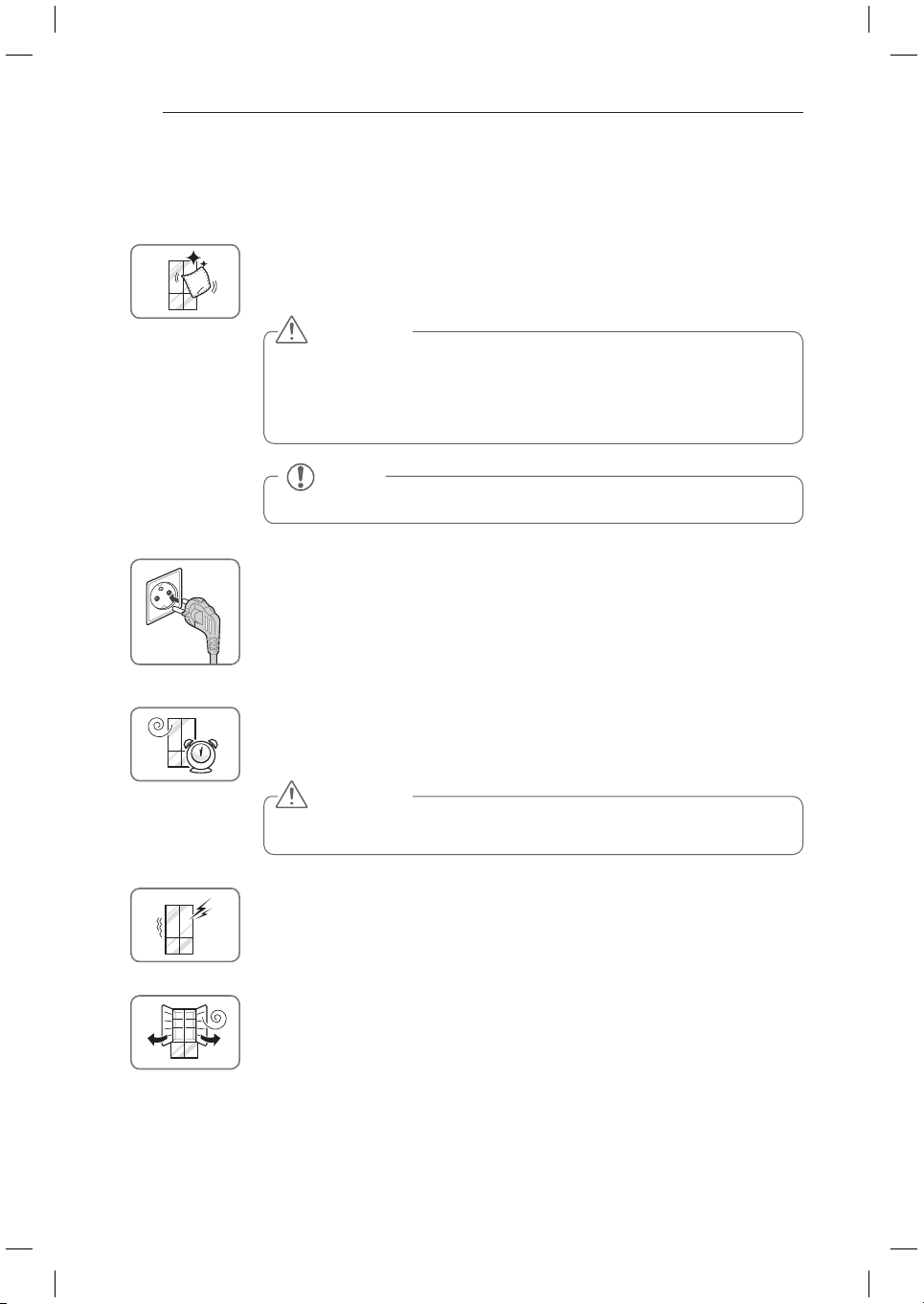
Before use
Clean the fridge.
Clean your fridge thoroughly and wipe off all dust that may have accumulated
during shipping.
NOTE
Remove adhesive residue by wiping it off with your thumb or dishwashing detergent.
CAUTION
Do not scratch the fridge with a sharp object or use a detergent that
y
contains alcohol, a flammable liquid or an abrasive when removing any tape
or adhesive from the fridge,.
Do not peel off the model or serial number label or the technical information
y
on the rear surface of the fridge.
Connect the power supply.
Check if the power supply is connected before use.
Read the “Turning On The Power” section. (Your plug type might be different from
the picture.)
CAUTION
Putting food in the fridge before it has cooled could cause the food to
spoil, or a bad odor could remain inside the fridge.
Wait for the fridge to cool.
Allow your fridge to run for at least three to four hours before putting food in it.
Check the flow of cold air in the freezer compartment to ensure proper cooling.
The fridge makes a loud noise after initial operation.
This is normal. The loudness will decrease as the temperature lowers.
Before Plugging in, open the fridge doors to ventilate the interior.
The inside of the fridge may smell like plastic at first. Remove any adhesive tape
from inside the fridge and open the fridge doors for ventilation until any odors have
subsided.
15
HOW TO USE
NOTE
The displayed temperature is the target
temperature, and not the actual temperature
of the refrigerator. The actual refrigerator
temperature depends on the food inside the
refrigerator as well as ambient temperatures and
how often the doors are opened and closed.
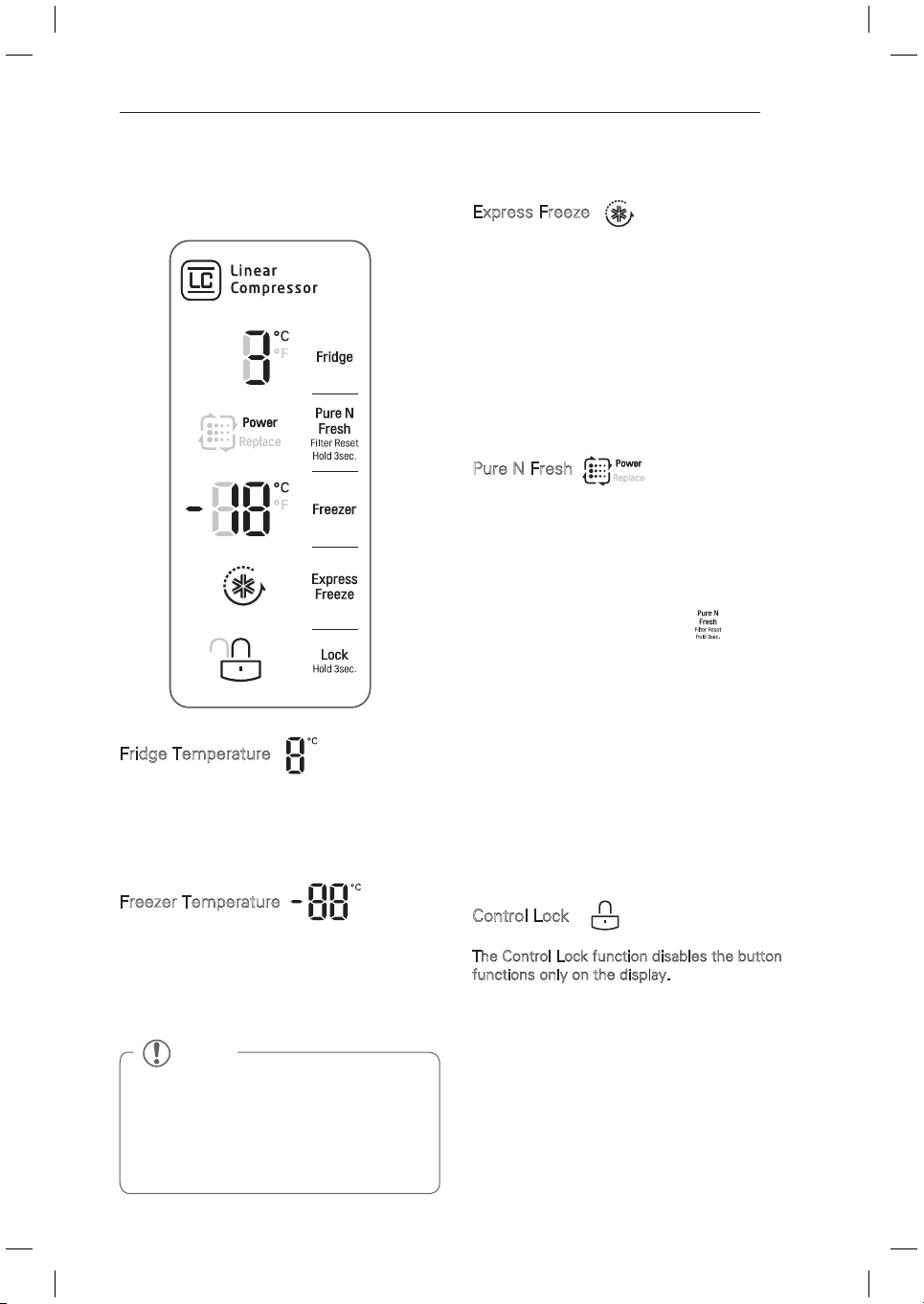
Control Panel (Applicable to some models only)
Control Panel Features
Express Freeze
This function increases both ice making and
freezing capabilities.
When you touch the
y
Express Freeze
button,
the graphic will illuminate in the display and
will continue for 3 hours. The function will
automatically disable itself after 3 hours.
You can stop this function manually by
y
touching the button one more time.
Control Lock
The Control Lock function disables the button
functions only on the display.
When power is initially connected to the
y
refrigerator, the
Lock
function is off.
If you want to activate the
y
Lock
function to
lock other buttons, press and hold the
Lock
button for 3 seconds or more. The
Lock
icon
will display and the
Lock
function is now
enabled.
To disable the
y
Lock
function, press and hold
the
Lock
button for approximately
3 seconds.
Fridge Temperature
Indicates the set target temperature of the
refrigerator compartment in Celsius (°C).
The recommended Fridge set temperature in
normal ambient conditions and loads is 3°C ~ 4°C.
Freezer Temperature
Indicates the set target temperature of the
freezer compartment in Celsius (°C).
The recommended Freezer set temperature
in normal ambient conditions and loads is
-17°C ~ -19 °C.
Pure N Fresh
When the Replace lamp is on, replace the Pure N
Fresh filter.
When the “Replace” lamp is turned on,
y
replace the filter to maintain the performance
of the Pure N Fresh Filter function.
To replace the filter, press the
y
button on
the touch control panel to the OFF mode so
that the filter icon is not illuminated and the
blue Pure N Fresh LED inside the refrigerator
remains off. The Pure N Fresh function has
three modes, The Pure N Fresh function
has three modes, Off(default mode when
icon is not lit up), Auto(when icon is lit up)
and Power(when icon and Power are lit up).
Power mode can be engaged by pressing the
Pure N Fresh touch control respectively.
Off>Auto>Power>Off>Auto….
Power mode will resume back to Auto mode
after 4 hours.
16
HOW TO USE
Storing Food
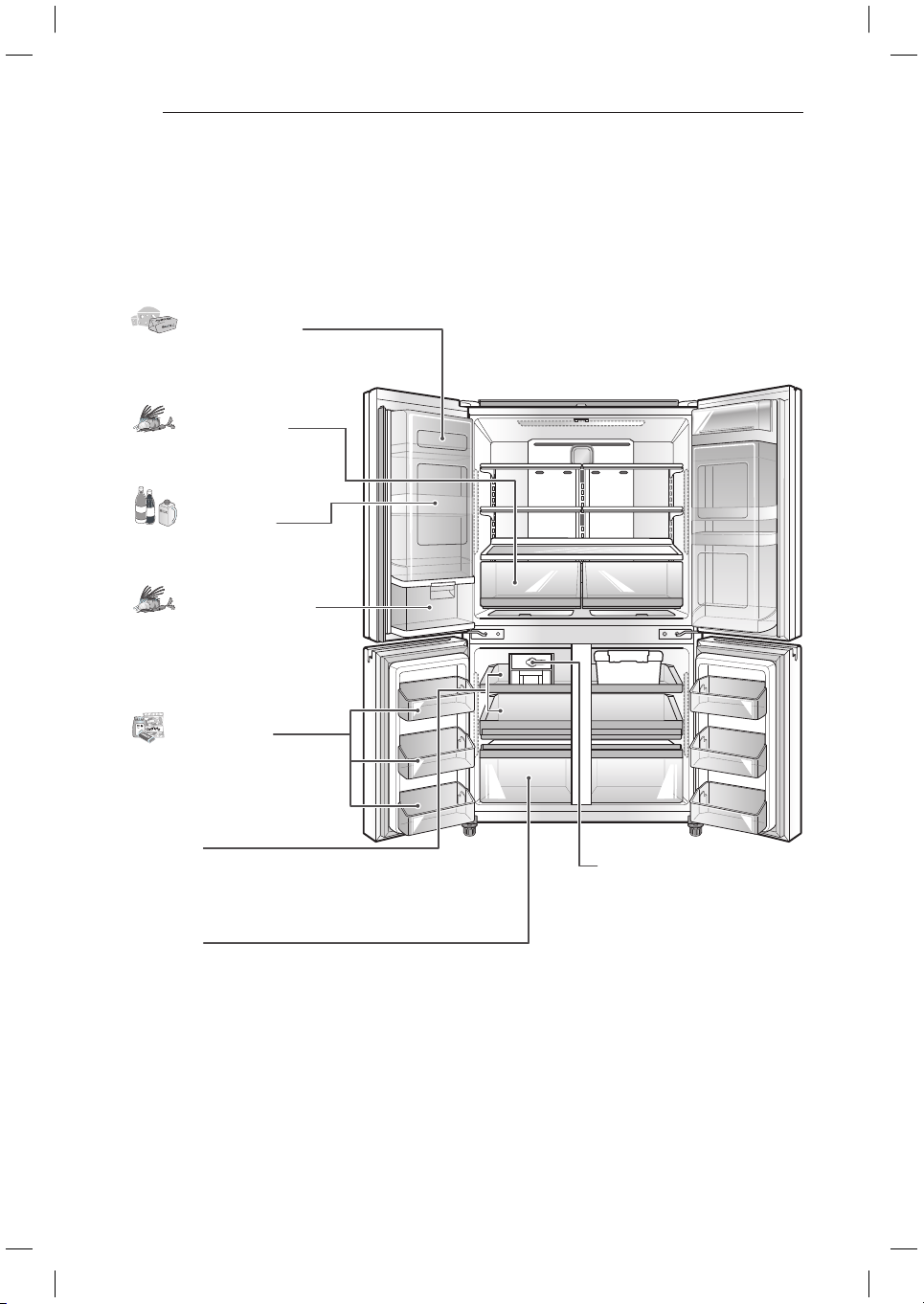
Food Preservation Location (Applicable to some models only)
Each compartment inside the fridge is designed to store different types of food.
Store your food in the optimal space to enjoy the freshest taste.
Freezer Basket
Preserve small packaged frozen
food or frequently-taken out foods.
Ice Maker
If necessary, preserve ices made in
icemaker.
Drawer (1)
Preserve small packaged frozen
food or frequently-taken out foods.
Drawer(2)
Preserve frozen food to keep it long.
Tilting Fresh Basket
Preserve short term ready to eat
vegetables.
Door-In-Door
Preserve frequently-taken out foods
such as beverages, snacks, etc.
Big Fresh Zone
Preserve vegetables and fruits.
Dairy Product Bin
Store diary foods such as butter,
cheese, etc.
17
HOW TO USE
Food Preservation Location (Applicable to some models only) (continued)
CAUTION
Do not store food with high moisture content towards the top of the fridge. The moisture could
y
come in direct contact with the cold air and freeze.
Wash food before storing it in the fridge. Vegetables and fruit should be washed, and food
y
packaging should be wiped down to prevent adjacent foods from being contaminated.
If the fridge is kept in a hot and humid place, frequent opening of the door or storing a lot of
y
vegetables in the fridge may cause condensation to form. Wipe off the condensation with a clean
cloth or a paper towel.
If the fridge doors are opened or closed too often, warm air may penetrate the fridge and raise its
y
temperature. It can also increase the fridge’s electricity usage.
NOTE
If you are leaving home for a short period of time, like a short vacation, the fridge should be left
y
on. Refrigerated foods that are able to be frozen will stay preserved longer if stored in the freezer.
If you are leaving the fridge turned off for an extended period of time, remove all food and unplug
y
the power cord. Clean the interior, and leave the doors slightly ajar to prevent mold from growing
in the fridge.
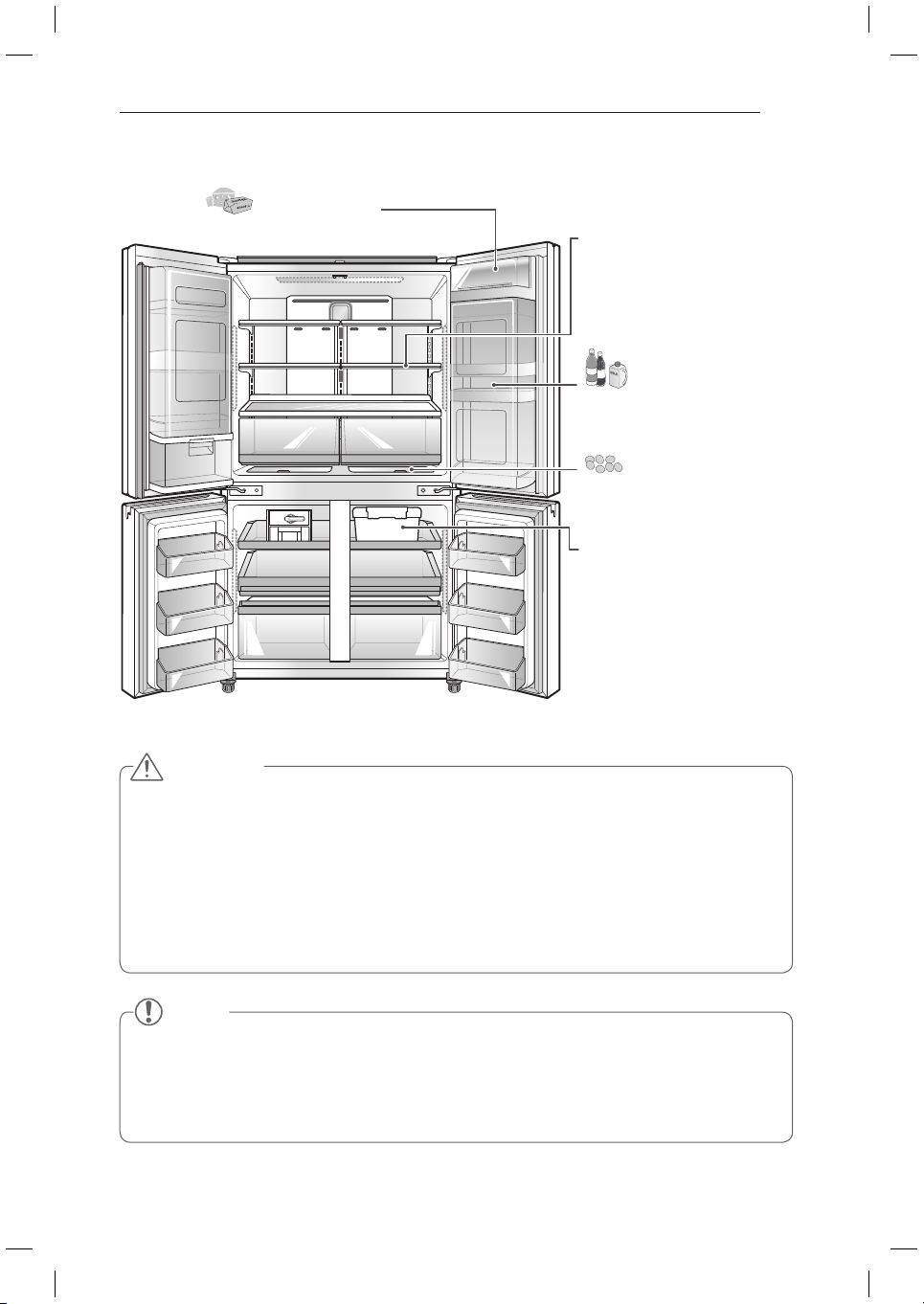
Dairy Product Bin
Store diary foods such as butter, cheese, etc.
Extra Space
Preserve small foods such as eggs,
ham, etc.
Fresh Zone
It is possible to keep fresh some
food for long-term storage for a long
time without the odor mixed with
other food.
This container can be stored in the
refrigeration chamber or freezer
chamber according to the food in the
container.
Door-In-Door
Preserve frequently-taken out foods
such as beverages, snacks, etc.
Folding Shelf
Fold a shelf to store large-sized
container or food.
18
HOW TO USE
Food Storage Tips
* The following tips may not be applicable
depending on the model.
Wrap or store food in the fridge in airtight and
moisture-proof material unless otherwise noted.
This prevents food odor and taste transfer
throughout the fridge. For dated products, check
use by dates to ensure freshness.
Food How to
Butter or
Margarine
Keep opened butter in a covered
dish or closed compartment.
When storing an extra supply,
wrap in freezer packaging and
freeze.
Cheese
Store in the original wrapping
until you are ready to use it.
Once opened, rewrap tightly in
plastic wrap or aluminum foil.
Milk Wipe milk cartons. For best
storage, place milk on interior
shelf, not on door shelf.
Eggs Store in original carton on
interior shelf, not on door shelf.
Fruit Do not wash or prepare fruit
until it is ready to be used. Sort
and keep fruit in its original
container, in a crisper, or store
in a completely closed paper
bag on a fridge shelf.
Leafy
Vegetables
Remove store wrapping and
trim or tear off bruised and
discolored areas. Wash in cold
water and drain. Place in plastic
bag or plastic container and
store in crisper.
Vegetables
with skins
(carrots,
peppers)
Place in plastic bags or plastic
container and store in crisper.
Fish Store fresh fish and shellfish
in the freezer section if they
are not being consumed the
same day of purchase. It is
recommended to consume
fresh fish and shellfish the
same day purchased.
Leftovers
Cover leftovers with plastic
wrap, aluminum foil, or plastic
containers with tight lids.
Storing Frozen Food
Freezing
Your freezer will not quick-freeze a large
quantity of food. Do not put more unfrozen
food into the freezer than will freeze within 24
hours (no more than 1 to 1.5kg. of food per
cubic foot of freezer space). Leave enough
space in the freezer for air to circulate around
packages. Be careful to leave enough room at
the front so the door can close tightly.
Storage times will vary according to the quality
and type of food, the type of packaging or wrap
used (how airtight and moisture-proof) and
the storage temperature. Ice crystals inside a
sealed package are normal. This simply means
that moisture in the food and air inside the
package have condensed, creating ice crystals.
NOTE
Check a freezer food guide or a reliable
cookbook for further information about preparing
food for freezing or food storage times.
NOTE
Allow hot foods to cool at room temperature
for 30 minutes, then package and freeze.
Cooling hot foods before freezing saves
energy.
NOTE
Never freeze beverage cans or bottles of any
kind as they can explode or shatter.

19
HOW TO USE
Storing Frozen Food (continued)
Packaging
Successful freezing depends on correct
packaging. When you close and seal the
package, it must not allow air or moisture in or
out. If it does, you could have food odor and
taste transfer throughout the fridge and could
also dry out frozen food.
Packaging recommendations:
Rigid plastic containers with tight-fitting
y
lids
Straight-sided canning/freezing jars
y
Heavy-duty aluminum foil
y
Plastic-coated paper
y
Non-permeable plastic wraps
y
Specified freezer-grade self-sealing plastic
y
bags
Follow package or container instructions for
proper freezing methods.
Do not use
Bread wrappers
y
Non-polyethylene plastic containers
y
Containers without tight lids
y
Wax paper or wax-coated freezer wrap
y
Thin, semi-permeable wrap
y
Adjusting the Fridge Shelves
The shelves in your fridge are adjustable to
meet your individual storage needs. Your
model may have either glass or wire shelves.
Adjusting the shelves to fit different heights
of items will make finding the exact item you
want easier. Doing so will also reduce the
amount of time the fridge door is open which
will save energy.
Detaching the Shelf
Tilt up the front of the shelf and lift it straight
up. Pull the shelf out.
Refitting the Shelf
Tilt the front of the shelf up and guide the
shelf hooks into the slots at the desired height.
Then, lower the front of the shelf so that the
hooks drop into the slots.
CAUTION
Make sure that shelves are level from
one side to the other. Failure to do so
may result in the shelf falling or spilling
food.

20
HOW TO USE
Using the Folding Shelf
You can store taller items, such as containers
or bottles, by simply pushing the front half of
the shelf underneath the back half of the shelf.
Pull the front of the shelf firmly toward you to
return to a full shelf.
When Closing the Door
CAUTION
Do not clean glass shelves with
y
warm water while they are cold.
Shelves may break if exposed to
sudden temperature changes or
impact.
Glass shelves are heavy. Use special
y
care when removing them.
CAUTION
To reduce the risk of door scratches
y
and breaking the door centre mullion,
please make sure that the fridge door
mullion is always folded in.
The door Alarm will sound if the door
y
remains open after 1 minute. Ensure
that the folding mullion is folded in
before closing the left hand door.
21
HOW TO USE
CAUTION
Always empty the draws before
y
removing them and use both hands
when removing and refitting.
Make sure that the fridge doors
y
are fully open before removing and
refitting the drawers.
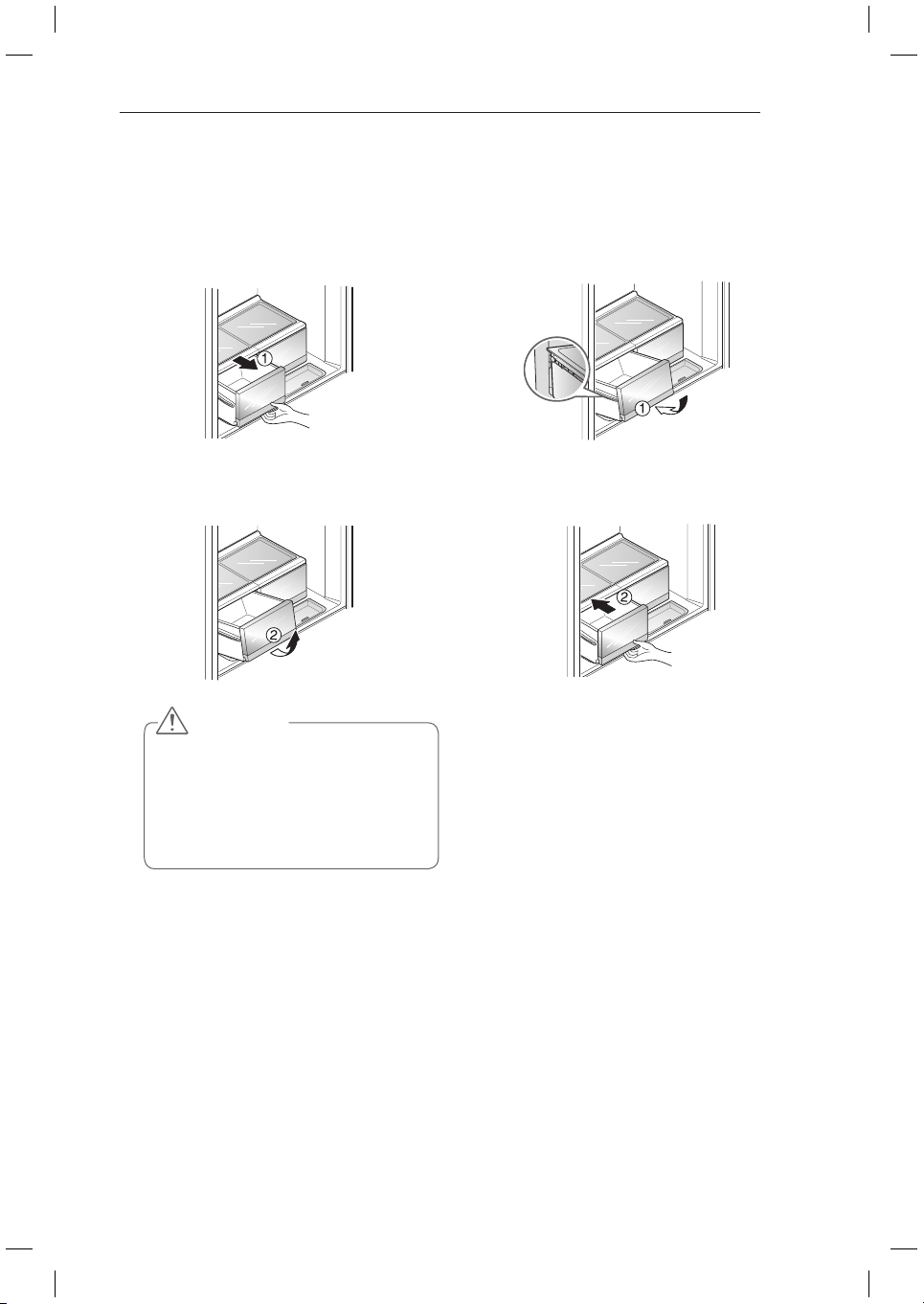
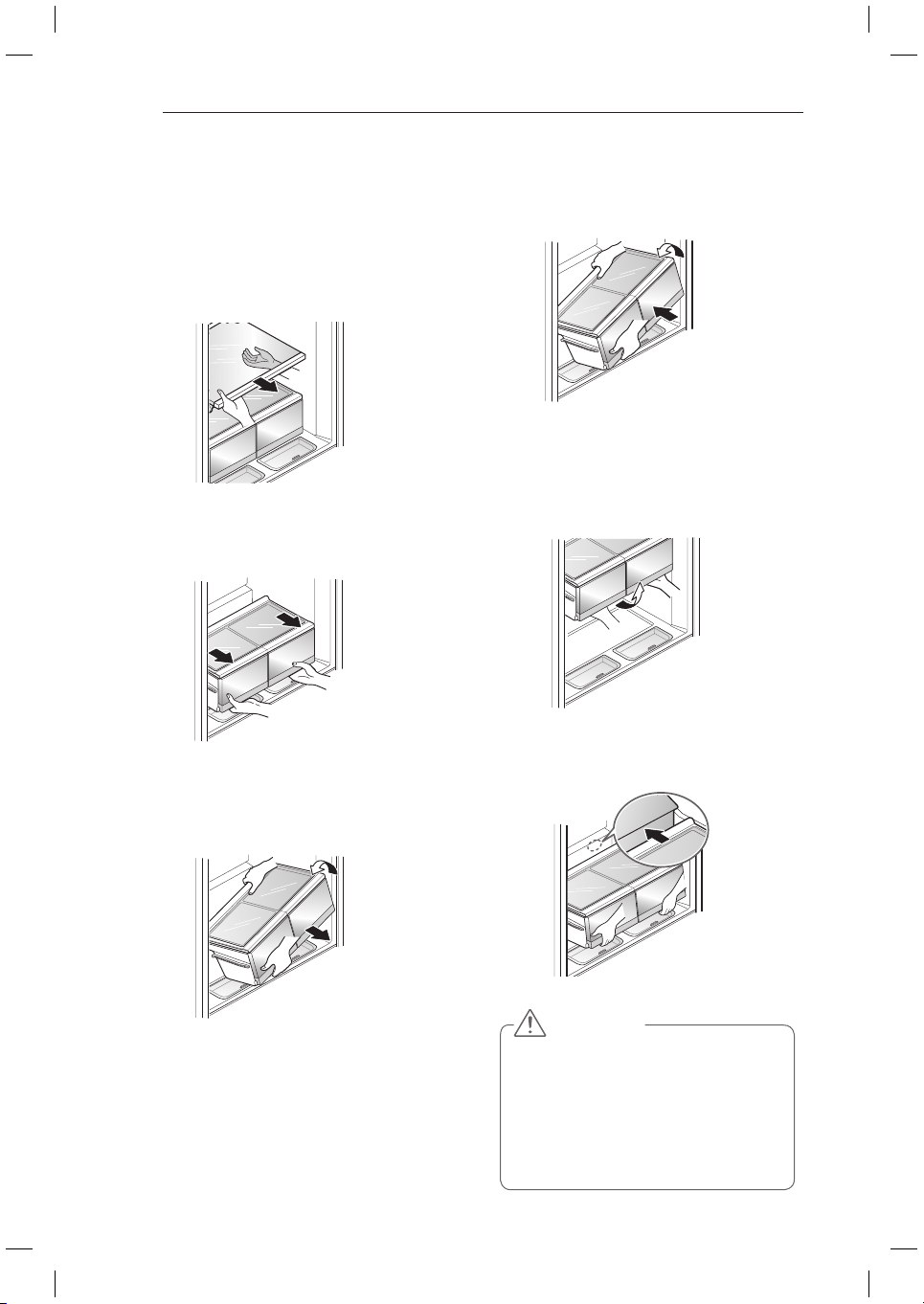
Big Fresh Zone
Removal of the Big Fresh Zone drawer.
1
Pull the drawer back to the end of its
travel.
2
Lift the front of the draw up and remove it
from its guide.
Refitting the Big Fresh Zone drawer
1
Insert the left and right roller of the drawer
into the guides whilst the draw is slightly
lifted at the front. and push it in gently
while lowering it at the same time.
2
Push it in gently while lowering it at the
same time.
22
HOW TO USE
CAUTION
Make sure to disassemble with
y
both hands. Heavy food in storage
may cause injury.
When you disassemble or assemble
y
the vegetable box, make sure
to widely open the refrigeration
chamber door.
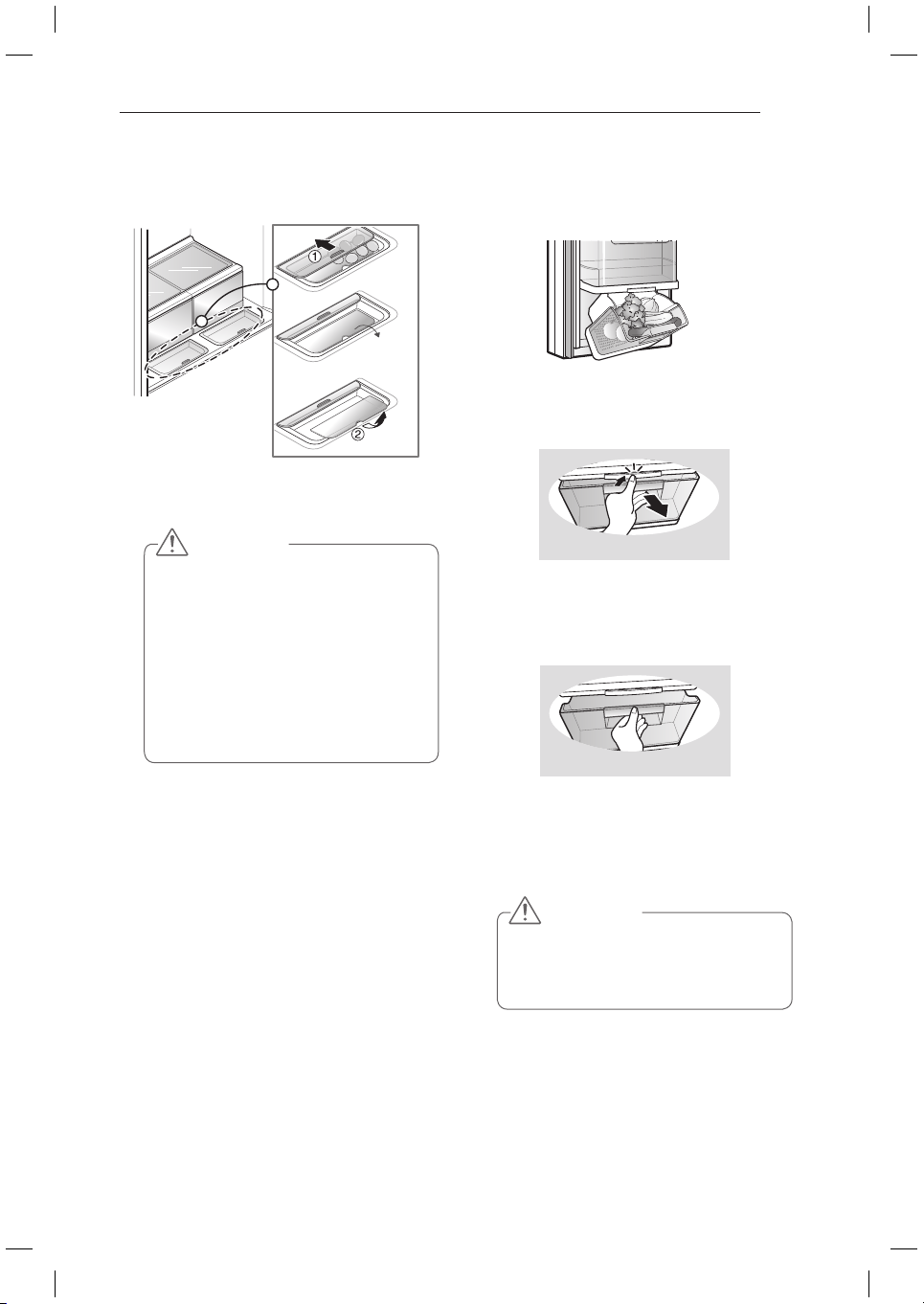
How to disassemble and
assemble the vegetable box
How to disassemble vegetable box
1
While the refrigeration chamber door is
wide open, take out all the shelves from
the refrigeration chamber.
2
Lift the vegetable box with both hands and
make space in the back by pulling it toward
you.
3
Grab the back side with one hand to lift the
vegetable box, and at this time, take it out
as tilted.
How to assemble vegetable box
1
Lift the vegetable box askew and push into
the refrigeration chamber.
2
Lift the vegetable box horizontally with the
height as high as the vegetable box in the
refrigeration chamber and put it down on
the floor. (It is to avoid contact with the
side of the refrigeration chamber.)
3
If there is a gap in the back side as in the
drawing, slightly lift the vegetable box and
push.
23
HOW TO USE
CAUTION
Be careful when handling and storing
y
larger eggs. They can be broken if the
cover is not completely closed and
the drawer is pushed in.
Observe the above diagrams when
y
removing and refitting the Multi-
Collection corner after cleaning.
Store all moist and easily-freezing
y
foods like soy bean curd, sesame leaf,
etc. on the front of the shelves.
Extra Space
Store small foods like eggs, ham, cheese, etc.
Open and close pushing or pulling grips.
y
Multi-collection
corner supporter
CAUTION
Do not allow children to hang from
y
the basket when it is open or closed.
This will damage the basket and
could cause injury.
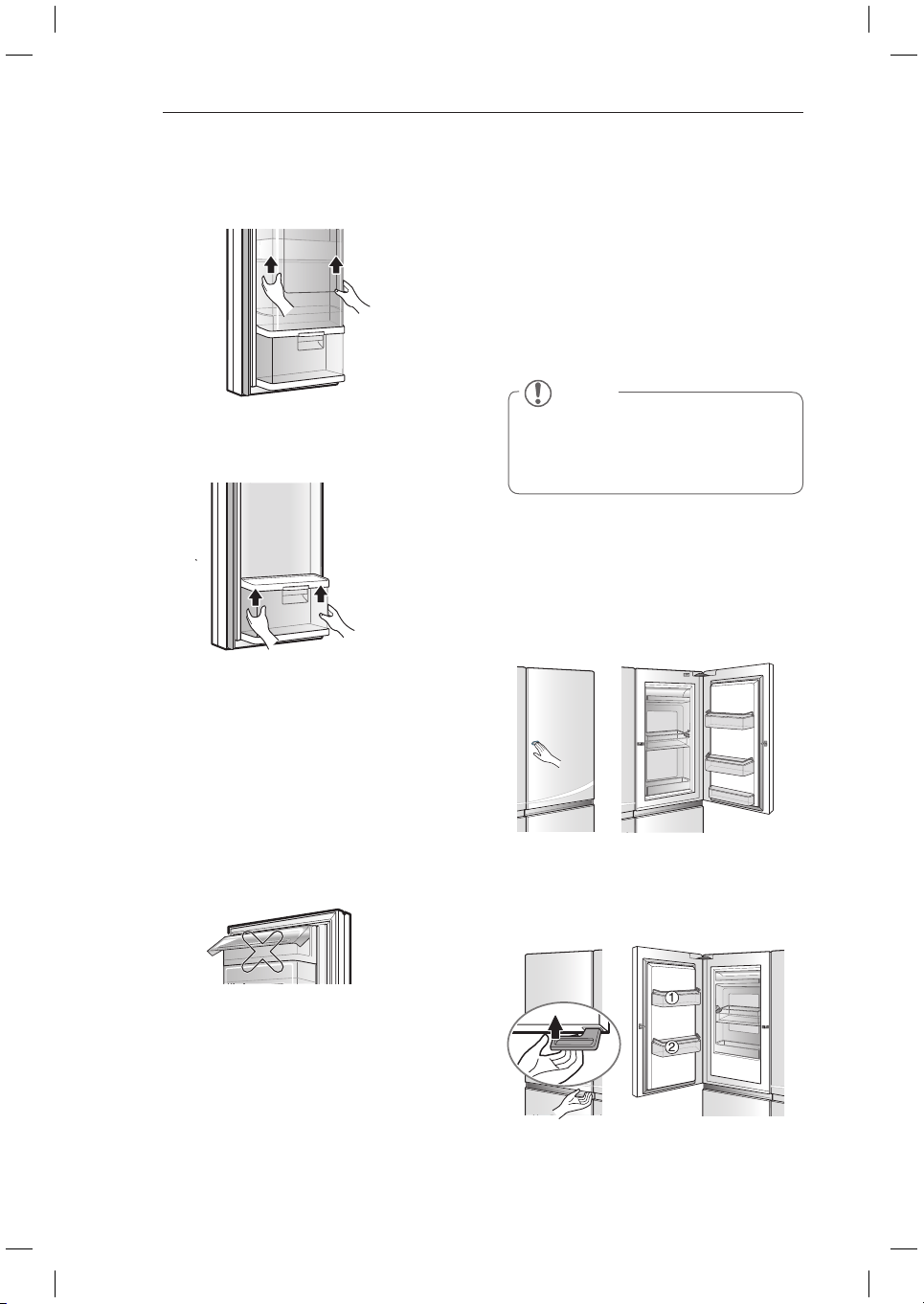
Tilting Fresh Basket
Ideal for storing vegetables soon to be eaten.
To open, lift the latch and gently pull the
basket back.
To close, push the basket in until a “click”
sound is heard.
To avoid damaging the drawer, do not
y
overload it or apply excessive force when
opening or closing.
< OPEN >
< CLOSE >
24
HOW TO USE
NOTE
The Cheese & Butter and Condiment
bins are not recommended for storing
items that spoil easily such as milk and
mayonnaise.
Door-In-Door (Applicable to
some models only)
The Door-In-Door compartment allows for easy
access of commonly used food items.
The inner Door-In-Door includes two door bins,
Cheese & Butter and Condiment bins, that
are specially designed for food that can be
stored at a warmer temperature. This makes
spreading butter and slicing cheese easier.
Press the the door button on the Home Bar
until you hear a click sound.
You can store more food in the larger Home
y
Bar.
With the larger storage room, you can
y
organize your foods better.
Press until
you hear
the “Click”
sound
When you turn the lever below the left door
upward, the door opens along with ‘click’ sound.
Door-In-Door (Left)
Door-In-Door (Right)
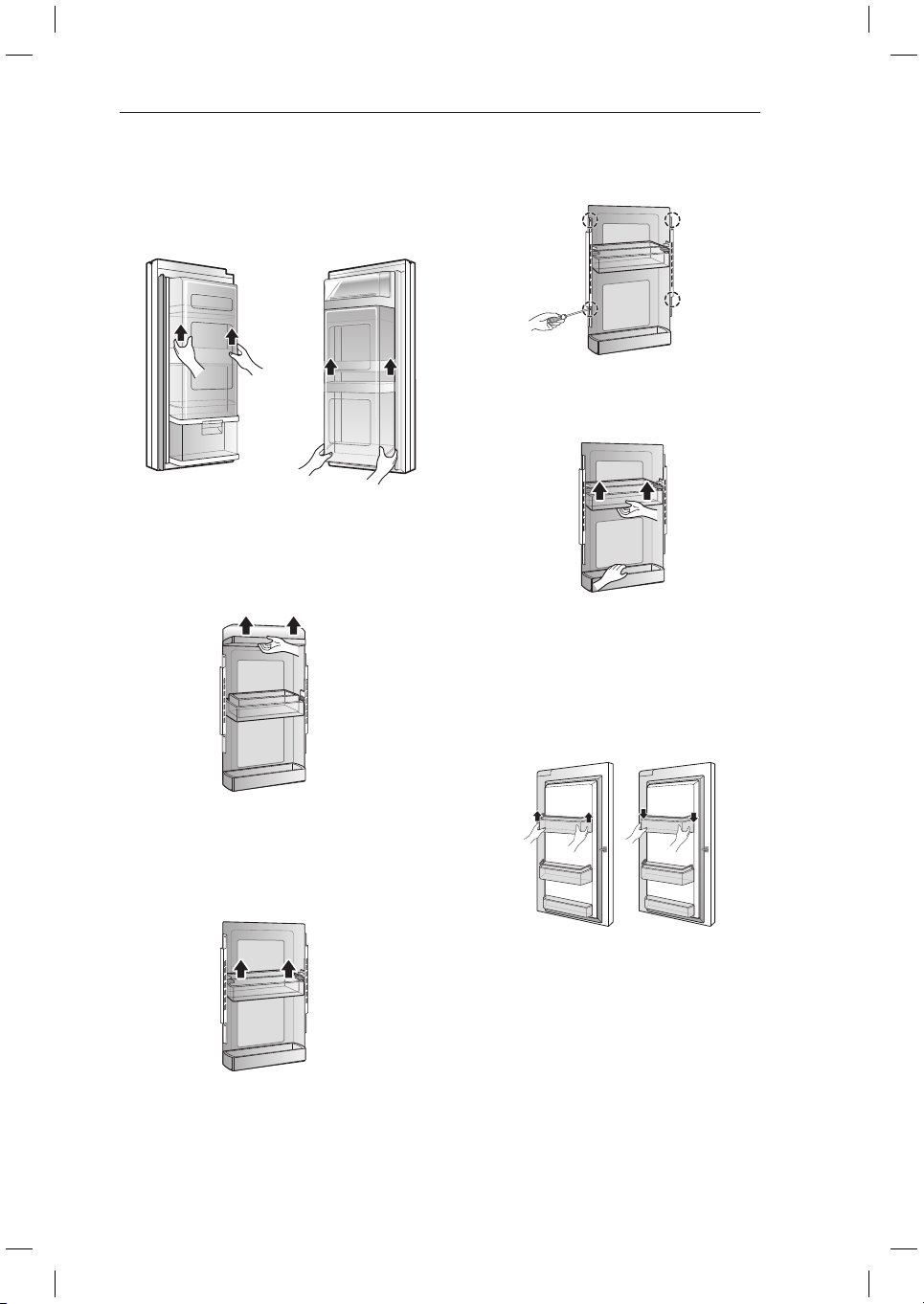
Tilting Fresh Basket Disassembly
1
Raise magicspace cover up and take it out.
2
Hold both ends of the tiling fresh basket and
lift up the front part of the tilting fresh basket.
Dairy Corner
You can store dairy products such as butter,
cheese etc.
If you close the fridge door with the dairy
corner left open, the fridge door may not close
properly. It could also result in damage to the
lid.
25
HOW TO USE
4
Remove screws on both sides of magic
space cover.
5
Hold the bottom of lower basket and raise
it up to take it out.
2
Hold the bottom of daily basket and raise it
up to take it out.
3
Move floating basket to the top
compartment from magic space cover
from which daily corner is removed.
Door-In-Door Shelf Disassembly
(Applicable to some models only)
1
Raise magicspace cover up and take it out.
Hold both ends of the basket and lift up the
front part of the basket.
Assemble in the same method as
y
disassembly.
Left : two separate
units type
Right : single unit
type
26
HOW TO USE
1
3
2
1
3
2
1
3
2
1
3
2
1
3
2
1
3
2
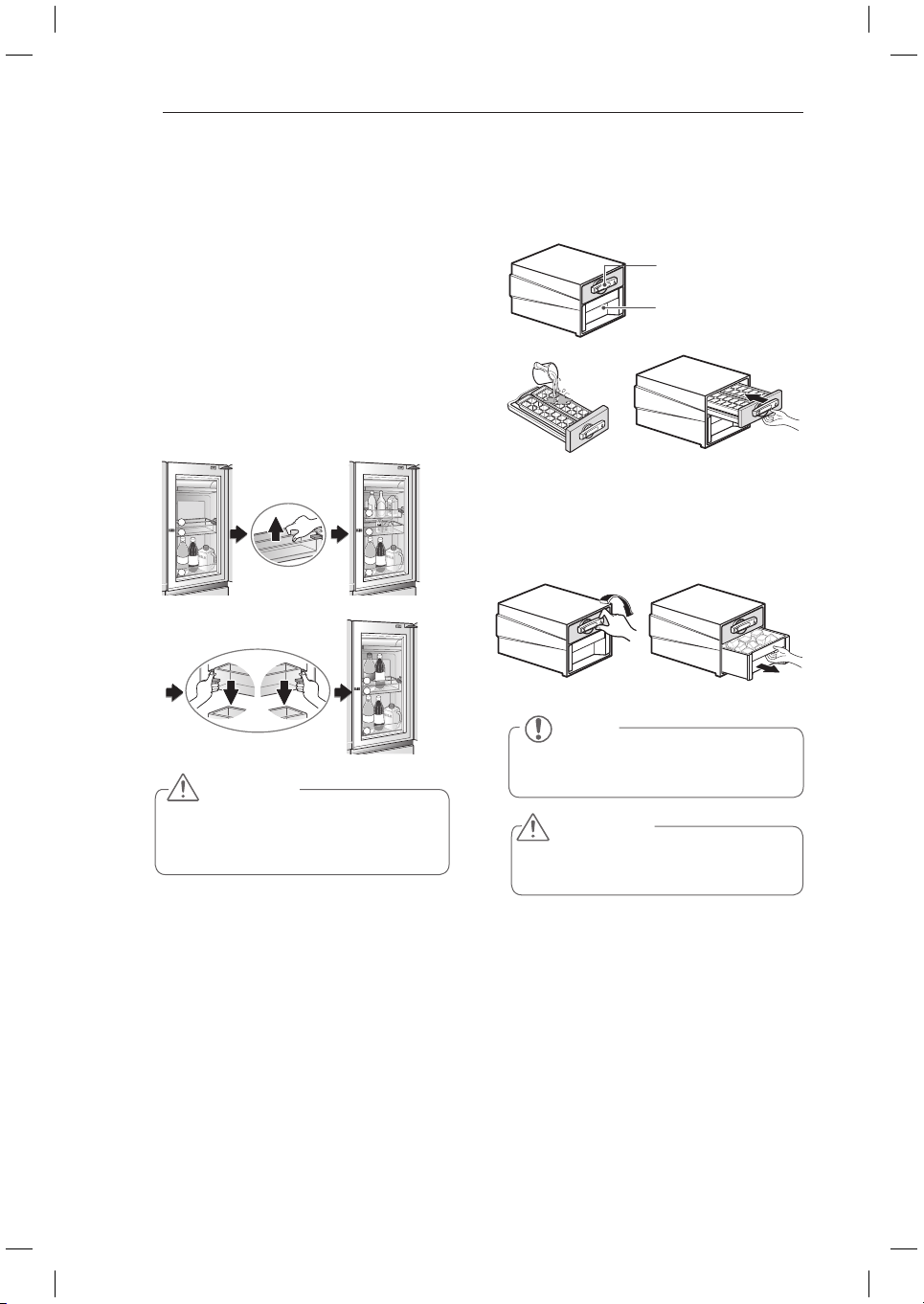
Adjustable Moving Basket
It can be moved up and down as necessary, and
used conveniently.
To move Adjustable Moving Basket up or
y
down, remove all items from the basket first.
Hold the center of basket gently with upward
y
pressure
Press the levers on both sides at the bottom of
y
the lower section upward, and then move it up
or down.
Adjusting the Moving Door Basket allows taller
y
food items to be stored more conveniently.
CAUTION
Remove all food items from basket before
y
moving it up or down. Not doing so could
cause damage to the basket or food items.
Ice Maker
To make ice cubes, fill the ice tray with
y
water and insert in its position.
To remove ice cubes, hold the lever of the
y
tray and pull turn gently. Then, ice cubes
drop in to the ice cube box.
NOTE
You can disassemble the Ice Maker to
secure space in the freezer.
WARNING
Do not use anything other than water.
y
Fill the water up to the marked line.
y
Ice Trays
Ice Cube Box
27
HOW TO USE
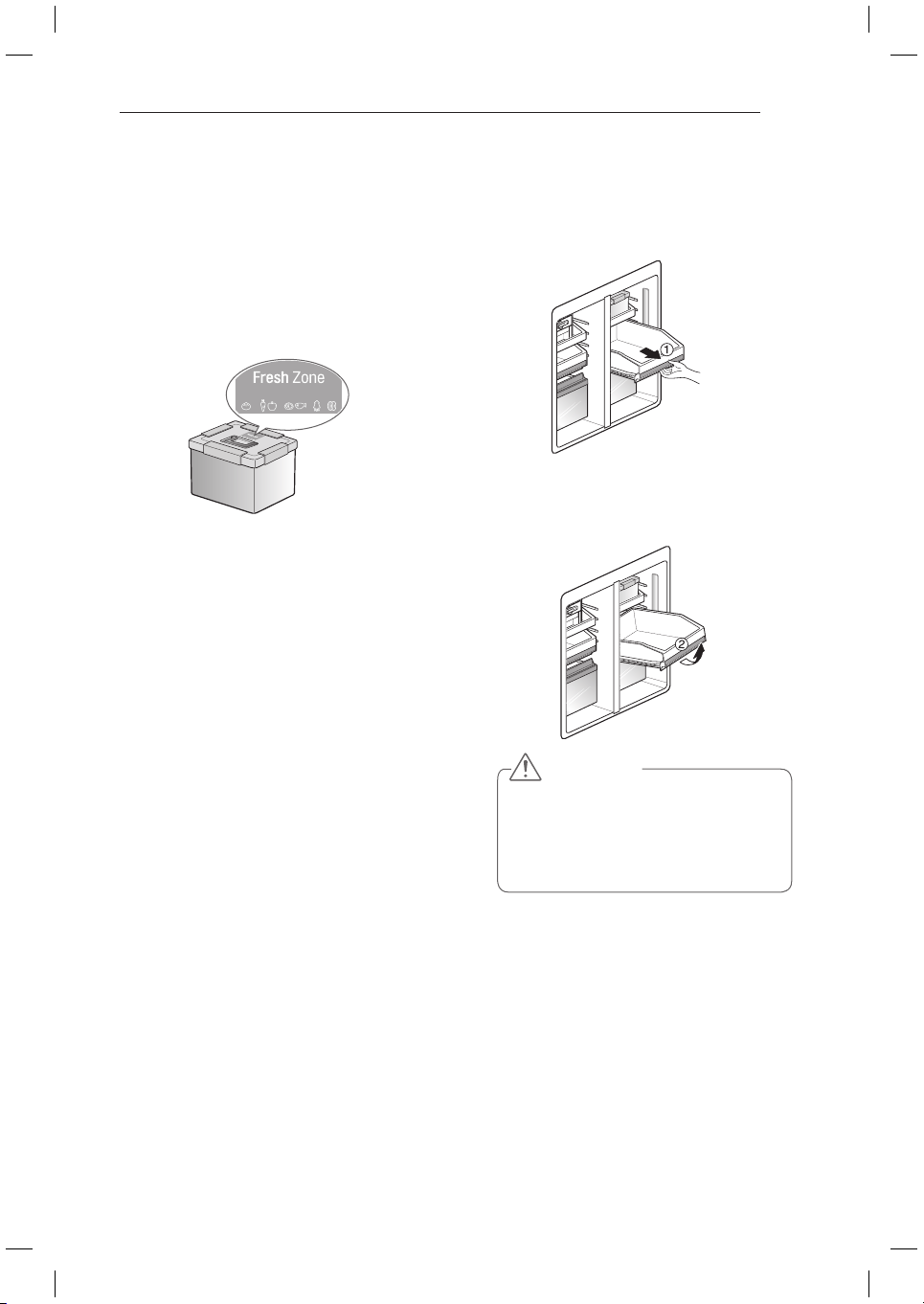
Fresh Zone
Put food in the fresh zone and keep the cap
y
tightly closed for storage.
It is possible to keep fresh some food for
y
long-term storage for a long time without
the odor mixed with other food.
This container can be stored in the
y
refrigeration chamber or freezer chamber
according to the food in the container.
CAUTION
Always remove drawers with both
y
hands to avoid breakage or injury.
Always open the freezer doors all the
y
way before removing or refitting the
drawers.
Freezer Drawer
Use the compartment for packed frozen foods
and frequently-taken out foods.
You can have a wide space available by taking
out the ice maker or fresh zone from the top
compartment according to the purpose of use.
Use the bottom compartment for frozen foods.
(Dried fish & condiments)
The sliding freezer drawers allow easy
y
access and convenience of use.
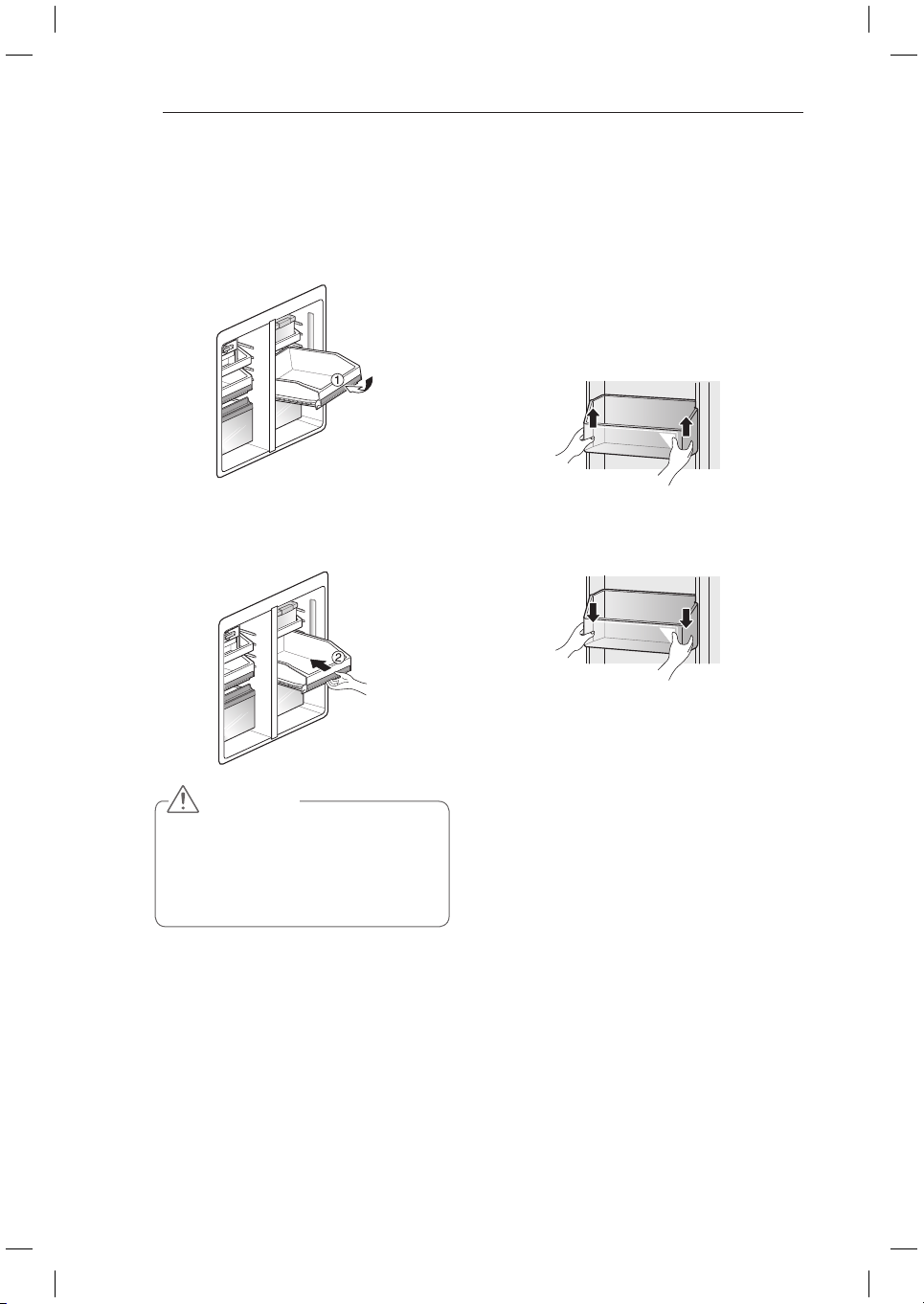
Freezer Drawer Removal
1
Pull out the Freezer drawer to the end of
its travel (as per below fig)and remove all
of the contents.
2
When the drawer is fully extended, lift up
the front and continue to pull it out (as per
below fig).
28
HOW TO USE
CAUTION
Always remove drawers with both
y
hands to avoid breakage or injury.
Always open the freezer doors all the
y
way before removing or refitting the
drawers.
Refitting the Freezer Drawer
1
Insert both rollers into the guides with
the front of the drawer slightly raised and
gently push in. while lowering the drawer
to the correct level.
2
Continue to push in the drawer all the way
while lowering the drawer to the correct
level.
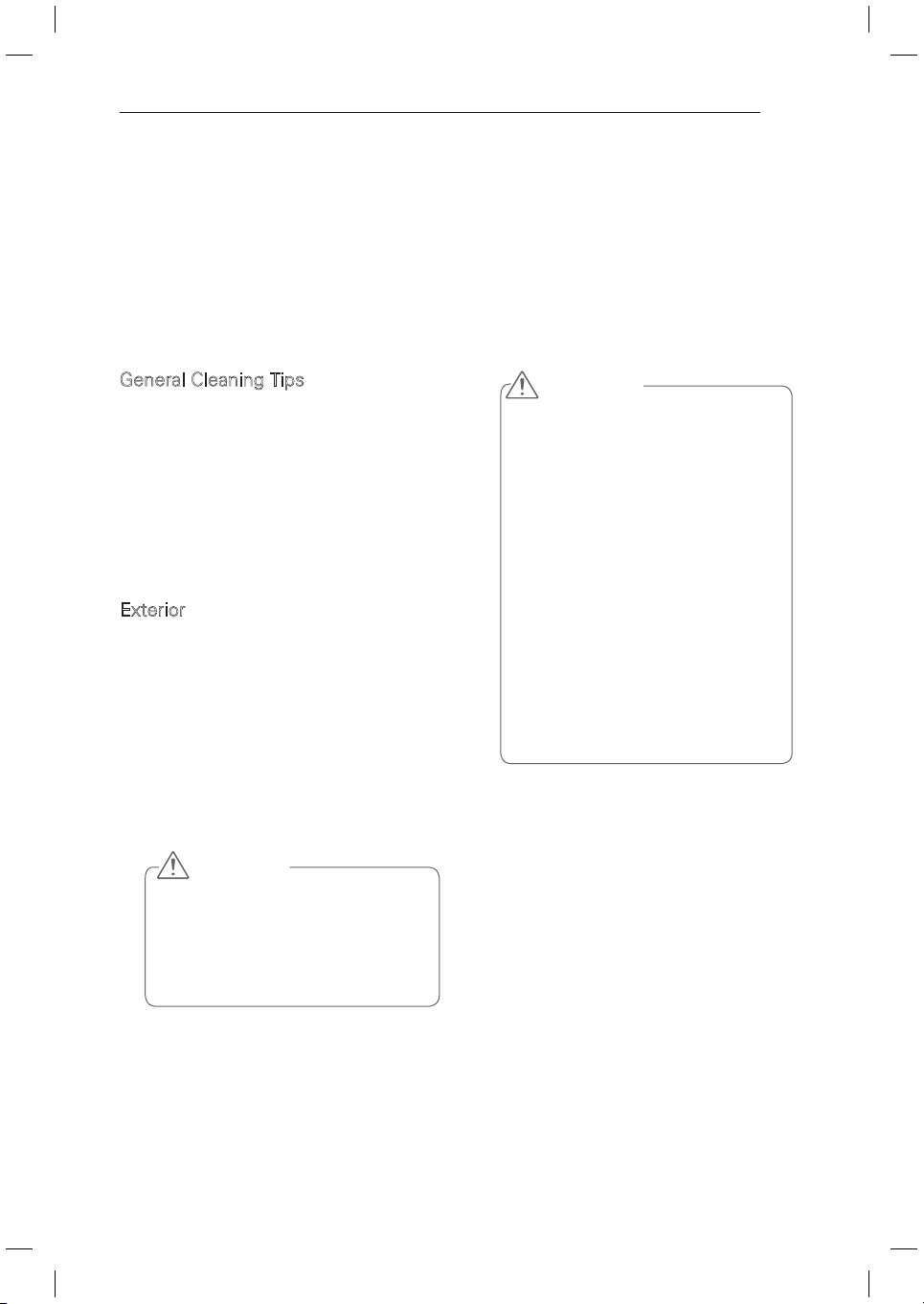
Freezer/Fridge basket
You can store small packaged frozen food
(Freezer basket), small packaged refrigerated
food or beverages (Fridge basket) such as milk,
water, juice, beer etc.
Do Not store ice cream or foods intended for
long term storage in the Freezer Basket.
To remove the basket, hold the basket with
both hands and slightly lift up the front part to
pull it out.
To refit the basket, align both sides of the
basket with the guides and push it down until
secure.
29
MAINTENANCE
MAINTENANCE
Cleaning
Both the fridge and freezer sections defrost automatically; however, clean both sections
y
about once a month to prevent odors.
Wipe up spills immediately.
y
Always unplug the refrigeration before cleaning.
y
General Cleaning Tips
Unplug fridge or disconnect power.
y
Remove all removable parts, such as
y
shelves, crispers, etc.
Use a clean sponge or soft cloth and a
y
mild detergent in only warm water. Do
not use abrasive or harsh cleaners.
Hand wash, rinse and dry all surfaces
y
thoroughly.
Exterior
Waxing external painted metal surfaces helps
provide rust protection. Do not wax plastic
parts. Wax painted metal surfaces at least
twice a year using appliance wax (or auto paste
wax). Apply wax with a clean, soft cloth.
For products with a stainless steel exterior,
use a clean sponge or soft cloth and a mild
detergent in warm water. Do not use abrasive
or harsh cleaners. Dry thoroughly with a soft
cloth.
CAUTION
Do not use a rough cloth or sponge
y
when cleaning the interior and exterior
of the fridge.
Do not place your hand on the bottom
y
surface of the fridge when opening
and closing.
WARNING
Use non-flammable cleaner. Failure to do
so can result in fire, explosion, or death.
Always remove power cord from the
wall outlet prior to cleaning in the vicinity
of electrical parts (lamps, switches,
covers, controls, etc.).
Wipe up excess moisture with a sponge
or cloth to prevent water or Liquid
from getting into any electrical part and
causing an electric shock.
Never use metallic scouring pads,
brushes, coarse abrasive cleaners,
Strong alkaline solutions, industrial
detergent (bleach containing detergent)
Flammable or toxic cleaning liquids on
any surface. Do not use Hot water to
clean the interior or any interior parts of
the unit when they are cold.
30
MAINTENANCE
Inside Walls (allow freezer to warm
up so the cloth will not stick)
To help remove odors, you can wash the inside
of the fridge with a mixture of baking soda and
warm water. Mix 2 tablespoons of baking soda
to 1 litre of warm water. Be sure the baking
soda is completely dissolved so it does not
scratch the surfaces of the fridge.
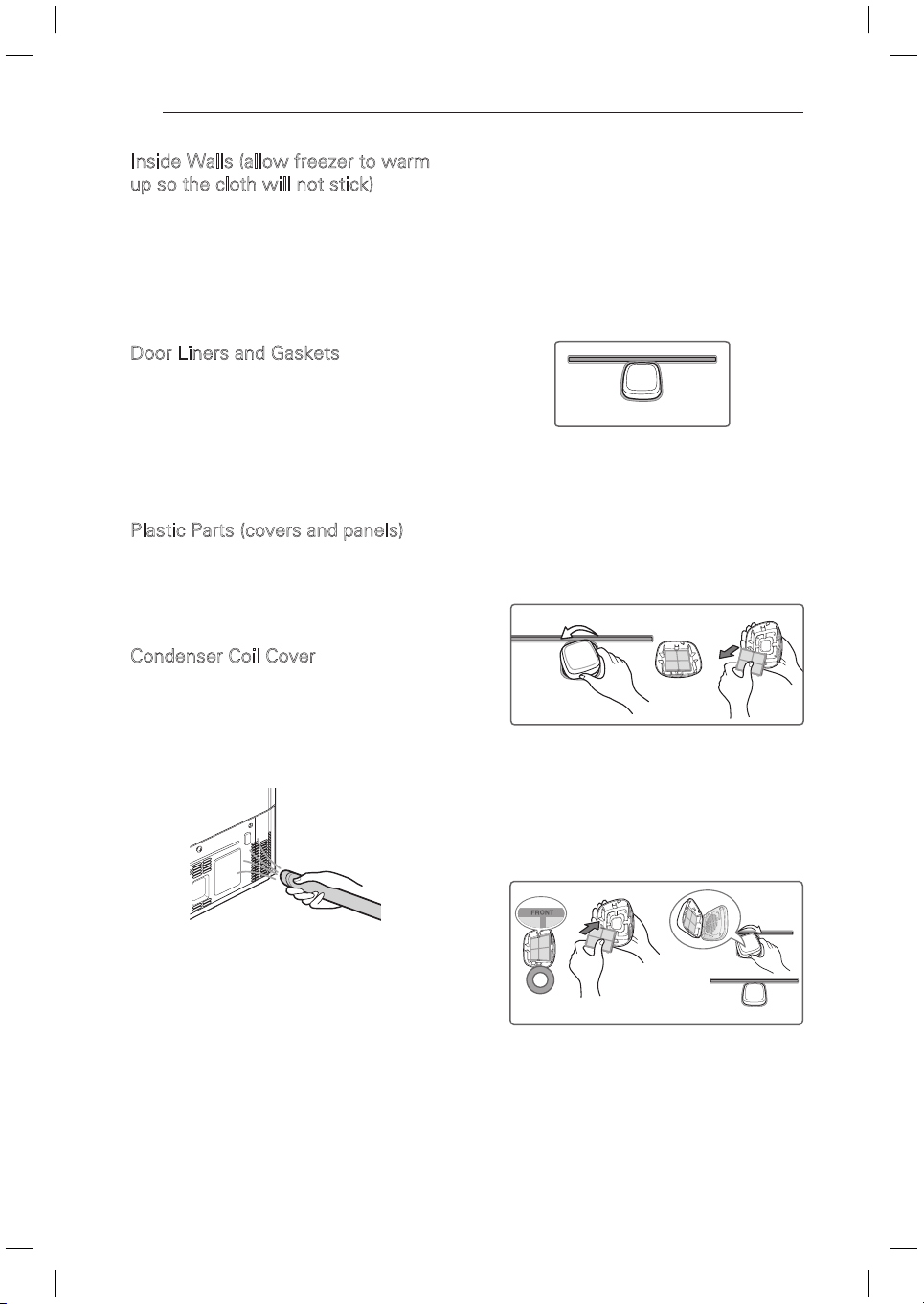
Door Liners and Gaskets
Use a clean sponge or soft cloth and a mild
detergent in warm water. Do not use cleaning
waxes, concentrated detergents, bleaches, or
cleaners containing petroleum on plastic fridge
parts.
Plastic Parts (covers and panels)
Use a clean sponge or soft cloth and a mild
detergent in warm water. Do not use window
sprays, abrasive cleansers, or flammable fluids.
These can scratch or damage the material.
Condenser Coil Cover
Use a vacuum cleaner with an attachment to
clean the condenser cover and vents located
at the rear of the appliance. Do not remove the
panel covering the condenser coil area. Always
disconnect the main power before cleaning.
2
Installing a New Pure N Fresh filter.
Place the new filter inside of the cover
with the side that says “Front” facing
outward. Turn the filter cover to the right
to reattach it to the refrigerator wall.
After changing the filter, touch and hold
the Pure N Fresh filter button on the
front display for three seconds to reset
the filter sensor.
Replacing the Pure N Fresh
filter
It is recommended that you replace the Pure N
Fresh filter:
Approximately every 1~2 years.
y
When the Replace light turns on.
y
1 Remove the Old Filter
Turn the filter cover to the left to detach
from the refrigerator wall. The filter is
located on the inside of the filter cover.
Remove the filter from the cover and
replace it with a new filter.
31
SMART DIAGNOSIS
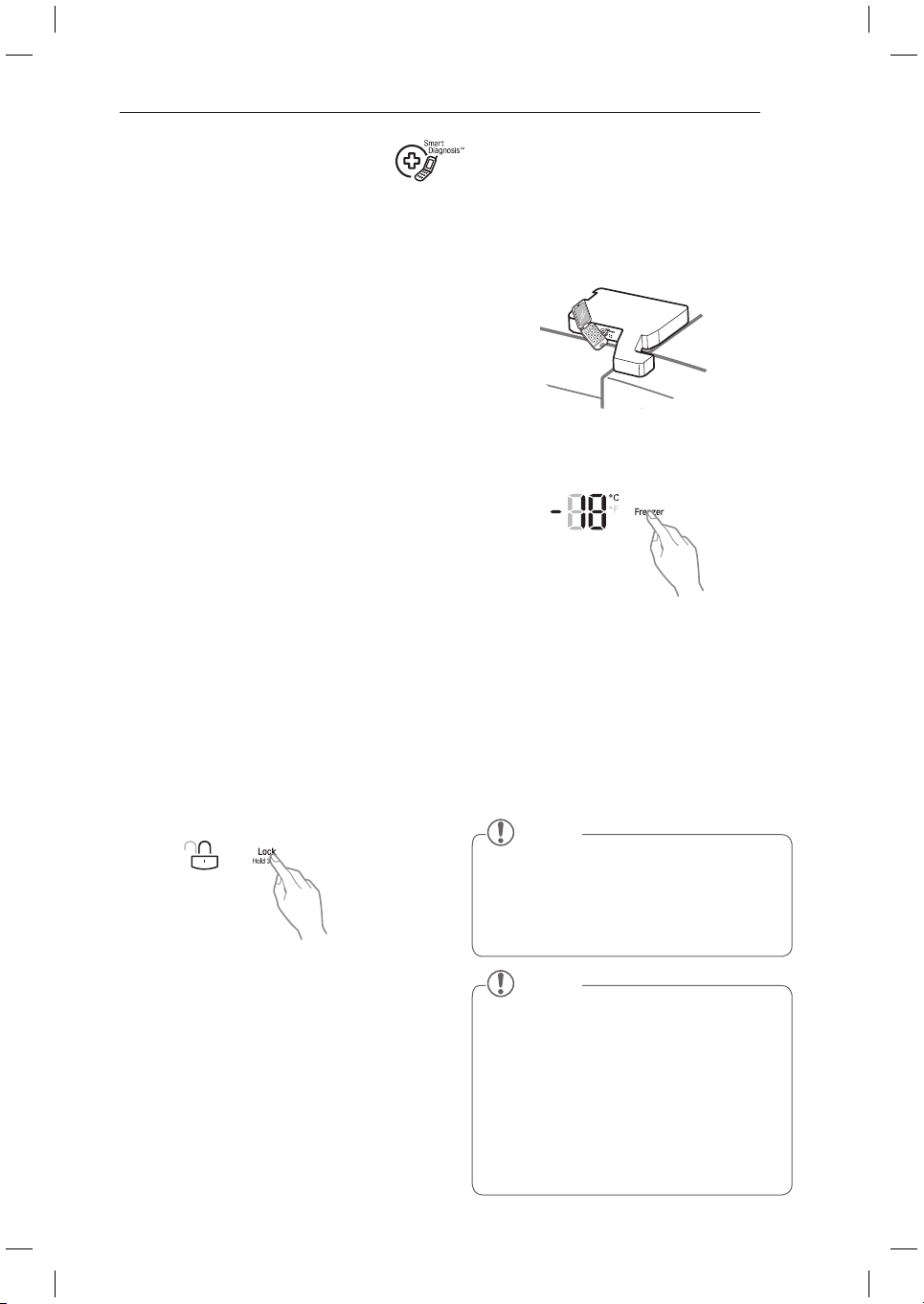
3
Hold the mouthpiece of your phone in front
of the speaker that is located on the right
hinge of the fridge door, when instructed
to do so by the call center.
4
Press and hold the Freezer Temperature
button for three seconds while continuing
to hold your phone to the speaker.
5
After you hear three beeps, release the
Freezer Temperature button.
6
Keep the phone in place until the tone
transmission has finished. This takes about
3 seconds, and the display will count down
the time. Once the countdown is over
and the tones have stopped, resume your
conversation with the specialist, who will
then be able to assist you in using the
information transmitted for analysis.
Should you experience any problems with
your fridge, it has the capability of transmitting
data via your telephone to the LG service
center. This gives you the capability of
speaking directly to our trained specialists. The
specialist records the data transmitted from
your machine and uses it to analyze the issue,
providing a fast and effective diagnosis.
If you experience problems with your fridge,
call to the LG service center. Only use the
Smart Diagnosis feature when instructed
to do so by the LG call center agent. The
transmission sounds that you will hear are
normal and sound similar to a fax machine.
Smart Diagnosis cannot be activated unless
your fridge is connected to power. If your
fridge is unable to turn on, then troubleshooting
must be done without using Smart Diagnosis.
Using Smart Diagnosis
First, call to the LG service center. Only use
the Smart Diagnosis feature when instructed
to do so by the LG call center agent.
1
Lock the display. To lock the display,
press and hold the Lock button for three
seconds. (If the display has been locked
for over five minutes, you must deactivate
the lock and then reactivate it.)
2
Open the right fridge door.
SMART DIAGNOSIS
NOTE
For best results, do not move the phone
y
while the tones are being transmitted.
If the call center agent is not able to get
y
an accurate recording of the data, you
may be asked to try again.
NOTE
Call quality differences by region may
y
affect the function.
Use the home telephone for better
y
communication performance, resulting in
better service.
Bad call quality either from a mobile or
y
home phone may result in poor data
transmission from your phone to the
diagnostics call centre, which could cause
Smart Diagnosis to not work properly.
32
TROUBLESHOOTING
TROUBLESHOOTING
Review the Troubleshooting section before calling for service; doing so will save you both time
and money.
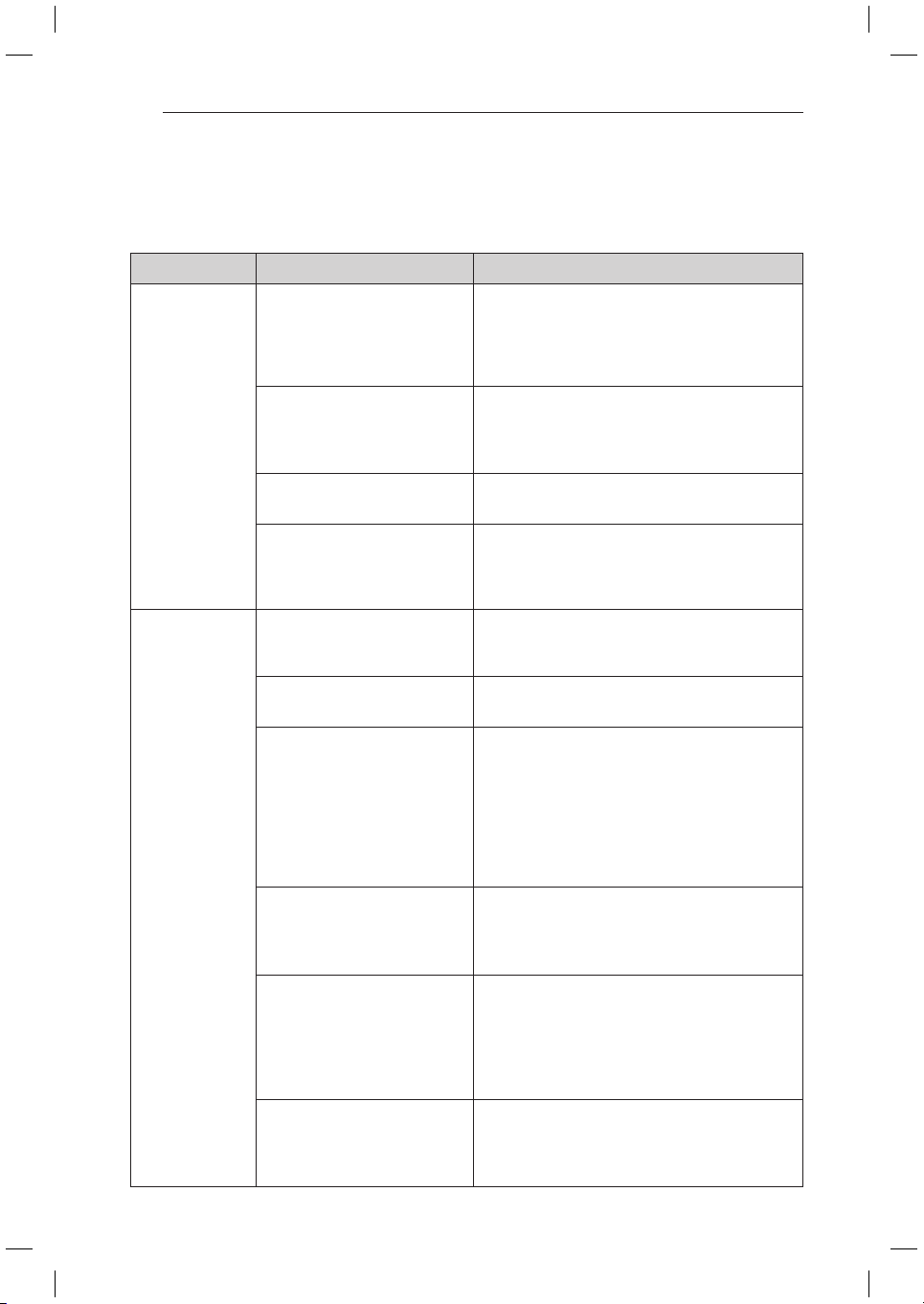
Problem Possible Causes Solutions
Fridge and
Freezer section
are not cooling.
The fridge display control is set
to OFF (some models).
Cancel the OFF mode so that the unit
commences operation. Refer to the Setting the
Controls section for proper temperature settings,
or call Customer Service if OFF remains on the
Display panel.
Fridge is in the defrost cycle. During the defrost cycle, the temperature of each
compartment may raise slightly. Wait 40 minutes
to confirm the proper temperature has been
restored once the defrost cycle has completed.
Fridge was recently installed. It may take up to 24 hours for each compartment
to reach the desired temperature.
Fridge was recently relocated. If the fridge was stored for a long period of time
or moved on its side, it is necessary for the fridge
to stand upright for 24 hours before connecting it
to power.
Cooling System
runs too much.
Fridge is replacing an older
model.
Modern fridges require more operating time but
use less energy due to more efficient technology.
Fridge was recently plugged in
or power restored.
The fridge will take up to 24 hours to cool
completely.
Door opened often or a large
amount of food / hot food was
added.
Adding food and opening the door warms the
fridge, requiring the compressor to run longer in
order to cool the fridge back down. In order to
conserve energy, try to get everything you need
out of the fridge at once, keep food organized so
it is easy to find, and close the door as soon as
the food is removed. (Refer to the Food Storage
Guide.)
Doors are not closed
completely.
Firmly push the doors shut. If they will not shut all
the way, see the Doors will not close completely
or pop open section in Parts & Features
Troubleshooting.
Fridge is installed in a hot
location.
The compressor will run longer under warm
conditions. At normal room temperatures
70°F(21°C) expect your compressor to run
about 40% to 80% of the time. Under warmer
conditions, expect it to run even more often. The
fridge should not be operated above 110°F(43°C).
Condenser / back cover is
clogged.
Use a vacuum cleaner with an attachment to
clean the condenser cover and vents. Do not
remove the panel covering the condenser coil
area. Disconnect the mains before cleaning.
33
TROUBLESHOOTING
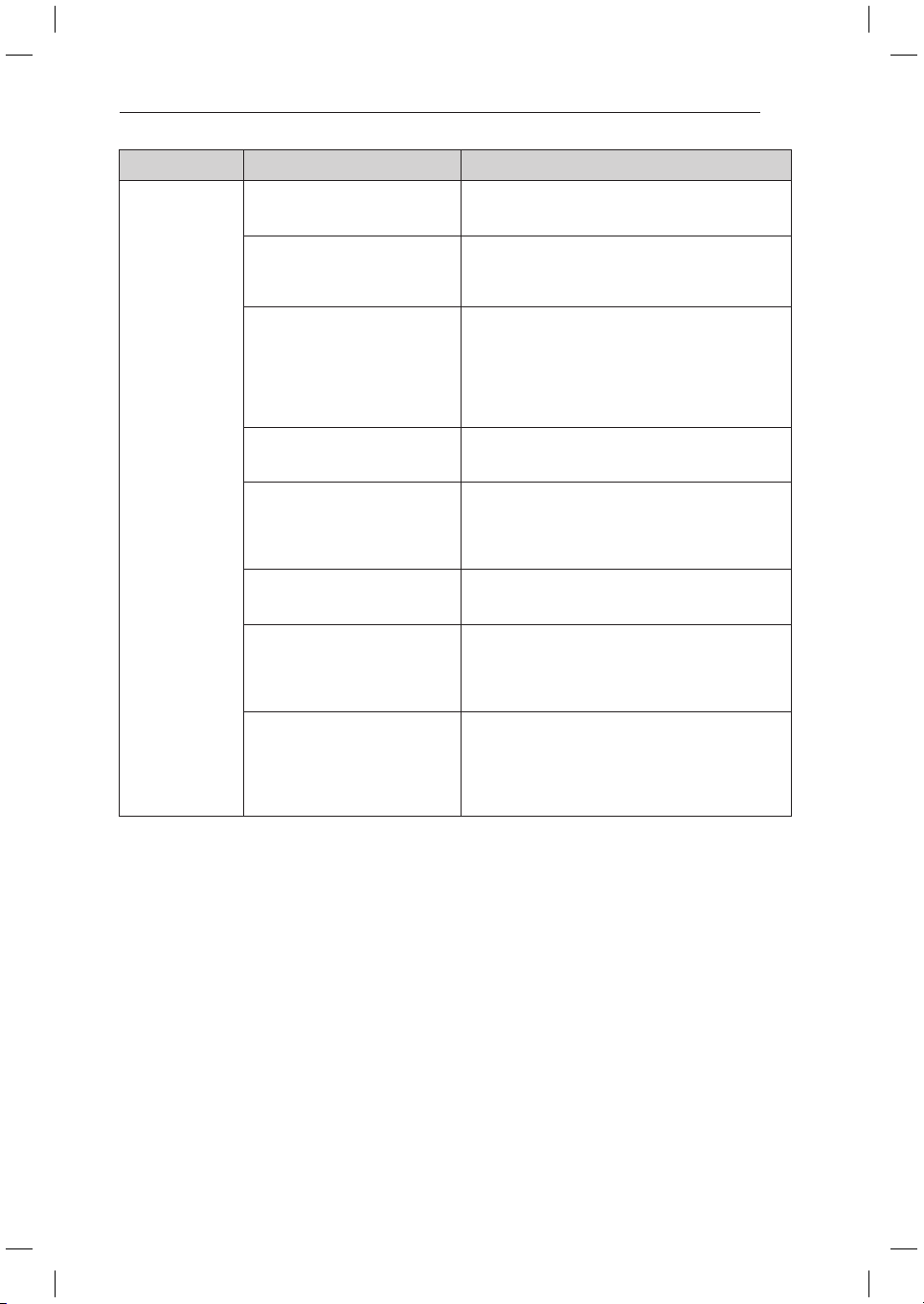
Problem Possible Causes Solutions
Fridge or Freezer
section is too
warm.
Fridge was recently installed. It may take up to 24 hours for each compartment
to reach the desired temperature.
Air vents are blocked. Rearrange items to allow air to flow throughout
the compartment. Refer to the Airflow diagram in
the Using Your Fridge section.
Doors are opened often or for
long periods of time.
When the doors are opened often or for long
periods of time, warm, humid air enters the
compartment. This raises the temperature and
moisture level within the compartment. To lessen
the effect, reduce the frequency and duration of
door openings.
Unit is installed in a hot location. The fridge should not be operated in
temperatures above 110°F(43°C).
A large amount of food or
hot food was added to either
compartment.
Adding food warms the compartment requiring
the cooling system to run. Allowing hot food to
cool to room temperature before putting it in the
fridge will reduce this effect.
Doors not closed correctly. See the Doors will not close correctly or pop open
section in Parts & Features Troubleshooting.
Temperature control is not set
correctly.
If the temperature is too warm, adjust the
control one increment at a time and wait for the
temperature to stabilize. Refer to the Setting the
Controls section for more information.
Defrost cycle has recently
completed.
During the defrost cycle, the temperature of each
compartment may raise slightly and condensation
may form on the back wall. Wait 40 minutes
and confirm the proper temperature has been
restored once the defrost cycle has completed.
34
TROUBLESHOOTING
Problem Possible Causes Solutions
Interior moisture
buildup.
Doors are opened often or for
long periods of time.
When the doors are opened often or for long
periods of time, warm, humid air enters the
compartment. This raises the temperature and
moisture level within the compartment. To
lessen the effect, reduce the frequency and
duration of door openings.
Doors not closed correctly. See the Doors will not close correctly section in
the Troubleshooting section.
Weather is humid. Humid weather allows additional moisture
to enter the compartments when the doors
are opened leading to condensation or frost.
Maintaining a reasonable level of humidity in the
home will help to control the amount of moisture
that can enter the compartments.
Defrost cycle recently
completed.
During the defrost cycle, the temperature
of each compartment may be raised slightly
and condensation may form on the back wall.
Wait 40 minutes and confirm that the proper
temperature has been restored once the defrost
cycle has completed.
Food is not packaged correctly. Food stored uncovered or unwrapped, and damp
containers can lead to moisture accumulation
within each compartment. Wipe all containers
dry and store food in sealed packaging to prevent
condensation and frost.
Food is freezing
in the fridge
compartment.
Food with high water content
was placed near an air vent.
Rearrange items with high water content away
from air vents.
Fridge temperature control is
set incorrectly.
If the temperature is too cold, adjust the control
one increment at a time and wait for the
temperature to stabilize. Refer to the Setting the
Controls section for more information.
Fridge is installed in a cold
location.
When the fridge is operated in temperatures
below 41°F (5°C), food can freeze in the fridge
compartment. The fridge should not be operated
in temperature below 55°F (13°C).
Frost or ice
crystals form
on frozen food
(outside of
package).
Door is opened frequently or for
long periods of time.
When the doors are opened often or for long
periods of time, warm, humid air enters the
compartment. This raises the temperature and
moisture level within the compartment. Increased
moisture will lead to frost and condensation.
To lessen the effect, reduce the frequency and
duration of door openings.
Door is not closing properly. Refer to the Doors will not close correctly or pop
open section in the Troubleshooting section.
Fridge or Freezer
section is too
cold.
Incorrect temperature control
settings.
If the temperature is too cold, adjust the control
one increment at a time and wait for the
temperature to stabilize. Refer to the Setting the
Controls section for more information.
35
TROUBLESHOOTING
Problem Possible Causes Solutions
Frost or ice
crystals on frozen
food (inside of
sealed package).
Condensation from food with a
high water content has frozen
inside of the food package.
This is normal for food items with a high water
content.
Food has been left in the freezer
for a long period of time.
Do not store food items with high water content
in the freezer for a long period of time.
Clicking The defrost control will click
when the automatic defrost
cycle begins and ends. The
thermostat control (or fridge
control on some models) will
also click when cycling on and
off.
Normal Operation
Rattling Rattling noises may come from
the flow of refrigerant, the
water line on the back of the
unit, or items stored on top of
or around the fridge.
Normal Operation
Fridge is not resting solidly on
the floor.
Floor is weak or uneven or leveling legs need to
be adjusted. See the Door Alignment section.
Fridge with linear compressor
was jarred while running.
Normal Operation
Whooshing Evaporator fan motor is
circulating air through the fridge
and freezer compartments.
Normal Operation
Air is being forced over the
condenser by the condenser
fan.
Normal Operation
Gurgling Refrigerant flowing through the
cooling system.
Normal Operation
Popping Contraction and expansion of
the inside walls due to changes
in temperature.
Normal Operation
Sizzling Water dripping on the defrost
heater during a defrost cycle.
Normal Operation
Vibrating If the side or back of the fridge
is touching a cabinet or wall,
some of the normal vibrations
may make an audible sound.
To eliminate the noise, make sure that the sides
and back cannot vibrate against any wall or
cabinet.
Dripping Water running into the drain pan
during the defrost cycle.
Normal Operation
36
TROUBLESHOOTING
Problem Possible Causes Solutions
Pulsating or
High-Pitched
Sound
Your fridge is designed to
run more efficiently to keep
your food items at the desired
temperature. The high efficiency
compressor may cause your
new fridge to run longer than
your old one, but it is still more
energy efficient than previous
models. While the fridge is
running, it is normal to hear a
pulsating or high-pitched sound.
Normal Operation
Doors will not
close correctly or
pop open.
Food packages are blocking the
door open.
Rearrange food containers to clear the door and
door shelves.
Ice bin, crisper cover, pans,
shelves, door bins, or baskets
are out of position.
Push bins all the way in and put crisper cover,
pans, shelves and baskets into their correct
positions. See the Using Your Fridge section for
more information.
The doors were removed during
product installation and not
properly replaced.
Remove and replace the doors according to the
Removing and Replacing Fridge Handles and
Doors section.
Fridge is not leveled properly. See Door Alignment in the Height adjustment
section to level fridge.
Doors are difficult
to open.
The gaskets are dirty or sticky. Clean the gaskets and the surfaces that they
touch. Rub a thin coat of appliance polish or
kitchen wax on the gaskets after cleaning.
Door was recently closed. When you open the door, warmer air enters
the fridge. As the warm air cools, it can create
a vacuum. If the door is hard to open, wait one
minute to allow the air pressure to equalize, then
see if it opens more easily.
Fridge wobbles or
seems unstable.
Leveling legs are not adjusted
properly.
Refer to the Leveling and Door Alignment section.
Floor is not level. It may be necessary to add shims under the
leveling legs or rollers to complete installation.
Lights do not
work.
LED interior lighting failure. The fridge compartment lamp is LED interior
lighting, and service should be performed by a
qualified technician.
Fridge has an
unusual odor.
The Hygiene Fresh filter may
need to be set to the POWER
setting or replaced.
Set the Hygiene Fresh filter to the POWER
setting. If the odor does not go away within 24
hours, the filter may need to be replaced. See
the Replacing the Hygiene Fresh filter section for
replacement instructions.
The interior of the
fridge is covered
with dust or soot.
The fridge is located near a fire
source, such as a fireplace,
chimney or candle.
Make sure that the fridge is not located near a fire
source, such as a fireplace, chimney, heater or
candle.
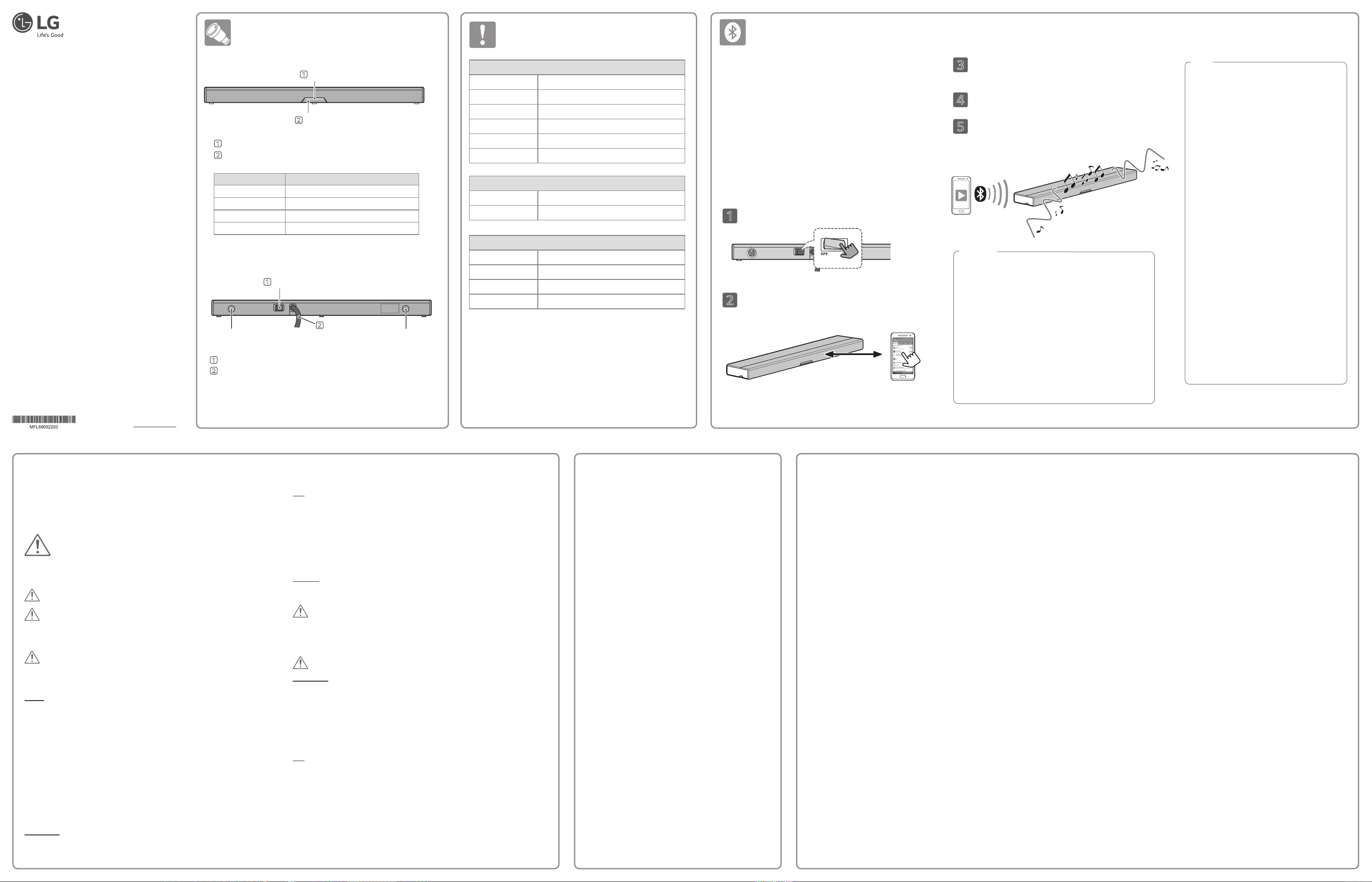
Bluetooth Sound Bar
OWNER’S MANUAL
Please read this manual carefully before operating and retain it for
future reference.
MODEL : GB-B1**
http://www.lg.com
Part Names and Functions
Specications
Connecting and Disconnecting Devices
1
Turn on the switch at the back of the product.
2
Enable Bluetooth on your device. When the LED indicator on the
front of the sound bar begins to ash quickly, pair the sound bar
and your Bluetooth device using Bluetooth tethering.
3
When the sound bar is successfully paired with the Bluetooth device,
the LED indicator stays ON.
4
Play music on the Bluetooth device.
5
Pressing the pairing button on the front of the sound bar or disabling
Bluetooth on your device causes Bluetooth to disconnect and the
music to stop.
About Bluetooth.
Bluetooth is a wireless communication technology used for short distance
transmissions.
Bluetooth connections can be made within a 32-foot (10-meter) range.
(Bluetooth connections can be interfered with by radio waves or other
Bluetooth devices.)
There is no cost to connect Bluetooth devices.
Devices which support Bluetooth include mobile phones, MP3 players,
notebook computers, PDAs, and PMPs.
Bluetooth Prole.
To use this Bluetooth wireless technology, the paired device should support
the A2DP prole (Advanced Audio Distribution Prole).
Front panel
Rear panel
LED status Speaker status
LED turned off Power off, disconnected
LED ashes slowly Turning on the power
LED ashes quickly Waiting for a Bluetooth connection (pairing)
LED turns on Completed a Bluetooth connection (pairing)
Caution
• Some Bluetooth devices may not function properly with this product.
• When there is an obstacle or a person between the product and a
Bluetooth device, connection may not be made or may disengage
even within 32 ft (10 m).
• As the distance between the product and a Bluetooth device
becomes greater, the connection may not work properly.
• Other Bluetooth devices which use the same frequency, such as
medical devices, microwave ovens, or wireless LANs, may interfere
with the connection between the sound bar and a Bluetooth device.
• Be cautious that volume control cannot be made to some Bluetooth
devices connected by a Bluetooth dongle.
• Maximum output could be a bit low with some Bluetooth devices.
• Cards with magnetic strips, or other objects which can be damaged
by magnetic elds, should not be placed close to the sound bar.
Notice
• Select “LG_Refrigerator: XXXX” in the Bluetooth device.
(XXXX stands for the last four digits of Bluetooth
address.)
• Input four-digit PIN code(0000) when required by the
Bluetooth device.
• Pairing method could differ by Bluetooth device.
Try searching again if the address of the product is not
found under the list of connectable devices.
• Refer to the manual of the Bluetooth device for the
method of playing music.
• After the music begins to play, make any necessary
adjustments to the volume on the Bluetooth device.
• If the product fails to pair with the Bluetooth device for
more than 10 minutes, it goes into wait mode.
• Press the pairing button to enable pairing when the
product is in wait mode.
• The Bluetooth device once paired with the product
could be paired again without pressing the button.
• When the product is turned on again after turnoff, a
Bluetooth device has to be reconnected.
• This product cannot operate a Bluetooth device, and
multi-connection is not supported.
• The product doesn’t support telephone function, and
making or receiving a call while playing music stops the
music.
• Playing at the maximum volume of a Bluetooth device
could distort the sound.
• Accumulated dust or foreign substances could decrease
sound quality. Refer to ‘cleaning procedure’ at the back
of this manual.
2
Power cord
1
Power switch
Vent holeVent hole
1
LED Indicator
2
Button (Pairing)
1
LED Indicator : Shows the status of the product.
2
Button (Pairing) : Press to connect or disconnect with a Bluetooth device.
1
Power switch : Used to turn the power ON/OFF.
2
Power cord : Connect the power plug to an electrical outlet.
• Design and product specications could change without any prior notice.
• Wireless communication devices cannot be used to provide services critical to
personal safety because there is a possibility of electrical wave interference
while they are in use.
• This device is suitable for home (B grade) electromagnetic wave and for home
use, and it can be used in all regions.
General
Dimensions (W x H x D) Approx. 552 mm x 33 mm x 105 mm (21.7” x 1.3” x 4.1”)
Net Weight Approx. 1.1 kg (2.42 lb)
Power Consumption 4.8W
Voltage Rating 100-240 V~
Operating Temperature 5 °C to 35 °C (41 °F to 95 °F)
Operating Humidity 5 % to 90 %
Speaker
Type Built-in
Impedance Rate
8 Ω
Rated Input Power 5 W
Max. Input Power 10 W
Amplier
Total
5 W + 5 W(8 Ω at 1 kHz)
THD 1%
Within 32 ft
Safety Information
READ ALL INSTRUCTIONS BEFORE USING THE APPLIANCE.
This guide contains many important safety messages. Always read and obey all safety
messages.
This is the safety alert symbol. It alerts you to safety messages that inform you of
hazards that can kill or hurt you or others, or cause damage to the product.
All safety messages will be preceded by the safety alert symbol and the hazard
signal word WARNING or CAUTION. These words mean:
Use
• Only qualied LG Electronics service center personnel should disassemble, repair, or modify
the product. Consult with LG Electronics service center for reinstallation.
• Do not use or stock re devices or combustible materials (ether, benzene, alcohol, chemicals,
LP gas, combustible spray, pesticide, air freshener, cosmetics, etc.) on or near the product.
• Do not place objects, or containers with liquids or ammable substances on the product.
• Do not insert or drop metals (coins, hairpins, needles) or inammable substances (matches,
paper) in the ventilation holes.
Disposal
• Dispose of all packing materials including vinyl and Styrofoam out of the reach of children.
WARNING
This product contains chemicals known to the State of California to cause cancer and birth
defects or other reproductive harm. Wash hands after handling.
CAUTION
Installation
• Do not install in areas with high moisture or where it will be exposed to water or weather.
• Install by directly attaching on the surface of a refrigerator top.
• Do not install in a conned space such as in the drawer or kitchen sink.
• Do not install in a location which is unstable or has high vibration.
• Do not place near a magnetic eld such as near a magnet.
• Do not install in direct sunlight.
Use
• Do not drop an object or inict a shock on the product.
• Be careful when carrying the product.
• Do not use at excessive volume for a long period of time.
• Do not use the product on a blanket, an electric pad, or a carpet for a long period of time.
• Do not block the ventilation holes with tablecloths, curtains, or other obstructions.
WARNING You can be killed or seriously injured if you do not follow instructions.
CAUTION Indicates an imminently hazardous situation which, if not avoided, may
result in minor or moderate injury, or product damage.
WARNING
To reduce the risk of re, electric shock, or personal injury when using this product,
follow basic safety precautions, including the following:
Power
• When using a multi-electricity outlet, do not plug-in multiple products at the same time.
• Be cautious that power cord is not upturned or power plug is not pressed by the back of the
product.
• Unplug while cleaning.
• Do not touch a power plug with wet hands.
• Remove moisture and dust from the power plug rst and rmly plug in to an electrical outlet.
• When unplugging, do not pull the power cord but hold the power plug.
• When power cord or an power plug are damaged, or electricity outlet holes become loose,
stop using and contact the LG Electronics service center.
• Unplug during lightning storms or when the product is not used for a long period of time.
• Do not force the power cord to be bent or damaged by placing a heavy object on it.
• Do not extend the length of the power cord or modify it.
Installation
• Do not place a heavy object on the product.
Troubleshooting
No power.
• Insert the power plug into the electricity outlet correctly and rmly.
• Check if the power switch is on.
No sound or sound distortion
• The unit or your smart device’s volume is set to minimum. Check and
adjust the volume of the unit or bluetooth device’s volume.
• When you use an external device at high volume, the sound quality
may be deteriorated. Lower the volume of the devices.
• If you use the unit for purposes other than listening to music, the
sound quality may be lowered or the unit may not work properly.
Bluetooth pairing does not work well.
• Switch bluetooth off and on again on your bluetooth device, then try
pairing again.
• Remove the obstacle in the path of the bluetooth device and the
unit.
• Depending on the type of the bluetooth device or surrounding
environment, your device may not be paired with the unit.
• If your bluetooth device is connected to another unit, disable that
bluetooth connection rst.
The unit does not operate normally.
• When product doesn’t operate normally, check the status after
turning off and turning on the power switch.
Regulation Notice for Transmitter Module Contained in Refrigerator
FCC Statement:
This device complies with Part 15 of the FCC Rules.
Operation is subject to the following two conditions:
(1) this device may not cause harmful interference, and
(2) this device must accept any interference received, including interference that may cause
undesired operation.
Any changes or modications not expressly approved by the party responsible for
compliance could void the user’s authority to operate this equipment.
This equipment has been tested and found to comply with the limits for a Class B
digital device, pursuant to part 15 of the FCC Rules. These limits are designed to provide
reasonable protection against harmful interference in a residential installation.
This equipment generates, uses and can radiate radio frequency energy and, if not
installed and used in accordance with the instructions, may cause harmful interference
to radio communications. However, there is no guarantee that interference will not occur
in a particular installation. If this equipment does cause harmful interference to radio or
television reception, which can be determined by turning the equipment off and on, the user
is encouraged to try to correct the interference by one or more of the following measures:
- Increase the separation between the equipment and receiver.
- Connect the equipment into an outlet on a circuit different from that to which the receiver
is connected.
- Consult the dealer or an experienced radio/TV technician for help.
- Reorient or relocate the receiving antenna
FCC RF Radiation Exposure Statement:
This equipment complies with FCC radiation exposure limits set forth for an uncontrolled
environment. This equipment should be installed and operated with minimum distance
20 cm between the radiator and your body. End users must follow the specic operating
instructions for satisfying RF exposure compliance.
This transmitter must not be co-located or operating in conjunction with any other antenna
or transmitter.
Industry Canada Statement:
This device complies with RSS-210 of the Industry Canada Rules. Operation is subject to the
following two conditions:
1) this device may not cause interference and
2) this device must accept any interference, including interference that may cause
undesired operation of the device
Note: The manufacturer is not responsible for any radio or TV interference caused by
unauthorized modications to this equipment. Such modications could void the user’s
authority to operate the equipment.
IC Radiation Exposure Statement:
This equipment complies with IC radiation exposure limits set forth for an uncontrolled
environment. This equipment should be installed and operated with minimum distance
20 cm between the radiator and your body.
Operation of the equipment is subject to the following two conditions:
(1) this equipment or device may not be used to cause harmful interference and
(2) this equipment or device must accept any interference, including interference that
may cause undesirable operation.