1. Overview
These are wired, in-ear headphones with an over-ear hook design. They are intended for use during physical activity, providing a secure fit. The headphones feature a built-in microphone and in-line controls for managing calls and media playback.

2. Features & Specifications
2.1 Audio Features
- Driver Size: 15 mm dynamic drivers.
- Bass Enhancement: Acoustically-tuned air channel and bass pipe for emphasized low tones.
- Frequency Response: Up to 20,000 Hz.
- Sensitivity: 100 dB.
- Impedance: 16 Ohms.
- Noise Control: Sound isolation via in-ear fit.
2.2 Design & Comfort
- Ear Hook: 3D flexible hook ensures a secure fit for various ear sizes.
- Form Factor: In-ear with on-ear hook placement.
- Cable: 1.2 meters long, retractable feature.
- Durability: Constructed for durability during active use.
- Colour: White.
2.3 Controls & Connectivity
- In-Line Remote: Contains a microphone and media control buttons.
- Control Method: Touch-based controls.
- Connection: Wired via a 3.5 mm audio jack. Compatible with devices featuring this port or a compatible adapter.
- Microphone: Integrated for hands-free calls.
2.4 Technical Specifications
| Model Name | SHS3300 |
|---|---|
| Model Number | SHS33300 |
| Headphone Jack | 3.5 mm |
| Water Resistance | Not Water Resistant |
| Item Weight | 0.64 Ounces (approx. 18.1 grams) |
| Contents | Headphones (1 unit) |
3. Use Guide
3.1 Package Contents
- Philips Wired Ear Hook Headphones (Model SHS3300).
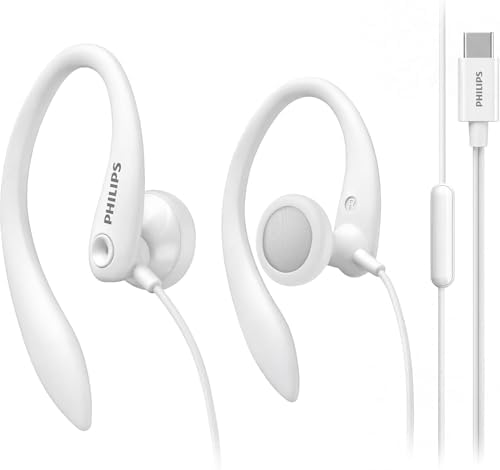
3.2 Connecting to Your Device
- Locate the 3.5 mm audio jack on your device (e.g., smartphone, tablet, MP3 player, laptop).
- Insert the headphone plug firmly into the jack.
- If your device uses USB-C or another port, you will need a compatible 3.5 mm adapter (not included).
3.3 Wearing the Headphones
- Identify the left (L) and right (R) earpieces, marked on the headphones.
- Gently bend the flexible ear hook to match the contour of your ear.
- Place the earpiece in your ear and loop the hook over the top of your ear for security.
- Adjust the earpiece until it feels comfortable and secure. The hook should rest snugly over your ear.
3.4 Using the In-Line Controls
The in-line remote contains touch-based controls for media and calls. Typical functions include:
- Play/Pause: Single touch.
- Volume Adjust: Touch and hold or slide on designated areas (exact control layout may vary; refer to your device's audio accessory settings).
- Answer/End Call: Single touch on the microphone button.
- Reject Call: Touch and hold.
Note: Control functions are dependent on the connected device's operating system and settings.
3.5 Care and Maintenance
- Gently wipe the earpieces and cable with a soft, dry cloth.
- Do not expose the headphones to liquids. They are not water-resistant.
- Store the headphones by loosely coiling the cable. Avoid sharp bends or kinks.
- To retract the cable, use the built-in mechanism if present, following the product's design.
4. Troubleshooting
- No sound or intermittent sound: Ensure the 3.5 mm plug is fully inserted into the jack. Try the headphones with another device to isolate the issue.
- Microphone not working: Check your device's audio settings to ensure the input is set to the wired headphone microphone.
- Poor fit or discomfort: Readjust the flexible ear hook. Ensure you are using the correct left/right earpiece.
- Controls unresponsive: Verify the headphones are fully plugged in. Check if your device supports the touch control protocol.
