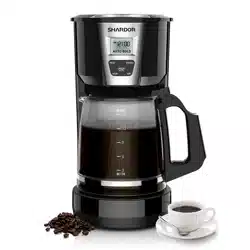
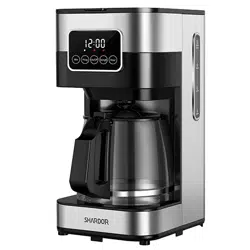
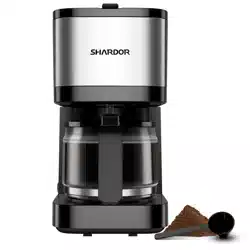
Model: CM1429TE | Color: Beige
1. Overview
The SHARDOR 10-Cup Programmable Coffee Maker is a drip coffee machine designed for home and office use. It features a programmable timer, LCD touch screen, and a permanent filter. The machine allows you to choose between Regular and Strong brew strengths and includes an auto shut-off function for safety.

1.1 Key Components
- Carafe: Glass carafe with a capacity of 10 cups (approx. 1.25 liters).
- Permanent Filter: Reusable mesh filter – no paper filters required.
- Water Reservoir: Removable tank for easy filling.
- Filter Basket: Holds the permanent filter or a paper filter.
- Warming Plate: Keeps coffee warm for up to 2 hours after brewing.
- LCD Touch Screen: Central control panel for programming and operation.
- Pause & Serve Mechanism: Allows you to pour a cup mid-brew without stopping the cycle.
2. Specifications
| Feature | Specification |
|---|---|
| Brand | SHARDOR |
| Model | CM1429TE |
| Capacity | 10 Cups |
| Product Dimensions (D x W x H) | 8" x 6.7" x 12.7" |
| Wattage | 900 Watts |
| Color | Beige (also available in Gray, Pink, Red, Silver) |
| Human Interface | Touchscreen |
| Operation Mode | Fully Automatic |
| Brew Strength Options | Regular, Strong |
| Programmable Timer | 24-hour |
| Auto Shut-Off | Yes |
| Keep Warm Duration | 2 hours |
| Included Components | Carafe, Permanent Filter |
3. Features
3.1 Programmable Brewing (24-Hour Timer)
Set the machine up to 24 hours in advance. The coffee maker will automatically start brewing at the programmed time.
3.2 LCD Touch Screen
The control panel uses a touch screen interface. Use it to set the clock, program the timer, select brew strength, and start or stop brewing.

3.3 Two Brew Strength Options
- Regular: Standard brewing cycle for a balanced flavor.
- Strong: Extended brewing cycle for a bolder, more robust taste.
3.4 Keep Warm Function
After brewing completes, the warming plate will keep your coffee hot for up to 2 hours. The machine will then automatically shut off.
3.5 Auto Shut-Off
For safety and energy conservation, the coffee maker automatically turns off after the keep-warm cycle ends (2 hours after brewing).
3.6 Pause & Serve
During the brewing cycle, you can remove the carafe to pour a cup. The flow from the filter basket will pause automatically. Replace the carafe within 30 seconds to resume brewing without overflow.
3.7 Permanent Filter
The included reusable mesh filter eliminates the need for disposable paper filters. Rinse it under running water after each use.
4. Use Guide
4.1 Before First Use
- Remove all packaging materials and stickers from the coffee maker.
- Wash the carafe, filter basket, and permanent filter in warm, soapy water. Rinse and dry thoroughly.
- Run one full brewing cycle with water only (no coffee grounds) to clean the internal system. Discard the water.
4.2 Setting the Clock
- Plug in the coffee maker. The display will flash "12:00".
- Press the PROG button once. The hour digits will flash.
- Use the HOUR and MIN buttons (or touch screen arrows) to set the current time.
- Press PROG again to confirm.
4.3 Programming a Delayed Brew Start
- Press the PROG button twice. The display will show "12:00" (or the last set time) and the PROG indicator will flash.
- Use the HOUR and MIN buttons to set the desired start time.
- Press PROG again to confirm. The PROG indicator will remain lit.
- The machine will automatically start brewing at the set time.
4.4 Brewing Coffee
- Open the top lid and lift out the filter basket.
- Place the permanent filter (or a #4 paper filter) into the basket.
- Add the desired amount of ground coffee. Use approximately 1 tablespoon per cup for regular strength, or 1.5 tablespoons for strong brew.
- Place the filter basket back into the machine and close the lid.
- Fill the water reservoir with fresh, cold water up to the desired cup level (do not exceed the MAX line).
- Place the carafe on the warming plate, ensuring the lid is closed.
- Press the ON/OFF button to start brewing immediately, or set the timer as described above.
- To select brew strength, press the STRENGTH button before starting. The display will show "REG" or "STRONG".
4.5 Using Pause & Serve
- During brewing, carefully remove the carafe from the warming plate.
- Pour your coffee. The flow from the filter basket will stop.
- Return the carafe to the warming plate within 30 seconds. Brewing will resume.
4.6 After Brewing
- The machine will keep the coffee warm for 2 hours, then shut off automatically.
- To turn off the warming plate manually, press the ON/OFF button.
- Unplug the machine when not in use for extended periods.
5. Cleaning & Maintenance
5.1 Daily Cleaning
- Discard used coffee grounds and rinse the permanent filter under running water.
- Wash the carafe and filter basket with warm, soapy water. Rinse and dry.
- Wipe the exterior of the machine with a damp cloth. Do not immerse the base in water.
5.2 Descaling (Every 2-3 Months)
Mineral deposits from water can affect performance. Descale regularly:
- Fill the water reservoir with a mixture of equal parts white vinegar and water (or use a commercial descaling solution).
- Place a paper filter in the basket (to catch any residue).
- Run a full brewing cycle without coffee grounds.
- Discard the vinegar solution.
- Run 2-3 cycles with fresh water only to rinse thoroughly.
6. Troubleshooting
| Issue | Possible Cause | Solution |
|---|---|---|
| Machine does not turn on | Not plugged in / Power outage | Check power cord and outlet. |
| Brewing is slow or stops | Mineral buildup / Clogged filter | Descale the machine. Clean the permanent filter thoroughly. |
| Coffee tastes weak | Incorrect coffee-to-water ratio / Regular strength selected | Use more coffee grounds or select "Strong" brew. |
| Coffee tastes bitter | Over-extraction / Dirty machine | Use less coffee or clean the machine. Descale if needed. |
| Carafe overflows | Too much water / Filter basket not seated properly | Do not exceed MAX line. Ensure filter basket is correctly inserted. |
| Display shows error code | Internal malfunction | Unplug for 1 minute, then plug back in. If persists, contact support. |
7. Warranty & Support
This product is covered by a limited manufacturer's warranty. For warranty claims, support, or service inquiries, please contact SHARDOR directly.
Contact Information:
- Brand: SHARDOR
- Model: CM1429TE
- ASIN: B0GRXVYGJL
- Customer Service: Visit the SHARDOR store on Amazon or refer to the product packaging for contact details.
Note: Warranty terms may vary by region. Keep your purchase receipt for proof of purchase.