Model: KCM301
Color: Black
Overview
This manual provides instructions for the safe and proper use of the Horavie All-in-1 Single Serve Coffee Maker. This machine brews single servings of coffee using K-Cup pods or ground coffee. It features multiple brew sizes, a removable water reservoir, and automatic cleaning alerts.
Safety Information
WARNING: To reduce the risk of fire, electric shock, or injury:
- Read all instructions before using the appliance.
- This appliance is for household use only. Do not use outdoors.
- Operate the coffee maker on a stable, flat, heat-resistant surface.
- Do not operate the appliance without water in the reservoir.
- Unplug the appliance from the outlet when not in use and before cleaning.
- This product operates at 120 volts. Using it with an incorrect voltage can cause damage or fire.
- Do not immerse the cord, plug, or main unit in water or other liquids.
- Keep the appliance and its cord out of reach of children.
Product Features and Parts

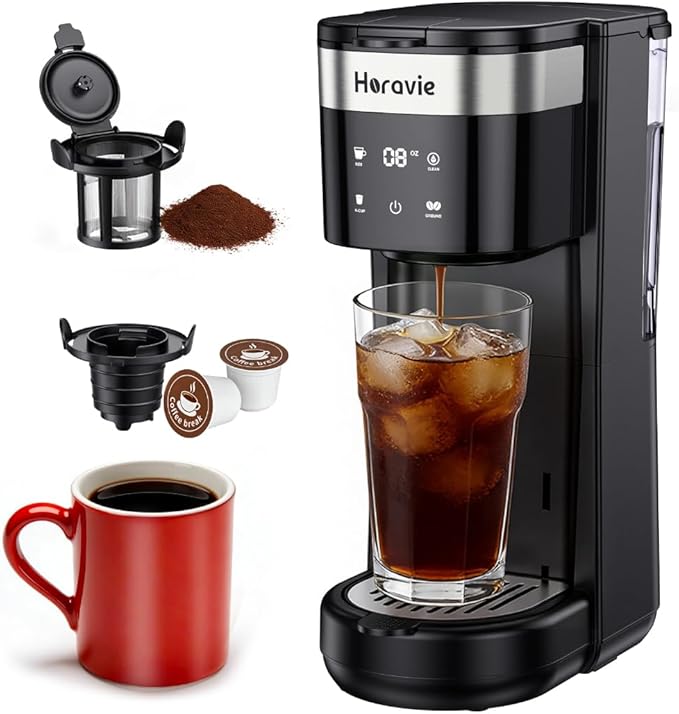
Main Components
- Main Housing: Contains the heating system and electronics.
- Removable Water Reservoir (30 oz / ~887 mL): Located at the back of the unit. Features a low-water level alert.
- Brew Head: The compartment that opens to accept a K-Cup pod or the reusable ground coffee filter.
- Adjustable Drip Tray: Can be raised or lowered to accommodate different cup heights. The tray is also removable to fit travel mugs up to 7.8 inches tall.
- Control Panel: Includes buttons for brew size selection and a CLEAN function.
- Permanent Reusable Filter: For use with ground coffee (included).
- K-Cup Pod Holder: For use with single-serve pods (included).
Control Panel and Indicators
The control panel allows you to select your brew size and manage the cleaning cycle.
- Brew Size Buttons (6oz, 8oz, 10oz, 12oz, 14oz): Press to select your desired beverage volume.
- CLEAN Button: Used to initiate the automatic descaling cycle when the descaling alert is active.
- Low Water Alert: An indicator light or prompt that activates when the water reservoir is nearly empty.
- Descaling Alert: A flashing indicator that signals when the machine requires descaling.
Use Guide
Initial Setup
- Place the coffee maker on a clean, dry, level, and heat-resistant surface.
- Remove the water reservoir by lifting it straight up. Fill it with fresh, cold water up to the MAX line and reinsert it firmly into the back of the unit.
- Ensure the drip tray is correctly positioned and the cup stand is at the desired height.
- Plug the power cord into a standard 120V electrical outlet.
Brewing with a K-Cup Pod
- Lift the brew head lid.
- Place a K-Cup pod into the pod holder compartment. Close the lid firmly.
- Place your cup or mug on the drip tray.
- Press the desired brew size button (6oz, 8oz, 10oz, 12oz, or 14oz). The brewing cycle will begin.
- When brewing is complete, lift the brew head lid to discard the used pod.

Brewing with Ground Coffee
- Lift the brew head lid.
- Insert the included permanent filter into the filter holder.
- Add one tablespoon of ground coffee per 6 oz of water, or to your taste preference. Do not overfill.
- Close the brew head lid firmly.
- Place your cup on the drip tray and press the desired brew size button.
- After brewing, remove and rinse the permanent filter.
Brewing Iced Coffee
To make iced coffee, add ice to your cup first, then select a smaller brew size (e.g., 6oz or 8oz) to account for dilution as the ice melts.
Using the Adjustable Drip Tray
- For shorter cups and mugs, raise the drip tray to minimize splashing.
- For tall travel mugs (up to 7.8 inches), completely remove the drip tray. Ensure the mug is stable on the counter beneath the brew spout.

Cleaning and Maintenance
IMPORTANT: Always unplug the appliance and allow it to cool completely before cleaning.
Daily Cleaning
- Wipe the exterior with a soft, damp cloth. Do not use abrasive cleaners.
- Remove, empty, and rinse the drip tray and cup stand with warm water.
- Remove the water reservoir, empty any unused water, and rinse it with warm water. Dry before refilling.
- Rinse the permanent filter after each use.
Descaling (Smart Cleaning System)
Mineral deposits from water can build up inside the machine. The descaling alert will flash when maintenance is required.
- Purchase a descaling solution suitable for single-serve coffee makers.
- Fill the water reservoir with the descaling solution mixed with water as per the solution's instructions.
- Place a large cup or container (at least 20 oz) on the drip tray.
- With the machine plugged in, press and hold the CLEAN button for 2 seconds to start the descaling cycle.
- The machine will run the solution through its system. Follow the specific timing instructions provided with your descaling solution.
- Once the cycle is complete, discard the liquid from the cup.
- Rinse the water reservoir thoroughly and fill it with fresh, cold water.
- Run 2-3 full reservoir cycles of clean water through the machine (using the largest brew size) to rinse out any remaining solution. Discard the water after each cycle.

Troubleshooting
| Problem | Possible Cause | Solution |
|---|---|---|
| Machine does not turn on or brew. | Not plugged in. Power outlet issue. | Ensure the power cord is securely plugged into a working 120V outlet. |
| Low water alert is on. | Water reservoir is empty or not seated correctly. | Fill the reservoir with water and push it firmly into place. |
| Descaling alert is flashing. | Mineral buildup requires cleaning. | Perform the descaling procedure as outlined in the manual. |
| Water leaks from the unit. | Water reservoir not properly inserted. Brew head not closed securely. | Check that the reservoir is fully seated and the brew head lid is closed and locked. |
| Coffee is not hot enough. | Initial heating cycle not complete. Using a cold cup. | Allow the machine to complete its initial heating cycle before brewing. Preheat your cup with hot water. |
| Slow brewing or no coffee dispensed. | Clogged needle or water lines due to scale. | Perform the descaling procedure. Ensure you are using the correct type of K-Cup pod. |
Specifications
- Brand: Horavie
- Model Name: Single Serve Coffee Maker (KCM301)
- Dimensions (WxDxH): 6.3" x 10.6" x 11.2" (16 x 27 x 28.5 cm)
- Weight: 5.63 lbs (2.55 kg)
- Water Reservoir Capacity: 30 oz (887 mL), removable
- Brew Sizes: 6, 8, 10, 12, 14 oz
- Max Cup Height: 7.8 inches (with drip tray removed)
- Compatibility: K-Cup pods and ground coffee
- Special Features: Auto Shut-Off, Permanent Filter, Removable Tank, Low Water Alert, Descaling Alert
- Power: 120V AC, 60Hz
- Included Components: Coffee Maker, Reusable Permanent Filter, K-Cup Pod Holder
Warranty and Support
For warranty information about this product, please click here.
For customer service, contact the seller via your Amazon account order page or visit Amazon Customer Service.