Overview
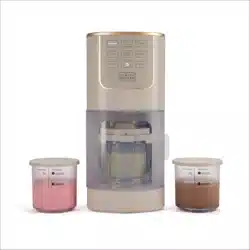
The BLACK+DECKER Ice Cream Maker (Model IC002-21BD) is a compact, automatic countertop appliance designed to make frozen desserts at home. It can produce ice cream, gelato, sorbet, frozen yogurt, and milkshakes. The machine uses a simple 3-step process and includes a re-spin feature for adjusting consistency. All removable parts are dishwasher safe for easy cleanup.

What's in the Box
- Ice Cream Maker base unit
- 2 Pint jars (with lids)
- Paddle (mixing arm)
- Instruction manual

Features
Preset Programs
The machine includes dedicated buttons for different frozen treats:
- Ice Cream – Standard cycle for creamy ice cream.
- Light Ice Cream – For lower-fat or lighter recipes.
- Gelato – Slower churning for dense, Italian-style gelato.
- Sorbet – For fruit-based, dairy-free frozen desserts.
- Frozen Yogurt – For yogurt-based treats.
- Milkshake – Blends ingredients into a thick, drinkable shake.


Re-Spin Feature
If the dessert is too soft after the initial cycle, press the Re-Spin button to churn for an additional period, firming up the texture without starting a full new cycle.
Mix-Ins Capability
Add solid ingredients like chocolate chips, crushed cookies, fruit, candy, or nuts during the last few minutes of churning. The machine incorporates them evenly throughout the batch.

Easy Cleanup
All removable parts (pint jars, lids, paddle) are top-rack dishwasher safe. The exterior can be wiped with a damp cloth.

Control Panel & Indicators
- Power Button – Turns the unit on/off.
- Program Selector Buttons – Choose the type of frozen treat (Ice Cream, Gelato, Sorbet, etc.).
- Re-Spin Button – Activates the re-spin cycle.
- Start/Stop Button – Begins or halts the current cycle.
- Indicator Lights – Show the selected program and cycle status (running/complete).
Use Guide
Before First Use
- Remove all packaging materials and stickers.
- Wash the pint jars, lids, and paddle in warm, soapy water or place them on the top rack of the dishwasher. Rinse and dry thoroughly.
- Wipe the base unit with a damp cloth. Do not immerse the base in water.
Basic Operation (3-Step Process)
Step 1: Prepare the Base
Pour your liquid base (e.g., cream, milk, alternative milk, sweetener, flavorings) into the pint jar. Do not fill above the maximum fill line.
Step 2: Assemble & Start
- Insert the paddle into the jar.
- Place the lid on the jar and lock it into place on the base unit.
- Plug in the unit and press the Power button.
- Select the desired program (e.g., Ice Cream, Gelato).
- Press the Start/Stop button to begin churning.
Step 3: Add Mix-Ins & Serve
- During the last 2-3 minutes of the cycle, open the lid and add your mix-ins (chips, fruit, etc.).
- Replace the lid and allow the cycle to finish.
- When the cycle ends, the unit will beep. Remove the jar and serve immediately, or transfer to a freezer-safe container for firmer texture.
Using the Re-Spin Feature
- After the initial cycle completes, check the consistency.
- If a firmer texture is desired, press the Re-Spin button.
- The machine will churn for an additional 5-10 minutes. Monitor to avoid over-churning.
Tips for Best Results
- Chill the pint jar in the freezer for 10-15 minutes before use for faster freezing.
- Use cold ingredients (refrigerated cream, milk) to reduce churning time.
- Do not overfill the jar; leave space for the paddle and expansion.
- For keto or low-sugar recipes, use sugar substitutes like monk fruit or stevia.
- For dairy-free recipes, use coconut cream, almond milk, or oat milk as a base.
Cleaning & Maintenance
- Unplug the unit before cleaning.
- Remove the jar, lid, and paddle. Wash them in warm, soapy water or place on the top rack of the dishwasher.
- Wipe the base unit and control panel with a damp, soft cloth. Do not use abrasive cleaners.
- Dry all parts thoroughly before reassembly or storage.
- Store the unit in a cool, dry place with the lid slightly ajar to prevent odors.
Specifications
- Brand: BLACK+DECKER
- Model: IC002-21BD
- Color: Stone
- Capacity: 1 pint (per batch)
- Material: Plastic
- Weight: 18.6 lbs
- Special Features: Re-Spin Feature, Easy Cleanup
- Operation Mode: Automatic
Product Videos
Video Description: The video showcases the product in use and guides you through product setup.