1. Overview
The ThermoPro TP150 is a digital thermometer and hygrometer designed to monitor temperature and humidity in indoor environments. It is built with an IPX5 waterproof rating for use in high-humidity areas such as greenhouses, grow tents, basements, and reptile terrariums.
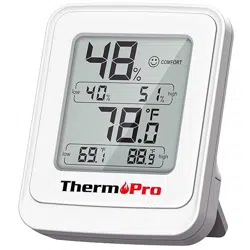
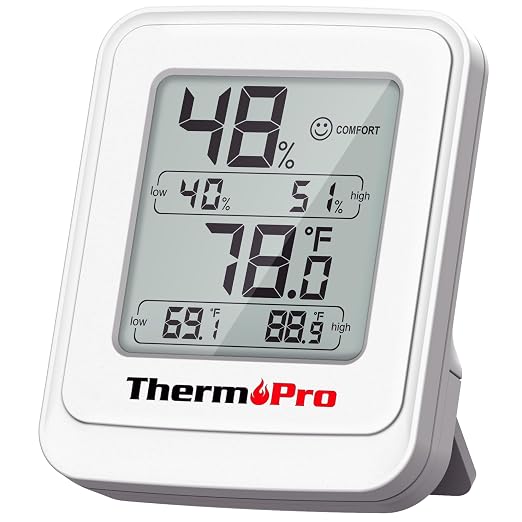
The device features a large LCD display that shows current readings, 24-hour high/low records, and a comfort indicator icon. It includes a table stand and a magnetic back for flexible placement.
2. Features
2.1 Real-Time Monitoring
The device displays current temperature and humidity. Readings update every 10 seconds.
2.2 Accuracy and High Humidity Resistance
- Temperature Accuracy: ±1°F (±0.5°C)
- Humidity Accuracy: ±2% RH
- IPX5 Waterproof Rating: Resistant to water jets from any direction, suitable for damp environments.
2.3 24-Hour High/Low Records
Automatically tracks and displays the maximum and minimum temperature and humidity readings from the past 24 hours.
2.4 Instant Comfort Check
An icon on the display indicates the comfort level based on ambient conditions:
- Dry: Displayed when humidity is below 30%.
- Comfort: Displayed when temperature is between 68–79°F and humidity is between 30%–60%.
- Wet: Displayed when humidity is above 60%.
2.5 Flexible Mounting Options
- Table Stand: Allows the unit to stand freely on a flat surface.
- Magnetic Back: Enables attachment to ferrous metal surfaces.
2.6 Large LCD Display
The screen uses large, bold digits for clear readability from various angles and distances.
3. Use Guide
3.1 Package Contents
- ThermoPro TP150 unit
- 1 x AAA battery
- User Manual
3.2 Initial Setup
- Open the battery compartment on the back of the unit.
- Insert the included AAA battery, observing the correct polarity (+/-).
- Close the battery compartment.
- The display will activate and begin showing readings.
3.3 Understanding the Display
The main screen shows the following information:
- Current Temperature: Displayed in large digits, typically in °F (may support °C).
- Current Humidity: Displayed as a percentage (% RH).
- High/Low Records: Icons or indicators for the 24-hour maximum and minimum values for both temperature and humidity.
- Comfort Icon: A symbol indicating Dry, Comfort, or Wet conditions.
3.4 Placement and Mounting
For accurate readings:
- Place the unit in the area you wish to monitor, away from direct heat sources, air vents, or drafts.
- For tabletop use, extend the stand on the back.
- To mount on a metal surface, attach the magnetic back directly to the surface. Ensure the surface is clean and dry.
- The IPX5 rating allows it to be used in humid locations, but it should not be submerged in water.
3.5 Resetting High/Low Records
The high and low records are automatically calculated over a rolling 24-hour period. To manually reset these values, remove the battery for more than 10 seconds and then reinsert it.
4. Specifications
- Brand: ThermoPro
- Model: TP150
- Temperature Range: -22°F to 140°F (-30°C to 60°C)
- Humidity Range: 10% to 99% RH
- Update Interval: 10 seconds
- Waterproof Rating: IPX5
- Power Source: 1 x AAA battery (included)
- Item Length: 4.09 inches
5. Care and Maintenance
- Wipe the exterior with a soft, damp cloth if dirty. Do not use abrasive cleaners or solvents.
- Ensure the battery compartment is securely closed, especially in humid environments.
- Replace the battery when the display becomes dim or readings become unstable.
- Do not disassemble the unit.