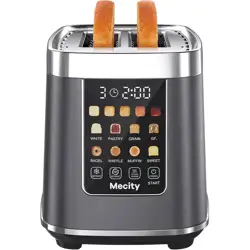
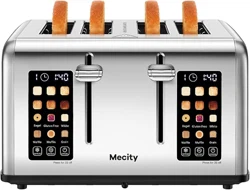
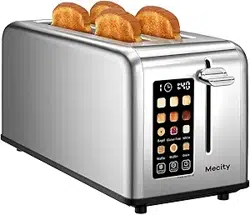
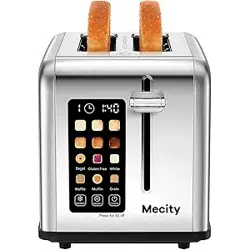
Mecity T-90-GY 2 Slice Toaster with Touch Screen & Auto Lift, Stainless Steel Cool-Touch Toaster

Product's Documents

Below are documents related to this product, you can read online or download:
T-90-GY photo

Model: T-90-GY | 120V, 1200W


1. Overview

This manual provides instructions for the Mecity 2-Slice Toaster with Touch Screen and Auto Lift. The toaster features a digital touch screen, automatic motorized lift, multiple bread programs, and a cool-touch exterior.

Mecity 2 Slice Toaster with Touch Screen and Auto Lift, Stainless Steel finish

Key Components:

  • Touch Screen Control Panel
  • Two Extra-Wide Slots
  • Removable Crumb Tray
  • Stainless Steel Body
  • Power Cord

2. Features and Specifications

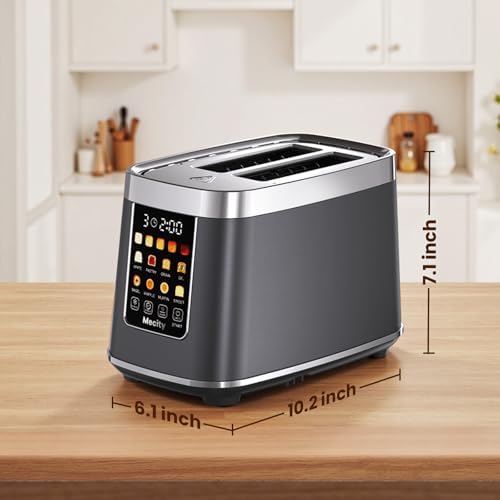
2.1 Physical Specifications

  • Dimensions: 10.4"D x 6.2"W x 7"H
  • Material: Stainless Steel, ABS Plastic
  • Color: Metallic Grey
  • Weight: Solid, stable construction

2.2 Electrical Specifications

  • Voltage: 120V AC
  • Power: 1200 Watts
  • Cord: Retractable power cord

2.3 Functional Features

  • Motorized Auto-Lift: Automatically lowers and raises bread; no manual lever required.
  • Touch Screen Control: Digital display with capacitive touch buttons.
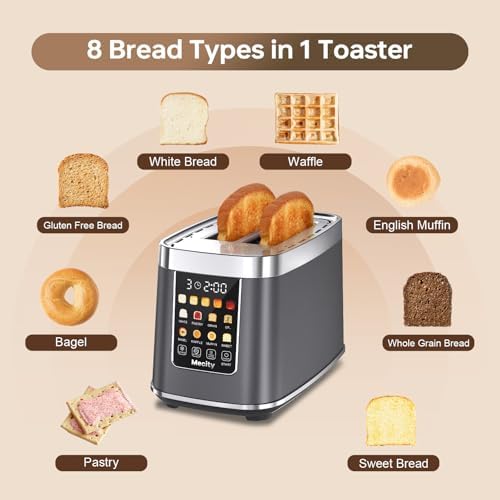
  • 8 Bread Programs: White, Pastry, Grain, Gluten Free, Bagel, Waffle, English Muffin, Sweet Breads.
  • 5 Browning Levels: Adjustable shade settings from light to dark.
  • Keep Warm Function: Holds toast at temperature for up to 30 minutes without over-browning.
  • Reheat Function: Reheats previously toasted bread without restarting a full cycle.
  • Defrost Function: Toasts frozen bread items.
  • Cancel Function: Stops the toasting cycle.
  • Cool-Touch Exterior: Heat-insulated layer keeps the sides safe to touch during operation.
  • Removable Crumb Tray: Slide-out tray for easy cleaning.
  • Silent Mode: Mutes button sounds. Activated by pressing and holding the DEFROST icon.
  • Auto Shut-Off: Automatically turns off 5 minutes after toasting is complete.
  • Child Lock: Activates after a period of inactivity, indicated by four lines on the screen.
Side view of toaster showing stainless steel finish

3. Use Guide

3.1 Before First Use

  1. Remove all packaging materials.
  2. Wipe the exterior with a damp cloth. Do not immerse the toaster in water.
  3. Extend the power cord fully and plug the toaster into a standard 120V outlet.
  4. Operate the toaster without bread for one cycle on a high setting to burn off any manufacturing residues. Ensure the area is well-ventilated.

3.2 Basic Toasting

  1. Insert Bread: Place bread, bagel, or other item into the wide slots. The toaster will automatically lower it.
  2. Select Program: On the touch screen, tap the icon corresponding to your bread type (e.g., White, Bagel, etc.).
  3. Select Browning Level: Tap one of the five shade level icons (1 lightest to 5 darkest).
  4. Start: Tap the START icon. The timer will count down on the display.
  5. Completion: When toasting is complete, the bread will automatically rise. A tone may sound (unless Silent Mode is on).
  6. Remove Toast: Carefully remove toast. The exterior remains cool to the touch.

Note: For bagels, cut evenly and place with the cut side facing outward.

3.3 Using Special Functions

  • Defrost: Tap the DEFROST icon before selecting your bread program and shade. Use for frozen items.
  • Reheat: Tap the REHEAT icon to warm previously toasted bread without additional browning.
  • Keep Warm: After toasting is complete, the toaster will enter Keep Warm mode for up to 30 minutes. The display will indicate this mode.
  • Cancel: Tap the CANCEL icon to stop the toasting cycle immediately. The bread will lift.
  • Manual Power Off: Press and hold the CANCEL icon for 3 seconds to turn the toaster off directly.

3.4 Touch Screen Icons and Display

The central display shows the selected options and a countdown timer. Icons are labeled for bread type and function.

  • Bread Icons: White, Pastry, Grain, Gluten Free, Bagel, Waffle, English Muffin, Sweet Breads.
  • Function Icons: START, DEFROST, REHEAT, CANCEL.
  • Shade Level Indicators: Five dots, indicating browning level.
Close-up of the toaster's touch screen interface

4. Cleaning and Maintenance

  • Unplug the toaster and allow it to cool completely before cleaning.
  • Exterior: Wipe with a soft, damp cloth. Do not use abrasive cleaners or scouring pads.
  • Crumb Tray: Pull the tray from the bottom of the toaster. Empty and wipe clean. Slide back in securely.
  • Interior: Do not insert any utensils or objects into the slots. Turn the toaster upside down over a trash bin and shake gently to dislodge loose crumbs. Do not wash the interior with water.
  • Storage: Retract the power cord and store in a dry place.
Hand removing the crumb tray from the bottom of the toaster

5. Troubleshooting

  • Toaster not working after pressing START: The toaster may be in child lock mode (screen shows four lines). Reselect your bread program and shade, then press START again.
  • Screen not responsive:
    • Ensure you are touching icons with your fingertip, not multiple icons simultaneously.
    • If the screen is locked (showing four lines), you must reselect programs; touching START alone will not work.
  • Second toasting cycle is shorter: This is normal. The toaster has a temperature control system that adjusts heating time based on internal temperature to prevent over-toasting.
  • Some heating wires not glowing red: This does not affect performance. Some wires may be tightly attached to the wall and not visibly glow. Do not attempt to adjust them.
  • Toasting results vary: Results depend on bread temperature, thickness, and moisture. You may need to experiment with settings for your preferred toast.

6. Safety Information

  • This appliance is for household use only.
  • Plug into a 120V outlet only. Do not use with an extension cord.
  • Do not insert anything other than bread, bagels, or similar food items into the slots.
  • Do not use near or under flammable materials like curtains.
  • Do not operate the toaster if the cord or plug is damaged.
  • The exterior is designed to stay cool, but the slots and toasted food will be very hot. Use caution when removing items.
  • Unplug the toaster when not in use and before cleaning.
  • Do not immerse the toaster, cord, or plug in water or any other liquid.
  • This toaster has an automatic shut-off feature. Do not leave the appliance unattended while plugged in.
Hand touching the side of the toaster, illustrating cool-touch safety

7. Product Information

Model Number: T-90-GY

UPC: 850082039029

ASIN: B0FHV8J1C9

Included: Toaster unit only.

For further information, visit the Mecity Store on Amazon.

Reference file: Mecity T-90-GY 2 Slice Toaster with Touch Screen & Auto Lift, Stainless Steel Cool-Touch Toaster

Specifications

Mecity T-90-GY Questions and Answers

See other models: T-68A T-88A T-78A T-42AUB HB-K002C