Overview

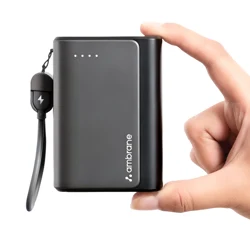
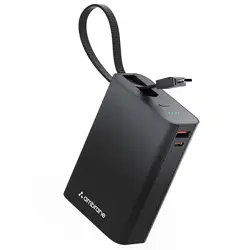
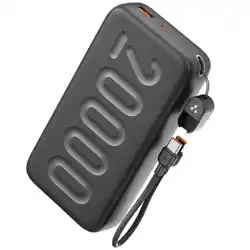
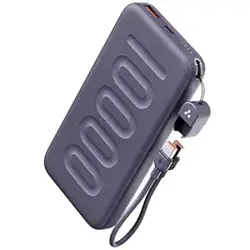
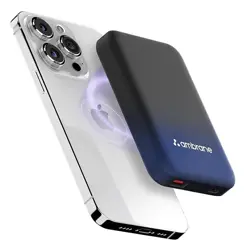
The Ambrane PowerMini 20 is a portable power bank designed for charging mobile devices on the go. Its key features include a high 20000mAh battery capacity, 35W fast charging output, and a built-in, detachable Type-C cable that also functions as a carrying loop.
This manual provides instructions for safe operation, charging, and maintenance of your power bank.
Package Contents
- 1 N PowerMini20 Powerbank
- 1 N Charging Cable
- 1 N Rating Card
Note: A charging adapter and external cables are not included. Use a compatible USB-C charger and cable to charge the power bank itself.
Use Guide
Charging the Power Bank (Input)
- Use a compatible USB-C wall charger and a USB-C to USB-C cable (not included).
- Connect the cable to the power bank's USB-C input port.
- Connect the other end to the wall charger and plug it into a power outlet.
- The power bank will begin charging. An LED indicator will show the charging status.
Note: For optimal performance and battery health, use a charger that supports USB Power Delivery (PD). The power bank does not include a charging adapter.
Charging Your Devices (Output)
You can charge your devices using either the built-in cable or the external ports.
Method A: Using the Built-in Type-C Cable
- Gently pull the built-in Type-C cable from its slot on the side of the power bank.
- Connect the loose end of the cable directly to your device's Type-C charging port.
- Press the power button on the power bank to begin charging. The LED indicators will illuminate to show the power bank's remaining capacity.
Method B: Using the External Ports
- Use your own USB-C or USB-A cable.
- Connect the cable to the corresponding port on the power bank (USB-C PD or USB-A).
- Connect the other end to your device.
- Press the power button to start charging.
Dual Charging: You can charge two devices simultaneously by using both the built-in cable and one external port, or both external ports with your own cables.
LED Indicator Guide
The LED lights indicate the approximate remaining battery level of the power bank.
- 4 LEDs lit: 76% - 100% capacity
- 3 LEDs lit: 51% - 75% capacity
- 2 LEDs lit: 26% - 50% capacity
- 1 LED lit: 10% - 25% capacity
- 1 LED blinking: Less than 10% capacity. Recharge the power bank.
Carrying and Storage
The built-in cable can be looped for hanging the power bank on a bag, hook, or your wrist for easy portability. Ensure the cable is securely tucked back into its slot when not in use to prevent damage.
Operating Instructions
Charging Products from Powerbank:
Connect your device to a USB-A or USB-C port of the powerbank with a quality charge cable. This model doesn’t need to press the button to start charging, just plug it in and charging will start.
- While connecting, LED indicators will turn ON displaying the remaining battery capacity
- The Green LED indicator will turn ON while Power Delivery, QC & Fast Charging mode is activated.
The indicator shows discharging conditions as follows:
|
Power Level
|
LED 1
|
LED 2
|
LED 3
|
LED 4
|
|
White
|
Green - QC/PD
|
|
Fully Charged
|
ON
|
ON
|
ON
|
ON
|
ON
|
|
75-100%
|
ON
|
ON
|
ON
|
ON
|
ON
|
|
50-75%
|
ON
|
ON
|
ON
|
OFF
|
ON
|
|
25-50%
|
ON
|
ON
|
OFF
|
OFF
|
ON
|
|
0-25%
|
ON
|
OFF
|
OFF
|
OFF
|
OFF
|
|
0%
|
OFF
|
OFF
|
OFF
|
OFF
|
OFF
|
How to Charge Type-C Laptops (35W) with the Powerbank
- Use a good quality Type-C to Type-C charging cable that supports 35W charging. Plug one end of the Type-C to Type-C cable into the Powerbank’s Type-C port and the other end into the Type-C port of your laptop.
- The LED indicator will start glowing according to the battery status.
NOTE:
- While charging the laptops, do not charge any other device using the powerbank simultaneously.
- This powerbank only charges laptops that support 35W or lower. Example: MacBook Air.
How to Charge the Powerbank
Use a good quality Type-C charging cable. Plug the Type-C connector of the cable into one Type-C input port of the Powerbank and the other connector into the matching port of the power adapter. The LED indicator will start flashing according to the battery status.
- We recommend using a 35W power adapter to get an enhanced charging speed. If charged using a lower-wattage power adapter, the charging rate will be slower.
- While charging the powerbank, it is recommended to not charge your devices using the powerbank simultaneously.
- While charging, the green LED indicator will glow (In case of QC/PD fast charging) and the corresponding battery capacity indicator (White LED) will blink.
- When fully charged, all white LED indicators will turn ON and the blinking will stop.
- After the Powerbank is fully charged, disconnect the cable from the Powerbank.
The indicators show charging conditions as follows:
|
Power Level
|
LED 1
|
LED 2
|
LED 3
|
LED 4
|
|
White
|
Green - QC/PD
|
|
0-25%
|
Blinking
|
OFF
|
OFF
|
OFF
|
ON
|
|
25-50%
|
ON
|
Blinking
|
OFF
|
OFF
|
ON
|
|
50-75%
|
ON
|
ON
|
Blinking
|
OFF
|
ON
|
|
75-100%
|
ON
|
ON
|
ON
|
Blinking
|
ON
|
|
Fully Charged
|
ON
|
ON
|
ON
|
ON
|
ON
|
Charging Protocols
Supports multiple fast charge protocols like Quick Charge (QC) 2.0/3.0, Power Delivery (PD) 2.0/3.0, PPS, VOOC, DASH, WARP etc. via USB-A and Type-C ports to fast charge any device/smartphone.
Product Specifications
- Battery Capacity: 20000 mAh
- Type C Input: 35W
- Ports:
- Type C Port: Max. 35W
- PPS: Max 36.8W
- USB-A Port: Max. 18W
- Maximum Output: 35W
- Protocols Supported: PD 3.0, QC 3.0, PPS, VOOC
- Battery Type: Lithium Polymer
- Protection: SafeCharge Technology
- Indicators: LED Indicators
- Compatibility: Works with Type C & USB-A enabled smartphones and gadgets
- Laptop Charging: Macbook Air supported via Type-C
- Body Material: Premium ABS Body
- Weight: 341 gms
PRECAUTIONS
- Some USB cables that are not compatible with the power bank or can't be used should be avoided, instead, choose or purchase the charging cable of the same mobile brand to get adequate speed.
- Do not use two charging cables simultaneously in both Type-C ports.
- When the power bank can't charge digital products, please check whether the charging cable and connectors are connected properly or change the cable. After digital devices are fully charged, please unplug the charging cable timely to avoid power loss.
- Because of the high charge and discharge current, please choose good quality charging cable and connectors.
- Please make sure the power bank is fully charged when using it for the first time. Make sure that the product is fully charged at least once in two or three months.
- During charging the power bank, please unplug the cable within 30 minutes when the power bank is fully charged.
- While using output through a single port, the powerbank delivers maximum power but if dual or more ports are used at the same time, then the power bank will divide power into two or three.
- In single port usage, the Power bank will operate in only one parameter whether QC or PD and will provide the output ratio mentioned.
- If all the ports are used in a single phase, then the Power Bank will work on basic parameters and the current will be divided into all the ports.
- It’s always suggested to discharge the powerbank completely before recharging to get enhanced battery backup. Frequent top-ups after minimal use may reduce long-term performance.
- It’s always suggested to discharge the powerbank completely before recharging to get enhanced battery backup. Frequent top-ups after minimal use may reduce long-term performance.
SAFETY ALERTS AND GUIDELINES
- Keep your Power bank dry and away from moisture and corrosive materials.
- Do not clean your Power bank with harsh chemicals, soaps or detergents. Just wipe it with a soft, water-dampened cloth.
- To prevent fire or shock hazards, do not expose this unit to rain or moisture.
- Do not expose this unit to extremes of temperature.
- Immediately terminate the use of the product if the item bulges, smells or leaks.
- Please recharge the Power bank once a month if not in use to extend the lifetime of the battery.
- Please allow the Power bank to deplete significantly before recharging in order to preserve the lifetime of the battery.
- Check the voltage of the USB devices and power adapters carefully before usage.
- Do not place this unit directly onto furniture surfaces with any type of soft, porous, or sensitive finish. As with any rubber compound made with oils, the rubber finish could cause marks or staining where the product resides.
- Keep your device out of reach of small children to prevent danger.
- Lithium batteries, like all rechargeable batteries, are recyclable and should not be recycled or disposed of in normal household waste. Contact your local government for disposal or recycling practices in your area.
- Keep away from fire, water and excess temperature ( > 45°C ) and too low temperature ( <-20°C).
- Do not dismantle, crush, puncture or short circuit the power bank, or expose it to liquids, fire or an environment where the temperature is above 55°C.
Troubleshooting
| Problem |
Possible Cause |
Solution |
| Power bank does not turn on or charge devices. |
Battery is completely depleted. |
Connect the power bank to a wall charger using a USB-C cable and charge it for at least 30 minutes before use. |
| Device charges slowly. |
1. Device not fast-charge compatible.
2. Using a non-PD charger/cable for the power bank input.
3. Charging two devices simultaneously reduces output per port. |
1. Check device compatibility.
2. Use a PD charger and cable for input.
3. Try charging a single device for faster speed. |
| LED indicators do not light up. |
1. Battery fully depleted.
2. Internal fault. |
1. Recharge the power bank.
2. If problem persists after a full charge, contact support. |
| Power bank becomes hot during use or charging. |
1. Normal during high-power fast charging.
2. Environmental factors.
3. Potential fault. |
1. This can be normal. Ensure it is in a well-ventilated area.
2. Move to a cooler location.
3. If excessively hot, stop using and disconnect all devices. |
| Built-in cable is loose or not working. |
Physical damage or wear. |
Use the external USB-C or USB-A ports with your own cable. Avoid putting strain on the built-in cable. |
Warranty and Support
This Ambrane PowerMini 20 power bank is covered by a 6-month (180-day) manufacturer's warranty from the date of purchase against manufacturing defects.
Warranty Service
For warranty claims or product issues:
- Contact: Ambrane Customer Care
- Email: [email protected]
- Please have your proof of purchase (invoice) ready when contacting support.
Service Process
For defective items, you may be directed to visit the nearest authorized Ambrane Service Centre. The brand will repair or replace the product as per their warranty policy. The time for resolution is determined by Ambrane.
Note: The warranty does not cover damage caused by misuse, accidents, liquid damage, unauthorized modifications, or normal wear and tear.
Disposal
This product contains a lithium polymer battery. Do not dispose of it with household waste.
At the end of its life, please dispose of the power bank according to your local regulations for electronic waste (e-waste) and batteries. Contact your local waste management authority for proper disposal or recycling facilities.
Manual Version 1.0
Specifications are subject to change without notice.
Manufacturer: Ambrane
Country of Origin: India