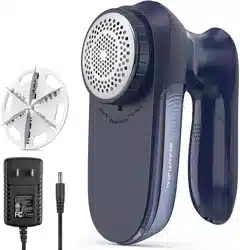
Overview
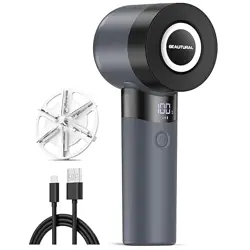
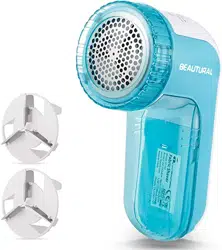
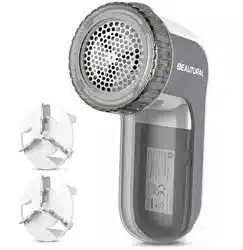
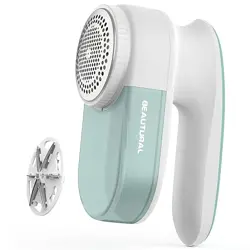
The BEAUTURAL Fabric Shaver and Lint Remover is a rechargeable electric device designed to remove lint, fuzz, and pilling from fabrics. It is suitable for use on clothing, furniture, blankets, and other textiles.

Features
Performance and Blades
- 6 Ultra-Sharp Leaf Blades: Designed for efficient and thorough pilling removal.
- 3 Adjustable Speeds: Allows you to select the appropriate speed for different fabric types and pilling density.
- Enhanced Suction: Helps pull fabric taut and collect removed lint.

Display and Controls
- Smart LED Display: Shows real-time battery life and current speed setting.
- Low Battery Indication: Alerts you before the battery is depleted to prevent interruptions.
- Power/Speed Button: Press to turn on and cycle through the three speed settings.

Battery and Charging
- 1800mAh Lithium Battery: Provides up to 4 hours of continuous runtime on a full charge.
- USB-C Charging Port: Fully charges in approximately 2 hours.
Safety and Convenience
- Automatic Safety Stop: The device stops automatically if the blade cover is opened or loose.
- Travel Lock: Activate by holding the power button for 3 seconds to prevent accidental activation during transport or storage.
- Magnetic Lint Collector: Detaches easily for mess-free emptying.
- Built-in Cleaning Brush: Used to clean the blades and maintain sharpness.


Use Guide
Before First Use
- Fully charge the device using the provided USB-C cable.
- Ensure the blade cover is securely closed.
Operating Instructions
- Prepare the Fabric: Lay the garment or fabric flat on a stable surface. Ensure the area is free of wrinkles.
- Power On: Press the power button once to turn on the device. The LED display will illuminate.
- Select Speed: Press the power button again to cycle through the three speed settings (Low, Medium, High). Choose a speed appropriate for the fabric.
- Low: Recommended for delicate fabrics.
Medium: For general use on sweaters, blankets, and upholstery.
- High: For heavy pilling on durable fabrics like couches.
- Shave the Fabric: Hold the device at a 90-degree angle to the fabric. Gently glide the shaver head over the fabric in straight, overlapping strokes. Do not press down hard; let the blades do the work.
- Empty the Lint Collector: When the lint collector is full, or after each use, detach the magnetic collector and empty the contents into a trash bin.
- Power Off: Press and hold the power button until the device turns off.
Cleaning and Maintenance
- Always turn off and unplug the device before cleaning.
- Use the built-in brush to remove any lint or fibers from the blades and the shaver head opening.
- Wipe the exterior of the device with a dry or slightly damp cloth. Do not immerse in water.
- Ensure the lint collector is empty and clean before reattaching.
Charging
Connect the USB-C cable to the port on the device and to a standard USB power adapter or computer port. The device does not operate while charging. A full charge takes approximately 2 hours.
Activating Travel Lock
To prevent accidental activation, press and hold the power button for 3 seconds until the display shows a lock icon or turns off. To deactivate, press and hold the button again for 3 seconds.
Specifications
- Brand: BEAUTURAL
- Model Number: 1-MR02NA17
- Color: Blue (also available in White & Black)
- Material: Metal, Plastic
- Operation Mode: Automatic
- Battery: 1800mAh Lithium-ion, rechargeable via USB-C
- Blades: 6 leaf blades
- Speeds: 3 adjustable speeds
Safety Information
- Read all instructions before use.
- For household use only.
- Keep the device away from water and other liquids.
- Do not use on leather, suede, vinyl, or other non-woven materials.
- Always ensure the blade cover is securely closed before operation.
- The automatic stop feature activates if the cover is loose. Do not attempt to override this safety feature.
- Unplug the charger when not in use.
- Keep the device out of reach of children.
- Do not use the device if it is damaged or malfunctions.
Troubleshooting
- Device does not turn on: Ensure the battery is charged. Activate travel lock may be on; deactivate it by holding the button for 3 seconds.
- Poor performance or no lint collection: The lint collector may be full. Empty it. The blades may be dull or clogged; clean them with the built-in brush.
- Device stops during use: Check that the blade cover is fully closed and secure. The safety feature may have been triggered.
- Battery does not charge: Check the USB-C cable and power source. Ensure the charging port is clean and free of debris.