Overview
This manual provides instructions for the safe and effective use of the RDINSCOS Portable Carbon Monoxide Detector (Model RD700). This is a handheld, battery-powered device designed to detect and measure carbon monoxide (CO) gas levels in the air. It is intended for use in various environments including homes, vehicles (cars, RVs), and during travel or camping activities.

Safety Information
WARNING: Carbon monoxide is a poisonous, odorless, and colorless gas. Exposure can cause serious injury or death.
- This device is designed to alert you to the presence of CO gas. It is not a substitute for proper ventilation, maintenance of fuel-burning appliances, or other safety practices.
- If the alarm sounds, immediately move to an area with fresh air and seek medical attention if anyone experiences symptoms of CO poisoning (headache, dizziness, nausea).
- This detector is for carbon monoxide ONLY. It cannot detect natural gas (methane), propane, smoke, or other combustible gases.
- Do not disassemble, modify, or expose the device to open flame or excessive heat.
- Keep out of reach of children.
Product Features and Components
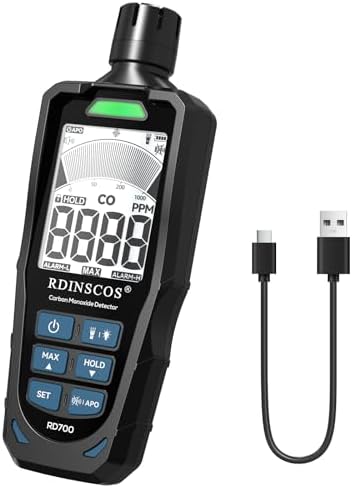
Physical Description
- Dimensions: 1.6" D x 1.1" W x 5.4" H
- Weight: 9.12 ounces
- Design: Compact, handheld, ergonomic shape.
Key Components
- LCD Display: Shows real-time CO concentration (in ppm), temperature, and humidity.
- Control Buttons: For power, mode selection, backlight, and flashlight.
- Electrochemical CO Sensor: Located on the device for gas detection.
- Audible Alarm Buzzer: Emits an audible alert when CO levels exceed the set threshold.
- Built-in Flashlight: LED light for use in low-light conditions.
- USB-C Charging Port: For recharging the internal battery.
- Power Button: To turn the device on and off.
Included in the Box
- RDINSCOS Portable Carbon Monoxide Detector (Model RD700)
- USB Charging Cable
- User Manual
- Carrying Bag
Getting Started
Initial Charging
- Before first use, fully charge the device using the provided USB cable and a standard USB power adapter (not included) or computer port.
- Connect the cable to the device's charging port. The display should indicate charging status.
- Charge until the battery icon indicates it is full. A full charge provides extended usage time.
Powering On/Off
- Press and hold the Power button for 2-3 seconds to turn the device on.
- The device will perform a brief self-test, and the display will show all segments before settling on the main reading screen.
- To power off, press and hold the Power button again for several seconds until the display turns off.
Using the Detector
Understanding the Display
The main screen shows:
- CO Concentration: Displayed in parts per million (ppm) (e.g., 0 ppm, 35 ppm).
- Temperature: Displayed in degrees Fahrenheit or Celsius.
- Humidity: Displayed as a percentage (%).
- Battery Icon: Indicates remaining battery charge.
- Backlight Indicator: Shows when the screen backlight is active.
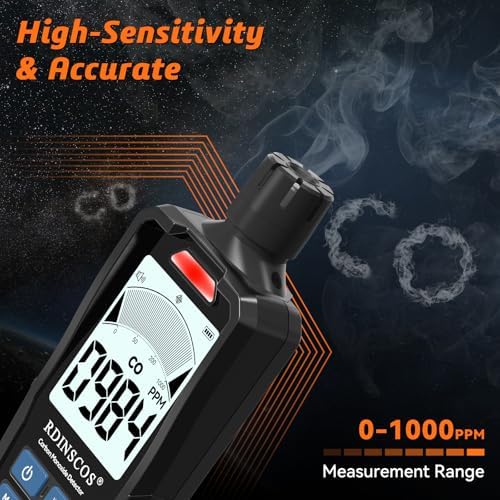
Taking a Measurement
- Ensure the device is powered on.
- Hold the device or place it in the area you wish to monitor. The sensor requires ambient air to flow over it.
- Allow 30-60 seconds for the readings to stabilize and provide an accurate current CO level.
- The device provides continuous, real-time monitoring while powered on.
Using the Flashlight
Press the dedicated flashlight button to turn the built-in LED light on or off. This is useful for inspecting dark areas like tents, garages, or RV compartments at night.
Adjusting Alarm Threshold
The device allows you to set a custom CO concentration alarm level.
- Navigate to the settings menu using the mode/function button.
- Find the alarm set point option.
- Use the buttons to increase or decrease the threshold value (in ppm).
- Confirm the setting. The audible alarm will sound when the detected CO level meets or exceeds this value.
Alarms and Indicators
- Audible Alarm: A loud, repeating beep will sound when CO levels reach the alarm threshold.
- Visual Alert: The display will show the high CO reading and may flash.
- Low Battery Indicator: The battery icon on the display will empty or flash when the battery charge is low and needs recharging.
If the Alarm Sounds:
- Do not ignore the alarm.
- Immediately move all persons to an area with fresh air (outdoors or by an open window).
- Account for all individuals.
- Call emergency services if anyone is experiencing symptoms.
- Do not re-enter the premises until the device reads a safe level (0 ppm) and the source of CO has been identified and repaired by a qualified professional.
Battery and Charging
- Power Source: Built-in rechargeable lithium battery.
- Charging: Use the included USB cable. The device can be used while charging.
- Battery Life: Usage time varies based on backlight use and alarm activity. The device will dim the display after a period of inactivity to conserve power while continuing to monitor.
- Recharge the battery when the low battery indicator appears.
Care and Maintenance
- Cleaning: Wipe the exterior with a soft, dry cloth. Do not use liquids, sprays, or abrasive cleaners.
- Sensor Care: Keep the sensor area free from dust, lint, and obstructions. Do not block the vents.
- Storage: Store in a cool, dry place when not in use. Avoid extreme temperatures and humidity.
- Testing: Regularly power on the device to ensure it operates correctly. The self-test sequence at startup is a basic functional check.
Specifications
- Model: RD700
- Detection Range: 0 - 1000 ppm (parts per million)
- Resolution: 1 ppm
- Sensor Type: Electrochemical
- Display: LCD with backlight
- Alarm Type: Audible buzzer
- Additional Features: Temperature and humidity display, built-in flashlight
- Charging: USB
- Manufacturer: SHENZHEN REDDRAGON INSTRUMENTS CO.,LTD
Troubleshooting
- Device won't turn on: Ensure the battery is charged. Connect to USB power and try again.
- Readings seem inaccurate: Ensure the sensor is not blocked. Allow the device to acclimate to a new environment for several minutes. Avoid testing in areas with strong air currents or directly next to air vents.
- Alarm sounds continuously with no apparent CO: Move the device to a known fresh air location outdoors. If the alarm continues, the sensor may be faulty or the device may require service.
- Screen is dim or blank: Press the backlight button. If the problem persists, recharge the battery.
Frequently Asked Questions (FAQ)
- Q: What environments is this detector suitable for?
A: It is suitable for home (bedrooms, basements, garages, near boilers), vehicles (cars, RVs, trucks, boats), and outdoor activities (camping in tents, trailers). - Q: Can it detect other gases like natural gas?
A: No. It detects carbon monoxide only. It cannot detect natural gas (methane), propane, butane, or smoke. - Q: How long does the battery last on a single charge?
A: The usage time varies. The device features a rechargeable battery and includes a USB cable for convenient recharging. - Q: Can the screen stay on all the time?
A: The screen will dim after a period of inactivity to save power but continues monitoring in the background. You can press a button to reactivate the backlight. - Q: Can I adjust the alarm threshold?
A: Yes. The RD700 allows you to set a custom CO concentration level that triggers the alarm via the device settings.