Overview
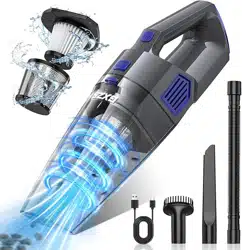
The Gxzsk LT-143 is a cordless, rechargeable handheld vacuum cleaner. It is designed for portable cleaning tasks in various locations such as the home, office, and car. The vacuum features a 15000PA suction motor, a dual filtration system, and comes with multiple attachments for different cleaning needs.

Features and Specifications
Key Features
- Cordless & Portable: Battery-powered design for use anywhere. Weighs 1.52 lbs (0.69 kg).
- Powerful Suction: 15000PA suction power from a high-speed motor.
- Dual Filtration: Includes a washable HEPA filter and a metal filter.
- Long Battery Life: 6000mAh battery provides up to 30 minutes of runtime. Charges fully in approximately 3 hours.
- Large Capacity: 520mL dust collection cup.
- Multi-Surface Use: Suitable for carpets, hard floors, furniture, and car interiors.
- Two Speed Settings: Allows adjustment of suction power.
Technical Specifications
- Model: LT-143
- Power Source: Rechargeable Lithium-ion Battery
- Battery Capacity: 6000mAh
- Charge Time: ~3 hours
- Run Time: Up to 30 minutes
- Dust Cup Capacity: 520 mL
- Suction Power: 15000PA
- Weight: 1.52 lbs (0.69 kg)
- Dimensions (L x W x H): 15.4" x 4.25" x 4.1" (391 x 108 x 104 mm)
- Included Filters: HEPA Filter (x2), Metal Filter

What's in the Box
- Handheld Vacuum Cleaner (Main Unit)
- Suction Nozzle
- Brush Attachment
- Extension Hose
- HEPA Filter (x2)
- Metal Filter
- Type-C Charging Cable
- User Manual
Parts and Controls

Main Unit
- Power Button: Touch-control button to turn the vacuum on/off and cycle between speed settings.
- Dust Cup Release Button: Press to detach the dust collection cup for emptying.
- Charging Port (Type-C): Located on the body for connecting the included charging cable.
- Charge Indicator Light:
- Red Light: Illuminates when the battery is charging.
- Green Light: Illuminates when the battery is fully charged.
- Attachment Dock: Socket for connecting nozzles and the extension hose.
Attachments
- Suction Nozzle: Standard nozzle for general cleaning and tight spaces.
- Brush Attachment: Designed for picking up pet hair and cleaning carpets and upholstery.
- Extension Hose: Flexible hose for reaching corners, ceilings, and other difficult areas. Can be used with the suction nozzle or brush attachment.
Use Guide
Initial Setup and Charging
- Remove all components from the packaging.
- Ensure the HEPA and metal filters are correctly installed inside the dust cup. (Refer to the Maintenance section for filter installation).
- Connect the provided Type-C charging cable to the vacuum's charging port and a 5V/2A (or higher) USB power adapter.
- Plug the adapter into a wall outlet. The charge indicator light will turn red.
- Allow the vacuum to charge for approximately 3 hours until the indicator light turns green.
- Disconnect the charger. The vacuum is now ready for use.
Basic Operation
- Press the power button once to turn on the vacuum at low speed.
- Press the power button again to switch to high speed.
- Press the power button a third time to turn the vacuum off.
- For general cleaning, attach the suction nozzle directly to the main unit.
- Guide the nozzle over the surface to be cleaned.
Using Attachments
- For Upholstery and Pet Hair: Attach the brush tool directly to the main unit or to the end of the extension hose.
- For High, Low, or Tight Spaces: Connect the extension hose to the main unit, then attach either the suction nozzle or brush tool to the end of the hose.
To change attachments, pull the current attachment straight off the dock or hose. Align the new attachment and push it firmly into place until it clicks.

Emptying the Dust Cup
- Press the dust cup release button and pull the cup away from the main body.
- Hold the dust cup over a trash bin.
- Open the lid at the bottom of the dust cup to empty the contents.
- Close the lid securely.
- Reattach the dust cup to the main body until it clicks into place.
Maintenance and Cleaning
Cleaning the Filters
Regular cleaning of the filters is essential to maintain suction power.
- Remove the dust cup from the main unit.
- Open the dust cup and remove the metal filter and the HEPA filter.
- Tap the filters gently over a trash bin to dislodge loose dust.
- For a thorough clean, rinse the filters under lukewarm running water. Do not use detergents.
- Allow both filters to air dry completely for at least 24 hours before reinstalling.
- Reinstall the dry metal filter first, followed by the HEPA filter, into the dust cup.
- Reattach the dust cup to the main unit.

General Care
- Wipe the exterior of the vacuum with a soft, dry cloth.
- Do not immerse the main unit, motor body, or battery in water or any other liquid.
- Clean the brush attachment by removing wrapped hair or fibers from the bristles.
- Store the vacuum and attachments in a cool, dry place.
Troubleshooting
| Problem |
Possible Cause |
Solution |
| Vacuum does not turn on. |
Battery is depleted. |
Charge the vacuum fully. Ensure the charger is properly connected. |
| Reduced suction power. |
Dust cup is full or filters are clogged. |
Empty the dust cup. Clean the filters as described in the Maintenance section. |
| Vacuum turns off during use. |
Battery is low, or motor is overheating. |
Recharge the vacuum. Allow the unit to cool down for 30 minutes if it has been used continuously. |
| Charge indicator light does not come on. |
Faulty power source, cable, or charging port. |
Try a different USB power adapter and wall outlet. Inspect the charging cable for damage. Ensure the Type-C connector is fully inserted. |
| Attachments will not stay connected. |
Attachment dock or connector is obstructed with debris. |
Turn off the vacuum. Disconnect all parts and clear any debris from the connection points. |
Safety Information
- This appliance is for indoor, household use only.
- Do not use to pick up liquids, burning materials (ashes, cigarettes), or sharp, hard objects (glass, nails).
- Do not block the air intake or use without filters installed.
- Keep hair, loose clothing, fingers, and all body parts away from openings and moving parts.
- Unplug the charger from the wall outlet when not in use.
- Use only the provided Type-C cable and a standard 5V USB adapter for charging. Do not use damaged chargers or cables.
- Do not attempt to disassemble, repair, or modify the vacuum. There are no user-serviceable parts inside.
- Keep the vacuum and charger away from heat sources and open flame.
- Store out of reach of children and pets.
Warranty and Support
For questions, troubleshooting, or warranty service regarding your Gxzsk cordless vacuum cleaner, please contact the seller through your Amazon purchase history or visit the Gxzsk Store on Amazon.
Model Number: LT-143
UPC: 762949440759
ASIN: B0DCZ6P4QD