1. Overview
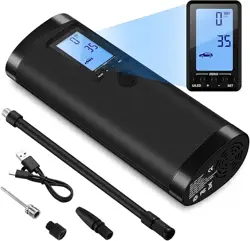
The GPUTEK Mini Bike Tire Air Pump is a portable, electric pump designed for inflating bicycle tires. It is compact, lightweight, and suitable for use with a variety of bicycle types including road, mountain, and e-bikes.

The pump features a digital pressure gauge, automatic inflation with auto-stop, and compatibility with both Presta and Schrader valves via included adapters. It is powered by a rechargeable battery.
2. Features and Specifications
2.1 Physical Specifications
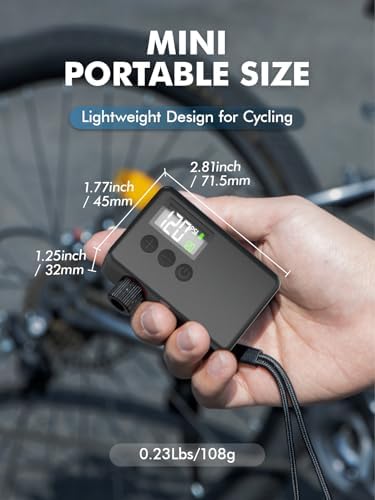
- Dimensions: 4.5 cm (L) x 3.18 cm (W) x 7.14 cm (H) / 2.81 x 1.77 x 1.25 inches
- Weight: 0.13 kg / 0.23 lbs
- Material: Plastic
- Colour: Black
2.2 Performance Specifications
- Maximum Pressure: 120 PSI (Pound per Square Inch)
- Pressure Adjustment Range: 2-120 PSI
- Air Flow Capacity: 40 Liters Per Minute
- Operation Mode: Automatic (with auto-stop function)
- Inflation Speed (Example): Inflates a 700x23C tire from 0 to 100 PSI in approximately 80 seconds. Inflates from 80 to 100 PSI in approximately 40 seconds.
2.3 Power and Battery
- Power Source: Battery Powered (Rechargeable)
- Battery Capacity: 2 x 500mAh (1000mAh total)
- Battery Life (Example): Can inflate a 700c23 tire from 0 to 100 PSI 2-3 times, or from 80 to 100 PSI approximately 9 times on a full charge.
- Gauge Battery: Requires 1 LR44 battery (for the digital pressure gauge display).
2.4 Valve Compatibility
The pump is compatible with the two most common bicycle tire valve types:
- Schrader Valve: Standard valve found on many city bikes, mountain bikes, and e-bikes.
- Presta Valve: Slimmer valve common on road bikes and higher-performance bicycles.
Dedicated adapters for each valve type are included.
3. Package Contents
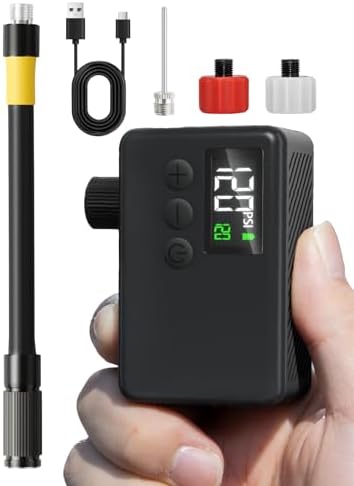
- GPUTEK Mini Bike Pump (Main Unit)
- Presta Valve Adapter
- Schrader Valve Adapter
- Air Hose
- Charger Cable (USB)
- Ball Needle (for inflating sports balls)
- User Manual (this document)
Note: The specific charger plug (wall adapter) may not be included. The charger cable has a USB connector for use with a standard USB power source.
4. Use Guide
4.1 Initial Setup and Charging
- Before first use, connect the provided charger cable to the pump's charging port and to a USB power source (e.g., computer, USB wall adapter).
- Charge the pump fully. A full charge is recommended for maximum battery performance.
- Install the LR44 battery into the compartment for the digital pressure gauge if not pre-installed.
4.2 Selecting and Attaching the Valve Adapter
- Identify the valve type on your bicycle tire (Schrader or Presta).
- Select the corresponding adapter from the package contents.
- If using the Presta adapter, you may need to unscrew the tip of your tire valve before attachment.
- Firmly screw or push the correct adapter onto the pump head's nozzle. Ensure it is secure.
4.3 Setting the Target Pressure
- Press the power button to turn on the digital display.
- Use the "+" and "-" buttons (or relevant controls on the pump body) to set your desired target pressure (in PSI). Consult your bicycle or tire manufacturer for recommended pressure levels.
- The digital screen will show the target value.
4.4 Inflating a Tire
- Attach the pump head (with the correct adapter fitted) securely onto the tire valve.
- Press and hold the inflation button. The pump will start automatically.
- The digital gauge will display the real-time pressure increasing.
- The pump will automatically stop when the preset target pressure is reached.
- Once stopped, quickly detach the pump head from the valve to prevent air loss.
- If using a Presta valve, remember to screw the valve tip closed.
Note: The automatic stop function is designed for convenience. You can also manually stop inflation at any time by releasing the inflation button.
4.5 Using the Air Hose (Optional)
For easier access to valves in difficult positions, you can connect the included flexible air hose between the pump body and the valve adapter.
4.6 Inflating Other Items
Using the included ball needle, the pump can also be used to inflate sports balls (e.g., basketballs, footballs). Attach the ball needle to the pump head in place of a valve adapter.
5. Care and Maintenance
- Storage: Store the pump in a cool, dry place. Avoid extreme temperatures.
- Cleaning: Wipe the exterior with a dry or slightly damp cloth. Do not submerge in water or use harsh chemicals.
- Battery: For longest battery life, avoid completely draining the battery. Recharge after use or periodically if stored for a long time.
- Valve Adapters: Keep the valve adapters clean and free of debris to ensure a proper seal.
- Gauge Battery: Replace the LR44 battery in the digital gauge when the display becomes dim or fails to turn on.
6. Troubleshooting
- Pump does not turn on: Ensure the internal battery is charged. Check the connection if plugged in.
- Pump starts but does not inflate / air leaks: Check that the correct valve adapter is selected and is firmly attached to both the pump and the tire valve. Ensure the tire valve itself is not damaged.
- Digital gauge does not light up: Check/replace the LR44 battery.
- Pump stops before reaching target pressure: The motor may have overheated. Allow it to cool down for a few minutes before resuming. Ensure the battery is adequately charged.
- Pump does not auto-stop: Manually stop the pump at the desired pressure. The auto-stop sensor may require the pump to be restarted or re-calibrated by turning it off and on.
7. Product Details and Safety
- Manufacturer: GPUTEK
- Item Model Number: BL01
- ASIN: B0D8HPJGQX
Safety Instructions
- Do not use the pump for continuous operation beyond its designed duty cycle. Allow it to cool between uses.
- Do not use the pump to inflate tires beyond their maximum rated pressure or the pump's maximum of 120 PSI.
- Keep the pump away from water and other liquids to prevent electric shock or damage.
- Do not disassemble the pump. There are no user-serviceable parts inside.
- Keep away from children.