1. Overview
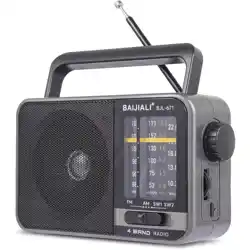
The BAIJIALI BJL-671 is a portable, multi-band transistor radio. It receives AM, FM, and Shortwave (SW) broadcasts and is designed for indoor, outdoor, travel, and emergency use. The radio features a retro-style design with a carrying handle, a telescopic antenna, and can be powered by its built-in rechargeable battery or via a USB connection.

2. Features & Specifications
2.1 Key Features
- 4-Band Reception: AM, FM, SW1, and SW2.
- DSP Chip: Anti-jamming chip for improved sensitivity and reception.
- 5W Loud Speaker: Delivers clear audio for music, news, and talk programs.
- Dual Power Options: Built-in rechargeable battery (included) or USB power (DC 5V).
- Portable Design: Compact with a carrying handle. Dimensions: 7.28"L x 3.11"W x 4.52"H.
- User-Friendly Controls: Dedicated band selection buttons, large tuning knob, and volume control.

2.2 Technical Specifications
| Feature |
Specification |
| Model |
BJL-671 |
| Brand |
BAIJIALI |
| Tuner Technology |
AM, FM, SW1, SW2 |
| FM Frequency Range |
88 - 108 MHz |
| AM Frequency Range |
530 - 1710 kHz |
| SW Frequency Range |
2.8 - 22 MHz |
| Power Source |
1x Built-in Rechargeable Lithium-Ion Battery (included) & USB (DC 5V) |
| Connectivity |
USB (for power) |
| Speaker Output |
5W |
| Display |
LED/LCD Frequency Display |
| Included Components |
Radio, Quick Start Guide |
| Style |
Retro |
3. Parts & Controls

- Carrying Handle: Located on top of the radio.
- Speaker Grille: Front-facing.
- Telescopic Antenna: Extends from the top/side to improve signal reception.
- Control Panel:
- Frequency Display: Shows the current station frequency.
- Band Selection Buttons (FM/AM/SW): Selects the desired radio band.
- Tuning Knob: Large knob for manually tuning to stations.
- Volume/Power Knob: Rotate to adjust volume. Pull/push or turn to the extreme end to power the radio ON/OFF.
- Charging/DC-IN Port: USB-C port for charging the internal battery or powering the radio directly.
- Charging Indicator LED: A red LED that illuminates solid red when the radio is charging.
4. Use Guide

4.1 Initial Setup
- Remove all packaging materials.
- Extend the telescopic antenna fully for best reception.
4.2 Powering the Radio
The radio can be operated in two ways:
- Battery Power (Portable): Ensure the internal battery is charged. Use the Volume/Power knob to turn the radio on.
- USB Power (Stationary): Connect the included USB-C cable from the radio to a USB power adapter (5V, not included) or a computer USB port. The radio will operate and charge simultaneously.
Note on Charging Indicator: The red LED will remain solid red while the battery is charging. This is the normal indication. It does not change color when charging is complete. Full charge is typically achieved in 4-6 hours.
4.3 Listening to the Radio
- Turn On: Rotate the Volume/Power knob clockwise. You should hear a click and the display will illuminate.
- Select Band: Press the FM, AM, or SW button on the control panel.
- Tune a Station: Slowly rotate the large Tuning Knob. The frequency on the display will change. Stop when you find a clear station.
- Adjust Volume: Rotate the Volume/Power knob to your desired listening level.
- Improve Reception: Adjust the angle and length of the telescopic antenna. Moving the radio's location can also improve signal strength.
- Turn Off: Rotate the Volume/Power knob fully counterclockwise until it clicks off.

4.4 Charging the Battery
- Connect the USB-C cable to the charging port on the radio.
- Connect the other end of the cable to a USB power source (e.g., wall adapter, computer).
- The red charging indicator LED will light up solid red.
- Charging is complete after approximately 4-6 hours. The radio can be used normally while charging.
Battery Operation
Insert one 18650 lithium battery into the battery compartment to use the radio.
NOTE: Charge for 4 hours during first use. Remove batteries if the radio will not be used for a long time.
Function Operation
- Select the desired broadcast band using the FUNCTION/BAND switch.
- Adjust the VOLUME to a comfortable listening level.
- Use the TUNING dial to select your preferred station.
- Extend the TELESCOPIC ANTENNA for optimal FM/SW reception.
Use the Internal lron Oxide Bar Antenna
A.This radio has an internal iron oxide bar antenna for receiving AM signals.
B.When listening to the AM, try to change the radio's location or adjust its orientation for betterreception.
C.It's better to use it near a windows or open space, in order to receive better signals.
- Power Supply: DC 5V(0.75W-5W) / 1200mAh(4.44wh) Li-Ion Rechargeable Batter
- Packing list: 1 ×radio, 1 × Li-Ion rechargeable battery, 1×USB Type-C charging cable, 1 ×manuals.
KINDLY REMINDER
- Please read the user's manual before first use of the radio.
- Do not use benzene thinner or any abrasive powder to clean the radio's shell.
- Do not placed the radio in water, or close to fire.
- Do not place the radio near strong magnets such as those used in amplifier, television set, speaker boxes etc.
- Do not drop or give the radio a strong shock.
5. Care & Maintenance
- Store the radio in a cool, dry place.
- Clean the exterior with a soft, dry cloth. Do not use abrasive cleaners or solvents.
- Do not expose the radio to extreme temperatures, moisture, or direct sunlight for prolonged periods.
- Retract the telescopic antenna when not in use or during transport to prevent damage.
- For long-term storage, it is recommended to partially charge the internal battery and recharge it every 3-6 months.
6. Troubleshooting
| Problem |
Possible Cause & Solution |
| Radio does not turn on. |
• Battery may be depleted. Connect to USB power.
• Ensure Volume/Power knob is rotated fully clockwise to the "ON" position. |
| Poor or no sound/reception. |
• Fully extend the telescopic antenna.
• Move to a different location, away from electronic interference.
• Ensure the correct band (FM/AM/SW) is selected.
• Tune slowly; stations may be weak. |
| Charging indicator is solid red and does not change. |
This is normal operation. The red LED indicates charging status and does not turn green when full. |
| Battery does not hold charge. |
• The rechargeable battery may have reached the end of its lifespan after many cycles.
• Ensure you are using a 5V USB power source for effective charging. |
7. Warranty & Support
This product is backed by a 1-Year Limited Warranty from the manufacturer, BAIJIALI. For warranty service or support, please contact the seller through your Amazon purchase history or refer to the contact information provided in the documentation included with your radio.