Overview
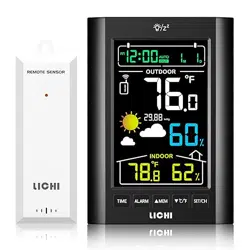
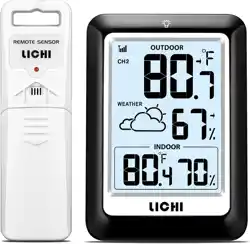
The LICHI LC803 is a wireless indoor/outdoor thermometer and hygrometer. It consists of a main display unit and a remote sensor. The device monitors and displays indoor and outdoor temperature and humidity, provides a weather forecast, and includes time, calendar, and alarm functions.

Package Contents
- 1 x Main Display Unit
- 1 x Remote Outdoor Sensor
- Instruction Manual
Note: Batteries are not included. The main unit requires 3 x AAA batteries. The remote sensor requires 2 x AA batteries.
Product Features & Specifications
Display and Physical Features
- Display: 4-inch digital LCD.
- Backlight: Button-activated, lasts for 10 seconds.
- Placement: Foldable stand and hanging ring for tabletop or wall mounting.
- Outer Material: Plastic.
- Care: Wipe clean with a dry cloth.
Measurement Ranges & Accuracy
| Parameter | Range | Accuracy |
|---|---|---|
| Indoor Temperature | +14.2°F to +122°F | ±0.5°F |
| Outdoor Temperature | -40°F to +158°F | ±0.5°F |
| Humidity | 1% to 99% | ±2% |
Wireless Technology
- Connectivity: Wireless transmission between sensor and main unit.
- Range: Up to 330 feet (approx. 100 meters) in open space.
- Update Rate: Data updates every 30 seconds.
- Multi-Sensor Support: The main unit can connect to up to 3 remote sensors (1 included).
Additional Functions
- Weather Forecast: 12-24 hour forecast based on barometric pressure trends.
- Barometric Pressure: Displayed on the main screen.
- Time & Calendar: Displays time and date.
- Alarm Clock: Includes snooze function.
- Record Tracking: Displays maximum and minimum recorded temperature and humidity values.
- Low Battery Indicator: Shows when batteries in the main unit or sensor need replacement.
Initial Setup & Use Guide
Step 1: Install Batteries
- Open the battery compartment on the back of the main display unit.
- Insert 3 AAA batteries, observing the correct polarity (+/-).
- Open the battery compartment on the remote sensor.
- Insert 2 AA batteries, observing the correct polarity.
Step 2: Pair the Sensor
After powering on both units, they should automatically search and connect. The outdoor temperature reading will appear on the main display once the connection is established. This may take 1-3 minutes.
If the outdoor reading does not appear (shows '--'):
- Bring the sensor within 10 feet of the main unit.
- Remove and reinsert the batteries in the main unit to restart the search.
- Wait for the connection to establish, then place the sensor in its desired outdoor location.
Step 3: Place the Units
Main Unit (Indoor):
- Place on a stable surface using the foldable stand, or hang on a wall using the integrated ring.
- Avoid direct sunlight, heat sources (radiators, ovens), and humid areas (like bathrooms).
- Ensure it is within the wireless range of the outdoor sensor.
Remote Sensor (Outdoor):
- Place in a shaded, well-ventilated area protected from direct rain and snow.
- Mount it using the provided hardware or place it on a sheltered surface.
- Ensure the distance to the main unit does not exceed the effective range, considering walls and obstacles which will reduce range.
Step 4: Set Time and Alarm
- Locate the function buttons on the side or back of the main unit (refer to manual diagrams).
- Press the SET or MODE button to enter settings mode.
- Use the UP/DOWN or +/- buttons to adjust hours, minutes, year, month, and date.
- Navigate to the alarm setting and set the desired alarm time using the same buttons.
- Press SET or MODE again to confirm and exit.
Understanding the Display
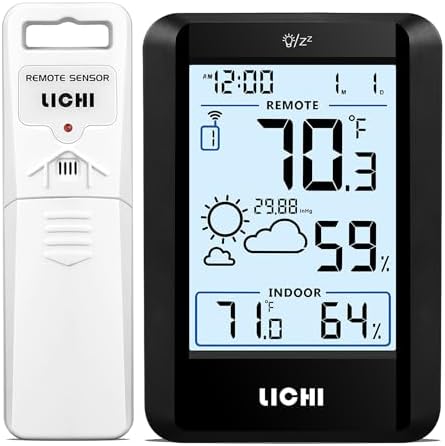
The main display screen shows the following information:
- Indoor Temperature & Humidity: Displayed prominently, usually with an "IN" label.
- Outdoor Temperature & Humidity: Displayed, usually with an "OUT" label.
- Weather Forecast Icons: Icons such as sunny, partly cloudy, cloudy, or rainy indicate the predicted weather for the next 12-24 hours.
- Time and Date: Digital clock and calendar.
- Barometric Pressure: Numerical value displayed, typically in hPa or inHg.
- Max/Min Values: Often shown in a smaller font, indicating the highest and lowest readings since the last reset.
- Alarm Indicator: A bell icon appears when the alarm is set.
- Low Battery Indicator: A battery icon flashes when batteries are low in either the main unit or the sensor.
Troubleshooting
No Outdoor Reading
- Check Batteries: Ensure batteries are fresh and correctly installed in both units.
- Reduce Distance: Temporarily bring the sensor closer to the main unit to re-establish connection.
- Restart Units: Remove batteries from both units for 60 seconds, then reinstall (sensor first).
- Interference: Move the main unit away from other electronic devices (routers, microwaves, cordless phones).
Inaccurate Readings
- Sensor Placement: Ensure the outdoor sensor is not in direct sunlight or near a heat source.
- Indoor Placement: Ensure the main unit is not near vents, windows, or electronics that generate heat.
- Allow Time: Allow 30-60 minutes for the units to acclimate to a new environment for stable readings.
Backlight Not Working
- Press the dedicated backlight button (often marked with a lightbulb icon). The backlight is designed to stay on for 10 seconds per press.
Weak Wireless Signal
- The effective range of 330ft is in open space. Walls, metal structures, and other obstacles significantly reduce range.
- Reposition the main unit or sensor to find a clearer signal path.
Battery Replacement & Maintenance
- Replace batteries when the low battery indicator appears on the display.
- Use high-quality alkaline batteries for best performance and longevity.
- To reset the max/min memory, remove all batteries from the main unit for a period of over 5 minutes.
- Clean the unit with a soft, dry cloth. Do not use chemicals or abrasives.
Technical Specifications Summary
| Model | LICHI LC803 (LC803-1) |
|---|---|
| Power Supply (Main Unit) | 3 x AAA Batteries (not included) |
| Power Supply (Sensor) | 2 x AA Batteries (not included) |
| Display Type | Digital LCD with Backlight |
| Connectivity | Wireless (Bluetooth technology noted in specs) |
| Response Time | 1 second |
| Item Weight | 7.9 Ounces |