Overview
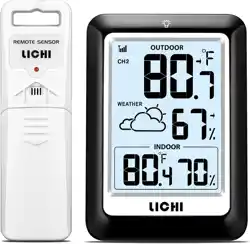
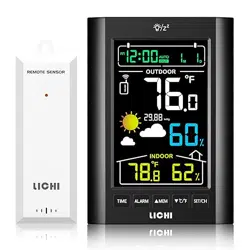
The LICHI LC802 is a wireless weather station that monitors indoor and outdoor temperature and humidity. It features a remote sensor that transmits data wirelessly to a main display unit.

The system is designed for home use in areas such as living rooms, bedrooms, offices, and restaurants. It provides real-time readings, weather forecasts, and tracks temperature and humidity trends.
Package Contents
- 1 x Main Display Unit
- 1 x Outdoor Remote Sensor
- Instruction Manual
Note: Batteries are not included. The main unit requires 3 AAA batteries. The remote sensor requires 2 AA batteries.
Product Features
Display and Design
The main unit has a 4-inch LCD screen for clear reading. It includes a foldable stand on the back and a hanging ring for placement on a wall or flat surface.

- Backlight: Press the backlight button to illuminate the screen for 10 seconds for viewing in low light.
- Material: The housing is made of ABS plastic with a matte finish.
Measurement Specifications
- Indoor Temperature Range: +14.2°F to +122°F (-9.9°C to +50°C)
- Outdoor Temperature Range: -40°F to +158°F (-40°C to +70°C)
- Humidity Range: 1% to 99% RH
- Temperature Accuracy: ±0.5°F (±0.28°C)
- Humidity Accuracy: ±2%
Wireless Transmission
The remote sensor communicates with the main display using a custom wireless frequency.
- Transmission Range: Up to 330 feet (approximately 100 meters) in open space.
- Update Interval: Data is transmitted from the sensor every 30 seconds.
- Multi-Sensor Support: The main display can connect with up to 3 remote sensors (one is included).
Weather Forecast
The unit has a built-in barometric pressure sensor that analyzes trends to predict local weather conditions for the next 12 to 24 hours. Icons on the display indicate the forecast (e.g., sunny, cloudy, rainy).

Data Recording
The device records and displays the trend of indoor and outdoor temperature and humidity changes over the past 24 hours.
Use Guide
Initial Setup
- Install Batteries:
- Open the battery compartment on the back of the main display unit. Insert 3 AAA batteries, observing the correct polarity (+/-).
- Open the battery compartment on the remote sensor. Insert 2 AA batteries, observing the correct polarity.
- Power On: The display and sensor will power on automatically once batteries are installed.
- Sensor Pairing: The main unit and sensor are pre-paired. Place them within range. The outdoor temperature and humidity should appear on the main display within a few minutes. If not, ensure batteries are correctly installed and devices are within range.
Placement
- Main Display Unit: Place indoors on a stable, flat surface using the foldable stand, or hang it on a wall using the integrated ring. Avoid direct sunlight, heat sources, and excessive moisture.
- Remote Sensor: Place outdoors in a shaded, well-ventilated area to get accurate ambient readings. Protect it from direct rain and snow. The effective wireless range can be reduced by walls, metal, and other obstructions.

Understanding the Display
The main screen shows the following information simultaneously:
- Current indoor temperature and humidity.
- Current outdoor temperature and humidity (received from the sensor).
- Weather forecast icon.
- Time (if the clock has been set).
- Trend arrows indicating if temperature/humidity is rising or falling.
Using the Backlight
Press the button marked with a lightbulb icon on the front or side of the unit. The screen backlight will turn on for 10 seconds.
Resetting the Device
If the device malfunctions or loses connection, remove all batteries from both the main unit and the remote sensor. Wait for 5 minutes, then reinsert the batteries to restart and re-establish connection.
Care and Maintenance
- Clean the display and sensor with a soft, dry cloth. Do not use chemicals or abrasive cleaners.
- Replace batteries when the low battery icon appears on the display.
- Store the device in a dry place when not in use.
Troubleshooting
No Outdoor Reading on Display
- Check that batteries in the remote sensor are correctly installed and not depleted.
- Reduce the distance between the sensor and the main unit, ensuring there are minimal obstructions.
- Remove and reinsert batteries in both units to reset the connection.
Inaccurate Readings
- Ensure the remote sensor is placed in a shaded, outdoor location, not in direct sunlight or near artificial heat sources.
- Ensure the main unit is not placed near vents, radiators, or windows that could affect its readings.
Weak or No Backlight
- Check and replace the batteries in the main display unit.
Technical Specifications
- Model: LC802 (Part Number: LC85)
- Power Supply: Battery Powered (Main Unit: 3 x AAA; Sensor: 2 x AA)
- Display Type: 4-inch LCD
- Sensor Technology: Sensirion
- Connectivity: Custom Wireless Frequency
- Dimensions (Main Unit): 0.8"D x 3.5"W x 5"H
- Weight: 0.23 kg