1. Overview
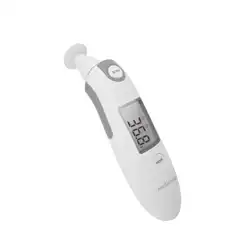
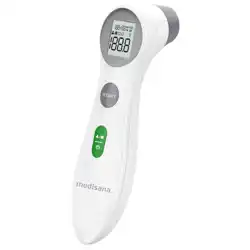
The OxiPro TH2 is a multi-mode infrared thermometer designed for measuring body temperature via the ear or forehead, and surface temperatures. It is suitable for use on newborns, children, and adults.

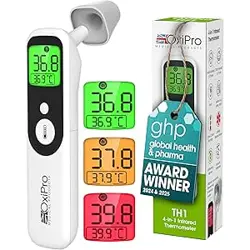
The device features a digital display, colour-coded temperature indicators, and an integrated LED light near the probe for use in low-light conditions.
2. Package Contents
- OxiPro TH2 Thermometer unit
- 2 x AAA Batteries
- Instruction Manual
- Quick Start Guide
Ensure all items are present before use. If anything is missing, contact customer support.
3. Key Features
3.1 Measurement Modes
The TH2 offers four distinct measurement modes:
- In-Ear Mode: For measuring core body temperature via the ear canal.
- Child Forehead Mode: For non-contact temperature measurement on a child's forehead.
- Adult Forehead Mode: For non-contact temperature measurement on an adult's forehead.
- Surface Mode: For measuring the temperature of objects or surfaces (e.g., baby bottles, bath water). Note: This mode is not for measuring body temperature.

3.2 Display and Indicators
- Digital Display: Shows temperature readings to a resolution of 0.1°C.
- Colour-Coded Backlight: Provides instant visual feedback on the reading:
- Green: Normal temperature range.
- Orange: Raised temperature.
- Red: High temperature (Fever).

3.3 Ear Canal LED Light
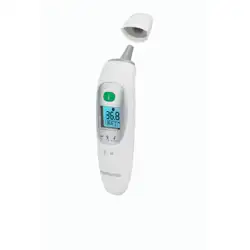
A soft LED light is integrated near the probe to assist with correct placement in the ear canal during nighttime or low-light use.
3.4 Sensor and Accuracy
The thermometer is equipped with a German-designed Heimann infrared temperature sensor. Advanced algorithms are used to ensure accuracy across different age groups.
4. Product Specifications
| Specification | Detail |
|---|---|
| Brand | OxiPro |
| Model Name / Number | OXI-TH2 |
| Display Type | Digital |
| Temperature Resolution | 0.1 °C |
| Upper Temperature Rating | 300 °C (Surface Mode only) |
| Power Source | 2 x AAA Batteries (included) |
| Unit Dimensions (Length) | 13.5 cm |
| Unit Weight | 58 g |
| Outer Material | Plastic |
| Care Instructions | Wipe Clean |
| Certification | CE |
5. Use Guide
5.1 Installing Batteries
- Locate the battery compartment on the back or handle of the thermometer.
- Open the compartment cover.
- Insert the two supplied AAA batteries, observing the correct polarity (+/-) markings inside.
- Close the compartment cover securely.
5.2 Taking a Measurement
- Power On: Press the power/mode button to turn on the device.
- Select Mode: Press the mode button to cycle through the four available modes (In-Ear, Child Forehead, Adult Forehead, Surface). The selected mode icon will appear on the display.
- Prepare for Measurement:
- For In-Ear: Gently pull the ear lobe back and up (for adults) or straight back (for children) to straighten the ear canal. Ensure the probe is clean.
- For Forehead: Hold the thermometer perpendicular to the forehead, approximately 1-3 cm away from the skin. Ensure the forehead is clean, dry, and free of hair.
- For Surface: Point the probe directly at the surface to be measured, holding it close without touching.
- Take Reading: Press and hold the measurement button. A beep or visual indicator will signal that the measurement is complete. Keep the device steady during measurement.
- Read Result: The temperature will be displayed on the screen with the corresponding colour backlight (Green, Orange, or Red).
- Power Off: The device will automatically power off after a period of inactivity.
5.3 Understanding the Results
The colour-coded system provides a quick reference:
- Green: Temperature is within the normal range.
- Orange: Temperature is elevated. Monitor the individual.
- Red: Temperature indicates a fever. Consider seeking medical advice.
Note: Normal body temperature ranges can vary. Consult a healthcare professional for interpretation of readings, especially for infants.
5.4 Cleaning and Maintenance
- Wipe the probe and body of the thermometer with a soft, slightly damp cloth. Do not immerse the device in water or other liquids.
- Use a dry cotton swab to gently clean the sensor window if necessary.
- Do not use abrasive cleaners, solvents, or compressed air.
- Store the thermometer in a clean, dry place at room temperature, away from direct sunlight.
6. Troubleshooting
| Issue | Possible Cause / Solution |
|---|---|
| Device does not turn on | Check battery orientation and replace batteries if necessary. |
| Inconsistent or 'Err' reading | Ensure correct measurement distance and mode selection. Wipe the sensor lens. Ensure the measurement environment is stable (avoid drafts, direct sunlight). |
| Display is dim or unreadable | Replace batteries. |
| Unexpectedly high/low readings | Verify the correct measurement mode is selected (e.g., not using Surface mode for body temperature). Allow the device to acclimatise to room temperature if stored in a very cold/hot environment. |
7. Warranty and Support
The OxiPro TH2 comes with a 2-year warranty from the date of purchase. Warranty terms and conditions apply; please see the documentation included in the box.
For customer support, contact OxiPro Medical Ltd, a UK-based company.
Manufacturer: OxiPro Medical Ltd
8. Safety and Compliance Information
- This device is a CE-marked medical device.
- Read all instructions before use.
- This thermometer is intended for home use to assist in monitoring health. It is not a substitute for professional medical diagnosis or advice.
- If you are concerned about symptoms or temperature readings, consult a healthcare professional.
- Keep batteries away from children. Dispose of used batteries according to local regulations.
- Do not use the thermometer on damaged skin or mucous membranes other than as directed for ear use.
- Do not disassemble the device.