1. Product Overview

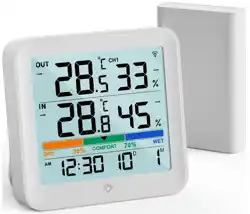
The VOCOO VC6215 is a digital indoor thermometer and hygrometer designed for home use. It features a 5.8-inch extra-large LCD screen that displays current temperature, humidity, a comfort indicator, maximum/minimum records, and a date and clock function.
The device is powered by a USB-C cable (plug not included) and includes three AAA batteries for backup power and memory retention during outages.
2. Package Contents
- VOCOO VC6215 Indoor Thermometer/Hygrometer (1 unit)
- USB-C Cable (1)
- AAA Batteries (3)
- User Manual (this document)
Note: A 5V USB power plug is not included. You may use any standard 5V USB power adapter.
3. Features and Specifications
3.1 Display and Screen
- Screen Size: 5.8-inch diagonal HD LCD.
- Displayed Information:
- Current Temperature (°F or °C)
- Current Humidity (%)
- Air Comfort Indicator (Dry/Comfort/Wet)
- Daily Maximum and Minimum Temperature & Humidity Records
- Date (Month/Day)
- Time (12-hour or 24-hour format)
- Backlight: Touch-activated on the top of the unit. When powered by batteries only, the backlight stays on for 15 seconds. When powered by USB, three brightness levels (Dim, Medium, Bright) are available.

3.2 Measurement Specifications
- Temperature Range: 14.2°F to 158°F (-9.9°C to 70°C).
- Temperature Accuracy: ±1°C (±1.8°F).
- Humidity Range: 10% to 99% Relative Humidity (RH).
- Humidity Accuracy: ±5% RH.
- Refresh Rate: Updates every 10 seconds.
Note on Out-of-Range Readings:
- If the temperature is below 14.2°F (-9.9°C), the display will show "LL°F" or "LL°C".
- If the temperature is above 158°F (70°C), the display will show "HH°F" or "HH°C".
- If humidity is below 10% or above 99%, the display will show 10% or 99%, respectively.
3.3 Air Comfort Indicator
A color-coded circle on the display provides an immediate assessment of indoor air conditions based on humidity levels:
- DRY (Blue): Humidity is below 30%.
- COMFORT (Green): Humidity is between 30% and 69%.
- WET (Orange/Red): Humidity is 70% or above.
3.4 Max/Min Records
The device tracks and displays the highest and lowest temperature and humidity readings encountered each day, resetting at midnight (00:00).

3.5 Power Options
- Primary Power: USB-C connection to a 5V power adapter (recommended for full functionality and adjustable brightness).
- Backup Power: 3 x AAA batteries (included).
- Batteries preserve clock, date, and recorded data during a power outage.
- When operating on battery power only, the display dims to conserve energy. Touch the top to illuminate the screen for 15 seconds.
Important: For optimal display brightness and feature use, it is strongly advised to keep the device connected to USB power.
4. Use and Operation Guide
4.1 Initial Setup
- Insert the three provided AAA batteries into the compartment on the back of the unit.
- Connect the included USB-C cable to the port on the back of the thermometer and plug the other end into a 5V USB power adapter (not included).
- The display will activate. The time and date may need to be set.
4.2 Control Buttons (Located on the Back)
Several buttons are located on the rear of the device for configuration:
- SET Button: Enters setting mode for time, date, and unit calibration.
- UP (▲) / DOWN (▼) Buttons: Adjust values in setting mode or scroll through options.
- MODE Button: Cycles through settings (e.g., hour, minute, month, day) or switches between °F and °C.
- °F/°C Button: Toggles the temperature display between Fahrenheit and Celsius.
4.3 Setting the Time and Date
- Press and hold the SET
- Use the MODE button to cycle between the settings for Hour, Minute, Month, and Day.
- Use the UP (▲) and DOWN (▼) buttons to adjust the value for the selected field.
- Press the SET button again to confirm and exit setting mode.
4.4 Using the Backlight
- When USB Powered: The backlight can be set to one of three brightness levels (Dim, Medium, Bright). The setting method is typically accessed via the buttons on the back (consult the quick-start guide included in the box for specific steps).
- When Battery Powered Only: The display is dim. Gently touch the top surface of the unit to activate the backlight for 15 seconds.
4.5 Calibration (If Required)
The device is pre-calibrated. A calibration feature is provided if you need to adjust the readings to match another reference device.
- Enter the setting mode (press and hold SET).
- Navigate to the calibration option using the MODE button.
- Use the UP and DOWN buttons to adjust the temperature or humidity offset values.
- Press SET to confirm and exit.
Note: Calibration should only be performed if you have a reliable reference. Incorrect calibration will affect accuracy.
4.6 Resetting Max/Min Records
The Max/Min records reset automatically every day at midnight. There is no manual reset button.
5. Placement and Care
5.1 Optimal Placement
- Place the thermometer on a stable, flat surface in the room you wish to monitor.
- Avoid placing it in direct sunlight, near heat sources (radiators, ovens, electronics), in drafts, or in excessively humid areas (like directly above a kettle or shower).
- For accurate readings, allow the device to acclimate to a new environment for at least one hour.
5.2 Cleaning and Maintenance
- Cleaning: Wipe the exterior with a soft, dry cloth. Do not use abrasive cleaners or solvents.
- Battery Replacement: When the battery indicator (if present) is low, or if the device loses memory during a power outage, replace all three AAA batteries with new ones.
- Sensor Care: Keep the ventilation slots on the unit free from dust and obstructions.
6. Troubleshooting
| Problem | Possible Cause | Solution |
|---|---|---|
| Display is blank or very dim. | 1. Not connected to power. 2. Batteries are depleted. 3. Operating on battery power only (normal dim state). |
1. Connect the USB-C cable to a power adapter. 2. Replace the AAA batteries. 3. Touch the top to activate the 15-second backlight. |
| Display shows "LL°F/HH°F" or "LL°C/HH°C". | Measured temperature is outside the device's range (below 14.2°F or above 158°F). | This is an informational display. Move the device to an environment within its specified temperature range. |
| Time/Date resets after power outage. | Backup batteries are missing, depleted, or incorrectly installed. | Install or replace the three AAA batteries. |
| Readings seem inaccurate. | 1. Poor placement (near heat/cold source). 2. May require calibration. |
1. Reposition the device according to section 5.1. 2. Consider calibration (section 4.5) using a trusted reference. |
| Backlight does not turn on when touched. | 1. Device is USB-powered (backlight may be set to always off). 2. Touch sensor area is dirty. |
1. Check backlight brightness settings via rear buttons. 2. Clean the top surface gently. |
7. Technical Specifications
| Model | VC6215 |
|---|---|
| Brand | VOCOO |
| Display Type | 5.8-inch Digital LCD |
| Temperature Range | 14.2°F to 158°F (-9.9°C to 70°C) |
| Temperature Accuracy | ±1°C (±1.8°F) |
| Humidity Range | 10% to 99% RH |
| Humidity Accuracy | ±5% RH |
| Refresh Rate | 10 seconds |
| Power Source | USB-C (5V) and 3 x AAA Batteries (Backup) |
| Included Components | Thermometer Unit, USB-C Cable, 3x AAA Batteries, Manual |
| Product Dimensions | 14 x 11.51 x 2.31 cm |
| Weight | 390 g |
8. Compliance and Disposal
This device complies with relevant standards for electronic equipment. At the end of its life, do not dispose of it with household waste. Please recycle or dispose of it according to your local regulations for electronic waste (WEEE). Batteries should be disposed of at a designated battery recycling point.