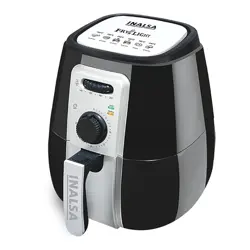
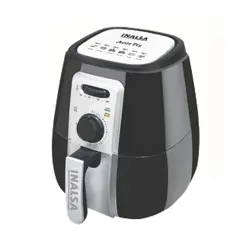
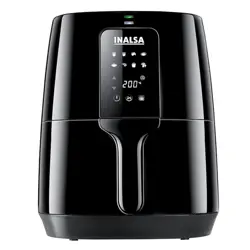
1. Overview
The INALSA Tasty Fry DW5.5 is a 5.5-liter capacity air fryer designed for home use. It utilizes Smart AirCrisp Technology to circulate hot air for cooking, aiming to reduce oil usage compared to traditional frying methods.
Key visual characteristics of the unit include a visible cooking window with an internal light, a digital touch display, and a black plastic exterior.

2. Package Contents
Before use, verify that your package contains the following items:
- 1 x Air Fryer Main Unit
- 1 x Non-Stick Cooking Pan (Basket)
- 1 x Food Separator
- 1 x Instruction Manual & Warranty Card
- 1 x Recipe Booklet
If any item is missing or damaged, contact the seller or INALSA support.
3. Product Features & Specifications
3.1 Physical Specifications
- Model: Tasty fry DW5.5
- Capacity: 5.5 Liters
- External Dimensions (D x W x H): 33 cm x 34.7 cm x 33 cm
- Weight: 3.5 kg
- Color: Black
- Primary Material: Plastic
- Cooking Pan Coating: Non-Stick
3.2 Electrical & Performance Specifications
- Power Rating: 1600 Watts
- Voltage: 240V AC
- Temperature Range: 80°C to 200°C
- Timer Range: 1 to 60 minutes
- Technology: Smart AirCrisp (360° hot air convection)
- Control Method: Digital Touch Control
3.3 Functional Features
- Visible Window with Light: Allows monitoring of food without opening the basket.
- 6-in-1 Functions: Air Fry, Bake, Roast, Grill, Toast, Reheat.
- 8 Preset Programs: Pre-programmed settings for common food types (e.g., fries, chicken, fish, cakes).
- Digital Touch Display: For setting time, temperature, and selecting presets.
- Cool-Touch Handle: For safe handling of the cooking pan.
- Smoke Vent: Helps manage odor and smoke.
- Non-Slip Feet: For stability on countertops.
- Audible Buzzer: Signals the end of a cooking cycle.

4. Safety Instructions
WARNING
To prevent fire, electric shock, or injury:
- Read all instructions before first use.
- Do not immerse the main unit, cord, or plug in water or any other liquid.
- This appliance is for household use only. Do not use outdoors.
- Place the air fryer on a stable, flat, heat-resistant surface. Ensure there is at least 10 cm of free space on all sides, especially the back where the smoke vent is located.
- Do not place the appliance on or near hot surfaces, such as a gas or electric burner.
- Do not cover the air inlet or outlet vents during operation.
- The exterior surfaces and the cooking pan become very hot during and after use. Always use the cool-touch handle. Allow the appliance to cool completely before cleaning or storing.
- Do not use the appliance if the cord or plug is damaged, or if the appliance malfunctions or is damaged in any manner.
- Unplug the appliance from the wall outlet when not in use and before cleaning.
- Do not use accessories or attachments not recommended by the manufacturer.
- Extreme caution must be used when moving an appliance containing hot oil or other hot liquids.
5. Control Panel & Display Guide
The digital touch panel is located on the top front of the appliance. The main elements are:
- Power Button: Turns the appliance on and off.
- Preset Buttons (8): Icons or labels for specific food types (e.g., Fries, Chicken, Fish, Bake). Press to select a preset cooking program.
- Temperature Control: Touch buttons (usually +/-) to adjust the cooking temperature between 80°C and 200°C.
- Timer Control: Touch buttons (usually +/-) to set the cooking duration from 1 to 60 minutes.
- Start/Pause Button: Initiates the cooking cycle or pauses an ongoing cycle.
- Digital Display: Shows the set temperature, remaining time, and selected preset.
- Internal Light Button: Turns the light inside the cooking chamber on or off to view food through the window.
Note: The exact layout and labeling of buttons may vary. Refer to the icons and indicators on your specific unit.
6. First Use & Daily Operation Guide
6.1 Before First Use
- Remove all packaging materials and stickers.
- Wash the cooking pan, food separator, and any other removable accessories in warm, soapy water. Rinse and dry thoroughly. Do not wash the main unit.
- Wipe the inside and outside of the main unit with a damp cloth and dry it.
- Place the air fryer on a stable, heat-resistant surface.
- It is recommended to run the appliance empty at 200°C for 10 minutes to eliminate any residual manufacturing odors. Ensure the room is well-ventilated.
6.2 Basic Cooking Steps
- Prepare Food: Pat food dry for crispier results. Lightly coat with oil if desired, using a spray bottle for even distribution.
- Load the Basket: Place food in the non-stick cooking pan. Do not overfill. For even cooking, ensure food is in a single layer and does not block the air inlet at the bottom. Use the food separator for cooking multiple items simultaneously.
- Insert the Basket: Slide the cooking pan into the main unit until it clicks into place.
- Set Controls:
- Plug in the appliance.
- Press the Power button.
- Select a preset button OR manually set the temperature and time using the +/- buttons.
- Start Cooking: Press the Start button. The heating indicator will light up.
- Monitor Cooking: You can check the food through the window using the internal light. For even cooking, you may shake or turn the food halfway through the cooking time. To do this, pull the basket out by its handle. The appliance will pause automatically. After shaking, slide the basket back in to resume cooking.
- End of Cycle: The timer will count down to zero, and an audible buzzer will sound. The appliance will stop heating.
- Remove Food: Carefully pull out the basket by its cool-touch handle. Place it on a heat-resistant surface. Use tongs to remove food, as the basket and food will be hot.
- Unplug: After use, unplug the appliance and allow it to cool completely before cleaning.
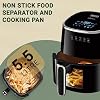
6.3 Using the Preset Programs
The 8 preset programs are optimized for specific food types. After selecting a preset, the default time and temperature will be set automatically. You can usually adjust these settings manually after selection if desired.
Common presets may include: Frozen Fries, Fresh Fries, Vegetables, Chicken, Meat, Fish, Cake, Reheat. Refer to your recipe booklet for guidance on which preset to use.
7. Cleaning & Maintenance
IMPORTANT: Always unplug the appliance and let it cool down completely before cleaning.
7.1 After Every Use
- Remove the cooking pan and food separator.
- Allow them to cool to a safe handling temperature.
- Wash the pan, separator, and any other removable parts in warm, soapy water using a non-abrasive sponge. The non-stick coating can be damaged by metal utensils or abrasive cleaners.
- Rinse and dry thoroughly.
- Wipe the inside of the main unit and the heating element with a soft, damp cloth to remove any food particles or grease. Do not use harsh chemicals or abrasive materials.
- Wipe the exterior with a damp cloth and dry it.
7.2 Cleaning the Visible Window
Wipe the interior and exterior of the glass window with a soft, damp cloth. Avoid spraying liquid directly onto the window or into the unit.
7.3 Storing the Appliance
Ensure all parts are completely dry before storing. Store the appliance in a clean, dry place. Do not place heavy objects on top of it.
8. Troubleshooting
| Problem | Possible Cause | Solution |
|---|---|---|
| Appliance does not turn on. | Not plugged in. Power outlet issue. | Check that the plug is firmly inserted into a working wall outlet. |
| Food is not cooked evenly. | Basket is overloaded. Food not shaken during cooking. | Do not overfill the basket. Shake or turn food halfway through the cooking time. |
| Smoke is emitted from the appliance. | Excess oil or food debris in the cooking pan. Cooking very greasy food. | Clean the cooking pan and main unit interior. For greasy food, use less oil. Ensure the smoke vent is not blocked. |
| The cooking pan is difficult to insert. | Pan is not aligned correctly. | Ensure the pan is oriented correctly and slide it in gently until it clicks. |
| Error code or display malfunction. | Electrical fault or component issue. | Unplug the appliance for 10 minutes, then plug it back in. If the problem persists, contact support. Do not attempt to repair it yourself. |
9. Warranty & Support
This INALSA product is covered by a 1-year warranty from the date of purchase, provided by the brand.
Manufacturer/Importer/Packer Contact Information:
Tuareg Marketing Pvt. Ltd.
Khasra No- 1189, Bhalswa,
New Delhi-110033, INDIA.
Contact: 9773982065
For warranty service or support, please have your proof of purchase (invoice) ready and contact the seller or the above address.