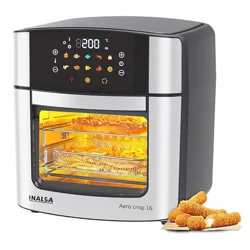
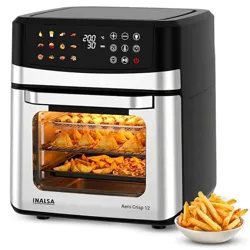
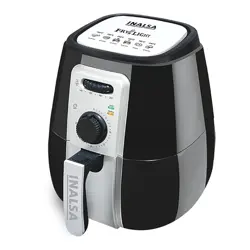
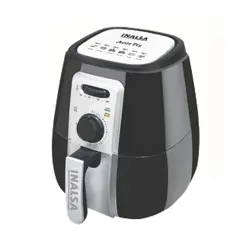
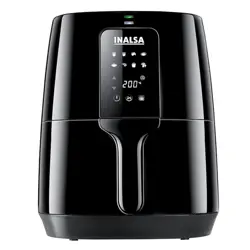
Model: Tasty Fry Digital (Nutri Fry Digital)
Capacity: 4.2 Litres
Power: 1400W
Important Safety Instructions: Before using your air fryer for the first time, please read all safety instructions provided in the physical instruction manual. This appliance is for household use only. Ensure the unit is placed on a stable, heat-resistant, and level surface. Do not immerse the main unit, cord, or plug in water or any other liquid.
1. Overview & Package Contents
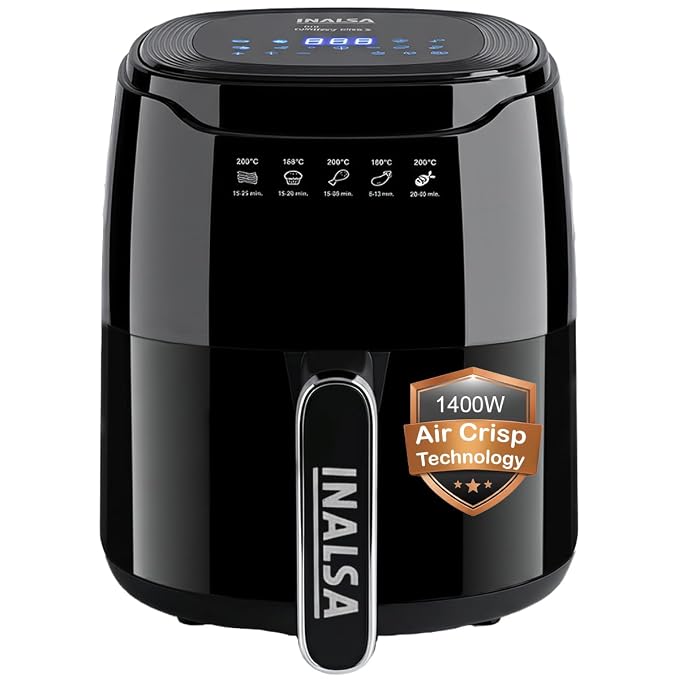
The INALSA Tasty Fry Digital Air Fryer uses Air Crisp Technology to cook food with hot air circulation, requiring little to no oil. It features a digital touch screen with 8 preset cooking programs and manual temperature and timer controls.
What's in the Box
- 1 x Main Air Fryer Unit
- 1 x Non-Stick Cooking Pan (Basket)
- 1 x Food Separator (Dividing Rack)
- 1 x Recipe Booklet
- 1 x Instruction Manual & Warranty Card
2. Product Features & Specifications

2.1 Key Features
- Air Crisp Technology: Circulates hot air for frying, baking, roasting, and dehydrating with up to 99% less fat.
- Digital Touch Control: Features a touch screen interface for easy operation.
- 8 Preset Programs: One-touch settings for common food types.
- Manual Controls: Adjustable timer (1-60 minutes) and temperature (80°C - 200°C).
- Non-Stick, 4.2L Cooking Pan: Removable basket for easy cleaning.
- Safety & Convenience: Cool-touch handle, non-slip feet, and an end-of-cycle buzzer.
2.2 Technical Specifications
- Model Name: Nutri Fry Digital / Tasty Fry Digital
- Capacity: 4.2 Litres
- Rated Power: 1400W
- Voltage: 240V
- Temperature Range: 80°C to 200°C
- Timer Range: 1 to 60 minutes
- Dimensions (D x W x H): 25.5 x 33.3 x 27.5 cm
- Weight: 2.9 kg
- Material: Plastic (Body), Non-Stick Coating (Pan)
3. Control Panel & Display Guide
The control panel is a digital touch screen. The main display shows the selected function, set temperature, and timer countdown.
Control Elements
- Power Button: Turns the appliance on and off.
- Preset Program Buttons (8): Icons or labels for Frozen Potatoes, Natural Potatoes, Vegetables, Chicken, Sausages, Meat, Fish, and Cakes.
- Temperature Buttons (+ / -): Adjusts the cooking temperature in manual mode or for some presets.
- Timer Buttons (+ / -): Adjusts the cooking time.
- Start/Pause Button: Begins the cooking cycle or pauses it.
Note: When a preset is selected, a default time and temperature are set. You can often adjust these values to your preference before starting.
4. Use Guide & Cooking Instructions
4.1 Before First Use
- Remove all packaging materials and stickers.
- Wash the cooking pan and food separator with warm water, mild detergent, and a non-abrasive sponge. Dry thoroughly.
- Wipe the inside and outside of the main unit with a damp cloth. Do not immerse it in water.
- Place the air fryer on a stable, level, and heat-resistant kitchen countertop.
- It is recommended to run the air fryer empty at 200°C for 10 minutes to eliminate any residual manufacturing odors.
4.2 Basic Operating Steps
- Prepare Food: Pat food dry for crispier results. Lightly coat with oil if desired, though not required.
- Load the Basket: Place food in the non-stick cooking pan. Do not overfill. For better air circulation, use the food separator for multiple items or smaller pieces.
- Insert the Basket: Slide the loaded cooking pan into the main unit until it clicks into place.
- Set Cooking Parameters:
- Using a Preset: Press the corresponding preset button (e.g., "Chicken"). Check/adjust time or temperature if needed.
- Manual Mode: Use the Temperature (+/-) and Timer (+/-) buttons to set your desired values.
- Start Cooking: Press the Start button. The heating indicator will light up, and the timer will begin counting down.
- Shaking/Turning (Optional): For even cooking, you may pause the cycle halfway, pull out the basket, shake or turn the food, and reinsert to continue.
- End of Cycle: A buzzer will sound. The display may show "END". Carefully pull out the basket using the cool-touch handle.
- Serving: Empty the cooked food onto a plate. The basket and food will be hot.
4.3 Preset Program Guide
The following are typical uses for the 8 preset functions. Times and temperatures are defaults and can be adjusted.
- Frozen Potatoes: For frozen fries, wedges, or potato bites.
- Natural Potatoes: For fresh, cut potatoes.
- Vegetables: For roasting vegetables like broccoli, peppers, or zucchini.
- Chicken: For chicken wings, drumsticks, or breast pieces.
- Sausages: For cooking sausages.
- Meat: For cooking meatballs, kebabs, or small cuts of red meat.
- Fish: For cooking fish fillets or fish sticks.
- Cakes: For baking small cakes or muffins (use oven-safe dish inside the basket).
Tip: Refer to the included Recipe Booklet for specific cooking times, temperatures, and recipe ideas for each function.
4.4 Other Functions: Reheat & Dehydrate
- Reheat: Use a low temperature (e.g., 120°C-150°C) for 3-10 minutes to reheat previously cooked food without drying it out.
- Dehydrate: Use the lowest temperature setting (80°C) and extended time (1+ hours) to dry fruits, herbs, or make jerky. Leave the basket slightly open for moisture to escape.
5. Cleaning & Maintenance
- Unplug the appliance and let it cool down completely.
- Cooking Pan & Food Separator: These are dishwasher safe (top rack recommended). Wash with warm soapy water and a non-abrasive sponge. The non-stick coating can be damaged by metal utensils or abrasive cleaners.
- Main Unit Interior: Wipe the inside of the heating chamber with a soft, damp cloth to remove any food particles or grease. Do not use harsh chemicals.
- Exterior: Wipe with a damp cloth. Do not use abrasive scouring pads.
- Ensure all parts are completely dry before reassembling and storing.
Warning: Never immerse the main body, power cord, or plug in water or any other liquid. This could cause an electric shock.
6. Troubleshooting
| Problem | Possible Cause | Solution |
|---|---|---|
| Air fryer does not turn on. | Not plugged in. Power outlet not working. | Check the power connection. Try a different outlet. |
| Food is not cooked evenly. | Basket overloaded. Food not shaken during cooking. | Do not overfill the basket. Shake or turn food halfway through the cooking time. |
| Smoke is coming from the appliance. | Excess oil from fatty foods is dripping into the pan. | Cook fatty meats at a lower temperature. Ensure the cooking pan is clean before use. |
| The display shows an error or does not respond. | Temporary electronic fault. | Unplug the appliance from the mains for 60 seconds, then plug it back in and try again. |