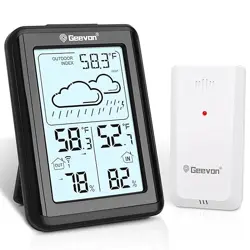
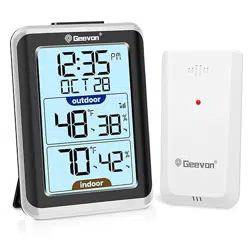
Geevon 22151 Indoor Outdoor Thermometer Wireless Digital Thermometer Room Temperature Gauge

Product's Documents

Below are documents related to this product, you can read online or download:
22151 photo

1. Overview

The GEEVON 151 is a wireless digital thermometer designed to monitor indoor and outdoor temperatures simultaneously. The system consists of a main display unit for indoor use and a remote sensor for outdoor placement. It records temperature highs and lows, displays the time, and features a backlit screen.

GEEVON Indoor Outdoor Thermometer Wireless Digital Thermometer Room Temperature Gauge with Time, High and Lows, 200ft/60m Range Temperature Monitor

Package Contents:

  • 1 x Temperature Monitor (Main Display Unit)
  • 1 x Wireless Remote Sensor
  • 1 x Instruction Manual

Note: Batteries are not included. You will need 4 AAA batteries (2 for the main unit, 2 for the sensor). Do not mix old and new batteries.

2. Product Features

2.1 Display and Readouts

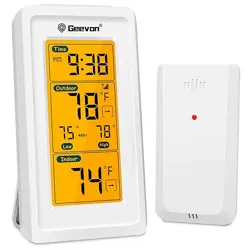
The main unit features a 3.14-inch HD LCD screen that shows the following information:

  • Time: Displays in 12-hour or 24-hour format.
  • Outdoor Temperature: Shows the current temperature from the remote sensor.
  • Temperature Trend Arrow: An arrow next to the outdoor temperature indicates if it is rising, falling, or steady.
  • High/Low Records: Cycles through displaying the maximum and minimum temperatures for "Today," "Last 48 Hours," and "All-Time" (since battery installation or data reset).
  • Indoor Temperature: Shows the current temperature at the main unit's location.
  • Indoor Temperature Trend Arrow: Indicates if the indoor temperature is rising, falling, or steady.
  • Ice Alert Symbol: Flashes when the outdoor temperature is between 30.2°F - 37.3°F (-1.0°C - 2.9°C).
  • Wireless Signal Strength Indicator: Shows the connection quality between the main unit and the remote sensor.
  • Backlight Indicator: Shows when the screen backlight is active.
thermometer indoor outdoor wireless display showing time, indoor and outdoor temperature, and high/low records

2.2 Physical Unit and Controls

Main Display Unit

  • Top Button: Press to activate the backlight for 8 seconds.
  • Back Panel: Contains the battery compartment, a SET button, UP button, and DOWN button for configuration.
  • Stand: A fold-out kickstand for tabletop use.
  • Wall Mount: A keyhole slot for hanging the unit on a wall screw.

Wireless Remote Sensor

  • Housing: Splash-proof design (IP23 rating).
  • Mounting: Includes a hole for mounting on a screw or nail. Can also be placed on a flat surface.
  • Battery Compartment: Holds 2 AAA batteries.
  • Transmission LED: Flashes when sending data.
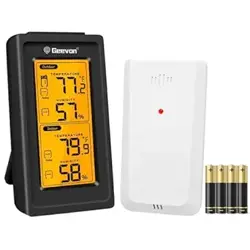
thermometer for home indoor outdoor thermometer wireless showing main unit and remote sensor

3. Use Guide

3.1 Initial Setup

  1. Install Batteries:
    • Open the battery compartments on the back of both the main display unit and the remote sensor.
    • Insert 2 new AAA batteries into each unit, observing the correct polarity (+/-).
  2. Power On:
    • Both units will power on automatically. The main unit will begin searching for the sensor's signal.
  3. Sensor Registration:
    • Place the sensor within 10 feet of the main unit for initial pairing.
    • The units should connect automatically within 3 minutes. The wireless signal icon on the main display will show connection strength.
  4. Manual RF Registration (if needed): If the units do not connect, press and hold the DOWN button on the back of the main unit for 3 seconds. The display will search for the RF signal for the next 3 minutes.

3.2 Placing the Units

Main Display Unit (Indoor):

  • Place on a stable, flat surface using the kickstand, or mount on a wall using the keyhole slot.
  • Choose a location away from direct heat sources, air vents, windows, or appliances that generate heat.

Remote Sensor (Outdoor):

  • Place the sensor in the outdoor area you wish to monitor.
  • For accurate readings, place it in a shaded, well-ventilated area, protected from direct sunlight and rain.
  • The maximum wireless range is up to 200 ft / 60 m in open air. Walls, windows, and other obstacles will reduce this range.
  • Use the mounting hole to secure it with a screw, or place it on a stable surface.
outdoor thermometer digital temperature thermometer showing sensor mounted outdoors and main unit indoors

3.3 Configuring Settings

Use the buttons on the back of the main display unit.

  • Set Time (12/24H format):
    1. Press the SET button once. The hour digits will blink.
    2. Use the UP or DOWN buttons to adjust the hour.
    3. Press SET again. The minute digits will blink.
    4. Use UP or DOWN to adjust the minutes.
    5. Press SET again. The 12H/24H indicator will blink.
    6. Use UP or DOWN to select the desired format.
    7. Press SET to confirm and exit setting mode.
  • Switch Temperature Unit (°C/°F): In normal display mode, press the UP button to toggle between Celsius (°C) and Fahrenheit (°F).
  • Reset High/Low Records: The "All-Time" high and low records are reset when batteries are removed or when the manual RF registration process is initiated.

3.4 Daily Use

  • To read the display in low light, press the button on the top of the main unit to activate the 8-second backlight.
  • Monitor the wireless signal indicator. If the signal is weak or lost (no bars), try moving the sensor closer or removing obstructions.
  • The Ice Alert symbol will flash automatically when conditions are met. No user setup is required.

4. Specifications

  • Model: GN-22151-US-T / GN-22151-T1-CA
  • Display Type: Digital LCD with Backlight
  • Indoor Temperature Range: -10°C / 14°F to 50°C / 122°F
  • Outdoor Temperature Range: -40°C / -40°F to 60°C / 140°F
  • Temperature Resolution: 0.1°F / 0.1°C
  • Wireless Range: Up to 200 ft / 60 m (open area)
  • Power Supply:
    • Main Unit: 2 x AAA batteries
    • Remote Sensor: 2 x AAA batteries
  • Sensor Protection Rating: IP23 (Splash-proof)
  • Certification: CE

5. Care and Maintenance

  • Clean the units with a soft, dry cloth. Do not use abrasive cleaners or solvents.
  • Battery Notes:
    • Use standard alkaline AAA batteries. Do not use heavy-duty or rechargeable batteries.
    • For the outdoor sensor in low-temperature conditions, the use of lithium batteries is recommended as alkaline batteries may not perform properly.
    • Replace all batteries at the same time. Do not mix old and new batteries.
  • Sensor Protection: The sensor is splash-proof but is not designed to be exposed to direct, heavy rain or prolonged sunlight. Place it under an eave or other protective covering.
  • If the display becomes blank or unreadable, first check and replace the batteries.

6. Troubleshooting

  • No Display on Main Unit:
    • Check that batteries are installed correctly.
    • Replace with new batteries.
  • Outdoor Temperature Not Displaying or Shows '--':
    • Check the wireless signal strength indicator. If weak or absent, reduce the distance between units or remove obstacles.
    • Ensure batteries in the remote sensor are fresh and correctly installed.
    • Initiate manual RF registration: Press and hold the DOWN button on the main unit for 3 seconds.
  • Inaccurate Temperature Readings:
    • Ensure the remote sensor is not in direct sunlight or near a heat source.
    • Ensure the main unit is not placed near TVs, computers, heaters, or air vents.
  • Backlight Does Not Turn On:
    • Press the button on the top of the main unit firmly.
    • If the backlight still fails, batteries may be low.

7. Warranty and Support

This product is covered by a 12-month limited warranty from the date of purchase.

For product support, warranty service, or to contact the seller (GEEVON Electronics), please use the store contact information on the Amazon product page where this item was purchased.

Important: Retain your proof of purchase for warranty claims.

Reference file: Geevon 22151 Indoor Outdoor Thermometer Wireless Digital Thermometer Room Temperature Gauge

Specifications

Geevon 22151 Questions and Answers

See other models: 228614 248721 24250 228646 24268